coolant temperature MERCEDES-BENZ SPRINTER 2018 MY18 Operator’s Manual
[x] Cancel search | Manufacturer: MERCEDES-BENZ, Model Year: 2018, Model line: SPRINTER, Model: MERCEDES-BENZ SPRINTER 2018Pages: 294, PDF Size: 4.36 MB
Page 10 of 294
Setting the air distribution ............. 103
Setting the air vents ...................... 106
Setting the airflow ......................... 103
Setting the temperature ................ 103
Switching air-recirculation mode
on/off ............................................ 105
Switching on/off ........................... 102
Switching the rear window
defroster on/off ............................ 105
Switching windshield heating on/
off .................................................. 105
Cockpit
Overview .......................................... 33
COLLISION PREVENTION ASSIST
Activating/deactivating the dis-
tance warning function .................. 142
Display messages (vehicles with
steering wheel buttons) ................. 192
Display messages (vehicles with-
out steering wheel buttons) ........... 180
COMAND display
Cleaning ......................................... 238
Combination switch ............................ 84
Communications equipment
Operation ....................................... 212
PND fittings ................................... 212
Type approval/frequency .............. 276
Consumption statistics (on-board
computer) .......................................... 173
Control panel
Above the windshield ....................... 38
Center console ................................ 37
Climate control ................................ 37
Driver's door .................................... 39
Left and right side of the steering
wheel ............................................... 39
Conversions/equipment .................... 28
Coolant (engine)
Adding ........................................... 224
Checking the level ......................... 223
Display message ............................ 190
Displaying the temperature (on-
board computer) ............................ 166
Filling capacity ............................... 285
Important safety notes .................. 223
Warning lamp ................................. 200
Cooling
see Climate control Cornering lamps
Replacing bulbs ............................... 90
Cornering light function
Function/notes ................................ 85
Courtesy lights
Replacing bulbs ............................... 94
Crosswind Assist
Display message ............................ 192
Fu
nction/notes ................................ 57
Cruise control
Activating ....................................... 140
Activation conditions ..................... 140
Cruise control lever ....................... 139
Deactivating ................................... 140
Display message ............................ 191
Display messages (vehicle with-
out steering wheel buttons) ........... 176
Driving system ............................... 139
Function/notes ............................. 139
Important safety notes .................. 139
Problem (malfunction) ................... 141
Resuming the stored speed ........... 140
Setting a speed .............................. 140
Storing and maintaining current
speed ............................................. 140
Cup holder ......................................... 209
Cup holder
see Cup holders
Cup holders ........................................ 209
Curtains (cleaning instructions) ...... 240
Customer Assistance Center
(CAC) ..................................................... 28
Customer Relations Department ....... 28
D
Dashboard
see Cockpit
Dashboard lighting
see Instrument cluster lighting
Data
see Technical data
Daytime running lamps
Activating/deactivating (vehicles
with steering wheel buttons) ......... 170
Changing bulbs (halogen head-
lamps) .............................................. 90
Switching on/off (switch) ................ 82
8Index
Page 110 of 294
GWARNING
When the auxiliary heating is switched on,
parts of the vehicle can become very hot, e.g.
the exhaust system.
Flammable materials such as leaves, grass or
twigs may ignite if they come into contact
with:
Rhot parts of the exhaust system
Rthe exhaust gas itself
There is a risk of fire.
When the auxiliary heating is switched on,
make sure that:
Rno flammable materials come into contact
with hot vehicle components
Rthe exhaust gas can escape from the
exhaust pipe unhindered
Rthe exhaust gas does not come into contact
with flammable materials.
!Turn on the auxiliary heating at least once a
month for approximately 10 minutes. The
auxiliary heating could otherwise be dam-
aged.
!Make sure that the flow of hot air is not
blocked. The auxiliary heating will otherwise
overheat and switch off.
Your vehicle may be equipped with either an
auxiliary hot-water heater or an auxiliary warm-
air heater. Adjustment and operation of the:
Rhot-water auxiliary heater is done via the on-
board computer and with the auxiliary heating
button in the control panel (
Ypage 109) or
with the remote control (Ypage 110).
Rauxiliary warm-air heater is done via the timer
above the overhead control panel
(
Ypage 114).
The auxiliary heating works independently of the
engine and supplements the climate control
system in the vehicle. The auxiliary heating
heats the air in the vehicle interior to the tem-
perature set.
If your vehicle is equipped with a hot-water aux-
iliary heater, the auxiliary heating also keeps the
coolant warm. This way, the load on the engine
is minimized and fuel is saved.
The heater booster function (
Ypage 112) of the
auxiliary heating supports the climate control system when the engine is running and the out-
side temperature is low.
You can use the auxiliary heating at an outside
temperature of up to 39 ‡ (4 †). At an outside
temperature above 39 ‡ (4 †) the auxiliary
heating system and the heater booster function
switch off automatically.
Hot-water auxiliary heating
Heating time
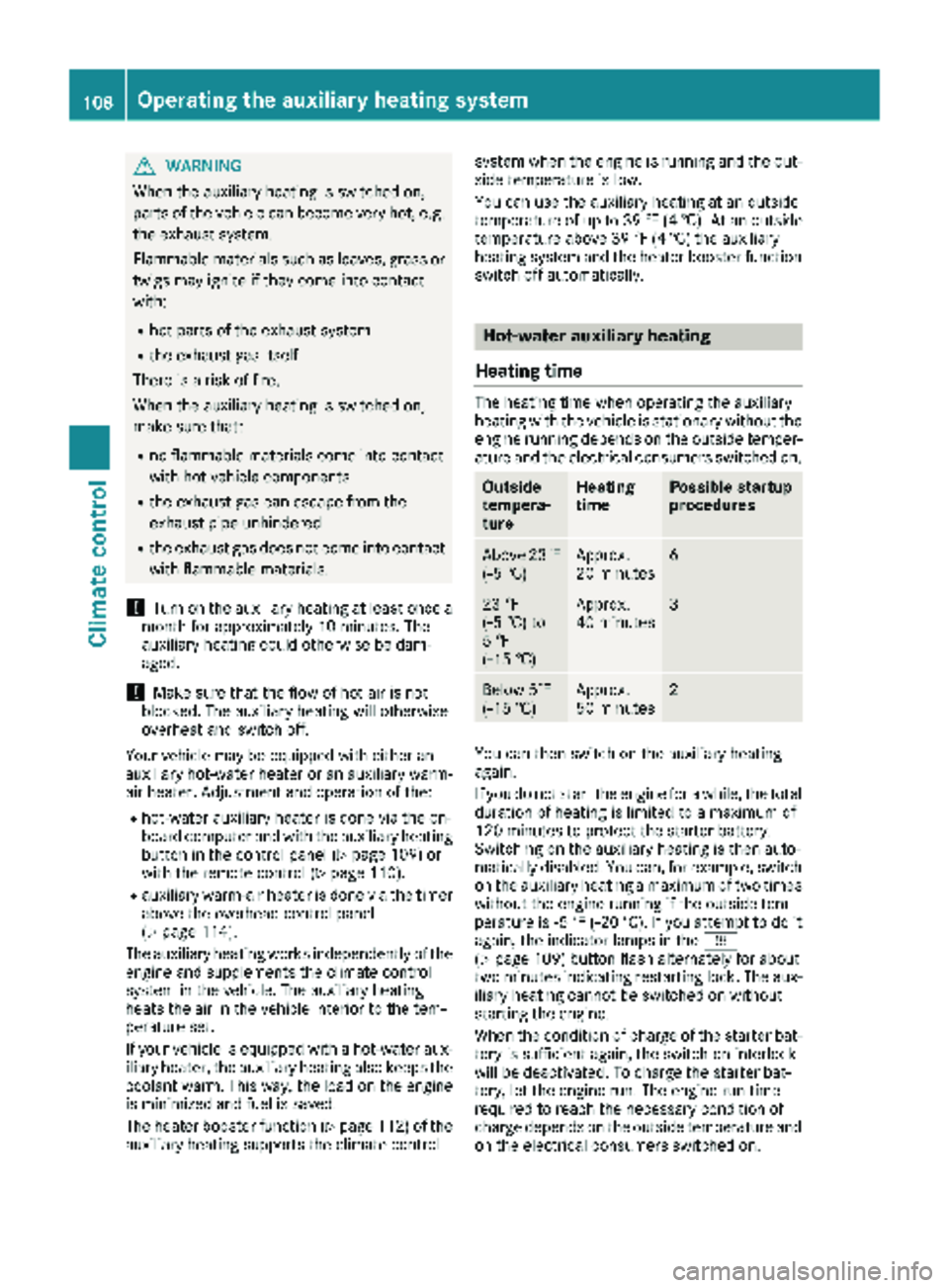
The heating time when operating the auxiliary
heating with the vehicle is stationary without the
engine running depends on the outside temper-
ature and the electrical consumers switched on.
Outside
tempera-
tureHeating
timePossible startup
procedures
Above 23‡
(Ò5 †)Approx.
20 minutes6
23 ‡
(Ò5 †) to
5 ‡
( Ò15 †)Approx.
40 minutes3
Below 5‡
( Ò 15 †)Approx.
50 minutes2
You can then switch on the auxiliary heating
again.
If you do not start the engine for a while, the total
duration of heating is limited to a maximum of
120 minutes to protect the starter battery.
Switching on the auxiliary heating is then auto-
matically disabled. You can, for example, switch
on the auxiliary heating a maximum of two times
without the engine running if the outside tem-
perature is Ò5 ‡ (Ò20 †). If you attempt to do it
again, the indicator lamps in the y
(
Ypage 109) button flash alternately for about
two minutes indicating restarting lock. The aux-
iliary heating cannot be switched on without
starting the engine.
When the condition of charge of the starter bat-
tery is sufficient again, the switch-on interlock
will be deactivated. To charge the starter bat-
tery, let the engine run. The engine run time
required to reach the necessary condition of
charge depends on the outside temperature and
on the electrical consumers switched on.
108Operating the auxiliary heating system
Climate control
Page 116 of 294
ProblemPossible causes/consequences andMSolutions
The auxiliary heating
does not switch on.The outside temperature is above 39 ‡ (4 †). The auxiliary heating
switches off automatically.
The auxiliary heating
switches off automati-
cally and/or cannot be
switched on.The fuel tank is less thanÕfull. The auxiliary heating switches off
automatically.
XRefuel at the nearest gas station.
XThen, start the auxiliary heating several times until the fuel lines are
full.
or
The low-voltage protection system integrated in the control unit
switches off the auxiliary heating because the on-board voltage is less
than 10 V.
XHave the alternator and battery checked.
or
The fuse is blown.
XReplace the fuse; see the "Fuse allocation" supplement.
XHave the cause of the blown fuse determined at a qualified spe-
cialist workshop.
or
A malfunction has occurred.
XSwitch the ignition on and off twice.
If the auxiliary heating still cannot be switched on, the heating device
is faulty.
XHave the auxiliary heating checked at a qualified specialist work-
shop.
The auxiliary heating is
overheated.The coolant level is too low.
XCheck the coolant level and add more coolant if necessary
(Ypage 223).
Auxiliary warm-air heater
Operation with the timer
Timer overview
Use the timer to:
Ractivate and deactivate immediate heating
mode
Rset up to three departure times
Rset the operating duration to a range between
10 and 120 minutes or to continuous opera-
tion
Rset the heating level (preselected tempera-
ture) to a range between 10 and 30
114Operating the auxiliary heating system
Climate control
Page 133 of 294
Exceptionally, if the service brake fails, the park-
ing brake can be used to brake the vehicle in an
emergency.
XEmergency braking: press and hold release
button ;and carefully apply brake lever :.
Switching off the engine
GWARNING
The automatic transmission switches to neu-
tral position Nwhen you switch off the engine.
The vehicle may roll away. There is a risk of an
accident.
After switching off the engine, always switch
to parking position P. Prevent the parked vehi-
cle from rolling away by applying the parking
brake.
!If the coolant temperature is very high, e.g.
after driving on hilly roads, leave the engine
running at idle speed for about two minutes
before turning it off.
This allows the coolant temperature to return
to normal.
XStop the vehicle.
XShift the automatic transmission to position
P .
XApply the parking brake.
XTurn the key to position 0in the ignition lock
and remove it.
The immobilizer is activated.
XSecure the vehicle to prevent it from rolling
away (Ypage 129).
Wheel chock
Use the wheel chock or a similar object to pre-
vent the vehicle from rolling away, e.g. when
parking or changing a wheel.
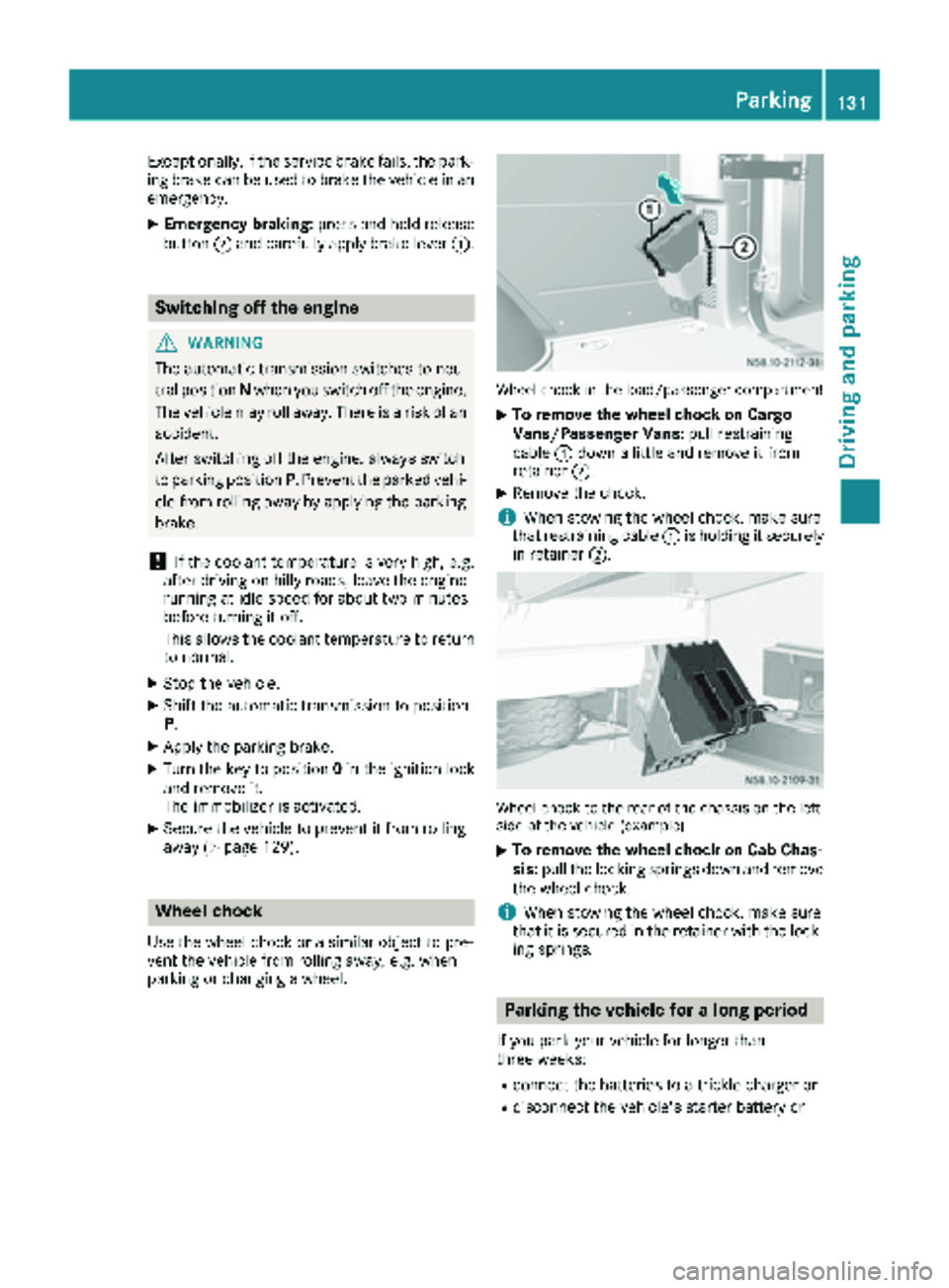
Wheel chock in the load/passenger compartment
XTo remove the wheel chock on Cargo
Vans/Passenger Vans: pull restraining
cable :down a little and remove it from
retainer ;.
XRemove the chock.
iWhen stowing the wheel chock, make sure
that restraining cable :is holding it securely
in retainer ;.
Wheel chock to the rear of the chassis on the left
side of the vehicle (example)
XTo remove the wheel chock on Cab Chas-
sis:pull the locking springs down and remove
the wheel chock.
iWhen stowing the wheel chock, make sure
that it is secured in the retainer with the lock-
ing springs.
Parking the vehicle for a long period
If you park your vehicle for longer than
three weeks:
Rconnect the batteries to a trickle charger or
Rdisconnect the vehicle's starter battery or
Parking131
Driving an d parking
Z
Page 159 of 294
ing to. Information is available from the police
and local authorities.
Observe the following when towing a trailer:
RPractice driving around bends, stopping and
backing up at a place where there is no traffic.This enables you to gain experience and get
used to the new handling characteristics.
RBefore driving, check:
-that the trailer tow hitch and ball coupling
are secure
-that the safety switch for a braked trailer is
functioning properly
-that the safety chains are secure and not
damaged
-that the electrical connections are secure
-that the lights are working
-that the wheels are in good order and the
tire pressure is correct
RAdjust the exterior mirrors to provide an
unobstructed view of the rear section of the
trailer.
RIf the trailer is equipped with an individual
braking system, check before each journey
whether the brakes are functioning correctly.
RIf the trailer has electronically controlled
brakes, pull the vehicle/trailer combination
away carefully. Brake manually using the
brake controller and check that the brakes
are working.
RSecure the load on the trailer according to the
applicable specifications and current stand-
ards on securing loads (
Ypage 215).
RWhen driving with a trailer, check at regular
intervals that the load is secured and that the
brakes and lights are working.
RBear in mind that the handling will be less
stable when towing a trailer than when driving
without one. Avoid sudden steering move-
ments.
RThe vehicle/trailer combination is heavier,
accelerates more slowly and has a decreased
gradient climbing capability and a long er
brak
ing distance.
It is more susceptible to crosswinds and
requires cautious steering.
RIf possible, do not brake suddenly, but rather
moderately at first so that the trailer can acti-
vate its brakes. Then increase the force on the
brake pedal.
RIf the automatic transmission repeatedly
shifts between gears when driving on inclines, restrict the shift range. Select shift range
4,3,
2 or 1.
Driving in a low gear and at a low speed
reduces the risk of damaging the engine.
RWhen driving on a downhill gradient, shift to a
low gear and take advantage of the engine's
braking effect.
Avoid continuous brake application as this
may overheat the vehicle brakes and, if instal-
led, the trailer brakes.
RIf the coolant temperature increases dramat-
ically while the air-conditioning system is
switched on, switch off the air-conditioning
system.
Coolant heat can also be dissipated by
switching the airflow and the temperature of
the heater/air conditioning to the maximum
level. Open the windows if necessary.
RWhen overtaking, pay particular attention to
the extended length of your vehicle/trailer
combination.
Due to the length of your vehicle/trailer com-
bination you need an additional distance
before you can return to your original lane.
Uncoupling a trailer
GWARNING
If you uncouple a trailer with the overrun
brake engaged, you could trap your hand
between the vehicle and the trailer drawbar.
There is a risk of injury.
Do not uncouple a trailer if the overrun brake
is engaged.
!Do not disconnect a trailer with an engaged
overrun brake. Otherwise, your vehicle could
be damaged by the rebounding of the overrun
brake.
XMake sure the selector lever of the automatic
transmission is in position P.
XApply the parking brake of the vehicle.
XClose all doors.
XApply the parking brake of the trailer.
XIn addition, secure the trailer against rolling
away with a wheel chock or similar object.
XRemove the trailer cable and safety chains
and decouple the trailer.
Towing a trailer157
Driving and parking
Z
Page 167 of 294
Menu overview
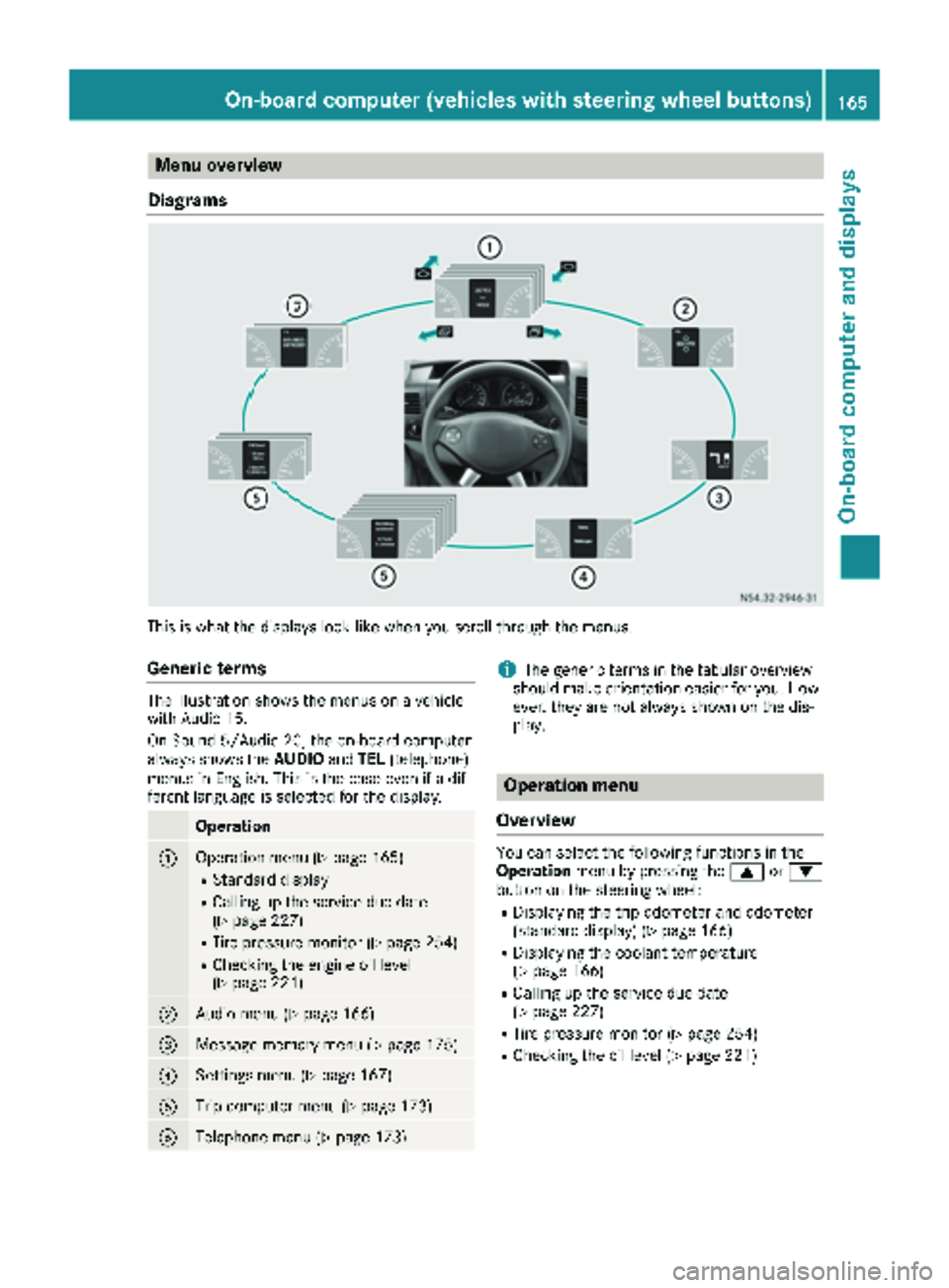
Diagrams
This is what the displays look like when you scroll through the menus.
Generic terms
The illustration shows the menus on a vehicle
with Audio 15.
On Sound 5/Audio 20, the on-board computer
always shows the AUDIOandTEL (telephone)
menus in English. This is the case even if a dif-
ferent language is selected for the display.
Operation
:Operation menu (Ypage 165)
RStandard display
RCalling up the service due date
(Ypage 227)
RTire pressure monitor (Ypage 254)
RChecking the engine oil level
(Ypage 221)
;Audio menu (Ypage 166)
=Message memory menu (Ypage 175)
?Settings menu (Ypage 167)
ATrip computer menu (Ypage 173)
BTelephone menu (Ypage 173)
iThe generic terms in the tabular overview
should make orientation easier for you. How-
ever, they are not always shown on the dis-
play.
Operation menu
Overview
You can select the following functions in the
Operation menu by pressing the 9or:
button on the steering wheel:
RDisplaying the trip odometer and odometer
(standard display) (Ypage 166)
RDisplaying the coolant temperature
(Ypage 166)
RCalling up the service due date
(Ypage 227)
RTire pressure monitor (Ypage 254)
RChecking the oil level (Ypage 221)
On-board computer (vehicles with steering wheel buttons)165
On-board computer and displays
Z
Page 168 of 294
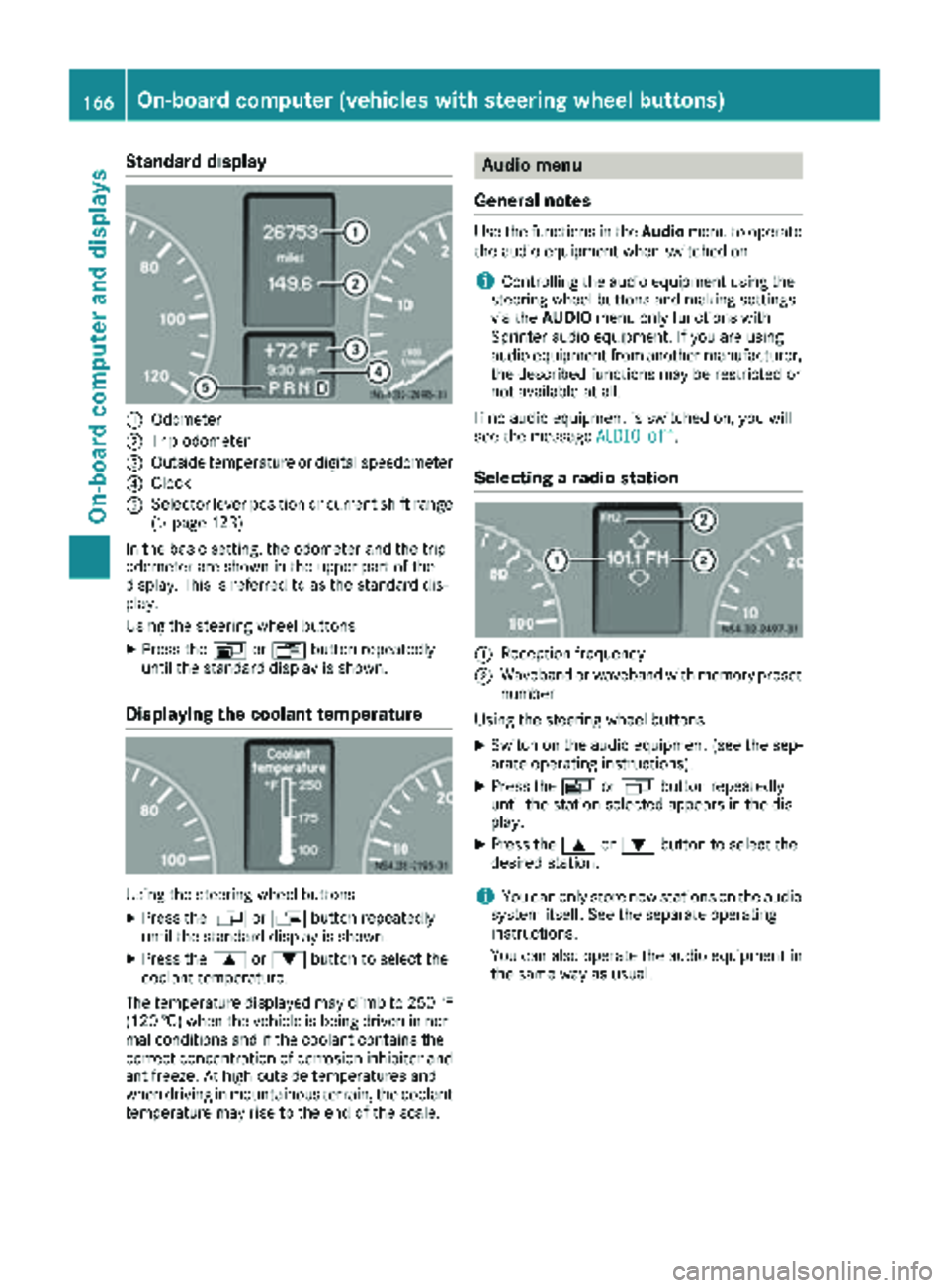
Standard display
:Odometer
;Trip odometer
=Outside temperature or digital speedometer
?Clock
ASelector lever position or current shift range
(Ypage 123)
In the basic setting, the odometer and the trip
odometer are shown in the upper part of the
display. This is referred to as the standard dis-
play.
Using the steering wheel buttons
XPress the VorU button repeatedly
until the standard display is shown.
Displaying the coolant temperature
Using the steering wheel buttons
XPress the VorU button repeatedly
until the standard display is shown.
XPress the 9or: button to select the
coolant temperature.
The temperature displayed may climb to 250 ‡
(120 †) when the vehicle is being driven in nor-
mal conditions and if the coolant contains the
correct concentration of corrosion inhibitor and
antifreeze. At high outside temperatures and
when driving in mountainous terrain, the coolant
temperature may rise to the end of the scale.
Audio menu
General notes
Use the functions in the Audiomenu to operate
the audio equipment when switched on.
iControlling the audio equipment using the
steering wheel buttons and making settings
via the AUDIO menu only functions with
Sprinter audio equipment. If you are using
audio equipment from another manufacturer,
the described functions may be restricted or
not available at all.
If no audio equipment is switched on, you will
see the message AUDIO off
.
Selecting a radio station
:Reception frequency
;Waveband or waveband with memory preset
number
Using the steering wheel buttons
XSwitch on the audio equipment (see the sep-
arate operating instructions).
XPress the VorU button repeatedly
until the station selected appears in the dis-
play.
XPress the 9or: button to select the
desired station.
iYou can only store new stations on the audio
system itself. See the separate operating
instructions.
You can also operate the audio equipment in
the same way as usual.
166On-board computer (vehicles with steering wheel buttons)
On-board computer and displays
Page 192 of 294
Engine
Display messagesPossible causes/consequences andMSolutions
?
Coolant Stop, turnengine off
The coolant temperature is too high.
If the vehicle is stopped after being subjected to extreme loads, the
coolant warning lamp may come on when the ignition is switched on
or the engine is restarted. Such loads can be, for example, driving in
mountainous terrain or driving with a trailer.
XLet the engine run at idling speed for approximately one minute.
XConsult a qualified specialist workshop if the display message con-
tinues to be shown.
*
Coolant Check level
The coolant level is too low.
Never run the engine if the coolant level is too low. The engine could
overheat and be damaged.
XStop the vehicle as soon as possible, paying attention to road and
traffic conditions.
XSwitch off the engine and let it cool down.
XAdd coolant and be sure to observe the warning notes
(Ypage 285).
XIf you need to add coolant frequently, have the engine cooling sys-
tem checked at a qualified specialist workshop.
7
Reserve fuel Driveto a filling stat.
The fuel level has fallen into the reserve range.
XRefuel at the nearest gas station (Ypage 126).
:
WaterinfuelVisitworkshop
The water that has collected in the water separator has reached the
maximum level.
XDrain the water separator (Ypage 225).
m
Fuel filter Visitworkshop
The fuel filter is dirty.
XHave the fuel filter element replaced as soon as possible at a quali-
fied specialist workshop.
4
Engine oil Add 1.0quart(Canada: 1.0liter)
The oil level is too low.
XCheck the oil level the next time you refuel (Ypage 221), and add
oil.
4
Engine oil levelNot when eng. run‐ning
You want to check the engine oil level even though the engine is still
running.
XSwitch off the engine.
XCheck the oil level (Ypage 221).
190Display messages
On-board computer and displays
Page 203 of 294
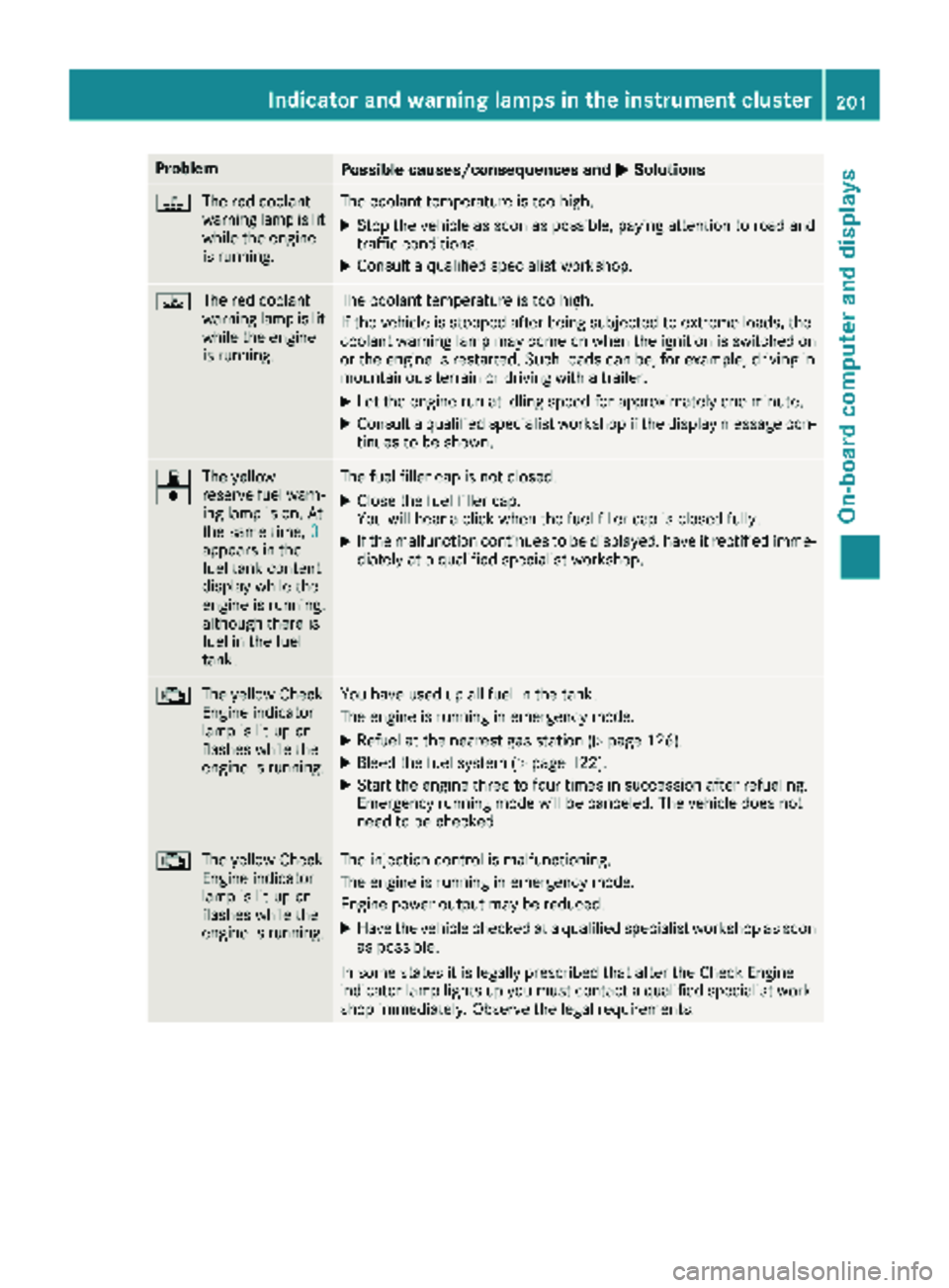
ProblemPossible causes/consequences andMSolutions
?
The red coolant
warning lamp is lit
while the engine
is running.The coolant temperature is too high.
XStop the vehicle as soon as possible, paying attention to road and
traffic conditions.
XConsult a qualified specialist workshop.
?The red coolant
warning lamp is lit
while the engine
is running.The coolant temperature is too high.
If the vehicle is stopped after being subjected to extreme loads, the
coolant warning lamp may come on when the ignition is switched on
or the engine is restarted. Such loads can be, for example, driving in
mountainous terrain or driving with a trailer.
XLet the engine run at idling speed for approximately one minute.
XConsult a qualified specialist workshop if the display message con-
tinues to be shown.
7
|The yellow
reserve fuel warn-
ing lamp is on. At
the same time,
0
appears in the
fuel tank content
display while the
engine is running,
although there is
fuel in the fuel
tank.
The fuel filler cap is not closed.
XClose the fuel filler cap.
You will hear a click when the fuel filler cap is closed fully.
XIf the malfunction continues to be displayed, have it rectified imme-
diately at a qualified specialist workshop.
;
The yellow Check
Engine indicator
lamp is lit up or
flashes while the
engine is running.You have used up all fuel in the tank.
The engine is running in emergency mode.
XRefuel at the nearest gas station (Ypage 126).
XBleed the fuel system (Ypage 122).
XStart the engine three to four times in succession after refueling.
Emergency running mode will be canceled. The vehicle does not
need to be checked.
;The yellow Check
Engine indicator
lamp is lit up or
flashes while the
engine is running.The injection control is malfunctioning.
The engine is running in emergency mode.
Engine power output may be reduced.
XHave the vehicle checked at a qualified specialist workshop as soon
as possible.
In some states it is legally prescribed that after the Check Engine
indicator lamp lights up you must contact a qualified specialist work-
shop immediately. Observe the legal requirements.
Indicator and warning lamps in the instrument cluster201
On-board computer and displays
Z
Page 223 of 294
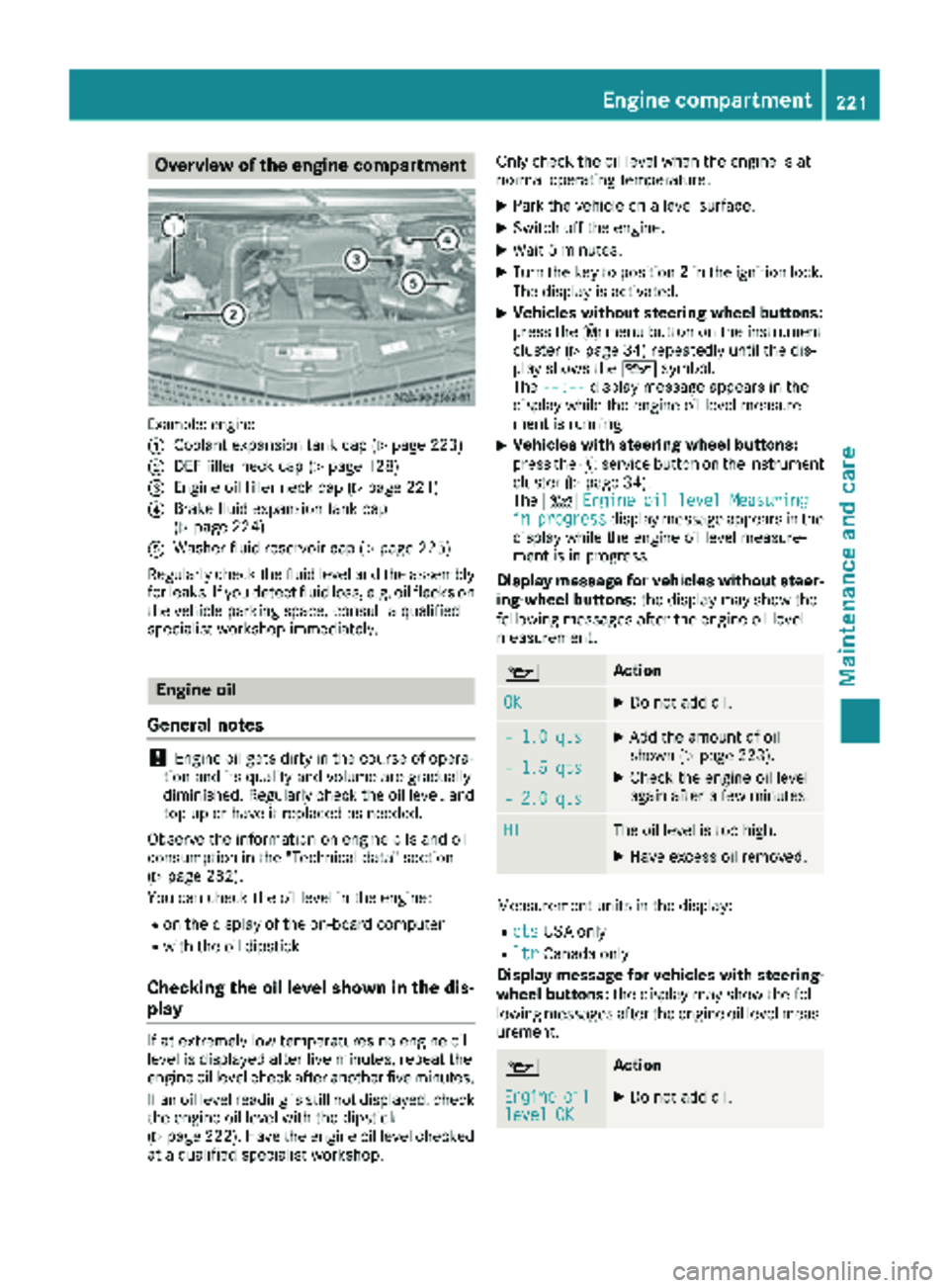
Overview of the engine compartment
Example: engine
:
Coolant expansion tank cap (Ypage 223)
;DEF filler neck cap (Ypage 128)
=Engine oil filler neck cap (Ypage 221)
?Brake fluid expansion tank cap
(Ypage 224)
AWasher fluid reservoir cap (Ypage 225)
Regularly check the fluid level and the assembly
for leaks. If you detect fluid loss, e.g. oil flecks on
the vehicle parking space, consult a qualified
specialist workshop immediately.
Engine oil
General notes
!Engine oil gets dirty in the course of opera-
tion and its quality and volume are gradually
diminished. Regularly check the oil level, and
top up or have it replaced as needed.
Observe the information on engine oils and oil
consumption in the "Technical data" section
(
Ypage 282).
You can check the oil level in the engine:
Ron the display of the on-board computer
Rwith the oil dipstick
Checking the oil level shown in the dis-
play
If at extremely low temperatures no engine oil
level is displayed after five minutes, repeat the
engine oil level check after another five minutes.
If an oil level reading is still not displayed, check
the engine oil level with the dipstick
(
Ypage 222). Have the engine oil level checked
at a qualified specialist workshop. Only check the oil level when the engine is at
normal operating temperature.
XPark the vehicle on a level surface.
XSwitch off the engine.
XWait 5 minutes.
XTurn the key to position
2in the ignition lock.
The display is activated.
XVehicles without steering wheel buttons:
press the 4menu button on the instrument
cluster (
Ypage 34) repeatedly until the dis-
play shows the 1symbol.
The --:--
display message appears in the
display while the engine oil level measure-
ment is running.
XVehicles with steering wheel buttons:
press the Ëservice button on the instrument
cluster (
Ypage 34).
The 4 Engine oil level Measuring
inprogressdisplay message appears in the
display while the engine oil level measure-
ment is in progress.
Display message for vehicles without steer-
ing-wheel buttons: the display may show the
following messages after the engine oil level
measurement.
1Action
OKXDo not add oil.
– 1.0 qtsXAdd the amount of oil
shown (Ypage 223).
XCheck the engine oil level
again after a few minutes.– 1.5 qts
– 2.0 qts
HIThe oil level is too high.
XHave excess oil removed.
Measurement units in the display:
RqtsUSA only
RltrCanada only
Display message for vehicles with steering- wheel buttons: the display may show the fol-
lowing messages after the engine oil level meas-
urement.
1Action
Engineoillevel OKXDo not add oil.
Engine compartment221
Maintenance and care
Z