traction control MERCEDES-BENZ SPRINTER 2020 MY20 with 7” screen
[x] Cancel search | Manufacturer: MERCEDES-BENZ, Model Year: 2020, Model line: SPRINTER, Model: MERCEDES-BENZ SPRINTER 2020Pages: 348, PDF Size: 5.84 MB
Page 196 of 348
Te
lephone Te
lephony Te
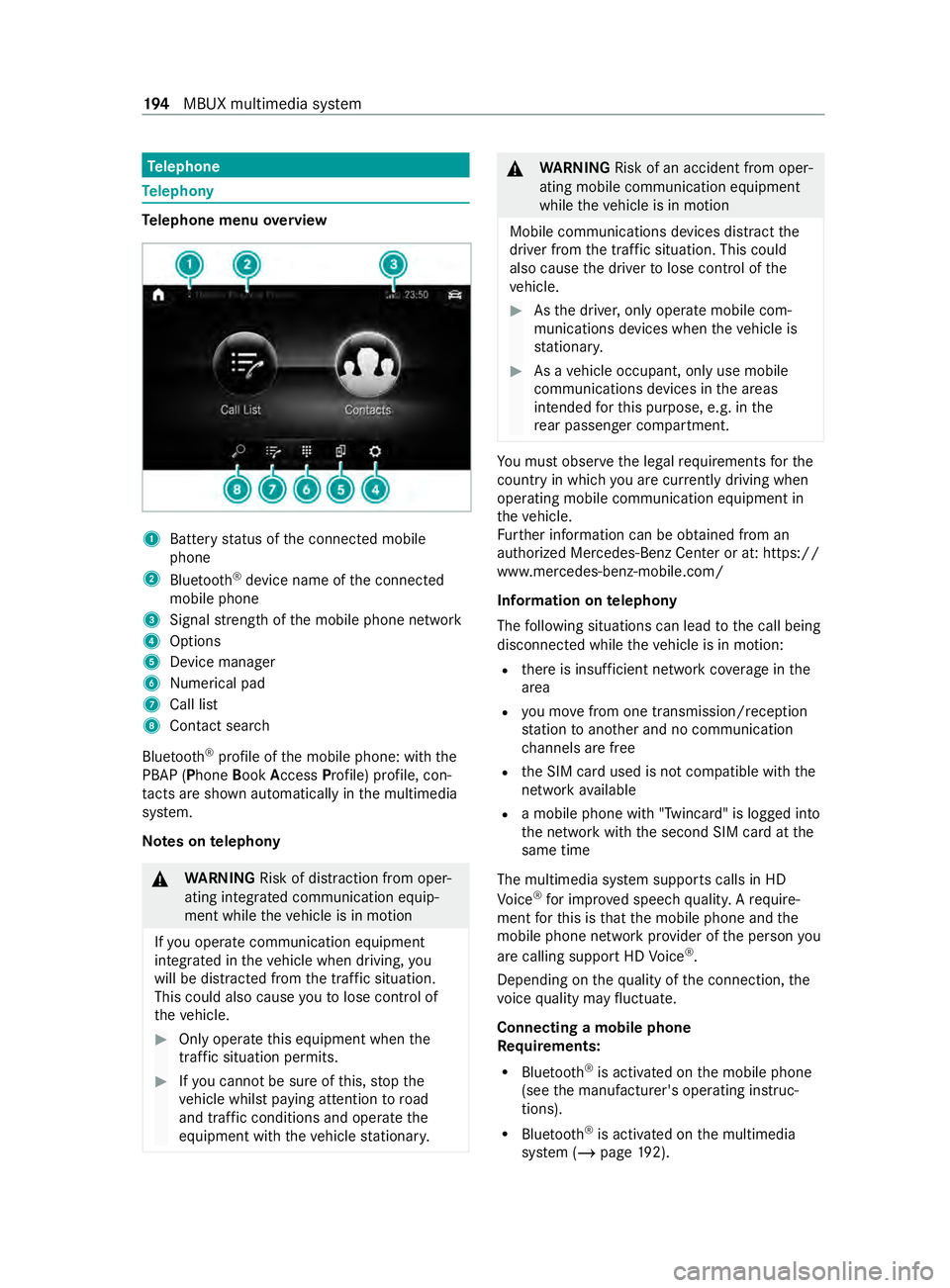
lephone menu overview 1
Batter ystatus of thec onnected mobile
phone
2 Blue tooth ®
device name of thec onnected
mobile phone
3 Signal stre ngt hoft he mobile phone network
4 Options
5 Device manager
6 Numerical pad
7 Call list
8 Contact sear ch
Blu etoo th®
profile of them obile phone: wit hthe
PBAP (Phone BookAccess Profile) profile, con‐
ta cts ar eshown au tomatically in them ultimedia
sy stem.
Note sont elephony &
WARNING Risk of distraction from oper‐
ating integrated communication equip‐
ment while thev ehicle is in motion
If yo uo perat ecommunication equipment
integ ratedint hevehicle when driving, you
will be distracted from thet raffic situation.
This could also cause youtol ose control of
th ev ehicle. #
Onlyoperat ethis equipment when the
traf fics ituation permits. #
Ifyo uc anno tbes ureoft his,stop the
ve hicle whils tpaying attention toroad
and traf ficc onditions and ope rate the
equipment wit hthe vehicle stationar y. &
WARNING Risk of an accident from oper‐
ating mobile communication equipment
while thev ehicle is in motion
Mobile communication sdevices distract the
driver from thet raffic situation .Thisc ould
also cause thed rive rtol ose control of the
ve hicle. #
Asthed rive r,onl yoperat emobile com‐
munications devices when thev ehicle is
st ationar y. #
Asavehicle occupant, onl yuse mobile
communication sdevices in thea reas
intended fort his purpose, e.g. in the
re ar passenger compartment. Yo
um usto bse rvet he legal requirements fort he
countr yinwhich youa recur rentl yd riving when
ope rating mobil ecommunication equipment in
th ev ehicle.
Fu rther information can be obtained from an
authorized Mercedes-BenzC enter or at:https://
www.mercedes-benz-mobile.com/
Information on telephony
The following situations can lead tothec all being
disconnected while thev ehicle is in motion:
R ther eisi nsufficient networ kcove rage inthe
area
R youm ovef romo ne transmission/reception
st atio ntoa nother and no communication
ch annels ar efree
R theS IM car dused is no tcompatible wit hthe
networ kavailable
R amobile phon ewith" Twincard" is logged into
th en etwo rkwit hthe second SIM car datthe
same time
The multimedia sy stem supports calls in HD
Vo ice ®
fori mp rove ds peec hquality .Arequire‐
ment fort his is that them obile phone and the
mobil ephone networ kprovide roft he person you
ar ec allin gsuppor tHDV oice®
.
Depending on theq uality of thec onnection ,the
vo ice quality ma yfluctuate.
Connecting amobile phone
Re quirements:
R Blue tooth ®
is activated on them obile phone
(see them anufacturer's operating instruc‐
tions).
R Blue tooth ®
is activated on them ultimedia
sy stem (/ page192). 194
MBUX multimedia sy stem
Page 200 of 348
If
th eP BAPB luetooth ®
profile is no tsuppor ted,
th ee ffects ar easfollows:
R The multimedia sy stem generates acalllist
independentl yassoon as calls ar emade in
th ev ehicle.
R The call lis tisnotsynchronized wit hthe call
lists in them obile phone.
Making acall from thec all list
Multimedia sy stem:
4 © 5
Phone #
Select +Recent Calls. #
Select an entry.
The call is made.
Calling up additional options in thec all list
Multimedia sy stem:
4 © 5
Phone #
Select +Recent Calls. #
Forp reviousl ystore dc ontacts: select 0048in
th el ine of an entry.
The sear chresults ar edispla yed. Apple CarPlay
® Overvie
wofApple CarPlay ® &
WARNING Risk of distraction from infor‐
mation sy stems and communications
equipment
If yo uo perat einformation and communica‐
tio ne quipment integ ratedint hevehicle when
driving, youw ill be distracted from thet raffic
situation. This could also cause youtol ose
control of thev ehicle. #
Onlyoperat ethis equipment when the
traf fics ituation permits. #
Ifyo uc anno tbes ureoft his,stop the
ve hicle whils tpaying attention toroad
and traf ficc onditions and ope rate the
equipment wit hthe vehicle stationar y. Yo
um usto bse rvet he legal requirements fort he
countr yinwhich youa recur rentl yd riving when
ope rating them ultimedia sy stem.
iPhone ®
functions can be used via them ultime‐
dia sy stem using Apple CarPlay ®
.T he ya reoper‐
ated using thet ouchscreen, Touc hC ontrol or the
Siri ®
vo ice-operated control sy stem. Youc an acti‐
va te thev oice-operated control sy stem bypress‐ ing and holding
the£ button on them ultifunc‐
tion steering wheel.
Onl yone mobile phone at atime can be connec‐
te dv ia Apple CarPlay ®
to them ultimedia sy stem.
The availabilit yofApple CarPlay ®
ma yvary
according tothec ount ry.
The service pr ovider is responsible fort his appli‐
cation and thes ervices and content connected to
it.
Apple CarPlay ®
is ar egis tere dt rademar kof
Apple Inc.
Information on Apple CarPlay ®
When Apple CarPlay ®
is being used, thei Pod ®
media source is no tavailable fort he respective
iPhone ®
.
Connecting an iPhone ®
via Apple CarPlay ®
(with cable)
Requ irements:
R The multimedia sy stem is equipped wit hthe
function.
R The cur rent version of your device's operating
sy stem is being used (see them anufacturer's
operating instructions).
R The full rang eoff unctions forA pple CarPlay ®
is only available wit hanInterne tconnection. #
Connect thei Phone ®
to the ç USB port
on them ultimedia sy stem using asuitable
cable (/ page203). #
If no other device is connected wit hthe sys‐
te mv ia Blue tooth®
:c onfir mthe dat aprotec‐
tion pr ovisions. #
If ano ther device is connected via Blue tooth®
or Apple CarPlay ®
(wireless) wit hthe sy stem:
ta pont heTap here to start Apple CarPlay
for:
or #
Select thei Phone ®
in the í device list
under thea pplication.
The pr evious connection via Blue tooth®
or
Apple CarPlay ®
(wireless) is disconnected.
The device newl yconnected via cable is
active.
Ac cepting/rejecting thed atap rotection pro‐
visions
Am essag ewitht he dat aprotection pr ovisions
appears. #
Select Accept &Start. 19 8
MBUX multimedia sy stem
Page 201 of 348
Exiting Apple CarPlay
®#
Press the00E2 button.
% If Apple CarPlay ®
wa sn otdispla yedf ull-
screen befor edisconnecting, thea pplication
st arts in theb ackg round when reconnected.
Yo uc an call up Apple CarPlay ®
in them ain
menu.
Connecting an iPhone ®
via Apple CarPlay ®
(wireless)
Requ irements:
R The multimedia sy stem is equipped wit hthe
function.
R The cur rent version of your device's operating
sy stem is being used (see them anufacturer's
operating instructions).
R Blue tooth ®
is activated on thed evice (see the
manufacturer's operating instructions).
R The device is "visible" foro ther devices.
R Ther eisanI nternetconnection fort he full
ra ng eoff unctions forA pple CarPlay ®
.
Multimedi asyst em:
4 © 5
Phone
Sear ching foram obilephone #
Select í. #
Select Connect New Device.
The available iPhone ®
is shown.
Connecting amobile phone #
Select thei Phone ®
. #
Select StartApple CarPlay.
% It is possible at an
ytime toswitc hbetwe en
connection via Blue tooth®
or via Apple Car‐
Play ®
(wireless) in thed evice list.
Ac cepting/rejecting thed atap rote ction pro‐
visions
Am essag ewitht he dat aprotection pr ovisions
appears. #
Select Accept &Start.
% When theA pple CarPlay ®
connection is
active, youc an swit chStart Automatically on
or off.
Exiting Appl eCarPlay ® #
Press the00E2 button.
% If Apple CarPlay ®
wa sn otdispla yedint he
fo re ground be fore disconnecting, thea pplica‐
tion starts in theb ackg round when reconnec‐ te
d. Youc an call up Apple CarPlay ®
in the
main menu.
Calling up Apple CarPlay ®
sound settings
Multimedia sy stem:
4 © 5
Smartphone 5
Apple CarPlay
5 Z #
Select sound settings.
Ending Apple CarPlay ® #
Toend thec onnection of Apple Car‐
Play ®
(cable): disconnect thec onnection via
th ec onnectin gcable between thei Phone ®
and multimedia sy stem. #
Toend thec onnection of Apple Car‐
Play ®
(wireless): de-authorize thei Phone ®
in
the í device lis tunder thea pplication.
% Re
gardless of whe ther thec onnection is via
cable or wireless, Mercedes-Benz recom‐
mends disconnection only whe nthe vehicle
is stationar y. Android
Auto Android
Autoove rview &
WARNING Risk of distraction from infor‐
mation sy stems and communications
equipment
If yo uo perat einformation and communica‐
tio ne quipment integ ratedint hevehicle when
driving, youw ill be distracted from thet raffic
situation. This could also cause youtol ose
control of thev ehicle. #
Onlyoperat ethis equipment when the
traf fics ituation permits. #
Ifyo uc anno tbes ureoft his,stop the
ve hicle whils tpaying attention toroad
and traf ficc onditions and ope rate the
equipment wit hthe vehicle stationar y. Yo
um usto bse rvet he legal requirements fort he
countr yinwhich youa recur rentl yd riving when
ope rating them ultimedia sy stem.
Mobile phone functions can be used wit hAndroid
Au tousin gthe Android operating sy stem on the
multimedia sy stem. It is operated using the
to uchsc reen or thev oice-operated control sys‐
te m. Youc an activat ethe voice-opera tedc ontrol
sy stem bypressing and holding the£ button
on them ultifunction steering wheel. MBUX multimedia sy
stem 19 9
Page 203 of 348
%
Depending on
thec onfiguration of the
device, af terc onnecting them obile phone via
Blue tooth ®
,t he prom ptma yappear in the
media displa yasking if Android Autoshould
be star ted. The querym ustint hat case be
answered with Yes.
% It is possible at an
ytime toswitc hbetwe en
connection via Blue tooth®
or Android Auto
(wireless) in thed evice list.
Ac cepting/rejecting thed atap rotection pro‐
visions
Am essag ewitht he dat aprotection pr ovisions
appears. #
Select Accept &Start.
Re turning tothem ainm enu #
Press the00E2 button.
% If Android
Autowa sn otdispla yedint hefore‐
ground befor edisconnecting, thea pplication
st arts in theb ackg round when reconnected.
Yo uc an call up Android Autointhem ain
menu.
Calling up theA ndroid Autosound settings
Multimedia sy stem:
4 © 5
Smartphone 5
Android Auto
5 Z #
Select sound settings.
Ending Android Auto #
Disconnect thec onnectin gcable between the
mobil ephone and multimedia sy stem.
Mercedes-Benz recommends disconnecting
th ec onnectin gcable onl ywhen thev ehicle is
st ationar y. Tr
ansfer redv ehicle dat awith Android Auto
and Apple CarPlay ®Overvie
woftransfer redv ehicle data
Whe nusing Android Autoor Apple CarPlay ®
,c er‐
ta in vehicle dat aistransfer redtot he mobile
phone. This enables youtog ettheb esto ut of
selected mobile phone services. Vehicle dat ais
no td irectl yaccessible.
The following sy stem information is transmit ted:
R softwar erelease of them ultimedia sy stem
R system ID (anonymized)
The transfer of this dat aisusedtooptimize com‐
munication between thev ehicle and them obile
phone. To
do this, and toassig nseve ralv ehicles tothe
mobil ephone, avehicle ID is random lyge ner‐
ated.
Thi sh asno connection tothev ehicle identifica‐
tion number (VIN) and is dele tedw hen them ulti‐
media sy stem is rese t(/ pag e193).
The following vehicle status dat aistransmitted:
R transmission position engaged
R distinction between par ked, standstill ,rolling
and driving
R day/night mode of thei nstrument clus ter
The transfer of this dat aisusedtoalter ho wcon‐
te nt is displ ayed tocor respond tothed riving sit‐
uation.
The following position dat aistransmitted:
R coordinates
R speed
R compass direction
R acceleration direction
This dat aisonlyt ransfer redw hile then avigation
sy stem is active, in order toimpr oveit (e.g. so it
can continue functioning when in atunnel). Media
Information about media mode
Information about suppor
tedf ormats and
dat astorage media &
WARNING Risk of distraction whe nhan‐
dling da tastorag emedia
If yo uh andle adatas torage medium while
driving, your attention is diver tedf romt he
traf ficc onditions. Thi scould also cause you
to lose control of thev ehicle. #
Onlyhandle adatas tora ge medium
when thev ehicle is stationar y. %
Depending on
thee quipment ins talled play‐
bac kofv ideoform ats ma ynotbe possible. MBU
Xmultimedi asystem 201
Page 246 of 348
Information on noise or unusua
ldriving
ch aracteristics
Whil edriving, pa yattention tovibrations, noises
and unusual driving characteristics, e.g .pullin gto
one side. This ma yindicat edamag etothe wheels
or tires. If yous uspect that at ireisd efective,
re duce your speed. Stop thev ehicle as soon as
possible tocheckifw heels and tires ha vebeen
damaged or ar enolonger functioning properly.
Hidden tir edamag ecould also be causing the
unusual drivin gcharacteristics. If no signs of
dama gecan be de tected, ha vethet ires and
wheels checkedataq ualified specialis twork‐
shop. Note
sonr egular lyinspecting wheels and
tires &
WARNING Risk of accident from dam‐
aged tires
Dama gedt ires can cause tir epressur eloss.
As aresult, youc oul dlose control of your
ve hicle. #
Chec kthe tires regularly fors igns of
dama geand replace an ydamaged tires
immediatel y. Chec
kthe wheels and tires of your vehicle for
damag eregular ly,i .e. at leas tevery twow eeks,
as well as af terd riving off-road or on rough
ro ads. Damaged wheels can lead toaloss of tire
pressure.
Look out fort he following types of damage, for
ex ample:
R Cuts in thet ires
R Punctures in thet ires
R Tearsint he tires
R Bulges on tires
R Deformation or se vere cor rosion on wheels &
WARNING Risk ofhydroplaning because
tir et read is tool ow
Insuf ficient tir etread will result in reduced
tir et raction .The tir etread will no longer be
able todissipat ewater.
This increase sthe risk of hydroplaning on wet
ro ad sur faces, pa rticularly when tra veling at
an inappropriat espeed. If
th et irep ressur eist oo high or tool ow ,tires
ma yexhibit dif fere nt le vels of wear at dif fer‐
ent locations on thet iret read. #
Regular lych eckt he tir etread dep thand
th ec ondition of thet iret read across
th ee ntir ew idthofa ll tires.
Minimum tread dep thforu se:
R In summer: 00CEin (3 mm)
R In winter: 00CFin (4 mm) #
Fors afet yr easons, ha vethet ires
re placed befor ethe legally prescribed
limit fort he minimum tir etread dep this
re ached. Conduct
thef ollowing checks regular lyon all
wheels, at leas tonce amonthorasr equired, e.g.
befor ealong journe yorwhen driving off- road:
R Chec kthe tir epressur e(/pag e246)
R Che ckthev alvec aps
Va lves mus tbeprotected from moistur eand
dir tw ithv alvec apss pecifically appr oved by
Mercedes-Benzf oryour vehicle.
R Visually inspect thet read dep thand thet ire
tread across thew hole tir ewidth
Fo ru se in summer ,the minimum tread dep th
is 00CE in (3 mm) and foru se in winter 00CFin
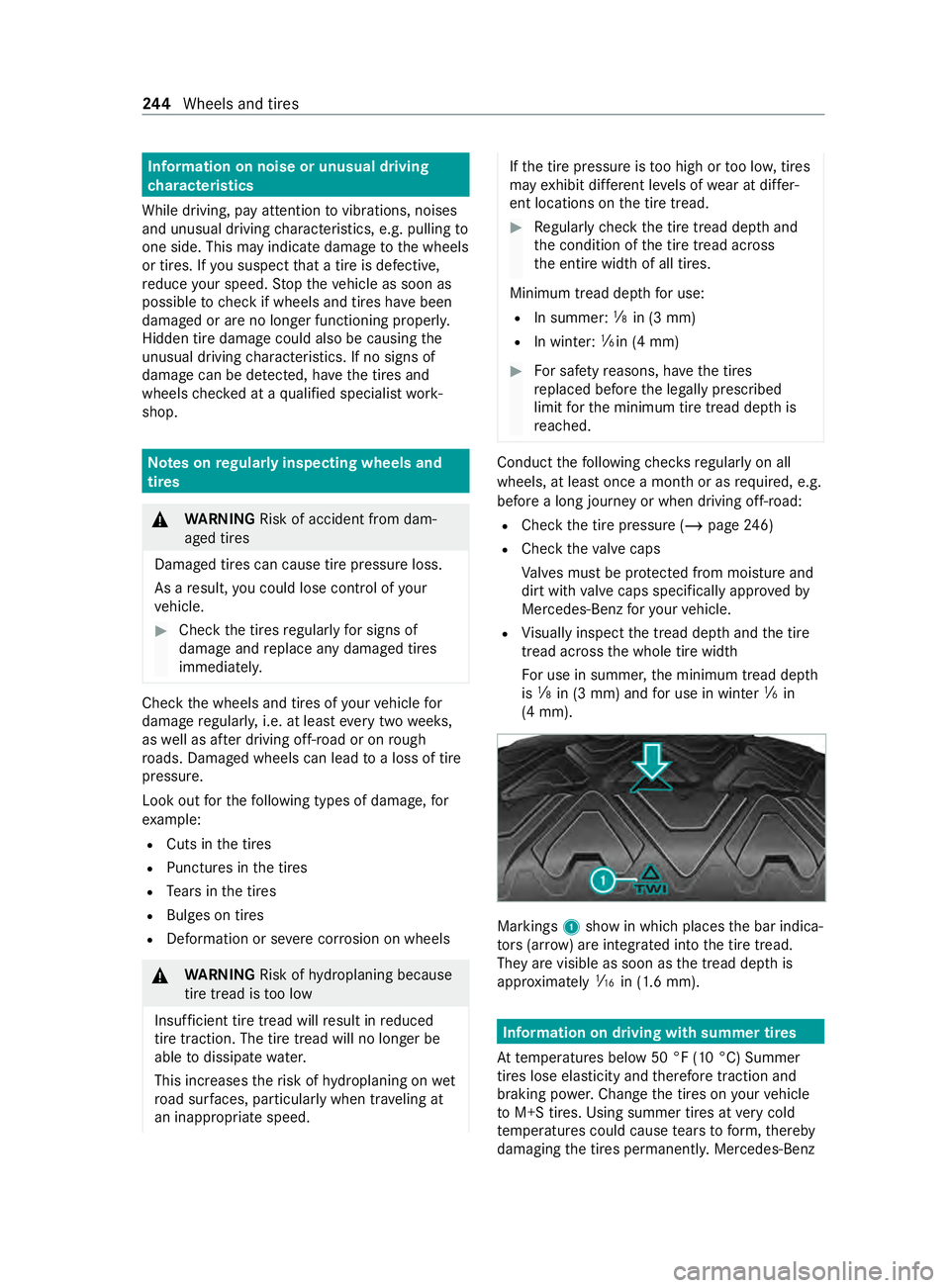
(4 mm). Markings
1showinw hichp laces theb ar indica‐
to rs (ar row )are integ ratedi ntot he tir etread.
The yarevisible as soon as thet read dep this
appr oximately 00CDin (1.6 mm). Information on driving wit
hsummer tires
At temp eratures belo w50°F(10°C) Summer
tires lose elasticit yand therefor etraction and
braking po wer.Chan gethet ires on your vehicle
to M+S tires. Using summer tires at very cold
te mp eratures could cause tear stof orm, thereby
damaging thet ires permanentl y.Mercedes-Benz 244
Wheels and tires
Page 258 of 348
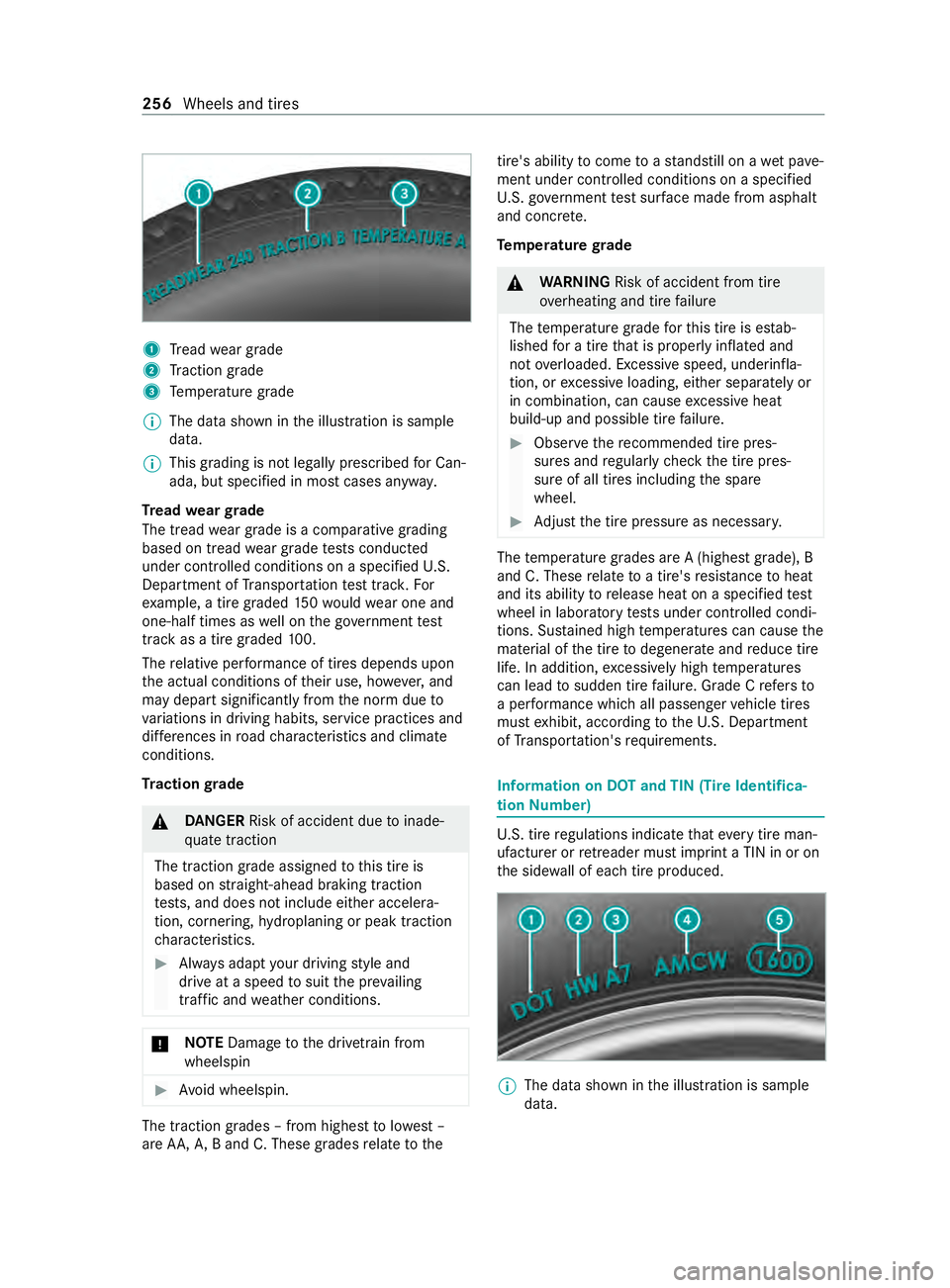
1
Tread weargrade
2 Traction grade
3 Temp eratur egrade
% The dat
ashown in thei llustration is sample
data.
% This grading is no
tlegall yprescribed forC an‐
ada,b ut specified in mos tcases anyw ay.
Tr ead weargrade
The tread wear grade is acomparativ egrading
based on tread wear grade testsc onducted
under contro lled condition sonaspecified U.S.
Depa rtment of Transpor tatio nt esttrack .F or
ex ample, atireg raded 150w ould wear one and
one-half times as well on theg ove rnment test
trac kasat ireg rade d1 00.
The relativ eperform anc eoft ires depends upon
th ea ctual conditions of their use, ho wever,and
ma ydepar tsignificantl yfromt he nor mdueto
va riations in drivin ghabits, servic epractices and
dif fere nces in road characteristic sand climate
conditions.
Tr actio ngrade &
DANG ER Risk of acciden tdue toinade‐
qu atet raction
The traction grade assigned tothis tir eis
based on stra ight-ahead brakin gtraction
te sts, and does no tinclude either accelera‐
tion, cornering, hydroplaning or peak traction
ch aracteristics. #
Alwaysa dap tyour driving stylea nd
driv eatas peedtosuit thep reva iling
traf fica nd weather conditions. *
NO
TEDama getothed rive trai nfrom
wheelspin #
Avoid wheelspin. The traction grades
–fromh ighes ttolowest –
ar eA A, A, Band C. These grades relat etot he tire's ability
tocome toas tandstill on awetpave‐
ment under controlle dconditions on aspecified
U. S. go vernment test sur face mad efroma sphalt
and concr ete.
Te mp eratur egrade &
WARNING Risk of accident from tire
ove rheating and tir efailure
The temp eratur egrade fort his tir eisestab‐
lished forat iret hat is properly inflated and
no to verloaded. Excessiv espeed, underinfla‐
tion, or excessiv eloading, either separatel yor
in combination, can cause excessiv eheat
build-up and possible tir efailure. #
Obser vether ecommended tir epres‐
sures and regular lych eckt he tir epres‐
sur eofa ll tires including thes pare
wheel. #
Adjus tthe tir epressur easn ecessar y. The
temp eratur egrades ar eA(highes tgrade), B
and C. These relat etoat ire'sresis tance toheat
and its ability torelease heat on aspecified test
wheel in laborator ytests under cont rolled condi‐
tions. Sus tained high temp eratures can cause the
material of thet iretod egenerat eand reduce tire
life. In addition, excessivel yhigh temp eratures
can lead tosudden tir efailure. Grade Crefer sto
ap erform anc ewhicha ll passenger vehicle tires
mus texhibit, accordin gtotheU.S. Depa rtment
of Transpor tation's requ irements. Information on DO
Tand TIN (Tir eIdentifica‐
tion Number) U.
S. tir eregulations indicat ethat everyt irem an‐
ufacturer or retreade rmustimp rint aT IN in or on
th es ide wall of eac htirep roduced. %
The dat
ashown in thei llustration is sample
data. 256
Wheels and tires