transmission MERCEDES-BENZ SPRINTER 2020 MY20 with 7” screen
[x] Cancel search | Manufacturer: MERCEDES-BENZ, Model Year: 2020, Model line: SPRINTER, Model: MERCEDES-BENZ SPRINTER 2020Pages: 348, PDF Size: 5.84 MB
Page 146 of 348
accelerator if tra
veling on steep uphill gradi‐
ents.
R Ifth et ransmission is in position 005E,therear-
end door smustbec losed.
App lying/releasing thee lectric pa rking brake
manually &
WARNING Risk of accident and inju ry
due tochildren and animals lef tunat ten‐
de dint hevehicle
If yo ul eave children and animals unat tended
in thev ehicle, they ma ybea bletos etthe
ve hicle in motion, fore xamp leby:
R Releasing thep arking brake.
R Shifting thea utomatic transmission out of
par kposition 005D.
R Startin gthe engine.
In addition, they ma yoperat evehicle equip‐
ment and become trapped. #
Neverlea ve children and animals unat‐
te nde dint hevehicle. #
When leaving thev ehicle, alw ayst ake
th eS martK eywit hyou and loc kthe
ve hicle. #
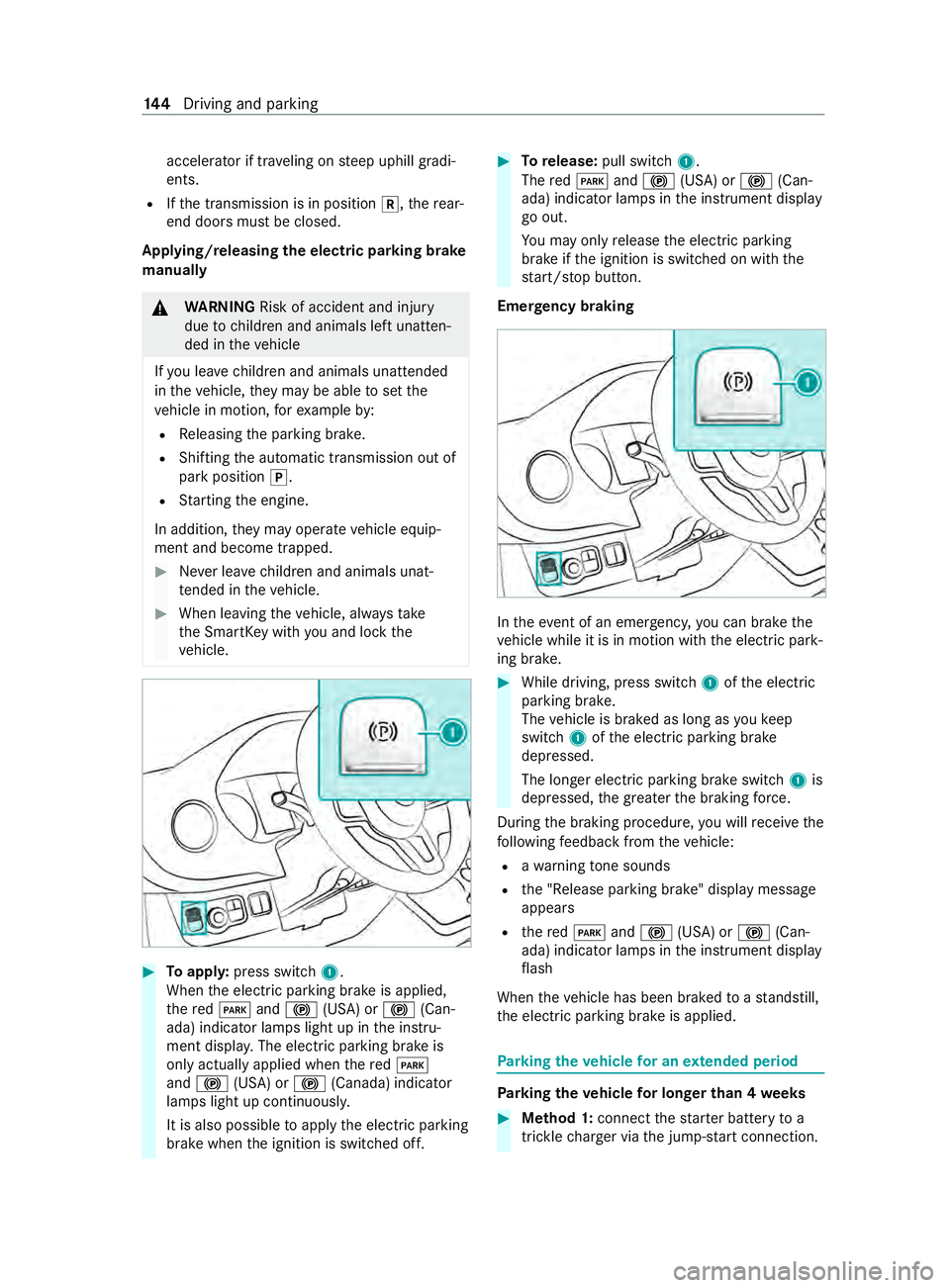
Toappl y:press switch 1.
When thee lectric parking brak eisapplied,
th er ed 0049 and0024 (USA) or 0024(Can‐
ada) indicator lamps light up in thei nstru‐
ment displa y.The electric parking brak eis
onl yactuall yapplied when ther ed 0049
and 0024 (USA) or 0024(Canada) indicator
lamps light up continuousl y.
It is also possible toappl ythe electric parking
brak ewhen thei gnition is switched off. #
Torelease: pull switch 1.
The red0049 and0024 (USA) or 0024(Can‐
ada) indicator lamps in thei nstrument display
go out.
Yo um ayonlyrelease thee lectric parking
brak eift he ignition is switched on wit hthe
st art/ stop button.
Emer gency braking In
thee vent of an emergency ,you can brak ethe
ve hicle while it is in motion wit hthe electric park‐
ing brake. #
While driving, press switch 1ofthee lectric
parking brake.
The vehicle is braked as long as youk eep
switch 1ofthee lectric parking brake
depressed.
The longer electric parking brak eswitch 1is
depressed, theg reater theb raking forc e.
During theb raking procedure, youw illreceiv ethe
fo llowing feedbac kfromt hevehicle:
R awarning tone sounds
R the" Release parking brake" displa ymessage
appears
R ther ed 0049 and0024 (USA) or 0024(Can‐
ada) indicator lamps in thei nstrument display
fl ash
When thev ehicle has been braked toas tandstill,
th ee lectric parking brak eisapplied. Pa
rking thev ehicle forane xtended period Pa
rking thev ehicle forl on gerthan 4weeks #
Method 1: connec tthe star terb atter ytoa
trickle charge rv iathej ump-s tart connection. 14 4
Driving and pa rking
Page 157 of 348
Information on Hill
StartA ssist Hill
StartA ssisth olds thev ehicle foras horttime
when pulling away on ahill under thef ollowing
conditions:
R Vehicles with automatic transmission: the
transmission is in position 005Bor005E.
R The pa rking brak ehas been released.
This gives youe nough tim etomoveyour foot
from theb rake pedal tothea ccelerator pedal and
depress it befor ethe vehicle begins toroll. &
WARNING Risk of accident and inju ry
due tothev ehicle rolling away
Af teras horttime, Hill StartA ssistnol onger
holds thev ehicle and it can rollaw ay. #
Therefore, swiftl ymove your foot from
th eb rake pedal tothea ccelerator
pedal. Ne vera ttem pttolea vethev ehi‐
cle if it is being held byHill StartA ssist. HOLD function
HOLD function
Re quirements:
R The seat occupancy recognition on thed riv‐
er's seat has de tected that thed rive rh as fas‐
te ned thes eat belt.
The HOLD function holds thev ehicle at astand‐
st ill without requ iring youtod epress theb rake
pedal, e.g. when pulling away on steep slopes or
when waitin gint raffic. Whe nyou depress the
accelerator pedal topull away,the braking ef fect
is canceled and theH OLD function is deactiva‐
te d.
The HOLD function is onl yanaid. The responsibil‐
ity fort he vehicle safel ystandi ngstill remains
wit hthe driver.
Sy stem limits
The HOL Dfunction is onl yintende dtoprovide
assis tance when driving and is no tasufficient
means of safeguarding thev ehicle agains trolling
aw ay when stationar y.
R The incline mus tnotbe greater than 30%.
Ac tivating/deactivatin gthe HOL Dfunction
Requ irements: R
The vehicle is stationar y.
R The engine is running or it ha sbeena utomati‐
cally switched of fbythe EC Ostart/s topf unc‐
tion.
R The driver is seated and belted.
R The electric parking brak eisreleased.
R Vehicles with automatic transmission: the
selector le verisinp osition005B,005Eor005C.
R ActiveD ista nce Assi stDISTRONI Cisdeacti va‐
te d.
Ac tivatin gthe HOL Dfunction &
WARNING Risk of an accident du etothe
HOLD function being acti vatedw heny ou
lea vethev ehicle
If yo ul eave thev ehicle while only theH OLD
function is braking thev ehicle, thev ehicle
can rollaw ay inthef ollowing situations:
R Ifth er eisam alfunction in thes ystemor
in thep owe rsupp ly.
R Ifth eH OLD function is deactivated by
depressing thea ccelera torp eda lorb rake
pedal, e.g. byavehicle occupant. #
Alwaysd eactivat ethe HOLD function
and secur ethe vehicle agains trolling
aw ay befor eleaving thev ehicle. *
NO
TEDama gefrom auto matic braking When
ActiveB rake Assi st,A ctiv eDista nce
Assi stDISTRONI Corthe HOLD function are
activated, thev ehicle brakes autonomously in
cer tains ituations.
To avo id damag etothevehicle, deactivate
th ese sy stems in thef ollowing or similars it‐
uations: #
During towing #
Inac arwa sh #
Mak esuret hat thea ctivation conditions are
met. #
Depress theb rake pedal until the00D9 dis‐
pla yappear sinthe multifunction displa y.
The HOLD function is activated. Youc an
re lease theb rake pedal.
% If depressing
theb rake pedal thef irst time
does no tactivate theH OLD function, wait
brief lyand then tr yagain. Driving and parking
15 5
Page 158 of 348
Deactivating th
eHOLD function
The HOLD function is deactivated in thef ollowing
situations: #
Vehicles with automatic transmission:
depress thea ccelerator pedal when thea uto‐
matic transmission is in position 005Bor005E. #
Depress theb rake pedal again wit hsufficient
pressur euntil the 00D9 displa yinthe multi‐
function displa ygoes out. #
Activat eActiv eDista nce Assi stDISTRONIC.
% Ve
hicles with automatic transmission: the
automatic transmissio nofyourvehicle shifts
to 005D afte rs ome time. This relie vest he load
on thes ervice brake.
When theH OLD function is activated, thea uto‐
matic transmission automaticall yshifts to005D in
th ef ollowing situations:
R The driver lea vest he driver's seat.
R The driver's door is opened.
R The engine is switched of fwithout theE CO
st art/ stop function. Pa
rking Assis tPARKTRONIC Fu
nction of Parking Assis tPARKTRONIC
Pa rking Assis tPARKTRONIC is an electroni cpark‐
ing assis tance sy stem wit hultrasound. It moni‐
to rs thea reaa round your vehicle using six sen‐
sor sont he front bumper and six sensor sonthe
re ar bumper .Parking Assis tPARKTRONIC indi‐
ca tesv isuall yand audibl ythe dis tance between
yo ur vehicle and an object.
Pa rking Assis tPARKTRONIC is only an aid. It is
no tas ubstitut efor your attention tothes ur‐
ro undings. The responsibility fors afem aneu ver‐
ing and parking remains wit hyou. Mak esuret hat
th er ea reno persons, animals or object sinthe
maneuvering area while maneuvering and parking
in/exiting parking spaces.
In thes tandar dsetting ,ani ntermit tent wa rning
to ne sounds from adista nc eofa pproximately
1. 3ft( 0.4 m) toan obs tacle. Acontinuou stone
sounds from adista nc eofa pproximately 1.0ft
(0.3 m). Youc an se tthe warning tone in them ul‐
timedia sy stem so that it will soun dearlier at a
grea terd ista nce of appr oximately 3.3 ft(1 m)
(/ page156).
Pa rking Assis tPARKTRONIC displa yinthe
mu ltimedia sy stem
If th eP arking Assis tPARKTRONIC displ ayinthe
multimedia sy stem is no tactiv eand an obs tacle is de
tected in thep athoft hevehicle, apop-up
windo wforParking Assis tPARKTRONIC appears
in them ultimedia sy stem at speeds up toappr ox‐
imatel y6mph (10km/h).
Sy stem limitations
Pa rking Assis tPARKTRONIC does no tnecessarily
ta ke intoa ccount thef ollowing obs tacles:
R Obs tacles bel ow thedetection range, e.g. per‐
sons ,animal soro bjects.
R Obs tacles ab ovethed etection range, e.g.
ove rhanging loads, overhangs or loading
ra mp soft ruck s.
The sensor smustbef reeofd irt, ice and slush.
Otherwise, they ma ynotfunction cor rectl y.Clean
th es ensor sregular ly,t aking ca renottos cratch
or damag ethem.
Ve hicles with traile rhitch: Parking Assist
PA RKTRONI Cisdeactivated fort he rear zone
when youe stablish an electrical connection
between your vehicle and atrailer.
Deactivating/activating Parking Assist
PA RKTRONIC
* NO
TERisk of an accident from objects at
close range Pa
rking Assis tPARKTRONIC ma ynotdetect
cer taino bjects at close range. #
Whe nparkin gorm aneuvering thev ehi‐
cle, pa yparticular attention toany
object swhicha reabo veor belo wthe
sensors, e.g. flowe rpotsord rawbars.
The vehicle or other objects could oth‐
erwise be damaged. Multimedia sy
stem:
4 © 5
Settings 5
Quick Access #
Select PARKTRONIC On .
The function is activated or deactivated
depending on thep reviou ssetting.
% Pa
rking Assis tPARKTRONIC is au tomatical ly
activated when startin gthe vehicle.
Setting thew arnin gtones of Parking Assist
PA RKTRONIC
Multimedia sy stem:
4 Settings 5
Assistance
5 Camera &Parking 5
Set Warning Tones
Ad justin gthe volume of thew arnin gtones #
Select Warnin gTone Volume. 15 6
Driving and pa rking
Page 166 of 348
Overview
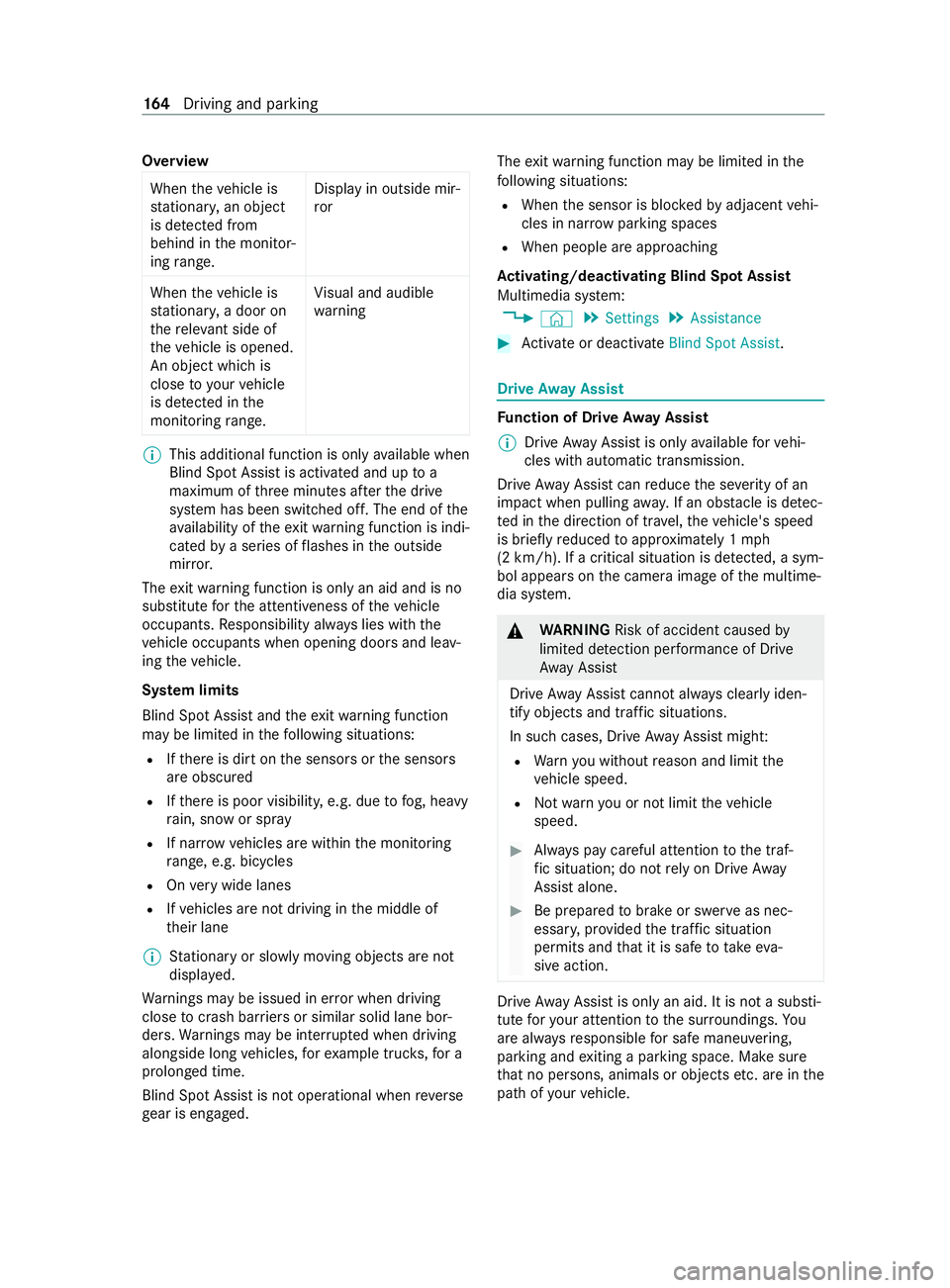
When thev ehicle is
st ationar y,an object
is de tected from
behind in them onitor‐
ing range. Displa
yinoutsid em ir‐
ror
When thev ehicle is
st ationar y,ad oor on
th er ele vant sid eof
th ev ehicle is opened.
An object whic his
close to yourvehicle
is de tected in the
monitoring range. Vi
sual and audible
wa rning %
This additional function is onl
yavailable when
Blin dSpotA ssistisa ctivated and up to a
maximu mofthree minutes af tert he drive
sy stem has been switched off. The end of the
av ailabilit yoftheexitwa rning function is indi‐
cated byaseries of flashes in theo utside
mir ror.
The exitwa rning function is onl yanaid and is no
substitut efor thea ttentiveness of thev ehicle
occupants. Responsibility alw aysl ies wit hthe
ve hicle occupants when opening door sand leav‐
ing thev ehicle.
Sy stem limits
Blin dSpotA ssis tand thee xit warning function
ma ybel imited in thef ollowing situations:
R Ifth er eisd irtont he sensor sorthe sensors
ar eo bscured
R Ifth er eisp oor visibility ,e.g. due tofog, heavy
ra in, sno worspray
R If nar rowv ehicles ar ewithin them onitoring
ra nge, e.g. bicycles
R Onvery wide lanes
R Ifve hicles ar enotdriving in them iddle of
th eir lane
% St
ationar yorslowlymovingo bject sarenot
displa yed.
Wa rnings ma ybeissued in er rorw hen driving
close tocrash ba rrier sors imilar solid lane bor‐
ders. Warnings ma ybeinterrupte dw hen driving
alongside long vehicles, fore xamp le truc ks,for a
prolonged time.
Blind Spo tAssis tisn otoperationa lwhen reve rse
ge ar is engaged. The
exitwa rning function ma ybelimited in the
fo llowing situations:
R When thes ensor is bloc kedbya djacent vehi‐
cles in nar rowparking spaces
R When people ar eapproaching
Ac tivating/deactivatin gBlind Spo tAssist
Multimedia sy stem:
4 © 5
Settings 5
Assistance #
Activat eord eacti vate Blind Spot Assist . Driv
eAwayA ssist Fu
nction of Driv eAwayA ssist
% Driv
eAwayA ssistis onl yavailable forv ehi‐
cles wit hautomatic transmission.
Driv eAwayA ssistcan reduce thes eve rity of an
impact when pulling away.Ifano bstacle is de tec‐
te dint he direction of tra vel,th ev ehicle's speed
is brief lyreduced toappr oximately 1mph
(2 km/h). If acritical situation is de tected, asym‐
bol appea rson thec amera imag eofthe multime‐
dia sy stem. &
WARNING Risk of accident caused by
limited de tection per form anc eofD rive
Aw ayAssi st
Driv eAwayA ssistcanno talway sc lea rlyi den‐
tify objects and traf fics ituations.
In suc hcases, Driv eAwayA ssistmight:
R Warnyouw ithout reason and limit the
ve hicle speed.
R Notw arny ou or no tlimit thev ehicle
speed. #
Alwaysp aycareful attention tothet raf‐
fi cs ituation; do no trelyo nD rive Away
Assi stalone. #
Be prepared tobrak eors werveasn ec‐
essar y,prov ided thet raffic situation
permit sand that it is saf etotakee va‐
siv ea ction. Driv
eAwayA ssistis onl yana id. It is no tasubsti‐
tut efor your attention tothes urroundings. Yo u
ar ea lway sr esponsibl efor saf emaneu vering,
pa rking and exitin gap arkin gspace. Mak esure
th at no persons, animals or object setc. ar einthe
pat hofy ourvehicle. 16 4
Driving and pa rking
Page 169 of 348
R
Adriving sa fety sy stem inter venes, su chas
ESP ®
or ActiveB rake Assi st.
R Youh ave adop tedas porty driving stylew ith
high cornering speeds or high ratesofa ccel‐
eration.
R ESP ®
has been switched off.
R When driving wit hatrailer ,the electrical con‐
nection tothet railer has been cor rectly
es tablished.
R Ifal oss of tir epressur eoraf aulty tir ehas
been de tected and displa yed.
The sy stem ma ybeimpaired or ma ynotfunction
in thef ollowing situations:
R Ther eisp oor visibilit y,e.g. due toinsuf ficient
illumination of ther oad, high lyvariable shade
conditions, or due torain, sno w,fogorh eavy
spr ay.
R Glar efromo ncomin gtraf fic, direct sunligh tor
re flections.
R Ther eisd irtont he windshield in thev icinity
of them ultifunction camer aorthe camera is
fo gged up, damaged or obscured.
R No or se veralu nclear lane markings ar epres‐
ent foro ne lane, e.g. in aconstruction area.
R The lane markings ar eworn, dar korcovered.
R The dis tance tothev ehicle in front is too
small, and therefor ethe lane markings cannot
be de tected.
R The lane markings chang equickl y,e.g. lanes
branc hoff,c ross one ano ther or mer ge.
R The roadw ayisvery nar row and winding.
Ac tivating/deactivatin gLaneK eeping Assist
or Activ eL aneK eeping Assist
Multimedia sy stem:
4 © 5
Settings 5
Assistance #
Select Lane Keeping Assist orAct.L ane
Keep Asst .On.
Ac tivatin gordeactivatin gthe warning #
Select Lane Keepin gAssist orAct. Lane
Keep Asst. On. #
Select Warning. Wo
rkmode AD
R(wo rkings peed control) Fu
nction of ADR (working speed control)
When activated, ADRa utomaticallyincreases the
engine speed toap rese ts peed or aspeed you
ha ve set.
% Af
terac oldstart, thei dle speed of the
engine is increased automaticall y.Ifth ep re‐
se tw orking speed is lo werthan the
inc reased idle speed ,the working speed is
onl yreached once thee ngine has comple ted
th ew arm-up phase.
It is only possible toactivat eADR withthe
ve hicle stationar yand thep arking brake
applied.
On vehicles wit hautomatic transmission, the
selector le verm ustbeinp osition005D.
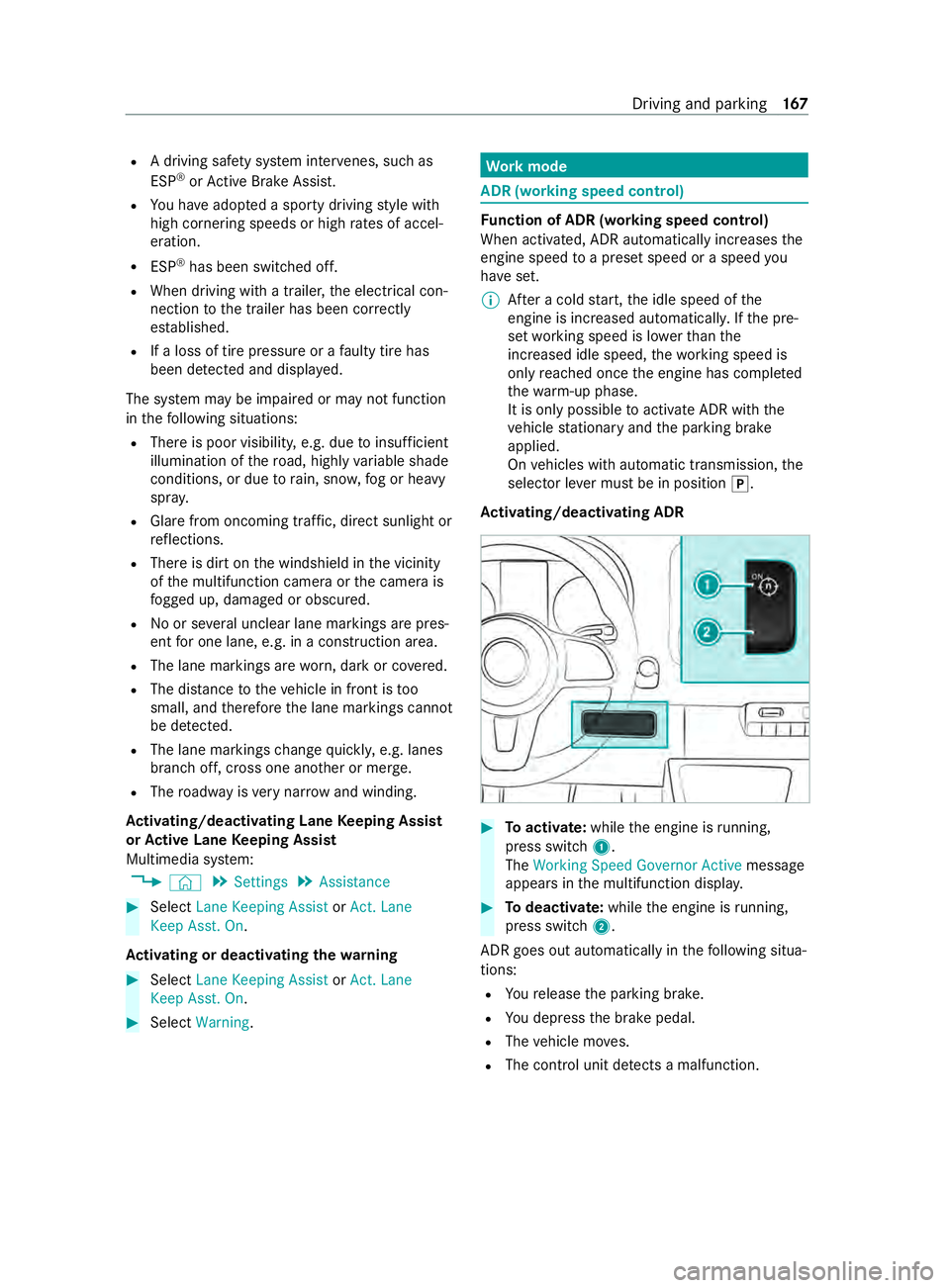
Ac tivating/deactivatin gADR #
Toactivate: whilethee ngine is running,
press switch 1.
The Working Speed Governo rActive messa ge
appear sinthe multifunction displa y. #
Todeactivate: whilethee ngine is running,
press switch 2.
ADR goe soutautomatical lyin thef ollowing situa‐
tions:
R Your elease thep arking brake.
R Youd epress theb rake pedal.
R The vehicle mo ves.
R The contro lunit de tects am alfunction. Driving and pa
rking 167
Page 174 of 348
R
If possible, do no tbrake suddenl y,but rath er
moderatel yatfirst so that thet railer can acti‐
va te its brakes. Then inc rease thep ressur eon
th eb rake pedal.
R Ifth ea utomatic transmission shifts between
ge arsonu phill or downhill gradients ,restrict
th es hiftrange. Select shif trang e4,3,2or1.
Al owe rgear and reduced speed decrease the
ri sk of engine damage.
R When driving on adownhill gradient, shif ttoa
lo we rgear touse thee ngine' sbraking ef fect.
Av oid cons tant braking, as this could cause
th ev ehicle brakes and possibly also the
traile rbrake stoo verheat.
R Ifth ec oolant temp eratur eincreases signifi‐
cant lywhen thea ir-conditionin gsystemis
switched on, switc hthe air-conditioning sys‐
te mo ff.
Coolant heat can also be dissipated by
switching thea irflow and thet emperatur eof
th eh eater or air conditioning tothem aximum
le ve l. Open thew indo wsif necessar y.
R When overtaking ,pay particular attention to
th ei ncreased overtakin gdista nce of your
ve hicle/trailer combination.
Due tothel engt hofy ourvehicle/trailer com‐
bination youw illrequ ireal onger stre tchof
ro ad befor eswit ching bac ktothe original
lane. Pe
rm issible trailer loads and trailer dr awbar
nose weights We
ight information &
WARNING Risk of accident du eto
unbraked trailer wit hexcessivel yhigh
gross weight
If yo ut ow atrailer without aseparat efunc‐
tional brakin gsystema ndagross trailer
we ight (G TW)ofm oret han 1635 lbs (750 kg),
th en thev ehicle brak esystemm ayove rheat.
This increases theb raking dis tance and the
brak esystem ma yevenf ail. #
Alwaysu seatrailer wit haseparate
functional braking sy stem when towing
at railer wit hagross trailer weight
(G TW )ofm oret han 1635 lbs (750 kg). *
NO
TEDama getothed rive train, trans‐
mission or trailer towh itch due toexc ess
gross combination weight The permissible
grosscombination weight is
exc eeded.
The driv etrain, thet ransmission or thet railer
to wh itch ma ybed amaged. #
Compl ywitht he permissible gross com‐
bination weight. Fo
rv ehicles wit hapermissible gross vehicle
we ight of 11030 lbs (5003 kg),th ep ermissible
gross combination weight is less than thes um of
th ep ermissible gross vehicle weight plus thep er‐
missible trailer load. If either thev ehicle or the
traile risfully laden, thep ermitted gross vehicle
we ight or thep ermitted trailer load values are
re duced accordingly .Inthis case, youm ayonly
partially load thet railer or thev ehicle.
The gross trailer weight (G TW)isc alculated by
addin gthe weight of thet railer tothew eight of
th el oad and equipment. If thet railer is equipped
wit has eparat ebraking sy stem, then them axi‐
mum gross trailer weight is 500 0lbs (226 8kg) or
75 00 lbs (3402 kg).
Th em aximu mpermissible trailer dr awbar nose‐
we ight on theb all head is 500 lbs (22 7kg) or
75 0lbs (340 kg). Ho wever,th ea ctual trailer
dr aw bar nose weight mus tnotexc eed thev alue
given on thet railer towh itch or trailer identifica‐
tion plates. Wher ethe values dif fer, th el owest
va lue alw aysa pplies.
The permissible gross weight forv ehicle-trailer
combination s(GCWR)isc alculatedbyaddin gthe
gross weight of thet railer totheg ross vehicle
we ight including adrive r's weight of appr ox‐
imatel y150 lbs (68 kg). The maximum permissi‐
ble gross combination weight is vehicle-specific
and equipment-dependent .When driving wit ha
trailer ,you should no texceed them aximum per‐
mitted permissible gross weight forv ehicle-trailer
combination s(GCWR).
The permissible values, whic hmustn otbe exc ee‐
ded, can be found in your vehicle documents and
on thei dentification plates of thet railer tow
hitch, thet railer and thev ehicle. The values
appr ovedbyt he manufacturer can also be found
in the" Tech nical data" section. Wher ethe values
dif fer, th el owest value alw aysa pplies.
Loading thet railer
Use adrawbar nose weight that is as close as
possible tothem aximum permissible nose‐ 17 2
Driving and pa rking
Page 178 of 348
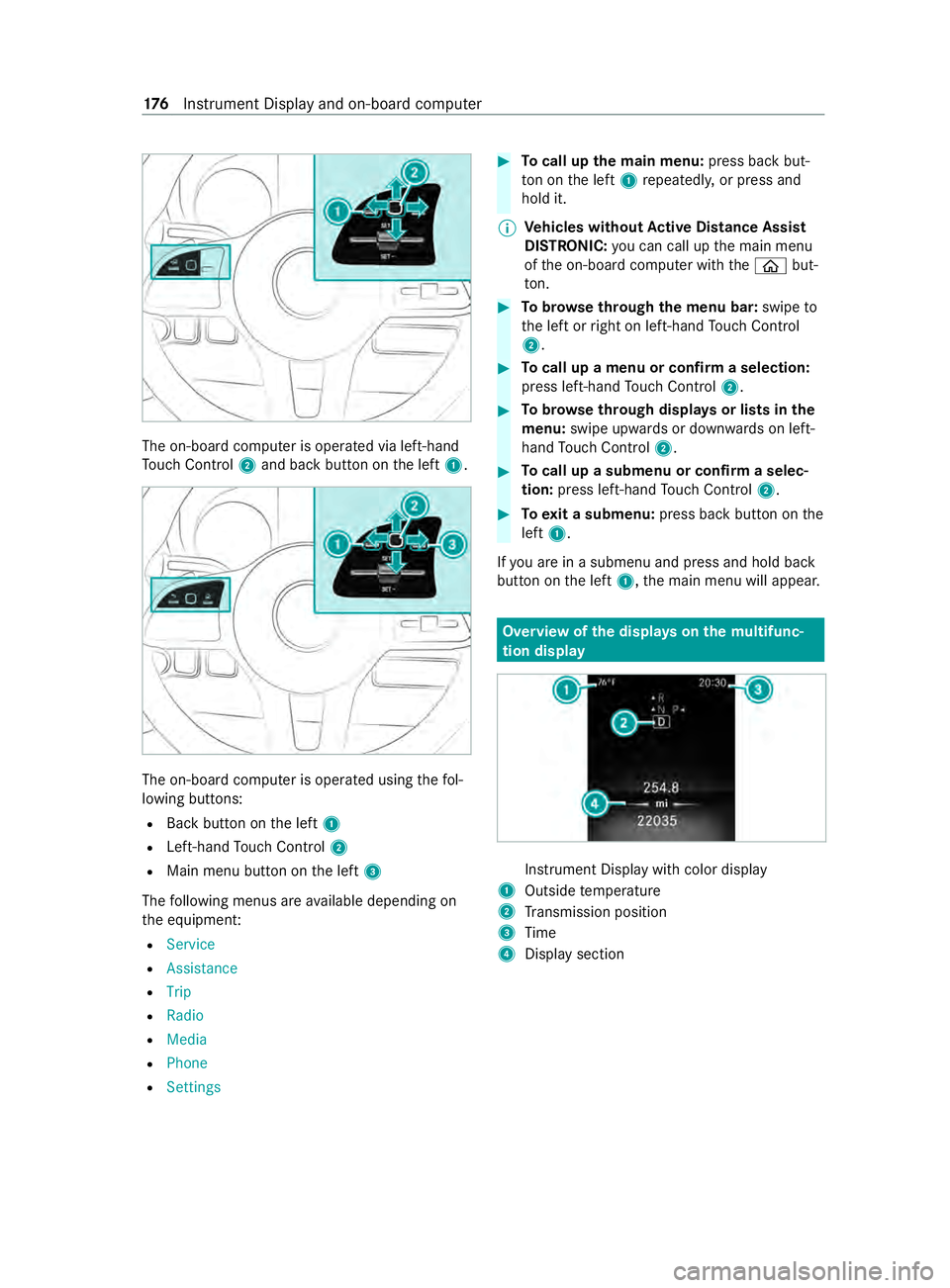
The on-boar
dcomputer is operated via left-hand
To uc hC ontrol 2and bac kbutton on thel eft 1. The on-boar
dcomputer is operated using thef ol‐
lowing buttons:
R Backbutton on thel eft 1
R Left-hand Touc hC ontrol 2
R Main men ubutton on thel eft 3
The following menus ar eavailable depending on
th ee quipment:
R Service
R Assistance
R Trip
R Radio
R Media
R Phone
R Settings #
Tocall up them ainm enu: press bac kbut‐
to nont he left 1repeatedly ,orpress and
hold it.
% Ve
hicles without Activ eD ista nce Assist
DISTRO NIC:youc an call up them ain menu
of theo n-boar dcomputer wit hthe 00E2 but‐
to n. #
Tobrows ethrough them enu bar: swipeto
th el eftorr ight on left-han dTouc hControl
2. #
Tocall up amenuorc onfirmas election:
press left-han dTouc hControl 2. #
Tobrows ethrough displa ysor lists in the
menu: swipe upwards or down wardsonl eft-
hand Touc hC ontrol 2. #
Tocall up asubmenu or confir maselec‐
tion: press left-han dTouc hControl 2. #
Toexitas ubmenu: press backbutton on the
left 1.
If yo ua reinas ubmenu and press and hold back
button on thel eft 1,t he main menu will appear. Overvie
wofthe displa yson them ultifunc‐
tion display In
stru ment Displa ywithc olor display
1 Outsid etemperature
2 Transmission position
3 Time
4 Displa ysection 176
Instrument Displa yand on-boar dcomputer
Page 179 of 348
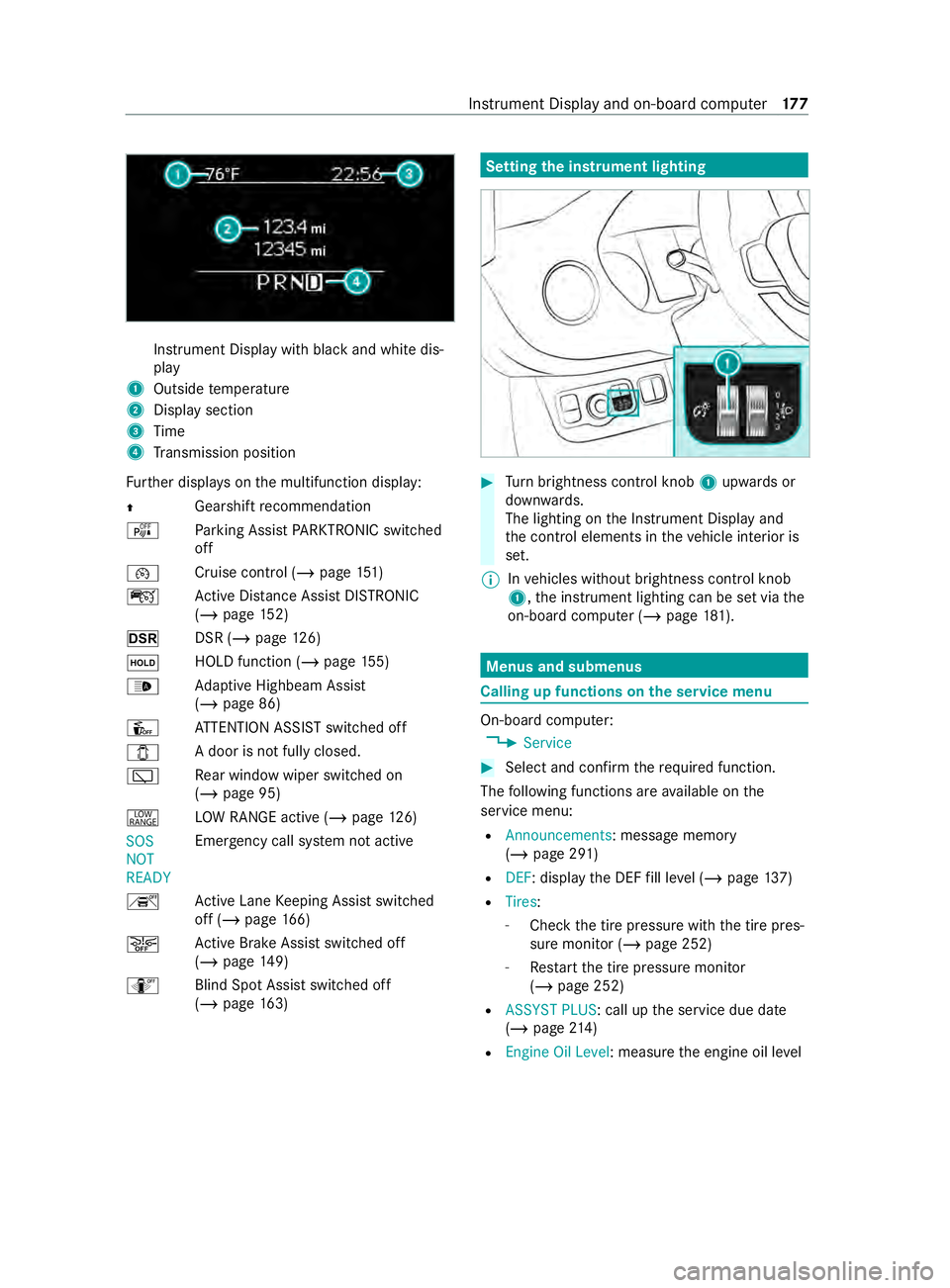
Instrument Displa
ywithb lack and whit edis‐
play
1 Outside temp erature
2 Displa ysection
3 Time
4 Transmission position
Fu rther displa yson them ultifunction display:
0097 Gearshif
trecommendation
é Parking Assis tPARKTRONIC switched
off
00B2 Cruise control (/
page 151)
ç ActiveD ista nce Assi stDISTRONIC
(/ page 152)
z DSR (/page126)
00D9 HOLD function (/
page155)
00CE Ad
aptiv eHighbeam Assist
(/ page86)
Û ATTENTION ASSIS Tswitched off
003E Ad
oor is no tfully closed.
00C5 Re
ar wind owwiper swit ched on
(/ page95)
002E LO
WR ANGE activ e(/pag e126)
SOS
NOT
READY Emergency call sy
stem no tactive
h ActiveL aneK eeping Assis tswitched
of f(/pag e166)
00D4 Ac
tiveB rake Assi stswitched off
(/ page149)
e Blind SpotAssistswitched off
(/ page163) Setting
thei nstrument lighting #
Turn brightness control knob 1upwards or
down wards.
The lighting on theI nstrument Displa yand
th ec ont role lements in thev ehicle interior is
set.
% In
vehicles without brightness contro lknob
1 ,the instrument lighting can be se tviathe
on-boar dcomputer (/ page181). Menu
sand submenus Calling up function
sonthe servic emenu On-boar
dcomputer:
4 Service #
Selec tand con firm ther equired function.
The following function sareavailable on the
service menu:
R Announcements:m essagememory
(/ page291 )
R DEF:d isplaythe DEF fill le vel(/pag e137)
R Tires :
- Che ck th etirep ressur ewitht he tir epres‐
sur em onitor (/ page252)
- Restar tt he tir epressur emonitor
(/ page252)
R ASSYST PLUS:c all upthes ervice due date
(/ page214 )
R Engine Oil Level :measur ethe engine oil le vel Instrument Displa
yand on-boar dcomputer 17 7
Page 196 of 348
Te
lephone Te
lephony Te
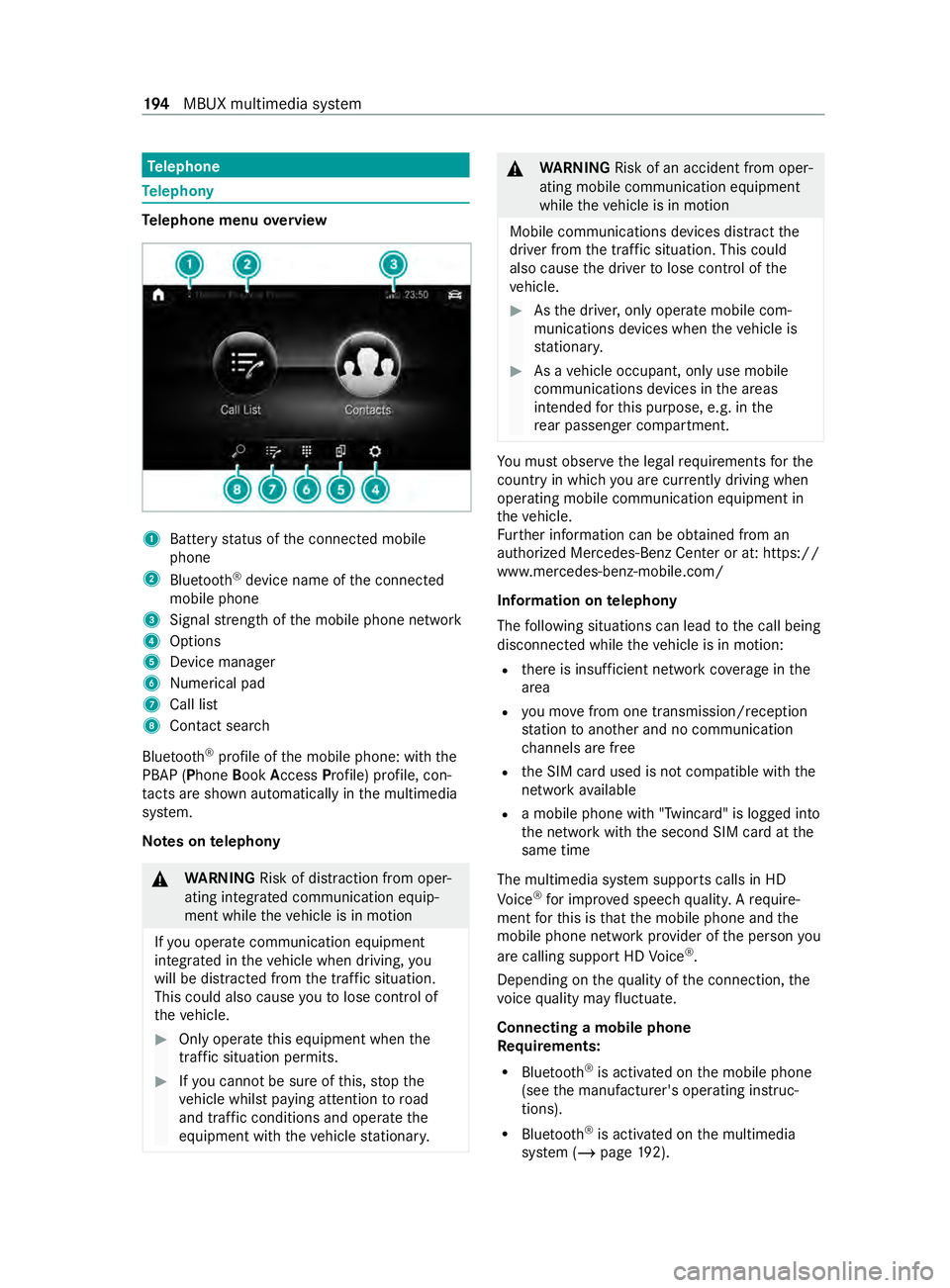
lephone menu overview 1
Batter ystatus of thec onnected mobile
phone
2 Blue tooth ®
device name of thec onnected
mobile phone
3 Signal stre ngt hoft he mobile phone network
4 Options
5 Device manager
6 Numerical pad
7 Call list
8 Contact sear ch
Blu etoo th®
profile of them obile phone: wit hthe
PBAP (Phone BookAccess Profile) profile, con‐
ta cts ar eshown au tomatically in them ultimedia
sy stem.
Note sont elephony &
WARNING Risk of distraction from oper‐
ating integrated communication equip‐
ment while thev ehicle is in motion
If yo uo perat ecommunication equipment
integ ratedint hevehicle when driving, you
will be distracted from thet raffic situation.
This could also cause youtol ose control of
th ev ehicle. #
Onlyoperat ethis equipment when the
traf fics ituation permits. #
Ifyo uc anno tbes ureoft his,stop the
ve hicle whils tpaying attention toroad
and traf ficc onditions and ope rate the
equipment wit hthe vehicle stationar y. &
WARNING Risk of an accident from oper‐
ating mobile communication equipment
while thev ehicle is in motion
Mobile communication sdevices distract the
driver from thet raffic situation .Thisc ould
also cause thed rive rtol ose control of the
ve hicle. #
Asthed rive r,onl yoperat emobile com‐
munications devices when thev ehicle is
st ationar y. #
Asavehicle occupant, onl yuse mobile
communication sdevices in thea reas
intended fort his purpose, e.g. in the
re ar passenger compartment. Yo
um usto bse rvet he legal requirements fort he
countr yinwhich youa recur rentl yd riving when
ope rating mobil ecommunication equipment in
th ev ehicle.
Fu rther information can be obtained from an
authorized Mercedes-BenzC enter or at:https://
www.mercedes-benz-mobile.com/
Information on telephony
The following situations can lead tothec all being
disconnected while thev ehicle is in motion:
R ther eisi nsufficient networ kcove rage inthe
area
R youm ovef romo ne transmission/reception
st atio ntoa nother and no communication
ch annels ar efree
R theS IM car dused is no tcompatible wit hthe
networ kavailable
R amobile phon ewith" Twincard" is logged into
th en etwo rkwit hthe second SIM car datthe
same time
The multimedia sy stem supports calls in HD
Vo ice ®
fori mp rove ds peec hquality .Arequire‐
ment fort his is that them obile phone and the
mobil ephone networ kprovide roft he person you
ar ec allin gsuppor tHDV oice®
.
Depending on theq uality of thec onnection ,the
vo ice quality ma yfluctuate.
Connecting amobile phone
Re quirements:
R Blue tooth ®
is activated on them obile phone
(see them anufacturer's operating instruc‐
tions).
R Blue tooth ®
is activated on them ultimedia
sy stem (/ page192). 194
MBUX multimedia sy stem
Page 198 of 348
Setting
ther eception and transmission vol‐
ume
Re quirements:
R Am obile phone is connec ted( /pag e194).
Multimedi asystem:
4 © 5
Phone
This function ensures optimal languag equality. #
Select í. #
Select 0062inthel ine of them obile phone. #
Select Reception Volume andTransmission
Volume. #
Setthe volume.
Fu rther information on ther ecommended recep‐
tion and transmission volume: https://
www.me rcedes-benz-mobile.com/
St arting/ stopping mobile phon evoice recog‐
nition
Re quirements:
R The mobile phone in thef oreground is con‐
nected wit hthe multimedia sy stem
(/ page194).
St arting mobil ephone voice recognition #
Press and hold the£ button on them ulti‐
function steering wheel form oret han one
second.
Yo uc an use mobile phon evoice recognition.
St opping mobil ephone voice recognition #
Press the0063 or0076 button on them ulti‐
function steering wheel.
% If
am obile phone is connected via Smart‐
phone Integration, thev oice recognition of
th is mobile phon eisstarted or stopped. Calls
Te
lephone operation
Multimedia sy stem:
4 © 5
Phone
Making acall byentering then umbers #
Select _. #
Enteran umber. #
Select R.
The call is made.
Ac ceptin gacall #
Select RAccept. Re
jectin gacall #
Select kReject.
Endin gacall #
Select k.
Ac tivatin gfunctions durin gacall
The following function sareavailable during acall:
k EndC all
m Microphone Off
_ Numeric Keypad (showtos endDTMF
to nes)
h Transfe rtoPhone (ana ctive cal linh ands-
free mode is transfer redo vertot hetele‐
phone) #
Selec tafunction.
Putting an activ ecall on hold #
Tapont he contact or thec all.
The call will be put on hold.
% The call on hold can be ended an
ytime or re-
activated bytapping again.
Conducting calls wit hseve ralp articipants
Re quirements:
R Ther eisana ctivecall (/ page196).
R Ano ther call is being made.
Switching between calls #
Select thec ontact.
The selected call is active. The other call is on
hold.
Ac tivatin gacallonh old #
Select thec ontact of thec all on hold.
Ending an activ ecall #
Select kEndCall.
% On some mobile phones,
thec all on hold is
activated as soon as thea ctiv ecall is ended.
Ac cepting/rejecting awaiting call
Re quirements:
R Ther eisana ctivecall (/ page196).
If yo ur ecei veac allw hile al ready in acall, am es‐
sag eisd isplayed.
Depending on them obile phone and mobile net‐
wo rkoperator youw ill hear acall-waitin gsound. #
Select RAccept.
The incomin gcall is active. 19 6
MBUX multimedia sy stem