esp MERCEDES-BENZ SPRINTER 2020 MY20 with 7” screen
[x] Cancel search | Manufacturer: MERCEDES-BENZ, Model Year: 2020, Model line: SPRINTER, Model: MERCEDES-BENZ SPRINTER 2020Pages: 348, PDF Size: 5.84 MB
Page 167 of 348
Ar
isk of acollision ma yarise in thef ollowing sit‐
uations, fore xamp le:
R Ifth ed rive rm ixes up thea ccelerator and
brak epedals.
R Ifth ew rong gear is selec ted.
The Driv eAwayA ssistfunction is activ eunder the
fo llowing conditions:
R IfPa rking Assis tPARKTRONIC is activated.
R Ever ytimet he gear is changed to005E or005B
when thev ehicle is at astandstill.
R Ifth ed etected obs tacle is les sthan appr ox‐
imately 3.3 ft(1.0 m) away.
R Ifth em aneuvering assis tance function is acti‐
va tedint he multimedia sy stem.
Sy stem limits
Driv eAwayA ssistis una vailable on inclines and
when driving wit hatrailer. Re
ar Cross Traf ficA lert Fu
nction of Rear Cross Traf ficA lert
The radar sensor sinthe bumper ar eused fort he
sy stem. This waythe area adjacent tothev ehicle
is continually monitored. If ther adar sensor sare
obscured byvehicles or other objects, de tection
is no tpossible.
% Also
read then otes on Blind Spo tAssist
(/ page163).
Ve hicles with Blind Spo tAssis t:driver scan
also be warned of an ycrossing tra ffic when back‐
ing up out of aparkin gspace. If avehicle is
de tected, thew arning lam pinthe outside mir ror
on thec orresponding side lights up red. If it
de tects acritica lsituation, awarning tone also
sounds.
Ve hicles with Blind Spo tAssis tand Parking
Assis tPARKTRONIC: driverscan also be warned
of an ycrossing tra ffic when backin gupout of a
parkin gspace. If acritical situation is de tected, a
wa rning symbol appear sonthe camera imag eof
th em ultimedia sy stem. If thed rive rd oes not
re spond tothew arning ,the vehicle's brakes can
be applieda utomatically.Inthis case, awarning
to ne sounds. The
Rear Cross Traf ficA lertfunction is acti ve
unde rthe following conditions:
R BlindSpotA ssis tisa ctivated.
R Reverseg ear is engaged or thev ehicle is
backing up at walkin gpace.
R Ifth em aneuvering assis tance function is acti‐
va tedint he multimedia sy stem.
The Rear Cross Traf ficA lertfunction is una vaila‐
ble when driving wit hatrailer. Lane
Keeping Assis tand Activ eL aneK eeping
Assist Fu
nctions of Lane Keeping Assist Lane
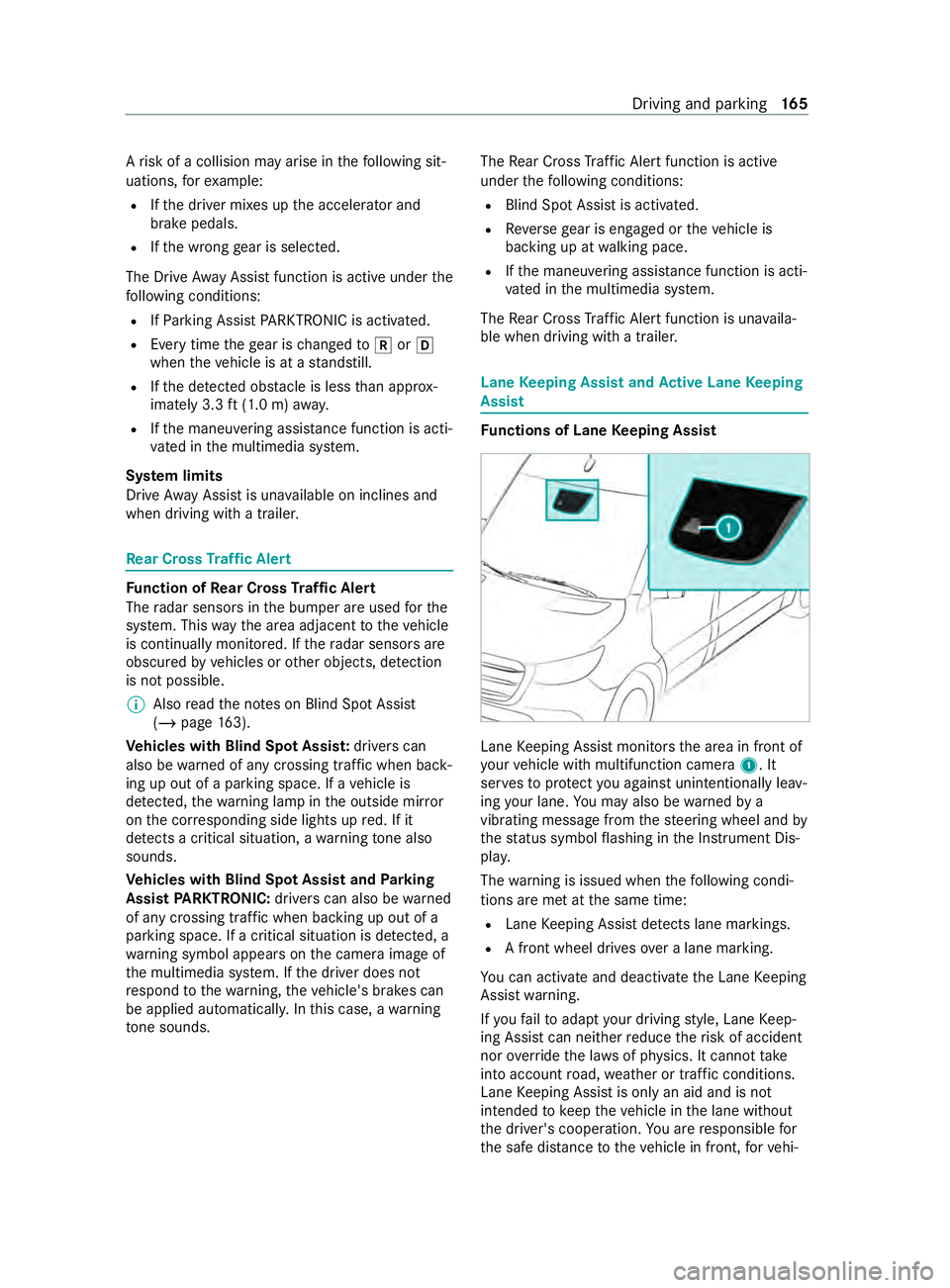
Keeping Assis tmonitor sthe area in front of
yo ur vehicle wit hmultifunction camera 1.It
ser vestop rotect youa gains tunin tentionally le av‐
ing your lane .You ma yalso be warned by a
vibrating messa gefrom thes teering wheel and by
th es tatus symbo lflashing in theI nstrument Dis‐
pla y.
The warning is issued when thef ollowing condi‐
tions ar emetat thes ame time:
R Lane Keeping Assis tdetects lane markings.
R Afront wheel drives overal ane marking.
Yo uc an activat eand deactivat ethe Lane Keeping
Assis twarning.
If yo uf ail toadap tyour driving style, Lane Keep‐
ing Assis tcan neither reduce ther isk of accident
nor override thel aw sofp hysics. It canno ttake
int oa ccount road, weather or traf ficc onditions.
Lane Keeping Assis tisonlyana id and is not
intended tokeep thev ehicle in thel ane without
th ed rive r's cooperation. Youa re re sponsible for
th es afed ista nce tothev ehicle in front, forv ehi‐ Driving and parking
16 5
Page 169 of 348
R
Adriving sa fety sy stem inter venes, su chas
ESP ®
or ActiveB rake Assi st.
R Youh ave adop tedas porty driving stylew ith
high cornering speeds or high ratesofa ccel‐
eration.
R ESP ®
has been switched off.
R When driving wit hatrailer ,the electrical con‐
nection tothet railer has been cor rectly
es tablished.
R Ifal oss of tir epressur eoraf aulty tir ehas
been de tected and displa yed.
The sy stem ma ybeimpaired or ma ynotfunction
in thef ollowing situations:
R Ther eisp oor visibilit y,e.g. due toinsuf ficient
illumination of ther oad, high lyvariable shade
conditions, or due torain, sno w,fogorh eavy
spr ay.
R Glar efromo ncomin gtraf fic, direct sunligh tor
re flections.
R Ther eisd irtont he windshield in thev icinity
of them ultifunction camer aorthe camera is
fo gged up, damaged or obscured.
R No or se veralu nclear lane markings ar epres‐
ent foro ne lane, e.g. in aconstruction area.
R The lane markings ar eworn, dar korcovered.
R The dis tance tothev ehicle in front is too
small, and therefor ethe lane markings cannot
be de tected.
R The lane markings chang equickl y,e.g. lanes
branc hoff,c ross one ano ther or mer ge.
R The roadw ayisvery nar row and winding.
Ac tivating/deactivatin gLaneK eeping Assist
or Activ eL aneK eeping Assist
Multimedia sy stem:
4 © 5
Settings 5
Assistance #
Select Lane Keeping Assist orAct.L ane
Keep Asst .On.
Ac tivatin gordeactivatin gthe warning #
Select Lane Keepin gAssist orAct. Lane
Keep Asst. On. #
Select Warning. Wo
rkmode AD
R(wo rkings peed control) Fu
nction of ADR (working speed control)
When activated, ADRa utomaticallyincreases the
engine speed toap rese ts peed or aspeed you
ha ve set.
% Af
terac oldstart, thei dle speed of the
engine is increased automaticall y.Ifth ep re‐
se tw orking speed is lo werthan the
inc reased idle speed ,the working speed is
onl yreached once thee ngine has comple ted
th ew arm-up phase.
It is only possible toactivat eADR withthe
ve hicle stationar yand thep arking brake
applied.
On vehicles wit hautomatic transmission, the
selector le verm ustbeinp osition005D.
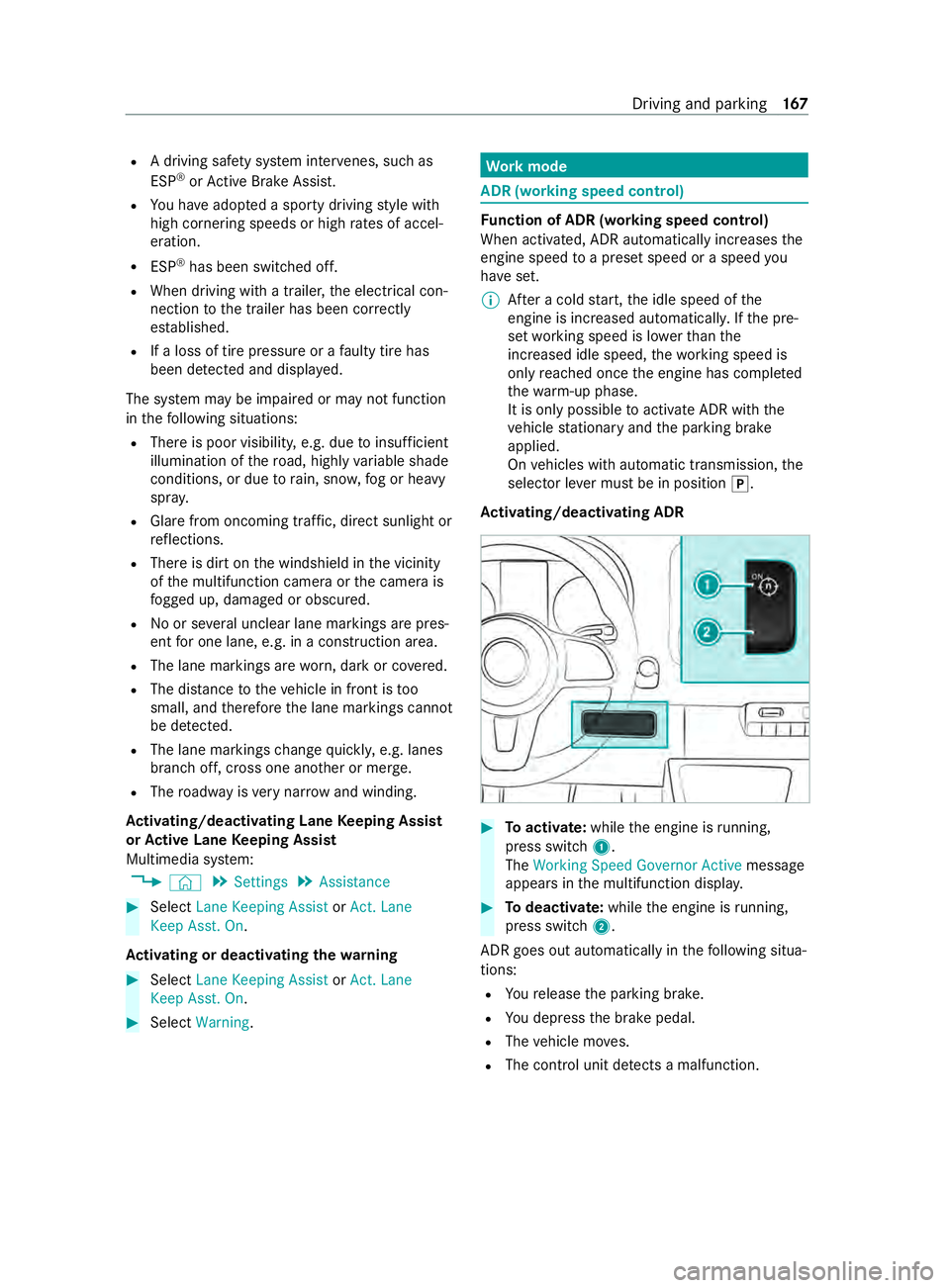
Ac tivating/deactivatin gADR #
Toactivate: whilethee ngine is running,
press switch 1.
The Working Speed Governo rActive messa ge
appear sinthe multifunction displa y. #
Todeactivate: whilethee ngine is running,
press switch 2.
ADR goe soutautomatical lyin thef ollowing situa‐
tions:
R Your elease thep arking brake.
R Youd epress theb rake pedal.
R The vehicle mo ves.
R The contro lunit de tects am alfunction. Driving and pa
rking 167
Page 181 of 348
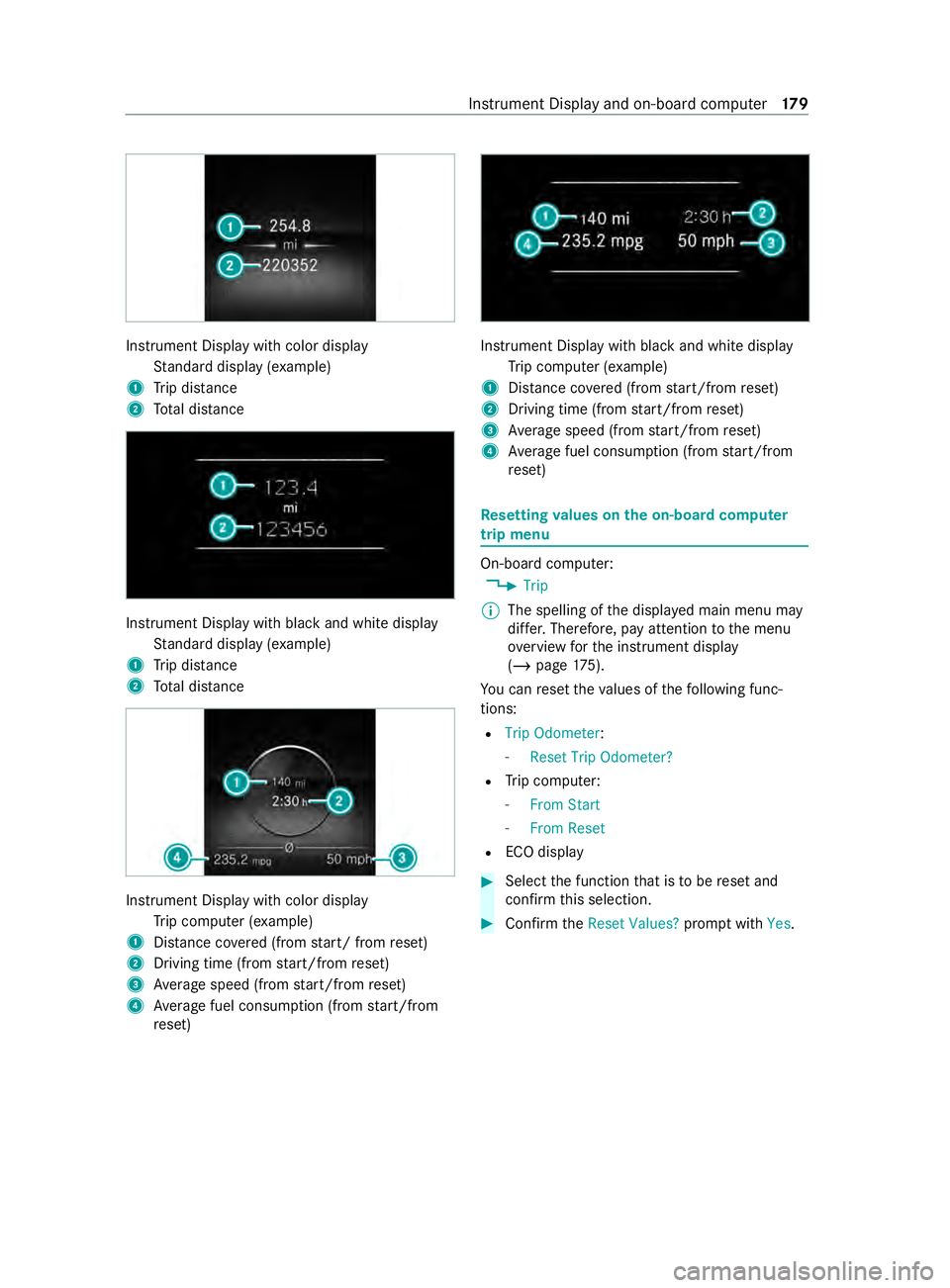
Instrument Displa
ywithc olor display
St andar ddispla y(example)
1 Trip dis tance
2 Totald ista nce Instrument Displa
ywithb lacka nd whit edisplay
St andar ddispla y(example)
1 Trip dis tance
2 Totald ista nce Instrument Displa
ywithc olo rdisplay
Tr ip computer (e xamp le)
1 Distance co vered( from start/ from reset)
2 Driving time (from start/from reset)
3 Averag espeed (from start/from reset)
4 Averag efuel consum ption (from start/from
re set) Instrument Displa
ywithb lacka nd whit edisplay
Tr ip computer (e xamp le)
1 Distance co vered( from start/from reset)
2 Driving time (from start/from reset)
3 Averag espeed (from start/from reset)
4 Averag efuel consum ption (from start/from
re set) Re
setting values on theo n-boa rdcompu ter
trip menu On-board computer:
4 Trip
% The spelling of
thed ispla yedm ain menu may
dif fer. Therefore, pa yattention tothem enu
ove rviewf orthei nstrument display
(/ page175).
Yo uc an rese tthe values of thef ollowing func‐
tions:
R Trip Odometer:
- Reset Trip Odometer?
R Trip computer:
- FromS tart
- FromR eset
R ECOd isplay #
Selec tthe function that is tobe rese ta nd
confir mthis selection. #
Confir mtheReset Values? promptwith Yes. In
stru ment Displa yand on-boar dcomputer 17 9
Page 184 of 348
Information abou
tMercedes PR O(Mercedes
me)
Mercedes-Ben zVans vehicles suppor tthe follow‐
ing telematics solutions depending on what is
selec ted:
R Mercedes PRO
R Mercedes me
When youl og in wit hauser accoun ttothe
Mercedes PR OportalorM ercedes me Portal,
th en services and of fers from Mercedes-Benz
Va ns will be available toyou.
Av ailabilit yiscountr y-dependent. Youc an check
th ea vailabilit yofM ercedes PR Oinyour country
at thef ollowing page: http://www.mercedes.pro
Yo uc an checkt he availabilit yofMercedes me in
yo ur countr yatthefollowing page: http://
www.me rcedes.me
Fo rm orei nformation on Mercedes PR Oor
Mercedes me contact an authorized Mercedes-
Benz Center or visit theM ercedes PR OPortalor
Mercedes me Portal. Information abou
tMercedes PR Oconnect
(Mercedes me connect)
Among stothers, Mercedes PR Oconnect or
Mercedes me connect pr ovide thef ollowing serv‐
ices:
R Accident and breakdown mana gement
(breakdown assi stanc ecall button or auto‐
matic acciden torbreakd ownd etection) as a
supplement tothee mer gency cal lsyst em
Use theb reakdown assis tance cal lbuttonin
th eo verhead cont rolp anel tomak eac allto
th eM ercedes-Benz Cus tomer Center
(/ page183).
Yo uc an also selec tamenue ntry inthem ulti‐
media sy stem (/ page182).
R Emergency Call Sy stem
Use the0053 button (SOS button) in the
ove rhead cont rolp anel tomak eac alltothe
Mercedes-Benze mergency cal lcenter
(/ page 183).
The Mercedes-Benz Cust omer Center andthe
Mercedes-Benze mergency cal lcenter are availa‐
ble fory ou around thec lockfor theu se of the
services.
Please no tethat Mercedes PR Oconnect, or
Mercedes me connect, is aMercedes-Benz service. In emer
gencies, al ways cal lthe national
emergency servic esfirs tu sing thes tandard
national emer gency service phone numbers. In
emergencies, youc an also use theE mer gency
Call Sy stem (/ page228). Obser vethel egal
requ irements fort he countr yinwhichyou are
st ay ing.
The following condition smustbem etto use
Mercedes PR Oconnec torMercedes me connect
services in thev ehicle:
R Youh avea ccess toaG SM network
R The contract partner' sGSM networ kcove r‐
ag eisa vailable in ther espectiv eregion
R The ignition is switched on, so that vehicle
dat acan be transfer reda utomatically Calling
theM ercedes-Benz Cus tomer Center
using the multimedi asystem
Multimedia sy stem:
4 © 5
Phone 5
g #
Call Mercedes PRO connect orMercedes me
connect.
Then, youc an selec taservic eand be connec ted
to as pecialis tatthe Mercedes-Benz Cus tomer
Center.
Yo uc an find information on thef ollowing topics:
R Activation of Mercedes PR Oconnect or
Mercede smeconnect
R Ope rating thev ehicle
R Neares tauthorized Mercedes-BenzC enter
R Other products and services from Mercedes-
Benz 18 2
Mercedes PRO
Page 195 of 348
Ac
tivating/deactivatin gWi-Fi
Multimedia sy stem:
4 © 5
Settings 5
System
5 Wi-Fi &Bluetooth #
Switch Wi-Fion or off.
If Wi-Fi is deactivated, communication via Wi-
Fi to all devices is inter rupte d. Sy
stem language Note
sont he system language
This function allo wsyoutod etermine thel an‐
guag efor them enu displa ys.T he selected lan‐
guag eaffects thec haracter savailable fore ntr y.
Setting thes ysteml anguage
Multimedia sy stem:
4 © 5
Settings 5
System
5 Language #
Setthe language. Setting
thed istance unit Multimedia sy
stem:
4 © 5
System 5
Units #
Select kmormi. #
Inthem ultifunction displa yofthe Instrument
Displa y,switc hthe Additional Speedometer
displa yon. Re
setting them ultimedia sy stem (rese tfunc‐
tion) Multimedia sy
stem:
4 © 5
Settings 5
System 5
Reset
Pe rsonal dat aisdeleted, fore xamp le:
R Statio npresets
R Connected mobile phones
Aq uer yappear sagain asking if thes ystem
should reall yber eset. #
Select Yes.
If PIN pr otection is activated, apromp tappears
asking if youa lso wish torestor et his tothef ac‐
to ry settings during areset. #
Select Yes. #
Enter thec urrent PIN.
The PIN is reset.
or #
Select No.
The cur rent PIN stay st he same af terr eset‐
ting.
% If
yo uh ave forg otteny our PIN ,anauthorized
Mercedes-Ben zCenter can deactivat ethe
PIN pr otection fory ou.
Ap romp tappear sagain asking whe ther you
re all yw ish toreset. #
Select Yes.
The multimedia sy stem is rese ttot hefactory
settings.
Re setting using abutton #
Press bo th the002Band\ buttons at the
same time until them ultimedia sy stem
re starts (at leas t15seconds).
The multimedia sy stem is restar ted. No data
is dele tedd uring this process. Ve
hicl einformation Displaying
vehicl edata Multimedi
asystem:
4 © 5
Info #
Select Vehicle .
The vehicle dat aisdisplayed. Displaying engine data
Multimedia sy
stem:
4 © 5
Info #
Select Engine.
The engine dat aisdisplayed.
% The
values fore ngine outpu tand engine tor‐
qu em aydeviat efromt he nominal values.
Items that can influenc ethis are, fore xam‐
ple:
R Engin espeed
R Sea le vel
R Fuel grade
R Outside temp erature Calling up
thef uel consum ption indicator Multimedia sy
stem:
4 © 5
Info #
Select Consumption .
Ad ispla ywithc urrent and average consu mp‐
tio nf igures is displa yed. MBUX multimedia sy
stem 19 3
Page 200 of 348
If
th eP BAPB luetooth ®
profile is no tsuppor ted,
th ee ffects ar easfollows:
R The multimedia sy stem generates acalllist
independentl yassoon as calls ar emade in
th ev ehicle.
R The call lis tisnotsynchronized wit hthe call
lists in them obile phone.
Making acall from thec all list
Multimedia sy stem:
4 © 5
Phone #
Select +Recent Calls. #
Select an entry.
The call is made.
Calling up additional options in thec all list
Multimedia sy stem:
4 © 5
Phone #
Select +Recent Calls. #
Forp reviousl ystore dc ontacts: select 0048in
th el ine of an entry.
The sear chresults ar edispla yed. Apple CarPlay
® Overvie
wofApple CarPlay ® &
WARNING Risk of distraction from infor‐
mation sy stems and communications
equipment
If yo uo perat einformation and communica‐
tio ne quipment integ ratedint hevehicle when
driving, youw ill be distracted from thet raffic
situation. This could also cause youtol ose
control of thev ehicle. #
Onlyoperat ethis equipment when the
traf fics ituation permits. #
Ifyo uc anno tbes ureoft his,stop the
ve hicle whils tpaying attention toroad
and traf ficc onditions and ope rate the
equipment wit hthe vehicle stationar y. Yo
um usto bse rvet he legal requirements fort he
countr yinwhich youa recur rentl yd riving when
ope rating them ultimedia sy stem.
iPhone ®
functions can be used via them ultime‐
dia sy stem using Apple CarPlay ®
.T he ya reoper‐
ated using thet ouchscreen, Touc hC ontrol or the
Siri ®
vo ice-operated control sy stem. Youc an acti‐
va te thev oice-operated control sy stem bypress‐ ing and holding
the£ button on them ultifunc‐
tion steering wheel.
Onl yone mobile phone at atime can be connec‐
te dv ia Apple CarPlay ®
to them ultimedia sy stem.
The availabilit yofApple CarPlay ®
ma yvary
according tothec ount ry.
The service pr ovider is responsible fort his appli‐
cation and thes ervices and content connected to
it.
Apple CarPlay ®
is ar egis tere dt rademar kof
Apple Inc.
Information on Apple CarPlay ®
When Apple CarPlay ®
is being used, thei Pod ®
media source is no tavailable fort he respective
iPhone ®
.
Connecting an iPhone ®
via Apple CarPlay ®
(with cable)
Requ irements:
R The multimedia sy stem is equipped wit hthe
function.
R The cur rent version of your device's operating
sy stem is being used (see them anufacturer's
operating instructions).
R The full rang eoff unctions forA pple CarPlay ®
is only available wit hanInterne tconnection. #
Connect thei Phone ®
to the ç USB port
on them ultimedia sy stem using asuitable
cable (/ page203). #
If no other device is connected wit hthe sys‐
te mv ia Blue tooth®
:c onfir mthe dat aprotec‐
tion pr ovisions. #
If ano ther device is connected via Blue tooth®
or Apple CarPlay ®
(wireless) wit hthe sy stem:
ta pont heTap here to start Apple CarPlay
for:
or #
Select thei Phone ®
in the í device list
under thea pplication.
The pr evious connection via Blue tooth®
or
Apple CarPlay ®
(wireless) is disconnected.
The device newl yconnected via cable is
active.
Ac cepting/rejecting thed atap rotection pro‐
visions
Am essag ewitht he dat aprotection pr ovisions
appears. #
Select Accept &Start. 19 8
MBUX multimedia sy stem
Page 202 of 348
Only one mobile phone at
atime can be connec‐
te dv ia Android Auto to them ultimedia sy stem.
The availabilit yofAndroid Au toand Android Auto
apps ma yvarya ccordin gtothe countr y.
The service pr ovider is responsible fort his appli‐
cation and thes ervices and content connected to
it.
Information on Android Auto
While using Android Auto,v arious func tions of
th em ultimedia sy stem, fore xamp lethem edia
source Blue tooth®
audio, ar enotavailable.
Connecting amobile phone via Android Auto
(wired)
Requ irements:
R The multimedia sy stem is equipped wit hthe
function.
R The cur rent version of your device's operating
sy stem is being used (see them anufacturer's
operating instructions).
R Ther eisanI nternetconnection fort he full
ra ng eoff unctions forA ndroid Auto.
Multimedia sy stem:
4 © 5
Smartphone
5 Mercedes PRO &Apps 5
Android Auto
5 Star tAndroid Auto #
Connec tthe mobile phone totheU SB por ton
th em ultimedia sy stem using asuitable cable
(/ page203). #
If no other device is connected wit hthe sys‐
te mv ia Blue tooth®
or Apple CarPlay ®
(wire‐
less): confir mthe dat aprotection pr ovisions. #
If ano ther device is connected via Blue tooth®
,
Androi dAuto( wireless) or Apple CarPlay ®
(wireless) wit hthe sy stem: taponthe Tap
here to start Android Auto
for:
or #
Select thed evice in theí device list
under thea pplication.
All existin gdevice connection svia USB ,Blue‐
tooth ®
,A ndroid Au to(wireless) or Apple Car‐
Play ®
(wireless) ar edisconnec ted. The device
newl yconnected via cable is active.
% If an Android
Autoapplicatio nisactive, you
can cal lupthis activ eapplication using the
z or002B application buttons. Ac
cepting/rejecting thed atap rote ction pro‐
visions
% The
firs ta ctivatio nofA ndroidAutoont he
multimedia sy stem mus tbecarried out when
th ev ehicle is stationar yfor saf etyr easons.
Fo rthe initial star toft he application:a message
wit hthe dat aprotection pr ovision sappears. #
Select Accept &Start.
Re turning tothem ainm enu #
Press the00E2 button.
% If
yo uu se bo th thewired as well as wireless
Android Autofunction, obser vethat aw ire‐
less connectio nmaybe es tablished when the
device is next connected using Blue tooth®
or
af te rs tartin gt he multimedia sy stem. If
Android Autowa sn otdispla yedint hefore‐
ground be fore disconnecting, thea pplication
st arts in theb ackg round when reconnected.
Yo uc an call up Android Autointhem ain
menu.
Connecting amobile phone via Android Auto
(wireless)
Requ irements:
R The multimedia sy stem is equipped wit hthe
function.
R The cur rent version of your device's operating
sy stem is being used (see them anufacturer's
operating instructions).
R The device supports theA ndroid Autowire‐
less function.
R Blue tooth ®
is activated on thed evice (see the
manufacturer's operating instructions).
R The device is "visible" foro ther devices.
R The full rang eoff unctions forA ndroid Autois
onl ypossible wit hanInterne tconnection.
Multimedia sy stem:
4 © 5
Phone 5
í
Connecting amobile phone #
Connec tthe mobile phone using Blue tooth®
( / pag e194).
St arting Android Auto #
Select Start Androi dAuto. 200
MBUX multimedi asystem
Page 203 of 348
%
Depending on
thec onfiguration of the
device, af terc onnecting them obile phone via
Blue tooth ®
,t he prom ptma yappear in the
media displa yasking if Android Autoshould
be star ted. The querym ustint hat case be
answered with Yes.
% It is possible at an
ytime toswitc hbetwe en
connection via Blue tooth®
or Android Auto
(wireless) in thed evice list.
Ac cepting/rejecting thed atap rotection pro‐
visions
Am essag ewitht he dat aprotection pr ovisions
appears. #
Select Accept &Start.
Re turning tothem ainm enu #
Press the00E2 button.
% If Android
Autowa sn otdispla yedint hefore‐
ground befor edisconnecting, thea pplication
st arts in theb ackg round when reconnected.
Yo uc an call up Android Autointhem ain
menu.
Calling up theA ndroid Autosound settings
Multimedia sy stem:
4 © 5
Smartphone 5
Android Auto
5 Z #
Select sound settings.
Ending Android Auto #
Disconnect thec onnectin gcable between the
mobil ephone and multimedia sy stem.
Mercedes-Benz recommends disconnecting
th ec onnectin gcable onl ywhen thev ehicle is
st ationar y. Tr
ansfer redv ehicle dat awith Android Auto
and Apple CarPlay ®Overvie
woftransfer redv ehicle data
Whe nusing Android Autoor Apple CarPlay ®
,c er‐
ta in vehicle dat aistransfer redtot he mobile
phone. This enables youtog ettheb esto ut of
selected mobile phone services. Vehicle dat ais
no td irectl yaccessible.
The following sy stem information is transmit ted:
R softwar erelease of them ultimedia sy stem
R system ID (anonymized)
The transfer of this dat aisusedtooptimize com‐
munication between thev ehicle and them obile
phone. To
do this, and toassig nseve ralv ehicles tothe
mobil ephone, avehicle ID is random lyge ner‐
ated.
Thi sh asno connection tothev ehicle identifica‐
tion number (VIN) and is dele tedw hen them ulti‐
media sy stem is rese t(/ pag e193).
The following vehicle status dat aistransmitted:
R transmission position engaged
R distinction between par ked, standstill ,rolling
and driving
R day/night mode of thei nstrument clus ter
The transfer of this dat aisusedtoalter ho wcon‐
te nt is displ ayed tocor respond tothed riving sit‐
uation.
The following position dat aistransmitted:
R coordinates
R speed
R compass direction
R acceleration direction
This dat aisonlyt ransfer redw hile then avigation
sy stem is active, in order toimpr oveit (e.g. so it
can continue functioning when in atunnel). Media
Information about media mode
Information about suppor
tedf ormats and
dat astorage media &
WARNING Risk of distraction whe nhan‐
dling da tastorag emedia
If yo uh andle adatas torage medium while
driving, your attention is diver tedf romt he
traf ficc onditions. Thi scould also cause you
to lose control of thev ehicle. #
Onlyhandle adatas tora ge medium
when thev ehicle is stationar y. %
Depending on
thee quipment ins talled play‐
bac kofv ideoform ats ma ynotbe possible. MBU
Xmultimedi asystem 201
Page 206 of 348
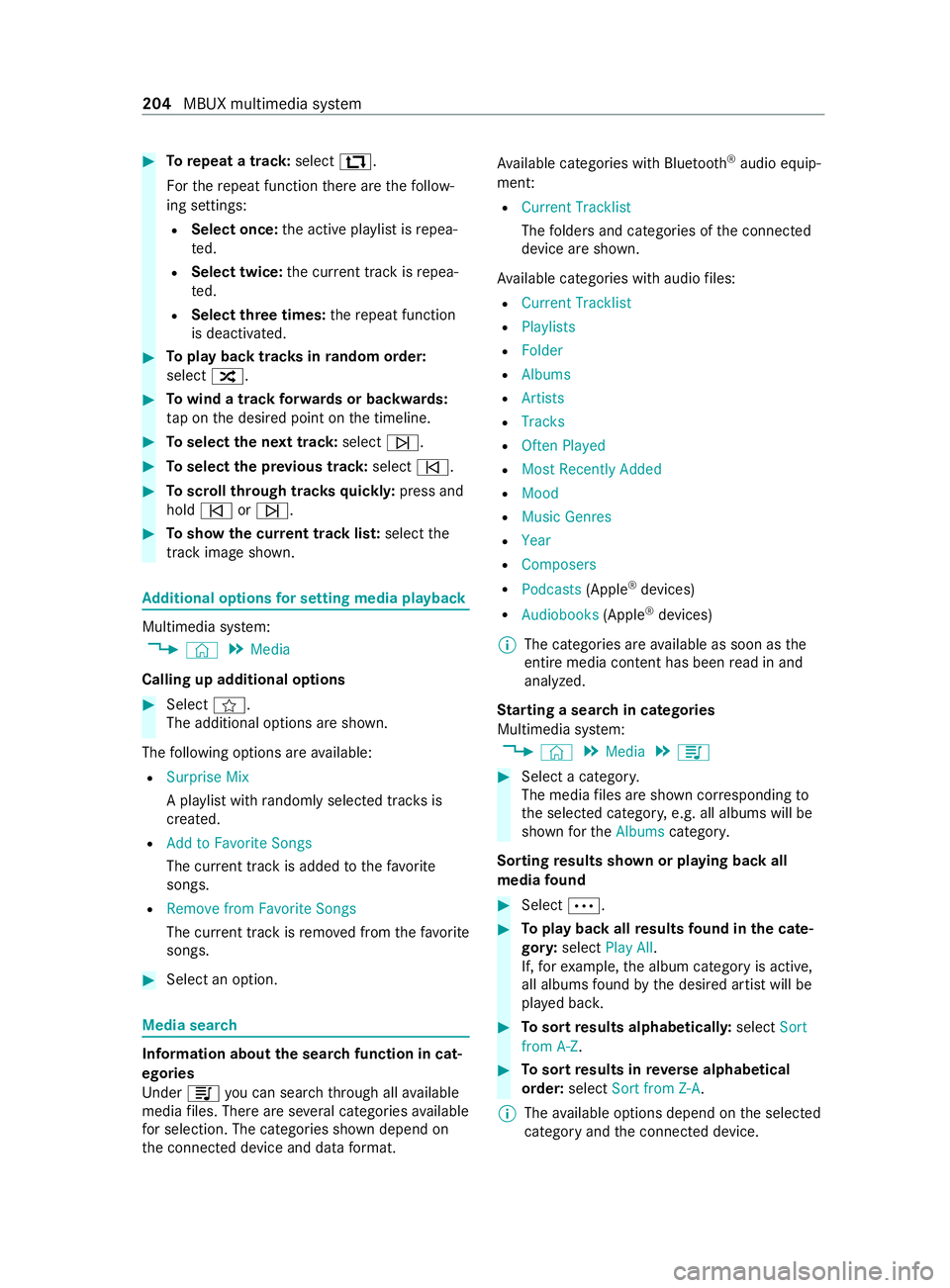
#
Torepeat atrack: select :.
Fo rthe repeat function ther ea rethef ollow‐
ing settings:
R Select once: thea ctiv eplaylistisr epea‐
te d.
R Select twice: thec urrent trac kisrepea‐
te d.
R Select threet imes: ther epeat function
is deactivated. #
Topla ybackt rack sinr andom order:
select 9. #
Towind atrack forw ards or backwards:
ta pont he desired point on thet imeline. #
Toselect then exttrack: select 00F6. #
Toselect thep revious track: select00F5. #
Toscroll through trac ksquickl y:press and
hold 00F5 or00F6. #
Tosho wthe cur rent trac klist: select the
trac kima geshown. Ad
ditional options fors ettin gm ediaplayba ck Multimedia sy
stem:
4 © 5
Media
Calling up additional options #
Select f.
The additional options ar eshown.
The following option sareavailable:
R Surpris eMix
Ap laylistw ithr andoml yselected trac ksis
created.
R Add to Favorite Songs
The cur rent trac kisadded tothef avo rite
songs.
R Remove from Favorite Songs
The cur rent trac kisremovedf romt hefavo rite
songs. #
Select an option. Media sear
ch Information abou
tthe sea rchfunctio nincat‐
egori es
Under 5youc an sear chthro ugh all available
media files. Ther eareseveralc ategories available
fo rs election. The categories shown depend on
th ec onnected device and dat aformat. Av
ailable categories wit hBluetooth ®
audio equip‐
men t:
R Current Tracklist
The folder sand categories of thec onnected
device ar eshown.
Av ailable categories wit haudio files:
R Curren tTracklist
R Playlists
R Folder
R Albums
R Artists
R Tracks
R Often Played
R Most Recently Added
R Mood
R Music Genres
R Year
R Composers
R Podcasts (Apple®
devices)
R Audiobooks (Apple®
devices)
% The categories ar
eavailable as soon as the
entir emedia content has been read in and
analyzed.
St arting asear chin categories
Multimedia sy stem:
4 © 5
Media 5
5 #
Select acategor y.
The media files ar eshown cor responding to
th es elected categor y,e.g. all albums will be
shown fort he Albums category.
Sorting results shown or playing bac kall
media found #
Select 0062. #
Topla ybacka llre sults found in thec ate‐
gor y:select Play All.
If, fore xamp le,thea lbum categor yisactive,
all albums found bythed esired artis twill be
pla yedb ack. #
Tosor tresults alphabeticall y:select Sort
from A-Z. #
Tosor tresults in reve rsea lphab etical
order: selectSortfrom Z-A.
% The
available options depen donthe selected
categor yand thec onnected device. 204
MBUX multimedia sy stem
Page 209 of 348
Note
sonl oading guidelines &
DANG ER Risk of poisonin gfrome xhau st
ga ses
Combustion engines emit poisonous exhaust
ga ses, suc hascarbon monoxide. Exhaust
ga ses can enter thev ehicle interior if the
re ar-en ddoor is open when thee ngine is run‐
ning ,especially if thev ehicle is in motion. #
Alwayss witc hoffthee ngine before
opening ther ear-end door. #
Neverd rive wit hthe rear-en ddoor
open. &
WARNING Risk of inju ryfrom unsecu red
object sinthevehicle
When objects ar eunsecured or inadequately
secured, they can slip, tip overorbet hrown
about, striking vehicle occupants.
This also appliest o:
R Luggag eorl oads
R Seats whic hhave been remo veda nd are
being transpor tedint hevehicle in an
ex ceptiona lcase
The reisar isk of injur y,particular lyin the
eve nt of braking maneuver sorabrupt
ch anges in direction. #
Alwayss towo bjectsins uchaw aythat
th ey canno tbetossed about. #
Befor etrave ling, secur eobjects, lug‐
ga ge or load topreve ntthem slipping or
tipping over. #
When aseat is remo ved, keep it prefera‐
bly outside thev ehicle. &
WARNING Risk of inju rydue toobjects
being stowedincor rectly
If yo udon otadequatel ystowo bjectsint he
ve hicle interior ,the yc ould sli porbet ossed
around and thereb ystrik evehicle occupants.
In addition, cup holders, open stowage
spaces and mobile phon ebrack etsc annot
al wa ys restra in theo bject stheyc ontai nint he
eve nt of an accident.
The reisar isk of injur y,particular lyin the
eve nt of sudden braking or asudde nchange
in direction. #
Alwayss towo bjectsins uchaw aythat
th ey canno tbetossed about in these or
similar situations. #
Alwaysm akes uret hat objects do not
project from stowages paces, parcel
nets or stowagen ets. #
Close thel oc kable stow ages paces
befor estarti ngajou rney. #
Stow and secur eobject sthat ar eheavy,
hard, poin ted, sharp-edged, fragile or
to ol arge inthec argo compartment. &
WARNING Risk of bu rnsf romt hetailpipe
and tailpipe trims
The exhaus ttailpipe and tailpipe trims can
becom everyh ot.Ify ou come int ocontact
wi th th ese parts of thev ehicle, youc ould
bur nyourself. #
Alwaysbep articularly careful around
th et ailpipe and thet ailpipe trims and
supervise children especially close lyin
th is area. #
Allowvehicle parts tocool down before
to uchin gthem. If
yo ua reusin gar oofrack ,p lease no tethem axi‐
mum roof load and them aximum load capacity of
th er oof rack ( /pag e289).
Camera-based driving sy stems and thes ensor
functions of thei nside rearvie wmirro rm aybe
impaire difyou ar etransportin gaload on the
ro of and it pr otru des mor ethan 16in (40 cm)
ov er thef ront edg eoftheroof. Therefore, make
sur ethat thel oad does no toverhang bymore
th an 16 in (40 cm).
The handlin gcharacteristics of your vehicle are
dependent on thel oad distribution.
Therefore, please obser vethef ollowing no tes
when loading:
R When transportin gaload, ne vere xceed the
permissible gross mass or theg ross axle
we ight rating fort he vehicle (including occu‐
pants). The values ar especified on thev ehi‐
cle identification plat eonthe B-pillar.
R The load mus tnotprotru de abo vetheu pper
edg eoft he seat backrests.
R If possible, alw ayst ranspor tthe load in the
cargo compa rtment. Tr
ansporting 207