tow MERCEDES-BENZ SPRINTER 2020 MY20 with 7” screen
[x] Cancel search | Manufacturer: MERCEDES-BENZ, Model Year: 2020, Model line: SPRINTER, Model: MERCEDES-BENZ SPRINTER 2020Pages: 348, PDF Size: 5.84 MB
Page 189 of 348
Switching acoustic operating
feedba ckfor
th eT ouc hControl on/off
Multimedi asystem:
4 © 5
Settings 5
System
5 Controls
The function is suppor tedbyt he selection in a
list. #
Select Acoustic Operating Feedback. #
Set Normal, LoudorOff.
If th ef unction is activated youw ill hear a
clickin gsoun dwhen sc rolling in alist. When
th eb eginnin gorend ofthel istisr eached you
will hear ano ther clicking sound. To
uchscreen Operating
thet ouchsc reen
Re quirements:
R Forthe map functions: an iPhone®
is con‐
nected via Apple CarPl ay™ora mobile phone
is connected via Android Autowit hthe multi‐
media sy stem.
R Anavigation application is available on the
mobil ephone.
Ta pping #
Toselect amenu item or entr y:tapona
symbol or an ent ry. #
Toincrease them apscale: tapt wice
qu ickl ywitho nefinger. #
Toreduce the map scale: tapw itht wo fin‐
ge rs. #
Toenter character swiththek eyboard: tap
on abutton.
Single-finger swipe #
Tonavigat einmenus:swipe up, down, left
or right.
To uching, holding and moving #
Tosetthe volume on ascale: touc ht he
to uchsc reen and mo vethef inger tothel eftor
ri ght.
To uching and holding #
Tocall up aglobal menu in thea pplica‐
tions: touc ht he touchsc reen and hold until
the OPTIONS menu appears. Setting acoustic operation
feedba ckfort he
to uchscreen
Multimedi asystem:
4 © 5
Settings 5
System
5 Controls 5
Touch Control Sensitivity
The function is suppor tedbyt he selection in a
list. #
Select Acoustic Operating Feedback. #
Set Normal, LoudorOff.
If th ef unction is activated youw ill hear a
clickin gsoun dwhen sc rolling in alist. When
th eb eginnin gorend ofthel istisr eached you
will hear ano ther clicking sound. Applications
Calling up applications
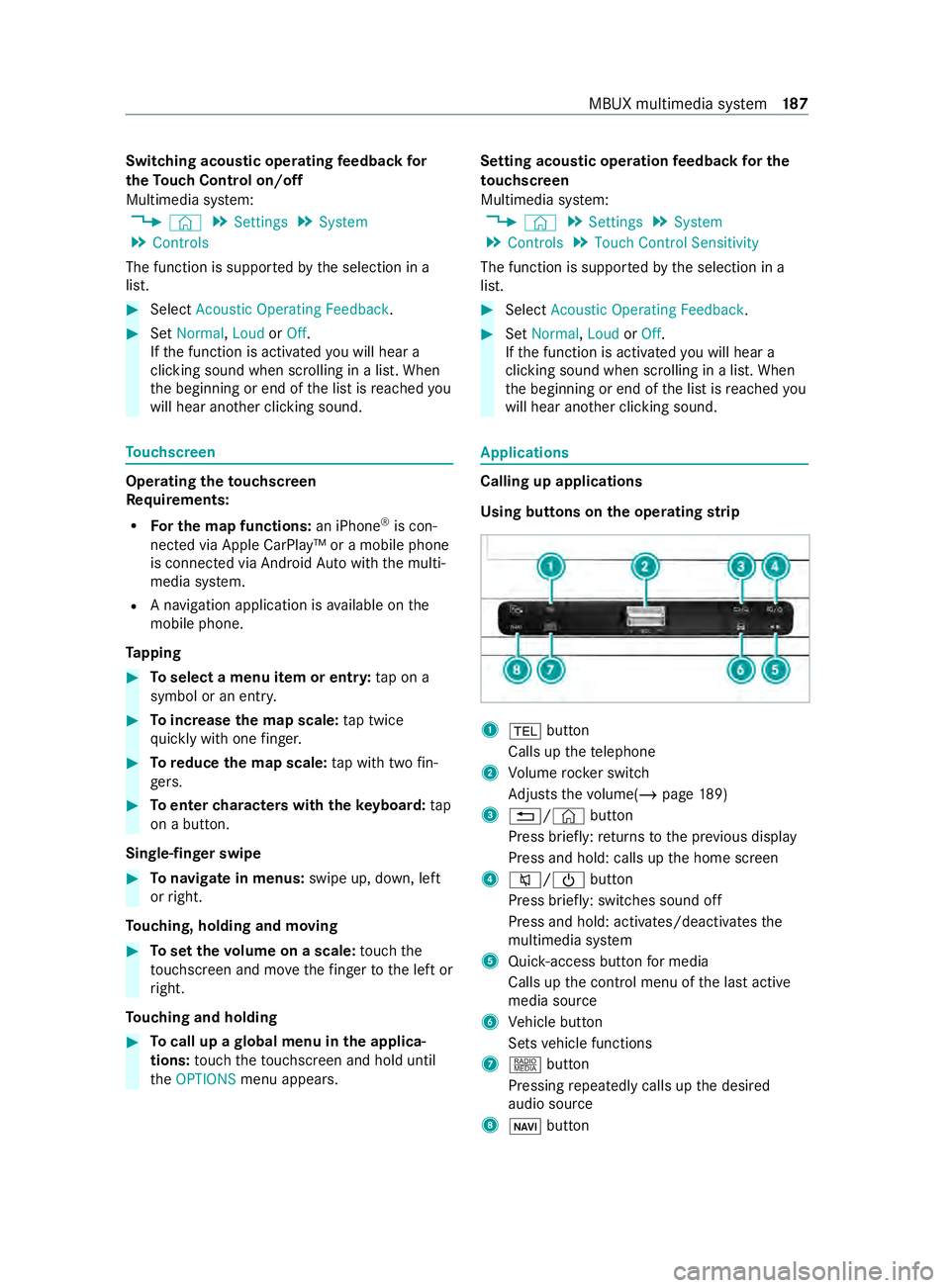
Using buttons on
theo perating strip 1
002B button
Calls up thet elephone
2 Volume rocker switch
Ad justs thev olume(/ page189)
3 0038/© button
Press brief ly:r eturns tothep reviou sdisplay
Press and hold: calls up theh ome screen
4 0063/00D0 button
Press brief ly:s witches sound off
Press and hold: acti vates/deactivates the
multimedia sy stem
5 Quic k-access button form edia
Calls up thec ont rolm enuoft he las tactive
media source
6 Vehicle button
Sets vehicle functions
7 | button
Pressing repeatedl ycalls up thed esired
audio source
8 00CB button MBUX multimedia sy
stem 187
Page 191 of 348
Ad
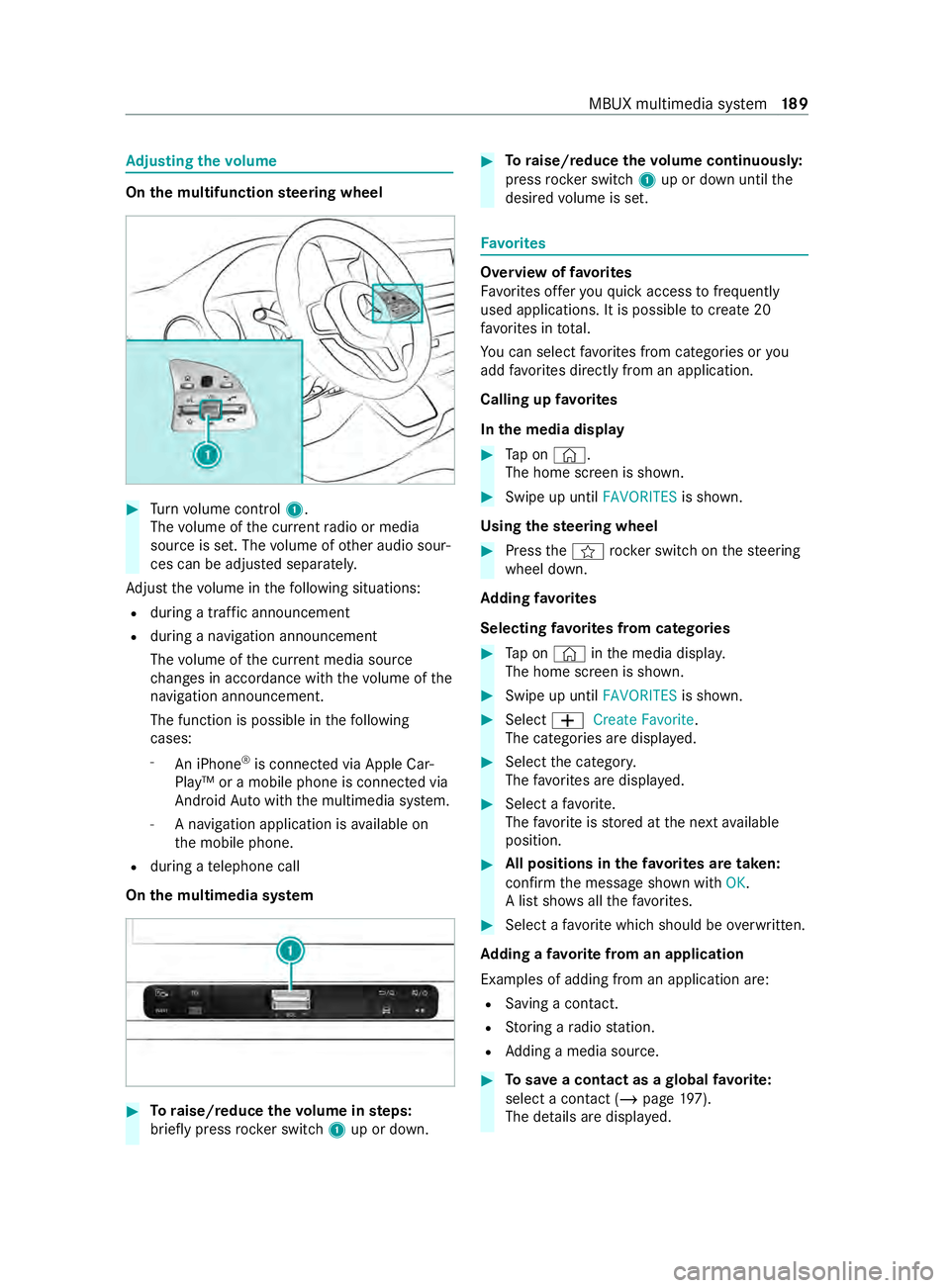
justin gthe volume On
them ultifunction steering wheel #
Turn volume control 1.
The volume of thec urrent radio or media
source is set. The volume of other audio sour‐
ces can be adjus teds eparately.
Ad jus tthe volume in thef ollowing situations:
R during atraf fica nnouncement
R during anavigation announcement
The volume of thec urrent media sou rce
ch anges in accordanc ewitht he volume of the
navigation announcement.
The function is possible in thef ollowing
cases:
- An iPhone ®
is connec tedv ia Apple Car‐
Play™ or amobile phone is connected via
Android Autowit hthe multimedia sy stem.
- Anavigation application is available on
th em obile phone.
R during atelephone call
On them ultimedia sy stem #
Toraise/reduce thev olume in steps:
brief lypress rocker switch 1up or down. #
Toraise/reduce thev olume continuousl y:
press rocker switch 1up or down until the
desired volume is set. Favo
rites Overvie
woffavorites
Favo rite so ffer youq uicka ccess tofrequently
used applications. It is possible tocrea te20
fa vo rite sint otal.
Yo uc an selec tfavo rite sf romc ategories or you
add favo rite sd irectl yfromana pplication.
Calling up favo rites
In them edia display #
Tapon© .
The home screen is shown. #
Swipe up until FAVORITESis shown.
Using thes teering wheel #
Press thef rocker switc honthesteering
wheel down.
Ad ding favo rites
Selecting favo rite sf romc ategories #
Tapon©in them edia displa y.
The home screen is shown. #
Swipe up until FAVORITESis shown. #
Select 0081Create Favorite .
The categories ar edispla yed. #
Select thec ategor y.
The favo rite sa redispla yed. #
Select afavo rite.
The favo rite isstored at then exta vailable
position. #
All position sinthefavo rite sa retaken:
confir mthe messag eshown with OK.
Al ists hows allthef avo rite s. #
Select afavo rite whic hshould be overwritten.
Ad ding afavorit efromana pplication
Examples of adding from an application are: R Saving acontact.
R Storing aradio station.
R Adding amedia source. #
Tosave ac ontac tasag lobalfavo rite:
select acontact (/ page 197).
Th ed etails ar edispla yed. MBUX multimedia sy
stem 18 9
Page 197 of 348
Multimedia sy
stem:
4 © 5
Phone
Sear ching foram obilephone #
Select í. #
Select Connect New Device.
Connectin gamobilephone (authorization
using Secur eSimpl ePairing) #
Select amobile phone. #
Acode is displa yedint he multimedia sy stem
and on them obile phone. #
Ifth ec odes match: confirm thec ode on the
mobil ephone.
% Fo
ro lde rm obil ephone models, enter aone
to sixteen-digit number code on them obile
phone and on them ultimedia sy stem for
authorization.
% Up
to15 mobil ephones can be authorized on
th em ultimedia sy stem.
Auth orized mobile phones ar ereconnec ted
au tomatical ly.
% The connected mobile phone can also be
used as Blue
tooth®
audio equipment
(/ page203).
Re placing amobile phone
Multimedia sy stem:
4 © 5
Phone #
Select í. #
Noauthorized mobil ephone available:
select Connect New Device .#
Select amobile phone. #
Newlya uthorized mobile phone: confirm
th en umber code on them obile phone.
Switching mobile phones #
Select an authorized mobile phone.
The selected mobile phone is connected to
th em ultimedia sy stem.
% ForiPhone ®
:y ou can switc hbetwe en the
Apple CarPl ay®
and Blue tooth®
equipment
connection variants.
De-authorizin gamobile phone
Multimedi asystem:
4 © 5
Phone #
Select í. #
Select 0062inthel ine of them obile phone. #
Select Deauthorize . Information on
NearField Communication
(NFC)
NFC enable sshort- rang ew ireles sdatat ransfer
or (re)connection of amobile phon ewitht he mul‐
timedia sy stem.
Fu rther information can be obtained at :https://
www.mercedes-benz-mobile.com/
Using them obil ephone wit hNear Field Com‐
munication (NFC)
Re quirements:
R NFC is activated on them obile phone (see
th em anufacturer's operating instructions)
R The mobile phone's screen is switched on
and unloc ked( see them anufacturer's operat‐
ing instructions) #
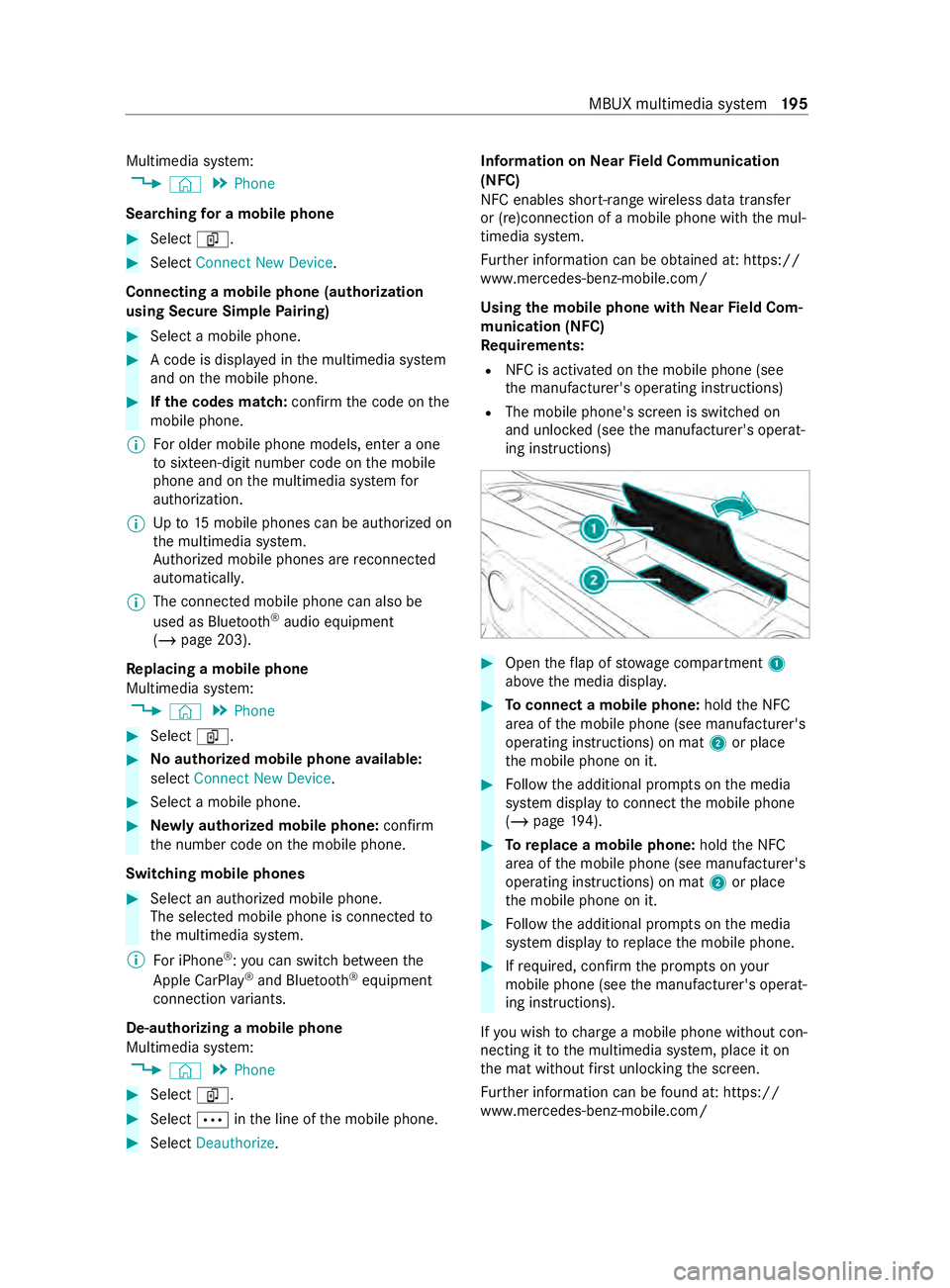
Open thef lap of stowagec ompartment 1
abo vethem edia displa y. #
Toconnect amobile phone: holdtheN FC
area of them obile phone (see manufacturer's
operating instructions) on mat 2or place
th em obile phone on it. #
Followt he additional prom ptsont he media
sy stem displa ytoconnect them obile phone
(/ page194). #
Toreplac eam obile phone: holdthe NFC
area of them obile phone (see manufacturer's
operating instructions) on mat 2or place
th em obile phone on it. #
Followt he additional prom ptsont he media
sy stem displa ytoreplace them obile phone. #
Ifre qu ired, con firm thep romp ts on your
mobile phon e(see them anufacturer's operat‐
ing instructions).
If yo uw ish tocharge am obile phon ewithout con‐
nectin gittot he multimedia sy stem, place it on
th em at without firs tu nlocking thes creen.
Fu rther information can be found at :https://
www.mercedes-benz-mobile.com/ MBU
Xmultimedia sy stem 19 5
Page 202 of 348
Only one mobile phone at
atime can be connec‐
te dv ia Android Auto to them ultimedia sy stem.
The availabilit yofAndroid Au toand Android Auto
apps ma yvarya ccordin gtothe countr y.
The service pr ovider is responsible fort his appli‐
cation and thes ervices and content connected to
it.
Information on Android Auto
While using Android Auto,v arious func tions of
th em ultimedia sy stem, fore xamp lethem edia
source Blue tooth®
audio, ar enotavailable.
Connecting amobile phone via Android Auto
(wired)
Requ irements:
R The multimedia sy stem is equipped wit hthe
function.
R The cur rent version of your device's operating
sy stem is being used (see them anufacturer's
operating instructions).
R Ther eisanI nternetconnection fort he full
ra ng eoff unctions forA ndroid Auto.
Multimedia sy stem:
4 © 5
Smartphone
5 Mercedes PRO &Apps 5
Android Auto
5 Star tAndroid Auto #
Connec tthe mobile phone totheU SB por ton
th em ultimedia sy stem using asuitable cable
(/ page203). #
If no other device is connected wit hthe sys‐
te mv ia Blue tooth®
or Apple CarPlay ®
(wire‐
less): confir mthe dat aprotection pr ovisions. #
If ano ther device is connected via Blue tooth®
,
Androi dAuto( wireless) or Apple CarPlay ®
(wireless) wit hthe sy stem: taponthe Tap
here to start Android Auto
for:
or #
Select thed evice in theí device list
under thea pplication.
All existin gdevice connection svia USB ,Blue‐
tooth ®
,A ndroid Au to(wireless) or Apple Car‐
Play ®
(wireless) ar edisconnec ted. The device
newl yconnected via cable is active.
% If an Android
Autoapplicatio nisactive, you
can cal lupthis activ eapplication using the
z or002B application buttons. Ac
cepting/rejecting thed atap rote ction pro‐
visions
% The
firs ta ctivatio nofA ndroidAutoont he
multimedia sy stem mus tbecarried out when
th ev ehicle is stationar yfor saf etyr easons.
Fo rthe initial star toft he application:a message
wit hthe dat aprotection pr ovision sappears. #
Select Accept &Start.
Re turning tothem ainm enu #
Press the00E2 button.
% If
yo uu se bo th thewired as well as wireless
Android Autofunction, obser vethat aw ire‐
less connectio nmaybe es tablished when the
device is next connected using Blue tooth®
or
af te rs tartin gt he multimedia sy stem. If
Android Autowa sn otdispla yedint hefore‐
ground be fore disconnecting, thea pplication
st arts in theb ackg round when reconnected.
Yo uc an call up Android Autointhem ain
menu.
Connecting amobile phone via Android Auto
(wireless)
Requ irements:
R The multimedia sy stem is equipped wit hthe
function.
R The cur rent version of your device's operating
sy stem is being used (see them anufacturer's
operating instructions).
R The device supports theA ndroid Autowire‐
less function.
R Blue tooth ®
is activated on thed evice (see the
manufacturer's operating instructions).
R The device is "visible" foro ther devices.
R The full rang eoff unctions forA ndroid Autois
onl ypossible wit hanInterne tconnection.
Multimedia sy stem:
4 © 5
Phone 5
í
Connecting amobile phone #
Connec tthe mobile phone using Blue tooth®
( / pag e194).
St arting Android Auto #
Select Start Androi dAuto. 200
MBUX multimedi asystem
Page 203 of 348
%
Depending on
thec onfiguration of the
device, af terc onnecting them obile phone via
Blue tooth ®
,t he prom ptma yappear in the
media displa yasking if Android Autoshould
be star ted. The querym ustint hat case be
answered with Yes.
% It is possible at an
ytime toswitc hbetwe en
connection via Blue tooth®
or Android Auto
(wireless) in thed evice list.
Ac cepting/rejecting thed atap rotection pro‐
visions
Am essag ewitht he dat aprotection pr ovisions
appears. #
Select Accept &Start.
Re turning tothem ainm enu #
Press the00E2 button.
% If Android
Autowa sn otdispla yedint hefore‐
ground befor edisconnecting, thea pplication
st arts in theb ackg round when reconnected.
Yo uc an call up Android Autointhem ain
menu.
Calling up theA ndroid Autosound settings
Multimedia sy stem:
4 © 5
Smartphone 5
Android Auto
5 Z #
Select sound settings.
Ending Android Auto #
Disconnect thec onnectin gcable between the
mobil ephone and multimedia sy stem.
Mercedes-Benz recommends disconnecting
th ec onnectin gcable onl ywhen thev ehicle is
st ationar y. Tr
ansfer redv ehicle dat awith Android Auto
and Apple CarPlay ®Overvie
woftransfer redv ehicle data
Whe nusing Android Autoor Apple CarPlay ®
,c er‐
ta in vehicle dat aistransfer redtot he mobile
phone. This enables youtog ettheb esto ut of
selected mobile phone services. Vehicle dat ais
no td irectl yaccessible.
The following sy stem information is transmit ted:
R softwar erelease of them ultimedia sy stem
R system ID (anonymized)
The transfer of this dat aisusedtooptimize com‐
munication between thev ehicle and them obile
phone. To
do this, and toassig nseve ralv ehicles tothe
mobil ephone, avehicle ID is random lyge ner‐
ated.
Thi sh asno connection tothev ehicle identifica‐
tion number (VIN) and is dele tedw hen them ulti‐
media sy stem is rese t(/ pag e193).
The following vehicle status dat aistransmitted:
R transmission position engaged
R distinction between par ked, standstill ,rolling
and driving
R day/night mode of thei nstrument clus ter
The transfer of this dat aisusedtoalter ho wcon‐
te nt is displ ayed tocor respond tothed riving sit‐
uation.
The following position dat aistransmitted:
R coordinates
R speed
R compass direction
R acceleration direction
This dat aisonlyt ransfer redw hile then avigation
sy stem is active, in order toimpr oveit (e.g. so it
can continue functioning when in atunnel). Media
Information about media mode
Information about suppor
tedf ormats and
dat astorage media &
WARNING Risk of distraction whe nhan‐
dling da tastorag emedia
If yo uh andle adatas torage medium while
driving, your attention is diver tedf romt he
traf ficc onditions. Thi scould also cause you
to lose control of thev ehicle. #
Onlyhandle adatas tora ge medium
when thev ehicle is stationar y. %
Depending on
thee quipment ins talled play‐
bac kofv ideoform ats ma ynotbe possible. MBU
Xmultimedi asystem 201
Page 205 of 348
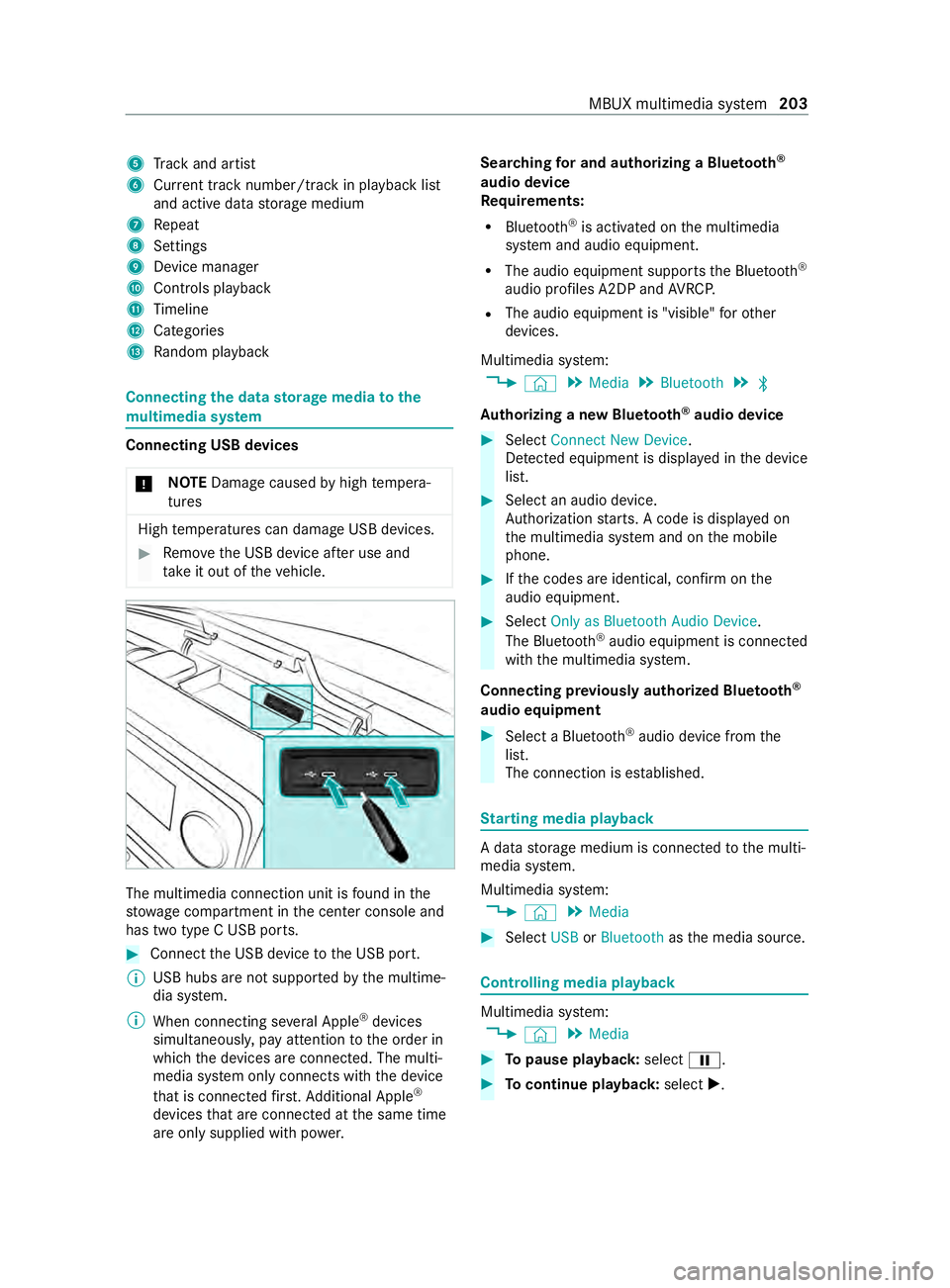
5
Trac ka nd artist
6 Current trac knumber/trac kinplaybacklist
and activ edatas torage medium
7 Repeat
8 Settings
9 Device manager
A Controls playback
B Timeline
C Categories
D Random pl ayback Connecting
thed atas torage medi atot he
mu ltimedia sy stem Connectin
gUSB devices
* NO
TEDama gecaused byhigh temp era‐
tures High
temp eratures can damag eUSB devices. #
Remo vetheU SB device af teru se and
ta ke it out of thev ehicle. The multimedia connection unit is
found in the
stow agec ompartment in thec enter console and
has tw otype CUSB ports. #
Connec tthe USB device totheU SB port.
% USB hubs ar
enotsuppor tedbyt he multime‐
dia sy stem.
% When connectin gseve ralA pple ®
devices
simultaneousl y,pa ya ttention totheo rder in
whic hthe devices ar econnected. The multi‐
media sy stem onl yconnects wit hthe device
th at is connec tedf irst .A dditional Apple ®
devices that ar econnec tedatt he same time
ar eo nlys upplied wit hpowe r. Sear
ching fora nd authorizing aBluetooth ®
audio device
Requ irements:
R Blue tooth ®
is activated on them ultimedia
sy stem and audio equipment.
R The audio equipment supports theB luetooth ®
audio profiles A2DP and AVRC P.
R The audio equipment is "visible" foro ther
devices.
Multimedia sy stem:
4 © 5
Media 5
Bluetooth 5
00A5
Au thorizing anew Bluetoo th®
audio device #
Select Connect New Device.
De tected equipment is displa yedint he device
list. #
Select an audio device.
Auth orization starts .Ac odeisd isplayedon
th em ultimedia sy stem and on them obile
phone. #
Ifth ec odes ar eidentical, confir monthe
audioe quipment. #
Select Only as Bluetoot hAudio Device .
The Blue tooth®
audio equipmen tisconnec ted
wit hthe multimedia sy stem.
Connecting pr eviousl yauthorized Blue tooth ®
audio equipment #
Select aBluetooth ®
audio devic efromt he
list.
The connection is es tablished. St
arting media playback Ad
atas torage medium is connected tothem ulti‐
media sy stem.
Multimedia sy stem:
4 © 5
Media #
Select USBorBluetooth asthem edia source. Controlling media playback
Multimedia sy
stem:
4 © 5
Media #
Topause playback: select00CF. #
Tocontinue playba ck:select X. MBUX multimedia sy
stem 203
Page 206 of 348
#
Torepeat atrack: select :.
Fo rthe repeat function ther ea rethef ollow‐
ing settings:
R Select once: thea ctiv eplaylistisr epea‐
te d.
R Select twice: thec urrent trac kisrepea‐
te d.
R Select threet imes: ther epeat function
is deactivated. #
Topla ybackt rack sinr andom order:
select 9. #
Towind atrack forw ards or backwards:
ta pont he desired point on thet imeline. #
Toselect then exttrack: select 00F6. #
Toselect thep revious track: select00F5. #
Toscroll through trac ksquickl y:press and
hold 00F5 or00F6. #
Tosho wthe cur rent trac klist: select the
trac kima geshown. Ad
ditional options fors ettin gm ediaplayba ck Multimedia sy
stem:
4 © 5
Media
Calling up additional options #
Select f.
The additional options ar eshown.
The following option sareavailable:
R Surpris eMix
Ap laylistw ithr andoml yselected trac ksis
created.
R Add to Favorite Songs
The cur rent trac kisadded tothef avo rite
songs.
R Remove from Favorite Songs
The cur rent trac kisremovedf romt hefavo rite
songs. #
Select an option. Media sear
ch Information abou
tthe sea rchfunctio nincat‐
egori es
Under 5youc an sear chthro ugh all available
media files. Ther eareseveralc ategories available
fo rs election. The categories shown depend on
th ec onnected device and dat aformat. Av
ailable categories wit hBluetooth ®
audio equip‐
men t:
R Current Tracklist
The folder sand categories of thec onnected
device ar eshown.
Av ailable categories wit haudio files:
R Curren tTracklist
R Playlists
R Folder
R Albums
R Artists
R Tracks
R Often Played
R Most Recently Added
R Mood
R Music Genres
R Year
R Composers
R Podcasts (Apple®
devices)
R Audiobooks (Apple®
devices)
% The categories ar
eavailable as soon as the
entir emedia content has been read in and
analyzed.
St arting asear chin categories
Multimedia sy stem:
4 © 5
Media 5
5 #
Select acategor y.
The media files ar eshown cor responding to
th es elected categor y,e.g. all albums will be
shown fort he Albums category.
Sorting results shown or playing bac kall
media found #
Select 0062. #
Topla ybacka llre sults found in thec ate‐
gor y:select Play All.
If, fore xamp le,thea lbum categor yisactive,
all albums found bythed esired artis twill be
pla yedb ack. #
Tosor tresults alphabeticall y:select Sort
from A-Z. #
Tosor tresults in reve rsea lphab etical
order: selectSortfrom Z-A.
% The
available options depen donthe selected
categor yand thec onnected device. 204
MBUX multimedia sy stem
Page 209 of 348
Note
sonl oading guidelines &
DANG ER Risk of poisonin gfrome xhau st
ga ses
Combustion engines emit poisonous exhaust
ga ses, suc hascarbon monoxide. Exhaust
ga ses can enter thev ehicle interior if the
re ar-en ddoor is open when thee ngine is run‐
ning ,especially if thev ehicle is in motion. #
Alwayss witc hoffthee ngine before
opening ther ear-end door. #
Neverd rive wit hthe rear-en ddoor
open. &
WARNING Risk of inju ryfrom unsecu red
object sinthevehicle
When objects ar eunsecured or inadequately
secured, they can slip, tip overorbet hrown
about, striking vehicle occupants.
This also appliest o:
R Luggag eorl oads
R Seats whic hhave been remo veda nd are
being transpor tedint hevehicle in an
ex ceptiona lcase
The reisar isk of injur y,particular lyin the
eve nt of braking maneuver sorabrupt
ch anges in direction. #
Alwayss towo bjectsins uchaw aythat
th ey canno tbetossed about. #
Befor etrave ling, secur eobjects, lug‐
ga ge or load topreve ntthem slipping or
tipping over. #
When aseat is remo ved, keep it prefera‐
bly outside thev ehicle. &
WARNING Risk of inju rydue toobjects
being stowedincor rectly
If yo udon otadequatel ystowo bjectsint he
ve hicle interior ,the yc ould sli porbet ossed
around and thereb ystrik evehicle occupants.
In addition, cup holders, open stowage
spaces and mobile phon ebrack etsc annot
al wa ys restra in theo bject stheyc ontai nint he
eve nt of an accident.
The reisar isk of injur y,particular lyin the
eve nt of sudden braking or asudde nchange
in direction. #
Alwayss towo bjectsins uchaw aythat
th ey canno tbetossed about in these or
similar situations. #
Alwaysm akes uret hat objects do not
project from stowages paces, parcel
nets or stowagen ets. #
Close thel oc kable stow ages paces
befor estarti ngajou rney. #
Stow and secur eobject sthat ar eheavy,
hard, poin ted, sharp-edged, fragile or
to ol arge inthec argo compartment. &
WARNING Risk of bu rnsf romt hetailpipe
and tailpipe trims
The exhaus ttailpipe and tailpipe trims can
becom everyh ot.Ify ou come int ocontact
wi th th ese parts of thev ehicle, youc ould
bur nyourself. #
Alwaysbep articularly careful around
th et ailpipe and thet ailpipe trims and
supervise children especially close lyin
th is area. #
Allowvehicle parts tocool down before
to uchin gthem. If
yo ua reusin gar oofrack ,p lease no tethem axi‐
mum roof load and them aximum load capacity of
th er oof rack ( /pag e289).
Camera-based driving sy stems and thes ensor
functions of thei nside rearvie wmirro rm aybe
impaire difyou ar etransportin gaload on the
ro of and it pr otru des mor ethan 16in (40 cm)
ov er thef ront edg eoftheroof. Therefore, make
sur ethat thel oad does no toverhang bymore
th an 16 in (40 cm).
The handlin gcharacteristics of your vehicle are
dependent on thel oad distribution.
Therefore, please obser vethef ollowing no tes
when loading:
R When transportin gaload, ne vere xceed the
permissible gross mass or theg ross axle
we ight rating fort he vehicle (including occu‐
pants). The values ar especified on thev ehi‐
cle identification plat eonthe B-pillar.
R The load mus tnotprotru de abo vetheu pper
edg eoft he seat backrests.
R If possible, alw ayst ranspor tthe load in the
cargo compa rtment. Tr
ansporting 207
Page 210 of 348
R
Fasten thel oad tothet ie-down eyes and dis‐
tribut ethe load evenlya mong them.
R Use tie-down eyes and fastening components
whic haresuitable fort he weight and size of
th el oad. Load distribution
* NO
TERisk of damag etothefloor co ver‐
ing Excessiv
epoint loading on thec argo com‐
partmen tfloor or on thel oad area can nega‐
tivel yaffect thed riving characteristic sand
could damag ethe floor co vering. #
Vehicles with rear-wheel drive: dis‐
tribu tethel oad uniformly .When doing
so, ensur ethat theo verall cen terof
gr av ity of thel oad is alw aysasl owand
close tothec enter as possible and
between thea xles near ther ear axle. #
Vehicles with all-wheel drive: distrib‐
ut et he load uniforml y.When doing so,
ensur ethat theo verall cen terofg ravity
of thel oad is alw aysasl owand close to
th ec enter as possible and between the
axles. Fo
rC argo Vans, buses and Passenger Vans:
R Alwayst ranspor tloads in thec argo compart‐
ment.
R Alwaysp lace thel oad agains tthe seat backr‐
ests of ther ear benc hseat.
R Movelarge and heavy loads as fart ow ards
th ef ront of thev ehicle as possible in the
direction of tra vela ga ins tthe rear ben ch
seat. Stow loads flush wit hthe rear ben ch
seat.
R Alwaysa dditionally secur ethe load wit hsuita‐
ble load securing aids or tie downs.
R The load mus tnotprotru de abo vetheu pper
edg eoft he seat backrests.
R Transpor tloads behin dseat sthat ar enot
occupied.
R Ifth er ear benc hseat is no toccupied, insert
th es eat belts crosswise int othe seat belt
buckle of theo pposit eseat belt. Securing loads
Note
sonl oad securing &
WARNING Risk of accident and injury
du etoi ncorrect use of thel ashing stra ps
If yo ua ttac hthe lashing stra pi ncor rectly
whe nsecu ring loads, thef ollowing ma yoccur
in thee vent of abrup tchanges in direction,
braking maneuver or an accident:
R The tie-down eyes ma ybecome de tach ed
or thel ashing stra pm aytear if thep er‐
missible load is exceeded.
R The load cann otbe restra ined.
This ma ycause thel oad toslip, tip overorbe
fl ung about ,striking vehicle occupants. #
Alwayst ension thel ashing stra ps in the
proper manner and onl ybetwe en the
described tie-down eyes. #
Alwaysu se lashing stra ps designed spe‐
cificall yfor thel oads. %
Obser
vethei nformation relatin gtot he maxi‐
mum loading capacity of thei ndividual cargo
tie-down point. If youc ombin evarious cargo
tie-down points tosecur eaload, alw ayst ake
th em aximum loading capacity of thew eak‐
es tc argo tie-down poin tint oa ccount .During
maximum full- stop braking, forc es ma yact
whic hcan multipl ythe weight of thel oad.
Alw aysu se se veralc argo tie-down point sto
distribut eand spread thel oad. Spread the
load evenly between thec argo tie-down
points or tie-down eyes.
Alw ayso bser vetheo perating instruction sorthe
lashing stra pm anufacturer's instruction sfor the
operation of thel ashing stra p.
Obser vethei nformation relatin gtot he maximum
loading capacity of thec argo tie-down points
(/ page289).
As thed rive r,yo ua re re sponsible fore nsuring the
fo llowing:
R The load is secured agains tslipping, tipping,
ro lling or falling off.
Ta ke usual traf ficc onditions as well as swerv‐
ing or full brak eapplication and bad roads
int oa ccount.
R The applicable requ irements and guidelines
re latin gtol oad-securing practices ar emet.
If th is is no tthe case, this ma yconstitut ea
punishable of fense, depending on local legis‐ 208
Transporting
Page 213 of 348
Using the interior
roof car rier sy stem &
WARNING Risk of inju rydue tounse‐
cured loads
When yous ecur eorl oosen aload, thel oad
ma yfall down and injur evehicle occupants. #
When securing or loosening aload, do
no ts tand unde rthe load. *
NO
TERisk of damag etothe belt stra ps
and slider Excessiv
epoint loading on theb elt stra ps and
slider smaycause theb elt stra ps totear or cause
thes lider stob reak of ffro mt herack
ra il. #
Distribut ethe load evenly. When doing
so, ensur ethat theo verall cen terof
gr av ity of thel oad is alw aysasc loseto
th ec enter as possible and between the
ro of rails and between ther ackr ails. Yo
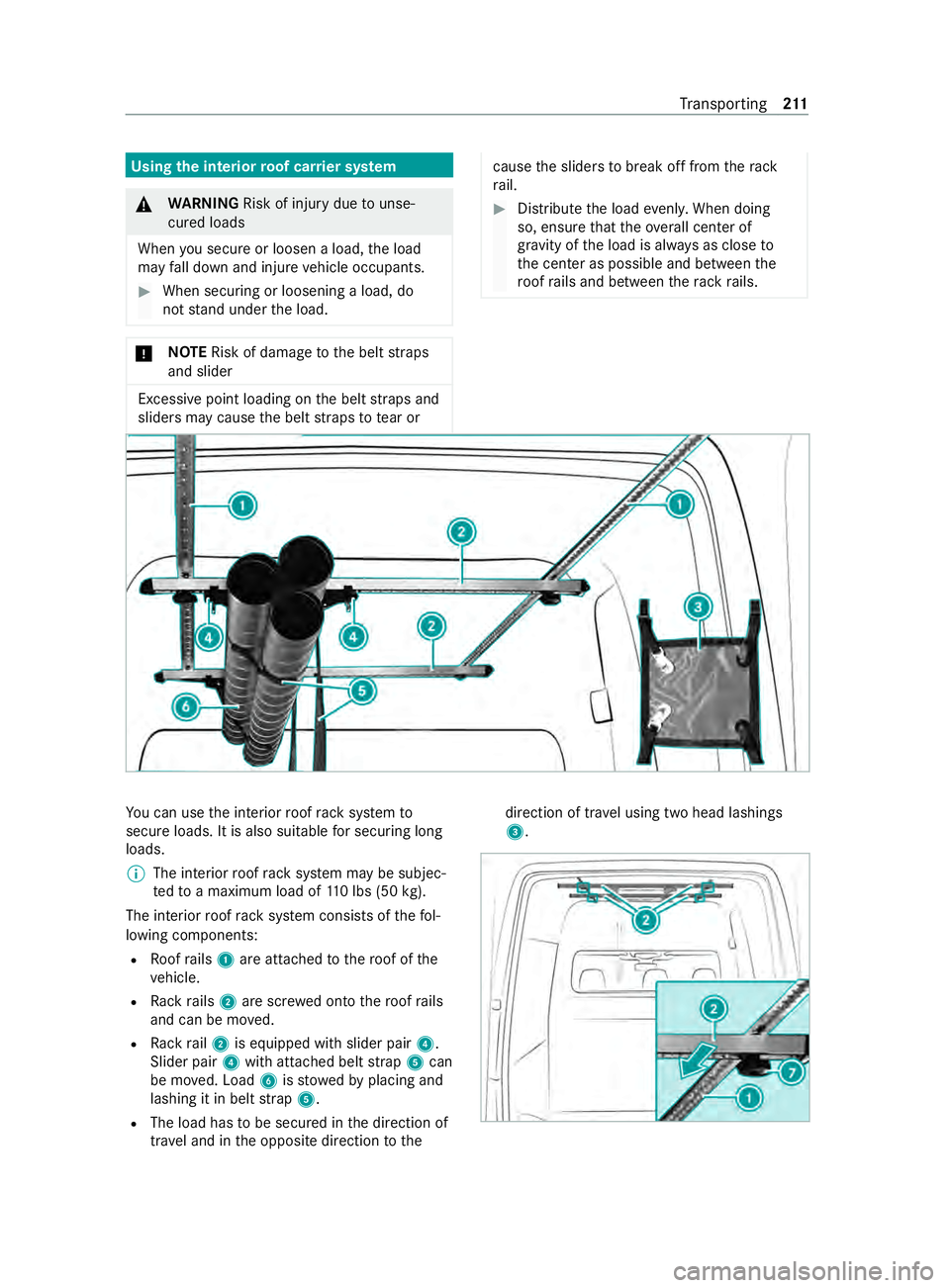
uc an use thei nterior roof rack system to
secur eloads. It is also suitable fors ecuring long
loads.
% The interior
roof rack system ma ybesubjec‐
te dtoam aximum load of 110l bs (50 kg).
The interior roof rack system consists of thef ol‐
lowing components:
R Roofrails 1 area ttached tother oof of the
ve hicle.
R Rack rails 2 ares crew ed ont othe roof rails
and can be mo ved.
R Rack rail2 is equipped wit hslider pair 4.
Slider pair 4witha ttached belt strap 5can
be mo ved. Load 6isstowe dbyp lacing and
lashing it in belt strap 5.
R The load has tobe secured in thed irection of
tra vela nd in theo pposit edirection tothe direction of tra
velu sing tw ohead lashings
3. Tr
ansporting 211