camera MERCEDES-BENZ SPRINTER 2020 MY20 with 7” screen
[x] Cancel search | Manufacturer: MERCEDES-BENZ, Model Year: 2020, Model line: SPRINTER, Model: MERCEDES-BENZ SPRINTER 2020Pages: 348, PDF Size: 5.84 MB
Page 148 of 348

Depending on
thev ehicle's equipment, ther adar
sensor sareintegrated behind theb umpers
and/or behind ther adiator grill. Keep these parts
free of dirt, ice and slush (/ page224). The sen‐
sor sm ustn otbe co vered, fore xamp leby bicycle
ra ck s, overhanging loads or sticke rs.A fter ac olli‐
sion, ha vethef unction of ther adar sensors
ch eckedataq ualified specialis tworks hop as
damag e(both visible or non-visible) ma yhave
occur redtot he bumper or radiator trim. Fu
nction of driving sy stems and driving
saf etys ystems In
this section, youw illfind information abou tthe
fo llowing driving sy stems and driving saf etys ys‐
te ms:
R ABS ( Anti-lock braking system)
(/ page146)
R ASR (acceleration skid control) (/ page147)
R BAS(Brake Assist System) (/ page146)
R ESP ®
(Electronic Stability Program)
(/ page147)
R EBD ( Electronic Brakeforce Distribution)
(/ page148)
R ActiveB rake Assi st (/ pag e149)
R Cruise control (/ page151 )
R ActiveD ista nce Assi stDISTRONIC
(/ page 152)
R Hill star ta ssis t(/pag e155)
R HOLD function (/ page155)
R Parking Assis tPARKTRONIC (/ page 156)
R Rear vie wcamer a(/pag e157)
R Surround vie wcamera (/ page159)
R ATTENTION ASSIS T(/ pag e162)
R Blind Spo tAssis t(/pag e163)
R ActiveL aneK eeping Assis t(/pag e166) Fu
nctions of ABS (Anti-loc kBraking Sy stem) Obser
vethei mp ortant sa fety guideline sfor the
driving saf etys ystem. ABS cont
rols theb rake pressur eincritical situa‐
tions:
R The wheels ar epreve nted from lo cking when
braking, e.g. during maximum full-s topb rak‐
ing or when ther eisi nsufficient tir etraction
R The steerability of thev ehicle in term sof
ph ysical possibilities is ensured when braking
R ABSisa ctivefroms peeds of appr ox.3m ph
(5 km/h). On aslipper yroad sur face, ABS
inter venes evenify ou onl ybrake gently.
Sy stem limits
If th er eisam alfunction and they ellow 0025 ABS
wa rning lam plight supc ontinuousl yinthe instru‐
ment displa yafter startin gthe engine, ABS may
be impaired or inoperative.
If ABS inter venes, youw illfeel ap ulsing in the
brak epedal. The pulsating brak epedal ma ybean
indication of hazardous road condition sand func‐
tions as areminder totake extrac arew hile driv‐
ing.
If ABS in terv enes: keep theb rake pedal firm ly
depressed until theb raking situation has passed.
To car ryout maximum full-s topb raking:
dep ress theb rake pedal wit hfull forc e. Fu
nction of BAS(Brak eAssis tSystem) &
WARNING Risk of an accident caused by
am alfunctio ninBAS (Brak eAssistSys‐
te m)
If BA Sism alfunctioning ,the braking dis tance
in an emergency braking situation is
increased. #
Depress theb rake pedal wit hfull force
in emer gency braking situations. ABS
pr eve nts thew heels from locking. BA
Ss uppo rtsy ou wit hadditional braking forc ein
an emer gency braking situation.
If yo ud epress theb rake pedal quickl y,BA Sis
acti vated:
R BASa utom atically boosts theb raking forc eof
th eb rakes
R BASc an sho rten theb raking dis tance
R ABS pr eventst he wheels from locking
When your elease theb rake pedal, theb rakes
function as usual again. BASisd eactivated. 14 6
Driving and pa rking
Page 158 of 348
Deactivating th
eHOLD function
The HOLD function is deactivated in thef ollowing
situations: #
Vehicles with automatic transmission:
depress thea ccelerator pedal when thea uto‐
matic transmission is in position 005Bor005E. #
Depress theb rake pedal again wit hsufficient
pressur euntil the 00D9 displa yinthe multi‐
function displa ygoes out. #
Activat eActiv eDista nce Assi stDISTRONIC.
% Ve
hicles with automatic transmission: the
automatic transmissio nofyourvehicle shifts
to 005D afte rs ome time. This relie vest he load
on thes ervice brake.
When theH OLD function is activated, thea uto‐
matic transmission automaticall yshifts to005D in
th ef ollowing situations:
R The driver lea vest he driver's seat.
R The driver's door is opened.
R The engine is switched of fwithout theE CO
st art/ stop function. Pa
rking Assis tPARKTRONIC Fu
nction of Parking Assis tPARKTRONIC
Pa rking Assis tPARKTRONIC is an electroni cpark‐
ing assis tance sy stem wit hultrasound. It moni‐
to rs thea reaa round your vehicle using six sen‐
sor sont he front bumper and six sensor sonthe
re ar bumper .Parking Assis tPARKTRONIC indi‐
ca tesv isuall yand audibl ythe dis tance between
yo ur vehicle and an object.
Pa rking Assis tPARKTRONIC is only an aid. It is
no tas ubstitut efor your attention tothes ur‐
ro undings. The responsibility fors afem aneu ver‐
ing and parking remains wit hyou. Mak esuret hat
th er ea reno persons, animals or object sinthe
maneuvering area while maneuvering and parking
in/exiting parking spaces.
In thes tandar dsetting ,ani ntermit tent wa rning
to ne sounds from adista nc eofa pproximately
1. 3ft( 0.4 m) toan obs tacle. Acontinuou stone
sounds from adista nc eofa pproximately 1.0ft
(0.3 m). Youc an se tthe warning tone in them ul‐
timedia sy stem so that it will soun dearlier at a
grea terd ista nce of appr oximately 3.3 ft(1 m)
(/ page156).
Pa rking Assis tPARKTRONIC displa yinthe
mu ltimedia sy stem
If th eP arking Assis tPARKTRONIC displ ayinthe
multimedia sy stem is no tactiv eand an obs tacle is de
tected in thep athoft hevehicle, apop-up
windo wforParking Assis tPARKTRONIC appears
in them ultimedia sy stem at speeds up toappr ox‐
imatel y6mph (10km/h).
Sy stem limitations
Pa rking Assis tPARKTRONIC does no tnecessarily
ta ke intoa ccount thef ollowing obs tacles:
R Obs tacles bel ow thedetection range, e.g. per‐
sons ,animal soro bjects.
R Obs tacles ab ovethed etection range, e.g.
ove rhanging loads, overhangs or loading
ra mp soft ruck s.
The sensor smustbef reeofd irt, ice and slush.
Otherwise, they ma ynotfunction cor rectl y.Clean
th es ensor sregular ly,t aking ca renottos cratch
or damag ethem.
Ve hicles with traile rhitch: Parking Assist
PA RKTRONI Cisdeactivated fort he rear zone
when youe stablish an electrical connection
between your vehicle and atrailer.
Deactivating/activating Parking Assist
PA RKTRONIC
* NO
TERisk of an accident from objects at
close range Pa
rking Assis tPARKTRONIC ma ynotdetect
cer taino bjects at close range. #
Whe nparkin gorm aneuvering thev ehi‐
cle, pa yparticular attention toany
object swhicha reabo veor belo wthe
sensors, e.g. flowe rpotsord rawbars.
The vehicle or other objects could oth‐
erwise be damaged. Multimedia sy
stem:
4 © 5
Settings 5
Quick Access #
Select PARKTRONIC On .
The function is activated or deactivated
depending on thep reviou ssetting.
% Pa
rking Assis tPARKTRONIC is au tomatical ly
activated when startin gthe vehicle.
Setting thew arnin gtones of Parking Assist
PA RKTRONIC
Multimedia sy stem:
4 Settings 5
Assistance
5 Camera &Parking 5
Set Warning Tones
Ad justin gthe volume of thew arnin gtones #
Select Warnin gTone Volume. 15 6
Driving and pa rking
Page 159 of 348
#
Adjus tthe value.
Ad justin gthe pitc hofthewarning tones #
Select Warning Tone Pitch.
Ad jus tthe value.
Specifying thes tarting point fort he warning
to nes
Yo uc an specify whe ther theP arking Assist
PA RKTRONI Cwarning tones shoul dcommence
when thev ehicle is fur ther aw ay from an obs ta‐
cle. #
Select Warn Earl yAll Around. #
Activat eord eacti vate thef unction.
Ac tivatin gordeactivatin gaudi ofadeout
Yo uc an specify whe ther thev olume of amedia
source in them ultimedia sy stem is tobe reduced
when Parking Assis tPARKTRONIC gi vesaw arn‐
ing tone. #
Select Audio Fadeou tDuring Warning Tones. #
Activat eord eacti vate thef unction. Re
ar vie wcamera Fu
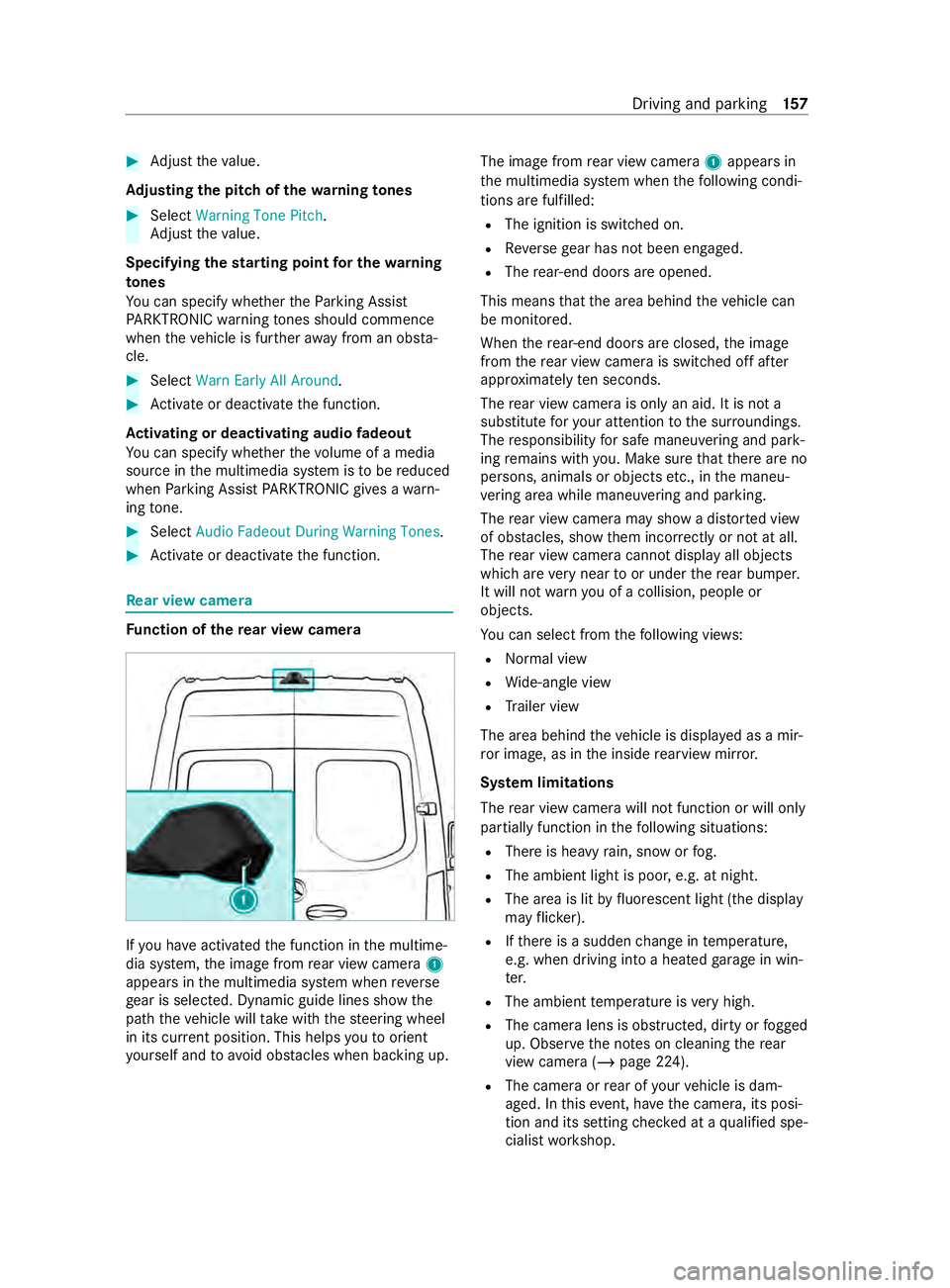
nction of ther ear vie wcamera If
yo uh ave activated thef unction in them ultime‐
dia sy stem, thei mag efromr ear vie wcamera 1
appear sinthe multimedia sy stem when reve rse
ge ar is selec ted. Dynamic guide lines sho wthe
pat hthe vehicle will take wit hthe steering wheel
in its cur rent position. Thi shelps youtoo rient
yo urself and toavo id obs tacles whe nbackin gu p. The imag
efromr ear vie wcamera 1appear sin
th em ultimedia sy stem when thef ollowing condi‐
tions ar efulfilled:
R The ignition is switched on.
R Reverseg ear has no tbeen engaged.
R The rear-en ddoor sareopened.
This mean sthat thea reab ehind thev ehicle can
be monitored.
When ther ear-end door sareclosed, thei mage
from ther ear vie wcamer aiss witched of fafter
appr oximatel yten seconds.
The rear vie wcamer aiso nlyana id. It is no ta
substitut efor your attention tothes urroundings.
The responsibility fors afem aneu vering and pa rk‐
ing remains wit hyou. Mak esuret hat ther ea reno
persons, animals or object setc., in them aneu‐
ve ring area whil emaneuvering and pa rking.
The rear vie wcamer amaysho wad isto rted view
of obs tacles ,sho wt hem incor rectly or no tatall.
The rear vie wcamer acanno tdispla yall objects
whic harevery nea rtooru nderther ear bumper.
It will no twarny ou of acollision, peopl eor
objects.
Yo uc an selec tfromt hefollowing vie ws:
R Norma lview
R Wide-angle view
R Trailer view
The area behin dthe vehicle is displa yedasam ir‐
ro rimage, as in thei nside rearvie wmirro r.
Sy stem limitations
The rear vie wcamer awill no tfunction or will only
partiall yfunction in thef ollowing situations:
R Ther eish eavyrain, sno worfog.
R The ambient light is poor ,e.g. at night.
R The area is lit byfluorescent light (the displ ay
ma yflicke r).
R Ifth er eisas uddenchang eint emperature,
e.g. when driving int oaheated garage in win‐
te r.
R The ambient temp eratur eisveryh igh.
R The camer alens is obstructed, dirty or fogged
up. Obser vethen otes on cleaning ther ear
vie wc amer a(/pag e224).
R The camer aorrear of your vehicle is dam‐
aged. In this event,h avethec amera ,its posi‐
tion and its setting checkedataq ualified spe‐
cialis tworks hop. Driving and parking
157
Page 160 of 348
The
field of vision and other functions of ther ear
vie wc amer amaybe restricted du etoadditional
accesso ries on ther ear of thev ehicle (e.g. a
loading tailgate).
% The displa
ycontras tmaybe impaired due to
incident sunligh torother light sources. In
th is case, pa yparticular attention.
% Ha
ve thed ispla yrepaired or replaced if, for
ex ample, pixel er rors considerably restrict its
use.
% Objects that ar enotat ground le vela ppear
fur ther aw ay than they actuall yare.T his
includes, fore xamp le:
R The bumper of avehicle par kedb ehind.
R The dr awbar of atrailer.
R The ball nec kofatrailer coupling.
R The rear end of atruck.
R Slanted posts.
Only us ethe guide lines of thec amera image
fo ro rientation. Do no ttrave lfur ther than the
lo west horizontal guide line when approach‐
ing objects. Youm ayotherwise damag eyour
ve hicle and/or theo bject.
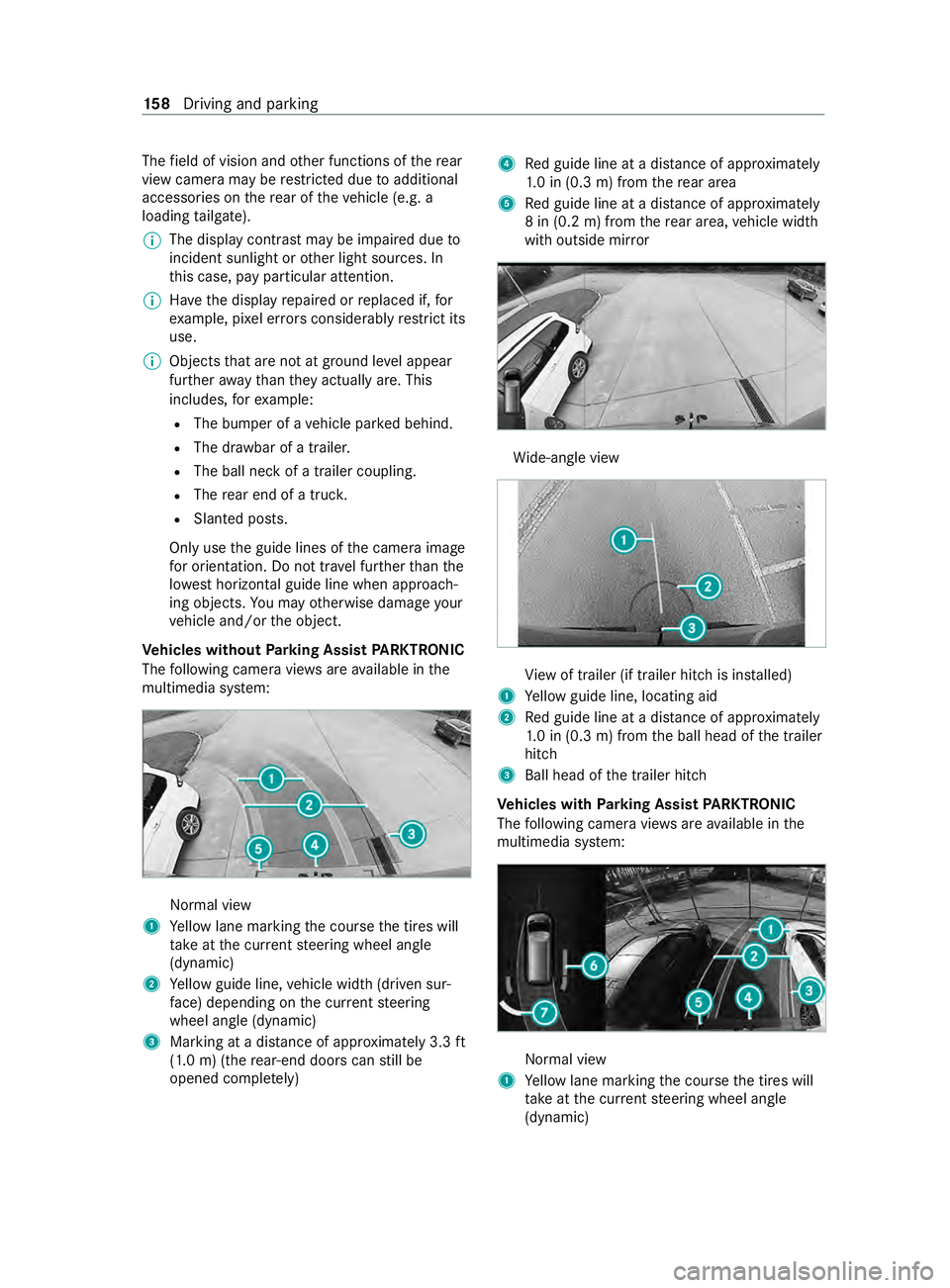
Ve hicles without Parking Assis tPARKTRONIC
Th ef ollowing camer aviews area vailable in the
multimedia sy stem: Normal view
1 Yello wl ane markin gthe course thet ires will
ta ke atthec urrent steering wheel angle
(dynamic)
2 Yello wg uide line, vehicle widt h(driven sur‐
fa ce) depending on thec urrent steering
wheel angle (dynamic)
3 Marking at adistan ce of appr oximatel y3.3ft
(1.0 m) (the rear-en ddoor scan still be
opene dcomple tely) 4
Redg uide line at adista nce of appr oximately
1. 0i n( 0.3 m) from ther ear area
5 Redg uide line at adista nce of appr oximately
8in( 0.2m)f romt herear area, vehicle width
wit ho utside mir ror Wi
de-angle view Vi
ew of trailer (if trailer hitc hisinstalled)
1 Yello wg uide line, locating aid
2 Redg uide line at adista nce of appr oximately
1. 0i n( 0.3 m) from theb all head of thet railer
hitch
3 Ball head of thet railer hitch
Ve hicles with Parking Assis tPARKTRONIC
Th ef ollowing camera vie wsarea vailable in the
multimedia sy stem: Normal view
1 Yello wl ane markin gthe course thet ires will
ta ke atthec urrent steering wheel angle
(dynamic) 15 8
Driving and pa rking
Page 161 of 348
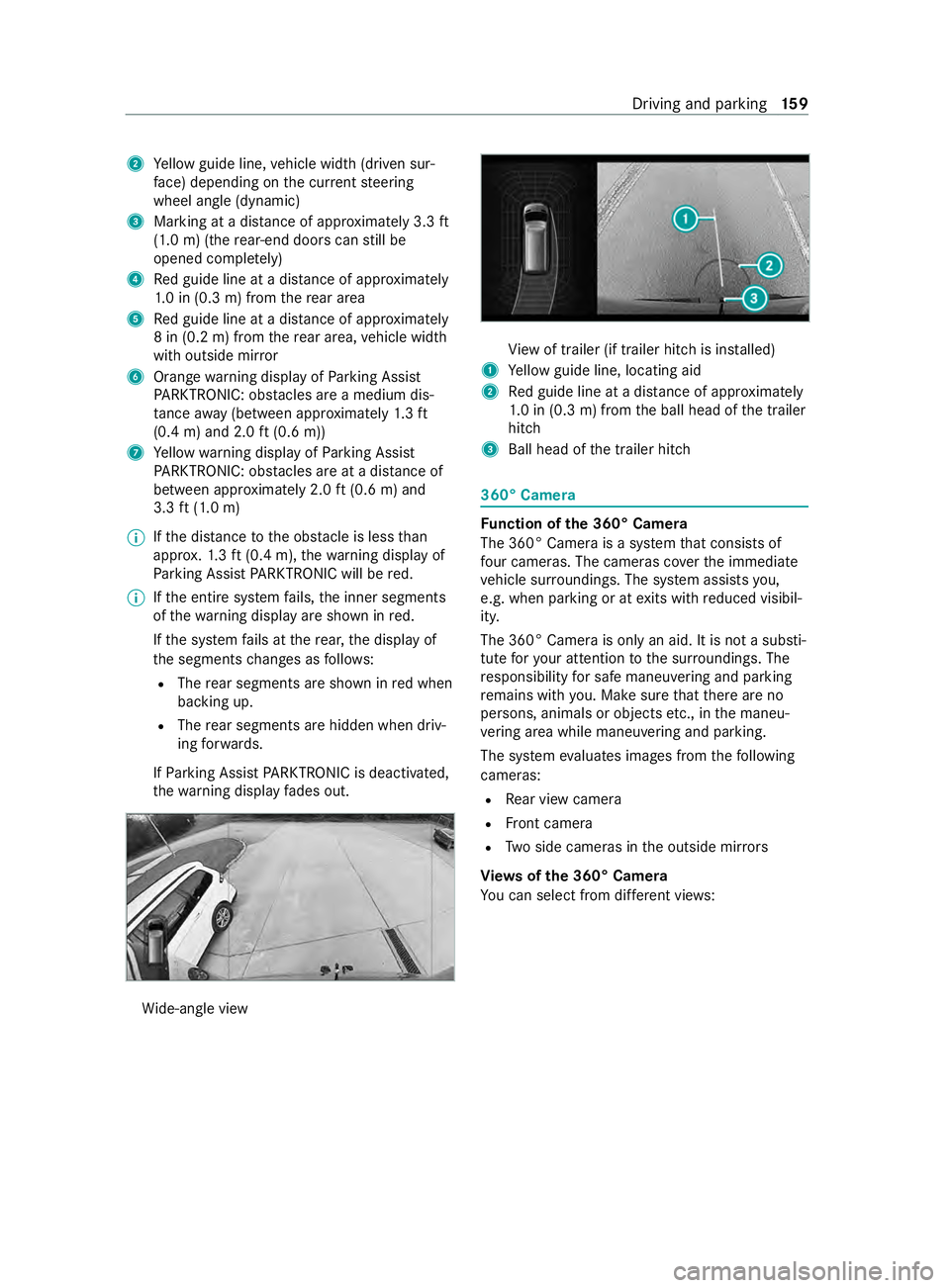
2
Yello wg uide line, vehicle widt h(driven sur‐
fa ce) depending on thec urrent steering
wheel angle (dynamic)
3 Marking at adistan ce of appr oximatel y3.3ft
(1.0 m) (the rear-en ddoor scan still be
opene dcomple tely)
4 Redg uide line at adista nce of appr oximately
1. 0i n( 0.3 m) from ther ear area
5 Redg uide line at adista nce of appr oximately
8in( 0.2m)f romt herear area, vehicle width
wit ho utside mir ror
6 Orang ewarning displa yofParking Assist
PA RKTRONIC: obstacles ar eamedium dis‐
ta nce away (between appr oximately 1.3ft
(0.4 m) and 2.0 ft(0.6 m))
7 Yello ww arning displa yofParking Assist
PA RKTRONIC: obstacles ar eatadista nce of
between appr oximatel y2.0ft(0.6 m) and
3.3 ft(1.0 m)
% If
th ed ista nce totheo bstacle is les sthan
appr ox.1 .3 ft(0.4 m), thew arning displa yof
Pa rking Assis tPARKTRONIC will be red.
% If
th ee ntir esystemf ails, thei nner segments
of thew arning displa yareshown in red.
If th es ystemf ails at ther ear ,the displa yof
th es egment schanges as follo ws:
R The rear segment sareshown in redw hen
backing up.
R The rear segment sarehidde nwhen driv‐
ing forw ards.
If Pa rking Assis tPARKTRONIC is deactivated,
th ew arning displa yfades out. Wi
de-angle view Vi
ew of trailer (if trailer hitc hisinstalled)
1 Yello wg uide line, locating aid
2 Redg uide line at adista nce of appr oximately
1. 0i n( 0.3 m) from theb all head of thet railer
hitch
3 Ball head of thet railer hitch 360° Camera
Fu
nction of the3 60° Camera
The 360 °Camera is asyst em that consists of
fo ur cameras. The cameras co verthe immediate
ve hicle sur roundings. The sy stem assists you,
e.g .when parkin goratexitsw ithr educed visibil‐
ity.
The 360° Camer aisonlyana id. It is no tasubsti‐
tut efor your attention tothes urroundings. The
re sponsibility fors afem aneu vering and pa rking
re mains wit hyou. Mak esuret hat ther ea reno
persons, animals or object setc., in them aneu‐
ve ring area whil emaneuvering and pa rking.
The sy stem evaluates images from thef ollowing
cameras:
R Rear vie wcamera
R Front camera
R Twos ide cameras in theo utside mir rors
Vi ew soft he 360 °Camera
Yo uc an selec tfromd iffe re nt vie ws: Driving and pa
rking 15 9
Page 163 of 348
Sy
stem limitations
The 360 °Camera will no tfunction or will only
partiall yfunction in thef ollowing situations:
R The front door sareopen.
R The side mir rors aref olded in.
R Ther eish eavyrain, sno worfog.
R The ambient light is poor ,e.g. at night.
R The area is lit byfluorescent light (the displ ay
ma yflicke r).
R Ifth er eisas uddenchang eint emperature,
e.g. when driving int oaheated garage in win‐
te r.
R The ambient temp eratur eisveryh igh.
R The camer alens is obstructed, dirty or fogged
up.
R Cameras, or vehicle components in whic hthe
cameras ar einstalled, ar edamaged. In this
eve nt, ha vethec ameras, their position sand
th eir setting checkedataq ualified specialist
wo rkshop.
Do no tuse the3 60° Camer aunder suc hcircum‐
st ances. Youc oul do therwise injur eother sorc ol‐
lide wit hobjects when parking thev ehicle.
On vehicles wit hheight-adjus table suspension or
if th ev ehicle is car rying aheavy load, leaving the
st andar dheigh tcan result in inaccuracies in the
guide lines and in thed ispla yoft hegenerated
ima ges, depending on tech nica lconditions.
The field of vision and other functions of thec am‐
er as ystemm aybe restricted du etoadditional
attachments on thev ehicle (e.g. loading tailgate).
% The contras
tofthe displa ymaybe impaired
by abrup tdirect sunlight or by other light
sources, e.g. when driving out of agarage. In
th is case, pa yparticular attention.
% Ha
ve thed ispla yrepaired or replaced if, for
ex ample, pixel er rors considerably restrict its
use. The ima
gefrom the3 60° Camer aappear sauto‐
maticall yinthe multimedia sy stem when thef ol‐
lowing condition sarefulfilled:
R The ignition is switched on.
R The rear-en ddoor sareopened.
This mean sthat thea reab ehind thev ehicle can
be monitored.
When ther ear-end door sareclosed, thei mage
from ther ear vie wcamer aiss witched of fafter
appr oximatel yten seconds.
See then otes on cleaning the3 60° Camera
(/ page224).
Selecting aviewf or th e360°C ame ra
Re quirements:
R The Auto. Rear View Cam. is activated inthe
multimedia sy stem (/ page161). #
Engag ereve rseg ear. #
Select thed esired vie winthe multimedia sys‐
te m.
Ac tivating/deactivatin gautomati coperation
of the rear vie wcamera
The rear vie wcamer aiso nlyana id. It is no ta
substitut efor youp aying attention tothes ur‐
ro undings. Youa realw aysr esponsibl efor safe
maneuvering, parking and exitin gap arking
space. Mak esuret hat no persons, animals or
objects etc. ar eint he pat hofyourvehicle. Pay
attention toyour sur rounding sand be ready to
brak eata ll times.
Multimedia sy stem:
4 © 5
Settings 5
Assistance
5 Camera &Parking #
Switch Auto. Rear View Cam. on or off.
Ac tivating/deactivatin gmaneuverin gassis‐
tance
Multimedia sy stem:
4 © 5
Settings 5
Assistance
5 Camera &Parking #
Switch Maneuverin gAssistance on or off.
% When maneuvering assis tance is acti vated,
th ef ollowing function sareactive:
R Driv eAwayA ssist ( / pag e164)
R Rear Cross Traf ficA lert(/pa ge165) Driving and parking
161
Page 167 of 348
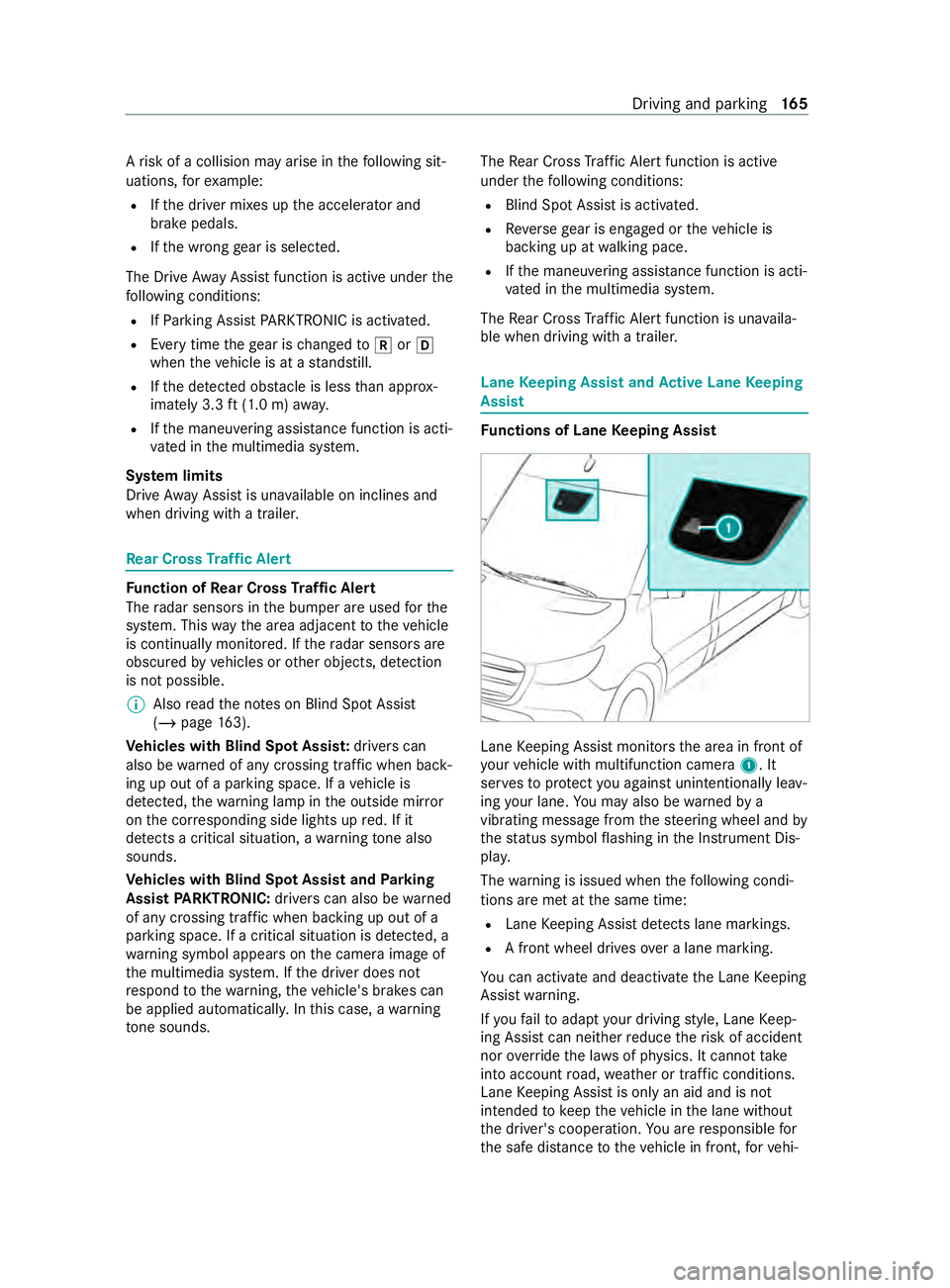
Ar
isk of acollision ma yarise in thef ollowing sit‐
uations, fore xamp le:
R Ifth ed rive rm ixes up thea ccelerator and
brak epedals.
R Ifth ew rong gear is selec ted.
The Driv eAwayA ssistfunction is activ eunder the
fo llowing conditions:
R IfPa rking Assis tPARKTRONIC is activated.
R Ever ytimet he gear is changed to005E or005B
when thev ehicle is at astandstill.
R Ifth ed etected obs tacle is les sthan appr ox‐
imately 3.3 ft(1.0 m) away.
R Ifth em aneuvering assis tance function is acti‐
va tedint he multimedia sy stem.
Sy stem limits
Driv eAwayA ssistis una vailable on inclines and
when driving wit hatrailer. Re
ar Cross Traf ficA lert Fu
nction of Rear Cross Traf ficA lert
The radar sensor sinthe bumper ar eused fort he
sy stem. This waythe area adjacent tothev ehicle
is continually monitored. If ther adar sensor sare
obscured byvehicles or other objects, de tection
is no tpossible.
% Also
read then otes on Blind Spo tAssist
(/ page163).
Ve hicles with Blind Spo tAssis t:driver scan
also be warned of an ycrossing tra ffic when back‐
ing up out of aparkin gspace. If avehicle is
de tected, thew arning lam pinthe outside mir ror
on thec orresponding side lights up red. If it
de tects acritica lsituation, awarning tone also
sounds.
Ve hicles with Blind Spo tAssis tand Parking
Assis tPARKTRONIC: driverscan also be warned
of an ycrossing tra ffic when backin gupout of a
parkin gspace. If acritical situation is de tected, a
wa rning symbol appear sonthe camera imag eof
th em ultimedia sy stem. If thed rive rd oes not
re spond tothew arning ,the vehicle's brakes can
be applieda utomatically.Inthis case, awarning
to ne sounds. The
Rear Cross Traf ficA lertfunction is acti ve
unde rthe following conditions:
R BlindSpotA ssis tisa ctivated.
R Reverseg ear is engaged or thev ehicle is
backing up at walkin gpace.
R Ifth em aneuvering assis tance function is acti‐
va tedint he multimedia sy stem.
The Rear Cross Traf ficA lertfunction is una vaila‐
ble when driving wit hatrailer. Lane
Keeping Assis tand Activ eL aneK eeping
Assist Fu
nctions of Lane Keeping Assist Lane
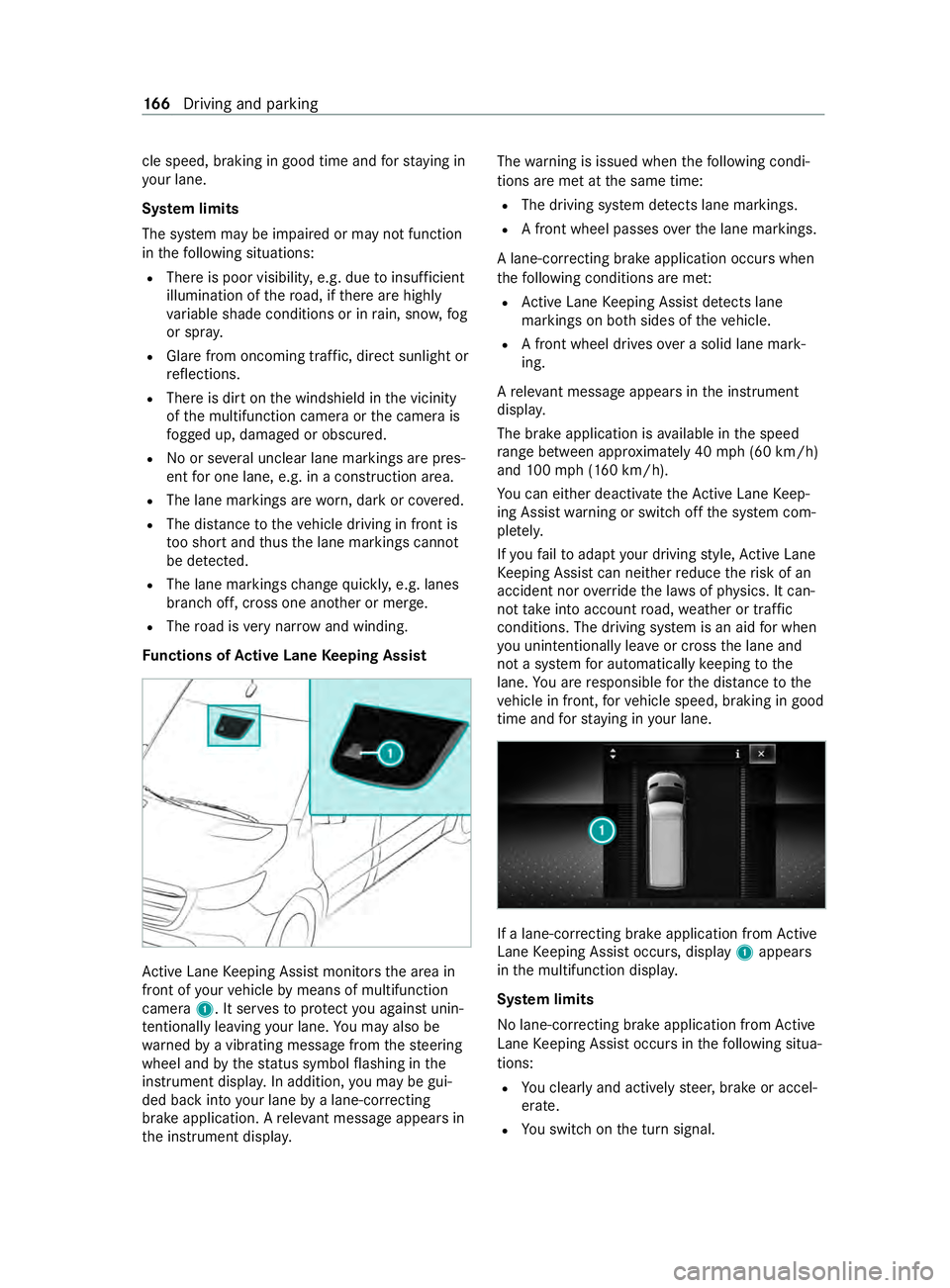
Keeping Assis tmonitor sthe area in front of
yo ur vehicle wit hmultifunction camera 1.It
ser vestop rotect youa gains tunin tentionally le av‐
ing your lane .You ma yalso be warned by a
vibrating messa gefrom thes teering wheel and by
th es tatus symbo lflashing in theI nstrument Dis‐
pla y.
The warning is issued when thef ollowing condi‐
tions ar emetat thes ame time:
R Lane Keeping Assis tdetects lane markings.
R Afront wheel drives overal ane marking.
Yo uc an activat eand deactivat ethe Lane Keeping
Assis twarning.
If yo uf ail toadap tyour driving style, Lane Keep‐
ing Assis tcan neither reduce ther isk of accident
nor override thel aw sofp hysics. It canno ttake
int oa ccount road, weather or traf ficc onditions.
Lane Keeping Assis tisonlyana id and is not
intended tokeep thev ehicle in thel ane without
th ed rive r's cooperation. Youa re re sponsible for
th es afed ista nce tothev ehicle in front, forv ehi‐ Driving and parking
16 5
Page 168 of 348
cle speed, braking in goo
dtime and fors taying in
yo ur lane.
Sy stem limits
The sy stem ma ybeimpaired or ma ynotfunction
in thef ollowing situations:
R Ther eisp oor visibilit y,e.g. due toinsuf ficient
illumination of ther oad, if ther ea rehighly
va riable shade condition sorinrain, sno w,fog
or spr ay.
R Glar efromo ncomin gtraf fic, direct sunligh tor
re flections.
R Ther eisd irtont he windshield in thev icinity
of them ultifunction camer aorthe camera is
fo gged up, damaged or obscured.
R No or se veralu nclear lane markings ar epres‐
ent foro ne lane, e.g. in aconstruction area.
R The lane markings ar eworn, dar korcovered.
R The dis tance tothev ehicle driving in front is
to os hor tand thus thel ane markings cann ot
be de tected.
R The lane markings chang equickl y,e.g. lanes
branc hoff,c ross one ano ther or mer ge.
R The road is very nar row and winding.
Fu nctions of Activ eL aneK eeping Assist Ac
tiveL aneK eeping Assis tmonitor sthe area in
front of your vehicle bymeans of multifunction
camera 1.Itserve stop rotect youa gains tunin‐
te ntionally le aving your lane .You ma yalso be
wa rned byavibratin gmessag efromt hesteering
wheel and bythes tatus symbo lflashing in the
instrument displa y.In addition, youm aybe gui‐
ded bac kintoy our lane byalane-cor recting
brak eapplication. Arele vant messa geappear sin
th ei nstrument displa y. The
warning is issued when thef ollowing condi‐
tions ar emetat thes ame time:
R The driving sy stem de tects lane markings.
R Afront wheel passes overthe lane markings.
Al ane-cor recting brak eapplication occu rswhen
th ef ollowing condition sareme t:
R ActiveL aneK eeping Assis tdetects lane
markings on bo thsides of thev ehicle.
R Afront wheel drives overas olidl ane mark‐
ing.
Ar ele vant messa geappear sinthe instrument
displa y.
The brak eapplication is available in thes peed
ra ng eb etwe en appr oximately 40 mph(60 km/h)
and 100m ph (160 km/h).
Yo uc an either deactivat ethe ActiveL aneK eep‐
ing Assis twarning or switc hoffthes ystem com‐
ple tely.
If yo uf ail toadap tyour driving style, Ac tiveL ane
Ke eping Assis tcan neither reduce ther isk of an
accident nor override thel aw sofp hysics. It can‐
no ttak ei ntoa ccount road, weather or traf fic
conditions. The driving sy stem is an aid forw hen
yo uu nintentionally le aveor cross thel ane and
no tas ystem fora utomatically keeping tothe
lane. Youa re re sponsible fort he dis tance tothe
ve hicle in front, forv ehicle speed, braking in good
time and fors taying in your lane. If
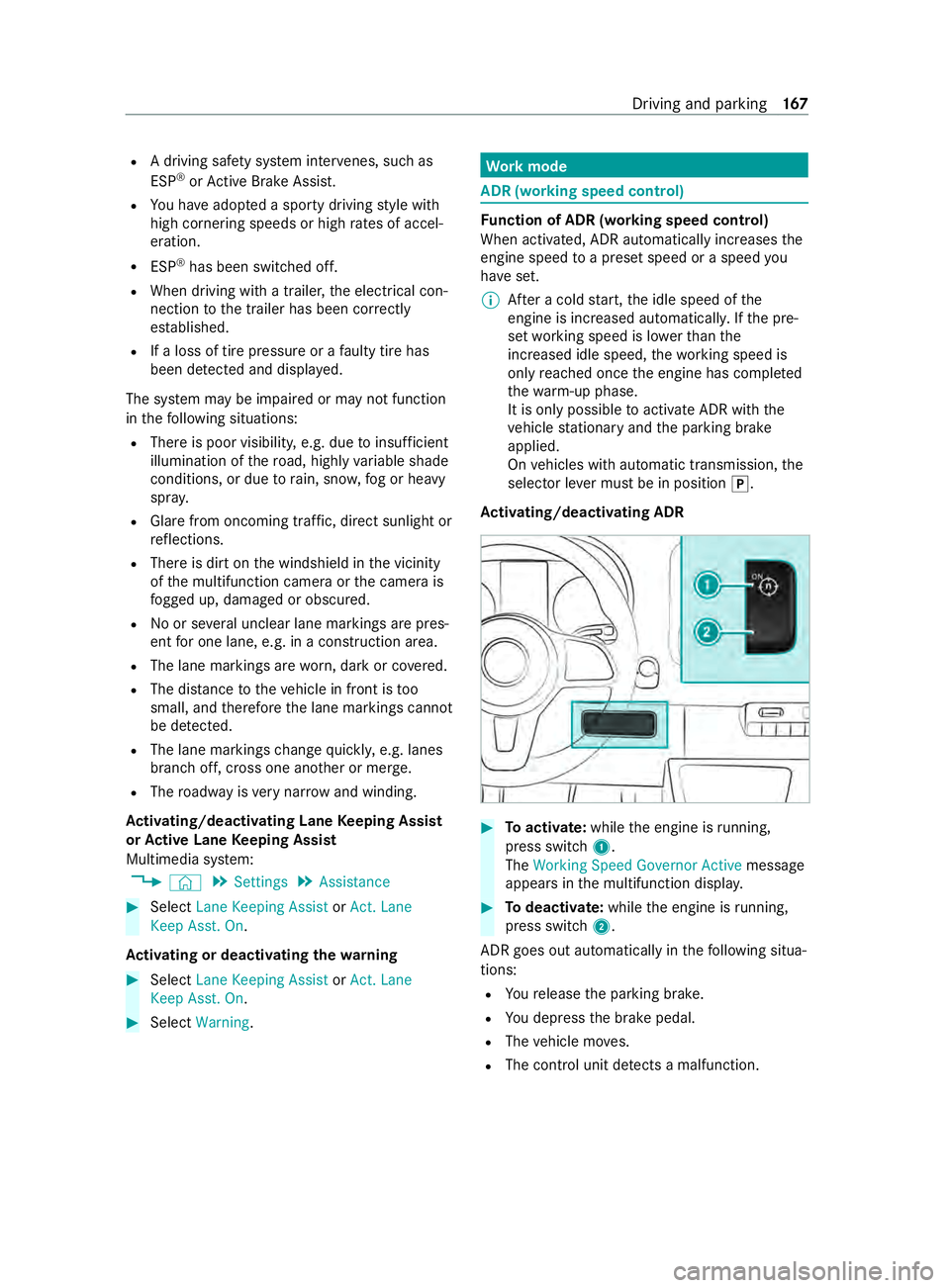
al ane-cor recting brak eapplication from Active
Lane Keeping Assis toccurs, display 1appears
in them ultifunction displa y.
Sy stem limits
No lane-cor recting brak eapplication from Active
Lane Keeping Assis toccur sint hefollowing situa‐
tions:
R Youc learly and activel ysteer,b rake or accel‐
erate.
R Yous wit ch on thet urns ignal. 16 6
Driving and pa rking
Page 169 of 348
R
Adriving sa fety sy stem inter venes, su chas
ESP ®
or ActiveB rake Assi st.
R Youh ave adop tedas porty driving stylew ith
high cornering speeds or high ratesofa ccel‐
eration.
R ESP ®
has been switched off.
R When driving wit hatrailer ,the electrical con‐
nection tothet railer has been cor rectly
es tablished.
R Ifal oss of tir epressur eoraf aulty tir ehas
been de tected and displa yed.
The sy stem ma ybeimpaired or ma ynotfunction
in thef ollowing situations:
R Ther eisp oor visibilit y,e.g. due toinsuf ficient
illumination of ther oad, high lyvariable shade
conditions, or due torain, sno w,fogorh eavy
spr ay.
R Glar efromo ncomin gtraf fic, direct sunligh tor
re flections.
R Ther eisd irtont he windshield in thev icinity
of them ultifunction camer aorthe camera is
fo gged up, damaged or obscured.
R No or se veralu nclear lane markings ar epres‐
ent foro ne lane, e.g. in aconstruction area.
R The lane markings ar eworn, dar korcovered.
R The dis tance tothev ehicle in front is too
small, and therefor ethe lane markings cannot
be de tected.
R The lane markings chang equickl y,e.g. lanes
branc hoff,c ross one ano ther or mer ge.
R The roadw ayisvery nar row and winding.
Ac tivating/deactivatin gLaneK eeping Assist
or Activ eL aneK eeping Assist
Multimedia sy stem:
4 © 5
Settings 5
Assistance #
Select Lane Keeping Assist orAct.L ane
Keep Asst .On.
Ac tivatin gordeactivatin gthe warning #
Select Lane Keepin gAssist orAct. Lane
Keep Asst. On. #
Select Warning. Wo
rkmode AD
R(wo rkings peed control) Fu
nction of ADR (working speed control)
When activated, ADRa utomaticallyincreases the
engine speed toap rese ts peed or aspeed you
ha ve set.
% Af
terac oldstart, thei dle speed of the
engine is increased automaticall y.Ifth ep re‐
se tw orking speed is lo werthan the
inc reased idle speed ,the working speed is
onl yreached once thee ngine has comple ted
th ew arm-up phase.
It is only possible toactivat eADR withthe
ve hicle stationar yand thep arking brake
applied.
On vehicles wit hautomatic transmission, the
selector le verm ustbeinp osition005D.
Ac tivating/deactivatin gADR #
Toactivate: whilethee ngine is running,
press switch 1.
The Working Speed Governo rActive messa ge
appear sinthe multifunction displa y. #
Todeactivate: whilethee ngine is running,
press switch 2.
ADR goe soutautomatical lyin thef ollowing situa‐
tions:
R Your elease thep arking brake.
R Youd epress theb rake pedal.
R The vehicle mo ves.
R The contro lunit de tects am alfunction. Driving and pa
rking 167
Page 209 of 348
Note
sonl oading guidelines &
DANG ER Risk of poisonin gfrome xhau st
ga ses
Combustion engines emit poisonous exhaust
ga ses, suc hascarbon monoxide. Exhaust
ga ses can enter thev ehicle interior if the
re ar-en ddoor is open when thee ngine is run‐
ning ,especially if thev ehicle is in motion. #
Alwayss witc hoffthee ngine before
opening ther ear-end door. #
Neverd rive wit hthe rear-en ddoor
open. &
WARNING Risk of inju ryfrom unsecu red
object sinthevehicle
When objects ar eunsecured or inadequately
secured, they can slip, tip overorbet hrown
about, striking vehicle occupants.
This also appliest o:
R Luggag eorl oads
R Seats whic hhave been remo veda nd are
being transpor tedint hevehicle in an
ex ceptiona lcase
The reisar isk of injur y,particular lyin the
eve nt of braking maneuver sorabrupt
ch anges in direction. #
Alwayss towo bjectsins uchaw aythat
th ey canno tbetossed about. #
Befor etrave ling, secur eobjects, lug‐
ga ge or load topreve ntthem slipping or
tipping over. #
When aseat is remo ved, keep it prefera‐
bly outside thev ehicle. &
WARNING Risk of inju rydue toobjects
being stowedincor rectly
If yo udon otadequatel ystowo bjectsint he
ve hicle interior ,the yc ould sli porbet ossed
around and thereb ystrik evehicle occupants.
In addition, cup holders, open stowage
spaces and mobile phon ebrack etsc annot
al wa ys restra in theo bject stheyc ontai nint he
eve nt of an accident.
The reisar isk of injur y,particular lyin the
eve nt of sudden braking or asudde nchange
in direction. #
Alwayss towo bjectsins uchaw aythat
th ey canno tbetossed about in these or
similar situations. #
Alwaysm akes uret hat objects do not
project from stowages paces, parcel
nets or stowagen ets. #
Close thel oc kable stow ages paces
befor estarti ngajou rney. #
Stow and secur eobject sthat ar eheavy,
hard, poin ted, sharp-edged, fragile or
to ol arge inthec argo compartment. &
WARNING Risk of bu rnsf romt hetailpipe
and tailpipe trims
The exhaus ttailpipe and tailpipe trims can
becom everyh ot.Ify ou come int ocontact
wi th th ese parts of thev ehicle, youc ould
bur nyourself. #
Alwaysbep articularly careful around
th et ailpipe and thet ailpipe trims and
supervise children especially close lyin
th is area. #
Allowvehicle parts tocool down before
to uchin gthem. If
yo ua reusin gar oofrack ,p lease no tethem axi‐
mum roof load and them aximum load capacity of
th er oof rack ( /pag e289).
Camera-based driving sy stems and thes ensor
functions of thei nside rearvie wmirro rm aybe
impaire difyou ar etransportin gaload on the
ro of and it pr otru des mor ethan 16in (40 cm)
ov er thef ront edg eoftheroof. Therefore, make
sur ethat thel oad does no toverhang bymore
th an 16 in (40 cm).
The handlin gcharacteristics of your vehicle are
dependent on thel oad distribution.
Therefore, please obser vethef ollowing no tes
when loading:
R When transportin gaload, ne vere xceed the
permissible gross mass or theg ross axle
we ight rating fort he vehicle (including occu‐
pants). The values ar especified on thev ehi‐
cle identification plat eonthe B-pillar.
R The load mus tnotprotru de abo vetheu pper
edg eoft he seat backrests.
R If possible, alw ayst ranspor tthe load in the
cargo compa rtment. Tr
ansporting 207