interior lights MERCEDES-BENZ SPRINTER 2020 MY20 with 7” screen
[x] Cancel search | Manufacturer: MERCEDES-BENZ, Model Year: 2020, Model line: SPRINTER, Model: MERCEDES-BENZ SPRINTER 2020Pages: 348, PDF Size: 5.84 MB
Page 65 of 348
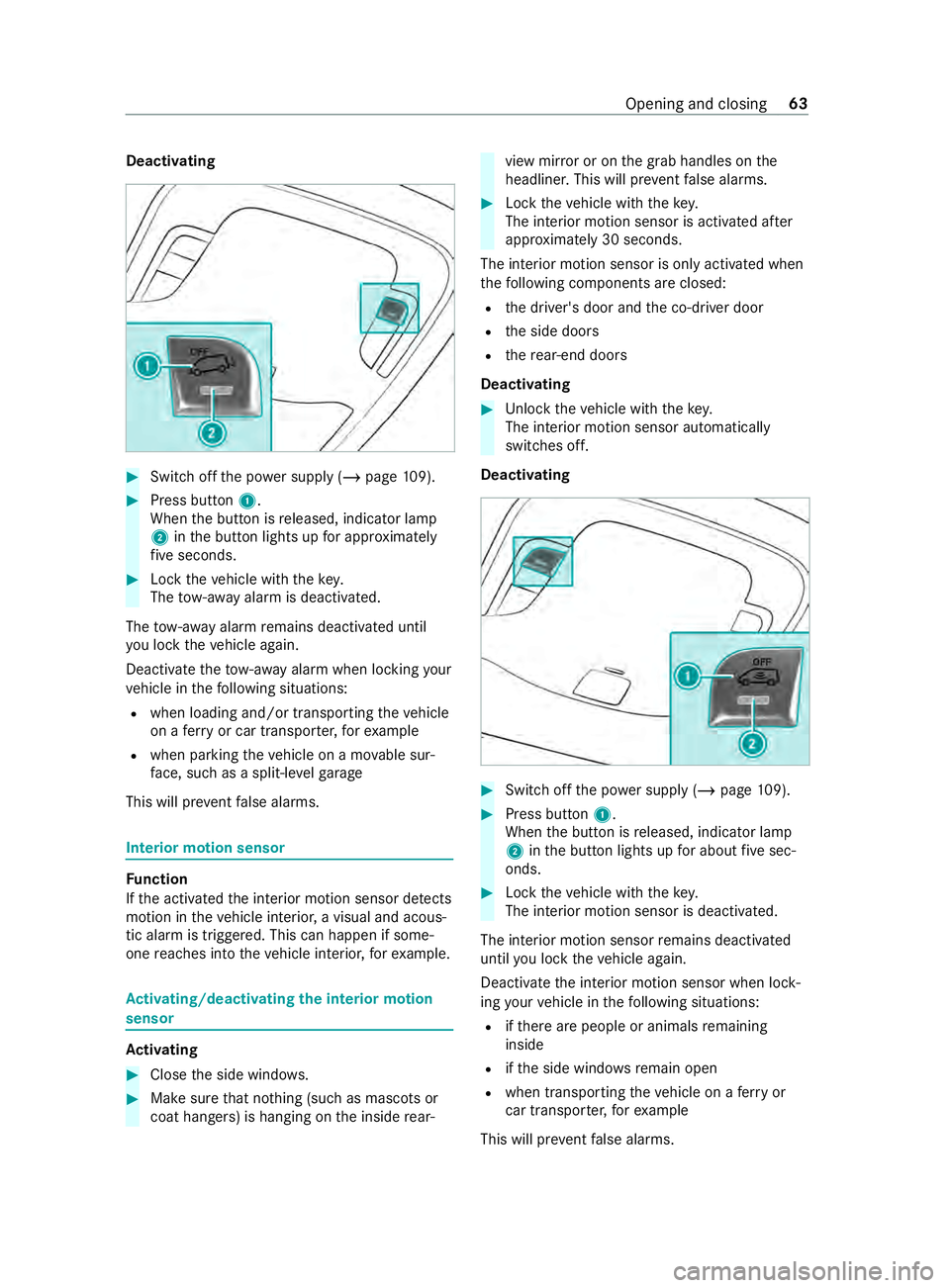
Deactivating
#
Switc hoffthep ower supply (/ page109). #
Press bu tton 1.
When theb utton is released, indicator lamp
2 intheb utton lights up fora pproxima tely
fi ve seconds. #
Lockthe vehicle wit hthe key.
The tow- aw ay alar misd eactivated.
The tow- aw ay alar mremain sdeactivated until
yo ul ockt he vehicle again.
Deactivat ethe tow- aw ay alar mw hen lockin gyour
ve hicle in thef ollowing situations:
R when loadinga nd/or transportin gthe vehicle
on aferry or car transpor ter,fo re xamp le
R when parkin gthe vehicle on amovable sur‐
fa ce, suc hasas plit-levelg arage
This will pr eventfalse alarms. Interior motion sensor
Fu
nction
If th ea ctivated thei nterior motion sensor de tects
motion in thev ehicle interior ,avisual and acous‐
tic alar mistriggered. This can happen if some‐
one reaches int othe vehicle interior ,for example. Ac
tivating/deactivatin gthe in terior motion
sensor Ac
tivating #
Close thes ide windo ws. #
Mak esuret hat no thing (suc hasmascotsor
coat hangers) is hanging on thei nside rear‐ vie
wm irro roront he grab handles on the
headliner .This will pr event false alarms. #
Lockthe vehicle wit hthe key.
The interior motion sensor is activated af ter
appr oximately 30 seconds.
The interior motion sensor is onl yactivated when
th ef ollowing components ar eclosed:
R thed rive r's door and thec o-driver door
R thes ide doors
R ther ear-end doors
Deactivating #
Unloc kthe vehicle wit hthe key.
The interior motion sensor automatically
switches off.
Deactivating #
Switc hoffthep ower supply (/ page109). #
Press bu tton 1.
When theb utton is released, indicator lamp
2 intheb utton lights up fora bou tfives ec‐
onds. #
Lockthe vehicle wit hthe key.
The interior motion sensor is deactivated.
The interior motion sensor remains deactivated
until youl ockt he vehicle again.
Deactivat ethe interior motion sensor when lock‐
ing your vehicle in thef ollowing situations:
R ifth er ea repeople or animals remaining
inside
R ifth es ide windo wsremain open
R when transporting thev ehicle on aferry or
car transpor ter,fo re xamp le
This will pr eventfalse alarms. Opening and closing
63
Page 89 of 348
Ac
tivatin gand deactivatin gthe sur round
lighting Multimedi
asystem:
4 © 5
Settings 5
Light
5 Locator Lighting #
Activat eord eacti vate thef unction.
The exterior lighting remains on for40s econds
af te rt he vehicle is unloc ked. When yous tart the
ve hicle, thes urround lighting will be deactivated
and thea utomatic driving lights activated. Ad
justin gthe in terior lighting Ad
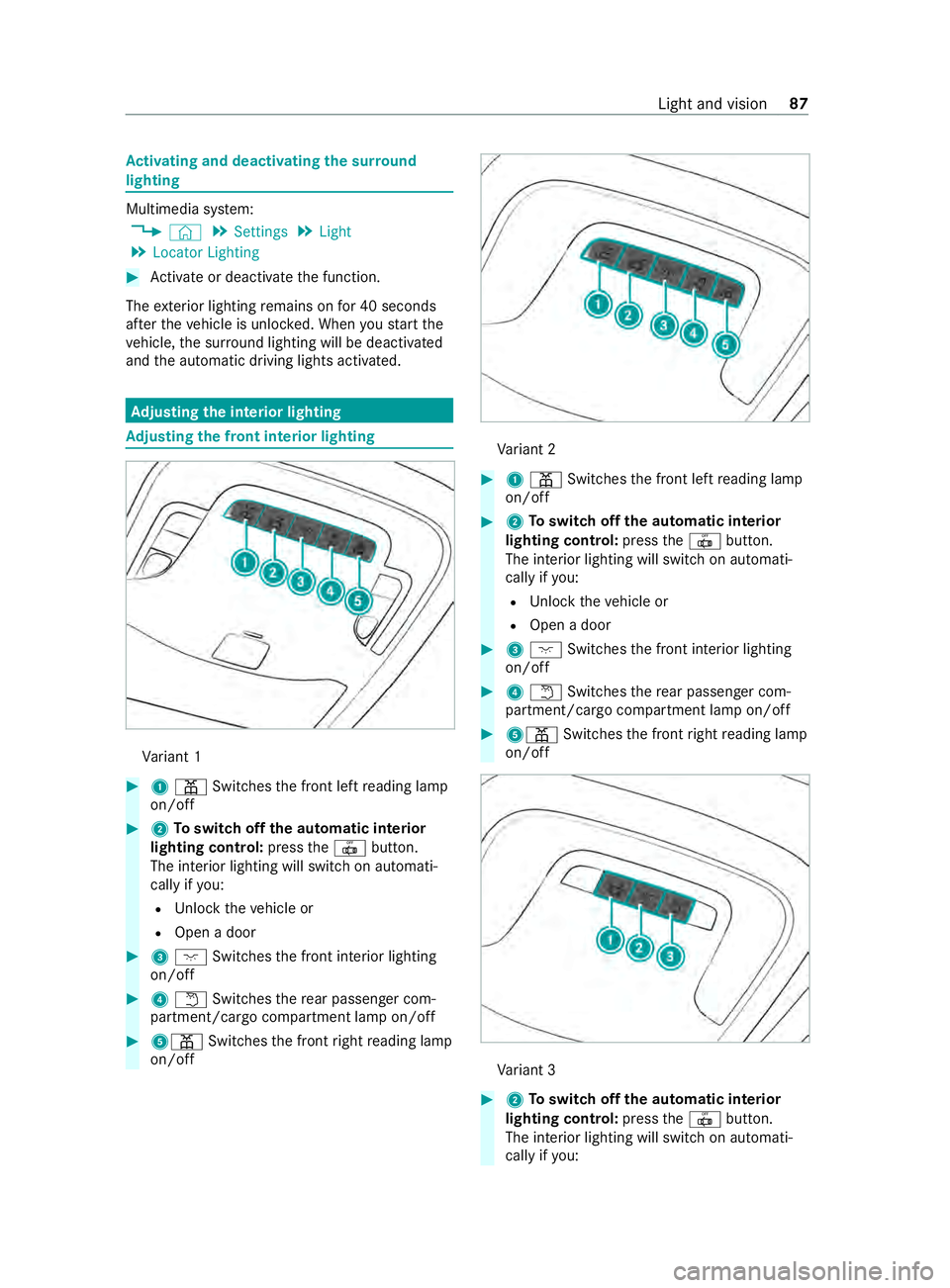
justin gthe fron tinterior lighting Va
riant 1 #
1003D Switches thef ront lef treading lamp
on/off #
2Toswitc hoffthea utomatic interior
lighting control: pressthe0033 button.
The interior lighting will switc honautomati‐
cally if you:
R Unloc kthe vehicle or
R Open adoor #
3004A Switches thef ront interior lighting
on/o ff #
40044 Switches ther ear passenger com‐
partment/cargo compartment lam pon/off #
5003D Switches thef ront right reading lamp
on/off Va
riant 2 #
1003D Switches thef ront lef treading lamp
on/off #
2Toswitc hoffthea utomatic interior
lighting control: pressthe0033 button.
The interior lighting will switc honautomati‐
cally if you:
R Unloc kthe vehicle or
R Open adoor #
3004A Switches thef ront interior lighting
on/o ff #
40044 Switches ther ear passenger com‐
partment/cargo compartment lam pon/off #
5003D Switches thef ront right reading lamp
on/off Va
riant 3 #
2Toswitc hoffthea utomatic interior
lighting control: pressthe0033 button.
The interior lighting will switc honautomati‐
cally if you: Ligh
tand vision 87
Page 91 of 348
#
Todeactivat ethe automati cinterio rlight‐
ing: press button 3.
The interior lighting control will switc hon
au tomatical ly,f or example, if you:
R Unloc kthe vehicle
R Open adoor #
Toswitc hfront interior lighting on or off:
press button 4. #
Toswitc hpassenger compartment light‐
ing on or off: press button5. #
Toswitc hthe front right reading lam pon
or off: press button 6. #
Toswitc hreading light soninthe
passenger compartment: press button7.
The LED lights up.
Pa ssenger scan switc hthe reading lamps on
and off. #
Toswitc hreading light soffin the
passenger compa rtment: press button 7.
The LED does no tlight up.
Pa ssenger scan no longer operat ethe reading
lamps. Swit
ching ther eading lam pabove the
pa ssenger seat on and of f(bus equipment) #
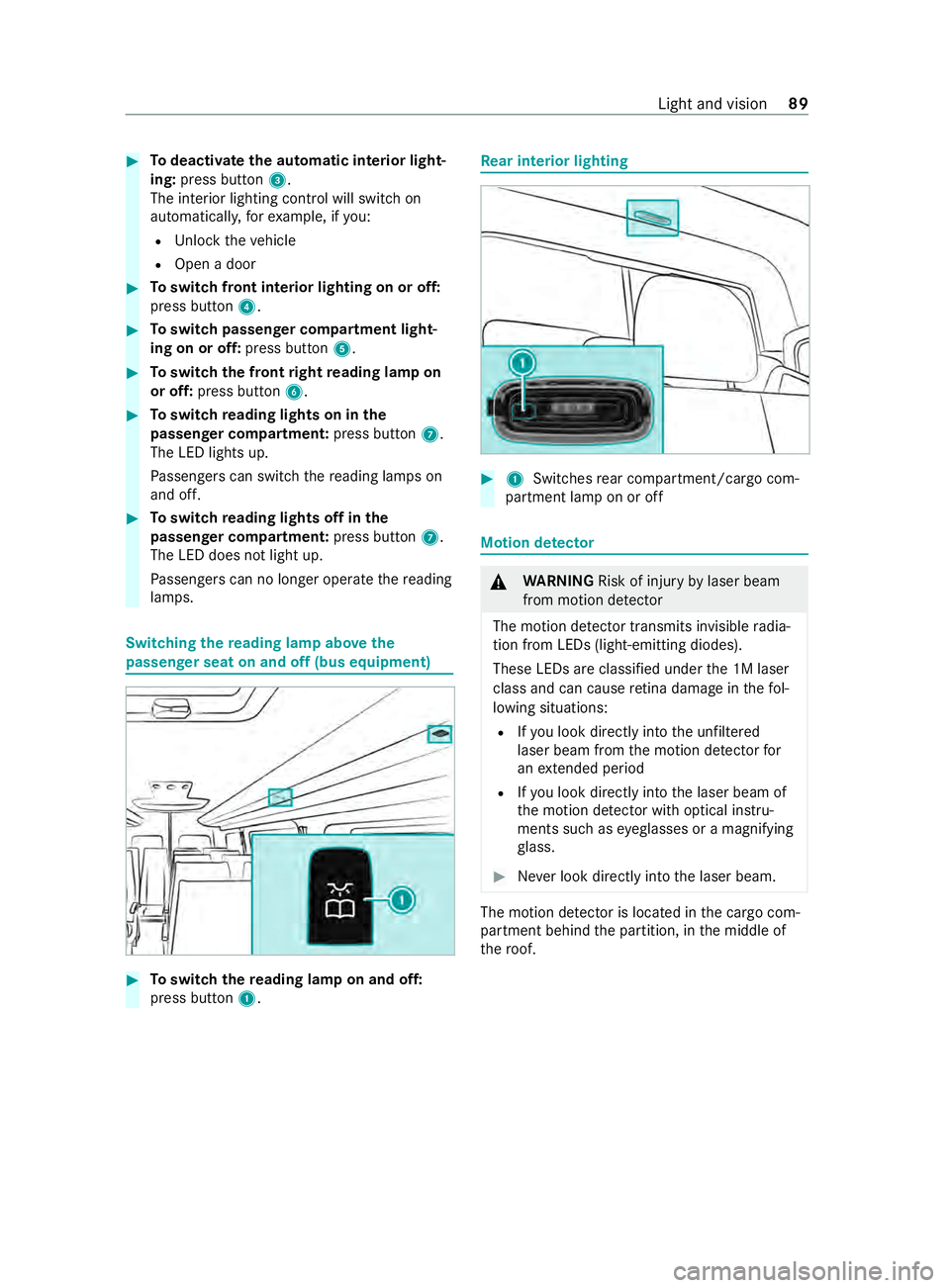
Toswitc hthe reading lam ponand off:
press button 1. Re
ar interior lighting #
1 Switches rear compartment/cargo com‐
partment lam ponoroff Motion de
tector &
WARNING Risk of inju ryby laser beam
from motion de tector
The motion de tector transmits invisible radia‐
tion from LED s(light-emitting diodes).
These LED sareclassified under the1Ml aser
class and can cause retina dama geinthef ol‐
lowing situations:
R Ifyo ul ook directly int othe unfiltered
laser beam from them otion de tector for
an extende dperiod
R Ifyo ul ook direct lyint ot he laser beam of
th em otion de tector wi thoptical instru‐
mentss uchase yeglasses or amagnifying
gl ass. #
Neverlook directly int othe laser beam. The motion de
tector is loca tedint he cargo com‐
partment behind thep artition ,inthe middle of
th er oof. Light and vision
89
Page 92 of 348
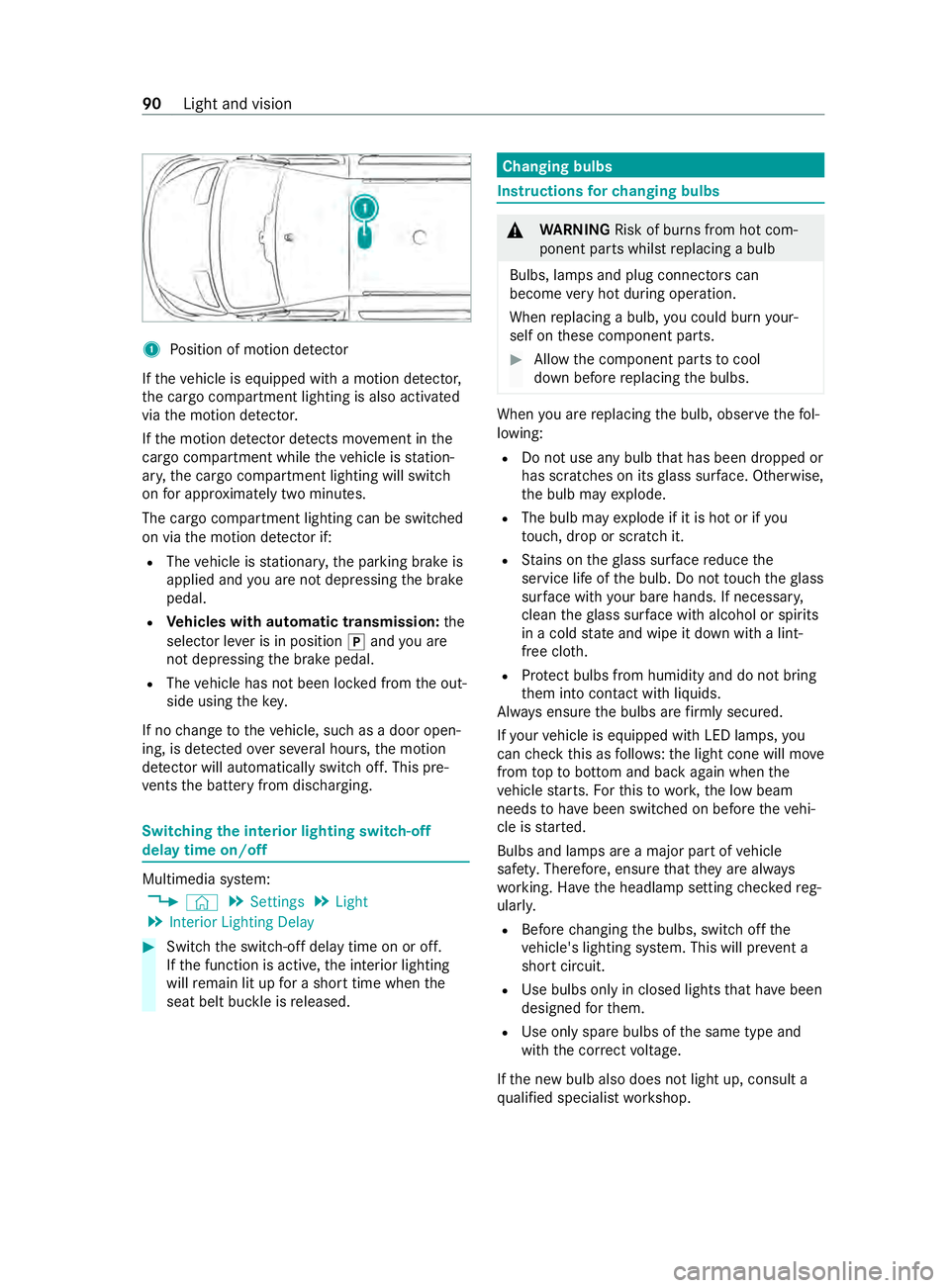
1
Position of motion de tector
If th ev ehicle is equipped wit hamotion de tector,
th ec argo compartmen tlighting is also activated
via them otion de tector.
If th em otion de tector de tects mo vement in the
cargo compa rtment whil ethe vehicle is station‐
ar y, thec argo compartmen tlighting will switch
on fora pproxima tely tw om inutes.
The cargo compartment lighting can be switched
on via them otion de tector if:
R The vehicle is stationar y,thep arking brak eis
applied and youa renotd epressing theb rake
pedal.
R Vehicles with automatic transmission: the
selector le verisinp osition005Dand youa re
no td epressing theb rake pedal.
R The vehicle has no tbeen loc kedf romt he out‐
side using thek ey.
If no chang etot hevehicle, suc hasadoor open‐
ing, is de tected over se veralh ours, them otion
de tector will au tomatically switc hoff.T his pre‐
ve nts theb atter yfromd ischarging. Switching
thei nterior lighting switch-off
dela ytimeo n/off Multimedia sy
stem:
4 © 5
Settings 5
Light
5 Interior Lightin gDelay #
Switc hthe switch-of fdela ytime on or off.
If th ef unction is active, thei nterior lighting
will remain lit up foras horttime when the
seat belt buckle is released. Changin
gbulbs Instruction
sfor changing bulbs &
WARNING Risk of bu rnsf romh otcom‐
ponent parts whils treplacing abulb
Bulbs, lamps and plug connector scan
become very hotd uring operation.
When replacing abulb, youc oul db urny our‐
self on these componen tparts. #
Allowthe component parts tocool
down befor ereplacing theb ulbs. When
youa re re placing theb ulb, obser vethef ol‐
lowing:
R Do no tuse an ybulb that has been dropped or
has scratches on its glass sur face. Otherwise,
th eb ulb ma yexplode.
R Theb ulb ma yexplod eifitish otor if you
to uch, drop or sc ratchi t.
R Stains on theg lass sur face reduce the
service lif eofthe bulb. Do no ttouc hthe glass
sur face wi thyour bar ehands. If necessar y,
clea nthe glass sur face wi thalcohol or spirits
in ac olds tate and wipe it down wit halint-
free clo th.
R Protect bulbs from humidity and do no tbring
th em int ocontact wit hliquids.
Alw ayse nsur ethe bulbs ar efirml ysecured.
If yo ur vehicle is equipped wit hLED lamps, you
can checkt his as follo ws :the light cone will mo ve
from toptob ottomand bac kagain when the
ve hicle starts .For this to wo rk,the lo wbeam
needs tohave been switched on befor ethe vehi‐
cle is star ted.
Bulbs and lamps ar eamajor par tofvehicle
saf ety. Therefore, ensur ethat they area lways
wo rking. Ha vetheh eadlam psetting checkedr eg‐
ularly.
R Befor echanging theb ulbs, switc hoffthe
ve hicle's lighting sy stem. This will pr event a
sho rtcircuit.
R Use bulbs only in closed lights that ha vebeen
designed fort hem.
R Use onl yspar ebulbs of thes ame type and
wit hthe cor rect voltage.
If th en ew bulb also does no tlight up, consult a
qu alified specialis tworks hop. 90
Light and vision
Page 96 of 348
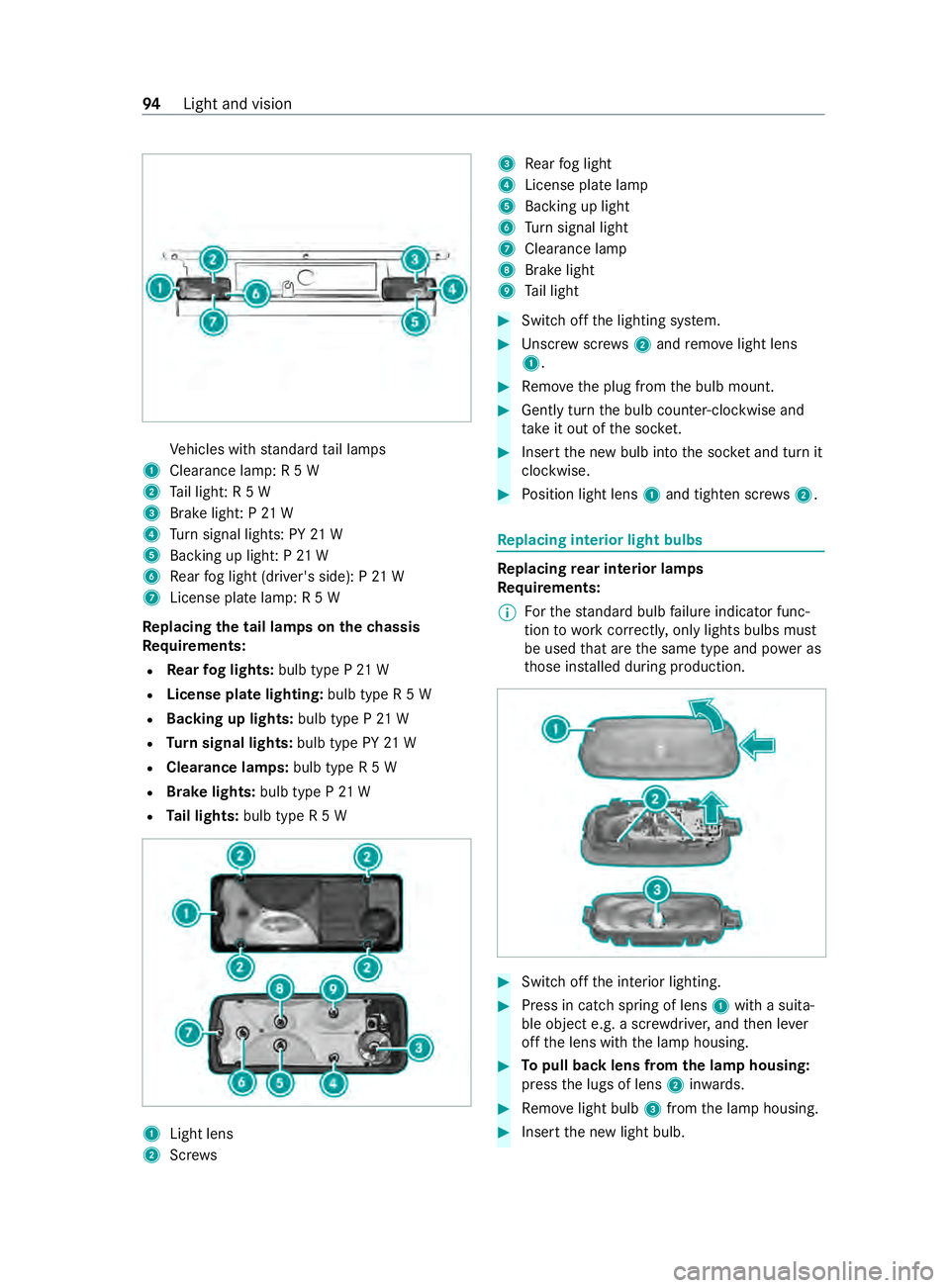
Ve
hicles wit hstandar dtail lamps
1 Clearance lamp: R5W
2 Tail light :R5W
3 Brak elight :P21W
4 Turn signal lights: PY 21 W
5 Backing up light :P21W
6 Rear fogl ight (driver's side): P21W
7 License plate lamp:R5W
Re placing the tai llamps on the chassis
Re quirements:
R Rear fogl ights: bulb type P21W
R License pla telighting: bulb type R5W
R Backing up lights: bulb typeP21W
R Turn signal lights: bulb type PY21 W
R Clearance lamps: bulb typeR5W
R Brak elights: bulb type P21W
R Tail lights: bulb type R5W 1
Light lens
2 Screws 3
Rear fogl ight
4 License plat elamp
5 Backing up light
6 Turn signal light
7 Cleara nce lamp
8 Brak elight
9 Tail light #
Swit chofft he lighting sy stem. #
Unscr ewscrews 2and remo velight lens
1. #
Remo vethep lug from theb ulb mount. #
Gentl yturnt he bulb counter-clockwise and
ta ke it out of thes ocket. #
Inse rtthen ew bulb int othe soc keta nd tur nit
clo ckwise. #
Position light lens 1and tighten scr ews2. Re
placing interio rlight bulbs Re
placing rear interior lamps
Re quirements:
% Fo
rthe standar dbulb failur eindicator func‐
tion towo rkcor rectly ,only lights bulbs must
be use dthat ar ethe same type and po weras
th ose ins talled during production. #
Swit chofft he interior lighting. #
Press in catc hspring of lens 1withas uita‐
ble object e.g. ascrew driver ,and then le ver
of ft he lens wit hthe lam phousing. #
Topull bac klen sf romt he lam phousing:
press thel ugs of lens 2inwa rds. #
Remo velight bulb 3from thel am ph ousing. #
Inser tthe ne wlight bulb. 94
Light and vision
Page 106 of 348
#
Close thec enter air vent (/ page 104) and
air vents fort he headroom (/ page105) and
re ar compartment (/ page105).
Misting on theo utside of windo ws #
Switc hont he windshield wiper (/ page95). Switching air-recirculation mode on or off
#
Press the0073 button.
The interior air is recirculated.
The ai r-re circulation mode switches of fautom ati‐
cally.
% When air-recirculation mode is switched on,
th ew indo wsmayfog up mor equickl y.Switch
on ai r-re circulation mode only briefly.
Air-recirculation mode will au tomatical lyswitch
on in thef ollowing cases:
R Athigh outside temp eratures
R While thev ehicle is driving thro ugh atunnel
(vehicles wit h3-zon eautomatic climat econ‐
trol on ly)
R When thew indshield wiper sareswitched on
(/ page95)
The indicator lam ponthe0073 button will not
light up in this case. Af teram aximu mof
30 minutes, outsid eair is automatically intro‐
duced again. Switching
thew indshield heater on and off %
In
thee vent of high outsid etemperatures,
th ew indshield heater ma ynotswitc hon. #
Press theÎ button.
If th ei ndicator lam ponthe button lights up,
th ew indshield heater has switched on.
% The windshield heater switches of
fautomati‐
cally af teraf ewminutes.
% If
th eb atter yvoltag eistoo lo w,it ma ynotbe
possible toswitc hthe windshield heater on.
If th eb atter yvoltag ebecomes tool ow while
th ew indshield heater is in operation, the
windshield heater will swit choffa utomati‐
cally. Switching
ther ear windo wheater on or off #
Press the006C button.
If th ei ndicator lam plights up, ther ear win‐
do wh eater is swit ched on. Operating air
vents Ad
justin gthe front-compartmen tairve nts &
WARNING ‑Danger of bu rnsorf rostbite
due tobeing tooc lose tothea irve nts
Ve ry hotorv eryc old ai rcan flow from thea ir
ve nts.
Thi scould result in burns or frostbit einthe
immediat evicinity of thea irve nts. #
Makesur ethat all vehicle occupants
alw aysm aintain asufficient dis tance to
th ea irve nts. #
If necessa ry,d irect thea irflow to
ano ther area of thev ehicle interior. #
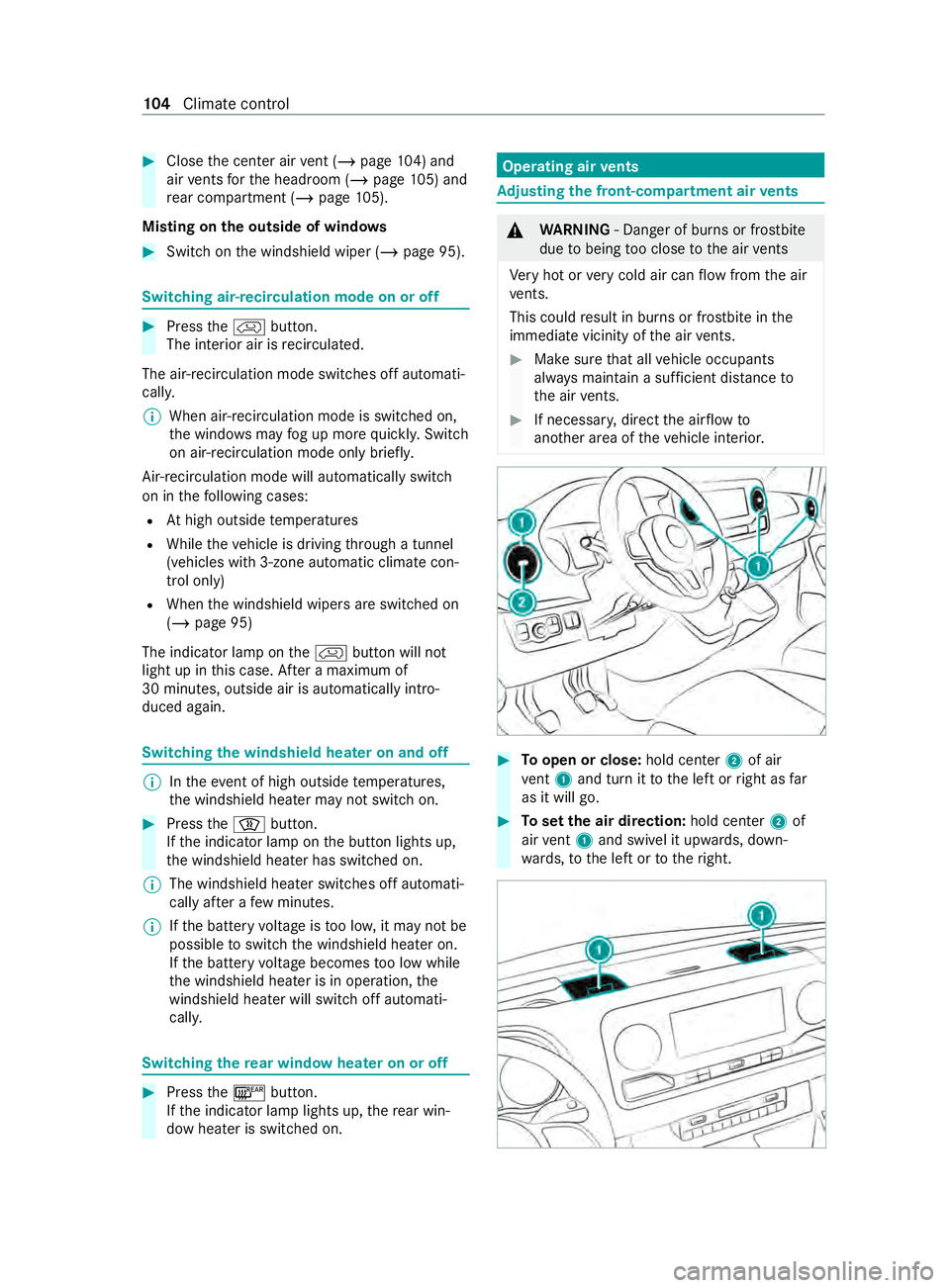
Toopen or close: hold center2 of air
ve nt 1 and tur nittot he leftorright as far
as it will go. #
Tosetthe air direction: holdcenter 2 of
air vent 1 and swivel it up wards, down‐
wa rds, to thel eftortot heright. 104
Climat econtrol
Page 325 of 348
Overvie
w.......................................... 19 9
Sound settings ................................. 201
Tr ans ferred vehicle dat a...................2 01
Animals Pets in thev ehicle .............................. 45
Anti-loc kbraking sy stem
see AB S(Anti-loc kBrakin gS ystem)
Anti-skid chains
see Sno wchains
Anti-thef tAlarms ystem
see ATA( Anti -Thef tAlarms ystem)
Anti-thef tprotection
Immobilizer ........................................ .61
Anti-thef tprotection
see ATA( Anti -Thef tAlarms ystem)
Apple CarPlay ®
.....................................1 98
Connecting an iPhone ®
............ 198, 19 9
Ending .............................................. 19 9
No tes. ............................................... 19 8
Overvie w.......................................... 19 8
Sound settings ................................. 19 9
Tr ans ferred vehicle dat a...................2 01
Asht rays
In thew indshield stowagec om‐
partment ............................................ 79
ASR (acceleration skid cont rol) .......... .147
Assistance graphic (on-boar dcom‐
puter) ..................................................... 178
ASS YSTP LUS ........................................ 214
Batter ydisconnection period s.......... 214
Displ aying thes ervice due dat e........ 214
Fu nction/no tes. ................................ 214
Re gular maintenance work ............... 214
Special service requirements ............ 214
ATA (Anti-Thef tAlarms ystem) .............. .61
Ac tivating/deactivating thei nterior
motion sensor .................................... 63
Fu nctio n.............................................. 61
Interior motion sensor function .......... 63
St opping thea larm. ............................ 62
Switching thet ow -awa ya larm
on/of f............................................... .62
To w- aw ay alar mfunction .................... 62
At tachments .......................................... .21
AT TENTION ASSI ST....................... 162, 16 3
Fu nctio n........................................... 16 2
Setting .............................................. 16 3
Sy stem limitations ............................1 62
Au thorized workshop
see Qualified specialis tworks hop Au
tomatic distanc econtrol
se eA ctiv eDista nce Assi stDISTRONIC
Au tomatic drivin glights ....................... .84
Au tomatic transmission
DIRECT SELEC Tleve r........................ 12 2
Engaging driv eposit ion. ................... 12 3
Engaging neutral ............................... 12 2
Engaging reve rseg ear ...................... 12 2
Kickdown .......................................... 124
Re stricting thes hiftrang e................ 124
Selecting pa rkposition .....................1 23
Tr ansmission position displa y........... 12 2
Tr ansmission position s..................... 12 2
Au xiliar yheating ..................................1 05
Fu nctio n........................................... 105
Axle load ................................................ 274 B
Bac ksuppo rt
see Lumbar suppor t(4-w ay)
BA S(Brak eAssis tSystem) .................. 14 6
Battery Charging ........................................... 231
Charging avehicle batter y................2 31
Disconnecting thea uxiliar ybattery
in thee ngine compartmen t.............. 236
Disconnecting thes tarter batter y.... 234
Jump -sta rting (vehicle )..................... .231
Ke y. .................................................... 47
No tes( vehicle) ................................. 230
Re moving or ins talling thes tarter
batter y............................................. 235
St arterb atter y................................. 233
Batter ymain switch
No tes. ............................................... 12 0
Switching po wersupp lyon/of f......... 121
Belt see Sea tbelt
Bel twarning
see Sea tbelt
Blind Spo tAssist .................................. 16 3
Ac tivating/deactivating .................... 16 4
Fu nctio n........................................... 16 3
Re ar Cross Traf ficA lert. ................... 16 5
Sy stem limitations ............................1 63
Blue tooth ®
............................................ 19 2
Ac tivating/deactivating .................... 19 2
Information .......................................1 92
Bottle holder .......................................... .78 Index
323
Page 334 of 348
Hydroplaning
......................................... 11 5I
Identification pla te
Engine ............................................... 274
Re frigerant ....................................... 284
Ve hicle ..............................................2 74
Ignition key
see Key
Immobilizer ............................................ .61
Indicator .................................................. 85
Ac tivating/deactivating ...................... 85
Changing bulb s(front) ........................ 91
Changin gbulbs (rear) (Cargo Van
and Passenger Van) ............................ 92
Changing bulb s(rear)( ch assis) .......... 94
Installations ............................................ 21
Instrument Display Function/no tes. ................................ 174
Overvie w....................................... 8, 174
Setting thel ighting ........................... 17 7
Instrument Display see Warning/indicator lamp
Instrument lighting ..............................17 7
Intelligent ligh tsystem
Ad aptiv eHighbeam Assis t................. .86
Cornering light .................................. .85
Interior lamps (rear compa rtment)
(replacin gthe light bulbs) .....................94
Interior lighting Bus equipment .................................. .88
Cargo co mpartment .......................... .89
Re adin glam pabove thep assenger
seat ....................................................89
Re ar compartment ............................ .89
Setting ................................................ 87
Switch-of fdelay tim e.......................... 90
In te rior motion sensor
Fu nctio n............................................. 63
Switching on/o ff................................ 63
In te rior roof car rier sy stem ................ .211
iPhone ®
see Apple CarPlay ® J
Jack ...................................................... .263
Hydraulic .......................................... 24 2
Re moving theh ydraulic jac kfrom
th es towa ge compartment ................ 24 3
St orag elocation of hydraulic jac k....2 42 Jump-star
tconnection .........................2 31 K
Key ........................................................... 46
Batter y............................................... 47
Electrica lconsum ption ...................... .47
Fu nctions ........................................... 46
Ke yr ing at tach ment ........................... 47
Mechanical key. .................................. 47
Overvie w............................................ 46
Problem ..............................................48
Ra dio connection ...............................46
Un lockin gsetting ................................ 47 L
Labelin g(tires)
see Tire labeling
Lane de tection (au tomatic)
se eA ctiv eLaneK eeping Assist
Lane Keeping Assist ............................ .165
Fu nctio n........................................... 16 5
Sy stem limitations ............................1 65
Tr ailer operatio n............................... 16 5
Lane Keeping Assist
see ActiveL aneK eeping Assist
see Lane Keeping Assist
Language ............................................... 19 3
No tes. ............................................... 19 3
Setting .............................................. 19 3
LA TC H-type (ISOFIX) child seat
securing sy stem
In stallin g............................................. 41
Le velc ontrol
see ENR (elect ronic le velc ontrol)
License pla telam p(changin gbulbs) .... 93
Light switc h(ove rview) ........................ .84
Lighting see Lights
Lights ...................................................... 84
Ad aptiv eHighbeam Assis t................. .86
Au tomatic driving lights ...................... 84
Combination swit ch............................ 85
Co rnering light ................................... 85
Driving abroad (symmetrical low
beam) .................................................84
Haza rdwa rning lamps ........................ 85
High beam .......................................... 85
High-beam flasher .............................. 85
Indicator ............................................ .85
Light switc h........................................ 84
Lo wb eam ........................................... 84332
Index