vehicle info screen MERCEDES-BENZ SPRINTER 2020 MY20 with 7” screen
[x] Cancel search | Manufacturer: MERCEDES-BENZ, Model Year: 2020, Model line: SPRINTER, Model: MERCEDES-BENZ SPRINTER 2020Pages: 348, PDF Size: 5.84 MB
Page 187 of 348
Overvie
wand operation Overvie
wofthe MBUX multi media sy stem &
WARNING Risk of distraction from infor‐
mation sy stems and communications
equipment
If yo uo perat einformation and communica‐
tio ne quipment integ ratedint hevehicle when
driving, youw ill be distracted from thet raffic
situation. This could also cause youtol ose
control of thev ehicle. #
Onlyoperat ethis equipment when the
traf fics ituation permits. #
Ifyo uc anno tbes ureoft his,stop the
ve hicle whils tpaying attention toroad
and traf ficc onditions and ope rate the
equipment wit hthe vehicle stationar y. Yo
um usto bse rvet he legal requirements fort he
countr yinwhich youa recur rentl yd riving when
ope rating them ultimedia sy stem.
MBUX stands forM ercedes-Benz User Experi‐
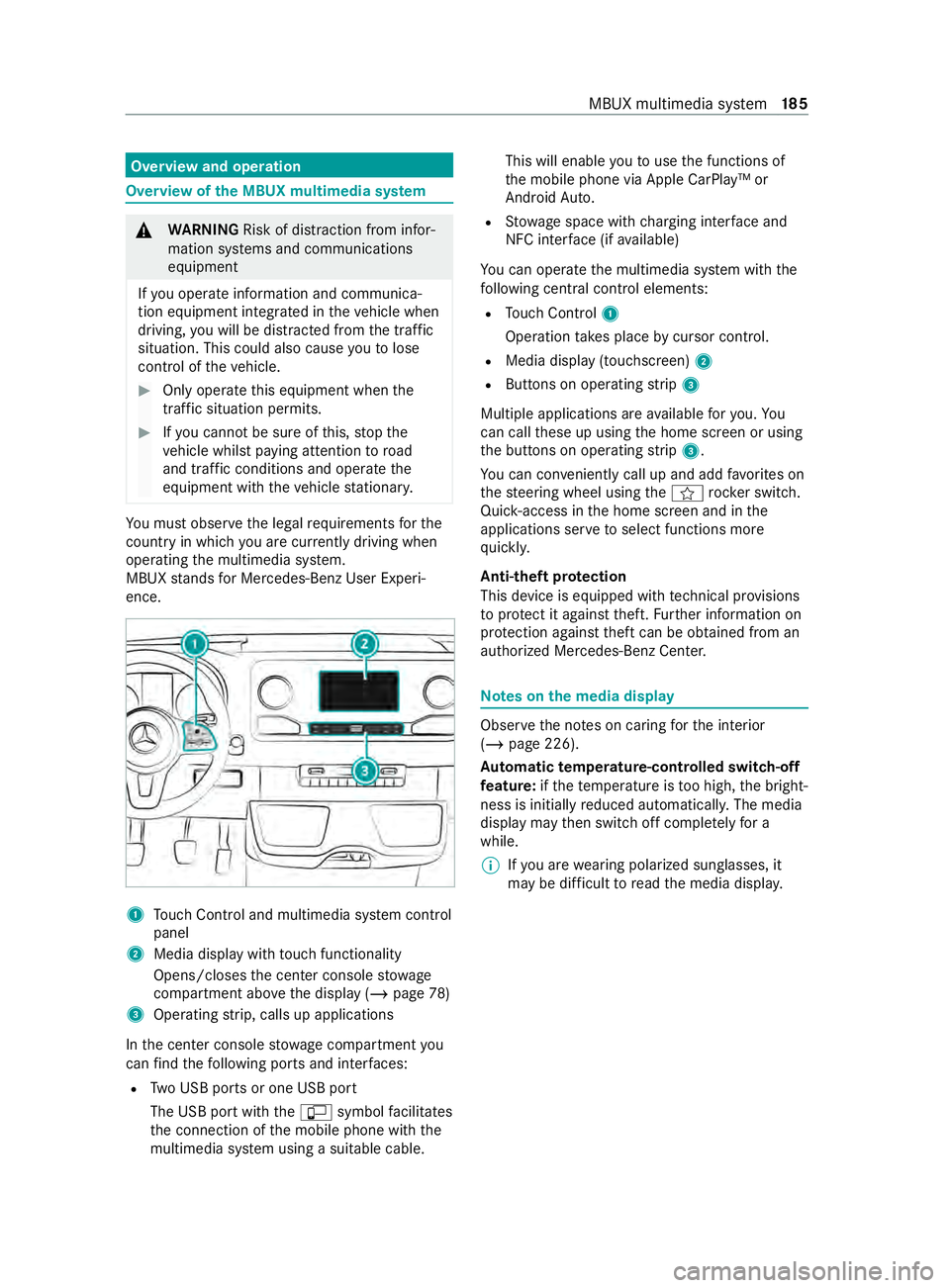
ence. 1
Touc hC ontrol and multimedia sy stem cont rol
panel
2 Media displa ywitht ouc hfunctionality
Opens/closes thec enter console stowage
compartment abo vethed ispla y(/pag e78)
3 Operating strip, calls up applications
In thec enter console stowagec ompartment you
can find thef ollowing ports and inter faces:
R TwoU SB ports or one USB port
The USB por twitht he ç symbol facilitates
th ec onnection of them obile phone wit hthe
multimedia sy stem using asuitable cable. This will enable
youtou sethef unctions of
th em obile phone via Apple CarPlay™ or
Android Auto.
R Stow ages pac ewithc harging inter face and
NFC inter face (i favailable)
Yo uc an operat ethe multimedia sy stem wit hthe
fo llowing central control elements:
R Touc hC ontrol 1
Operatio ntakes plac ebycursor control.
R Media displa y(touchscreen) 2
R Button sonoperating strip 3
Multiple applications ar eavailable fory ou. Yo u
can cal lthese up using theh ome screen or using
th eb uttons on operating strip 3.
Yo uc an con veniently cal lupand ad dfavo rite son
th es teering wheel using thef rock er switch.
Quic k-access in theh ome screen and in the
applications ser vetoselect functions more
qu ickl y.
Anti-thef tprotection
This devic eisequipped wit htechnical pr ovisions
to protect it agains ttheft. Further information on
pr otection agains tthef tcan be obtained from an
authorized Mercedes-Benz Center. Note
sont he media display Obser
vethen otes on caring fort he interior
(/ page226).
Au tomatic temperature-cont rolled switch-off
fe ature: ifth et emperatur eistoo high, theb right‐
ness is initiall yreduced automaticall y.The media
displa ymaythen switc hoffcomple tely fora
while.
% If
yo ua rewe aring polarize dsunglasses ,it
ma ybed ifficul ttor eadthem edia displa y. MBUX multimedia sy
stem 18 5
Page 192 of 348
#
Press on aphone number until theOPTIONS
menu is shown. #
Select Save as Favorite.
The contact is added as afavo rite. #
Tosto rearadio station as aglobal favo r‐
ite: setar adio statio n(/ pag e205). #
Press on ther adio statio nuntil the OPTIONS
menu is shown. #
Select Save as Favorite.
The radio statio nisa dded as afavo rite.
Re naming favo rites #
Tapon©in them edia displa y.
The home screen is shown. #
Swipe up until FAVORITESis shown. #
Press on afavo rite until theOPTIONS menu is
shown. #
Select Rename . #
Ente rthe name. #
Select OK.
Moving favo rites
Moving favo rite sint hefavo rite sm enu #
Tapon©in them edia displa y.
The home screen is shown. #
Swipe up until FAVORITESis shown. #
Press on afavo rite until theOPTIONS menu is
shown. #
Select Move. #
Movethef avo rite to then ew position. #
Tapon00FB .
Deleting favo rites #
Tapon©in them edia displa y.
The home screen is shown. #
Swipe up until FAVORITESis shown. #
Press on afavo rite until theOPTIONS menu is
shown. #
Select Delete. #
Select Yes. Entering
characters Using
thec haracter input function &
WARNING Risk of distraction from infor‐
mation sy stems and communications
equipment
If yo uo perat einformation and communica‐
tio ne quipment integ ratedint hevehicle when
driving, youw ill be distracted from thet raffic
situation. This could also cause youtol ose
control of thev ehicle. #
Onlyoperat ethis equipment when the
traf fics ituation permits. #
Ifyo uc anno tbes ureoft his,stop the
ve hicle whils tpaying attention toroad
and traf ficc onditions and ope rate the
equipment wit hthe vehicle stationar y. Yo
um usto bse rvet he legal requirements fort he
countr yinwhich youa recur rentl yd riving when
ope rating them ultimedia sy stem.
Character entry can be carried out wit hthese
contro lelements:
R Touc hC ontrol
R Touchsc reen (media display)
Character entry take sp lace bycursor control
whe nusing theT ouc hControl.
Character input can be star tedw ithac ontrol ele‐
ment and resumed wit hanother. #
When thek eyboar diss hown, en tert he char‐
acter sont he contro lelemen tbyswiping and
pressing or bytapping (touchscreen).
or #
Writet he character on thet ouchscreen.
Examples of character ent ry:
R Renaming afavo rite
R Entering atelephone number 19 0
MBUX multimedia sy stem
Page 200 of 348
If
th eP BAPB luetooth ®
profile is no tsuppor ted,
th ee ffects ar easfollows:
R The multimedia sy stem generates acalllist
independentl yassoon as calls ar emade in
th ev ehicle.
R The call lis tisnotsynchronized wit hthe call
lists in them obile phone.
Making acall from thec all list
Multimedia sy stem:
4 © 5
Phone #
Select +Recent Calls. #
Select an entry.
The call is made.
Calling up additional options in thec all list
Multimedia sy stem:
4 © 5
Phone #
Select +Recent Calls. #
Forp reviousl ystore dc ontacts: select 0048in
th el ine of an entry.
The sear chresults ar edispla yed. Apple CarPlay
® Overvie
wofApple CarPlay ® &
WARNING Risk of distraction from infor‐
mation sy stems and communications
equipment
If yo uo perat einformation and communica‐
tio ne quipment integ ratedint hevehicle when
driving, youw ill be distracted from thet raffic
situation. This could also cause youtol ose
control of thev ehicle. #
Onlyoperat ethis equipment when the
traf fics ituation permits. #
Ifyo uc anno tbes ureoft his,stop the
ve hicle whils tpaying attention toroad
and traf ficc onditions and ope rate the
equipment wit hthe vehicle stationar y. Yo
um usto bse rvet he legal requirements fort he
countr yinwhich youa recur rentl yd riving when
ope rating them ultimedia sy stem.
iPhone ®
functions can be used via them ultime‐
dia sy stem using Apple CarPlay ®
.T he ya reoper‐
ated using thet ouchscreen, Touc hC ontrol or the
Siri ®
vo ice-operated control sy stem. Youc an acti‐
va te thev oice-operated control sy stem bypress‐ ing and holding
the£ button on them ultifunc‐
tion steering wheel.
Onl yone mobile phone at atime can be connec‐
te dv ia Apple CarPlay ®
to them ultimedia sy stem.
The availabilit yofApple CarPlay ®
ma yvary
according tothec ount ry.
The service pr ovider is responsible fort his appli‐
cation and thes ervices and content connected to
it.
Apple CarPlay ®
is ar egis tere dt rademar kof
Apple Inc.
Information on Apple CarPlay ®
When Apple CarPlay ®
is being used, thei Pod ®
media source is no tavailable fort he respective
iPhone ®
.
Connecting an iPhone ®
via Apple CarPlay ®
(with cable)
Requ irements:
R The multimedia sy stem is equipped wit hthe
function.
R The cur rent version of your device's operating
sy stem is being used (see them anufacturer's
operating instructions).
R The full rang eoff unctions forA pple CarPlay ®
is only available wit hanInterne tconnection. #
Connect thei Phone ®
to the ç USB port
on them ultimedia sy stem using asuitable
cable (/ page203). #
If no other device is connected wit hthe sys‐
te mv ia Blue tooth®
:c onfir mthe dat aprotec‐
tion pr ovisions. #
If ano ther device is connected via Blue tooth®
or Apple CarPlay ®
(wireless) wit hthe sy stem:
ta pont heTap here to start Apple CarPlay
for:
or #
Select thei Phone ®
in the í device list
under thea pplication.
The pr evious connection via Blue tooth®
or
Apple CarPlay ®
(wireless) is disconnected.
The device newl yconnected via cable is
active.
Ac cepting/rejecting thed atap rotection pro‐
visions
Am essag ewitht he dat aprotection pr ovisions
appears. #
Select Accept &Start. 19 8
MBUX multimedia sy stem
Page 201 of 348
Exiting Apple CarPlay
®#
Press the00E2 button.
% If Apple CarPlay ®
wa sn otdispla yedf ull-
screen befor edisconnecting, thea pplication
st arts in theb ackg round when reconnected.
Yo uc an call up Apple CarPlay ®
in them ain
menu.
Connecting an iPhone ®
via Apple CarPlay ®
(wireless)
Requ irements:
R The multimedia sy stem is equipped wit hthe
function.
R The cur rent version of your device's operating
sy stem is being used (see them anufacturer's
operating instructions).
R Blue tooth ®
is activated on thed evice (see the
manufacturer's operating instructions).
R The device is "visible" foro ther devices.
R Ther eisanI nternetconnection fort he full
ra ng eoff unctions forA pple CarPlay ®
.
Multimedi asyst em:
4 © 5
Phone
Sear ching foram obilephone #
Select í. #
Select Connect New Device.
The available iPhone ®
is shown.
Connecting amobile phone #
Select thei Phone ®
. #
Select StartApple CarPlay.
% It is possible at an
ytime toswitc hbetwe en
connection via Blue tooth®
or via Apple Car‐
Play ®
(wireless) in thed evice list.
Ac cepting/rejecting thed atap rote ction pro‐
visions
Am essag ewitht he dat aprotection pr ovisions
appears. #
Select Accept &Start.
% When theA pple CarPlay ®
connection is
active, youc an swit chStart Automatically on
or off.
Exiting Appl eCarPlay ® #
Press the00E2 button.
% If Apple CarPlay ®
wa sn otdispla yedint he
fo re ground be fore disconnecting, thea pplica‐
tion starts in theb ackg round when reconnec‐ te
d. Youc an call up Apple CarPlay ®
in the
main menu.
Calling up Apple CarPlay ®
sound settings
Multimedia sy stem:
4 © 5
Smartphone 5
Apple CarPlay
5 Z #
Select sound settings.
Ending Apple CarPlay ® #
Toend thec onnection of Apple Car‐
Play ®
(cable): disconnect thec onnection via
th ec onnectin gcable between thei Phone ®
and multimedia sy stem. #
Toend thec onnection of Apple Car‐
Play ®
(wireless): de-authorize thei Phone ®
in
the í device lis tunder thea pplication.
% Re
gardless of whe ther thec onnection is via
cable or wireless, Mercedes-Benz recom‐
mends disconnection only whe nthe vehicle
is stationar y. Android
Auto Android
Autoove rview &
WARNING Risk of distraction from infor‐
mation sy stems and communications
equipment
If yo uo perat einformation and communica‐
tio ne quipment integ ratedint hevehicle when
driving, youw ill be distracted from thet raffic
situation. This could also cause youtol ose
control of thev ehicle. #
Onlyoperat ethis equipment when the
traf fics ituation permits. #
Ifyo uc anno tbes ureoft his,stop the
ve hicle whils tpaying attention toroad
and traf ficc onditions and ope rate the
equipment wit hthe vehicle stationar y. Yo
um usto bse rvet he legal requirements fort he
countr yinwhich youa recur rentl yd riving when
ope rating them ultimedia sy stem.
Mobile phone functions can be used wit hAndroid
Au tousin gthe Android operating sy stem on the
multimedia sy stem. It is operated using the
to uchsc reen or thev oice-operated control sys‐
te m. Youc an activat ethe voice-opera tedc ontrol
sy stem bypressing and holding the£ button
on them ultifunction steering wheel. MBUX multimedia sy
stem 19 9
Page 333 of 348
Flat tire
................................................ .230
Changing awheel ............................ .263
No tes. .............................................. 230
Floorc overing
Ins talling/ removing (s tarter bat‐
te ry ). ................................................ 233
Fl oo rm at................................................. 83
Fo reign trip
Instructions ...................................... .113
symmetrical lo wbeam ....................... 84
Fr ee software ........................................ .29
Fr equencies
Mobile phon e................................... 273
Tw o-w ayradio ...................................2 73
Fr ont airbag (driver ,fro nt passenger) .. 35
Fr ont door
Opening (from inside) ........................ .49
Un lockin g(from inside )..................... .49
Fr ont passenger benc hseat
Fo lding thes eat cushion forw ards/
backwards .......................................... 71
Fr ont seats
8- wa ya djustmen toptions .................. 67
Ad justing (electrically). .......................67
Ad justing (manually). ....................64,66
Memor yfunction ................................ 67
Tu rning .............................................. .70
Wi th Sea tCom fort Pa ckag e. .............. .66
Wi thout Seat Comfor tPacka ge .......... 64
Fu el ........................................................ 277
Ad ditives .......................................... 277
Diesel ............................................... 277
Draining thef ilter ............................ .221
E1 0. .................................................. 277
Flexibl efuelvehicles ........................ 277
Fu elreser ve ..................................... 279
Gasolin e........................................... 277
Lo wo utsid etemperatures ................2 77
Problems .......................................... 13 5
Quality (diesel )................................. 277
Quality (gasoline ).............................. 277
Re fueling .......................................... 13 3
Sulfur content .................................. 277
Ta nk capacity ................................... 279
Fu el consum ption (on-boar dcom‐
puter) .................................................... .178
Fu el consum ption indicator
Calling up ........................................ .193
Fu ses ..............................................2 40,241
Befor ereplacing ............................... 24 0Fu
se bo xinthe front-passenger
fo ot we ll ............................................ .241
Fu se bo xinthe seat base of the
driver's seat ...................................... 241
No tes. ............................................... 24 0 G
Gasoline ................................................ 277
Genera loperating permit number
(EU) ........................................................ 274
Genuin eparts ........................................ .20
Getting int oand out of thev ehicle .......50
Glasse scompartment ............................ 78
Grab handles .......................................... 50
Using .................................................. 50
Gross axle weight rating ...................... 274
Gross mass ........................................... 274 H
Handbrak e(electrical)
see Electric parking brake
Handbrak e(manual)
see Manua lparking brake
Handlin gcontrol sy stem
see ESP ®
(Elect ronic Stabilit yProgram)
Hazar dwarnin glights ............................ 85
Swit ching on/of f............................... .85
Hazardous substances Informatio n......................................... 23
Head restra int
Ad justing mechanically ....................... 75
Headliner (care) .................................... 226
Heating sy stem (control panel) ............ 99
High beam .............................................. .85
Ac tivating/deactivating ...................... 85
Ad aptiv eHighbeam Assis t................. .86
Changin gbulbs .................................. .91
High-beam flasher .................................. 85
Hill star ta ssi st ..................................... 15 5
HOLD function ...................................... 15 5
Home screen (media display) ..............186
Hot-water auxiliar yheater .................. 106
Fu nctio n........................................... 106
Problems .......................................... 108
switching on/of fwitht he button ...... 106
Switching on/of fwitht he on-
boar dcomputer ................................ 107 Index
331
Page 335 of 348
Pa
rking light ...................................... .84
Re ar fogl ight ...................................... 84
Re sponsibility wit hlighting sy stems ... 84
Setting thee xterio rlighting switch-
of fd ela ytime .....................................86
Setting thei nstrument lighting ......... 17 7
Switching thes urround lighting
on/of f............................................... .87
Limited Warranty (vehicle) ....................27
Limiting speed ...................................... 11 3
Load Determ inin gthe maximum ............... 254
Sample calculation. .......................... 254
Load distribution ..................................2 08
Load inde x(tire) ................................... 257
Load securing Carg otie-down point ........................ 209
Ins talling and removing tie-down
ey es .................................................. 210
No tes. .............................................. 208
Load-bearing capacity (tire) ................257
Loading Definitions ........................................ 259
Loading guidelines ...............................207
Loading information table ...................253
Lo wb eam
Ac tivating/deactivating ...................... 84
Changin gbulbs .................................. .91
Setting fora broad (symmetrical )........ 84
LO Wr ange ............................................. 12 6
Lu bricant additives
see Additive
Lu mbar suppor t(4-wa y) ........................ 69 M
M+S tires ............................................... 24 5
Maintenance Vehicle ............................................... 23
Maintenance see ASS YSTP LUS
Malfunction Restra int sy stem ................................. 31
Malfunction message see Displa ymessa ge
Manual parking brake ..........................141
App lying/ releasing .......................... .141
Emergency braking ........................... 14 2
Fo lding up/down .............................. 14 2Manuall
yinflating air bello ws(ENR) ...1 32
Matt efinish (cleaning instructions) ... 223
Maximum load Determ inin g..................................... 254
Sa mp lecalculation ........................... 254
Maximum tir eload ............................... 257
Maximum tir epress ure ....................... 257
MBUX multimedi asystem
Configuring displa ysettings .............. 191
MBUX multimedia sy stem (o ver‐
vi ew) ...................................................... 185
Mechanical key
Locking door ...................................... 50
Re moving/inserting ............................ 47
Un lockin gdoor .................................. .50
Media Menu (on-boa rdcompu ter) ............... 180
Operating media playbac k................1 80
Selecting amediasource. ................ 180
Media display Entering character s......................... .191
Home screen .................................... 186
No tes. ............................................... 185
Media mode Adding afavo rite song ......................2 04
Connecting Blue tooth®
audio
equipment ........................................ 203
Connectin gUSBdevices .................. 203
Controllin gmediap laybac k............. .203
Copyright and trademar ks................ 202
No tesa bout thes ear chfunction in
categories ........................................ 204
Overvie wofthe media menu ............ 202
Re moving afavo rite song ................. 204
St artin gas earchin categories ........ .204
St artin gmediap laybac k................... 203
Suppor tedf ormat and dat astorage
media ............................................... 201
Using thek eywo rdsear ch................ 205
Memo ryfunctio n(seat) ......................... 69
Menu (on-boar dcomputer)
Assis tance graphic ........................... 178
Media ............................................... 180
Overvie w...........................................1 75
Ra dio ................................................ 180
Service ............................................. 17 7
Settings ............................................ 181
Te lephon e......................................... 180
Tr ip .................................................. .178
Mercede sme
Information ....................................... 182 Index
333
Page 342 of 348
To
pping up the windshield washer
sy stem .................................................. 220
To uc hC ontrol ....................................... 186
On-boar dcomputer .......................... 175
Operating ......................................... 186
Setting acoustic ope rating feed‐
bac k.................................................1 87
Setting thes ensitivity ....................... 186
To uchscreen (media display)
Operating ......................................... 187
Setting acoustic ope rating feed‐
bac k.................................................1 87
To ws tarting .......................................... 24 0
To w- aw ay alarm
Fu nctio n............................................. 62
Switching on/o ff................................ 62
To wing away ......................................... 237
Ra ised front or rear axle .................. .238
To wing eye
Ins talling/ removing ......................... .240
St orag elocation ...............................2 39
To wing eye( stora gelocation)
see Vehicle tool kit
To wing me thods .................................. .236
Tr actio ngrade ...................................... 255
Tr aile rhitch
Care ................................................. 224
General no tes. .................................. 285
Information ....................................... 171
Information aboutt railer operation .. 16 8
Pe rm issible trailer loads and trailer
dr aw bar nose weight s....................... .172
Po we rsupply ................................... .173
Soc ket. ............................................. 17 0
Tr aile rloads .......................................... 285
Tr aile roperation
Ac tiveL aneK eeping Assis t............... 16 6
Coupling/Decouplin gthe trailer .......1 70
Gross axle weight rating ................... 274
Information ....................................... 171
Lane Keeping Assis t.........................1 65
No tes. ............................................... 16 8
Pe rm issible trailer loads and trailer
dr aw bar nose weight s....................... .172
Po we rsupply ................................... .173
Soc ket. ............................................. 17 0
Tr ailer loads ...................................... 285
Tr aile rstabilization ............................... 14 8
Tr ansfer redv ehicle data
And roid Au to .................................... 201 Appl
eCarPlay ®
................................. 201
Tr ansmissio nposition display .............12 2
Tr ansmissio nratio
LO Wr ang e........................................ 12 6
Tr ansmissio nratio
see Engaging/disengaging LOWR ANGE
Tr anspo rtby rail .................................... 11 4
Tr anspo rting (vehicle breakd own) ...... 239
Tr ead weargrade ................................. 255
Tr im element (care) .............................. 226
Tr ip
Displa ytotal dis tance ....................... 178
Menu (on-boar dcomputer) ............... 178
Tr ip computer
Re setting. ......................................... 17 9
Showing ............................................ 178
Tr ip distance ........................................ .178
Showing ............................................ 178
Tr ip odom eter
Re setting. ......................................... 17 9
Tr ip odom eter
see Trip dis tance
Tu rn signal light
Ad ditional tur nsignal light (all-
wheel driv evehicles) .......................... 92
Tw in co-driver's seat .............................. 71
Tw o-w ayradio telephone
see Mobile phone
Tw o-w ayradios
Fr equencies ...................................... 273
Ins tallation no tes. ............................. 273
Tr ansmission output (maximum )......2 73 U
Un its of measurement
Setting .............................................. 19 3
Un locking setting .................................. .47
Un locking/locking
Swit ching automatic lockin gfea‐
tur eo n/off. ........................................ 50
Unl ockin gand opening front doors
from insid e......................................... 49
USB soc ketint he rear passenger
comp artment .......................................... 81
Using asun visor .................................... 98
Using kickdown .................................... 124
Using thet elephone
see Calls 340
Index