brake light MERCEDES-BENZ V-CLASS MPV 2021 Owners Manual
[x] Cancel search | Manufacturer: MERCEDES-BENZ, Model Year: 2021, Model line: V-CLASS MPV, Model: MERCEDES-BENZ V-CLASS MPV 2021Pages: 337, PDF Size: 9.88 MB
Page 9 of 337
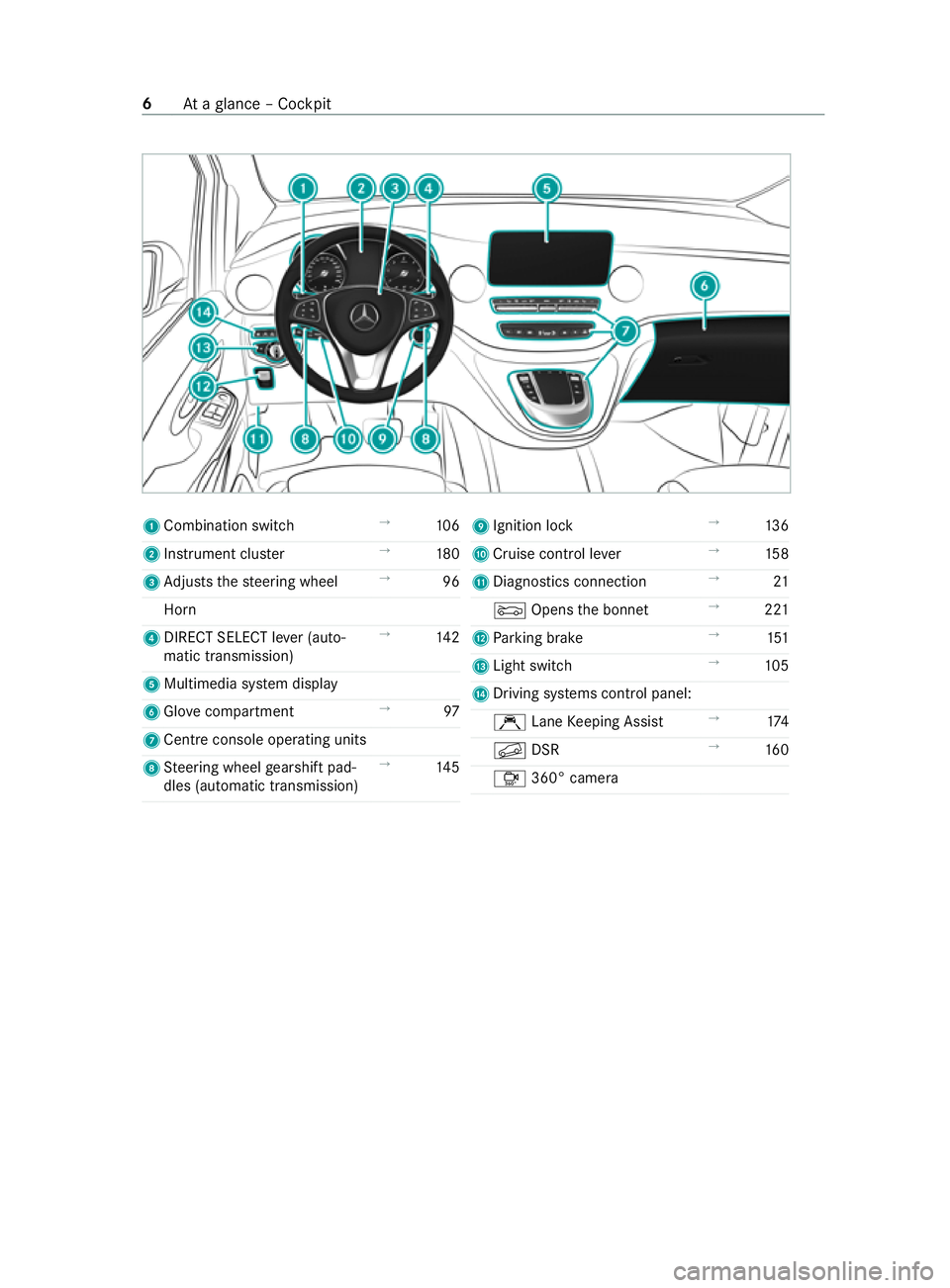
1
Combination swit ch→
106
2 Instrument clus ter →
180
3 Adjusts thesteering wheel →
96
Horn
4 DIRECT SELECT le ver (auto‐
matic transmission) →
14 2
5 Multimedia sy stem display
6 Glo vecompa rtment →
97
7 Cent reconsole ope rating units
8 Steering wheel gearshift pad‐
dles (automatic transmission) →
14 5 9
Ignition lock →
13 6
A Cruise control le ver→
15 8
B Diagnostics connection →
21
0083 Opens the bonn et →
221
C Parking brake →
151
D Light switch →
105
E Driving sy stems cont rol panel:
Ç LaneKeeping Assist →
174
0092 DSR →
16 0
Ô 360° camera 6
Ataglance – Cockpit
Page 10 of 337
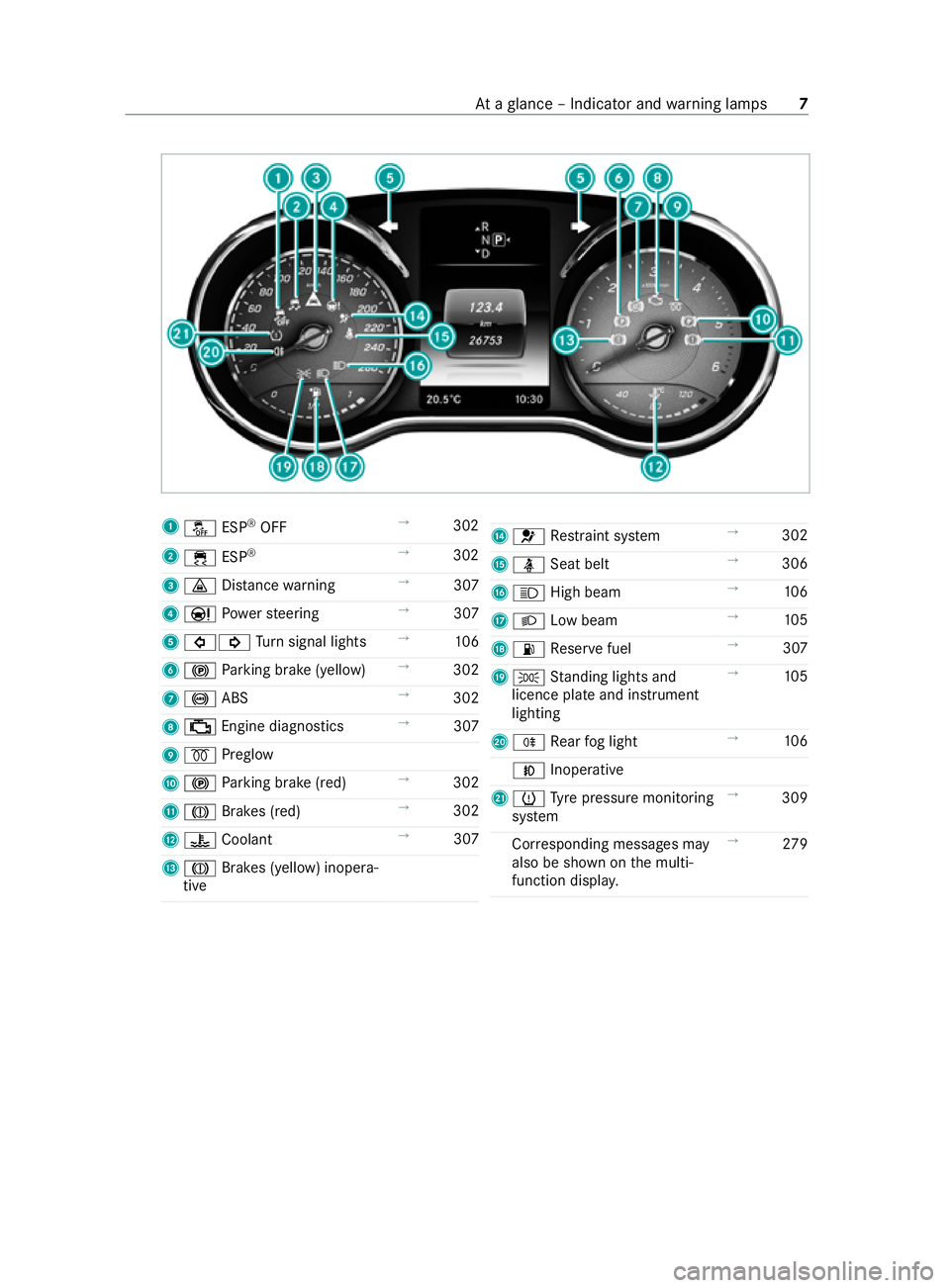
1
00BB ESP®
OFF →
302
2 00E5 ESP®
→
302
3 00BA Distance warning →
307
4 00CC Powe rst eering →
307
5 003E003D Turn signal lights →
106
6 0024 Parking brake (yellow) →
302
7 0025 ABS →
302
8 00B9 Engine diagnostics →
307
9 0028 Preglow
A 0024 Parking brake (red) →
302
B 004D Brakes (red) →
302
C 00AC Coolant →
307
D 004D Brakes (yellow) inopera‐
tive E
0075 Restra int sy stem →
302
F 00E9 Seat belt →
306
G 0057 High beam →
106
H 0058 Low beam →
105
I 00B4 Reser vefuel →
307
J 0060 Standing lights and
licence plate and instrument
lighting →
105
K 005E Rear fog light →
106
005A Inoperative
L 0077 Tyre pressure monitoring
sy stem →
309
Cor responding messages may
also be shown on the multi‐
function displa y. →
279 At
aglance – Indicator and warning lamps 7
Page 28 of 337
Gene
rally, these are volatile data and will not be
st ored be yond the period of operation but will
only be processed within theve hicle itself. Con‐
trol units, vehicle keys forex ample, of ten contain
da ta memories. Their use permits thete mp orary
or permanent documentation of tech nical infor‐
mation about theve hicle's operating state, com‐
ponent loads, main tenance requirements and
te ch nical events or faults.
Depending on thete ch nical equipment, thefo l‐
lowing data are stored:
R operating status of sy stem components, such
as fill le vels, tyre pressure or battery status
R malfunctions or faults in impor tant sy stem
components, such as lights or brakes
R system reactions in special driving situations,
such as airbag deployment or the inter vention
of stability control sy stems
R information on events in which theve hicle is
damaged
In cer tain cases, it may be requ ired tostore data
th at wo uld ha veotherwise been temp orar y.This
may be the case if theve hicle has de tected a
malfunction, forex ample.
If yo u use services, such as repair services and
maintenance work,st ored operational data as
we ll as theve hicle identification number can be
re ad out and used. They can be read out by
service network emplo yees, such as workshops
and manufacturers or third parties, such as
breakdown services. The same is true in the case
of wa rranty claims and quality assurance meas‐
ures.
In general, there adout is per form ed via the
legally prescribed port forth e diagnostics con‐
nection in theve hicle. The operational data that
are read out document tech nical states of the
ve hicle or of individual components and assist in
th e diagnosis of malfunctions, compliance with
wa rranty obligations and quality impr ovement. To
th at end, these data, in particular information
about component loads, tech nical events, mal‐
functions and other faults may be transmitted
along with theve hicle identification number to
th e manufacturer. In addition, the manufacturer is
subject toproduct liability. Forth is reason, the
manufacturer also uses operational data from the
ve hicle, forex ample, forre calls. These data can
also be used toexamine the cus tomer's warranty
and guarantee claims. Fa
ult memories in theve hicle can be reset by a
service outlet or at your requ est as part of repair
or maintenance work.
Con venience and inf otainment functions
Yo u can store con venience settings and individual
settings in theve hicle and change or reset them
at any time.
Depending on theve hicle equipment, this
includes thefo llowing settings, forex ample:
R seat and steering wheel positions
R suspension and climate cont rol settings
R individual settings, such as interior lighting
Depending on the selected equipment, you can
import data into vehicle inf otainment functions
yo urself.
Depending on theve hicle equipment, this
includes thefo llowing data, forex ample:
R multimedia data, such as music, films or pho‐
to sfo r playback in an integrated multimedia
sy stem
R address book data for use in an integrated
hands-free sy stem or an integrated navigation
sy stem
R entered navigation destinations
R data on the use of Internet services
These data for con venience and inf otainment
functions may be sa ved locally in theve hicle or
th ey may be located on a device which you ha ve
connected totheve hicle, such as a smartphone,
USB flash drive or MP3 pla yer.If yo u ha ve
entered these data yourself, you can dele tethem
at any time.
This data is transmit ted from theve hicle tothird
parties only at your requ est. This applies, in par‐
ticular, when you use online services in accord‐
ance with the settings that you ha veselected.
Smartphone integ ration (e.g. Android Autoor
Apple CarPlay ®
)
If yo ur vehicle is equipped appropriatel y,yo u can
connect your smartphone or ano ther mobile end
device totheve hicle. You can then cont rolth em
by means of the cont rol elements integrated in
th eve hicle. The smartphone's picture and sound
can be output via the multimedia sy stem. Simul‐
ta neously, specific items of information are trans‐
fe rred to yo ur smartphone. Depending on the
type of integration, this includes position data,
day/night mode and other general vehicle sta‐
tuses. For more information, please consult the Gene
ral no tes 25
Page 42 of 337
#
Ifth ech ild restra int sy stem has been
ex posed todirect sunlight, allow it to
cool before secu ring a child into it. #
Never lea vechildren unat tended in the
ve hicle. Obser
vewhen stopping or parking &
WARNING Risk of accident and inju ry
due toleaving children unat tended in the
ve hicle
If ch ildren are left unat tended in theve hicle,
th ey could, in part icular:
R open doors, thereby endangering other
persons or road users.
R get out and be stru ck byoncoming traf fic.
R operate vehicle equipment and become
trapped, forex ample.
In addition, thech ildren could also set the
ve hicle in motion by,fo rex ample:
R releasing the parking brake.
R changing the transmission position.
R starting theve hicle. #
Never lea vechildren unat tended in the
ve hicle. #
When leaving theve hicle, alw aysta ke
th eke y with you and lock theve hicle. #
Keep theve hicle key out of there ach of
ch ildren. Overview of
recommended child restra int
sy stems %
Fu
rther information on the cor rect child
re stra int sy stem can be obtained at a quali‐
fi ed specialist workshop. Mercedes-Benz rec‐
ommends that you use a Mercedes-Benz
Service Cent reforth is purpose.
Securing with ISOFIX
We ight category 0+ (up to13 kgand up to
appr ox.15 months) Ty
pe 1
BABY SAFE plus
Size categories E
App rova lE 1 04 30114 6 Ty
pe 1
BABY SAFE plus
Order number 2
B6 6 86 82 24
1 Manufacturer: Britax Römer .2 With colour code 9H95. We
ight category I (9 to18 kgand from
appr oxima tely 9 months to4ye ars) Ty
pe 1
DUO plus
Size catego ries B1
Appr oval E1 04 30113 3
Order number 2
A 000970 43 02
1 Manufacturer: Britax Römer .2 With colour code 9H95. Securing with th
e seat belt ontheve hicle
seat
We ight category 0 (up to10 kgand appr ox‐
ima tely 6 months) and weight category 0+
(up to13 kgand appr oxima tely 15 months) Ty
pe 1
BABY SAFE plus II
App rova lE 1 04 30114 6
Order number 2
A 000970 38 02
1 Manufacturer: Britax Römer .2 With colour code 9H95. We
ight category I (9 to18 kgand from
appr oxima tely 9 months to4ye ars) Ty
pe 1
DUO plus
Appr oval E1 04 30113 3
Order number 2
A 000970 43 02
1 Manufacturer: Britax Römer .2 With colour code 9H95. We
ight category II/III (15 to36 kgand from
appr oxima tely 3to 12 years) Ty
pe 1
KIDFIX XP
Appr oval E1 04 301 304
Order number 2
A 000970 49 02 Ty
pe 1
AMG KIDFIX XP
Appr oval E1 04 301 304
Order number 2
A 000970 33 02
1 Manufacturer: Britax Römer .2 With colour code 9H95. Occupant saf
ety39
Page 52 of 337
Key
Overview of
key functions &
WARNING Risk of accident and inju ry
due toleaving children unat tended in the
ve hicle
If ch ildren are left unat tended in theve hicle,
th ey could, in part icular:
R open doors, thereby endangering other
persons or road users.
R get out and be stru ck byoncoming traf fic.
R operate vehicle equipment and become
trapped, forex ample.
In addition, thech ildren could also set the
ve hicle in motion by,fo rex ample:
R releasing the parking brake.
R changing the transmission position.
R starting theve hicle. #
Never lea vechildren unat tended in the
ve hicle. #
When leaving theve hicle, alw aysta ke
th eke y with you and lock theve hicle. #
Keep theve hicle key out of there ach of
ch ildren. &
WARNING Risk of accident due toinad‐
ve rtent turning of theke y in the ignition
lock
If yo u attach lar geor heavy objects totheke y,
th eke y could inadver tently turn in the ignition
lock while theve hicle is in motion. #
Do not attach any lar geor heavy objects
to thekey. #
Remo veake yring if it is cumbe rsome
before you insert theke y in the ignition
loc k. *
NO
TEDama getotheke y caused bymag‐
netic fields #
Keep theke yaw ay from strong mag‐
netic fields. Ke
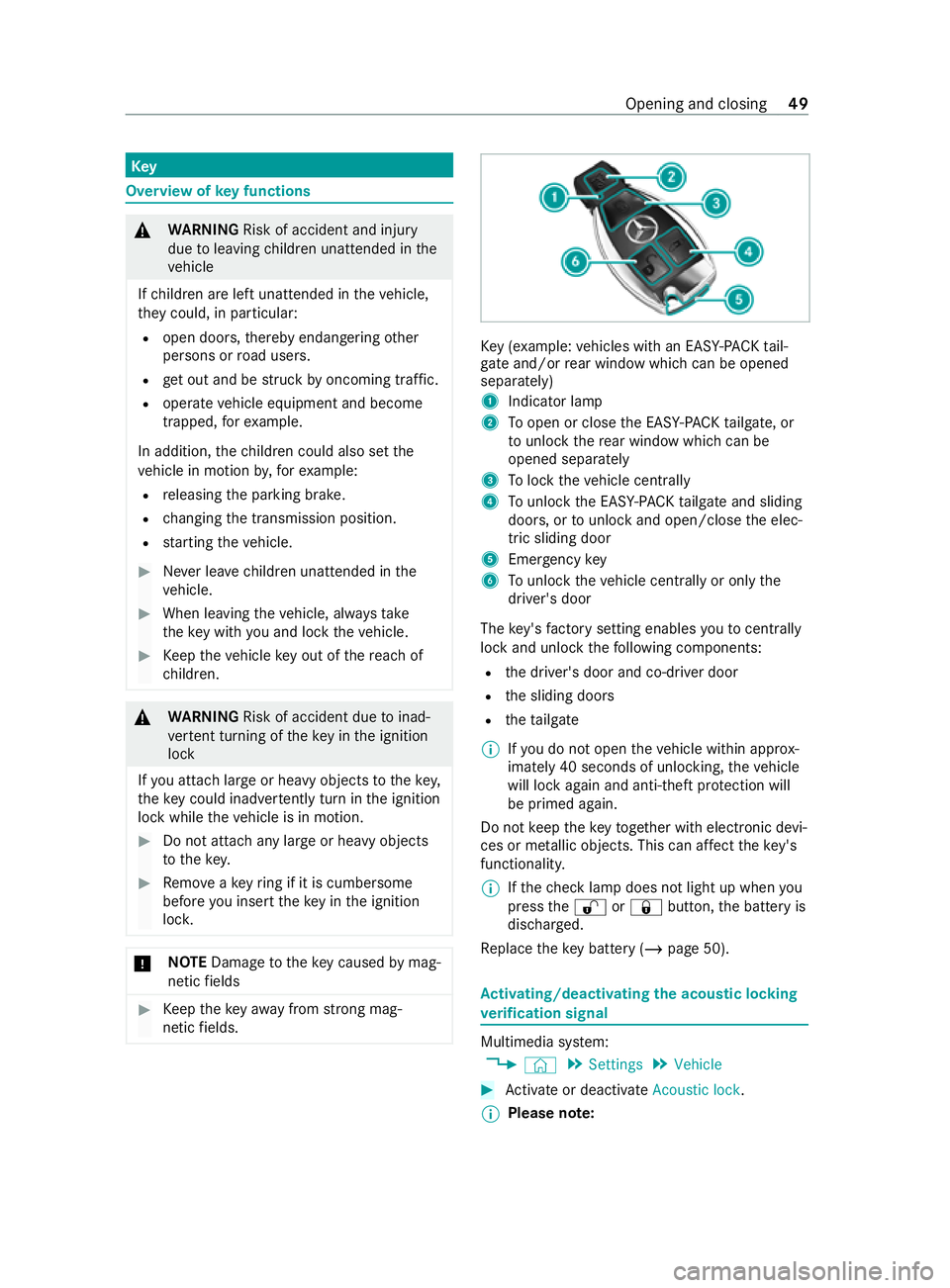
y (e xamp le:vehicles with an EAS Y-PA CK tail‐
ga te and/or rear wind owwhich can be opened
separately)
1 Indicator lamp
2 Toopen or close the EASY -PAC Ktailgate, or
to unlo ck th ere ar wind owwhich can be
opened separately
3 Tolock theve hicle centra lly
4 Tounlo ckthe EASY -PAC Ktailgate and sliding
doors, or tounlo ckand open/close the elec‐
tric sliding door
5 Emer gency key
6 Tounlo cktheve hicle centra lly or onlythe
driver's door
The key's factory setting enables youto centrally
lock and unlock thefo llowing components:
R the driver's door and co-driver door
R the sliding doors
R theta ilgate
% If
yo u do not open theve hicle within appr ox‐
imately 40 seconds of unlocking, theve hicle
will lock again and anti-theft pr otection will
be primed again.
Do not keep theke yto ge ther with electronic devi‐
ces or me tallic objects. This can af fect theke y's
functionalit y.
% If
th ech eck lamp does not light up when you
press the0036 or0037 button, the battery is
dischar ged.
Re place theke y bat tery ( / page 50). Ac
tivating/deactivating the acoustic lo cking
ve rification signal Multimedia sy
stem:
4 © 5
Settings 5
Vehicle #
Activate or deacti vate Acoustic lock .
% Please no
te: Opening and closing
49
Page 110 of 337

engages. In
the case of larger steering mo ve‐
ments, the combination switch will automati‐
cally switch bac k. #
Toindicate briefl y:tapth e combination
switch briefly in there qu ired direction 2or
4. The cor responding turn signal lamp will
fl ash thre e times. Switching
the hazard warning light sy stem
on/off #
Press button 1.
If yo u operate a turn signal indicator while the
hazard warning light sy stem is switched on, only
th e turn signal lamps on there leva nt side of the
ve hicle will light up.
The hazard warning light sy stem will switch on
automatically in thefo llowing situations:
R The airbag is deplo yed
R The vehicle is heavily braked from a speed of
more than 70 km/h toast andstill.
The hazard warning light sy stem will automati‐
cally switch off when theve hicle rega ins a speed
of more than 10 km/h af ter maximum full-s top
braking.
% The hazard
warning light sy stem will work
eve n when theve hicle has been switched off. Intelligent Light Sy
stem Fu
nction of the Intelligent Light Sy stem
The In telligent Light Sy stem adapts the head‐
lamps' lighting function tothe cur rent driving and
we ather situation. The sy
stem comprises thefo llowing functions:
R Active light function (/ page 107)
R Cornering light (/ page107)
R Motorw ay mode (/ page108)
R Enhanced fog light function (/ page108)
Yo u can swit ch the Intelligent Light Sy stem func‐
tion on or off via the on-board computer
(/ page 108).
Ac tive light function The acti
velight function has thefo llowing func‐
tions:
R The headlamps follow thesteering mo ve‐
ments.
R Releva nt areas are better illumina ted during a
journe y.
The functions will be active when low beam is
switched on.
The active light function can, forex ample, de tect
pedestrians, cyclist s and animals at an earlier
st age.
Cornering light function The function is active under
thefo llowing condi‐
tions:
R Your speed is less than 40 km/h and the turn
signal light has been switched on or the
st eering wheel is turned.
R Your speed is between 40 km/h and
70 km/h and thesteering wheel is turned. Light and vision
107
Page 116 of 337
#
Replace the co ver in the front wheel ar ch.
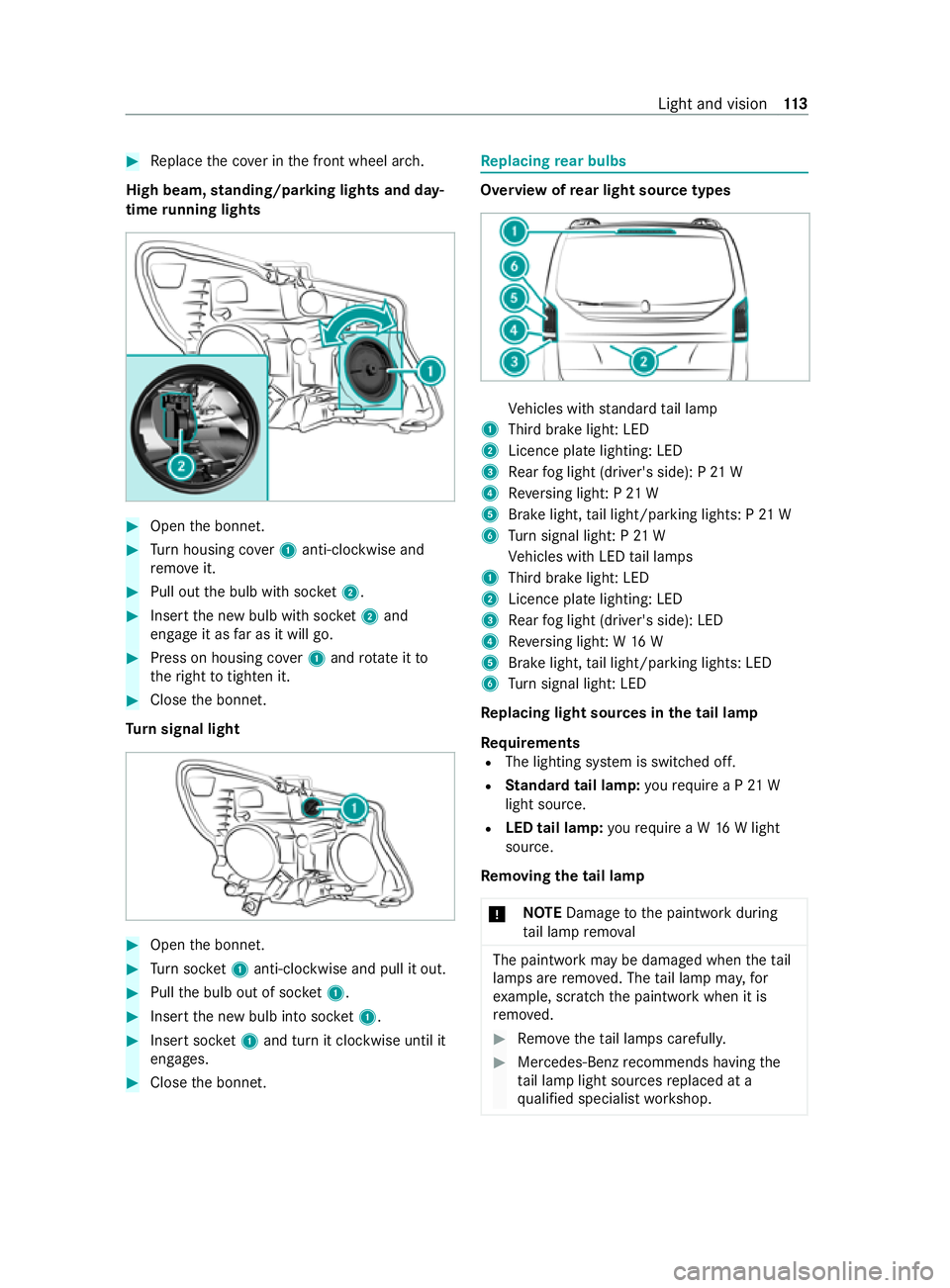
High beam, standing/parking lights and day‐
time running lights #
Open the bonn et. #
Turn housing co ver1 anti-clockwise and
re mo veit. #
Pull out the bulb with soc ket2. #
Inse rtthe new bulb with soc ket2 and
engage it as far as it will go. #
Press on housing co ver1 and rotate itto
th eright totighten it. #
Close the bonn et.
Tu rn signal light #
Open the bonn et. #
Turn soc ket1 anti-clo ckwise and pull it out. #
Pull the bulb out of soc ket1. #
Inse rtthe new bulb into soc ket1. #
Inse rtsoc ket1 and turn it clo ckwise until it
engages. #
Close the bonn et. Re
placing rear bulbs Overview of
rear light source types Ve
hicles with standard tail lamp
1 Third brake light: LED
2 Licence plate lighting: LED
3 Rear fog light (driver's side): P 21 W
4 Reversing light: P 21 W
5 Brake light, tail light/parking lights: P 21 W
6 Turn signal light: P 21 W
Ve hicles with LED tail lamps
1 Third brake light: LED
2 Licence plate lighting: LED
3 Rear fog light (driver's side): LED
4 Reversing light: W 16 W
5 Brake light, tail light/parking lights: LED
6 Turn signal light: LED
Re placing light sou rces in the tail lamp
Re quirements
R The lighting sy stem is switched off.
R Standard tail lamp: yourequ ire a P 21 W
light source.
R LED tail lamp: yourequ ire a W 16W light
source.
Re moving the tail lamp
* NO
TEDama getothe paintwork during
ta il lamp remo val The paintwork may be damaged when
theta il
lamps are remo ved. The tail lamp ma y,for
ex ample, scratch the paintwork when it is
re mo ved. #
Remo vetheta il lamps carefull y. #
Mercedes-Benz recommends having the
ta il lamp light sources replaced at a
qu alified specialist workshop. Light and vision
11 3
Page 117 of 337
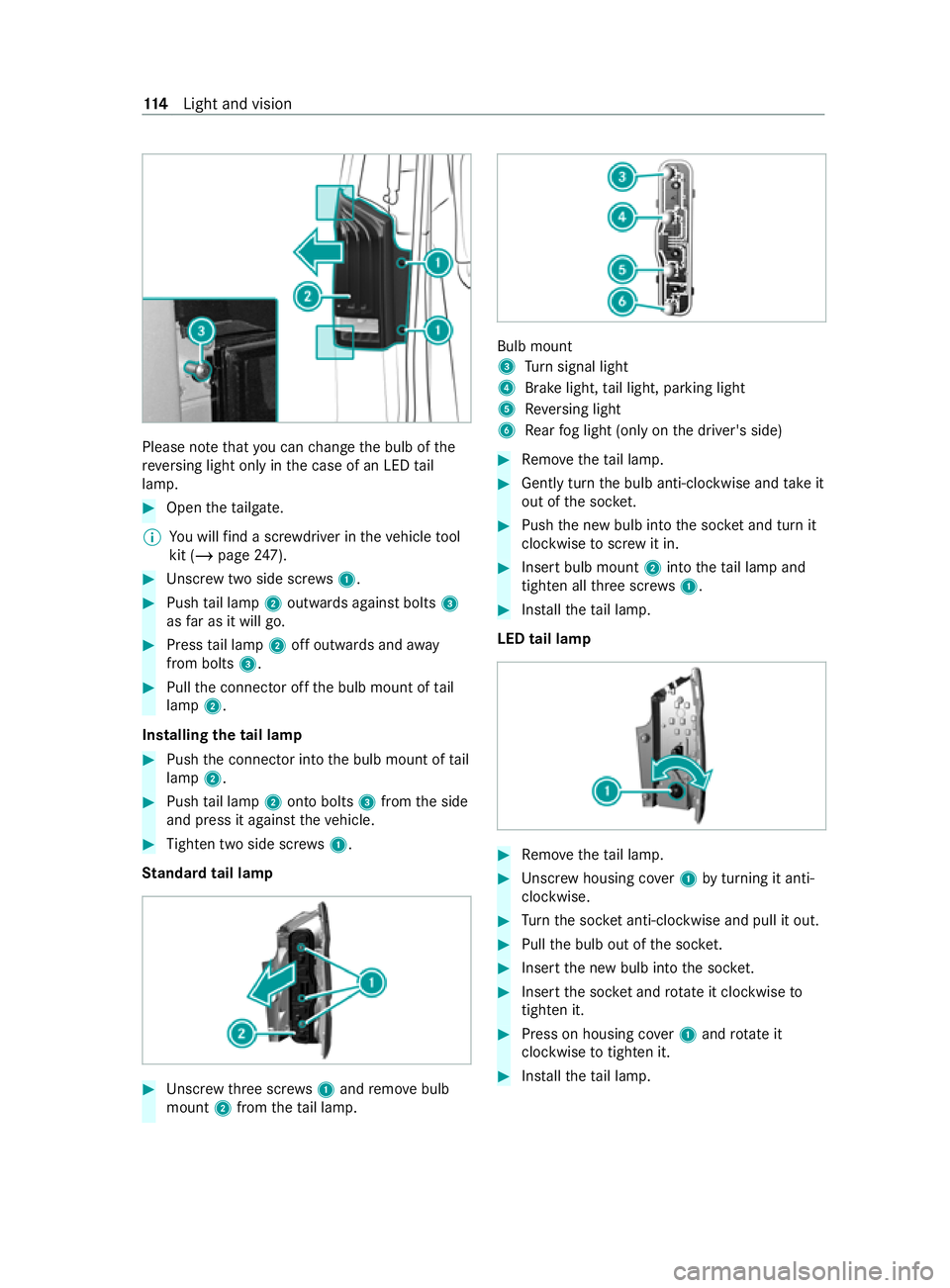
Please no
tethat you can change the bulb of the
re ve rsing light only in the case of an LED tail
lamp. #
Open theta ilgate.
% Yo
u will find a scr ewdriver in theve hicle tool
kit (/ page247). #
Unscr ewtwo side scre ws1. #
Push tail lamp 2outwards against bolts 3
as far as it will go. #
Press tail lamp 2off outwards and away
from bolts 3. #
Pull the connector off the bulb mount of tail
lamp 2.
Installing the tail lamp #
Push the connector into the bulb mount of tail
lamp 2. #
Push tail lamp 2onto bolts 3from the side
and press it against theve hicle. #
Tighten two side scr ews1.
St andard tail lamp #
Unscr ewthre e scr ews1 and remo vebulb
mount 2from theta il lamp. Bulb mount
3
Turn signal light
4 Brake light, tail light, parking light
5 Reversing light
6 Rear fog light (only on the driver's side) #
Remo vetheta il lamp. #
Gently turn the bulb anti-clockwise and take it
out of the soc ket. #
Push the new bulb into the soc ket and turn it
clo ckwise toscr ew it in. #
Insert bulb mount 2into theta il lamp and
tigh ten all thre e scr ews1. #
Installth eta il lamp.
LED tail lamp #
Remo vetheta il lamp. #
Unscr ewhousing co ver1 byturning it anti-
clo ckwise. #
Turn the soc ket anti-clo ckwise and pull it out. #
Pull the bulb out of the soc ket. #
Inse rtthe new bulb into the soc ket. #
Inse rtthe soc ket and rotate it clockwise to
tighten it. #
Press on housing co ver1 and rotate it
clockwise totighten it. #
Installth eta il lamp. 11 4
Light and vision
Page 142 of 337
%
Chan
gethe shift range in good time when
cruise control or the limiter are activated.
Obser vethe driving tips (/ page137).
Yo uth ereby make use of the braking ef fect of the
engine and do not ha vetobrake as of tento main‐
tai nth e speed. This relie vesth e load on the
service brake and pr events the brakes from over‐
heating and wearing tooqu ickl y.
Heavy and light loads
If th e brakes ha vebeen subjected toa heavy
load, do not stop theve hicle immediatel y.Drive
on for a short while. The brakes cool down more
qu ickly in the air flow.
If th e brakes ha vebeen used only moderately,
yo u should occasionally test their ef fectiveness.
To do this, brake more firm ly from a higher speed
while pa ying attention tothe traf fic conditions.
The brakes will grip better as a result.
We tro ad sur faces
If yo u ha vebeen driving for a long time in heavy
ra in without braking, there may be a dela yed
re sponse when youfirs t apply the brakes. This
may also occur af ter driving thro ugh a car wash
or deep water.Yo u must depress the brake pedal
more firm ly. Maintain a grea ter dis tance tothe
ve hicle in front.
While paying attention tothe traf fic conditions,
yo u should brake theve hicle firm lyafte r driving
on a wetro ad sur face or thro ugh a car wash. This
heats the brake disks so that they dry more
qu ickl y,which pr otects them against cor rosion.
Limited braking ef fect on salt-treate dro ads:
R a layer of salt on the brake disks or brakepads
can increase braking dis tances considerably,
or braking may happen on only one side
R maintain an especially large safe dis tance to
th eve hicle in front
To remo vethe la yer of salt:
R apply the brakes from time totime, paying
attention totraf fic conditions
R carefully dep ress the brake pedal at the end
of a journey and af terth est art of a new jour‐
ney
Ne w brake dis ksand brakepads
New brakepads and brake disks only reach their
optimal braking ef fect af ter appro ximately
10 0 km.
Un tilthen, compensate forth ere duced braking
ef fect by applying greater pressure tothe brake
pedal. For saf etyre asons, Mercedes-Benz recom‐ mends
that you on lyha ve brakepads and brake
disks which are appr ovedby Mercedes-Benz
ins talled on your vehicle.
Other brake disks or brakepads may compromise
th e saf ety of your vehicle.
Alw aysre place all brake disks and brakepads on
an axle at the same time. Alw aysfit new brake‐
pads when replacing brake disks.
Information about driving on wetro ads
Note s on aquaplaning
Aq uaplaning can take place once a cer tain
am ount of water has accumulated on thero ad
sur face.
Obser vethefo llowing no tes during heavy precipi‐
ta tion or in conditions in which aquaplaning may
occu r:
R reduce your speed
R avoid tyre ruts
R avoid sudden steering mo vements
R brake carefully
Note s on driving through water on roads
If th e maximum permissible height of thewate r is
exc eeded when ford ing, theve hicle can be dam‐
aged.
Obser vethefo llowing if you must drive thro ugh
wate r:
R thewate r level of standing water may not be
abo vethe lo wer edge of the front bumper
R you may drive no fasterthan walking pace
R vehicles tr avelling in front, or oncoming vehi‐
cles, can create waves which may exceed the
maximum permissible height of thewa ter
The braking ef fect of the brakes is reduced af ter
fo rd ing. Brake carefully while paying attention to
th e traf fic conditions until braking po wer has
been fully restored.
Note s on driving in mountainous areas
Ve hicles with diesel engines: the operating
saf ety of the diesel engine is guaranteed up toan
ele vation of 2,500 m ab ovesea le vel.Yo u may
exc eed this ele vation for a short time, e.g. in
mountainous terrain. Do not drive continuously at
ele vations ab ove2,500 m. Otherwise, you may
damage the diesel engine.
When driving in mountainous areas, no tethat
engine output, and therefore start-off gradeabil‐
ity, will dec rease with inc reasing ele vation. The
ECO start/ stop function is no longer available Driving and parking
13 9
Page 143 of 337

when driving at ele
vations higher than 2,500 m
abo vesea le vel. Obser vethe no tes on braking on
downhill gradients (/ page138).
The ma ximum permissible trailer loads are valid
fo r journe ysat ele vations up to1,000 m abo ve
sea le vel with gradients up to12% (/ page277). ECO
start/s top function Ope
ration of the ECO start/s top function &
WARNING Risk of accident and inju ry
due toautomatic engine starting
If th e engine was switched off automatically
and youth en get out, it star ted again auto‐
maticall y.The vehicle could pull away. #
Before leaving theve hicle,alw ays switch
off the ignition and secure theve hicle
against rolling away. Displ
aying the ECO start/ stop function in the
instrument clus ter:
R 00D6 : The ECO start/ stop function opera‐
tional.
R 00D5: Not all on vehicle conditions for an
automatic engine stop are met.
% Depending on the engine, the00D6 symbol
fi rs t appears du ring the automatic engine
st op or during the journe y.
If all theve hicle conditions for an automatic
engine stop are met, the engine will be automati‐
cally switched off:
R Vehicles with manual transmission: you
decelerate theve hicle toa lo wer speed, then
engage neutral 005Cand then release the
clutch pedal.
R Vehicles with automatic transmission: you
st op theve hicle in transmission position 005B
or 005C.
The engine restarts automatically in thefo llowing
cases:
R Vehicles with manual transmission: Yo u
depress the clutch pedal.
R Vehicles with automatic transmission: Yo u
re lease the brake pedal in transmission posi‐
tion 005Band with the HOLD function deactiva‐
te d.
R Vehicles with automatic transmission: Yo u
select transmission position 005Bor005E. R
You depress the accelera tor pedal.
R Ave hicle automatic engine start is required.
If th e engine was switched off bythe ECO start/
st op function and one of the doors is opened, the
engine will automatically start.
Swit ching the ECO start/s top function off/on #
Press the00D6 button on the cent reconsole.
When the indicator lamp in the00D6 button
lights up, the ECO start/ stop function is acti‐
va ted. Fu
nction of the ECO display The ECO display summarises
your driving charac‐
te rist ics from thest art of the journey toits com‐
pletion and assists you in achieving the most eco‐
nomical driving style. If you inter rupt your trip
and swit choff the ignition for longer than four
hours, the ECO display values will automatically
be reset.
Yo u can influence consum ption as follo ws:
R Anticipate road and traf fic conditions.
R Drive in drive program ;if it is available;
ot herwise, in drive program A
(/ page 145).
R Follow thege arshift recommendations. The inner segment lights up green and
the outer
segment fills up:
R 1Moderate acceleration
R 2Gentle deceleration and rolling
R 3Consis tent speed
The inner segment is gr eyand the outer segment
em pties:
R 1Sporty acceleration
R 2Heavy braking
R 3Speed fluctuations 14 0
Driving and pa rking