mirror MERCEDES-BENZ WAGON 2016 User Guide
[x] Cancel search | Manufacturer: MERCEDES-BENZ, Model Year: 2016, Model line: WAGON, Model: MERCEDES-BENZ WAGON 2016Pages: 350, PDF Size: 6.71 MB
Page 115 of 350
Useful information............................114
Correct driver's seat position ..........114
Seats .................................................. 115
Steering wheel .................................. 117
Mirrors ............................................... 117
Memory function ............................... 117
113
Seats, steering wheel and mirrors
Page 116 of 350
Useful information
i
This Operator's Manual describes all
models and all standard and optional equip-
ment of your vehicle available at the time of
publication of the Operator's Manual.
Country-specific differences are possible.
Please note that your vehicle may not be
equipped with all features described. This
also applies to safety-related systems and
functions.
iRead the information on qualified special-
ist workshops (
Ypage 31).
Correct driver's seat position
GWARNING
You could lose control of your vehicle if you do the following while driving:
Radjust the driver's seat, head restraint,
steering wheel or mirrors
Rfasten the seat belt
There is a risk of an accident.
Adjust the driver's seat, head restraint, steer-
ing wheel and mirror and fasten your seat belt before starting the engine.
XObserve the safety guidelines on seat
adjustment (
Ypage 115).
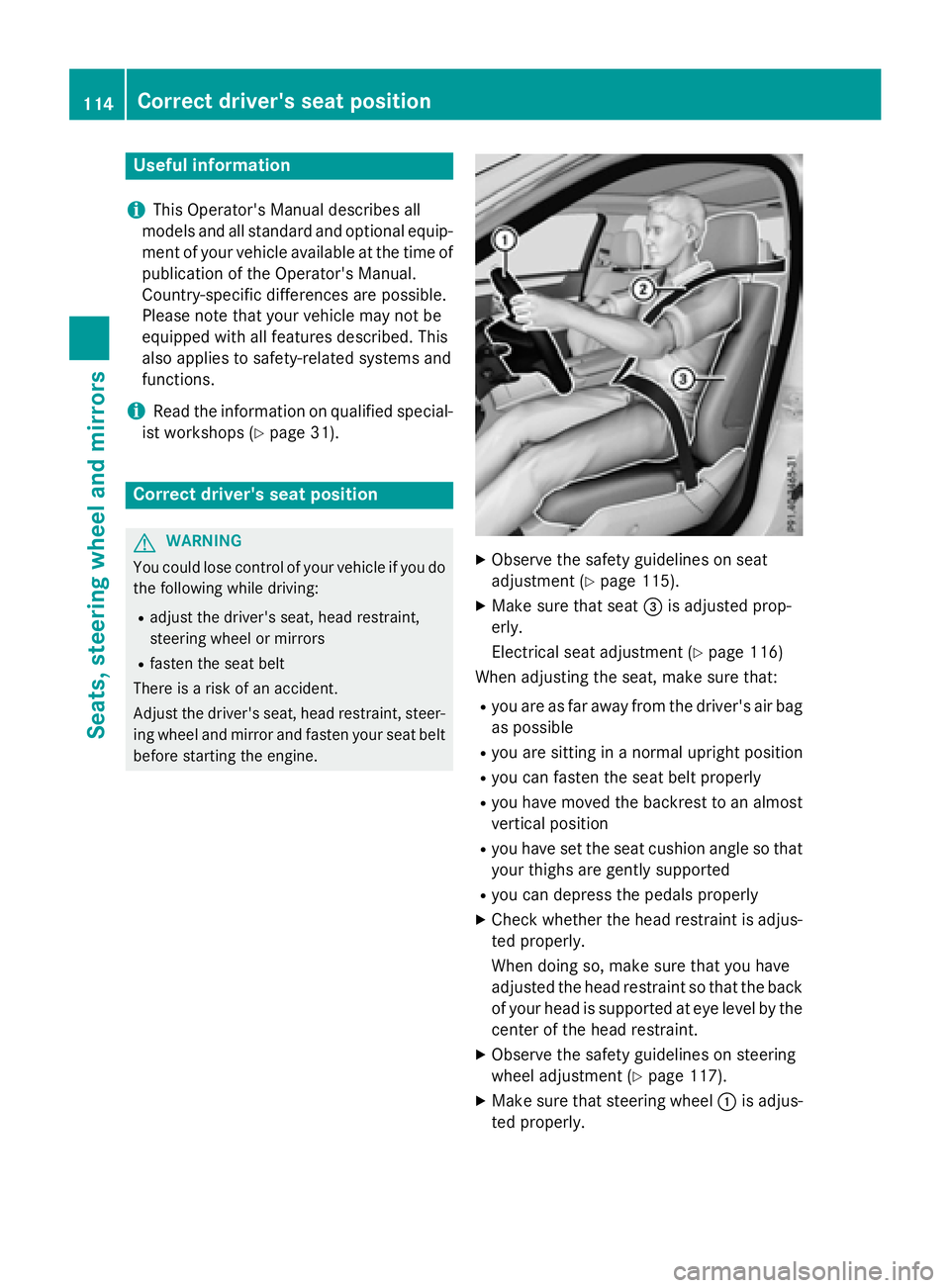
XMake sure that seat =is adjusted prop-
erly.
Electrical seat adjustment (
Ypage 116)
When adjusting the seat, make sure that:
Ryou are as far away from the driver's air bag
as possible
Ryou are sitting in a normal upright position
Ryou can fasten the seat belt properly
Ryou have moved the backrest to an almost
vertical position
Ryou have set the seat cushion angle so that
your thighs are gently supported
Ryou can depress the pedals properly
XCheck whether the head restraint is adjus-
ted properly.
When doing so, make sure that you have
adjusted the head restraint so that the back
of your head is supported at eye level by the
center of the head restraint.
XObserve the safety guidelines on steering
wheel adjustment (
Ypage 117).
XMake sure that steering wheel :is adjus-
ted properly.
114Correct driver's seat position
Seats, steering wheel and mirrors
Page 117 of 350
Adjusting the steering wheel electrically
(
Ypage 117)
When adjusting the steering wheel, make
sure that:
Ryou can hold the steering wheel with your
arms slightly bent
Ryou can move your legs freely
Ryou can see all the displays in the instru-
ment cluster clearly
XObserve the safety guidelines for seat belts
(
Ypage 50).
XCheck whether you have fastened seat
belt ;properly (
Ypage 52).
The seat belt should:
Rfit snugly across your body
Rbe routed across the middle of your shoul-
der
Rbe routed in your pelvic area across the hip
joints
XBefore starting off, adjust the rear-view mir-
ror and the exterior mirrors in such a way
that you have a good view of road and traf-
fic conditions (
Ypage 117).
XVehicles with a memory function: save
the seat, steering wheel and exterior mirror
settings with the memory function
(
Ypage 117).
Seats
Important safety notes
GWARNING
Children could become trapped if they adjust
the seats, particularly when unattended.
There is a risk of injury.
When leaving the vehicle, always take the
SmartKey with you and lock the vehicle. Never
leave children unsupervised in the vehicle.
The seats can still be adjusted when there is
no SmartKey in the ignition lock.
GWARNING
If the head restraints are not installed or not
adjusted correctly, they cannot provide pro-
tection as intended. There is an increased risk
of injury in the head and neck area, e.g. in the event of an accident or when braking.
Always drive with the head restraints instal-
led. Before driving off, make sure for every
vehicle occupant that the center of the head
restraint supports the back of the head at
about eye level.
Observe the safety notes on "Air bags"
(
Ypage 54) and "Children in the Vehicle"
(
Ypage 68).
GWARNING
You could lose control of your vehicle if you do the following while driving:
Radjust the driver's seat, head restraint,
steering wheel or mirrors
Rfasten the seat belt
There is a risk of an accident.
Adjust the driver's seat, head restraint, steer-
ing wheel and mirror and fasten your seat belt before starting the engine.
GWARNING
If you adjust the seat height carelessly, you or
other vehicle occupants could be trapped and
thereby injured. Children in particular could
accidentally press the electrical seat adjust-
ment buttons and become trapped. There is a
risk of injury.
While moving the seats, make sure that your
hands or other body parts do not get under the
lever assembly of the seat adjustment sys-
tem.
GWARNING
When you adjust a seat, you or other vehicle
occupants could become trapped, e.g. on the seat guide rail. There is a risk of injury.
Make sure when adjusting a seat that no one
has any body parts in the sweep of the seat.
Seats115
Seats, steering wheel and mirrors
Z
Page 118 of 350
!To avoid damage to the seats and the seat
heating, observe the following information:
Rkeep liquids from spilling on the seats. If
liquid is spilled on the seats, dry them as
soon as possible.
Rif the seat covers are damp or wet, do not
switch on the seat heating. The seat
heating should also not be used to dry
the seats.
Rclean the seat covers as recommended;
see the "Interior care" section.
Rdo not transport heavy loads on the
seats. Do not place sharp objects on the
seat cushions, e.g. knives, nails or tools. The seats should only be occupied by
passengers, if possible.
Rwhen the seat heating is in operation, do
not cover the seats with insulating mate-
rials, e.g. blankets, coats, bags, seat cov-
ers, child seats or booster seats.
!Make sure that there are no objects in the
footwell under or behind the seats when
moving the seats back. There is a risk that
the seats and/or the objects could be dam- aged.
iThe head restraints in the front seats are
installed with the NECK-PRO system
(
Ypage 65). For this reason, it is not pos-
sible to remove the head restraints from
the front seats.
Vehicles without the through-loading fea-
ture: the head restraints cannot be
removed from the rear compartment seats.
For more information, contact a qualified
specialist workshop.
Information in the Digital Operator's
Manual
In the Digital Operator's Manual you will find
information on the following topics:
RAdjusting the seats
RAdjusting the head restraints
RAdjusting the active multicontour seat
RAdjusting the 4-way lumbar support
RFolding bench seat in the cargo compart-
ment (Wagon)
RSwitching the seat ventilation on/off
Switching the seat heating on/off
Switching on/off
GWARNING
Repeatedly switching on the seat heating can
cause the seat cushion and backrest pads to
become very hot. The health of persons with
limited temperature sensitivity or a limited
ability to react to excessively high tempera-
tures may be affected or they may even suffer
burn-like injuries. There is a risk of injury.
Therefore, do not switch the seat heating on
repeatedly.
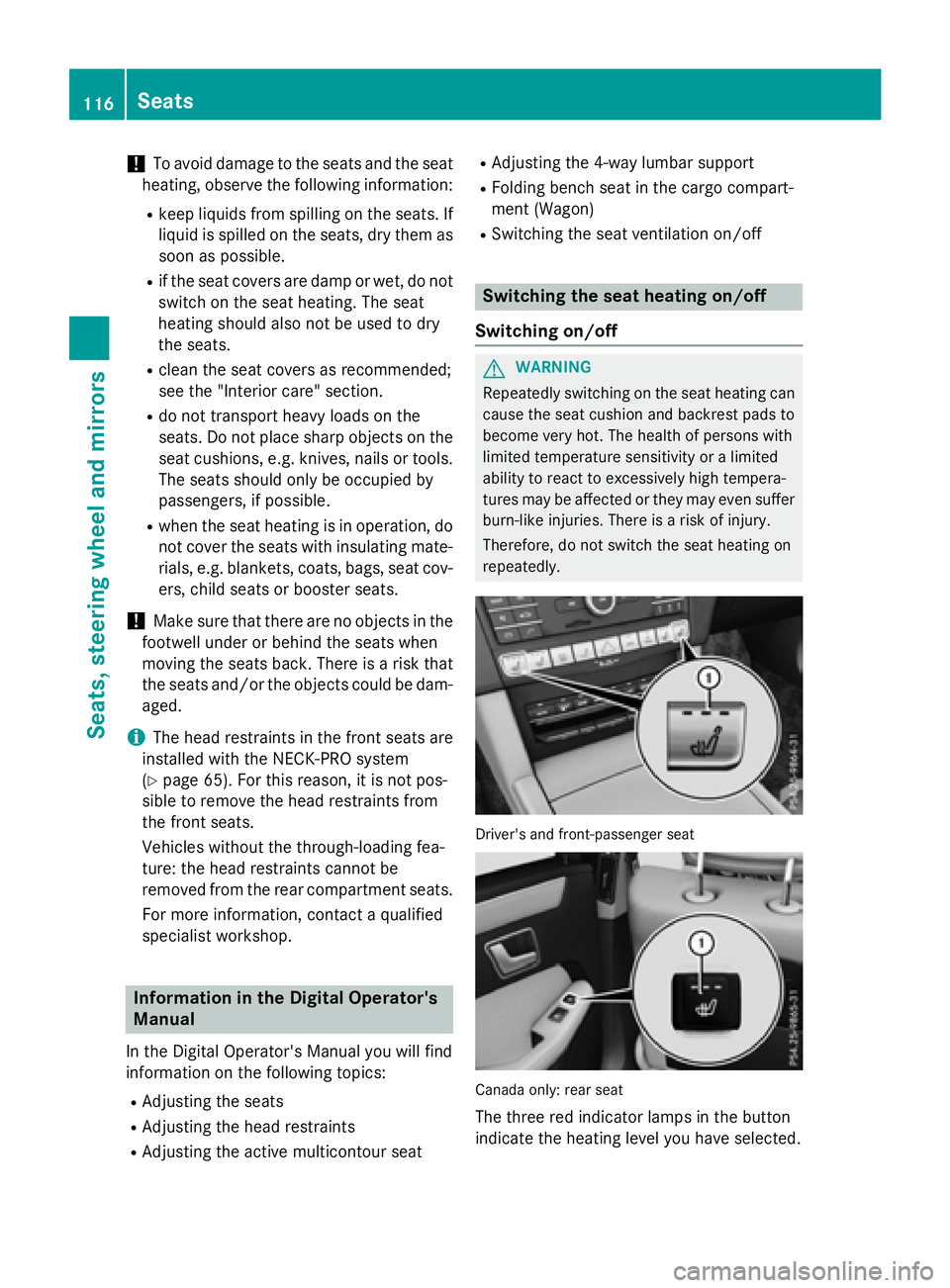
Driver's and front-passenger seat
Canada only: rear seat
The three red indicator lamps in the button
indicate the heating level you have selected.
116Seats
Seats, steering wheel and mirrors
Page 119 of 350
Driver's and front-passenger seat:thesys-
te m automatically switches down from level 3
to level 2after approximately eigh tminutes.
Rea rseat: thesystem automatically
switches down from level 3to level 2after
approximately fiv eminutes.
The system automatically switches down
from level 2to level 1after approximately te n
minutes.
The system automatically switches of f
approximately 20 minute safter it is set to
level 1.
XTurnth eSmartKey to position 1or 2in th e
ignition loc k (
Ypage 137).
XTo switch on: press button: repeatedly
until th edesire dheatin glevel is set .
XTo switch off :press butto n: repeatedly
until all th eindicato rlamp sgo out .
iIf thebattery voltag eis to olow, th eseat
heatin gmay switch off.
Problem swit hth esea theating
You can fin dinformation about this in th e
Digital Operator' sManual.
Steering wheel
Important safet ynotes
GWARNIN G
You could los econtrol of your vehicl eif you do
th efollowing while driving:
Radjust th edriver's seat ,head restraint,
steerin gwhee lor mirror s
Rfastenth eseat belt
There is aris kof an accident.
Adjus tth edriver's seat ,head restraint, steer -
in gwhee land mirror and faste nyour seat belt
before startin gth eengine.
GWARNIN G
Children could injur ethemselves if they
adjust th esteerin gwheel. There is aris kof
injury.
Whe nleavin gth evehicle, always tak eth e
SmartKey wit hyou and loc kth evehicle. Never
leav echildren unsupervised in th evehicle.
The electrically adjustable steerin gwhee lcan
still be adjusted when there is no SmartKey in
th eignition lock.
Information in th eDigital Operator's
Manua l
In theDigital Operator' sManual you will fin d
information on th efollowing topics:
RAdjusting th esteerin gwhee l
RSteerin gwhee lheatin g
REASY-ENTRY/EXIT featur e
Mirrors
In theDigital Operator' sManual you will fin d
information on th efollowing topics:
RRear-view mirror
RExterio rmirror s
RAutomati canti-glar emirror s
RParking position fo rth eexterio rmirror on
th efront-passenger side
Memor yfunction
In th eDigital Operator' sManual you will fin d
information on th efollowing topics:
RStoring setting s
RCallingup astore dsetting
Memory function117
Seats, steering wheel and mirrors
Z
Page 173 of 350
Active Parking Assist may possibly indicate
parking spaces which are not suitable for
parking, for example:
Rwhere parking or stopping is prohibited
Rin front of driveways or entrances and exits
Ron unsuitable surfaces
Parking tips:
ROn narrow roads, drive as close to the park-
ing space as possible.
RParking spaces that are littered or over-
grown might be identified or measured
incorrectly.
RParking spaces that are partially occupied
by trailer drawbars might not be identified
as such or be measured incorrectly.
RSnowfall or heavy rain may lead to a parking
space being measured inaccurately.
RPay attention to the PARKTRONIC
(
Ypage 170 )warning messages during the
parking procedure.
RYou can intervene in the steering procedure
to correct it at any time. Active Parking
Assist will then be canceled.
RWhen transporting a load which protrudes
from your vehicle, you should not use
Active Parking Assist.
RNever use Active Parking Assist when snow
chains are installed.
RMake sure that the tire pressures are
always correct. This has a direct influence
on the parking characteristics of the vehi-
cle.
Use Active Parking Assist for parking spaces:
Rparallel or at right angles to the direction of
travel
Rthat are on straight roads, not bends
Rthat are on the same level as the road, e.g.
not on the pavement
Information in the Digital Operator's
Manual
In the Digital Operator's Manual you will find
information on the following topics:
RDetecting parking spaces
RParking
RExiting a parking space
RCanceling Active Parking Assist
Rear view camera
General notes
Example :Sedan
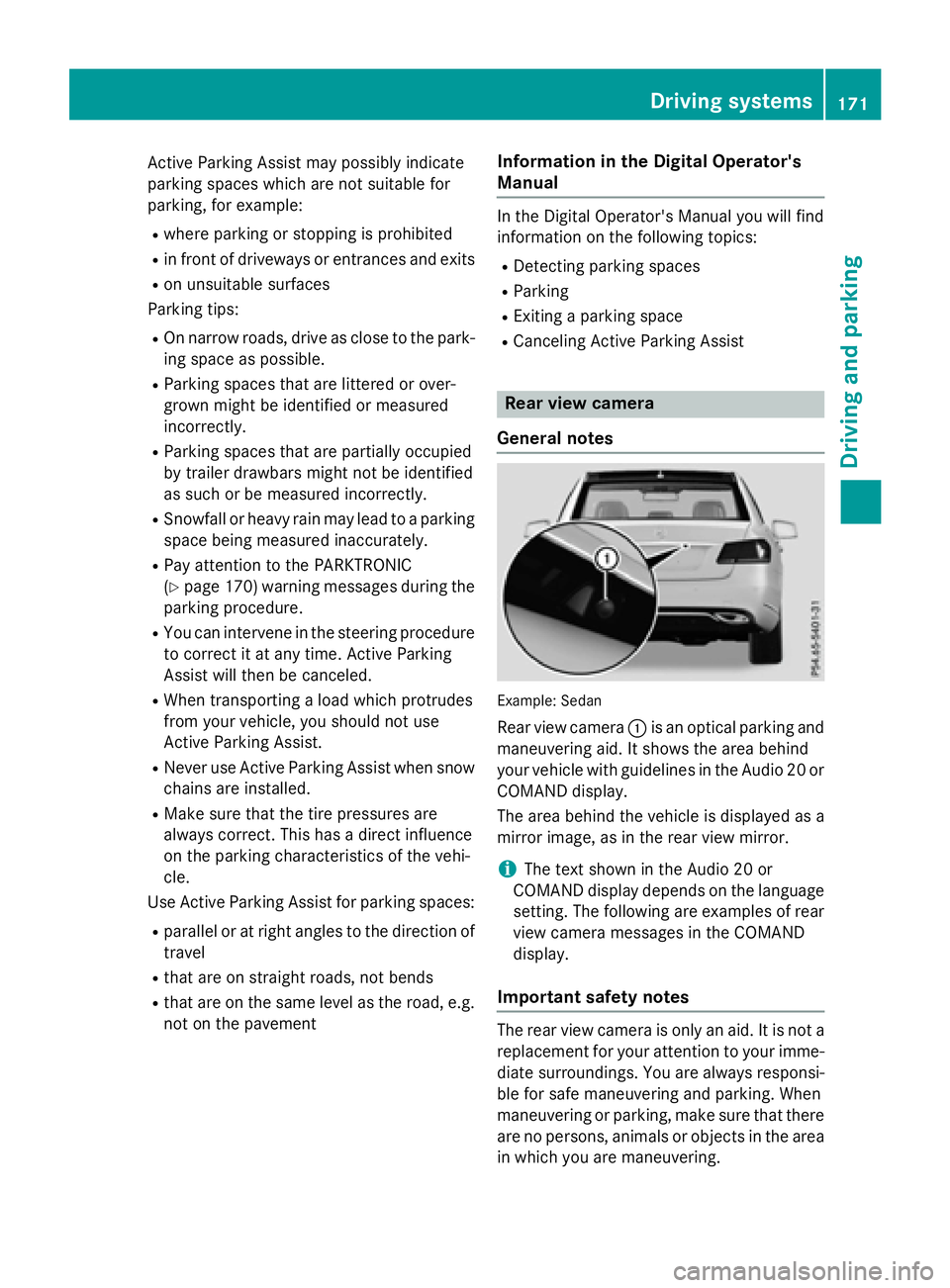
Rear view camera :is an optical parking and
maneuvering aid. It shows the area behind
your vehicle with guidelines in the Audio 20 or
COMAND display.
The area behind the vehicle is displayed as a
mirror image, as in the rear view mirror.
iThe text shown in the Audio 20 or
COMAND display depends on the language
setting. The following are examples of rear
view camera messages in the COMAND
display.
Important safety notes
The rear view camera is only an aid. It is not a
replacement for your attention to your imme- diate surroundings. You are always responsi-
ble for safe maneuvering and parking. When
maneuvering or parking, make sure that there
are no persons, animals or objects in the area
in which you are maneuvering.
Driving systems171
Driving and parking
Z
Page 175 of 350
Information in the Digital Operator's
Manual
Inthe Digital Operator's Manual you willfind
information on the following topics:
RMessages inthe Audio 20 or COMAND dis-
play
R"Reverse parking" function
RWide-ang lefunction
360° camera
General notes
The 360° camera isa system consisting of
four cameras.
The system analyzes images from the fol low-
ing cameras:
RRear view camera
RFront camera
RTwo cameras inthe exterior rear view mir-
rors
The cameras capture the immediate sur-
roun dings of the vehicle. The system sup-
ports you, e.g. when parking or if vision is
restricted at an exit.
You can show pictures from the 360° camera
in full-screen mode or in six different split-
screen views on the COMAND/A udio20 dis-
play. A split-screen view also includes a top
view of the vehicle. This view iscalculated
from the data supplied by the installed cam-
eras (virtual camera).
The six split-screen views are:
Rtop view and picture from the rear view
camera (130° viewing angle)
Rtop view and image from the front camera
(130° viewing angle without displaying the
maximum steering wheel angle)
Rtop view and enlarged rear view
Rtop view and enlarged front view
Rtop view and images from the side mirror
cameras (rear wheel view)
Rtop view and images from the sidemirror
cameras (front wheel view) When the function
isactive and you shift the
transmission from Dor Rto N, the dynamic
guidelines are hidden.
When you change between transmission
posit ionsDand R, you see the prev
iously
selected front or rear view.
Distances measured byPARKTRONIC will
also beoptical lydisplayed:
Rin split screen viewas red or yellow brack-
ets around the vehicle icon inthe top view,
or
Rat the bottom right as red or yellow brack-
ets around the vehicle symbol infull-screen
mode
The line thickness and color of the brackets
show how far the vehicle isfrom an object.
Ryellow brackets with th inlines:
PARKTRONIC isactive
Ryellow brackets with normal lines: an
object ispresent inclose range of the veh i-
cle
Rred line: an object ispresent inthe imme-
diat e close range of the vehicle
Important safety notes
The 360°camera isonly an aid and may show
a distorted viewof obstacles, show them
incorrectly or not at all. The 360°camera is
not a substitute for attenti vedriving.
You are always responsible for safe maneu-
vering and parking. When maneuvering or
parking, make sure that there are no persons,
animals or objects inthe area in which you are
maneuvering.
You are always responsible for safety, and
must always pay attention to your surround-
ings when parking and maneuvering. This
applie s to the areas behind, infront of and
beside the vehicle. You could otherwise
endanger yourself and others.
The 360° camera willnot function or will
function ina limited manner:
Rifthe doors are open
Rifthe exterior mirrors are folded in
Driving systems173
Driving and parking
Z
Page 180 of 350
Blind Spot Assist
General notes
Blind Spot Assist uses a radar sensor system
to monitor the areas on both sides of your
vehicle. It supports you from a speed of
approximately 20 mph (30 km/h). A warning
display in the exterior mirrors draws your
attention to vehicles detected in the moni-
tored area. If you then switch on the corre-
sponding turn signal to change lanes, you will
also receive an optical and audible collision
warning. Blind Spot Assist uses sensors in the
rear bumper for monitoring purposes.
Important safety notes
GWARNING
Blind Spot Assist does not react to:
Rvehicles overtaken too closely on the side,
placing them in the blind spot area
Rvehicles which approach with a large speed
differential and overtake your vehicle
As a result, Blind Spot Assist may not give
warnings in such situations. There is a risk of
an accident.
Always observe the traffic conditions care-
fully, and maintain a safe lateral distance.
Blind Spot Assist is only an aid. It may fail to
detect some vehicles and is no substitute for
attentive driving. Always ensure that there is
sufficient distance to the side for other road
users and obstacles.
iUSA only:
This device has been approved by the FCC
as a "Vehicular Radar System". The radar
sensor is intended for use in an automotive
radar system only. Removing, tampering
with, or altering the device will void any
warranties, and is not permitted by the
FCC. Do not tamper with, alter, or use in
any non-approved way.
Any unauthorized modification to this
device could void the user’s authority to
operate the equipment. Monitoring range of the sensors
In particular, the detection of obstacles can
be impaired if:
Rthere is dirt on the sensors or anything else
covering the
senso
rs
Rthere is poor visibility, e.g. due to fog, heavy
rain, snow or spray
Rthere are narrow vehicles, e.g. motorcycles
or bicycles
Rthe road has very wide lanes
Rthe road has narrow lanes
Ryou are not driving in the middle of the lane
Rthere are barriers or similar lane borders
Vehicles in the monitoring range are then not
indicated.
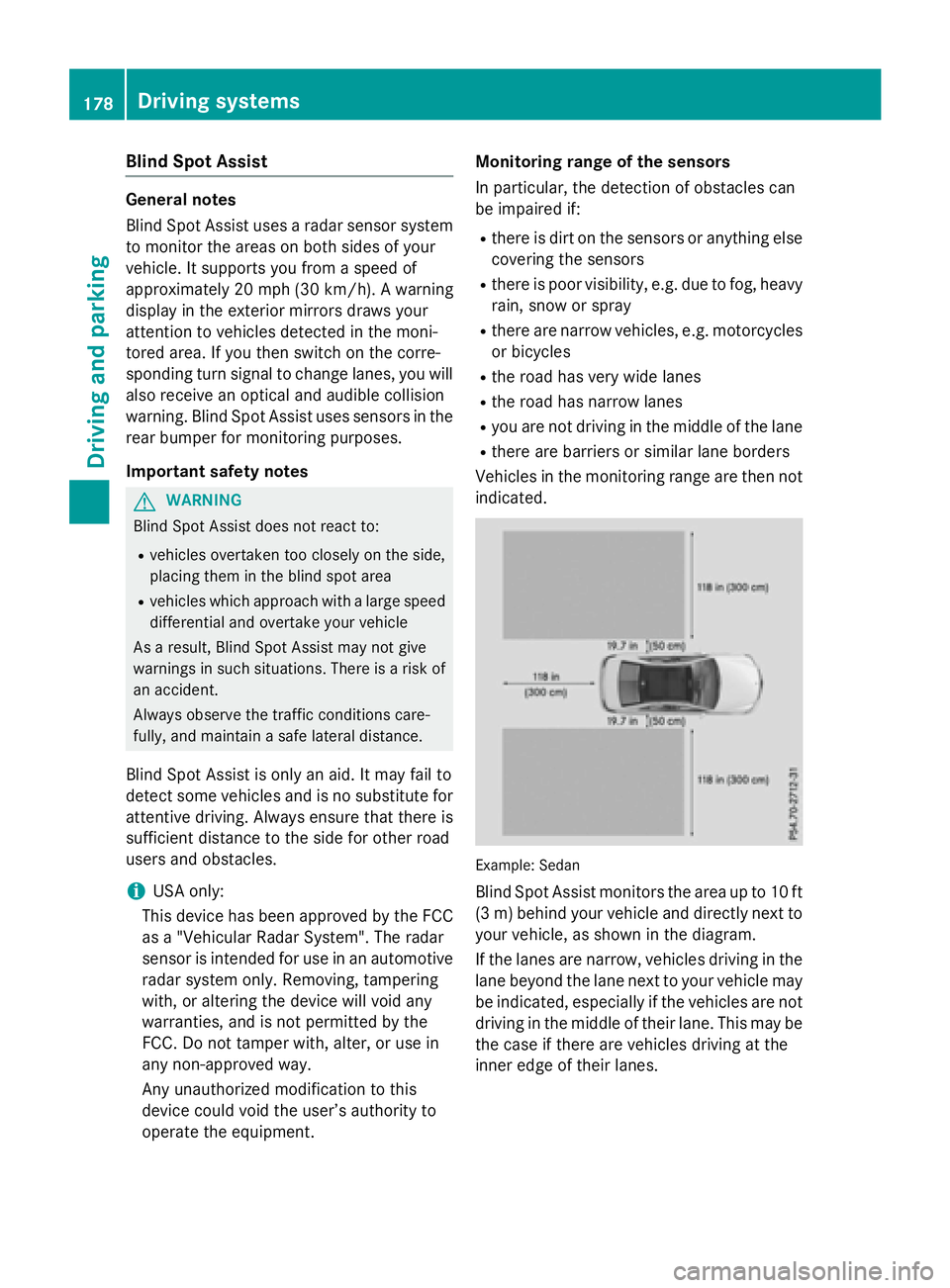
Example: Sedan
Blind Spot Assist monitors the area up to 10 ft
(3 m) behind your vehicle and directly next to
your vehicle, as shown in the diagram.
If the lanes are narrow, vehicles driving in the
lane beyond the lane next to your vehicle may
be indicated, especially if the vehicles are not
driving in the middle of their lane. This may be
the case if there are vehicles driving at the
inner edge of their lanes.
178Driving systems
Driving an d parking
Page 181 of 350
Due to the nature of the system:
Rwarnings may be issued in error when driv-ing close to crash barriers or similar solid
lane borders.
Rthe warning is canceled when driving for an
extended period next to long vehicles, such
as trucks.
The two radar sensors for Blind Spot Assist
are integrated into the sides of the rear
bumper. Make sure that the bumper is free of
dirt, ice or slush in the vicinity of the sensors.
The sensors must not be covered, for exam-
ple by cycle racks or overhanging loads. Fol-
lowing a severe impact or in the event of dam-
age to the bumpers, have the function of the
sensors checked at a qualified specialist
workshop. Blind Spot Assist may otherwise
not work properly.
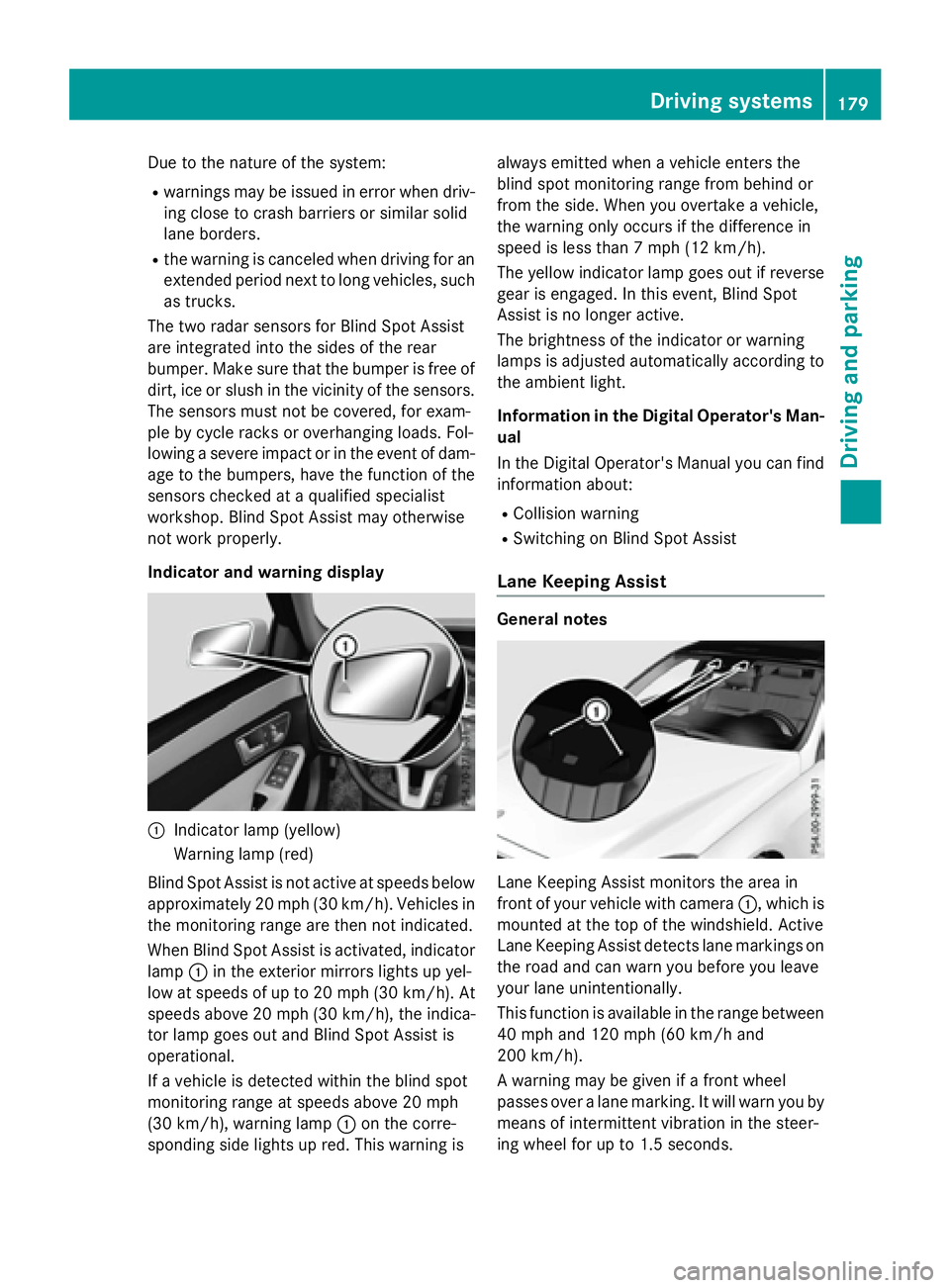
Indicator and warning display
:Indicator lamp (yellow)
Warning lamp (red)
Blind Spot Assist is not active at speeds below
approximately 20 mph (30 km/h). Vehicles in the monitoring range are then not indicated.
When Blind Spot Assist is activated, indicator
lamp :in the exterior mirrors lights up yel-
low at speeds of up to 20 mph (30 km/h). At
speeds above 20 mph (30 km/h), the indica-
tor lamp goes out and Blind Spot Assist is
operational.
If a vehicle is detected within the blind spot
monitoring range at speeds above 20 mph
(30 km/h), warning lamp :on the corre-
sponding side lights up red. This warning is always emitted when a vehicle enters the
blind spot monitoring range from behind or
from the side. When you overtake a vehicle,
the warning only occurs if the difference in
speed is less than 7 mph (12 km/h).
The yellow indicator lamp goes out if reverse
gear is engaged. In this event, Blind Spot
Assist is no longer active.
The brightness of the indicator or warning
lamps is adjusted automatically according to
the ambient light.
Information in the Digital Operator's Man-
ual
In the Digital Operator's Manual you can find
information about:
RCollision warning
RSwitching on Blind Spot Assist
Lane Keeping Assist
General notes
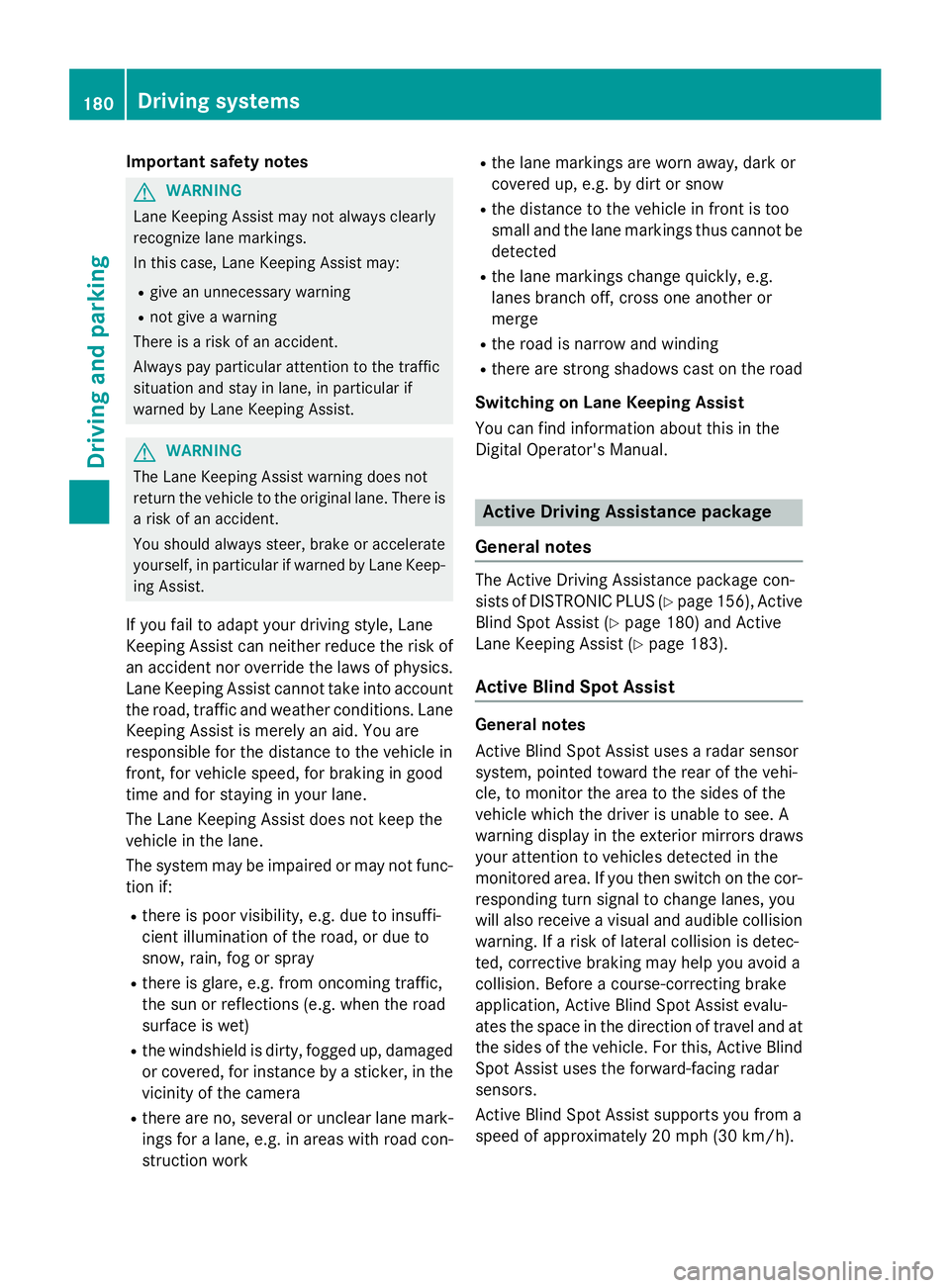
Lane Keeping Assist monitors the area in
front of your vehicle with camera :, which is
mounted at the top of the windshield. Active
Lane Keeping Assist detects lane markings on
the road and can warn you before you leave
your lane unintentionally.
This function is available in the range between
40 mph and 120 mph (60 km/h and
200 km/h).
A warning may be given if a front wheel
passes over a lane marking. It will warn you by means of intermittent vibration in the steer-
ing wheel for up to 1.5 second s.
Drivingsystem s179
Drivin g and parking
Z
Page 182 of 350
Important safety notes
GWARNING
Lane Keepin g Assist may not always clearly
recognize lane markings.
In this case, Lane Keepin g Assist may:
Rgive an unnecessary warning
Rnot give a warning
There isa risk of an acc ident.
Always pay particular attention to the traff ic
situation and stay inlane, inparticular if
warned byLane Keepin g Assist.
GWARNING
The Lane Keepin g Assist warning does not
return the veh icleto the original lane. There is
a risk of an acc ident.
You should always steer, brake or accelerate
yourself, inparticular ifwarned byLane Keep-
ing Assist.
If you fail to adapt your driving style, Lane
Keeping Assist can neither reduce the risk of
an accident nor override the laws of physics.
Lane Keeping Assist cannot take into account
the road, traffic and weather conditions. Lane
Keeping Assist is merely an aid. You are
responsible for the distance to the vehicle in
front, for vehicle speed, for braking in good
time and for staying in your lane.
The Lane Keeping Assist does not keep the
vehicle in the lane.
The system may be impaired or may not func- tion if:
Rthere is poor visibility, e.g. due to insuffi-
cient illumination of the road, or due to
snow, rain, fog or spray
Rthere is glare, e.g. from oncoming traffic,
the sun or reflections (e.g. when the road
surface is wet)
Rthe windshield is dirty, fogged up, damagedor covered, for instance by a sticker, in the
vicinity of the camera
Rthere are no, several or unclear lane mark-
ings for a lane, e.g. in areas with road con-
struction work
Rthe lane markings are worn away, dark or
covered up, e.g. by dir
t or snow
Rthe distance to the vehicle in front is too
small and the lane markings thus cannot be
detected
Rthe lane markings change quickly, e.g.
lanes branch off, cross one another or
merge
Rthe road is narrow and winding
Rthere are strong shadows cast on the road
Switching on Lane Keeping Assist
You can find information about this in the
Digital Operator's Manual.
Active Driving Assistance package
General notes
The Active Driving Assistance package con-
sists of DISTRONIC PLUS (
Ypage 156), Active
Blind Spot Assist (
Ypage 180) and Active
Lane Keeping Assist (
Ypage 183).
Active Blind Spot Assist
General notes
Active Blind Spot Assist uses a radar sensor
system, pointed toward the rear of the vehi-
cle, to monitor the area to the sides of the
vehicle which the driver is unable to see. A
warning display in the exterior mirrors draws
your attention to vehicles detected in the
monitored area. If you then switch on the cor-
responding turn signal to change lanes, you
will also receive a visual and audible collision
warning. If a risk of lateral collision is detec-
ted, corrective braking may help you avoid a
collision. Before a course-correcting brake
application, Active Blind Spot Assist evalu-
ates the space in the direction of travel and at
the sides of the vehicle. For this, Active Blind
Spot Assist uses the forward-facing radar
sensors.
Active Blind Spot Assist supports you from a
speed of approximately 20 mph (30 km/h).
180Driving systems
Driving and parking