mirror MERCEDES-BENZ WAGON 2016 Owner's Manual
[x] Cancel search | Manufacturer: MERCEDES-BENZ, Model Year: 2016, Model line: WAGON, Model: MERCEDES-BENZ WAGON 2016Pages: 350, PDF Size: 6.71 MB
Page 184 of 350
The detection of obstacles can be impaired in
the case of:
Rthere is dirt on the sensors or anything else
covering the sensors
Rpoor visibility, e.g. due to rain, snow or
spray
Vehicles in the monitoring range are then not indicated or indicated with a delay.
Active Blind Spot Assist may not detect nar-
row vehicles, such as motorcycles or bicy-
cles, or may only detect them too late.
If the lanes are narrow, vehicles driving in the
lane beyond the lane next to your vehicle may
be indicated, especially if the vehicles are not
driving in the middle of their lane. This may be
the case if there are vehicles at the edge of
their lane.
Due to the nature of the system:
Rwarnings may be issued in error when driv-
ing close to crash barriers or similar solid
lane borders.
Rthe warning is canceled when driving for an
extended period next to long vehicles, such
as trucks.
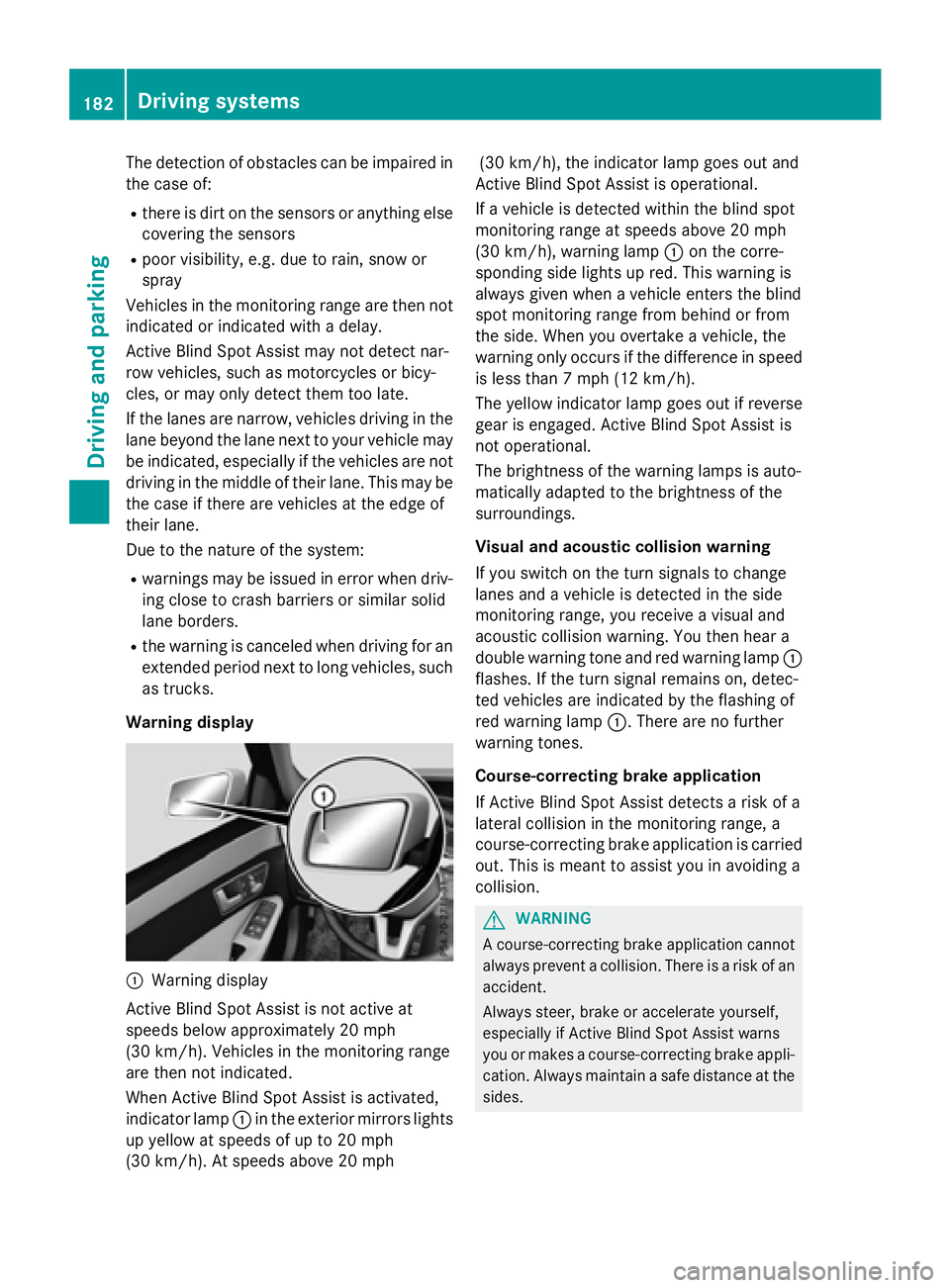
Warning display
:Warning display
Active Blind Spot Assist is not active at
speeds below approximately 20 mph
(30 km/h). Vehicles in the monitoring range
are then not indicated.
When Active Blind Spot Assist is activated,
indicator lamp :in the exterior mirrors lights
up yellow at speeds of up to 20 mph
(30 km/h). At speeds above 20 mph (30 km/h), the indicator lamp goes out and
Active Blind Spot Assist is operational.
If a vehicle is detected within the blind spot
monitoring range at speeds above 20 mph
(30 km/h), warning lamp :on the corre-
sponding side lights up red. This warning is
always given when a vehicle enters the blind
spot monitoring range from behind or from
the side. When you overtake a vehicle, the
warning only occurs if the difference in speed
is less than 7 mph (12 km/h).
The yellow indicator lamp goes out if reverse
gear is engaged. Active Blind Spot Assist is
not operational.
The brightness of the warning lamps is auto-
matically adapted to the brightness of the
surroundings.
Visual and acoustic collision warning
If you switch on the turn signals to change
lanes and a vehicle is detected in the side
monitoring range, you receive a visual and
acoustic collision warning. You then hear a
double warning tone and red warning lamp :
flashes. If the turn signal remains on, detec-
ted vehicles are indicated by the flashing of
red warning lamp :. There are no further
warning tones.
Course-correcting brake application
If Active Blind Spot Assist detects a risk of a
lateral collision in the monitoring range, a
course-correcting brake application is carried
out. This is meant to assist you in avoiding a
collision.
GWARNING
A course-correcting brake application cannot always prevent a collision. There is a risk of an
accident.
Always steer, brake or accelerate yourself,
especially if Active Blind Spot Assist warns
you or makes a course-correcting brake appli-
cation. Always maintain a safe distance at the
sides.
182Driving systems
Driving and parking
Page 185 of 350
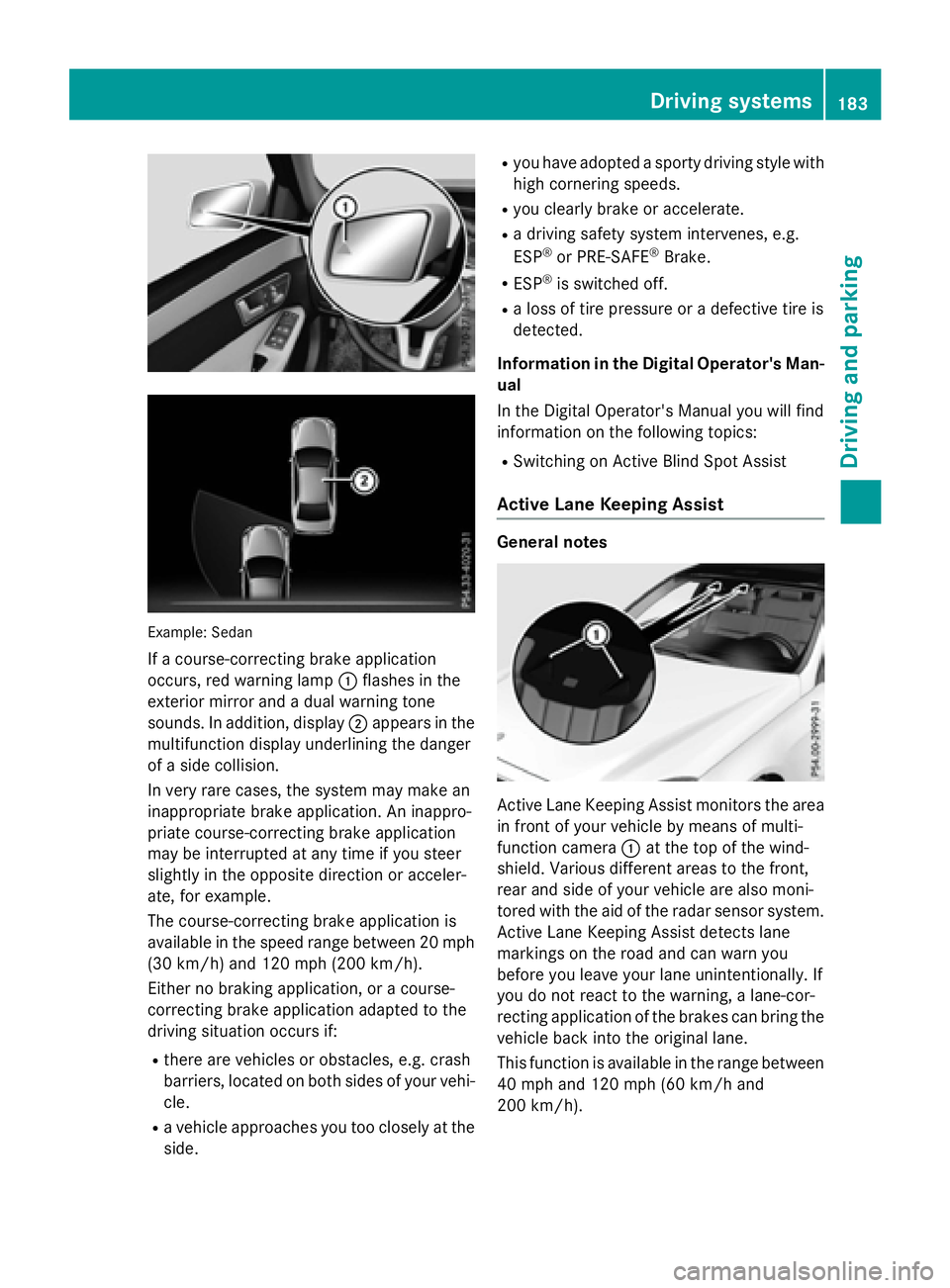
Example: Sedan
If a course-correcting brake application
occurs, red warning lamp:flashes in the
exterior mirror and a dual warning tone
sounds. In addition, display ;appears in the
multifunction display underlining the danger
of a side collision.
In very rare cases, the system may make an
inappropriate brake application. An inappro-
priate course-correcting brake application
may be interrupted at any time if you steer
slightly in the opposite direction or acceler-
ate, for example.
The course-correcting brake application is
available in the speed range between 20 mph (30 km/h) and 120 mph (200 km/h).
Either no braking application, or a course-
correcting brake application adapted to the
driving situation occurs if:
Rthere are vehicles or obstacles, e.g. crash
barriers, located on both sides of your vehi-
cle.
Ra vehicle approaches you too closely at the
side.
Ryou have adopted a sporty driving style with
high cornering speeds.
Ryou clearly brake or accelerate.
Ra driving safety system intervenes, e.g.
ESP®or PRE-SAFE®Brake.
RESP®is switched off.
Ra loss of tire pressure or a defective tire is
detected.
Information in the Digital Operator's Man-
ual
In th
e Digital Operator's Manual you will find
information on the following topics:
RSwitching on Active Blind Spot Assist
Active Lane Keeping Assist
General notes
Active Lane Keeping Assist monitors the area
in front of your vehicle by means of multi-
function camera :at the top of the wind-
shield. Various different areas to the front,
rear and side of your vehicle are also moni-
tored with the aid of the radar sensor system.
Active Lane Keeping Assist detects lane
markings on the road and can warn you
before you leave your lane unintentionally. If
you do not react to the warning, a lane-cor-
recting application of the brakes can bring the
vehicle back into the original lane.
This function is available in the range between
40 mph and 120 mph (60 km/h and
200 km/h).
Driving systems183
Driving an d parking
Z
Page 253 of 350
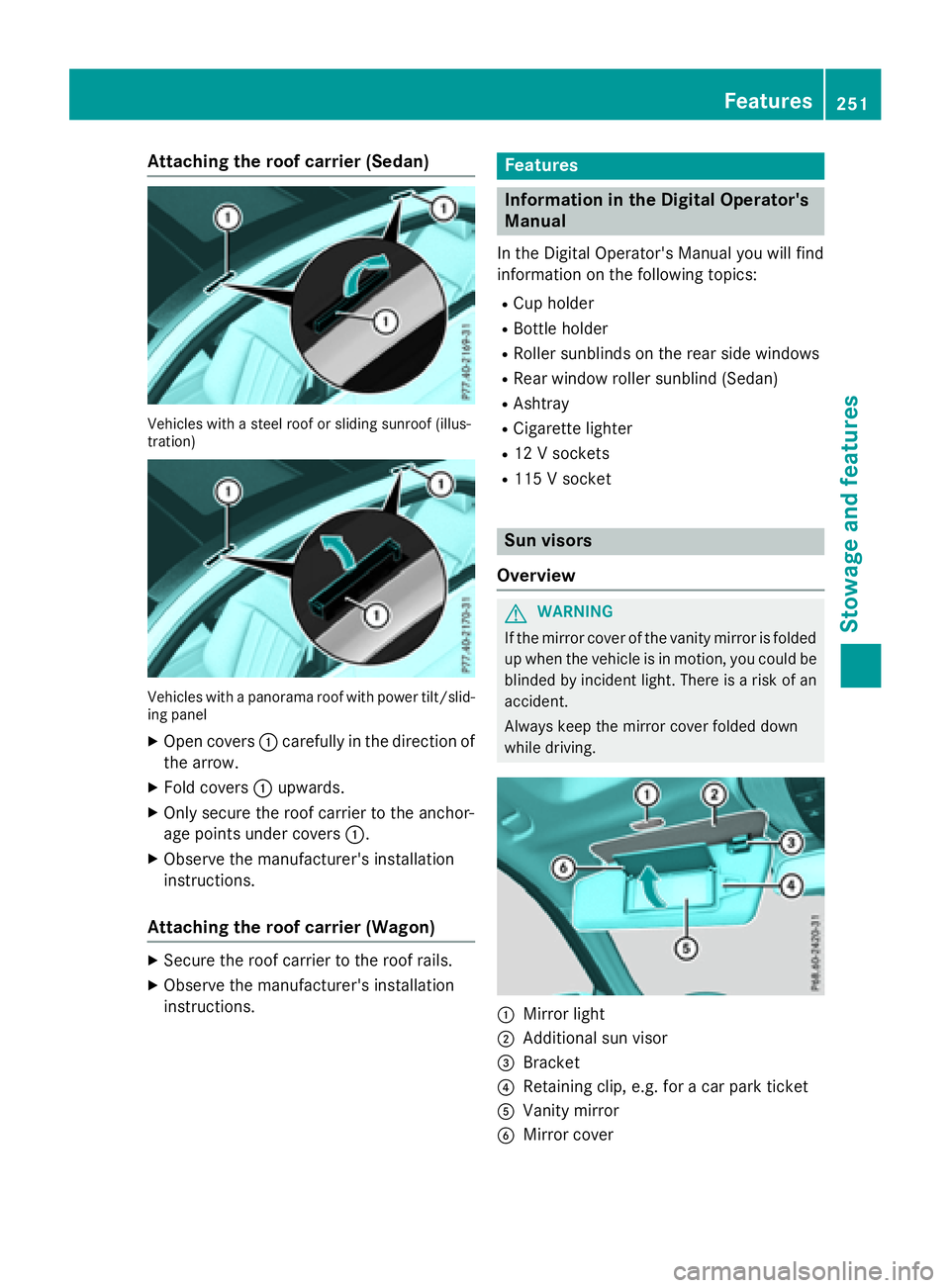
Attaching theroof car rier (Sedan)
Vehicles wit h asteel roo for sliding sunroo f(illus -
tration )
Vehicles wit h apanorama roo fwit hpowe rtilt/slid-
ing panel
XOpen cover s: carefully in th edirection of
th earrow.
XFold cover s: upwards.
XOnly secure th eroo fcarrie rto th eanchor -
age points under cover s:.
XObserv eth emanufacturer' sinstallation
instructions.
Attaching the roof car rier (Wagon)
XSecur eth eroo fcarrie rto th eroo frails .
XObserv eth emanufacturer' sinstallation
instructions.
Features
Infor mation in the Digital Operator's
Manual
In th eDigital Operator' sManual you will fin d
information on th efollowin gtopic s:
RCup holder
RBottle holder
RRoller sunblinds on th erear side windows
RRear window roller sunblin d(Sedan )
RAshtray
RCigarette lighte r
R12V sockets
R115 V socke t
Sun visors
Overview
GWARNIN G
If th emirror cover of th evanit ymirror is folded
up when th evehicl eis in motion ,you could be
blinded by inciden tlight. There is aris kof an
accident.
Always keep th emirror cover folded down
while driving.
:Mirror ligh t
;Additional sunvisor
=Bracket
?Retaining clip, e.g. for acar park ticket
AVanit ymirror
BMirror cover
Features251
Stowage and features
Z
Page 254 of 350
Information in the Digital Operator's
Manual
Inthe Digital Operator's Manual you willfind
information on the following topics:
RVanit y mirror inthe sun visor
RGlare from the side
mbrace
Information in the Digital Operator's
Manual
In the Digital Operator's Manual you willfind
information on the following topics:
RDownloading destinations inCOMAND
RSe arch & Send
RVehicle remote opening
RVehicle remote closing
RStolen vehicle recovery service
RVehicle remote malfunction diagnosis
RDownloading routes
RSp eed alert
RGeo fencing
RTriggering the vehicle alarm
iThe mbrace system isonly availab le inthe
USA.
General notes
The mbrace system is only availablein the
USA.
You must have a license agreement to acti-
vate the mbrace service. Make sure that your system isactivated and operational. To log in,
press the ïMBInfo call button. Ifany of
the steps mentioned are not carried out, the
system may not be activated.
If you have questions about the activation,
contact one of the fol lowing telephone hot-
lin es:
Mercedes-Benz Customer Assistance Center
at 1-800-FOR-M ERCedes (1-800-367-6372)
or 1-866-990-9007 Sh
ort lyafter successfully registering with the
mbrace service, a user IDand password will
be sent to you bymail. You can use th ispass-
word to log onto the mbrace area under "Own-
ers Onlin e" athttp://www.mbusa.com .
The system isavailab leif:
Rit has been activated and isoperational
Rthe corresponding mob ilephone network is
availab lefor transmitting data to the Cus-
tomer Center
Ra servic e subscr iption isavailab le
Rthe starter battery issufficiently charged
Determining the location of the vehicle on a
map isonly possible if:
RGPS reception isavailable.
Rthe vehicle posit ion canbeforwarded to
the Customer Assistance Center.
The mbrace system
To adjust the volume during a call, proceed as
follows:
XPress the WorX button on the mul-
tifunction steering wheel.
or
XUse the COMAND/A udio 20 volume con-
trol.
The system offers various servic es, e.g.:
RAutomaticand manual emergency call
RRoadside Assistance call
RMB Info call
You can find information and a description of
all availab lefeatures under "Owners Online"
at http:/ /www.mbusa.com.
System self-test
After you have switched on the ignit ion, the
system carries out a self-diagnosis.
252Features
Stowage and features
Page 258 of 350
You receive information about operating your
vehicle, about the nearest authorized
Mercedes-Benz Center and about other prod-
ucts and services from Mercedes-Benz.
You can find further information on the
mbrace system under "Owners Online" at
http://www.mbusa.com.
The system has not been able to initiate an
MB Info call, if:
Rthe indicator lamp in MB Info call button
ïis flashing continuously.
Rno voice connection to the Mercedes-Benz
Customer Assistance Center was estab-
lished.
This can occur if the relevant mobile phone
network is not available, for example.
The Call Failed
message appears in the
multifunction display.
XTo end a call: press the~button on the
multifunction steering wheel.
or
XPress the corresponding COMAND/Audio
20 button for ending a phone call.
Call priority
When service calls are active, e.g. Roadside
Assistance or MB Info calls, an emergency
call can still be initiated. In this case, an emer-
gency call will take priority and override all
other active calls.
The indicator lamp of the respective button
flashes until the call is ended.
An emergency call can only be terminated by the Mercedes-Benz Customer Assistance
Center.
All other calls can be ended by pressing:
Rthe ~ button on the multifunction steer-
ing wheel
Rthe corresponding button in COMAND/
Audio 20 to end the voice call
When a call is initiated, the audio system is
muted. The mobile phone is no longer connected to
COMAND/Audio 20.
However, if you want to use your mobile
phone, do so only when the vehicle is station-
ary and in a safe location.
Garage door opener
General notes
The HomeLink®garage door opener integra-
ted in the rear-view mirror allows you to oper-
ate up to three different door and gate sys-
tems.
Use the integrated garage door opener only
on garage doors that:
Rhave safety stop and reverse features and
Rmeet current U.S. federal safety standards
Once programed, the integrated garage door
opener in the rear-view mirror will assume the
function of the garage door system's remote
control. Please also read the operating
instructions for the garage door system.
When programming a garage door opener,
park the vehicle outside the garage. Do not
run the engine while programming.
Certain garage door drives are incompatible
with the integrated garage door opener. If you
have difficulty programing the integrated
garage door opener, contact an authorized
Mercedes-Benz Center.
Alternatively, you can call the following tele-
phone assistance services:
RUSA: Mercedes-Benz Customer Assistance
Center at 1-800-FOR-MERCedes
RCanada: Customer Service at
1-800-387-0100
RHomeLink®hotline 1-800-355-3515 (free
of charge)
More information on HomeLink
®and/or
compatible products is also available online
at http://www.homelink.com.
Notes on the declaration of conformity
(
Ypage 31).
256Features
Stowage and features
Page 259 of 350
USA: FCC ID: CB2HMIHL4
Canada: IC: 279B-HMIHL4
Important safety notes
GWARNING
When you operate or program the garage door
with the integrated garage door opener, per-
sons in the range of movement of the garage
door can become trapped or struck by the
garage door. There is a risk of injury.
When using the integrated garage door
opener, always make sure that nobody is
within the range of movement of the garage
door.
GWARNING
Combustion engines emit poisonous exhaust
gases such as carbon monoxide. Inhaling
these exhaust gases leads to poisoning. There
is a risk of fatal injury. Therefore never leave
the engine running in enclosed spaces with-
out sufficient ventilation.
Programming
Programming buttons
Pay attention to the "Important safety notes"
(
Ypage 257).
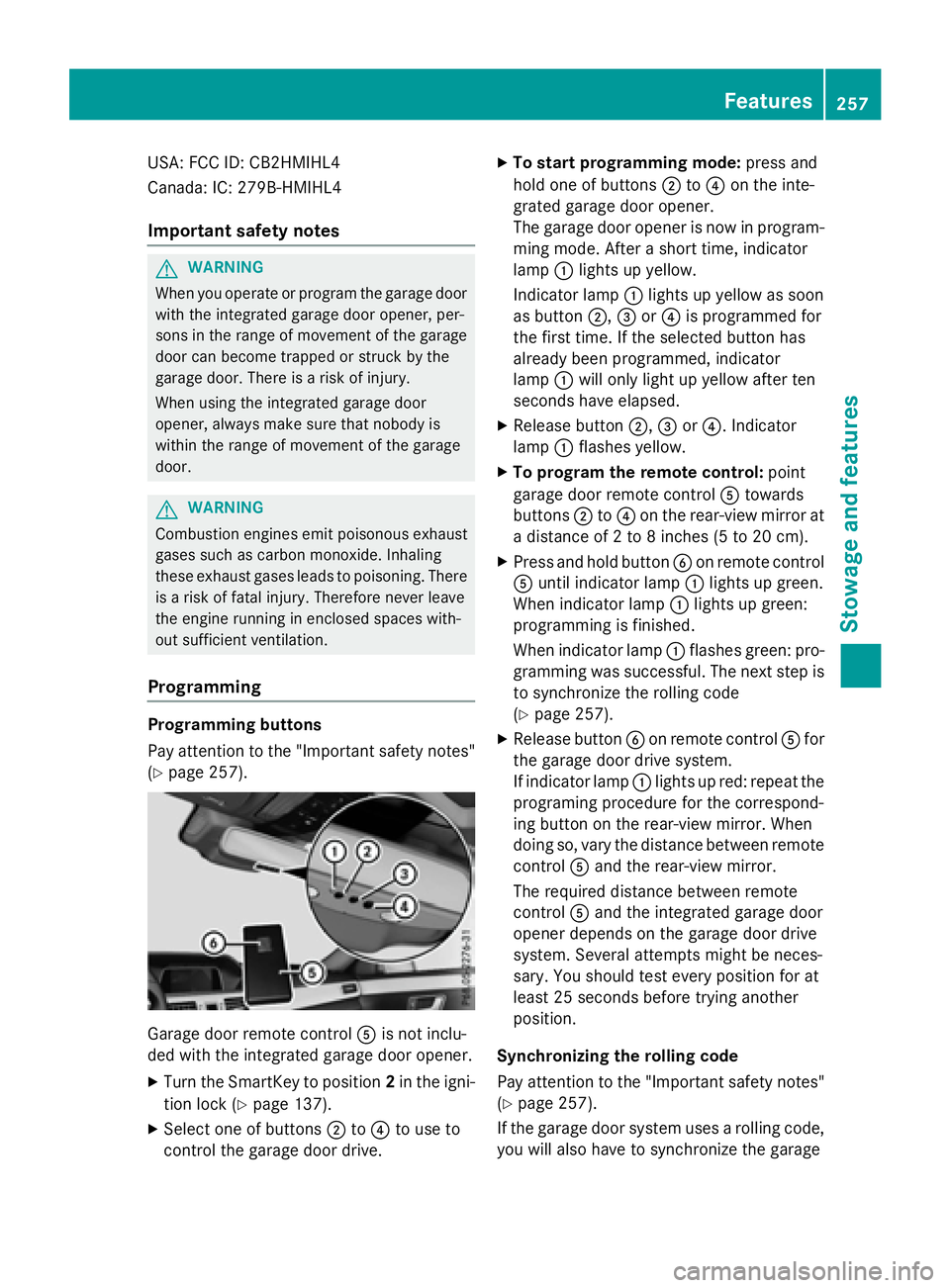
Garage door remote control Ais not inclu-
ded with the integrated garage door opener.
XTurn the SmartKey to position 2in the igni-
tion lock (
Ypage 137).
XSelect one of buttons ;to? to use to
control the garage door drive.
XTo start programming mode: press and
hold one of buttons ;to? on the inte-
grated garage door opener.
The garage door opener is now in program-
ming mode. After a short time, indicator
lamp :lights up yellow.
Indicator lamp :lights up yellow as soon
as button ;,=or? is programmed for
the first time. If the selected button has
already been programmed, indicator
lamp :will only light up yellow after ten
seconds have elapsed.
XRelease button ;,=or?. Indicator
lamp :flashes yellow.
XTo program the remote control: point
garage door remote control Atowards
buttons ;to? on the rear-view mirror at
a distance of 2 to 8 inches (5 to 20 cm).
XPress and hold button Bon remote control
A until indicator lamp :lights up green.
When indicator lamp :lights up green:
programming is finished.
When indicator lamp :flashes green: pro-
gramming was successful. The next step is
to synchronize the rolling code
(
Ypage 257).
XRelease button Bon remote control Afor
the garage door drive system.
If indicator lamp :lights up red: repeat the
programing procedure for the correspond-
ing button on the rear-view mirror. When
doing so, vary the distance between remote
control Aand the rear-view mirror.
The required distance between remote
control Aand the integrated garage door
opener depends on the garage door drive
system. Several attempts might be neces-
sary. You should test every position for at
least 25 seconds before trying another
position.
Synchronizing the rolling code
Pay attention to the "Important safety notes"
(
Ypage 257).
If the garage door system uses a rolling code,
you will also have to synchronize the garage
Features257
Stowage and features
Z
Page 260 of 350
door system with the integrated garage door
opener in the rear-view mirror. To do this you
will need to use the programming button on
the door drive control panel. The program-
ming button may be positioned in different
places depending on the manufacturer. It is
usually located on the door drive unit on the
garage ceiling.
Familiarize yourself with the garage door
drive operating instructions, e.g. under "Pro-
gramming of additional remote controls",
before carrying out the following steps.
Your vehicle must be within reach of the
garage door or gate opener drive. Make sure
that neither your vehicle nor any persons/
objects are present within the sweep of the
door or gate.
XTurn the SmartKey to position2in the igni-
tion lock (
Ypage 137).
XGet out of the vehicle.
XPress the programming button on the door drive unit.
Usually, you now have 30 seconds to ini-
tiate the next step.
XGet into the vehicle.
XPress previously programmed button ;,
= or? on the integrated garage door
opener until the door closes.
The rolling code synchronization is then
complete.
Notes on programming the remote con-
trol
Canadian radio frequency laws require a
"break" (or interruption) of the transmission
signals after broadcasting for a few seconds. Therefore, these signals may not last long
enough for the integrated garage door
opener. The signal is not recognized during
programming. Comparable with Canadian
law, some U.S. garage door openers also fea-
ture a "break". Proceed as follows:
Rif you live in Canada
Rif you have difficulties programming the
garage door opener (regardless of where
you live) when using the programming
steps.
XPress and hold one of buttons
;to? on
the integrated garage door opener.
After a short time, indicator lamp :lights
up yellow.
XRelease the button.
Indicator lamp :flashes yellow.
XPress button Bof garage door remote
control Afor two seconds, then release it
for t
wo seconds.
XPress button Bagain for two seconds.
XRepeat this sequence on button Bof
remote control Auntil indicator lamp :
lights up green.
When indicator lamp :lights up green:
programming is finished.
When indicator lamp :flashes green: pro-
gramming was successful. The next step is
to synchronize the rolling code.
XRelease button Bof remote control Aof
the garage door drive.
If indicator lamp :lights up red: repeat the
programming process for the correspond-
ing button on the rear-view mirror. When
doing so, vary the distance between remote
control Aand the rear-view mirror.
The required distance between remote
control Aand the integrated garage door
opener depends on the garage door drive
system. Several attempts might be neces-
sary. You should test every position for at
least 25 seconds before trying another
position.
258Features
Stowage and features
Page 261 of 350
Problems when programming
If you are experiencing problems programing
the integrated garage door opener on the
rear-view mirror, take note of the following
instructions:
RCheck the transmitter frequency used by
garage door drive remote controlAand
whether it is supported. The transmitter
frequency can usually be found on the back
of the garage door drive remote control.
The integrated garage door opener is com-
patible with devices that have units which
operate in the frequency range of 280 to
433 MHz.
RReplace the batteries in garage door
remote control A. This increases the like-
lihood that garage door remote control A
will transmit a strong and precise signal to
the integrated garage door opener.
RWhen programming, hold remote control
A at varying distances and angles from the
button which you are programming. Try var-
ious angles at a distance between 2and
12 inches (5to 30 cm) or at the same angle
but at varying distances.
RIf another remote control is available for the
same garage door drive, repeat the same
programming steps with this remote con-
trol. Before performing these steps, make
sure that new batteries have been installed
in garage door drive remote control A.
RNote that some remote controls only trans-
mit for a limited amount of time (the indi-
cator lamp on the remote control goes out).
Press buttonBon remote control Aagain
before transmission ends.
RAlign the antenna cable of the garage door
opener unit. This can improve signal recep-
tion/transmission.
Opening/closing the garage door
After it has been programmed, the integrated
garage door opener performs the function of
the garage door system remote control. Please also read the operating instructions
for the garage door system.
XTurn the SmartKey to position
2in the igni-
tion lock (
Ypage 137).
XPress button ;,=or? which you have
programmed to operate the garage door.
Garage door system with a fixed code: indi-
cator lamp :lights up green.
Garage door system with a rolling code:
indicator lamp :flashes green.
The transmitter will transmit a signal as
long as the button is pressed. The trans-
mission is halted after a maximum of ten
seconds and indicator lamp :lights up
yellow.
XPress button ;,=or? again if neces-
sary.
Clearing the memory
Make sure that you clear the memory of the
integrated garage door opener before selling
the vehicle.
XTurn the SmartKey to position 2in the igni-
tion lock (
Ypage 137).
XPress and hold buttons ;and ?.
The indicator lamp initially lights up yellow
and then green.
XRelease buttons ;and ?.
The memory of the integrated garage door
opener in the rear-view mirror is cleared.
Floormats
GWARNING
Objects in the driver's footwell can restrict the pedal travel or obstruct a depressed pedal.
The operating and road safety of the vehicle is
jeopardized. There is a risk of an accident.
Make sure that all objects in the vehicle are
stowed correctly, and that they cannot enter
the driver's footwell. Install the floormats
securely and as specified in order to ensure
sufficient clearance for the pedals. Do not use
Features259
Stowage and features
Z
Page 270 of 350
wiping noises caused by residue on the wind-
shield.
Information in the Digital Operator's
Manual
In the Digital Operator's Manual you will find
information on the following topics:
RWashing by hand
RPower washers
RCleaning the paintwork
RMatte finish care
RCleaning the wheels
RCleaning the windows
RCleaning wiper blades
RCleaning the exterior lighting
RCleaning the mirror turn signals
RCleaning the sensors
RCleaning the rear view camera
RCleaning the 360° camera
RCleaning the exhaust pipes
Interior care
In the Digital Operator's Manual you will find
information on the following topics:
RCleaning the display
RCleaning the plastic trim
RCleaning the steering wheel and gear or
selector lever
RCleaning genuine wood and trim strips
RCleaning the seat covers
RCleaning the seat belts
RCleaning the headliner and carpets
268Care
Maintenance and care
Page 280 of 350
cialist workshop if you wish to leave your
vehicle parked for a long period of time.
iRemove the SmartKey if you park the
vehicle and do not require any electrical
consumers. The vehicle will then use very
little energy, thus conserving battery
power.
iIf the power supply has been interrupted,
e.g. if you reconnect the battery, you will
have to:
Rset the clock. Information on setting the
clock can be found in the Digital Opera-
tor's Manual.
On vehicles with COMAND and a naviga-
tion system, the clock is set automati-
cally.
Rreset the function for folding the exterior mirrors in/out automatically, by folding
the mirrors out once (
Ypage 117).
Charging the battery
GWARNING
During charging and jump-starting, explosive
gases can escape from the battery. There is a risk of an explosion.
Particularly avoid fire, open flames, creating
sparks and smoking. Ensure there is sufficient
ventilation while charging and jump-starting.
Do not lean over a battery.
GWARNING
Battery acid is caustic. There is a risk of injury.
Avoid contact with skin, eyes or clothing. Do
not inhale any battery gases. Do not lean over
the battery. Keep children away from batter-
ies. Wash away battery acid immediately with
plenty of clean water and seek medical atten-
tion.
GWARNING
A discharged battery can freeze at tempera-
tures below freezing point. When jump-start-
ing the vehicle or charging the battery, gases
can escape from the battery. There is a risk of an explosion.
Allow the frozen battery to thaw out before
charging it or jump-starting.
!Only use battery chargers with a maxi-
mum charging voltage of 14.8 V.
!Onlycharge the battery using the jump-
starting connection point.
The jump-starting connection point is in the
engine compartment (
Ypage 279).
XOpen the hood.
XConnect the battery charger to the positive
terminal and ground point in the same
order as when connecting the donor bat-
tery in the jump-starting procedure
(
Ypage 279).
If the indicator/warning lamps do not light up
at low temperatures, it is very likely that the
discharged battery has frozen. In this case,
you may neither charge the battery nor jump-
start the vehicle. The service life of a thawed- out battery may be shorter. The starting char-
acteristics may be impaired, especially at low
temperatures. Have the thawed-out battery
checked at a qualified specialist workshop.
Never charge a battery still installed in the
vehicle unless a battery charger unit
approved by Mercedes-Benz is being used . A
battery charger unit specially adapted for
Mercedes-Benz vehicles and tested and
approved by Mercedes-Benz is available as anaccessory. It permits the charging of the bat-
tery in its installed position. Contact an
authorized Mercedes-Benz Center for further
informa
tion and availability. Read the battery
charger's operating instructions before
charging the battery.
278Battery (vehicle)
Roadside Assistance