phone MERCEDES-BENZ WAGON 2016 User Guide
[x] Cancel search | Manufacturer: MERCEDES-BENZ, Model Year: 2016, Model line: WAGON, Model: MERCEDES-BENZ WAGON 2016Pages: 350, PDF Size: 6.71 MB
Page 90 of 350
XTo stop the alarm using KEYLESS-GO:
grasp the outside door handle. The Smart-
Key must be outside the vehicle.
The alarm is switched off.
or
XPress the Start/Stop button on the dash-
board. The SmartKey must be inside the
vehicle.
The alarm is switched off.
The alarm is not switched off, even if you
close the open door that triggered it, for
example.
iIf the alarm continues for more than
30 seconds, the mbrace emergency call
system automatically notifies the Cus-
tomer Assistance Center. This is done
either by text message or data connection.
The emergency call system sends the mes-
sage or data provided that:
Ryou have subscribed to the mbrace ser-
vice.
Rthe mbrace service has been activated
properly.
Rthe necessary mobile phone network is
available.
88Protection against theft
Safety
Page 92 of 350
Useful information
i
This Operator's Manual describes all
models and all standard and optional equip-
ment of your vehicle available at the time of
publication of the Operator's Manual.
Country-specific differences are possible.
Please note that your vehicle may not be
equipped with all features described. This
also applies to safety-related systems and
functions.
iRead the information on qualified special-
ist workshops (
Ypage 31).
SmartKey
Important safety notes
GWARNING
If children are left unsupervised in the vehicle,
they could:
Ropen the doors, thus endangering other
people or road users.
Rget out and disrupt traffic.
Roperate the vehicle's equipment.
Additionally, children could set the vehicle in
motion if, for example, they:
Rrelease the parking brake.
Rshifting the automatic transmission out of
park position P
RStart the engine.
There is a risk of an accident and injury.
When leaving the vehicle, always take the
SmartKey with you and lock the vehicle. Never
leave children or animals unattended in the
vehicle. Always keep the SmartKey out of
reach of children.
GWARNING
If you attach heavy or large objects to the
SmartKey, the SmartKey could be uninten-
tionally turned in the ignition lock. This could
cause the engine to be switched off. There is a risk of an accident.
Do not attach any heavy or large objects to theSmartKey. Remove any bulky key rings before
inserting the SmartKey into the ignition lock.
!Keep the SmartKey away from strong
magnetic fields. Otherwise, the remote
control function could be affected.
Strong magnetic fields can occur in the
vicinity of powerful electrical installations.
Do not keep the SmartKey:
Rwith electronic devices, e.g. a mobile
phone or another SmartKey.
Rwith metallic objects, e.g. coins or metal
foil.
Rinside metallic objects, e.g. a metal case.
This can affect the functionality of the
SmartKey.
SmartKey functions
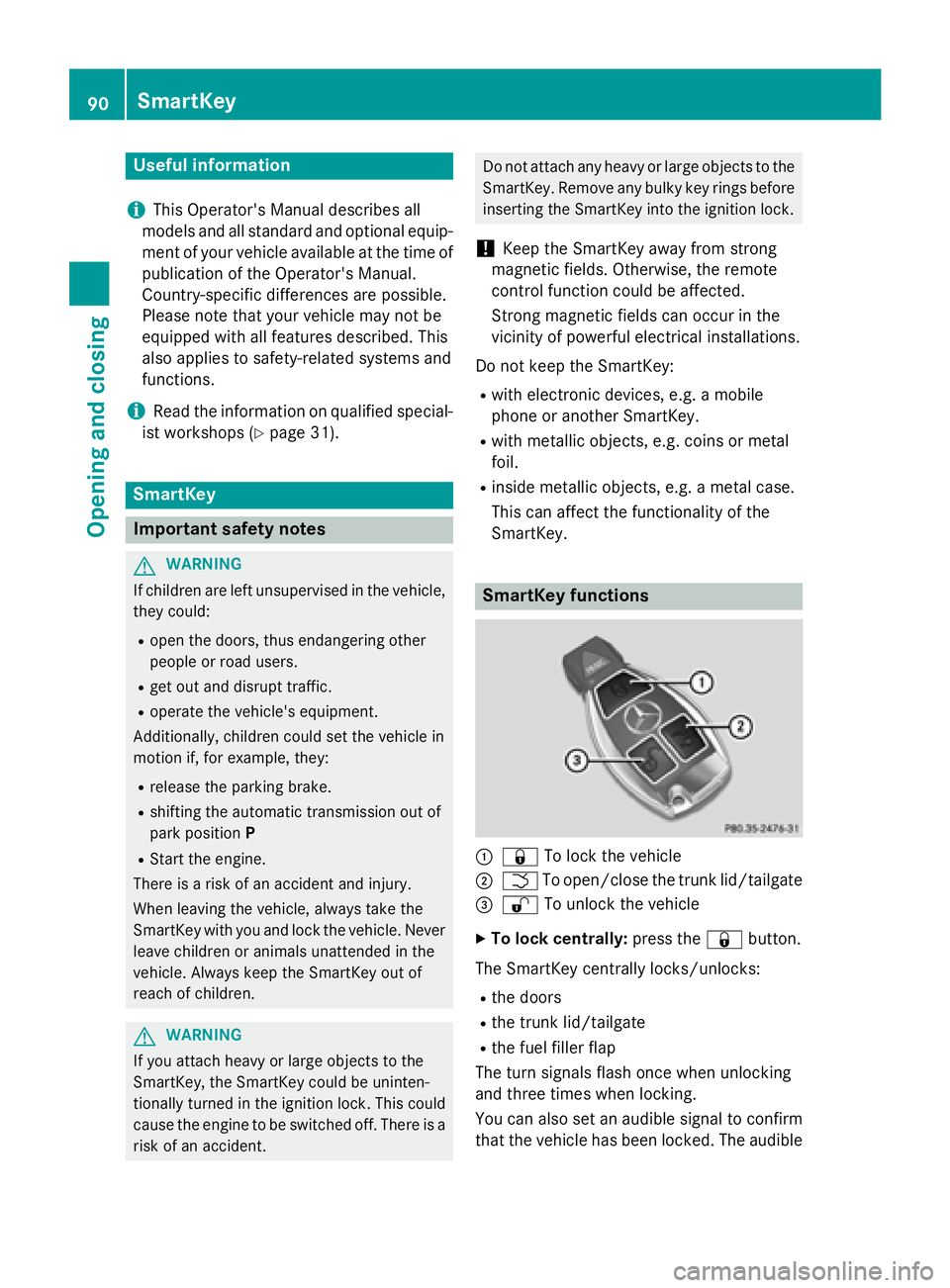
:& To lock the vehicle
;FTo open/close the trunk lid/tailgate
=% To unlock the vehicle
XTo lock centrally: press the&button.
The SmartKey centrally locks/unlocks:
Rthe doors
Rthe trunk lid/tailgate
Rthe fuel filler flap
The turn signals flash once when unlocking
and three times when locking.
You can also set an audible signal to confirm
that the vehicle has been locked. The audible
90SmartKey
Opening and closing
Page 140 of 350

iThe SmartKey can be turned in the igni-
tion lock even if it is not the correct Smart- Key for the vehicle. The ignition is not
switched on. The engine cannot be started.
KEYLESS-GO
General notes
Vehicles with KEYLESS-GO are equipped with
SmartKeys featuring the integrated KEYLESS-GO function and a detachable Start/Stop but-
ton.
The Start/Stop button must be inserted in the
ignition lock and the SmartKey must be in the vehicle.
When you insert the Start/Stop button into
the ignition lock, the system needs approx-
imately two seconds recognition time. You
can then use the Start/Stop button.
Pressing the Start/Stop button several times
in succession corresponds to the different
key positions in the ignition lock. This is only
the case if you are not depressing the brake
pedal.
If you depress the brake pedal and press the
Start/Stop button, the engine starts immedi-
ately.
A check which periodically establishes a radio
connection between the vehicle and the
SmartKey determines whether a valid Smart-
Key is in the vehicle. This occurs, for example,
when starting the engine.
To start the vehicle without actively using the
SmartKey:
Rthe Start/Stop button must be inserted in
the ignition lock.
Rthe SmartKey must be in the vehicle.
Rthe vehicle must not be locked with the
SmartKey or KEYLESS-GO (
Ypage 91).
Do not keep the KEYLESS-GO key:
Rwith electronic devices, e.g. a mobile
phone or another SmartKey.
Rwith metallic objects, e.g. coins or metal
foil.
Rinside metallic objects, e.g. a metal case. This can affect the functionality of KEYLESS-
GO.
If you lock the vehicle with the SmartKey's
remote control or with KEYLESS-GO, after a
short time:
Ryou will not be able to switch on the ignition
with the Start/Stop button.
Ryou will not be able to start the engine with
the Start/Stop button until the vehicle is
unlocked again.
If you lock the vehicle centrally using the but-
ton on the front door (
Ypage 95), you can
continue to start the engine with the Start/
Stop button.
The engine can be switched off while the vehi-
cle is in motion by pressing and holding the
Start/Stop button for three seconds. This
function operat
es independently of the ECO
start/stop automatic engine switch-off func-
tion.
Key positions with KEYLESS-GO
:Start/Stop button
;Ignition lock
As soon as the ignition is switched on, all the
indicator lamps in the instrument cluster light
up. Further information on situations where
an indicator lamp either fails to go out after
starting the engine or lights up while driving
(
Ypage 204).
If Start/Stop button :has not yet been
pressed, this corresponds to the key being
removed from the ignition.
138Driving
Driving and parking
Page 155 of 350
XTo apply:depress parking brake ;firmly.
When the engine is running, the $(USA
only) or J(Canada only) indicator lamp
lights up in the instrument cluster.
XTo release: depress the brake pedal and
keep it depressed.
XPull release handle :.
When the ignition is switched on or the
engine is running, the $(USA only) or
J (Canada only) indicator lamp goes out
in the instrument cluster.
Parking the vehicle for a long period
You can find information about this in the
Digital Operator's Manual.
Driving tips
General notes
Important safety notes
GWARNING
If you switch off the ignition while driving,
safety-relevant functions are only available
with limitations, or not at all. This could affect, for example, the power steering and the brake
boosting effect. You will require considerably
more effort to steer and brake. There is a risk
of an accident.
Do not switch off the ignition while driving.
GWARNING
If you operate mobile communication equip-
ment while driving, you will be distracted from traffic conditions. You could also lose control
of the vehicle. There is a risk of an accident.
Only operate this equipment when the vehicle
is stationary.
Observe the legal requirements for the coun-
try in which you are driving. Some jurisdic-
tions prohibit the driver from using a mobile
phone while driving a vehicle. If you make a call while driving, always use
hands-free mode. Only operate the telephone
when the traffic situation permits. If you are
unsure, pull over to a safe location and stop
before operating the telephone.
Bear in mind that at a speed of only 30 mph
(approximately 50 km/h), the vehicle covers
a distance of 44 ft (approximately 14 m) per
se cond.
Drive sensibly – save fuel
Observe the following tips to save fuel:
XThe tires should always be inflated to the
recommended tire pressure.
XRemove unnecessary loads.
XRemove roof racks when they are not nee-
ded.
XWarm up the engine at low engine speeds.
XAvoid frequent acceleration or braking.
XHave all maintenance work carried out as
indicated by the service intervals in the
Maintenance Booklet or by the service
interval display.
Fuel consumption also increases when driv-
ing in cold weather, in stop-start traffic and in
hilly terrain.
Drinking and driving
GWARNING
Drinking and driving and/or taking drugs and driving are very dangerous combinations.
Even a small amount of alcohol or drugs can
affect your reflexes, perceptions and judg-
ment.
The possibility of a serious or even fatal acci-
dent is greatly increased when you drink or
take drugs and drive.
Do not drink or take drugs and drive or allow
anyone to drive who has been drinking or tak-
ing drugs.
Driving tips153
Driving and parking
Z
Page 191 of 350
Operating the on-board computer
Overview
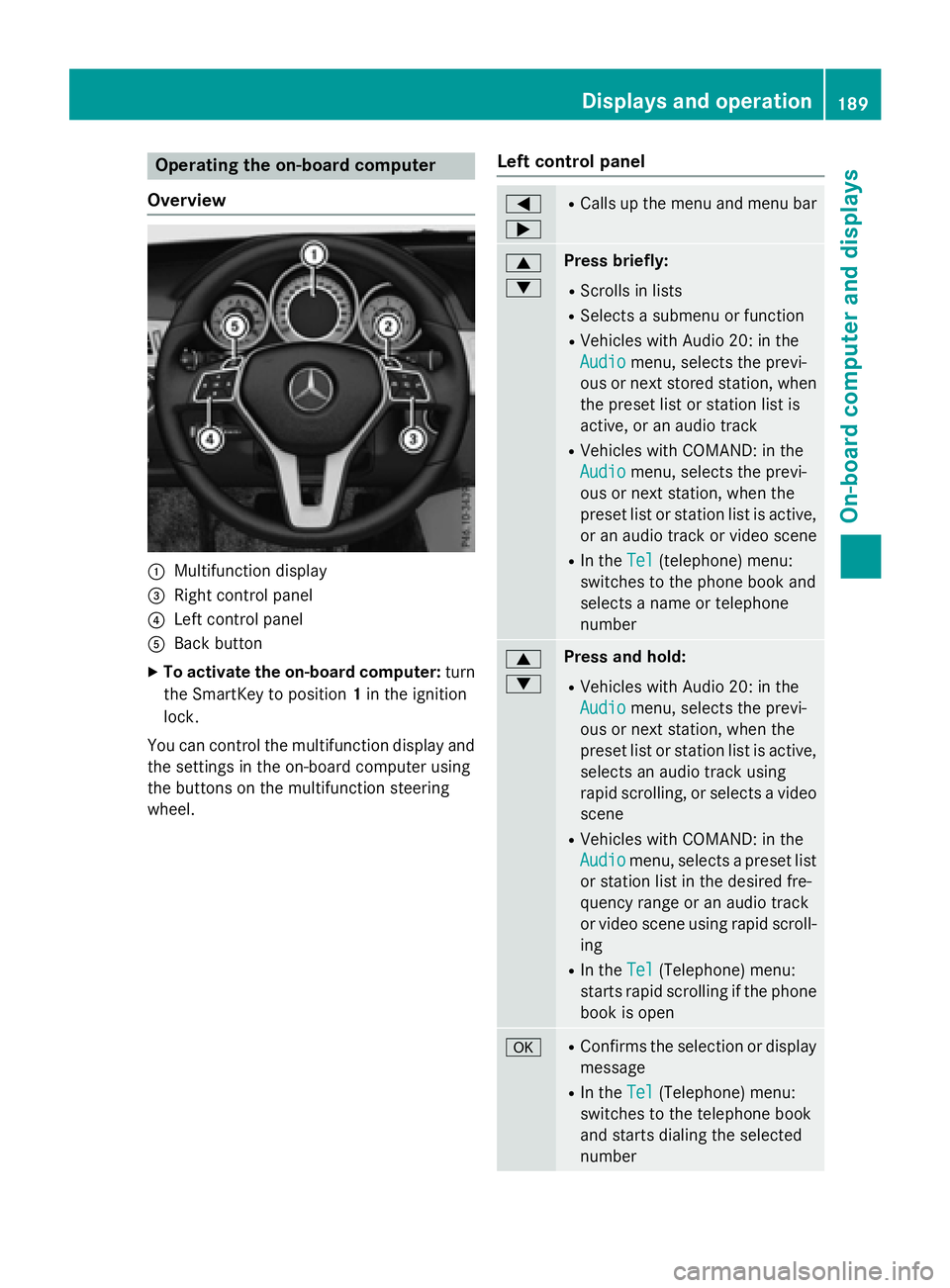
:Multifunction display
=Right control panel
?Left control panel
ABack button
XTo activate the on-board computer: turn
the SmartKey to position 1in the ignition
lock.
You can control the multifunction display and
the settings in the on-board computer using
the buttons on the multifunction steering
wheel.
Left control panel
=
;RCalls up the menu and menu bar
9
:Press briefly:
RScrolls in lists
RSelects a submenu or function
RVehicles with Audio 20: in the
Audio
menu, selects the previ-
ous or next stored station, when
the preset list or station list is
active, or an audio track
RVehicles with COMAND: in the
Audio
menu, selects the previ-
ous or next station, when the
preset list or station list is active,
or an audio track or video scene
RIn the Tel(telephone) menu:
switches to the phone book and
selects a name or telephone
number
9
:Press and hold:
RVehicles with Audio 20: in the
Audio
menu, selects the previ-
ous or next station, when the
preset list or station list is active,
selects an audio track using
rapid scrolling, or selects a video
scene
RVehicles with COMAND: in the
Audio
menu, selects a preset list
or station list in the desired fre-
quency range or an audio track
or video scene using rapid scroll-
ing
RIn the Tel(Telephone) menu:
starts rapid scrolling if the phone
book is open
aRConfirms the selection or display
message
RIn the Tel(Telephone) menu:
switches to the telephone book
and starts dialing the selected
number
Displays and operation189
On-board computer and displays
Z
Page 192 of 350
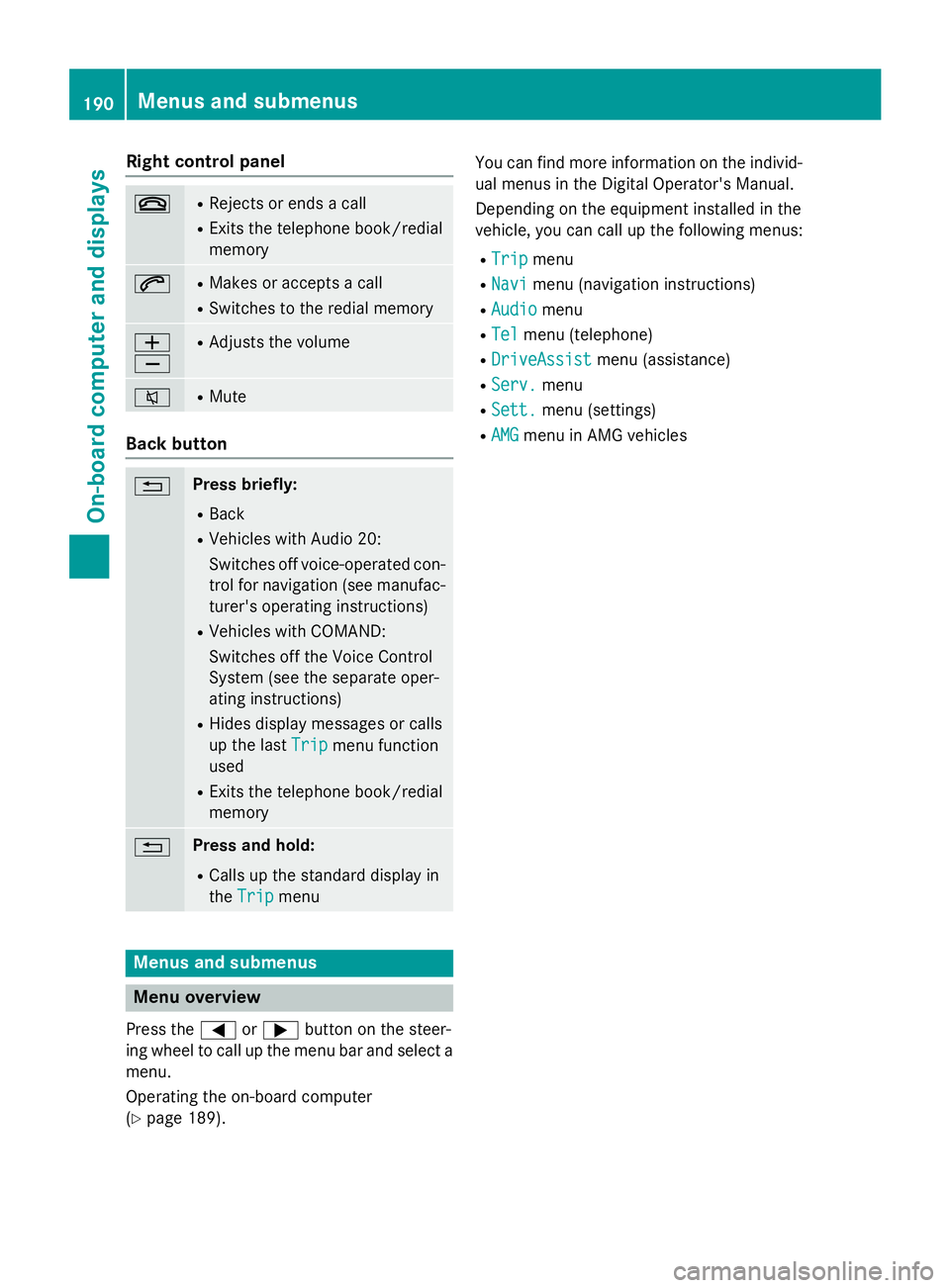
Right control panel
~RRejects or ends a call
RExits the telephone book/redial
memory
6RMakes or accepts a call
RSwitches to the redial memory
W
XRAdjusts the volume
8RMute
Back button
%Press briefly:
RBack
RVehicles with Audio 20:
Switches off voice-operated con-
trol for navigation (see manufac-
turer's operating instructions)
RVehicles with COMAND:
Switches off the Voice Control
System (see the separate oper-
ating instructions)
RHides display messages or calls
up the lastTrip
menu function
used
RExits the telephone book/redial
memory
%Press and hold:
RCalls up the standard display in
the Trip
menu
Menus and submenus
Menu overview
Press the =or; button on the steer-
ing wheel to call up the menu bar and select a
menu.
Operating the on-board computer
(
Ypage 189). You can find more information on the individ-
ual menus in the Digital Operator's Manual.
Depending on the equipment installed in the
vehicle, you can call up the following menus:
RTripmenu
RNavimenu (navigation instructions)
RAudiomenu
RTelmenu (telephone)
RDriveAssistmenu (assistance)
RServ.menu
RSett.menu (settings)
RAMGmenu in AMG vehicles
190Menus and submenus
On-board computer and displays
Page 219 of 350
You can select from the following sound
systems:
-harman/kardon®Logic7®surround
sound system
-Bang & Olufsen BeoSound AMG sound
system (COMAND)
RNavigation system
-Navigation via the hard drive (COMAND)
-Navigation via an SD card (if available for Audio 20)
-Destination entry, e.g. using keyword
search (COMAND)
-Realistic 3D map with textured city mod-
els
-Personal POIs and routes using SD mem-
ory card (COMAND)
-Navigation functions, e.g. compass dis-
play (COMAND)
-Dynamic route guidance with traffic
reports via SIRIUS satellite radio
(COMAND)
RCommunication
-Messaging functions: text messages, e-
mail (COMAND)
-Address book (COMAND)
-Internet browser (COMAND)
-Mercedes-Benz Apps with Google™,
Local Search, Destination/Route down-
load, Facebook, Google Street View™,
stock prices, news and much more
-Mercedes-Benz mobile website
-WiFi interface for the connection of a
smartphone to COMAND
-WiFi hotspot functionality to connect a
tablet PC or notebook in order to enable
access to the Internet using the custom-
er's mobile phone (COMAND)
RSIRIUS Weather (COMAND)
-Weather data as an information chart
(current forecast, 5-day preview,
detailed information)
-Weather data on the weather map, e.g.
rain radar data, storm characteristics and the track of tropical cyclones (hurri-
canes, tornadoes)
RVehicle functions
-Vehicle settings, e.g. fuel consumption
-360° camera
-Rear view camera
-Seat functions
RFavorites button (if available)
Fast access to favorites functions using the
favorites button on the controller
Display
General notes
!Do not use the space in front of the dis-
play for storage. Objects placed here could damage the display or impair its function.
Avoid any direct contact with the display
surface. Pressure on the display surface
may result in impairments to the display,
which could be irreversible.
Wearing polarized sunglasses may impair
your ability to read the display.
The display has an automatic temperature-
controlled switch-off feature. The brightness
is automatically reduced if the temperature is
too high. The display may then temporarily
switch off completely.
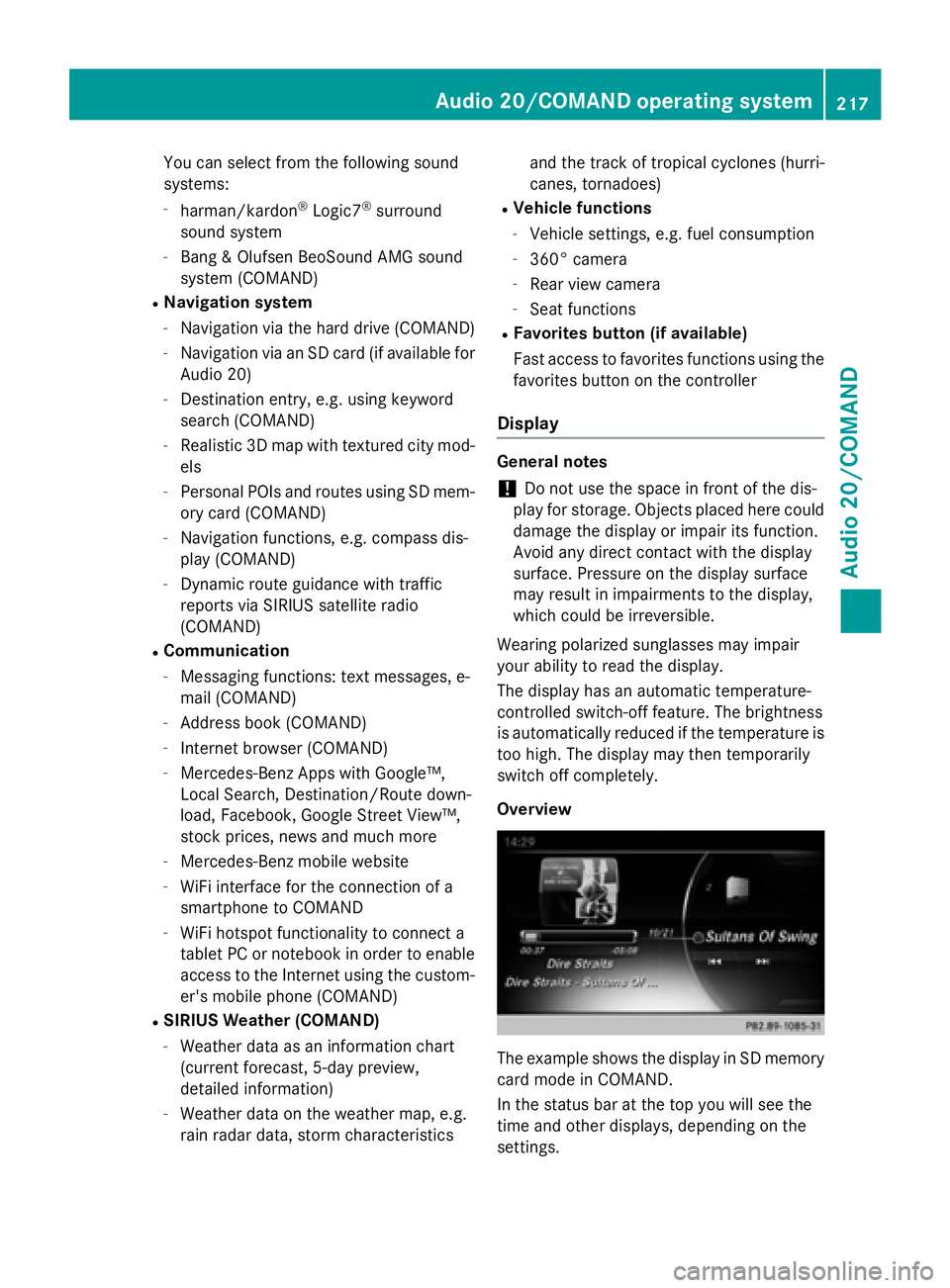
Overview
The example shows the display in SD memory
card mode in COMAND.
In the status bar at the top you will see the
time and other displays, depending on the
settings.
Audio 20/COMAND operating system217
Audio 20/COMAND
Z
Page 221 of 350
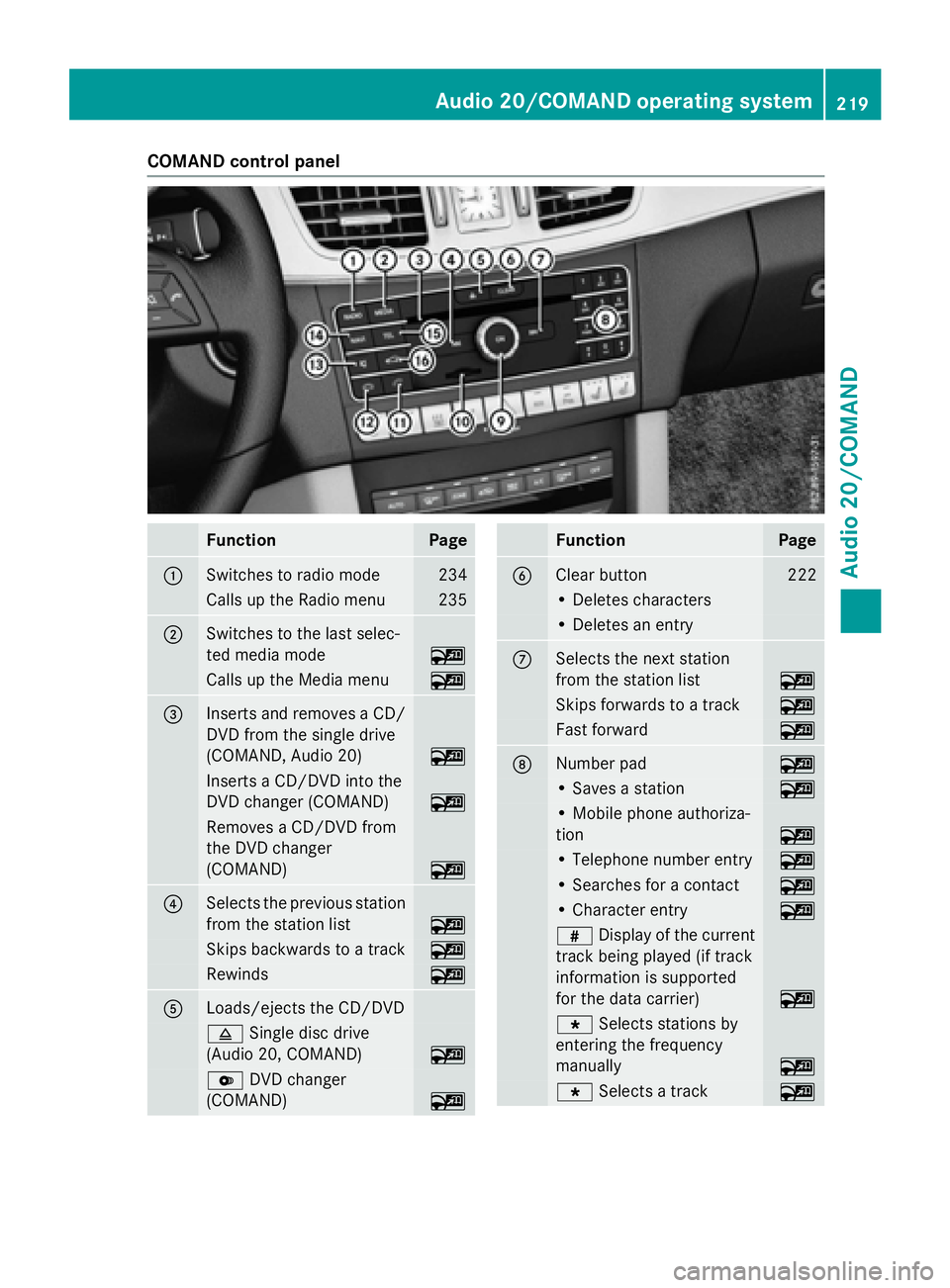
COMAND control panel
FunctionPage
:Switches to radio mode234
Calls up the Radio menu235
;Switches to the last selec-
ted media mode
~
Calls up the Media menu~
=Inserts and removes a CD/
DVD from the single drive
(COMAND, Audio 20)
~
Inserts a CD/DVD into the
DVD changer (COMAND)
~
Removes a CD/DVD from
the DVD changer
(COMAND)
~
?Selects the previous station
from the station list
~
Skips backwards to a track~
Rewinds~
ALoads/ejects the CD/DVD
8Single disc drive
(Audio 20, COMAND)
~
V DVD changer
(COMAND)
~
FunctionPage
BClear button222
• Deletes characters
• Deletes an entry
CSelects the next station
from the station list
~
Skips forwards to a track~
Fast forward~
DNumber pad~
• Saves a station~
• Mobile phone authoriza-
tion
~
• Telephone number entry~
• Searches for a contact~
• Character entry~
z Display of the current
track being played (if track
information is supported
for the data carrier)
~
g Selects stations by
entering the frequency
manually
~
g Selects a track~
Audio 20/COMAND operating system219
Audio 20/COMAND
Z
Page 222 of 350
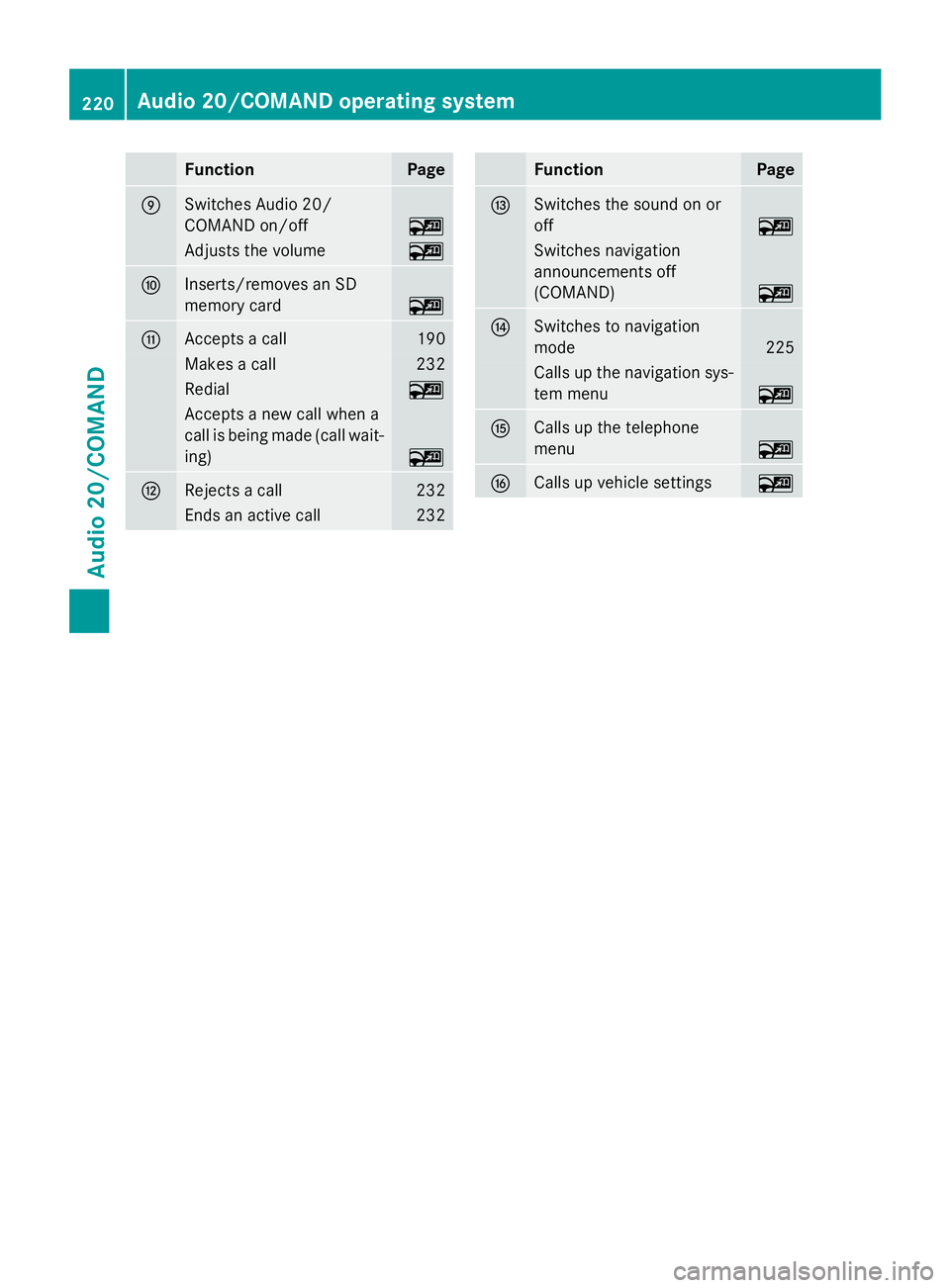
FunctionPage
ESwitches Audio 20/
COMAND on/off
~
Adjusts the volume~
FInserts/removes an SD
memory card
~
GAccepts a call190
Makes a call232
Redial~
Accepts a new call when a
call is being made (call wait-
ing)
~
HRejects a call232
Ends an active call232
FunctionPage
ISwitches the sound on or
off
~
Switches navigation
announcements off
(COMAND)
~
JSwitches to navigation
mode
225
Calls up the navigation sys-
tem menu
~
KCalls up the telephone
menu
~
LCalls up vehicle settings~
220Audio 20/COMAND operating system
Audio 20/COMAND
Page 224 of 350
FunctionPage
ISwitches the sound on or
off
~
Switches off navigation
announcements
~
JCalls up the sound menu~
Switches to navigation
mode
~
FunctionPage
KCalls up the telephone
menu
~
LCalls up vehicle settings~
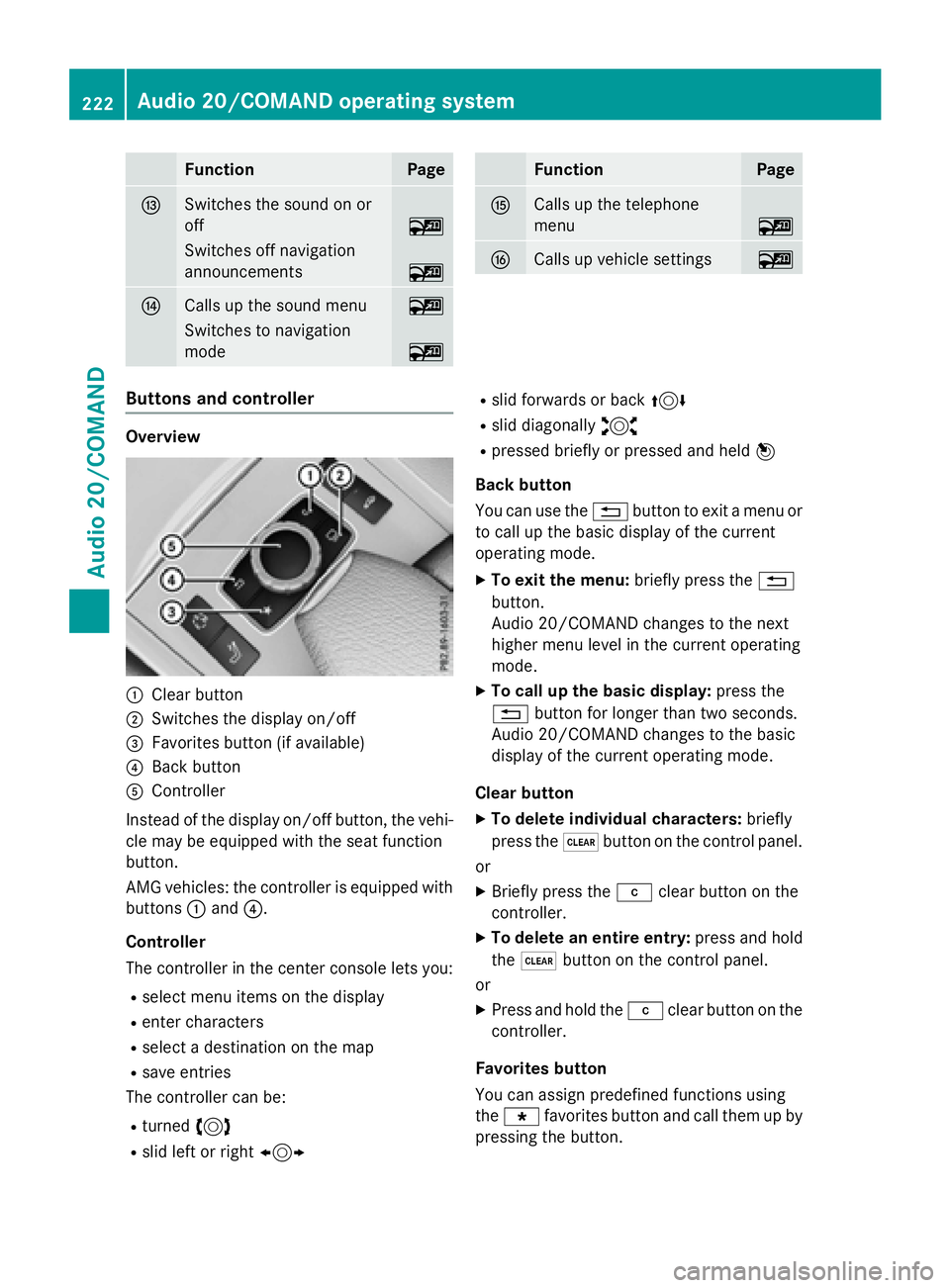
Buttons and controller
Overview
:Clear button
;Switches the display on/off
=Favorites button (if available)
?Back button
AController
Instead of the display on/off button, the vehi-
cle may be equipped with the seat function
button.
AMG vehicles: the controller is equipped with
buttons :and ?.
Controller
The controller in the center console lets you:
Rselect menu items on the display
Renter characters
Rselect a destination on the map
Rsave entries
The controller can be:
Rturned 3
Rslid left or right 1
Rslid forwards or back 4
Rslid diagonally2
Rpressed briefly or pressed and held 7
Back button
You can use the %button to exit a menu or
to call up the basic display of the current
operating mode.
XTo exit the menu: briefly press the%
button.
Audio 20/COMAND changes to the next
higher menu level in the current operating
mode.
XTo call up the basic display: press the
% button for longer than two seconds.
Audio 20/COMAND changes to the basic
display of the current operating mode.
Clear button
XTo delete individual characters: briefly
press the $button on the control panel.
or
XBriefly press the jclear button on the
controller.
XTo delete an entire entry: press and hold
the $ button on the control panel.
or
XPress and hold the jclear button on the
controller.
Favorites button
You can assign predefined functions using
the g favorites button and call them up by
pressing the button.
222Audio 20/COMAND operating system
Audio 20/COMAND