tow MERCEDES-BENZ WAGON 2016 Owner's Manual
[x] Cancel search | Manufacturer: MERCEDES-BENZ, Model Year: 2016, Model line: WAGON, Model: MERCEDES-BENZ WAGON 2016Pages: 350, PDF Size: 6.71 MB
Page 161 of 350
Activating
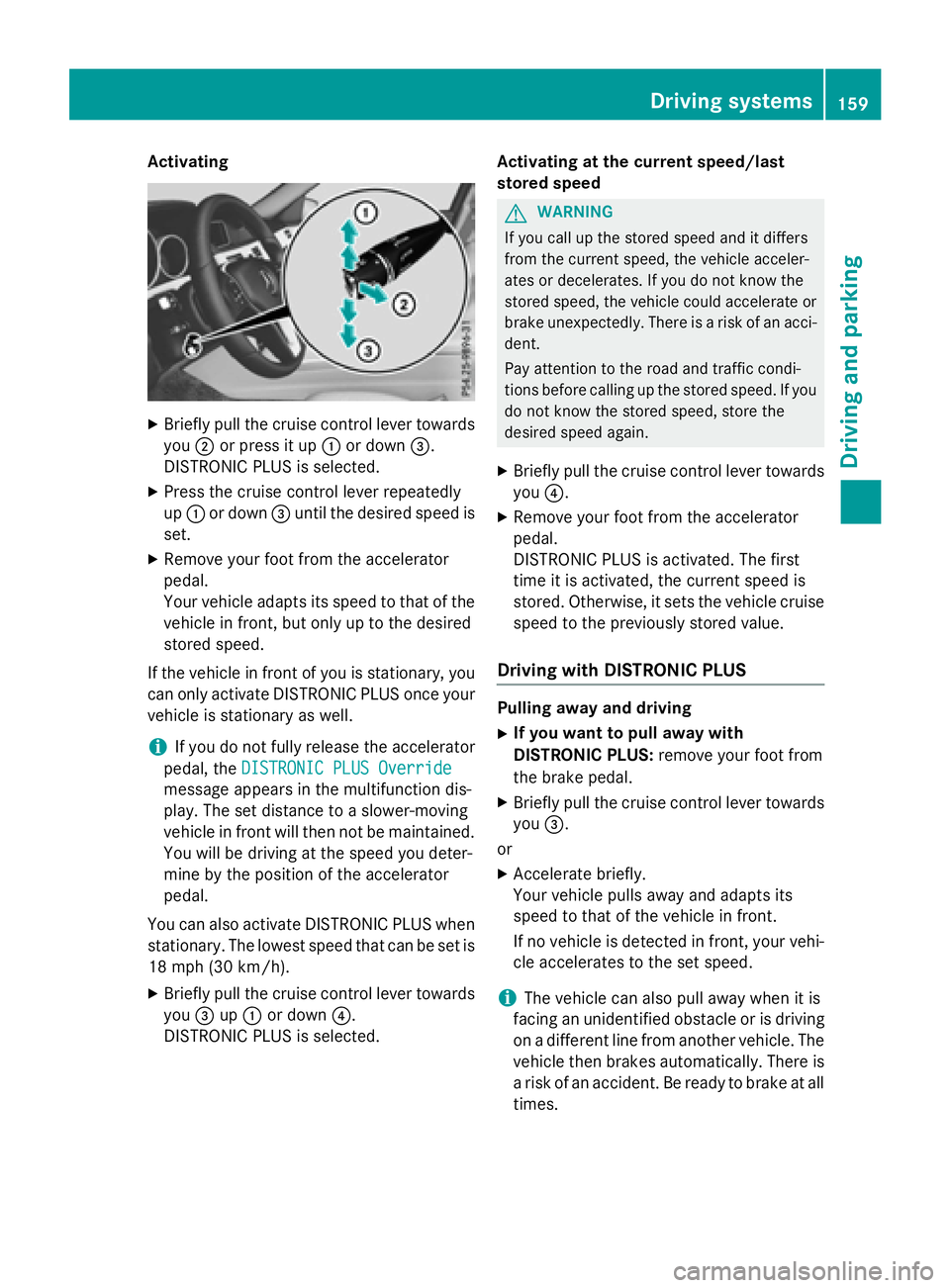
XBrieflypullthe cruise control lever towards
you ;or press itup : ordown =.
DI ST RONIC PLUS is selected.
XPress the cruise control lever repeatedly
up : ordown =until the desired speed is
set.
XRemove your foot from the accelerator
pedal.
Your veh icleadapts its speed to that of the
veh icle in front, but only up to the desired
stored speed.
If the veh iclein front of you is stationary, you
can only activate DI STRONIC PLUS once your
veh icle is stationary as well.
iIfyou donot fully release the accelerator
pedal, theDISTRONIC PLUS Override
message appears inthe multifunction dis-
play. The set distance to a slower-moving
veh icle in front will then not bemaintained.
You will be driving at the speed you deter-
mine bythe position of the accelerator
pedal.
You can also activate DI STRONIC PLUS when
stationary. The lowest speed that can be set is 18 mph (30 km/h).
XBriefly pullthe cruise control lever towards
you =up: ordown ?.
DI ST RONIC PLUS isselected. Activating at
the current speed/last
store d speed
GWARNIN G
If you call up th estore dspee dand it differs
from th ecurren tspeed, th evehicl eacceler -
ate sor decelerates. If you do no tknow th e
store dspeed, th evehicl ecould accelerate or
brak eune xpectedly. Ther eis aris kof an acci-
dent.
Pay attentio nto th eroad and traffic condi-
tions before calling up th estore dspeed. If you
do no tknow th estore dspeed, store th e
desired spee dagain .
XBriefly pull the cruise control lever towards
you ?.
XRemo veyour foot from the accelerator
pedal.
DI ST RONIC PLUS isact ivat ed. The first
time it isactivated, the current speed is
stored. Otherwise, itsets the vehicle cruise
speed to the pre viously stored value.
Driving with DISTRONIC PLUS
Pulling away and driving
XIfyou want topull away with
DISTRO NIC PLUS: remove your foot from
the brake pedal.
XBrieflypullthe cruise control lever towards
you =.
or
XAccelerate briefly.
Your veh iclepulls away and adapts its
speed to that of the vehicle infront.
If no vehicle isdetected infront, your veh i-
cle accelerates to the set speed.
iThe vehicle can also pullaway when it is
facing an unidentified obstacle or isdriving
on a different line from another veh icle. The
vehicle then brakes automatically. There is
a risk of an accident. Be ready to brake at all
times.
Driving systems159
Driving and parking
Z
Page 163 of 350
When DISTRONIC PLUS is activated, the
transmission is shifted automatically to posi-
tionPif:
Rthe driver's door is open and the driver's
seat belt is unfastened.
Rthe engine is switched off, unless it is auto-
matically switched off by the ECO start/
stop function.
Ra system malfunction occurs.
Rthe power supply is not sufficient.
Information in the Digital Operator's
Manual
In the Digital Operator's Manual you will find
information on the following topics:
RSetting a speed
RSetting the specified minimum distance
RDISTRONIC PLUS displays in the instru-
ment cluster
Deactivating DISTRONIC PLUS
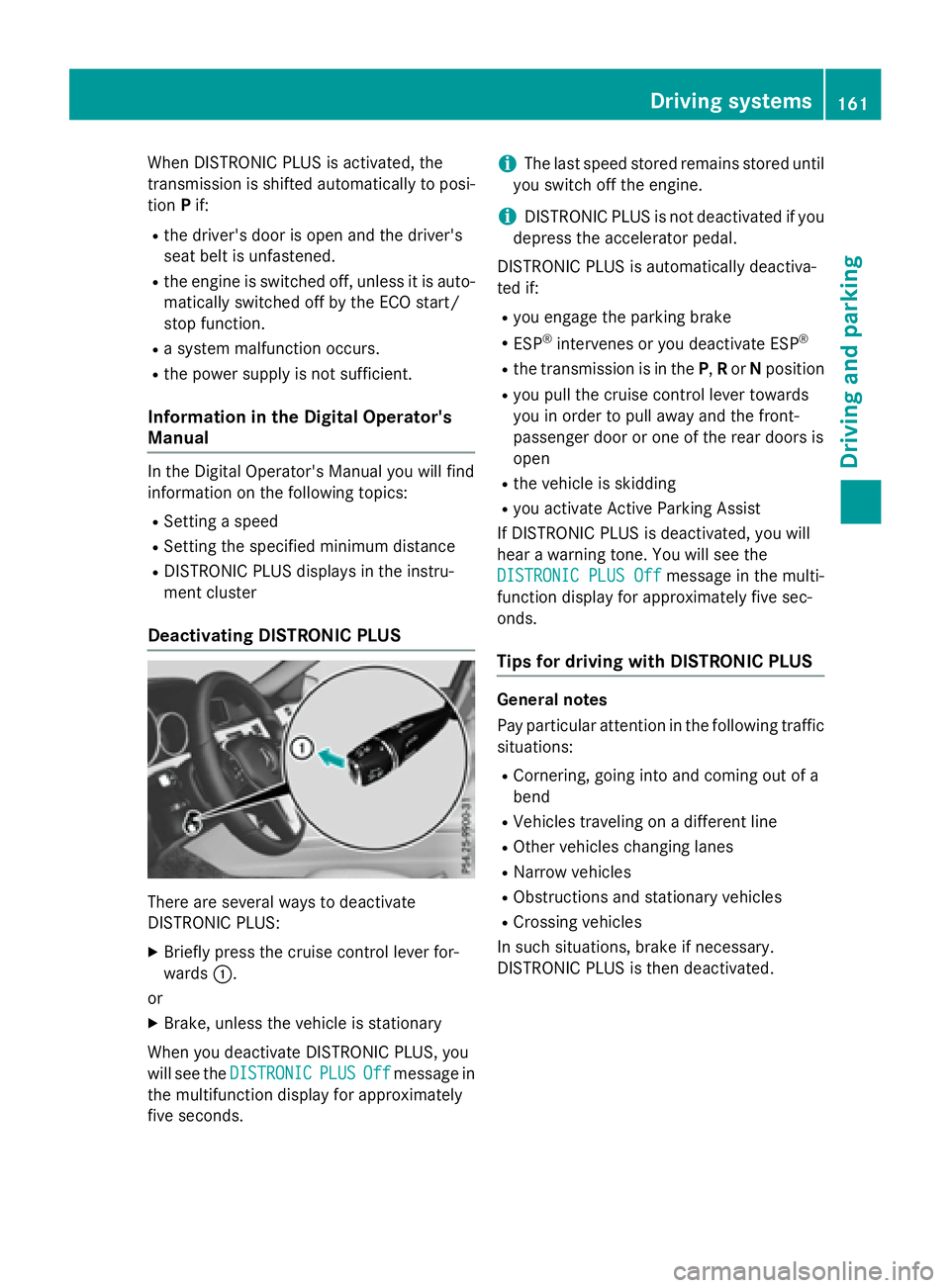
There are several ways to deactivate
DISTRONIC PLUS:
XBriefly press the cruise control lever for-
wards :.
or
XBrake, unless the vehicle is stationary
When you deactivate DISTRONIC PLUS, you
will see the DISTRONIC
PLUSOffmessage in
the multifunction display for approximately
five seconds.
iThe last speed stored remains stored until
you switch off the engine.
iDISTRONIC PLUS is not deactivated if you
depress the accelerator pedal.
DISTRONIC PLUS is automatically deactiva-
ted if:
Ryou engage the parking brake
RESP®intervenes or you deactivate ESP®
Rthe transmission is in the P,Ror Nposition
Ryou pull the cruise control lever towards
you in order to pull away and the front-
passenger door or one of the rear doors is
open
Rthe vehicle is skidding
Ryou activate Active Parking Assist
If DISTRONIC PLUS is deactivated, you will
hear a warning tone. You will see the
DISTRONIC PLUS Off
message in the multi-
function display for approximately five sec-
onds.
Tips for driving with DISTRONIC PLUS
General notes
Pay particular attention in the following traffic
situations:
RCornering, going into and coming out of a
bend
RVehicles traveling on a different line
ROther vehicles changing lanes
RNarrow vehicles
RObstructions and stationary vehicles
RCrossing vehicles
In such situations, brake if necessary.
DISTRONIC PLUS is then deactivated.
Driving systems161
Driving and parking
Z
Page 165 of 350
Crossing vehicles
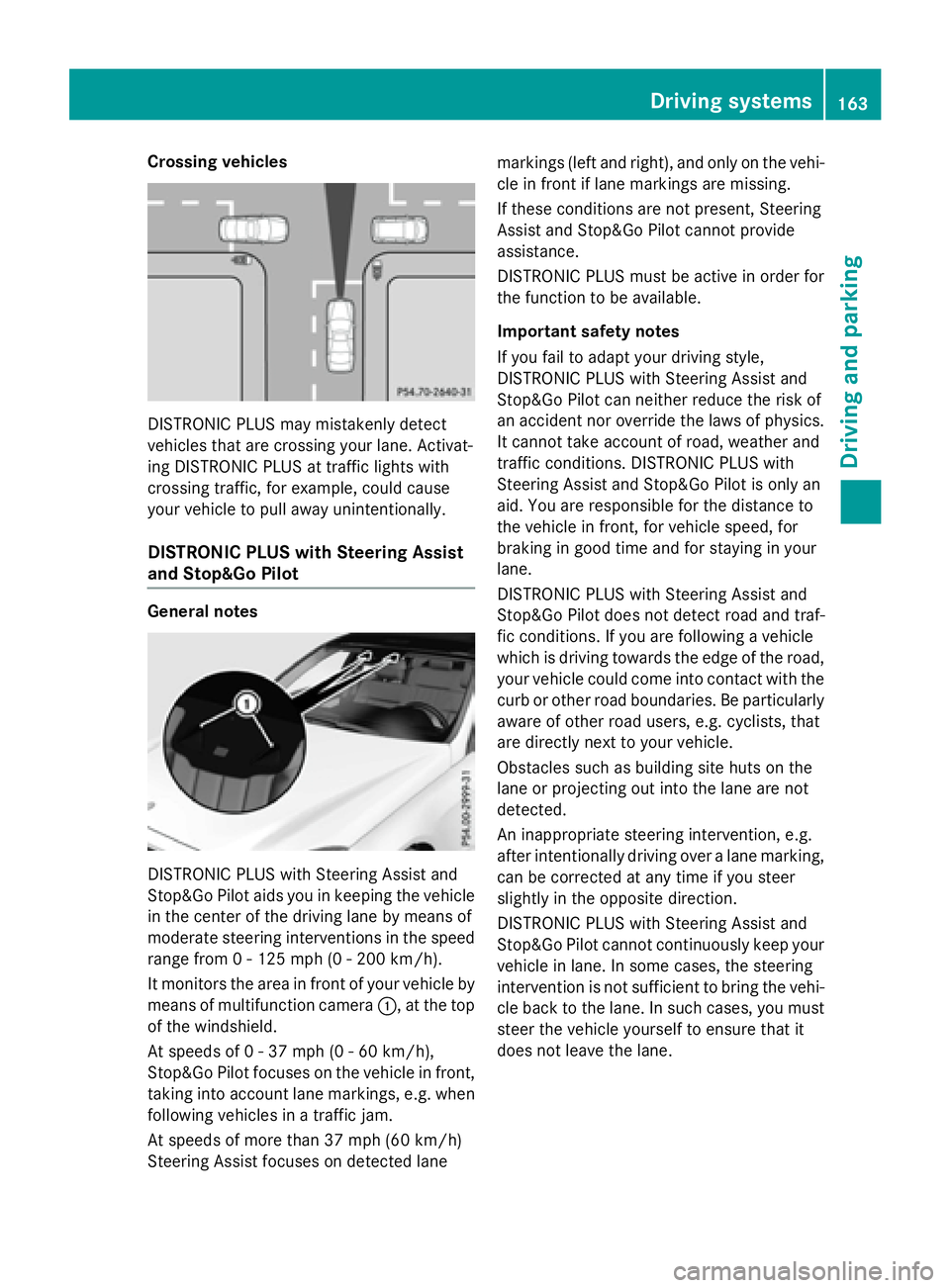
DISTRONIC PLUS may mistakenly detect
vehicles that are crossing your lane. Activat-
ing DISTRONIC PLUS at traffic lights with
crossing traffic, for example, could cause
your vehicle to pull away unintentionally.
DISTRONIC PLUS with Steering Assist
and Stop&Go Pilot
General notes
DISTRONIC PLUS with Steering Assist and
Stop&Go Pilot aids you in keeping the vehicle
in the center of the driving lane by means of
moderate steering interventions in the speed
range from 0 - 125 mph(0-20 0km/ h).
It monitors the area in front of your vehicle by
means of multifunction camera :, at the top
of the windshield.
At speeds of 0 - 37 mph (0 - 60 km/h),
Stop&Go Pilot focuses on the vehicle in front,
taking into account lane markings, e.g. when
following vehicles in a traffic jam.
At speeds of more than 37 mph (60 km/h)
Steering Assist focuses on detected lane markings (left and right), and only on the vehi-
cle in front if lane markings are missing.
If these conditions are not present, Steering
Assist and Stop&Go Pilot cannot provide
assistance.
DISTRONIC PLUS must be active in order for
the function to be available.
Important safety notes
If you fail to adapt your driving style,
DISTRONIC PLUS with Steering Assist and
Stop&Go Pilot can neither reduce the risk of
an accident nor override the laws of physics.
It cannot take account of road, weather and
traffic conditions. DISTRONIC PLUS with
Steering Assist and Stop&Go Pilot is only an
aid. You are responsible for the distance to
the vehicle in front, for vehicle speed, for
braking in good time and for staying in your
lane.
DISTRONIC PLUS with Steering Assist and
Stop&Go Pilot does not detect road and traf-
fic conditions. If you are following a vehicle
which is driving towards the edge of the road,
your vehicle could come into contact with the
curb or other road boundaries. Be particularly
aware of other road users, e.g. cyclists, that
are directly next to your vehicle.
Obstacles such as building site huts on the
lane or projecting out into the lane are not
detected.
An inappropriate steering intervention, e.g.
after intentionally driving over a lane marking,
can be corrected at any time if you steer
slightly in the opposite direction.
DISTR
ONIC PLUS with Steering Assist and
Stop&Go Pilot cannot continuously keep your
vehicle in lane. In some cases, the steering
intervention is not sufficient to bring the vehi-
cle back to the lane. In such cases, you must
steer the vehicle yourself to ensure that it
does not leave the lane.
Driving systems163
Driving and parking
Z
Page 167 of 350
play. Steering Assist and Stop&Go Pilot are
deactivated.
When DISTRONIC PLUS is deactivated or not
available, Steering Assist and Stop&Go Pilot
are deactivated automatically.
HOLD function
General notes
The HOLD function can assist the driver in the
following situations:
Rwhen pulling away, especially on steep
slopes
Rwhen maneuvering on steep slopes
Rwhen waiting in traffic
The vehicle is kept stationary without the
driver having to depress the brake pedal.
The braking effect is canceled and the HOLD
function deactivated when you depress the
accelerator pedal to pull away.
Important safety notes
GWARNING
When leaving the vehicle, it can still roll away despite being braked by the HOLD function if:
Rthere is a malfunction in the system or in
the voltage supply.
Rthe HOLD function has been deactivated by
pressing the accelerator pedal or the brake
pedal, e.g. by a vehicle occupant.
Rthe electrical system in the engine com-
partment, the battery or the fuses have
been tampered with.
Rthe battery is disconnected
There is a risk of an accident.
If you wish to exit the vehicle, always turn off the HOLD function and secure the vehicle
against rolling away.
!If DISTRONIC PLUS or the HOLD function
is activated, the vehicle brakes automati-
cally in certain situations. To prevent damage to the vehicle, deacti-
vate DISTRONIC PLUS and the HOLD func-
tion in the following or other similar situa-
tions:
Rwhen towing the vehicle
Rin the car wash
Activation conditions
You can activate the HOLD function if:
Rthe vehicle is stationary
Rthe engine is running or if it has been auto-
matically switched off by the ECO start/
stop function
Rthe driver's door is closed or your seat beltis fastened
Rthe parking brake is released
Rthe transmission is in position D,Ror N
RDISTRONIC PLUS is deactivated
Activating the HOLD function
XMake sure that the activation conditions
are met.
XDepress the brake pedal.
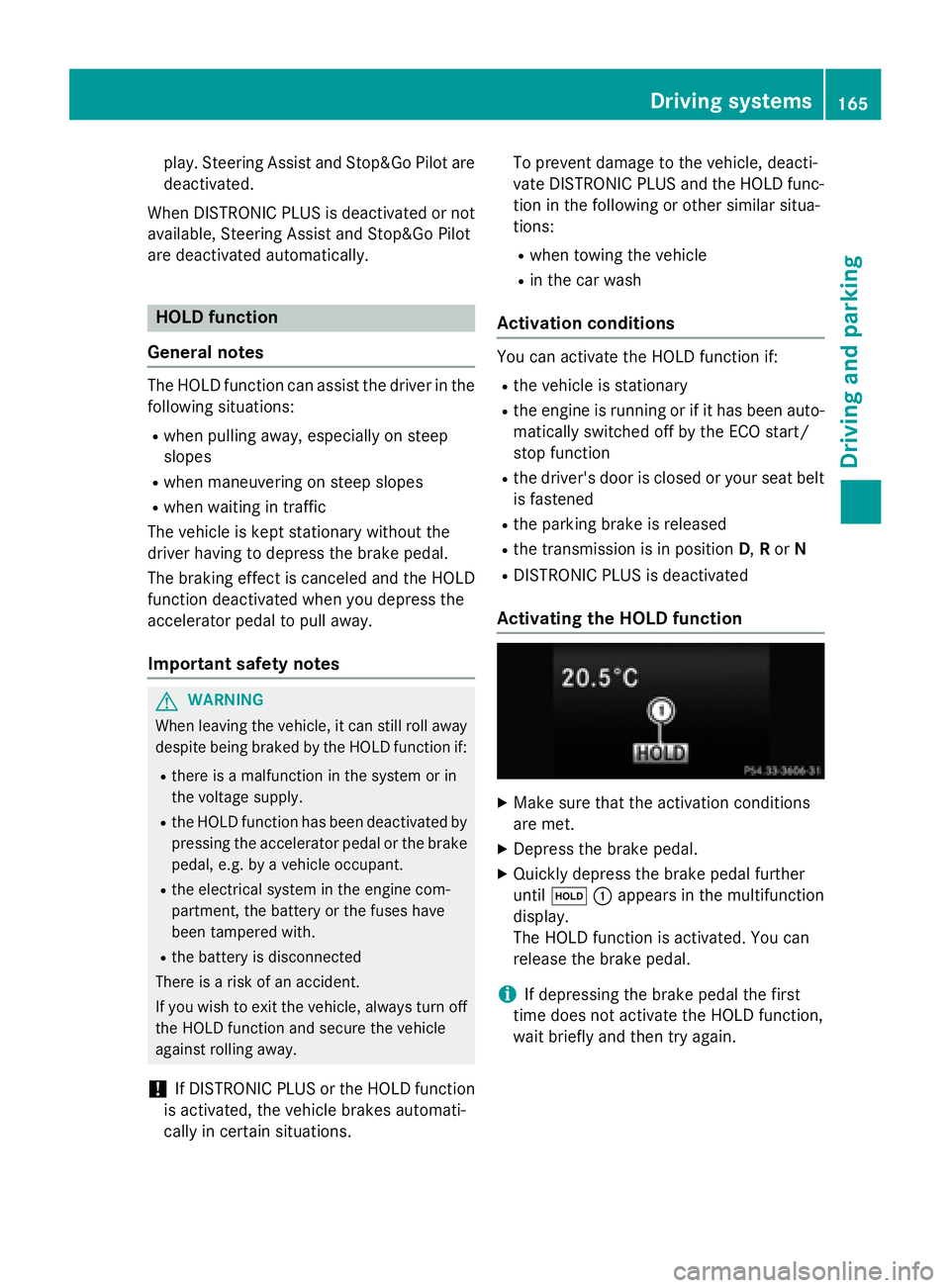
XQuickly depress the brake pedal further
until ë :appears in the multifunction
display.
The HOLD function is activated. You can
release the brake pedal.
iIf depressing the brake pedal the first
time does not activate the HOLD function,
wait briefly and then try again.
Driving systems165
Driving and parking
Z
Page 170 of 350
!The vehicle is lowered by about 0.8 in
(20 mm) if:
Ryou have selected "Comfortable tuning"
Ryou switch off the engine and then
Ryou lock the vehicle within approximately
60 seconds
When parking, position your vehicle so that
it does not make contact with the curb as
the vehicle is lowered. Your vehicle could
otherwise be damaged.
Vehicle level
Important safety notes
GWARNING
When the vehicle is being lowered, people
could become trapped if their limbs are
between the vehicle body and the wheels or
underneath the vehicle. There is a risk of
injury.
Make sure no one is underneath the vehicle or
in the immediate vicinity of the wheel arches
when the vehicle is being lowered.
The vehicle may be lowered if you press the
suspension setting selector button or the
AMG button. The vehicle also lowers if it is
stationary.
!If Sport or Sport + suspension tuning has
been selected, the vehicle's ground clear-
ance decreases. Make sure that no objects
become trapped or that the vehicle does
not become damaged, for example, on the
curb.
iThe vehicle level may change visibly at the
rear axle if you park the vehicle and the
outside temperature changes. If the tem-
perature drops, the vehicle level lowers;
with an increase in temperature, the vehi-
cle level rises.
4MATIC (permanent four-wheel drive)
If you fail to adapt your driving style, 4MATIC
can neither reduce the risk of accident nor override the laws of physics. 4MATIC cannot
take account of road, weather and traffic con-
ditions. 4MATIC is only an aid. You are
responsible for the distance to the vehicle in
front, for vehicle speed, for braking in good
time and for staying in your lane.
If a drive wheel spins due to insufficient grip:
ROnly depress the accelerator pedal as far as
necessary when pulling away.
RAccelerate less when driving.
!Never tow the vehicle with one axle
raised. This may damage the transfer case.
Damage of this sort is not covered by the
Mercedes-Benz Limited Warranty. All
wheels must remain either on the ground or be fully raised. Observe the instructions for
towing the vehicle with all wheels in full
contact with the ground.
iIn wintry driving conditions, the maximum
effect of 4MATIC can only be achieved if
you use winter tires (M+S tires), with snow
chains if necessary.
4MATIC ensures that all four wheels are per-
manently driven. Together with ESP
®, it
improves the traction of your vehicle when-
ever a drive wheel spins due to insufficient
grip.
PARKTRONIC
Important safety notes
PARKTRONIC is an electronic parking aid with
ultrasonic sensors. It monitors the area
around your vehicle using six sensors in the
front bumper and six sensors in the rear
bumper. PARKTRONIC indicates visually and
audibly the distance between your vehicle
and an object.
PARKTRONIC is only an aid. It is not a replace-
ment for your attention to your immediate
surroundings. You are always responsible for
safe maneuvering, parking and exiting a park- ing space. When maneuvering, parking or
pulling out of a parking space, make sure that
168Driving systems
Driving and parking
Page 174 of 350
Under the following circumstances, the rear
view camera will not function, or will function
in a limited manner:
Rif the trunk lid or tailgate is open
Rin heavy rain, snow or fog
Rat night or in very dark places
Rif the camera is exposed to very bright light
Rif the area is lit by fluorescent bulbs or LED
lighting (the display may flicker)
Rif there is a sudden change in temperature,
e.g. when driving into a heated garage in
winter
Rif the camera lens is dirty or obstructed.
Observe the notes on cleaning
(
Ypage 268)
Rif the rear of your vehicle is damaged. In this
event, have the camera position and setting
checked at a qualified specialist workshop
The field of vision and other functions of the
rear view camera may be restricted due to
additional accessories on the rear of the vehi-
cle (e.g. license plate holder, bicycle rack).
On vehicles with height-adjustable chassis,
leaving the standard height can result in inac-
curacies in the guide lines, depending on
technical conditions.
iThe rear view camera is protected from
raindrops and dust by means of a flap.
When the rear view camera is activated,
this flap opens.
The flap closes again when:
Ryou have finished the maneuvering proc-
ess
Ryou switch off the engine
Ryou open the trunk
Observe the notes on cleaning
(
Ypage 268).
For technical reasons, the flap may remain
open briefly after the rear view camera has
been deactivated.
!Objects not at ground level may appear to
be further away than they actually are, e.g.:
Rthe bumper of a parked vehicle
Rthe drawbar of a trailer
Rthe ball coupling of a trailer tow hitch
Rthe rear section of an HGV
Ra slanted post
Use the guidelines only for orientation.
Approach objects no further than the bot-
tom-most guideline.
The rear view camera may show a distorted
view of obstacles, show them incorrectly or
not at all. The rear view camera does not show
objects in the following positions:
Rvery close to the rear bumper
Runder the rear bumper
Rin the area immediately above the tailgate
handle
Activating/deactivating the rear view
camera
XTo activate: make sure that the SmartKey
is in position 2in the ignition lock.
XMake sure that the Activation by R
gearfunction is selected in Audio 20 or
COMAND, see the Digital Operator's Man-
ual.
XEngage reverse gear.
The rear view camera flap opens. The area
behind the vehicle is shown with guide lines
in the Audio 20 or COMAND display.
The image from the rear view camera is
available throughout the maneuvering
process.
To deactivate: the rear view camera deacti-
vates if you shift the transmission to Por after
driving forwards a short distance.
172Driving systems
Driving and parking
Page 182 of 350
Important safety notes
GWARNING
Lane Keepin g Assist may not always clearly
recognize lane markings.
In this case, Lane Keepin g Assist may:
Rgive an unnecessary warning
Rnot give a warning
There isa risk of an acc ident.
Always pay particular attention to the traff ic
situation and stay inlane, inparticular if
warned byLane Keepin g Assist.
GWARNING
The Lane Keepin g Assist warning does not
return the veh icleto the original lane. There is
a risk of an acc ident.
You should always steer, brake or accelerate
yourself, inparticular ifwarned byLane Keep-
ing Assist.
If you fail to adapt your driving style, Lane
Keeping Assist can neither reduce the risk of
an accident nor override the laws of physics.
Lane Keeping Assist cannot take into account
the road, traffic and weather conditions. Lane
Keeping Assist is merely an aid. You are
responsible for the distance to the vehicle in
front, for vehicle speed, for braking in good
time and for staying in your lane.
The Lane Keeping Assist does not keep the
vehicle in the lane.
The system may be impaired or may not func- tion if:
Rthere is poor visibility, e.g. due to insuffi-
cient illumination of the road, or due to
snow, rain, fog or spray
Rthere is glare, e.g. from oncoming traffic,
the sun or reflections (e.g. when the road
surface is wet)
Rthe windshield is dirty, fogged up, damagedor covered, for instance by a sticker, in the
vicinity of the camera
Rthere are no, several or unclear lane mark-
ings for a lane, e.g. in areas with road con-
struction work
Rthe lane markings are worn away, dark or
covered up, e.g. by dir
t or snow
Rthe distance to the vehicle in front is too
small and the lane markings thus cannot be
detected
Rthe lane markings change quickly, e.g.
lanes branch off, cross one another or
merge
Rthe road is narrow and winding
Rthere are strong shadows cast on the road
Switching on Lane Keeping Assist
You can find information about this in the
Digital Operator's Manual.
Active Driving Assistance package
General notes
The Active Driving Assistance package con-
sists of DISTRONIC PLUS (
Ypage 156), Active
Blind Spot Assist (
Ypage 180) and Active
Lane Keeping Assist (
Ypage 183).
Active Blind Spot Assist
General notes
Active Blind Spot Assist uses a radar sensor
system, pointed toward the rear of the vehi-
cle, to monitor the area to the sides of the
vehicle which the driver is unable to see. A
warning display in the exterior mirrors draws
your attention to vehicles detected in the
monitored area. If you then switch on the cor-
responding turn signal to change lanes, you
will also receive a visual and audible collision
warning. If a risk of lateral collision is detec-
ted, corrective braking may help you avoid a
collision. Before a course-correcting brake
application, Active Blind Spot Assist evalu-
ates the space in the direction of travel and at
the sides of the vehicle. For this, Active Blind
Spot Assist uses the forward-facing radar
sensors.
Active Blind Spot Assist supports you from a
speed of approximately 20 mph (30 km/h).
180Driving systems
Driving and parking
Page 204 of 350
Warning and indicator lamps in the instrument cluster
General notes
This section describes indicator and warning lamps in the instrument cluster relevant to safety
and solutions. A description of other indicator and warning lamps in the instrument cluster and
their solutions can be found in the Digital Operator's Manual.
Some systems carry out a self-diagnosis when the ignition is switched on. Therefore, some
indicator and warning lamps may light up or flash temporarily. This behavior is non-critical.
These indicator and warning lamps only indicate a malfunction if they light up or flash after
starting the engine or whilst driving.
Safety
Seat belts
ProblemPossible causes/consequences and MSolutions
ü
After starting the
engine, the red seat
belt warning lamp lights
up for 6 seconds.The seat belt warning lamp reminds the driver and front passenger
to fasten their seat belts.
XFasten your seat belt (Ypage 52).
ü
After starting the
engine, the red seat
belt warning lamp lights
up. In addition, a warn-
ing tone sounds for up
to 6 seconds.The driver's seat belt is not fastened.
XFasten your seat belt (Ypage 52).
The warning tone ceases.
ü
The red seat belt warn-
ing lamp lights up after
the engine starts, as
soon as the driver's or
the front-passenger
door is closed.The driver or front passenger has not fastened their seat belt.
XFasten your seat belt (Ypage 52).
The warning lamp goes out.
There are objects on the front-passenger seat.
XRemove the objects from the front-passenger seat and stow
them in a secure place.
The warning lamp goes out.
202Warning and indicator lamps in the instrument cluster
On-board computer and displays
Page 205 of 350
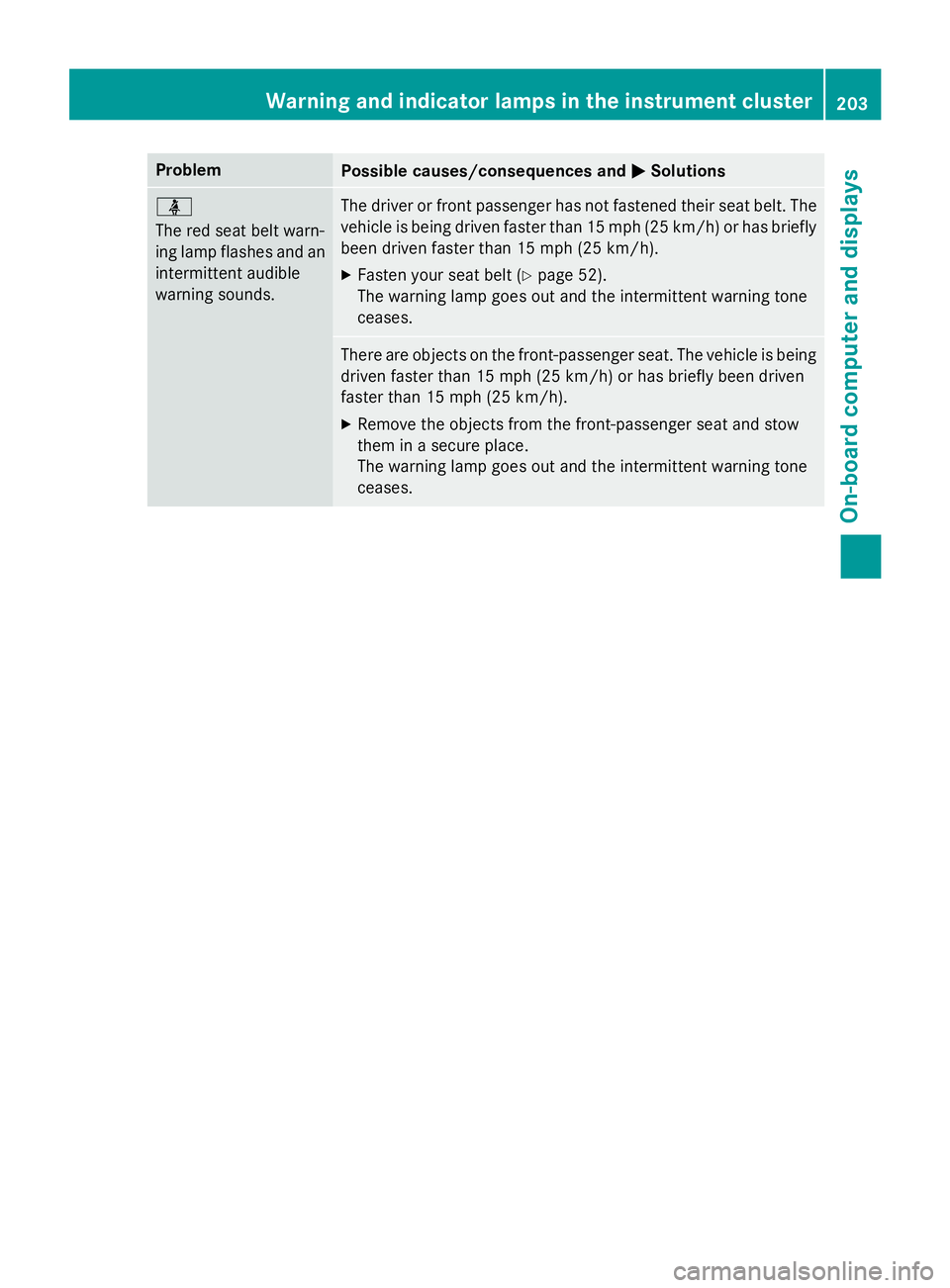
ProblemPossible causes/consequences andMSolutions
ü
The red seat belt warn-
ing lamp flashes and an
intermittent audible
warning sounds.The driver or front passenger has not fastened their seat belt. The
vehicle is being driven faster than 15 mph (25 km/h) or has briefly
been driven faster than 15 mph (25 km/h).
XFasten your seat belt (Ypage 52).
The warning lamp goes out and the intermittent warning tone
ceases.
There are objects on the front-passenger seat. The vehicle is being
driven faster than 15 mph (25 km/h) or has briefly been driven
faster than 15 mph (25 km/h).
XRemove the objects from the front-passenger seat and stow
them in a secure place.
The warning lamp goes out and the intermittent warning tone
ceases.
Warning and indicator lamps in the instrument cluster203
On-board computer and displays
Z
Page 239 of 350
Useful information............................238
Stowage areas ................................... 238
Features ............................................. 251
237
Stowage and features