light Mercury Mariner Hybrid 2007 s Owner's Guide
[x] Cancel search | Manufacturer: MERCURY, Model Year: 2007, Model line: Mariner Hybrid, Model: Mercury Mariner Hybrid 2007Pages: 336, PDF Size: 2.89 MB
Page 60 of 336

5.Use freeways— Creates a route which uses freeways where possible.
Route calculation
Once the route criteria is selected, the navigation system automatically
calculates a route to the selected destination. The route appears on the
display screen and a voice prompt provides instructions.
This screen will appear for a few
seconds while the navigation system
is calculating your route.
Please proceed
Once the route is calculated, “Please
Proceed” is displayed with a map on
the display. Also included in the
display:
•the planned route is shown in
pink
•parts of the planned route
containing incomplete map data
are highlighted in “cautionary” yellow
•major roadways are shown in blue
•other streets are shown in white
•your vehicle location is shown as a pink/yellow triangle
•the arrow at the foot of the screen points to your destination
You are able to choose from three viewing options in this display:
•PLAN — Press this soft key to scroll through your entire route. This
option is only available prior to beginning the journey.
•PAN — Press this soft key, then use the cursor control to pan up,
down, left or right on the map. This option is only available when the
vehicle is not in motion.
•ZOOM — Press this soft key multiple times (or use the cursor input)
to select the desired zoom level on the map. The zoom level is shown
at the bottom of the screen.
2007 Mariner Hybrid(mhv)
Owners Guide (post-2002-fmt)
USA(fus)
Entertainment Systems
60
Page 61 of 336
Guide display
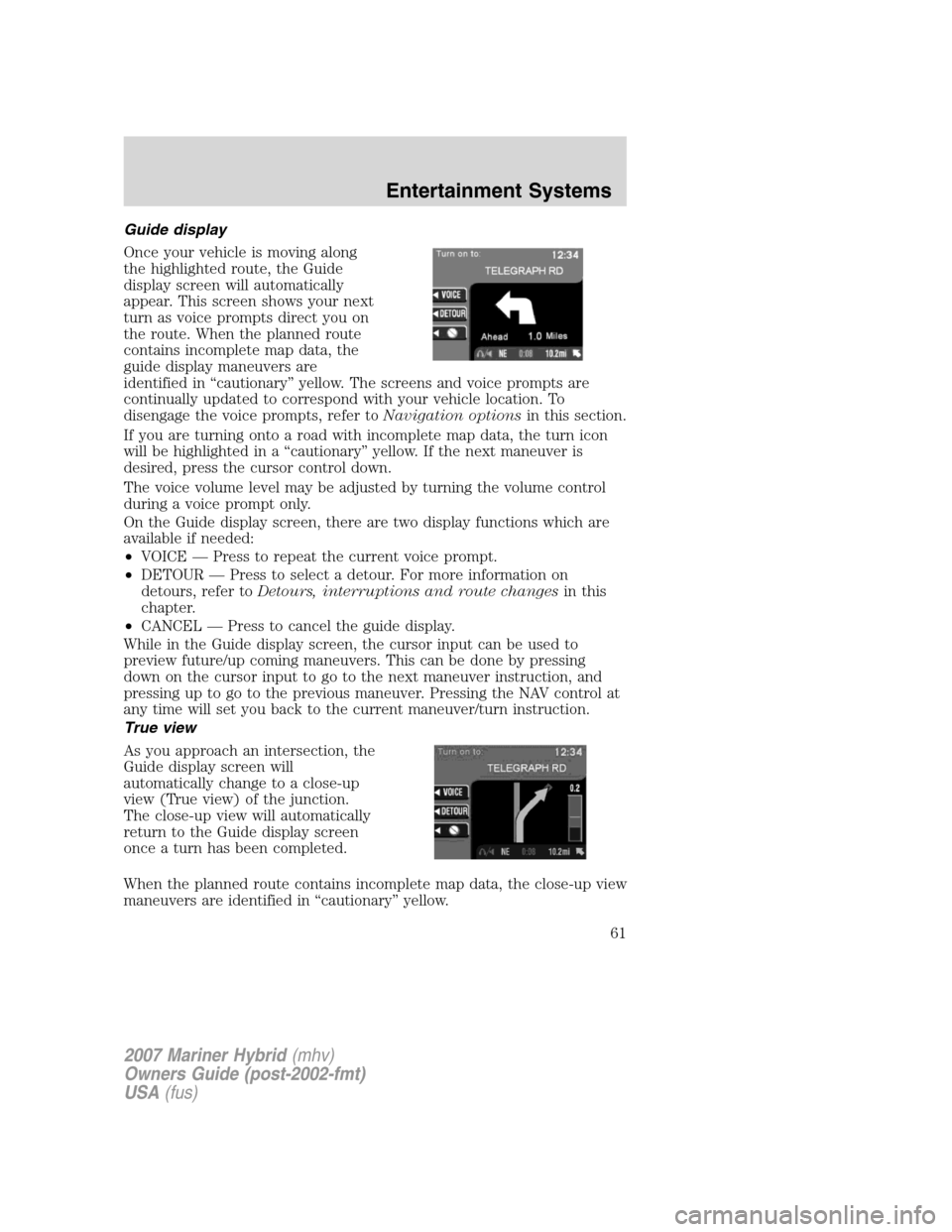
Once your vehicle is moving along
the highlighted route, the Guide
display screen will automatically
appear. This screen shows your next
turn as voice prompts direct you on
the route. When the planned route
contains incomplete map data, the
guide display maneuvers are
identified in “cautionary” yellow. The screens and voice prompts are
continually updated to correspond with your vehicle location. To
disengage the voice prompts, refer toNavigation optionsin this section.
If you are turning onto a road with incomplete map data, the turn icon
will be highlighted in a “cautionary” yellow. If the next maneuver is
desired, press the cursor control down.
The voice volume level may be adjusted by turning the volume control
during a voice prompt only.
On the Guide display screen, there are two display functions which are
available if needed:
•VOICE — Press to repeat the current voice prompt.
•DETOUR — Press to select a detour. For more information on
detours, refer toDetours, interruptions and route changesin this
chapter.
•CANCEL — Press to cancel the guide display.
While in the Guide display screen, the cursor input can be used to
preview future/up coming maneuvers. This can be done by pressing
down on the cursor input to go to the next maneuver instruction, and
pressing up to go to the previous maneuver. Pressing the NAV control at
any time will set you back to the current maneuver/turn instruction.
True view
As you approach an intersection, the
Guide display screen will
automatically change to a close-up
view (True view) of the junction.
The close-up view will automatically
return to the Guide display screen
once a turn has been completed.
When the planned route contains incomplete map data, the close-up view
maneuvers are identified in “cautionary” yellow.
2007 Mariner Hybrid(mhv)
Owners Guide (post-2002-fmt)
USA(fus)
Entertainment Systems
61
Page 65 of 336

•Resume route - The navigation
system displays the Select Route
Criteria screen. Refer to
Selecting Route Criteriaearlier
in this chapter.
•Cancel route - Press to return to
the main menu.
If the ignition is not turned off,
simply continue along your highlighted route.
Route changes or cancellations
To cancel or change your current
route:
•Press BACK, then select “Cancel
Guidance” or
•Press the CANCEL soft key.
Navigation Menu
You are able to make various
adjustments in navigation mode. To
view the options, press the control
next to “Option Menu” to select
from the following options:
Navigation options
Once in the navigation preference
menu, you may select from the
following options:
•VOICE — Select to turn the voice
output on or off and to adjust the
volume level.
•MAP — Choose between
“Heading up” to put your
direction of travel toward the top of the screen, or “North up” to
ensure that North is always at the top of the screen.
2007 Mariner Hybrid(mhv)
Owners Guide (post-2002-fmt)
USA(fus)
Entertainment Systems
65
Page 68 of 336

•Always store the map CDs in their protective cases when not in use.
Map coverage
Please refer to theIn-dash Navigation System Quick Startfor
individual map CD content details.
CDs contain map data for all of the continental United States and parts
of Canada. In some less populated areas, even though a map is displayed,
map data may be incomplete (does not contain one-way street
information, turn restrictions, speed limits, etc.) In these cases, the
system will alert the driver and route guidance directions on the display
are highlighted in “cautionary” yellow.
Ordering additional map CDs
If you wish to order additional maps, or report possible problems with
your current map CD, please callNAVTEQ at 1–(888) NAV-MAPS,
(1–888–628–6277) toll-free or write
NAVTEQ
P.O. Box 543442
Chicago, IL 60654–0442
Website — www.navteq.com
Latest map CDs
The traffic network is constantly changing due to new roads, traffic
restrictions, etc. Therefore, it is not always possible to exactly match the
digital CD map with the current roadways. To help with accuracy, always
use the latest version of the map CD for navigation.
2007 Mariner Hybrid(mhv)
Owners Guide (post-2002-fmt)
USA(fus)
Entertainment Systems
68
Page 71 of 336

HEADLAMP CONTROL
Rotate the headlamp control to the
first position
to turn on the
parking lamps. Rotate to the second
position
to also turn on the
headlamps.
Headlamp battery saver
The battery saver will shut off the exterior lamps 10 minutes after the
ignition switch has been turned off if the headlamp control is in
the
position. The system will not shut off the parking lamps if the
headlamp control is in the
position.
Autolamp control (if equipped)
The autolamp system sets the
headlamps to turn on and off
automatically. The autolamp control,
located on the headlamp switch,
will:
•turn on the lamps automatically
at night
•turn off the lamps automatically
during the daylight
•keep the lamps on for up to three minutes after the key is turned to
OFF.
SeeAutolamp delay system (if equipped)to set the auto headlamp off
delay time.
Autolamp delay system (if equipped)
If your vehicle has an autolamp delay feature, you can set the delay time
to keep the headlights on for up to three minutes after the key is turned
OFF. The delay time is set to 20 seconds at the factory, but the delay
time may be changed by following the steps below (Steps 1 through 6
must be done within 10 seconds):
2007 Mariner Hybrid(mhv)
Owners Guide (post-2002-fmt)
USA(fus)
Lights
71
Page 72 of 336

1. Turn the key to the 1 (LOCK)
position.
2. Rotate the headlamp control to
the autolamp position.
3. Rotate the headlamp control to
the OFF position.
4. Turn the key to the 3 (RUN)
position.
5. Turn the key back to the 1
(LOCK) position.
6. Turn the headlamp control to the autolamp position (the headlights
should turn on).
7. Turn the headlamp control to the OFF position when the desired
delay time (up to 3 minutes) has been reached.
High beams
Push the lever toward the
instrument panel to activate. Pull
the lever towards you to deactivate.
Flash to pass
Pull toward you slightly to activate
and release to deactivate.
2007 Mariner Hybrid(mhv)
Owners Guide (post-2002-fmt)
USA(fus)
Lights
72
Page 73 of 336

Daytime running lamps (DRL) (if equipped)
Turns the lowbeam headlamps on with a reduced output.
To activate:
•the ignition must be in the 3 (RUN) position.
•the headlamp control must be in the OFF, parking lamps or autolamp
position.
•the parking brake must be released.
Always remember to turn on your headlamps at dusk or during
inclement weather. The Daytime Running Lamp (DRL) system
does not activate the tail lamps and generally may not provide
adequate lighting during these conditions. Failure to activate your
headlamps under these conditions may result in a collision.
Smart park lamps (if equipped)
If your vehicle is equipped with the DRL and autolamp features, your
park lamps will turn on automatically when lighting conditions are dark
and DRLs are activated (the headlamp control is in the OFF position).
Foglamp control (if equipped)
Press the foglamp control, located
on the instrument panel, to activate
the foglamps. The foglamp indicator
will illuminate when the foglamps
are on. Press the foglamp control to
deactivate the foglamps.
The foglamps will only operate with
the parking lamps or headlamps on.
When the highbeams are activated, the foglamps will not operate.
2007 Mariner Hybrid(mhv)
Owners Guide (post-2002-fmt)
USA(fus)
Lights
73
Page 74 of 336

PANEL DIMMER CONTROL
Use to adjust the brightness of the instrument panel.
•Push and hold top of control to
brighten.
•Push and hold bottom of control
to dim.
AIMING THE HEADLAMPS
The headlamps on your vehicle are properly aimed at the assembly plant.
If your vehicle has been in an accident the alignment of your headlamps
should be checked by your authorized dealer.
Vertical aim adjustment
1. Park the vehicle directly in front of a wall or screen on a level surface,
approximately 25 feet (7.6 meters) away.
•(1) 8 feet (2.4 meters)
•(2) Center height of lamp to
ground
•(3) 25 feet (7.6 meters)
•(4) Horizontal reference line
2. Measure the height from the
center of your headlamp to the
ground and mark an 8 foot (2.4
meter) horizontal reference line on
the vertical wall or screen at this
height (a piece of masking tape works well). The center of the lamp is
marked by a 3.0 mm circle on the headlamp lens.
2007 Mariner Hybrid(mhv)
Owners Guide (post-2002-fmt)
USA(fus)
Lights
74
Page 75 of 336

3. Turn on the low beam headlamps to illuminate the wall or screen and
open the hood. Cover the left-hand headlamp with an opaque cloth.
4. On the wall or screen you will
observe a light pattern with a
distinct horizontal edge of high
intensity light towards the right. If
this edge is not at the horizontal
reference line, the beam will need to
be adjusted.
5. Locate the vertical adjuster on
the headlamp, then use a Phillips
screwdriver to turn the adjuster
either counterclockwise (to adjust
up) or clockwise (to adjust down)
aligning the upper edge of the light
pattern to the horizontal line.
6. Move the opaque cloth to cover
the right-hand headlamp and repeat
Steps 4 and 5 for the left-hand
headlamp.
7. HORIZONTAL AIM IS NOT REQUIRED FOR THIS VEHICLE AND IS
NON-ADJUSTABLE.
8. Close the hood and turn off the lamps.
TURN SIGNAL CONTROL
•Push down to activate the left
turn signal.
•Push up to activate the right turn
signal.
INTERIOR LAMPS
Dome lamps and map lamps
The front dome lamp is located overhead between the driver and
passenger seats.
2007 Mariner Hybrid(mhv)
Owners Guide (post-2002-fmt)
USA(fus)
Lights
75
Page 76 of 336

The dome lamp control has three
positions:
•OFF: In this position, the lamp
will not illuminate.
•DOOR: In this position, the dome
lamp will illuminate only when a
door is opened and will remain
illuminated for 25 seconds after the door is shut.
•ON: In this position, the lamp will remain illuminated.
The map lamp controls (without
moon roof) are located on the dome
lamp. Press the button on either
side of each map lamp to illuminate
the lamps. Push the button again to
turn off the lamps.
For models equipped with a moon
roof, the map lamps are located on
the moon roof control panel. Press
the button on either side of each
map lamp to illuminate the lamps.
Push the button again to turn off
the lamps.
The map lamps will illuminate
whenever a door is opened. After
the door is shut, the lamps will remain illuminated for 25 seconds.
Cargo and dome lamp
Rear cargo lamp equipped with an
ON/OFF/DOOR control will light
when:
•the doors are closed and the
control is in the ON position.
•the control is in the DOOR
position and any door is open.
When the control is in the OFF position, it will not illuminate when you
open the doors.
2007 Mariner Hybrid(mhv)
Owners Guide (post-2002-fmt)
USA(fus)
Lights
76