phone Mercury Milan 2009 s User Guide
[x] Cancel search | Manufacturer: MERCURY, Model Year: 2009, Model line: Milan, Model: Mercury Milan 2009Pages: 317, PDF Size: 2.67 MB
Page 39 of 317
USB port (if equipped)
WARNING:Driving while distracted can result in loss of vehicle
control, accident and injury. Ford strongly recommends that
drivers use extreme caution when using any device that may take their
focus off the road. The driver’s primary responsibility is the safe
operation of their vehicle. Only use cell phones and other devices not
essential to the driving task when it is safe to do so.
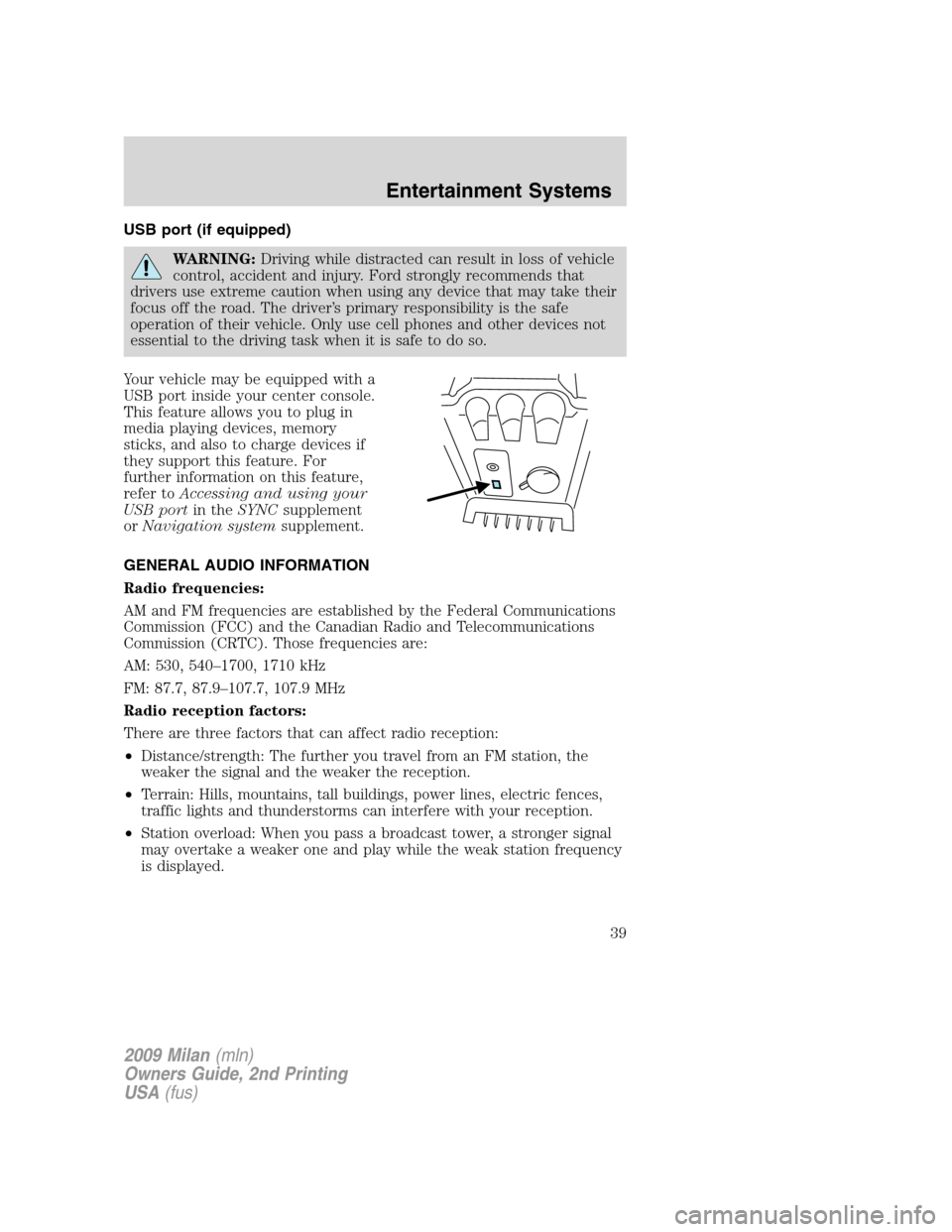
Your vehicle may be equipped with a
USB port inside your center console.
This feature allows you to plug in
media playing devices, memory
sticks, and also to charge devices if
they support this feature. For
further information on this feature,
refer toAccessing and using your
USB portin theSYNCsupplement
orNavigation systemsupplement.
GENERAL AUDIO INFORMATION
Radio frequencies:
AM and FM frequencies are established by the Federal Communications
Commission (FCC) and the Canadian Radio and Telecommunications
Commission (CRTC). Those frequencies are:
AM: 530, 540–1700, 1710 kHz
FM: 87.7, 87.9–107.7, 107.9 MHz
Radio reception factors:
There are three factors that can affect radio reception:
•Distance/strength: The further you travel from an FM station, the
weaker the signal and the weaker the reception.
•Terrain: Hills, mountains, tall buildings, power lines, electric fences,
traffic lights and thunderstorms can interfere with your reception.
•Station overload: When you pass a broadcast tower, a stronger signal
may overtake a weaker one and play while the weak station frequency
is displayed.
2009 Milan(mln)
Owners Guide, 2nd Printing
USA(fus)
Entertainment Systems
39
Page 45 of 317
Radio Display Condition Action Required
NO TEXT Category information
not available.Category information
not available at this
time on this channel.
The system is working
properly.
NO SIGNAL Loss of signal from
the SIRIUS satellite or
SIRIUS tower to the
vehicle antenna.You are in a location
that is blocking the
SIRIUS signal (i.e.,
tunnel, under an
overpass, dense foliage,
etc). The system is
working properly. When
you move into an open
area, the signal should
return.
UPDATING Update of channel
programming in
progress.No action required. The
process may take up to
three minutes.
CALL SIRIUS
1–888–539–7474Satellite service has
been deactivated by
SIRIUS Satellite
Radio.Call SIRIUS at
1–888–539–7474 to
re-activate or resolve
subscription issues.
NAVIGATION SYSTEM (IF EQUIPPED)
Your vehicle may be equipped with a navigation system. Refer to the
Navigation systemsupplement for further information.
SYNC (IF EQUIPPED)
Your vehicle may be equipped with SYNC, a hands-free communications
and entertainment system with special phone and media features. For
more information, please refer to theSYNCsupplement or to theSYNC
section in theNavigation systemsupplement (if equipped).
2009 Milan(mln)
Owners Guide, 2nd Printing
USA(fus)
Entertainment Systems
45
Page 76 of 317

WARNING:Do not adjust the mirror while the vehicle is in
motion.
Automatic dimming interior rear view mirror (if equipped)
Your vehicle may be equipped with an interior rear view mirror that has
an auto-dimming function. The electronic day/night mirror will change
from the normal (high reflective) state to the non-glare (darkened) state
when bright lights (glare) reach the mirror. When the mirror detects
bright light from behind the vehicle, it will automatically adjust (darken)
to minimize glare.
Without microphone
With microphone
The mirror will automatically return to the normal state whenever the
vehicle is placed in R (Reverse) to ensure a bright clear view when
backing up.
Do not block the sensors on the front and back of the interior
rear view mirror since this may impair proper mirror
performance.
Do not clean the housing or glass of any mirror with harsh
abrasives, fuel or other petroleum-based cleaning products.
EXTERIOR MIRRORS
Power side view mirrors
WARNING:Do not adjust the mirror while the vehicle is in
motion.
2009 Milan(mln)
Owners Guide, 2nd Printing
USA(fus)
Driver Controls
76
Page 81 of 317

In any mode:
•Press VOL + or VOL - to adjust
the volume.
Navigation system hands free
control features (if equipped)
Press and hold
control briefly
until the voice
icon appears on
the navigation display to use the
voice command feature.
Press
to complete a voice
command.
For further information on the
navigation system, refer to theNavigation Systemsupplement.
SYNC system hands free control
feature (if equipped)
Press
briefly to use the voice
command feature. You will hear a
tone and LISTENING will appear in
the radio display. Press and
hold
to exit voice command.
Press
to activate phone mode or
answer a phone call. Press and
hold
to end a call or exit phone
mode.
Press
to scroll through various menus and selections. Press
OK to confirm your selection.
For further information on the SYNC system, refer to theSYNC
supplement.
2009 Milan(mln)
Owners Guide, 2nd Printing
USA(fus)
Driver Controls
81
Page 82 of 317

Navigation system/SYNC hands
free control features (if
equipped)
Press
control briefly until the
voice
icon appears on the
Navigation display to use the voice
command feature.
Press
to activate phone mode or
answer a phone call. Press and
hold
to exit phone mode or end
a call.
For further information on the Navigation system/SYNC system, refer to
theNavigation SystemandSYNCsupplements.
MOON ROOF (IF EQUIPPED)
You can move the glass panel of the moon roof back to open or tilt up
(from the closed position) to ventilate the vehicle.
WARNING:Do not let children play with the moon roof or leave
children unattended in the vehicle. They may seriously hurt
themselves.
To open the moon roof:
The moon roof is equipped with an
automatic, one-touch, express
opening, closing and venting feature.
Press and release the rear portion of
the control. To stop motion at any
time during the one-touch
operation, press the control a
second time.
WARNING:When closing the moon roof, you should verify that
it is free of obstructions and ensure that children and/or pets are
not in the proximity of the moon roof opening.
To close the moon roof:
The moon roof is equipped with an automatic, one-touch, express closing
feature. Press and release the front portion of the control. To stop
motion at any time during the one-touch closing, press the control again.
2009 Milan(mln)
Owners Guide, 2nd Printing
USA(fus)
Driver Controls
82
Page 149 of 317

WARNING:To reduce the risk of possible serious injury:
Do not stow objects in seat back map pocket (if equipped) or
hang objects off seat back if a child is in the front passenger seat.
Do not place objects underneath the front passenger seat or between
the seat and the center console (if equipped).
Check the “passenger airbag off” or “pass airbag off” indicator lamp for
proper airbag status.
Failure to follow these instructions may interfere with the front
passenger seat sensing system.
In case there is a problem with the
front passenger sensing system, the
airbag readiness light in the
instrument cluster will stay lit.
If the airbag readiness light is lit, do the following:
The driver and/or adult passengers should check for any objects that
may be lodged underneath the front passenger seat or cargo interfering
with the seat.
If objects are lodged and/or cargo is interfering with the seat; please take
the following steps to remove the obstruction:
•Pull the vehicle over.
•Turn the vehicle off.
•Driver and/or adult passengers should check for any objects lodged
underneath the front passenger seat or cargo interfering with the seat.
•Remove the obstruction(s) (if found).
•Restart the vehicle.
•Wait at least two minutes and verify that the airbag readiness light is
no longer illuminated
•If the airbag readiness light remains illuminated, this may or may/not
be a problem due to the front passenger sensing system.
DO NOT attempt to repair or service the system; take your vehicle
immediately to an authorized dealer.
If it is necessary to modify an advanced front airbag system to
accommodate a person with disabilities, contact the Ford Customer
Relationship Center at the phone number shown in theCustomer
Assistancesection of thisOwner’s Guide.
2009 Milan(mln)
Owners Guide, 2nd Printing
USA(fus)
Seating and Safety Restraints
149
Page 250 of 317

GETTING THE SERVICES YOU NEED
Warranty repairs to your vehicle must be performed by an authorized
Ford, Lincoln, or Mercury dealer. While any authorized dealer handling
your vehicle line will provide warranty service, we recommend you
return to your selling authorized dealer who wants to ensure your
continued satisfaction.
Please note that certain warranty repairs require special training and/or
equipment, so not all authorized dealers are authorized to perform all
warranty repairs. This means that, depending on the warranty repair
needed, you may have to take your vehicle to another authorized dealer.
A reasonable time must be allowed to perform a repair after taking your
vehicle to the authorized dealer. Repairs will be made using Ford or
Motorcraft parts, or remanufactured or other parts that are authorized by
Ford.
Away from home
If you are away from home when your vehicle needs service, contact the
Ford Customer Relationship Center or use the online resources listed
below to find the nearest authorized dealer.
In the United States:
Mailing Address
Ford Motor Company
Customer Relationship Center
P.O. Box 6248
Dearborn, MI 48121
Telephone
1-800-392-3673 (FORD)
(TDD for the hearing impaired: 1-800-232-5952)
Online
Additional information and resources are available online at
www.genuineservice.com.
•U.S. dealer locator by Dealer Name, City/State, or Zip Code
•Owner Guides
•Maintenance Schedules
•Recalls
•Ford Extended Service Plans
•Ford Genuine Accessories
•Service specials and promotions.
2009 Milan(mln)
Owners Guide, 2nd Printing
USA(fus)
Customer Assistance
250
Page 251 of 317
In Canada:
Mailing Address (Ford vehicles)
Customer Relationship Centre
Ford Motor Company of Canada, Limited
P.O. Box 2000
Oakville, Ontario L6J 5E4
Telephone
1-800-565-3673 (FORD)
Online
www.ford.ca
Mailing Address (Lincoln vehicles)
Lincoln Centre
Ford Motor Company of Canada, Limited
P.O. Box 2000
Oakville, Ontario L6J 5E4
Telephone
1-800-387-9333
Online
www.lincolncanada.com
Additional Assistance
If you have questions or concerns, or are unsatisfied with the service you
are receiving, follow these steps:
1. Contact your Sales Representative or Service Advisor at your
selling/servicing authorized dealer.
2. If your inquiry or concern remains unresolved, contact the Sales
Manager, Service Manager or Customer Relations Manager.
3. If you require assistance or clarification on Ford Motor Company
policies, please contact the Ford Customer Relationship Center
In order to help you serve you better, please have the following
information available when contacting a Customer Relationship Center:
•Vehicle Identification Number (VIN)
•Your telephone number (home and business)
•The name of the authorized dealer and city where located
•The vehicle’s current odometer reading
In some states, you must directly notify Ford in writing before pursuing
remedies under your state’s warranty laws. Ford is also allowed a final
repair attempt in some states.
2009 Milan(mln)
Owners Guide, 2nd Printing
USA(fus)
Customer Assistance
251
Page 255 of 317

If you cannot find unleaded fuel or can only get fuel with an anti-knock
index lower than is recommended for your vehicle, contact a regional
office or owner relations/customer relationship office.
The use of leaded fuel in your vehicle without proper conversion may
damage the effectiveness of your emission control system and may cause
engine knocking or serious engine damage. Ford Motor Company/Ford of
Canada is not responsible for any damage caused by use of improper
fuel. Using leaded fuel may also result in difficulty importing your vehicle
back into the U.S.
If your vehicle must be serviced while you are traveling or living in
Central America, the Caribbean, or the Middle East, contact the nearest
authorized dealer. If the authorized dealer cannot help you, contact:
FORD MOTOR COMPANY
FORD EXPORT OPERATIONS
1555 Fairlane Drive
Fairlane Business Park #3
Allen Park, Michigan 48101
U.S.A.
Telephone: (313) 594-4857
FAX: (313) 390-0804
Email: [email protected]
If you are in another foreign country, contact the nearest authorized
dealer. If the authorized dealer employees cannot help you, they can
direct you to the nearest Ford affiliate office.
If you buy your vehicle in North America and then relocate outside of
the U.S. or Canada, register your vehicle identification number (VIN) and
new address with Ford Motor Company Export Operations.
Customers in the U.S. should call 1-800-392-3673.
ORDERING ADDITIONAL OWNER’S LITERATURE
To order the publications in this portfolio, contact Helm, Incorporated at:
HELM, INCORPORATED
P.O. Box 07150
Detroit, Michigan 48207
Or to order a free publication catalog, call toll free: 1-800-782-4356
Monday-Friday 8:00 a.m. - 6:00 p.m. EST
Helm, Incorporated can also be reached by their website:
www.helminc.com.
(Items in this catalog may be purchased by credit card, check or
money order.)
2009 Milan(mln)
Owners Guide, 2nd Printing
USA(fus)
Customer Assistance
255
Page 311 of 317
Wheel locks
For maximum vehicle performance, keep the following information in
mind when adding accessories or equipment to your vehicle:
•When adding accessories, equipment, passengers and luggage to your
vehicle, do not exceed the total weight capacity of the vehicle or of
the front or rear axle (GVWR or GAWR as indicated on the Safety
Compliance Certification label). Consult your authorized dealer for
specific weight information.
•The Federal Communications Commission (FCC) and Canadian Radio
Telecommunications Commission (CRTC) regulate the use of mobile
communications systems — such as two-way radios, telephones and
theft alarms - that are equipped with radio transmitters. Any such
equipment installed in your vehicle should comply with FCC or CRTC
regulations and should be installed only by a qualified service
technician.
•Mobile communications systems may harm the operation of your
vehicle, particularly if they are not properly designed for automotive
use.
•To avoid interference with other vehicle functions, such as anti-lock
braking systems, amateur radio users who install radios and antennas
onto their vehicle should not locate the Amateur Radio Antennas in
the area of the driver’s side hood.
•Electrical or electronic accessories or components that are added to
the vehicle by the authorized dealer or the owner may adversely affect
battery performance and durability.
2009 Milan(mln)
Owners Guide, 2nd Printing
USA(fus)
Accessories
311