phone Mercury Villager 1999 Owner's Manuals
[x] Cancel search | Manufacturer: MERCURY, Model Year: 1999, Model line: Villager, Model: Mercury Villager 1999Pages: 264, PDF Size: 2.19 MB
Page 49 of 264
Rear seat controls (if equipped)
The Rear Seat Controls (RSC) allow
the rear seat passengers to operate
the radio, tape, or CD changer (if
equipped).
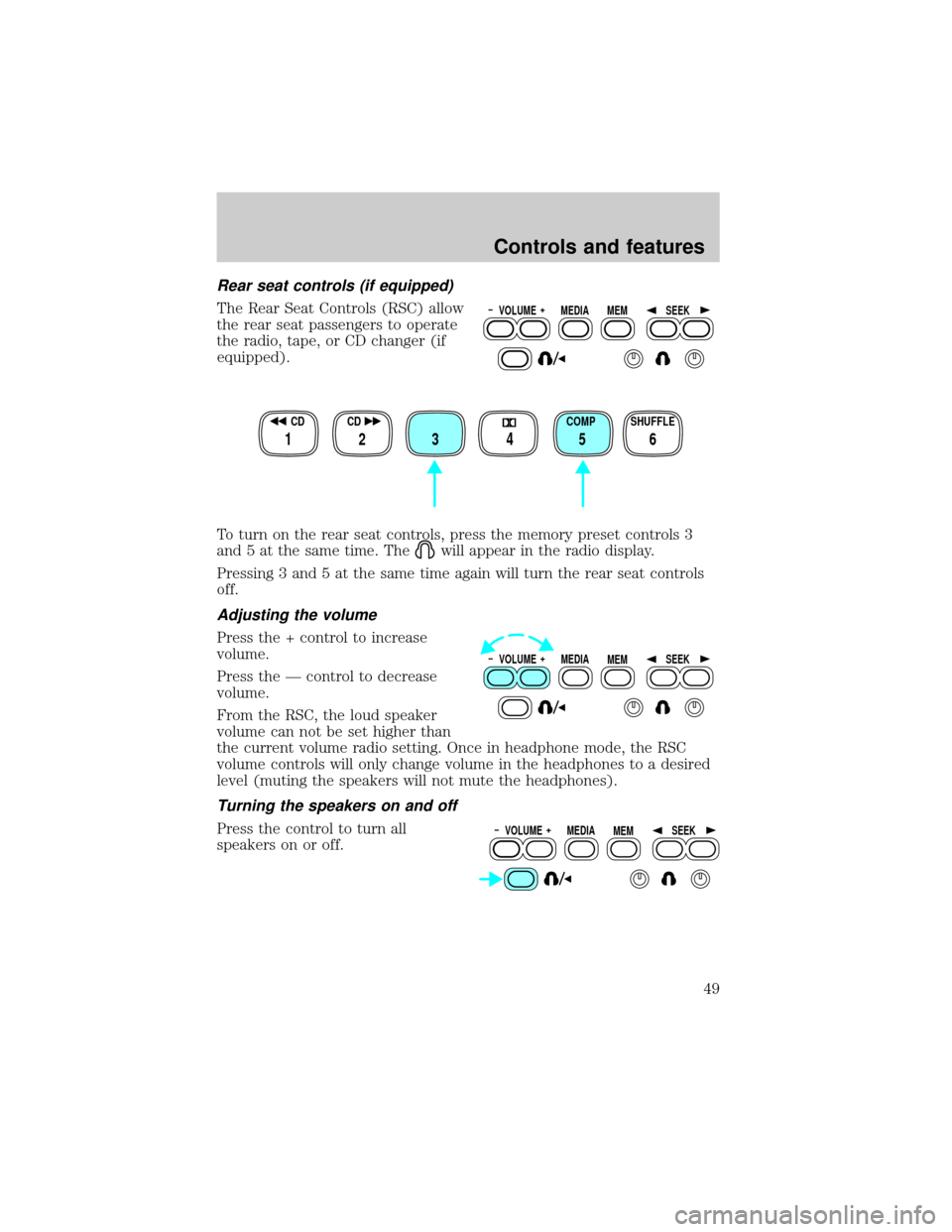
To turn on the rear seat controls, press the memory preset controls 3
and 5 at the same time. The
will appear in the radio display.
Pressing 3 and 5 at the same time again will turn the rear seat controls
off.
Adjusting the volume
Press the + control to increase
volume.
Press the Ð control to decrease
volume.
From the RSC, the loud speaker
volume can not be set higher than
the current volume radio setting. Once in headphone mode, the RSC
volume controls will only change volume in the headphones to a desired
level (muting the speakers will not mute the headphones).
Turning the speakers on and off
Press the control to turn all
speakers on or off.
VOLUME MEDIA
MEMSEEK
SHUFFLE COMP CD CD
3 2 1456
VOLUME MEDIA
MEMSEEK
VOLUME MEDIA
MEMSEEK
Controls and features
49
Page 50 of 264
Using headphones
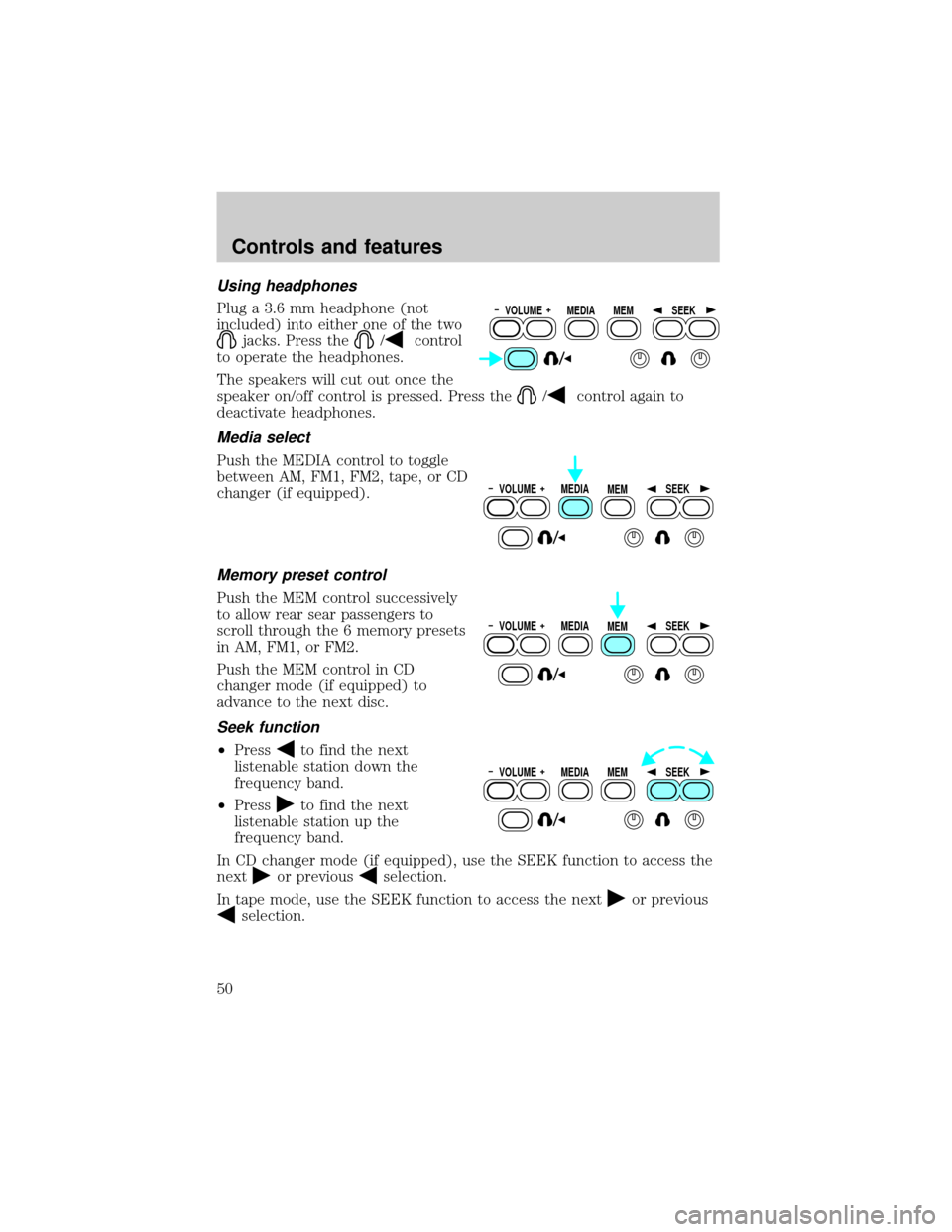
Plug a 3.6 mm headphone (not
included) into either one of the two
jacks. Press the/control
to operate the headphones.
The speakers will cut out once the
speaker on/off control is pressed. Press the
/control again to
deactivate headphones.
Media select
Push the MEDIA control to toggle
between AM, FM1, FM2, tape, or CD
changer (if equipped).
Memory preset control
Push the MEM control successively
to allow rear sear passengers to
scroll through the 6 memory presets
in AM, FM1, or FM2.
Push the MEM control in CD
changer mode (if equipped) to
advance to the next disc.
Seek function
²Pressto find the next
listenable station down the
frequency band.
²Press
to find the next
listenable station up the
frequency band.
In CD changer mode (if equipped), use the SEEK function to access the
next
or previousselection.
In tape mode, use the SEEK function to access the next
or previous
selection.
VOLUME MEDIA
MEMSEEK
VOLUME MEDIA
MEMSEEK
VOLUME MEDIA
MEMSEEK
VOLUME MEDIA
MEMSEEK
Controls and features
50
Page 61 of 264

Adjusting the volume
Press the + control to increase
volume.
Press the Ð control to decrease
volume.
From the RSC, the speaker volume
can not be set higher than the
current volume radio setting. Once in headphone mode, the RSC volume
controls will only change volume in the headphones to a desired level
(muting the speakers will not mute the headphones).
Turning the speakers on and off
Press the control to turn all
speakers on or off.
Using headphones
Plug a 3.6 mm headphone (not
included) into either one of the two
jacks. Press the/control
to operate the headphones.
The speakers will cut out once the
speaker on/off control is pressed. Press the
/control again to
deactivate headphones.
Media select
Push the MEDIA control to toggle
between AM, FM1, FM2, tape, or CD
changer (if equipped).
VOLUME MEDIA
MEMSEEK
VOLUME MEDIA
MEMSEEK
VOLUME MEDIA
MEMSEEK
VOLUME MEDIA
MEMSEEK
Controls and features
61
Page 74 of 264
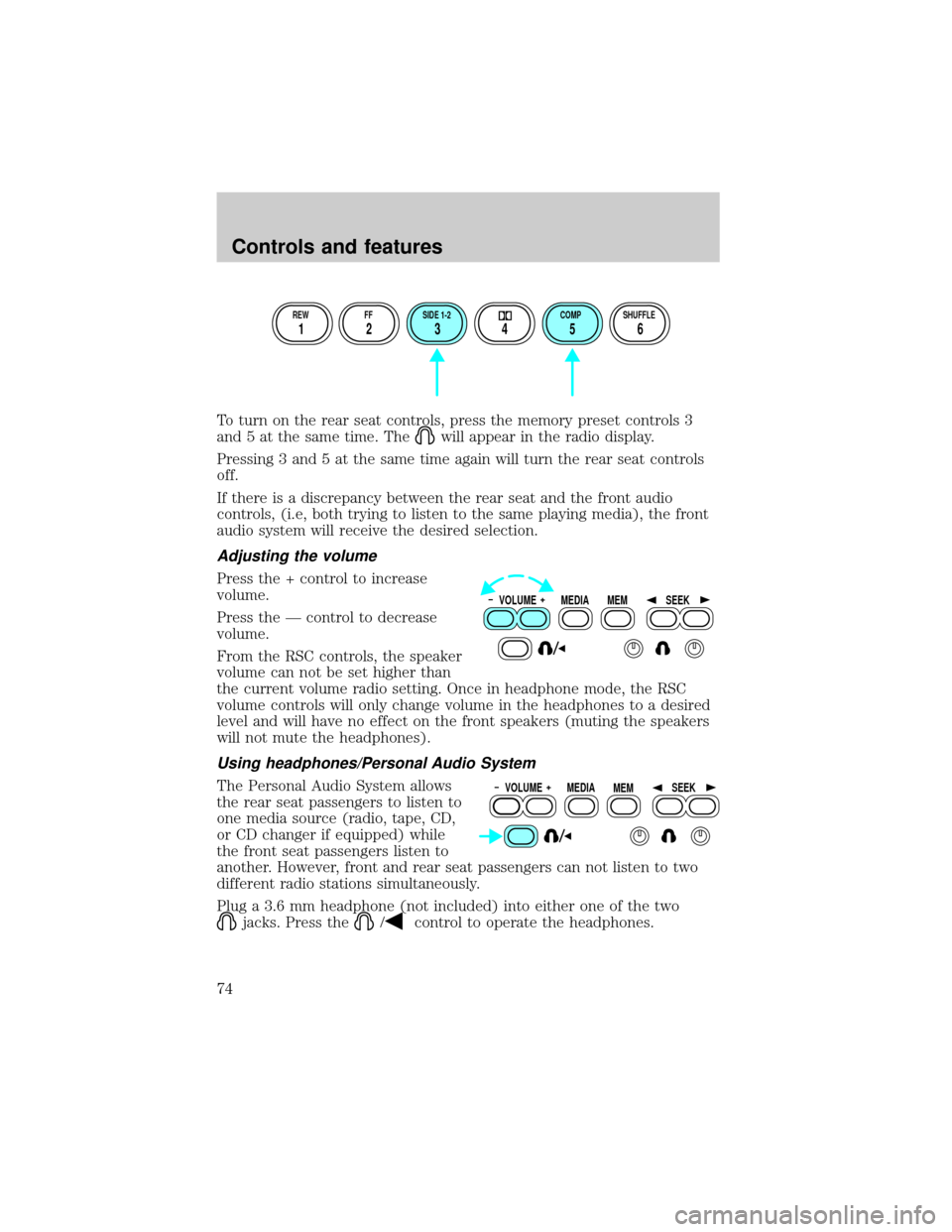
To turn on the rear seat controls, press the memory preset controls 3
and 5 at the same time. The
will appear in the radio display.
Pressing 3 and 5 at the same time again will turn the rear seat controls
off.
If there is a discrepancy between the rear seat and the front audio
controls, (i.e, both trying to listen to the same playing media), the front
audio system will receive the desired selection.
Adjusting the volume
Press the + control to increase
volume.
Press the Ð control to decrease
volume.
From the RSC controls, the speaker
volume can not be set higher than
the current volume radio setting. Once in headphone mode, the RSC
volume controls will only change volume in the headphones to a desired
level and will have no effect on the front speakers (muting the speakers
will not mute the headphones).
Using headphones/Personal Audio System
The Personal Audio System allows
the rear seat passengers to listen to
one media source (radio, tape, CD,
or CD changer if equipped) while
the front seat passengers listen to
another. However, front and rear seat passengers can not listen to two
different radio stations simultaneously.
Plug a 3.6 mm headphone (not included) into either one of the two
jacks. Press the/control to operate the headphones.
REW FF SIDE 1-2 COMP SHUFFLE
12 3456
VOLUME MEDIA
MEMSEEK
VOLUME MEDIA
MEMSEEK
Controls and features
74
Page 75 of 264

The rear speakers will cut out once the speaker on/off control is pressed.
A soft audible sound may be heard from the rear speakers. The front
speaker will remain playing for the front passengers. Press the
/
control again to deactivate headphones (Personal Audio System).
Media select
Push the MEDIA control to toggle
between AM, FM1, FM2, tape, CD,
or CD changer (if equipped).
Memory preset control
Push the MEM control successively
to allow rear seat passengers to
scroll through the 6 memory presets
in AM, FM1, or FM2.
Push the MEM control in CD
changer mode (if equipped) to
advance to the next disc.
Seek function
²Pressto find the next
listenable station down the
frequency band.
²Press
to find the next
listenable station up the
frequency band.
In tape mode, use the SEEK function to access the next
or previous
selection.
In CD or CD changer mode (if equipped), use the SEEK function to
access the next
or previousselection.
VOLUME MEDIA
MEMSEEK
VOLUME MEDIA
MEMSEEK
VOLUME MEDIA
MEMSEEK
Controls and features
75
Page 244 of 264

If you own a Lincoln vehicle and are away from home when your vehicle
needs service, or if you need more help than the dealership could
provide, after following the steps described above, contact the Ford
Customer Assistance Center to find an authorized dealership to help you.
In the United States:
Ford Motor Company
Customer Assistance Center
16800 Executive Plaza Drive
P.O. Box 6248
Dearborn, Michigan 48121
1-800-521-4140
(TDD for the hearing impaired: 1-800-232-5952)
In Canada:
Customer Assistance Centre
Ford Motor Company of Canada, Limited
P.O. Box 2000
Oakville, Ontario L6J 5E4
1-800-565-3673 (FORD)
Please have the following information available when contacting a
Customer Assistance Center:
²Your telephone number (home and business)
²The name of the dealer and the city where the dealership is located
²The year and make of your vehicle
²The date of vehicle purchase
²The current odometer reading
²The vehicle identification number (VIN)
If you still have a complaint involving a warranty dispute, you may wish
to contact the Dispute Settlement Board (U.S.) or the
Mediation/Arbitration Program (Canada).
In the United States, a warranty dispute must be submitted to the
Dispute Settlement Board before taking action under the Magnuson-Moss
Warranty Act, or to the extent allowed by state law, before pursuing
replacement or repurchase remedies provided by certain state laws. This
dispute handling procedure is not required prior to enforcing state
created rights or other rights which are independent of the
Magnuson-Moss Warranty Act or state replacement or repurchase laws.
Customer assistance
244
Page 246 of 264

Board membership
The Board consists of:
²three consumer representatives
²a Ford or Lincoln-Mercury dealership representative
Consumer candidates for Board membership are recruited and trained by
an independent consulting firm. The dealership Board member is chosen
from Ford and Lincoln-Mercury dealership management, recognized for
their business leadership qualities.
What the Board needs
To have your case reviewed you must complete the application in the
DSB brochure and mail it to the address provided on the application
form.
Your application is reviewed and, if it is determined to be eligible, you
will receive an acknowledgment indicating:
²the file number assigned to your application
²the toll-free phone number of the DSB's independent administrator
Your dealership and a Ford Motor Company representative will then be
asked to submit statements.
To properly review your case, the Board needs the following information:
²legible copies of all documents and maintenance or repair orders
relevant to the case
²the year, make, model, and Vehicle Identification Number (VIN) listed
on your vehicle ownership license
²the date of repair(s) and mileage at the time of occurrence(s)
²the current mileage
²the name of the dealer(s) who sold or serviced the vehicle
²a brief description of your unresolved concern
²a brief summary of the action taken by the dealer(s) and Ford Motor
Company
²the names (if known) of all the people you contacted at the
dealership(s)
²a description of the action you expect to resolve your concern
Customer assistance
246
Page 247 of 264

You will receive a letter of explanation if your application does not
qualify for Board review.
Oral presentations
If you would like to make an oral presentation, indicate YES to question
#6 on the application. While it is your right to make an oral presentation
before the Board, this is not a requirement and the Board will decide the
case whether or not an oral presentation is made. Oral presentation may
be requested by the Board as well.
Making a decision
Board members review all available information related to each
complaint, including oral presentations, and arrive at a fair and impartial
decision.
Every effort is made to decide the case within 40 days of the date that
all requested information is received by the Board. Since the Board
generally meets once a month, it may take longer for the Board to
consider some cases.
After a case is reviewed, the Board mails you a decision letter and a
form on which to accept or reject the Board's decision. The decisions of
the Board are binding on Ford (and, in some cases, on the dealer) but
not on consumers who are free to pursue other remedies available to
them under state or federal law.
To Request a DSB Brochure/Application
For a brochure/application, speak to your dealer or write/call to the
Board at the following address/phone number:
Dispute Settlement Board
P.O. Box 5120
Southfield, MI 48086±5120
1±800±428±3718
You may also contact the North American Customer Assistance Center at
1-800-392-3673 (Ford), TDD for the hearing impaired: 1-800-232-5952 or
by writing to the Center at the following address:
Ford Motor Company
Customer Assistance Center
16800 Executive Plaza Drive
P.O. Box 6248
Dearborn, Michigan 48121
Customer assistance
247
Page 248 of 264

GETTING ASSISTANCE OUTSIDE THE U.S. AND CANADA
Before exporting your vehicle to a foreign country, contact the
appropriate foreign embassy or consulate. These officials can inform you
of local vehicle registration regulations and where to find unleaded fuel.
If you cannot find unleaded fuel or can only get fuel with an anti-knock
index lower than is recommended for your vehicle, contact a district or
owner relations/customer assistance office.
The use of leaded fuel in your vehicle without proper conversion may
damage the effectiveness of your emission control system and may cause
engine knocking or serious engine damage. Ford Motor Company/Ford of
Canada is not responsible for any damage caused by use of improper
fuel.
In the United States, using leaded fuel may also result in difficulty
importing your vehicle back into the U.S.
If your vehicle must be serviced while you are traveling or living in
Central or South America, the Caribbean, or the Middle East, contact the
nearest Ford dealership. If the dealership cannot help you, write or call:
FORD MOTOR COMPANY
WORLDWIDE DIRECT MARKET OPERATIONS
1555 Fairlane Drive
Fairlane Business Park #3
Allen Park, Michigan 48101
U.S.A.
Telephone: (313) 594-4857
FAX: (313) 390-0804
If you are in another foreign country, contact the nearest Ford
dealership. If the dealership employees cannot help you, they can direct
you to the nearest Ford affiliate office.
If you buy your vehicle in North America and then relocate outside of
the U.S. or Canada, register your vehicle identification number (VIN) and
new address with Ford Motor Company Worldwide Direct Market
Operations.
FORD CAR CARE PRODUCTS FOR YOUR VEHICLE
Ford has many quality products available from your dealer to clean your
vehicle and protect its finishes. For best results, use the following or
products of equivalent quality:
Ford Custom Clearcoat Polish*
Customer assistance
248
Page 252 of 264

Tailgate lock
Tailgate protector
Tonneau covers
Touch-up paint
Universal floor mats
For maximum vehicle performance, keep the following information in
mind when adding accessories or equipment to your vehicle:
²When adding accessories, equipment, passengers and luggage to your
vehicle, do not exceed the total weight capacity of the vehicle or of
the front or rear axle (GVWR or GAWR as indicated on the Safety
compliance certification label). Consult your dealer for specific weight
information.
²The Federal Communications Commission (FCC) and Canadian Radio
Telecommunications Commission (CRTC) regulate the use of mobile
communications systems - such as two-way radios, telephones and
theft alarms - that are equipped with radio transmitters. Any such
equipment installed in your vehicle should comply with FCC or CRTC
regulations and should be installed only by a qualified service
technician.
²Mobile communications systems may harm the operation of your
vehicle, particularly if they are not properly designed for automotive
use or are not properly installed. When operated, such systems may
cause the engine to stumble or stall. In addition, such systems may be
damaged or their performance may be affected by operating your
vehicle. (Citizens band [CB] transceivers, garage door openers and
other transmitters with outputs of five watts or less will not ordinarily
affect your vehicle's operation.)
²Ford cannot assume responsibility for any adverse effects or damage
that may result from the use of such equipment.
Customer assistance
252