ignition MINI 3 door 2013 Owner's Guide
[x] Cancel search | Manufacturer: MINI, Model Year: 2013, Model line: 3 door, Model: MINI 3 door 2013Pages: 233, PDF Size: 17.19 MB
Page 115 of 233
3.Hold the hand-held transmitter for the sys‐
tem to be controlled approx. 1 to 3 in/2.5
to 8 cm away from the buttons on the inte‐
rior rearview mirror. The required distance
depends on the manual transmitter.4.Simultaneously press and hold the button
of the desired function on the hand-held
transmitter and the button to be program‐
med on the interior rearview mirror. The
LED on the interior rearview mirror will be‐
gin flashing slowly.5.Release both buttons as soon as the LED
flashes more rapidly. When the LED is flash‐
ing faster, this indicates that the button on
the interior rearview mirror has been pro‐
grammed.
If the LED does not flash faster after at least
60 seconds, change the distance between
the interior rearview mirror and the hand-
held transmitter and repeat the step. Sev‐
eral more attempts at different distances
may be necessary. Wait at least 15 seconds
between attempts.
Canada: if programming with the hand-
held transmitter was interrupted, hold
down the interior rearview mirror button
and repeatedly press and release the hand-
held transmitter button for 2 seconds.6.To program other functions on other but‐
tons, repeat steps 3 to 5.
The systems can be controlled using the interior
rearview mirror buttons.
Special feature of the alternating-code
wireless system
If you are unable to operate the system after
repeated programming, please check if the sys‐
tem to be controlled features an alternating-
code system.
Read the system's operating manual, or press
the programmed button on the interior rear‐
view mirror longer. If the LED on the interior
rearview mirror starts flashing rapidly and then
stays lit constantly for 2 seconds, the system
features an alternating-code system. Flashing
and continuous illumination of the LED will re‐
peat for approximately 20 seconds.
For systems with an alternating-code system,
the universal garage door opener and the sys‐
tem also have to be synchronized.
Please read the operating manual of the sys‐
tem being set up for information on how to
synchronize the system.
Synchronizing is easier with the aid of a second
person.
To synchronize:1.Park the vehicle within range of the re‐
mote-controlled system.2.Program the relevant button on the interior
rearview mirror as described.3.Locate and press the synchronizing button
on the system being programmed. You
have approx. 30 seconds for the next step.4.Hold down the programmed button on the
interior rearview mirror for approximately
3 seconds and then release it. If necessary,
repeat this work step up to three times in
order to finish synchronization. Once syn‐
chronization is complete, the programmed
function will be carried out.
Reprogramming individual buttons
1.Switch on the ignition.2.Press and hold the interior rearview mirror
button to be programmed.3.As soon as the interior rearview mirror LED
starts flashing slowly, hold the hand-held
transmitter for the system to be controlled
approx. 1 to 3 in/2.5 to 8 cm away from the
buttons on the interior rearview mirror. The
required distance depends on the manual
transmitter.Seite 111Interior equipmentControls111
Online Edition for Part no. 01 40 2 925 116 - X/13
Page 116 of 233
4.Likewise, press and hold the button of the
desired function on the hand-held trans‐
mitter.5.Release both buttons as soon as the interior
rearview mirror LED flashes more rapidly.
When the LED is flashing faster, this indi‐
cates that the button on the interior rear‐
view mirror has been programmed. The
system can then be controlled by the but‐
ton on the interior rearview mirror.
If the LED does not flash faster after at least
60 seconds, change the distance and re‐
peat the step. Several more attempts at dif‐
ferent distances may be necessary. Wait at
least 15 seconds between attempts.
Canada: if programming with the hand-
held transmitter was interrupted, hold
down the interior rearview mirror button
and repeatedly press and release the hand-
held transmitter button for 2 seconds.
Controls
Before operation
Before operating a system using the
integrated universal remote control, ensure
that there are no people, animals, or objects
within the range of movement of the remote-
controlled system; otherwise, there is a risk of
injury or damage.
Also follow the safety instructions of the hand- held transmitter. ◀
The system, such as the garage door, can be
operated using the button on the interior rear‐
view mirror while the engine is running or
when the ignition is started. To do this, hold down the button within receiving range of the
system until the function is activated. The inte‐
rior rearview mirror LED stays lit while the wire‐
less signal is being transmitted.
Deleting stored functions
Press and hold the left and right button on the
interior rearview mirror simultaneously for ap‐
proximately 20 seconds until the LED flashes
rapidly. All stored functions are deleted. The
functions cannot be deleted individually.
Digital compass
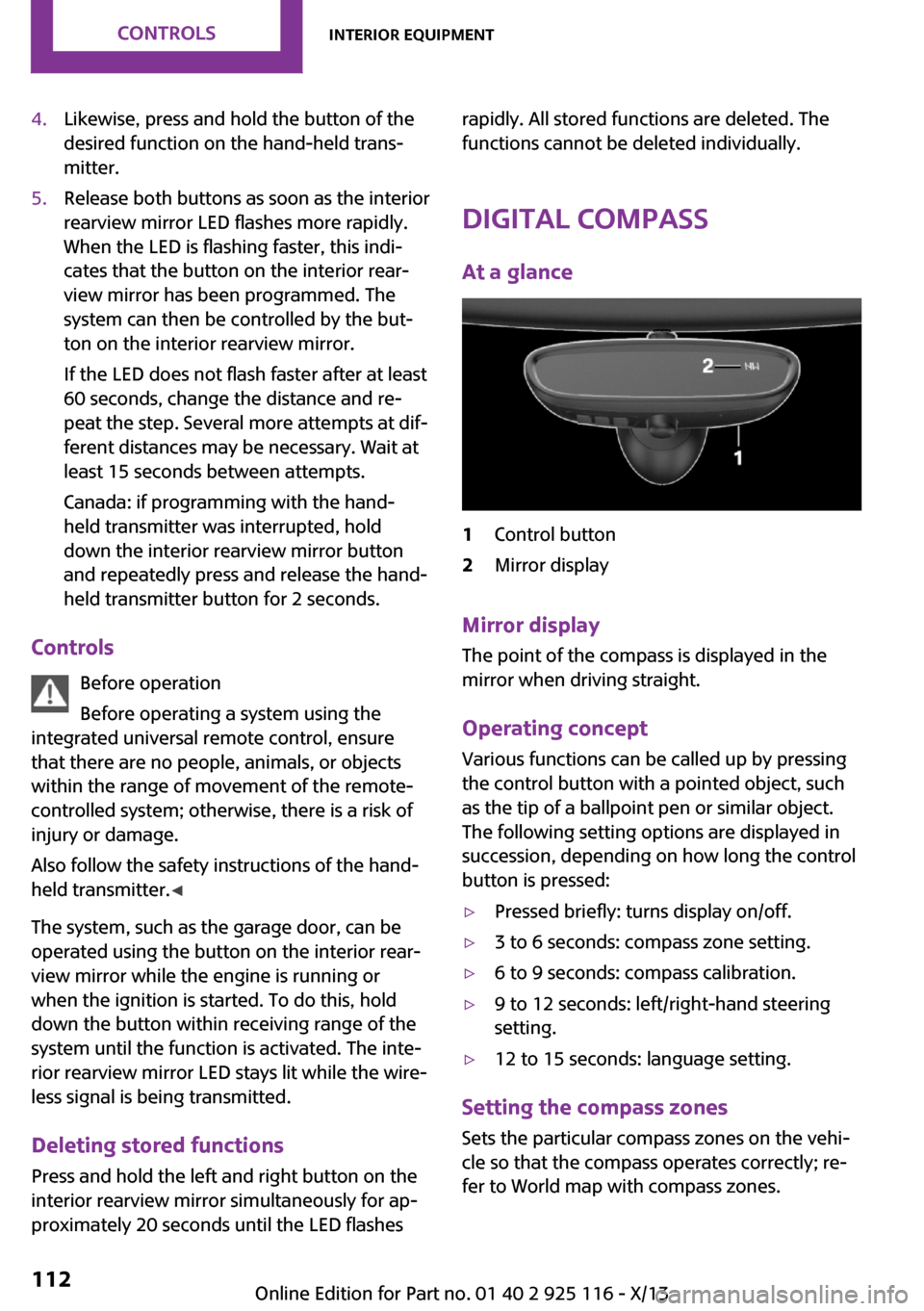
At a glance1Control button2Mirror display
Mirror display The point of the compass is displayed in the
mirror when driving straight.
Operating concept Various functions can be called up by pressing
the control button with a pointed object, such
as the tip of a ballpoint pen or similar object.
The following setting options are displayed in
succession, depending on how long the control
button is pressed:
▷Pressed briefly: turns display on/off.▷3 to 6 seconds: compass zone setting.▷6 to 9 seconds: compass calibration.▷9 to 12 seconds: left/right-hand steering
setting.▷12 to 15 seconds: language setting.
Setting the compass zones
Sets the particular compass zones on the vehi‐
cle so that the compass operates correctly; re‐
fer to World map with compass zones.
Seite 112ControlsInterior equipment112
Online Edition for Part no. 01 40 2 925 116 - X/13
Page 118 of 233
The setting is stored automatically after ap‐
proximately 10 seconds.
Connecting electrical de‐
vices
Hints Do not plug chargers into the socket
Do not connect battery chargers to the
factory-installed sockets in the vehicle as this
may damage the battery. ◀
Replace the cover after use
Reinsert the lighter or socket cover after
use, otherwise objects may get into the lighter
socket or fixture and cause a short circuit. ◀
Keep the airbag unfolding area clear
Make sure that the devices and cable are
located outside of the unfolding area of the air‐
bag; otherwise, its unfolding can be hindered
or objects can be hurled through the interior
when the airbag unfolds. ◀
Sockets Sockets can be used for the operation of elec‐
trical devices with the engine running or with
the ignition switched on. The total load of all
sockets must not exceed 140 watts at 12 volts.
Do not damage the socket by using unsuitable
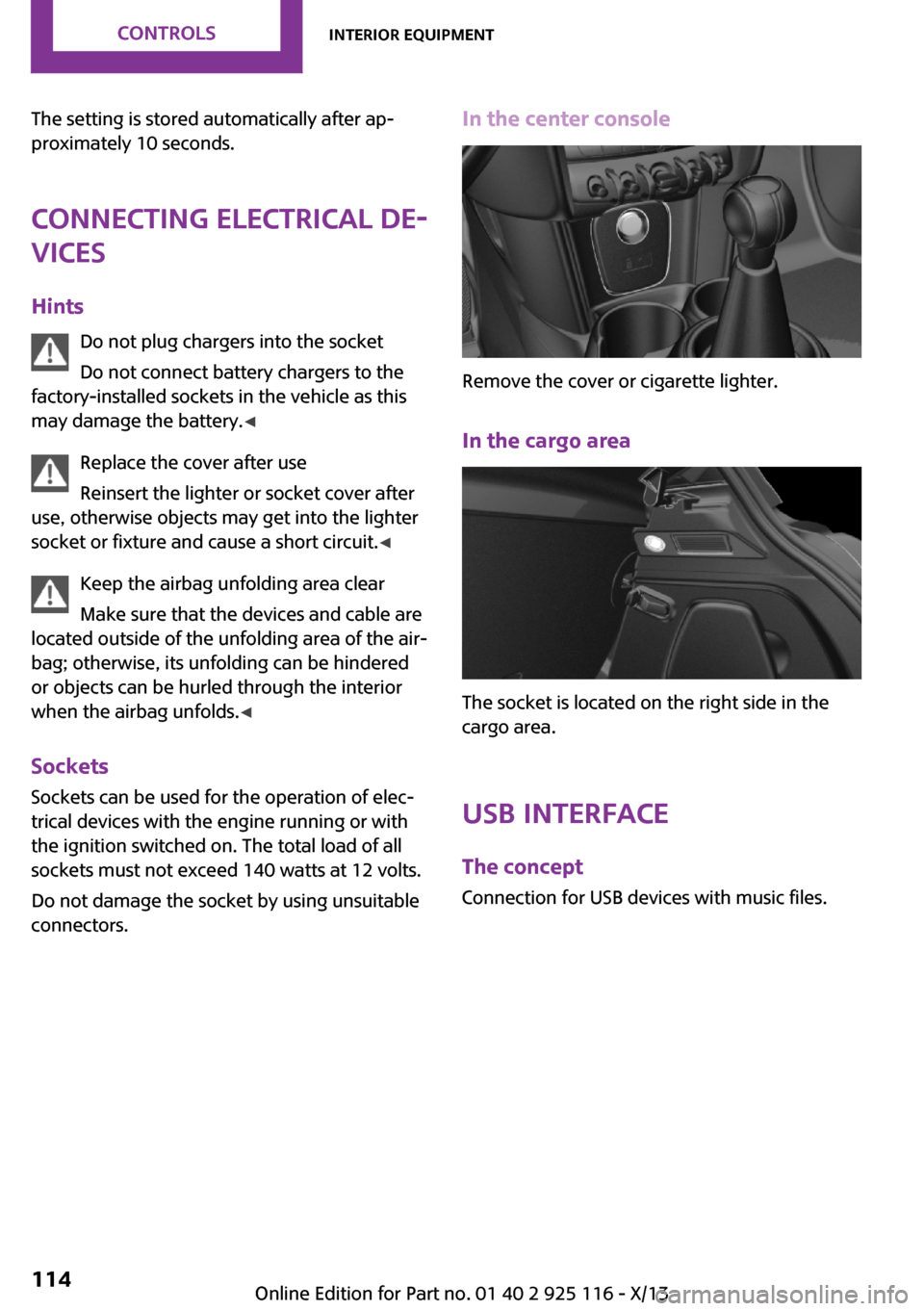
connectors.In the center console
Remove the cover or cigarette lighter.
In the cargo area
The socket is located on the right side in the
cargo area.
USB interface The concept
Connection for USB devices with music files.
Seite 114ControlsInterior equipment114
Online Edition for Part no. 01 40 2 925 116 - X/13
Page 119 of 233
At a glance
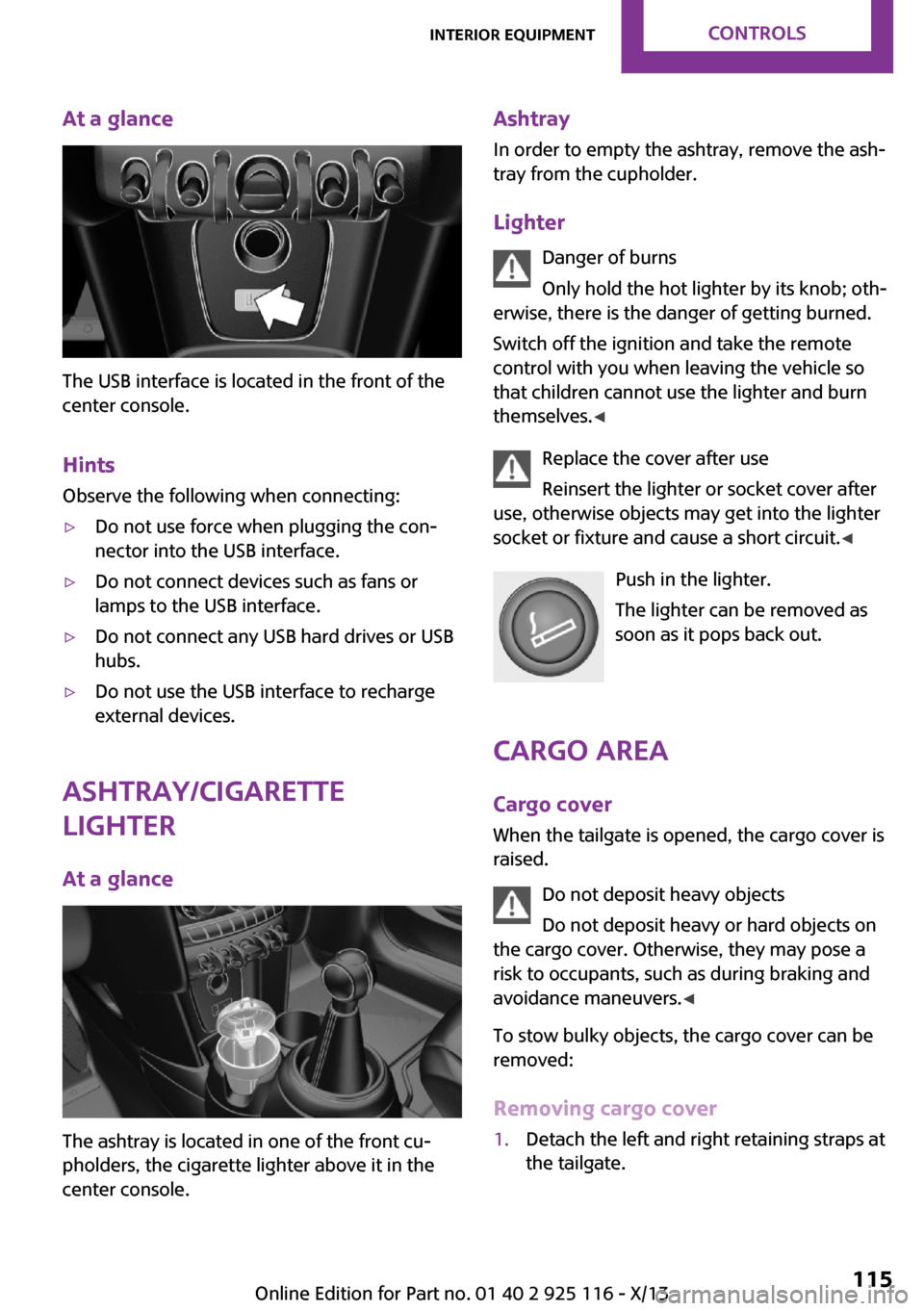
The USB interface is located in the front of the
center console.
Hints Observe the following when connecting:
▷Do not use force when plugging the con‐
nector into the USB interface.▷Do not connect devices such as fans or
lamps to the USB interface.▷Do not connect any USB hard drives or USB
hubs.▷Do not use the USB interface to recharge
external devices.
Ashtray/cigarette
lighter
At a glance
The ashtray is located in one of the front cu‐
pholders, the cigarette lighter above it in the
center console.
Ashtray
In order to empty the ashtray, remove the ash‐
tray from the cupholder.
Lighter Danger of burns
Only hold the hot lighter by its knob; oth‐
erwise, there is the danger of getting burned.
Switch off the ignition and take the remote
control with you when leaving the vehicle so
that children cannot use the lighter and burn
themselves. ◀
Replace the cover after use
Reinsert the lighter or socket cover after
use, otherwise objects may get into the lighter
socket or fixture and cause a short circuit. ◀
Push in the lighter.
The lighter can be removed as
soon as it pops back out.
Cargo area Cargo cover
When the tailgate is opened, the cargo cover is
raised.
Do not deposit heavy objects
Do not deposit heavy or hard objects on
the cargo cover. Otherwise, they may pose a
risk to occupants, such as during braking and
avoidance maneuvers. ◀
To stow bulky objects, the cargo cover can be
removed:
Removing cargo cover1.Detach the left and right retaining straps at
the tailgate.Seite 115Interior equipmentControls115
Online Edition for Part no. 01 40 2 925 116 - X/13
Page 143 of 233
RadioVehicle equipment
All standard, country-specific and optional
equipment that is offered in the model series is
described in this chapter. Therefore, equipment
is also described that is not available in a vehi‐
cle, e. g., because of the selected optional
equipment or country variant. This also applies
for safety-related functions and systems.
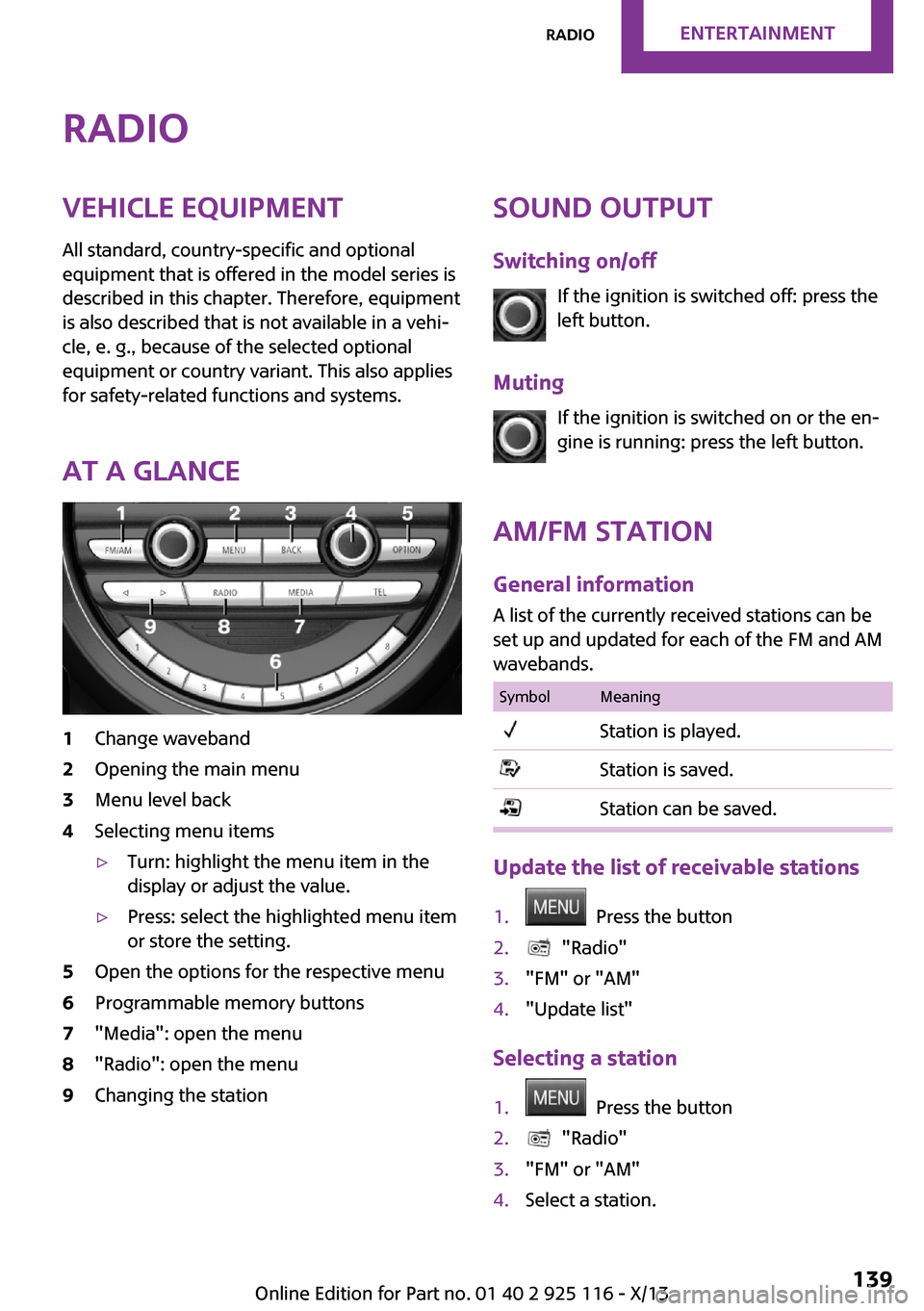
At a glance1Change waveband2Opening the main menu3Menu level back4Selecting menu items▷Turn: highlight the menu item in the
display or adjust the value.▷Press: select the highlighted menu item
or store the setting.5Open the options for the respective menu6Programmable memory buttons7"Media": open the menu8"Radio": open the menu9Changing the stationSound output
Switching on/off If the ignition is switched off: press the
left button.
Muting If the ignition is switched on or the en‐
gine is running: press the left button.
AM/FM station General information
A list of the currently received stations can be
set up and updated for each of the FM and AM
wavebands.SymbolMeaningStation is played.Station is saved.Station can be saved.
Update the list of receivable stations
1. Press the button2. "Radio"3."FM" or "AM"4."Update list"
Selecting a station
1. Press the button2. "Radio"3."FM" or "AM"4.Select a station.Seite 139RadioEntertainment139
Online Edition for Part no. 01 40 2 925 116 - X/13
Page 156 of 233
Bluetooth hands-free systemVehicle equipmentAll standard, country-specific and optional
equipment that is offered in the model series is
described in this chapter. Therefore, equipment
is also described that is not available in a vehi‐
cle, e. g., because of the selected optional
equipment or country variant. This also applies
for safety-related functions and systems.
The concept Mobile phones can be connected to the vehicle
via Bluetooth. After the mobile phones are
paired once, they are recognized automatically
when the ignition is switched on. As soon as
they are inside the vehicle they can be oper‐
ated via the radio and via the buttons on the
steering wheel.
Hints Using the mobile phone while driving
Make entries only when traffic and road
conditions allow. Do not hold the mobile phone
in your hand while you are driving; use the
hands-free system instead. If you do not ob‐
serve this precaution, you can endanger the ve‐
hicle occupants and other road users. ◀
Certain functions may need to be enabled by
the mobile phone provider or service provider.
At high temperatures, the charge functions of
the mobile phone can be limited under certain
circumstances, and functions are no longer
executed.
When the mobile phone is used via the vehicle,
refer to the operating manual of the mobile
phone.Approved mobile phones
Accurate information about which mobile
phones are supported with a Bluetooth inter‐
face is available at www.mini.com/connectivity.
Displaying the vehicle identification
number and software part number
The vehicle identification number and the soft‐
ware part number are needed to determine
which mobile phones are supported by the mo‐
bile phone preparation package. The software
version of the mobile phone may also be re‐
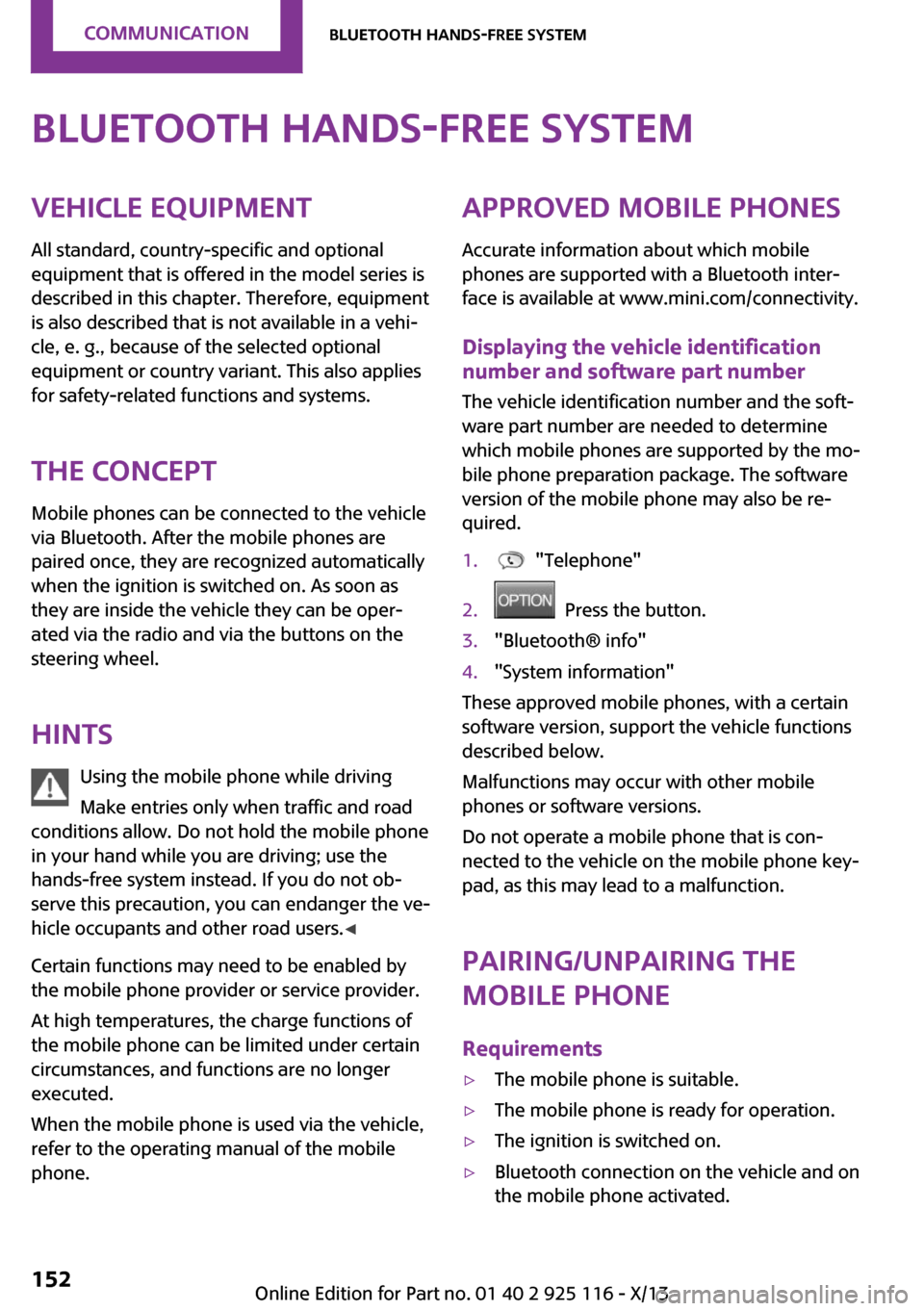
quired.1. "Telephone"2. Press the button.3."Bluetooth® info"4."System information"
These approved mobile phones, with a certain
software version, support the vehicle functions
described below.
Malfunctions may occur with other mobile
phones or software versions.
Do not operate a mobile phone that is con‐
nected to the vehicle on the mobile phone key‐
pad, as this may lead to a malfunction.
Pairing/unpairing the
mobile phone
Requirements
▷The mobile phone is suitable.▷The mobile phone is ready for operation.▷The ignition is switched on.▷Bluetooth connection on the vehicle and on
the mobile phone activated.Seite 152CommunicationBluetooth hands-free system152
Online Edition for Part no. 01 40 2 925 116 - X/13
Page 161 of 233
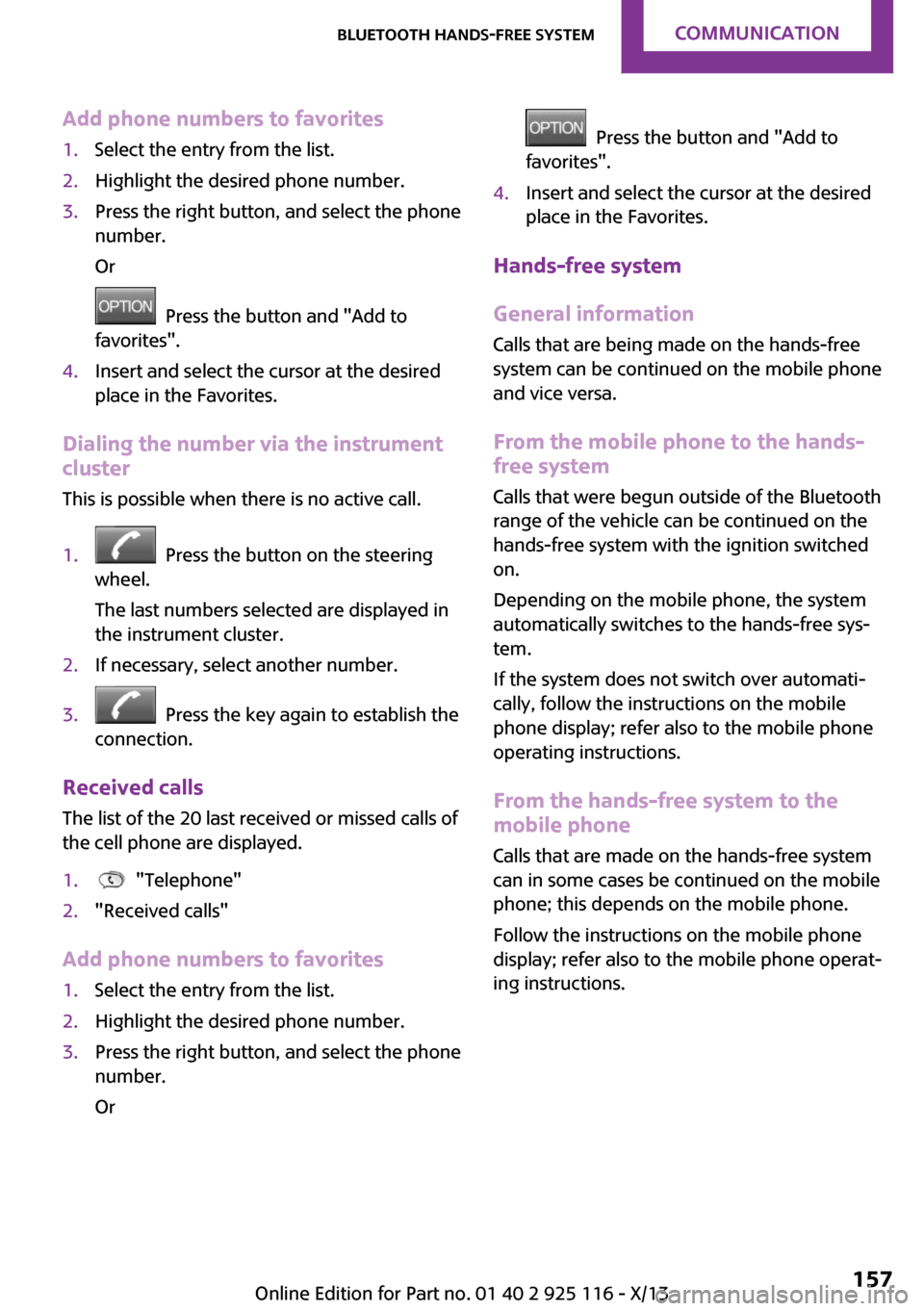
Add phone numbers to favorites1.Select the entry from the list.2.Highlight the desired phone number.3.Press the right button, and select the phone
number.
Or
Press the button and "Add to
favorites".
4.Insert and select the cursor at the desired
place in the Favorites.
Dialing the number via the instrument
cluster
This is possible when there is no active call.
1. Press the button on the steering
wheel.
The last numbers selected are displayed in
the instrument cluster.
2.If necessary, select another number.3. Press the key again to establish the
connection.
Received calls
The list of the 20 last received or missed calls of
the cell phone are displayed.
1. "Telephone"2."Received calls"
Add phone numbers to favorites
1.Select the entry from the list.2.Highlight the desired phone number.3.Press the right button, and select the phone
number.
Or
Press the button and "Add to
favorites".
4.Insert and select the cursor at the desired
place in the Favorites.
Hands-free system
General information
Calls that are being made on the hands-free
system can be continued on the mobile phone
and vice versa.
From the mobile phone to the hands-
free system
Calls that were begun outside of the Bluetooth
range of the vehicle can be continued on the
hands-free system with the ignition switched
on.
Depending on the mobile phone, the system
automatically switches to the hands-free sys‐
tem.
If the system does not switch over automati‐
cally, follow the instructions on the mobile
phone display; refer also to the mobile phone
operating instructions.
From the hands-free system to the
mobile phone
Calls that are made on the hands-free system
can in some cases be continued on the mobile
phone; this depends on the mobile phone.
Follow the instructions on the mobile phone
display; refer also to the mobile phone operat‐
ing instructions.
Seite 157Bluetooth hands-free systemCommunication157
Online Edition for Part no. 01 40 2 925 116 - X/13
Page 179 of 233
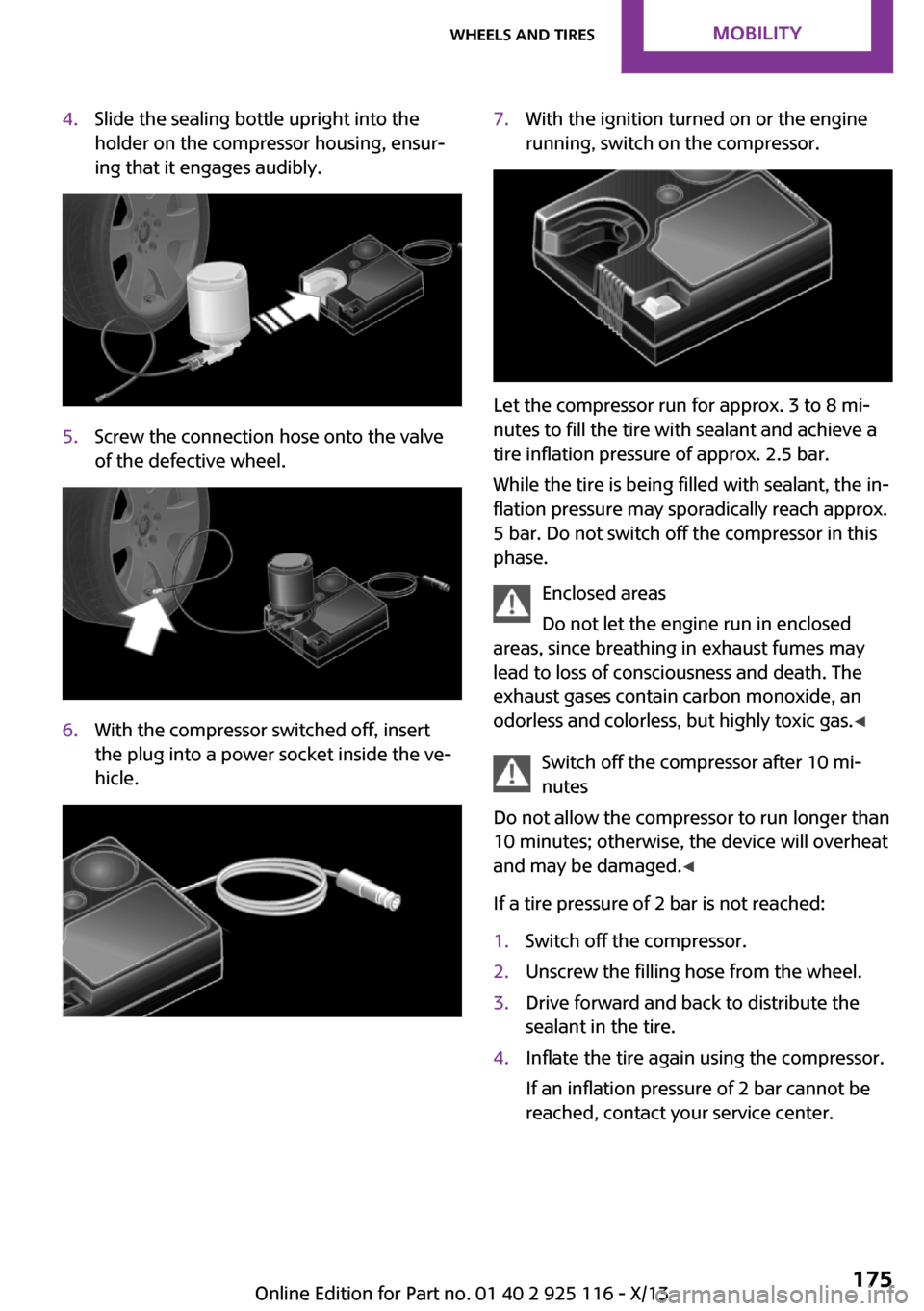
4.Slide the sealing bottle upright into the
holder on the compressor housing, ensur‐
ing that it engages audibly.5.Screw the connection hose onto the valve
of the defective wheel.6.With the compressor switched off, insert
the plug into a power socket inside the ve‐
hicle.7.With the ignition turned on or the engine
running, switch on the compressor.
Let the compressor run for approx. 3 to 8 mi‐
nutes to fill the tire with sealant and achieve a
tire inflation pressure of approx. 2.5 bar.
While the tire is being filled with sealant, the in‐
flation pressure may sporadically reach approx.
5 bar. Do not switch off the compressor in this
phase.
Enclosed areas
Do not let the engine run in enclosed
areas, since breathing in exhaust fumes may
lead to loss of consciousness and death. The
exhaust gases contain carbon monoxide, an
odorless and colorless, but highly toxic gas. ◀
Switch off the compressor after 10 mi‐
nutes
Do not allow the compressor to run longer than
10 minutes; otherwise, the device will overheat
and may be damaged. ◀
If a tire pressure of 2 bar is not reached:
1.Switch off the compressor.2.Unscrew the filling hose from the wheel.3.Drive forward and back to distribute the
sealant in the tire.4.Inflate the tire again using the compressor.
If an inflation pressure of 2 bar cannot be
reached, contact your service center.Seite 175Wheels and tiresMobility175
Online Edition for Part no. 01 40 2 925 116 - X/13
Page 180 of 233
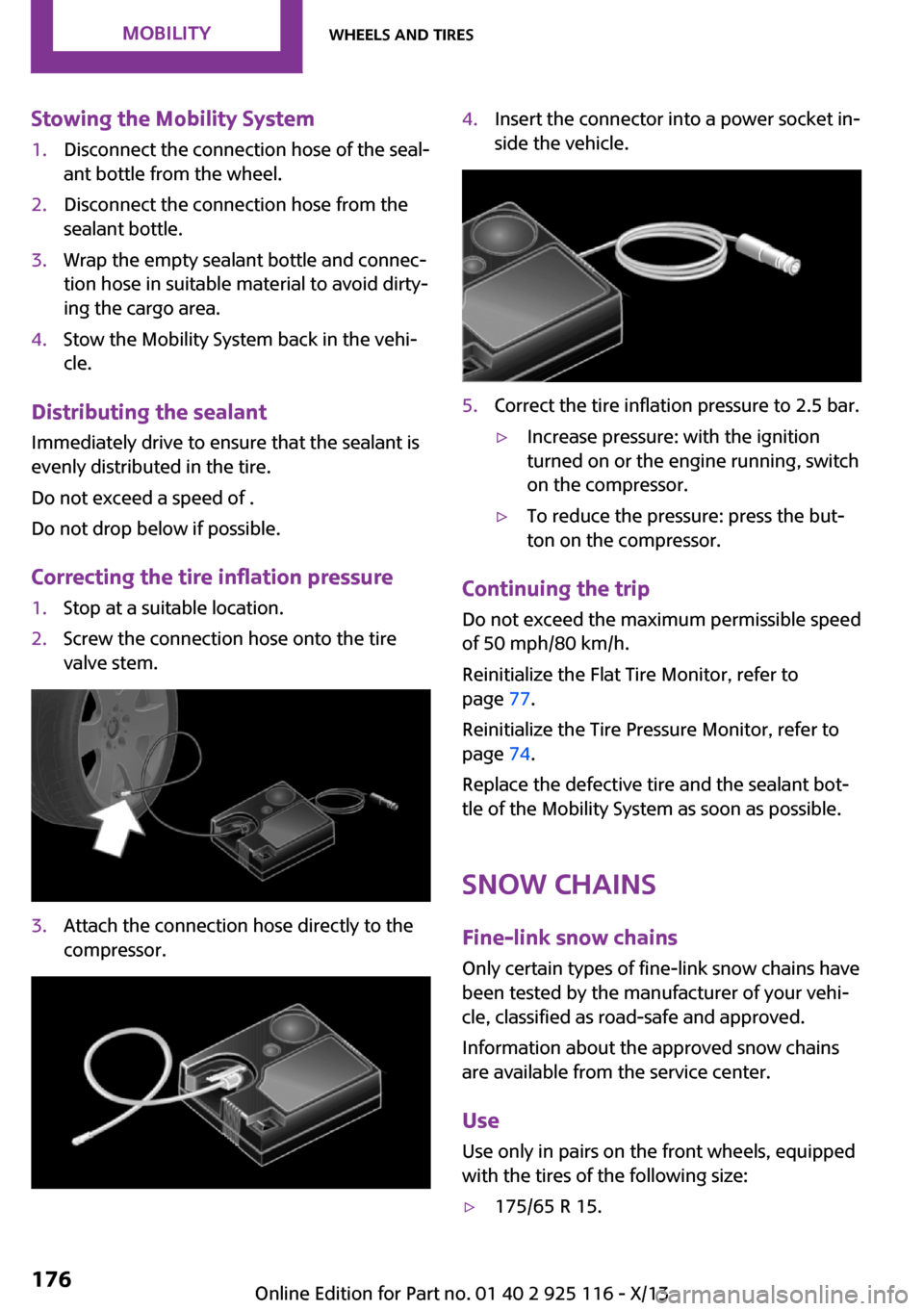
Stowing the Mobility System1.Disconnect the connection hose of the seal‐
ant bottle from the wheel.2.Disconnect the connection hose from the
sealant bottle.3.Wrap the empty sealant bottle and connec‐
tion hose in suitable material to avoid dirty‐
ing the cargo area.4.Stow the Mobility System back in the vehi‐
cle.
Distributing the sealant
Immediately drive to ensure that the sealant is
evenly distributed in the tire.
Do not exceed a speed of .
Do not drop below if possible.
Correcting the tire inflation pressure
1.Stop at a suitable location.2.Screw the connection hose onto the tire
valve stem.3.Attach the connection hose directly to the
compressor.4.Insert the connector into a power socket in‐
side the vehicle.5.Correct the tire inflation pressure to 2.5 bar.▷Increase pressure: with the ignition
turned on or the engine running, switch
on the compressor.▷To reduce the pressure: press the but‐
ton on the compressor.
Continuing the trip
Do not exceed the maximum permissible speed
of 50 mph/80 km/h.
Reinitialize the Flat Tire Monitor, refer to
page 77.
Reinitialize the Tire Pressure Monitor, refer to
page 74.
Replace the defective tire and the sealant bot‐
tle of the Mobility System as soon as possible.
Snow chains
Fine-link snow chains Only certain types of fine-link snow chains have
been tested by the manufacturer of your vehi‐
cle, classified as road-safe and approved.
Information about the approved snow chains
are available from the service center.
Use
Use only in pairs on the front wheels, equipped
with the tires of the following size:
▷175/65 R 15.Seite 176MobilityWheels and tires176
Online Edition for Part no. 01 40 2 925 116 - X/13
Page 185 of 233
If the oil level reaches the minimum level or an
overfilling is detected, a check control message
is displayed.
During the measurement, the idle speed is in‐
creased somewhat.
Requirements▷Vehicle is on level road.▷Manual transmission: shift lever in neutral
position, clutch and accelerator pedals not
depressed.▷Automatic transmission: selector lever in
transmission position N or P and accelera‐
tor pedal not depressed.▷Engine is running and is at operating tem‐
perature.
Performing a detailed measurement
In order to perform a detailed measurement of
the engine oil level:
Confirm message regarding oil level display.
The oil level is checked and displayed via a
scale.
Duration: approx. 1 minute.
Adding engine oil
General information Switch off the ignition and safely park the vehi‐
cle before engine oil is added.
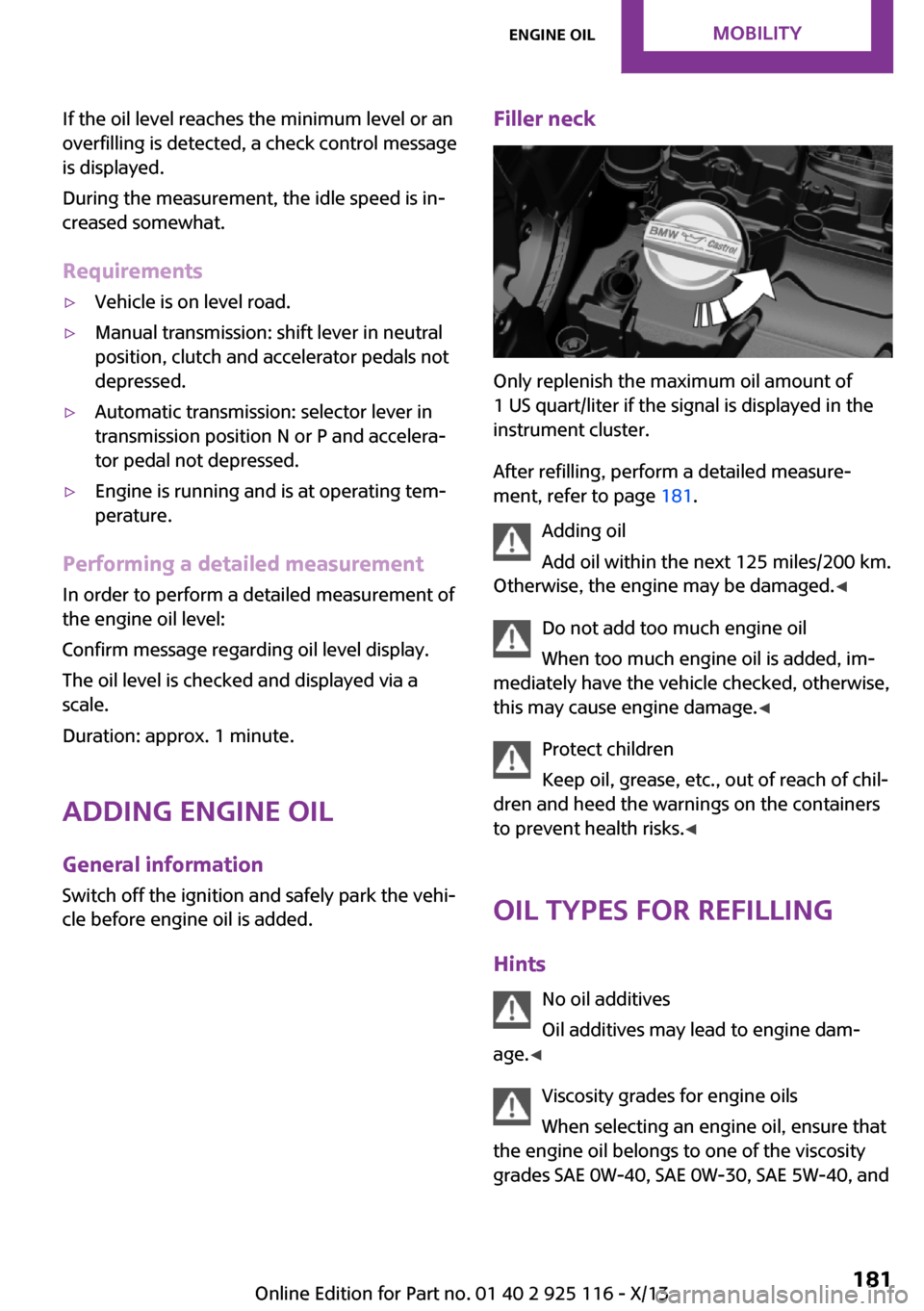
Filler neck
Only replenish the maximum oil amount of
1 US quart/liter if the signal is displayed in the
instrument cluster.
After refilling, perform a detailed measure‐
ment, refer to page 181.
Adding oil
Add oil within the next 125 miles/200 km.
Otherwise, the engine may be damaged. ◀
Do not add too much engine oil
When too much engine oil is added, im‐
mediately have the vehicle checked, otherwise,
this may cause engine damage. ◀
Protect children
Keep oil, grease, etc., out of reach of chil‐
dren and heed the warnings on the containers
to prevent health risks. ◀
Oil types for refilling
Hints No oil additives
Oil additives may lead to engine dam‐
age. ◀
Viscosity grades for engine oils
When selecting an engine oil, ensure that
the engine oil belongs to one of the viscosity
grades SAE 0W-40, SAE 0W-30, SAE 5W-40, and
Seite 181Engine oilMobility181
Online Edition for Part no. 01 40 2 925 116 - X/13