reset MINI Clubman 2010 (Mini Connected) User Guide
[x] Cancel search | Manufacturer: MINI, Model Year: 2010, Model line: Clubman, Model: MINI Clubman 2010Pages: 218, PDF Size: 3.97 MB
Page 79 of 218
MOBILITYAT A GLANCE CONTROLS DRIVING TIPS ENTERTAINMENT
77
NAVIGATION REFERENCE
After driving a few minutes, the set inflation
pressures in the tires are accepted as the target
values to be monitored. The system reset is
completed during your drive, and can be inter-
rupted at any time. When driving resumes, the
reset is continued automatically. On the
onboard monitor, the tires are shown in green
and "Status: TPM active" is once again dis-
played.
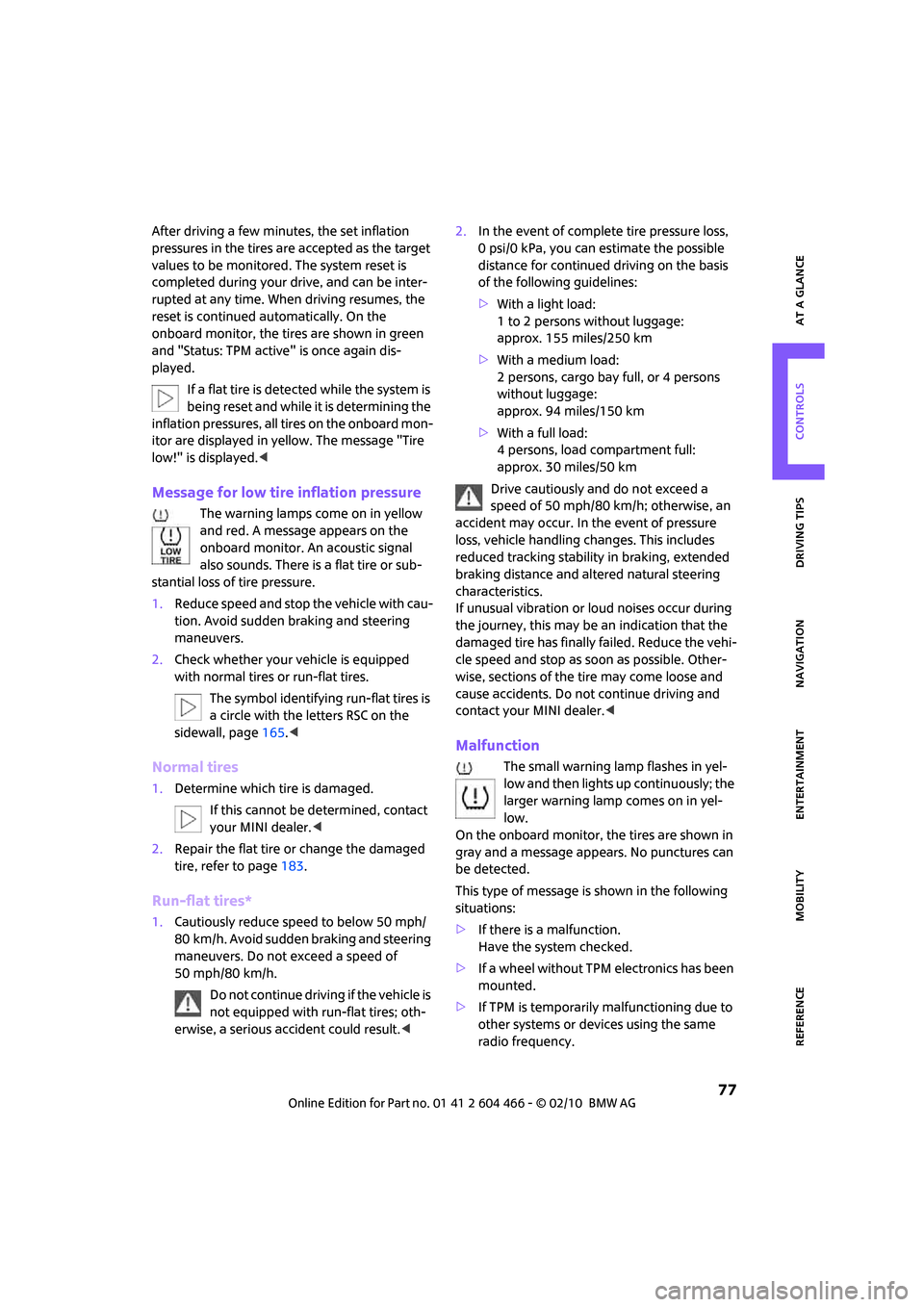
If a flat tire is detected while the system is
being reset and while it is determining the
inflation pressures, all tires on the onboard mon-
itor are displayed in yellow. The message "Tire
low!" is displayed.<
Message for low tire inflation pressure
The warning lamps come on in yellow
and red. A message appears on the
onboard monitor. An acoustic signal
also sounds. There is a flat tire or sub-
stantial loss of tire pressure.
1.Reduce speed and stop the vehicle with cau-
tion. Avoid sudden braking and steering
maneuvers.
2.Check whether your vehicle is equipped
with normal tires or run-flat tires.
The symbol identifying run-flat tires is
a circle with the letters RSC on the
sidewall, page165.<
Normal tires
1.Determine which tire is damaged.
If this cannot be determined, contact
your MINI dealer.<
2.Repair the flat tire or change the damaged
tire, refer to page183.
Run-flat tires*
1.Cautiously reduce speed to below 50 mph/
80 km/h. Avoid sudden braking and steering
maneuvers. Do not exceed a speed of
50 mph/80 km/h.
Do not continue driving if the vehicle is
not equipped with run-flat tires; oth-
erwise, a serious accident could result.<2.In the event of complete tire pressure loss,
0 psi/0 kPa, you can estimate the possible
distance for continued driving on the basis
of the following guidelines:
>With a light load:
1 to 2 persons without luggage:
approx. 155 miles/250 km
>With a medium load:
2 persons, cargo bay full, or 4 persons
without luggage:
approx. 94 miles/150 km
>With a full load:
4 persons, load compartment full:
approx. 30 miles/50 km
Drive cautiously and do not exceed a
speed of 50 mph/80 km/h; otherwise, an
accident may occur. In the event of pressure
loss, vehicle handling changes. This includes
reduced tracking stability in braking, extended
braking distance and altered natural steering
characteristics.
If unusual vibration or loud noises occur during
the journey, this may be an indication that the
damaged tire has finally failed. Reduce the vehi-
cle speed and stop as soon as possible. Other-
wise, sections of the tire may come loose and
cause accidents. Do not continue driving and
contact your MINI dealer.<
Malfunction
The small warning lamp flashes in yel-
low and then lights up continuously; the
larger warning lamp comes on in yel-
low.
On the onboard monitor, the tires are shown in
gray and a message appears. No punctures can
be detected.
This type of message is shown in the following
situations:
>If there is a malfunction.
Have the system checked.
>If a wheel without TPM electronics has been
mounted.
>If TPM is temporarily malfunctioning due to
other systems or devices using the same
radio frequency.
Page 80 of 218
Technology for driving comfort and safety
78
Message for unsuccessful system reset
Both warning lamps come on in yellow.
A message appears on the onboard
monitor. The system is not reset after a
tire has been changed, for example.
Check the tire inflation pressure and reset the
system, page76.
Declaration according to NHTSA/
FMVSS 138 Tire Pressure Monitoring
Systems
Each tire, including the spare, should be
checked monthly when cold and inflated to the
inflation pressure recommended by the vehicle
manufacturer on the vehicle placard or tire infla-
tion pressure label. If your vehicle has tires of a
different size than the size indicated on the vehi-
cle placard or tire inflation pressure label, you
should determine the proper tire inflation pres-
sure for those tires. As an added safety feature,
your vehicle has been equipped with a tire pres-
sure monitoring system TPMS that illuminates a
low tire pressure telltale when one or more of
your tires are significantly underinflated.
Accordingly, when the low tire pressure telltale
illuminates, you should stop and check your tires
as soon as possible, and inflate them to the
proper pressure. Driving on a significantly
underinflated tire causes the tire to overheat
and can lead to tire failure. Underinflation also
reduces fuel efficiency and tire tread life, and
may affect the vehicle's handling and stopping
ability. Please note that the TPMS is not a substi-
tute for proper tire maintenance, and it is the
driver's responsibility to maintain correct tire
pressure, even if underinflation has not reached
the level at which the TPMS low tire pressure tell-
tale illuminates.
The TPMS malfunction indicator is combined
with the low tire pressure telltale. When the sys-
tem detects a malfunction, the telltale will flash
for approximately one minute and then remain
continuously lit. This sequence will continue
upon subsequent vehicle startups as long as the
malfunction exists. When the malfunction indi-
cator is illuminated, the system may not be able
to detect or signal low tire pressure as intended.
TPMS malfunctions may occur for a variety of reasons, including the installation of replace-
ment or alternate tires or wheels on the vehicle
that prevent the TPMS from functioning prop-
erly. Always check the TPMS malfunction telltale
after replacing one or more tires or wheels on
your vehicle to ensure that the replacement or
alternate tires and wheels allow the TPMS to
continue to function properly.
Page 136 of 218
On/off and settings
134
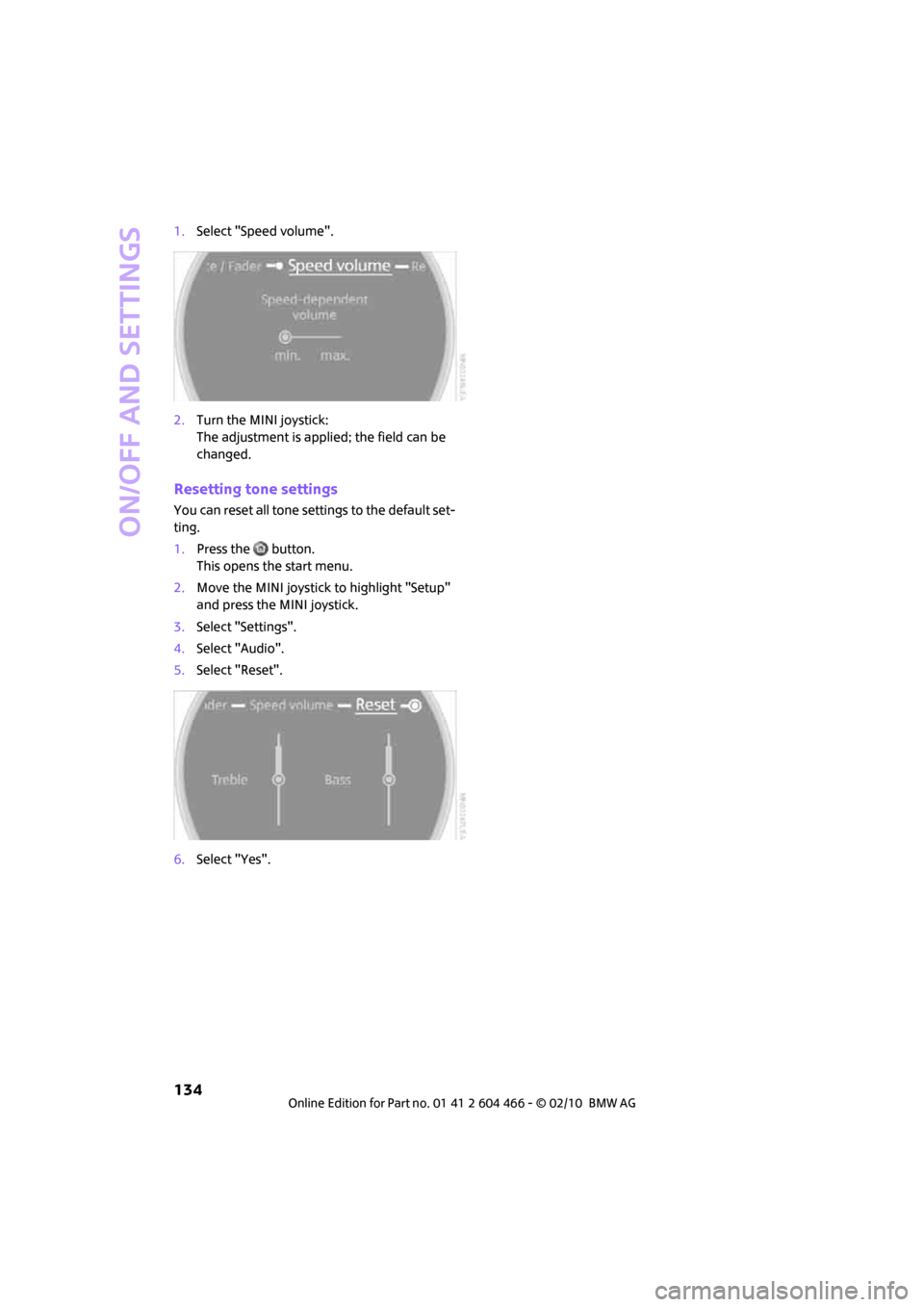
1.Select "Speed volume".
2.Turn the MINI joystick:
The adjustment is applied; the field can be
changed.
Resetting tone settings
You can reset all tone settings to the default set-
ting.
1.Press the button.
This opens the start menu.
2.Move the MINI joystick to highlight "Setup"
and press the MINI joystick.
3.Select "Settings".
4.Select "Audio".
5.Select "Reset".
6.Select "Yes".
Page 137 of 218
MOBILITYAT A GLANCE CONTROLS DRIVING TIPS ENTERTAINMENT
135
NAVIGATION REFERENCE
Radio
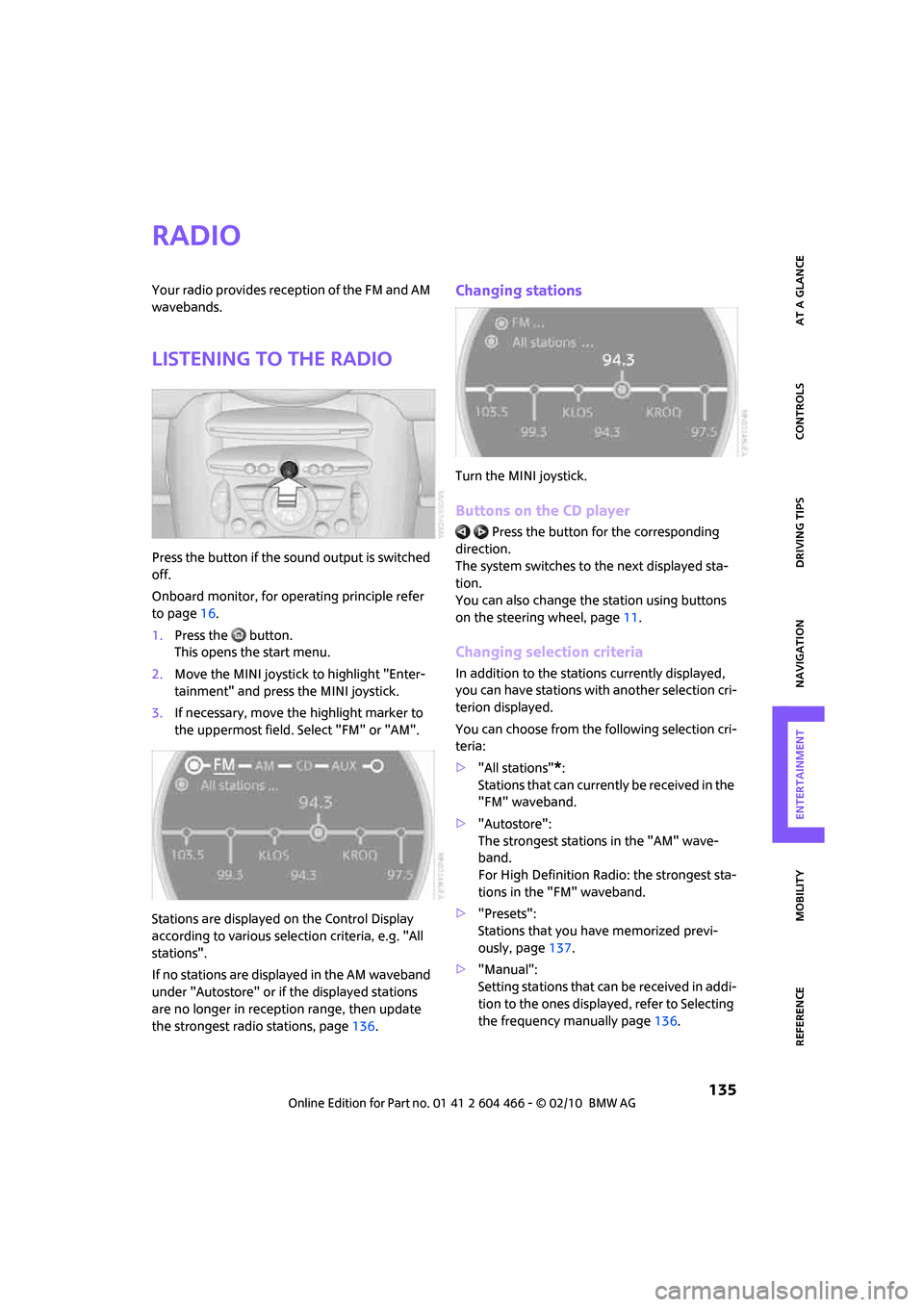
Your radio provides reception of the FM and AM
wavebands.
Listening to the radio
Press the button if the sound output is switched
off.
Onboard monitor, for operating principle refer
to page16.
1.Press the button.
This opens the start menu.
2.Move the MINI joystick to highlight "Enter-
tainment" and press the MINI joystick.
3.If necessary, move the highlight marker to
the uppermost field. Select "FM" or "AM".
Stations are displayed on the Control Display
according to various selection criteria, e.g. "All
stations".
If no stations are displayed in the AM waveband
under "Autostore" or if the displayed stations
are no longer in reception range, then update
the strongest radio stations, page136.
Changing stations
Turn the MINI joystick.
Buttons on the CD player
Press the button for the corresponding
direction.
The system switches to the next displayed sta-
tion.
You can also change the station using buttons
on the steering wheel, page11.
Changing selection criteria
In addition to the stations currently displayed,
you can have stations with another selection cri-
terion displayed.
You can choose from the following selection cri-
teria:
>"All stations"
*:
Stations that can currently be received in the
"FM" waveband.
>"Autostore":
The strongest stations in the "AM" wave-
band.
For High Definition Radio: the strongest sta-
tions in the "FM" waveband.
>"Presets":
Stations that you have memorized previ-
ously, page137.
>"Manual":
Setting stations that can be received in addi-
tion to the ones displayed, refer to Selecting
the frequency manually page136.
Page 139 of 218
MOBILITYAT A GLANCE CONTROLS DRIVING TIPS ENTERTAINMENT
137
NAVIGATION REFERENCE
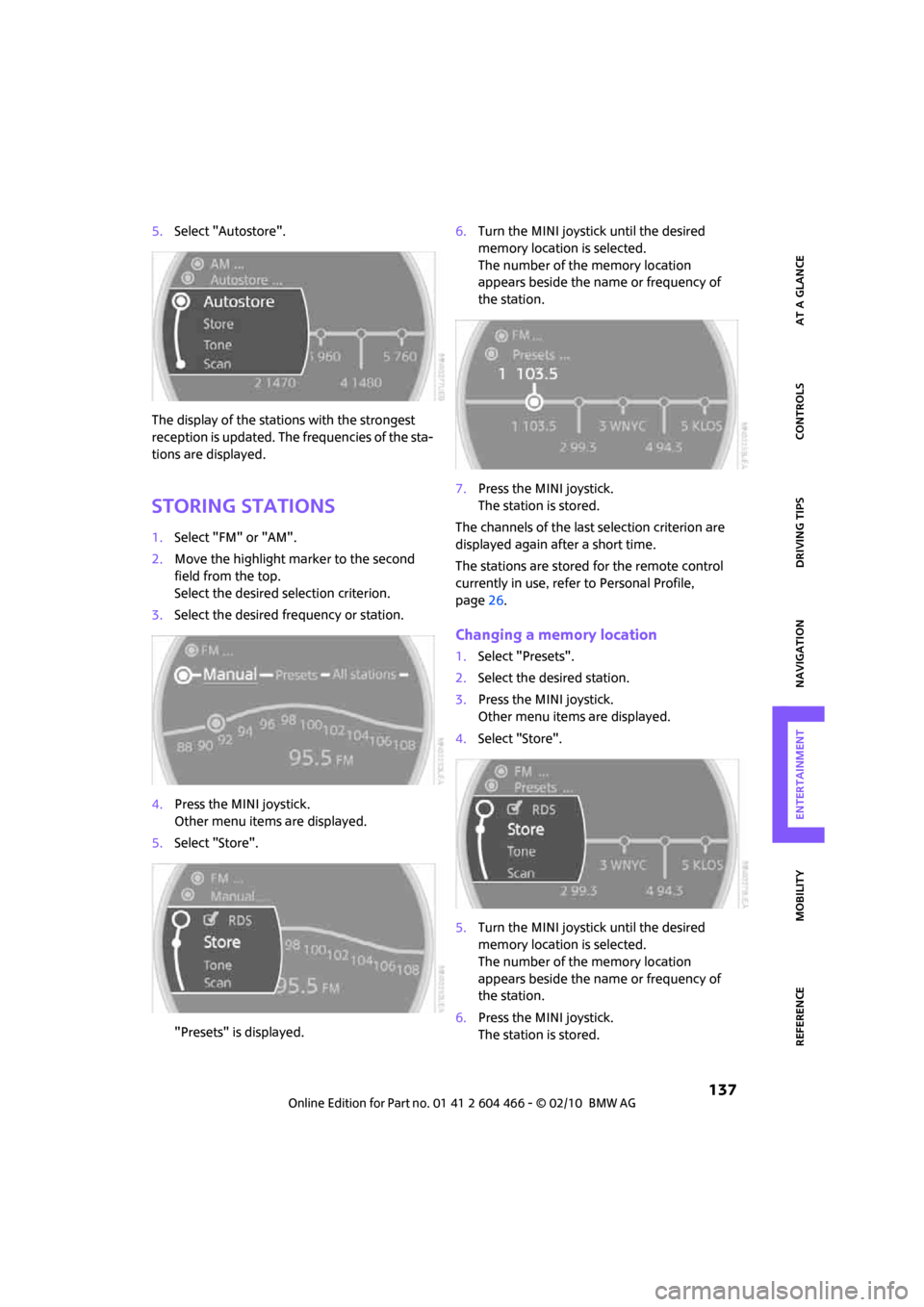
5.Select "Autostore".
The display of the stations with the strongest
reception is updated. The frequencies of the sta-
tions are displayed.
Storing stations
1.Select "FM" or "AM".
2.Move the highlight marker to the second
field from the top.
Select the desired selection criterion.
3.Select the desired frequency or station.
4.Press the MINI joystick.
Other menu items are displayed.
5.Select "Store".
"Presets" is displayed.6.Turn the MINI joystick until the desired
memory location is selected.
The number of the memory location
appears beside the name or frequency of
the station.
7.Press the MINI joystick.
The station is stored.
The channels of the last selection criterion are
displayed again after a short time.
The stations are stored for the remote control
currently in use, refer to Personal Profile,
page26.
Changing a memory location
1.Select "Presets".
2.Select the desired station.
3.Press the MINI joystick.
Other menu items are displayed.
4.Select "Store".
5.Turn the MINI joystick until the desired
memory location is selected.
The number of the memory location
appears beside the name or frequency of
the station.
6.Press the MINI joystick.
The station is stored.
Page 143 of 218
MOBILITYAT A GLANCE CONTROLS DRIVING TIPS ENTERTAINMENT
141
NAVIGATION REFERENCE
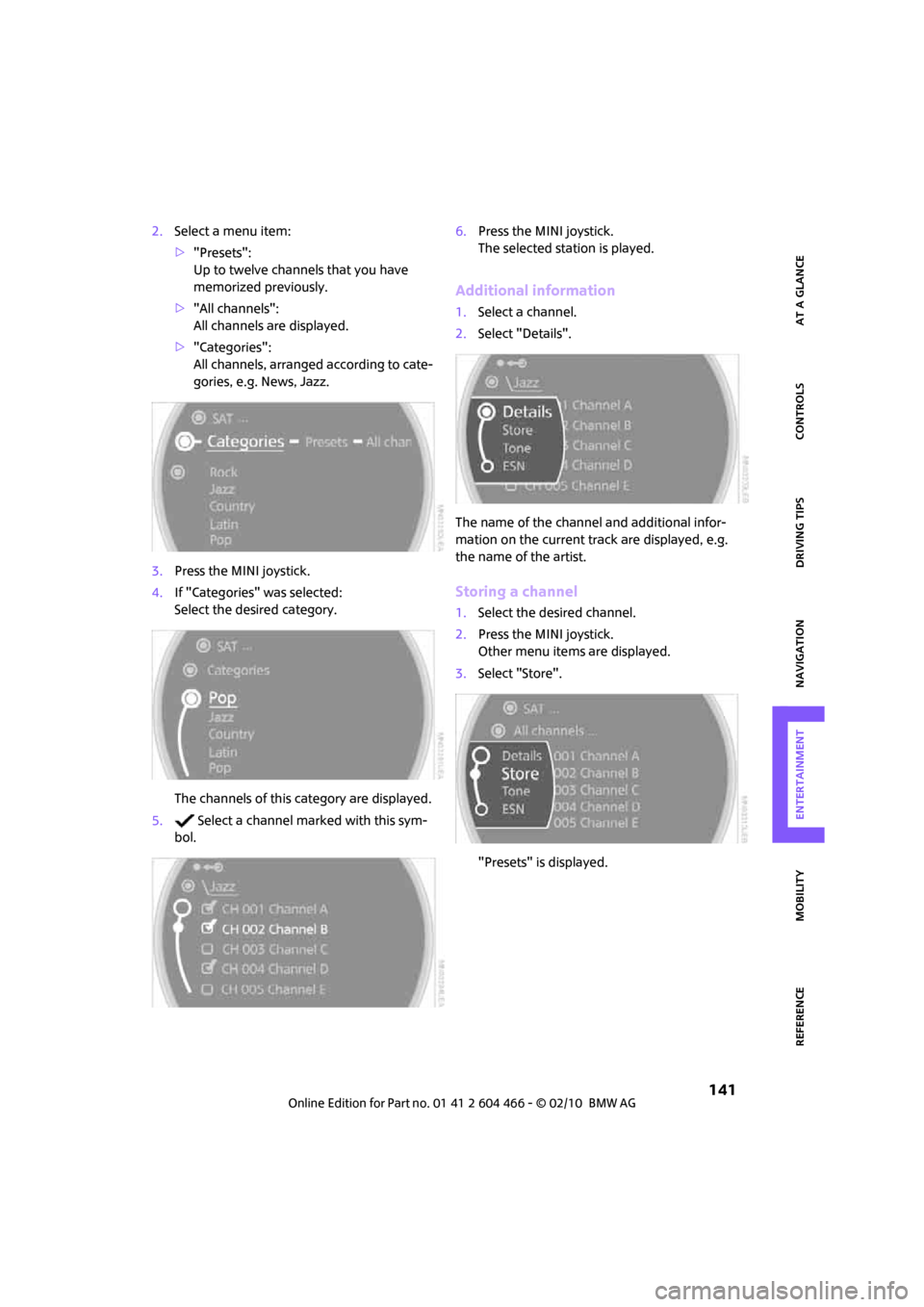
2.Select a menu item:
>"Presets":
Up to twelve channels that you have
memorized previously.
>"All channels":
All channels are displayed.
>"Categories":
All channels, arranged according to cate-
gories, e.g. News, Jazz.
3.Press the MINI joystick.
4.If "Categories" was selected:
Select the desired category.
The channels of this category are displayed.
5. Select a channel marked with this sym-
bol.6.Press the MINI joystick.
The selected station is played.
Additional information
1.Select a channel.
2.Select "Details".
The name of the channel and additional infor-
mation on the current track are displayed, e.g.
the name of the artist.
Storing a channel
1.Select the desired channel.
2.Press the MINI joystick.
Other menu items are displayed.
3.Select "Store".
"Presets" is displayed.
Page 160 of 218
Wheels and tires
158
Wheels and tires
Tire inflation pressures
Information for your safety
It is not merely the tires' service life, but also
driving comfort and, to a great extent, driving
safety that depend on the condition of the tires
and the maintenance of the specified tire pres-
sure.
Checking pressure
Check the tire inflation pressure regularly
and correct it, if necessary: at least twice a
month and before starting long trips. If you fail
to observe this precaution you may be driving
on tires with incorrect tire pressures, a condition
that can not only compromise your vehicle's
driving stability, but also lead to tire damage and
the risk of an accident. Do not drive with
deflated, i.e. flat tires, except when using run-
flat tires. A flat tire will seriously impair your
vehicle's handling and braking response.
Attempts to drive on a flat tire can lead to loss of
control over the vehicle.<
Check the tire inflation pressures only on cold
tires. This means after a maximum of 1.25 miles/
2 km driving or when the vehicle has been
parked for at least 2 hours. When tires are warm,
the tire inflation pressure is higher.
After adjusting the tire inflation pressure,
reinitialize the flat tire monitor, page74,
or reset the Tire Pressure Monitor, page76.<
Checking the tire inflation pressure of
the compact tire*
To check the inflation pressure, fold up the level
load floor. Remove the onboard vehicle tool kit
and the space-saver spare tire, refer to
page183.
Inflation pressure specifications
The tables below provide all the correct inflation
pressures for the specified tire sizes at ambient
temperature.The tire inflation pressures apply to the
tire sizes approved and the tire brands
recommended by the manufacturer of your
MINI. Your MINI dealer will be glad to advise
you.<
For correct identification of the right tire infla-
tion pressures, observe the following:
>Tire sizes for your vehicle
>Load conditions
>Maximum allowable driving speed
Tire inflation pressures for driving up to
100 mph or 160 km/h
For normal driving up to 100 mph or 160 km/h
and to achieve optimum driving comfort, adjust
pressures to the respective tire inflation pres-
sures listed on the following pages in the col-
umns for traveling speeds up to a maximum of
100 mph or 160 km/h.
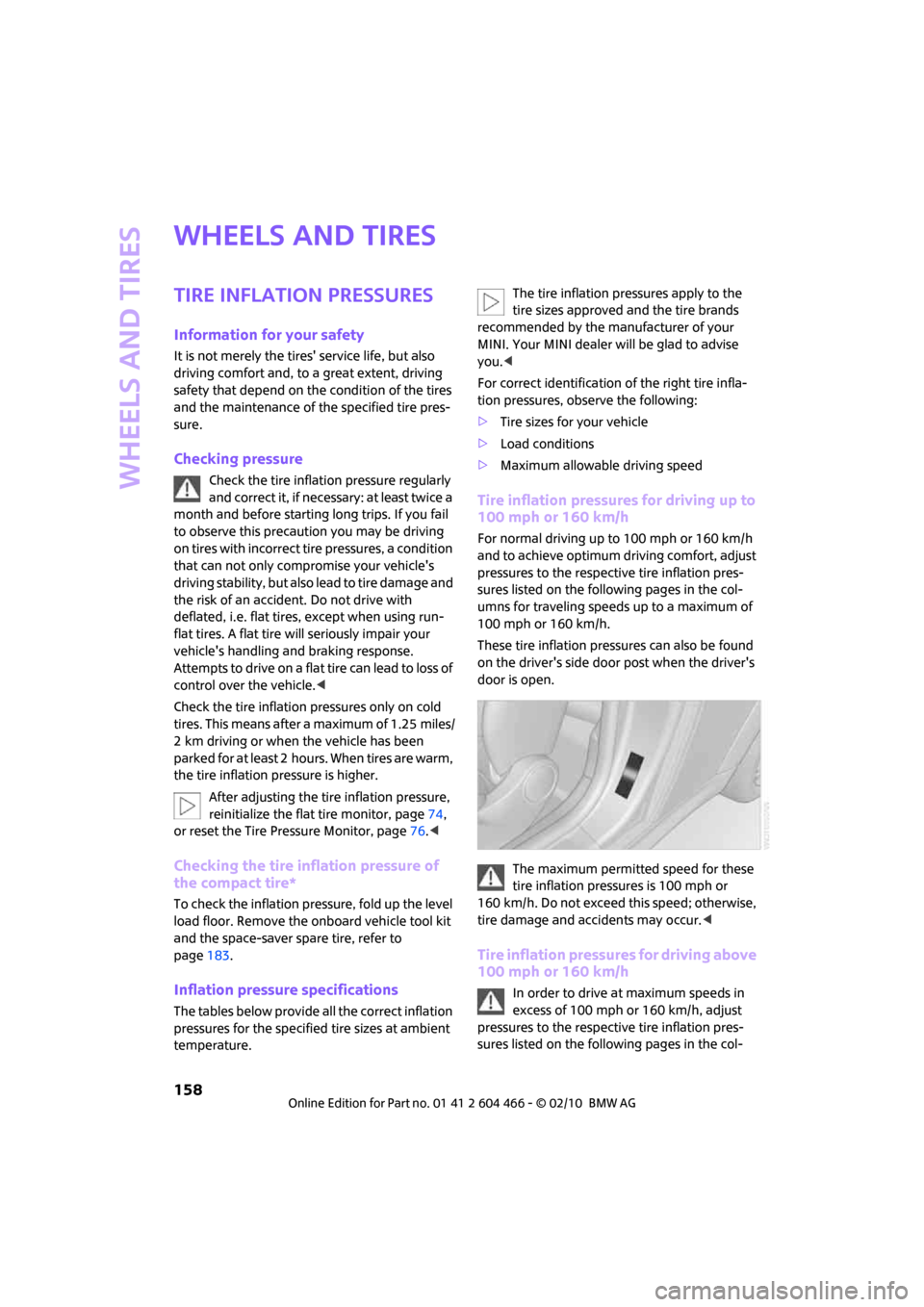
These tire inflation pressures can also be found
on the driver's side door post when the driver's
door is open.
The maximum permitted speed for these
tire inflation pressures is 100 mph or
160 km/h. Do not exceed this speed; otherwise,
tire damage and accidents may occur.<
Tire inflation pressures for driving above
100 mph or 160 km/h
In order to drive at maximum speeds in
excess of 100 mph or 160 km/h, adjust
pressures to the respective tire inflation pres-
sures listed on the following pages in the col-
Page 199 of 218
MOBILITYAT A GLANCE CONTROLS DRIVING TIPS ENTERTAINMENT
197
NAVIGATION REFERENCE
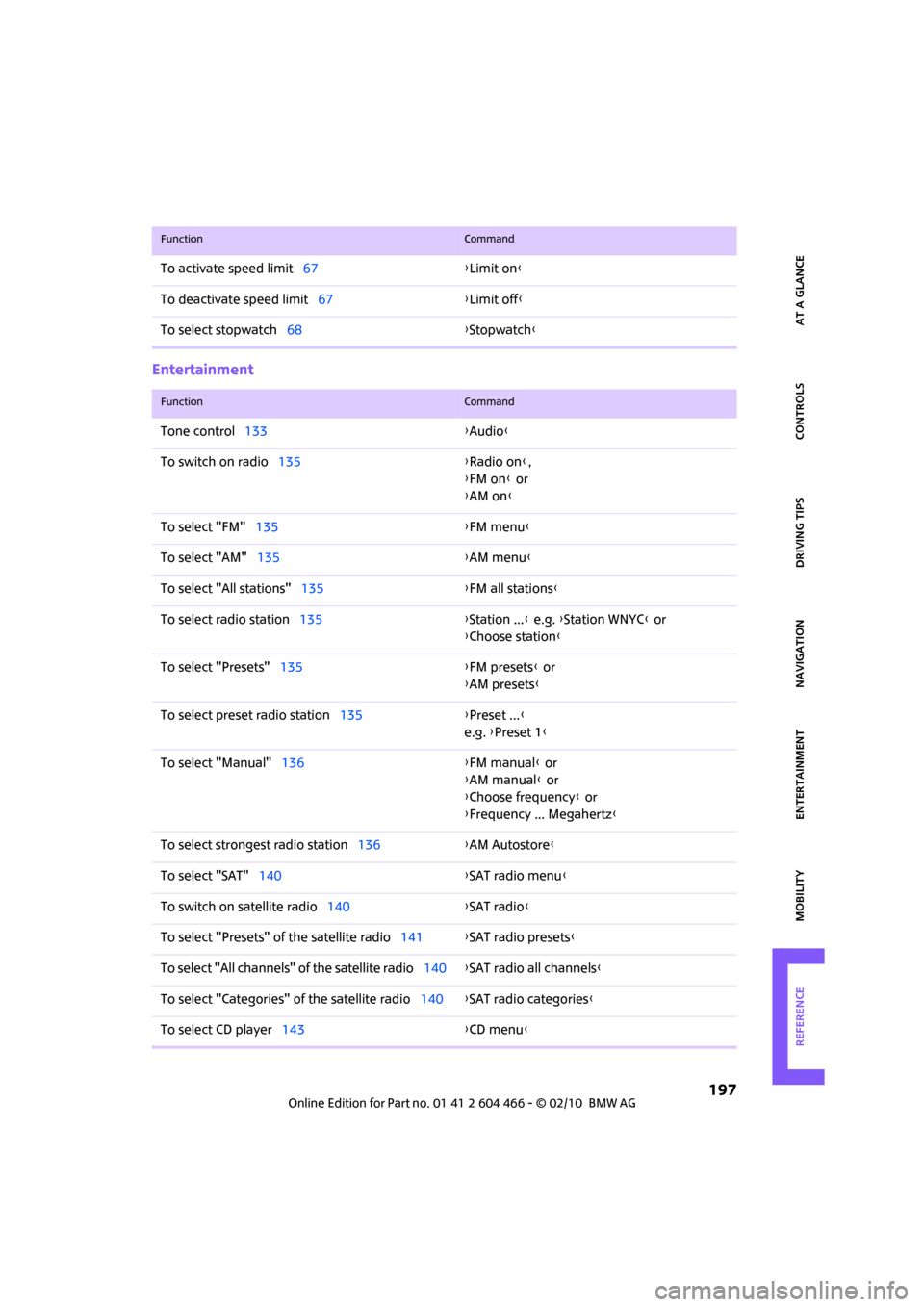
Entertainment
To activate speed limit67{Limit on}
To deactivate speed limit67{Limit off}
To select stopwatch68{Stopwatch}
FunctionCommand
FunctionCommand
Tone control133{Audio}
To switch on radio135{Radio on},
{FM on} or
{AM on}
To select "FM"135{FM menu}
To select "AM"135{AM menu}
To select "All stations"135{FM all stations}
To select radio station135{Station ...} e.g. {Station WNYC} or
{Choose station}
To select "Presets"135{FM presets} or
{AM presets}
To select preset radio station135{Preset ...}
e.g. {Preset 1}
To select "Manual"136{FM manual} or
{AM manual} or
{Choose frequency} or
{Frequency ... Megahertz}
To select strongest radio station136{AM Autostore}
To select "SAT"140{SAT radio menu}
To switch on satellite radio140{SAT radio}
To select "Presets" of the satellite radio141{SAT radio presets
}
To select "All channels" of the satellite radio140{SAT radio all channels}
To select "Categories" of the satellite radio140{SAT radio categories}
To select CD player143{CD menu}
Page 210 of 218
Everything from A to Z
208
O
OBD socket, refer to Socket for
Onboard Diagnosis170
Octane ratings, refer to Fuel
specifications157
Odometer55
Oil consumption168
Oil level168
Oil, refer to Engine oil168
Oil types169
Old batteries, refer to
Disposal185
"On a new destination" in
Navigation114
"On destination"114
"On location"114
"Onboard info"57
Onboard monitor16
– adjusting brightness69
– changing date and time63
– changing language68
– confirming selection or
entry19
– displays, menus16
– menu guidance17
– operating principles16
– overview16
– selecting menu items19
– status information20
– symbols18
Onboard vehicle tool kit176
Opening and closing
– Comfort Access33
– from inside30
– from outside27
– using the door lock29
– using the remote control27
Opening and unlocking
– from inside30
Opening/closing the
splitdoor31
Orientation menu, refer to
Start menu17
Outlets
– refer to Ventilation87
Output, refer to Engine
data192Outside temperature
display55
– change units of measure60
– in the onboard computer60
Outside-air mode
– automatic climate control86
Overheated engine, refer to
Coolant temperature56
P
Paintwork, care173
Park Distance Control PDC70
Parking
– vehicle47
Parking aid, refer to Park
Distance Control PDC70
Parking brake47
– indicator lamp13
Parking lamps, replacing
bulb178
Parking lamps/low beams81
Partition net99
Parts and accessories, refer to
Your individual vehicle4
"Pathway lighting"82
Pathway lighting81
"PDC"71
Personal Profile26
"Perspective"122
Pinch protection system
– windows36
Plastic parts, care174
Pollen
– refer to Microfilter/activated-
charcoal filter for automatic
climate control87
Position
– displaying127
– storing116
Power failure185
Power windows35
Power windows, refer to
Windows35
"Presets" on the radio141
Pressure monitoring of tires,
refer to Tire Pressure Monitor
TPM75Pressure monitoring, tires73
– Flat Tire Monitor73
Pressure, tires158
Protective function, refer to
Pinch protection system
– windows36
Puncture
– Flat Tire Monitor73
R
Radio
– autostore136
– controls132
– HD Radio138
– sampling stations136
– satellite radio140
– select waveband132,135
– selecting the frequency
manually136
– station search136
– storing stations137
– strongest stations136
– switching on/off132
– tone control133
– tuning to station135
– volume133
Radio key, refer to Integrated
key/remote control26
Radio position, refer to Radio
readiness46
Radio readiness46
– switched off46
– switched on46
Rain sensor51
"Random all" during audio
playback146
"Random directory" during
audio playback146
Random play sequence146
Range, refer to Cruising
range56
Reading lamps84
Rear door, refer to
Clubdoor31
Rear doors, refer to
Splitdoor31
Rear double doors, refer to
Splitdoor31
Page 211 of 218
REFERENCEAT A GLANCE CONTROLS DRIVING TIPS MOBILITY
209
Rear fog lamp83
– indicator lamp13
– replacing bulb180
Rear lamps
– bulb replacement179
Rear lamps, refer to Tail
lamps179
Rear seat backrest, folding98
Rear seats
– folding the backrests98
Rear window defroster87
Rearview mirror, refer to
Mirrors41
Receiving level of mobile
phone, refer to Status
information20
Reception
– radio station138
Recirculated-air mode86
Recirculation of air, refer to
Recirculated-air mode86
Reclining seat, refer to
Backrest38
Recording times, refer to
Stopwatch68
Refueling156
Releasing
– hood167
Remote control26
– battery renewal34
– Comfort Access33
– garage door opener88
– malfunctions29,34
– service data170
– splitdoor29
"Repeat directory" during
audio playback146
"Repeat track" during audio
playback146
Replacement remote
control26
Replacing bulbs, refer to
Lamps and bulbs176
Replacing tires, refer to New
wheels and tires165
Reporting safety defects6
Reserve warning, refer to Fuel
gauge56Reservoir for washer
systems52
"Reset"74
"Reset" of tone settings134
Reset, refer to Resetting tone
settings134
"Reset" the stopwatch68
Restraint systems
– for children43
– refer to Safety belts40
Reverse
– CD changer146
– CD player146
Reverse gear
– automatic transmission with
Steptronic49
– manual transmission48
Road map121
Roadside Assistance186
Roadside parking lamps82
– replacing bulb178
Roadworthiness test, refer to
Service requirements60
Roof load capacity194
Roof-mounted luggage
rack101
Rope, refer to Tow-starting,
towing away188
Route118
– changing118,124
– display121
– displaying arrow view121
– displaying map view121
– displaying town123
– list123
– selecting118
– selecting criteria118
– taking detours124
Route selection118
RSC Run-flat System
Component, refer to Run-flat
tires165
Rubber parts, care173
Run-flat System Component
RSC, refer to Run-flat
tires165Run-flat tires165
– flat tire74
– tire inflation pressure158
– tire replacement165
– winter tires166
S
Safety belt
– number37
Safety Belt Reminder40
Safety belts40
– damage40
– indicator lamp40
– reminder40
– sitting safely37
Safety belts, care174
Safety systems
– airbags79
– Antilock Brake System
ABS71
– Dynamic Stability Control
DSC71
– safety belts40
Safety tires, refer to Run-flat
tires165
"SAT" on the radio132,140
Satellite radio140
– enabling channel140
– selecting channel140
– storing channel140
Scale for navigation,
changing122
"Scan"
– Briefly play stations on the
radio136
Scan
– CD changer144
– CD player144
– radio136
"Scan all" during audio
playback145
"Scan directory" during audio
playback145
Screen, refer to Onboard
monitor controls16
Screw thread for tow
fitting187