radio MINI Clubman 2010 Owner's Manual (Mini Connected)
[x] Cancel search | Manufacturer: MINI, Model Year: 2010, Model line: Clubman, Model: MINI Clubman 2010Pages: 218, PDF Size: 3.97 MB
Page 5 of 218
MOBILITYAT A GLANCE CONTROLS DRIVING TIPS ENTERTAINMENT
3
NAVIGATION REFERENCE
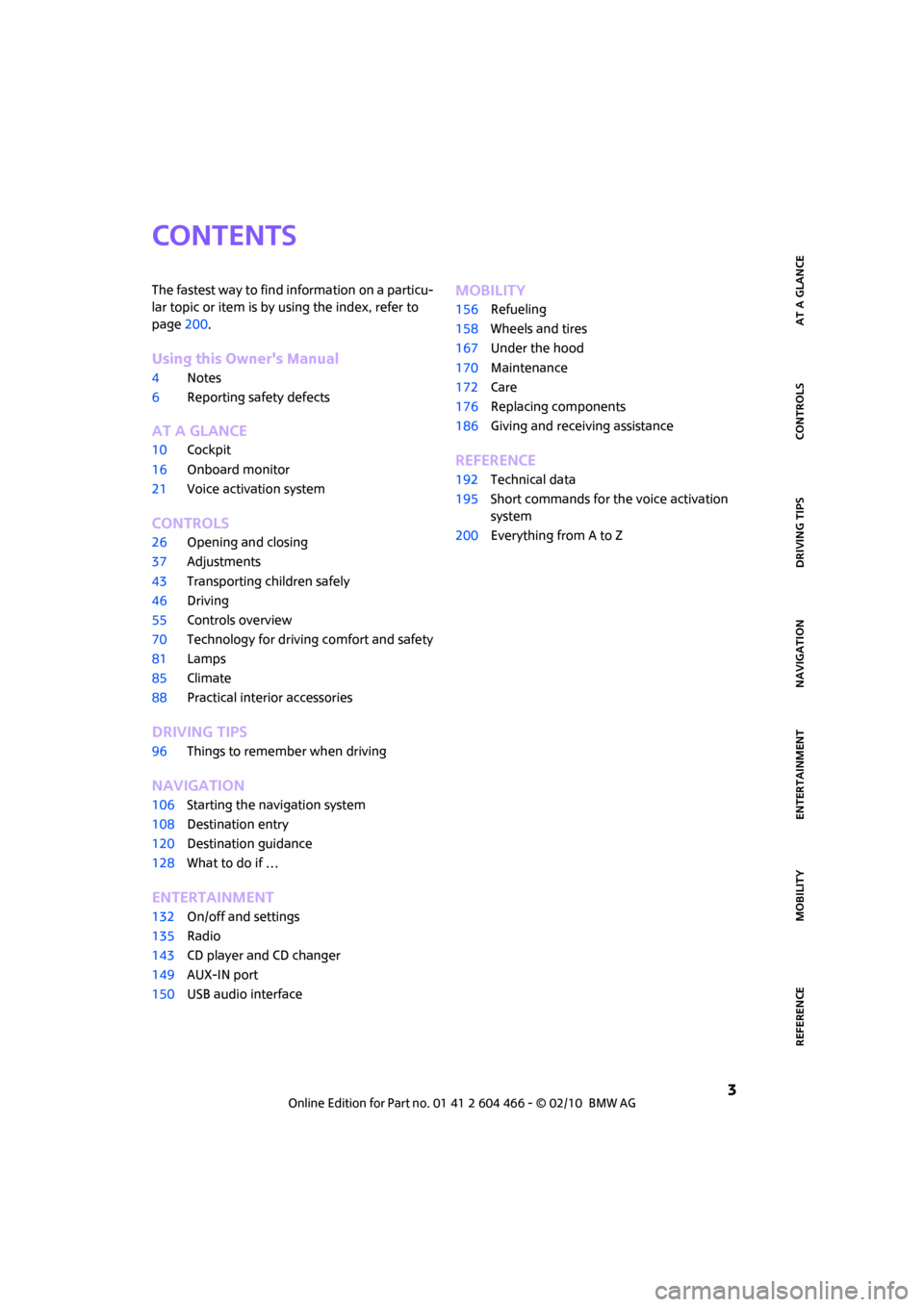
CONTENTS
The fastest way to find information on a particu-
lar topic or item is by using the index, refer to
page200.
Using this Owner's Manual
4Notes
6Reporting safety defects
AT A GLANCE
10Cockpit
16Onboard monitor
21Voice activation system
CONTROLS
26Opening and closing
37Adjustments
43Transporting children safely
46Driving
55Controls overview
70Technology for driving comfort and safety
81Lamps
85Climate
88Practical interior accessories
DRIVING TIPS
96Things to remember when driving
NAVIGATION
106Starting the navigation system
108Destination entry
120Destination guidance
128What to do if …
ENTERTAINMENT
132On/off and settings
135Radio
143CD player and CD changer
149AUX-IN port
150USB audio interface
MOBILITY
156Refueling
158Wheels and tires
167Under the hood
170Maintenance
172Care
176Replacing components
186Giving and receiving assistance
REFERENCE
192Technical data
195Short commands for the voice activation
system
200Everything from A to Z
Page 7 of 218
5
MOBILITYAT A GLANCE CONTROLS DRIVING TIPS ENTERTAINMENT NAVIGATION REFERENCE
For your safety
Maintenance and repair
Advanced technology, e.g. the use of
modern materials and powerful electron-
ics, requires specially adapted maintenance and
repair methods. Therefore, have the necessary
work on your MINI only carried out by a MINI
dealer or a workshop that has specially trained
personnel working in accordance with the spec-
ifications of the MINI manufacturer. If this work
is not carried out properly, there is a danger of
subsequent damage and related safety haz-
ards.<
Parts and accessories
For your own safety, use genuine parts
and accessories approved by the manu-
facturer of the MINI.
When you purchase accessories tested
and approved by the manufacturer of the MINI
and Original MINI Parts, you simultaneously
acquire the assurance that they have been thor-
oughly tested by the manufacturer of the MINI
to ensure optimum performance when installed
on your vehicle.
The manufacturer of the MINI warrants these
parts to be free from defects in material and
workmanship.
The manufacturer of the MINI will not accept any
liability for damage resulting from installation of
parts and accessories not approved by the man-
ufacturer of the MINI.
The manufacturer of the MINI cannot test every
product made by other manufacturers to verify
i f i t c a n b e u s e d o n a M I N I s a f e l y a n d w i t h o u t r i s k
to either the vehicle, its operation, or its occu-
pants.
Original MINI Parts, MINI Accessories and other
products approved by the manufacturer of the
MINI, together with professional advice on using
these items, are available from all MINI dealers.
Installation and operation of accessories that
have not been approved by the manufacturer of
your MINI, such as alarms, radios, amplifiers,
radar detectors, wheels, suspension compo-nents, brake dust shields, telephones, including
operation of any mobile phone from within the
vehicle without using an externally mounted
antenna, or transceiver equipment, for instance,
CBs, walkie-talkies, ham radios or similar acces-
sories, may cause extensive damage to the vehi-
cle, compromise its safety, interfere with the
vehicle's electrical system or affect the validity of
the MINI Limited Warranty. See your MINI dealer
for additional information.<
Maintenance, replacement, or repair of
the emission control devices and systems
may be performed by any automotive repair
establishment or individual using any certified
automotive part.
warning:
Engine exhaust and a wide variety of
automobile components and parts,
including components found in the interior fur-
nishings in a vehicle, contain or emit chemicals
known to the State of California to cause cancer
and birth defects and reproductive harm. In
addition, certain fluids contained in vehicles and
certain products of component wear contain or
emit chemicals known to the State of California
to cause cancer and birth defects or other repro-
ductive harm.
Battery posts, terminals and related accessories
contain lead and lead compounds. Wash your
hands after handling.
Used engine oil contains chemicals that have
caused cancer in laboratory animals. Always
protect your skin by washing thoroughly with
soap and water.<
Service and warranty
We recommend that you read this publication
thoroughly.
Your MINI is covered by the following warran-
ties:
>New Vehicle Limited Warranty
>Rust Perforation Limited Warranty
Page 13 of 218
MOBILITYAT A GLANCE CONTROLS DRIVING TIPS ENTERTAINMENT
11
NAVIGATION REFERENCE
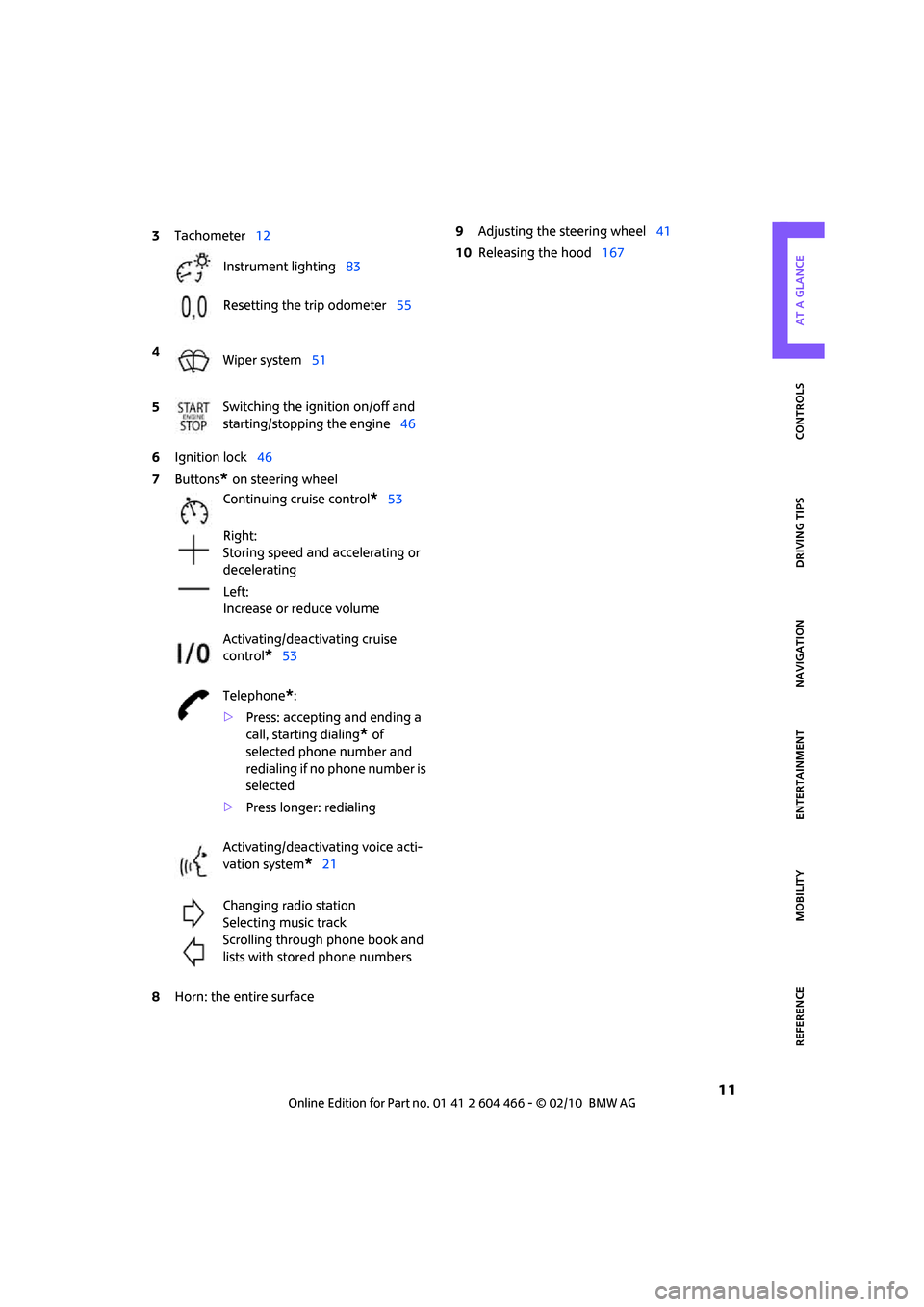
6Ignition lock46
7Buttons
* on steering wheel
8Horn: the entire surface9Adjusting the steering wheel41
10Releasing the hood167 3Tachometer12
Instrument lighting83
Resetting the trip odometer55
4
Wiper system51
5Switching the ignition on/off and
starting/stopping the engine46
Continuing cruise control
*53
Right:
Storing speed and accelerating or
decelerating
Left:
Increase or reduce volume
Activating/deactivating cruise
control
*53
Telephone
*:
>Press: accepting and ending a
call, starting dialing
* of
selected phone number and
redialing if no phone number is
selected
>Press longer: redialing
Activating/deactivating voice acti-
vation system
*21
Changing radio station
Selecting music track
Scrolling through phone book and
lists with stored phone numbers
Page 17 of 218
MOBILITYAT A GLANCE CONTROLS DRIVING TIPS ENTERTAINMENT
15
NAVIGATION REFERENCE
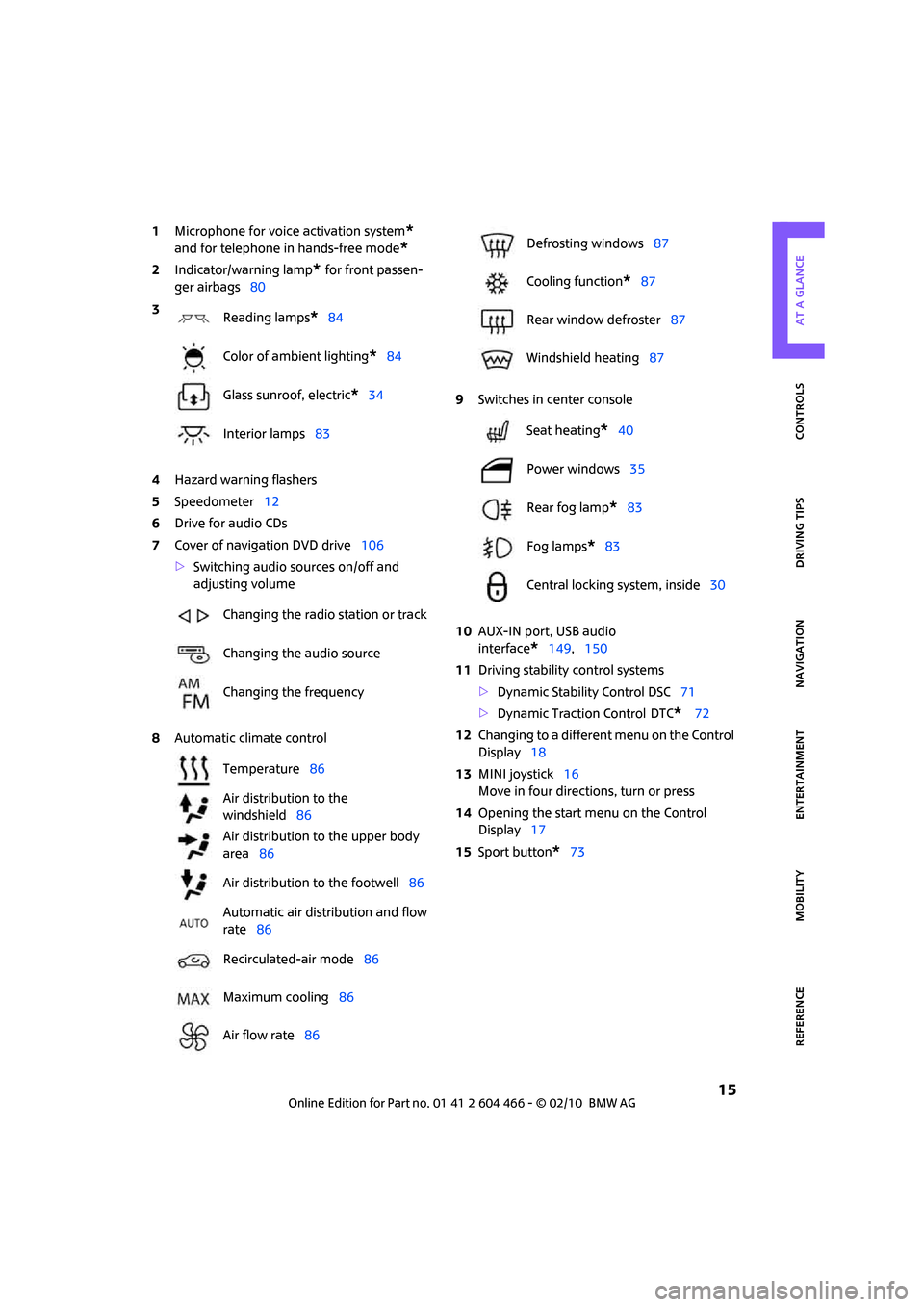
1Microphone for voice activation system*
and for telephone in hands-free mode*
2Indicator/warning lamp* for front passen-
ger airbags80
4Hazard warning flashers
5Speedometer12
6Drive for audio CDs
7Cover of navigation DVD drive106
>Switching audio sources on/off and
adjusting volume
8Automatic climate control9Switches in center console
10AUX-IN port, USB audio
interface
*149,150
11Driving stability control systems
>Dynamic Stability Control DSC71
>Dynamic Traction Control
DTC* 72
12Changing to a different menu on the Control
Display18
13MINI joystick16
Move in four directions, turn or press
14Opening the start menu on the Control
Display17
15Sport button
*73 3
Reading lamps
*84
Color of ambient lighting
*84
Glass sunroof, electric
*34
Interior lamps83
Changing the radio station or track
Changing the audio source
Changing the frequency
Temperature86
Air distribution to the
windshield86
Air distribution to the upper body
area86
Air distribution to the footwell86
Automatic air distribution and flow
rate86
Recirculated-air mode86
Maximum cooling86
Air flow rate86
Defrosting windows87
Cooling function
*87
Rear window defroster87
Windshield heating87
Seat heating
*40
Power windows35
Rear fog lamp
*83
Fog lamps
*83
Central locking system, inside30
Page 18 of 218
Onboard monitor
16
Onboard monitor
The onboard monitor integrates the functions of
a large number of switches. This allows these
functions to be operated from a single central
position. The following section provides an introduction to basic menu navigation. The con-
trol of the individual functions is described in
connection with the relevant equipment.
Controls
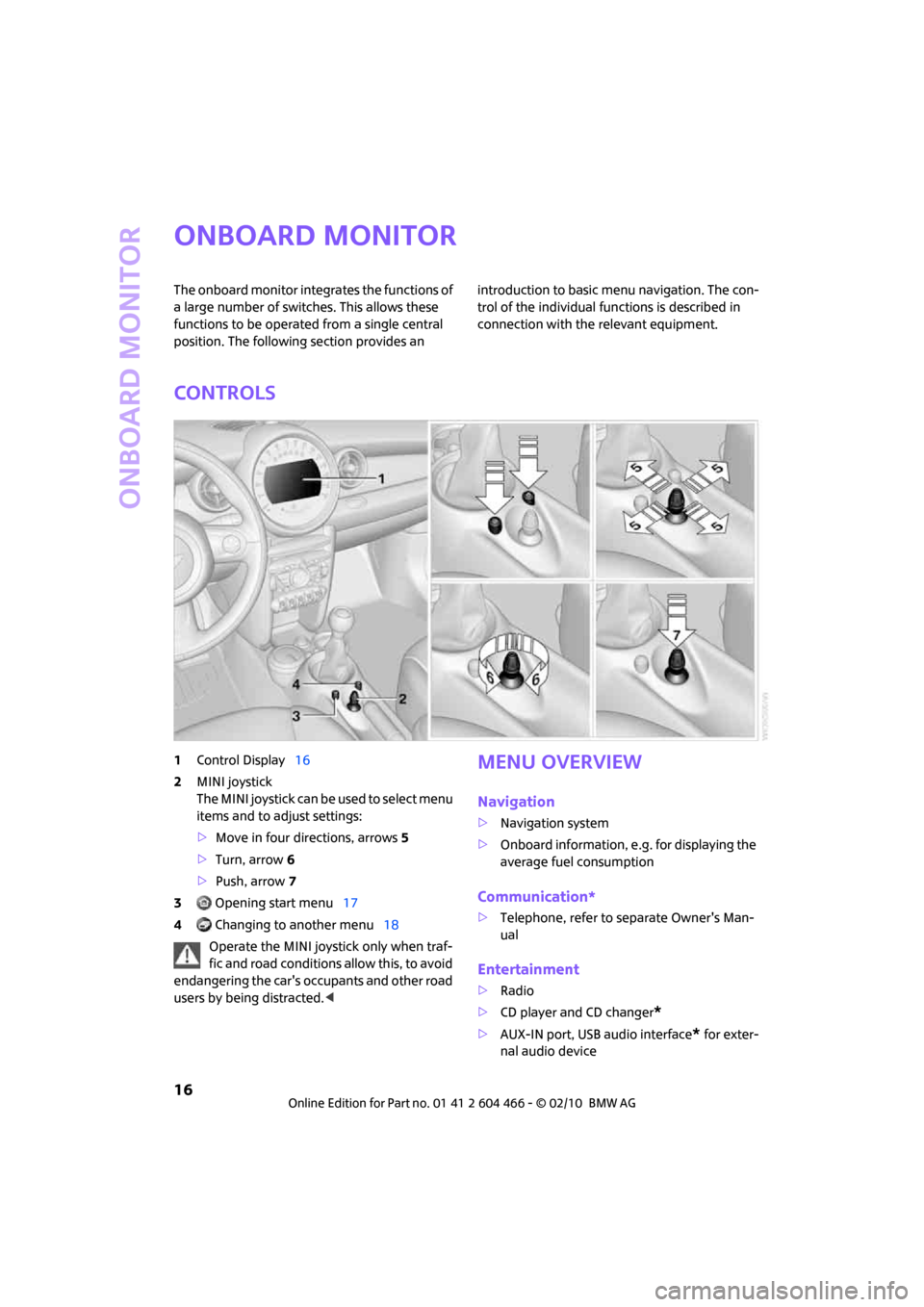
1Control Display16
2MINI joystick
The MINI joystick can be used to select menu
items and to adjust settings:
>Move in four directions, arrows5
>Turn, arrow 6
>Push, arrow 7
3 Opening start menu17
4 Changing to another menu18
Operate the MINI joystick only when traf-
fic and road conditions allow this, to avoid
endangering the car's occupants and other road
users by being distracted.
>Navigation system
>Onboard information, e.g. for displaying the
average fuel consumption
Communication*
>Telephone, refer to separate Owner's Man-
ual
Entertainment
>Radio
>CD player and CD changer
*
>AUX-IN port, USB audio interface* for exter-
nal audio device
Page 19 of 218
MOBILITYAT A GLANCE CONTROLS DRIVING TIPS ENTERTAINMENT
17
NAVIGATION REFERENCE
Setup
>Switching off Control Display
>Tone and display settings
>Settings for your vehicle, e.g. for the central
locking system
>Display of service requirements and dates
for statutory emissions and vehicle inspec-
tions
>Check Control
Operating principle
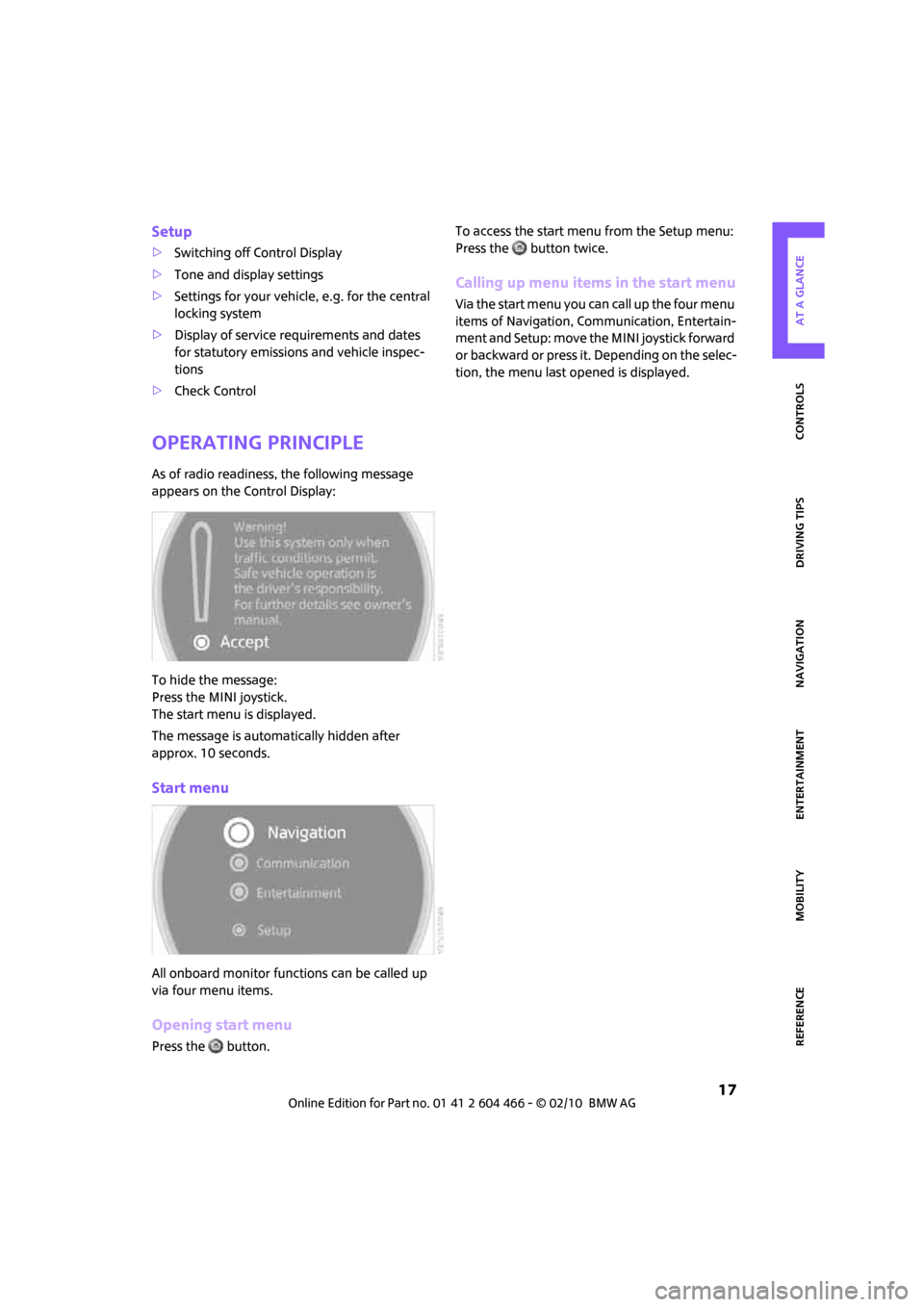
As of radio readiness, the following message
appears on the Control Display:
To hide the message:
Press the MINI joystick.
The start menu is displayed.
The message is automatically hidden after
approx. 10 seconds.
Start menu
All onboard monitor functions can be called up
via four menu items.
Opening start menu
Press the button.To access the start menu from the Setup menu:
Press the button twice.
Calling up menu items in the start menu
Via the start menu you can call up the four menu
items of Navigation, Communication, Entertain-
m e n t a n d S e t u p : m o v e t h e M I N I j o y s t i c k f o r w a r d
or backward or press it. Depending on the selec-
tion, the menu last opened is displayed.
Page 22 of 218
Onboard monitor
20
Status information
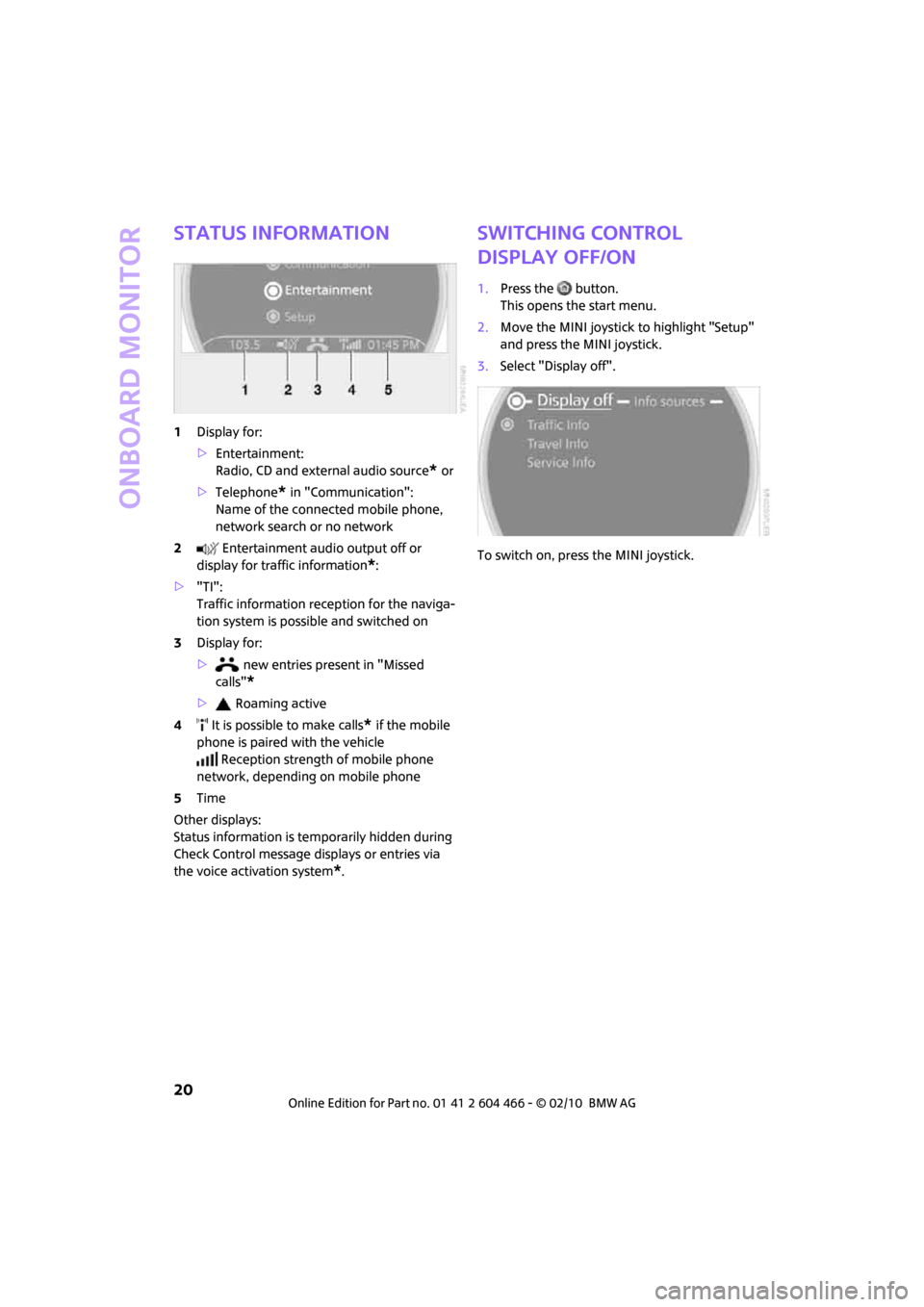
1Display for:
>Entertainment:
Radio, CD and external audio source
* or
>Telephone
* in "Communication":
Name of the connected mobile phone,
network search or no network
2 Entertainment audio output off or
display for traffic information
*:
>"TI":
Traffic information reception for the naviga-
tion system is possible and switched on
3Display for:
> new entries present in "Missed
calls"
*
> Roaming active
4 It is possible to make calls
* if the mobile
phone is paired with the vehicle
Reception strength of mobile phone
network, depending on mobile phone
5Time
Other displays:
Status information is temporarily hidden during
Check Control message displays or entries via
the voice activation system
*.
Switching control
display off/on
1.Press the button.
This opens the start menu.
2.Move the MINI joystick to highlight "Setup"
and press the MINI joystick.
3.Select "Display off".
To switch on, press the MINI joystick.
Page 24 of 218
Voice activation system
22
Having the possible commands read aloud:
For example, if you have selected "CD", the sys-
tem will read aloud the possible commands for
operating the CD player and CD changer.
Opening help
Using alternative commands
There are often a number of commands to run a
function, e.g.:
Calling up functions immediately via
short commands
Short commands enable you to perform certain
functions immediately, irrespective of which
menu item is selected, page195.
Opening the start menu
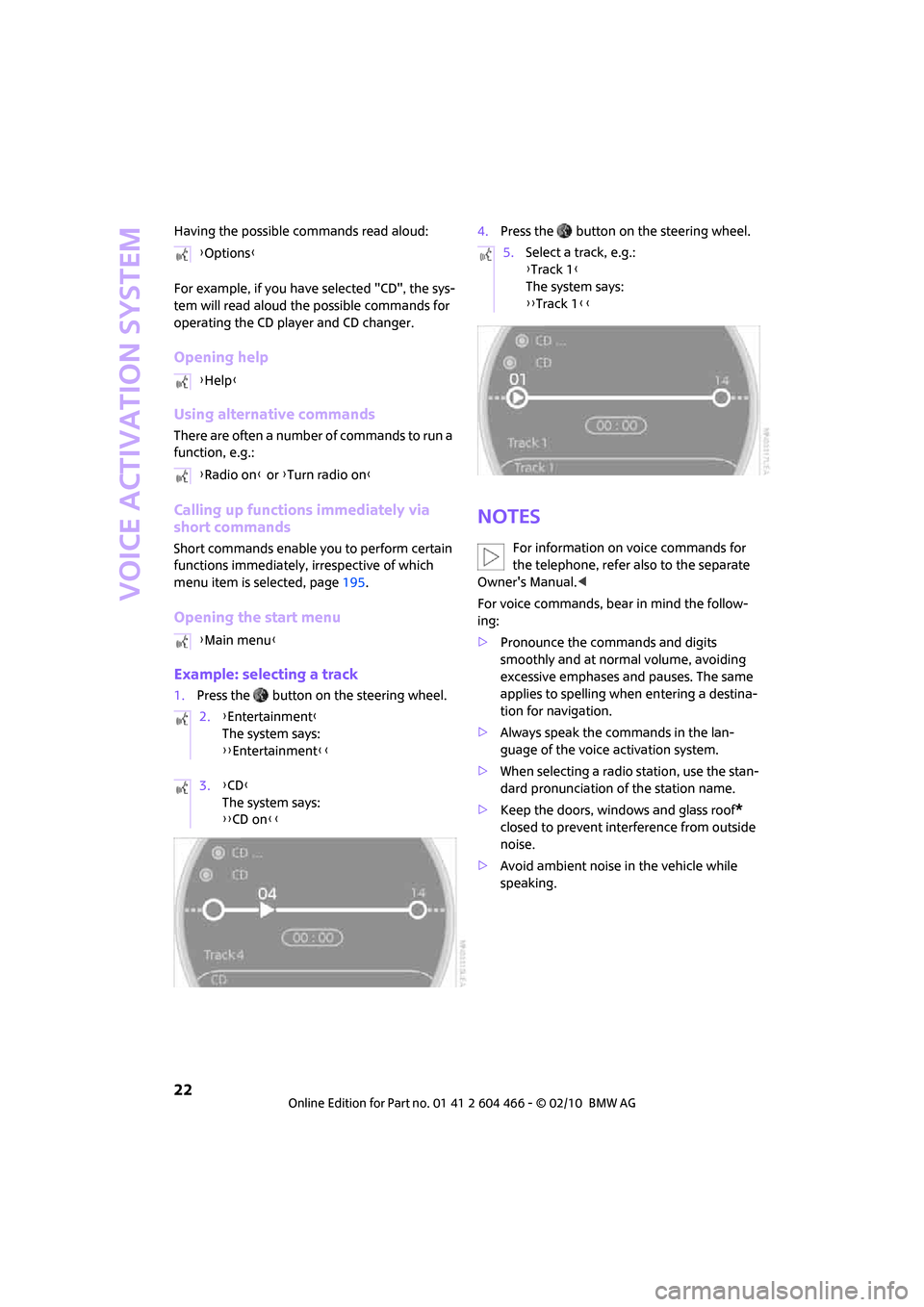
Example: selecting a track
1.Press the button on the steering wheel.4.Press the button on the steering wheel.
Notes
For information on voice commands for
the telephone, refer also to the separate
Owner's Manual.<
For voice commands, bear in mind the follow-
ing:
>Pronounce the commands and digits
smoothly and at normal volume, avoiding
excessive emphases and pauses. The same
applies to spelling when entering a destina-
tion for navigation.
>Always speak the commands in the lan-
guage of the voice activation system.
>When selecting a radio station, use the stan-
dard pronunciation of the station name.
>Keep the doors, windows and glass roof
*
closed to prevent interference from outside
noise.
>Avoid ambient noise in the vehicle while
speaking. {Options}
{Help}
{Radio on} or {Turn radio on}
{Main menu}
2.{Entertainment}
The system says:
{{Entertainment}}
3.{CD}
The system says:
{{CD on}}
5.Select a track, e.g.:
{Track 1}
The system says:
{{Track 1}}
Page 31 of 218
MOBILITYAT A GLANCE CONTROLS DRIVING TIPS ENTERTAINMENT
29
NAVIGATION REFERENCE
You can also use this function to locate your
vehicle in parking garages, etc.
Unlocking the splitdoor
Press the button.
When it is opened, the splitdoor swings
upward and outward to the rear. Make
sure that adequate clearance is available before
opening.
To prevent accidentally locking yourself out, do
not place the key down in the cargo bay. If the
splitdoor was locked before opening, it will be
locked again after it is closed.
Before and after each trip, check that the split-
door has not been inadvertently unlocked.<
Malfunctions
The remote control may malfunction due to
local radio waves. If this occurs, unlock and lock
the car at the door lock with the integrated key.
If the car can no longer be locked with a remote
control, the battery in the remote control is dis-
charged. Use this remote control during an
extended drive; this will recharge the battery,
page26.
For US owners only
The transmitter and receiver units comply with
part 15 of the FCC/Federal Communications
Commission regulations. Operation is governed
by the following:
FCC ID:
LX8766S
LX8766E
LX8CAS
Compliance statement:
This device complies with part 15 of the FCC
Rules. Operation is subject to the following two
conditions:
>This device must not cause harmful interfer-
ence, and
>this device must accept any interference
received, including interference that may
cause undesired operation.Any unauthorized modifications or
changes to these devices could void the
user's authority to operate this equipment.<
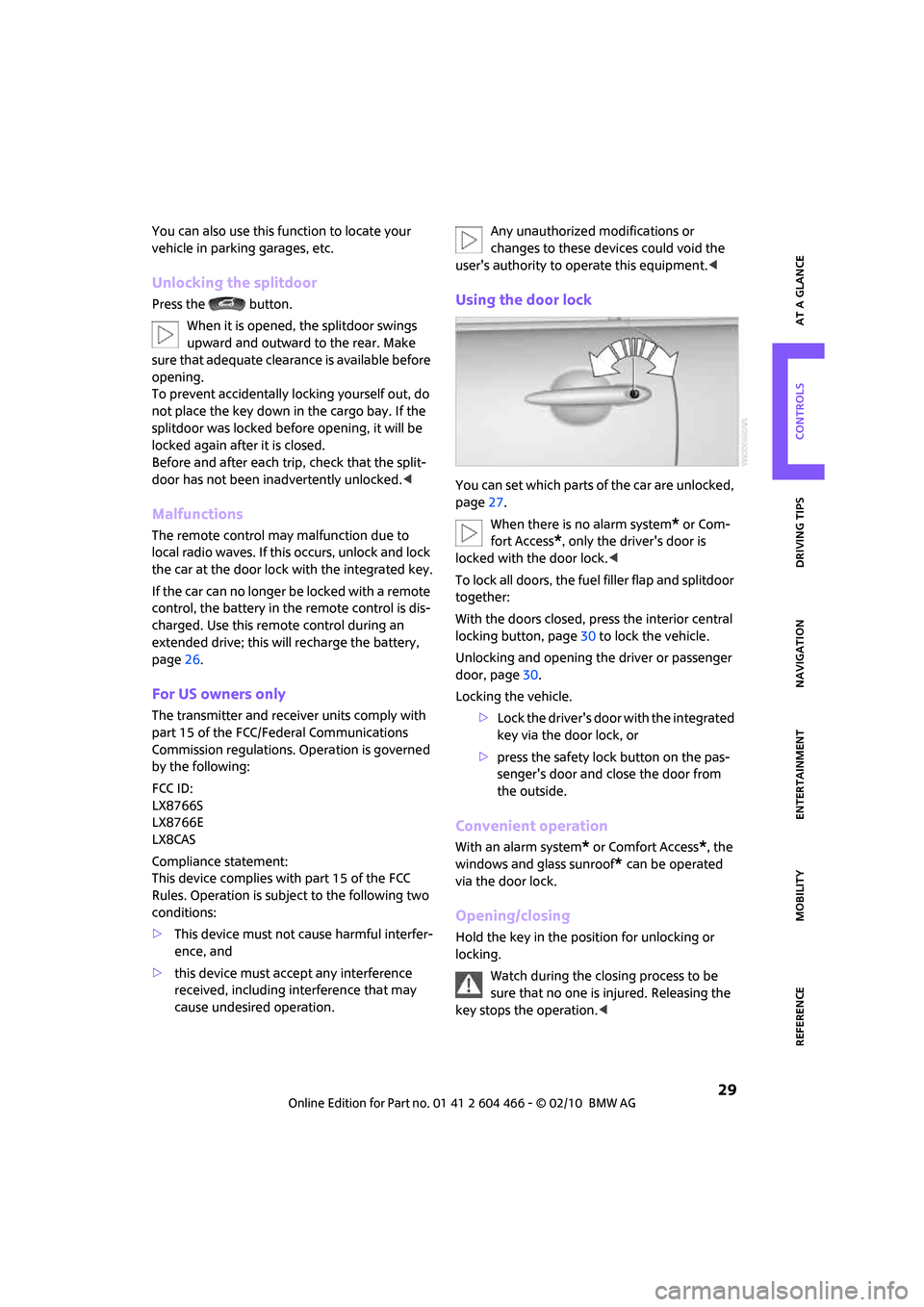
Using the door lock
You can set which parts of the car are unlocked,
page27.
When there is no alarm system
* or Com-
fort Access
*, only the driver's door is
locked with the door lock.<
To lock all doors, the fuel filler flap and splitdoor
together:
With the doors closed, press the interior central
locking button, page30 to lock the vehicle.
Unlocking and opening the driver or passenger
door, page30.
Locking the vehicle.
>Lock the driver's door with the integrated
key via the door lock, or
>press the safety lock button on the pas-
senger's door and close the door from
the outside.
Convenient operation
With an alarm system* or Comfort Access*, the
windows and glass sunroof
* can be operated
via the door lock.
Opening/closing
Hold the key in the position for unlocking or
locking.
Watch during the closing process to be
sure that no one is injured. Releasing the
key stops the operation.<
Page 36 of 218
Opening and closing
34
Switching on radio readiness
Switch on radio readiness by briefly pressing the
start/stop button, page46.
Do not depress the brake or the clutch;
otherwise, the engine will start.<
Starting the engine
The engine can be started or the ignition can be
switched on when a remote control is inside the
vehicle. It is not necessary to insert a remote
control into the ignition lock, page46.
Switching off the engine in cars with
automatic transmission
The engine can only be switched off when the
selector lever is in position P, page47.
To switch the engine off when the selector lever
is in position N, the remote control must be in
the ignition lock.
Before driving a vehicle with automatic
transmission into a car wash
1.Insert remote control into ignition lock.
2.Depress the brake.
3.Move the selector lever to position N.
4.Switch off the engine.
The vehicle can roll.
Malfunction
Comfort Access may malfunction due to local
radio waves.
If this happens, open or close the vehicle via the
buttons on the remote control or using the inte-
grated key.
Insert the remote control into the ignition lock
and start the engine.
Warning lamps
The warning lamp comes on when an
attempt is made to start the engine: the
engine cannot be started. The remote
control is not inside the vehicle or is malfunc-
tioning. Take the remote control with you inside
the vehicle or have it checked. If necessary, insert another remote control into the ignition
lock.
The warning lamp comes on when the
engine is running: the remote control is
no longer inside the vehicle. After the
engine is switched off, the engine can only be
restarted within approx. 10 seconds.
The indicator lamp comes on and a mes-
sage appears on the Control Display:
Replace the battery in the remote con-
trol.
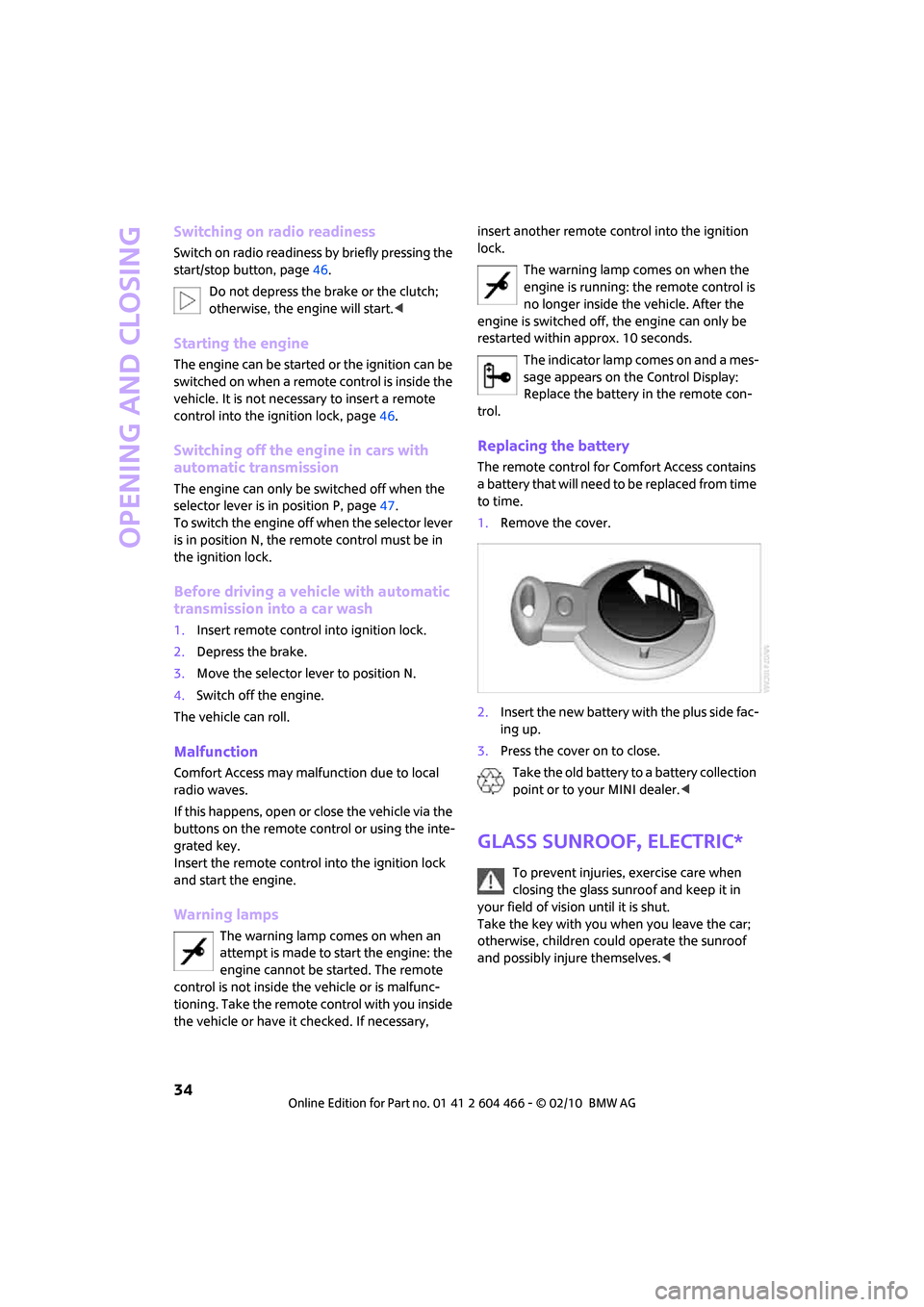
Replacing the battery
The remote control for Comfort Access contains
a battery that will need to be replaced from time
to time.
1.Remove the cover.
2.Insert the new battery with the plus side fac-
ing up.
3.Press the cover on to close.
Take the old battery to a battery collection
point or to your MINI dealer.<
Glass sunroof, electric*
To prevent injuries, exercise care when
closing the glass sunroof and keep it in
your field of vision until it is shut.
Take the key with you when you leave the car;
otherwise, children could operate the sunroof
and possibly injure themselves.<