bonnet MINI Clubman 2010 Owner's Manual
[x] Cancel search | Manufacturer: MINI, Model Year: 2010, Model line: Clubman, Model: MINI Clubman 2010Pages: 160, PDF Size: 2.58 MB
Page 5 of 160
REFERENCEAT A GLANCE CONTROLS DRIVING TIPS MOBILITY
3
CONTENTS
The fastest way to find information on a particu-
lar topic or item is by using the index, refer to
page146.
Using this Owner's Manual
4Notes
6Reporting safety defects
AT A GLANCE
10Cockpit
CONTROLS
20Opening and closing
31Adjustments
37Transporting children safely
40Driving
49Controls overview
57Technology for driving comfort and safety
67Lamps
72Climate
77Practical interior accessories
DRIVING TIPS
84Things to remember when driving
MOBILITY
94Refueling
96Wheels and tires
105Under the bonnet
108Maintenance
110Care
114Replacing components
124Giving and receiving assistance
128Indicator and warning lamps
REFERENCE
142Technical data
146From A to Z
Page 13 of 160
REFERENCE
AT A GLANCE CONTROLS DRIVING TIPS MOBILITY
11
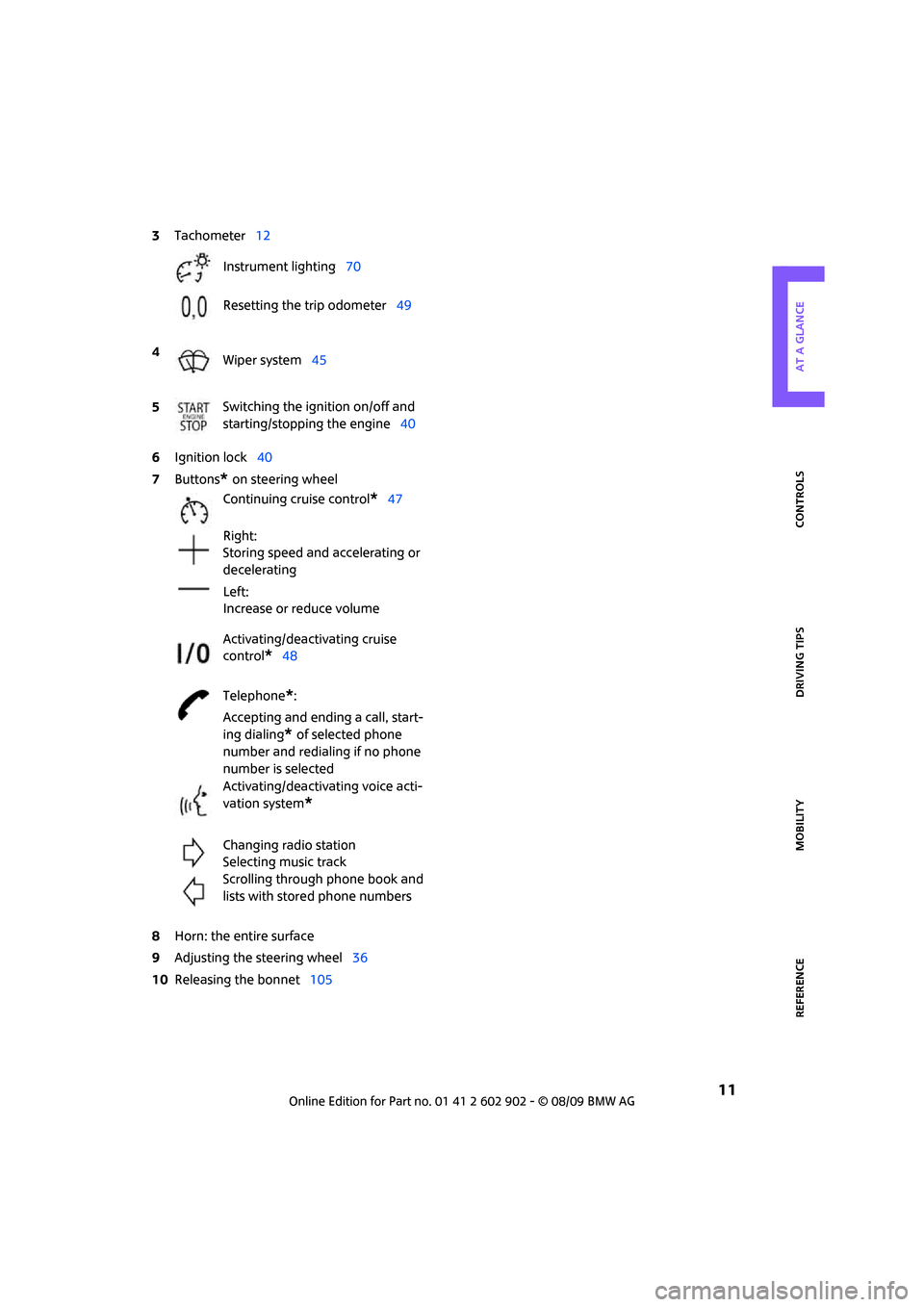
6Ignition lock40
7Buttons
* on steering wheel
8Horn: the entire surface
9Adjusting the steering wheel36
10Releasing the bonnet105 3Tachometer12
Instrument lighting70
Resetting the trip odometer49
4
Wiper system45
5Switching the ignition on/off and
starting/stopping the engine40
Continuing cruise control
*47
Right:
Storing speed and accelerating or
decelerating
Left:
Increase or reduce volume
Activating/deactivating cruise
control
*48
Telephone
*:
Accepting and ending a call, start-
ing dialing
* of selected phone
number and redialing if no phone
number is selected
Activating/deactivating voice acti-
vation system
*
Changing radio station
Selecting music track
Scrolling through phone book and
lists with stored phone numbers
Page 29 of 160
REFERENCEAT A GLANCE CONTROLS DRIVING TIPS MOBILITY
27
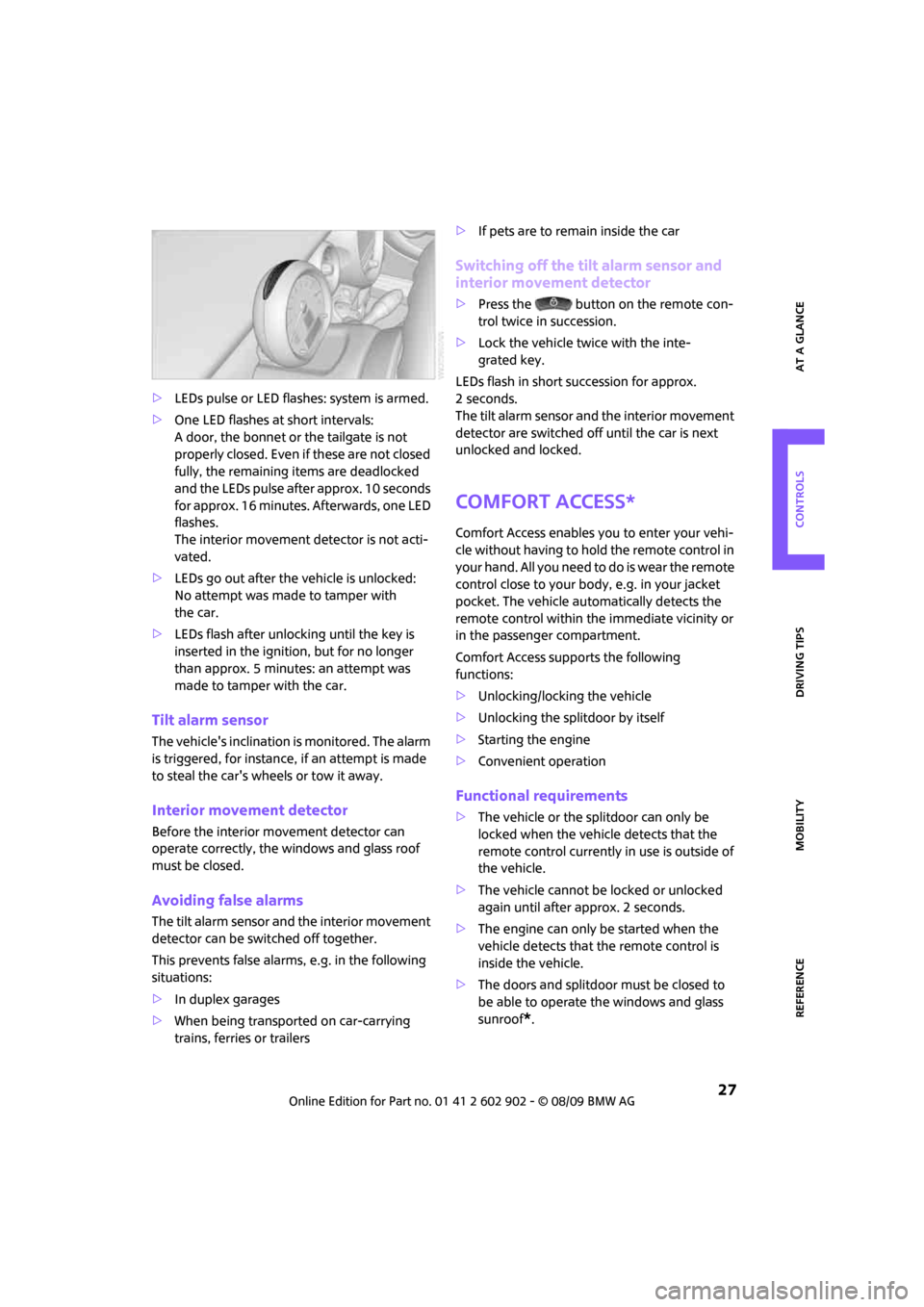
>LEDs pulse or LED flashes: system is armed.
>One LED flashes at short intervals:
A door, the bonnet or the tailgate is not
properly closed. Even if these are not closed
fully, the remaining items are deadlocked
and the LEDs pulse after approx. 10 seconds
for approx. 16 minutes. Afterwards, one LED
flashes.
The interior movement detector is not acti-
vated.
>LEDs go out after the vehicle is unlocked:
No attempt was made to tamper with
the car.
>LEDs flash after unlocking until the key is
inserted in the ignition, but for no longer
than approx. 5 minutes: an attempt was
made to tamper with the car.
Tilt alarm sensor
The vehicle's inclination is monitored. The alarm
is triggered, for instance, if an attempt is made
to steal the car's wheels or tow it away.
Interior movement detector
Before the interior movement detector can
operate correctly, the windows and glass roof
must be closed.
Avoiding false alarms
The tilt alarm sensor and the interior movement
detector can be switched off together.
This prevents false alarms, e.g. in the following
situations:
>In duplex garages
>When being transported on car-carrying
trains, ferries or trailers>If pets are to remain inside the car
Switching off the tilt alarm sensor and
interior movement detector
>Press the button on the remote con-
trol twice in succession.
>Lock the vehicle twice with the inte-
grated key.
LEDs flash in short succession for approx.
2seconds.
The tilt alarm sensor and the interior movement
detector are switched off until the car is next
unlocked and locked.
Comfort Access*
Comfort Access enables you to enter your vehi-
cle without having to hold the remote control in
your hand. All you need to do is wear the remote
control close to your body, e.g. in your jacket
pocket. The vehicle automatically detects the
remote control within the immediate vicinity or
in the passenger compartment.
Comfort Access supports the following
functions:
>Unlocking/locking the vehicle
>Unlocking the splitdoor by itself
>Starting the engine
>Convenient operation
Functional requirements
>The vehicle or the splitdoor can only be
locked when the vehicle detects that the
remote control currently in use is outside of
the vehicle.
>The vehicle cannot be locked or unlocked
again until after approx. 2 seconds.
>The engine can only be started when the
vehicle detects that the remote control is
inside the vehicle.
>The doors and splitdoor must be closed to
be able to operate the windows and glass
sunroof
*.
Page 48 of 160
Driving
46
Intermittent wipe or rain sensor*
If the car is not equipped with a rain sensor, the
intermittent-wipe time is preset.
If the car is equipped with a rain sensor, the time
between wipes is controlled automatically and
depends on the intensity of the rainfall. The rain
sensor is mounted on the windshield, directly in
front of the interior rearview mirror.
Activating intermittent wipe or rain
sensor
Press button, arrow3.
Deactivate the rain sensor before entering
an automatic car wash. Failure to do so
could result in damage caused by undesired
wiper activation.<
Adjusting the sensitivity of the rain
sensor
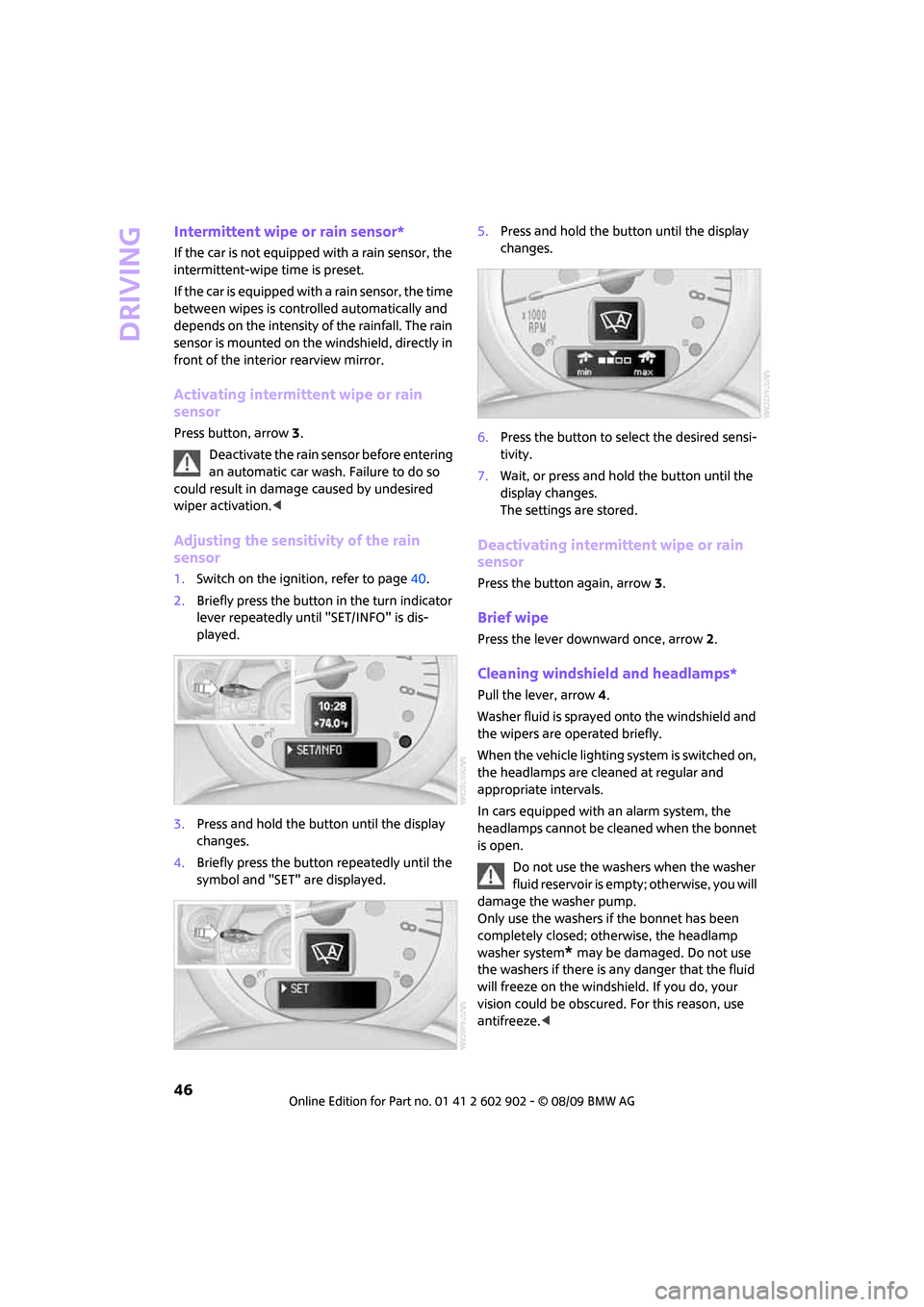
1.Switch on the ignition, refer to page40.
2.Briefly press the button in the turn indicator
lever repeatedly until "SET/INFO" is dis-
played.
3.Press and hold the button until the display
changes.
4.Briefly press the button repeatedly until the
symbol and "SET" are displayed.5.Press and hold the button until the display
changes.
6.Press the button to select the desired sensi-
tivity.
7.Wait, or press and hold the button until the
display changes.
The settings are stored.
Deactivating intermittent wipe or rain
sensor
Press the button again, arrow3.
Brief wipe
Press the lever downward once, arrow2.
Cleaning windshield and headlamps*
Pull the lever, arrow 4.
Washer fluid is sprayed onto the windshield and
the wipers are operated briefly.
When the vehicle lighting system is switched on,
the headlamps are cleaned at regular and
appropriate intervals.
In cars equipped with an alarm system, the
headlamps cannot be cleaned when the bonnet
is open.
Do not use the washers when the washer
fluid reservoir is empty; otherwise, you will
damage the washer pump.
Only use the washers if the bonnet has been
completely closed; otherwise, the headlamp
washer system
* may be damaged. Do not use
the washers if there is any danger that the fluid
will freeze on the windshield. If you do, your
vision could be obscured. For this reason, use
antifreeze.<
Page 107 of 160
REFERENCEAT A GLANCE CONTROLS DRIVING TIPS MOBILITY
105
Under the bonnet
Do not work on the car unless you possess
the necessary technical knowledge. If you
are not familiar with the regulations to be
observed, have the necessary work on your
vehicle carried out only by a MINI dealer or a
workshop that has specially trained personnel
working in accordance with the specifications of
the MINI manufacturer. If this work is not carried
out properly, there is a danger of subsequent
damage and related safety hazards.<
Bonnet
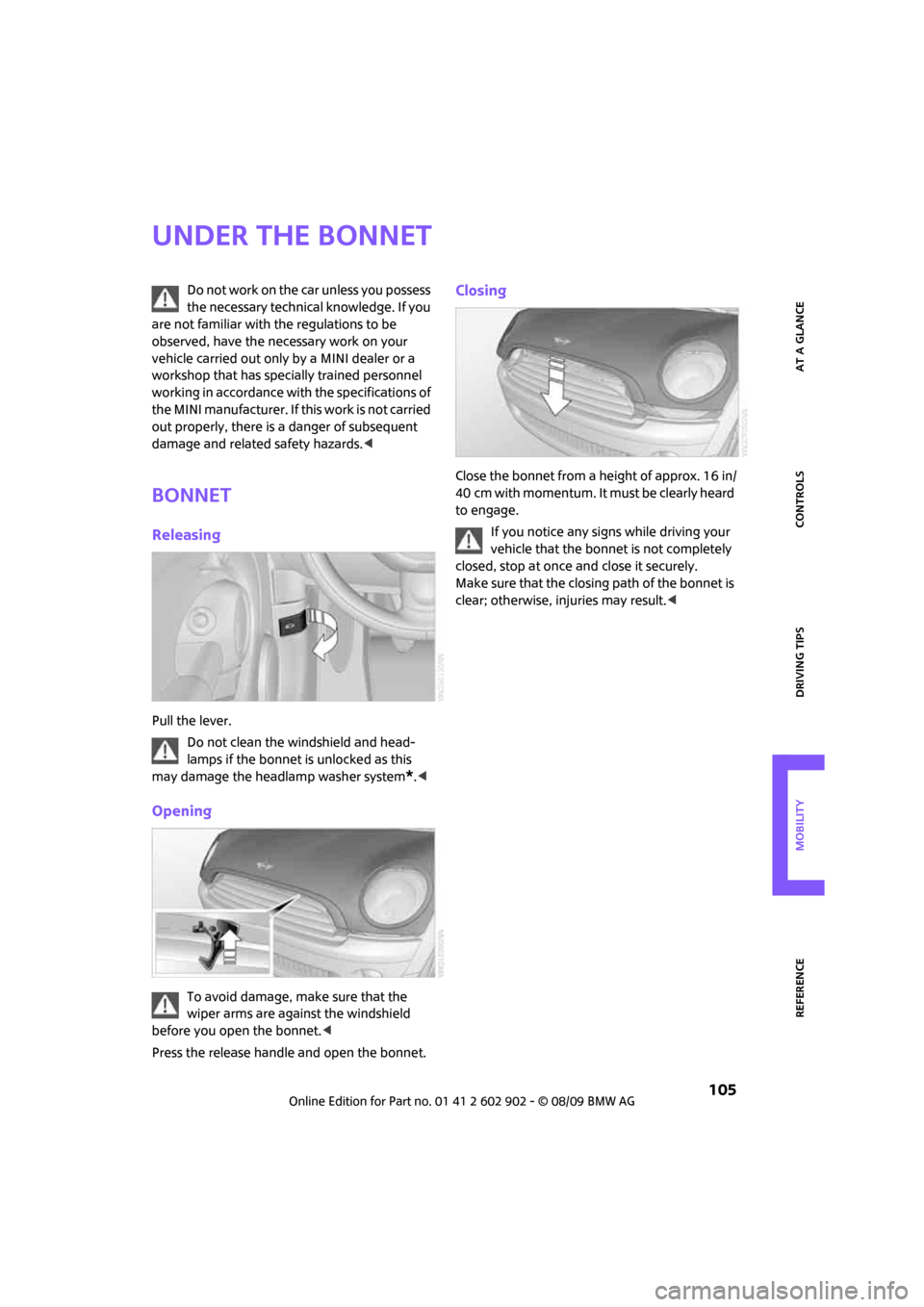
Releasing
Pull the lever.
Do not clean the windshield and head-
lamps if the bonnet is unlocked as this
may damage the headlamp washer system
*.<
Opening
To avoid damage, make sure that the
wiper arms are against the windshield
before you open the bonnet.<
Press the release handle and open the bonnet.
Closing
Close the bonnet from a height of approx. 16 in/
40 cm with momentum. It must be clearly heard
to engage.
If you notice any signs while driving your
vehicle that the bonnet is not completely
closed, stop at once and close it securely.
Make sure that the closing path of the bonnet is
clear; otherwise, injuries may result.<
Page 108 of 160
Under the bonnet
106
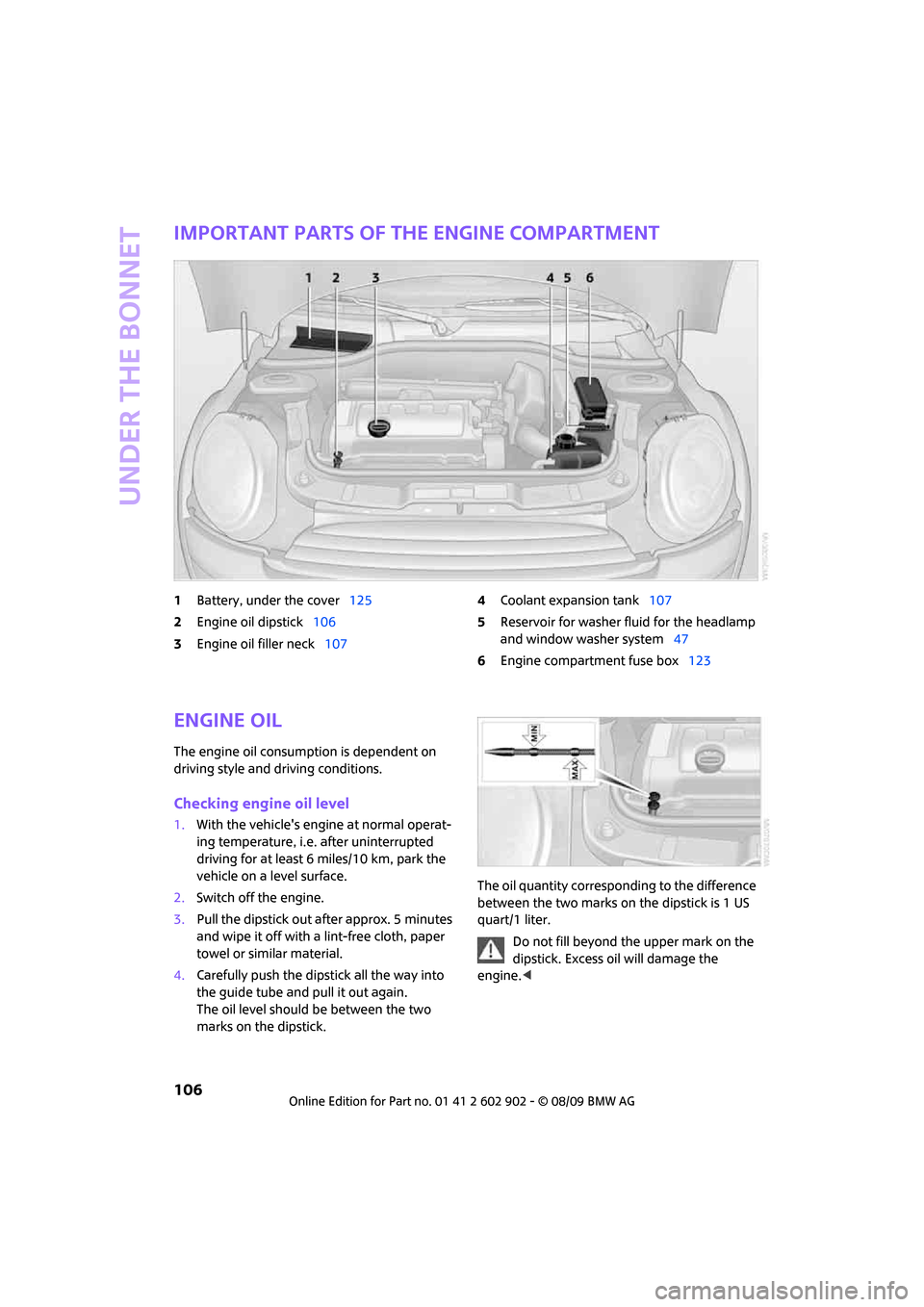
Important parts of the engine compartment
1Battery, under the cover125
2Engine oil dipstick106
3Engine oil filler neck1074Coolant expansion tank107
5Reservoir for washer fluid for the headlamp
and window washer system47
6Engine compartment fuse box123
Engine oil
The engine oil consumption is dependent on
driving style and driving conditions.
Checking engine oil level
1.With the vehicle's engine at normal operat-
ing temperature, i.e. after uninterrupted
driving for at least 6 miles/10 km, park the
vehicle on a level surface.
2.Switch off the engine.
3.Pull the dipstick out after approx. 5 minutes
and wipe it off with a lint-free cloth, paper
towel or similar material.
4.Carefully push the dipstick all the way into
the guide tube and pull it out again.
The oil level should be between the two
marks on the dipstick.The oil quantity corresponding to the difference
between the two marks on the dipstick is 1 US
quart/1 liter.
Do not fill beyond the upper mark on the
dipstick. Excess oil will damage the
engine.<
Page 116 of 160

Replacing components
114
Replacing components
Onboard vehicle tool kit
Your vehicle comes with an onboard vehicle tool
kit that varies with the equipment version; it is
stored underneath the level load floor.
>Mobility System with onboard vehicle tool
kit and tire change set
*118
>Tire change set with onboard vehicle tool kit
for space-saver spare tire121
Wiper blades
Changing the front wiper blades
1.Fold up the wiper arm.
2.Position the wiper blade horizontally.
3.Press the securing spring, arrow.
4.Unhook the wiper blade toward the wind-
shield.
5.Pull the wiper blade past the wiper arm
toward the top.
6.Insert the new wiper blade.7.Press into position until you hear it engage.
8.Fold down the wiper arm.
To avoid damage, make sure that the
wiper arms are against the windshield
before you open the bonnet.<
Changing the rear wiper blade
1.Fold out the wiper arm and hold it.
2.Press together the locking spring, arrow 1,
and fold out the wiper blade.
3.Pull the wiper blade away from and out of
the catch mechanism, arrow 2.
4.Press the new wiper blade into the fixture
until it engages audibly.
Lamps and bulbs
Lamps and bulbs make an essential contribution
to vehicle safety. They should, therefore, be
handled carefully. The manufacturer of your
MINI recommends having your MINI dealer per-
form any work that you do not feel competent to
perform yourself or that is not described here.
Never touch the glass of new bulbs with
your bare fingers, as even minute
amounts of contamination will burn into the
bulb's surface and reduce its service life. Use a
clean tissue, cloth or something similar, or hold
the bulb by its base.<
You can obtain a selection of replacement bulbs
at your MINI dealer.
Page 131 of 160
REFERENCEAT A GLANCE CONTROLS DRIVING TIPS MOBILITY
129
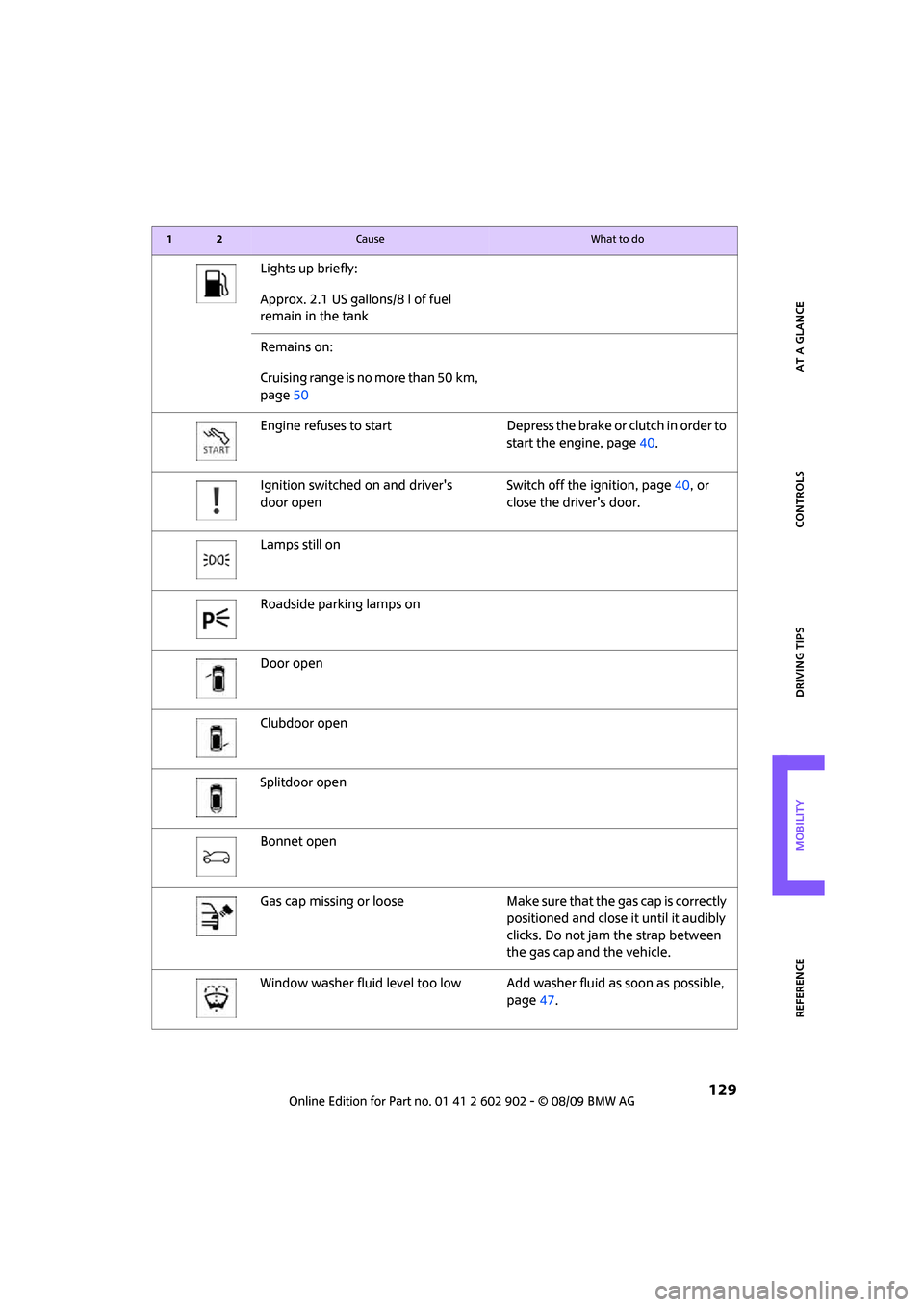
Lights up briefly:
Approx. 2.1 US gallons/8 l of fuel
remain in the tank
Remains on:
Cruising range is no more than 50 km,
page50
Engine refuses to start Depress the brake or clutch in order to
start the engine, page40.
Ignition switched on and driver's
door openSwitch off the ignition, page40, or
close the driver's door.
Lamps still on
Roadside parking lamps on
Door open
Clubdoor open
Splitdoor open
Bonnet open
Gas cap missing or loose Make sure that the gas cap is correctly
positioned and close it until it audibly
clicks. Do not jam the strap between
the gas cap and the vehicle.
Window washer fluid level too low Add washer fluid as soon as possible,
page47.
12Cause What to do
Page 133 of 160
REFERENCEAT A GLANCE CONTROLS DRIVING TIPS MOBILITY
131
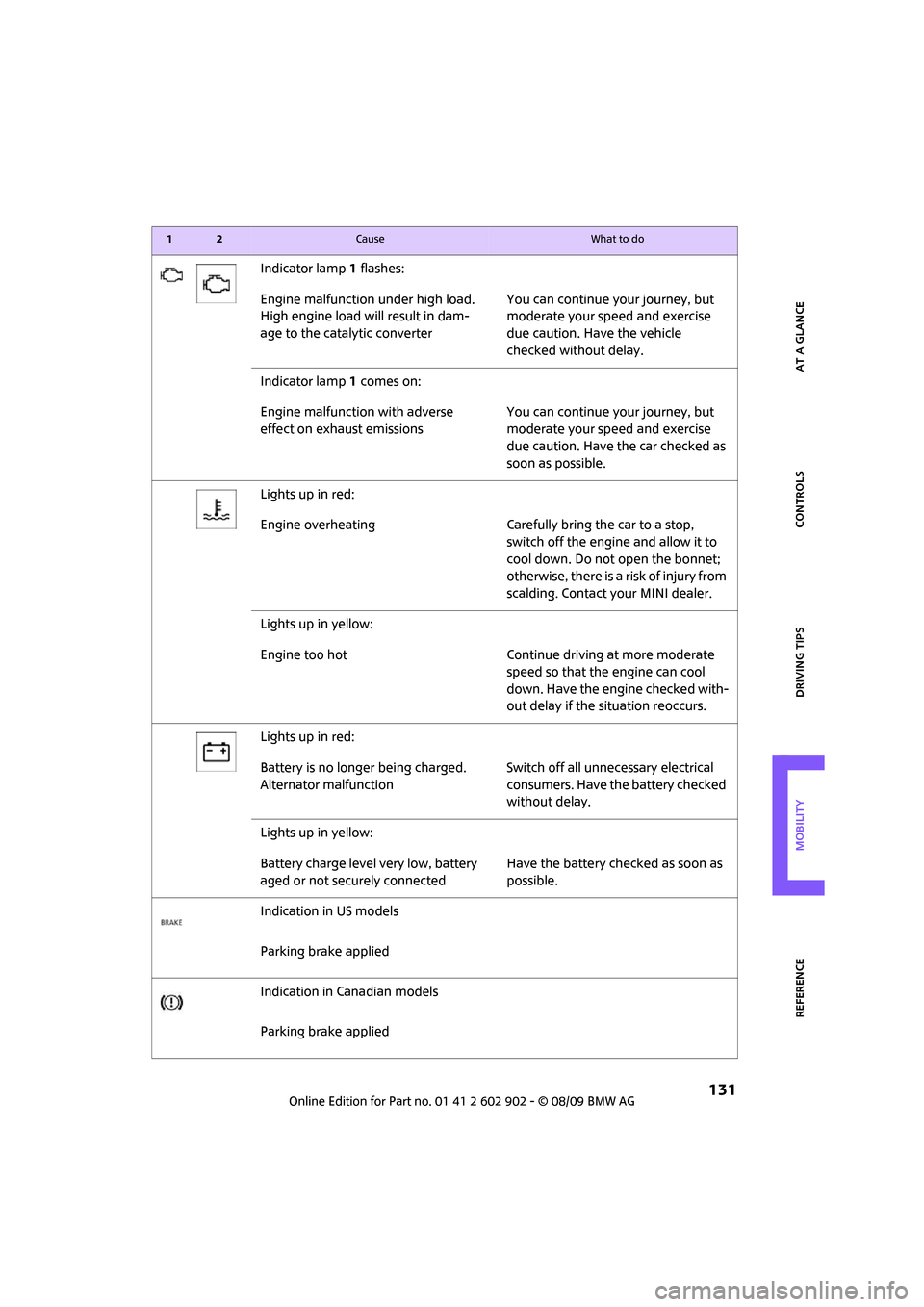
Indicator lamp1 flashes:
Engine malfunction under high load.
High engine load will result in dam-
age to the catalytic converterYou can continue your journey, but
moderate your speed and exercise
due caution. Have the vehicle
checked without delay.
Indicator lamp1 comes on:
Engine malfunction with adverse
effect on exhaust emissionsYou can continue your journey, but
moderate your speed and exercise
due caution. Have the car checked as
soon as possible.
Lights up in red:
Engine overheating Carefully bring the car to a stop,
switch off the engine and allow it to
cool down. Do not open the bonnet;
otherwise, there is a risk of injury from
scalding. Contact your MINI dealer.
Lights up in yellow:
Engine too hot Continue driving at more moderate
speed so that the engine can cool
down. Have the engine checked with-
out delay if the situation reoccurs.
Lights up in red:
Battery is no longer being charged.
Alternator malfunctionSwitch off all unnecessary electrical
consumers. Have the battery checked
without delay.
Lights up in yellow:
Battery charge level very low, battery
aged or not securely connectedHave the battery checked as soon as
possible.
Indication in US models
Parking brake applied
Indication in Canadian models
Parking brake applied
12Cause What to do
Page 148 of 160
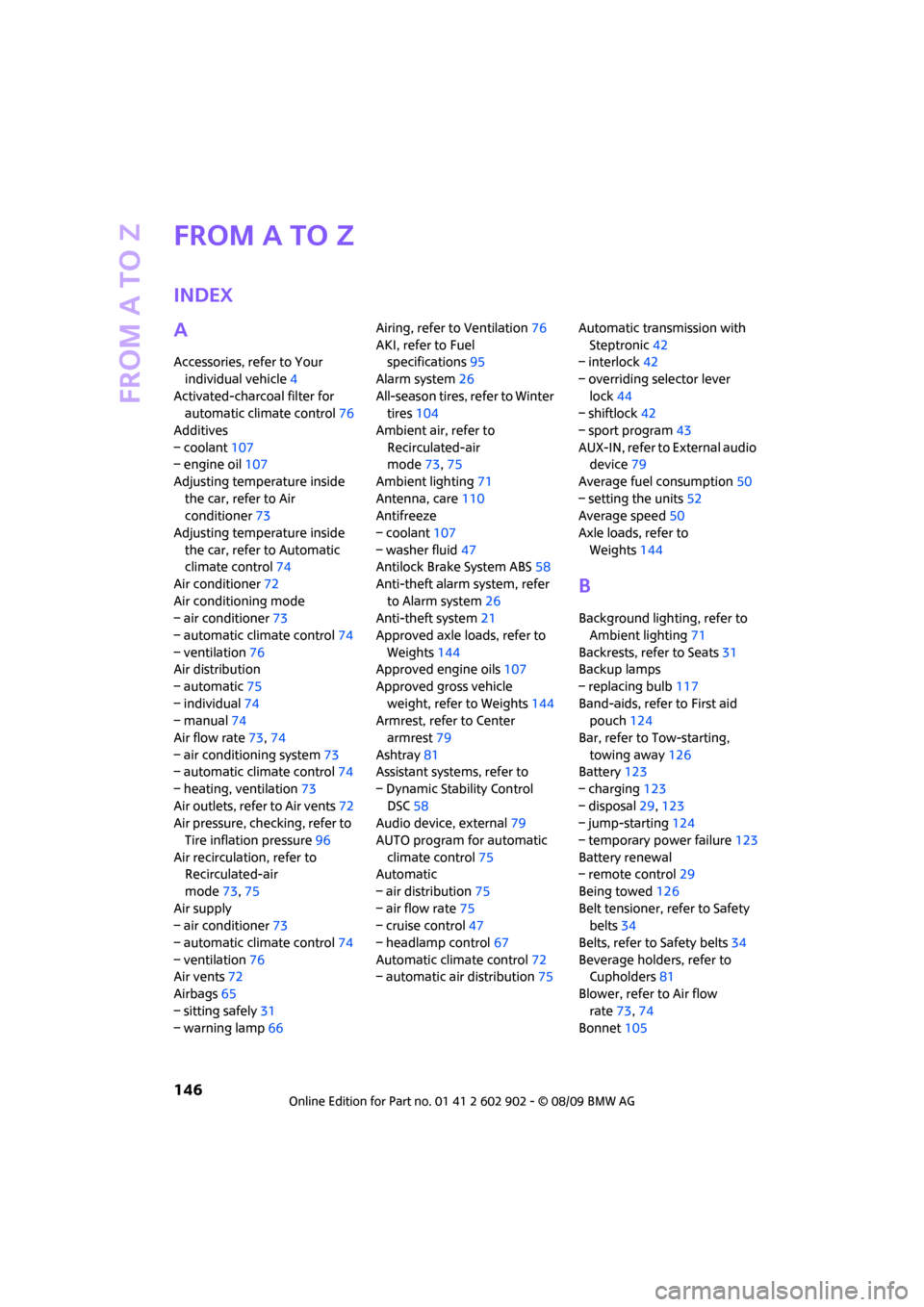
From A to Z
146
From A to Z
INDEX
A
Accessories, refer to Your
individual vehicle4
Activated-charcoal filter for
automatic climate control76
Additives
– coolant107
– engine oil107
Adjusting temperature inside
the car, refer to Air
conditioner73
Adjusting temperature inside
the car, refer to Automatic
climate control74
Air conditioner72
Air conditioning mode
– air conditioner73
– automatic climate control74
– ventilation76
Air distribution
– automatic75
– individual74
– manual74
Air flow rate73,74
– air conditioning system73
– automatic climate control74
– heating, ventilation73
Air outlets, refer to Air vents72
Air pressure, checking, refer to
Tire inflation pressure96
Air recirculation, refer to
Recirculated-air
mode73,75
Air supply
– air conditioner73
– automatic climate control74
– ventilation76
Air vents72
Airbags65
– sitting safely31
– warning lamp66Airing, refer to Ventilation76
AKI, refer to Fuel
specifications95
Alarm system26
All-season tires, refer to Winter
tires104
Ambient air, refer to
Recirculated-air
mode73,75
Ambient lighting71
Antenna, care110
Antifreeze
– coolant107
– washer fluid47
Antilock Brake System ABS58
Anti-theft alarm system, refer
to Alarm system26
Anti-theft system
21
Approved axle loads, refer to
Weights144
Approved engine oils107
Approved gross vehicle
weight, refer to Weights144
Armrest, refer to Center
armrest79
Ashtray81
Assistant systems, refer to
– Dynamic Stability Control
DSC58
Audio device, external79
AUTO program for automatic
climate control75
Automatic
– air distribution75
– air flow rate75
– cruise control47
– headlamp control67
Automatic climate control72
– automatic air distribution75Automatic transmission with
Steptronic42
– interlock42
– overriding selector lever
lock44
– shiftlock42
– sport program43
AUX-IN, refer to External audio
device79
Average fuel consumption50
– setting the units52
Average speed50
Axle loads, refer to
Weights144
B
Background lighting, refer to
Ambient lighting71
Backrests, refer to Seats31
Backup lamps
– replacing bulb117
Band-aids, refer to First aid
pouch124
Bar, refer to Tow-starting,
towing away126
Battery123
– charging123
– disposal29,123
– jump-starting124
– temporary power failure123
Battery renewal
– remote control29
Being towed126
Belt tensioner, refer to Safety
belts34
Belts, refer to Safety belts34
Beverage holders, refer to
Cupholders81
Blower, refer to Air flow
rate73,74
Bonnet105