ECU MINI Clubman 2011 User Guide
[x] Cancel search | Manufacturer: MINI, Model Year: 2011, Model line: Clubman, Model: MINI Clubman 2011Pages: 196, PDF Size: 3.08 MB
Page 138 of 196

MOBILITYUnder the hood
136
Under the hood
Never attempt to perform any service or
repair operations on your vehicle without
the required professional technical training. If
you are not familiar with the regulations to be
observed, have the necessary work on your
vehicle carried out only by a MINI dealer or a
workshop that has specially trained personnel
working in accordance with the specifications of
the MINI manufacturer. If this work is not carried
out properly, there is a danger of subsequent
damage and related safety hazards. <
Hood
Releasing
Pull the lever.
Do not clean the windshield and head-
lamps if the hood is unlocked as this may
damage the headlamp washer system
*. <
Opening
To avoid damage, make sure that the
wiper arms are against the windshield
before you open the hood. <
Press the release handle and open the hood.
Closing
Close the hood from a height of approx. 16 in/
40 cm with momentum. It must be clearly heard
to engage.
If you notice any signs while driving your
vehicle that the hood is not completely
closed, stop at once and close it securely.
Make sure that the closing path of the hood is
clear; otherwise, injuries may result. <
Page 146 of 196

MOBILITYCare
144
Chrome parts*
Carefully clean vehicle parts such as the radiator
grill and door handles with copious quantities of
water and, if necessary, a shampoo additive,
especially when contaminated with road salt.
For additional treatmen t, use chrome polish.
Light alloy wheels*
The system produces brake dust that collects on
the light alloy wheels. Clean them regularly with
acid-free wheel cleaner.
Do not use aggressive, acid-containing,
highly alkaline, or abrasive cleansers or
steam jets hotter than 140 7/60 6 a s t h e y m a y
cause damage. <
External sensors
Keep the outside sensors on the vehicle
such as the Park Di stance Control clean
and ice-free to ensure that they function prop-
erly. <
Careinternal
Upholstery/fabrics
Regularly use a vacuum cleaner to remove sur-
face dirt.
In case of serious spots su ch as liquid stains, use
a soft sponge or lint-free microfiber cloth and
suitable interior cleaners. Observe the instruc-
tions on the packaging.
Clean upholstery up to the seams. Do not
rub forcefully. <
Velcro fasteners on pa nts or other items of
clothing can damage seat covers. Make
sure that all Velcro fasteners are closed. <
Leather/leather coverings*
The leather processed by the manufac-
turer of your MINI is a high-quality natural
product. Light variations in the grain is one of
the typical properties of natural leather.
leather have an abrasive effect, leading to
increased wear and causing the leather surface
to become brittle prematurely. Use a cloth or
vacuum cleaner to remo ve dust on a regular
basis.
Especially when the leather has a light color, it
should be cleaned regularl y since it tends to get
heavily soiled.
Treat the leather twice a year using a leather
lotion since dirt and grease will gradually attack
the leather's protective layer.
Carpets/floor mats*
Keep floor mats, carpet, and other objects
out of the movement range of the pedals;
otherwise, they may inhibit the function of the
pedals during driving.
Do not place additional floor mats onto an exist-
ing one or onto other objects.
Only use floor mats that have been approved for
the vehicle and can be appropriately fastened.
Make sure that the floo r mats are securely fas-
tened again after they ha ve been removed, e.g.
for cleaning. <
Floor mats can be removed to be cleaned.
If the carpets are very di rty, clean with a microfi-
ber cloth and water or an interior cleaner. When
doing so, rub forward and back in the driving
direction; otherwise, the carpet may become
matted.
Interior plastic parts
These include:
> Plastic surfaces
> Lamp glass
> Display panes
> Mat parts
Only clean with water and, if necessary, solvent-
free plastic cleaners. Do not use solvents such as alcohol, lac-
quer thinner, cold clea ners, fuel, or similar,
as these will damage the surfaces. <
Page 148 of 196

MOBILITYReplacing components
146
Replacing components
Onboard vehicle toolkit
Your vehicle comes with an onboard vehicle
toolkit that varies with the equipment version; it
is stored underneath the flat load floor.
With the MINI Mobility System*
1 Compressor
2 Wheel stud wrench
*
3Vehicle jack*
4Torx insert bit for screwdriver
5 Flat screwdriver/Phillips screwdriver, towing
eyelet
6 Extractor hook
7 Sealant bottle
Run-flat tires* or space-saver spare tire*
1Folding chock* and cover for defective
wheel
2 Vehicle jack
3 Wheel stud wrench
4 Extractor hook
*
5Flat screwdriver/Phillips screwdriver
6 Torx insert bit for screwdriver
7 Towing eyelet
The onboard vehicle tool kit includes a pouch
with a plastic bag in which you can place the
damaged wheel.
Wiper blades
Changing the front wiper blades
1. Fold up the wiper arm.
2. Position the wiper blade horizontally.
3. Press the securing spring, arrow.
Page 156 of 196

MOBILITYReplacing components
154
Removing the space-saver spare tire
The space-saver spare tire is located under the
tire change set in the cargo area.
1.Fold up the floor mat.
2. Unscrew the nut, arrow, and remove the
space-saver spare tire.
Driving with the space-saver spare tire
Drive cautiously and do not exceed a
speed of 50 mph/80 km/h. Changes may
occur in vehicle handling such as lower track sta-
bility during br aking, longer braking distances
and changes in self-steering properties when
close to the handling limit. These properties are
more noticeable with winter tires. <
Only one space-saver spare tire may be
mounted at one time. Mount a wheel and
tire of the original size as soon as possible, to
avoid any safety risks. <
Check the tire inflation pressure at the ear-
liest opportunity and correct it if neces-
sary. Replace the defective tire as soon as possi-
ble and have the new wheel/tire assembly
balanced. <
Preparing for a tire change
Observe the safety precautions regarding
flat tires on page 151.< Additional safety measures when chang-
ing tires:
Only change the tire wh en parked on a surface
that is level, firm and not slippery.
The vehicle or the jack could slip sideways on
soft or slippery support surfaces, such as snow,
ice, flagstones, etc.
Do not use a wooden block or similar object as a
support base for the jack, as this would prevent
it from extending to its full support height and
reduce its load-carrying capacity.
Do not lie under the vehicle or start the engine
when the vehicle is supported by the jack; other-
wise, there is a risk of fatal injury. <
1. Place the foldable chock
* behind the front
wheel on the other side of the vehicle or in
front of the wheel if the vehicle is on an
incline. If the wheel is changed on a surface
with a more severe sl ope, take additional
precautions to secure the vehicle from roll-
ing.
2. Uncover the lug bolts if necessary.
3. Loosen the lug bolts by a half turn.
Jacking up the vehicle
The vehicle jack is designed for changing
wheels only. Do not attempt to raise
another vehicle model with it or to raise any load
of any kind. To do so could cause accidents and
personal injury. <
Page 157 of 196
Replacing componentsMOBILITY
155
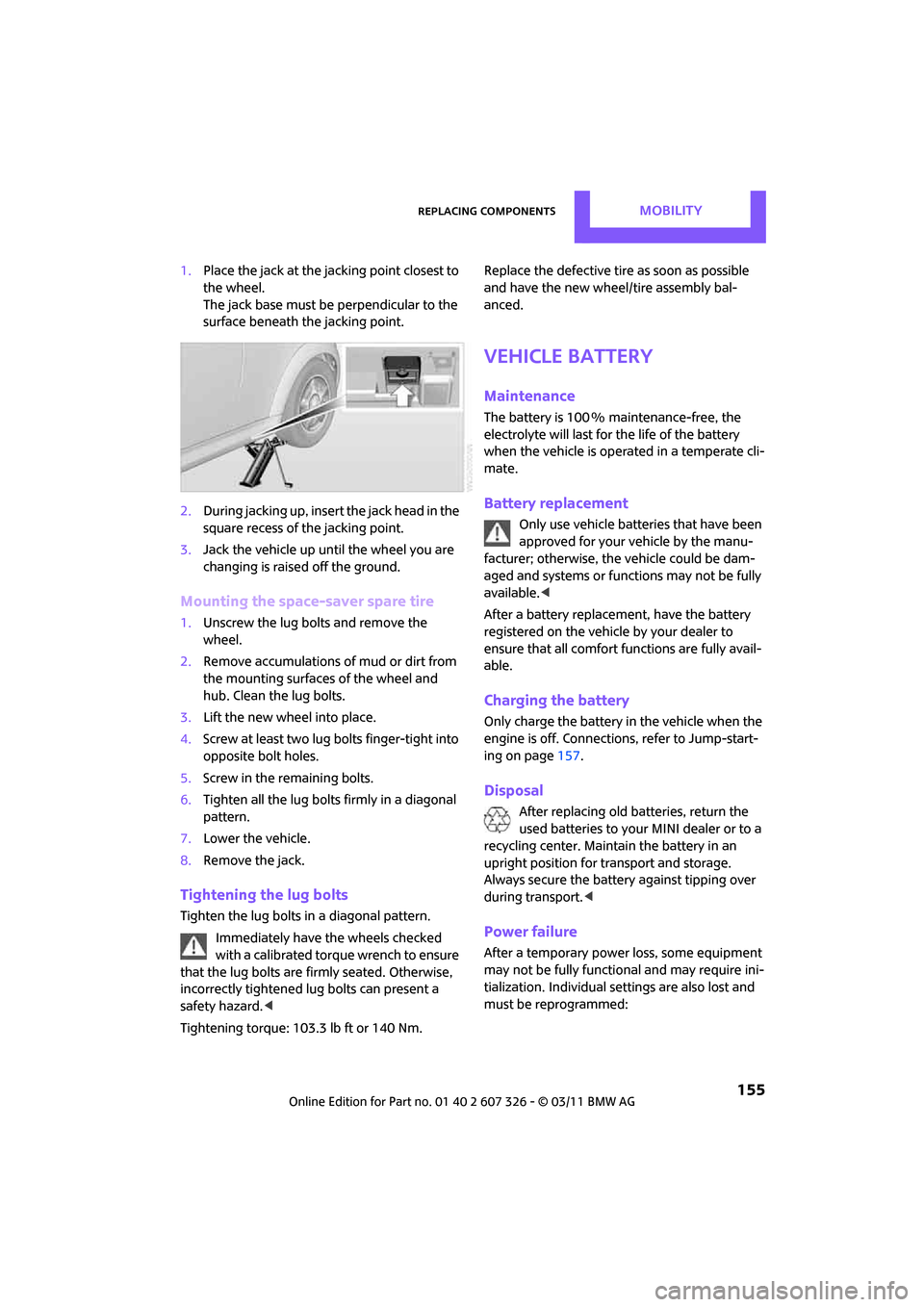
1.Place the jack at the jacking point closest to
the wheel.
The jack base must be perpendicular to the
surface beneath the jacking point.
2. During jacking up, insert the jack head in the
square recess of the jacking point.
3. Jack the vehicle up until the wheel you are
changing is raised off the ground.
Mounting the space-saver spare tire
1.Unscrew the lug bolts and remove the
wheel.
2. Remove accumulations of mud or dirt from
the mounting surfaces of the wheel and
hub. Clean the lug bolts.
3. Lift the new wheel into place.
4. Screw at least two lug bolts finger-tight into
opposite bolt holes.
5. Screw in the remaining bolts.
6. Tighten all the lug bolts firmly in a diagonal
pattern.
7. Lower the vehicle.
8. Remove the jack.
Tightening the lug bolts
Tighten the lug bolts in a diagonal pattern.
Immediately have the wheels checked
with a calibrated torque wrench to ensure
that the lug bolts are firmly seated. Otherwise,
incorrectly tightened lug bolts can present a
safety hazard. <
Tightening torque: 103.3 lb ft or 140 Nm. Replace the defective tire
as soon as possible
and have the new wheel/tire assembly bal-
anced.
Vehicle battery
Maintenance
The battery is 100 % maintenance-free, the
electrolyte will last for the life of the battery
when the vehicle is operated in a temperate cli-
mate.
Battery replacement
Only use vehicle batteries that have been
approved for your vehicle by the manu-
facturer; otherwise, the vehicle could be dam-
aged and systems or func tions may not be fully
available. <
After a battery replacement, have the battery
registered on the vehicle by your dealer to
ensure that all comfort functions are fully avail-
able.
Charging the battery
Only charge the battery in the vehicle when the
engine is off. Connection s, refer to Jump-start-
ing on page 157.
Disposal
After replacing old batteries, return the
used batteries to your MINI dealer or to a
recycling center. Maintain the battery in an
upright position for transport and storage.
Always secure the battery against tipping over
during transport. <
Power failure
After a temporary power loss, some equipment
may not be fully functional and may require ini-
tialization. Individual se ttings are also lost and
must be reprogrammed:
Page 167 of 196

Indicator and warning lampsMOBILITY
165
Lights up in red:
Battery is no longer being charged.
Alternator malfunctionSwitch off all unne
cessary electrical
consumers. Have the battery checked
without delay.
Lights up in yellow:
Battery charge level very low, battery
aged or not securely connected Have the battery checked as soon as
possible.
Indication in US models
Parking brake applied
Indication in Canadian models
Parking brake applied
Indication in US models
Lights up in red:
Brake fluid level too low Braking action is reduced, stop with care. Contact the nearest MINI dealer.
Lights up in yellow:
Hill Assist failed. The car will not be
held in place after the brake is
released Have the system ch
ecked as soon as
possible.
12Cause What to do
Page 183 of 196
Everything from A to ZREFERENCE
181
Being towed159
Bell
– volume 100
Belt tensioner, refer to Safety
belts 35
Belts, refer to Safety belts 35
Beverage holders, refer to
Cupholders 87
Black ice, refer to External temperature warning 52
Blower, refer to Air flow rate 79,81
Bluetooth, activating/
deactivating 114
Bottle holders, refer to Cupholders 87
Brake Assist 61
Brake fluid, refer to Service requirements 56
Brake lamps
– replacing bulbs 150
Brake pads, breaking in 90
Brake rotors 91
– brakes 90
– breaking in 90
Brake system 90
– breaking in 90
– disc brakes 91
– MINI Maintenance System 140
Brakes
– ABS 61
– breaking in 90
– MINI Maintenance System 140
– parking brake 43
– service requirements 56
Brakes, refer to Braking safely 91
Breakdown service, refer to Roadside Assistance 157
Break-in period 90
Breaking in the clutch 90
Bulb changing, refer to Lamps and bulbs 147
Button for starting the engine 41 Buttons on the steering
wheel 11
C
California Proposition 65
warning 5
Call
– accepting 117
– ending 118
– rejecting 118
Calling, refer to Phone numbers, dialing 118
Can holders, refer to Cupholders 87
Capacities 179
Car battery, refer to Vehicle battery 155
Car care 142
Car key, refer to Keys/remote controls 20
Car phone
– installation location, refer to Center armrest 85
– refer to separate Owner's
Manual
Car phone, refer to Telephone 112
Car wash, care 142
Car washes 142
Care 142
– car washes 142
– car-care products 142
– CD/DVD drives 145
– external 142
– high-pressure washers 143
– internal 144
– leather 144
– manual washing 143
– upholstery and fabrics 144
– windows 143
– wiper blades 143 Cargo area
92
– capacity 178
– Comfort Access 29
– doors, refer to Split Rear Barn
Doors 26
– lamp 76
– opening from outside 26
– trunk lid, refer to Split Rear Barn Doors 26
Cargo area doors, refer to Split
Rear Barn Doors 26
Cargo area, expanding 92
Cargo area lamp 76
Cargo area partition net, refer to Cargo net 93
Cargo loading 94
– securing cargo 95
– stowing cargo 95
– vehicle 92
Cargo net 93
Cargo, securing 95
Carpets, care 144
Cataly
tic converter, refer to
Hot exhaust system 90
CD player 105
– changing the track 106
– fast forward/reverse 106
– playing a track 106
– random order 106
– starting 105
– volume 100
Center armrest 85
Center brake lamp 151
Center console, refer to Around the center
console 14
Central locking system 21
– Comfort Access 28
– from inside 24
– from outside 21
Changing bulbs 147
Changing wheels 153
Chassis number, refer to Engine compartment 137
Check Control 58
Child restraint fixing system LATCH 39
Page 187 of 196

Everything from A to ZREFERENCE
185
Individual air distribution80
Individual settings, refer to Personal Profile 20
Inflation pressure monitoring,
refer to Tire Pressure Monitor
TPM 65
Initializing
– Flat Tire Monitor FTM 64
– glass roof, electric 30
Instrument cluster, refer to
Displays 12
Instrument lighting 76
Instrument panel, refer to
Cockpit 10
Instrument panel, refer to Displays 12
Integrated key 20
Integrated universal remote control 83
Interior lamps 76
– remote control 23
Interior rearview mirror 36
– automatic dimming feature 36
Interlock 44
Intermittent mode of the wipers 47
Internet page 4
J
Jacking points 154
Jets, refer to Window washer
nozzles 48
Jumpering, refer to Jump- starting 157
Jump-starting 157
K
Key Memory, refe r to Personal
Profile 20
Key, refer to Keys/remote controls 20
Keyless opening and closing,
refer to Comfort Access 28Keyless-Go, refer to Comfort
Access 28
Keypad dialing 118
Kickdown 44
– automatic transmission with Steptronic 44
Knock control 127
L
Lamps and bulbs, replacing
bulbs 147
Lamps, refer to Parking lamps/
Low beams 72
Lashing eyes, refer to Securing cargo 95
LATCH child restraint fixing system 39
Leather care 144
LEDs light-emitting diodes 147
Length, refer to Dimensions 177
License plate lamp
– bulb replacement 151
Liftgate
– Comfort Access 29
Liftgate, refer to Split Rear Barn Doors 23
Light alloy wheels, care 144
Light switch 72
Light-emitting diodes LEDs 147
Lighter 87
– socket 87
Lighting
– lamps and bulbs 147
– of the instruments 76
– of vehicle, refer to Lamps 72
Limit 172
Listening to test scan
– Radio MINI Boost CD 102
Load 94
Load securing equipment, refer to Secu ring cargo95
Lock buttons of doors, refer to
Locking 25 Locking
– adjusting confirmation
signal 22
– from inside 25
– from outside 22
– without remote control, refer
to Comfort Access 28
Locking and unlocking doors
– confirmation signals 22
– from inside 24
– from outside 21
Longlife oils
– approved motor oils 138
Low beams 72
– automatic 72
– replacing bulb 148
Lower back suppo rt, refer to
Lumbar support 33
Luggage compartment doors,
refer to Split Rear Barn
Doors 26
Luggage compartment
partition net, refer to Cargo
net 93
Luggage rack, re fer to Roof-
mounted luggage rack 95
Lumbar su
pport 33
M
M+S tires, refer to Winter
tires 135
Maintenance, refer to Service
and Warranty Information
Booklet for US models and
Service Guide Booklet for
Canadian models
Maintenance system 140
Malfunction warnings, refer to
Check Control 58
Manual air distribution 80
Manual mode
– automatic transmission with Steptronic 45
Page 190 of 196
REFERENCEEverything from A to Z
188
Safety belts35
– damage 36
– indicator lamp 35
– reminder 35
– sitting safely 32
Safety belts, care 145
Safety systems
– airbags 69
– Antilock Brake System ABS 61
– Dynamic Stability Control DSC 61
– safety belts 35
Safety tires, refer to Run-flat tires 134
Satellite radio 104
– enabling 104
Scan, listening to test
– Radio MINI Boost CD 102
Screw thread for tow fitting 159
Searching
– CD player 106
– radio 101
Searching for a music track
– CD 106
Seat adjustment
– mechanical 33
Seats 33
– adjusting the seats 33
– heating 35
– sitting safely 32
Securing the vehicle
– from inside 24
– from outside 21
Selector lever
– automatic transmission with Steptronic 44
Selector lever lock
– automatic transmission with Steptronic, refer to
Shiftlock 44
– overriding manually 45
Selector lever positions
– automatic transmission with
Steptronic 44 Service car, refe
r to Roadside
Assistance 157
Service data in the remote control 140
Service Interval Display, refer to Condition Based Service
CBS 140
Service, refer to Roadside Assistance 157
Service requirement display,
refer to Condition Based
Service CBS 140
Service requirements 56
Setting the time format 101
Settings
– clock, 12 h/24 h mode 55
Shifting gears
– automatic transmission with Steptronic 45
– manual transmission 43
Shiftlock
– automatic transmission, refer
t
o Changing selector lever
positions 44
Side airbags 69
Side door, rear, refer to Club Door 26
Side turn signal
– replacing bulb 150
Side windows, refer to
Windows 30
Signal horn, refer to Horn 10
Sitting safely 32
– airbags 32
– safety belts 32
– with head restraint 32
Size, refer to Dimensions 177
Sliding/tilt sunroof
– refer to Glass roof, electric 30
Slot for remote control 41
Smokers' package, refer to Ashtray 87
Snap-in adapter
– inserting/removing 123
– use 112 Snap-in adapter, refer to
Center armrest storage
compartment 85
Snow chains 135
Socket for On-Board Diagnosis OBD 141
Socket, refer to Connecting
electrical appliances 87
Space-saver spare tire
– changing tires 153
– inflation pressure 128
Spare wheel, refer to Space- saver spare tire 153
Special oils, refer to Approved engine oils 138
Speed 176
– with winter tires 135
Speed-dependent volume 100
Speedo, refer to
Speedometer 12
Speedometer 12
Split Rear Barn Doors 26
– opening from outside 26
– unlocking with remote control 23
Split rear seat backrest, refer to Expanding the cargo area 92
Sport button 63
Stability control, refer to Driving stability control
systems 60
Start/Stop button 41
– starting the engine 42
– switching off the engine 42
Starting assistance, refer to Jump-starting 157
Starting, refer to Starting the engine 42
Starting the engine
– Start/Stop button 41
Start-off assi
stance, refer to
– DSC 61
– Hill Assist 63
Stations, refer to Radio MINI
Boost CD 102
Status of this Owner's Manual at time of printing 4
Page 191 of 196
Everything from A to ZREFERENCE
189
Steering wheel37
– adjustment 37
– buttons on steering wheel 11
– lock 41
– shift paddles 45
Steptronic, refer to Automatic transmission with
Steptronic 43
Storage area
– cargo area 92
Storage compartment, front passenger side 86
Storage compartments 86
Storage space
– storage compartments 86
Storing the vehicle 145
Storing tires 135
Stowage, refer to Storage compartments 86
Summer tires, re fer to Wheels
and tires 128
Switches, refer to Cockpit 10
Switching off
– engine 42
Switching off the engine
– Start/Stop button 41
Switching on
– CD player 100,105
– Radio MINI Boost CD 100
Switching the cooling function
on and off 82
Symbols 4
T
Tachometer 51
Tail lamp, refer to Tail lamps 150
– replacing bulb 150
Tail lamps 150
Tank volume, refer to Capacities 179
Technical data 176
Technical modifications 5Telephone
112
– hands-free system 120
– installation location, refer to Center armrest 85
– refer to separate Owner's Manual
– voice commands 120
Telephone call, refer to the Owner's Manual for the
telephone
Temperature display
– setting the units 55
Temperature of coolant, refer
to Coolant temperature 139
Temperature setting
– air conditioner 79
– automatic climate control 81
Tempomat, refer to Cruise control 49
Tensioning straps, refer to Securing cargo 95
The individual vehicle 4
Third brake lamp, refer to Center brake lamp 151
Three-point safety belt 35
Tightening the lug bolts
– keys 146
– torque 155
Tightening torque, refer to Tightening lug bolts 155
Time
– setting 101
Tire change set
– space-saver spare tire 146
Tire failure
– Flat Tire Monitor 64
– indicator/warning lamp 64
– MINI Mobility System 151
– run-flat tires 65
– space-saver spare tire 153
– Tire Pressure Monitor 65
Tire inflation pressure 128
– loss 64
– space-saver spare tire 128Tire Pressure Monitor TPM
65
– limitations of system 66
– resetting system 66
– warning lamp 66
Tire pressure monitoring, refer to Flat Tire Monitor 63
Tire Quality Grading 132
Tires
– age 133
– breaking in 90
– changi
ng, refe r to Changing
wheels 153
– condition 133
– damage 133
– inflation pressure 128
– inflation pressure loss 66
– minimum tread depth 133
– new tires 134
– pressure monitoring, refer to
Flat Tire Monitor 63
– pressure monitoring, refer to Tire Pressure Monitor
TPM 65
– puncture 64
– size 131
– wear indicators, refer to Minimum tread depth 133
– winter tires 135
– with emergency operation properties 134
Tires with emergency operation properties, refer to
Run-flat tires 134
Tires with safety features, refer
to Run-flat tires 134
Tone
– middle setting 101
Tone control 101
Tools, refer to Onboard vehicle
toolkit 146
Torque 176
– lug bolts 155
Tow bar 159
Tow fitting 159
– screw thread 159
Tow fittings for tow-starting and towing away 159