audio MINI Clubman 2011 User Guide
[x] Cancel search | Manufacturer: MINI, Model Year: 2011, Model line: Clubman, Model: MINI Clubman 2011Pages: 196, PDF Size: 3.08 MB
Page 111 of 196
Radio MINI Boost CDENTERTAINMENT
109
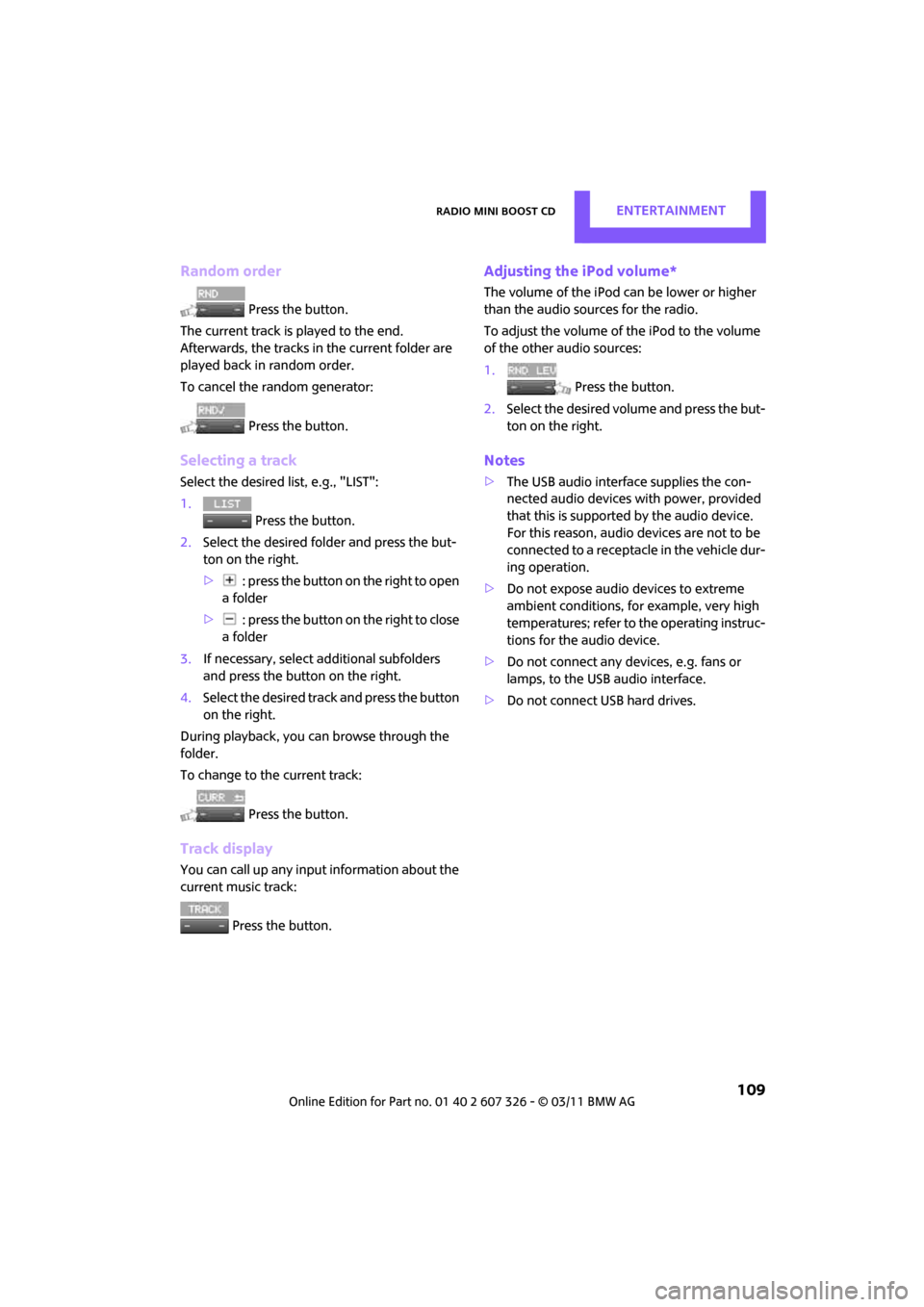
Random order
Press the button.
The current track is played to the end.
Afterwards, the tracks in the current folder are
played back in random order.
To cancel the random generator:
Press the button.
Selecting a track
Select the desired list, e.g., "LIST":
1. Press the button.
2. Select the desired folder and press the but-
ton on the right.
> : press the button on the right to open
a folder
> : press the button on the right to close
a folder
3. If necessary, select additional subfolders
and press the button on the right.
4. Select the desired track and press the button
on the right.
During playback, you can browse through the
folder.
To change to the current track:
Press the button.
Track display
You can call up any inpu t information about the
current music track:
Press the button.
Adjusting the iPod volume*
The volume of the iPod can be lower or higher
than the audio sources for the radio.
To adjust the volume of the iPod to the volume
of the other audio sources:
1. Press the button.
2. Select the desired volume and press the but-
ton on the right.
Notes
>The USB audio interface supplies the con-
nected audio devices with power, provided
that this is supported by the audio device.
For this reason, audio devices are not to be
connected to a receptac le in the vehicle dur-
ing operation.
> Do not expose audio devices to extreme
ambient conditions, for example, very high
temperatures; refer to the operating instruc-
tions for the audio device.
> Do not connect any devices, e.g. fans or
lamps, to the USB audio interface.
> Do not connect USB hard drives.
Page 114 of 196
COMMUNICATIONSTelephone
112
Telephone
Overview
The concept
Mobile phones or other external devices, e.g.
audio players, can be connected to the vehicle
via Bluetooth.
Bluetooth® is a registered trademark of Blue-
tooth® SIG, Inc.
Your MINI is equipped with a complete mobile
phone preparation. After a suitable mobile
phone is paired with the vehicle once, the
mobile phone can be controlled via the radio,
the buttons
* on the steering wheel, and by
voice
*.
It may be necessary for some functions to be
activated by the mobile phone provider. Only make entries when traffic conditions
permit. Do not hold the mobile phone in
your hand while you are driving; use the hands-
free system instead. If you do not observe this
precaution, your being distracted can endanger
vehicle occupants and other road users. <
Snap-in adapter*
The snap-in adapter, refer to page123, makes it
possible to:
> Accommodate the mobile phone.
> Recharge its battery.
> Connect it to an exte rnal antenna of the
vehicle.
This assures a better network connection
and constant sound quality.
A mobile phone that is connected to the vehicle
should not be operated via the mobile phone
keypad; otherwise, ma lfunctions may occur.
Suitable mobile phones
For precise information as to which mobile
phones and external devices with Bluetooth
interfaces are supported by the mobile phone
preparation, go to ww w.mini.com/connectivity.
*
Page 182 of 196

180
REFERENCEEverything from A to Z
Everything from A to Z
INDEX
A
ABS Antilock Brake System61
Accessories, refer to Your individual vehicle 4
Acknowledgment signals for
locking/unlocking vehicle 22
Activated-charcoa l filter for
automatic climate control 82
Adaptive Light Control 74
Additives
– coolant 139
– engine oil 138
Adjusting temperature inside the car, refer to Air
conditioner 79
Adjusting temperature inside the car, refer to Automatic
climate control 80
Air conditioner 78
Air conditioning mode
– air conditioner 79
– automatic cl imate control80
– ventilation 82
Air distribution
– automatic 81
– individual 80
– manual 80
Air flow rate 79,81
– air conditioning system 79
– automatic cl imate control81
– heating, ventilation 79
Air outlets, refer to Air vents 78
Air pressure, checking, refer to Tire inflation pressure 128
Air recirculation, refer to Recir-
culated-air mode 79,81
Air supply
– air conditioner 79
– automatic cl imate control80
– ventilation 82 Air vents
78
Airbags 69
– sitting safely 32
– warning lamp 71
Airing, refer to Ventilation82
AKI, refer to Fuel grade 127
Alarm system 27
All-season tires, refer to Winter tires 135
Ambient air, refer to Recircu- lated-air mode 79,81
Ambient lighting 77
Antenna, care 142
Antifreeze
– coolant 139
– washer fluid 49
Anti
lock Brake System ABS 61
Anti-theft alarm system, refer
to Alarm system 27
Anti-theft system 21
Approved axle loads, refer to Weights 178
Approved engine oils 138
Approved gross vehicle weight, refer to Weights 178
Armrest, refer to Center
armrest 85
Ashtray 87
Assistant systems, refer to
– Dynamic Stability Control DSC 61
Audio device, external 85
AUTO program for automatic climate control 81
Auto radio, refer to Radio MINI
Boost CD 100
Automatic
– air distribution 81
– air flow rate 81
– cruise control 49
– headlamp control 72Automatic climate control
78
– automatic air distribution 81
Automatic station search 101
Automatic station storage 102
Automatic transmission with Steptronic 43
– interlock 44
– overriding selector lever lock 45
– shiftlock 44
– sport program 45
AUX In connection 100
AUX-IN, refer to External audio device 85
Average fuel consumption 52
– setting the units 55
Average speed 52
Axle loads, refer to
Weights 178
B
Background lighting, refer to
Ambient lighting 77
Backrests, refer to Seats 33
Backup lamps
– replacing bulb 150
Band-aids, refer to First aid pouch 157
Bar, refer to Tow-starting, towing away 159
Base plate for telephone or
mobile phone
– refer to Snap-in adapter 123
Battery 155
– charging 155
– disposal 30,155
– jump-starting 157
– temporary power failure 155
Battery renewal
– remote control 30
Page 184 of 196

REFERENCEEverything from A to Z
182
Child restraint systems38
Child seats 38
Chrome parts, care 144
Chrome parts, refer to
Care 142
Cigarette lighter 87
Cleaning headlamps 48
– washer fluid 49
Clock
– 12 h/24 h mode 55
– setting time 57
Closing
– from inside 24
– from outside 21
Clothes hooks 86
Club Door 26
Cockpit 10
Cold start, refer to Starting the engine 42
Comfort Access 28
– replacing the battery 30
– what to observe before
entering a car wash 29
Comfort area, refer to Around the center console 14
Compartment for remote control, refer to Ignition
lock 41
Compressed audio files 105
Computer 52
Condensation, refer to When the vehicle is parked 92
Condition Based Service
CBS 140
Configuring settings, refer to Personal Profile 20
Connecting vacuum cleaner, refer to Connecting electrical
appliances 87
Consumption, refer to Average fuel consumption 52
Control Display
– settings 53
Controls and displays 10
Convenient access, refer to
Comfort Access 28 Convenient operation
– windows
22
Convenient start, refer to Starting the engine 42
Coolant 139
– checking level 139
– filling 139
Coolant temperature 139
Cooling fluid, refer to Coolant 139
Cooling, maximum 81
Copyright 2
Cornering light, refer to
Adaptive Light Control 74
Cruising range 52
Cupholders 87
Curb weight, refer to Weights 178
C
urrent fuel consumption 52
D
Dashboard instruments, refer
to Displays 12
Dashboard lighting, refer to
Instrument lighting 76
Dashboard, refer to Cockpit 10
Data 176
– capacities 179
– dimensions 177
– engine 176
– weights 178
Data memory 141
Date
– setting 58
Date setting 101
Daytime running lights 73
DBC Dynamic Brake Control, refer to Brake Assist 61
Deactivating front passenger airbags 70
Deadlocking, refer to
Locking 22
Defect
– door lock 24
– fuel filler flap 126
Defogging windows 80,82 Defrost positi
on, refer to
Defrosting windows 80,82
Defrosting windows 80,82
Defrosting windows and
removing condensation
– air conditioner 80
– automatic climate control 82
Defrosting windshield, refer to Defrosting windows 80,82
Differential, breaking in 90
Digital radio, refer to HD Radio 103
Dimensions 177
Dipstick, engine oil 137
Directional indicators, refer to Turn signals 46
Displacement, refer to Engine data 176
Display lighting, refer to
Instrument lighting 76
Displays 12
– instrument cluster 12
Displays and controls 10
Displays, care 145
Disposal
– of coolant 139
– remote control battery 30
– vehicle battery 155
Distance remaining to service, refer to Service
requirements 56
Distance warning, refer
to Park
Distance Control PDC 60
Door
– rear, refer to Club Door 26
Door key, refer to Integrated
key/remote control 20
Door lock 24
Door lock, confirmation
signals 22
Doors, manual operation 24
DOT Quality Grades 132
Double doors, refer to Split Rear Barn Doors 26
Drinks holders, refer to
Cupholders 87
Page 185 of 196

Everything from A to ZREFERENCE
183
Drive-off assistant, refer to Hill
Assist 63
Driving dynamics control, refer to Sport button 63
Driving lamps, refer to Parking lamps/low beams 72
Driving notes 90
Driving off on inclines, refer to Hill Assist 63
Driving stability control
systems 60
Driving through water 91
Driving tips, refer to Driving
notes 90
Dry air, refer to Cooling function 82
DSC Dynamic Stability Control 61
DTC Dynamic Traction
Control 62
Dynamic Brake Control DBC, refer to Brake Assist 61
Dynamic Stability Control DSC 61
Dynamic Traction Control
DTC 62
E
Eject button 106
Electrical malfunction
– door lock 24
– fuel filler flap 126
Electronic brake-force distribution 61
Electronic Stability Program
ESP, refer to Dynamic
Stability Control DSC 61
Emergency operation, refer to
Manual operation
– door lock 24
– fuel filler flap 126
– transmission lock, automatic transmission 45
Emergency services, refer to
Roadside Assistance 157Engine
– breaking in
90
– data 176
– overheated, refer to Coolant
temperature 139
– speed 176
– starting 42
– starting, Comfort Access 28
– switching off 42
Engine compartment 137
Engine coolant, refer to Coolant 139
Engine oil
– adding 138
– additives, refer to Approved engine oils 138
– alternative oil types 138
– approved engine oils 138
– capacity 138
– checking level 137
– dipstick 137
– intervals between changes,
refer to Service
requirements 56
– MINI Maintenance
System 140
Engine oil level, checking 137
Engine output, refer to Engine
data 176
Engine starting, refer to
Starting the engine 42
ESP Electronic Stability Program, refer to Dynamic
Stability Control DSC 61
Exhaust system, refer to Hot exhaust system 90
Exterior mirrors 36
– adjusting 36
– automatic heating 36
– folding in and out 36
External audio device 85,100
External temperature display
– change units of measure 55
– in the on-board computer 55Eyes
– for tow-
starting and towing
away 159
– for tying down loads 95
F
Failure messages, refer to
Check Control 58
Failure of an electrical
consumer 156
Fast forward
– CD 106
Fastening safety be lts, refer to
Safety belts 35
Fault messages, refer to Check
Control 58
Filter
– microfilter for air
conditioner 80
– microfilter/activated- charcoal filter for automatic
climate control 82
Fine wood, care 145
First aid pouch 157
Fixture for remote control, refer to Ignition lock 41
Flash when locking/
unlocking 22
Flat load floor 94
Flat tire
– run-flat tires 134
– Tire Pressure Monitor TPM 65
Flat Tire Monitor FTM 63
– indicating a flat tire 64
– initializing the system 64
– snow chains 64
– system limits 64
Flat tires, refer to Tire
condition 133
Floor mats, care 144
Floor plate, refe r to Flat load
floor 94
Fog lamps
– replacing bulb 149,150
Folding rear seat backrest 92
Page 192 of 196

REFERENCEEverything from A to Z
190
Tow rope159
Towing 158
– car with automatic transmission 159
– methods 159
Tow-starting 158
TPM, refer to Tire Pressure
Monitor 65
Track width, refer to Dimension 177
Traction control, refer to
– Dynamic Stability Control DSC 61
Transmission
– automatic transmission with Steptronic 43
– manual transmission 43
– overriding selector lever lock for automatic transmission
with Steptronic 45
Transport securing devices, refer to Securing cargo 95
Transporting children safely 38
Tread depth, refer to Minimum tire tread 133
Trip odometer 51
Trip-distance counter, refer to Trip odometer 51
Triple turn si gnal activation 46
Turn signal 46
– front, replacing bulb 149
– indicator lamp 12
– rear, replacing bulb 150
– side, replacing bulb 150
Turning circle, refer to Dimensions 177
Tying down load s, refer to
Cargo loading 95
U
Uniform Tire Quality Grading
UTQR 132
Units
– average fuel consumption 55
– temperature 55 Universal garage-door opener,
refer to Integrated universal
remote control 83
Universal remote control 83
Unlatching, refer to Unlocking 28
Unlocking
– from inside 25
– from outside 21
– liftgate 29
– without remote control, refer
to Comfort Access 28
Upholstery, care 144
USB audio interface 107
V
Vehicle
– battery155
– breaking in 90
– cargo loading 92
– dimensions 177
– identification number, refer to Engine compartment 137
– parking 42
– storage 145
– weight 178
Vehicle jack 146
– jacking points 154
Ventilation
– air conditioner 82
Vents, refer to Air vents 78
Vents, refer to Ventilation 82
Voice commands
– telephone 120
Voice phone book 121
Volume
– bell 100
– mobile phone 117
– PDC 100
– setting speed- dependent 100
Volume of cargo area 178
W
Warning and indicator
lamps 13,161
Warning messages, refer to Check Control 58
Warning triangle 157
Washer fluid 49
– capacity of reservoir 49
Washer fluid reservoir 49
Waste tray, refer to Ashtray 87
Water on roads, refer to Driving through water 91
Waterfall lighti ng, refer to
Ambient lighting 77
Wear indicators in tires, refer to
Minimum tread depth 133
Weights 178
Welcome lamps 72
Wheel stud wrench
– space-saver spare tire 146
Wheelbase, refer to
Dimensions 177
Wheels and tires 128
Wheels, new 134
Width, refer to Dimensions 177
Window washer, refer to
Washer fluid 49
Window washer reservoir,
refer to Washer fluid
– volume, refer to Capacities 179
Window washer system 47
– washer fluid 49
– washer jets 48
Windows 30
– closing 31
– convenient operation 22
– opening 31
– pinch protection system 31
Windshield
– cleaning 48
– defrosting and removing condensation 80,82