engine overheat MINI Clubman 2011 Owner's Manual
[x] Cancel search | Manufacturer: MINI, Model Year: 2011, Model line: Clubman, Model: MINI Clubman 2011Pages: 196, PDF Size: 3.08 MB
Page 33 of 196
Opening and closingCONTROLS
31
If, after a window is opened and closed
several times in close succession, the win-
dow can only be closed and not opened, the sys-
tem is overheated. Let the system cool for sev-
eral minutes with the igni tion switched on or the
engine running. <
Opening, closing
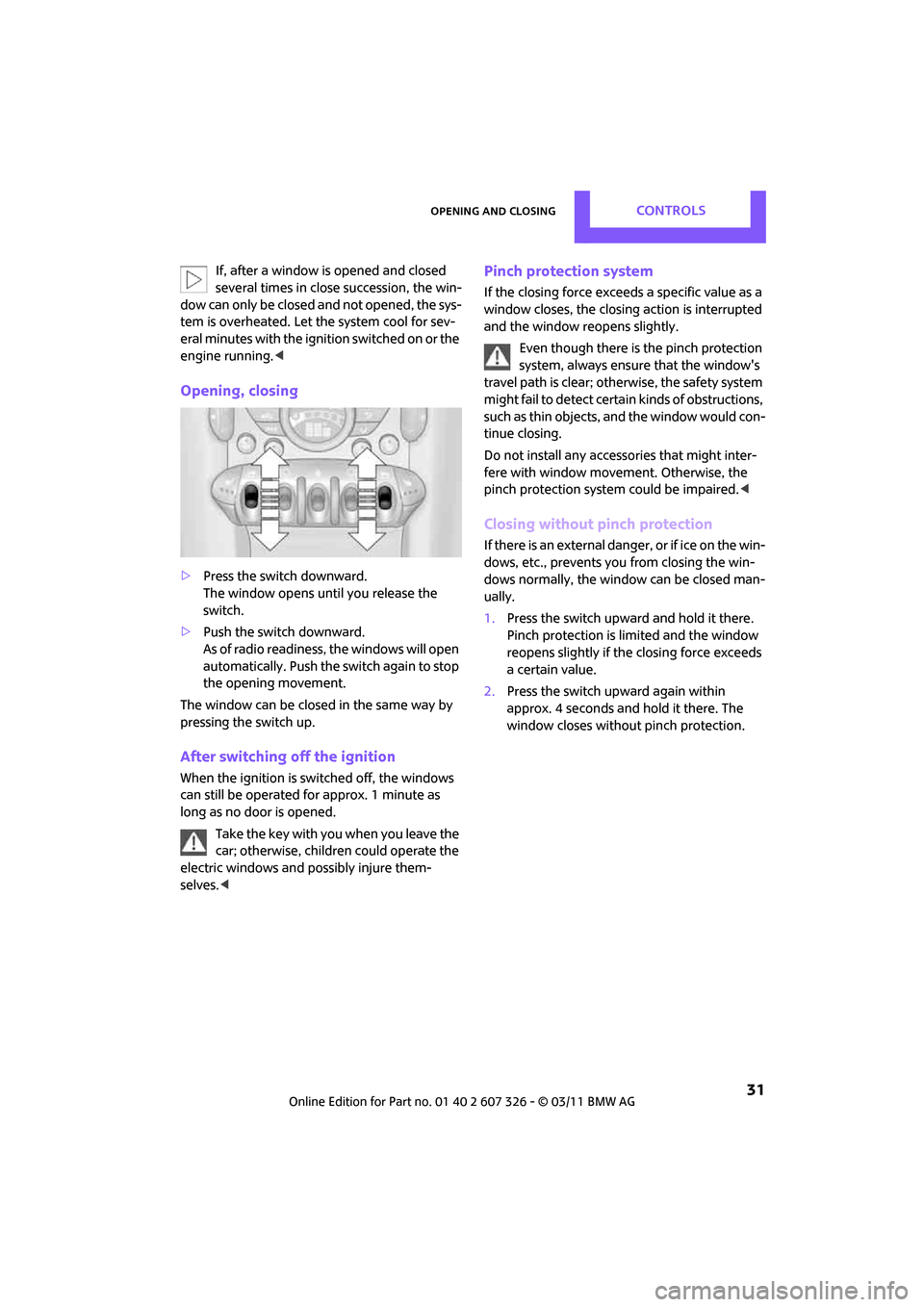
>Press the switch downward.
The window opens until you release the
switch.
> Push the switch downward.
As of radio readiness, the windows will open
automatically. Push the switch again to stop
the opening movement.
The window can be closed in the same way by
pressing the switch up.
After switching off the ignition
When the ignition is sw itched off, the windows
can still be operated for approx. 1 minute as
long as no door is opened.
Take the key with you when you leave the
car; otherwise, children could operate the
electric windows and possibly injure them-
selves. <
Pinch protection system
If the closing force exceeds a specific value as a
window closes, the closing action is interrupted
and the window reopens slightly.
Even though there is the pinch protection
system, always ensure that the window's
travel path is clear; otherwise, the safety system
might fail to detect certain kinds of obstructions,
such as thin objects, and the window would con-
tinue closing.
Do not install any accesso ries that might inter-
fere with window movement. Otherwise, the
pinch protection system could be impaired. <
Closing without pinch protection
If there is an external danger, or if ice on the win-
dows, etc., prevents you from closing the win-
dows normally, the window can be closed man-
ually.
1.Press the switch upward and hold it there.
Pinch protection is limited and the window
reopens slightly if the closing force exceeds
a certain value.
2. Press the switch up ward again within
approx. 4 seconds and hold it there. The
window closes without pinch protection.
Page 44 of 196
CONTROLSDriving
42
Radio readiness and ignition off
All indicator and warning lamps in the displays
go out.
The ignition automatically turns off
* when the
driver's door is opened. Pressing the Start/Stop
button again switches the ignition back on.
The ignition is not switched off in situations such
as the following:
> The clutch or brake is depressed
> The low beams are switched on
Starting the engine
Do not allow the engine to run in enclosed
areas; otherwise, inha lation of the noxious
exhaust gases can lead to loss of consciousness
and death. Exhaust gase s contain carbon mon-
oxide, an odorless and colorless, but highly toxic
gas. Never leave an unattended vehicle with the
engine running; otherwise, such a vehicle repre-
sents a potential safety hazard.
Before leaving the car while the engine is run-
ning, place the transmission in neutral or move
the selector lever to position P and forcefully
apply the parking brake to prevent the car from
moving. <
Avoid frequent starting in quick succes-
sion or repeated start attempts in which
the engine does not start. Otherwise, the fuel is
not burned or inadequate ly burned and there is
a danger of overheatin g and damaging the cat-
alytic converter. <
Do not let the engine warm up with the vehicle
at a standstill. Move off immediately at a moder-
ate engine speed.
When starting the engi ne, do not depress the
accelerator pedal.
Manual transmission
Key in ignition lock or inside vehicle with Com-
fort Access, refer to page 28.
1. Depress the brake.
2. Depress the clutch.
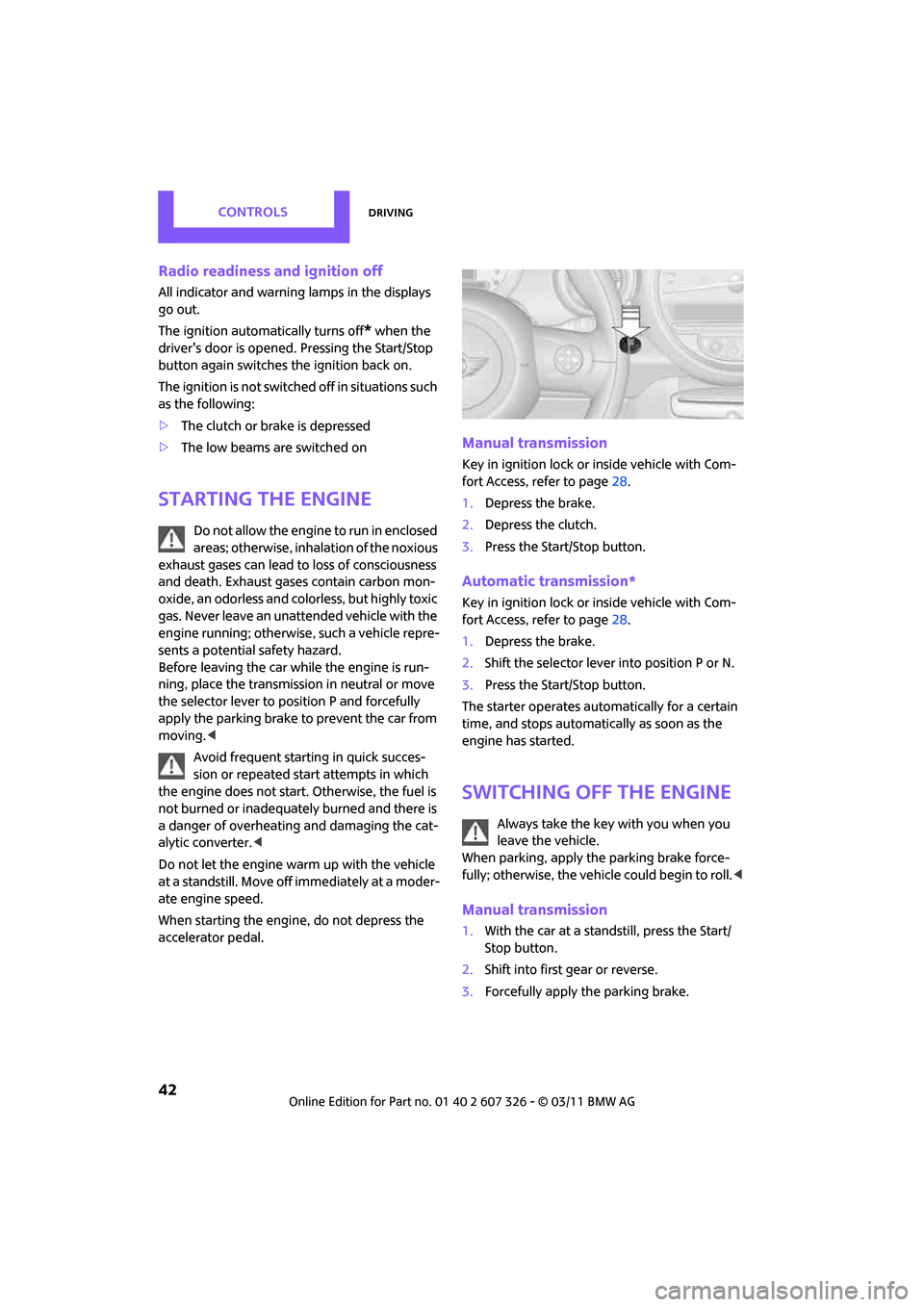
3. Press the Start/Stop button.
Automatic transmission*
Key in ignition lock or inside vehicle with Com-
fort Access, refer to page 28.
1. Depress the brake.
2. Shift the selector lever into position P or N.
3. Press the Start/Stop button.
The starter operates auto matically for a certain
time, and stops automati cally as soon as the
engine has started.
Switching off the engine
Always take the key with you when you
leave the vehicle.
When parking, apply the parking brake force-
fully; otherwise, the vehicle could begin to roll. <
Manual transmission
1.With the car at a standstill, press the Start/
Stop button.
2. Shift into first gear or reverse.
3. Forcefully apply the parking brake.
Page 93 of 196

Things to remember when drivingDRIVING TIPS
91
Hydroplaning
When driving on wet or slushy roads,
reduce road speed. If you do not, a wedge
of water can form betw een tires and road sur-
face. This situation, known as hydroplaning, can
cause partial or complete loss of tire contact
with the road surface, so that the car cannot be
steered or braked properly. <
The risk of hydroplaning increases with declining
tread depth on the tires, refer also to Tread
depth on page 133.
Driving through water
Drive through water on the road only if it is
not deeper than 1 ft/30 cm, and then only
at walking speed at the most. Otherwise, the
vehicle's engine, the electrical systems and the
transmission may be damaged. <
Parking brake on inclines
On inclines, do not hold the vehicle with
the clutch; use the parking brake. Other-
wise, greater clutch wear will result. <
For information on drivin g off using Hill Assist,
refer to page 63.
Braking safely
Your MINI is equipped with ABS. If you are in a
situation which requires full braking, it is best to
brake using maximum brake pressure. Since the
vehicle maintains steeri ng responsiveness, you
can still avoid possible obstacles with a mini-
mum of steering effort.
The pulsation of the brake pedal, together with
the sound of hydraulic regulation, indicates that
ABS is functioning properly.
Objects in the move ment range of the
pedals
Keep floor mats, carpet, and other objects
out of the movement range of the pedals;
otherwise, they may inhibit the function of the
pedals during driving.
Do not place additional floor mats onto an exist-
ing one or onto other objects. Only use floor mats that
have been approved for
the vehicle and can be appropriately fastened.
Make sure that the floo r mats are securely fas-
tened again after they have been removed, e.g.
for cleaning. <
Driving in wet conditions
When roads are wet or ther e is heavy rain, briefly
exert gentle pressure on the brake pedal every
few miles. Monitor traffic conditions to ensure
that this maneuver does not endanger other
road users. The heat generated in this process
helps dry the pads and rotors to ensure that
Then full braking force will be immediately avail-
able when it is needed.
Hills
To prevent overheatin g and the resulting
reduced efficiency of the brake system,
drive long or steep downhill gradients in the
gear in which the least braking is required. Even
light but consistent brake pressure can lead to
high temperatures, brake wear and possibly
even brake failure. <
You can increase the engine's braking effect by
shifting down, all the way to first gear if neces-
sary. This strategy helps you avoid placing
excessive loads on the brake system. Downshift-
ing in manual mo de of the automatic transmis-
sion, page 45.
Never drive with the clutch held down,
with the transmission in neutral or with
the engine switched off; otherwise, engine brak-
ing action will not be present or there will be no
power assistance to th e brakes or steering.
Never allow floor mats, carpets or any other
objects to protrude into the area around the
pedals; otherwise, pedal function could be
impaired. <
Corrosion on brake rotors
When the vehicle is driven only occasionally,
during extended periods when the vehicle is not
used at all, and in operating conditions where
brake applications are less frequent, there is an
Page 141 of 196

Under the hoodMOBILITY
139
Coolant
Coolant consists of half water and half additive.
Not all commercially available additives are suit-
able for your MINI. Your MINI dealer knows
which additives are suitable and will be glad to
advise you.Only use suitable additives; otherwise,
engine damage may result. Because addi-
tives are harmful to your health, it is important
to follow the instructions on the containers. <
Comply with the appropriate environmen-
tal protection regulations when disposing
of coolant additives. <
Coolant temperature
If the coolant, and therefore the engine, should
overheat, then a warning li ght will go on, refer to
page 164.
Checking coolant level
Do not add coolant to the cooling system
when the engine is hot. Escaping coolant
can cause burns. <
Do not open the hood until the engine has
cooled down.
The coolant level is correct if it is between the
Min and Max markings.
Topping off
1. Turn the cap of the expansion tank a little
counterclockwise to allow any accumulated pressure to escape, then continue turning to
open.
2. Slowly fill to the correct fluid level; do not
overfill.
3. Close by turning the cap.
Have the reason for the coolant loss eliminated
as soon as possible.
Page 154 of 196
MOBILITYReplacing components
152
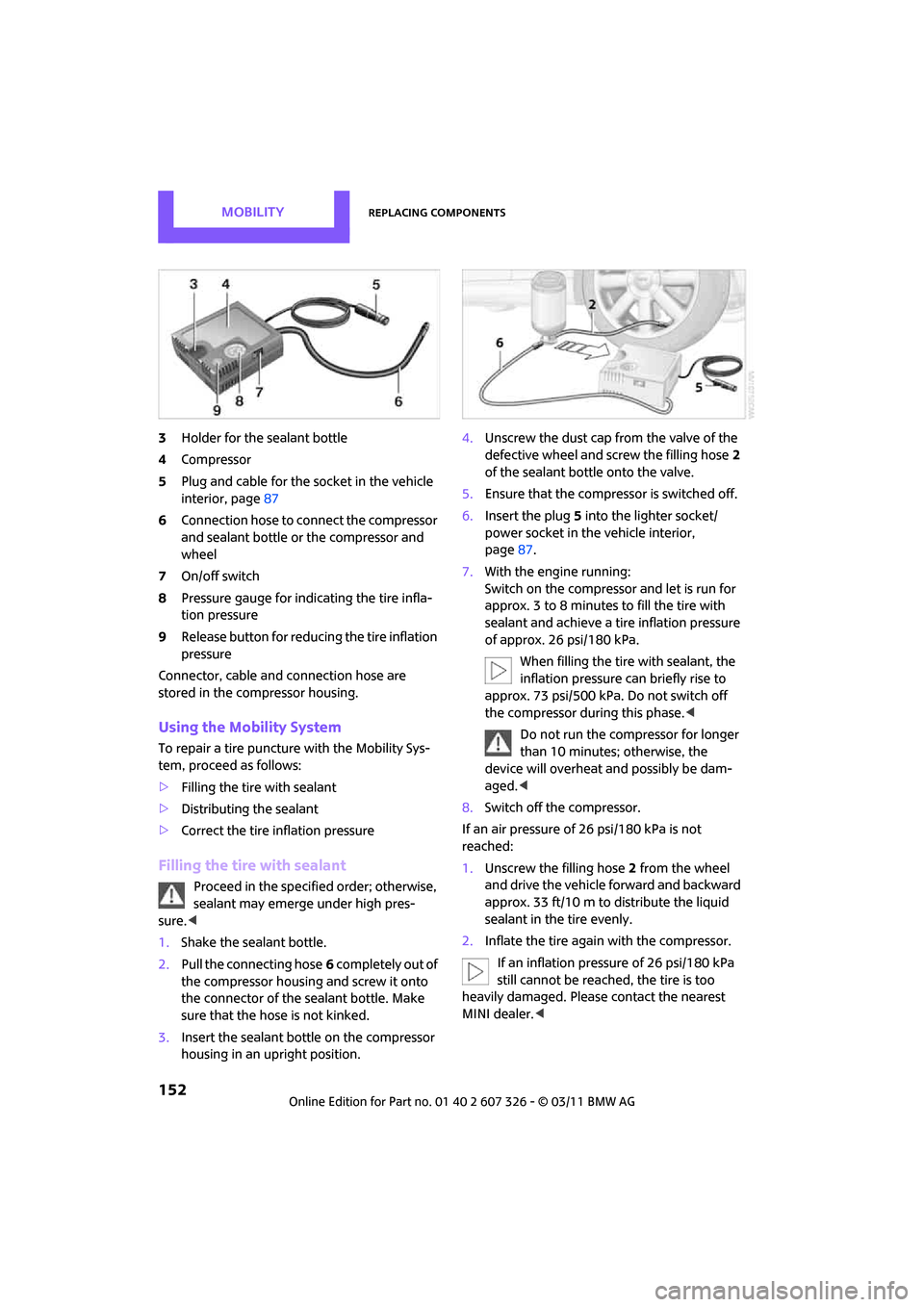
3Holder for the sealant bottle
4 Compressor
5 Plug and cable for the socket in the vehicle
interior, page 87
6 Connection hose to connect the compressor
and sealant bottle or the compressor and
wheel
7 On/off switch
8 Pressure gauge for indi cating the tire infla-
tion pressure
9 Release button for reduci ng the tire inflation
pressure
Connector, cable and connection hose are
stored in the compressor housing.
Using the Mobility System
To repair a tire puncture with the Mobility Sys-
tem, proceed as follows:
> Filling the tire with sealant
> Distributing the sealant
> Correct the tire inflation pressure
Filling the tire with sealant
Proceed in the specified order; otherwise,
sealant may emerge under high pres-
sure. <
1. Shake the sealant bottle.
2. Pull the connecting hose 6 completely out of
the compressor housing and screw it onto
the connector of the sealant bottle. Make
sure that the hose is not kinked.
3. Insert the sealant bo ttle on the compressor
housing in an upright position. 4.
Unscrew the dust cap from the valve of the
defective wheel and screw the filling hose 2
of the sealant bottle onto the valve.
5. Ensure that the compre ssor is switched off.
6. Insert the plug 5 into the lighter socket/
power socket in the vehicle interior,
page 87.
7. With the engine running:
Switch on the compressor and let is run for
approx. 3 to 8 minutes to fill the tire with
sealant and achieve a ti re inflation pressure
of approx. 26 psi/180 kPa.
When filling the tire with sealant, the
inflation pressure can briefly rise to
approx. 73 psi/500 kPa. Do not switch off
the compressor during this phase. <
Do not run the compressor for longer
than 10 minutes; otherwise, the
device will overheat and possibly be dam-
aged.<
8. Switch off the compressor.
If an air pressure of 26 psi/180 kPa is not
reached:
1. Unscrew the filling hose 2 from the wheel
and drive the vehicle forward and backward
approx. 33 ft/10 m to distribute the liquid
sealant in the tire evenly.
2. Inflate the tire again with the compressor.
If an inflation pressure of 26 psi/180 kPa
still cannot be reached, the tire is too
heavily damaged. Please contact the nearest
MINI dealer. <
Page 155 of 196

Replacing componentsMOBILITY
153
Stowing Mobility System
1.Unscrew filler hose 2 of the sealant bottle
from the wheel.
2. Unscrew connecting hose of the
compressor 6 from the sealant bottle.
3. Connect the filler hose 2 of the sealant bot-
tle to the unoccupied connection on the
sealant bottle.
This prevents the rest of the sealant from
escaping from the bottle.
4. Wrap the empty sealant bottle in suitable
material to avoid dirtying the cargo area.
5. Stow Mobility System back in the vehicle.
Distributing the sealant
Immediate drive approx. 3.1 miles/5 km so that
the sealant evenly distributes itself.
Do not exceed speeds of 50 mph/
80 km/h.
If possible, do not drop below 10 mph/
20 km/h.<
Adjusting the tire pressure
1. After driving approx. 3.1 miles/5 km or
10 minutes, stop at a suitable location.
2. Screw the connection hose 6 of the com-
pressor directly onto the tire valve.
3. Insert the plug 5 into the power socket in
the vehicle interior.
4. Correct inflation pressu re to 26 psi/180 kPa.
With the engine running:
> To increase the inflatio n pressure: switch on
the compressor. To check the current infla-
tion pressure, switch off the compressor.
Do not run the compressor for longer
than 10 minutes; otherwise, the
device will overheat and possibly be dam-
aged. <
> To decrease the inflation pressure: press the
release button 9. If the tire cannot ma
intain the inflation
pressure, drive the vehicle again, refer to
Distributing the sealan t. Then repeat steps
1to4.
If an inflation pressure of 26 psi/180 kPa still
cannot be reached, the tire is too heavily dam-
aged. Contact the nearest MINI dealer. <
Driving on
Do not exceed the permitted maximum
speed of 50 mph/80 km/h; doing so may
result in an accident.<
Replace the defective tire as soon as possible
and have the new wheel/tire assembly bal-
anced.
Have the Mobility System refilled.
Changing wheels
Run-flat tires*
Tire change for run-flat tires:
> Prepare for tire change, page 154
> Jack up vehicle, page 154
> Tighten lug bolts, page 155
Space-saver spare tire*
Tire change with space-saver spare tire:
>Remove the space-saver spare tire,
page 154
> Prepare for tire change, page 154
> Jack up vehicle, page 154
> Mount space-saver spare tire, page 155
> Tighten lug bolts, page 155
> Drive with space-saver spare tire, page 154
Page 166 of 196
MOBILITYIndicator and warning lamps
164
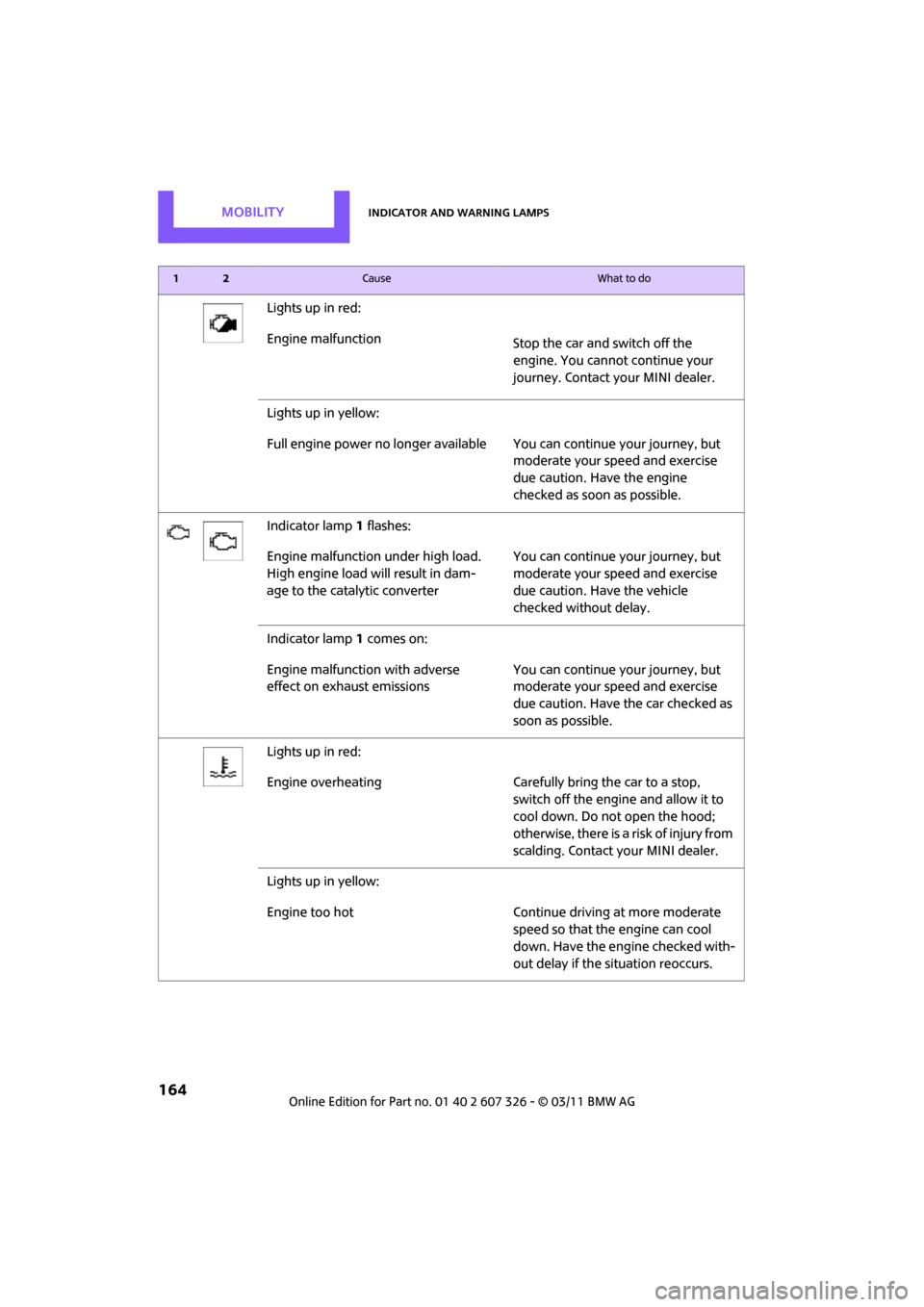
Lights up in red:
Engine malfunctionStop the car and switch off the
engine. You cannot continue your
journey. Contact your MINI dealer.
Lights up in yellow:
Full engine power no longer available Y ou can continue your journey, but
moderate your speed and exercise
due caution. Have the engine
checked as soon as possible.
Indicator lamp 1 flashes:
Engine malfunction under high load.
High engine load will result in dam-
age to the catalytic converter You can continue your journey, but
moderate your speed and exercise
due caution. Have the vehicle
checked without delay.
Indicator lamp 1 comes on:
Engine malfunction with adverse
effect on exhaust emissions You can continue your journey, but
moderate your speed and exercise
due caution. Have the car checked as
soon as possible.
Lights up in red:
Engine overheating Carefully bring the car to a stop, switch off the engine and allow it to
cool down. Do not open the hood;
otherwise, there is a risk of injury from
scalding. Contact your MINI dealer.
Lights up in yellow:
Engine too hot Continue driving at more moderate speed so that the engine can cool
down. Have the engine checked with-
out delay if the situation reoccurs.
12Cause What to do
Page 172 of 196
MOBILITYIndicator and warning lamps
170
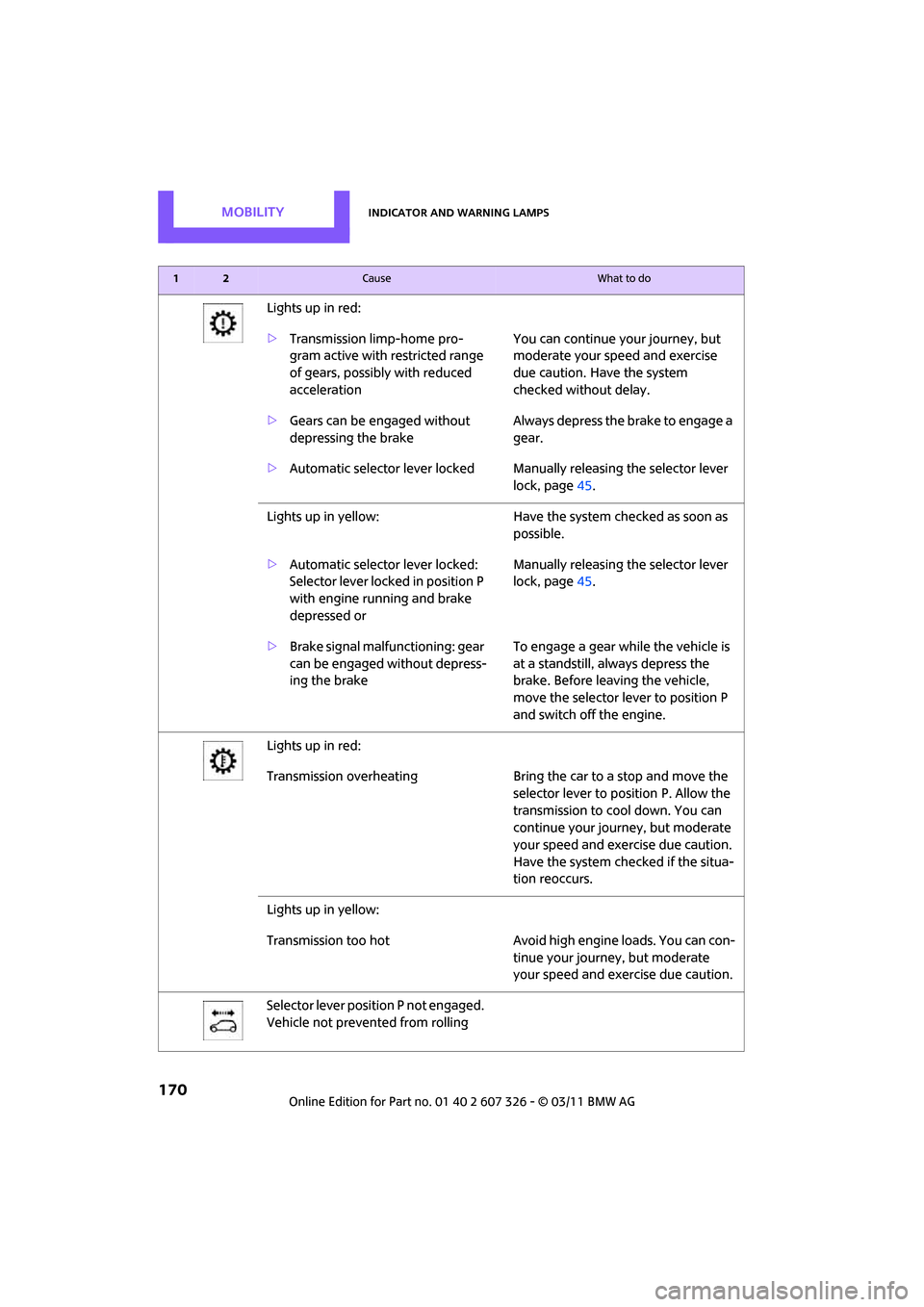
Lights up in red:
>Transmission limp-home pro-
gram active with restricted range
of gears, possibly with reduced
acceleration You can continue your journey, but
moderate your speed and exercise
due caution. Have the system
checked without delay.
> Gears can be engaged without
depressing the brake Always depress the brake to engage a
gear.
> Automatic selector lever locked Manually releasing the selector lever
lock, page45.
Lights up in yellow: Have the system checked as soon as
possible.
> Automatic selector lever locked:
Selector lever locked in position P
with engine running and brake
depressed or Manually releasing the selector lever
lock, page
45.
> Brake signal malfunctioning: gear
can be engaged without depress-
ing the brake To engage a gear while the vehicle is
at a standstill, always depress the
brake. Before leaving the vehicle,
move the selector lever to position P
and switch off the engine.
Lights up in red:
Transmission overheating Bring the car to a stop and move the
selector lever to po sition P. Allow the
transmission to co ol down. You can
continue your journey, but moderate
your speed and exercise due caution.
Have the system checked if the situa-
tion reoccurs.
Lights up in yellow:
Transmission too hot Avoid high engine loads. You can con-
tinue your journey, but moderate
your speed and exer cise due caution.
Selector lever position P not engaged.
Vehicle not prevented from rolling
12Cause What to do
Page 185 of 196

Everything from A to ZREFERENCE
183
Drive-off assistant, refer to Hill
Assist 63
Driving dynamics control, refer to Sport button 63
Driving lamps, refer to Parking lamps/low beams 72
Driving notes 90
Driving off on inclines, refer to Hill Assist 63
Driving stability control
systems 60
Driving through water 91
Driving tips, refer to Driving
notes 90
Dry air, refer to Cooling function 82
DSC Dynamic Stability Control 61
DTC Dynamic Traction
Control 62
Dynamic Brake Control DBC, refer to Brake Assist 61
Dynamic Stability Control DSC 61
Dynamic Traction Control
DTC 62
E
Eject button 106
Electrical malfunction
– door lock 24
– fuel filler flap 126
Electronic brake-force distribution 61
Electronic Stability Program
ESP, refer to Dynamic
Stability Control DSC 61
Emergency operation, refer to
Manual operation
– door lock 24
– fuel filler flap 126
– transmission lock, automatic transmission 45
Emergency services, refer to
Roadside Assistance 157Engine
– breaking in
90
– data 176
– overheated, refer to Coolant
temperature 139
– speed 176
– starting 42
– starting, Comfort Access 28
– switching off 42
Engine compartment 137
Engine coolant, refer to Coolant 139
Engine oil
– adding 138
– additives, refer to Approved engine oils 138
– alternative oil types 138
– approved engine oils 138
– capacity 138
– checking level 137
– dipstick 137
– intervals between changes,
refer to Service
requirements 56
– MINI Maintenance
System 140
Engine oil level, checking 137
Engine output, refer to Engine
data 176
Engine starting, refer to
Starting the engine 42
ESP Electronic Stability Program, refer to Dynamic
Stability Control DSC 61
Exhaust system, refer to Hot exhaust system 90
Exterior mirrors 36
– adjusting 36
– automatic heating 36
– folding in and out 36
External audio device 85,100
External temperature display
– change units of measure 55
– in the on-board computer 55Eyes
– for tow-
starting and towing
away 159
– for tying down loads 95
F
Failure messages, refer to
Check Control 58
Failure of an electrical
consumer 156
Fast forward
– CD 106
Fastening safety be lts, refer to
Safety belts 35
Fault messages, refer to Check
Control 58
Filter
– microfilter for air
conditioner 80
– microfilter/activated- charcoal filter for automatic
climate control 82
Fine wood, care 145
First aid pouch 157
Fixture for remote control, refer to Ignition lock 41
Flash when locking/
unlocking 22
Flat load floor 94
Flat tire
– run-flat tires 134
– Tire Pressure Monitor TPM 65
Flat Tire Monitor FTM 63
– indicating a flat tire 64
– initializing the system 64
– snow chains 64
– system limits 64
Flat tires, refer to Tire
condition 133
Floor mats, care 144
Floor plate, refe r to Flat load
floor 94
Fog lamps
– replacing bulb 149,150
Folding rear seat backrest 92
Page 188 of 196

REFERENCEEverything from A to Z
186
Manual operation
– door lock24
– fuel filler flap 126
– transmission lock, automatic
transmission 45
Manual station search 102
Manual transmission 43
Manual washing 143
Master key, refer to Integrated key/remote control 20
Maximum cooling 81
Maximum speed
– with winter tires 135
Medical assistance, refer to First aid pouch 157
Microfilter
– for air conditioner 80
– for automatic climate control 82
– MINI Maintenance System 140
Microfilter/activated-charcoal
filter
– MINI Maintenance System 140
Microphone for telephone 14
MINI Internet page 4
MINI Maintenance System 140
Mirror dimming feature 36
Mirrors 36
– exterior mirrors 36
– heating 36
– interior rearview mirror 36
Mobile phone
– adjusting volume 117
– connecting, refer to Mobile
phone, pairing 114
– installation location, refer to Center armrest 85
– pairing 114
– refer to separate Owner's Manual
– What to do if… 116
Mobile phone, installation
location, refer to Center
armrest 85 Mobile phone, refer to
separate Owner's Manual
Mobility System 151
Modifications, technical, refer
to For your own safety 5
Monitoring syst em for tire
pressures, refer to Flat Tire
Monitor 63
MP3 105
Multifunction switch
– refer to Turn signals/ headlamp flasher 46
– refer to Wiper system 47
Multifunctional steering wheel, refer to Buttons on
the steering wheel 11
Music tracks
– playing a track 106
– random order 106
N
Neck support, refer to Head
restraints 34
Nets, refer to Storage
compartments 86
New tires 134
Number of cylinders, refer to
Engine data 176
Number of safety belts 32
Nylon rope, refer to Tow rope 159
O
OBD socket, refer to Socket for
On-Board Diagnosis 141
Octane ratings, refer to Fuel specifications 127
Odometer 51
Oil consumption 137
Oil level 137
Oil, refer to Engine oil 137
Oil types 138
Old batteries, refer to
Disposal 155
Onboard vehicle toolkit 146Opening and closing
– Comfort Access
28
– from inside 24
– from outside 21
– using the door lock 24
– using the remote control 21
Opening and unlocking
– from inside 25
Opening/closing the Split Rear Barn Doors 26
Outlets
– refer to Ventilation 82
Outlets, refer to Air vents 78
Output, refer to Engine data 176
Outside-air mode
– automatic climate control 81
Overheated engine, refer to Coolant temperature 139
P
Paintwork, care143
Park Distance Control PDC 60
Parking
– vehicle 42
Parking aid, refer to Park Distance Control PDC 60
Parking brake 43
Parking lamps, replacing
bulb 149
Parking lamps/low beams 72
Parts and accessories, refer to
Your individual vehicle 4
Pathway lighting 73
PDC
– volume 100
Personal Profile 20
Phone numbers
– dialing 118
Pinch protection system
– windows 31
Plastic parts, care 144
Playing a track scan
– CD 106