light MINI Clubman 2016 (Mini Connected) Owners Manual
[x] Cancel search | Manufacturer: MINI, Model Year: 2016, Model line: Clubman, Model: MINI Clubman 2016Pages: 246, PDF Size: 5.21 MB
Page 200 of 246
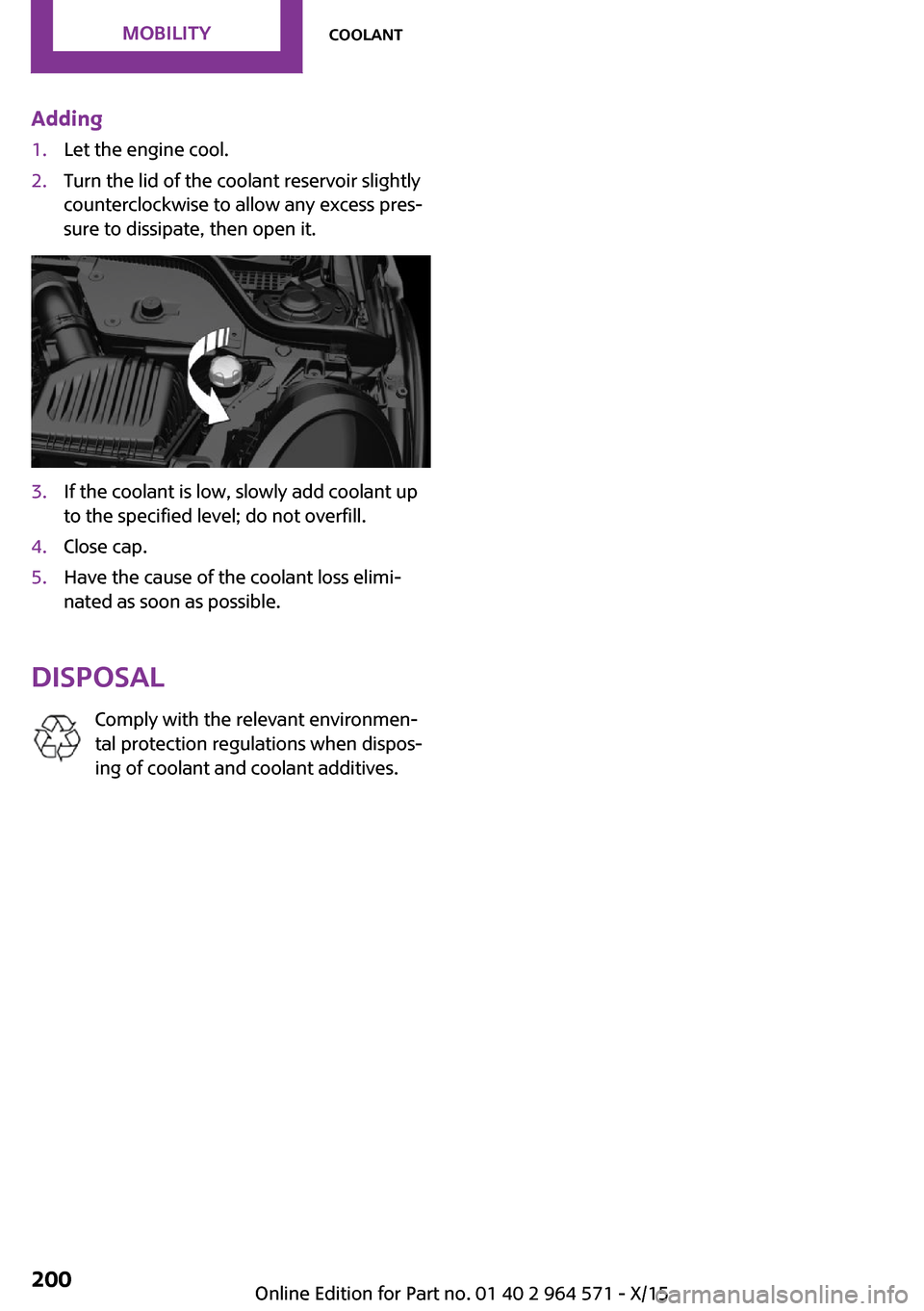
Adding1.Let the engine cool.2.Turn the lid of the coolant reservoir slightly
counterclockwise to allow any excess pres‐
sure to dissipate, then open it.
3.If the coolant is low, slowly add coolant up
to the specified level; do not overfill.
4.Close cap.5.Have the cause of the coolant loss elimi‐
nated as soon as possible.
Disposal
Comply with the relevant environmen‐
tal protection regulations when dispos‐
ing of coolant and coolant additives.
Seite 200MOBILITYCoolant200
Online Edition for Part no. 01 40 2 964 571 - X/15
Page 202 of 246

service center or repair shop. Records of regu‐
lar maintenance and repair work should be re‐
tained.
Socket for OBD Onboard
Diagnosis
Information
CAUTION
The socket for Onboard Diagnosis is an
intricate component intended to be used in
conjunction with specialized equipment to
check the vehicle’s primary emissions system.
Improper use of the socket for Onboard Diag‐
nosis, or contact with the socket for Onboard
Diagnosis for other than its intended purpose,
can cause vehicle malfunctions and creates
risks of personal and property damage. Given
the foregoing, the manufacture of your vehicle
strongly recommends that access to the socket
for Onboard Diagnosis be limited to a dealer's
service center or another qualified service cen‐
ter or repair shop or other persons that have
the specialized training and equipment for pur‐
poses of properly utilizing the socket for On‐
board Diagnosis.◀
Position
There is an OBD socket on the driver's side for
checking the primary components in the vehi‐
cle's emissions.
Emissions▷The warning lamp lights up:
Emissions are deteriorating. Have
the vehicle checked as soon as pos‐
sible.
▷The warning lamp flashes under certain cir‐
cumstances:
This indicates that there is excessive misfir‐
ing in the engine.
Reduce the vehicle speed and have the sys‐
tem checked immediately; otherwise, seri‐
ous engine misfiring within a brief period
can seriously damage emission control
components, in particular the catalytic con‐
verter.
Seite 202MOBILITYMaintenance202
Online Edition for Part no. 01 40 2 964 571 - X/15
Page 204 of 246

3.Continue turning the wiper blade all the
way so that it pops out of the holder.
4.Press the new wiper blade into the holder
until you hear it snap into place.
5.Fold the wipers in.
Lamp and bulb replace‐
ment
General information
Lights and bulbs make an essential contribution
to vehicle safety.
The manufacturer of the vehicle recommends
that you have appropriate work performed by a
dealer’s service center or another qualified
service center or repair shop if you are unfami‐
liar with it or if it has not been described here.
A spare lamp box is available from a dealer’s
service center or another qualified service cen‐
ter or repair shop.
Information
Lights and bulbs
WARNING
Bulbs can get hot during operation. Con‐
tact with the bulbs can cause burns. There is
risk of injuries. Only change bulbs after they
have cooled off.◀
WARNING
Work on switched-on lighting systems
can cause short circuits. There is risk of injuries
or risk of property damage. When working on
the lighting system, switch off the lamps in
question. If necessary, heed the bulb manufac‐
turer's instructions.◀
CAUTION
Dirty bulbs have a reduced service life.
There is risk of property damage. Do not hold
new bulbs with your bare hands. Use a clean
cloth or something similar, or hold the bulb by
its base.◀
Light-emitting diodes (LEDs)
Some items of equipment use light-emitting di‐
odes installed behind a cover as a light source.
These light-emitting diodes, which are related
to conventional lasers, are officially designated
as Class 1 light-emitting diodes.
WARNING
Too intensive brightness can irritate or
damage the retina of the eye. There is risk of
injuries. Do not look directly into the headlights
or other light sources. Do not remove the LED
covers.◀
Headlight glass
Condensation can form on the inside of the ex‐
ternal lights in cool or humid weather. When
driving with the lights switched on, the conden‐
sation evaporates after a short time. The head‐
light glass does not need to be changed.
If despite driving with the lights switched on,
increasing humidity forms, e. g. water droplets
in the lamp, the manufacturer of your vehicle
recommends having it checked by a dealer’s
service center or another qualified service cen‐
ter or repair shop.
Seite 204MOBILITYReplacing components204
Online Edition for Part no. 01 40 2 964 571 - X/15
Page 205 of 246

Front lights, bulb replacement
Overview
Halogen headlights
1Low beams/high beams2Turn signal
LED headlights
1Daytime running lights2Low beams/high beams3Turn signalBug light1Parking lights2Daytime running lights3Fog lights
LED bug light
1Parking lights2Fog lights
LED low beams/LED high beams
Follow the general instructions on lights and
bulbs, refer to page 204.
The lights feature LED technology. In the case
of a malfunction, contact a dealer’s service cen‐
ter or another qualified service center or repair
shop.
Halogen low beams/halogen high
beams
Follow the general instructions on lights and
bulbs, refer to page 204.
Seite 205Replacing componentsMOBILITY205
Online Edition for Part no. 01 40 2 964 571 - X/15
Page 206 of 246
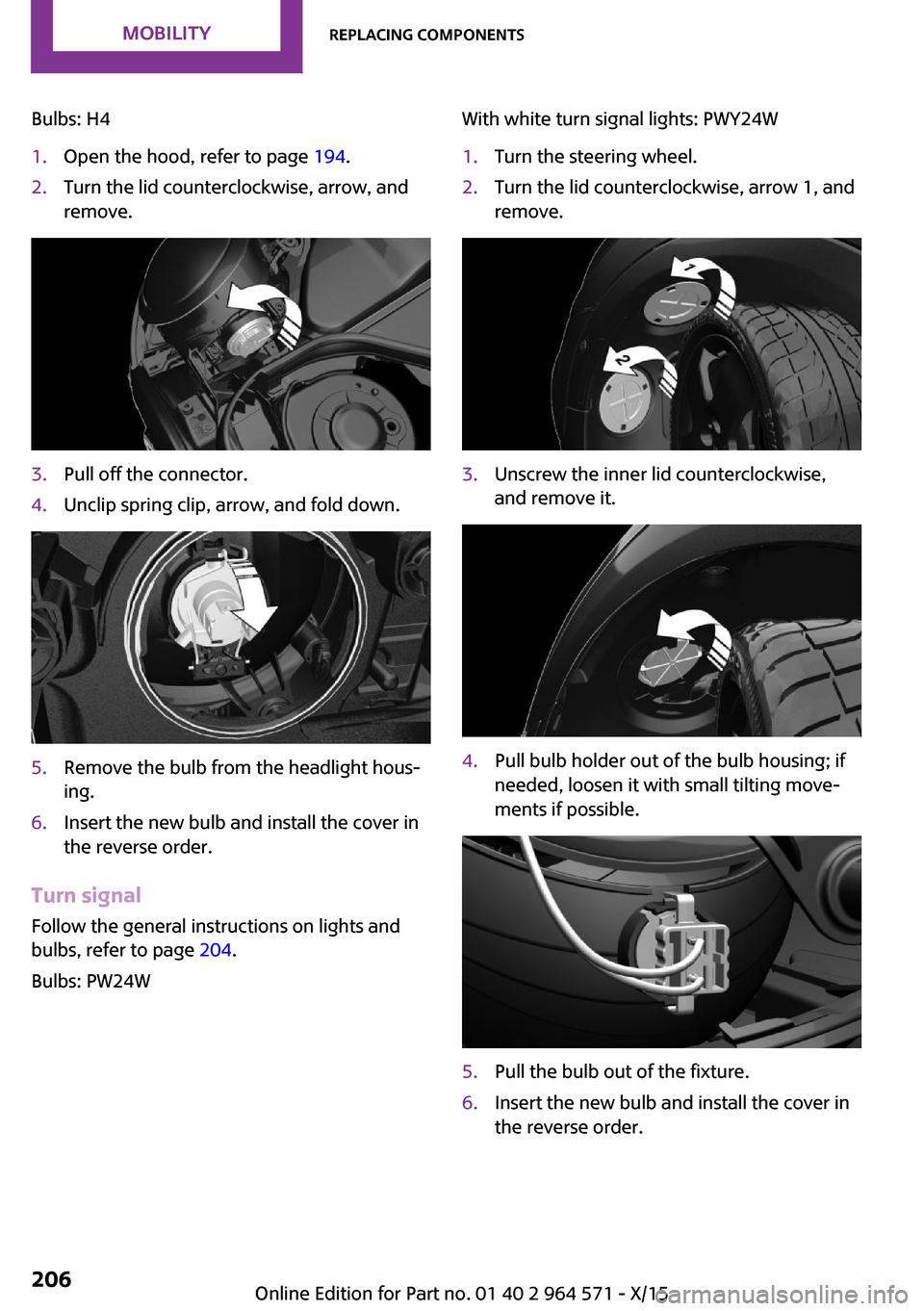
Bulbs: H41.Open the hood, refer to page 194.2.Turn the lid counterclockwise, arrow, and
remove.
3.Pull off the connector.4.Unclip spring clip, arrow, and fold down.5.Remove the bulb from the headlight hous‐
ing.
6.Insert the new bulb and install the cover in
the reverse order.
Turn signal
Follow the general instructions on lights and
bulbs, refer to page 204.
Bulbs: PW24W
With white turn signal lights: PWY24W1.Turn the steering wheel.2.Turn the lid counterclockwise, arrow 1, and
remove.
3.Unscrew the inner lid counterclockwise,
and remove it.
4.Pull bulb holder out of the bulb housing; if
needed, loosen it with small tilting move‐
ments if possible.
5.Pull the bulb out of the fixture.6.Insert the new bulb and install the cover in
the reverse order.
Seite 206MOBILITYReplacing components206
Online Edition for Part no. 01 40 2 964 571 - X/15
Page 207 of 246
LED parking lights/LED fog lights
Follow the general instructions on lights and
bulbs, refer to page 204.
The lights feature LED technology. In the case
of a malfunction, contact a dealer’s service cen‐
ter or another qualified service center or repair
shop.
Parking lights/fog lights/daytime
running lights
Follow the general instructions on lights and
bulbs, refer to page 204.
Bulbs:
▷Parking lights for halogen headlights: W5W
Parking lights for LED headlights: W5W NBV
▷Daytime running light: PSX24W▷Fog lamp: H8
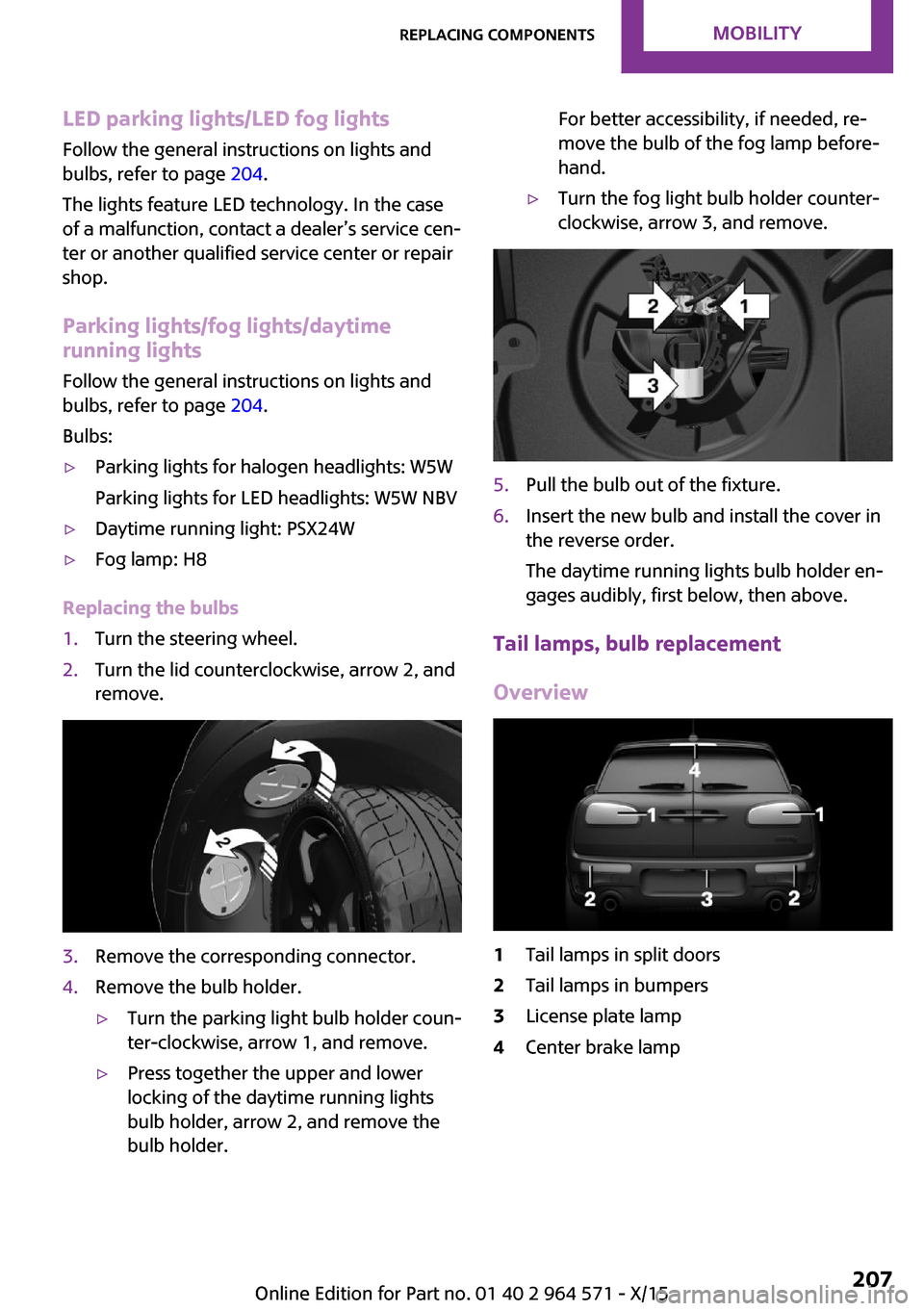
Replacing the bulbs
1.Turn the steering wheel.2.Turn the lid counterclockwise, arrow 2, and
remove.
3.Remove the corresponding connector.4.Remove the bulb holder.▷Turn the parking light bulb holder coun‐
ter-clockwise, arrow 1, and remove.
▷Press together the upper and lower
locking of the daytime running lights
bulb holder, arrow 2, and remove the
bulb holder.
For better accessibility, if needed, re‐
move the bulb of the fog lamp before‐
hand.
▷Turn the fog light bulb holder counter-
clockwise, arrow 3, and remove.
5.Pull the bulb out of the fixture.6.Insert the new bulb and install the cover in
the reverse order.
The daytime running lights bulb holder en‐
gages audibly, first below, then above.
Tail lamps, bulb replacement
Overview
1Tail lamps in split doors2Tail lamps in bumpers3License plate lamp4Center brake lampSeite 207Replacing componentsMOBILITY207
Online Edition for Part no. 01 40 2 964 571 - X/15
Page 208 of 246

Tail lamps in split doors1Turn signal2Tail lamps3Rear fog lamp4Reversing lights
LED tail lights in the split doors
1Turn signal2Tail lamps3Rear fog lamp4Reversing lightsTail lamps in bumpers1Tail lamps/brake lights2Turn signal
In addition, the tail lamps in the bumper as‐
sume the functions of tail lamp and turn sig‐
nals, if the split doors are open.
Tail lamps in split doors
Follow the general instructions on lights and
bulbs, refer to page 204.
Turn signals/tail lamps
Bulbs: P21W/W5W
1.Opening split doors, refer to page 41.2.Remove left or right cover. If necessary, it is
then possible to pry the cover off using a
screwdriver or a similar plastic tool.
3.Press the latches together upward, arrow 1,
and remove the bulb holder.
Seite 208MOBILITYReplacing components208
Online Edition for Part no. 01 40 2 964 571 - X/15
Page 209 of 246
Loosen the plug connector, arrow 2, on the
bulb holder.
4.Remove the bulb holder from the opening.5.Press the nonworking bulb gently into the
socket, turn counterclockwise and remove.
▷Arrow 1: turn signal▷Arrow 2: tail lamp6.Proceed in the reverse order to insert the
new bulb and attach the bulb holder. Make
sure that the bulb holder engages in all fas‐
teners.
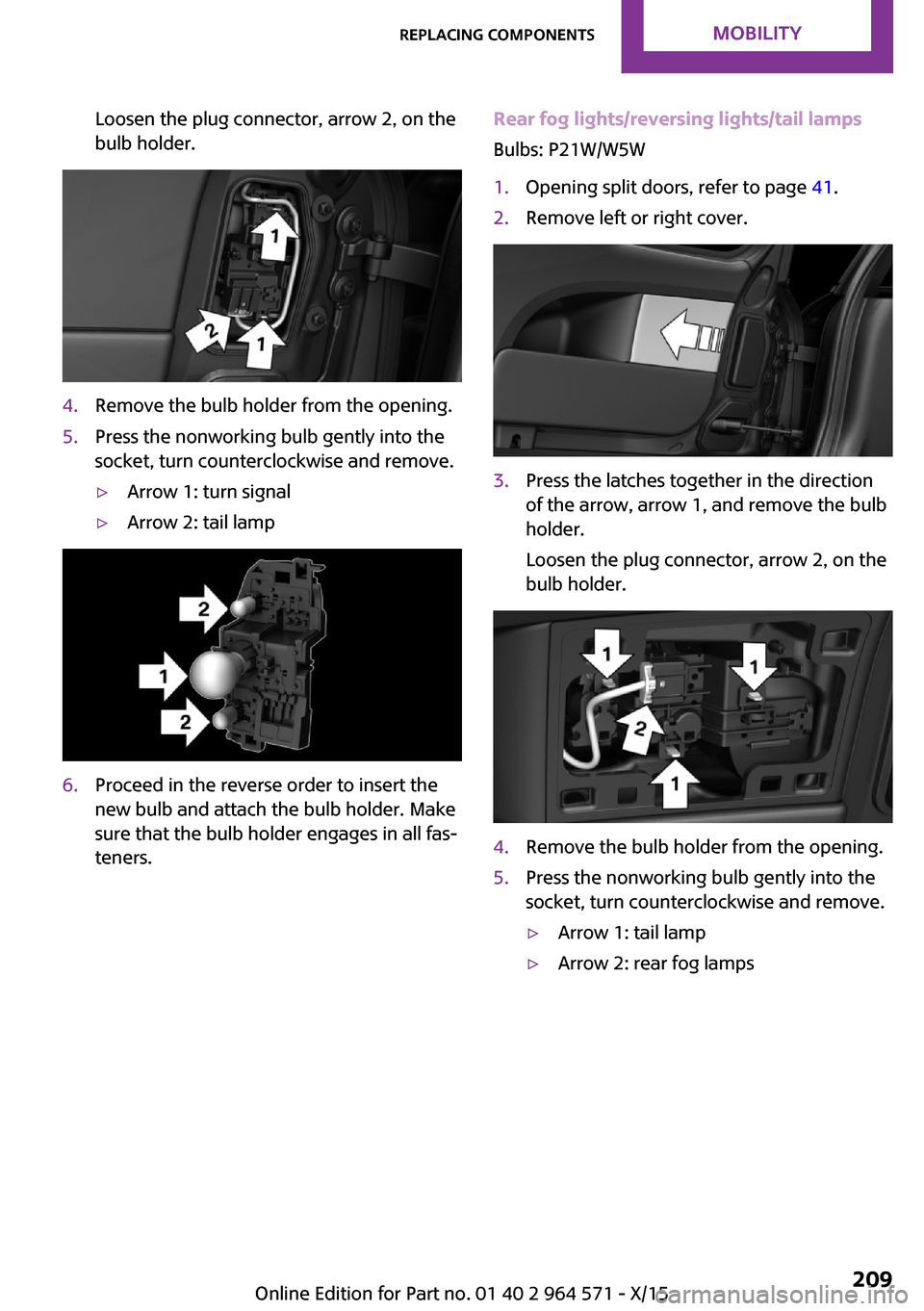
Rear fog lights/reversing lights/tail lamps
Bulbs: P21W/W5W
1.Opening split doors, refer to page 41.2.Remove left or right cover.3.Press the latches together in the direction
of the arrow, arrow 1, and remove the bulb
holder.
Loosen the plug connector, arrow 2, on the
bulb holder.
4.Remove the bulb holder from the opening.5.Press the nonworking bulb gently into the
socket, turn counterclockwise and remove.
▷Arrow 1: tail lamp▷Arrow 2: rear fog lampsSeite 209Replacing componentsMOBILITY209
Online Edition for Part no. 01 40 2 964 571 - X/15
Page 210 of 246
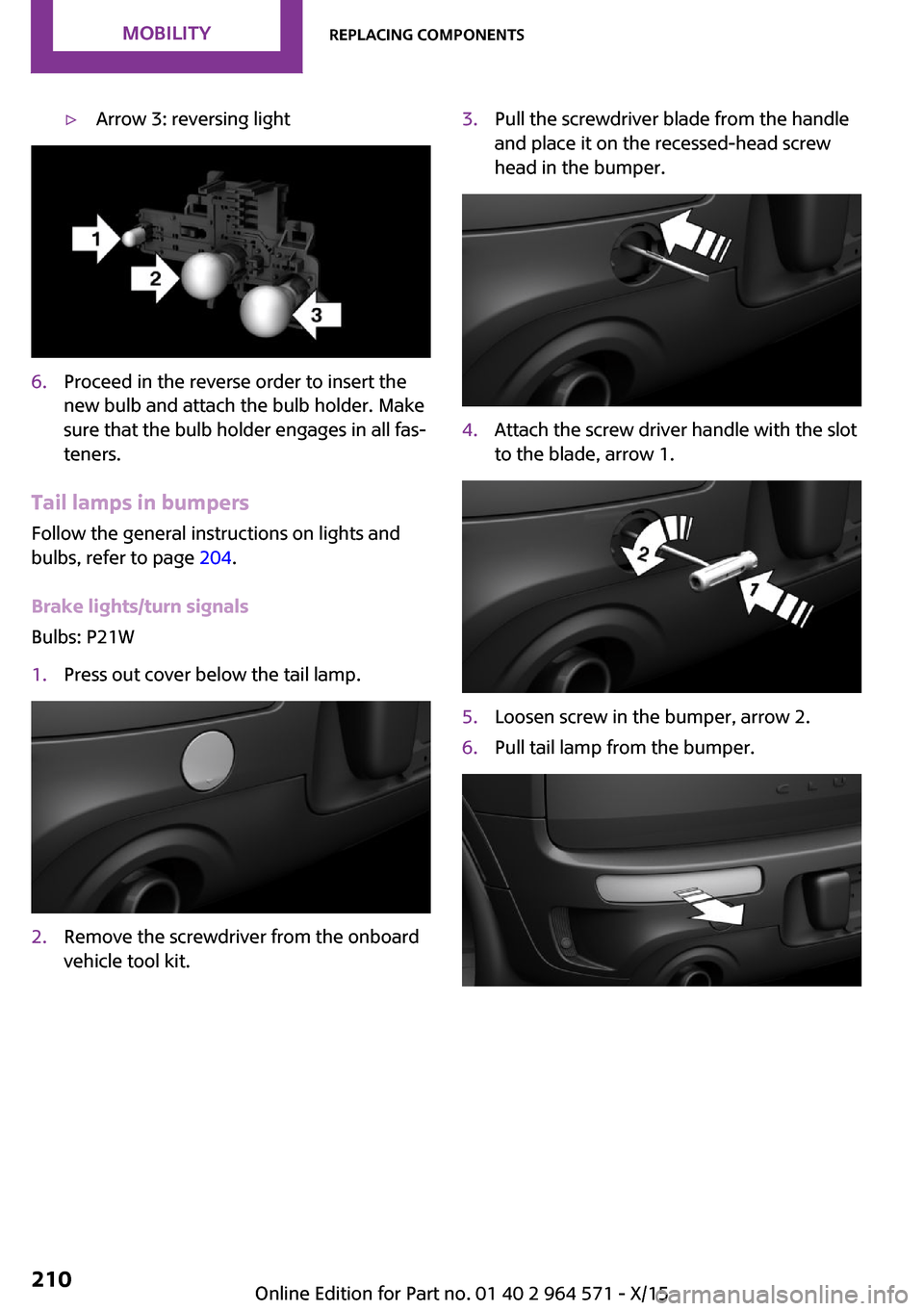
▷Arrow 3: reversing light6.Proceed in the reverse order to insert the
new bulb and attach the bulb holder. Make
sure that the bulb holder engages in all fas‐
teners.
Tail lamps in bumpers
Follow the general instructions on lights and
bulbs, refer to page 204.
Brake lights/turn signals
Bulbs: P21W
1.Press out cover below the tail lamp.2.Remove the screwdriver from the onboard
vehicle tool kit.
3.Pull the screwdriver blade from the handle
and place it on the recessed-head screw
head in the bumper.
4.Attach the screw driver handle with the slot
to the blade, arrow 1.
5.Loosen screw in the bumper, arrow 2.6.Pull tail lamp from the bumper.Seite 210MOBILITYReplacing components210
Online Edition for Part no. 01 40 2 964 571 - X/15
Page 211 of 246
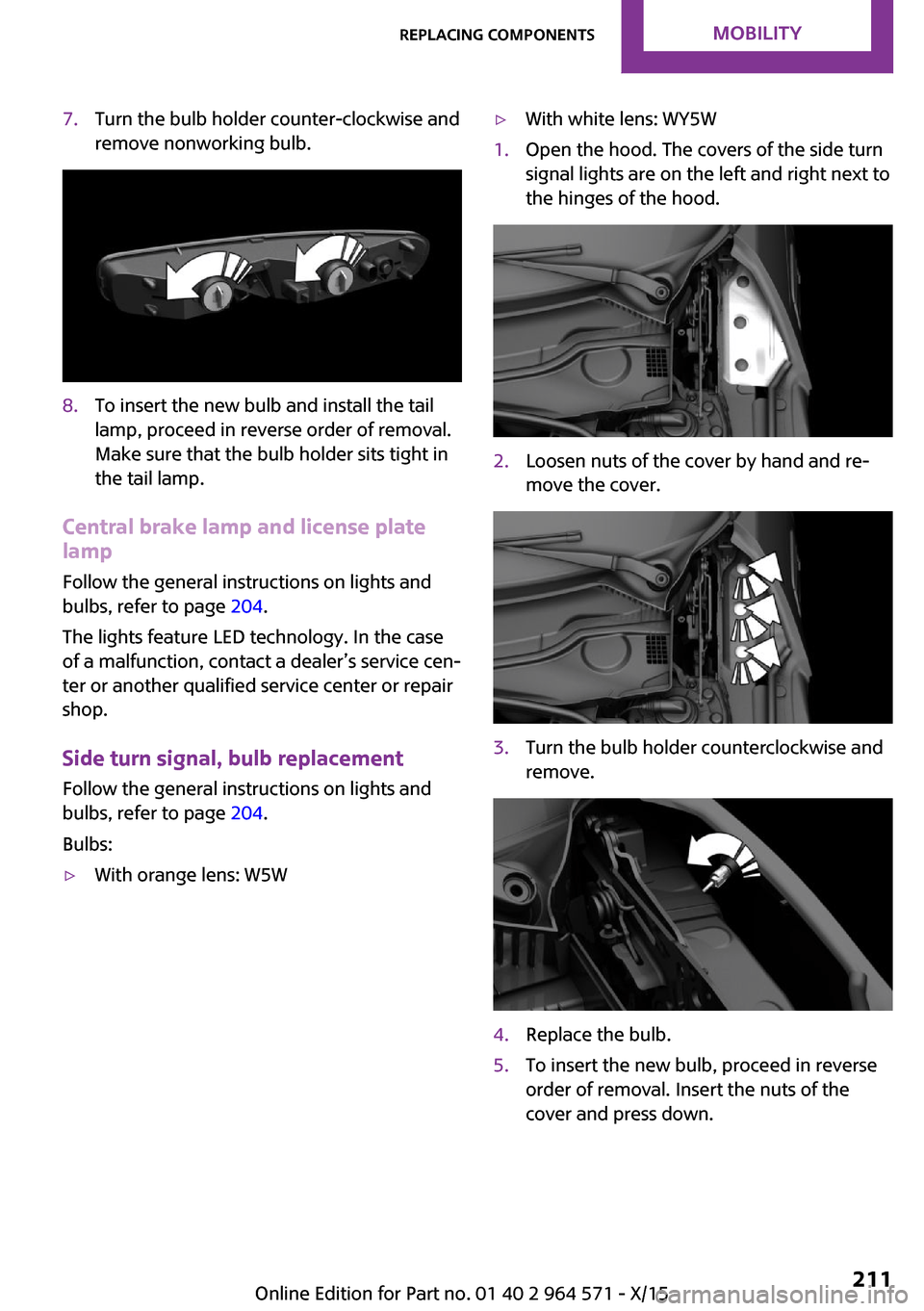
7.Turn the bulb holder counter-clockwise and
remove nonworking bulb.
8.To insert the new bulb and install the tail
lamp, proceed in reverse order of removal.
Make sure that the bulb holder sits tight in
the tail lamp.
Central brake lamp and license plate
lamp
Follow the general instructions on lights and
bulbs, refer to page 204.
The lights feature LED technology. In the case
of a malfunction, contact a dealer’s service cen‐
ter or another qualified service center or repair
shop.
Side turn signal, bulb replacement
Follow the general instructions on lights and
bulbs, refer to page 204.
Bulbs:
▷With orange lens: W5W▷With white lens: WY5W1.Open the hood. The covers of the side turn
signal lights are on the left and right next to
the hinges of the hood.
2.Loosen nuts of the cover by hand and re‐
move the cover.
3.Turn the bulb holder counterclockwise and
remove.
4.Replace the bulb.5.To insert the new bulb, proceed in reverse
order of removal. Insert the nuts of the
cover and press down.
Seite 211Replacing componentsMOBILITY211
Online Edition for Part no. 01 40 2 964 571 - X/15