ignition MINI Clubman 2016 (Mini Connected) User Guide
[x] Cancel search | Manufacturer: MINI, Model Year: 2016, Model line: Clubman, Model: MINI Clubman 2016Pages: 246, PDF Size: 5.21 MB
Page 65 of 246
▷After approx. 8 minutes.▷When the vehicle is locked using the central
locking system.
▷Shortly before the battery is discharged
completely, so that the engine can still be
started.
The radio-ready state remains active if, for ex‐
ample, the ignition is automatically switched off
for the following reasons:
▷Opening or closing the driver's door.▷Unfastening of the driver's safety belt.▷When automatically switching from low
beams to parking lights.
If the engine is switched off and the ignition is
switched on, the system automatically switches
to the radio-ready state if the lights are turned
off or, if correspondingly equipped, the day‐
time running lights are activated.
Starting the engine
Information
DANGER
If the exhaust pipe is blocked or ventila‐
tion is insufficient, harmful exhaust gases can
enter into the vehicle. The exhaust gases con‐
tain carbon monoxide, an odorless and color‐
less but highly toxic gas. In enclosed areas, ex‐
haust gases can also accumulate outside of the
vehicle. There is danger to life. Keep the ex‐
haust pipe free and ensure sufficient ventila‐
tion.◀
WARNING
An unsecured vehicle can put itself into
motion and roll away. There is risk of an acci‐
dent. Before exiting, secure the vehicle against
rolling.
In order to ensure that the vehicle is secured
against rolling away, observe the following:
▷Set the parking brake.▷On uphill grades or on a slope, turn the
front wheels in the direction of the curb.
▷On uphill grades or on a slope, also secure
the vehicle, for example with a wheel
chock.◀
CAUTION
In the case of repeated starting attempts
or repeated starting in quick succession, the
fuel is not burned or is inadequately burned.
The catalytic converter can overheat. There is
risk of property damage. Avoid repeated start‐
ing in quick succession.◀
Steptronic transmission
Starting the engine
1.Depress the brake pedal.2.Engage selector lever position P or N.3.Press the Start/Stop button.
The ignition is activated automatically for a cer‐
tain time and is stopped as soon as the engine
starts.
Manual transmission
Starting the engine
1.Depress the brake pedal.2.Press on the clutch pedal and shift to neu‐
tral.
3.Press the Start/Stop button.
The ignition is activated automatically for a cer‐
tain time and is stopped as soon as the engine
starts.
Engine stop
Information
WARNING
Unattended children or animals can move
the vehicle and endanger themselves and traf‐
fic, for example with the following actions:
Seite 65DrivingCONTROLS65
Online Edition for Part no. 01 40 2 964 571 - X/15
Page 66 of 246
▷Pressing the Start/Stop button.▷Releasing the parking brake.▷Opening and closing of doors or windows.▷Engaging selector lever position N.▷Using vehicle equipment.
There is risk of accidents or injuries. Do not
leave children or animals unattended in the ve‐
hicle. Carry remote control along when exiting
and lock the vehicle.◀
WARNING
An unsecured vehicle can put itself into
motion and roll away. There is risk of an acci‐
dent. Before exiting, secure the vehicle against
rolling.
In order to ensure that the vehicle is secured
against rolling away, observe the following:
▷Set the parking brake.▷On uphill grades or on a slope, turn the
front wheels in the direction of the curb.
▷On uphill grades or on a slope, also secure
the vehicle, for example with a wheel
chock.◀
Before driving into a car wash
So that the vehicle can roll into a car wash ob‐
serve instructions for going into an automatic
car wash, refer to page 221.
Steptronic transmission
Switching off the engine
1.Engage selector lever position P with the
vehicle stopped.
2.Press the Start/Stop button.
The engine is switched off.
The radio-ready state is switched on.
3.Set the parking brake.Manual transmission
Switching off the engine
1.With the vehicle at a standstill, press the
Start/Stop button.
The engine is switched off.
The radio-ready state is switched on.
2.Shift into first gear or reverse.3.Set the parking brake.
Auto Start/Stop function
The concept
The Auto Start/Stop function helps save fuel.
The system switches off the engine during a
stop, for example, in traffic congestion or at
traffic lights. The ignition remains switched on.
The engine starts again automatically for driv‐
ing off.
Information
After every start of the engine using the Start/
Stop button, the Auto Start/Stop function is in
the last selected state, refer to page 68. When
the Auto Start/Stop function is active, it is avail‐
able when the vehicle is traveling faster than
about 3 mph, approx. 5 km/h.
Depending on the selected driving mode, refer
to page 119, the system is automatically acti‐
vated or deactivated.
Engine stop
The engine is switched off automatically during
a stop under the following conditions:
Manual transmission:
▷Neutral is engaged and the clutch pedal is
not pressed.
▷The driver's safety belt is buckled or the
driver's door is closed.
Steptronic transmission:
Seite 66CONTROLSDriving66
Online Edition for Part no. 01 40 2 964 571 - X/15
Page 68 of 246

▷Steptronic transmission: change from selec‐
tor lever position P to R, N, D or M/S.
▷The vehicle begins rolling.▷Fogging of the windows when the auto‐
matic climate control is switched on.
▷The vehicle battery charge is very low.▷Excessive cooling of the car's interior when
the heating is switched on.
▷Manual transmission: low brake vacuum
pressure; this can occur, for example, if the
brake pedal is depressed a number of times
in succession.
Switching the system on/off
Using the button
Press button.
▷LED comes on: Auto Start/Stop function is
deactivated.
The engine is started during an automatic
engine stop.
The engine can only be stopped or started
via the Start/Stop button.
▷LED goes out: Auto Start/Stop function is
activated.
Switching off the vehicle during an
automatic engine stop
During an automatic engine stop, the vehicle
can be switched off permanently, e. g., when
leaving it.
Steptronic transmission:1.Engage selector lever position P.2.Press the Start/Stop button. The ignition is
switched off. The Auto Start/Stop function is
deactivated.
3.Set the parking brake.
Manual transmission:
1.Press the Start/Stop button. The ignition is
switched off. The Auto Start/Stop function is
deactivated.
2.Shift into first gear or reverse.3.Set the parking brake.
Engine start as usual via Start/Stop button.
Automatic deactivation
In certain situations, the Auto Start/Stop func‐
tion is deactivated automatically for safety rea‐
sons, as it is detected that no driver is present.
Malfunction
The Auto Start/Stop function no longer switches
off the engine automatically. A Check Control
message is displayed. It is possible to continue
driving. Have the system checked by a dealer’s
service center or another qualified service cen‐
ter or repair shop.
Parking brake
The concept
The parking brake is used to prevent the vehi‐
cle from rolling when it is parked.
Information
WARNING
An unsecured vehicle can put itself into
motion and roll away. There is risk of an acci‐
dent. Before exiting, secure the vehicle against
rolling.
Seite 68CONTROLSDriving68
Online Edition for Part no. 01 40 2 964 571 - X/15
Page 69 of 246
In order to ensure that the vehicle is secured
against rolling away, observe the following:
▷Set the parking brake.▷On uphill grades or on a slope, turn the
front wheels in the direction of the curb.
▷On uphill grades or on a slope, also secure
the vehicle, for example with a wheel
chock.◀
WARNING
Unattended children or animals can move
the vehicle and endanger themselves and traf‐
fic, for example with the following actions:
▷Pressing the Start/Stop button.▷Releasing the parking brake.▷Opening and closing of doors or windows.▷Engaging selector lever position N.▷Using vehicle equipment.
There is risk of accidents or injuries. Do not
leave children or animals unattended in the ve‐
hicle. Carry remote control along when exiting
and lock the vehicle.◀
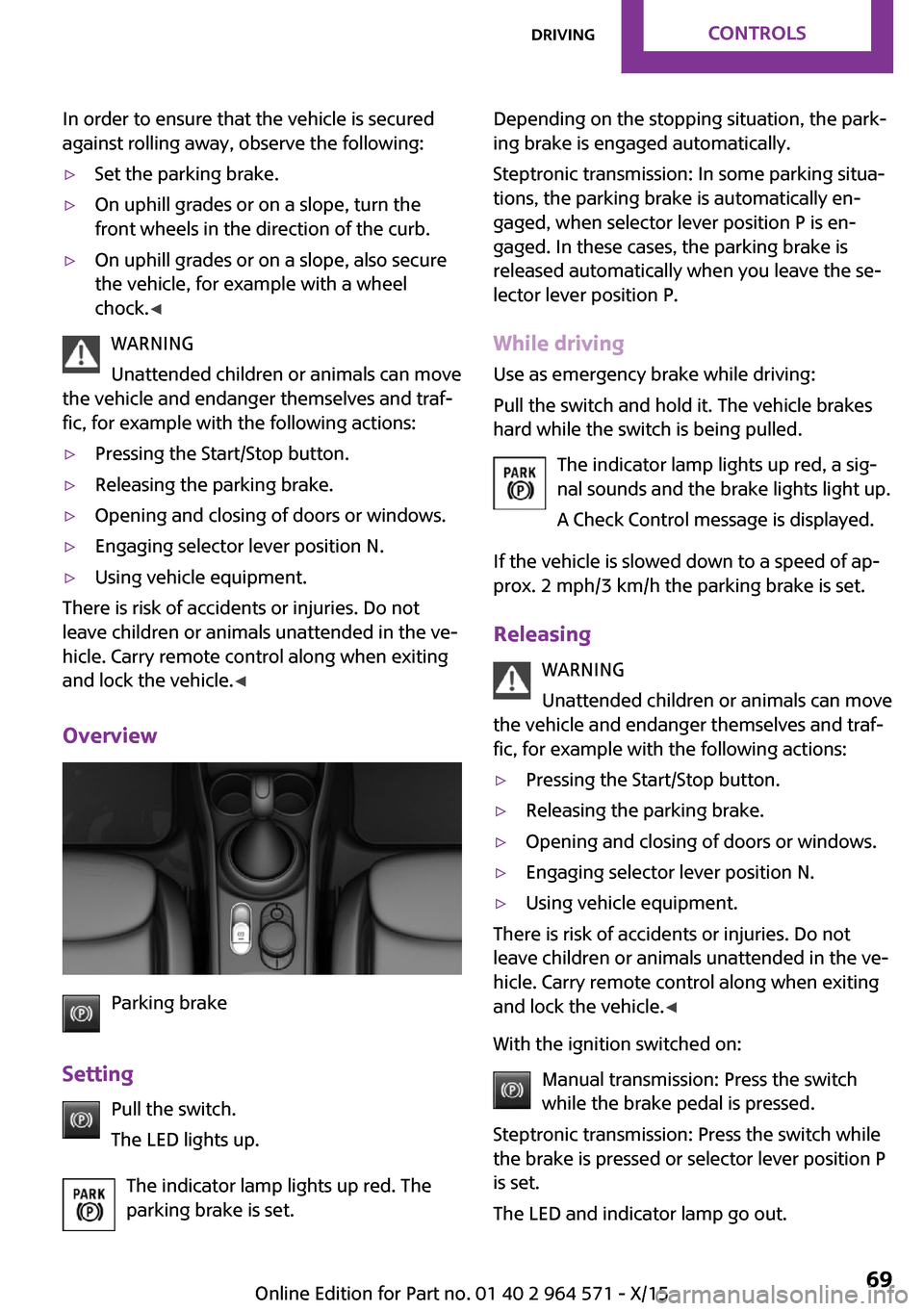
Overview
Parking brake
Setting
Pull the switch.
The LED lights up.
The indicator lamp lights up red. The
parking brake is set.
Depending on the stopping situation, the park‐
ing brake is engaged automatically.
Steptronic transmission: In some parking situa‐
tions, the parking brake is automatically en‐
gaged, when selector lever position P is en‐
gaged. In these cases, the parking brake is
released automatically when you leave the se‐
lector lever position P.
While driving
Use as emergency brake while driving:
Pull the switch and hold it. The vehicle brakes
hard while the switch is being pulled.
The indicator lamp lights up red, a sig‐
nal sounds and the brake lights light up.
A Check Control message is displayed.
If the vehicle is slowed down to a speed of ap‐
prox. 2 mph/3 km/h the parking brake is set.
Releasing
WARNING
Unattended children or animals can move
the vehicle and endanger themselves and traf‐
fic, for example with the following actions:
▷Pressing the Start/Stop button.▷Releasing the parking brake.▷Opening and closing of doors or windows.▷Engaging selector lever position N.▷Using vehicle equipment.
There is risk of accidents or injuries. Do not
leave children or animals unattended in the ve‐
hicle. Carry remote control along when exiting
and lock the vehicle.◀
With the ignition switched on:
Manual transmission: Press the switch
while the brake pedal is pressed.
Steptronic transmission: Press the switch while
the brake is pressed or selector lever position P
is set.
The LED and indicator lamp go out.
Seite 69DrivingCONTROLS69
Online Edition for Part no. 01 40 2 964 571 - X/15
Page 70 of 246
The parking brake is released.
Automatic release in cars with
Steptronic transmission
For automatic release, step on the accelerator
pedal.
The LED and indicator lamp go out.
The parking brake is automatically released
when you step on the accelerator:
▷Engine on.▷Drive mode engaged.▷Driver buckled in and doors closed.
Automatic release in cars with manual
transmission
Drive off as usual. The parking brake disen‐
gages when the clutch pedal is released.
The LED and indicator lamp go out.
Under the following conditions, the parking
brake is automatically released:
▷Engine on.▷Gear engaged.▷Driver buckled in and doors closed.▷Engine power is sufficient to drive off.
Malfunction
In the event of a failure or malfunction of the
parking brake, secure the vehicle against rolling
using a wheel chock, for example, when leav‐
ing it.
After a power failure
Putting the parking brake into
operation
1.Switch on the ignition.2. Press the switch while stepping on the
brake pedal or selector lever position P is
set.
It may take several seconds for the brake to be
put into operation. Any sounds associated with
this are normal.
The indicator lamp in the instrument
cluster goes out as soon as the parking
brake is ready for operation.
Turn signal, high beams,
headlight flasher
Turn signal
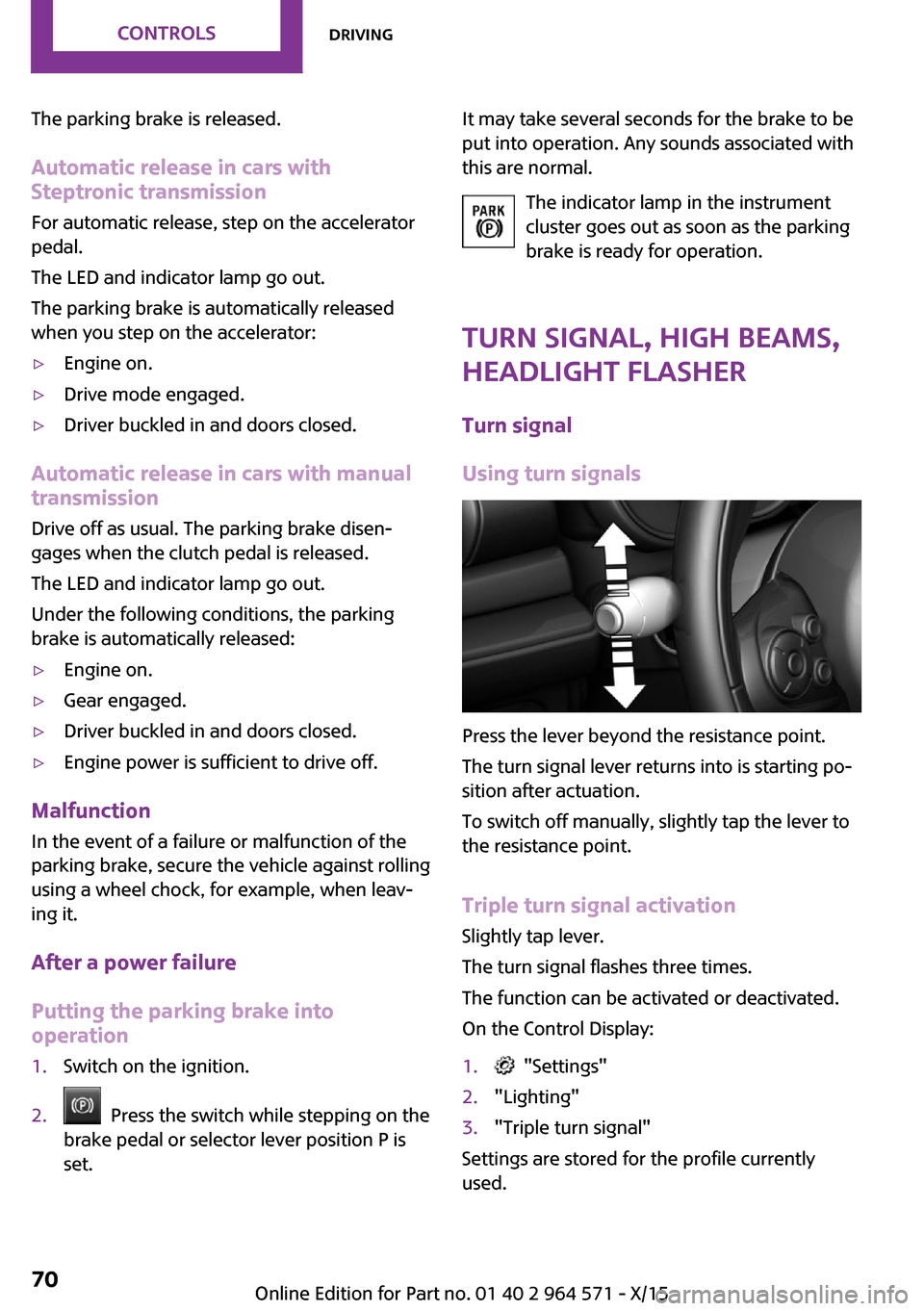
Using turn signals
Press the lever beyond the resistance point.
The turn signal lever returns into is starting po‐
sition after actuation.
To switch off manually, slightly tap the lever to
the resistance point.
Triple turn signal activation
Slightly tap lever.
The turn signal flashes three times.
The function can be activated or deactivated.
On the Control Display:
1. "Settings"2."Lighting"3."Triple turn signal"
Settings are stored for the profile currently
used.
Seite 70CONTROLSDriving70
Online Edition for Part no. 01 40 2 964 571 - X/15
Page 73 of 246
the washer system when the wash water con‐
tainer is empty.◀
Windshield washer nozzles
The windshield washer nozzles are automati‐
cally heated while the ignition is switched on.
Rear window wiper
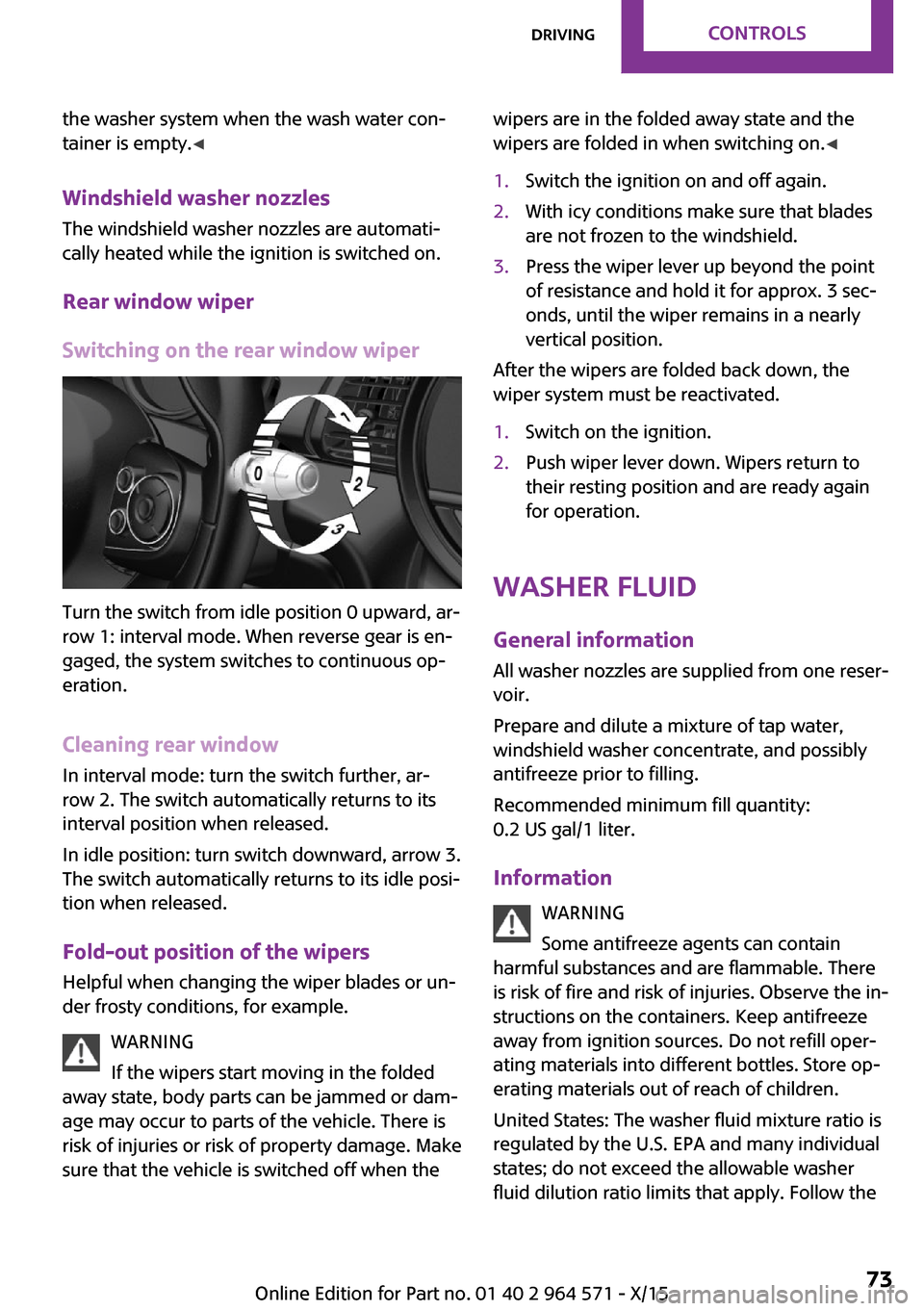
Switching on the rear window wiper
Turn the switch from idle position 0 upward, ar‐
row 1: interval mode. When reverse gear is en‐
gaged, the system switches to continuous op‐
eration.
Cleaning rear window
In interval mode: turn the switch further, ar‐
row 2. The switch automatically returns to its
interval position when released.
In idle position: turn switch downward, arrow 3.
The switch automatically returns to its idle posi‐
tion when released.
Fold-out position of the wipers
Helpful when changing the wiper blades or un‐
der frosty conditions, for example.
WARNING
If the wipers start moving in the folded
away state, body parts can be jammed or dam‐
age may occur to parts of the vehicle. There is
risk of injuries or risk of property damage. Make
sure that the vehicle is switched off when the
wipers are in the folded away state and the
wipers are folded in when switching on.◀
1.Switch the ignition on and off again.2.With icy conditions make sure that blades
are not frozen to the windshield.
3.Press the wiper lever up beyond the point
of resistance and hold it for approx. 3 sec‐
onds, until the wiper remains in a nearly
vertical position.
After the wipers are folded back down, the
wiper system must be reactivated.
1.Switch on the ignition.2.Push wiper lever down. Wipers return to
their resting position and are ready again
for operation.
Washer fluid
General information
All washer nozzles are supplied from one reser‐
voir.
Prepare and dilute a mixture of tap water,
windshield washer concentrate, and possibly
antifreeze prior to filling.
Recommended minimum fill quantity:
0.2 US gal/1 liter.
Information
WARNING
Some antifreeze agents can contain
harmful substances and are flammable. There
is risk of fire and risk of injuries. Observe the in‐
structions on the containers. Keep antifreeze
away from ignition sources. Do not refill oper‐
ating materials into different bottles. Store op‐
erating materials out of reach of children.
United States: The washer fluid mixture ratio is
regulated by the U.S. EPA and many individual
states; do not exceed the allowable washer
fluid dilution ratio limits that apply. Follow the
Seite 73DrivingCONTROLS73
Online Edition for Part no. 01 40 2 964 571 - X/15
Page 75 of 246

Steptronic transmission
Information
WARNING
An unsecured vehicle can put itself into
motion and roll away. There is risk of an acci‐
dent. Before exiting, secure the vehicle against
rolling.
In order to ensure that the vehicle is secured
against rolling away, observe the following:
▷Set the parking brake.▷On uphill grades or on a slope, turn the
front wheels in the direction of the curb.
▷On uphill grades or on a slope, also secure
the vehicle, for example with a wheel
chock.◀
Selector lever positions
D Drive
Selector lever position for normal vehicle oper‐
ation. All gears for forward travel are activated
automatically.
R Reverse
Select only when the vehicle is stationary.
N Neutral
The vehicle may roll. Use in automatic car
washes, for example.
P Park
Select only when the vehicle is stationary. The
drive wheels are blocked.
Before exiting the vehicle, make sure that se‐
lector lever position P is set. Otherwise, the ve‐
hicle may begin to move.
Kickdown
Kickdown is used to achieve maximum driving
performance. Step on the accelerator pedal be‐
yond the resistance point at the full throttle po‐
sition.
Engaging selector lever positions
To prevent the vehicle from creeping after you
select a gear, maintain pressure on the brake
pedal until you are ready to start.
The selector lever can only be taken out of se‐
lector lever position P if the ignition is on or the
engine is running.
With the vehicle stationary, depress the brake
pedal before shifting out of selector lever posi‐
tion P or N; otherwise, the shift block will not be
deactivated and the shift command will not be
executed.
A block prevents the inadvertent switching to
selector lever position P or R or the inadvertent
change from selector lever position P.
Canceling the lock
Press unlock button on the front of the selector
lever, arrow.
Seite 75DrivingCONTROLS75
Online Edition for Part no. 01 40 2 964 571 - X/15
Page 77 of 246
▷Shift down: briefly pull left shift paddle.▷The lowest possible gear can be selected by
pulling and holding the left shift paddle.
Gears will only be shifted at appropriate engine
and road speeds, for example downshifting is
not possible if the engine speed is too high.
The selected gear is briefly displayed in the in‐
strument cluster, followed by the current gear.
If the shift paddles on the steering wheel are
used to shift gears in automatic mode, the
transmission temporarily switches to manual
mode.
In the manual mode, after conservative driving
for a certain amount of time or if there has
been no acceleration or shifting of the shift
paddles within a certain amount of time, the
transmission switches back to automatic mode.
It is possible to switch into the automatic mode:
▷Pull and hold right shift paddle.
or
▷In addition to the briefly pulled right shift
paddle, briefly pull the left shift paddle.
Displays in the instrument cluster
The selector lever position is dis‐
played, for example: P.
Manually release the transmission lock
Should the selector lever be blocked in selector
lever position P despite the ignition being
turned on, the brake being depressed and the
unlock button being pressed, the transmission
lock can be manually canceled:
Before unlocking the transmission lock man‐
ually, set the parking brake to prevent the vehi‐
cle from rolling away.
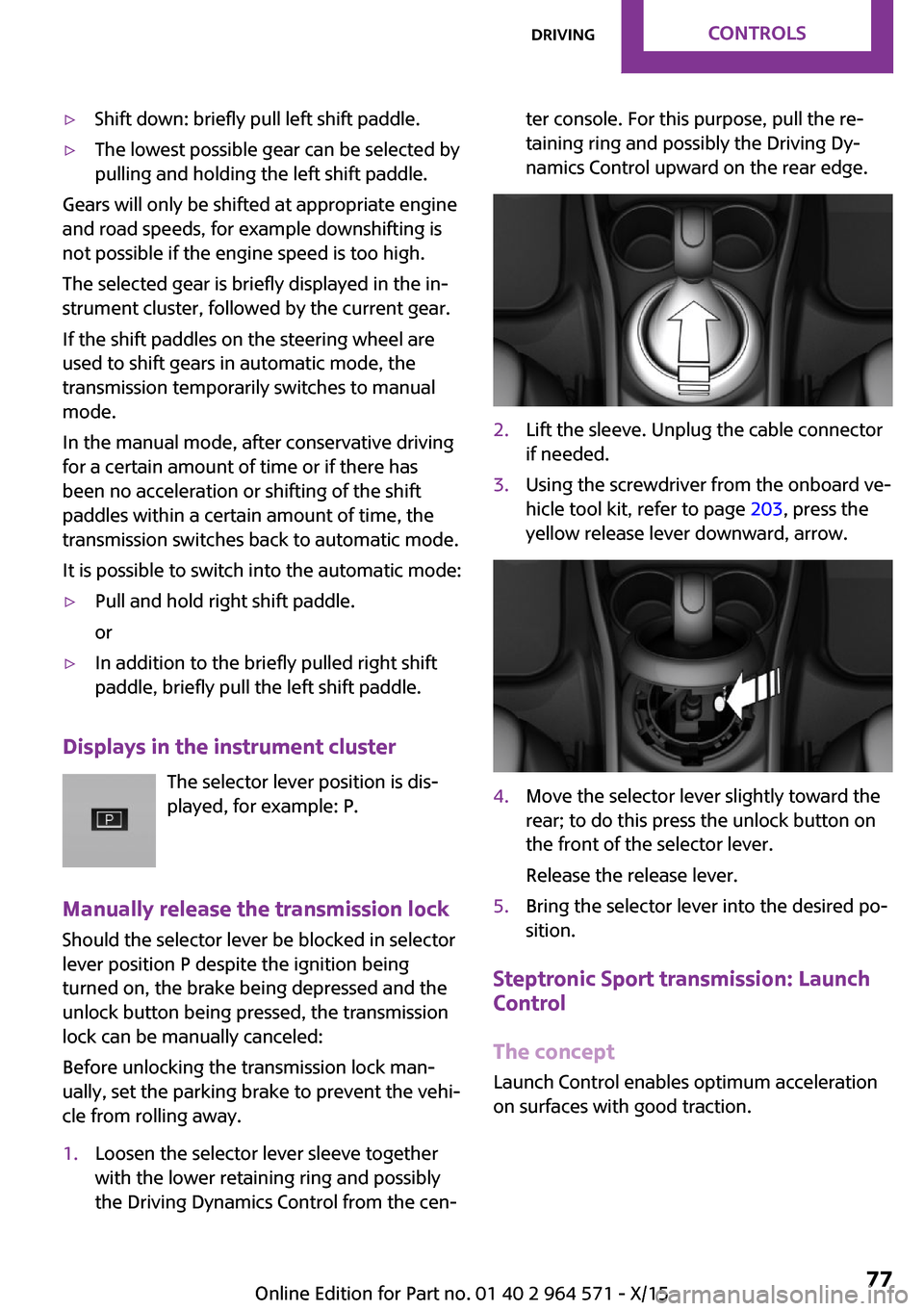
1.Loosen the selector lever sleeve together
with the lower retaining ring and possibly
the Driving Dynamics Control from the cen‐
ter console. For this purpose, pull the re‐
taining ring and possibly the Driving Dy‐
namics Control upward on the rear edge.
2.Lift the sleeve. Unplug the cable connector
if needed.
3.Using the screwdriver from the onboard ve‐
hicle tool kit, refer to page 203, press the
yellow release lever downward, arrow.
4.Move the selector lever slightly toward the
rear; to do this press the unlock button on
the front of the selector lever.
Release the release lever.
5.Bring the selector lever into the desired po‐
sition.
Steptronic Sport transmission: Launch
Control
The concept
Launch Control enables optimum acceleration
on surfaces with good traction.
Seite 77DrivingCONTROLS77
Online Edition for Part no. 01 40 2 964 571 - X/15
Page 80 of 246
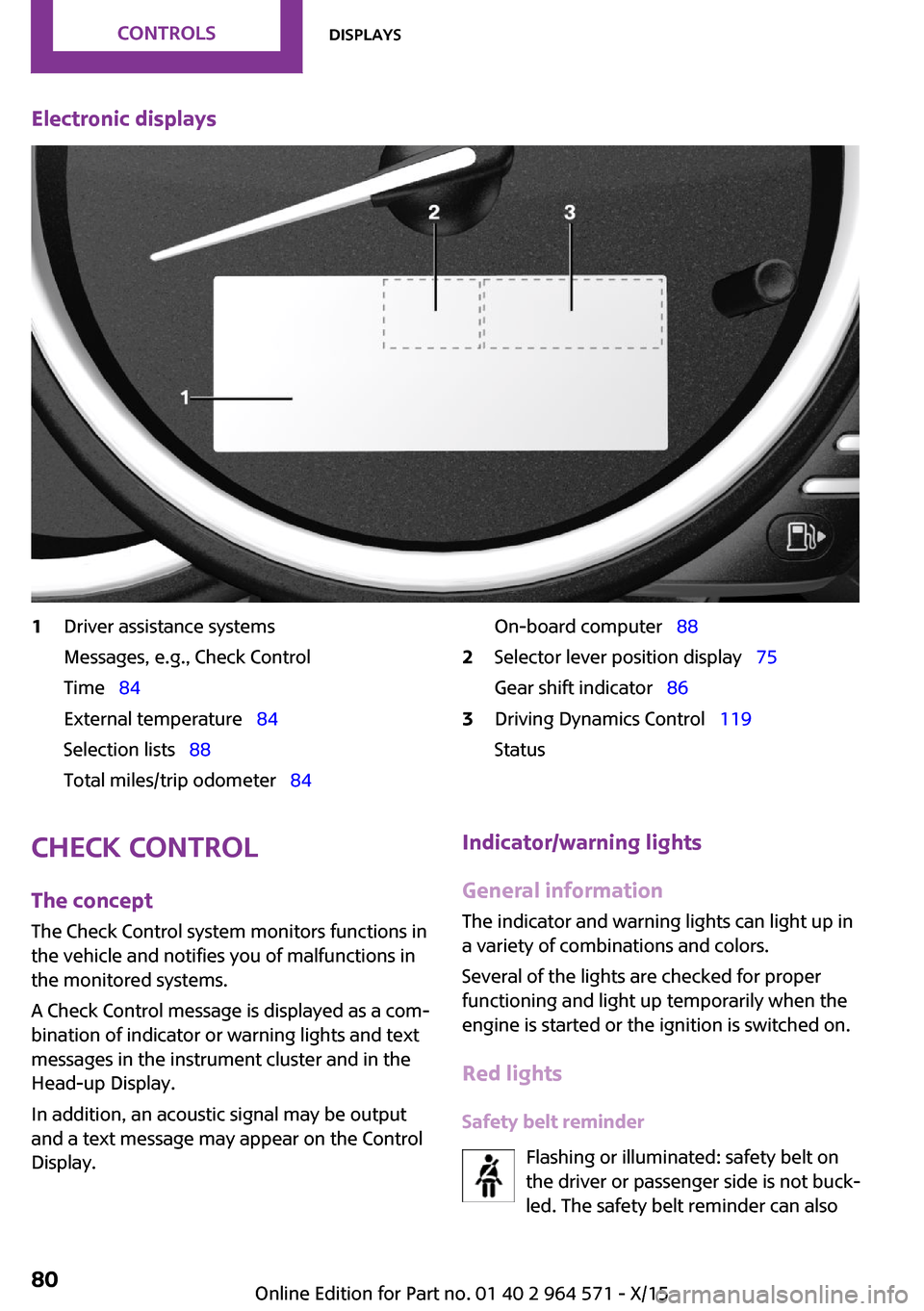
Electronic displays1Driver assistance systems
Messages, e.g., Check Control
Time 84
External temperature 84
Selection lists 88
Total miles/trip odometer 84
On-board computer 882Selector lever position display 75
Gear shift indicator 86
3Driving Dynamics Control 119
Status
Check Control
The concept
The Check Control system monitors functions in
the vehicle and notifies you of malfunctions in
the monitored systems.
A Check Control message is displayed as a com‐
bination of indicator or warning lights and text
messages in the instrument cluster and in the
Head-up Display.
In addition, an acoustic signal may be output
and a text message may appear on the Control
Display.
Indicator/warning lights
General information
The indicator and warning lights can light up in
a variety of combinations and colors.
Several of the lights are checked for proper
functioning and light up temporarily when the
engine is started or the ignition is switched on.
Red lights
Safety belt reminder
Flashing or illuminated: safety belt on
the driver or passenger side is not buck‐
led. The safety belt reminder can also
Seite 80CONTROLSDisplays80
Online Edition for Part no. 01 40 2 964 571 - X/15
Page 84 of 246

▷Other Check Control messages are faded
automatically after approx. 20 seconds.
They are stored and can be displayed again
later.
Displaying stored Check Control
messages
On the Control Display:
1. "Vehicle info"2."Vehicle status"3. "Check Control"4.Select the text message.
Messages after trip completion
Special messages displayed while driving are
displayed again after the ignition is switched
off.
Fuel gauge
Vehicle tilt position may cause
the display to vary.
The arrow beside the fuel pump
symbol shows which side of the
vehicle the fuel filler flap is on.
Hints on refueling, refer to page 178.
Tachometer
Always avoid engine speeds in the red warning
field. In this range, the fuel supply is interrupted
to protect the engine.
Odometer and trip odom‐
eter
The concept
Odometer and trip odometer are displayed in
the instrument cluster.
Resetting the trip odometer
Press the knob.
▷The odometer is displayed
when the ignition is switched
off.
▷When the ignition is switched
on, the trip odometer is re‐
set.
External temperature
If the indicator drops to
+37 ℉/+3 ℃, a signal sounds.
A Check Control message is dis‐
played.
There is an increased risk of ice
on roads.
WARNING
Even at temperatures above +37 ℉/+3 ℃
there can be a danger of icy roads, for example
on bridges or shady sections of road. There is
risk of an accident. Adjust your driving style to
the weather conditions at low temperatures.◀
Time
The time is displayed in the in‐
strument cluster.
Setting the time on the Control
Display, refer to page 91.
Date
The date is displayed in the in‐
strument cluster.
Set the date on the Control Dis‐
play, refer to page 91.
Seite 84CONTROLSDisplays84
Online Edition for Part no. 01 40 2 964 571 - X/15