tire pressure MINI COOPER 2003 User Guide
[x] Cancel search | Manufacturer: MINI, Model Year: 2003, Model line: COOPER, Model: MINI COOPER 2003Pages: 148, PDF Size: 3.17 MB
Page 117 of 148
115
OVERVIEW REPAIRSOPERATION CONTROLS DATA INDEX
CHANGING TIRES – MINI WITH SPACE-SAVER SPARE TIRE
*
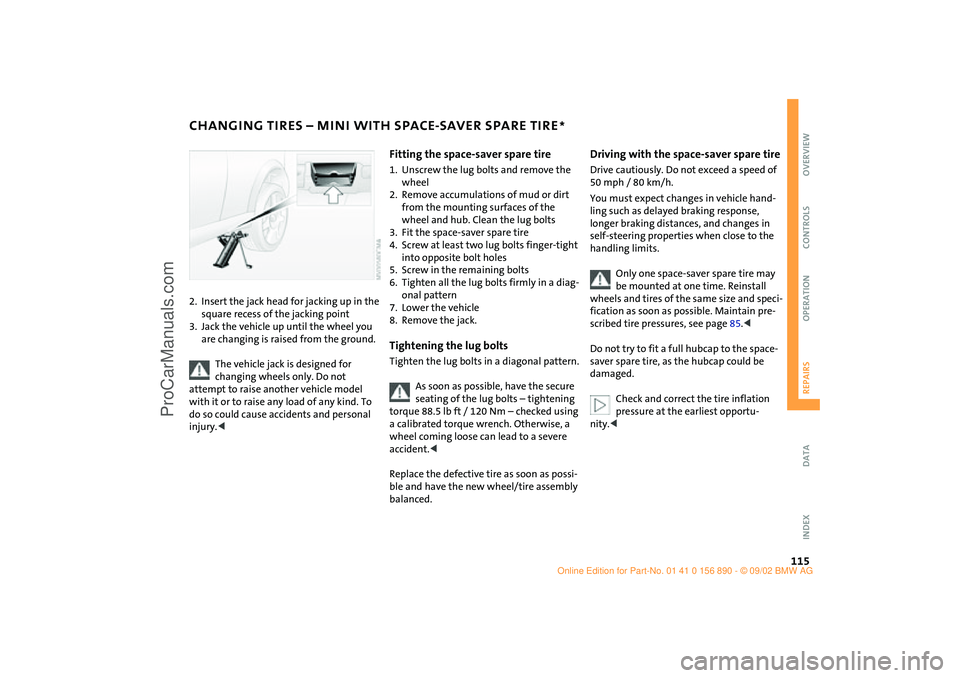
2. Insert the jack head for jacking up in the
square recess of the jacking point
3. Jack the vehicle up until the wheel you
are changing is raised from the ground.
The vehicle jack is designed for
changing wheels only. Do not
attempt to raise another vehicle model
with it or to raise any load of any kind. To
do so could cause accidents and personal
injury.<
Fitting the space-saver spare tire1. Unscrew the lug bolts and remove the
wheel
2. Remove accumulations of mud or dirt
from the mounting surfaces of the
wheel and hub. Clean the lug bolts
3. Fit the space-saver spare tire
4. Screw at least two lug bolts finger-tight
into opposite bolt holes
5. Screw in the remaining bolts
6. Tighten all the lug bolts firmly in a diag-
onal pattern
7. Lower the vehicle
8. Remove the jack.Tightening the lug boltsTighten the lug bolts in a diagonal pattern.
As soon as possible, have the secure
seating of the lug bolts – tightening
torque 88.5 lb ft / 120 Nm – checked using
a calibrated torque wrench. Otherwise, a
wheel coming loose can lead to a severe
accident.<
Replace the defective tire as soon as possi-
ble and have the new wheel/tire assembly
balanced.
Driving with the space-saver spare tireDrive cautiously. Do not exceed a speed of
50 mph / 80 km/h.
You must expect changes in vehicle hand-
ling such as delayed braking response,
longer braking distances, and changes in
self-steering properties when close to the
handling limits.
Only one space-saver spare tire may
be mounted at one time. Reinstall
wheels and tires of the same size and speci-
fication as soon as possible. Maintain pre-
scribed tire pressures, see page 85.<
Do not try to fit a full hubcap to the space-
saver spare tire, as the hubcap could be
damaged.
Check and correct the tire inflation
pressure at the earliest opportu-
nity.<
ba.book Seite 115 Montag, 5. August 2002 8:09 20
ProCarManuals.com
Page 118 of 148

116
FLAT TIRE– RUN FLAT TIRES
*
You will recognize Run Flat tires by a circu-
lar symbol containing the letters RSC on
the side of the tire.
Run Flat tires consist of self-contained tires
and special rims. The tire reinforcement
ensures that the tire retains some residual
safety in the event of pressure drop and
driving remains possible to a restricted
degree.
The reinforcement on the flanks of
the Run Flat tires means that it is usu-
ally not possible to detect an air loss from
outside.<
Flat tire The yellow indicator lamp in the instru-
ment cluster lights up to indicate a flat tire.
In addition, a gong sounds, see pages 17,
64.
1. Reduce vehicle speed carefully to under
50 mph / 80 km/h, avoiding hard brake
applications and steering maneuvers.
2. Do not exceed a speed of 50 mph /
80 km/h.
3. Identify damaged tires; check tire infla-
tion pressures on all four wheels at the
next opportunity, see page 85
4. Correct the tire inflation pressure if you
wish to continue your journey and this is
permitted, see next text section
5. Have damaged tires changed by your
MINI Dealer, see page 88.Your MINI Dealer has the information
needed for working with Run Flat
tires and is equipped with the necessary
special tools. They provide advice if you
wish to replace the tires on your MINI, or re-
equip from summer to winter tires or vice
versa, also see pages 85, 88, 89.<
For safety reasons, do not have a
damaged safety tire repaired.<
ba.book Seite 116 Montag, 5. August 2002 8:09 20
ProCarManuals.com
Page 119 of 148
117
OVERVIEW REPAIRSOPERATION CONTROLS DATA INDEX
FLAT TIRE – RUN FLAT TIRES
*
Continuing driving with a damaged
tire
With Run Flat tires, you can continue driv-
ing under certain conditions, depending on
the vehicle load and the severity of the tire
damage, at a maximum speed of 50 mph /
80 km/h.
You can determine the possible mileage for
continued driving on the basis of the fol-
lowing general indications:
>Tire inflation pressure 0 psi / 0 kPa:
approx. 95 miles / 150 km
>Tire inflation pressure 7.2 – 14.5 psi /
50 – 100 kPa:
approx. 300 miles / 500 km
>Tire inflation pressure greater than
14.5 psi / 100 kPa:
approx. 600 miles / 1,000 km.
Tire change setYour MINI is additionally equipped with a
tire change set. This is located in the MINI
COOPER in the cargo area under the floor
mat.
In the MINI COOPER S the tire change set is
located in a separate bag which is attached
to the eyelets on the cargo area floor by
means of tie-down straps, see page 75.
When changing a tire, always observe the
safety measures on page 112, and follow
the procedure described on page 114 ff.
In case of a flat tire the tire change
set is not needed, since your MINI has
Run Flat tires.<
ba.book Seite 117 Montag, 5. August 2002 8:09 20
ProCarManuals.com
Page 120 of 148
118
FLAT TIRE – MINI MOBILITY SYSTEM
*
MINI Mobility System
To repair a flat tire you will find a MINI
Mobility System in your MINI. With the
help of this system you can apply a liquid
sealant on the inside of the tire, which seals
the damaged area and enables you to con-
tinue to drive. Using the MINI Mobility SystemIn order to repair a flat tire with the MINI
Mobility System, proceed as follows:
>Prepare for tire repair, see page 119
>Pump in liquid sealant, see page 119
>Reinflate the tire, see page 120
>Distribute liquid sealant, see page 120
>Check tire inflation pressure, see
page 121
>Drive on, see page 121.
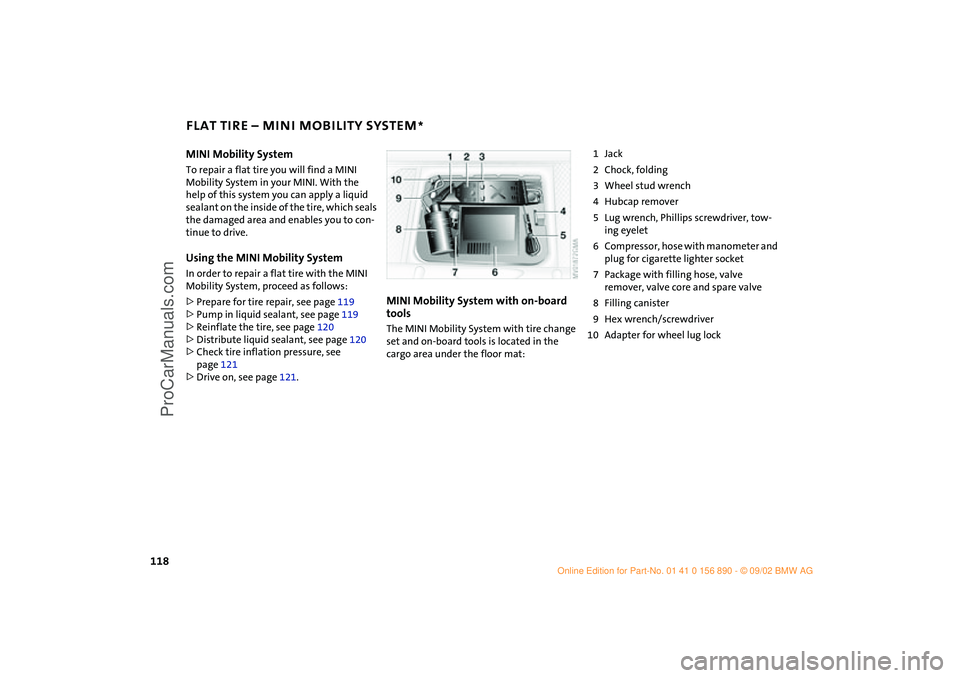
MINI Mobility System with on-board
toolsThe MINI Mobility System with tire change
set and on-board tools is located in the
cargo area under the floor mat:
1Jack
2Chock, folding
3Wheel stud wrench
4Hubcap remover
5Lug wrench, Phillips screwdriver, tow-
ing eyelet
6Compressor, hose with manometer and
plug for cigarette lighter socket
7Package with filling hose, valve
remover, valve core and spare valve
8Filling canister
9Hex wrench/screwdriver
10 Adapter for wheel lug lock
ba.book Seite 118 Montag, 5. August 2002 8:09 20
ProCarManuals.com
Page 122 of 148

120
FLAT TIRE – MINI MOBILITY SYSTEM
*
Reinflating the tire
1. Screw hose 1 with manometer onto the
tire valve
2. Connect plug 3 to the cigarette lighter
socket in the vehicle interior, see
page 73
3. Ignition key in position 1:
Turn on compressor 2
4. Pump up the tires to at least 26.1 psi /
180 kPa, but not to more than 36.2 psi /
250 kPa.
To check the current air pressure, shut
off the device for a short time
Do not run the compressor for
longer than 6 minutes, otherwise
the device will overheat and possibly be
damaged.<
If an air pressure of 26.1 psi /
180 kPa cannot be reached, drive
back and forth about 35 ft / 10 m so that
the liquid sealant is distributed in the
tire. Afterwards repeat the procedure.
If an air pressure of 26.1 psi / 180 kPa is
still not reached, the tire is too badly
damaged. Please contact the nearest
MINI Dealer.<
5. Turn off compressor 2
6. Unscrew hose 1 from the tire valve
7. Store the MINI Mobility System back in
the vehicle.
Distributing liquid sealantImmediately drive for 10 minutes, so that
the liquid sealant is uniformly distributed.
Do not exceed a speed of 40 mph /
60 km/h).
If possible do not drive at a speed lower
than 10 mph / 20 km/h. Stop at a suitable
location.<
ba.book Seite 120 Montag, 5. August 2002 8:09 20
ProCarManuals.com
Page 123 of 148

121
OVERVIEW REPAIRSOPERATION CONTROLS DATA INDEX
FLAT TIRE – MINI MOBILITY SYSTEM
*
Checking tire inflation pressure
1. After driving for 10 minutes:
Screw hose with manometer back onto
the tire valve
2. Check tire pressure
The tire inflation pressure must be
at least 18.8 psi / 130 kPa.
If it is not, do not continue driving.<
If 18.8 psi / 130 kPa are displayed:
3. Ignition key position 1:
Turn on compressor 2. Correct tire infla-
tion pressure to the prescribed value, see
tire inflation pressure table, page 86
4. Replace the tire as soon as possible.
The use of the MINI Mobility System
may be ineffective with tire damage
larger than approx.
3/16 in / 4 mm. Please
contact the nearest MINI Dealer if the tire
cannot be made drivable with the MINI
Mobility System.<
Driving on
Do not exceed the permitted maxi-
mum speed of 50 mph / 80 km/h,
otherwise an accident could happen.<
Replace the defective tire as soon as
possible and have the new wheel/tire
assembly balanced.
Have the MINI Mobility System refilled.
Please contact your MINI Dealer. They pro-
vide advice if you wish to replace the tires
on your MINI or re-equip from summer to
winter tires or vice versa.<
Tire change setYour MINI is additionally equipped with a
tire change set. This is located in the MINI
COOPER in the cargo area under the floor
mat.
When changing a tire, always observe the
safety measures on page 112, and follow
the procedure described on page 114 ff.
In case of a flat tire the tire change
set is not necessary due to the avail-
ability of the MINI Mobility System.<
ba.book Seite 121 Montag, 5. August 2002 8:09 20
ProCarManuals.com
Page 138 of 148
EVERYTHING FROM A TO Z
136
A
ABS (Antilock Brake
System)16,17,83
Accessories7,99
Activated-charcoal filter72
Adjusting
backrest35
steering wheel38
Air conditioner operation
air conditioning system68
automatic climate
control71
Air conditioning system67
Air distribution
air conditioning system68
automatic climate
control71,72
Air outlets, ventilation69
Air pressure85
Air recirculation68,71
Air supply
air conditioning system68
automatic climate
control71
Air vents69,72
Air, dry68
Air, drying71
Airbags16,33,40
Airing out69
Alarm system31
All-season tires89 Antenna99
Antifreeze96
Antilock Brake System
(ABS)16,17,83
Anti-theft system31
Aquaplaning, see
Hydroplaning81
ASC+T (Automatic Stability
Control plus
Traction)16,17,62
Ashtray73
AUTO Program, see Automatic
air distribution71
Auto washing99
Automatic
air distribution71
air supply71
cruise control56
Automatic car wash99
Automatic climate control70
Automatic Stability Control
plus Traction
(ASC+T)16,17,62
Average fuel consumption61
Average speed61
Axle loads132
B
Backrest, adjusting35
Backup lamps48
bulb replacement109 Bar, towing126
Battery124
charge current15
charging122
disposal122
maintenance122
Battery, remote control22
Belts33,38
Beverage holder73
Blower71
BMW6
Bonnet16,91
Bore130
Brake fluid level15,84,97
Brake hydraulic system15
Brake lamp
bulb replacement109
Brake pads80,84
Brake rotors80
Brake system80,84
brake fluid97
Brakes81,84
Braking system16
Breaking-in80
Bridging124
Bulb replacement
backup lamps109
brake lamp, center110
cargo area lamps111
footwell lamps111
front fog lamps108 front turn signal
indicators108
glove compartment
lamp111
interior lamps110
license plate lamp110
parking lamps108
reading lamps110
rear lamps109
side turn signal
indicators108
standing lamps108
tail lamps109
vanity mirror111
C
California Proposition
65 warning103
Capacity
fuel tank133
Car care99
Car wash99
Car-care products99
Care99
chrome parts100
floor mats100
imitation leather100
leather101
light-alloy wheels100
plastic parts100
rubber parts100
Hilfsrahmen für Querverweise
ba.book Seite 136 Montag, 5. August 2002 8:09 20
ProCarManuals.com
Page 139 of 148
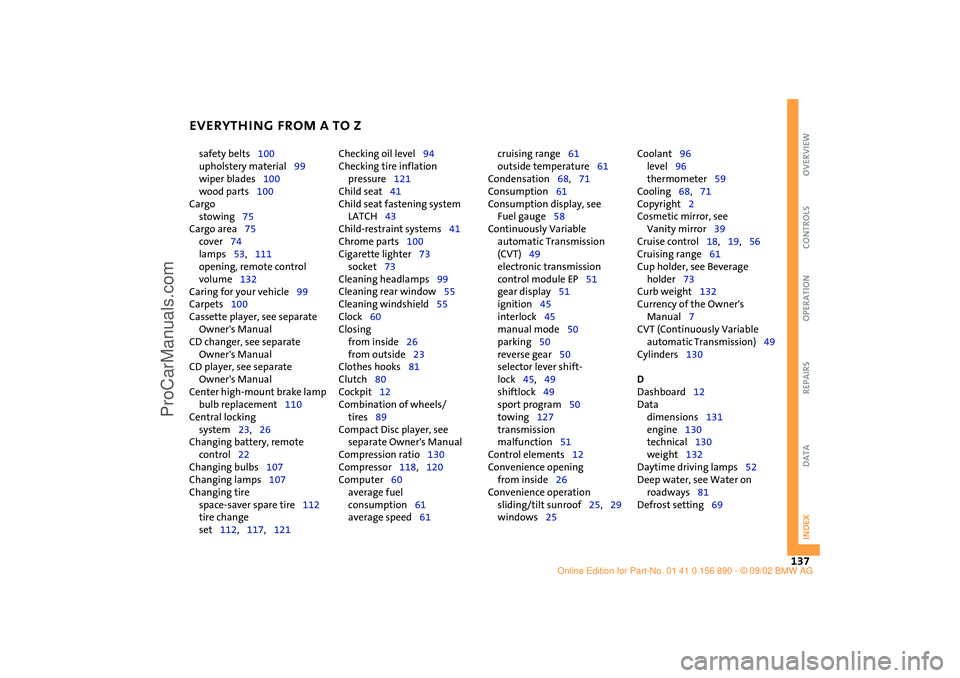
EVERYTHING FROM A TO Z
137
OVERVIEW REPAIRS OPERATION CONTROLS DATA INDEX
safety belts100
upholstery material99
wiper blades100
wood parts100
Cargo
stowing75
Cargo area75
cover74
lamps53,111
opening, remote control
volume132
Caring for your vehicle99
Carpets100
Cassette player, see separate
Owner's Manual
CD changer, see separate
Owner's Manual
CD player, see separate
Owner's Manual
Center high-mount brake lamp
bulb replacement110
Central locking
system23,26
Changing battery, remote
control22
Changing bulbs107
Changing lamps107
Changing tire
space-saver spare tire112
tire change
set112,117,121 Checking oil level94
Checking tire inflation
pressure121
Child seat41
Child seat fastening system
LATCH43
Child-restraint systems41
Chrome parts100
Cigarette lighter73
socket73
Cleaning headlamps99
Cleaning rear window55
Cleaning windshield55
Clock60
Closing
from inside26
from outside23
Clothes hooks81
Clutch80
Cockpit12
Combination of wheels/
tires89
Compact Disc player, see
separate Owner's Manual
Compression ratio130
Compressor118,120
Computer60
average fuel
consumption61
average speed61 cruising range61
outside temperature61
Condensation68,71
Consumption61
Consumption display, see
Fuel gauge58
Continuously Variable
automatic Transmission
(CVT)49
electronic transmission
control module EP51
gear display51
ignition45
interlock45
manual mode50
parking50
reverse gear50
selector lever shift-
lock45,49
shiftlock49
sport program50
towing127
transmission
malfunction51
Control elements12
Convenience opening
from inside26
Convenience operation
sliding/tilt sunroof25,29
windows25 Coolant96
level96
thermometer59
Cooling68,71
Copyright2
Cosmetic mirror, see
Vanity mirror39
Cruise control18,19,56
Cruising range61
Cup holder, see Beverage
holder73
Curb weight132
Currency of the Owner's
Manual7
CVT (Continuously Variable
automatic Transmission)49
Cylinders130
D
Dashboard12
Data
dimensions131
engine130
technical130
weight132
Daytime driving lamps52
Deep water, see Water on
roadways81
Defrost setting69
ba.book Seite 137 Montag, 5. August 2002 8:09 20
ProCarManuals.com
Page 140 of 148

EVERYTHING FROM A TO Z
138
Defrosting windows69,72
air conditioning system69
automatic climate
control72
Dimensions131
Dimming
interior mirror39
Dipstick, engine oil94
Dirt on the paintwork99
Disc brakes84
Displacement130
Display elements13,14
coolant thermometer59
fuel gauge58
indicator and warning
lamps15
odometer58
service interval display60
with navigation system14
Display lighting53
Distance remaining61
Doors
keys22
locking24
manual operation25
unlocking24
DOT quality grades87
Driving lamps52
Driving notes, general81
Dry air68,71 DSC (Dynamic Stability
Control)16,63
Dynamic Stability Control
(DSC)16,63
E
Easy entry35
EBD (Electronic Brake Force
Distribution)16,83
Electric power windows28
Electrical defect
driver's door25
sliding/tilt sunroof30
tailgate27
Electronic Brake Force
Distribution (EBD)16,83
Electronic transmission control
module
Continuously Variable
automatic Transmission
(CVT)51
Emergency operation
driver's door25
sliding/tilt sunroof30
tailgate27
Engine80
electronics17
power output17
speed17,58
starting46 Engine compartment
MINI COOPER92
MINI COOPER S93
Engine oil94
additives95
consumption94
dipstick94
High Performance
Synthetic Oil96
level94
pressure15
recommended grades of
oil95
viscosities96
Entry to the rear35
Exterior finish, care99
Exterior mirrors39
Eyelets, towing126
F
Failure, tires64
False alarm32
Fans68
Fastening safety belts16,38
Filling canister118,119
Filling hose118
First-aid kit124
Flat116 Flat tire64,112
MINI Mobility System118
Run Flat tires116
space-saver spare tire112
Flat Tire Monitor16,17,64
Floor coverings, floor
carpets100
Fluid capacities
fuel tank133
headlamp washer
system133
windshield washer
system133
Fog lamps53
Foldable rear backrest74
"Follow me home" lamps52
Foot mats100
Footbrake84
Footwell lamps53
bulb replacement111
Front airbags40
Front fog lamps
bulb replacement108
Front seat adjustment34
Fuel
consumption61
consumption display58
preparation130
quality83
tank capacity82,133
ba.book Seite 138 Montag, 5. August 2002 8:09 20
ProCarManuals.com
Page 142 of 148

EVERYTHING FROM A TO Z
140
turn signal indicators108
xenon lamps107
Lashing eyes75
LATCH
child seat fastening
system43
identification43
Leather care101
LED light-emitting diodes54
Length131
License plate lamp
bulb replacement110
Lifting handle, space-saver
spare tire112
Light-alloy wheels100
Lighting
cargo area lamps53
"Lights on" warning52
Liquid sealant
filling119
Load securing devices75
Loading75
Loading cargo75
Low beams52,107
Lug bolts114
Luggage compartment
see Cargo area
Luggage compartment cover,
see Cargo area cover74
Luggage compartment lamps,
see Cargo area lamps111 Luggage rack,
see Roof-mounted luggage
rack76
Lumbar support35
M
M+S tires89
Maintenance60,98
Maintenance System98
Manual operation
driver's door25
sliding/tilt sunroof30
tailgate27
Manual transmission48
Manufacturer6
Master key
initialization22
with remote control22
Mechanical key22
MINI Maintenance System98
MINI manufacturer6
MINI Mobility System
compressor120
liquid sealant119
on-board tools118
Mirror heater39
Mirrors39
Modifications, technical103
Multifunction steering
wheel19
Multifunction switch52 N
Navigation system, see
separate Owner's
Manual14
Non-smoker's equipment
package, see Cigarette lighter
socket73
Nozzles69,72
Nylon rope126
O
OBD interface socket102
Odometer58
Oil94
additives95
consumption94
dipstick94
High Performance Synthetic
Oil96
level15
pressure15
recommended grades of
oil95
viscosities96
Oil change intervals, see Service
and Warranty Booklet for US
models, or Warranty and
Service Guide Booklet for
Canadian models
Oil service60
Old batteries122 On-board tool kit106
On-board tools112,118
Opening
from inside26
from outside23
Outside temperature
display61
P
Park Distance Control
(PDC)66
Parking brake16,47
Parking lamps52
bulb replacement108
Parking lamps/Low beams52
Parking vehicle81
Particle filter69,72
PDC (Park Distance
Control)66
Phillips screwdriver118
Plastic100
Pollen69,72
Power output17,130
Power supply 12 V73
Power windows
electric power windows28
initialize28
Pressure, tires85,115,120
Pushing/Towing126
ba.book Seite 140 Montag, 5. August 2002 8:09 20
ProCarManuals.com