service MINI COOPER 2004 User Guide
[x] Cancel search | Manufacturer: MINI, Model Year: 2004, Model line: COOPER, Model: MINI COOPER 2004Pages: 152, PDF Size: 1.53 MB
Page 61 of 152

59
OVERVIEW REPAIRS OPERATIONCONTROLS DATA INDEX
ALL SEASON TRACTION CONTROL (ASC)
*
The concept
This system optimizes driving stability and
traction, especially when just starting off,
when accelerating or when cornering.
ASC recognizes the danger present in trac-
tion loss and will increase driving stability
and traction by reducing the engine's out-
put and, if necessary, by applying the
brakes to the front wheels.
ASC is operational each time you start the
engine. It contains the following functions:
>Antilock Brake System (ABS)
>Cornering Brake Control (CBC)
>Electronic Brake Force Distribution (EBD).
The laws of physics cannot be
repealed, even with ASC. An appropri-
ate driving style always remains the
responsibility of the driver. Avoid using the
additional safety margin provided by the
system as an excuse for taking unnecessary
risks.
Do not make any modifications to the ASC
system. Allow only authorized technicians
to perform service procedures on the
ASC.<
Indicator lamp
The indicator lamp in the display
elements will go out shortly after
the ignition has been switched on,
refer to pages 16, 17.
If the indicator lamp flashes:
ASC controls the drive and braking forces.
If the indicator lamp fails to go out after
the engine is started, or if it comes on dur-
ing normal driving and stays on:
The system is defective or was turned off
using the button.
The described stabilizing operations are no
longer available.
You can, however, drive the vehicle nor-
mally without ASC.
In the event of a malfunction, please see
your MINI Dealer, refer to pages 16, 17.
To switch off the ASCBriefly press the switch.
The indicator lamp stays lit.
When driving with snow chains or to 'rock
free' in snow, it can be helpful to switch off
the ASC for a brief period.
To maintain vehicle stability, always
drive with the ASC switched on
whenever possible.
ProCarManuals.com
Page 62 of 152

60
DYNAMIC STABILITY CONTROL (DSC)
*
The concept
This system optimizes driving stability and
traction, especially when just starting off,
when accelerating or when cornering. It
also maintains driving stability even in criti-
cal driving situations.
DSC recognizes unstable vehicle conditions,
such as understeering or oversteering, and,
as far as is possible within the laws of phys-
ics, helps keep the vehicle on a steady
course by reducing the rpms and by brake
applications to the individual wheels.
The DSC is operational every time you start
the engine. It contains the following func-
tions:
>All Season traction Control (ASC)
>Antilock Brake System (ABS)
>Cornering Brake Control (CBC)
>Electronic Brake Force Distribution (EBD).
The laws of physics cannot be
repealed, even with DSC. An appropri-
ate driving style always remains the respon-
sibility of the driver. Avoid using the addi-
tional safety margin provided by the system
as an excuse for taking unnecessary risks.
Do not make any modifications to the DSC
system. Allow only authorized technicians to
perform service procedures on the DSC.<
Indicator lamp
The indicator lamp in the display
elements will go out shortly after
the ignition has been switched on,
refer to pages 16, 17.
If the indicator lamp flashes:
DSC controls the drive and braking forces.
If the indicator lamp fails to go out after
the engine is started, or if it comes on dur-
ing normal driving and stays on:
The system is defective or was turned off
using the button.
The described stabilizing operations are no
longer available.
The vehicle will remain completely opera-
tional, however, without DSC.
In the event of a malfunction, please see
your MINI Dealer, refer to pages 16, 17.
To switch off the DSCBriefly press the switch.
The indicator lamp stays lit.
When driving with snow chains, it may be
effective to switch off the DSC for a brief
period.
To maintain stability, always drive
with the DSC switched on whenever
possible.
ProCarManuals.com
Page 67 of 152

65
OVERVIEW REPAIRS OPERATIONCONTROLS DATA INDEX
AIRBAGS1Side airbags in seatback on the driver
and passenger side: front
2Head airbags on the driver and passenger
sides for both rows of seats: front/rear
3Front airbags on the driver and passen-
ger sidesProtective effectThe front airbags supplement the safety belts
by providing additional protection for the
driver and front passenger in the event of a
frontal collision in which the protection
afforded by the belts alone may no longer be
sufficient.
When needed, the head and side airbags help
to furnish protection in the event of side
impact.
Each of the side airbags is designed to help
support the seat occupant's upper body.
The airbags are designed to not be trig-
gered in certain types of collisions, e.g. in
minor accidents, certain kinds of vehicle
rollover and rear impact.
For information on the ideal seating position,
refer to page 31.
Do not apply adhesive materials to the
cover panels of the airbags, cover them
or modify them in any other way. Do not fit
covers, cushions or other items to the front
seats that have not been specially approved
for seats with side airbags. Do not hang cloth-
ing, e. g. jackets, over the backrests.
Do not attempt to remove the airbag
restraint system from the vehicle. Do not
make any changes yourself to the individual
components and wiring. This includes the
padded covers of the steering wheel, instru-
ment panel and roof supports, as well as the
sides of the roofliner and the original back-
rest covers on the front seats. Do not attempt
to remove or dismantle the steering wheel.
Do not touch the individual components
directly after the system has been triggered,
as otherwise there is a danger of burns. In the
event of malfunctions, immobilization or use,
i.e. triggering, of the airbag restraint system
in accordance with its intended function,
please commission a MINI Dealer with the
inspection, repair or disassembly. Unprofes-
sional attempts to service the system could
lead to failure in an emergency or undesired
airbag activation, either of which could result
in personal injury. In view of the applicable
safety regulations, please arrange for your
MINI Dealer to dispose of the airbag genera-
tors.<
Airbag warning information is also pro-
vided on the sun visors.Indicator lamp
The indicator lamp in the display
elements shows the status of the
entire airbag system and the seat
belt tensioners starting from ignition key
position 1.
System operational:
>The indicator lamp comes on briefly.
System malfunction:
>The indicator lamp does not come on
starting from ignition key position 1
>The indicator lamp stays lit
>The indicator lamp lights up while driving.
ProCarManuals.com
Page 83 of 152

OVERVIEW
CONTROLS
OPERATION, CARE, MAINTENANCE
OWNER SERVICE PROCEDURES
INDEX TECHNICAL DATA
81
OVERVIEW REPAIRSOPERATIONCONTROLS DATA INDEX
Operation
ProCarManuals.com
Page 84 of 152

82
BREAK-IN PROCEDURES To ensure that your vehicle provides maxi-
mum economy throughout a long service
life, we request that you comply with the
following information: EngineUp to 1,250 miles / 2,000 km:
>Drive at various vehicle and engine
speeds
>Do not exceed an engine speed of
4,500 rpm or a vehicle speed of 95 mph /
150 km/h.
>Absolutely avoid using the full-throttle
or kickdown position for the accelerator.
Up to 1,250 miles / 2,000 km:
Engine and road speeds can be gradually
increased.
You should also comply with these break-in
procedures if the engine has to be replaced
at a later point.
TiresDue to technical factors associated with
their manufacture, tires do not achieve
their full traction potential until after an
initial break-in period. Therefore drive care-
fully during the first 200 miles / 300 km.Brake systemApprox. 300 miles / 500 km must be driven
before the brake pads and rotors achieve
the optimum pad-surface and wear pat-
terns required for trouble-free operation
and an extended service life.ClutchRoughly 300 miles / 500 km must be driven
before the clutch starts to operate at opti-
mum efficiency. Remember to engage the
clutch carefully during this initial period.
ProCarManuals.com
Page 86 of 152
84
REFUELING
Always switch off the engine before
refueling. If you do not, fuel cannot
be filled into the tank and the SERVICE
ENGINE SOON lamp may come on.<
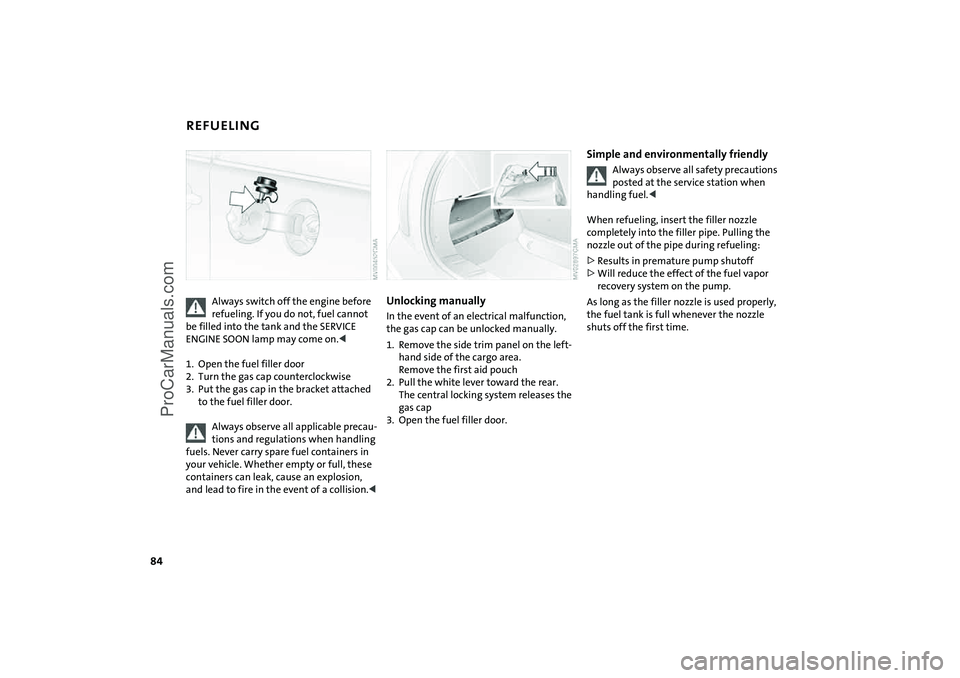
1. Open the fuel filler door
2. Turn the gas cap counterclockwise
3. Put the gas cap in the bracket attached
to the fuel filler door.
Always observe all applicable precau-
tions and regulations when handling
fuels. Never carry spare fuel containers in
your vehicle. Whether empty or full, these
containers can leak, cause an explosion,
and lead to fire in the event of a collision.<
Unlocking manually In the event of an electrical malfunction,
the gas cap can be unlocked manually.
1. Remove the side trim panel on the left-
hand side of the cargo area.
Remove the first aid pouch
2. Pull the white lever toward the rear.
The central locking system releases the
gas cap
3. Open the fuel filler door.
Simple and environmentally friendly
Always observe all safety precautions
posted at the service station when
handling fuel.<
When refueling, insert the filler nozzle
completely into the filler pipe. Pulling the
nozzle out of the pipe during refueling:
>Results in premature pump shutoff
>Will reduce the effect of the fuel vapor
recovery system on the pump.
As long as the filler nozzle is used properly,
the fuel tank is full whenever the nozzle
shuts off the first time.
ProCarManuals.com
Page 89 of 152
87
OVERVIEW REPAIRSOPERATIONCONTROLS DATA INDEX
TIRE INFLATION PRESSURE Information for your safetyIt is not merely the tire's service life, but
also driving safety and driving comfort that
depend on the condition of the tires and
the maintenance of the specified tire pres-
sure.
Check tire inflation pressures regu-
larly, including the space-saver spare
tire: at least twice a month and before long
journeys. Failure to observe this precaution
can result in incorrect tire pressures, which
cause unstable handling response as well
as tire damage, and can ultimately lead to
an accident. Do not drive with deflated, i.e.
flat, tires except if Run Flat tires are fitted.
A flat tire greatly impairs steering and brak-
ing response, and can lead to complete loss
of control over the vehicle.
mum of 1.25 miles / 2 km or when the vehi-
cle has been parked for at least 2 hours.
Warm tires have higher pressures.
After correcting the tire inflation
pressure, reinitialize the Flat Tire
Monitor, refer to page 62.<
Tire inflation pressures for original
tiresThe tire inflation pressures in psi and kilo-
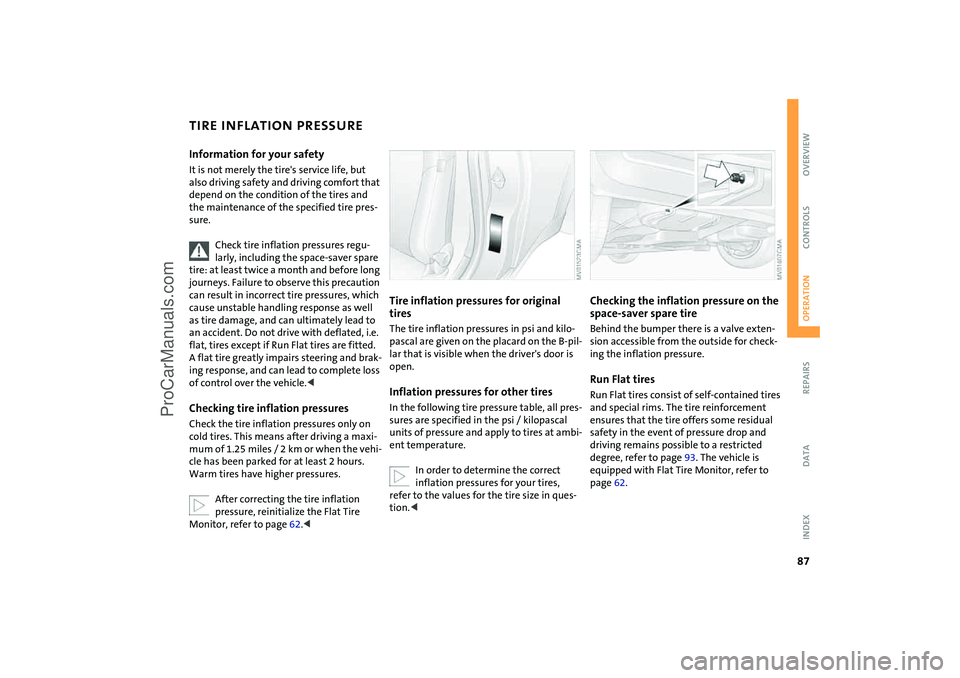
pascal are given on the placard on the B-pil-
lar that is visible when the driver's door is
open.Inflation pressures for other tiresIn the following tire pressure table, all pres-
sures are specified in the psi / kilopascal
units of pressure and apply to tires at ambi-
ent temperature.
In order to determine the correct
inflation pressures for your tires,
refer to the values for the tire size in ques-
tion.<
Checking the inflation pressure on the
space-saver spare tireBehind the bumper there is a valve exten-
sion accessible from the outside for check-
ing the inflation pressure.Run Flat tiresRun Flat tires consist of self-contained tires
and special rims. The tire reinforcement
ensures that the tire offers some residual
safety in the event of pressure drop and
driving remains possible to a restricted
degree, refer to page 93. The vehicle is
equipped with Flat Tire Monitor, refer to
page 62.
ProCarManuals.com
Page 91 of 152

89
OVERVIEW REPAIRSOPERATIONCONTROLS DATA INDEX
TIRE CODINGKnowing the tire code on the tire's sidewall
makes it easier for you to choose and iden-
tify the correct tires.Tire sizee.g. 205/45 R 17 84 V
Nominal width in mm
Cross-sectional
ratio in %
Radial belt construction
Rim diameter in inches
Load index,
not on ZR tires
Speed code letter,
in front of the R on ZR tires
Speed code letters:
Q= bis 105 mph / 160 km/h
T= up to 118 mph / 190 km/h
H= up to 131 mph / 210 km/h
V= up to 150 mph / 240 km/h
W= up to 167 mph / 270 km/hTire Identification NumberTires with DOT codes meet the guidelines
of the U.S. Department of Transportation. DOT code:
e.g. DOT xxxx xxx 3603
Manufacturer's code
for tire make
Tire size and
tire version
Tire age
Tire ageThe manufacturer of your MINI recom-
mends replacing all tires, including the
space-saver spare tire, regardless of actual
wear, after 6 years at the latest.
The date on which the tire was manufac-
tured is indicated by the code on the side-
wall:
DOT … 3603 indicates that the tire was
manufactured in Week 36 of the year 2003.Uniform Tire Quality GradingQuality grades can be found where applica-
ble on the tire sidewall between tread
shoulder and maximum section width.
For example:
DOT quality grades Treadwear 200
Traction AA A B C
Temperature A B C
All passenger car tires must conform
to Federal Safety Requirements in
addition to these grades.< Tread wearThe tread wear grade is a comparative rat-
ing based on the wear rate of the tire when
tested under controlled conditions on a
specified government test course.
For example, a tire graded 150 would wear
one and one-half, 1 γ times as well on the
government course as a tire graded 100.
The relative performance of tires depends
upon the actual conditions of their use,
however, and may depart significantly
from the norm due to variations in driving
habits, service practices and differences in
road characteristics and climate.
ProCarManuals.com
Page 94 of 152

92
WHEEL AND TIRE REPLACEMENT
Unprofessional attempts by laymen
to service tires can lead to damage
and accidents.
Have this work performed by skilled profes-
sionals only. Your MINI Dealer will be glad
to assist you with both their expertise and
the proper equipment for your vehicle.<
The correct wheel and tire combination
also affects various systems that would
otherwise be impaired, e.g. ABS or DSC.
Have the wheels balanced after each tire or
wheel replacement.
The manufacturer of your MINI rec-
ommends that you avoid using
retread tires, as this could impair driving
safety. This is due to the possible variations
in casing structures and, in some cases, to
their extreme age, which can lead to a
decrease in their durability.<
The correct wheels and tires
The manufacturer of your MINI rec-
ommends never mounting wheels
and tires that have not been specifically
approved by the manufacturer for use on
your particular model. Although other
wheels and tires may theoretically have the
same dimensions, variations in factors such
as manufacturing tolerances can result in
contact between tire and bodywork, ulti-
mately leading to serious accidents. The
manufacturer of your MINI cannot evaluate
non-approved wheels and tires to deter-
mine if they are suited for use, and there-
fore cannot ensure the operating safety of
the vehicle if they are fitted.<
Recommended tire makes:
To maintain good handling and vehicle
response, use only tires of a single tread
configuration from a single manufacturer.
In the event of a flat tire, remount the pre-
vious wheel and tire combination as soon
as possible.
Run Flat tires:
If your MINI is equipped with Run Flat tires
– refer to Run Flat tires – use only these
tires, since no space-saver spare tire may be
available in the event of a flat. Special characteristics of winter tires The manufacturer of your MINI recom-
mends winter tires for driving in adverse
winter road conditions. While all-season
tires with the M+S designation provide bet-
ter winter traction than summer tires, they generally do not achieve the full perfor-
mance of winter tires.
For mounting winter tires, refer to the
descriptions under Tire condition, page 91,
and Wheel and tire replacement.
Run Flat tires:
If your MINI is equipped with Run Flat tires
– refer to Run Flat tires – use only these
tires, since no space-saver spare tire may be
available in the event of a flat.
Observing speeds:
Never exceed the maximum speed
for which the winter tires are rated.
Unprofessional attempts by laymen to ser-
vice tires can lead to damage and accidents.
Have this work performed by skilled profes-
sionals only. The technicians at your MINI
Dealer will be glad to assist you with the
required professional knowledge and spe-
cialized equipment.<
StorageStore tires in a cool, dry place, protecting
them against light whenever possible. Pro-
tect the tires against contact with oil,
grease and fuel. Do not exceed the maxi-
mum tire inflation pressure specified on
the tire sidewall.
ProCarManuals.com
Page 97 of 152

95
OVERVIEW REPAIRSOPERATIONCONTROLS DATA INDEX
BONNET
Do not attempt to service your vehi-
cle if you do not have the required
technical background. Before working in
the engine compartment, switch off the
engine and allow it to cool down. Before
working on the electrical system, always
disconnect the battery first. For all work on
the vehicle, comply with the appropriate
information and instructions. If you are not
familiar with the guidelines, the manufac-
turer of your MINI recommends that you
have the service work performed by your
MINI Dealer. Otherwise, work improperly
carried out on the parts and components
can pose a safety hazard for vehicle occu-
pants and other road users.<
To unlockPull the lever in the right door area beneath
the instrument panel.
To open1. Reach under the bonnet
2. Pull the release lever
3. Open the bonnet.To closeAllow the bonnet to fall from a height of
approx. 1 ft / 30 cm.
To avoid injuries, be sure that the
travel path of the bonnet is clear
when it is closed, as with all closing proce-
dures.
If it is determined that the bonnet is not
completely closed while driving, stop
immediately and close it securely, also refer
to page 16.<
ProCarManuals.com