seats MINI COOPER 2009 Owners Manual
[x] Cancel search | Manufacturer: MINI, Model Year: 2009, Model line: COOPER, Model: MINI COOPER 2009Pages: 160, PDF Size: 2.84 MB
Page 31 of 160
REFERENCEAT A GLANCE CONTROLS DRIVING TIPS MOBILITY
29
Adjustments
Sitting safely
The ideal sitting position can make a vital contri-
bution to relaxed, fatigue-free driving. In con-
junction with the safety belts, the head restraints
and the airbags, the seated position has a major
influence on your safety in the event of an acci-
dent. To ensure that the safety systems operate
with optimal efficiency, we strongly urge you to
observe the instructions contained in the follow-
ing section.
For additional information on transporting chil-
dren safely, refer to page35.
Airbags
Always maintain an adequate distance
between yourself and the airbags. Always
grip the steering wheel on the rim, with your
hands in the 3 o'clock and 9 o'clock positions, to
minimize the risk of injury to the hands or arms
in the event of the airbag being triggered off.
No one and nothing is to come between the air-
bags and the seat occupant.
Do not use the cover of the front airbag on the
front passenger side as a storage area. Ensure
that the front passenger is correctly seated, e.g.
that no feet or legs are propped against the
dashboard. Otherwise, leg injury could result if
the front airbag suddenly deployed.
Make sure that passengers do not lean their
heads against the side airbags, otherwise seri-
ous injuries could result if the airbags suddenly
deployed.<
Even if you follow all the instructions, injuries
resulting from contact with airbags cannot be
fully excluded, depending on the circumstances.
The ignition and inflation noise may provoke a
mild hearing loss in extremely sensitive individ-
uals. This effect is usually only temporary.
For airbag locations and additional information
on airbags, refer to page64.
Head restraint
A correctly adjusted head restraint reduces the
risk of neck injury in the event of an accident.
Adjust the head restraint in such a way
that its center is at approx. ear level. Oth-
erwise, there is an increased risk of injury in the
event of an accident.<
Head restraints, refer to page31.
Safety belt
Before every drive, make sure that all occupants
wear their safety belts. Airbags complement the
safety belt as an additional safety device, but
they do not represent a substitute.
Never allow more than one person to
wear a single safety belt. Never allow
infants or small children to ride in a passenger's
lap.
Make sure that the belt in the lap area sits low
across the hips and does not press against the
abdomen. The safety belt must not rest against
the throat, run across sharp edges, pass over
hard or fragile objects or be pinched. Fasten the
safety belt so that it is pulled taut across the lap
and shoulder, fitting the body snugly without
any twists. Otherwise the belt could slide over
the hips in the event of a frontal collision and
injure the abdomen. Avoid wearing bulky cloth-
ing and regularly pull the belt in the upper-body
area taut, otherwise its restraining effect could
be impaired.<
Safety belts, refer to page32.
Seats
Note before adjusting
Never attempt to adjust your seat while
the vehicle is moving. The seat could
respond with unexpected movement, and the
ensuing loss of vehicle control could lead to an
accident.
ProCarManuals.com
Page 33 of 160
REFERENCEAT A GLANCE CONTROLS DRIVING TIPS MOBILITY
31
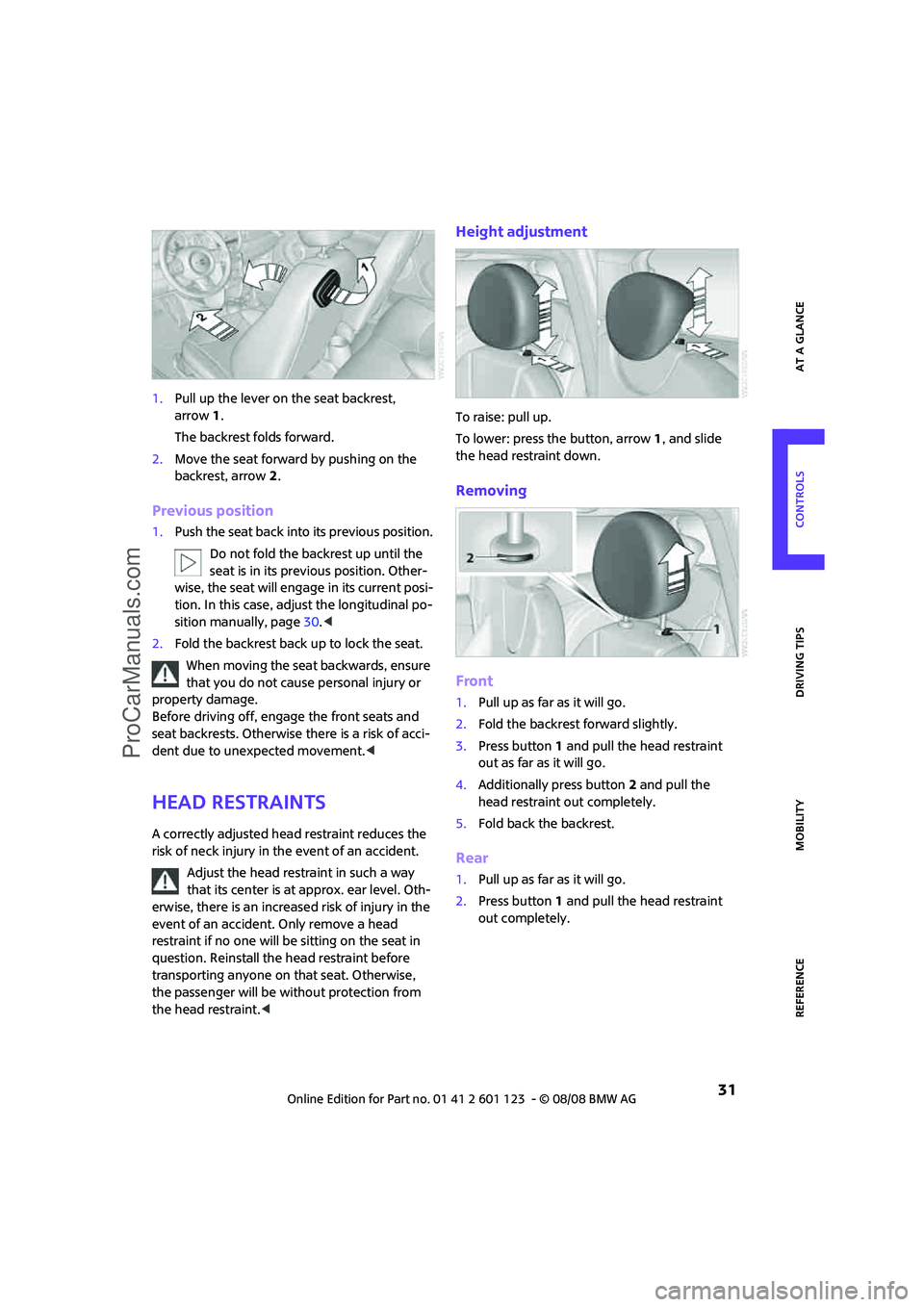
1.Pull up the lever on the seat backrest,
arrow1.
The backrest folds forward.
2.Move the seat forward by pushing on the
backrest, arrow2.
Previous position
1.Push the seat back into its previous position.
Do not fold the backrest up until the
seat is in its previous position. Other-
wise, the seat will engage in its current posi-
tion. In this case, adjust the longitudinal po-
sition manually, page30.<
2.Fold the backrest back up to lock the seat.
When moving the seat backwards, ensure
that you do not cause personal injury or
property damage.
Before driving off, engage the front seats and
seat backrests. Otherwise there is a risk of acci-
dent due to unexpected movement.<
Head restraints
A correctly adjusted head restraint reduces the
risk of neck injury in the event of an accident.
Adjust the head restraint in such a way
that its center is at approx. ear level. Oth-
erwise, there is an increased risk of injury in the
event of an accident. Only remove a head
restraint if no one will be sitting on the seat in
question. Reinstall the head restraint before
transporting anyone on that seat. Otherwise,
the passenger will be without protection from
the head restraint.<
Height adjustment
To raise: pull up.
To lower: press the button, arrow1, and slide
the head restraint down.
Removing
Front
1.Pull up as far as it will go.
2.Fold the backrest forward slightly.
3.Press button1 and pull the head restraint
out as far as it will go.
4.Additionally press button 2 and pull the
head restraint out completely.
5.Fold back the backrest.
Rear
1.Pull up as far as it will go.
2.Press button 1 and pull the head restraint
out completely.
ProCarManuals.com
Page 34 of 160
Adjustments
32
Seat heating*
Switching on
Press once for each temperature level.
Three LEDs indicate the highest temperature.
If you continue driving within the next 15 min-
utes, the seat heating is automatically activated
at the previously set temperature.
The temperature is lowered or the heating is
switched off entirely to save on battery power.
The LEDs stay lit.
Switching off
Press button longer.
Safety belts
Observe the instructions on page29 to
ensure the best possible personal protec-
tion.<
Before every drive, make sure that all occupants
wear their safety belts. Airbags complement the
safety belt as an additional safety device, but
they do not represent a substitute.
Front and rear seatsClosing
Make sure you hear the lock engage in the belt
buckle.
The upper belt anchor is suitable for adults of
any stature as long as the seat is adjusted prop-
erly, page29.
Opening
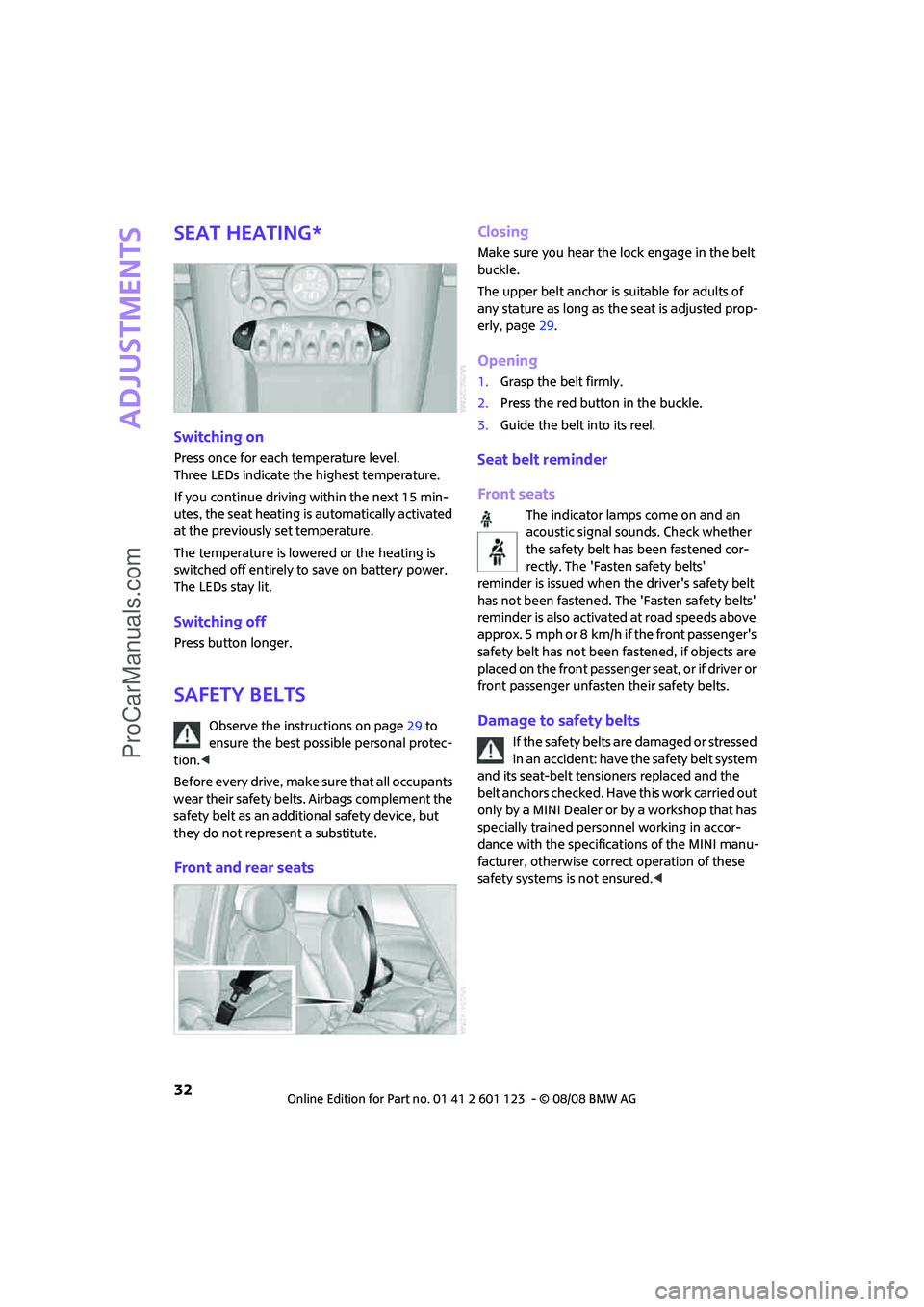
1.Grasp the belt firmly.
2.Press the red button in the buckle.
3.Guide the belt into its reel.
Seat belt reminder
Front seats
The indicator lamps come on and an
acoustic signal sounds. Check whether
the safety belt has been fastened cor-
rectly. The 'Fasten safety belts'
reminder is issued when the driver's safety belt
has not been fastened. The 'Fasten safety belts'
reminder is also activated at road speeds above
approx. 5 mph or 8 km/h if the front passenger's
safety belt has not been fastened, if objects are
placed on the front passenger seat, or if driver or
front passenger unfasten their safety belts.
Damage to safety belts
If the safety belts are damaged or stressed
in an accident: have the safety belt system
and its seat-belt tensioners replaced and the
belt anchors checked. Have this work carried out
only by a MINI Dealer or by a workshop that has
specially trained personnel working in accor-
dance with the specifications of the MINI manu-
facturer, otherwise correct operation of these
safety systems is not ensured.<
ProCarManuals.com
Page 37 of 160
REFERENCEAT A GLANCE CONTROLS DRIVING TIPS MOBILITY
35
Transporting children safely
The right place for
children
Do not leave children unattended in the
vehicle, otherwise they could endanger
themselves and/or other persons by opening the
doors, for example.<
Children should always sit in the rear
Accident research has shown that the safest
place for children is on the rear seat.
Only transport children under the age of
13 or smaller than 5 ft/150 cm in the rear
in a child-restraint system suitable for their age,
weight and size. Otherwise there is an increased
risk of injury in the event of an accident.<
Children 13 years of age or older must be buck-
led in with a safety belt as soon as there no
longer is any child-restraint system that is
appropriate for their age, size and weight.
Only install child seats in the rear when the
rear seat backrest is folded all the way
back and engaged. Otherwise there will be an
increased risk of injury in the event of an acci-
dent.<
Exception for front passenger seat
Front passenger airbags
Should it be necessary to use a child-
restraint system on the front passenger
seat, the front and side airbags must be deacti-
vated. Otherwise, there is an increased risk of
injury to the child if the airbags deploy, even if
the child is seated in a child-restraint system.<
For more information on automatic deactivation
of the front passenger airbags, refer to page65.
Child-restraint systems,
installation
Observe the child-restraint system manu-
facturer's instructions when selecting,
installing and using child-restraint systems. Oth-
erwise the protective effect may be dimin-
ished.<
On the front passenger seat
After installing a child-restraint system on
the front passenger seat, make sure that
the front and side airbags for the front passen-
ger are deactivated, otherwise there is an
increased risk of injury if the airbags deploy.<
Child seat security
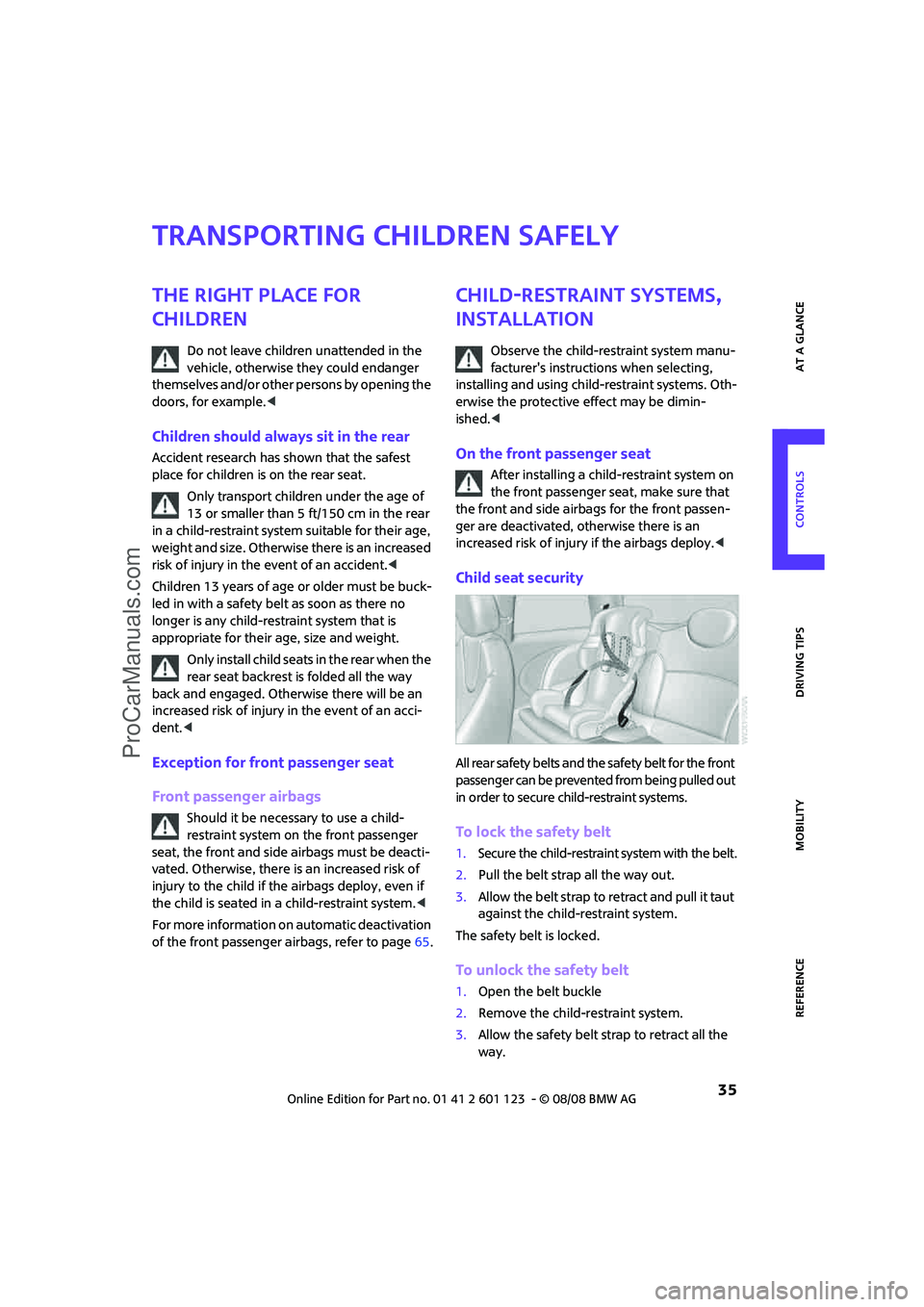
All rear safety belts and the safety belt for the front
passenger can be prevented from being pulled out
in order to secure child-restraint systems.
To lock the safety belt
1.Secure the child-restraint system with the belt.
2.Pull the belt strap all the way out.
3.Allow the belt strap to retract and pull it taut
against the child-restraint system.
The safety belt is locked.
To unlock the safety belt
1.Open the belt buckle
2.Remove the child-restraint system.
3.Allow the safety belt strap to retract all the
way.
ProCarManuals.com
Page 66 of 160
Technology for driving comfort and safety
64
Airbags
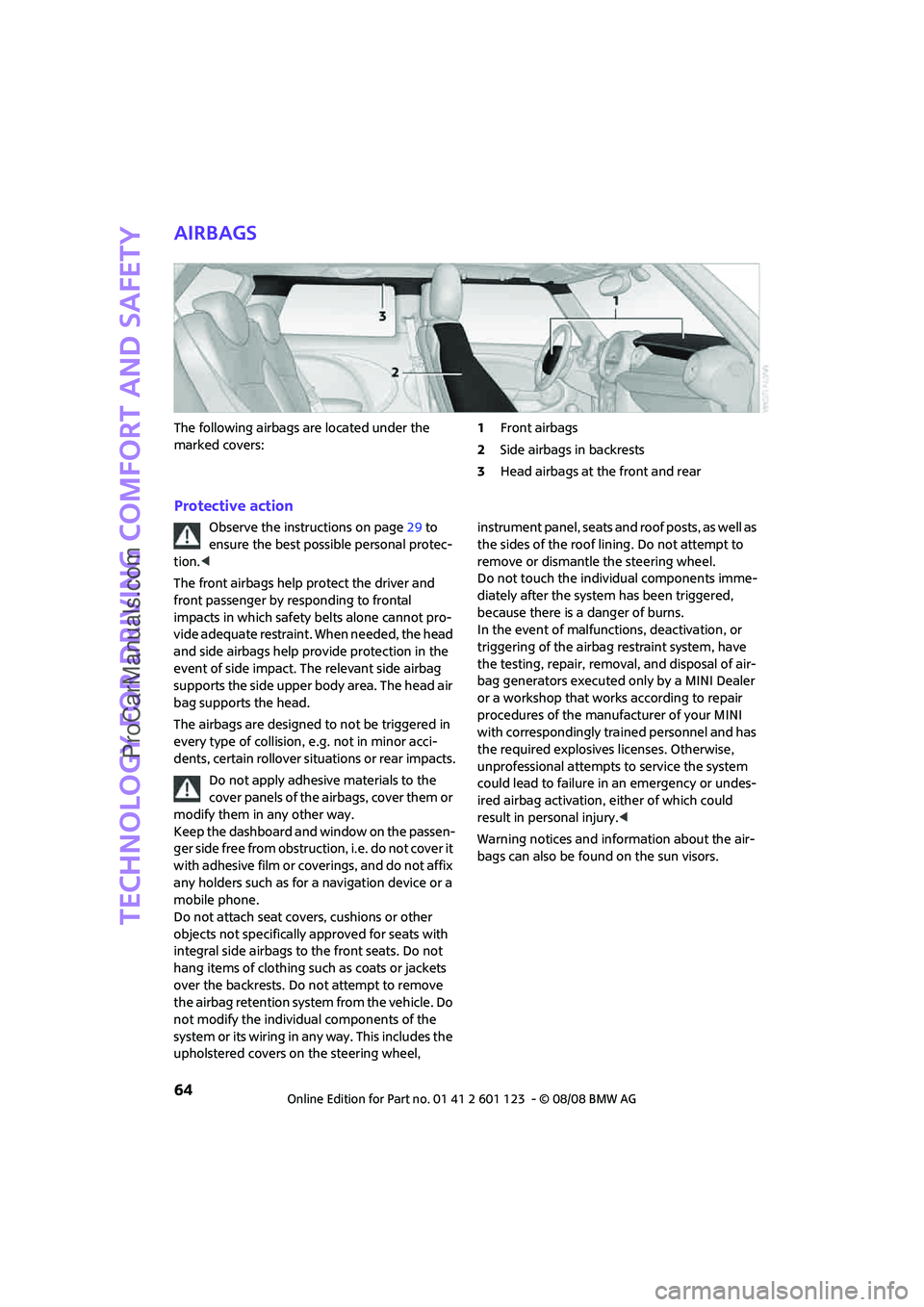
The following airbags are located under the
marked covers:1Front airbags
2Side airbags in backrests
3Head airbags at the front and rear
Protective action
Observe the instructions on page29 to
ensure the best possible personal protec-
tion.<
The front airbags help protect the driver and
front passenger by responding to frontal
impacts in which safety belts alone cannot pro-
vide adequate restraint. When needed, the head
and side airbags help provide protection in the
event of side impact. The relevant side airbag
supports the side upper body area. The head air
bag supports the head.
The airbags are designed to not be triggered in
every type of collision, e.g. not in minor acci-
dents, certain rollover situations or rear impacts.
Do not apply adhesive materials to the
cover panels of the airbags, cover them or
modify them in any other way.
Keep the dashboard and window on the passen-
ger side free from obstruction, i.e. do not cover it
with adhesive film or coverings, and do not affix
any holders such as for a navigation device or a
mobile phone.
Do not attach seat covers, cushions or other
objects not specifically approved for seats with
integral side airbags to the front seats. Do not
hang items of clothing such as coats or jackets
over the backrests. Do not attempt to remove
the airbag retention system from the vehicle. Do
not modify the individual components of the
system or its wiring in any way. This includes the
upholstered covers on the steering wheel, instrument panel, seats and roof posts, as well as
the sides of the roof lining. Do not attempt to
remove or dismantle the steering wheel.
Do not touch the individual components imme-
diately after the system has been triggered,
because there is a danger of burns.
In the event of malfunctions, deactivation, or
triggering of the airbag restraint system, have
the testing, repair, removal, and disposal of air-
bag generators executed only by a MINI Dealer
or a workshop that works according to repair
procedures of the manufacturer of your MINI
with correspondingly trained personnel and has
the required explosives licenses. Otherwise,
unprofessional attempts to service the system
could lead to failure in an emergency or undes-
ired airbag activation, either of which could
result in personal injury.<
Warning notices and information about the air-
bags can also be found on the sun visors.
ProCarManuals.com
Page 67 of 160
REFERENCEAT A GLANCE CONTROLS DRIVING TIPS MOBILITY
65
Automatic deactivation of the front
passenger airbags
An analysis of the impression in the front pas-
senger seat cushion determines whether and
how the seat is occupied. The front and side air-
bags for the front passenger are activated or
deactivated by the system accordingly.
The indicator lamp above the interior rear-
view mirror shows the current status of
the front passenger airbags, deactivated or acti-
vated, refer to Status of front passenger airbags
below.<
Before transporting a child on the front
passenger seat, read the safety precau-
tions and handling instructions under Transport-
ing children safely, page35.
The front and side airbags can also be deacti-
vated by adolescents and adults sitting in certain
positions; the indicator lamp for the front pas-
senger airbags comes on. In such cases, the pas-
senger should change his or her sitting position
so that the front passenger airbags are activated
and the indicator lamp goes out. If the desired
airbag status cannot be achieved by changing
the sitting position, transport the relevant pas-
senger on a rear seat. Do not attach covers,
cushions, ball mats or other items to the front
passenger seat unless they are specifically rec-
ommended by the manufacturer of your MINI.
Do not place any items under the seat which
could press against the seat from below. Other-
wise a correct analysis of the seat cushion is not
ensured.<
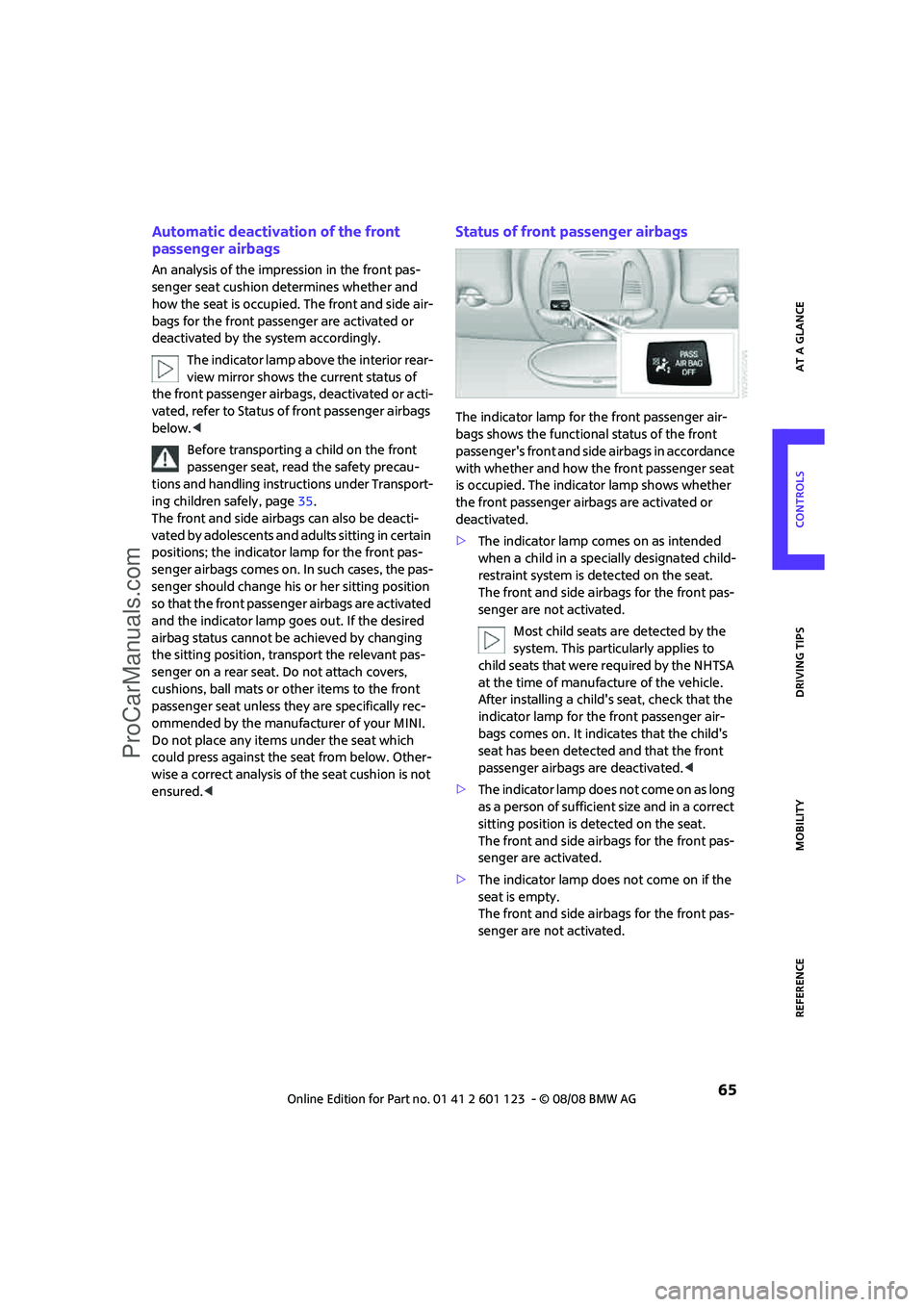
Status of front passenger airbags
The indicator lamp for the front passenger air-
bags shows the functional status of the front
passenger's front and side airbags in accordance
with whether and how the front passenger seat
is occupied. The indicator lamp shows whether
the front passenger airbags are activated or
deactivated.
>The indicator lamp comes on as intended
when a child in a specially designated child-
restraint system is detected on the seat.
The front and side airbags for the front pas-
senger are not activated.
Most child seats are detected by the
system. This particularly applies to
child seats that were required by the NHTSA
at the time of manufacture of the vehicle.
After installing a child's seat, check that the
indicator lamp for the front passenger air-
bags comes on. It indicates that the child's
seat has been detected and that the front
passenger airbags are deactivated.<
>T h e i n d i c a t o r l a m p d o e s n o t c o m e o n a s l o n g
as a person of sufficient size and in a correct
sitting position is detected on the seat.
The front and side airbags for the front pas-
senger are activated.
>The indicator lamp does not come on if the
seat is empty.
The front and side airbags for the front pas-
senger are not activated.
ProCarManuals.com
Page 81 of 160
REFERENCEAT A GLANCE CONTROLS DRIVING TIPS MOBILITY
79
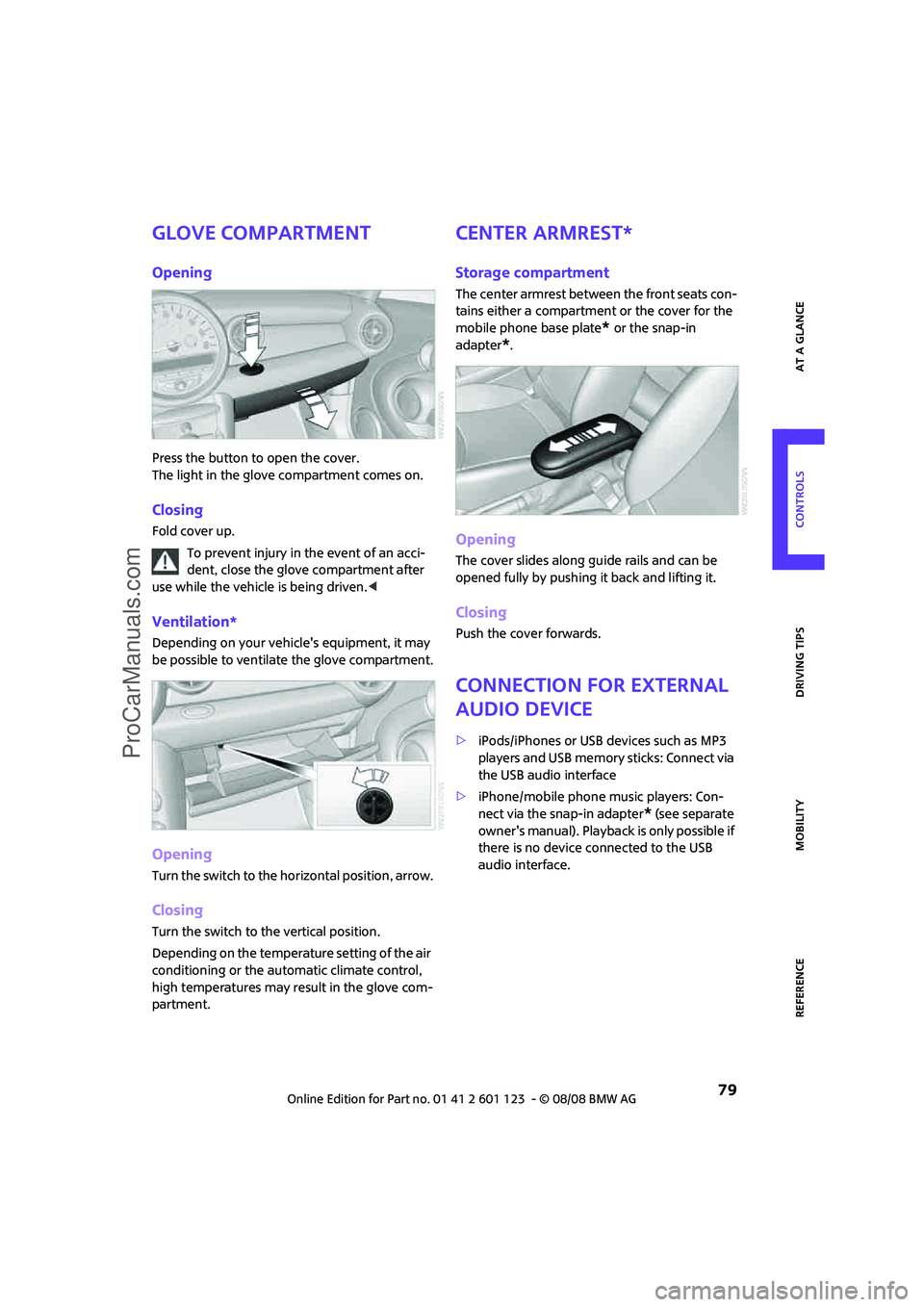
Glove compartment
Opening
Press the button to open the cover.
The light in the glove compartment comes on.
Closing
Fold cover up.
To prevent injury in the event of an acci-
dent, close the glove compartment after
use while the vehicle is being driven.<
Ventilation*
Depending on your vehicle's equipment, it may
be possible to ventilate the glove compartment.
Opening
Turn the switch to the horizontal position, arrow.
Closing
Turn the switch to the vertical position.
Depending on the temperature setting of the air
conditioning or the automatic climate control,
high temperatures may result in the glove com-
partment.
Center armrest*
Storage compartment
The center armrest between the front seats con-
tains either a compartment or the cover for the
mobile phone base plate
* or the snap-in
adapter
*.
Opening
The cover slides along guide rails and can be
opened fully by pushing it back and lifting it.
Closing
Push the cover forwards.
Connection for external
audio device
>iPods/iPhones or USB devices such as MP3
players and USB memory sticks: Connect via
the USB audio interface
>iPhone/mobile phone music players: Con-
nect via the snap-in adapter
* (see separate
owner's manual). Playback is only possible if
there is no device connected to the USB
audio interface.
ProCarManuals.com
Page 82 of 160
Practical interior accessories
80
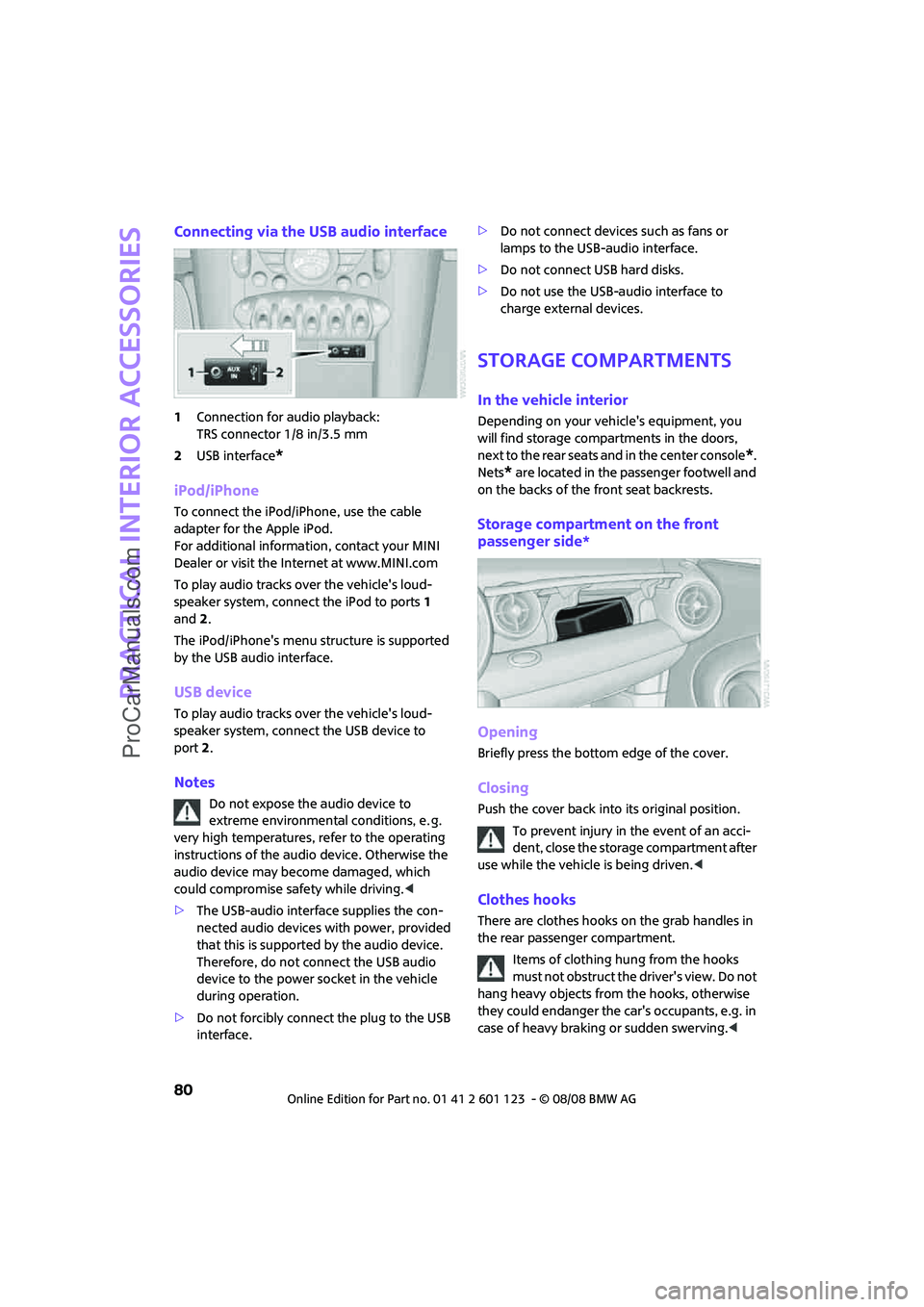
Connecting via the USB audio interface
1Connection for audio playback:
TRS connector 1/8 in/3.5 mm
2USB interface
*
iPod/iPhone
To connect the iPod/iPhone, use the cable
adapter for the Apple iPod.
For additional information, contact your MINI
Dealer or visit the Internet at www.MINI.com
To play audio tracks over the vehicle's loud-
speaker system, connect the iPod to ports 1
and2.
The iPod/iPhone's menu structure is supported
by the USB audio interface.
USB device
To play audio tracks over the vehicle's loud-
speaker system, connect the USB device to
port2.
Notes
Do not expose the audio device to
extreme environmental conditions, e. g.
very high temperatures, refer to the operating
instructions of the audio device. Otherwise the
audio device may become damaged, which
could compromise safety while driving.<
>The USB-audio interface supplies the con-
nected audio devices with power, provided
that this is supported by the audio device.
Therefore, do not connect the USB audio
device to the power socket in the vehicle
during operation.
>Do not forcibly connect the plug to the USB
interface.>Do not connect devices such as fans or
lamps to the USB-audio interface.
>Do not connect USB hard disks.
>Do not use the USB-audio interface to
charge external devices.
Storage compartments
In the vehicle interior
Depending on your vehicle's equipment, you
will find storage compartments in the doors,
next to the rear seats and in the center console
*.
Nets
* are located in the passenger footwell and
on the backs of the front seat backrests.
Storage compartment on the front
passenger side*
Opening
Briefly press the bottom edge of the cover.
Closing
Push the cover back into its original position.
To prevent injury in the event of an acci-
dent, close the storage compartment after
use while the vehicle is being driven.<
Clothes hooks
There are clothes hooks on the grab handles in
the rear passenger compartment.
Items of clothing hung from the hooks
must not obstruct the driver's view. Do not
hang heavy objects from the hooks, otherwise
they could endanger the car's occupants, e.g. in
case of heavy braking or sudden swerving.<
ProCarManuals.com
Page 148 of 160
From A to Z
146
From A to Z
INDEX
A
Accessories, refer to Your
individual vehicle4
Activated-charcoal filter for
automatic climate control76
Additives
– coolant105
– engine oil105
Adjusting temperature inside
the car, refer to Air
conditioner73
Adjusting temperature inside
the car, refer to Automatic
climate control74
Air conditioner72
Air conditioning mode
– air conditioner73
– automatic climate control74
– ventilation76
Air distribution
– automatic75
– individual74
– manual74
Air flow rate73,75
– air conditioning system73
– automatic climate control75
– heating, ventilation73
Air outlets, refer to Air vents72
Air pressure, checking, refer to
Tire inflation pressure94
Air recirculation, refer to
Recirculated-air
mode73,75
Air supply
– air conditioner73
– automatic climate control74
– ventilation76
Air vents72
Airbags64
– sitting safely29
– warning lamp66
Airing, refer to Ventilation76AKI, refer to Fuel
specifications93
Alarm system24
All-season tires, refer to Winter
tires102
Ambient air, refer to
Recirculated-air
mode73,75
Ambient lighting71
Antenna, care109
Antifreeze
– coolant105
– washer fluid44
Antilock Brake System ABS57
Anti-theft alarm system, refer
to Alarm system24
Anti-theft system19
Approved axle loads, refer to
Weights144
Approved engine oils105
Approved gross vehicle
weight, refer to Weights144
Armrest, refer to Center
armrest79
Arrival time
– computer49
Ashtray81
Assistant systems, refer to
– Dynamic Stability Control
DSC57
AUC Automatic recirculated-
air control75
Audio device, external79
AUTO program for automatic
climate control75
Automatic
– air distribution75
– air flow rate75
– cruise control45
– headlamp control67
Automatic climate control72
– automatic air distribution75Automatic recirculated-air
control AUC75
Automatic transmission with
Steptronic39
– interlock40
– overriding selector lever
lock41
– shiftlock40
– sport program40
AUX-In, refer to External audio
device79
Average fuel consumption48
– setting the units50
Average speed49
Axle loads, refer to
Weights144B
Background lighting, refer to
Ambient lighting71
Backrests, refer to Seats29
Backup lamps
– replacing bulb116
– replacing bulbs in MINI116
Band-aids, refer to First aid
pouch123
Bar, refer to Tow-starting,
towing away126
Battery122
– charging122
– disposal27,122
– jump starting123
– temporary power failure122
Battery renewal
– remote control27
Being towed125
Belt tensioner, refer to Safety
belts32
Belts, refer to Safety belts32
Beverage holders, refer to Cup
holders81
ProCarManuals.com
Page 149 of 160
REFERENCEAT A GLANCE CONTROLS DRIVING TIPS MOBILITY
147
Blower, refer to Air flow
rate73,75
Bonnet103
Bottle holders, refer to Cup
holders81
Brake Assist57
Brake fluid, refer to Service
requirements52
Brake lamps
– replacing bulbs in MINI116
Brake pads, breaking in84
Brake rotors85
– brakes84
– breaking in84
Brake system84
– breaking in84
– disc brakes85
– MINI Maintenance
System107
Brakes
– ABS57
– breaking in84
– MINI Maintenance
System107
– parking brake39
– service requirements52
Brakes, refer to Braking
safely85
Breakdown service, refer to
Roadside Assistance123
Break-in period84
Breaking in the clutch84
Bulb changing, refer to Lamps
and bulbs113
Button for starting the
engine37
Buttons on the steering
wheel11
C
California Proposition 65
warning5
Can holders, refer to Cup
holders81
Capacities144
Car battery, refer to Vehicle
battery122
Car care109Car key, refer to Keys/remote
controls18
Car phone
– installation location, refer to
Center armrest79
– refer to separate Owner's
Manual
Car wash85
Car wash, care109
Car washes109
Care109
– Car washes109
– Car-care products109
– CD/DVD drives111
– High-pressure washers109
– internal111
– Leather111
– Manual washing110
– Upholstery and fabrics111
– Windows110
– Wiper blades110
Cargo area
– capacity144
Cargo bay86
– convenient access26
– cover86
– lamp70
– opening from outside23
Cargo bay, expanding86
Cargo bay lamp70
Cargo bay lid, refer to
Tailgate23
Cargo loading87
– securing cargo88
– stowing cargo87
– vehicle86
Cargo, securing88
Carpets, care111
Catalytic converter, refer to
Hot exhaust system84
Center armrest79
Center brake lamp117
Center console, refer to
Around the center
console14
Central locking system19
– convenient access25
– from inside22
– from outside19Changing bulbs
113
Changing wheels119
Chassis number, refer to
Engine compartment104
Check Control54
Child's seats35
Child-restraint fixing system
LATCH36
Child-restraint systems35
Chock, folding
– space-saver spare tire119
Chrome parts, care110
Chrome parts, refer to
Care109
Cigarette lighter81
Cleaning headlamps43
– washer fluid44
Clock47
– 12h/24h mode50
– setting time53
Closing
– from inside22
– from outside19
Clothes hooks80
Cockpit10
Cold start, refer to Starting the
engine38
Comfort access
– what to observe before
entering a car wash26
Comfort access, refer to
Convenient access25
Comfort area, refer to Around
the center console14
Compartment for remote
control, refer to Ignition
lock37
Computer48
Condensation, refer to When
the vehicle is parked85
Condition Based Service
CBS107
Configuring settings, refer to
Personal Profile18
Confirmation signals for
vehicle locking/unlocking20
Connecting vacuum cleaner,
refer to Connecting electrical
appliances81
ProCarManuals.com