brake fluid MINI COOPER 2012 Owners Manual
[x] Cancel search | Manufacturer: MINI, Model Year: 2012, Model line: COOPER, Model: MINI COOPER 2012Pages: 207, PDF Size: 3.18 MB
Page 6 of 207
Notes
5
the specifications of the MINI manufacturer. If
this work is not carried out properly, there is a
danger of subsequent damage and related
safety hazards.<
Parts and accessories
For your own safety, use genuine parts
and accessories approved by the manu-
facturer of the MINI.
When you purchase accessories tested
and approved by the manufacturer of the MINI
and Original MINI Parts, you simultaneously
acquire the assurance that they have been thor-
oughly tested by the manufacturer of the MINI
to ensure optimum performance when installed
on your vehicle.
The manufacturer of the MINI warrants these
parts to be free from defects in material and
workmanship.
The manufacturer of the MINI will not accept any
liability for damage result ing from installation of
parts and accessories not approved by the
manufacturer of the MINI.
The manufacturer of the MINI cannot test every
product made by other manufacturers to verify
if it can be used on a MINI safely and without risk
to either the vehicle, its operation, or its occu-
pants.
Original MINI Parts, MINI Accessories and other
products approved by the manufacturer of the
MINI, together with professional advice on using
these items, are available from all MINI dealers.
Installation and operation of accessories that
have not been approved by the manufacturer of
your MINI, such as alarms, radios, amplifiers,
radar detectors, wheels, suspension compo-
nents, brake dust shield s, telephones, including
operation of any mobile phone from within the
vehicle without using an externally mounted
antenna, or transceiver equipment, for instance,
CBs, walkie-talkies, ham radios or similar acces-
sories, may cause extensiv e damage to the vehi-
cle, compromise its safe ty, interfere with the
vehicle's electrical s y s t e m o r a f f e c t t h e v a l i d i t y o f the MINI Limited Warranty. See your MINI dealer
for additional information.
<
Maintenance, replacement, or repair of
the emission control devices and systems
may be performed by any automotive repair
establishment or individu al using any certified
automotive part. <
California Proposition 65 warning
California law requires us to issue the following
warning:
Engine exhaust and a wide variety of
automobile components and parts,
including components foun d in the interior fur-
nishings in a vehicle, contain or emit chemicals
known to the State of California to cause cancer
and birth defects and reproductive harm. In
addition, certain fluids co ntained in vehicles and
certain products of component wear contain or
emit chemicals known to the State of California
to cause cancer and birth defects or other repro-
ductive harm.
Battery posts, terminals and related accessories
contain lead and lead compounds. Wash your
hands after handling.
Used engine oil contains chemicals that have
caused cancer in laboratory animals. Always
protect your skin by washing thoroughly with
soap and water.<
Service and warranty
We recommend that you read this publication
thoroughly.
Your MINI is covered by the following warran-
ties:
> New Vehicle Limited Warranty
> Rust Perforation Limited Warranty
> Federal Emissions System Defect Warranty
> Federal Emissions Performance Warranty
> California Emission Control System Limited
Warranty
Online Edition for Part no. 01 40 2 914 744 - \251 07/12 BMW AG
Page 62 of 207
Controls overviewCONTROLS
61
More information on the MINI Maintenance
System can be found on page 147.
Clock
Setting the time
Radio MINI Boost CD:
1.Press the MENU button.
2. Press the button.
3. Press the button.
4. Select the desired menu item, "FORMAT",
"HRS" or "MIN", and then press the button.
5. Turn the knob on the right to set values.
6. Press the knob on the right to store values.
7. Press the button to exit setting
values.
Date
Setting date
Radio MINI Boost CD:
1. Press the MENU button.
2. Press the button.
3. Press the button.
4. Select the desired menu item "DD", "MM" or
"YY".
5. Turn the knob on the right to set values.
6. Press the knob on the right to store values.
7. Press the button to exit setting
values.
Check Control
The concept
The Check Control monitors vehicle functions
and alerts you to any malfunctions in the
systems monitored. Check Control messages
involve indicator or warning lamps in the
displays and, in some circumstances, an acoustic
signal.
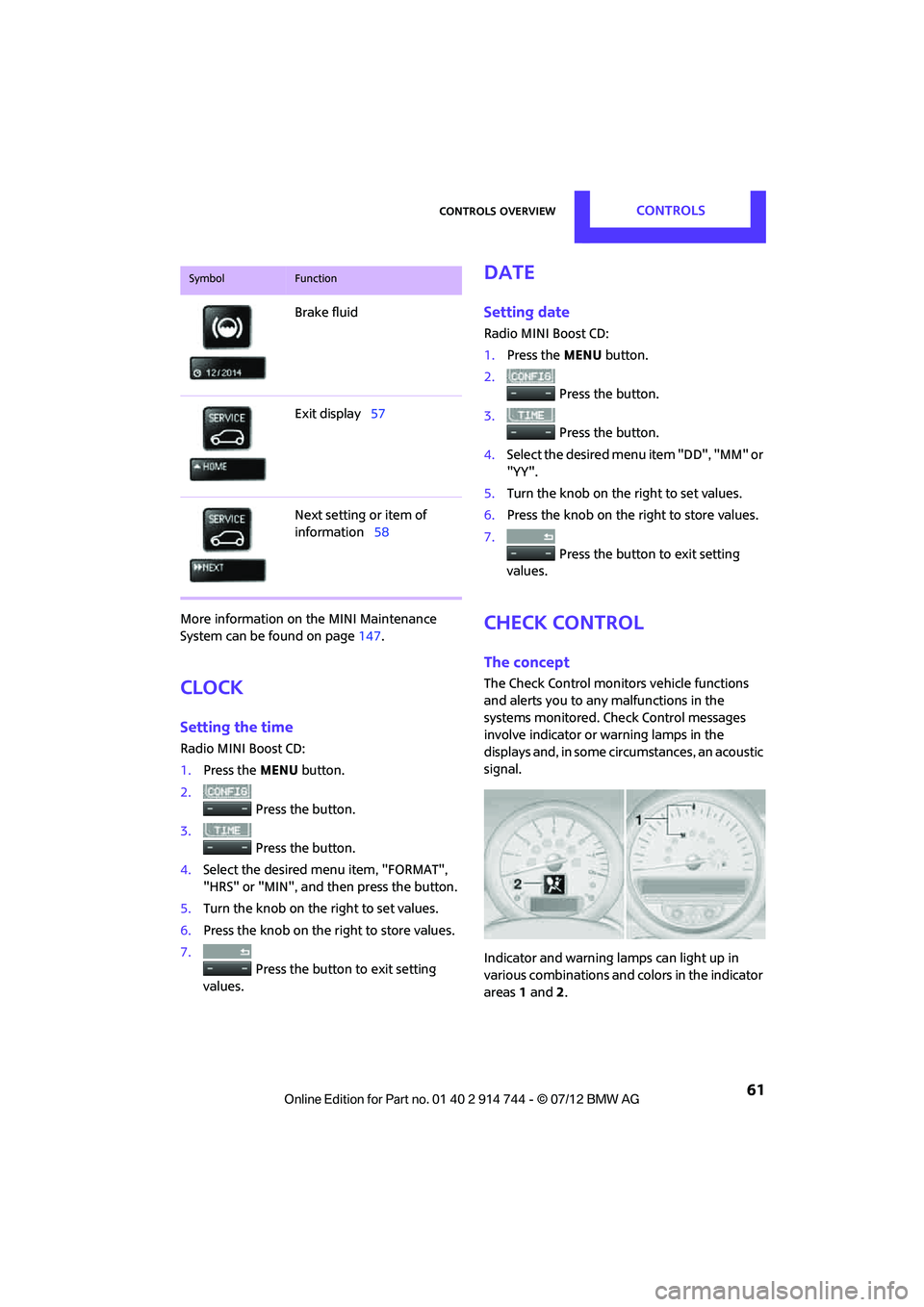
Indicator and warning lamps can light up in
various combinations and colors in the indicator
areas 1 and 2.
Brake fluid
Exit display
57
Next setting or item of
information 58
SymbolFunction
Online Edition for Part no. 01 40 2 914 744 - \251 07/12 BMW AG
Page 97 of 207
DRIVING TIPSThings to remember when driving
96
sary. This strategy helps you avoid placing
excessive loads on the brake system. Down-
shifting in manual mode of the automatic trans-
mission, page48.
Never drive with the clutch held down,
with the transmission in neutral or with
the engine switched off; otherwise, engine
braking action will not be present or there will be
no power assistance to the brakes or steering.
Never allow floor mats, carpets or any other
objects to protrude into the area around the
pedals; otherwise, pedal function could be
impaired. <
Corrosion on brake rotors
When the vehicle is driven only occasionally,
during extended periods when the vehicle is not
used at all, and in op erating conditions where
brake applications are less frequent, there is an
increased tendency for corrosion to form on
rotors, while contaminan ts accumulate on the
brake pads. This occurs because the minimum
pressure which must be exerted by the pads
during brake applications to clean the rotors is
not reached.
Should corrosion form on the brake rotors, the
brakes will tend to respond with a pulsating
effect that even extended application will fail to
cure.
When the vehicle is parked
Condensation forms while the automatic climate
control is in operation, and then exits under the
vehicle. Traces of condensed water under the
vehicle are therefore normal.
In the MINI Cooper S, the coolant pump may
continue to run for some time after the engine is
switched off. This will generate noise in the
engine compartment.
Cargo loading
To avoid loading the tires beyond their
approved carrying capacity, never over-
load the vehicle. Overloading can lead to over-
heating and increases the rate at which damage
develops inside the tires. The ultimate result can
assume the form of a sudden blowout. <
Avoid fluid spills in the cargo area as they
could damage the vehicle. <
MINI: cargo area cover
Do not place any objects on the cover;
otherwise, they could endanger the car's
occupants, e.g. in the case of braking or sudden
swerving, or they may damage the cover. <
When you open the tailgate, the roll-up cover is
raised.
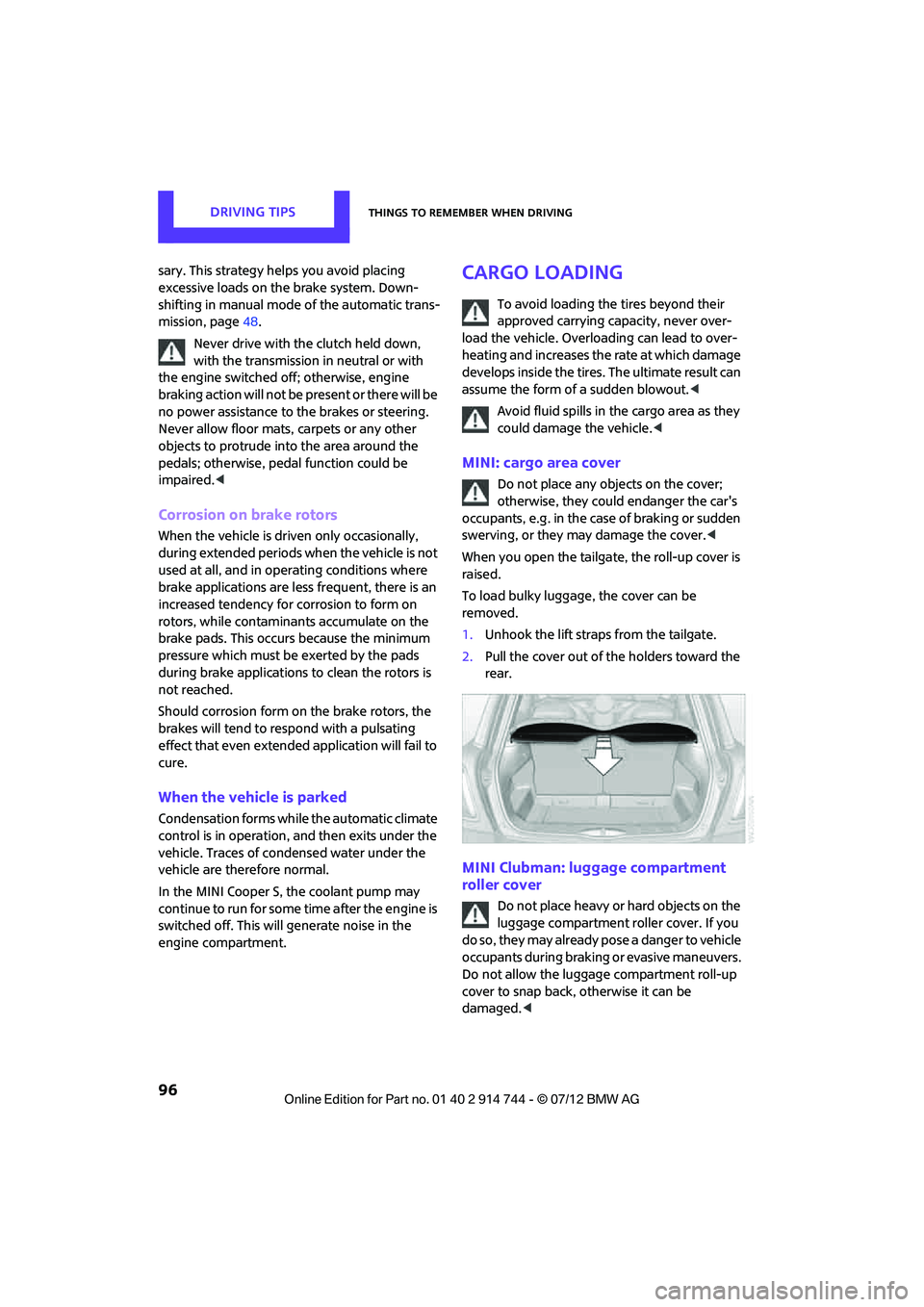
To load bulky luggage, the cover can be
removed.
1. Unhook the lift straps from the tailgate.
2. Pull the cover out of the holders toward the
rear.
MINI Clubman: luggage compartment
roller cover
Do not place heavy or hard objects on the
luggage compartment roller cover. If you
do so, they may already po s e a d a n g e r t o v e h i c l e
occupants during braking or evasive maneuvers.
Do not allow the luggage compartment roll-up
cover to snap back, otherwise it can be
damaged. <
Online Edition for Part no. 01 40 2 914 744 - \251 07/12 BMW AG
Page 151 of 207

MOBILITYCare
150
Automatic transmission
Before driving into the car wash, make sure that
the vehicle can roll:
1.Place the remote control, even with Comfort
Access, in the ignition lock.
2. Move the selector lever to position N.
3. Release the parking brake.
4. Switch off the engine.
5. Insert the remote control in the ignition lock
so that the vehicle can roll.
Steam jets/high-pressure washers
When using steam jets or high-pressure
washers, make sure that you maintain
sufficient distance from the vehicle and do not
exceed a maximum temperature of 140 7/
60 6 .
If the distance is too close, the pressure too high,
or the temperature too high, parts of the vehicle
can be damaged, or water can penetrate.
Observe the operating instructions for high-
pressure washers. <
Do not spray sensors, such as the Park Dis-
tance Control, with high-pressure washers
for a long time or at a distance of less than 1 ft/
30 cm. <
Manual washing
Use a great deal of water and, if necessary, car
shampoo when washing your car by hand. Clean
the vehicle with a sponge or a washing brush
applying a slight amount of pressure.
Before cleaning the windshield, deacti-
vate the rain sensor or turn off the ignition
to prevent unintentional wiping. <
Observe local regulations regarding
washing vehicles by hand. <
Headlamps
Do not wipe dry and do not use abrasive or
corrosive cleaning agents. Remove dirt and
contamination, such as in sects, by soaking with shampoo and then washing with plenty of
water.
Do not remove accumulated ice and snow with
an ice scraper; use window deicers instead.
Windows
Clean the outside and inside of the windows and
mirrors with a window cleaner.
Do not clean the mirrors with cleaners
containing quartz. <
Wiper blades
Clean with soapy water and change regularly to
prevent the formation of streaks.
Wax, preservatives and dirt on the win-
dows cause streaks wh en the windshield
wipers are on, and can cause premature wear of
the wiper blades and interfere with the rain
sensor. <
Paintwork, care
Regular care helps your vehicle retain its value
and protects the paint from the long-term
effects of aggressive substances.
Environmental influences in areas with
increased air pollution or natural contaminants,
such as tree sap or pollen, can affect the vehicle
paintwork. It is therefore important to adjust the
frequency and extent of vehicle care corre-
spondingly.
Immediately remove any pa rticularly aggressive
substances, such as fuel that has overflowed, oil,
grease, brake fluid, or bird droppings; otherwise,
paint damage can be caused.
Removing paintwork damage
Depending on the severity of the damage,
immediately repair stone damage or
scratches to prevent rusting. <
The manufacturer of the MINI recommends
repairing paint damage professionally according
to factory specifications with original MINI
paints.
Online Edition for Part no. 01 40 2 914 744 - \251 07/12 BMW AG
Page 175 of 207
MOBILITYIndicator and warning lamps
174
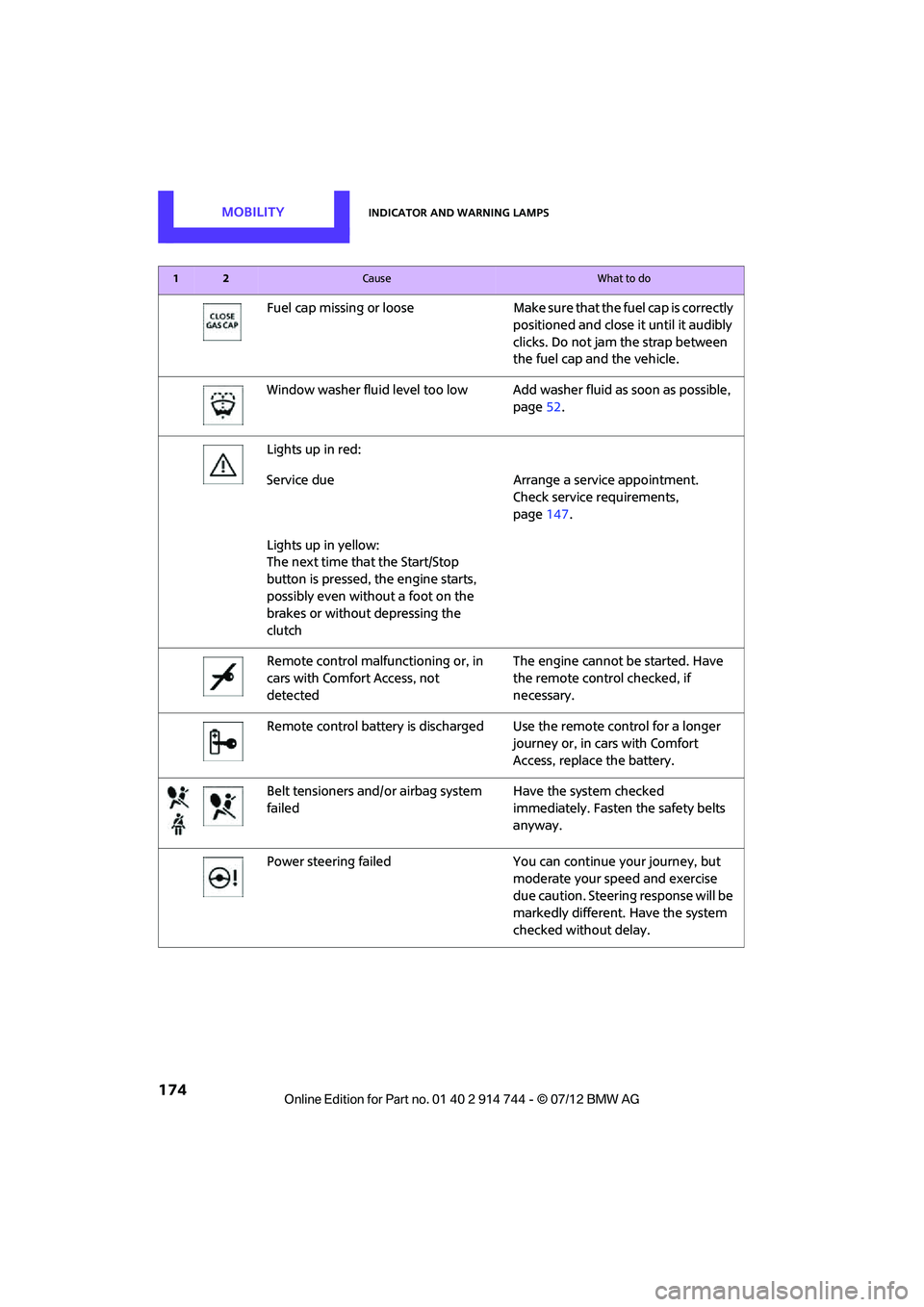
Fuel cap missing or looseMake sure that the fuel cap is correctly
positioned and close it until it audibly
clicks. Do not jam the strap between
the fuel cap and the vehicle.
Window washer fluid level too low Add washer fluid as soon as possible,
page 52.
Lights up in red:
Service due Arrange a service appointment.
Check service requirements,
page 147.
Lights up in yellow:
The next time that the Start/Stop
button is pressed, the engine starts,
possibly even without a foot on the
brakes or without depressing the
clutch
Remote control malfunctioning or, in
cars with Comfort Access, not
detected The engine cannot be started. Have
the remote control checked, if
necessary.
Remote control battery is discharged Use the remote control for a longer journey or, in cars with Comfort
Access, replace the battery.
Belt tensioners and/ or airbag system
failed Have the system checked
immediately. Fasten the safety belts
anyway.
Power steering failed You can continue your journey, but
moderate your speed and exercise
due caution. Steering response will be
markedly different. Have the system
checked without delay.
12Cause What to do
Online Edition for Part no. 01 40 2 914 744 - \251 07/12 BMW AG
Page 177 of 207

MOBILITYIndicator and warning lamps
176
Lights up in red:
Battery is no longer being charged.
Alternator malfunctionSwitch off all unnecessary electrical
consumers. Have the battery checked
without delay.
Lights up in yellow:
Battery charge level very low, battery
aged or not securely connected C h a r g e i t b y t a k i n g a longer drive or by
using an external charger. Possibly
automatic switch-o
ff of power con-
suming devices. Have the battery
checked as soon as possible.
Display in US models
Parking brake applied
Display in Canadian models
Parking brake applied
Display in US models
Parking brake applied while driv ing Release the parking brake.
Display in Canadian models
Parking brake applied while driv ing Release the parking brake.
Display in US models
Lights up in red:
Brake fluid level too low Braking action is reduced, stop with
care. Contact your nearest MINI
dealer.
12Cause What to do
Online Edition for Part no. 01 40 2 914 744 - \251 07/12 BMW AG
Page 178 of 207
Indicator and warning lampsMOBILITY
177
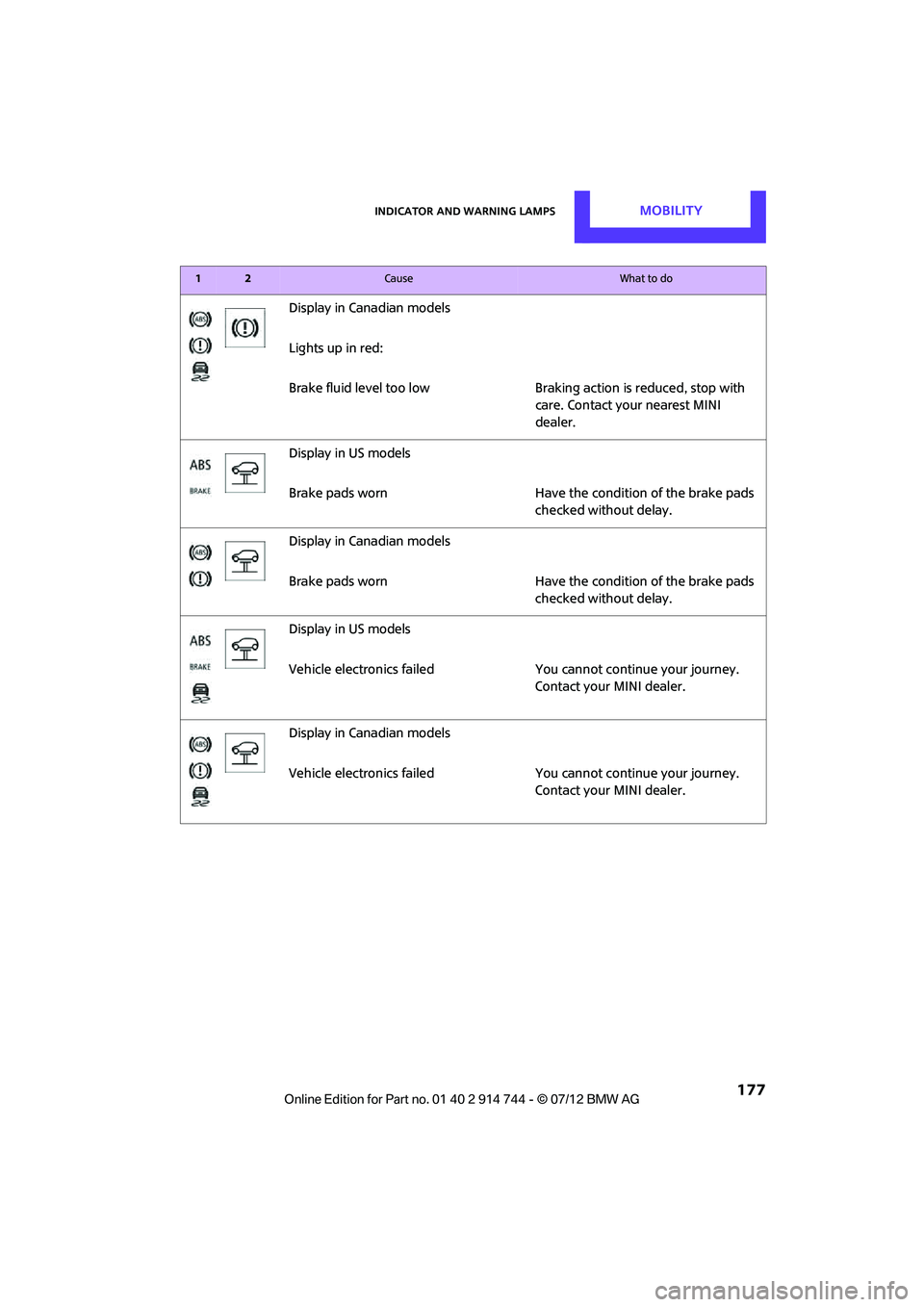
Display in Canadian models
Lights up in red:
Brake fluid level too lowBraking action is reduced, stop with
care. Contact your nearest MINI
dealer.
Display in US models
Brake pads worn Have the condition of the brake pads
checked without delay.
Display in Canadian models
Brake pads worn Have the condition of the brake pads
checked without delay.
Display in US models
Vehicle electronics failed You cannot continue your journey.
Contact your MINI dealer.
Display in Canadian models
Vehicle electronics failed You cannot continue your journey.
Contact your MINI dealer.
12Cause What to do
Online Edition for Part no. 01 40 2 914 744 - \251 07/12 BMW AG
Page 195 of 207

194
REFERENCEEverything from A to Z
Everything from A to Z
Index
A
ABS Antilock Brake System64
Accepting a call 121
Accessories, see Vehicle equipment 4
Acknowledgment signals for locking/unlocking vehicle 24
Activated-charcoa l filter for
automatic climate control 84
Adaptive Light Control 77
Adding engine oil 145
Additives
– coolant 146
– engine oil 145
Adjusting temperature inside the car, refer to Air
conditioner 81
Adjusting temperature inside the car, refer to Automatic
climate control 82
Airbags 72
– sitting safely 35
– warning lamp 73
Air conditioner 80
Air conditioning mode
– air conditioner 81
– automatic cl imate control82
– ventilation 84
Air distribution
– automatic 83
– individual 82
– manual 82
Air flow rate 81,83
– air conditioning system 81
– automatic cl imate control83
– heating, ventilation 81
Airing, refer to Ventilation84
Air outlets, refer to Air vents 80
Air pressure, checking, refer to Tire inflation pressure 131Air recirculation, refer to
Recirculated-air
mode 81,83
Air supply
– air conditioner 81
– automatic climate control 82
– ventilation 84
Air vents 80
AKI, refer to Fuel grade 129
Alarm system 29
All-season tires, refer to Winter tires 141
Ambient air, refer to Recirculated-air
mode 81,83
Ambient lighting 79
Antenna, care 149
An
tifreeze
– coolant 146
– washer fluid 52
Antilock Brake System ABS 64
Anti-theft alarm system, refer to Alarm system 29
Anti-theft system 23
Approved axle loads, refer to Weights 191
Approved engine oils 145
Approved gross vehicle weight, refer to Weights 191
Armrest, refer to Center armrest 89
Ashtray 91
Assistant systems, refer to
– Dynamic Stability Control DSC 64
Audio device, external 89
Automatic
– air distribution 83
– air flow rate 83
– cruise control 52
– headlamp control 75Automatic climate control
80
– automatic air distribution 83
Automatic station search 105
Automatic station storage 106
Automatic transmission with Steptronic 46
– interlock 47
– overriding selector lever lock 48
– shiftlock 47
– sport program 48
AUTO program for automatic
climate control 83
Auto radio, refer to Radio MINI Boost CD 104
AUX-In, refer to External audio device 89
AUX-In connection 104
Average fuel consumption 55
– setting the units 58
Average speed 56
Axle loads, refer to Weights 191
B
Background lighting, refer to
Ambient lighting 79
Backrests, refer to Seats 36
Backup lamps
– replacing bulb 158,159
Band-aids, refer to First aid
pouch 167
Bar, refer to Tow-starting, towing away 170
Base plate for telephone or mobile phone
– refer to Snap-in adapter 124
Online Edition for Part no. 01 40 2 914 744 - \251 07/12 BMW AG
Page 196 of 207

Everything from A to ZREFERENCE
195
Battery165
– disposal 32,165
– jump-starting 168
– temporary power failure 165
Battery renewal
– remote control 32
Being towed 170
Belts, refer to Safety belts 38
Belt tensioner, refer to Safety belts 38
Beverage holders, refer to Cupholders 90
Black ice, refer to External
temperature warning 55
Blower, refer to Air flow rate 81,83
Bluetooth, activating/ deactivating 118
Bottle holders, refer to
Cupholders 90
Brake Assist 64
Brake fluid, refer to Service
requirements 59
Brake lamps
– replacing bulbs 158,159
Brake pads, breaking in 94
Brake rotors 96
– brakes 94
– breaking in 94
Brakes
– ABS 64
– breaking in 94
– MINI Maintenance
System 147
– parking brake 46
– service requirements 59
Brakes, refer to Braking safely 95
Brake system 94
– breaking in 94
– disc brakes 96
– MINI Maintenance
System 147
Breakdown service, refer to Roadside Assistance 167
Breaking in the clutch 94
Break-in period 94 Bulb changing, refer to Lamps
and bulbs 155
Button for starting the engine 44
Buttons on the steering wheel 11
C
California Proposition 65
warning 5
Call ending 122
Calling, refer to Phone
numbers, dialing 122
Calling, refer to Telephone 89
Can holders, refer to
Cupholders 90
Capacities 192
Car battery, refer to Vehicle
battery 165
Car care 149
Care 149
– car-care products 149
– car washes 149
– CD/DVD drives 152
– high-pressure washers 150
– leather 151
– manual washing 150
– upholstery and fabrics 151
– windows 150
– wiper blades 150
Cargo, securing 99
Cargo area 96
– capacity 191
– Comfort Access 31
– cover 96
– doors, refer to Split Rear Barn Doors 28
– expanding 97
– lamp 79
– opening from outside 28
– trunk lid, refer to Split Rear
Barn Doors 28
Cargo area doors, refer to Split Rear Barn Doors 28
Cargo area lamp 79 Cargo area lid, refer to
Tailgate 28
Cargo area partition net, refer to Cargo net 98
Cargo loading 98
– securing cargo 99
– stowing cargo 99
– vehicle 96
Cargo net 98
Car key, refer to Keys/remote
controls 22
Carpets, care 151
Car phone
– installation location, refer to Center armrest 89
– refer to Telephone 89,116
Car radio, refer to Radio 16
Car wash, care 149
Car washes 149
Cataly
tic converter, refer to
Hot exhaust system 95
CD player 109
– changing the track 109
– fast forward/reverse 109
– playing a track 110
– random order 109
– volume 104
Center armrest 89
Center brake lamp 160
Center console, refer to
Around the center
console 14
Central locking system 23
– Comfort Access 30
– from inside 26
– from outside 23
Changing bulbs 155
Changing wheels 162
Charging the battery 165
Chassis number, refer to Engine compartment 143
Check Control 61
Child restraint fixing system LATCH 42
Child restraint systems 41
Child seats 41
Chrome parts, care 151
Online Edition for Part no. 01 40 2 914 744 - \251 07/12 BMW AG
Page 197 of 207

REFERENCEEverything from A to Z
196
Chrome parts, refer to Care 149
Cigarette lighter 91
Cleaning headlamps 51
– washer fluid 52
Clock
– setting time 61
– 12 h/24 h mode 58
Closing
– from inside 26
– from outside 23
Clothes hooks 90
Club Door 28
Cockpit 10
Cold start, refer to Starting the engine 45
Comfort Access 30
– replacing the battery 32
– what to observe before
entering a car wash 32
Comfort area, refer to Around the center console 14
Compartment for remote control, refer to Ignition
lock 44
Compass 87
Compressed audio files 109
Computer 55
Condensation, refer to When the vehicle is parked 96
Condition Based Service CBS 147
Configuring settings, refer to
Personal Profile 22
Connecting vacuum cleaner, refer to Connecting electrical
appliances 91
Consumption, refer to Average fuel consumption 55
Control Display
– settings 56
Controls and displays 10
Convenience operation
– windows 24
Convenient access, refer to
Comfort Access 30 Convenient start, refer to
Starting the engine 45
Coolant 146
– checking level 146
– filling 146
Coolant temperature 146
Cooling, maximum 83
Cooling fluid, refer to Coolant 146
Copyright 2
Cornering light, refer to Adaptive Light Control 77
Cruising range 55,56
Cupholders 90
Curb weight, refer to Weights 191
C
urrent fuel consumption 56
D
Dashboard, refer to Cockpit 10
Dashboard instruments, refer
to Displays 12
Dashboard lighting, refer to Instrument lighting 78
Data 186
– capacities 192
– dimensions 187
– engine 186
– weights 191
Data memory 148
Date
– setting 61
Daytime running lights 76
DBC Dynamic Brake Control, refer to Brake Assist 64
Deactivating front passenger airbags 72
Deadlocking, refer to
Locking 24
Defect
– door lock 26
– fuel filler flap 128
Defogging windows 82,84
Defrosting windows 82,84 Defrosting windows and
removing condensation
– air conditioner 82
– automatic climate control 84
Defrosting windshield, refer to Defrosting windows 82,84
Defrost positi on, refer to
Defrosting windows 82,84
Differential, breaking in 94
Digital compass 87
Digital radio, refer to HD Radio 107
Dimensions 187
Dipstick, engine oil 144
Directional indicators, refer to Turn signals 49
Displacement, refer to Engine data 186
Display lighting, refer to
Instrument lighting 78
Displays 12
– instrument panel 12
Displays, care 152
Displays and controls 10
Disposal
– of coolant 146
– remote control battery 32
– vehicle battery 165
Distance remaining to service, refer to Service
requirements 59
Distance warning, refer
to Park
Distance Control PDC 63
Door
– rear, refer to Club Door 28
Door key, refer to Integrated
key/remote control 22
Door lock 26
Door lock, confirmation
signals 24
Doors, manual operation 26
DOT Quality Grades 139
Double doors, refer to Split Rear Barn Doors 28
Drinks holders, refer to
Cupholders 90
Online Edition for Part no. 01 40 2 914 744 - \251 07/12 BMW AG