key battery MINI COOPER 2012 Owners Manual
[x] Cancel search | Manufacturer: MINI, Model Year: 2012, Model line: COOPER, Model: MINI COOPER 2012Pages: 207, PDF Size: 3.18 MB
Page 23 of 207
CONTROLSOpening and closing
22
Opening and closing
Vehicle equipment
In this chapter, all production, country, and
optional equipment that is offered in the model
range is described. Equipment is also described
that is not available because of, for example,
selected options or coun try version. This also
applies to safety relate d functions and systems.
Keys/remote controls
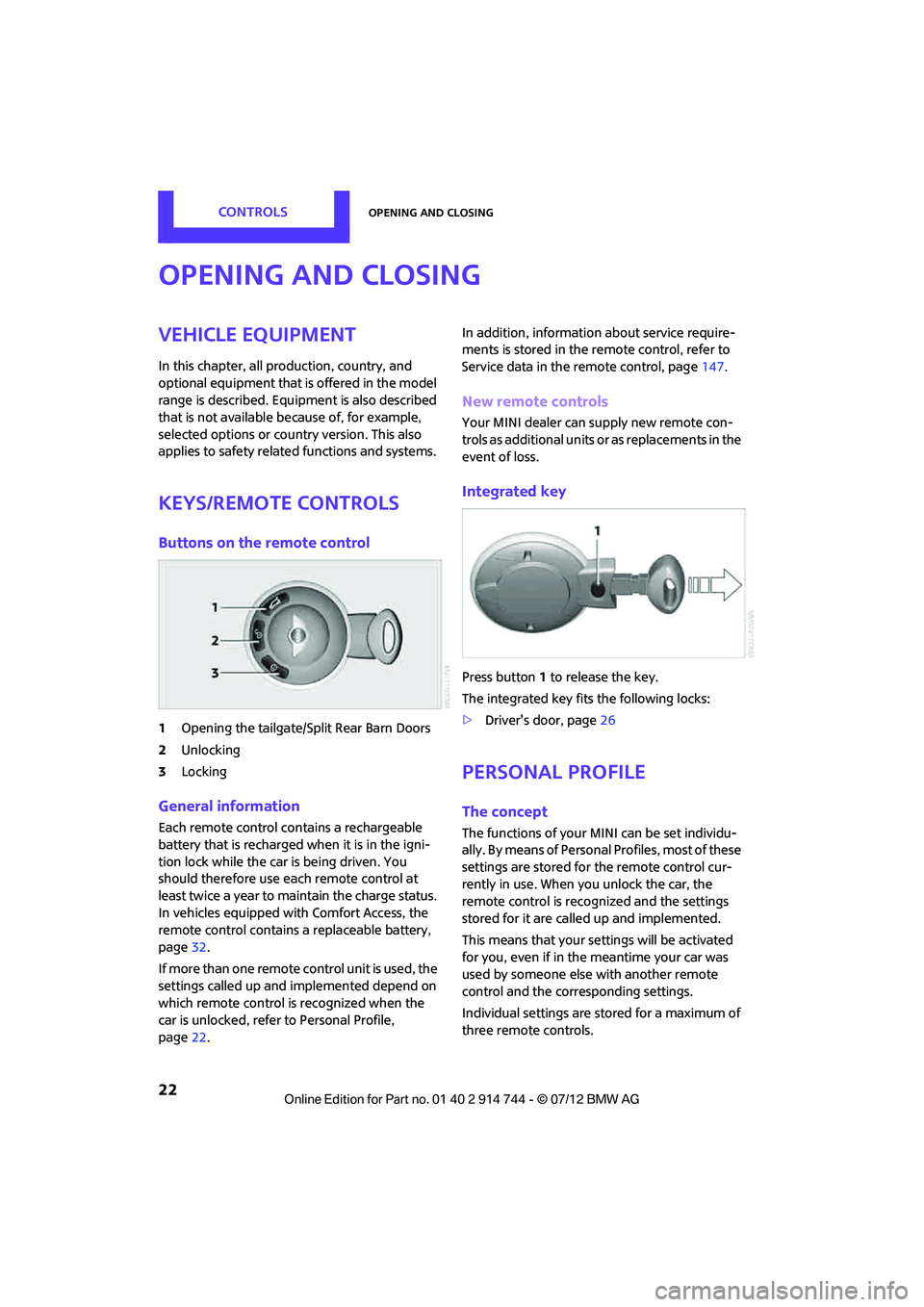
Buttons on the remote control
1Opening the tailgate/Split Rear Barn Doors
2 Unlocking
3 Locking
General information
Each remote control co ntains a rechargeable
battery that is recharged when it is in the igni-
tion lock while the car is being driven. You
should therefore use each remote control at
least twice a year to maintain the charge status.
In vehicles equipped with Comfort Access, the
remote control contains a replaceable battery,
page 32.
If more than one remote control unit is used, the
settings called up and implemented depend on
which remote control is recognized when the
car is unlocked, refer to Personal Profile,
page 22. In addition, information about service require-
ments is stored in the remote control, refer to
Service data in the remote control, page
147.
New remote controls
Your MINI dealer can supply new remote con-
trols as additional units or as replacements in the
event of loss.
Integrated key
Press button1 to release the key.
The integrated key fits the following locks:
> Driver's door, page 26
Personal Profile
The concept
The functions of your MINI can be set individu-
ally. By means of Personal Profiles, most of these
settings are stored for the remote control cur-
rently in use. When you unlock the car, the
remote control is recognized and the settings
stored for it are called up and implemented.
This means that your settings will be activated
for you, even if in the meantime your car was
used by someone else with another remote
control and the corresponding settings.
Individual settings are stored for a maximum of
three remote controls.
Online Edition for Part no. 01 40 2 914 744 - \251 07/12 BMW AG
Page 26 of 207
Opening and closingCONTROLS
25
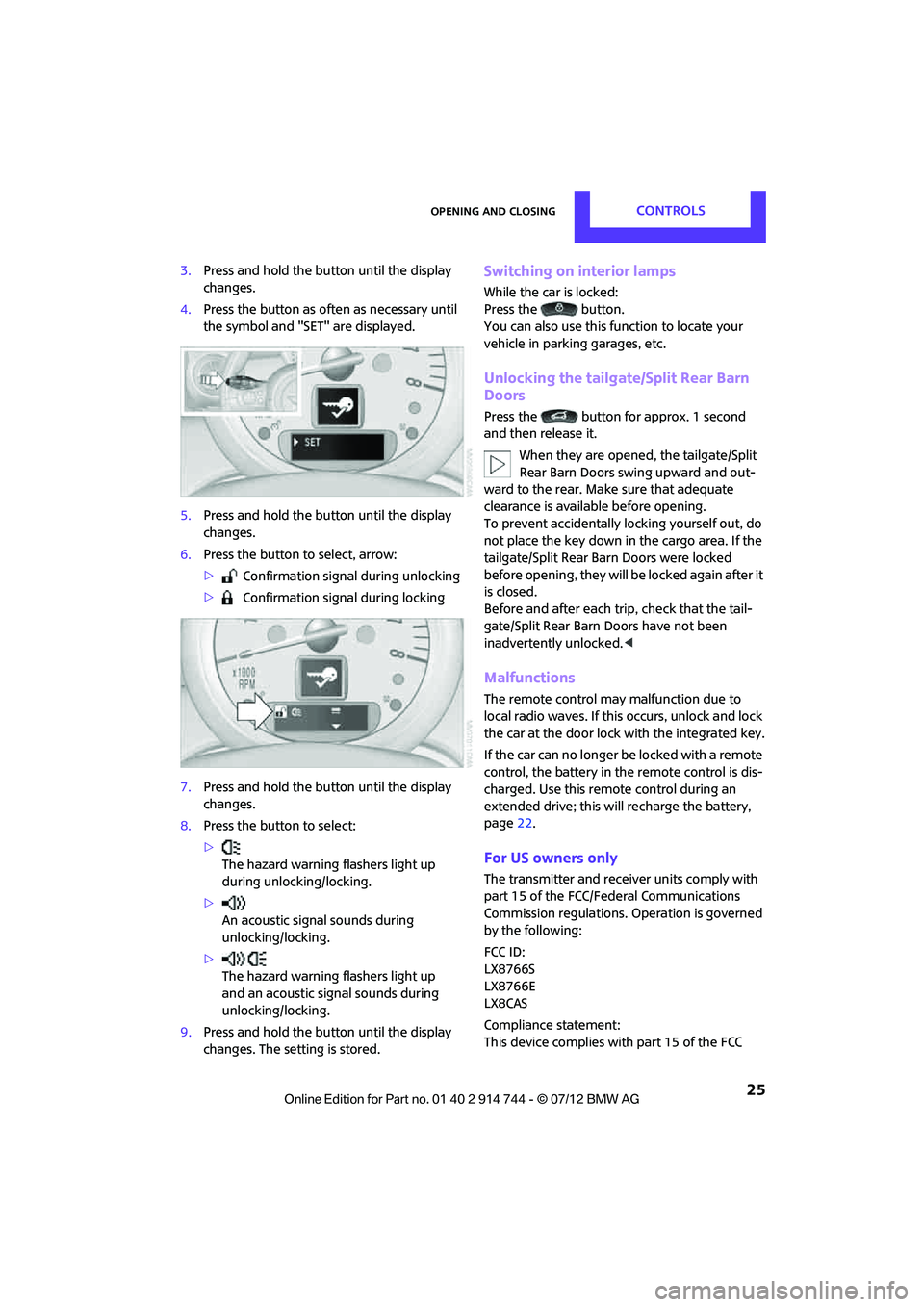
3.Press and hold the butt on until the display
changes.
4. Press the button as of ten as necessary until
the symbol and "SET" are displayed.
5. Press and hold the butt on until the display
changes.
6. Press the button to select, arrow:
> Confirmation signal during unlocking
> Confirmation signal during locking
7. Press and hold the butt on until the display
changes.
8. Press the button to select:
>
The hazard warning flashers light up
during unlocking/locking.
> An acoustic signal sounds during
unlocking/locking.
> The hazard warning flashers light up
and an acoustic signal sounds during
unlocking/locking.
9. Press and hold the butt on until the display
changes. The setting is stored.Switching on interior lamps
While the car is locked:
Press the button.
You can also use this function to locate your
vehicle in parking garages, etc.
Unlocking the tailgate/Split Rear Barn
Doors
Press the button for approx. 1 second
and then release it.
When they are opened, the tailgate/Split
Rear Barn Doors swing upward and out-
ward to the rear. Make sure that adequate
clearance is available before opening.
To prevent accidentally locking yourself out, do
not place the key down in the cargo area. If the
tailgate/Split Rear Ba rn Doors were locked
before opening, they will be locked again after it
is closed.
Before and after each trip, check that the tail-
gate/Split Rear Barn Doors have not been
inadvertently unlocked. <
Malfunctions
The remote control may malfunction due to
local radio waves. If this occurs, unlock and lock
the car at the door lock with the integrated key.
If the car can no longer be locked with a remote
control, the battery in the remote control is dis-
charged. Use this remo te control during an
extended drive; this wi ll recharge the battery,
page 22.
For US owners only
The transmitter and receiv er units comply with
part 15 of the FCC/Federal Communications
Commission regulations. Operation is governed
by the following:
FCC ID:
LX8766S
LX8766E
LX8CAS
Compliance statement:
This device complies with part 15 of the FCC
Online Edition for Part no. 01 40 2 914 744 - \251 07/12 BMW AG
Page 30 of 207
Opening and closingCONTROLS
29
Closing
Make sure that the closing path of the tail-
gate/Split Rear Barn Doors is clear; other-
wise, injuries may occur. <
Take the remote control with you and do
not put it into the luggage compartment:
otherwise, the remote co ntrol can be locked in
the vehicle when the tailgate/Split Rear Barn
Doors are closed. <
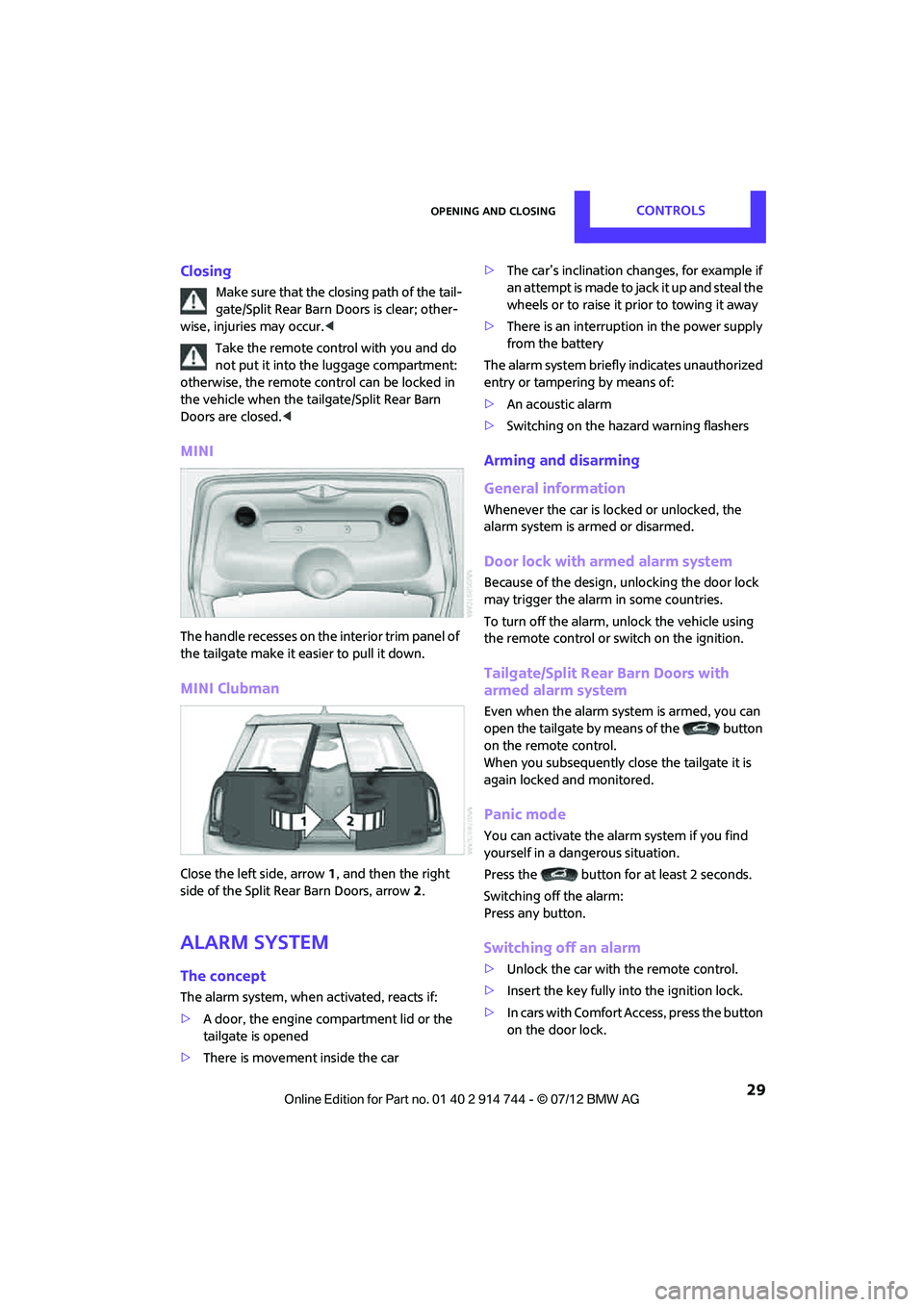
MINI
The handle recesses on the interior trim panel of
the tailgate make it easier to pull it down.
MINI Clubman
Close the left side, arrow 1, and then the right
side of the Split Rear Barn Doors, arrow 2.
Alarm system
The concept
The alarm system, when activated, reacts if:
> A door, the engine compartment lid or the
tailgate is opened
> There is movement inside the car >
The car’s inclination changes, for example if
an attempt is made to jack it up and steal the
wheels or to raise it prior to towing it away
> There is an interruption in the power supply
from the battery
The alarm system briefly indicates unauthorized
entry or tampering by means of:
> An acoustic alarm
> Switching on the hazard warning flashers
Arming and disarming
General information
Whenever the car is locked or unlocked, the
alarm system is armed or disarmed.
Door lock with armed alarm system
Because of the design, unlocking the door lock
may trigger the alarm in some countries.
To turn off the alarm, unlock the vehicle using
the remote control or switch on the ignition.
Tailgate/Split Rear Barn Doors with
armed alarm system
Even when the alarm syst em is armed, you can
open the tailgate by means of the button
on the remote control.
When you subsequently close the tailgate it is
again locked and monitored.
Panic mode
You can activate the alarm system if you find
yourself in a dangerous situation.
Press the button for at least 2 seconds.
Switching off the alarm:
Press any button.
Switching off an alarm
>Unlock the car with the remote control.
> Insert the key fully into the ignition lock.
> In cars with Comfort Access, press the button
on the door lock.
Online Edition for Part no. 01 40 2 914 744 - \251 07/12 BMW AG
Page 33 of 207
CONTROLSOpening and closing
32
Before driving a vehicle with automatic
transmission into a car wash
1.Insert remote control into ignition lock.
2. Depress the brake.
3. Move the selector lever to position N.
4. Switch off the engine.
The vehicle can roll.
Malfunction
Comfort Access may malf unction due to local
radio waves, e. g. due to the presence of a
mobile phone in the immediate vicinity of the
remote control or the charging of a mobile
phone in the vehicle.
If this happens, open or close the vehicle via the
buttons on the remote control or using the
integrated key.
Insert the remote control into the ignition lock
and start the engine.
Warning lamps
The warning lamp lights up when an
attempt is made to start the engine: the
engine cannot be started. The remote
control is not inside the vehicle or is malfunc-
tioning. Take the remote control with you inside
the vehicle or have it checked. If necessary,
insert another remote co ntrol into the ignition
lock.
The warning lamp lights up when the
engine is running: the remote control is
no longer inside the vehicle. After the
engine is switched off, the engine can only be
restarted within approx. 10 seconds.
The indicator lamp comes on: replace
the battery in the remote control.
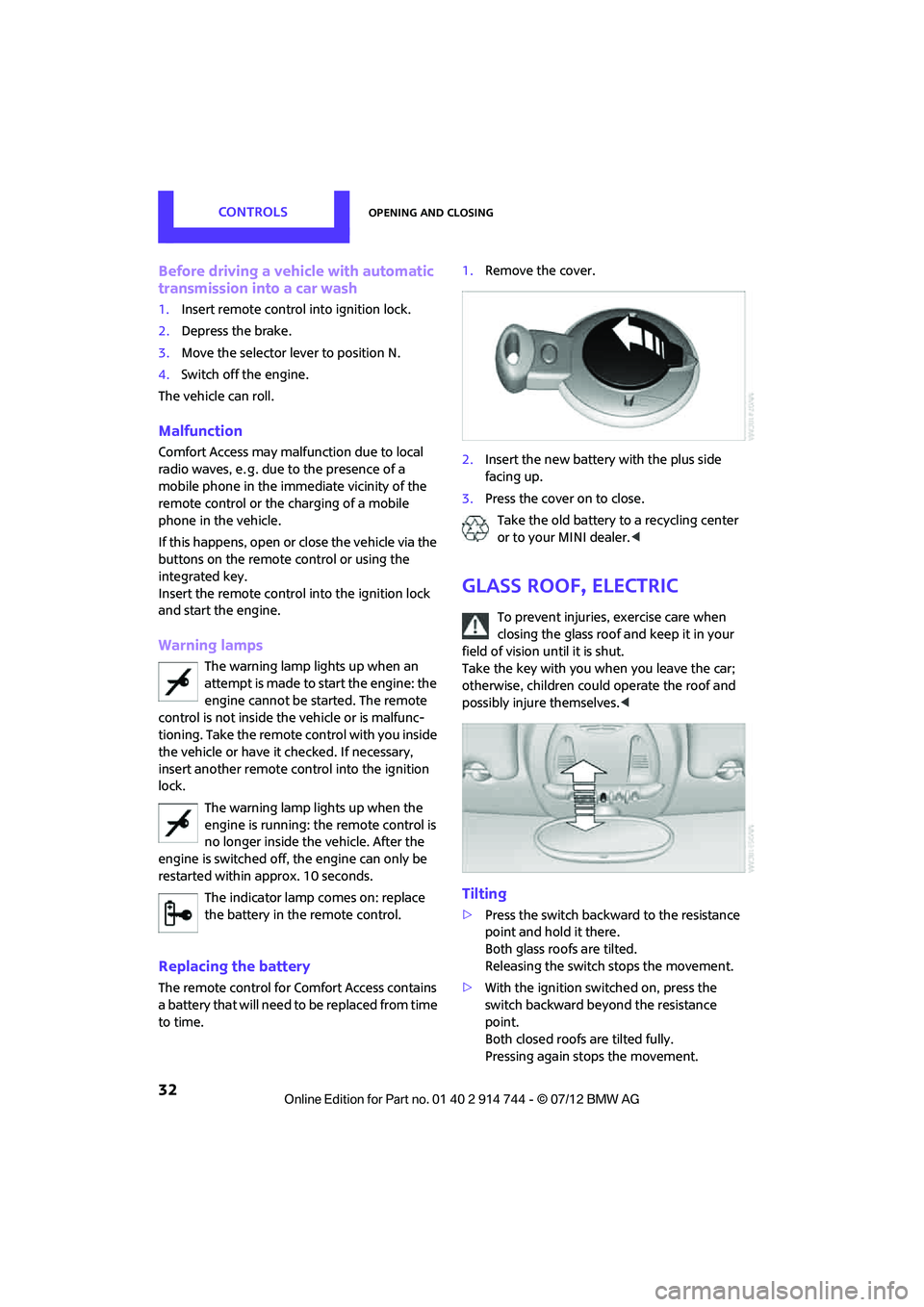
Replacing the battery
The remote control for Comfort Access contains
a b a t t e r y t h a t w i l l n e e d t o b e r e p l a c e d f r o m t i m e
to time. 1.
Remove the cover.
2. Insert the new battery with the plus side
facing up.
3. Press the cover on to close.
Take the old battery to a recycling center
or to your MINI dealer. <
Glass roof, electric
To prevent injuries, exercise care when
closing the glass roof and keep it in your
field of vision until it is shut.
Take the key with you when you leave the car;
otherwise, children could operate the roof and
possibly injure themselves. <
Tilting
>Press the switch backwa rd to the resistance
point and hold it there.
Both glass roofs are tilted.
Releasing the switch stops the movement.
> With the ignition switched on, press the
switch backward beyond the resistance
point.
Both closed roofs are tilted fully.
Pressing again stops the movement.
Online Edition for Part no. 01 40 2 914 744 - \251 07/12 BMW AG
Page 34 of 207
Opening and closingCONTROLS
33
Opening, closing
With the ignition switched on and the glass roof
tilted, press the switch backward and hold it
there.
The front glass roof opens.
The rear glass roof is closed.
Releasing the switch stops the movement.
The glass roof can be closed in the same way by
pressing the switch forward.
The front glass roof remains in a tilted position.
The rear glass roof is tilted. Pressing on the
switch again closes bo th roofs completely.
Convenience operation via door lock or Comfort
Access, refer to page 24,26,31.
Roller sunblind
The roller sunblind can be opened and closed
independently of the glass roof.
Following interruptions in electrical
power supply
After a power failure, there is a possibility that
the glass roof can only be tilted. In this case,
have the system initialized. The manufacturer of
your MINI recommends that you have this work
done by your MINI dealer.
Windows
To prevent injuries, exercise care when
closing the windows.
Take the remote control with you when you
leave the car; otherwise, children could operate
the electric windows and possibly injure them-
selves. <
If, after a window is opened and closed
several times in close succession, the
window can only be closed and not opened, the
system is overheated. Let the system cool for
several minutes with the ignition switched on or
the engine running. <
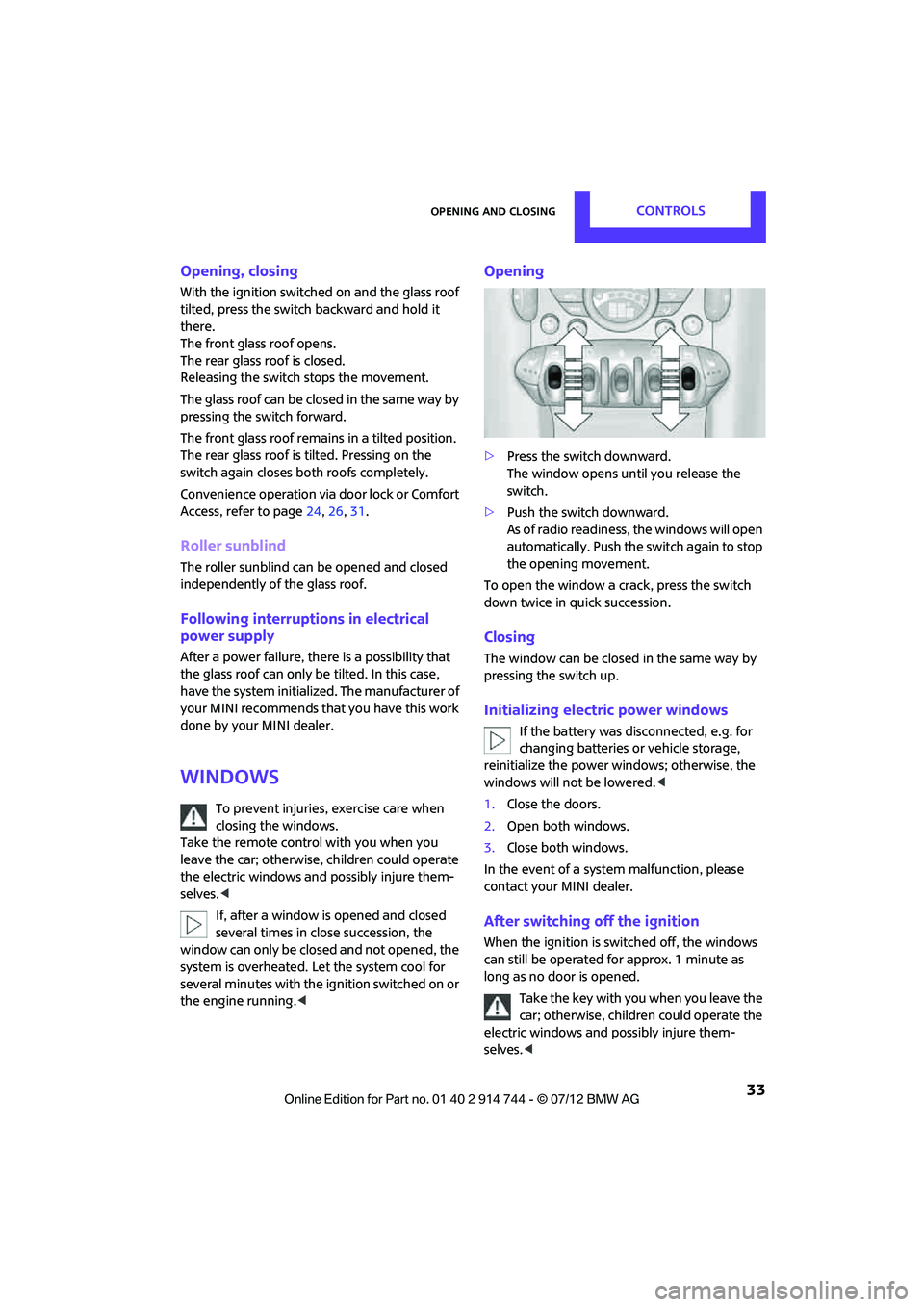
Opening
>Press the switch downward.
The window opens until you release the
switch.
> Push the switch downward.
As of radio readiness, the windows will open
automatically. Push the switch again to stop
the opening movement.
To open the window a crack, press the switch
down twice in quick succession.
Closing
The window can be closed in the same way by
pressing the switch up.
Initializing electric power windows
If the battery was disconnected, e.g. for
changing batteries or vehicle storage,
reinitialize the power wi ndows; otherwise, the
windows will not be lowered.<
1. Close the doors.
2. Open both windows.
3. Close both windows.
In the event of a system malfunction, please
contact your MINI dealer.
After switching off the ignition
When the ignition is sw itched off, the windows
can still be operated for approx. 1 minute as
long as no door is opened.
Take the key with you when you leave the
car; otherwise, children could operate the
electric windows and possibly injure them-
selves. <
Online Edition for Part no. 01 40 2 914 744 - \251 07/12 BMW AG
Page 45 of 207
CONTROLSDriving
44
Driving
Vehicle equipment
In this chapter, all production, country, and
optional equipment that is offered in the model
range is described. Equipment is also described
that is not available because of, for example,
selected options or coun try version. This also
applies to safety relate d functions and systems.
Ignition lock
Inserting the key into the ignition lock
Insert the key all the way into the ignition lock.
Radio readiness
Individual electrical consumers can operate.
Removing the key from the ignition lock
Press in the key briefly. It is ejected slightly.
At the same time:
>The ignition is switched off if it was on
beforehand.
Automatic transmission
The key can only be removed if the selector lever
is in position P: interlock.
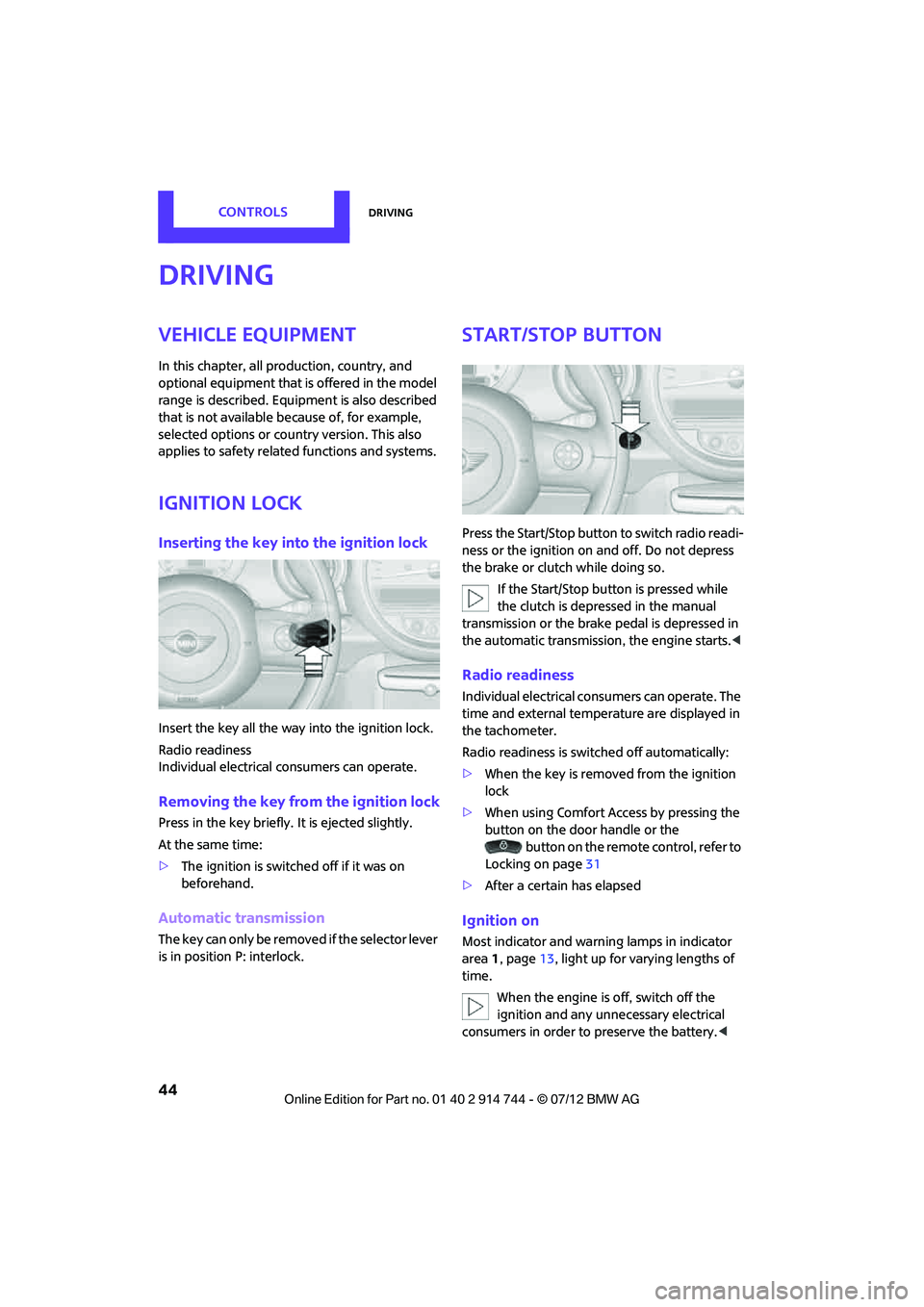
Start/Stop button
Press the Start/Stop button to switch radio readi-
ness or the ignition on and off. Do not depress
the brake or clutch while doing so.
If the Start/Stop button is pressed while
the clutch is depressed in the manual
transmission or the brake pedal is depressed in
the automatic transmission, the engine starts. <
Radio readiness
Individual electrical consumers can operate. The
time and external temperature are displayed in
the tachometer.
Radio readiness is switched off automatically:
>When the key is removed from the ignition
lock
> When using Comfort Access by pressing the
button on the door handle or the
button on the remote control, refer to
Locking on page 31
> After a certain has elapsed
Ignition on
Most indicator and warn ing lamps in indicator
area 1, page 13, light up for varying lengths of
time.
When the engine is off, switch off the
ignition and any unnecessary electrical
consumers in order to preserve the battery. <
Online Edition for Part no. 01 40 2 914 744 - \251 07/12 BMW AG
Page 92 of 207

Practical interior accessoriesCONTROLS
91
MINI Clubman
There are two additional cupholders in the arm
rests in the rear.
Ashtray
The ashtray is located in one of the cupholders in
the center console.
Emptying
Remove the entire ashtray.
Lighter
With the engine running or the ignition switched
on, press in the cigarette lighter.
The lighter can be pulled out as soon as it pops
back out.
Hold or touch the hot cigarette lighter by
the knob only. Holding or touching it in
other areas could result in burns.
When leaving the car, always remove the key so
that children cannot operate the cigarette
lighter and burn themselves. <
Connecting electrical
appliances
In your MINI, when the engine is running or if the
ignition is switched on, you can use electrical
devices such as flashlights, car vacuum cleaners,
etc., up to approx. 140 watts at 12 volts, as long
as one of the following sockets is available.
Avoid damaging the sockets by attempting to
insert plugs of unsui table shape or size. Do not connect battery chargers to the
sockets installed in the vehicle at the
factory; otherwise you may cause damage to
the vehicle. <
Cigarette lighter socket
Remove the lighter or cover from the socket.
Power socket in cargo area
By way of example, the illustration shows the
cargo area in the MINI.
Pull out the cover.
Online Edition for Part no. 01 40 2 914 744 - \251 07/12 BMW AG
Page 117 of 207

COMMUNICATIONSTelephone
116
Telephone
Vehicle equipment
In this chapter, all production, country, and
optional equipment that is offered in the model
range is described. Equipment is also described
that is not available because of, for example,
selected options or coun try version. This also
applies to safety relate d functions and systems.
Overview
The concept
Mobile phones can be connected to the vehicle
through Bluetooth.
Bluetooth® is a registered trademark of
Bluetooth® SIG, Inc.
Your MINI is equipped with a mobile phone
preparation package. Af ter a suitable mobile
phone is paired with the vehicle once, the
mobile phone can be controlled via the radio,
the buttons on the steering wheel, and by voice.
It may be necessary for some functions to be
activated by the mobile phone provider.
Only make entries when traffic conditions
permit. Do not hold the mobile phone in
your hand while you are driving; use the hands-
free system instead. If you do not observe this
precaution, your being distracted can endanger
vehicle occupants and other road users. <
Snap-in adapter
The snap-in adapter, refer to page124, makes it
possible to:
> Accommodate the mobile phone.
> Recharge its battery.
> Connect it to an exte rnal antenna of the
vehicle.
This assures a better network connection
and constant sound quality. A mobile phone that is connected to the vehicle
should not be operated via the mobile phone
keypad; otherwise, ma
lfunctions may occur.
Suitable mobile phones
Precise information as to which mobile phones
are supported by the hands-free device can be
found at www.mini.com/connectivity.
Notes
Do not expose your mobile phone to extreme
ambient conditions, for example, very high tem-
peratures; otherwise, fu nctions on your mobile
phone may not work. Follow the operating
instructions for yo ur mobile phone.
Online Edition for Part no. 01 40 2 914 744 - \251 07/12 BMW AG
Page 121 of 207

COMMUNICATIONSTelephone
120
To display the number for the Hotline: Press the button.
Turn the right knob to show the phone number
for the Hotline and the re quired information for
the pairing procedure on the display.
Following the initial pairing
> The mobile phone is detected/connected in
the vehicle within a short period of time
when the engine is running or radio readi-
ness is switched on.
> After identification, phone book entries are
imported from the mobile phone and/or SIM
card of the telephone, depending on the
telephone.
> Specific settings may be necessary in some
mobile phones, e.g. authorization or a
secure connection, re fer to the Owner's
Manual for the mobile phone.
Connecting a particular mobile phone
The connected mobile phone is identified with
the following symbol in the radio display:
To change the sequence of mobile phones in the
list:
1. Press the MENU button.
2. Press the button.
3. Press the button.
4. Turn the right rotary knob until the display
shows the mobile phone whose position in
the list is to be changed.
5. Press the button the number of
times required to reach the desired position.
Unpairing mobile phone
1. Switch off mobile phone.
2. Press the MENU button.
3. Press the button.
4. Press the button.
5. Turn the right rotary knob to show the
desired mobile phone on the radio display.
6. Press the button.
7. Press the button to acknowledge
the message displayed.
What to do if…
For information on suitab le mobile phones, refer
to page 116.
The mobile phone could not be paired or
connected.
> Is Bluetooth activated in the vehicle and in
the mobile phone? Activate Bluetooth in the
vehicle and in the mobile phone.
> Do the Bluetooth passkeys on the mobile
phone and the vehicle match? Enter the
same passkey on the mobile phone and via
the radio.
> A multi-digit passkey may be required.
> Is the passkey input taking longer than
30 seconds? Repeat th e pairing procedure.
> Are too many Bluetoot h devices connected
to the mobile phone? If so, delete the con-
nections with other devices on the mobile
phone.
> Is the mobile phone in power economy
m o d e o r d o e s i t o n l y have a small amount of
battery charge remaining? Charge the
mobile phone in the snap-in adapter or via a
charging cable.
Online Edition for Part no. 01 40 2 914 744 - \251 07/12 BMW AG
Page 196 of 207

Everything from A to ZREFERENCE
195
Battery165
– disposal 32,165
– jump-starting 168
– temporary power failure 165
Battery renewal
– remote control 32
Being towed 170
Belts, refer to Safety belts 38
Belt tensioner, refer to Safety belts 38
Beverage holders, refer to Cupholders 90
Black ice, refer to External
temperature warning 55
Blower, refer to Air flow rate 81,83
Bluetooth, activating/ deactivating 118
Bottle holders, refer to
Cupholders 90
Brake Assist 64
Brake fluid, refer to Service
requirements 59
Brake lamps
– replacing bulbs 158,159
Brake pads, breaking in 94
Brake rotors 96
– brakes 94
– breaking in 94
Brakes
– ABS 64
– breaking in 94
– MINI Maintenance
System 147
– parking brake 46
– service requirements 59
Brakes, refer to Braking safely 95
Brake system 94
– breaking in 94
– disc brakes 96
– MINI Maintenance
System 147
Breakdown service, refer to Roadside Assistance 167
Breaking in the clutch 94
Break-in period 94 Bulb changing, refer to Lamps
and bulbs 155
Button for starting the engine 44
Buttons on the steering wheel 11
C
California Proposition 65
warning 5
Call ending 122
Calling, refer to Phone
numbers, dialing 122
Calling, refer to Telephone 89
Can holders, refer to
Cupholders 90
Capacities 192
Car battery, refer to Vehicle
battery 165
Car care 149
Care 149
– car-care products 149
– car washes 149
– CD/DVD drives 152
– high-pressure washers 150
– leather 151
– manual washing 150
– upholstery and fabrics 151
– windows 150
– wiper blades 150
Cargo, securing 99
Cargo area 96
– capacity 191
– Comfort Access 31
– cover 96
– doors, refer to Split Rear Barn Doors 28
– expanding 97
– lamp 79
– opening from outside 28
– trunk lid, refer to Split Rear
Barn Doors 28
Cargo area doors, refer to Split Rear Barn Doors 28
Cargo area lamp 79 Cargo area lid, refer to
Tailgate 28
Cargo area partition net, refer to Cargo net 98
Cargo loading 98
– securing cargo 99
– stowing cargo 99
– vehicle 96
Cargo net 98
Car key, refer to Keys/remote
controls 22
Carpets, care 151
Car phone
– installation location, refer to Center armrest 89
– refer to Telephone 89,116
Car radio, refer to Radio 16
Car wash, care 149
Car washes 149
Cataly
tic converter, refer to
Hot exhaust system 95
CD player 109
– changing the track 109
– fast forward/reverse 109
– playing a track 110
– random order 109
– volume 104
Center armrest 89
Center brake lamp 160
Center console, refer to
Around the center
console 14
Central locking system 23
– Comfort Access 30
– from inside 26
– from outside 23
Changing bulbs 155
Changing wheels 162
Charging the battery 165
Chassis number, refer to Engine compartment 143
Check Control 61
Child restraint fixing system LATCH 42
Child restraint systems 41
Child seats 41
Chrome parts, care 151
Online Edition for Part no. 01 40 2 914 744 - \251 07/12 BMW AG