pairing phone MINI COOPER 2013 User Guide
[x] Cancel search | Manufacturer: MINI, Model Year: 2013, Model line: COOPER, Model: MINI COOPER 2013Pages: 267, PDF Size: 3.53 MB
Page 172 of 267
Mobile phone preparation BluetoothCOMMUNICATIONS
171
>Is the mobile phone paired as an auxiliary
phone and is the auxiliary phone function
deactivated? Activate the function.
> Outgoing call not possible? Connect the
mobile phone as a telephone.
Is the mobile phone no longer responding?
> Switch the mobile ph one off and back on
again. Repeat the pairing procedure.
> Is the ambient temperature too high or too
low? Do not subject your mobile phone to
extreme ambient temperatures.
Phone book entries are not displayed, not all of
them are displayed, or they are displayed
incompletely.
> The transfer of phone book entries has not
yet completed.
> It is possible that only the phone book
entries of the mobile phone or the SIM card
are transferred.
> It may not be possible to display phone book
entries with special characters.
> The number of phone book entries to be
stored is too high.
> The data volume of the phone book entry is
too great, e.g. due to additionally stored
information such as notes? Reduce the data
volume.
> Is the mobile phone connected as an audio
source or auxiliary phone? The mobile
phone must be connected as a telephone.
The telephone connection quality is low.
> Depending on the mobile phone, it is possi-
ble to adjust the strength of the Bluetooth
signal.
> Insert the mobile phone into the snap-in
adapter or place it in the vicinity of the cen-
ter console.
> Adjust the volume of the microphone and
speaker separately.
If you have gone through all items in the list and
still cannot activate the desired function please
contact the Hotline or your MINI dealer.Operation
Adjusting volume
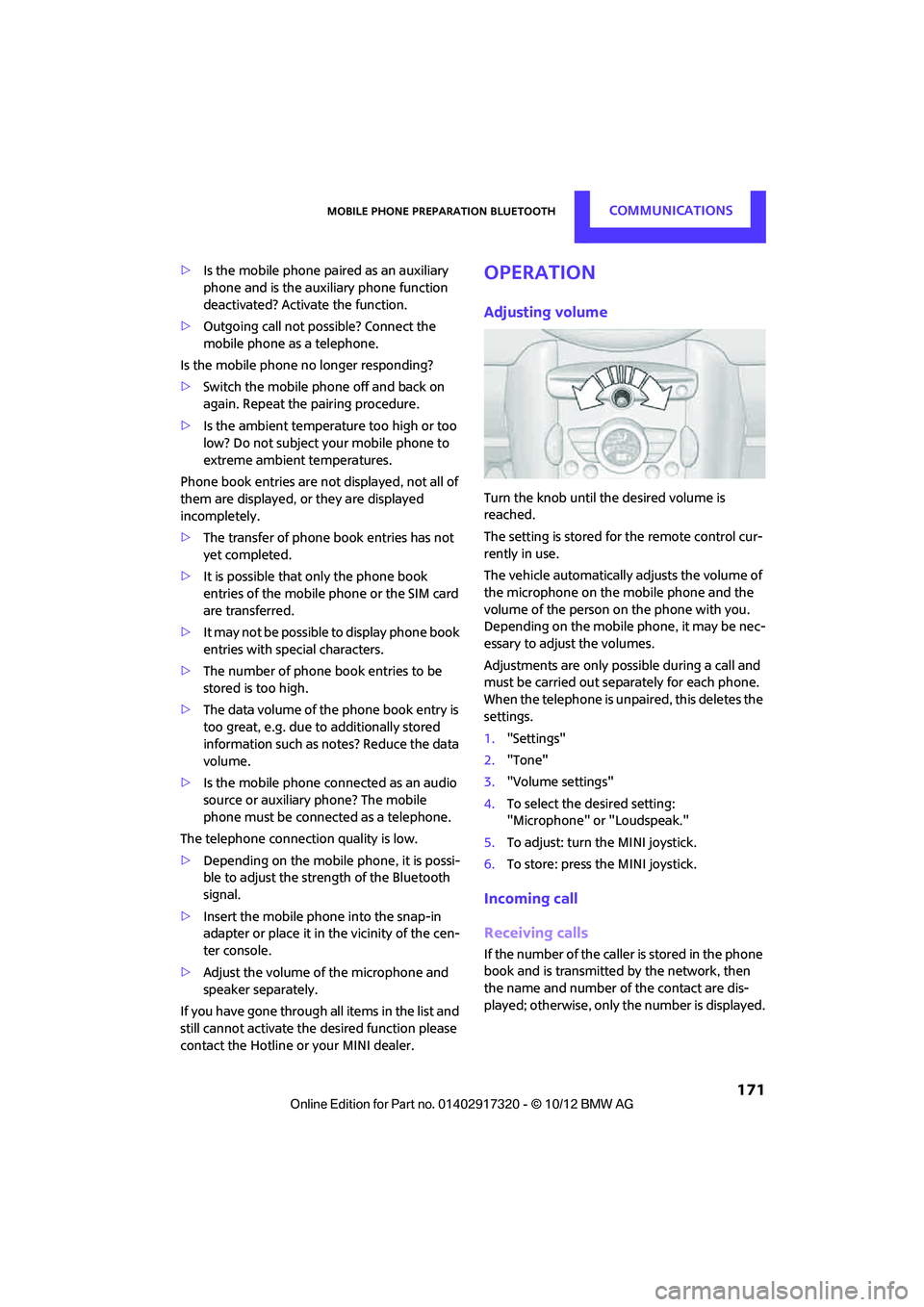
Turn the knob until the desired volume is
reached.
The setting is stored for the remote control cur-
rently in use.
The vehicle automatically adjusts the volume of
the microphone on the mobile phone and the
volume of the person on the phone with you.
Depending on the mobile phone, it may be nec-
essary to adjust the volumes.
Adjustments are only possible during a call and
must be carried out separately for each phone.
When the telephone is unpaired, this deletes the
settings.
1. "Settings"
2. "Tone"
3. "Volume settings"
4. To select the desired setting:
"Microphone" or "Loudspeak."
5. To adjust: turn the MINI joystick.
6. To store: press the MINI joystick.
Incoming call
Receiving calls
If the number of the caller is stored in the phone
book and is transmitted by the network, then
the name and number of the contact are dis-
played; otherwise, only the number is displayed.
00320051004F004C00510048000300280047004C0057004C005200510003
Page 254 of 267
Everything from A to ZREFERENCE
253
B
Background lighting, refer to
Ambient lighting 84
Backrests, refer to Seats 39
Backup lamps
– replacing bulb 222,223
Band-aids, refer to First aid pouch 231
Bar, refer to Tow-starting,
towing away 234
Base plate for telephone or mobile phone
– refer to Snap-in adapter 177
Bass sounds, refer to Tone control 133
Battery 229
– disposal 35,230
– jump-starting 232
– temporary power failure 230
Battery renewal
– remote control 35
Being towed 234
Belts, refer to Safety belts 41
Belt tensioner, refer to Safety
belts 41
Beverage holders, refer to Cupholders 96
Black ice, refer to External temperature warning 58
Blower, refer to Air flow rate 86,88
Bluetooth, activating/
deactivating 157,167
Bluetooth audio 149
– device pairing 150
– disconnecting an audio connection 152
– playback 151
– unpairing device 152
– What to do if... 152
Bottle holders, refer to
Cupholders 96
Brake Assist 69
Brake fluid, refer to Service
requirements 61 Brake lamps
– replacing bulbs
222,223
Brake pads, breaking in 100
Brake rotors 102
– brakes 100
– breaking in 100
Brakes
– ABS 69
– breaking in 100
– MINI Maintenance
System 211
– parking brake 49
– service requirem ents
61
Brakes, refer to Braking sa fely 101
Br
ake system 100
– breaking in 100
– disc brakes 102
– MINI Maintenance
System 211
Breakdown service, refer to Roadside Assistance 231
Breaking in the clutch 100
Break-in period 100
Bulb changing, refer to Lamps
and bulbs 219
Button for starting the engine 47
Buttons on the steering wheel 11
C
Calendar 183
– displaying appointment 183
– selecting calendar day 183
California Proposition 65 warning 5
Call
– ending 160,172
– muting the microphone 173
Calling, refer to Phone
numbers, dialing 160,172
Calling, refer to Telephone 95
Can holders, refer to
Cupholders 96
Capacities 244 Car battery, refer to Vehicle
battery 229
Car care 213
Care 213
– car-care products 213
– car washes 213
– CD/DVD drives 216
– high-pressure washers 214
– leather 215
– manual washing 214
– upholstery and fabrics 215
– windows 214
– wiper blades 214
Cargo, securing 105
Cargo area 102
– capacity 242
– Comfort Access 34
– cover 102
– doors, refer to Split Rear Barn
Doors 31
– lamp 84
– opening from outside 31
– trunk lid, refer to Split Rear Barn Doors 31
Cargo area, expanding 103
Cargo area doors, refer to Split Rear Barn Doors 31
Cargo area lamp 84
Cargo area lid, refer to Tailgate 31
Cargo area partition net, refer to Cargo net 104
Cargo loading 104
– securing cargo 105
– stowing cargo 105
– vehicle 102
Cargo net 104
Car key, refer to Keys/remote controls 26
Carpets, care 215
Car phone
– installation location, refer to
Ce
nter armrest 95
– refer to Telephone 95
Car phone, refer to
Telephone 156,166
Car radio, refer to Radio 135
00320051004F004C00510048000300280047004C0057004C005200510003
Page 260 of 267
Everything from A to ZREFERENCE
259
Microfilter/activated-charcoal filter
– MINI Maintenance System 211
Microphone for telephone 14
MINI Connected 187
MINI Internet page 4
MINI joystick, refer to Onboard computer 16
MINI Maintenance System 211
Mirror dimming feature 43
Mirrors 42
– exterior mirrors 42
– heating 42
– interior rearview mirror 42
Mobile phone
– adjusting volume 159,171
– connecting, refer to Mobile phone, pairing 156,167
– installation location, refer to Center armrest 95
– pairing 156,167
– refer to Telephone 95
– What to do if…. 158,170
Mobile phone, installation
location, refer to Center
armrest 95
Mobile phone, refer to
Telephone 95
Mobile phone preparation
Bluetooth 166
Mobility Kit 224
Modifications, te chnical, refer
to For your own safety 4
Monitor, refer to MINI controls with navigation 16
Monitoring system for tire pressures, refer to Flat Tire
Monitor 71
Multifunctional steering wheel, refer to Buttons on
the steering wheel 11
Multifunction switch
– refer to Turn signals/ headlamp flasher 52
– refer to Wiper system 52N
Navigation
– storing current position 114
Navigation data 110
Navigation destination
– entering manually 112,118
– home address 115
Navigation instructions, refer to Switching voice
instructions on/off 125
Navigation system 110
– address book 114
– bypassing a route section 122
– continuing route
guidance 121
– destination entry 112
– dynamic route guidance 128
– entering a destination manually 112,118
– planning a trip 119
– route list 122
– selecting destination via map 117
– selecting route criteria 121
– special destinations 116
– starting route guidance 121
– terminating route guidance 121
– voice instructions 125
– volume adjustment 125
Neck support, refer to Head
restraints 40
Nets, refer to Storage compartments 95
New tires 205
North-facing map 123
Notes 184
Number of cylinders, refer to Engine data 238
Number of safety belts 38
Nylon rope, refer to Tow rope 234
O
OBD socket, refer to Socket for
On-Board Diagnosis 212
Octane ratings, refer to Fuel specifications 193
Odometer 58
Office 179
– current office 179
– What to do if…. 185
Oil, refer to Engine oil 208
Oil consumption 208
Oil level 208
Oil types 209
Old batteries, refer to Disposal 230
Onboard computer 16
– adjusting brightness 66
– changing language 66
– menu guidance 17
– operating principles 16
– overview 16
Opening and closing
– Comfort Access 33
– from inside 30
– from outside 27
– using the door lock 29
– using the remote control 27
Opening and unlocking
– from inside 30
Options, selecting for navigation 121
Orientation menu, refer to
Main menu 17
Outlets
– refer to Ventilation 89
Outlets, refer to Air vents 86
Output, refer to Engine data 238
Outside-air mode
– automatic climate control 88
Overheated engine, refer to
Coolant temperature 210
00320051004F004C00510048000300280047004C0057004C005200510003