change wheel MINI COOPER 2014 User Guide
[x] Cancel search | Manufacturer: MINI, Model Year: 2014, Model line: COOPER, Model: MINI COOPER 2014Pages: 230, PDF Size: 11.58 MB
Page 116 of 230
Cruise controlThe concept
The system is functional at speeds beginning at
approx. 20 mph/30 km/h.
It maintains the speed that was set using the
control elements on the steering wheel.
The system brakes on downhill gradients if en‐
gine braking action is insufficient.
Unfavorable conditions
Do not use the system if unfavorable con‐
ditions make it impossible to drive at a constant
speed, for instance:▷On curvy roads.▷In heavy traffic.▷On slippery roads, in fog, snow or rain, or
on a loose road surface.
Otherwise, you could lose control of the vehicle
and cause an accident. ◀
General information
Depending on the set drive mode, refer to
page 108, the characteristics of the cruise con‐
trol can change in certain areas.
Controls
At a glance
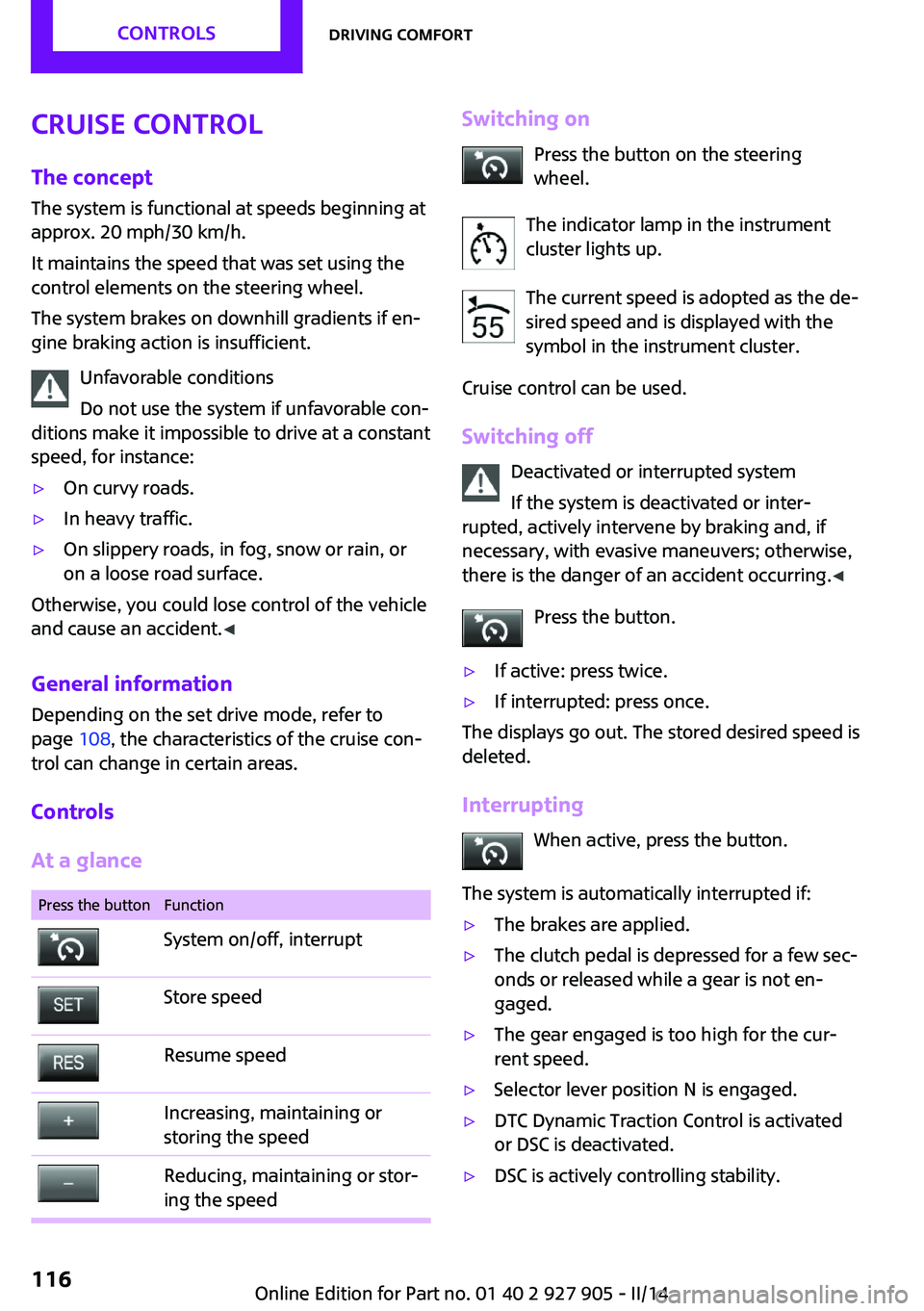
Press the buttonFunctionSystem on/off, interruptStore speedResume speedIncreasing, maintaining or
storing the speedReducing, maintaining or stor‐
ing the speedSwitching on
Press the button on the steering
wheel.
The indicator lamp in the instrument
cluster lights up.
The current speed is adopted as the de‐
sired speed and is displayed with the
symbol in the instrument cluster.
Cruise control can be used.
Switching off Deactivated or interrupted system
If the system is deactivated or inter‐
rupted, actively intervene by braking and, if
necessary, with evasive maneuvers; otherwise,
there is the danger of an accident occurring. ◀
Press the button.▷If active: press twice.▷If interrupted: press once.
The displays go out. The stored desired speed is
deleted.
Interrupting When active, press the button.
The system is automatically interrupted if:
▷The brakes are applied.▷The clutch pedal is depressed for a few sec‐
onds or released while a gear is not en‐
gaged.▷The gear engaged is too high for the cur‐
rent speed.▷Selector lever position N is engaged.▷DTC Dynamic Traction Control is activated
or DSC is deactivated.▷DSC is actively controlling stability.Seite 116CONTROLSDriving comfort116
Online Edition for Part no. 01 40 2 927 905 - II/14
Page 123 of 230

This system assists the driver in parking parallel
to the road.
Ultrasound sensors measure parking spaces on
both sides of the vehicle.
The parking assistant calculates the best possi‐
ble parking line and takes control of steering
during the parking procedure.
When parking, also take note of the visual and
acoustic information issued by the PDC, the
parking assistant and, where applicable, the
rearview camera, and react accordingly.
A component of the parking assistant is the
PDC Park Distance Control, refer to page 118.
Hints Personal responsibility
Even an active system does not relieve
the driver from personal responsibility for the
driving process.
Because of technical system limits, the system
cannot independently react appropriately in all
traffic situations.
Continuously and attentively monitor the driv‐
ing process, the area surrounding the vehicle
and the traffic situation, and actively intervene
when required, otherwise, there is a risk of an
accident. ◀
Changes to the parking space
Changes to the parking space after it was
measured are not taken into account by the
system.
Therefore, always be alert and ready to inter‐
vene; otherwise, there is the danger of an acci‐
dent occurring. ◀
Transporting loads
Loads that extend beyond the perimeter
of the vehicle are not taken into account by the
system during the parking procedure.
Therefore, always be alert and ready to inter‐
vene; otherwise, there is the danger of an acci‐
dent occurring. ◀Curbs
The parking assistant may steer the vehi‐
cle over or onto curbs.
Therefore, always be alert and ready to inter‐
vene; otherwise, the wheels, tires, or the vehi‐
cle may become damaged. ◀
An engine that has been switched off by the
Auto Start Stop function is restarted automati‐
cally when the parking assistant is activated.
Requirements
For measuring parking spaces▷Maximum speed while driving forward ap‐
prox. 22 mph/35 km/h.▷Maximum distance to row of parked vehi‐
cles: 5 ft/1.5 m.
Suitable parking space
▷Gaps behind an object that have a min.
length of 5 ft/1.5 m.▷Gap between two objects with a minimum
length of approx. 5 ft/1.5 m.▷Min. length of gap between two objects:
your vehicle's length plus approx.
3.3 ft/1.0 m.▷Minimum depth: approx. 5 ft/1.5 m.
For parking procedure
▷Doors and tailgate closed.▷Parking brake released.▷When parking in parking spaces on the
driver's side, the corresponding turn signal
must be set.Seite 123Driving comfortCONTROLS123
Online Edition for Part no. 01 40 2 927 905 - II/14
Page 125 of 230
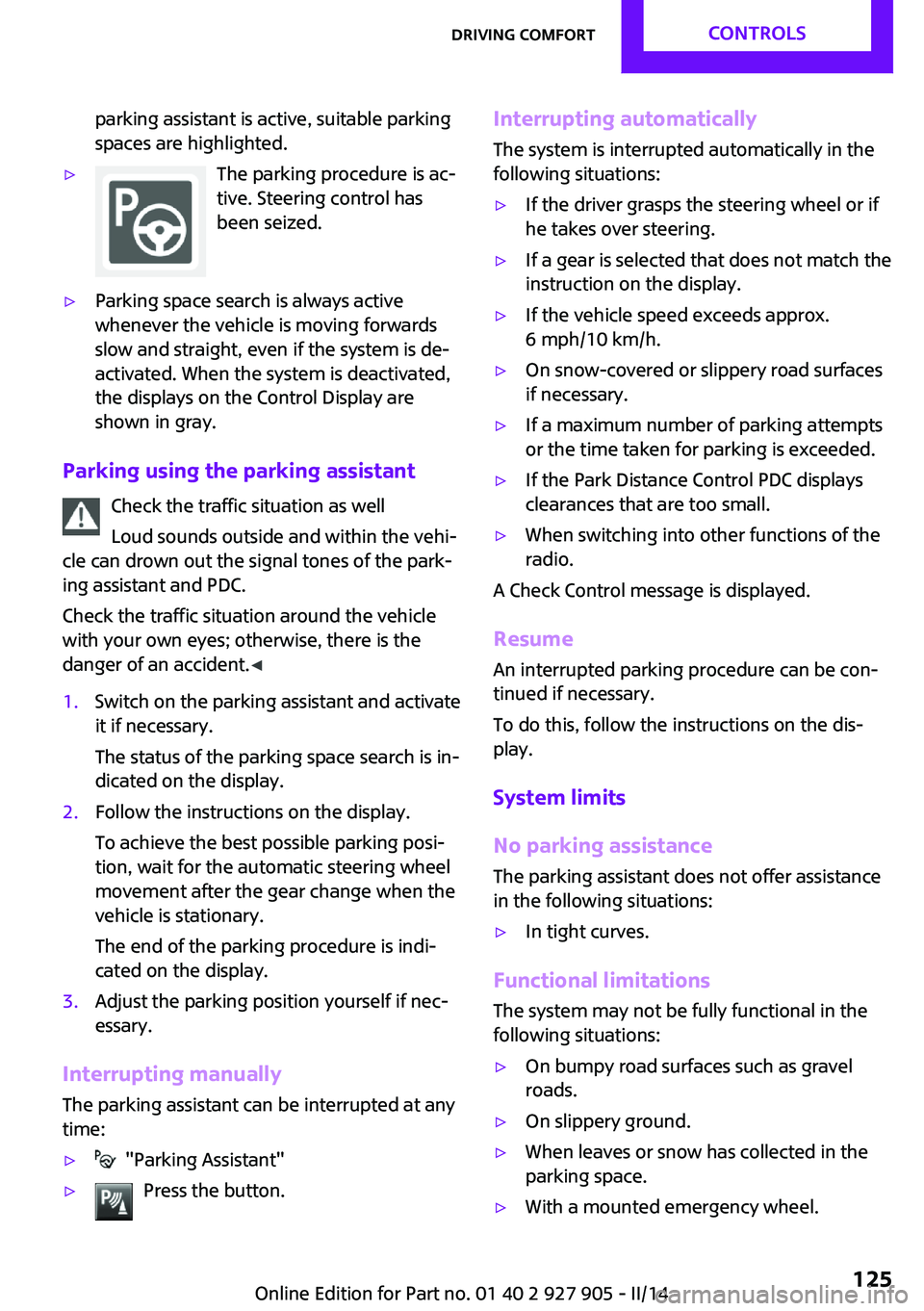
parking assistant is active, suitable parking
spaces are highlighted.▷The parking procedure is ac‐
tive. Steering control has
been seized.▷Parking space search is always active
whenever the vehicle is moving forwards
slow and straight, even if the system is de‐
activated. When the system is deactivated,
the displays on the Control Display are
shown in gray.
Parking using the parking assistant
Check the traffic situation as well
Loud sounds outside and within the vehi‐
cle can drown out the signal tones of the park‐
ing assistant and PDC.
Check the traffic situation around the vehicle
with your own eyes; otherwise, there is the
danger of an accident. ◀
1.Switch on the parking assistant and activate
it if necessary.
The status of the parking space search is in‐
dicated on the display.2.Follow the instructions on the display.
To achieve the best possible parking posi‐
tion, wait for the automatic steering wheel
movement after the gear change when the
vehicle is stationary.
The end of the parking procedure is indi‐
cated on the display.3.Adjust the parking position yourself if nec‐
essary.
Interrupting manually
The parking assistant can be interrupted at any
time:
▷ "Parking Assistant"▷Press the button.Interrupting automatically
The system is interrupted automatically in the
following situations:▷If the driver grasps the steering wheel or if
he takes over steering.▷If a gear is selected that does not match the
instruction on the display.▷If the vehicle speed exceeds approx.
6 mph/10 km/h.▷On snow-covered or slippery road surfaces
if necessary.▷If a maximum number of parking attempts
or the time taken for parking is exceeded.▷If the Park Distance Control PDC displays
clearances that are too small.▷When switching into other functions of the
radio.
A Check Control message is displayed.
Resume
An interrupted parking procedure can be con‐
tinued if necessary.
To do this, follow the instructions on the dis‐
play.
System limits
No parking assistance The parking assistant does not offer assistance
in the following situations:
▷In tight curves.
Functional limitations
The system may not be fully functional in the
following situations:
▷On bumpy road surfaces such as gravel
roads.▷On slippery ground.▷When leaves or snow has collected in the
parking space.▷With a mounted emergency wheel.Seite 125Driving comfortCONTROLS125
Online Edition for Part no. 01 40 2 927 905 - II/14
Page 196 of 230

▷With white lens: WY5W diadem1.Push turn signal housing up and pull out at
the bottom.2.Turn the bulb socket counterclockwise and
remove.3.Replace the bulb.4.Proceed in the reverse order to insert the
new bulb and install the turn signal hous‐
ing.
First hook the turn signal housing to the
bottom, then at the top press it into the
latch.
Changing wheels
Hints
The vehicle equipment does not include a
spare tire.
When using run-flat tires or tire sealants, a tire
does not need to be changed immediately in
the event of pressure loss due to a flat tire.
The tools for changing wheels are available as
accessories from your service center.
Jacking points for the vehicle jack
The jacking points for the vehicle jack are lo‐
cated at the positions shown.
Compact wheel
Hints Safety measures in case of a breakdown
or a wheel change
▷Park the vehicle as far away as possible
from passing traffic and on solid ground.
Switch on the hazard warning system.▷Set the parking brake, and engage first gear
or transmission position P.▷Have all vehicle occupants get out of the
vehicle and ensure that they remain out‐
side the immediate area in a safe place,
such as behind a guardrail.▷If necessary, set up a warning triangle or
portable hazard warning lamp at an appro‐
priate distance. Comply with all safety
guidelines and regulations.▷Perform wheel change only on a flat, solid
and slip-resistant surface. On soft or slip‐
pery ground, e.g., snow, ice, tiles, etc., the
vehicle or vehicle jack can slip away to the
side.▷Do not place wood blocks or similar items
under the vehicle jack; otherwise, it cannot
reach its carrying capacity because of the
restricted height.▷If the vehicle is raised, do not lie under the
vehicle and do not start the engine; other‐
wise, a mortal hazard exists. ◀Seite 196MOBILITYReplacing components196
Online Edition for Part no. 01 40 2 927 905 - II/14
Page 197 of 230

Use the vehicle jack only for changing
wheels
Use the vehicle jack only for changing wheels
Do not attempt to use it to jack up a different
type of vehicle or loads of any kind; otherwise,
this could cause material damage and personal
injury. ◀
Removing compact wheel The compact wheel is housed in a well on the
underbody of the vehicle. The screw connec‐
tion of the compact wheel is located in the
cargo area under the floor mat, on the floor of
the storage compartment for the wheel chang‐
ing set.1.Loosen the nut from the wheel change set
using the wheel wrench.2.Remove the retaining plate.3.Screw the wheel wrench on the threads
and loosen the lock clockwise rotation.
Compact wheel releases and must be held
with the wheel wrench.4.Lower the compact wheel with the wheel
wrench.5.Unscrewing the wheel wrench6.Pull out the well with compact wheel under
the vehicle toward the rear.7.Remove the spacer and compact wheel of
the well.8.Stow the well and spacer in the vehicle.
Prepare wheel change
1.Follow the Safety instructions, refer to
page 196.2.With the wheel chock from the wheel
change set, also secure the vehicle against
rolling away at the front wheel of the oppo‐
site side.3.Loosen the wheel lug bolts a half turn.
Lug bolt lock, refer to page 198
Jacking up the vehicle
1.Place the vehicle jack at the jacking point
closest to the wheel such that the vehicle
jack foot is vertically beneath the vehicle
jacking point with the entire surface on the
ground.2.Insert the vehicle jack head in the rectan‐
gular recess of the jacking point for crank‐
ing it up.3.Crank it up until the wheel in question lifts
off of the ground.Seite 197Replacing componentsMOBILITY197
Online Edition for Part no. 01 40 2 927 905 - II/14
Page 198 of 230

Wheel mounting1.Unscrew the wheel lug bolts and remove
the wheel.2.Put the new wheel or compact wheel on
and screw in at least two bolts.
If original MINI light alloy wheels are not
mounted, any accompanying lug bolts also
have to be used.3.Screw in the remaining the lug bolts and
tighten all bolts well in a crosswise pattern.4.Lower the vehicle and remove the vehicle
jack.
After the wheel change
1.Tighten the lug bolts crosswise. The tight‐
ening torque is 101 lb ft/140 Nm.
Check for secure seating of the lug
bolts
For safety reasons, have the secure seating
of the lug bolts checked with a calibrated
torque wrench; otherwise, a safety hazard
results from incorrectly tightened lug
bolts. ◀2.Stow the defective wheel in the cargo area.
The defective wheel cannot be stored in the
compact wheel bracket because of its size.3.Check tire inflation pressure at the next op‐
portunity and correct as needed.4.Reinitialize the Flat Tire Monitor, refer to
page 98.
Reinitialize the Tire Pressure Monitor, refer
to page 95.5.Replace the damaged tires as soon as pos‐
sible.
Driving with the compact wheel
Watch the speed when driving with the
compact wheel
Drive conservatively and do not exceed a speed
of 50 mph/80 km/h; otherwise, changed driving
characteristics such as reduced lane stability
while braking, extended braking distance and
changed self-steering properties in the limit
area. ◀
Mounting only one compact wheel
Only a single compact wheel may be
mounted. Reinstall wheels and tires of the orig‐
inal size as quickly as possible; otherwise, there
is a safety risk. ◀
Lug bolt lock
The adapter of the lug bolt lock is located in the
onboard vehicle tool kit, refer to page 188.▷Lug bolt, arrow 1.▷Adapter, arrow 2.
Removing
1.Attach the adapter to the wheel lug.2.Unscrew the lug bolt.
Remove the adapter after screwing the lug bolt
back on.
Vehicle battery
Maintenance
The battery is maintenance-free, i.e., the elec‐
trolyte will last for the life of the battery.
Your service center will be glad to advise you
on questions regarding the battery.
Seite 198MOBILITYReplacing components198
Online Edition for Part no. 01 40 2 927 905 - II/14
Page 221 of 230
C
California Proposition 65 Warning 7
Camera-based cruise control, ACC 110
Camera, care 210
Camera, rearview cam‐ era 120
Can holder, refer to Cu‐ pholder 142
Car battery 198
Car care products 208
Care, displays 210
Care, vehicle 208
Cargo 151
Cargo area 138
Cargo area, adapting size 143
Cargo area, enlarging 139
Cargo area lid 39
Cargo area, storage compart‐ ments 143
Cargo cover 138
Cargo, securing 152
Cargo straps, securing cargo 152
Car key, refer to Remote con‐ trol 34
Carpet, care 210
Car wash 207
Catalytic converter, refer to Hot exhaust system 149
CBS Condition Based Serv‐ ice 186
Center armrest 142
Center console 16
Central screen, refer to Control Display 18
Changes, technical, refer to Safety 7
Changing parts 188
Changing wheels 196
Changing wheels/tires 173
Check Control 72
Children, seating position 55 Children, transporting
safely 55
Child restraint fixing sys‐ tem 55
Child restraint fixing system LATCH 56
Child restraint fixing systems, mounting 55
Child seat, mounting 55
Child seats 55
Chrome parts, care 209
Cigarette lighter 138
Cleaning, displays 210
Climate control 127, 129
Clock 75
Closing/opening via door lock 38
Closing/opening with remote control 37
Clothes hooks 143
Coasting 159
Coasting with engine decou‐ pled, coasting 159
Coasting with idling en‐ gine 159
Cold starting, refer to Starting the engine 60
Collision warning with City Braking function 100
Combination switch, refer to Turn signals 64
Combination switch, refer to Wiper system 64
Comfort Access 40
Compact wheel 196
Compartments in the doors 142
Compass 135
Compressor 175
Computer 79
Condensation on win‐ dows 131
Condensation under the vehi‐ cle 150
Condition Based Service CBS 186 Configuring drive pro‐
gram 109
Confirmation signal 42
Control Display 18
Control Display, settings 81
Controller 18, 19
Control systems, driving stabil‐ ity 106
Convenient opening 37
Coolant 185
Coolant temperature 74
Cooling function 128, 131
Cooling, maximum 130
Cooling system 185
Cornering lamp 87
Corrosion on brake discs 150
Cruise control 116
Cruise control, active 110
Cruise control, refer to cam‐ era-based cruise control 110
Cruising range 75
Cupholder 142
Current fuel consumption 75
D
Damage, tires 173
Damping control, dy‐ namic 107
Data, technical 214
Date 75
Daytime running lights 87
Defrosting, refer to defrosting the windows 128
Defrosting, refer to Windows, defrosting 131
Defrosting the windows 128
Dehumidifying, air 128, 131
Destination distance 80
Diesel particulate filter 149
Digital clock 75
Digital compass 135
Dimensions 214
Dimmable exterior mirrors 53
Dimmable interior rearview mirror 53 Seite 221Everything from A to ZREFERENCE221
Online Edition for Part no. 01 40 2 927 905 - II/14
Page 222 of 230

Direction indicator, refer toTurn signals 64
Display, electronic, instrument cluster 72
Display lighting, refer to In‐ strument lighting 89
Displays 71
Displays, cleaning 210
Disposal, coolant 185
Disposal, vehicle battery 199
Distance control, refer to PDC 118
Distance to destination 80
Divided screen view, split screen 23
Door lock, refer to Remote control 34
Drive mode, GREEN mode 156
Drive-off assistant 109
Drive-off assistant, refer to DSC 106
Driving Dynamics Control 108
Driving Excitement, SPORT 80
Driving instruction, GREEN mode 158
Driving instructions, breaking in 148
Driving mode 108
Driving notes, general 148
Driving stability control sys‐ tems 106
Driving style analysis 160
Driving tips 148
DSC Dynamic Stability Con‐ trol 106
DTC Dynamic Traction Con‐ trol 107
Dynamic Damping Con‐ trol 107
Dynamic Stability Control DSC 106
Dynamic Traction Control DTC 107 E
Electronic displays, instrument cluster 72
Electronic Stability Program ESP, refer to DSC 106
Emergency detection, remote control 35
Emergency release, fuel filler flap 164
Emergency Request 201
Emergency service, refer to Roadside Assistance 202
Emergency start function, en‐ gine start 35
Emergency unlocking, door lock 39
Energy Control 75
Engine, automatic Start/Stop function 61
Engine, automatic switch- off 61
Engine compartment 180
Engine compartment, working in 180
Engine coolant 185
Engine idling when driving, coasting 159
Engine oil 182
Engine oil, adding 183
Engine oil additives 183
Engine oil change 184
Engine oil filler neck 183
Engine oil temperature 74
Engine oil types, alterna‐ tive 184
Engine oil types, ap‐ proved 184
Engine start during malfunc‐ tion 35
Engine start, jump-start‐ ing 202
Engine start, refer to Starting the engine 60
Engine stop 60
Engine temperature 74 Entering a car wash 207
Equipment, interior 133
ESP Electronic Stability Pro‐ gram, refer to DSC 106
Exchanging wheels/tires 173
Exhaust system 149
Exterior mirror, automatic dimming feature 53
Exterior mirrors 52
External start 202
External temperature dis‐ play 75
External temperature warn‐ ing 75
Eyes for securing cargo 152
F
Failure message, refer to Check Control 72
False alarm, refer to Uninten‐ tional alarm 43
Fan, refer to Air flow 128, 130
Fault displays, refer to Check Control 72
Favorites buttons, onboard monitor 24
Filler neck for engine oil 183
Fine wood, care 209
First aid kit 202
Fitting for towing, refer to Tow fitting 205
Flat tire, changing wheels 196
Flat Tire Monitor FTM 97
Flat tire, repairing 175
Flat tire, Tire Pressure Monitor TPM 94
Flat tire, warning lamp 95, 98
Flooding 149
Floor carpet, care 210
Floor mats, care 210
Fogged up windows 128
Fold-out position, windshield wipers 66
Foot brake 149
Front airbags 91 Seite 222REFERENCEEverything from A to Z222
Online Edition for Part no. 01 40 2 927 905 - II/14
Page 225 of 230

Monitor, refer to Control Dis‐play 18
Mounting of child restraint fix‐ ing systems 55
Multifunction steering wheel, buttons 14
Multimedia, refer to Integrated Owner's Manual
N Navigation, refer to Integrated Owner's Manual
Neck restraints, front, refer to Head restraints 50
Neck restraints, rear, refer to Head restraints 51
New wheels and tires 173
No Passing Information 77
Nylon rope for tow-starting/ towing 205
O
OBD Onboard Diagnos‐ tics 186
Obstacle marking, rearview camera 122
Octane rating, refer to Recom‐ mended fuel grade 166
Odometer 74
Office, refer to Integrated Owner's Manual
Oil 182
Oil, adding 183
Oil additives 183
Oil change 184
Oil change interval, service re‐ quirements 76
Oil filler neck 183
Oil types, alternative 184
Oil types, approved 184
Old batteries, disposal 199
Onboard Diagnostics OBD 186
Onboard monitor 18 Onboard monitor operating
concept 18
Onboard monitor, refer to Control Display 18
Onboard vehicle tool kit 188
Opening/closing via door lock 38
Opening/closing with remote control 37
Operating menus, onboard monitor 18
Optional equipment, standard equipment 6
Outside air, refer to Automatic recirculated-air control 131
Overheating of engine, refer to Coolant temperature 74
P Paint, vehicle 208
Panoramic glass sunroof 45
Parallel parking assistant 122
Park Distance Control PDC 118
Parked-car ventilation 132
Parked vehicle, condensa‐ tion 150
Parking aid, refer to PDC 118
Parking assistant 122
Parking brake 63
Parking lamps 86
Particulate filter 149
Parts and accessories 7
Passenger side mirror, tilting downward 52
Pathway lines, rearview cam‐ era 121
PDC Park Distance Con‐ trol 118
Pedestrian warning with city braking function 103
Performance Control 107
Personal Profile 35
Phone, refer to Integrated Owner's Manual Pinch protection system, glasssunroof 46
Pinch protection system, win‐ dows 44
Plastic, care 209
Power failure 199
Power windows 44
Pressure, tire air pressure 168
Pressure warning, tires 97
Profile, refer to Personal Pro‐ file 35
Protective function, glass sun‐ roof 46
Protective function, win‐ dows 44
Push-and-turn switch, refer to Controller 18, 19
R Radiator fluid 185
Radio-operated key, refer to Remote control 34
Radio ready state 60
Radio, refer to Integrated Owner's Manual
Rain sensor 65
Rear fog lamps 89
Rear lamps 192
Rear luggage rack 153
Rearview camera 120
Rearview mirror 52
Rear window de‐ froster 128, 131
Recirculated-air filter 132
Recirculated-air mode 128, 131
Recommended fuel grade 166
Recommended tire brands 174
Refueling 164
Remaining range 75
Remote control/key 34
Remote control, blocking 35 Seite 225Everything from A to ZREFERENCE225
Online Edition for Part no. 01 40 2 927 905 - II/14
Page 227 of 230

Symbols in the status field 23
T Tachometer 74
Tailgate 39
Tailgate via remote control 38
Tail lamps 192
Technical changes, refer to Safety 7
Technical data 214
Temperature, air condi‐ tioner 128
Temperature, automatic cli‐ mate control 130
Temperature display for exter‐ nal temperature 75
Temperature, engine oil 74
Terminal, starting aid 202
Text messages, supplemen‐ tary 73
Theft alarm system, refer to Alarm system 42
Theft protection, lug bolts 198
Thigh support 48
Tilt alarm sensor 43
Time of arrival 80
Tire damage 173
Tire identification marks 171
Tire inflation pressure 168
Tire inflation pressure moni‐ tor, refer to FTM 97
Tire Pressure Monitor TPM 94
Tires, changing 173
Tire sealant 175
Tires, everything on wheels and tires 168
Tires, run-flat tires 175
Tire tread 172
Tone, refer to Integrated Owner's Manual
Tools 188
Total vehicle weight 214
Touchpad 21 Tourist function, refer to
Right-hand/left-hand traf‐
fic 89
Tow fitting 205
Towing 203
Tow-starting 203
TPM Tire Pressure Monitor 94
Traction control 107
TRACTION drive mode, driving dynamics 107
Transmission, automatic 67
Transmission lock, releasing manually 69
Transmission, manual 67
Transporting children safely 55
Tread, tires 172
Trip computer 80
Triple turn signal activa‐ tion 64
Trip odometer 74
Turning circle lines, rearview camera 121
Turn signal, front 190
Turn signal, side 195
Turn signals, operation 64
Turn signals, rear, bulb re‐ placement 192
U
Unintentional alarm 43
Units of measure 82
Universal remote control 133
Unlock button, automatic transmission 68
Unlocking/locking via door lock 38
Unlocking/locking with re‐ mote control 37
Unlocking, settings 42
Updates made after the edito‐ rial deadline 6
Upholstery care 209
USB interface 137 V
Vehicle battery 198
Vehicle battery, replacing 199
Vehicle, breaking in 148
Vehicle care 208
Vehicle equipment 6
Vehicle identification number, refer to Identification num‐
ber in the engine compart‐
ment 180
Vehicle jack 196
Vehicle paint 208
Vehicle storage 210
Vehicle wash 207
Ventilation 132
Ventilation, refer to Parked- car ventilation 132
Voice activation system 26
W Warning messages, refer to Check Control 72
Warning triangle 202
Washer fluid 66
Washer nozzles, wind‐ shield 66
Washer system 64
Washing, vehicle 207
Water on roads 149
Weights 214
Welcome lamps 87
Wheels, changing 173
Wheels, everything on wheels and tires 168
Wheels, Flat Tire Monitor FTM 97
Wheels, Tire Pressure Monitor TPM 94
Window defroster, rear 128, 131
Windows, powered 44
Windshield de‐ froster 129, 131
Windshield washer fluid 66 Seite 227Everything from A to ZREFERENCE227
Online Edition for Part no. 01 40 2 927 905 - II/14