fog light MINI COOPER 2014 User Guide
[x] Cancel search | Manufacturer: MINI, Model Year: 2014, Model line: COOPER, Model: MINI COOPER 2014Pages: 230, PDF Size: 11.58 MB
Page 110 of 230
Driving comfortVehicle equipment
All standard, country-specific and optional
equipment that is offered in the model series is
described in this chapter. Therefore, equipment
is also described that is not available in a vehi‐
cle, e. g., because of the selected optional
equipment or country variant. This also applies
for safety-related functions and systems.
Camera-based cruise con‐
trol, ACC
The concept
This system can be used to select a desired
speed that the vehicle will maintain automati‐
cally on clear roads.
To the extent possible, the system automati‐
cally adjusts the speed to a slower vehicle
ahead of you.
A camera on the interior rear view mirror is
used to detect vehicles driving ahead.
The distance that the vehicle maintains to the
vehicle ahead of you can be varied.
For safety reasons, it depends on the speed.
To maintain a certain distance, the system au‐
tomatically decelerates, applies the brakes
lightly, or accelerates again if the vehicle ahead
begins moving faster.
As soon as the road is clear, it accelerates to the
desired speed.
The speed is also maintained on downhill gradi‐
ents, but may not be maintained on uphill
slopes if engine power is insufficient.
General information
Depending on the set drive mode, refer to
page 108, the characteristics of the cruise con‐
trol can change in certain areas.Hints
Personal responsibility
Even an active system does not release
the driver from personal responsibility for the
driving process, especially for lane tracking, adaptation of speed, distance and driving style
to the traffic conditions.
Because of technical system limits, the system
cannot independently react appropriately in all
traffic situations.
Monitor the driving process, the surrounding
area and what is occurring in traffic continu‐
ously and attentively and actively intervene as
required, e.g., by braking, steering or making
an evasive maneuver. ◀
Unfavorable weather conditions
In the event of unfavorable weather and
light conditions, for instance if there is rain,
snowfall, slush, fog or glare, this may result in
poorer recognition of traffic situations as well
as short-term interruptions for vehicles that are
already detected. Drive attentively, and react to
the current traffic events. Intervene actively
when necessary, e.g., by braking, steering or
making an evasive maneuver, otherwise, there
is danger of an accident. ◀
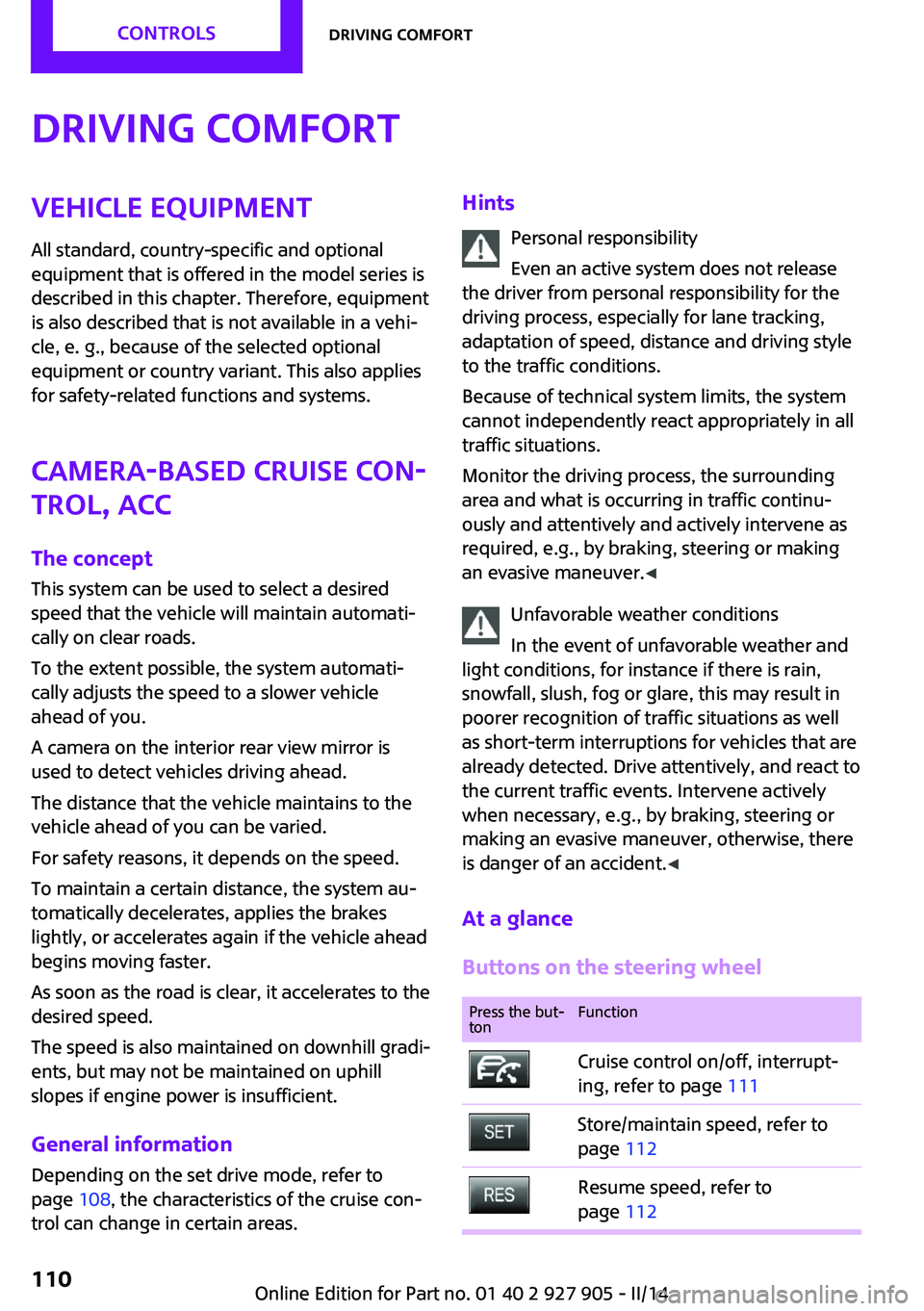
At a glance
Buttons on the steering wheelPress the but‐
tonFunctionCruise control on/off, interrupt‐
ing, refer to page 111Store/maintain speed, refer to
page 112Resume speed, refer to
page 112Seite 110CONTROLSDriving comfort110
Online Edition for Part no. 01 40 2 927 905 - II/14
Page 115 of 230
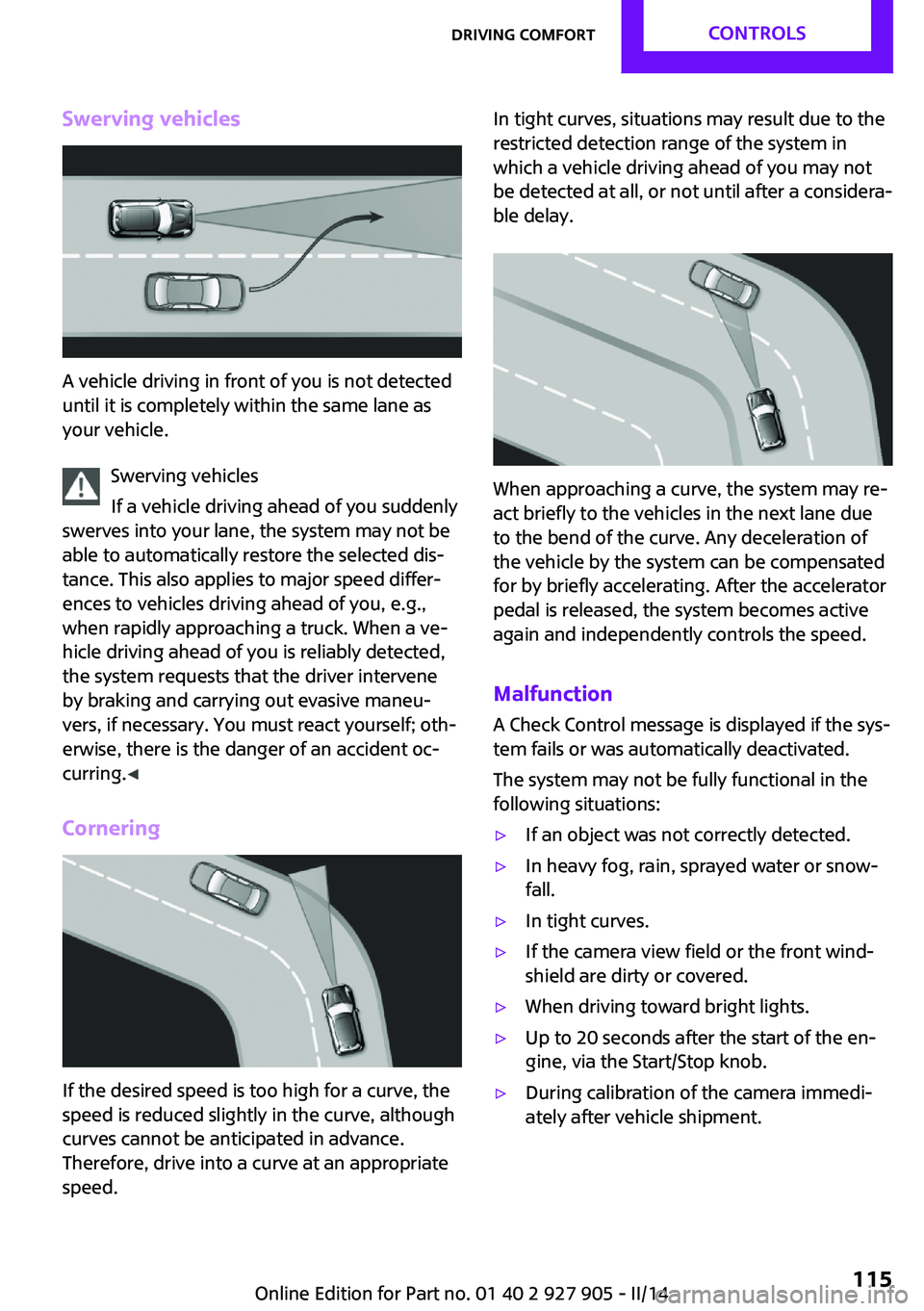
Swerving vehicles
A vehicle driving in front of you is not detected
until it is completely within the same lane as
your vehicle.
Swerving vehicles
If a vehicle driving ahead of you suddenly
swerves into your lane, the system may not be
able to automatically restore the selected dis‐
tance. This also applies to major speed differ‐
ences to vehicles driving ahead of you, e.g.,
when rapidly approaching a truck. When a ve‐
hicle driving ahead of you is reliably detected,
the system requests that the driver intervene
by braking and carrying out evasive maneu‐
vers, if necessary. You must react yourself; oth‐
erwise, there is the danger of an accident oc‐
curring. ◀
Cornering
If the desired speed is too high for a curve, the
speed is reduced slightly in the curve, although
curves cannot be anticipated in advance.
Therefore, drive into a curve at an appropriate
speed.
In tight curves, situations may result due to the
restricted detection range of the system in
which a vehicle driving ahead of you may not
be detected at all, or not until after a considera‐
ble delay.
When approaching a curve, the system may re‐
act briefly to the vehicles in the next lane due
to the bend of the curve. Any deceleration of
the vehicle by the system can be compensated
for by briefly accelerating. After the accelerator
pedal is released, the system becomes active
again and independently controls the speed.
Malfunction A Check Control message is displayed if the sys‐
tem fails or was automatically deactivated.
The system may not be fully functional in the
following situations:
▷If an object was not correctly detected.▷In heavy fog, rain, sprayed water or snow‐
fall.▷In tight curves.▷If the camera view field or the front wind‐
shield are dirty or covered.▷When driving toward bright lights.▷Up to 20 seconds after the start of the en‐
gine, via the Start/Stop knob.▷During calibration of the camera immedi‐
ately after vehicle shipment.Seite 115Driving comfortCONTROLS115
Online Edition for Part no. 01 40 2 927 905 - II/14
Page 116 of 230
Cruise controlThe concept
The system is functional at speeds beginning at
approx. 20 mph/30 km/h.
It maintains the speed that was set using the
control elements on the steering wheel.
The system brakes on downhill gradients if en‐
gine braking action is insufficient.
Unfavorable conditions
Do not use the system if unfavorable con‐
ditions make it impossible to drive at a constant
speed, for instance:▷On curvy roads.▷In heavy traffic.▷On slippery roads, in fog, snow or rain, or
on a loose road surface.
Otherwise, you could lose control of the vehicle
and cause an accident. ◀
General information
Depending on the set drive mode, refer to
page 108, the characteristics of the cruise con‐
trol can change in certain areas.
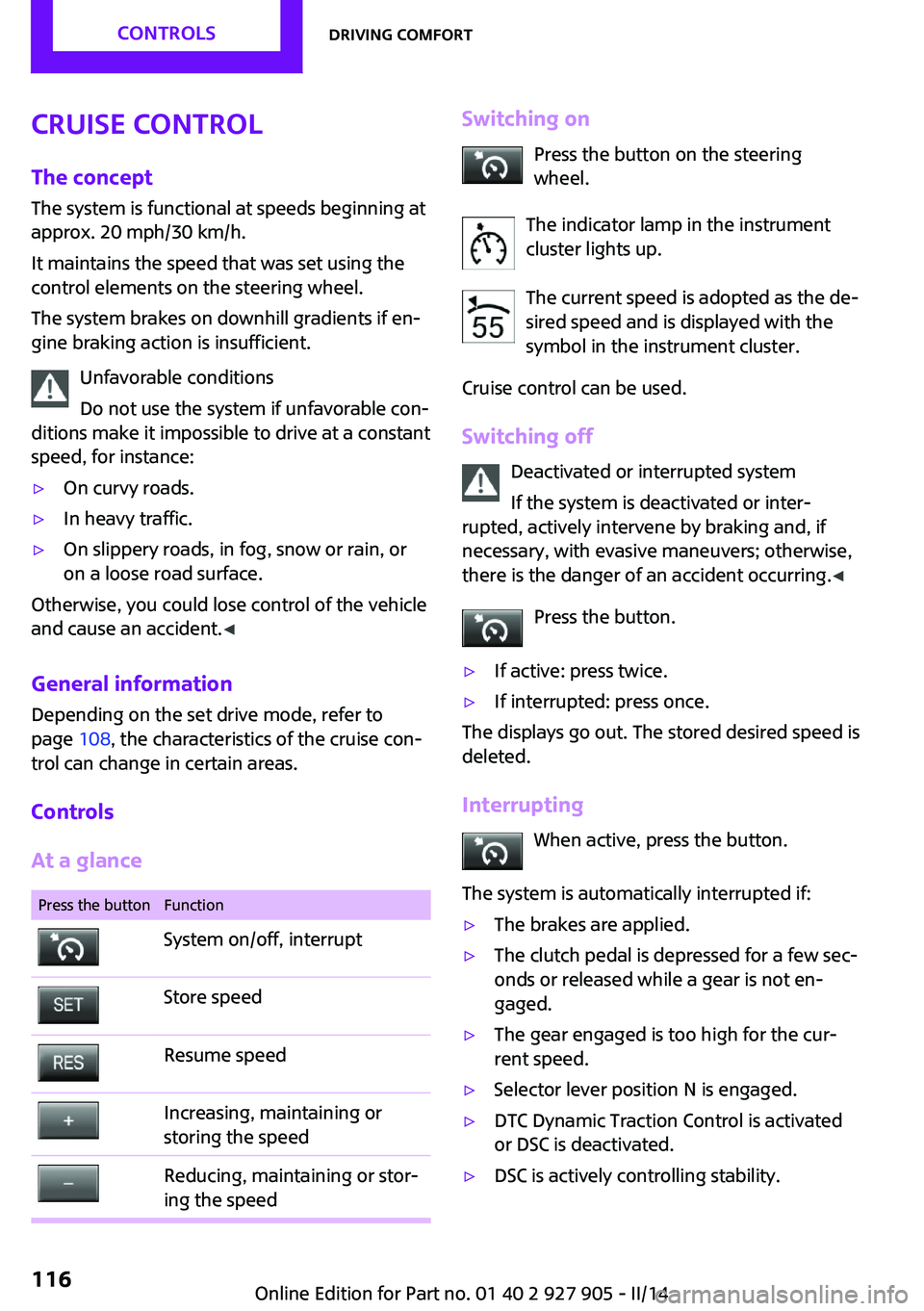
Controls
At a glance
Press the buttonFunctionSystem on/off, interruptStore speedResume speedIncreasing, maintaining or
storing the speedReducing, maintaining or stor‐
ing the speedSwitching on
Press the button on the steering
wheel.
The indicator lamp in the instrument
cluster lights up.
The current speed is adopted as the de‐
sired speed and is displayed with the
symbol in the instrument cluster.
Cruise control can be used.
Switching off Deactivated or interrupted system
If the system is deactivated or inter‐
rupted, actively intervene by braking and, if
necessary, with evasive maneuvers; otherwise,
there is the danger of an accident occurring. ◀
Press the button.▷If active: press twice.▷If interrupted: press once.
The displays go out. The stored desired speed is
deleted.
Interrupting When active, press the button.
The system is automatically interrupted if:
▷The brakes are applied.▷The clutch pedal is depressed for a few sec‐
onds or released while a gear is not en‐
gaged.▷The gear engaged is too high for the cur‐
rent speed.▷Selector lever position N is engaged.▷DTC Dynamic Traction Control is activated
or DSC is deactivated.▷DSC is actively controlling stability.Seite 116CONTROLSDriving comfort116
Online Edition for Part no. 01 40 2 927 905 - II/14
Page 190 of 230
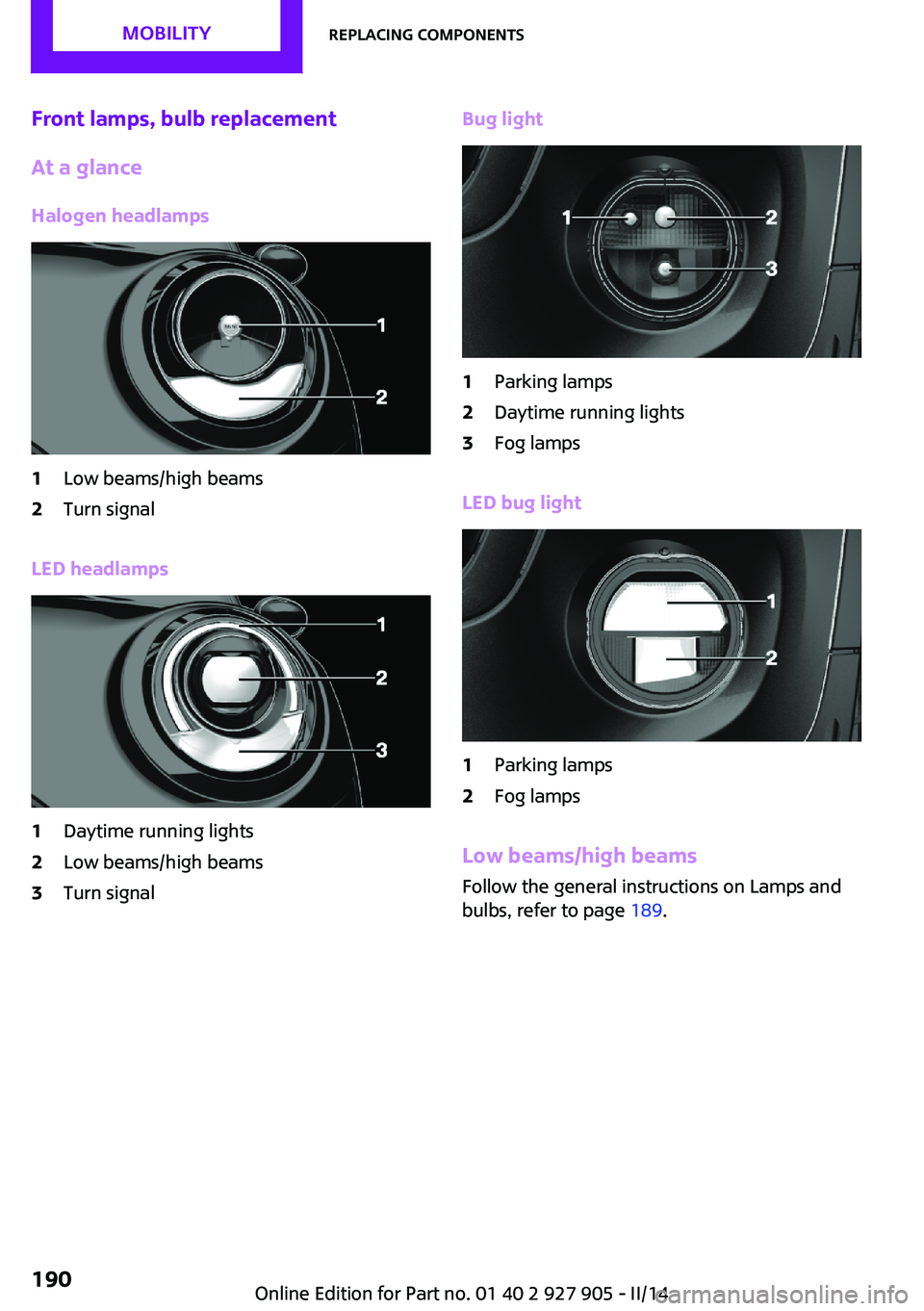
Front lamps, bulb replacement
At a glance
Halogen headlamps1Low beams/high beams2Turn signal
LED headlamps
1Daytime running lights2Low beams/high beams3Turn signalBug light1Parking lamps2Daytime running lights3Fog lamps
LED bug light
1Parking lamps2Fog lamps
Low beams/high beams Follow the general instructions on Lamps and
bulbs, refer to page 189.
Seite 190MOBILITYReplacing components190
Online Edition for Part no. 01 40 2 927 905 - II/14
Page 192 of 230
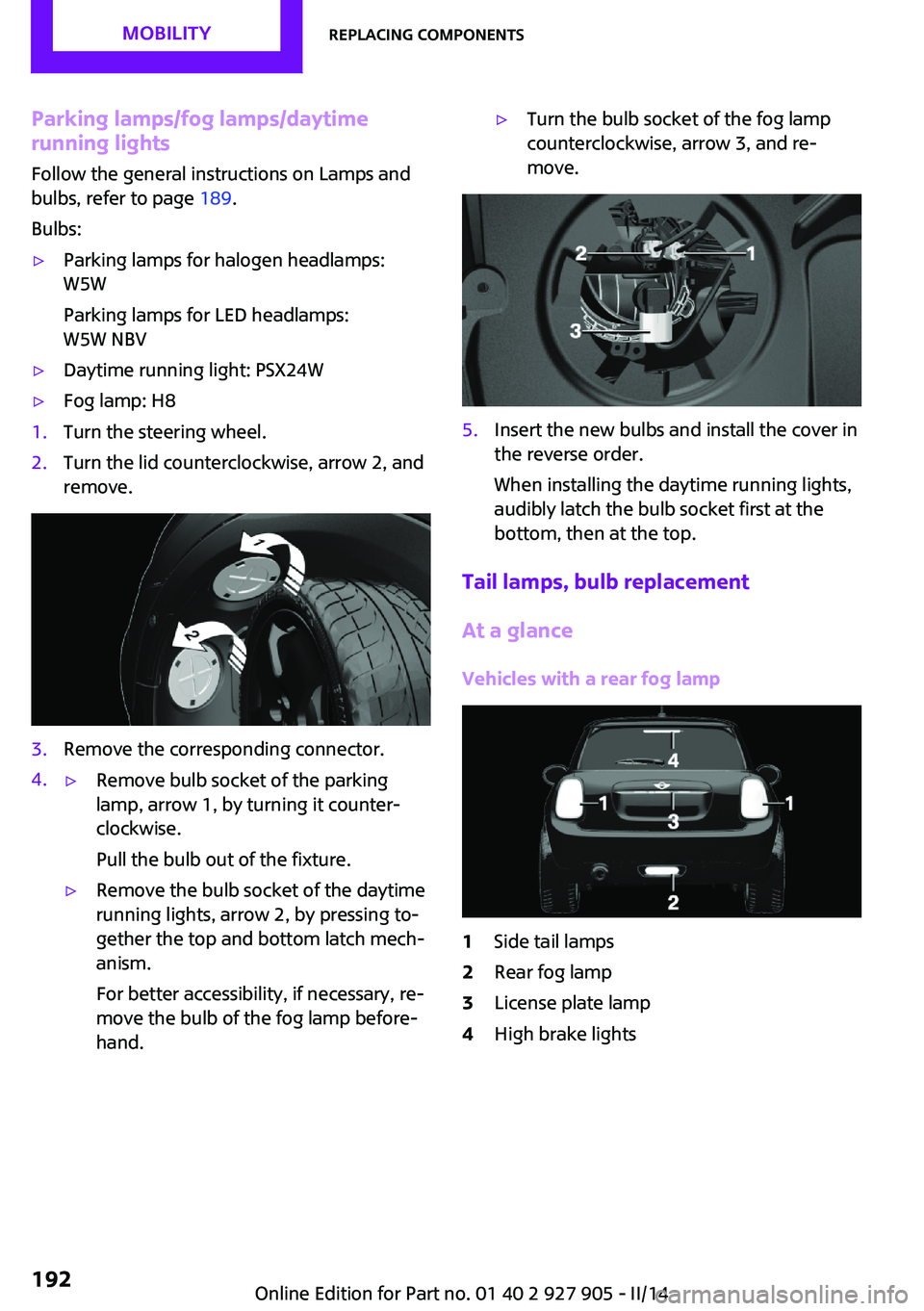
Parking lamps/fog lamps/daytime
running lights
Follow the general instructions on Lamps and
bulbs, refer to page 189.
Bulbs:▷Parking lamps for halogen headlamps:
W5W
Parking lamps for LED headlamps:
W5W NBV▷Daytime running light: PSX24W▷Fog lamp: H81.Turn the steering wheel.2.Turn the lid counterclockwise, arrow 2, and
remove.3.Remove the corresponding connector.4.▷Remove bulb socket of the parking
lamp, arrow 1, by turning it counter‐
clockwise.
Pull the bulb out of the fixture.▷Remove the bulb socket of the daytime
running lights, arrow 2, by pressing to‐
gether the top and bottom latch mech‐
anism.
For better accessibility, if necessary, re‐
move the bulb of the fog lamp before‐
hand.▷Turn the bulb socket of the fog lamp
counterclockwise, arrow 3, and re‐
move.5.Insert the new bulbs and install the cover in
the reverse order.
When installing the daytime running lights,
audibly latch the bulb socket first at the
bottom, then at the top.
Tail lamps, bulb replacement
At a glance
Vehicles with a rear fog lamp
1Side tail lamps2Rear fog lamp3License plate lamp4High brake lightsSeite 192MOBILITYReplacing components192
Online Edition for Part no. 01 40 2 927 905 - II/14
Page 193 of 230
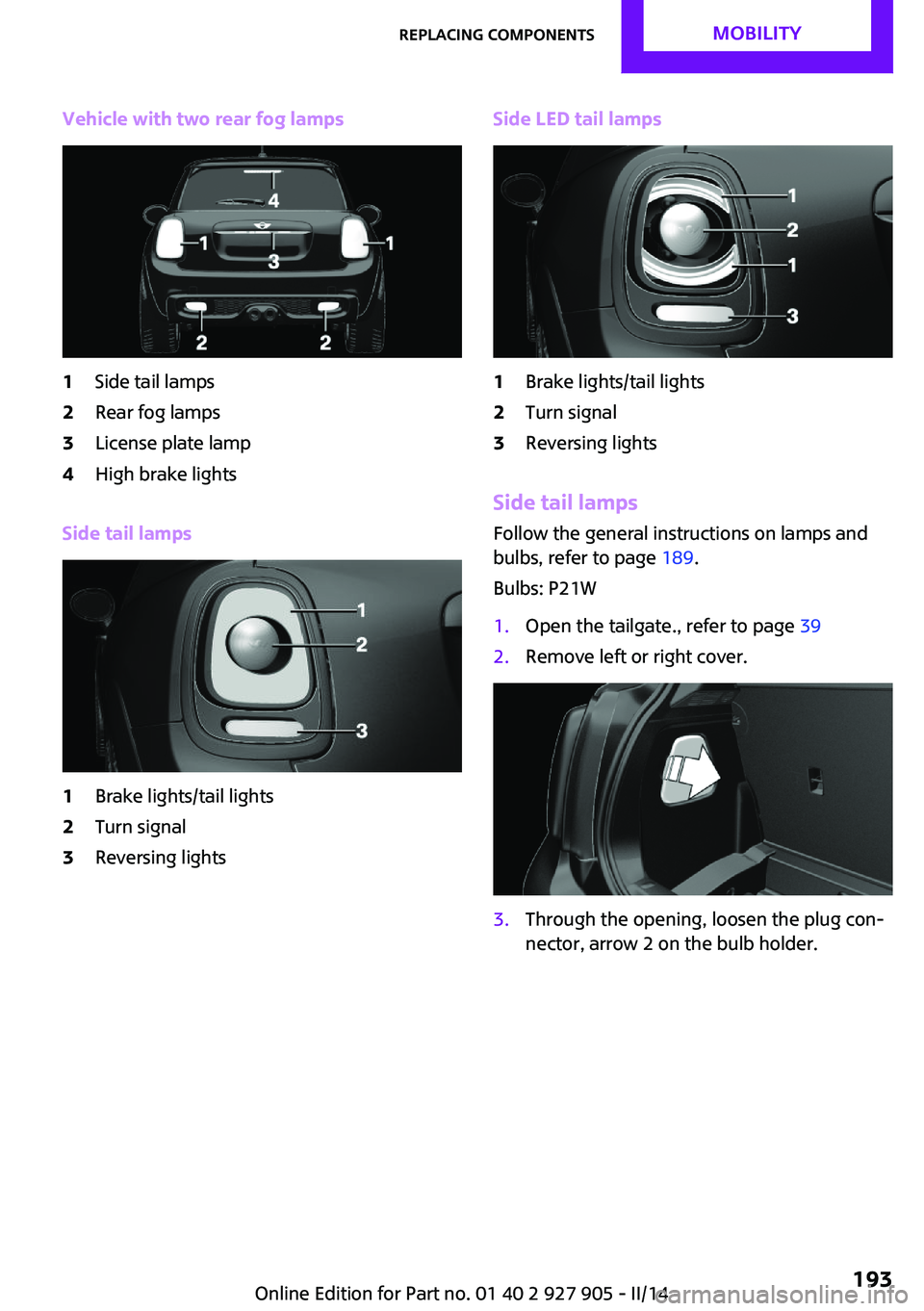
Vehicle with two rear fog lamps1Side tail lamps2Rear fog lamps3License plate lamp4High brake lights
Side tail lamps
1Brake lights/tail lights2Turn signal3Reversing lightsSide LED tail lamps1Brake lights/tail lights2Turn signal3Reversing lights
Side tail lampsFollow the general instructions on lamps and
bulbs, refer to page 189.
Bulbs: P21W
1.Open the tailgate., refer to page 392.Remove left or right cover.3.Through the opening, loosen the plug con‐
nector, arrow 2 on the bulb holder.Seite 193Replacing componentsMOBILITY193
Online Edition for Part no. 01 40 2 927 905 - II/14
Page 194 of 230
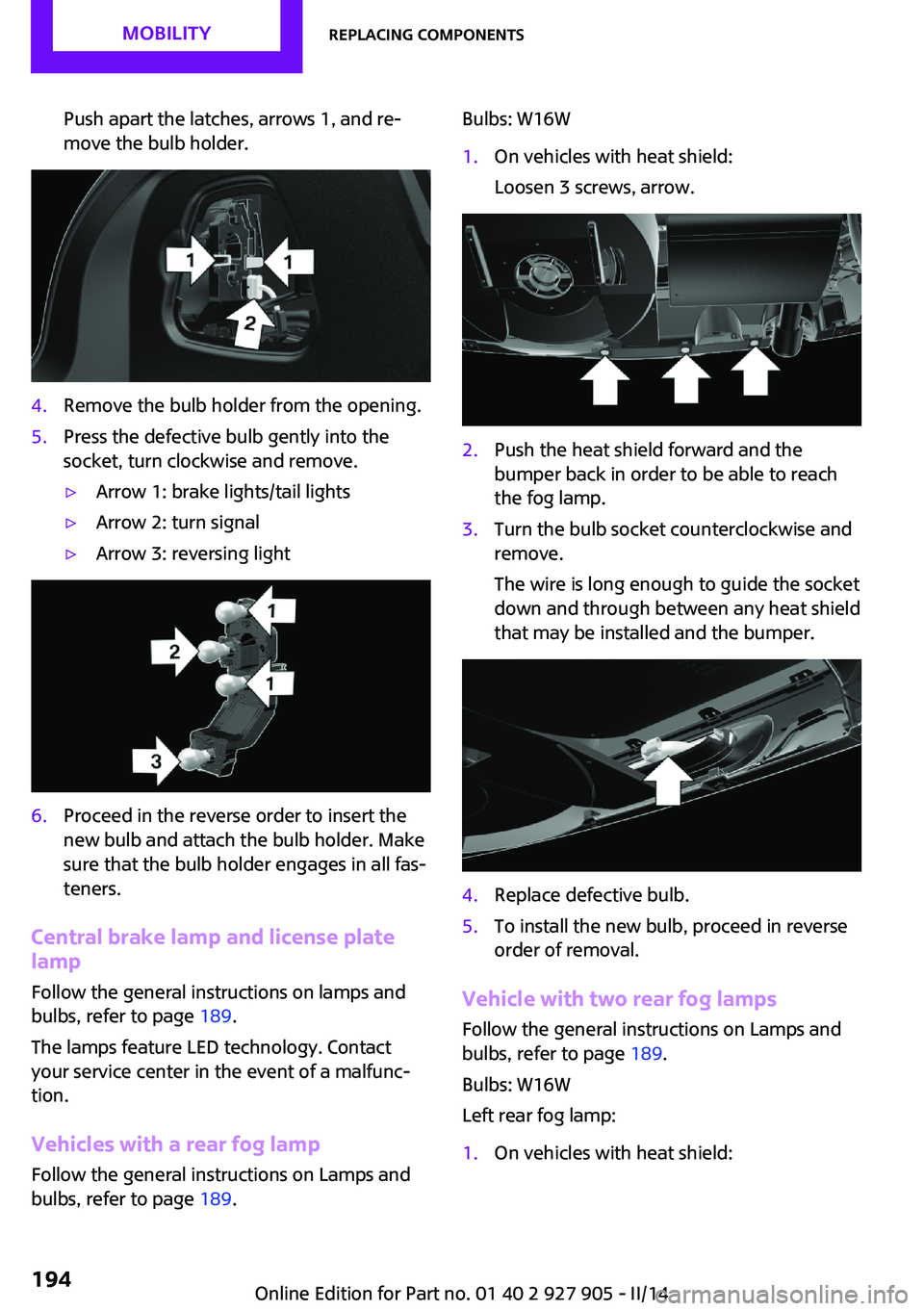
Push apart the latches, arrows 1, and re‐
move the bulb holder.4.Remove the bulb holder from the opening.5.Press the defective bulb gently into the
socket, turn clockwise and remove.▷Arrow 1: brake lights/tail lights▷Arrow 2: turn signal▷Arrow 3: reversing light6.Proceed in the reverse order to insert the
new bulb and attach the bulb holder. Make
sure that the bulb holder engages in all fas‐
teners.
Central brake lamp and license plate
lamp
Follow the general instructions on lamps and
bulbs, refer to page 189.
The lamps feature LED technology. Contact your service center in the event of a malfunc‐
tion.
Vehicles with a rear fog lamp
Follow the general instructions on Lamps and
bulbs, refer to page 189.
Bulbs: W16W1.On vehicles with heat shield:
Loosen 3 screws, arrow.2.Push the heat shield forward and the
bumper back in order to be able to reach
the fog lamp.3.Turn the bulb socket counterclockwise and
remove.
The wire is long enough to guide the socket
down and through between any heat shield
that may be installed and the bumper.4.Replace defective bulb.5.To install the new bulb, proceed in reverse
order of removal.
Vehicle with two rear fog lamps
Follow the general instructions on Lamps and
bulbs, refer to page 189.
Bulbs: W16W
Left rear fog lamp:
1.On vehicles with heat shield:Seite 194MOBILITYReplacing components194
Online Edition for Part no. 01 40 2 927 905 - II/14
Page 222 of 230

Direction indicator, refer toTurn signals 64
Display, electronic, instrument cluster 72
Display lighting, refer to In‐ strument lighting 89
Displays 71
Displays, cleaning 210
Disposal, coolant 185
Disposal, vehicle battery 199
Distance control, refer to PDC 118
Distance to destination 80
Divided screen view, split screen 23
Door lock, refer to Remote control 34
Drive mode, GREEN mode 156
Drive-off assistant 109
Drive-off assistant, refer to DSC 106
Driving Dynamics Control 108
Driving Excitement, SPORT 80
Driving instruction, GREEN mode 158
Driving instructions, breaking in 148
Driving mode 108
Driving notes, general 148
Driving stability control sys‐ tems 106
Driving style analysis 160
Driving tips 148
DSC Dynamic Stability Con‐ trol 106
DTC Dynamic Traction Con‐ trol 107
Dynamic Damping Con‐ trol 107
Dynamic Stability Control DSC 106
Dynamic Traction Control DTC 107 E
Electronic displays, instrument cluster 72
Electronic Stability Program ESP, refer to DSC 106
Emergency detection, remote control 35
Emergency release, fuel filler flap 164
Emergency Request 201
Emergency service, refer to Roadside Assistance 202
Emergency start function, en‐ gine start 35
Emergency unlocking, door lock 39
Energy Control 75
Engine, automatic Start/Stop function 61
Engine, automatic switch- off 61
Engine compartment 180
Engine compartment, working in 180
Engine coolant 185
Engine idling when driving, coasting 159
Engine oil 182
Engine oil, adding 183
Engine oil additives 183
Engine oil change 184
Engine oil filler neck 183
Engine oil temperature 74
Engine oil types, alterna‐ tive 184
Engine oil types, ap‐ proved 184
Engine start during malfunc‐ tion 35
Engine start, jump-start‐ ing 202
Engine start, refer to Starting the engine 60
Engine stop 60
Engine temperature 74 Entering a car wash 207
Equipment, interior 133
ESP Electronic Stability Pro‐ gram, refer to DSC 106
Exchanging wheels/tires 173
Exhaust system 149
Exterior mirror, automatic dimming feature 53
Exterior mirrors 52
External start 202
External temperature dis‐ play 75
External temperature warn‐ ing 75
Eyes for securing cargo 152
F
Failure message, refer to Check Control 72
False alarm, refer to Uninten‐ tional alarm 43
Fan, refer to Air flow 128, 130
Fault displays, refer to Check Control 72
Favorites buttons, onboard monitor 24
Filler neck for engine oil 183
Fine wood, care 209
First aid kit 202
Fitting for towing, refer to Tow fitting 205
Flat tire, changing wheels 196
Flat Tire Monitor FTM 97
Flat tire, repairing 175
Flat tire, Tire Pressure Monitor TPM 94
Flat tire, warning lamp 95, 98
Flooding 149
Floor carpet, care 210
Floor mats, care 210
Fogged up windows 128
Fold-out position, windshield wipers 66
Foot brake 149
Front airbags 91 Seite 222REFERENCEEverything from A to Z222
Online Edition for Part no. 01 40 2 927 905 - II/14
Page 223 of 230

Front fog lamps 89
Front passenger airbags, auto‐ matic deactivation 93
Front passenger airbags, indi‐ cator lamp 93
FTM Flat Tire Monitor 97
Fuel 166
Fuel cap 164
Fuel consumption, current 75
Fuel consumption, refer to Average fuel consump‐
tion 79
Fuel filler flap 164
Fuel gauge 74
Fuel quality 166
Fuel recommendation 166
Fuel, tank capacity 215
Fuse 199
G Garage door opener, refer to Universal garage door
opener 133
Gasoline 166
Gear change, automatic trans‐ mission 68
Gear shift indicator 76
General driving notes 148
Glass sunroof, refer to Panor‐ amic glass sunroof 45
Glove compartment 141
GREEN mode 156
GREEN mode, bonus range 158
GREEN mode driving style analysis 160
GREEN mode indicator 156
GREEN - program, driving dy‐ namics 108
GREEN tip 158
Gross vehicle weight, ap‐ proved 214
Ground clearance 150 H
Halogen headlamps 190
Handbrake, refer to parking brake 63
Hand-held transmitter, alter‐ nating code 134
Hazard warning flashers 201
Head airbags 91
Headlamp control, auto‐ matic 87
Headlamp courtesy delay fea‐ ture 87
Headlamp flasher 64
Headlamp glass 189
Headlamps, care 208
Headlamp washer system 64
Headliner 17
Head restraints 47
Head restraints, front 50
Head restraints, rear 51
Head-up Display 83
Head-up Display, standard view 84
Heavy cargo, stowing 152
High-beam Assistant 88
High beams 64
High beams/low beams, refer to High-beam Assistant 88
Hills 150
Hill start assistant, refer to Drive-off assistant 109
Hints 6
Holder for beverages 142
Homepage 6
Hood 180
Horn 14
Hot exhaust system 149
HUD Head-up Display 83
Hydroplaning 149
I
Ice warning, see External tem‐ perature warning 75 Icy roads, see External tem‐
perature warning 75
Identification marks, tires 171
Identification number, refer to Important features in the en‐
gine compartment 180
Ignition key, refer to Remote control 34
Ignition off 59
Ignition on 59
Illuminated ring, central in‐ strument cluster 82
Indication of a flat tire 95, 98
Individual air distribu‐ tion 128, 130
Individual settings, refer to Personal Profile 35
Inflation pressure, tires 168
Inflation pressure warning, tires 97
Info display, refer to Com‐ puter 79
Initialize, Tire Pressure Moni‐ tor TPM 95
Initializing, Flat Tire Monitor FTM 98
Instrument cluster 71
Instrument cluster, electronic displays 72
Instrument lighting 89
Integrated key 34
Intelligent Emergency Re‐ quest 201
Intelligent Safety 99
Intensity, AUTO program 130
Interior equipment 133
Interior lamps 89
Interior lamps via remote con‐ trol 37
Interior motion sensor 43
Interior rearview mirror, auto‐ matic dimming feature 53
Interior rearview mirror, com‐ pass 135
Interior rearview mirror, man‐ ually dimmable 53 Seite 223Everything from A to ZREFERENCE223
Online Edition for Part no. 01 40 2 927 905 - II/14