instrument cluster MINI COOPER 2014 Owner's Guide
[x] Cancel search | Manufacturer: MINI, Model Year: 2014, Model line: COOPER, Model: MINI COOPER 2014Pages: 230, PDF Size: 11.58 MB
Page 116 of 230
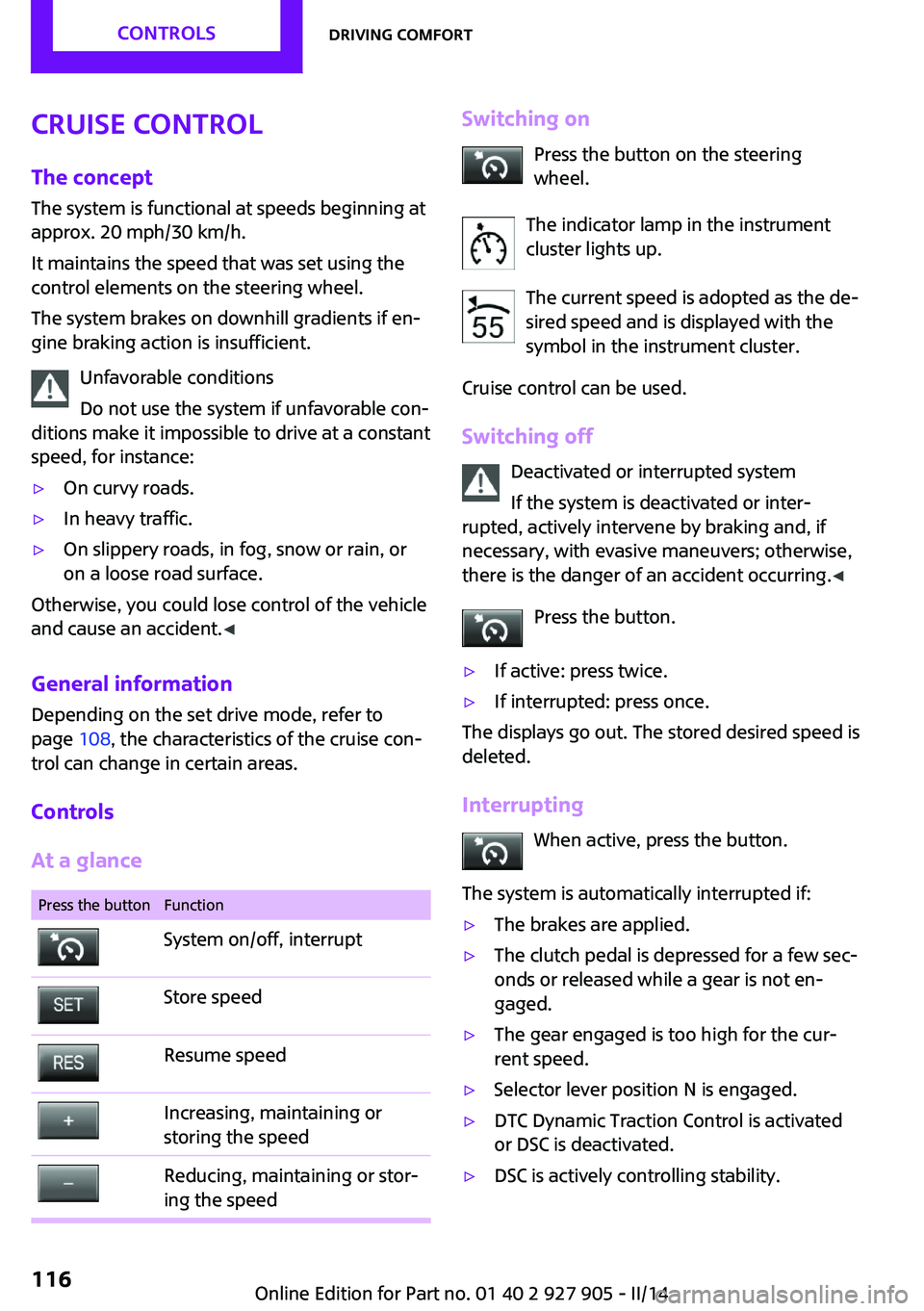
Cruise controlThe concept
The system is functional at speeds beginning at
approx. 20 mph/30 km/h.
It maintains the speed that was set using the
control elements on the steering wheel.
The system brakes on downhill gradients if en‐
gine braking action is insufficient.
Unfavorable conditions
Do not use the system if unfavorable con‐
ditions make it impossible to drive at a constant
speed, for instance:▷On curvy roads.▷In heavy traffic.▷On slippery roads, in fog, snow or rain, or
on a loose road surface.
Otherwise, you could lose control of the vehicle
and cause an accident. ◀
General information
Depending on the set drive mode, refer to
page 108, the characteristics of the cruise con‐
trol can change in certain areas.
Controls
At a glance
Press the buttonFunctionSystem on/off, interruptStore speedResume speedIncreasing, maintaining or
storing the speedReducing, maintaining or stor‐
ing the speedSwitching on
Press the button on the steering
wheel.
The indicator lamp in the instrument
cluster lights up.
The current speed is adopted as the de‐
sired speed and is displayed with the
symbol in the instrument cluster.
Cruise control can be used.
Switching off Deactivated or interrupted system
If the system is deactivated or inter‐
rupted, actively intervene by braking and, if
necessary, with evasive maneuvers; otherwise,
there is the danger of an accident occurring. ◀
Press the button.▷If active: press twice.▷If interrupted: press once.
The displays go out. The stored desired speed is
deleted.
Interrupting When active, press the button.
The system is automatically interrupted if:
▷The brakes are applied.▷The clutch pedal is depressed for a few sec‐
onds or released while a gear is not en‐
gaged.▷The gear engaged is too high for the cur‐
rent speed.▷Selector lever position N is engaged.▷DTC Dynamic Traction Control is activated
or DSC is deactivated.▷DSC is actively controlling stability.Seite 116CONTROLSDriving comfort116
Online Edition for Part no. 01 40 2 927 905 - II/14
Page 117 of 230
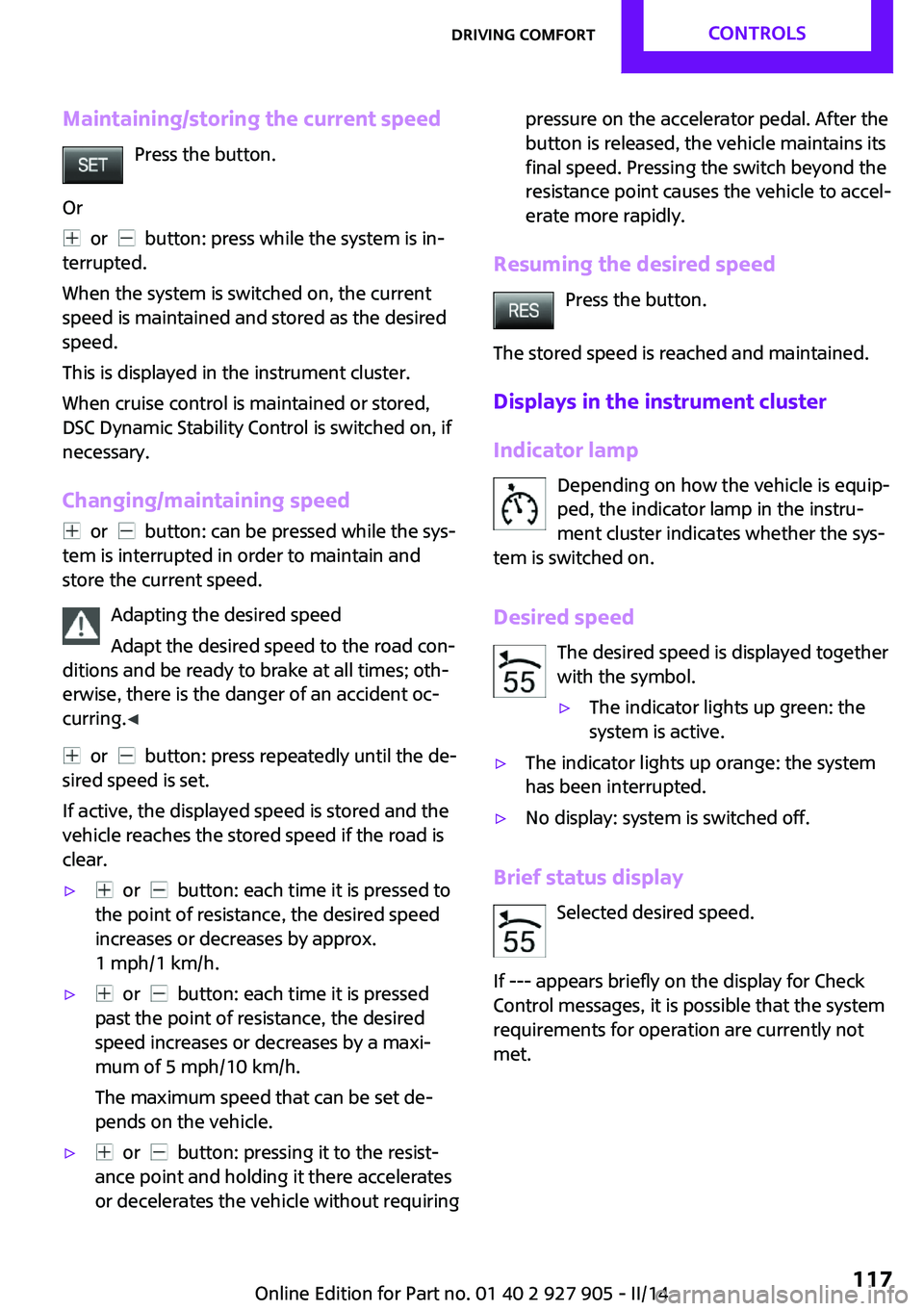
Maintaining/storing the current speedPress the button.
Or
or button: press while the system is in‐
terrupted.
When the system is switched on, the current
speed is maintained and stored as the desired
speed.
This is displayed in the instrument cluster.
When cruise control is maintained or stored,
DSC Dynamic Stability Control is switched on, if
necessary.
Changing/maintaining speed
or button: can be pressed while the sys‐
tem is interrupted in order to maintain and
store the current speed.
Adapting the desired speed
Adapt the desired speed to the road con‐
ditions and be ready to brake at all times; oth‐
erwise, there is the danger of an accident oc‐
curring. ◀
or button: press repeatedly until the de‐
sired speed is set.
If active, the displayed speed is stored and the
vehicle reaches the stored speed if the road is
clear.
▷ or button: each time it is pressed to
the point of resistance, the desired speed
increases or decreases by approx.
1 mph/1 km/h.▷ or button: each time it is pressed
past the point of resistance, the desired
speed increases or decreases by a maxi‐
mum of 5 mph/10 km/h.
The maximum speed that can be set de‐
pends on the vehicle.▷ or button: pressing it to the resist‐
ance point and holding it there accelerates
or decelerates the vehicle without requiringpressure on the accelerator pedal. After the
button is released, the vehicle maintains its
final speed. Pressing the switch beyond the
resistance point causes the vehicle to accel‐
erate more rapidly.
Resuming the desired speed
Press the button.
The stored speed is reached and maintained.
Displays in the instrument cluster
Indicator lamp Depending on how the vehicle is equip‐
ped, the indicator lamp in the instru‐
ment cluster indicates whether the sys‐
tem is switched on.
Desired speed The desired speed is displayed together
with the symbol.
▷The indicator lights up green: the
system is active.▷The indicator lights up orange: the system
has been interrupted.▷No display: system is switched off.
Brief status display
Selected desired speed.
If --- appears briefly on the display for Check
Control messages, it is possible that the system
requirements for operation are currently not met.
Seite 117Driving comfortCONTROLS117
Online Edition for Part no. 01 40 2 927 905 - II/14
Page 120 of 230

▷In heavy rain.▷When sensors are very dirty or covered in
ice.▷When sensors are covered in snow.▷On rough road surfaces.▷On uneven surfaces, such as speed bumps.▷In large buildings with right angles and
smooth walls, e.g., in underground garages.▷In heavy exhaust.▷Due to other ultrasound sources, e.g.,
sweeping machines, high pressure steam
cleaners or neon lights.
The malfunction is signaled by a continuous
tone alternating between the front and rear
speakers. As soon as the malfunction due
to other ultrasound sources is no longer
present, the system is again fully functional.
Malfunction
A Check Control message, refer to page 72, is
displayed in the instrument cluster.
Red symbol is displayed, and the range
of the sensors is darkly displayed on the
Control Display.
PDC has failed. Have the system checked.
To ensure full operability:
▷Keep the sensors clean and free of ice.▷Do not adhere any stickers to the sensors.▷When using high-pressure washers, do not
spray the sensors for long periods and
maintain a distance of at least 12 in/30 cm.
Rearview camera
The concept
The rearview camera provides assistance in
parking and maneuvering backwards. The area
behind the vehicle is shown on the Control Dis‐
play.
Hints
Check the traffic situation as well
Check the traffic situation around the ve‐
hicle with your own eyes. Otherwise, an acci‐
dent could result from road users or objects lo‐
cated outside the picture area of the backup
camera. ◀
At a glance
Button in the vehicle
Rearview camera
Camera
The camera lens is located in the handle of the
tailgate. The image quality may be impaired by
dirt.
Clean the lens, refer to page 210.
Seite 120CONTROLSDriving comfort120
Online Edition for Part no. 01 40 2 927 905 - II/14
Page 158 of 230
Display in the instrument cluster
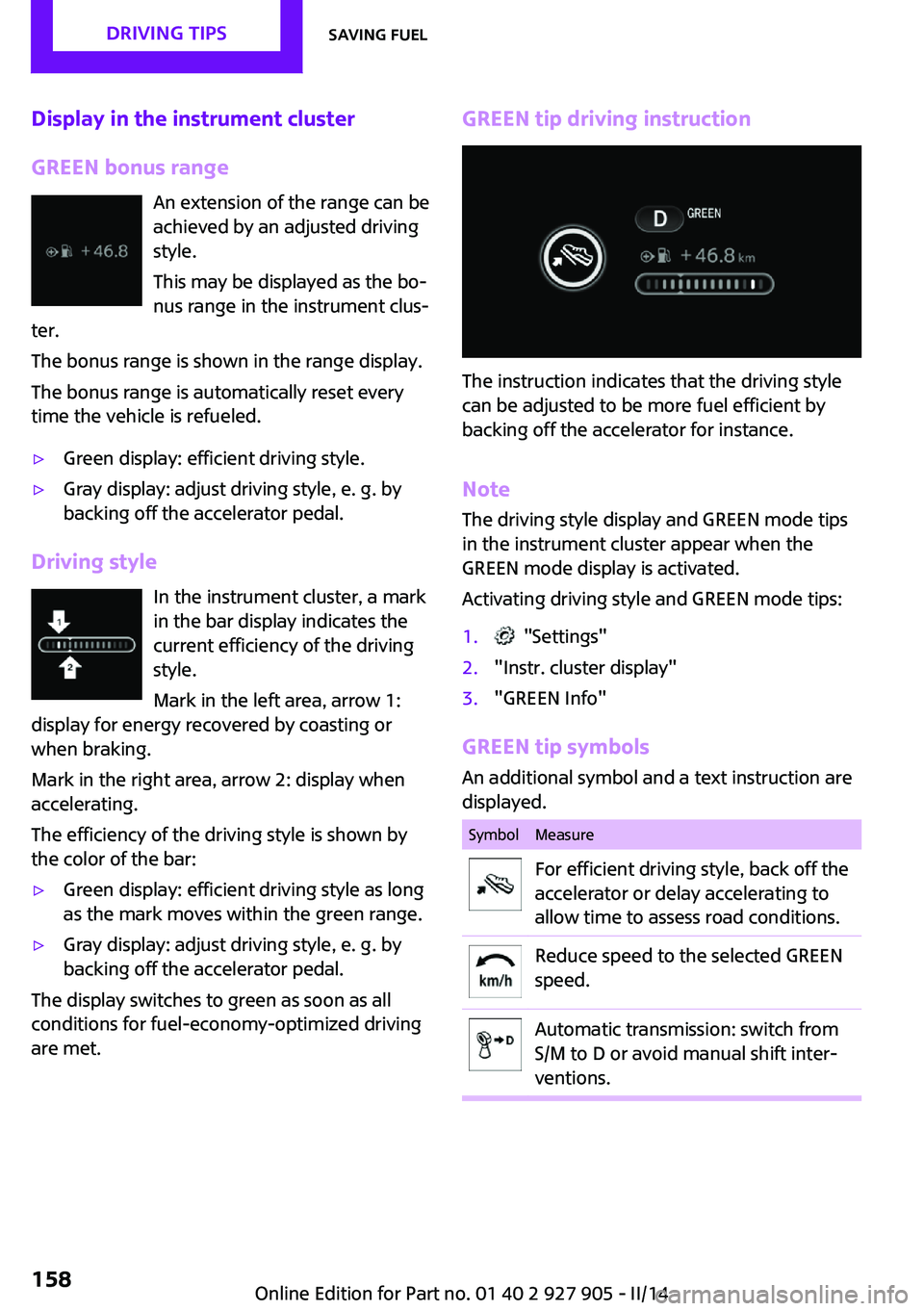
GREEN bonus range An extension of the range can be
achieved by an adjusted driving
style.
This may be displayed as the bo‐
nus range in the instrument clus‐
ter.
The bonus range is shown in the range display.
The bonus range is automatically reset every
time the vehicle is refueled.▷Green display: efficient driving style.▷Gray display: adjust driving style, e. g. by
backing off the accelerator pedal.
Driving style
In the instrument cluster, a mark
in the bar display indicates the
current efficiency of the driving
style.
Mark in the left area, arrow 1:
display for energy recovered by coasting or
when braking.
Mark in the right area, arrow 2: display when
accelerating.
The efficiency of the driving style is shown by
the color of the bar:
▷Green display: efficient driving style as long
as the mark moves within the green range.▷Gray display: adjust driving style, e. g. by
backing off the accelerator pedal.
The display switches to green as soon as all
conditions for fuel-economy-optimized driving
are met.
GREEN tip driving instruction
The instruction indicates that the driving style
can be adjusted to be more fuel efficient by
backing off the accelerator for instance.
Note
The driving style display and GREEN mode tips
in the instrument cluster appear when the
GREEN mode display is activated.
Activating driving style and GREEN mode tips:
1. "Settings"2."Instr. cluster display"3."GREEN Info"
GREEN tip symbols An additional symbol and a text instruction are
displayed.
SymbolMeasureFor efficient driving style, back off the
accelerator or delay accelerating to
allow time to assess road conditions.Reduce speed to the selected GREEN
speed.Automatic transmission: switch from
S/M to D or avoid manual shift inter‐
ventions.Seite 158DRIVING TIPSSaving fuel158
Online Edition for Part no. 01 40 2 927 905 - II/14
Page 160 of 230
Display
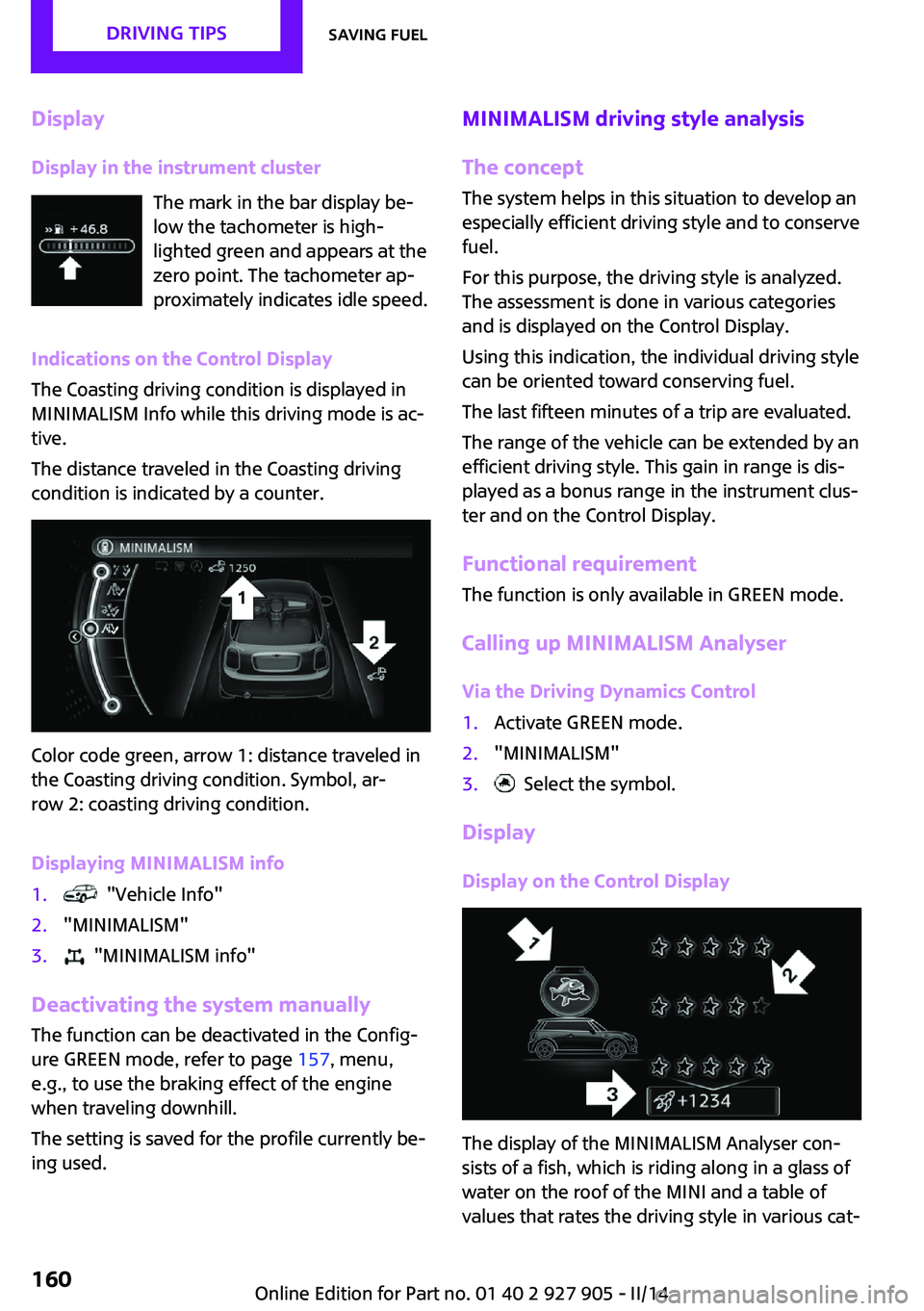
Display in the instrument cluster The mark in the bar display be‐
low the tachometer is high‐
lighted green and appears at the
zero point. The tachometer ap‐
proximately indicates idle speed.
Indications on the Control Display
The Coasting driving condition is displayed in
MINIMALISM Info while this driving mode is ac‐
tive.
The distance traveled in the Coasting driving
condition is indicated by a counter.
Color code green, arrow 1: distance traveled in
the Coasting driving condition. Symbol, ar‐
row 2: coasting driving condition.
Displaying MINIMALISM info
1. "Vehicle Info"2."MINIMALISM"3. "MINIMALISM info"
Deactivating the system manually The function can be deactivated in the Config‐
ure GREEN mode, refer to page 157, menu,
e.g., to use the braking effect of the engine
when traveling downhill.
The setting is saved for the profile currently be‐
ing used.
MINIMALISM driving style analysis
The concept
The system helps in this situation to develop an
especially efficient driving style and to conserve
fuel.
For this purpose, the driving style is analyzed.
The assessment is done in various categories
and is displayed on the Control Display.
Using this indication, the individual driving style
can be oriented toward conserving fuel.
The last fifteen minutes of a trip are evaluated.
The range of the vehicle can be extended by an
efficient driving style. This gain in range is dis‐
played as a bonus range in the instrument clus‐
ter and on the Control Display.
Functional requirement
The function is only available in GREEN mode.
Calling up MINIMALISM Analyser Via the Driving Dynamics Control1.Activate GREEN mode.2."MINIMALISM"3. Select the symbol.
Display
Display on the Control Display
The display of the MINIMALISM Analyser con‐
sists of a fish, which is riding along in a glass of
water on the roof of the MINI and a table of
values that rates the driving style in various cat‐
Seite 160DRIVING TIPSSaving fuel160
Online Edition for Part no. 01 40 2 927 905 - II/14
Page 183 of 230
During the measurement, the idle speed is in‐
creased somewhat.
Requirements▷Vehicle is on level road.▷Manual transmission: shift lever in neutral
position, clutch and accelerator pedals not
depressed.▷Automatic transmission: selector lever in
transmission position N or P and accelera‐
tor pedal not depressed.▷Engine is running and is at operating tem‐
perature.
Performing a detailed measurement
In order to perform a detailed measurement of
the engine oil level:
1."Vehicle Info"2."Vehicle status"3. "Measure engine oil level"4."Start measurement"
The oil level is checked and displayed via a
scale.
Duration: approx. 1 minute.
Adding engine oilGeneral information
Switch off the ignition and safely park the vehi‐
cle before engine oil is added.
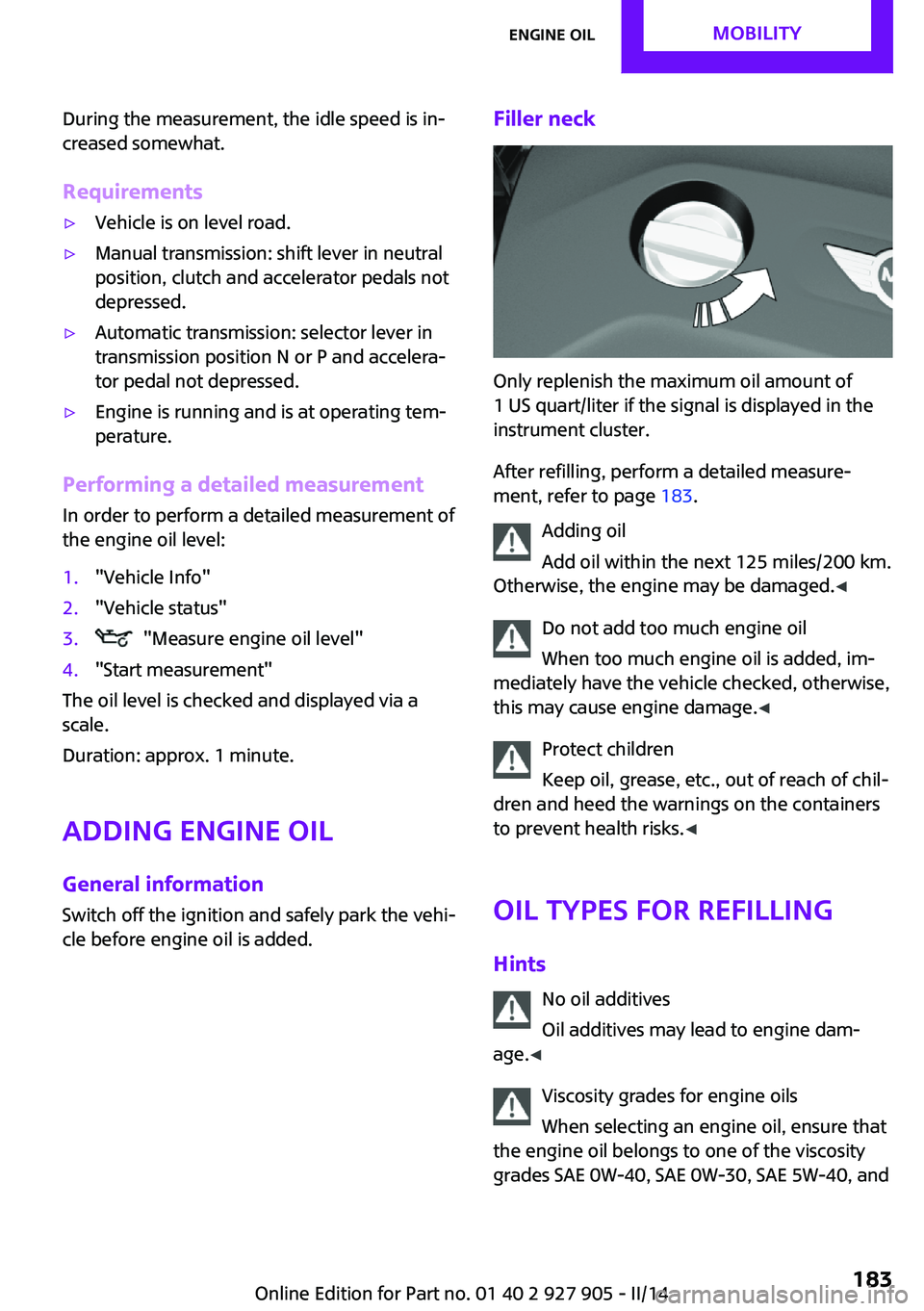
Filler neck
Only replenish the maximum oil amount of
1 US quart/liter if the signal is displayed in the
instrument cluster.
After refilling, perform a detailed measure‐
ment, refer to page 183.
Adding oil
Add oil within the next 125 miles/200 km.
Otherwise, the engine may be damaged. ◀
Do not add too much engine oil
When too much engine oil is added, im‐
mediately have the vehicle checked, otherwise,
this may cause engine damage. ◀
Protect children
Keep oil, grease, etc., out of reach of chil‐
dren and heed the warnings on the containers
to prevent health risks. ◀
Oil types for refilling
Hints No oil additives
Oil additives may lead to engine dam‐
age. ◀
Viscosity grades for engine oils
When selecting an engine oil, ensure that
the engine oil belongs to one of the viscosity
grades SAE 0W-40, SAE 0W-30, SAE 5W-40, and
Seite 183Engine oilMOBILITY183
Online Edition for Part no. 01 40 2 927 905 - II/14
Page 209 of 230
Use leather care products; otherwise, dirt and
grease will gradually break down the protective
layer of the leather surface.
Suitable care products are available from the
service center.
Upholstery material care
Vacuum regularly with a vacuum cleaner.
If they are very dirty, e.g., beverage stains, use
a soft sponge or microfiber cloth with a suitable
interior cleaner.
Clean the upholstery down to the seams using
large sweeping motions. Avoid rubbing the ma‐
terial vigorously.
Damage from Velcro® fasteners
Open Velcro® fasteners on pants or other
articles of clothing can damage the seat covers.
Ensure that any Velcro® fasteners are closed. ◀
Caring for special components Light-alloy wheels
When cleaning the vehicle, use only neutral
wheel cleaners having a pH value from 5 to 9.
Do not use abrasive cleaning agents or steam
jets above 140 ℉/60 ℃. Follow the manufac‐
turer's instructions.
Aggressive, acidic or alkaline cleaning agents
can destroy the protective layer of adjacent
components, such as the brake disk.
Chrome surfaces
Carefully clean components such as the radia‐
tor grille or door handles with an ample supply
of water, possibly with shampoo added, partic‐
ularly when they have been exposed to road
salt.
Rubber components Aside from water, treat only with rubber cleans‐
ers.When cleaning rubber seals, do not use any sili‐
con-containing car care products in order to
avoid damage or reduced noise damping.
Fine wood parts Clean fine wood facing and fine wood compo‐
nents only with a moist rag. Then dry with a
soft cloth.
Plastic components
These include:▷Imitation leather surfaces.▷Headliner.▷Lamp lenses.▷Instrument cluster cover.▷Matte black spray-coated components.▷Painted parts in the interior.
Clean with a microfiber cloth.
Lightly dampen the cloth with water.
Do not soak the headliner.
Do not use cleansers that contain alcohol
or solvents
Do not use cleansers that contain alcohol or
solvents, such as lacquer thinners, heavy-duty
grease removers, fuel, or such; this could lead
to surface damage. ◀
Safety belts
Dirty belt straps impede the reeling action and
thus have a negative impact on safety.
Chemical cleaning
Do not clean chemically; this can destroy
the webbing. ◀
Use only a mild soapy solution, with the safety
belts clipped into their buckles.
Do not allow the reels to retract the safety belts
until they are dry.
Seite 209CareMOBILITY209
Online Edition for Part no. 01 40 2 927 905 - II/14
Page 222 of 230

Direction indicator, refer toTurn signals 64
Display, electronic, instrument cluster 72
Display lighting, refer to In‐ strument lighting 89
Displays 71
Displays, cleaning 210
Disposal, coolant 185
Disposal, vehicle battery 199
Distance control, refer to PDC 118
Distance to destination 80
Divided screen view, split screen 23
Door lock, refer to Remote control 34
Drive mode, GREEN mode 156
Drive-off assistant 109
Drive-off assistant, refer to DSC 106
Driving Dynamics Control 108
Driving Excitement, SPORT 80
Driving instruction, GREEN mode 158
Driving instructions, breaking in 148
Driving mode 108
Driving notes, general 148
Driving stability control sys‐ tems 106
Driving style analysis 160
Driving tips 148
DSC Dynamic Stability Con‐ trol 106
DTC Dynamic Traction Con‐ trol 107
Dynamic Damping Con‐ trol 107
Dynamic Stability Control DSC 106
Dynamic Traction Control DTC 107 E
Electronic displays, instrument cluster 72
Electronic Stability Program ESP, refer to DSC 106
Emergency detection, remote control 35
Emergency release, fuel filler flap 164
Emergency Request 201
Emergency service, refer to Roadside Assistance 202
Emergency start function, en‐ gine start 35
Emergency unlocking, door lock 39
Energy Control 75
Engine, automatic Start/Stop function 61
Engine, automatic switch- off 61
Engine compartment 180
Engine compartment, working in 180
Engine coolant 185
Engine idling when driving, coasting 159
Engine oil 182
Engine oil, adding 183
Engine oil additives 183
Engine oil change 184
Engine oil filler neck 183
Engine oil temperature 74
Engine oil types, alterna‐ tive 184
Engine oil types, ap‐ proved 184
Engine start during malfunc‐ tion 35
Engine start, jump-start‐ ing 202
Engine start, refer to Starting the engine 60
Engine stop 60
Engine temperature 74 Entering a car wash 207
Equipment, interior 133
ESP Electronic Stability Pro‐ gram, refer to DSC 106
Exchanging wheels/tires 173
Exhaust system 149
Exterior mirror, automatic dimming feature 53
Exterior mirrors 52
External start 202
External temperature dis‐ play 75
External temperature warn‐ ing 75
Eyes for securing cargo 152
F
Failure message, refer to Check Control 72
False alarm, refer to Uninten‐ tional alarm 43
Fan, refer to Air flow 128, 130
Fault displays, refer to Check Control 72
Favorites buttons, onboard monitor 24
Filler neck for engine oil 183
Fine wood, care 209
First aid kit 202
Fitting for towing, refer to Tow fitting 205
Flat tire, changing wheels 196
Flat Tire Monitor FTM 97
Flat tire, repairing 175
Flat tire, Tire Pressure Monitor TPM 94
Flat tire, warning lamp 95, 98
Flooding 149
Floor carpet, care 210
Floor mats, care 210
Fogged up windows 128
Fold-out position, windshield wipers 66
Foot brake 149
Front airbags 91 Seite 222REFERENCEEverything from A to Z222
Online Edition for Part no. 01 40 2 927 905 - II/14
Page 223 of 230

Front fog lamps 89
Front passenger airbags, auto‐ matic deactivation 93
Front passenger airbags, indi‐ cator lamp 93
FTM Flat Tire Monitor 97
Fuel 166
Fuel cap 164
Fuel consumption, current 75
Fuel consumption, refer to Average fuel consump‐
tion 79
Fuel filler flap 164
Fuel gauge 74
Fuel quality 166
Fuel recommendation 166
Fuel, tank capacity 215
Fuse 199
G Garage door opener, refer to Universal garage door
opener 133
Gasoline 166
Gear change, automatic trans‐ mission 68
Gear shift indicator 76
General driving notes 148
Glass sunroof, refer to Panor‐ amic glass sunroof 45
Glove compartment 141
GREEN mode 156
GREEN mode, bonus range 158
GREEN mode driving style analysis 160
GREEN mode indicator 156
GREEN - program, driving dy‐ namics 108
GREEN tip 158
Gross vehicle weight, ap‐ proved 214
Ground clearance 150 H
Halogen headlamps 190
Handbrake, refer to parking brake 63
Hand-held transmitter, alter‐ nating code 134
Hazard warning flashers 201
Head airbags 91
Headlamp control, auto‐ matic 87
Headlamp courtesy delay fea‐ ture 87
Headlamp flasher 64
Headlamp glass 189
Headlamps, care 208
Headlamp washer system 64
Headliner 17
Head restraints 47
Head restraints, front 50
Head restraints, rear 51
Head-up Display 83
Head-up Display, standard view 84
Heavy cargo, stowing 152
High-beam Assistant 88
High beams 64
High beams/low beams, refer to High-beam Assistant 88
Hills 150
Hill start assistant, refer to Drive-off assistant 109
Hints 6
Holder for beverages 142
Homepage 6
Hood 180
Horn 14
Hot exhaust system 149
HUD Head-up Display 83
Hydroplaning 149
I
Ice warning, see External tem‐ perature warning 75 Icy roads, see External tem‐
perature warning 75
Identification marks, tires 171
Identification number, refer to Important features in the en‐
gine compartment 180
Ignition key, refer to Remote control 34
Ignition off 59
Ignition on 59
Illuminated ring, central in‐ strument cluster 82
Indication of a flat tire 95, 98
Individual air distribu‐ tion 128, 130
Individual settings, refer to Personal Profile 35
Inflation pressure, tires 168
Inflation pressure warning, tires 97
Info display, refer to Com‐ puter 79
Initialize, Tire Pressure Moni‐ tor TPM 95
Initializing, Flat Tire Monitor FTM 98
Instrument cluster 71
Instrument cluster, electronic displays 72
Instrument lighting 89
Integrated key 34
Intelligent Emergency Re‐ quest 201
Intelligent Safety 99
Intensity, AUTO program 130
Interior equipment 133
Interior lamps 89
Interior lamps via remote con‐ trol 37
Interior motion sensor 43
Interior rearview mirror, auto‐ matic dimming feature 53
Interior rearview mirror, com‐ pass 135
Interior rearview mirror, man‐ ually dimmable 53 Seite 223Everything from A to ZREFERENCE223
Online Edition for Part no. 01 40 2 927 905 - II/14
Page 224 of 230

Internet site 6
Interval display, service re‐ quirements 76
J
Jacking points for the vehicle jack 196
Joystick, automatic transmis‐ sion 68
Jump-starting 202
K Key/remote control 34
Keyless Go, refer to Comfort Access 40
Key Memory, refer to Personal Profile 35
Kickdown, automatic trans‐ mission 68
Knee airbag 91
L Lamp replacement 189
Lamp replacement, front 190
Lamp replacement, rear 192
Lamp replacement, side 195
Lamps and bulbs 189
Language on Control Dis‐ play 82
Lashing eyes, securing cargo 152
LATCH child restraint fixing system 56
Launch Control 70
Leather, care 208
LED bug light 190
LED headlamps 190
LED ring, central instrument cluster 82
LEDs, light-emitting di‐ odes 189
Left-hand traffic, lamp set‐ ting 89 Letters and numbers, enter‐
ing 24
Light 86
Light-alloy wheels, care 209
Light-emitting diodes, LEDs 189
Lighter 138
Lighting 86
Lighting via remote con‐ trol 37
Light switch 86
Load 152
Loading 151
Lock, door 38
Locking/unlocking via door lock 38
Locking/unlocking with re‐ mote control 37
Locking, automatic 42
Locking, settings 42
Low beams 86
Low beams, automatic, refer to High-beam Assistant 88
Lower back support, mechani‐ cal 48
Lug bolt lock 198
Luggage rack, refer to Roof- mounted luggage rack 152
Lumbar support, mechani‐ cal 48
M
Maintenance 186
Maintenance require‐ ments 186
Maintenance, service require‐ ments 76
Maintenance system, MINI 186
Malfunction displays, refer to Check Control 72
Manual air distribu‐ tion 128, 130
Manual air flow 128, 130 Manual mode, transmis‐
sion 68
Manual operation, door lock 38
Manual operation, exterior mirrors 52
Manual operation, fuel filler flap 164
Manual operation, Park Dis‐ tance Control PDC 119
Manual operation, rearview camera 121
Manual transmission 67
Manufacturer of the MINI 7
Marking on approved tires 174
Marking, run-flat tires 175
Master key, refer to Remote control 34
Maximum cooling 130
Maximum speed, display 77
Maximum speed, winter tires 174
Measure, units of 82
Medical kit 202
Menu in instrument cluster 78
Menus, refer to onboard mon‐ itor operating concept 20
Microfilter 129, 132
MID - program, driving dy‐ namics 108
MINI Connected, refer to Integrated Owner's Manual
MINI maintenance sys‐ tem 186
MINIMALISM Analyser 160
MINIMALISM info 159
Minimum tread, tires 172
Mirrors 52
Mobile communication devi‐ ces in the vehicle 149
Mobility System 175
Mode, GREEN Mode 156
Modifications, technical, refer to Safety 7
Moisture in headlamp 189 Seite 224REFERENCEEverything from A to Z224
Online Edition for Part no. 01 40 2 927 905 - II/14