wheel MINI COOPER 2014 Repair Manual
[x] Cancel search | Manufacturer: MINI, Model Year: 2014, Model line: COOPER, Model: MINI COOPER 2014Pages: 230, PDF Size: 11.58 MB
Page 198 of 230

Wheel mounting1.Unscrew the wheel lug bolts and remove
the wheel.2.Put the new wheel or compact wheel on
and screw in at least two bolts.
If original MINI light alloy wheels are not
mounted, any accompanying lug bolts also
have to be used.3.Screw in the remaining the lug bolts and
tighten all bolts well in a crosswise pattern.4.Lower the vehicle and remove the vehicle
jack.
After the wheel change
1.Tighten the lug bolts crosswise. The tight‐
ening torque is 101 lb ft/140 Nm.
Check for secure seating of the lug
bolts
For safety reasons, have the secure seating
of the lug bolts checked with a calibrated
torque wrench; otherwise, a safety hazard
results from incorrectly tightened lug
bolts. ◀2.Stow the defective wheel in the cargo area.
The defective wheel cannot be stored in the
compact wheel bracket because of its size.3.Check tire inflation pressure at the next op‐
portunity and correct as needed.4.Reinitialize the Flat Tire Monitor, refer to
page 98.
Reinitialize the Tire Pressure Monitor, refer
to page 95.5.Replace the damaged tires as soon as pos‐
sible.
Driving with the compact wheel
Watch the speed when driving with the
compact wheel
Drive conservatively and do not exceed a speed
of 50 mph/80 km/h; otherwise, changed driving
characteristics such as reduced lane stability
while braking, extended braking distance and
changed self-steering properties in the limit
area. ◀
Mounting only one compact wheel
Only a single compact wheel may be
mounted. Reinstall wheels and tires of the orig‐
inal size as quickly as possible; otherwise, there
is a safety risk. ◀
Lug bolt lock
The adapter of the lug bolt lock is located in the
onboard vehicle tool kit, refer to page 188.▷Lug bolt, arrow 1.▷Adapter, arrow 2.
Removing
1.Attach the adapter to the wheel lug.2.Unscrew the lug bolt.
Remove the adapter after screwing the lug bolt
back on.
Vehicle battery
Maintenance
The battery is maintenance-free, i.e., the elec‐
trolyte will last for the life of the battery.
Your service center will be glad to advise you
on questions regarding the battery.
Seite 198MOBILITYReplacing components198
Online Edition for Part no. 01 40 2 927 905 - II/14
Page 203 of 230

The so-called starting aid terminal in the engine
compartment acts as the battery's positive ter‐
minal.
Open the cap of the starting aid terminal.
The body ground acts as the negative terminal
of the battery.
Connecting the cables
1.Pull off the cap of the starting aid terminal.2.Attach one terminal clamp of the positive
jumper cable to the positive terminal of the
battery, or to the corresponding starting aid
terminal of the vehicle providing assistance.3.Attach the terminal clamp on the other end
of the cable to the positive terminal of the
battery, or to the corresponding starting aid
terminal of the vehicle to be started.4.Attach one terminal clamp of the negative
jumper cable to the negative terminal of
the battery, or to the corresponding engine
or body ground of assisting vehicle.5.Attach the second terminal clamp to the
negative terminal of the battery, or to thecorresponding engine or body ground of
the vehicle to be started.
Starting the engine
Never use spray fluids to start the engine.
1.Start the engine of the assisting vehicle and
let it run for several minutes at an increased
idle speed.
If the vehicle to be started has a diesel en‐
gine: let the engine of the assisting vehicle
run for approx. 10 minutes.2.Start the engine of the vehicle to be started
in the usual way.
If the first starting attempt is not successful,
wait a few minutes before making another
attempt in order to allow the discharged
battery to recharge.3.Let both engines run for several minutes.4.Disconnect the jumper cables in the reverse
order.
Check the battery and recharge if necessary.
Tow-starting and towing
Note Tow-starting and towing
When tow-starting and towing the vehi‐
cle, switch off the Intelligent Safety systems;
otherwise, improper behavior of the braking
function of individual systems could result in an
accident. ◀
Switching off Intelligent Safety systems, refer to
page 99.
Automatic transmission: transporting your vehicle
Note Your vehicle must not be towed if the front
wheels are touching the ground. Therefore,
Seite 203Breakdown assistanceMOBILITY203
Online Edition for Part no. 01 40 2 927 905 - II/14
Page 204 of 230
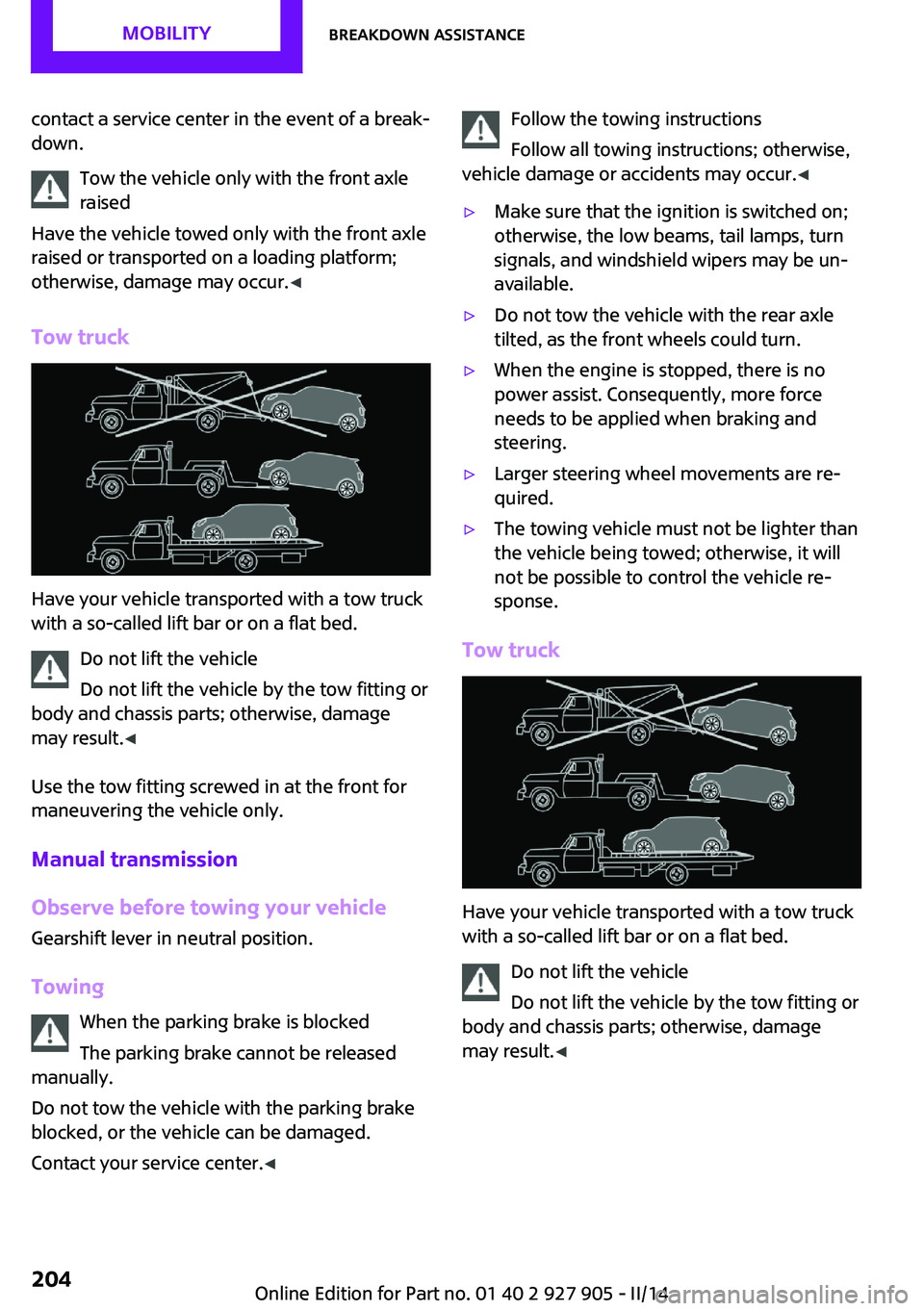
contact a service center in the event of a break‐
down.
Tow the vehicle only with the front axle
raised
Have the vehicle towed only with the front axle
raised or transported on a loading platform;
otherwise, damage may occur. ◀
Tow truck
Have your vehicle transported with a tow truck
with a so-called lift bar or on a flat bed.
Do not lift the vehicle
Do not lift the vehicle by the tow fitting or
body and chassis parts; otherwise, damage
may result. ◀
Use the tow fitting screwed in at the front for
maneuvering the vehicle only.
Manual transmission
Observe before towing your vehicle Gearshift lever in neutral position.
Towing When the parking brake is blocked
The parking brake cannot be released
manually.
Do not tow the vehicle with the parking brake
blocked, or the vehicle can be damaged.
Contact your service center. ◀
Follow the towing instructions
Follow all towing instructions; otherwise,
vehicle damage or accidents may occur. ◀▷Make sure that the ignition is switched on;
otherwise, the low beams, tail lamps, turn
signals, and windshield wipers may be un‐
available.▷Do not tow the vehicle with the rear axle
tilted, as the front wheels could turn.▷When the engine is stopped, there is no
power assist. Consequently, more force
needs to be applied when braking and
steering.▷Larger steering wheel movements are re‐
quired.▷The towing vehicle must not be lighter than
the vehicle being towed; otherwise, it will
not be possible to control the vehicle re‐
sponse.
Tow truck
Have your vehicle transported with a tow truck
with a so-called lift bar or on a flat bed.
Do not lift the vehicle
Do not lift the vehicle by the tow fitting or
body and chassis parts; otherwise, damage
may result. ◀
Seite 204MOBILITYBreakdown assistance204
Online Edition for Part no. 01 40 2 927 905 - II/14
Page 207 of 230

CareVehicle equipmentAll standard, country-specific and optional
equipment that is offered in the model series is
described in this chapter. Therefore, equipment
is also described that is not available in a vehi‐
cle, e. g., because of the selected optional
equipment or country variant. This also applies
for safety-related functions and systems.
Car washes
Hints Steam jets or high-pressure washers
When using steam jets or high-pressure
washers, hold them a sufficient distance away
and use a maximum temperature of
140 ℉/60 ℃.
If the vehicle has a glass sunroof, ensure that a
distance of at least 31.5 inches/80 cm is main‐
tained. Holding them too close or using exces‐
sively high pressures or temperatures can
cause damage or preliminary damage that may
then lead to long-term damage.
Follow the user's manual for the high-pressure
washer. ◀
Cleaning sensors/cameras with high-pres‐
sure washers
When using high-pressure washers, do not
spray the exterior sensors and cameras, e.g.,
Park Distance Control, for extended periods of
time and only from a distance of at least
12 in/30 cm. ◀▷Regularly remove foreign items such as
leaves in the area below the windshield
when the hood is raised.▷Wash your vehicle frequently, particularly in
winter.Intense soiling and road salt can damage
the vehicle.
Automatic car washes
Hints
▷Give preference to cloth car washes or
those that use soft brushes in order to
avoid paint damage.▷Make sure that the wheels and tires are not
damaged by the transport mechanisms.▷Fold in the exterior mirrors; otherwise, they
may be damaged, depending on the width
of the vehicle.▷Unscrew the rod antenna.▷Deactivate the rain sensor, refer to
page 65, to avoid unintentional wiper acti‐
vation.▷In some cases, an unintentional alarm can
be triggered by the interior motion sensor
of the alarm system. Follow the instructions
on avoiding an unintentional alarm, refer to
page 43.
Guide rails in car washes
Avoid car washes with guide rails higher
than 4 in/10 cm; otherwise, the vehicle body
could be damaged. ◀
Before driving into a car wash In order to ensure that the vehicle can roll in a
car wash, take the following steps:
Manual transmission:
1.Drive into the car wash.2.Shift to neutral.3.Switch the engine off.4.Switch on the ignition.Seite 207CareMOBILITY207
Online Edition for Part no. 01 40 2 927 905 - II/14
Page 209 of 230
Use leather care products; otherwise, dirt and
grease will gradually break down the protective
layer of the leather surface.
Suitable care products are available from the
service center.
Upholstery material care
Vacuum regularly with a vacuum cleaner.
If they are very dirty, e.g., beverage stains, use
a soft sponge or microfiber cloth with a suitable
interior cleaner.
Clean the upholstery down to the seams using
large sweeping motions. Avoid rubbing the ma‐
terial vigorously.
Damage from Velcro® fasteners
Open Velcro® fasteners on pants or other
articles of clothing can damage the seat covers.
Ensure that any Velcro® fasteners are closed. ◀
Caring for special components Light-alloy wheels
When cleaning the vehicle, use only neutral
wheel cleaners having a pH value from 5 to 9.
Do not use abrasive cleaning agents or steam
jets above 140 ℉/60 ℃. Follow the manufac‐
turer's instructions.
Aggressive, acidic or alkaline cleaning agents
can destroy the protective layer of adjacent
components, such as the brake disk.
Chrome surfaces
Carefully clean components such as the radia‐
tor grille or door handles with an ample supply
of water, possibly with shampoo added, partic‐
ularly when they have been exposed to road
salt.
Rubber components Aside from water, treat only with rubber cleans‐
ers.When cleaning rubber seals, do not use any sili‐
con-containing car care products in order to
avoid damage or reduced noise damping.
Fine wood parts Clean fine wood facing and fine wood compo‐
nents only with a moist rag. Then dry with a
soft cloth.
Plastic components
These include:▷Imitation leather surfaces.▷Headliner.▷Lamp lenses.▷Instrument cluster cover.▷Matte black spray-coated components.▷Painted parts in the interior.
Clean with a microfiber cloth.
Lightly dampen the cloth with water.
Do not soak the headliner.
Do not use cleansers that contain alcohol
or solvents
Do not use cleansers that contain alcohol or
solvents, such as lacquer thinners, heavy-duty
grease removers, fuel, or such; this could lead
to surface damage. ◀
Safety belts
Dirty belt straps impede the reeling action and
thus have a negative impact on safety.
Chemical cleaning
Do not clean chemically; this can destroy
the webbing. ◀
Use only a mild soapy solution, with the safety
belts clipped into their buckles.
Do not allow the reels to retract the safety belts
until they are dry.
Seite 209CareMOBILITY209
Online Edition for Part no. 01 40 2 927 905 - II/14
Page 214 of 230

Technical dataVehicle equipment
All standard, country-specific and optional
equipment that is offered in the model series is
described in this chapter. Therefore, equipmentis also described that is not available in a vehi‐
cle, e. g., because of the selected optional
equipment or country variant. This also applies
for safety-related functions and systems.
Dimensions
MINIWidth with mirrorsinches/mm76.1/1932Width without mirrorsinches/mm68.0/1727Height with roof antennainches/mm55.7/1414Lengthinches/mm151.1/3837Cooper S: lengthinches/mm151.9/3858Wheelbaseinches/mm98.2/2495Smallest turning circle diam.ft/m35/10.8
Weights
The values preceding the slash apply to vehicles
with manual transmission; the values followingthe slash apply to vehicles with automatic
transmission. MINI CooperCurb weight, road ready, with 75 kg load, with fuel
tank 90 % full, without special equipmentlbs
kg2605/2675
1182/1213Approved gross vehicle weightlbs
kg3455/3520
1567/1597Loadlbs
kg680
305Approved front axle loadlbs
kg1905/1975
864/896Seite 214REFERENCETechnical data214
Online Edition for Part no. 01 40 2 927 905 - II/14
Page 220 of 230
Everything from A to ZIndexA
ABS, Antilock Brake Sys‐ tem 106
ACC, Active Cruise Control 110
Acceleration Assistant, refer to Launch Control 70
Accessories and parts 7
Activated-charcoal filter 132
Active cruise control, ACC 110
Additives, oil 183
Adjusting the headlamps 89
Adjustments, seats/head re‐ straints 47
Adjustments, steering wheel 54
After washing vehicle 208
Airbags 91
Airbags, indicator/warning light 92
Air circulation, refer to Recir‐ culated-air mode 128, 131
Air conditioner 127
Air, dehumidifying, refer to Cooling function 128, 131
Air distribution, manual 128, 130
Air flow, air conditioner 128
Air flow, automatic climate control 130
Air pressure, tires 168
Air vents, refer to Ventila‐ tion 132
Alarm system 42
Alarm triggering 42
Alarm, unintentional 43
All around the center con‐ sole 16
All around the headliner 17
All around the steering wheel 14 All-season tires, refer to Win‐
ter tires 174
Alternating-code hand-held transmitter 134
Alternative oil types 184
Antifreeze, washer fluid 66
Antilock Brake System, ABS 106
Anti-slip control, refer to DSC 106
Approved axle load 214
Approved engine oils 184
Arrival time 80
Ash tray 138
Assistance, Roadside Assis‐ tance 202
Assistance when driving off 109
Assist system, refer to Intelli‐ gent Safety 99
AUTO intensity 130
Automatic car wash 207
Automatic climate con‐ trol 129
Automatic cruise control with Stop & Go 110
Automatic Curb Monitor 52
Automatic deactivation, front passenger airbags 93
Automatic headlamp con‐ trol 87
Automatic locking 42
Automatic recirculated-air control 131
Automatic transmission with Steptronic 67
AUTO program, automatic cli‐ mate control 130
AUTO program, intensity 130
Auto Start/Stop function 61
Average fuel consumption 79 Average speed 80
Axle loads, weights 214
B
Backrest curvature, refer to Lumbar support 48
Band-aids, refer to First aid kit 202
Bar for tow-starting/ towing 205
Battery replacement, vehicle battery 199
Battery, vehicle 198
Belts, safety belts 49
Beverage holder, cu‐ pholder 142
Bonus range, GREEN mode 158
Bottle holder, refer to Cu‐ pholder 142
Brake assistant 106
Brake discs, breaking in 148
Brake pads, breaking in 148
Braking, hints 149
Breakdown assis‐ tance 201, 202
Breaking in 148
Brightness of Control Dis‐ play 82
Bug light 190
Bulb replacement 189
Bulb replacement, front 190
Bulb replacement, rear 192
Bulb replacement, side 195
Bulbs and lamps 189
Button, RES 112
Button, Start/Stop 59
Bypassing, refer to Jump- starting 202 Seite 220REFERENCEEverything from A to Z220
Online Edition for Part no. 01 40 2 927 905 - II/14
Page 221 of 230
C
California Proposition 65 Warning 7
Camera-based cruise control, ACC 110
Camera, care 210
Camera, rearview cam‐ era 120
Can holder, refer to Cu‐ pholder 142
Car battery 198
Car care products 208
Care, displays 210
Care, vehicle 208
Cargo 151
Cargo area 138
Cargo area, adapting size 143
Cargo area, enlarging 139
Cargo area lid 39
Cargo area, storage compart‐ ments 143
Cargo cover 138
Cargo, securing 152
Cargo straps, securing cargo 152
Car key, refer to Remote con‐ trol 34
Carpet, care 210
Car wash 207
Catalytic converter, refer to Hot exhaust system 149
CBS Condition Based Serv‐ ice 186
Center armrest 142
Center console 16
Central screen, refer to Control Display 18
Changes, technical, refer to Safety 7
Changing parts 188
Changing wheels 196
Changing wheels/tires 173
Check Control 72
Children, seating position 55 Children, transporting
safely 55
Child restraint fixing sys‐ tem 55
Child restraint fixing system LATCH 56
Child restraint fixing systems, mounting 55
Child seat, mounting 55
Child seats 55
Chrome parts, care 209
Cigarette lighter 138
Cleaning, displays 210
Climate control 127, 129
Clock 75
Closing/opening via door lock 38
Closing/opening with remote control 37
Clothes hooks 143
Coasting 159
Coasting with engine decou‐ pled, coasting 159
Coasting with idling en‐ gine 159
Cold starting, refer to Starting the engine 60
Collision warning with City Braking function 100
Combination switch, refer to Turn signals 64
Combination switch, refer to Wiper system 64
Comfort Access 40
Compact wheel 196
Compartments in the doors 142
Compass 135
Compressor 175
Computer 79
Condensation on win‐ dows 131
Condensation under the vehi‐ cle 150
Condition Based Service CBS 186 Configuring drive pro‐
gram 109
Confirmation signal 42
Control Display 18
Control Display, settings 81
Controller 18, 19
Control systems, driving stabil‐ ity 106
Convenient opening 37
Coolant 185
Coolant temperature 74
Cooling function 128, 131
Cooling, maximum 130
Cooling system 185
Cornering lamp 87
Corrosion on brake discs 150
Cruise control 116
Cruise control, active 110
Cruise control, refer to cam‐ era-based cruise control 110
Cruising range 75
Cupholder 142
Current fuel consumption 75
D
Damage, tires 173
Damping control, dy‐ namic 107
Data, technical 214
Date 75
Daytime running lights 87
Defrosting, refer to defrosting the windows 128
Defrosting, refer to Windows, defrosting 131
Defrosting the windows 128
Dehumidifying, air 128, 131
Destination distance 80
Diesel particulate filter 149
Digital clock 75
Digital compass 135
Dimensions 214
Dimmable exterior mirrors 53
Dimmable interior rearview mirror 53 Seite 221Everything from A to ZREFERENCE221
Online Edition for Part no. 01 40 2 927 905 - II/14
Page 222 of 230

Direction indicator, refer toTurn signals 64
Display, electronic, instrument cluster 72
Display lighting, refer to In‐ strument lighting 89
Displays 71
Displays, cleaning 210
Disposal, coolant 185
Disposal, vehicle battery 199
Distance control, refer to PDC 118
Distance to destination 80
Divided screen view, split screen 23
Door lock, refer to Remote control 34
Drive mode, GREEN mode 156
Drive-off assistant 109
Drive-off assistant, refer to DSC 106
Driving Dynamics Control 108
Driving Excitement, SPORT 80
Driving instruction, GREEN mode 158
Driving instructions, breaking in 148
Driving mode 108
Driving notes, general 148
Driving stability control sys‐ tems 106
Driving style analysis 160
Driving tips 148
DSC Dynamic Stability Con‐ trol 106
DTC Dynamic Traction Con‐ trol 107
Dynamic Damping Con‐ trol 107
Dynamic Stability Control DSC 106
Dynamic Traction Control DTC 107 E
Electronic displays, instrument cluster 72
Electronic Stability Program ESP, refer to DSC 106
Emergency detection, remote control 35
Emergency release, fuel filler flap 164
Emergency Request 201
Emergency service, refer to Roadside Assistance 202
Emergency start function, en‐ gine start 35
Emergency unlocking, door lock 39
Energy Control 75
Engine, automatic Start/Stop function 61
Engine, automatic switch- off 61
Engine compartment 180
Engine compartment, working in 180
Engine coolant 185
Engine idling when driving, coasting 159
Engine oil 182
Engine oil, adding 183
Engine oil additives 183
Engine oil change 184
Engine oil filler neck 183
Engine oil temperature 74
Engine oil types, alterna‐ tive 184
Engine oil types, ap‐ proved 184
Engine start during malfunc‐ tion 35
Engine start, jump-start‐ ing 202
Engine start, refer to Starting the engine 60
Engine stop 60
Engine temperature 74 Entering a car wash 207
Equipment, interior 133
ESP Electronic Stability Pro‐ gram, refer to DSC 106
Exchanging wheels/tires 173
Exhaust system 149
Exterior mirror, automatic dimming feature 53
Exterior mirrors 52
External start 202
External temperature dis‐ play 75
External temperature warn‐ ing 75
Eyes for securing cargo 152
F
Failure message, refer to Check Control 72
False alarm, refer to Uninten‐ tional alarm 43
Fan, refer to Air flow 128, 130
Fault displays, refer to Check Control 72
Favorites buttons, onboard monitor 24
Filler neck for engine oil 183
Fine wood, care 209
First aid kit 202
Fitting for towing, refer to Tow fitting 205
Flat tire, changing wheels 196
Flat Tire Monitor FTM 97
Flat tire, repairing 175
Flat tire, Tire Pressure Monitor TPM 94
Flat tire, warning lamp 95, 98
Flooding 149
Floor carpet, care 210
Floor mats, care 210
Fogged up windows 128
Fold-out position, windshield wipers 66
Foot brake 149
Front airbags 91 Seite 222REFERENCEEverything from A to Z222
Online Edition for Part no. 01 40 2 927 905 - II/14
Page 224 of 230

Internet site 6
Interval display, service re‐ quirements 76
J
Jacking points for the vehicle jack 196
Joystick, automatic transmis‐ sion 68
Jump-starting 202
K Key/remote control 34
Keyless Go, refer to Comfort Access 40
Key Memory, refer to Personal Profile 35
Kickdown, automatic trans‐ mission 68
Knee airbag 91
L Lamp replacement 189
Lamp replacement, front 190
Lamp replacement, rear 192
Lamp replacement, side 195
Lamps and bulbs 189
Language on Control Dis‐ play 82
Lashing eyes, securing cargo 152
LATCH child restraint fixing system 56
Launch Control 70
Leather, care 208
LED bug light 190
LED headlamps 190
LED ring, central instrument cluster 82
LEDs, light-emitting di‐ odes 189
Left-hand traffic, lamp set‐ ting 89 Letters and numbers, enter‐
ing 24
Light 86
Light-alloy wheels, care 209
Light-emitting diodes, LEDs 189
Lighter 138
Lighting 86
Lighting via remote con‐ trol 37
Light switch 86
Load 152
Loading 151
Lock, door 38
Locking/unlocking via door lock 38
Locking/unlocking with re‐ mote control 37
Locking, automatic 42
Locking, settings 42
Low beams 86
Low beams, automatic, refer to High-beam Assistant 88
Lower back support, mechani‐ cal 48
Lug bolt lock 198
Luggage rack, refer to Roof- mounted luggage rack 152
Lumbar support, mechani‐ cal 48
M
Maintenance 186
Maintenance require‐ ments 186
Maintenance, service require‐ ments 76
Maintenance system, MINI 186
Malfunction displays, refer to Check Control 72
Manual air distribu‐ tion 128, 130
Manual air flow 128, 130 Manual mode, transmis‐
sion 68
Manual operation, door lock 38
Manual operation, exterior mirrors 52
Manual operation, fuel filler flap 164
Manual operation, Park Dis‐ tance Control PDC 119
Manual operation, rearview camera 121
Manual transmission 67
Manufacturer of the MINI 7
Marking on approved tires 174
Marking, run-flat tires 175
Master key, refer to Remote control 34
Maximum cooling 130
Maximum speed, display 77
Maximum speed, winter tires 174
Measure, units of 82
Medical kit 202
Menu in instrument cluster 78
Menus, refer to onboard mon‐ itor operating concept 20
Microfilter 129, 132
MID - program, driving dy‐ namics 108
MINI Connected, refer to Integrated Owner's Manual
MINI maintenance sys‐ tem 186
MINIMALISM Analyser 160
MINIMALISM info 159
Minimum tread, tires 172
Mirrors 52
Mobile communication devi‐ ces in the vehicle 149
Mobility System 175
Mode, GREEN Mode 156
Modifications, technical, refer to Safety 7
Moisture in headlamp 189 Seite 224REFERENCEEverything from A to Z224
Online Edition for Part no. 01 40 2 927 905 - II/14