parking brake MINI COOPER 2015 Owner's Manual
[x] Cancel search | Manufacturer: MINI, Model Year: 2015, Model line: COOPER, Model: MINI COOPER 2015Pages: 248, PDF Size: 5.43 MB
Page 212 of 248

Changing wheels/tiresInformationWhen using run-flat tires or tire sealants, a tire
does not need to be changed immediately in
the event of pressure loss due to a flat tire.
Which is why no spare tire is available.
The tools for changing wheels are available as
accessories from your dealer’s service center or
another qualified service center or repair shop.
Jacking points for the vehicle jack
The jacking points for the vehicle jack are lo‐
cated at the positions shown.
Emergency wheel
Safety measures
▷Park the vehicle as far away as possible
from passing traffic and on solid ground.
Switch on the hazard warning system.▷Set the parking brake and engage lever in
position P P.▷Have all vehicle occupants get out of the
vehicle and ensure that they remain out‐
side the immediate area in a safe place,
such as behind a guardrail.▷If necessary, set up a warning triangle or
portable hazard warning lamp at an appro‐
priate distance.▷Perform wheel change only on a flat, solid
and slip-resistant surface. On soft or slip‐
pery ground, for example, snow, ice, tiles,etc., the vehicle or vehicle jack can slip
away to the side.▷Do not place wood blocks or similar items
under the vehicle jack; otherwise, it cannot
reach its carrying capacity because of the
restricted height.▷If the vehicle is raised, do not lie under the
vehicle and do not start the engine; other‐
wise, a fatal hazard exists.
Information
WARNING
The vehicle jack is optimized for lifting
the vehicle and for the jacking points on the ve‐
hicle only. There is risk of injuries. Do not lift
any other vehicle or cargo using the vehicle
jack. ◀
Removing the emergency wheel The emergency wheel is housed in a well on
the underbody of the vehicle. The screw con‐
nection of the emergency wheel is in the cargo
area underneath the floor mat, on the floor of
the storage compartment for the onboard vehi‐
cle tool kit.
1.Loosen the nut using the wheel wrench
from the onboard vehicle tool kit.2.Remove the retaining plate.Seite 212MOBILITYReplacing components212
Online Edition for Part no. 01 40 2 964 625 - X/15
Page 218 of 248
3.Let both engines run for several minutes.4.Disconnect the jumper cables in the reverse
order.
Check the battery and recharge if needed.
Tow-starting and towing
Information WARNING
Due to system limits, individual functions
can malfunction during tow-starting/towing
with the Intelligent Safety systems activated,
for example approach control warning with
light braking function. There is risk of an acci‐
dent. Switch all Intelligent Safety systems off
prior to tow-starting/towing. ◀
Switching off Intelligent Safety systems, refer to
page 109.
Steptronic transmission: transporting
the vehicle
Information The vehicle must not be towed if the front
wheels are touching the ground.
CAUTION
The vehicle can be damaged when tow‐
ing the vehicle with a lifted rear axle. There is
risk of property damage. Have vehicle trans‐
ported only with lifted front axle or on a load‐
ing platform. ◀
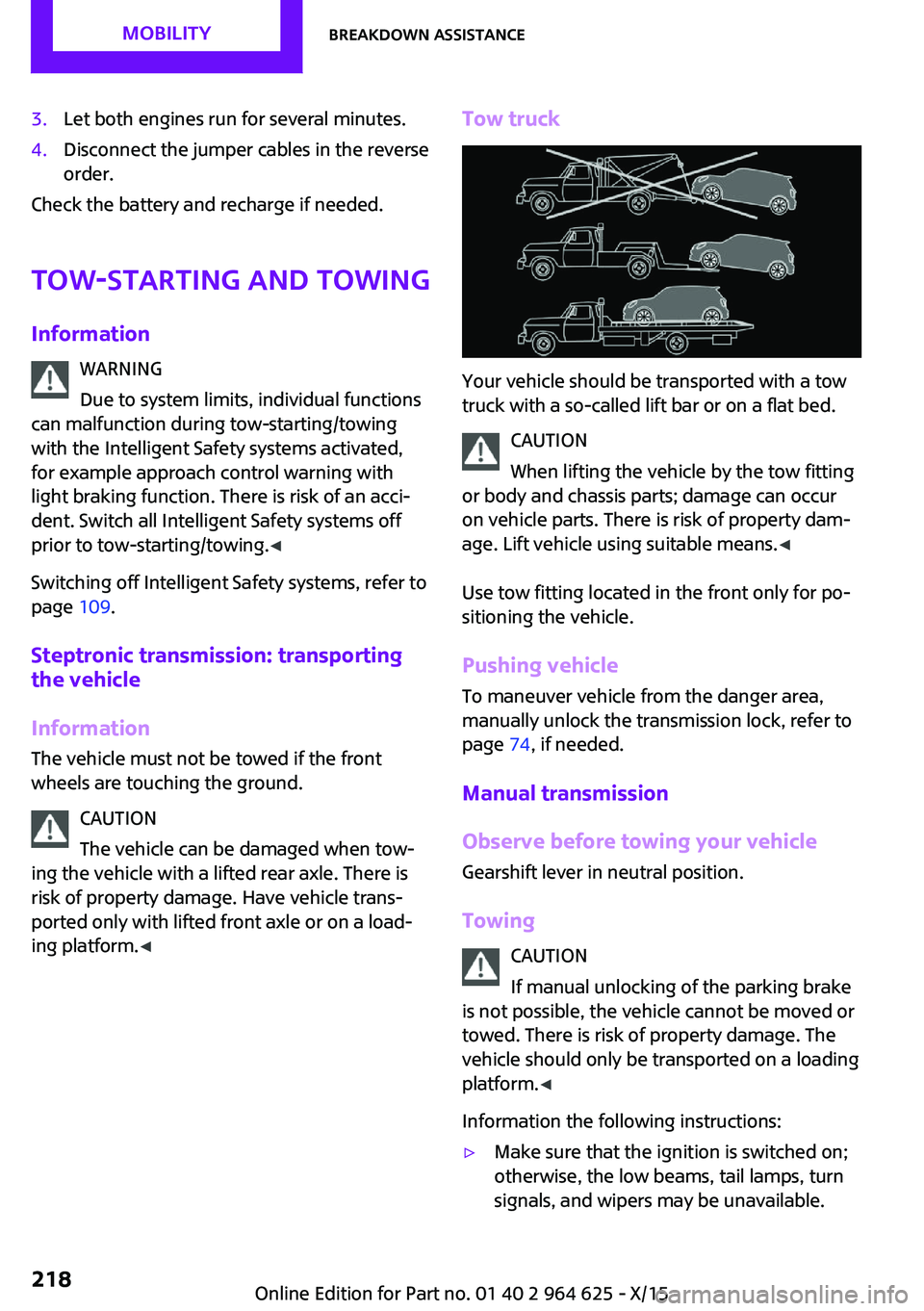
Tow truck
Your vehicle should be transported with a tow
truck with a so-called lift bar or on a flat bed.
CAUTION
When lifting the vehicle by the tow fitting
or body and chassis parts; damage can occur
on vehicle parts. There is risk of property dam‐
age. Lift vehicle using suitable means. ◀
Use tow fitting located in the front only for po‐
sitioning the vehicle.
Pushing vehicle
To maneuver vehicle from the danger area,
manually unlock the transmission lock, refer to
page 74, if needed.
Manual transmission
Observe before towing your vehicle
Gearshift lever in neutral position.
Towing CAUTION
If manual unlocking of the parking brake
is not possible, the vehicle cannot be moved or
towed. There is risk of property damage. The
vehicle should only be transported on a loading
platform. ◀
Information the following instructions:
▷Make sure that the ignition is switched on;
otherwise, the low beams, tail lamps, turn
signals, and wipers may be unavailable.Seite 218MOBILITYBreakdown assistance218
Online Edition for Part no. 01 40 2 964 625 - X/15
Page 222 of 248

Before driving into a car washIn order to ensure that the vehicle can roll in a
car wash, take the following steps:
Manual transmission:1.Drive into the car wash.2.Shift to neutral.3.Switch the engine off.4.Switch on the ignition.
Steptronic transmission:
1.Drive into the car wash.2.Engage selector lever position N.3.Make sure that the parking brake is re‐
leased.4.Press the Start/Stop button to switch off the
engine.
In this way, the ignition remains switched
on, and two Check-Control messages are
displayed.
A signal sounds when you leave the vehicle
while in selector lever position N.
The vehicle cannot be locked from the outside
when in selector lever position N. A signal is
sounded when an attempt is made to lock the
vehicle.
To start the engine with manual transmission:
1.Press on the clutch pedal.2.Press the Start/Stop button.
To start the engine with Steptronic transmis‐
sion:
1.Depress the brake pedal.2.Press the Start/Stop button.
Headlights
▷Do not rub dry and do not use abrasive or
acidic cleansers.▷Soak areas that have been dirtied e. g.,
from insects, with shampoo and wash off
with water.▷Thaw ice with de-icing spray; do not use an
ice scraper.
After washing the vehicle
After washing the vehicle, apply the brakes
briefly to dry them; otherwise, braking action
can be reduced and corrosion of the brake
discs can occur.
Completely remove all residues on the win‐
dows, to minimize loss of visibility due to
smearing and to reduce wiper noises and wiper
blade wear.
Vehicle care Car care products
The manufacturer of your vehicle recommends
using care and cleaning products from MINI.
WARNING
Cleansers can contain substances that are
dangerous and harmful to your health. There is
risk of injuries. When cleaning the interior, open
the doors or windows. Only use products in‐
tended for cleaning vehicles. Follow the instruc‐
tions on the container. ◀
Vehicle paint
Regular care contributes to driving safety and
value retention. Environmental influences in
areas with elevated air pollution or natural con‐
taminants, such as tree resin or pollen can af‐
fect the vehicle's paintwork. Tailor the fre‐
quency and extent of your car care to these
influences.
Aggressive substances such as spilled fuel, oil,
grease or bird droppings must be removed im‐
mediately to prevent the finish from being al‐
tered or discolored.
Leather careRemove dust from the leather often, using acloth or vacuum cleaner.
Seite 222MOBILITYCare222
Online Edition for Part no. 01 40 2 964 625 - X/15
Page 241 of 248

Front-end collision warningwith City Braking func‐
tion 110
Front fog lights 98
Front-seat passenger airbags, automatic deactivation 102
Front-seat passenger airbags, indicator lamp 102
FTM Flat Tire Monitor 107
Fuel 178
Fuel consumption, see Aver‐ age fuel consumption 86
Fuel filler flap 176
Fuel gauge 81
Fuel lid 176
Fuel quality 178
Fuel recommendation 178
Fuel, tank capacity 232
Fuse 215
G Garage door opener, see Uni‐ versal Integrated Remote
Control 145
Gasoline 178
Gear change, Steptronic trans‐ mission 72
Gear shift indicator 83
General driving notes 161
Glare shield 149
Glass sunroof, refer to Panor‐ amic glass sunroof 47
Glove compartment 153
GREEN Mode 167
GREEN Mode, bonus range 169
GREEN Mode driving style analysis 171
GREEN Mode indicator 167
GREEN - program, driving dy‐ namics 118
GREEN tip 169
Gross vehicle weight, ap‐ proved 229
Ground clearance 162 H
Halogen headlights 206
Handbrake, see parking brake 66
Hand-held transmitter, alter‐ nating code 146
Hazard warning flashers 216
Head airbag 100
Headlight control, auto‐ matic 96
Headlight courtesy delay fea‐ ture 96
Headlight flasher 68
Headlight glass 205
Headlights, care 222
Head restraints 49
Head restraints, front 53
Head restraints, rear 54
Head-up Display 90
Head-Up Display, Shift point indicator 92
Head-up Display, sport dis‐ plays 92
Head-up Display, standard view 91
Heavy cargo, stowing 164
High-beam Assistant 97
High beams 68
High beams/low beams, see High-beam Assistant 97
Hills 162
Hill start assistant, see Drive- off assistant 119
Holder for beverages 154
Homepage 6
Hood 194
Horn 14
Hot exhaust system 161
HUD Head-up Display 90
Hydroplaning 161
I
Ice warning, see External tem‐ perature warning 81 Icy roads, see External tem‐
perature warning 81
Identification marks, tires 186
Identification number, see ve‐ hicle identification num‐
ber 10
Ignition key, see Remote con‐ trol 34
Ignition off 62
Ignition on 62
Illuminated ring, central in‐ strument cluster 89
Indication of a flat tire 104, 107
Indicator lamp, see Check Control 77
Individual air distribu‐ tion 139, 142
Individual settings, see Per‐ sonal Profile 36
Inflation pressure, tires 180
Inflation pressure warning, tires 107
Info display, refer to On-Board computer 85
Information 6
Initialize, Tire Pressure Moni‐ tor TPM 104
Initializing, Flat Tire Monitor FTM 107
Instrument cluster 76
Instrument cluster, electronic displays 77
Instrument lighting 98
Integrated key 34
Integrated Owner's Manual in the vehicle 29
Intelligent Safety 109
Intensity, AUTO program 142
Interior equipment 145
Interior lights 98
Interior lights during unlock‐ ing 37
Interior lights with the vehicle locked 38 Seite 241Everything from A to ZREFERENCE241
Online Edition for Part no. 01 40 2 964 625 - X/15
Page 243 of 248

Minimum tread, tires 187
Mirrors 55
Mobile communication devi‐ ces in the vehicle 161
Mobility System 190
Mode, GREEN Mode 167
Modifications, technical, refer to Own Safety 7
Moisture in headlight 205
Monitor, refer to Control Dis‐ play 18
Mounting of child restraint systems 59
Multifunction steering wheel, buttons 14
Multimedia, refer to Integrated Owner's Manual
N Navigation, refer to Integrated Owner's Manual
Neck restraints, front, see Head restraints 53
Neck restraints, rear, see Head restraints 54
New wheels and tires 188
O OBD Onboard Diagnos‐ tics 203
Obstacle marking, rearview camera 132
Octane rating, see Recom‐ mended fuel grade 178
Odometer 81
Office, refer to Integrated Owner's Manual
Oil 196
Oil, adding 197
Oil additives 198
Oil change 198
Oil change interval, service re‐ quirements 82
Oil filler neck 197 Oil types, alternative 198
Oil types, suitable 198
Old batteries, disposal 215
On-board computer 85
On-board computer, refer to On-board computer 85
Onboard Diagnostics OBD 203
Onboard monitor 18
Onboard monitor operating concept 18
Onboard vehicle tool kit 204
Opening/closing via door lock 39
Opening/closing with remote control 37
Operating menus, onboard monitor 18
Optional equipment, standard equipment 7
Outside air, see Automatic re‐ circulated-air control 142
Own safety 7
P
Paint, vehicle 222
Panoramic glass sunroof 47
Parallel parking assistant 133
Park Distance Control PDC 128
Parked-car ventilation 143
Parked vehicle, condensa‐ tion 162
Parking aid, see PDC 128
Parking assistant 133
Parking brake 66
Parking lights 95
Parts and accessories 8
Passenger side mirror, tilting downward 55
Pathway lines, rearview cam‐ era 132
PDC Park Distance Con‐ trol 128
Performance Control 117 Personal Profile 36
Person warning with City light braking function 113
Phone, refer to Integrated Owner's Manual
Pinch protection system, glass sunroof 48
Pinch protection system, win‐ dows 46
Plastic, care 223
PostCrash 115
Power failure 215
Power windows 45
Prescribed engine oil types 198
Pressure, tire air pressure 180
Pressure warning, tires 107
Profile, see Personal Pro‐ file 36
Protective function, glass sun‐ roof 48
Protective function, win‐ dows 46
Push-and-turn switch, see Controller 19
R
Radiator fluid 200
Radio-operated key, see Re‐ mote control 34
Radio ready state 62
Radio, refer to Integrated Owner's Manual
Rain sensor 69
Rear fog lights 98
Rear lights 208
Rear luggage rack 165
Rearview camera 131
Rearview mirror 55
Rear window de‐ froster 140, 143
Recirculated-air filter 143
Recirculated-air mode 139, 142 Seite 243Everything from A to ZREFERENCE243
Online Edition for Part no. 01 40 2 964 625 - X/15