auto MINI COOPER 2015 Repair Manual
[x] Cancel search | Manufacturer: MINI, Model Year: 2015, Model line: COOPER, Model: MINI COOPER 2015Pages: 248, PDF Size: 5.43 MB
Page 135 of 248
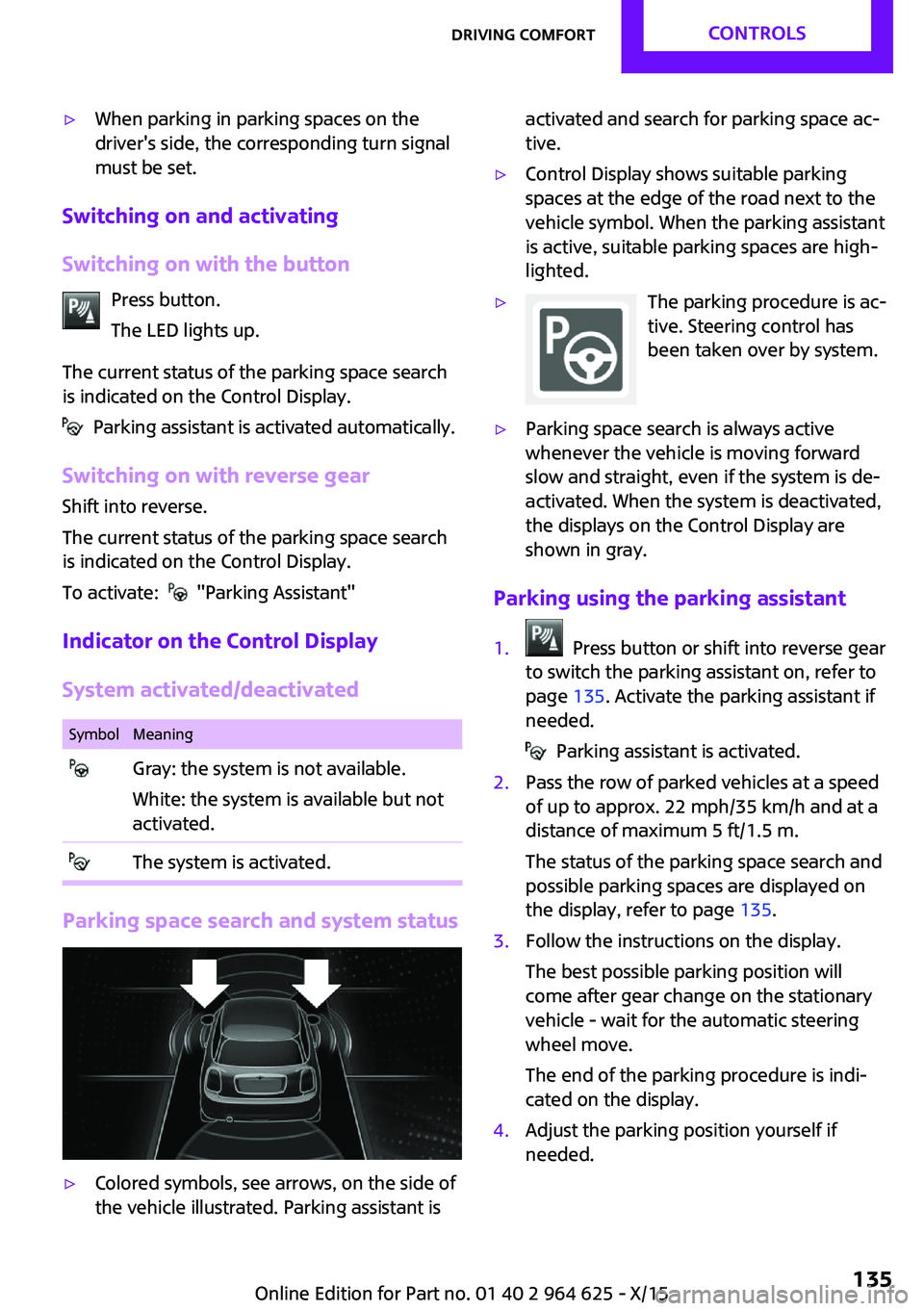
▷When parking in parking spaces on the
driver's side, the corresponding turn signal
must be set.
Switching on and activating
Switching on with the button Press button.
The LED lights up.
The current status of the parking space search
is indicated on the Control Display.
Parking assistant is activated automatically.
Switching on with reverse gear
Shift into reverse.
The current status of the parking space search
is indicated on the Control Display.
To activate:
"Parking Assistant"
Indicator on the Control Display
System activated/deactivated
SymbolMeaning Gray: the system is not available.
White: the system is available but not
activated. The system is activated.
Parking space search and system status
▷Colored symbols, see arrows, on the side of
the vehicle illustrated. Parking assistant isactivated and search for parking space ac‐
tive.▷Control Display shows suitable parking
spaces at the edge of the road next to the
vehicle symbol. When the parking assistant
is active, suitable parking spaces are high‐
lighted.▷The parking procedure is ac‐
tive. Steering control has
been taken over by system.▷Parking space search is always active
whenever the vehicle is moving forward
slow and straight, even if the system is de‐
activated. When the system is deactivated,
the displays on the Control Display are
shown in gray.
Parking using the parking assistant
1. Press button or shift into reverse gear
to switch the parking assistant on, refer to
page 135. Activate the parking assistant if
needed.
Parking assistant is activated.
2.Pass the row of parked vehicles at a speed
of up to approx. 22 mph/35 km/h and at a
distance of maximum 5 ft/1.5 m.
The status of the parking space search and
possible parking spaces are displayed on
the display, refer to page 135.3.Follow the instructions on the display.
The best possible parking position will
come after gear change on the stationary
vehicle - wait for the automatic steering
wheel move.
The end of the parking procedure is indi‐
cated on the display.4.Adjust the parking position yourself if
needed.Seite 135Driving comfortCONTROLS135
Online Edition for Part no. 01 40 2 964 625 - X/15
Page 136 of 248
Interrupting manuallyThe parking assistant can be interrupted at any
time:▷ "Parking Assistant"▷Press button.
Interrupting automatically
The system is interrupted automatically in the
following situations:
▷If the driver grasps the steering wheel or if
he takes over steering.▷If a gear is selected that does not match the
instruction on the display.▷If the vehicle speed exceeds approx.
6 mph/10 km/h.▷Possible on snow-covered or slippery road
surfaces.▷If a maximum number of parking attempts
or the time taken for parking is exceeded.▷If the Park Distance Control PDC displays
clearances that are too small.▷When switching into other functions of the
radio.
A Check Control message is displayed.
Resume
An interrupted parking procedure can be con‐
tinued if needed.
Reactivate the parking assistant, refer to page 135, and follow the instructions on the
display.
Switching off The system can be deactivated as follows:
▷Press button.▷Switching off the ignition.System limits
Information WARNING
The system can react incorrectly or not at
all due to the system limits. There is risk of acci‐
dents or risk of property damage. Observe the
system limits and actively interfere if needed. ◀
No parking assistance The parking assistant does not offer assistance
in the following situations:▷In tight curves.
Functional limitations
The system may not be fully functional in the
following situations:
▷On bumpy road surfaces such as gravel
roads.▷On slippery ground.▷With accumulations of leaves/snow in the
parking space.▷With a mounted emergency wheel.▷With ditches or edges, for example an edge
of a port.
Limits of ultrasonic measurement
Ultrasonic measuring might not function under
the following circumstances:
▷For small children and animals.▷For persons with certain clothing, for exam‐
ple coats.▷With external interference of the ultra‐
sound, for example from passing vehicles
or loud machines.▷When sensors are dirty, iced over, damaged
or out of position.▷If cargo protrudes.▷Under certain weather conditions such as
high relative humidity, rain, snowfall, ex‐
treme heat or strong wind.Seite 136CONTROLSDriving comfort136
Online Edition for Part no. 01 40 2 964 625 - X/15
Page 139 of 248

Climate control functions in detail
Switching the system on/off Switching on
Set any air volume.
Switching off Turn wheel for air quantity to the
left until the control switches off.
Temperature Turn the ring to set the desired
temperature.
Cooling function
The air in the car's interior will be cooled and
dehumidified and, depending on the tempera‐
ture setting, warmed again.
The car's interior can only be cooled with the
engine running.
Press button.
Air conditioning is switched on or off.
Depending on the weather, the windshield may
fog up briefly when the engine is started.
The air conditioner produces condensation wa‐
ter, refer to page 162, that will exit from below
the car.
Recirculated-air mode You may respond to unpleasant odors or pollu‐
tants in the immediate environment by tempo‐
rarily suspending the supply of outside air. The
system then recirculates the air currently within
the vehicle.Press button repeatedly to select an
operating mode:▷LED off: outside air flows in continuously.▷LED on, recirculated-air mode: the supply
of outside air into the vehicle is perma‐
nently blocked.
To prevent window condensation, recirculated
air mode switches off automatically after a cer‐
tain amount of time, depending on the external
temperature.
With constant recirculated-air mode, the air
quality in the car's interior deteriorates and the
fogging of the windows increases.
If the windows fog over, switch off recirculated-
air mode and increase the air flow, if needed.
Air flow, manual Turn the ring to set the desired
air volume.
The higher the rate, the more ef‐
fective the heating or cooling will
be.
The air flow from the air conditioner may be re‐
duced automatically to save battery power.
Manual air distribution Turn the wheel to select the de‐
sired program or the desired in‐
termediate setting.
▷ Windows.▷ Upper body region.▷ Floor area.▷ Windows, upper body region, and floor
area.Seite 139Climate controlCONTROLS139
Online Edition for Part no. 01 40 2 964 625 - X/15
Page 140 of 248
Defrosts windows and removes
condensation
Direct the air distribution toward windows, in‐
crease the air flow and temperature, and, if
needed, use the cooling function.
Windshield defroster Press button.
The front window defroster switches
off automatically after a certain period of time.
Rear window defroster Press button.
The rear window defroster switches off
automatically after a certain period of time.When GREEN Mode, refer to page 167, is acti‐
vated, the heater output is reduced.
Microfilter
In external and recirculated air mode the mi‐
crofilter filters dust and pollen from the air.
This filter should be replaced during scheduled
maintenance, refer to page 202, of your vehi‐
cle.
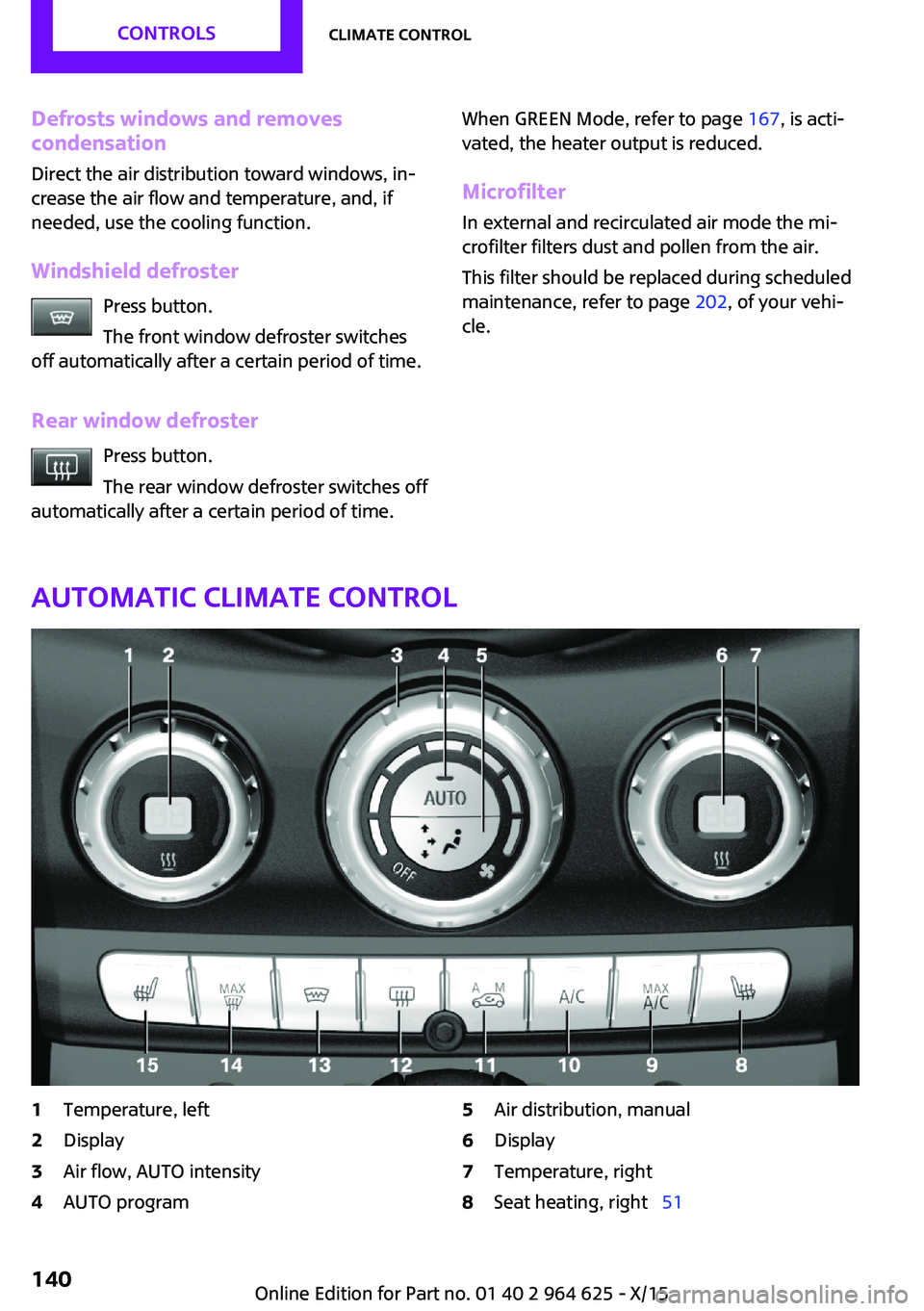
Automatic climate control
1Temperature, left2Display3Air flow, AUTO intensity4AUTO program5Air distribution, manual6Display7Temperature, right8Seat heating, right 51Seite 140CONTROLSClimate control140
Online Edition for Part no. 01 40 2 964 625 - X/15
Page 141 of 248

9Maximum cooling10Cooling function11Automatic recirculated-air control/recircu‐
lated-air mode12Rear window defroster13Windshield defroster14Defrosts windows and removes condensa‐
tion15Seat heating, left 51Climate control functions in detail
Switching the system on/off Switching on
Set any air volume.
Switching off Turn wheel for air quantity to the
left until the control switches off.
Temperature Turn the ring to set the desired
temperature.
The automatic climate control reaches this
temperature as quickly as possible, if needed
by increasing the cooling or heating output,
and then keeps it constant.
Do not rapidly switch between different tem‐
perature settings. The automatic climate con‐
trol will not have sufficient time to adjust the
set temperature.
Cooling function The air in the car's interior will be cooled and
dehumidified and, depending on the tempera‐
ture setting, warmed again.
The car's interior can only be cooled with the
engine running.Press button.
Air conditioning is switched on or off.
Depending on the weather, the windshield may
fog up briefly when the engine is started.
The cooling function is switched on automati‐
cally with the AUTO program.
When using the automatic climate control, con‐
densation water, refer to page 162, develops
that exits underneath the vehicle.
Maximum cooling Press button.
The system is set to the lowest temper‐
ature, optimum air flow and air circulation
mode.
Air flows out of the vents to the upper body re‐
gion. The vents need to be open for this.
The function is available with external tempera‐
tures beyond approx. 32 ℉/0 ℃ and with the
engine running.
Adjust air flow with the program active.
AUTO program Press button.
Air flow, air distribution and tempera‐
ture are controlled automatically.
Depending on the selected temperature, AUTO
intensity and outside influences, the air is di‐
rected to the windshield, side windows, upper
body, and into the floor area.
The cooling function, refer to page 141, and
the automatic recirculation control, refer toSeite 141Climate controlCONTROLS141
Online Edition for Part no. 01 40 2 964 625 - X/15
Page 142 of 248
page 142, are automatically also switched on
in the AUTO program.
To switch off the program: press the button
again or manually adjust the air distribution.
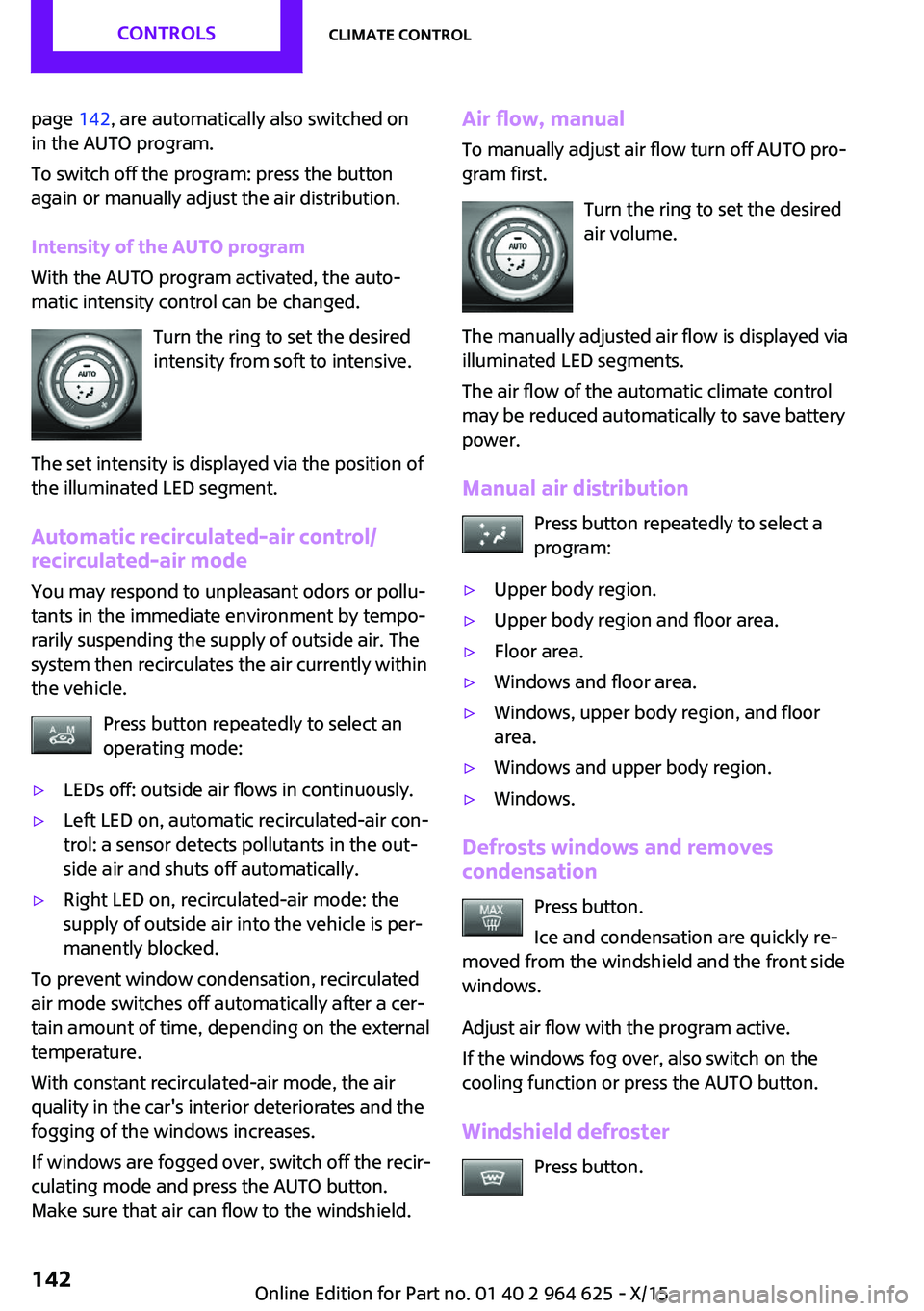
Intensity of the AUTO program
With the AUTO program activated, the auto‐
matic intensity control can be changed.
Turn the ring to set the desired
intensity from soft to intensive.
The set intensity is displayed via the position of
the illuminated LED segment.
Automatic recirculated-air control/
recirculated-air mode
You may respond to unpleasant odors or pollu‐
tants in the immediate environment by tempo‐
rarily suspending the supply of outside air. The
system then recirculates the air currently within
the vehicle.
Press button repeatedly to select an
operating mode:▷LEDs off: outside air flows in continuously.▷Left LED on, automatic recirculated-air con‐
trol: a sensor detects pollutants in the out‐
side air and shuts off automatically.▷Right LED on, recirculated-air mode: the
supply of outside air into the vehicle is per‐
manently blocked.
To prevent window condensation, recirculated
air mode switches off automatically after a cer‐
tain amount of time, depending on the external
temperature.
With constant recirculated-air mode, the air
quality in the car's interior deteriorates and the
fogging of the windows increases.
If windows are fogged over, switch off the recir‐
culating mode and press the AUTO button.
Make sure that air can flow to the windshield.
Air flow, manual
To manually adjust air flow turn off AUTO pro‐
gram first.
Turn the ring to set the desired
air volume.
The manually adjusted air flow is displayed via
illuminated LED segments.
The air flow of the automatic climate control
may be reduced automatically to save battery
power.
Manual air distribution Press button repeatedly to select a
program:▷Upper body region.▷Upper body region and floor area.▷Floor area.▷Windows and floor area.▷Windows, upper body region, and floor
area.▷Windows and upper body region.▷Windows.
Defrosts windows and removes
condensation
Press button.
Ice and condensation are quickly re‐
moved from the windshield and the front side
windows.
Adjust air flow with the program active.
If the windows fog over, also switch on the
cooling function or press the AUTO button.
Windshield defroster Press button.
Seite 142CONTROLSClimate control142
Online Edition for Part no. 01 40 2 964 625 - X/15
Page 143 of 248
The front window defroster switches off auto‐
matically after a certain period of time.
Rear window defroster Press button.
The rear window defroster switches off
automatically after a certain period of time.
When GREEN Mode, refer to page 167, is acti‐
vated, the heater output is reduced.
Microfilter/activated-charcoal filter In external and recirculated air mode the mi‐
crofilter/activated charcoal filter filters dust,
pollen, and gaseous pollutants out of the air.
This filter should be replaced during scheduled
maintenance, refer to page 202, of your vehi‐
cle.
Ventilation
Setting The air flow directions can be individually ad‐
justed:▷Direct ventilation:
The air flow is directly pointed onto the per‐
son. The air flow heats or cools noticeably,
depending on the adjusted temperature.▷Indirect ventilation:
If the vents are fully or partly closed, the air
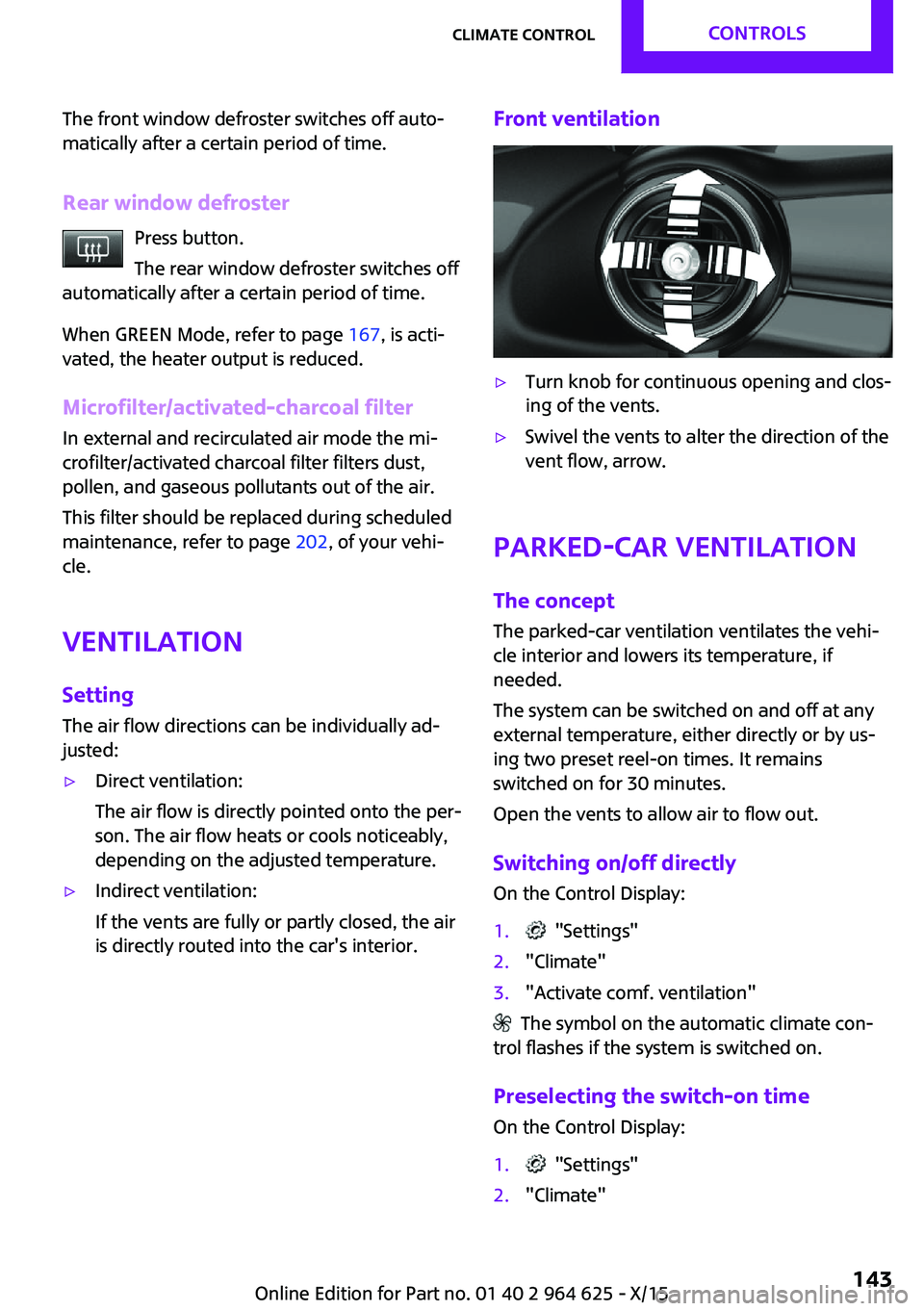
is directly routed into the car's interior.Front ventilation▷Turn knob for continuous opening and clos‐
ing of the vents.▷Swivel the vents to alter the direction of the
vent flow, arrow.
Parked-car ventilation
The concept
The parked-car ventilation ventilates the vehi‐
cle interior and lowers its temperature, if needed.
The system can be switched on and off at any
external temperature, either directly or by us‐
ing two preset reel-on times. It remains
switched on for 30 minutes.
Open the vents to allow air to flow out.
Switching on/off directly On the Control Display:
1. "Settings"2."Climate"3."Activate comf. ventilation"
The symbol on the automatic climate con‐
trol flashes if the system is switched on.
Preselecting the switch-on time
On the Control Display:
1. "Settings"2."Climate"Seite 143Climate controlCONTROLS143
Online Edition for Part no. 01 40 2 964 625 - X/15
Page 144 of 248
3."Timer 1:" or "Timer 2:"4.Set the desired time.
Activating the switch-on time
On the Control Display:
1. "Settings"2."Climate"3."Activate timer 1" or "Activate timer 2"
The symbol on the automatic climate con‐
trol lights up when the reel-on time is acti‐
vated.
The symbol on the automatic climate con‐
trol flashes when the system has been switched
on.
The system will only be switched on within the
next 24 hours. After that, it needs to be reacti‐
vated.
Seite 144CONTROLSClimate control144
Online Edition for Part no. 01 40 2 964 625 - X/15
Page 148 of 248
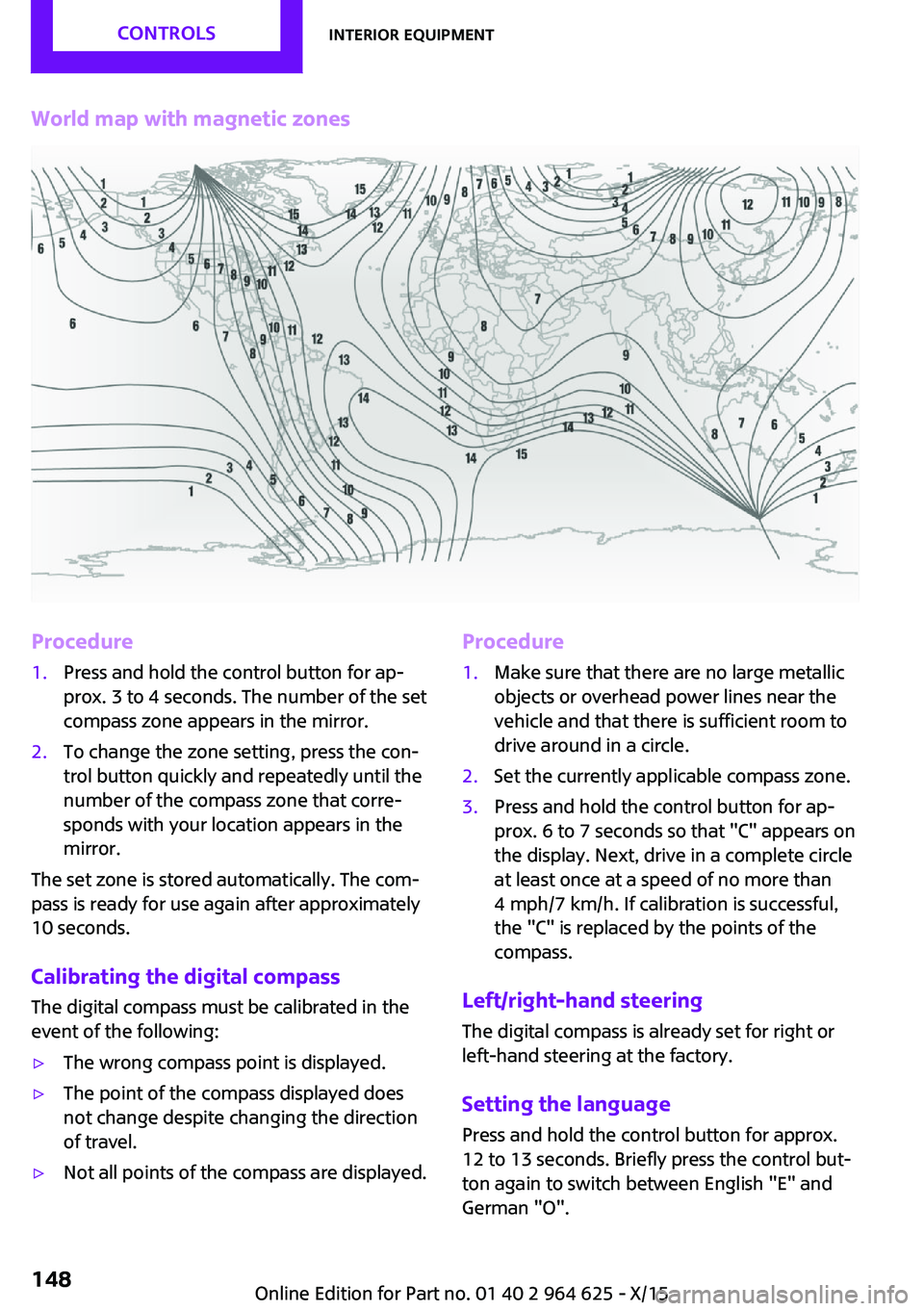
World map with magnetic zonesProcedure1.Press and hold the control button for ap‐
prox. 3 to 4 seconds. The number of the set
compass zone appears in the mirror.2.To change the zone setting, press the con‐
trol button quickly and repeatedly until the
number of the compass zone that corre‐
sponds with your location appears in the
mirror.
The set zone is stored automatically. The com‐
pass is ready for use again after approximately
10 seconds.
Calibrating the digital compass The digital compass must be calibrated in the
event of the following:
▷The wrong compass point is displayed.▷The point of the compass displayed does
not change despite changing the direction
of travel.▷Not all points of the compass are displayed.Procedure1.Make sure that there are no large metallic
objects or overhead power lines near the
vehicle and that there is sufficient room to
drive around in a circle.2.Set the currently applicable compass zone.3.Press and hold the control button for ap‐
prox. 6 to 7 seconds so that "C" appears on
the display. Next, drive in a complete circle
at least once at a speed of no more than
4 mph/7 km/h. If calibration is successful,
the "C" is replaced by the points of the
compass.
Left/right-hand steering
The digital compass is already set for right or
left-hand steering at the factory.
Setting the language
Press and hold the control button for approx.
12 to 13 seconds. Briefly press the control but‐ ton again to switch between English "E" and
German "O".
Seite 148CONTROLSInterior equipment148
Online Edition for Part no. 01 40 2 964 625 - X/15
Page 149 of 248

Settings are stored automatically after approxi‐
mately 10 seconds.
Sun visor
Glare shield
Fold the sun visor down or up.
Vanity mirror
A vanity mirror is located in the sun visor be‐
hind a cover.
When the cover is opened, the mirror lighting
switches on.
Ashtray/cigarette
lighter
Overview
The ashtray is located in one of the frontal cup
holders, the cigarette lighter above it in the
center console.
Ashtray In order to empty the ashtray, remove the ash‐
tray from the cupholder.
Lighter WARNING
Contact with hot heating elements or the
hot socket of the cigarette lighter can cause
burns. Flammable materials can ignite if the
cigarette lighter falls down or is held against
the respective objects. There is risk of fire and
injuries. Hold the cigarette lighter on its handle.
Make sure that children do not use the ciga‐
rette lighter and do not burn themselves, for
example by carrying the remote control along
when exiting the vehicle. ◀
CAUTION
If metal objects fall into the socket, they
can cause a short circuit. There is risk of prop‐
erty damage. Replace the cigarette lighter or
socket cover again after using the socket. ◀
Push in the lighter.
The lighter can be removed as
soon as it pops back out.
Connecting electrical de‐
vices
Information WARNING
Devices and cables in the unfolding area
of the airbags, for example portable navigation
devices, etc., can hinder the unfolding of the
airbag or be thrown around in the car's interior
when unfolding. There is risk of injuries. make
sure that devices and cables are not in the air‐
bag's area of unfolding. ◀
CAUTION
Battery chargers for the vehicle battery
can work with high voltages and currents,
which means that the 12 volt on-board net‐
work can be overloaded or damaged. There is
risk of property damage. Only connect battery
chargers for the vehicle battery to the starting
aid terminals in the engine compartment. ◀Seite 149Interior equipmentCONTROLS149
Online Edition for Part no. 01 40 2 964 625 - X/15