auto MINI COOPER 2015 Manual PDF
[x] Cancel search | Manufacturer: MINI, Model Year: 2015, Model line: COOPER, Model: MINI COOPER 2015Pages: 248, PDF Size: 5.43 MB
Page 162 of 248

Objects in the area around the pedalsWARNING
Objects in the driver's floor area can limit
the pedal distance or block a depressed pedal.
There is risk of an accident. Stow objects in the
vehicle such that they are secured and cannot
enter into the driver's floor area. Use floor mats
that are suitable for the vehicle and can be
safely attached to the floor. Do not use loose
floor mats and do not layer several floor mats.
Make sure that there is sufficient clearance for
the pedals. Ensure that the floor mats are se‐
curely fastened again after they were removed,
for example for cleaning. ◀
Driving in wet conditions When roads are wet, salted, or in heavy rain,
press brake pedal ever so gently every few
miles.
Ensure that this action does not endanger other
traffic.
The heat generated in this process helps dry
the brake discs and pads.
In this way braking efficiency will be available
when you need it.
Hills WARNING
Light but consistent brake pressure can
lead to high temperatures, brakes wearing out
and possibly even brake failure. There is risk of
an accident. Avoid placing excessive stress on
the brake system. ◀
WARNING
In idle or with the engine switched off,
safety-relevant functions are restricted or not
available anymore, for example braking effect
of the engine or braking force and steering
support. There is risk of an accident. Do not
drive in idle or with the engine switched off. ◀
Drive long or steep downhill gradients in the
gear that requires least braking efforts. Other‐wise the brakes may overheat and reduce
brake efficiency.
You can increase the engine's braking effect by
shifting down, going all the way to first gear, if
needed.
Brake disc corrosion Corrosion on the brake discs and contamina‐
tion on the brake pads are furthered by:▷Low mileage.▷Extended periods when the vehicle is not
used at all.▷Infrequent use of the brakes.
Corrosion will built up when the maximum
pressure applied to the brake pads during brak‐
ing is not reached - thus discs don't get
cleaned.
Corrosion buildup on the brake discs will cause
a pulsating effect on the brakes in their re‐
sponse - generally that cannot be corrected.
Condensation under the parked vehicle When using the automatic climate control, con‐
densation water develops collecting under‐
neath the vehicle.
Ground clearance CAUTION
If ground clearance is insufficient, there
might be contact with the front or rear spoiler
for example when driving over curbs or enter‐
ing into underground car parking garages.
There is risk of property damage. Ensure that
there is sufficient ground clearance available. ◀
Seite 162DRIVING TIPSThings to remember when driving162
Online Edition for Part no. 01 40 2 964 625 - X/15
Page 167 of 248

By maintaining a suitable distance to the vehi‐
cle driving ahead of you.
Driving smoothly and proactively reduces fuel
consumption.
Avoid high engine speeds
As a rule: driving at low engine speeds lowers
fuel consumption and reduces wear.
Use 1st gear to get the vehicle moving. Starting
with the 2nd gear, accelerate rapidly. When ac‐
celerating, shift up before reaching high engine
speeds.
When you reach the desired speed, shift into
the highest applicable gear and drive with the
engine speed as low as possible and at a con‐
stant speed.
The gear shift indicator, refer to page 83, of
your vehicle indicates the most fuel efficient gear.
Use coasting conditions When approaching a red light, take your foot
off the accelerator and let the vehicle coast to a
halt.
For going downhill take your foot off the accel‐
erator and let the vehicle roll.
The flow of fuel is interrupted while coasting.
Switch off the engine
during longer stops
Switch off the engine during longer stops, for
example, at traffic lights, railroad crossings or in
traffic congestion.
Auto Start/Stop function
The Auto Start/Stop function of your vehicle au‐
tomatically switches off the engine during a
stop.If the engine is switched off and then restarted
rather than leaving the engine running con‐
stantly, fuel consumption and emissions are re‐
duced. Savings can begin within a few seconds
of switching off the engine.
In addition, fuel consumption is also deter‐
mined by other factors, such as driving style,
road conditions, maintenance or environmental
factors.
Switch off any functions
that are not currently
needed
Functions such as seat heating and the rear
window defroster require a lot of energy and
consume additional fuel, especially in city and
stop-and-go traffic.
Therefore, switch off these functions if they are
not actually needed.
Have maintenance car‐
ried out
Have vehicles maintained regularly to achieve
optimal vehicle efficiency and service life. MINI
recommends that maintenance work be per‐
formed by a MINI service center.
Also note the MINI maintenance systems, refer
to page 202.
GREEN Mode
The concept The GREEN Mode supports a driving style that
saves on fuel consumption. For this purpose,
the engine control and comfort features, e. g.
the climate control output, are adjusted.
For Steptronic transmission:Seite 167Saving fuelDRIVING TIPS167
Online Edition for Part no. 01 40 2 964 625 - X/15
Page 168 of 248

The Coasting driving condition is enabled under
certain conditions.
Under certain conditions the engine is auto‐
matically decoupled from the transmission in
selector lever position D. The vehicle continues
traveling with the engine idling to reduce fuel
consumption. Selector lever position D remains
engaged. An indicator provides information
about the distance traveled in Coasting mode.
In addition, context-sensitive instructions are
displayed to assist with an optimized fuel con‐
sumption driving style.
The achieved extended range is displayed in
the instrument cluster.
Overview The system includes the following MINIMAL
functions and displays:▷GREEN bonus range, refer to page 169.▷GREEN tips driving instruction, refer to
page 169.▷GREEN climate control, refer to page 168.▷MINIMALISM analyzer, refer to page 171.▷Coasting driving condition, refer to
page 170.
Activating GREEN Mode
Turn Driving Dynamics Control to
the right until GREEN Mode is
displayed in the instrument clus‐
ter.
Configuring GREEN Mode
Via the Driving Dynamics Control
1.Activating GREEN Mode.2."Configure GREEN"3.Configure the program.
Via onboard monitor:
1. "Settings"2."GREEN Mode"
Or
1. "Settings"2."Driving mode"3."Configure GREEN"
Configure the program.
GREEN tip
▷"Tip at:"
Set the GREEN Mode speed at which a
GREEN Mode tip is to be displayed.▷"GREEN speed warning":
Displays a reminder when the set GREEN
Mode speed is exceeded.
Coasting
Fuel-efficiency can be optimized by disengag‐
ing the engine and Coasting, refer to page 170,
with the engine idling.
This function is only available in GREEN Mode.
GREEN climate control
"GREEN climate control"
Climate control is set to be fuel-efficient.
By making a slight change to the set tempera‐
ture, or adjusting the rate of heating or cooling
of the car's interior fuel consumption can be
economized.
The outputs of the seat heater and the exterior
Additionally heat output to seats and exterior
mirror is reduced.
Exterior mirror heat is available when outside
temperatures are very low.
GREEN potential
The percentage of potential savings that can be
achieved with the current configuration is dis‐
played.
Seite 168DRIVING TIPSSaving fuel168
Online Edition for Part no. 01 40 2 964 625 - X/15
Page 169 of 248
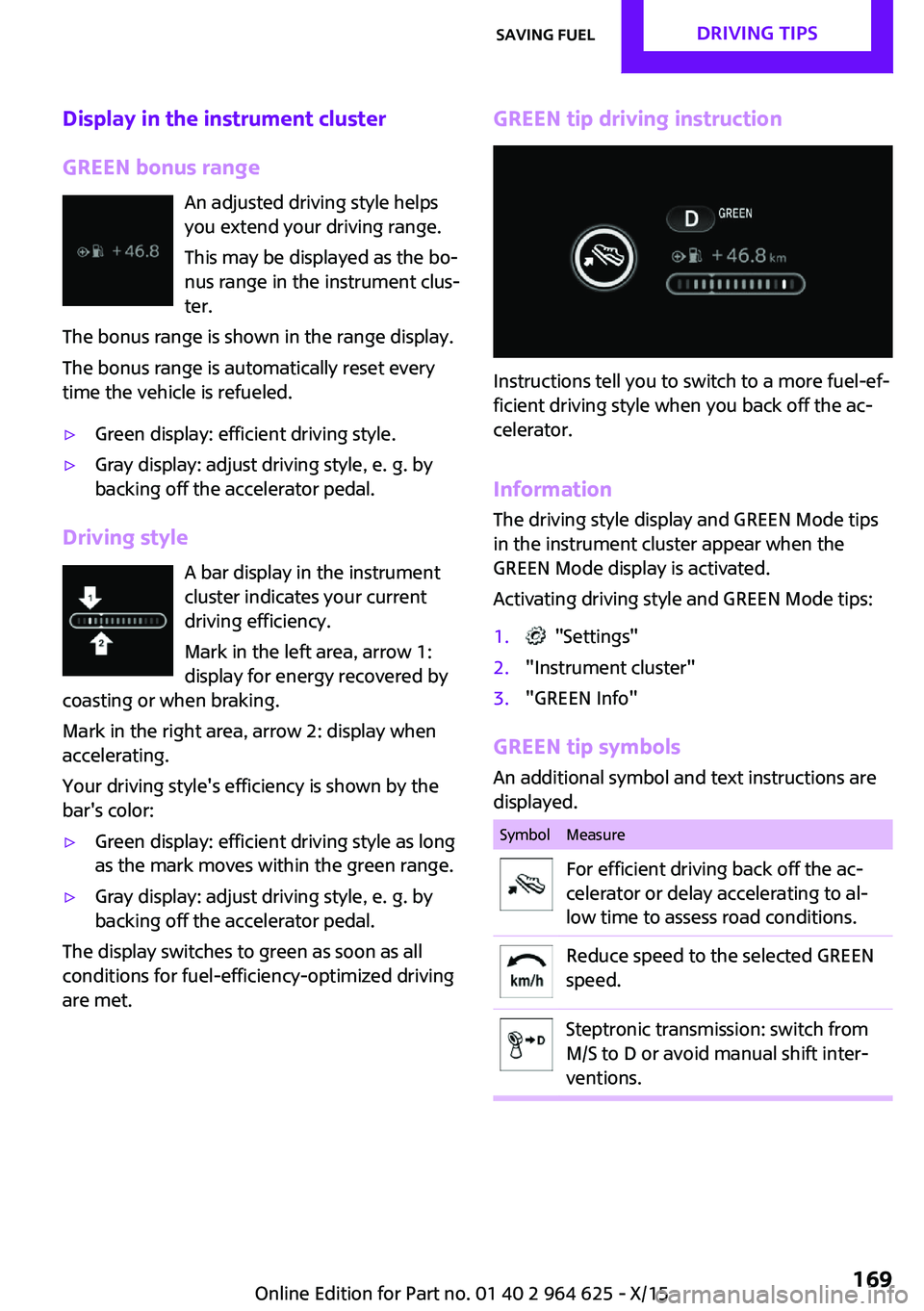
Display in the instrument cluster
GREEN bonus range An adjusted driving style helps
you extend your driving range.
This may be displayed as the bo‐
nus range in the instrument clus‐
ter.
The bonus range is shown in the range display.
The bonus range is automatically reset every
time the vehicle is refueled.▷Green display: efficient driving style.▷Gray display: adjust driving style, e. g. by
backing off the accelerator pedal.
Driving style
A bar display in the instrument
cluster indicates your current
driving efficiency.
Mark in the left area, arrow 1:
display for energy recovered by
coasting or when braking.
Mark in the right area, arrow 2: display when
accelerating.
Your driving style's efficiency is shown by the
bar's color:
▷Green display: efficient driving style as long
as the mark moves within the green range.▷Gray display: adjust driving style, e. g. by
backing off the accelerator pedal.
The display switches to green as soon as all
conditions for fuel-efficiency-optimized driving
are met.
GREEN tip driving instruction
Instructions tell you to switch to a more fuel-ef‐
ficient driving style when you back off the ac‐
celerator.
Information The driving style display and GREEN Mode tips
in the instrument cluster appear when the
GREEN Mode display is activated.
Activating driving style and GREEN Mode tips:
1. "Settings"2."Instrument cluster"3."GREEN Info"
GREEN tip symbols An additional symbol and text instructions aredisplayed.
SymbolMeasureFor efficient driving back off the ac‐
celerator or delay accelerating to al‐
low time to assess road conditions.Reduce speed to the selected GREEN
speed.Steptronic transmission: switch from
M/S to D or avoid manual shift inter‐
ventions.Seite 169Saving fuelDRIVING TIPS169
Online Edition for Part no. 01 40 2 964 625 - X/15
Page 170 of 248
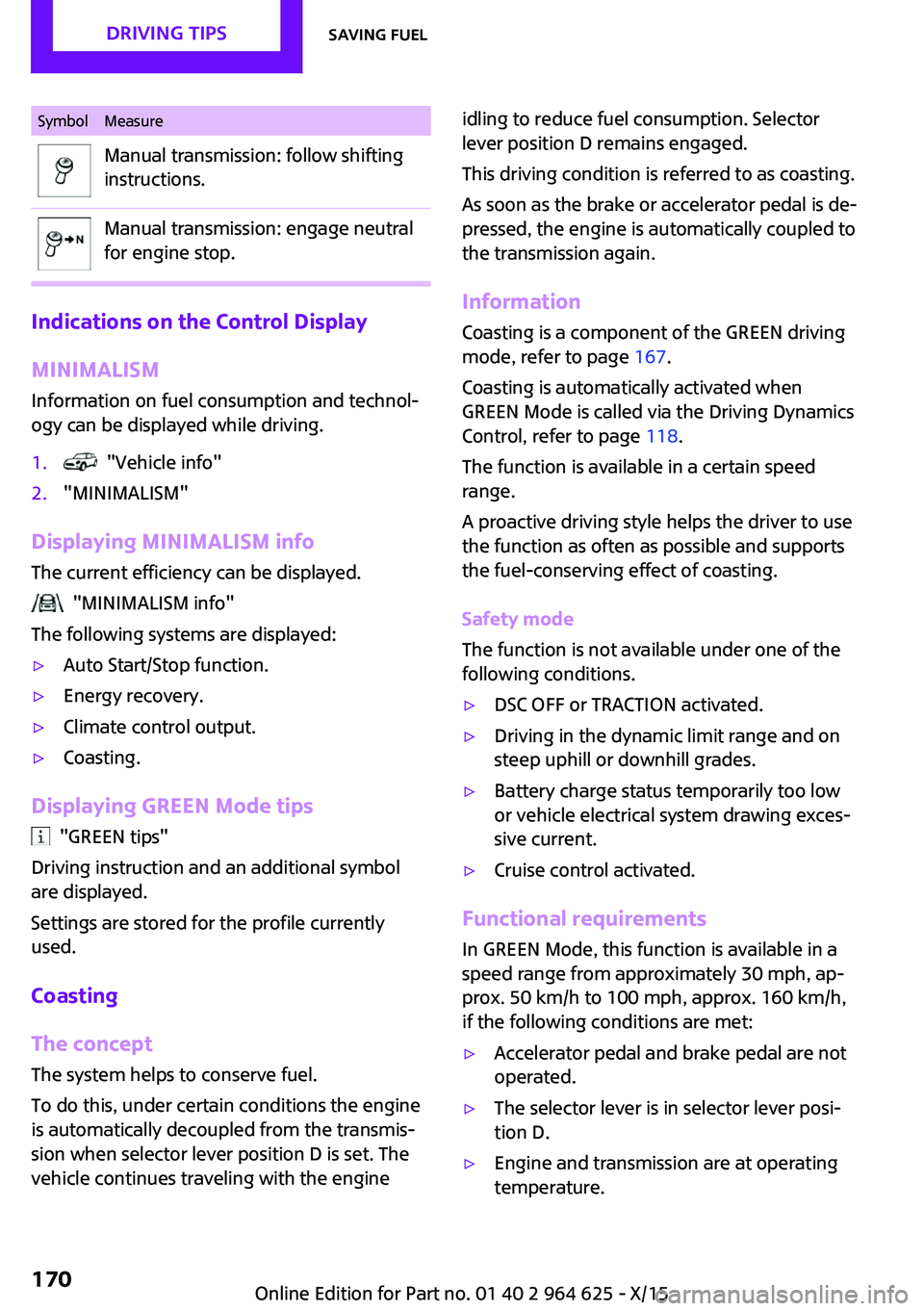
SymbolMeasureManual transmission: follow shifting
instructions.Manual transmission: engage neutral
for engine stop.
Indications on the Control Display
MINIMALISM
Information on fuel consumption and technol‐
ogy can be displayed while driving.
1. "Vehicle info"2."MINIMALISM"
Displaying MINIMALISM info
The current efficiency can be displayed.
"MINIMALISM info"
The following systems are displayed:
▷Auto Start/Stop function.▷Energy recovery.▷Climate control output.▷Coasting.
Displaying GREEN Mode tips
"GREEN tips"
Driving instruction and an additional symbol
are displayed.
Settings are stored for the profile currently
used.
Coasting
The concept The system helps to conserve fuel.
To do this, under certain conditions the engine
is automatically decoupled from the transmis‐ sion when selector lever position D is set. The
vehicle continues traveling with the engine
idling to reduce fuel consumption. Selector
lever position D remains engaged.
This driving condition is referred to as coasting.
As soon as the brake or accelerator pedal is de‐
pressed, the engine is automatically coupled to
the transmission again.
Information
Coasting is a component of the GREEN driving
mode, refer to page 167.
Coasting is automatically activated when
GREEN Mode is called via the Driving Dynamics
Control, refer to page 118.
The function is available in a certain speed
range.
A proactive driving style helps the driver to use
the function as often as possible and supports
the fuel-conserving effect of coasting.
Safety mode
The function is not available under one of the
following conditions.▷DSC OFF or TRACTION activated.▷Driving in the dynamic limit range and on
steep uphill or downhill grades.▷Battery charge status temporarily too low
or vehicle electrical system drawing exces‐
sive current.▷Cruise control activated.
Functional requirements
In GREEN Mode, this function is available in a
speed range from approximately 30 mph, ap‐
prox. 50 km/h to 100 mph, approx. 160 km/h,
if the following conditions are met:
▷Accelerator pedal and brake pedal are not
operated.▷The selector lever is in selector lever posi‐
tion D.▷Engine and transmission are at operating
temperature.Seite 170DRIVING TIPSSaving fuel170
Online Edition for Part no. 01 40 2 964 625 - X/15
Page 221 of 248
CareVehicle features and op‐tions
This chapter describes all standard, country-
specific and optional features offered with the series. It also describes features that are not
necessarily available in your car, e. g., due to
the selected options or country versions. This
also applies to safety-related functions and sys‐
tems. The respectively applicable country provi‐
sions must be observed when using the respec‐
tive features and systems.
Car washes
General information Regularly remove foreign objects such as leaves
in the area below the windshield when the
hood is raised.
Wash your vehicle frequently, particularly in
winter. Intense soiling and road salt can dam‐
age the vehicle.
Steam jets or high-pressure washers
Information CAUTION
When cleaning with high-pressure wash‐
ers, components can be damaged due to the
pressure or temperatures being too high. There
is risk of property damage. Maintain sufficient
distance and do not spray too long continu‐
ously. Follow the Owner's Manual for the high-
pressure washer. ◀
Distances and temperature▷Maximum temperature: 140 ℉/60 ℃.▷Minimum distance from sensors, cameras,
seals: 12 inches/30 cm.▷Minimum distance from glass sunroof:
31.5 inches/80 cm.
Automatic car washes
Information CAUTION
Water can penetrate in the windshield
area due to high-pressure washers. There is risk
of property damage. Avoid high-pressure
washers. ◀
CAUTION
Improper use of automatic car washes
can cause damage to the vehicle. There is risk of property damage. Information the following
instructions:
▷Give preference to cloth car washes or
those that use soft brushes in order to
avoid paint damage.▷Avoid car washes with guide rails higher
than 4 in/10 cm to avoid damage to the
chassis.▷Observe the tire width of the guide rail to
avoid damage to tires and rims.▷Fold in exterior mirrors to avoid damage to
the exterior mirrors.▷Unscrew the rod antenna to avoid the rod
antenna breaking off.▷Deactivate rain sensor if necessary to avoid
damage to the wiper system. ◀
In some cases, an unintentional alarm can be
triggered by the interior motion sensor of the
alarm system. Follow the instructions on avoid‐
ing an unintentional alarm, refer to page 45.
With front PDC: to reduce PDC false alarms,
switch off automatic PDC activation on obstacle
detection, for example in car washes, refer to
page 128.
Seite 221CareMOBILITY221
Online Edition for Part no. 01 40 2 964 625 - X/15
Page 238 of 248
Everything from A to ZIndexA
ABS, Antilock Brake Sys‐ tem 116
Acceleration Assistant, see Launch Control 74
Accessories and parts 8
ACC, see camera-based cruise control 120
Activated-charcoal filter 143
Active Cruise Control, see camera-based cruise con‐
trol 120
Additives, oil 198
Adjustments, seats/head re‐ straints 49
Adjustments, steering wheel 57
After washing vehicle 222
Airbags 100
Airbags, indicator/warning light 101
Air circulation, see Recircu‐ lated-air mode 139, 142
Air conditioner 138
Air, dehumidifying, see Cool‐ ing function 139, 141
Air distribution, manual 139, 142
Air flow, air conditioner 139
Air flow, automatic climate control 142
Air pressure, tires 180
Air vents, see Ventilation 143
Alarm system 43
Alarm triggering 43
Alarm, unintentional 45
All around the center con‐ sole 16
All around the roofliner 17 All around the steering
wheel 14
All-season tires, see Winter tires 189
Alternating-code hand-held transmitter 146
Alternative oil types 198
Antifreeze, washer fluid 70
Antilock Brake System, ABS 116
Anti-slip control, see DSC 116
App, MINI Motorer’s Guide 6
Approved axle load 229
Arrival time 86
Ash tray 149
Assistance when driving off 119
Assist system, see Intelligent Safety 109
AUTO intensity 142
Automatic car wash 221
Automatic climate con‐ trol 140
Automatic Curb Monitor 55
Automatic deactivation, Front- seat passenger airbags 102
Automatic headlight con‐ trol 96
Automatic locking 43
Automatic recirculated-air control 142
Automatic transmission with Steptronic 72
AUTO program, automatic cli‐ mate control 141
AUTO program, intensity 142
Auto Start/Stop function 64
Average fuel consumption 86
Average speed 86
Axle loads, weights 229 B
Backrest curvature, see Lum‐ bar support 50
Band-aids, see First-aid kit 216
Battery replacement, vehicle battery 214
Battery, vehicle 214
Being towed, see Tow-starting and towing 218
Belts, safety belts 51
Beverage holder, cu‐ pholder 154
Bonus range, GREEN Mode 169
Bottle holder, see Cu‐ pholder 154
Brake assistant 116
Brake discs, break-in 160
Brake pads, break-in 160
Braking, hints 161
Breakdown assistance 216
Break-in 160
Brightness of Control Dis‐ play 89
Bug light 206
Bulb replacement 205
Bulb replacement, front 206
Bulb replacement, rear 208
Bulb replacement, side 211
Bulbs and lights 205
Button, Start/Stop 62
Bypassing, see Jump-start‐ ing 216
C
California Proposition 65 Warning 8 Seite 238REFERENCEEverything from A to Z238
Online Edition for Part no. 01 40 2 964 625 - X/15
Page 240 of 248

Direction indicator, see Turnsignals 67
Display, electronic, instrument cluster 77
Display, engine tempera‐ ture 86
Display lighting, see Instru‐ ment lighting 98
Displays 76
Displays, cleaning 224
Disposal, coolant 201
Disposal, vehicle battery 215
Distance control, see PDC 128
Distance to destination 86
Divided screen view, split screen 23
Door lock, see Remote con‐ trol 34
Drive mode, GREEN Mode 167
Drive-off assistant 119
Drive-off assistant, see DSC 116
Driving Dynamics Control 118
Driving Excitement, SPORT 87
Driving instruction, GREEN Mode 169
Driving instructions, break- in 160
Driving mode 118
Driving notes, general 161
Driving stability control sys‐ tems 116
Driving style analysis 171
Driving tips 161
DSC Dynamic Stability Con‐ trol 116
DTC Dynamic Traction Con‐ trol 117
Dynamic Damping Con‐ trol 118
Dynamic Stability Control DSC 116
Dynamic Traction Control DTC 117 E
Electronic displays, instrument cluster 77
Electronic oil measure‐ ment 196
Electronic Stability Program ESP, see DSC 116
Emergency detection, remote control 35
Emergency release, fuel filler flap 176
Emergency start function, en‐ gine start 35
Emergency wheel, compact wheel, see Emergency
wheel 212
Energy Control 82
Engine, automatic Start/Stop function 64
Engine, automatic switch- off 64
Engine compartment 194
Engine compartment, working in 194
Engine coolant 200
Engine idling when driving, coasting 170
Engine oil 196
Engine oil, adding 197
Engine oil additives 198
Engine oil change 198
Engine oil filler neck 197
Engine oil types, alterna‐ tive 198
Engine oil types, suitable 198
Engine start during malfunc‐ tion 35
Engine start, jump-start‐ ing 216
Engine start, see Starting the engine 63
Engine stop 63
Engine temperature, dis‐ play 86
Entering a car wash 221 Equipment, interior 145
Error displays, see Check Con‐ trol 77
ESP Electronic Stability Pro‐ gram, see DSC 116
Exchanging wheels/tires 188
Exhaust system 161
Exterior mirror, automatic dimming feature 56
Exterior mirrors 55
External start 216
External temperature dis‐ play 81
External temperature warn‐ ing 81
Eyes for securing cargo 164
F
Failure message, see Check Control 77
False alarm, see Unintentional alarm 45
Fan, see Air flow 139, 142
Favorites buttons, onboard monitor 24
Filler neck for engine oil 197
Fine wood, care 223
First-aid kit 216
Flat tire, changing wheels 212
Flat Tire Monitor FTM 107
Flat tire, repairing 190
Flat tire, Tire Pressure Monitor TPM 103
Flat tire, warning lamp 104, 107
Flooding 161
Floor carpet, care 224
Floor mats, care 224
Fogged up windows 140
Folding back rear seat back‐ rests 151
Fold-out position, windshield wipers 70
Foot brake 161
Front airbags 100 Seite 240REFERENCEEverything from A to Z240
Online Edition for Part no. 01 40 2 964 625 - X/15
Page 241 of 248

Front-end collision warningwith City Braking func‐
tion 110
Front fog lights 98
Front-seat passenger airbags, automatic deactivation 102
Front-seat passenger airbags, indicator lamp 102
FTM Flat Tire Monitor 107
Fuel 178
Fuel consumption, see Aver‐ age fuel consumption 86
Fuel filler flap 176
Fuel gauge 81
Fuel lid 176
Fuel quality 178
Fuel recommendation 178
Fuel, tank capacity 232
Fuse 215
G Garage door opener, see Uni‐ versal Integrated Remote
Control 145
Gasoline 178
Gear change, Steptronic trans‐ mission 72
Gear shift indicator 83
General driving notes 161
Glare shield 149
Glass sunroof, refer to Panor‐ amic glass sunroof 47
Glove compartment 153
GREEN Mode 167
GREEN Mode, bonus range 169
GREEN Mode driving style analysis 171
GREEN Mode indicator 167
GREEN - program, driving dy‐ namics 118
GREEN tip 169
Gross vehicle weight, ap‐ proved 229
Ground clearance 162 H
Halogen headlights 206
Handbrake, see parking brake 66
Hand-held transmitter, alter‐ nating code 146
Hazard warning flashers 216
Head airbag 100
Headlight control, auto‐ matic 96
Headlight courtesy delay fea‐ ture 96
Headlight flasher 68
Headlight glass 205
Headlights, care 222
Head restraints 49
Head restraints, front 53
Head restraints, rear 54
Head-up Display 90
Head-Up Display, Shift point indicator 92
Head-up Display, sport dis‐ plays 92
Head-up Display, standard view 91
Heavy cargo, stowing 164
High-beam Assistant 97
High beams 68
High beams/low beams, see High-beam Assistant 97
Hills 162
Hill start assistant, see Drive- off assistant 119
Holder for beverages 154
Homepage 6
Hood 194
Horn 14
Hot exhaust system 161
HUD Head-up Display 90
Hydroplaning 161
I
Ice warning, see External tem‐ perature warning 81 Icy roads, see External tem‐
perature warning 81
Identification marks, tires 186
Identification number, see ve‐ hicle identification num‐
ber 10
Ignition key, see Remote con‐ trol 34
Ignition off 62
Ignition on 62
Illuminated ring, central in‐ strument cluster 89
Indication of a flat tire 104, 107
Indicator lamp, see Check Control 77
Individual air distribu‐ tion 139, 142
Individual settings, see Per‐ sonal Profile 36
Inflation pressure, tires 180
Inflation pressure warning, tires 107
Info display, refer to On-Board computer 85
Information 6
Initialize, Tire Pressure Moni‐ tor TPM 104
Initializing, Flat Tire Monitor FTM 107
Instrument cluster 76
Instrument cluster, electronic displays 77
Instrument lighting 98
Integrated key 34
Integrated Owner's Manual in the vehicle 29
Intelligent Safety 109
Intensity, AUTO program 142
Interior equipment 145
Interior lights 98
Interior lights during unlock‐ ing 37
Interior lights with the vehicle locked 38 Seite 241Everything from A to ZREFERENCE241
Online Edition for Part no. 01 40 2 964 625 - X/15
Page 242 of 248

Interior mirror, automaticdimming feature 56
Interior mirror, manually dim‐ mable 56
Interior motion sensor 44
Interior rearview mirror, com‐ pass 147
Internet site 6
Interval display, service re‐ quirements 82
Interval mode 69
J Jacking points for the vehicle jack 212
Joystick, Steptronic transmis‐ sion 72
Jump-starting 216
K
Key/remote control 34
Keyless Go, see Comfort Ac‐ cess 41
Key Memory, see Personal Profile 36
Kickdown, Steptronic trans‐ mission 72
Knee airbag 101
L
Label on recommended tires 189
Lamp replacement 205
Lamp replacement, front 206
Lamp replacement, rear 208
Lamp replacement, side 211
Language on Control Dis‐ play 89
Lashing eyes, securing cargo 164
LATCH child restraint sys‐ tem 60
Launch Control 74 Leather, care 222
LED bug light 206
LED headlights 206
LED ring, central instrument cluster 89
LEDs, light-emitting di‐ odes 205
Letters and numbers, enter‐ ing 25
Light 95
Light-alloy wheels, care 223
Light-emitting diodes, LEDs 205
Lighter 149
Lighting 95
Lights and bulbs 205
Light switch 95
Load 164
Loading 163
Lock, door 39
Locking/unlocking via door lock 39
Locking/unlocking with re‐ mote control 37
Locking, automatic 43
Locking, settings 43
Lock, power window 46
Locks, doors, and windows 61
Low beams 95
Low beams, automatic, see High-beam Assistant 97
Lower back support, mechani‐ cal 50
Luggage rack, refer to Roof- mounted luggage rack 164
Lumbar support, mechani‐ cal 50
M
Maintenance 202
Maintenance require‐ ments 202
Maintenance, service require‐ ments 82 Maintenance system,
MINI 202
Make-up mirror 149
Malfunction displays, see Check Control 77
Manual air distribu‐ tion 139, 142
Manual air flow 139, 142
Manual mode, transmis‐ sion 73
Manual operation, door lock 39
Manual operation, exterior mirrors 55
Manual operation, fuel filler flap 176
Manual operation, Park Dis‐ tance Control PDC 129
Manual operation, rearview camera 131
Manual transmission 71
Manufacturer of the MINI 7
Marking, run-flat tires 190
Master key, see Remote con‐ trol 34
Maximum cooling 141
Maximum speed, display 83
Maximum speed, winter tires 189
Measurement, units of 89
Medical kit 216
Menu in instrument cluster 85
Menus, refer to onboard mon‐ itor operating concept 20
Messages, see Check Con‐ trol 77
Microfilter 140, 143
MID - program, driving dy‐ namics 118
MINI Connected, refer to Integrated Owner's Manual
MINI maintenance sys‐ tem 202
MINIMALISM Analyser 171
MINIMALISM info 170
MINI Motorer’s Guide app 6 Seite 242REFERENCEEverything from A to Z242
Online Edition for Part no. 01 40 2 964 625 - X/15