interior lights MINI COOPER 2016 User Guide
[x] Cancel search | Manufacturer: MINI, Model Year: 2016, Model line: COOPER, Model: MINI COOPER 2016Pages: 251, PDF Size: 8.4 MB
Page 70 of 251

Display
The following is displayed in the instrument
cluster:
Speed limit detection The last speed limit detected.Without a navigation system the
traffic signals are grayed out af‐ ter curves or longer stretches of
roadway.
Without navigation system:
speed limit detection switched
on but no speed limit or cancel‐
lation is detected.
System limits
The system may not be fully functional and
may provide incorrect information in the fol‐
lowing situations:▷In heavy fog, rain or snowfall.▷When signs are concealed by objects.▷When driving very close to the vehicle in
front of you.▷When driving toward bright lights.▷When the windshield behind the interior
rearview mirror is fogged over, dirty or cov‐
ered by a sticker, etc.▷In the event of incorrect detection by the
camera.▷When passing buses or trucks with a speed
sticker.▷If the traffic signs are non-conforming.▷During calibration of the camera immedi‐
ately after vehicle delivery.Selection lists in the in‐
strument cluster
The concept
With the buttons on the steering wheel and the
display in the instrument cluster the following
can be displayed or operated:▷Current audio source.
It also displays programs of the Driving Dynam‐
ics Control.
Display
Activating a list and adjusting the
setting
Button the steering wheelFunctionActivate the respec‐
tive list and select the
desired settings.Seite 70CONTROLSDisplays70
Online Edition for Part no. 01 40 2 963 307 - VI/15
Page 77 of 251
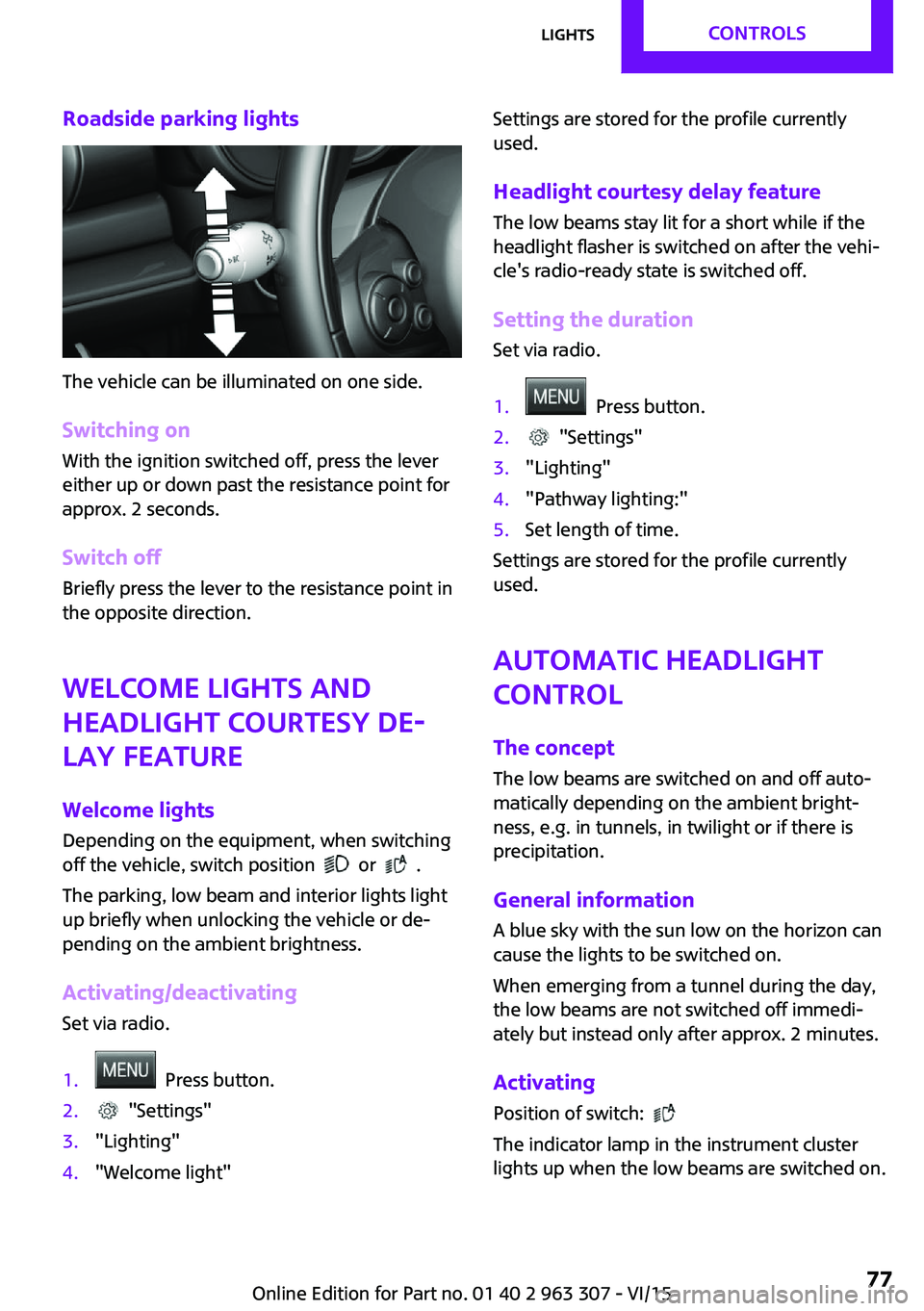
Roadside parking lights
The vehicle can be illuminated on one side.
Switching on With the ignition switched off, press the lever
either up or down past the resistance point for
approx. 2 seconds.
Switch off Briefly press the lever to the resistance point in
the opposite direction.
Welcome lights and
headlight courtesy de‐
lay feature
Welcome lights
Depending on the equipment, when switching
off the vehicle, switch position
or .
The parking, low beam and interior lights light
up briefly when unlocking the vehicle or de‐
pending on the ambient brightness.
Activating/deactivating
Set via radio.
1. Press button.2. "Settings"3."Lighting"4."Welcome light"Settings are stored for the profile currently
used.
Headlight courtesy delay feature The low beams stay lit for a short while if the
headlight flasher is switched on after the vehi‐
cle's radio-ready state is switched off.
Setting the duration Set via radio.1. Press button.2. "Settings"3."Lighting"4."Pathway lighting:"5.Set length of time.
Settings are stored for the profile currently
used.
Automatic headlight
control
The concept
The low beams are switched on and off auto‐
matically depending on the ambient bright‐
ness, e.g. in tunnels, in twilight or if there is
precipitation.
General information
A blue sky with the sun low on the horizon can
cause the lights to be switched on.
When emerging from a tunnel during the day,
the low beams are not switched off immedi‐
ately but instead only after approx. 2 minutes.
Activating Position of switch:
The indicator lamp in the instrument cluster
lights up when the low beams are switched on.
Seite 77LightsCONTROLS77
Online Edition for Part no. 01 40 2 963 307 - VI/15
Page 78 of 251
System limits
The automatic headlamp control cannot serve
as a substitute for your personal judgment of
lighting conditions.
E. g. the sensors are unable to detect fog or
hazy weather. To avoid safety risks under these
conditions, you should always switch on the
lights manually.
Daytime running lights Position of switch:
, ,
The daytime running lights light up when the
ignition is switched on. After the ignition is
switched off, the parking lights light up in posi‐
tion
.
Activating/deactivating
In some countries, daytime running lights are
mandatory, so it may not be possible to deacti‐ vate the daytime running lights.
Set via radio.
1. Press button.2. "Settings"3."Lighting"4."Daytime running lamps"
Settings are stored for the profile currently
used.
Cornering lamp
Position of switch:
When going around corners, the cornering light
also lights the interior area of the curve. Below
a speed of approx. 25 mph/40 km/h when the
turn signal is switched on and the steering an‐
gle is detected, there is automatic activation.
Malfunction A Check Control message is displayed.
Cornering light is disrupted or failed. Have the
system checked as soon as possible.
High-beam Assistant The concept
When the low beams are activated, this system automatically switches the high beams on and
off. The procedure is controlled by a camera on
the front of the interior rearview mirror. The as‐
sistant ensures that the high beams are acti‐
vated whenever the traffic situation allows. The
driver can intervene at any time and switch the
high beams on and off as usual. In the low
speed range, the high beams are not switched
on by the system.
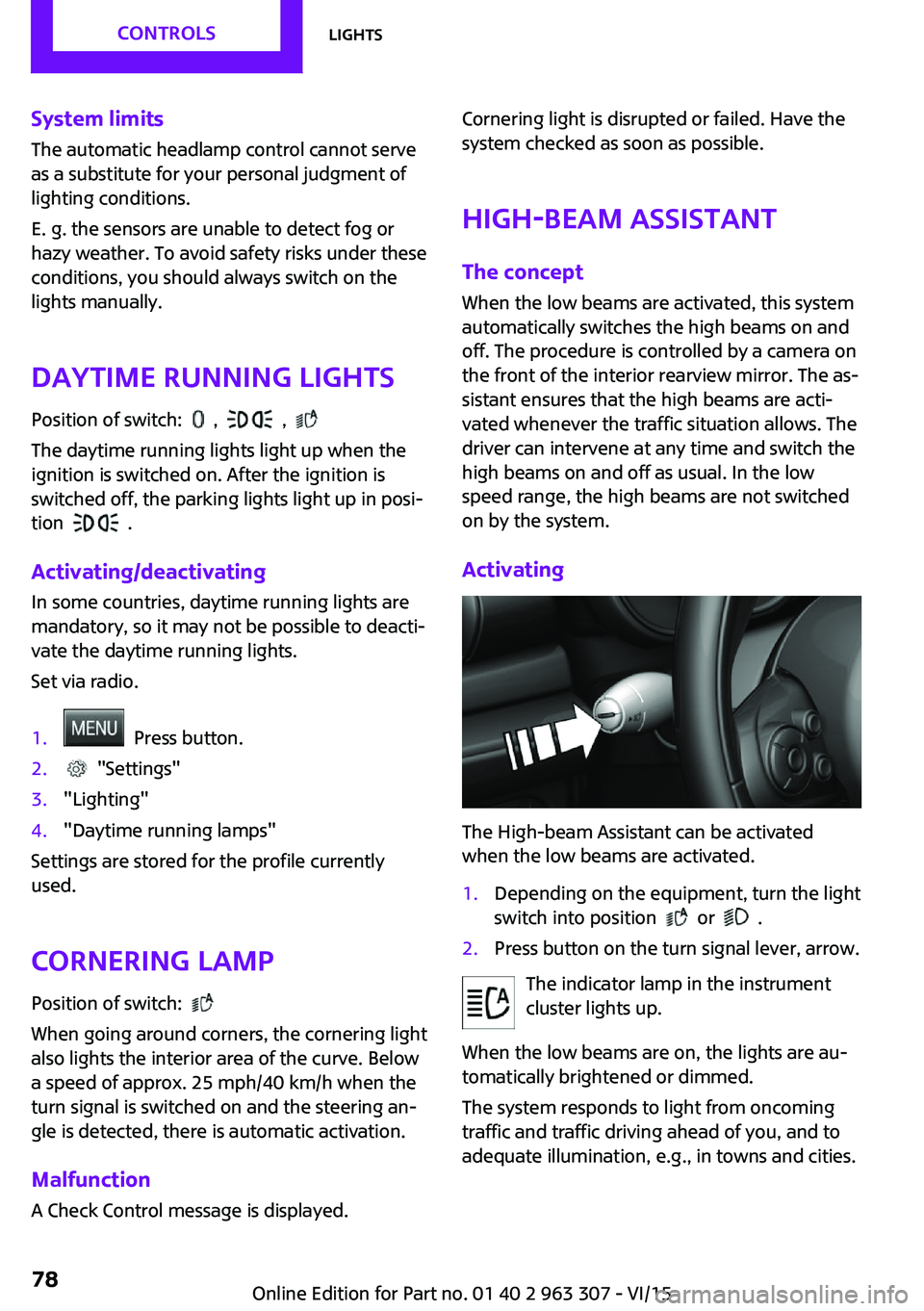
Activating
The High-beam Assistant can be activated
when the low beams are activated.
1.Depending on the equipment, turn the light
switch into position
or .
2.Press button on the turn signal lever, arrow.
The indicator lamp in the instrument
cluster lights up.
When the low beams are on, the lights are au‐
tomatically brightened or dimmed.
The system responds to light from oncoming
traffic and traffic driving ahead of you, and to
adequate illumination, e.g., in towns and cities.
Seite 78CONTROLSLights78
Online Edition for Part no. 01 40 2 963 307 - VI/15
Page 79 of 251
The blue indicator lamp in the instru‐
ment cluster lights up when the system
switches on the high beams.
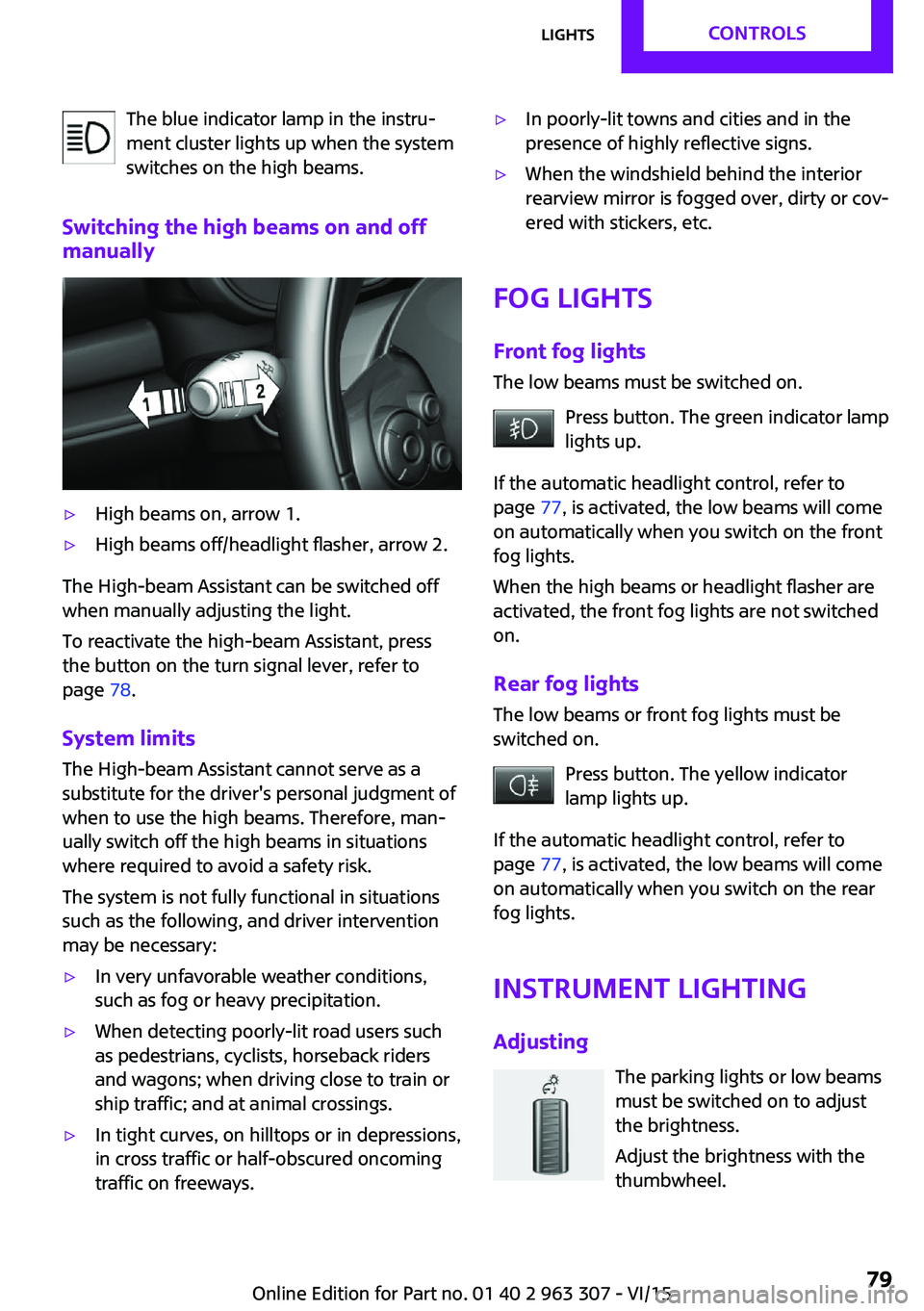
Switching the high beams on and off
manually▷High beams on, arrow 1.▷High beams off/headlight flasher, arrow 2.
The High-beam Assistant can be switched off
when manually adjusting the light.
To reactivate the high-beam Assistant, press
the button on the turn signal lever, refer to
page 78.
System limits
The High-beam Assistant cannot serve as a
substitute for the driver's personal judgment of
when to use the high beams. Therefore, man‐
ually switch off the high beams in situations
where required to avoid a safety risk.
The system is not fully functional in situations such as the following, and driver intervention
may be necessary:
▷In very unfavorable weather conditions,
such as fog or heavy precipitation.▷When detecting poorly-lit road users such
as pedestrians, cyclists, horseback riders
and wagons; when driving close to train or
ship traffic; and at animal crossings.▷In tight curves, on hilltops or in depressions,
in cross traffic or half-obscured oncoming
traffic on freeways.▷In poorly-lit towns and cities and in the
presence of highly reflective signs.▷When the windshield behind the interior
rearview mirror is fogged over, dirty or cov‐
ered with stickers, etc.
Fog lights
Front fog lights
The low beams must be switched on.
Press button. The green indicator lamp
lights up.
If the automatic headlight control, refer to
page 77, is activated, the low beams will come
on automatically when you switch on the front
fog lights.
When the high beams or headlight flasher are
activated, the front fog lights are not switched
on.
Rear fog lights The low beams or front fog lights must be
switched on.
Press button. The yellow indicator
lamp lights up.
If the automatic headlight control, refer to
page 77, is activated, the low beams will come
on automatically when you switch on the rear
fog lights.
Instrument lighting Adjusting The parking lights or low beams
must be switched on to adjust
the brightness.
Adjust the brightness with the
thumbwheel.
Seite 79LightsCONTROLS79
Online Edition for Part no. 01 40 2 963 307 - VI/15
Page 80 of 251
Interior lights
General information The interior lights, footwell lights, access lights
and courtesy lights are controlled automati‐ cally.
Thumb wheel for the instrument lighting con‐
trols brightness of some of these features.
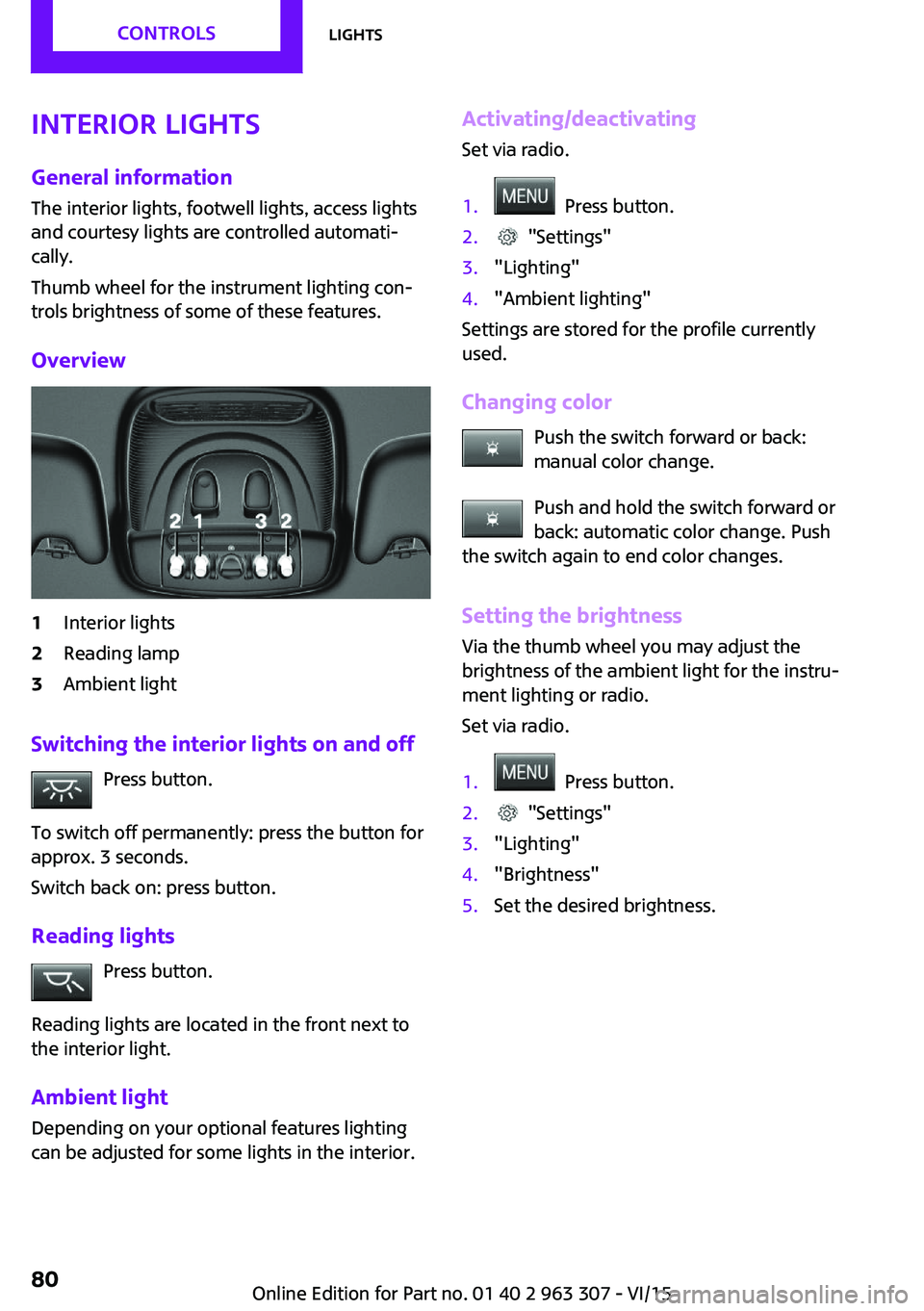
Overview1Interior lights2Reading lamp3Ambient light
Switching the interior lights on and off Press button.
To switch off permanently: press the button for
approx. 3 seconds.
Switch back on: press button.
Reading lights Press button.
Reading lights are located in the front next to
the interior light.
Ambient light
Depending on your optional features lighting
can be adjusted for some lights in the interior.
Activating/deactivating
Set via radio.1. Press button.2. "Settings"3."Lighting"4."Ambient lighting"
Settings are stored for the profile currently
used.
Changing color Push the switch forward or back:
manual color change.
Push and hold the switch forward or
back: automatic color change. Push
the switch again to end color changes.
Setting the brightnessVia the thumb wheel you may adjust the
brightness of the ambient light for the instru‐
ment lighting or radio.
Set via radio.
1. Press button.2. "Settings"3."Lighting"4."Brightness"5.Set the desired brightness.Seite 80CONTROLSLights80
Online Edition for Part no. 01 40 2 963 307 - VI/15
Page 92 of 251

Overview
Button in the vehicle
Intelligent Safety button
Camera
The camera is installed near the interior rear‐
view mirror.
Keep the windshield in the area behind the in‐
terior rearview mirror clean and clear.
Switching on/off
Switching on automatically
The system is automatically active after every
driving-off.
Switching on/off manually Press button briefly:
▷The menu for the intelligent safety
system is displayed. The systems
are individually switched off ac‐
cording to their respective settings.▷LED lights up orange or goes out respective
to their individual settings.
Adjust as needed. Individual settings are stored
for the profile currently used.
Press button again:
▷All Intelligent Safety systems are
activated.▷The LED lights up green.
Hold down button:
▷All Intelligent Safety systems are
turned off.▷The LED goes out.
Setting the warning time
The warning time can be set on the radio.
1.Intelligent Safety button
The intelligent safety menu is displayed for
a brief time on the radio display.2."Front. Coll. Warn."3."Warning time"4.Setting the desired warning time
The selected warning time is stored for the pro‐
file currently used.
Warning with braking function
Display
If a collision with a vehicle detected in this way
is imminent, a warning symbol appears on the
instrument cluster.
SymbolMeasureSymbol lights up red: prewarning.
Brake and increase distance.Symbol flashes red and an acoustic
signal sounds: acute warning.
You are requested to intervene by
braking or make an evasive maneu‐
ver.Seite 92CONTROLSSafety92
Online Edition for Part no. 01 40 2 963 307 - VI/15
Page 95 of 251

Camera
The camera is installed near the interior rear‐
view mirror.
Keep the windshield in the area behind the in‐
terior rearview mirror clean and clear.
Switching on/off
Switching on automatically
The system is automatically active after every
driving-off.
Switching on/off manually Press button briefly:
▷The menu for the intelligent safety
system is displayed. The systems
are individually switched off ac‐
cording to their respective settings.▷LED lights up orange or goes out respective
to their individual settings.
Adjust as needed. Individual settings are stored
for the profile currently used.
Press button again:
▷All Intelligent Safety systems are
activated.▷The LED lights up green.
Hold down button:
▷All Intelligent Safety systems are
turned off.▷The LED goes out.Warning with braking function
Display
If a collision with a person detected in this way
is imminent, a warning symbol appears on the
instrument cluster.
The red symbol is displayed and a signal
sounds.
Intervene immediately by braking or
make an evasive maneuver.
Braking intervention
The warning prompts the driver himself/herself
to react. During a warning, the maximum brak‐
ing force is used. Premise for the brake booster
is sufficiently quick and sufficiently hard step‐
ping on the brake pedal. The system can assist
with some braking intervention if there is risk of
a collision. At low speeds vehicles may thus come to a complete stop.
Manual transmission: During a braking inter‐
vention up to a complete stop, the engine may
be shut down.
The braking intervention is executed only if DSC
Dynamic Stability Control is switched on.
The braking intervention can be interrupted by
stepping on the accelerator pedal or by actively
moving the steering wheel.
Object detection can be restricted. Limitations
of the detection range and functional restric‐
tions are to be considered.
System limits
Detection range The detection potential of the camera is lim‐
ited.
Thus a warning might not be issued or be is‐
sued late.
E. g. the following situations may not be de‐
tected:▷Partially covered pedestrians.Seite 95SafetyCONTROLS95
Online Edition for Part no. 01 40 2 963 307 - VI/15
Page 102 of 251

Press buttonFunctionPause cruise control, refer to
page 102
Continue cruise control with the
last setting, refer to page 103Reduce distance, refer to
page 103Increase distance, refer to
page 103Increase, maintain, and store
speed, refer to page 103Reduce, maintain, and store
speed, refer to page 103
Buttons are arranged according to vehicle's ser‐
ies, optional features and country specifica‐
tions.
Camera
The camera is installed near the interior rear‐
view mirror.
Keep the windshield in the area behind the in‐
terior rearview mirror clean and clear.
Switching on/off and interrupting cruise
control
Switching on Press button on the steering wheel.
Display in the instrument cluster lights
up.
Display in the instrument cluster lights up. The current speed is adopted as de‐
sired speed and displayed with symbol.
Cruise control is active and maintains the set
speed.
DSC Dynamic Stability Control will be switched
on if needed.
Switch off Press button on the steering wheel.
The displays go out. The stored desired speed is
deleted.
Interrupting Press button on the steering wheel.
The system is automatically interrupted in the
following situations:▷When the brakes are applied.▷If the clutch pedal is depressed for a few
seconds or released while a gear is not en‐
gaged.▷If selector lever position N is set.▷When DTC Dynamic Traction Control is acti‐
vated or DSC is deactivated.▷When DSC is actively controlling stability.▷If the detection range of the camera is im‐
paired, e.g., by soiling, heavy precipitation
or glare effects from the sun.▷If the vehicle in front decelerates below a
speed of approx. 20 mph/30 km/h.Seite 102CONTROLSDriving comfort102
Online Edition for Part no. 01 40 2 963 307 - VI/15
Page 126 of 251
devices and cables are not in the airbag's area
of unfolding. ◀
Sockets Sockets can be used for the running electrical
devices with the engine running or with the ig‐
nition switched on. The total load of all sockets
must not exceed 140 watts at 12 volts.
Do not damage the socket by using non-com‐
patible connectors.
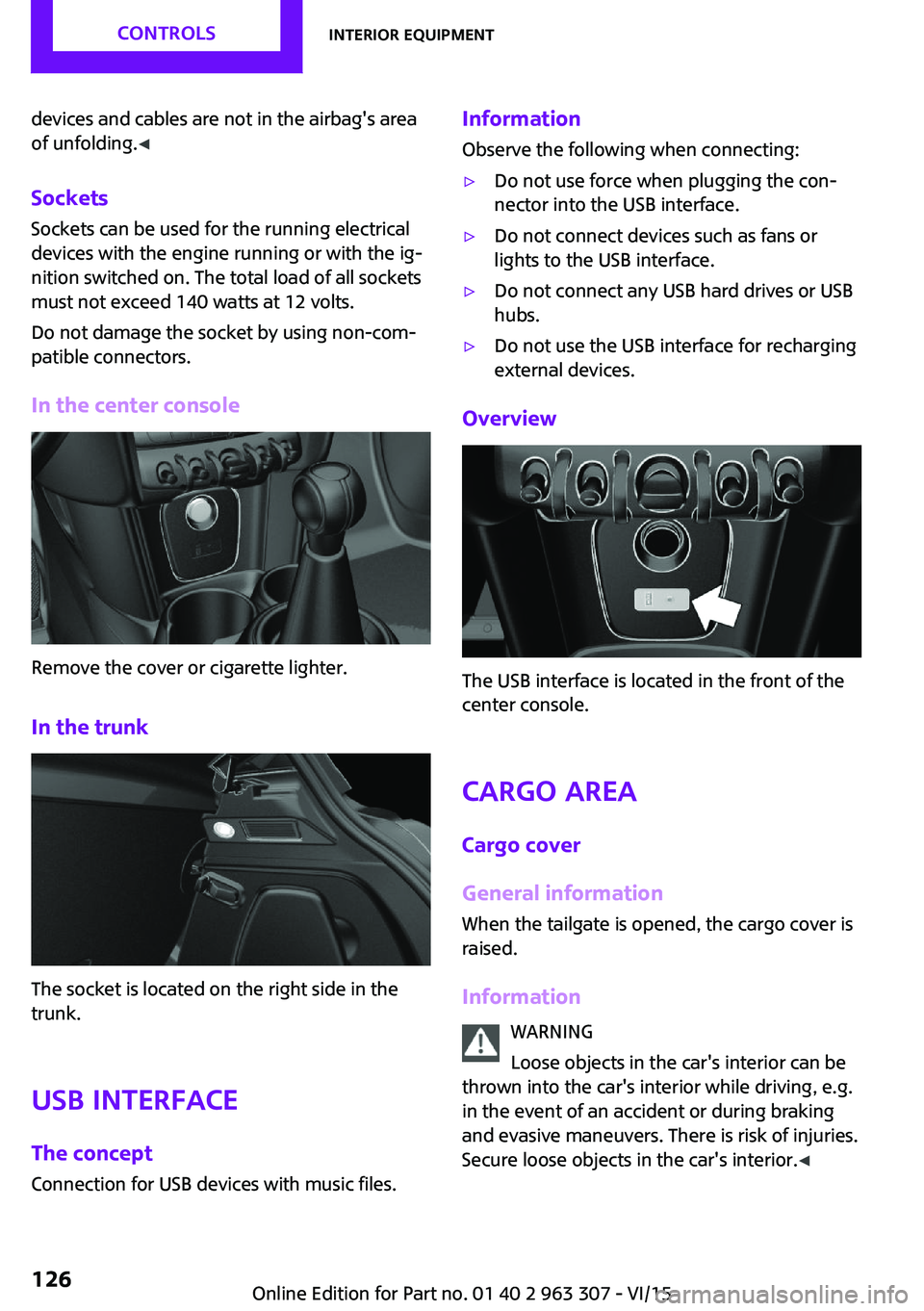
In the center console
Remove the cover or cigarette lighter.
In the trunk
The socket is located on the right side in the
trunk.
USB interface
The concept
Connection for USB devices with music files.
Information Observe the following when connecting:▷Do not use force when plugging the con‐
nector into the USB interface.▷Do not connect devices such as fans or
lights to the USB interface.▷Do not connect any USB hard drives or USB
hubs.▷Do not use the USB interface for recharging
external devices.
Overview
The USB interface is located in the front of the
center console.
Cargo area
Cargo cover
General information When the tailgate is opened, the cargo cover is
raised.
Information WARNING
Loose objects in the car's interior can be
thrown into the car's interior while driving, e.g.
in the event of an accident or during braking
and evasive maneuvers. There is risk of injuries.
Secure loose objects in the car's interior. ◀
Seite 126CONTROLSInterior equipment126
Online Edition for Part no. 01 40 2 963 307 - VI/15
Page 221 of 251
Steptronic transmission:1.Drive into the car wash.2.Engage selector lever position N.3.Make sure that the parking brake is re‐
leased.4.Press the Start/Stop button to switch off the
engine.
In this way, the ignition remains switched
on, and two Check-Control messages are
displayed.
A signal sounds when you leave the vehicle
while in selector lever position N.
The vehicle cannot be locked from the outside
when in selector lever position N. A signal is
sounded when an attempt is made to lock the
vehicle.
To start the engine with manual transmission:
1.Press on the clutch pedal.2.Press the Start/Stop button.
To start the engine with Steptronic transmis‐
sion:
1.Depress the brake pedal.2.Press the Start/Stop button.
Headlights
▷Do not rub dry and do not use abrasive or
acidic cleansers.▷Soak areas that have been dirtied e. g.,
from insects, with shampoo and wash off
with water.▷Thaw ice with de-icing spray; do not use an
ice scraper.
After washing the vehicle
After washing the vehicle, apply the brakes
briefly to dry them; otherwise, braking action
can be reduced and corrosion of the brake
discs can occur.
Completely remove all residues on the win‐
dows, to minimize loss of visibility due to
smearing and to reduce wiper noises and wiper
blade wear.
Vehicle care Car care products
The manufacturer of your vehicle recommends
using care and cleaning products from MINI.
WARNING
Cleansers can contain substances that are
dangerous and harmful to your health. There is
risk of injuries. When cleaning the interior, open
the doors or windows. Only use products in‐
tended for cleaning vehicles. Follow the instruc‐
tions on the container. ◀
Vehicle paint
Regular care contributes to driving safety and
value retention. Environmental influences in
areas with elevated air pollution or natural con‐
taminants, such as tree resin or pollen can af‐
fect the vehicle's paintwork. Tailor the fre‐
quency and extent of your car care to these
influences.
Aggressive substances such as spilled fuel, oil,
grease or bird droppings must be removed im‐
mediately to prevent the finish from being al‐
tered or discolored.
Leather careRemove dust from the leather often, using acloth or vacuum cleaner.
Otherwise, particles of dust and road grime
chafe in pores and folds, and lead to increased
wear and premature degradation of the leather
surface.
To guard against discoloration, such as from
clothing, provide leather care roughly every
two months.
Clean light-colored leather more frequently be‐
cause soiling on such surfaces is substantially
more visible.Seite 221CareMOBILITY221
Online Edition for Part no. 01 40 2 963 307 - VI/15