park assist MINI COOPER 2016 User Guide
[x] Cancel search | Manufacturer: MINI, Model Year: 2016, Model line: COOPER, Model: MINI COOPER 2016Pages: 251, PDF Size: 8.4 MB
Page 215 of 251

PreparationCAUTION
In the case of body contact between the
two vehicles, a short circuit can occur during
jump-starting. There is risk of property damage.
Make sure that no body contact occurs. ◀1.Check whether the battery of the other ve‐
hicle has a voltage of 12 volts. This informa‐
tion can be found on the battery.2.Switch off the engine of the assisting vehi‐
cle.3.Switch off any electronic systems/power
consumers in both vehicles.
Starting aid terminals
WARNING
If the jumper cables are connected in the
incorrect order, sparks formation can occur.
There is risk of injuries. Pay attention to the cor‐
rect order during connection. ◀
The so-called starting aid terminal in the engine
compartment acts as the battery's positive ter‐
minal.
Open the lid of the starting aid terminal.
The body ground acts as the negative terminal
of the battery.
Connecting the cables
1.Pull off the lid of the starting aid terminal.2.Attach one terminal clamp of the positive
jumper cable to the positive terminal of the
battery, or to the corresponding starting aid
terminal of the vehicle providing assistance.3.Attach the terminal clamp on the other end
of the cable to the positive terminal of the
battery, or to the corresponding starting aid
terminal of the vehicle to be started.4.Attach one terminal clamp of the negative
jumper cable to the negative terminal of
the battery, or to the corresponding engine
or body ground of assisting vehicle.5.Attach the second terminal clamp to the
negative terminal of the battery, or to the
corresponding engine or body ground of
the vehicle to be started.
Starting the engine
Never use spray fluids to start the engine.
1.Start the engine of the assisting vehicle and
let it run for several minutes at an increased
idle speed.2.Start the engine of the vehicle that is to be
started in the usual way.
If the first starting attempt is not successful,
wait a few minutes before making another
attempt in order to allow the discharged
battery to recharge.Seite 215Breakdown assistanceMOBILITY215
Online Edition for Part no. 01 40 2 963 307 - VI/15
Page 216 of 251
3.Let both engines run for several minutes.4.Disconnect the jumper cables in the reverse
order.
Check the battery and recharge if needed.
Tow-starting and towing
Information WARNING
Due to system limits, individual functions
can malfunction during tow-starting/towing
with the Intelligent Safety systems activated,
e.g. approach control warning with light brak‐
ing function. There is risk of an accident. Switch
all Intelligent Safety systems off prior to tow-
starting/towing. ◀
Switching off Intelligent Safety systems, refer to
page 90.
Steptronic transmission: transporting your vehicle
Information Your vehicle must not be towed if the front
wheels are touching the ground.
CAUTION
The vehicle can be damaged when tow‐
ing the vehicle with a lifted rear axle. There is
risk of property damage. Have vehicle trans‐
ported only with lifted front axle or on a load‐
ing platform. ◀
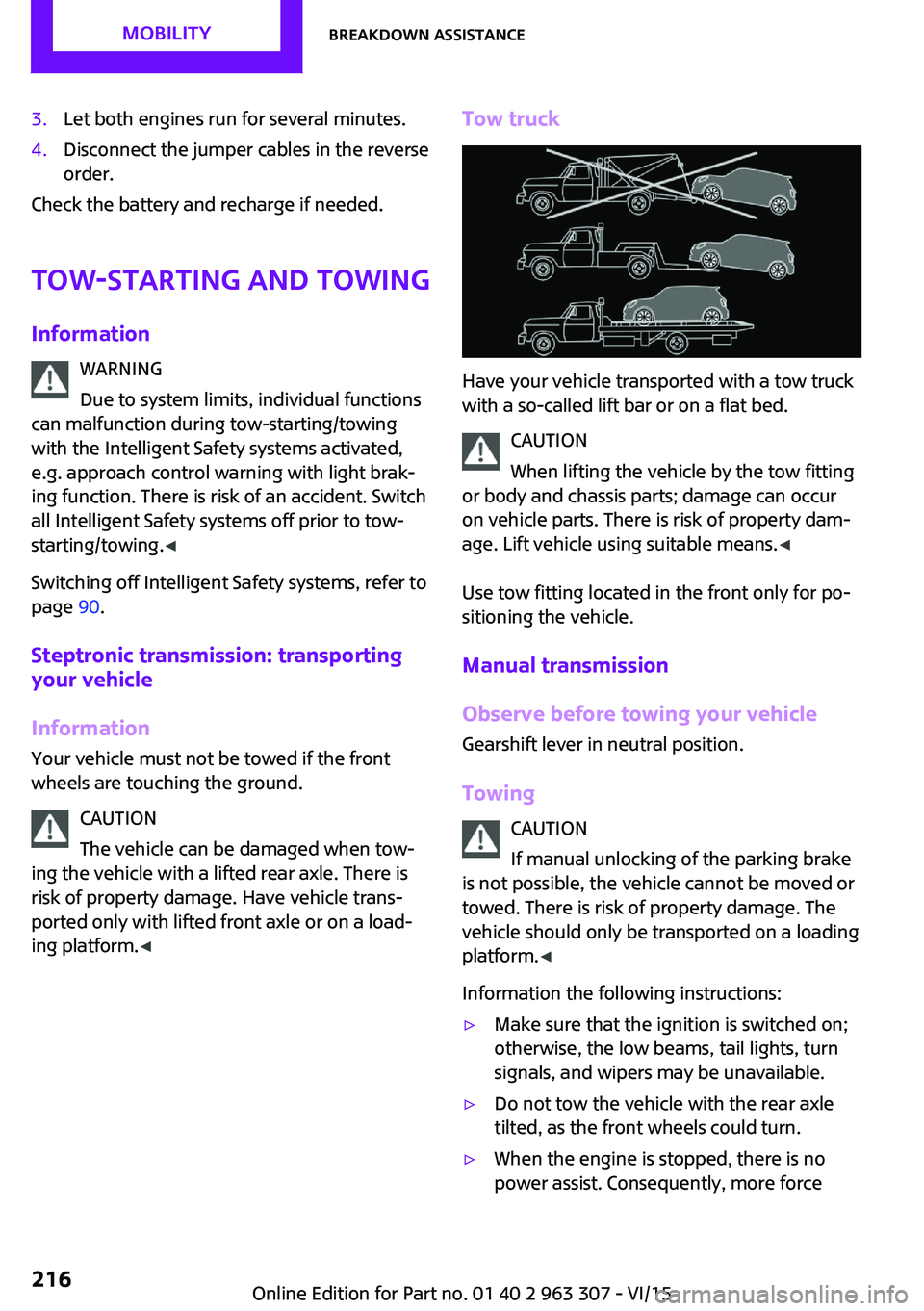
Tow truck
Have your vehicle transported with a tow truck
with a so-called lift bar or on a flat bed.
CAUTION
When lifting the vehicle by the tow fitting
or body and chassis parts; damage can occur
on vehicle parts. There is risk of property dam‐
age. Lift vehicle using suitable means. ◀
Use tow fitting located in the front only for po‐
sitioning the vehicle.
Manual transmission
Observe before towing your vehicle
Gearshift lever in neutral position.
Towing CAUTION
If manual unlocking of the parking brake
is not possible, the vehicle cannot be moved or
towed. There is risk of property damage. The
vehicle should only be transported on a loading
platform. ◀
Information the following instructions:
▷Make sure that the ignition is switched on;
otherwise, the low beams, tail lights, turn
signals, and wipers may be unavailable.▷Do not tow the vehicle with the rear axle
tilted, as the front wheels could turn.▷When the engine is stopped, there is no
power assist. Consequently, more forceSeite 216MOBILITYBreakdown assistance216
Online Edition for Part no. 01 40 2 963 307 - VI/15
Page 245 of 251

Front-seat passenger airbags,automatic deactivation 83
Front-seat passenger airbags, indicator lamp 83
FTM Flat Tire Monitor 88
Fuel 176
Fuel consumption, see Aver‐ age fuel consumption 71
Fuel filler flap 174
Fuel gauge 67
Fuel lid 174
Fuel quality 176
Fuel recommendation 176
Fuel, tank capacity 230
Fuse 213
G Garage door opener, see Uni‐ versal Integrated Remote
Control 121
Gasoline 176
Gear change, Steptronic trans‐ mission 58
Gear shift indicator 68
General driving notes 136
Glare shield 125
Glass sunroof, refer to Panor‐ amic glass sunroof 33
Glove compartment 129
Gong, volume equaliza‐ tion 150
GREEN mode 143
GREEN mode, bonus range 144
GREEN mode indicator 143
GREEN - program, driving dy‐ namics 99
GREEN tip 145
Gross vehicle weight, ap‐ proved 227
Ground clearance 138
H Halogen headlights 204 Handbrake, refer to parking
brake 53
Hand-held transmitter, alter‐ nating code 122
Hands-free system 164
Hazard warning flashers 214
HD Radio 153
Head airbag 81
Headlight control, auto‐ matic 77
Headlight courtesy delay fea‐ ture 77
Headlight flasher 54
Headlight glass 204
Headlights, care 221
Head restraints 36
Head restraints, front 40
Head restraints, rear 41
Heavy cargo, stowing 140
High-beam Assistant 78
High beams 54
High beams/low beams, see High-beam Assistant 78
Hills 138
Hill start assistant, see Drive- off assistant 100
Holder for beverages 130
Homepage 6
Hood 194
Horn 14
Hot exhaust system 137
Hydroplaning 137
I
Ice warning, see External tem‐ perature warning 67
Icy roads, see External tem‐ perature warning 67
Identification marks, tires 184
Identification number, see ve‐ hicle identification number 9
Ignition key, see Remote con‐ trol 22
Ignition off 49
Ignition on 49 Illuminated ring, central in‐
strument cluster 73
Indication of a flat tire 85, 88
Indicator lamp, see Check Control 63
Individual air distribu‐ tion 116, 119
Individual settings, see Per‐ sonal Profile 24
Inflation pressure, tires 178
Inflation pressure warning, tires 88
Info display, refer to On-Board computer 71
Information 6
Initialize, Tire Pressure Moni‐ tor TPM 85
Initializing, Flat Tire Monitor FTM 88
Instrument cluster 62
Instrument cluster, electronic displays 63
Instrument lighting 79
Integrated key 22
Intelligent Safety 90
Intensity, AUTO program 118
Interior equipment 121
Interior lights 80
Interior lights during unlock‐ ing 24
Interior lights with the vehicle locked 25
Interior motion sensor 31
Interior rearview mirror, auto‐ matic dimming feature 43
Interior rearview mirror, com‐ pass 123
Interior rearview mirror, man‐ ually dimmable 43
Internet site 6
Interval display, service re‐ quirements 68
Interval mode 55 Seite 245Everything from A to ZREFERENCE245
Online Edition for Part no. 01 40 2 963 307 - VI/15
Page 246 of 251

J
Jacking points for the vehicle jack 210
Joystick, Steptronic transmis‐ sion 58
Jump-starting 214
K
Key/remote control 22
Keyless Go, see Comfort Ac‐ cess 28
Key Memory, see Personal Profile 24
Kickdown, Steptronic trans‐ mission 58
Knee airbag 82
L
Label on recommended tires 186
Lamp replacement 203
Lamp replacement, front 204
Lamp replacement, rear 206
Lamp replacement, side 209
Language, setting 72
Lashing eyes, securing cargo 140
LATCH child restraint sys‐ tem 47
Launch Control 61
Leather, care 221
LED bug light 204
LED headlights 204
LED ring, central instrument cluster 73
LEDs, light-emitting di‐ odes 203
License Texts and Certifica‐ tions 235
Light 76
Light-alloy wheels, care 222
Light-emitting diodes, LEDs 203 Lighter 125
Lighting 76
Lights and bulbs 203
Light switch 76
Load 140
Loading 139
Lock, door 26
Locking/unlocking via door lock 26
Locking/unlocking with re‐ mote control 24
Locking, automatic 30
Locking, settings 29
Lock, power window 33
Locks, doors, and windows 48
Low beams 76
Low beams, automatic, see High-beam Assistant 78
Lower back support, mechani‐ cal 37
Luggage rack, refer to Roof- mounted luggage rack 140
Lumbar support, mechani‐ cal 37
M
Maintenance 200
Maintenance require‐ ments 200
Maintenance, service require‐ ments 68
Maintenance system, MINI 200
Make-up mirror 125
Malfunction displays, see Check Control 63
Manual air distribu‐ tion 116, 119
Manual air flow 116, 119
Manual mode, transmis‐ sion 59
Manual operation, door lock 26
Manual operation, exterior mirrors 42 Manual operation, fuel filler
flap 174
Manual operation, Park Dis‐ tance Control PDC 110
Manual transmission 58
Manufacturer of the MINI 7
Marking, run-flat tires 187
Master key, see Remote con‐ trol 22
Maximum cooling 118
Maximum speed, display 69
Maximum speed, winter tires 187
Medical kit 214
Menu in instrument cluster 70
Messages, see Check Con‐ trol 63
Microfilter 117, 120
MID - program, driving dy‐ namics 99
MINI maintenance sys‐ tem 200
Minimum tread, tires 185
Mirrors 42
Mobile communication devi‐ ces in the vehicle 137
Mobile phone 164
Mobility System 188
Mode, GREEN Mode 143
Modifications, technical, refer to Own Safety 7
Moisture in headlight 204
Mounting of child restraint systems 46
Multifunction steering wheel, buttons 14
N
Neck restraints, front, see Head restraints 40
Neck restraints, rear, see Head restraints 41
New wheels and tires 186
Nylon rope for tow-starting/ towing 217 Seite 246REFERENCEEverything from A to Z246
Online Edition for Part no. 01 40 2 963 307 - VI/15
Page 247 of 251
O
OBD Onboard Diagnos‐ tics 201
Octane rating, see Recom‐ mended fuel grade 176
Odometer 67
Oil 195
Oil, adding 196
Oil additives 197
Oil change 197
Oil change interval, service re‐ quirements 68
Oil filler neck 196
Oil types, alternative 197
Oil types, suitable 197
Old batteries, disposal 213
On-board computer 71
On-board computer, refer to On-board computer 71
Onboard Diagnostics OBD 201
Onboard vehicle tool kit 202
Opening/closing via door lock 26
Opening/closing with remote control 24
Optional equipment, standard equipment 6
Outside air, refer to Automatic recirculated-air control 119
Own safety 7
P
Paint, vehicle 221
Panoramic glass sunroof 33
Parallel parking assistant 111
Park Distance Control PDC 108
Parked vehicle, condensa‐ tion 138
Parking aid, see PDC 108
Parking assistant 111
Parking brake 53
Parking lights 76 Passenger side mirror, tilting
downward 42
PDC Park Distance Con‐ trol 108
Pedestrian warning with city braking function 94
Performance Control 98
Personal Profile 24
Phone 164
Pinch protection system, glass sunroof 34
Pinch protection system, win‐ dows 32
Plastic, care 222
PostCrash 96
Power failure 213
Power windows 31
Prescribed engine oil types 197
Pressure, tire air pressure 178
Pressure warning, tires 88
Profile, see Personal Pro‐ file 24
Protective function, glass sun‐ roof 34
Protective function, win‐ dows 32
R
Radiator fluid 198
Radio, AM/FM stations 151
Radio, Apple iPod/iPhone 157
Radio, AUX-IN port 156
Radio, control elements 151
Radio, external devices 156
Radio, FM/AM 151
Radio, muting 151
Radio-operated key, see Re‐ mote control 22
Radio, overview 151
Radio ready state 49
Radio, satellite radio 154
Radio, save stations 153
Radio, USB audio inter‐ face 157 Rain sensor 55
Rear fog lights 79
Rear lights 206
Rear luggage rack 141
Rearview mirror 42
Rear window de‐ froster 117, 119
Recirculated-air filter 120
Recirculated-air mode 116, 119
Recommended fuel grade 176
Recommended tire brands 186
Refueling 174
Remaining range 67
Remote control/key 22
Remote control, blocking 23
Remote control, malfunc‐ tion 25
Remote control, replacing the battery 22
Remote control, univer‐ sal 121
Replacement fuse 213
Replacing parts 202
Replacing the battery, remote control 22
Replacing wheels/tires 186
Reporting safety malfunc‐ tions 10
RES CNCL button, see camera- based cruise control 101
RES CNCL button, see Cruise control 106
Reserve warning, see Range 67
Resetting the tone set‐ tings 150
Reset, Tire Pressure Monitor TPM 85
Retaining straps, securing cargo 140
Retreaded tires 187
Roadside parking lights 77 Seite 247Everything from A to ZREFERENCE247
Online Edition for Part no. 01 40 2 963 307 - VI/15