warning MINI COOPER CONVERTIBLE 2007 Owner's Manual
[x] Cancel search | Manufacturer: MINI, Model Year: 2007, Model line: COOPER CONVERTIBLE, Model: MINI COOPER CONVERTIBLE 2007Pages: 172, PDF Size: 1.9 MB
Page 79 of 172

77
OVERVIEW REPAIRS OPERATIONCONTROLS DATA INDEX
AIRBAGStivated or activated, refer to Functional sta-
tus of the front passenger airbags below. <
Before transporting a child on the
front passenger seat, read the safety
notes and instructions under Transporting
children safely, refer to page50.
Adolescents and adults sitting in certain
positions could also deactivate the front
and side airbags for the front passenger;
the indicator lamp for the front passenger
airbags comes on. In such cases, the occu-
pant should change his or her sitting posi-
tion so that the front passenger airbags are
activated and the indicator lamp goes out.
If the airbags are not activated although
the seat occupant has changed his or her
position, have the occupant sit on a rear
seat. Do not attach covers, cushions, ball
mats or other items to the front passenger
seat unless they are specifically recom-
mended by the manufacturer of your MINI.
Do not place any objects under the seat
which could press against the seat from
below. Otherwise, a correct analysis of the
seat cushion is not ensured.<
Functional status of the front
passenger airbagsAs an example, the illustration shows the
indicator lamp for front passenger airbags
in the MINI Convertible.
In accordance with whether and how the
front passenger seat is occupied, the indi-
cator lamp for the front passenger airbags
shows the functional status of the front
and side airbags for the front passenger.
The indicator lamp shows whether the
front passenger airbags are activated or
deactivated.
>The indicator lamp comes on as intended
when a child in a specially designated
child-restraint system is detected on the
front passenger's seat.
The front and side airbags for the front
passenger are not activated.
>The indicator lamp does not come on
when the system detects a person of suf-
ficient size sitting correctly on the seat,
for example. The front and side airbags
for the front passenger are activated.
>The indicator lamp does not come on
when the seat is empty. However, the
front and side airbags for the front pas-
senger are not activated. Operational readiness of the airbag
system
Starting from ignition key
position 1, the warning lamp in the
display elements lights up briefly
for confirmation that the entire airbag sys-
tem and the seat belt tensioners are opera-
tional.
Airbag system malfunctioning>The warning lamp does not come on
along with ignition key position 1
>The warning lamp stays lit continuously.
In the event of a malfunction, have
the airbag system checked immedi-
ately. Otherwise, there is a risk that the sys-
tem will not function as intended in an
accident of sufficient severity.<
Page 80 of 172

78
PARK DISTANCE CONTROL (PDC)
*
The concept
The PDC assists you when you back into a
parking space. A signal tone tells you the
current distance to an object behind your
vehicle. To do this, four ultrasonic sensors
in the rear bumper measure the distance to
the nearest object.
The sensors on each side have a range of
approx. 2 ft/60 cm, the middle sensors one
of approx. 5 ft/1.5 m.
PDC is a parking aid that can identify
objects if they are approached slowly,
as is generally the case when parking.
Avoid driving towards objects rapidly; due
to underlying physical principles, the sys-
tem may otherwise alert you too late for
you to take evasive steps.
one second after you select reverse gear or
place the selector lever in position R.
Wait for this one second before you
drive backwards.<
The system is deactivated when you shift
away from Reverse.
You can have a signal tone set as a
confirmation that PDC has been acti-
vated.<
Acoustical signalsThe distance to an object is indicated by a
tone sounding at intervals. As the distance
between vehicle and object decreases, the
intervals between the tones become
shorter. A continuous tone indicates the
presence of an object less than 12 in/30 cm
away.
The warning signal is canceled after
approx. three seconds if the distance to the
object remains constant during this time,
for instance if you are moving parallel to a
wall.MalfunctionA continuous high-pitched tone will sound
during initial activation. The system is mal-
functioning. Have the system checked.Volume controlThe volume of the Park Distance Control
signal can be adjusted from level 1, soft, to
level 6, loud.
You can have this function set.<
System limitations
Even with PDC, final responsibility for
estimating the distance between the
vehicle and any objects always remains
with the driver.
Even when sensors are involved, there is a
blind spot in which objects cannot be
detected. Recognition of some objects can
be beyond the limits of physical ultrasonic
measurement, for example with towing
bars or hitches or with thin or wedge-
shaped objects. It is also possible that low
objects already detected, such as a curb
edge, can disappear in the blind spot of the
sensors before a continuous tone is
sounded, or that protruding objects higher
above the ground, such as ledges, are not
detected.
Loud sources of sound outside and inside
your vehicle can drown the PDC signal
tone.<
Keep the sensors clean and free of ice
or snow in order to ensure that they
will continue to operate effectively.
Do not apply high pressure spray to the
sensors for a prolonged period of time.
Always maintain a distance which is
greater than 4 in/10 cm.<
Page 101 of 172
99
OVERVIEW REPAIRSOPERATIONCONTROLS DATA INDEX
GENERAL DRIVING NOTESSafe braking Your vehicle is equipped with ABS as a stan-
dard feature. If you are in a situation which
requires full braking, it is best to brake
using maximum brake pressure. Since the
vehicle remains maneuverable, you can still
go around any obstacles with the smallest
possible steering movements.
The pulsation of the brake pedal, together
with the sound of hydraulic regulation,
indicates to you that ABS is actively taking
effect.
Wet roads:
It is a good idea to periodically dry the
brakes with a gentle application when driv-
ing in rain and on wet roads. Monitor traffic
conditions to ensure that this maneuver
does not hinder other road users. The
resulting heat dries brake rotors and pads.
Then if the braking force is needed, it is
immediately available.
Driving downhill:
To prevent overheating and the
resulting reduced efficiency of the
brake system, drive down extended or
steep mountain gradients in the gear
which requires the least brake applications.
Otherwise, even light but consistent pres-
sure on the brake can lead to high tempera-
tures, brake wear and possibly even brake
failure.<
The braking effect of the engine can be
increased by downshifting in the manual
mode of the automatic transmission, to
first gear if necessary, refer to page58. This
protects the brakes from excessive loads.
Do not coast with the clutch
depressed, the transmission in idle or
the engine switched off. Otherwise, the
engine provides no braking effect, and
there is no power-assist for braking or
steering.
Make sure that there are no floor mats,
floor carpets or other objects in the vicinity
of the pedals; otherwise pedal function
could be impeded.<
Corrosion on the brake rotors:
When the vehicle is driven only occasion-
ally, during extended periods when the
vehicle is not used at all, and in operating
conditions where brake applications are
less frequent, there is an increased ten-
dency for corrosion of the brake rotors and
accumulation of contamination on the
brake pads. This occurs because the mini-
mal pressure that must be exerted by the
pads to clean the rotors by brake applica-
tions is not reached.
Corrosion on brake rotors is signaled by a
running or pulsation during braking; even
extended subsequent braking will not cure
this phenomenon.Brake pads
Sensors in the left front and right
rear brake pads monitor pad condi-
tion. When the brake pads have
worn to the permissible limit, this is indi-
cated by the brake wear warning light,
refer to page18.
Hydroplaning
When driving on wet or slushy roads,
reduce road speed. If you do not, a
wedge of water can form between tires
and road surface. This phenomenon is char-
acterized by a partial or complete loss of
contact between the tires and the road sur-
face. The ultimate results are loss of steer-
ing and braking control.<
Page 103 of 172

101
OVERVIEW REPAIRSOPERATIONCONTROLS DATA INDEX
REFUELING
Always switch off the engine before
refueling; otherwise no fuel can be
added to the tank and the SERVICE ENGINE
SOON lamp may come on.<
1. Open the fuel filler door
2. Turn the gas cap counterclockwise
3. Put the gas cap in the bracket attached
to the fuel filler door.
Always observe all applicable precau-
tionary measures and regulations
when handling fuels. Do not carry any
spare fuel containers in the vehicle. They
can leak and cause an explosion or fire in
the event of an accident.<
Observe the following when refueling
Always observe all safety precautions
posted at the service station when
handling fuel.<
When refueling, insert the filler nozzle
completely into the filler pipe. Pulling the
nozzle out of the pipe during refueling:
>Results in premature pump shutoff
>Will reduce the effect of the fuel vapor
recovery system on the pump.
As long as the filler nozzle is used properly,
the fuel tank is full whenever the nozzle
shuts off the first time.
Closing the gas cap1. Insert gas cap
2. Turn gas cap clockwise until it clicks
3. Close fuel filler door.
Insert the cap and turn it clockwise
until it audibly clicks.
Do not jam the strap between the gas cap
and the vehicle. The following message is
displayed if the cap is loose or missing.<
US models only:
The warning lamp
* comes on.
The gas cap is not correctly closed
or missing. Check if the gas cap is
correctly closed.
Fuel tank volumeApprox. 13.2 gallons/50 liters, of which
approx. 2.1 gallons/8 liters are reserve
capacity.
Do not drive until the fuel tank is
totally empty. Otherwise engine
operations are not guaranteed and damage
could occur.
line; otherwise the catalytic con-
verter will be permanently damaged. Do
not fill the tank with E85, i.e. fuel contain-
ing 85 % ethanol, nor with flex fuel. Other-
wise the engine and fuel supply system will
be damaged.<
Required fuelSuper Premium gasoline/AKI 91
Page 113 of 172

111
OVERVIEW REPAIRSOPERATIONCONTROLS DATA INDEX
RUN-FLAT TIRES
*
You will recognize Run-Flat Tires by a circu-
lar symbol containing the letters RSC on
the side of the tire.
Run-Flat Tires consist of conditionally self-
supporting tires and special rims. The tire
reinforcement ensures that driving
remains possible to a restricted degree in
the event of a pressure drop or even a flat
tire.
For information on continuing to drive with
a flat tire, refer to Flat tire warning,
page75.
Tire change set
In case of a flat tire, the tire change
set is not needed, since your vehicle
has Run-Flat Tires.
When changing a tire, always observe the
safety measures and the procedure for
changing tires starting on page133.<
Your vehicle is additionally equipped with a
tire change set.
In the MINI COOPER and MINI COOPER Con-
vertible this is located in the luggage com-
partment under the floor mat.
In the MINI COOPER S and MINI COOPER S
Convertible, the tire change set is located in
a separate bag which is attached to the
lashing eyelets on the luggage compart-
ment floor by means of tie-down straps.
Have new wheels and tires mounted
only by your MINI Dealer or a special-
ized tire shop that has specially trained per-
sonnel working in accordance with the
specifications of the MINI manufacturer.
Work that is improperly carried out could
result in consequential damage and pose
safety hazards.<
Retreaded tires
The manufacturer of your MINI rec-
ommends that you avoid using
retreaded tires, as this could impair driving
safety. This is due to possible variations in
casing structures and, in some cases, to
their extreme age, factors which can lead
to limited durability.<
Page 119 of 172

117
OVERVIEW REPAIRSOPERATIONCONTROLS DATA INDEX
ENGINE OILMeasuring the oil level1. With the vehicle's engine at normal
operating temperature, i.e. after unin-
terrupted driving for at least 6 miles/
10 km, park the vehicle on a level surface
2. Switch off the engine
3. Pull the dipstick out after approx.
5 minutes and wipe it off with a lint-free
cloth, paper towel, or similar material
4. Carefully push the dipstick all the way
into the guide tube and pull it out again.
The oil level should be between the two
marks on the dipstick.
As with fuel economy, oil consumption is
directly influenced by your driving style and
vehicle operating conditions.
The oil volume between the two marks
MIN, MAX on the dipstick corresponds to
approx. 1.1 quarts/1 liter.
Do not fill beyond the upper mark on
the dipstick. Excess oil will damage
the engine.
dropped to just above the lower mark
of the dipstick. However, never allow the
level to drop below the lower mark.<
Add oil within the next 30 miles/
50 km, otherwise the engine could be
damaged.<
Always store oil, grease, etc., out of
reach of children. Comply with all
warning labels and information on lubri-
cant containers, otherwise health risks may
result.<
Oil changeHave the oil changed only by a MINI Dealer
or a workshop that has specially trained
personnel working in accordance with the
specifications of the MINI manufacturer.
Page 122 of 172

120
BRAKE SYSTEMBrake fluid level
The warning lamp comes on
although the parking brake is not
engaged:
The brake fluid level in the reservoir is too
low, refer to page16. At the same time,
brake pedal travel may become signifi-
cantly longer.
Have the system checked immediately.
If the brake fluid level is too low and brake
pedal travel has become longer, there may
be a defect in one of the brake system's
hydraulic circuits.
Canadian models display this
warning lamp.
If you continue driving, higher brake
application pressure may be neces-
sary, and there may be a slight pull to one
side. Brake pedal travel may also be longer.
Adapt your driving style accordingly.<
Page 124 of 172

122
SOCKET FOR ONBOARD DIAGNOSTICS OBD CARING FOR YOUR VEHICLEPrimary components of exhaust emissions
can be checked by a device via the OBD
socket.
This socket is located to the left of the
driver's side, on the bottom of the instru-
ment panel underneath a cover.Exhaust emission values
The warning lamp comes on. The
exhaust emissions have deterio-
rated. Have the vehicle checked as
soon as possible.
Canadian models display this
warning lamp.
Under some circumstances, the lamp will
flash. This indicates severe engine misfir-
ing. In this case, you should reduce your
speed and visit your nearest MINI Dealer as
soon as possible. Severe engine misfiring
can quickly lead to serious damage of emis-
sions-related components, especially the
catalytic converter.
If the fuel filler cap is not properly
tightened, the OBD system may con-
clude that fuel vapors are escaping, causing
an indicator to light up. If the filler cap is
then tightened, the indicator should go out
within a few days.<
Suitable car-care products
Use the cleaning and car-care prod-
ucts available at your MINI Dealer.<
Washing your vehicleYou can wash your new MINI or MINI Con-
vertible in automatic car washes from the
beginning. Preference should be for cloth
car washes. If, due to lack of availability,
brush car washes must be used, modern
systems with soft brushes should be given
preference.
When using steam cleaners or high-
pressure cleaners, maintain sufficient
distance to the vehicle and do not exceed a
maximum temperature of 1407/606. If
the jet is too close or the pressure is too
high, this can lead to damage or initial
damage that can develop into more serious
damage. Water that enters vehicle compo-
nents can lead to damage over the long
term.
After washing the vehicle, apply the brakes
briefly to dry them, otherwise water can
reduce braking efficiency over the short
term and the brake rotors can corrode.
Switch the rain sensor off when passing
through an automatic car wash, refer to
page63. Failure to do so could result in
Page 135 of 172
133
OVERVIEW REPAIRSOPERATION CONTROLS DATA INDEX
REPAIRING A FLAT TIRE SPACE-SAVER SPARE TIRE
*
Safety measures in the event of a
flat:
Park the vehicle as far away from flowing
traffic as possible, and switch on the haz-
ard warning flashers.
Turn the steering wheel to the straight-
ahead wheel position and engage the
steering lock. Engage the parking brake and
shift into 1st or reverse gear – selector lever
in P.
All passengers should be outside the vehi-
cle and well away from your immediate
working area – behind a guardrail, for
instance.
If a portable hazard warning lamp is avail-
able, set it up on the roadside at an appro-
priate distance from the rear of the vehicle.
Comply with all safety guidelines and regu-
lations.<
In the event of a flat tire, different proce-
dures should be followed depending on the
equipment included in your vehicle:
>Vehicles with Run-Flat Tires, refer to
page111
>Vehicles with a space-saver spare tire,
refer to the following section
>Vehicles with MINI Mobility System,
refer to page137.
To change a space-saver spare tire, proceed
as follows:
>Remove space-saver spare tire, refer to
the section after the next one
>Prepare for tire change, refer to page135
>Jack up the vehicle, refer to page136
>Mount the space-saver spare tire, refer
to page136
>Tighten the lug bolts, refer to page136
>Drive with space-saver spare tire, refer to
page135.
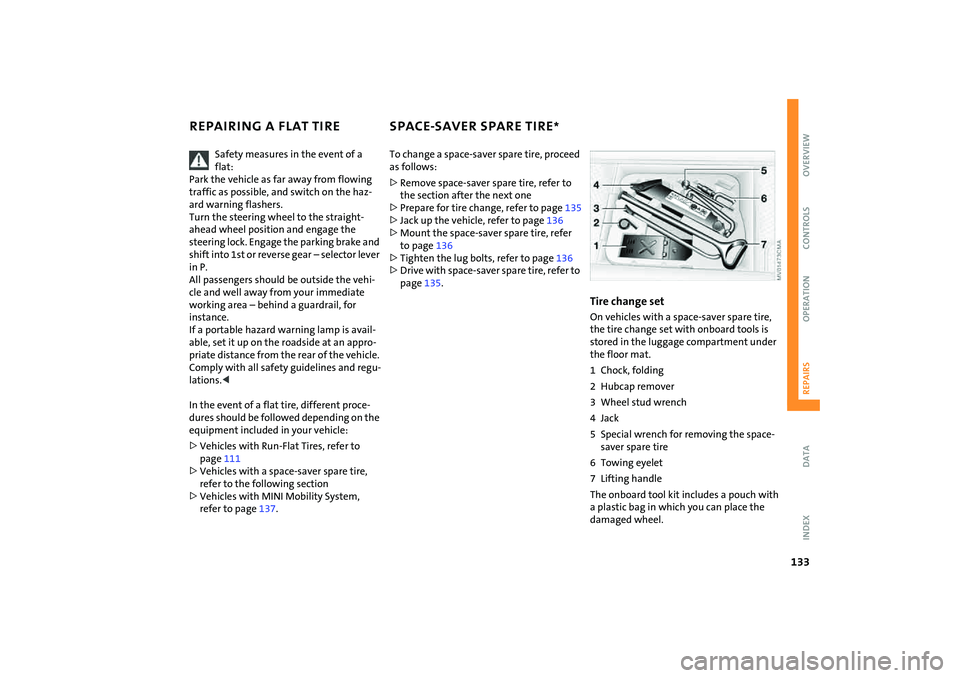
Tire change setOn vehicles with a space-saver spare tire,
the tire change set with onboard tools is
stored in the luggage compartment under
the floor mat.
1 Chock, folding
2 Hubcap remover
3 Wheel stud wrench
4Jack
5 Special wrench for removing the space-
saver spare tire
6 Towing eyelet
7 Lifting handle
The onboard tool kit includes a pouch with
a plastic bag in which you can place the
damaged wheel.
Page 139 of 172

137
OVERVIEW REPAIRSOPERATION CONTROLS DATA INDEX
MINI MOBILITY SYSTEM
*
MINI Mobility System
The MINI Mobility System is provided to
help you repair a flat tire. With the help of
this system you can apply a liquid sealant
on the inside of the tire, which seals the
damaged area and enables you to continue
to drive.Preparing for tire repair
Before using the MINI Mobility Sys-
tem read the warning and danger
precautions on the equipment.<
If possible, leave objects in which have
been forced into the tire.
Take off the tag regarding speed limits and
stick it onto the steering wheel.
Using the MINI Mobility SystemIn order to repair a flat tire with the MINI
Mobility System, proceed as follows:
>Pump in liquid sealant, refer to page138
>Reinflate the tire, refer to page138
>Distribute liquid sealant, refer to
page139
>Check tire inflation pressure, refer to
page139
>Drive on, refer to page139.
MINI Mobility System with onboard
tools The MINI Mobility System with tire change
set and onboard tools is located in the lug-
gage compartment under the floor mat:
1Jack
2 Wheel stud wrench
3 Hubcap remover
4 Wrench, screwdriver/Phillips screw-
driver, towing eyelet
5 Compressor, hose with manometer and
plug for cigarette lighter socket
6 Package with filling hose, valve remover
and valve core
7 Filling canister
8 Hex wrench/screwdriver
9 Adapter for wheel lug lock