bulb MINI COOPER CONVERTIBLE 2007 Owners Manual
[x] Cancel search | Manufacturer: MINI, Model Year: 2007, Model line: COOPER CONVERTIBLE, Model: MINI COOPER CONVERTIBLE 2007Pages: 172, PDF Size: 1.9 MB
Page 6 of 172
CONTENTS
4
In the engine compartment:
Bonnet114
Engine compartment:
MINI COOPER and
MINI COOPER Convertible115
MINI COOPER S and
MINI COOPER S Convertible116
Engine oil117
Coolant118
Brake system120
Maintenance and care:
MINI Maintenance System121
Socket for Onboard Diagnostics
OBD122
Caring for your vehicle122
Vehicle storage125
OWNER SERVICE PROCEDURESReplacement procedures:
Onboard tool kit128
Wiper blades128
Lamps and bulbs129
Repairing a flat tire133
Space-saver spare tire133
Changing tires135
MINI Mobility System137
Vehicle battery140
Fuses141
Giving and receiving assistance:
Jump-starting142
Towing and tow-starting143
TECHNICAL DATAEngine data148
Dimensions:
MINI149
MINI Convertible150
Weights:
MINI151
MINI Convertible152
Capacities153
Page 63 of 172

61
OVERVIEW REPAIRS OPERATIONCONTROLS DATA INDEX
PARKING LAMPS/LOW BEAMS TURN SIGNAL INDICATOR/HEADLAMP FLASHERperiods of time; otherwise, you may not be
able to start the engine.<'Lights on' warning If the lights have not been switched off and
the ignition key is in position 0, an acoustic
signal sounds for a few seconds when you
open the driver's door to remind you that
the lights have not been switched off.Daytime running lamps*If convenient, the light switch can be left in
position 2.
When the ignition is switched off, the
external lights go out.
You can have this function activated/
deactivated.<
1 Turn signal indicators
2 High beams/Headlamp flasherTo signal brieflyGently push the lever up to the point of
resistance and hold it there, if necessary.
The indicator lamp flashes and the
relay clicks faster than normal: flash-
ing bulb has failed.<
Page 131 of 172
129
OVERVIEW REPAIRSOPERATION CONTROLS DATA INDEX
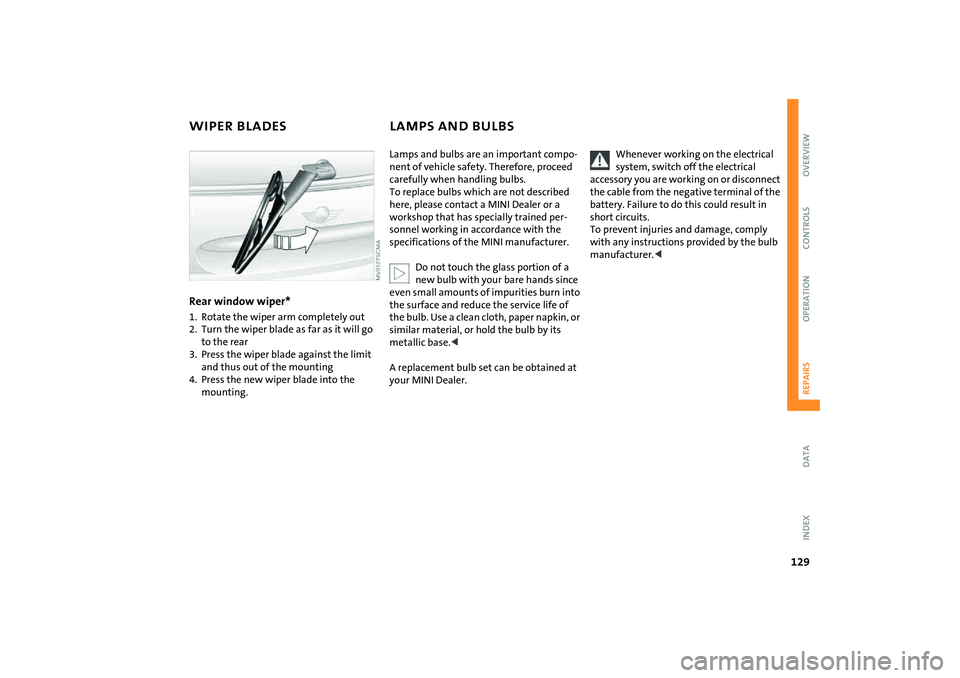
WIPER BLADES LAMPS AND BULBSRear window wiper*1. Rotate the wiper arm completely out
2. Turn the wiper blade as far as it will go
to the rear
3. Press the wiper blade against the limit
and thus out of the mounting
4. Press the new wiper blade into the
mounting.
Lamps and bulbs are an important compo-
nent of vehicle safety. Therefore, proceed
carefully when handling bulbs.
To replace bulbs which are not described
here, please contact a MINI Dealer or a
workshop that has specially trained per-
sonnel working in accordance with the
specifications of the MINI manufacturer.
Do not touch the glass portion of a
new bulb with your bare hands since
even small amounts of impurities burn into
the surface and reduce the service life of
the bulb. Use a clean cloth, paper napkin, or
similar material, or hold the bulb by its
metallic base.<
A replacement bulb set can be obtained at
your MINI Dealer.
Whenever working on the electrical
system, switch off the electrical
accessory you are working on or disconnect
the cable from the negative terminal of the
battery. Failure to do this could result in
short circuits.
To prevent injuries and damage, comply
with any instructions provided by the bulb
manufacturer.<
Page 132 of 172

130
LAMPS AND BULBS1 Low beamsH7 bulb, 55 watts2High beams H7 bulb, 55 watts
The H7 bulb is pressurized. Therefore,
wear safety glasses and protective
gloves. If the lamp is damaged there is a
risk of injury.<
For checking and adjusting headlamp
aim, please contact your MINI
Dealer.
1. Gently pull the retaining wire of the
headlamp cover and guide it outwards
2. Fold down the headlamp cover
3. Disconnect the cable connector from the
bulb socket and pull out the bulb
4. Place the bulb holder on the lower edge
of the mounting and press it in until it
engages in the bulb socket
5. Reconnect the cable connector and
install the headlamp cover again.Xenon lamps*The service life of these bulbs is very long
and the probability of a failure is very low,
provided that they are not switched on and
off an unusual number of times. If one of
these bulbs should nevertheless fail, it is
possible to continue driving with great cau-
tion using the fog lamps, provided traffic
laws in your area do not prohibit this.
Have any work on the xenon lamp
system, including bulb replacement,
carried out only by a MINI Dealer or a work-
shop that has specially trained personnel
working in accordance with the specifica-
tions of the MINI manufacturer. Due to
high voltage, there is a risk of fatal injury if
work on the xenon lamps is carried out
improperly.<
Turn signal indicators, front 21 watt bulb
1. Open the bonnet
2. Reach into the opening for the turn sig-
nal indicators from above
3. Apply gentle pressure to the bulb holder
while turning it to the left
4. Remove and replace the bulb.Parking lamps and standing lamps5watt bulb
The parking lamps and standing lamps are
integrated in the lamp housing of the turn
signal indicator.
1. Turn the bulb holder to the left and pull
out
2. Remove and replace the bulb.
Page 133 of 172

131
OVERVIEW REPAIRSOPERATION CONTROLS DATA INDEX
LAMPS AND BULBSSide turn signal indicators5watt bulb
1. Slide the lamp toward the rear of the
vehicle and remove
2. Remove and replace the bulb.
Tail lampsTurn signal lamp 1: 21 watts
Rear lamp 2: 21/5 watt bulb
Backup lamp 3: 16 watts
1 Turn signal indicator yellow
2 Rear lamp/Brake lamp red
3 Backup lamp white
Replacing bulbsTo access the bulb holder, remove the cover
on the side panel in the luggage compart-
ment for MINI and MINI Convertible.
1. Unplug the power supply, arrow 1
2. Squeeze the retaining clips together, see
arrows 2, and remove the bulb holder
3. Apply gentle pressure to the bulb while
turning it to the left
4. Remove and replace the bulb
5. Press the bulb holder into position until
you hear it engage
6. Plug in the power supply.
Page 134 of 172

132
LAMPS AND BULBSRear fog lamp*With the space-saver spare tire option:
Access to the lamp via the back or under-
side of the bumper.
1. Press the clips together
2. Push the lamp out of the bumper
3. Apply gentle pressure to the bulb while
turning it to the left
4. Remove and replace the bulb.
Other equipment:
In the event of a malfunction, please
contact your MINI Dealer or a work-
shop that has specially trained personnel
working in accordance with the specifica-
tions of your MINI manufacturer.<
License plate lamps 5watt bulb
As an example, the illustration shows the
license plate lamp of the MINI.
1. Apply a screwdriver to the recess and
lever out the lamp cover
2. Replace the bulb.Light-emitting diodes (LEDs)Light-emitting diodes installed behind
translucent lenses serve as the light
sources for many of the controls and dis-
plays in your vehicle. These light-emitting
diodes are related to conventional lasers,
and legislation defines them as light-emit-
ting diodes, Class 1.
Do not remove the protective lenses
and avoid staring directly at the unfil-
tered beam for several hours, as inflamma-
tion of the retina could result.<
Page 158 of 172

EVERYTHING FROM A TO Z
156
A
ABS Antilock Brake System72
indicator lamp17,18
Accessories, refer to Your
individual vehicle6
Activated-charcoal filter84
Adjusting interior
temperature80,83
Air circulation, refer to
Recirculated air mode80,83
Air conditioning system79
Air distribution
air conditioning system80
automatic climate control83
individual84
manual80
Air outlets, refer to
Ventilation81,84
Air pressure, refer to Tire
inflation pressure104
Air volume
air conditioning system80
automatic climate control83
Airbags76
passenger airbag status
lamp77
safe seating position42
warning lamp18
AKI, refer to Fuel quality101 All Season traction Control
(ASC)72
indicator lamps17,18
All-season tires, refer to Winter
tires113
Antenna123
Antifreeze
coolant118
washer fluid64
Antilock Brake System (ABS)72
indicator lamp17,18
Anti-theft system24
Approved axle load, refer to
Weights151,152
Approved engine oils118
Approved gross vehicle weight,
refer to Weights151,152
Armrest, refer to Center
armrest86
ASC All Season traction
Control72
indicator lamps17,18
Assistant systems, refer to
All Season traction Control
(ASC)72
Dynamic Stability Control
(DSC)72
AUTO program, refer to
Automatic air distribution83 Automatic
air distribution83
air volume83
cruise control65
Automatic car washes122
Automatic climate control82
Automatic transmission with
Steptronic
ignition53
indicator lamp57
interlock53
selector lever lock56
shiftlock56
towing144
tow-starting145
Aux-In socket85
Average consumption71
setting units71
Average speed71
setting units71
Axle loads, refer to
Weights151,152
B
Backrests, refer to
Adjusting seats44
Backup lamp
bulb replacement131
Bar, towing144
Base plate for telephone or
mobile phone86 Battery140
charging140
disposal140
indicator lamp16
jump-starting142
power failure140
Battery care69,121
Being towed144
Belts, refer to Safety belts46
Beverage holders86
Black ice, refer to Temperature
warning70
Blower
air conditioning system80
automatic climate control83
Blower, refer to Air volume80
Blowers, refer to Draft-free
ventilation81,84
Bonnet114
indicator lamp17
Bottle holders, refer to
Beverage holders86
Brake discs
brake system99
break-in procedures98
Brake fluid120
level120
warning lamp16
Brake lamps, bulb
replacement131
Page 159 of 172

EVERYTHING FROM A TO Z
157
OVERVIEW REPAIRS OPERATION CONTROLS DATA INDEX
Brake pads99
break-in procedures98
warning lamp18
Brake system120
brake fluid120
brake pads99
break-in procedures98
disc brakes99
warning lamp17
Brake wear warning
brake pads99
warning lamp18
Brakes120
ABS72
brake fluid120
brake pads99
break-in procedures98
CBC72
indicator/warning
lamps16,17,18
parking brake54
Breaking in98
Bulb replacement, refer to
Lamps and bulbs129
Buttons on multifunction
steering wheel20
automatic transmission with
Steptronic58 C
California Proposition 65
warning7
Capacities153
Car care, refer to Caring for your
vehicle122
Car keys, refer to Keys24
Car radio, refer to separate
Owner's Manual
Car telephone, refer to separate
Owner's Manual
Car vacuum cleaner,
connecting, refer to Cigarette
lighter socket
87
Car wash122
Car wash, refer to Washing
your vehicle122
Car-care products122
Care of plastics123
Care of synthetic leather123
Care, vehicle122
Cargo area
opening from the outside29
opening with the remote
control26
volume151,152
Cargo area cover, refer to
Luggage compartment
cover90
Cargo area, refer to Luggage
compartment in the MINI90 Carpet care124
Cassette operation, refer to
Owner's Manual for Radio
Catalytic converter, refer to
Hot exhaust system100
CBC Cornering Brake Control72
CD changer, refer to Owner's
Manual for Radio
CD operation, refer to
Owner's Manual for Radio
Center armrest86
Central locking system24
interior28
Changing bulbs129
Changing the wiper
blades128,129
Changing tires135
space-saver spare tire133
Charge-current indicator
light16
Child seat, refer to Installing
child-restraint systems50
Children, transporting50
Child-restraint fixing system,
LATCH52
Child-restraint systems50
Chock, folding
space-saver spare tire133
Chrome parts, refer to Caring
for your vehicle123
Chrome-plated parts, care123 Cigarette lighter87
Cigarette lighter socket87
Cigarette tray, refer to
Ashtray86
Circulation of air, refer to
Recirculated air mode80,83
Cleaning the rear window64
Cleaning the vehicle, refer to
Caring for your vehicle122
Clock67
12-hour/24-hour mode67
changing the time67
Closing
from inside28
from outside25
Clothes hooks100
Clutch53
break-in procedures98
Cockpit12
Coding, tires108
Cold start, refer to Starting the
engine53
Compact disk operation, refer
to Owner's Manual for Radio
Compartments, refer to
Storage compartments85
Computer, refer to Onboard
computer70
Condensed water, refer to Air
conditioning80,83
Page 162 of 172

EVERYTHING FROM A TO Z
160
Flat tire
Flat Tire Monitor74,75
MINI Mobility System137
Run-Flat Tires75
space-saver spare tire133
Flat Tire Monitor74
indicator lamp17
issuing a flat tire warning75
malfunction75
Flat tire, refer to Changing
tires135
Flat tire, refer to Tire
condition109
Floor coverings, carpets124
Floor mats124
Fog lamps62
indicator lamp62
Foldable rear backrest90,91
Folding roof, refer to
Convertible top with
integrated sliding sunroof35
Foot braking, refer to General
driving notes99
Fresh air nozzles,
refer to Draft-free
ventilation81
Front airbags76
Front turn signal indicators,
bulb replacement130 Fuel101
average consumption71
gauge67,68
quality101
tank capacity153
Fuel filler door101
unlocking in the event of
electrical
malfunction102,103
Fuses141
G
Garage door opener, refer to
Integrated universal remote
control88
Gas cap101
Gas, refer to Average
consumption71
Gas, refer to Fuel quality101
Gasoline gauge, refer to Fuel
gauge67,68
Gasoline, refer to Fuel
quality101
Gear indicator, for automatic
transmission with
Steptronic57
Gear shifts, automatic
transmission with
Steptronic56 Gearshift lever
automatic transmission with
Steptronic56
manual transmission55
General driving notes98
Glass sunroof, electric33
convenience operation27
opening and closing in the
event of an electrical
malfunction34
remote control26
Glove compartment85
Gross weight, refer to
Weights151,152
H
Handbrake, refer to Parking
brake54
Hazard warning flashers12
Head airbags76
Head restraints44
Headlamp flasher61
indicator lamp19
Headlamp washer reservoir64
capacity, refer to
Capacities153
Headlamp washer system
cleaning headlamps64
washer fluid64 Headlamps
bulb replacement130
care123
Heated rear window
air conditioning system80
automatic climate control83
Heating79
exterior mirrors48
mirrors48
rear window80,83
seats47
windshield80,83
Heavy load, refer to Loading94
Height adjustment
seats43
steering wheel47
Height, refer to
Dimensions149,150
High beams61
bulb replacement130
headlamp flasher61
indicator lamp19
High Performance Synthetic
Oil, refer to Engine oil118
recommended oils118
specified oils118
Holders for beverages86
Horn12
Hot exhaust system100
Hydraulic brake120
Hydroplaning99
Page 163 of 172
EVERYTHING FROM A TO Z
161
OVERVIEW REPAIRS OPERATION CONTROLS DATA INDEX
I
Ice warning, refer to Outside
temperature warning70
Ignition53
Ignition key24
Ignition key positions, refer to
Ignition lock53
Ignition lock53
Illuminated vanity mirror48
Imitation leather123
Imprint2
Index156
Indicator and warning lamps,
overview16
Indicator/warning lamp
airbags77
ASC73
brakes120
coolant temperature68
DSC73
fasten safety belts46
Flat Tire Monitor75
fog lamps62
reserve fuel capacity67,68
Individual air distribution84
Individual settings, refer to
Vehicle Memory49
Inflation pressure monitor,
refer to Flat Tire Monitor74
Inflation pressure, refer to Tire
inflation pressure104 Inspection69
Instrument cluster, refer to
Display elements13
Instrument lighting62
Instrument panel, refer to
Cockpit12
Integrated universal remote
control88
Interior lamp, remote
control26
Interior lamps62
Interior rearview mirror48
automatic dimming98
Interlock, refer to Steering
locked53
Intermittent operation of the
wipers63
Interval
display, service121
J
Jack133,137
points136
Jack, refer to Tire change set
MINI Mobility System137
Run-Flat Tires111
space-saver spare tire133
Jacking points136
Jets, refer to Ventilation81,84
Jets, refer to Windshield
washer jets64 John Cooper Works Kit148
Jump-starting142
K
Keys24
Kickdown57
Knock control101
L
Lamp defect129
Lamp replacement, refer to
Lamps and bulbs129
Lamps and bulbs129
Lamps, refer to Parking lamps/
Low beams60
Lashing eyelets, refer to
Securing the load94
LATCH child-restraint fixing
system52
Leather care124
LEDs light-emitting diodes132
Length, refer to
Dimensions149,150
License plate lamp, bulb
replacement132
Lifting handle, space-saver
spare tire133
Light switch60
Light-alloy wheels, care123
Light-emitting diodes
(LEDs)132 Lighter87
Lighting
lamps and bulbs129
Lighting of the instruments62
Lights on warning61
Load securing devices, refer to
Securing the load94
Loading
securing cargo94
stowing cargo94
Loading the vehicle92
Loads, refer to Loading cargo92
Locking
from inside28
from outside26
Locking/unlocking the vehicle,
acknowledgment
signals26,27
Low beams60
bulb replacement130
Lower back support, refer to
Lumbar support44