warning light MINI COOPER CONVERTIBLE 2009 Owners Manual
[x] Cancel search | Manufacturer: MINI, Model Year: 2009, Model line: COOPER CONVERTIBLE, Model: MINI COOPER CONVERTIBLE 2009Pages: 172, PDF Size: 2.73 MB
Page 14 of 172
Cockpit
12
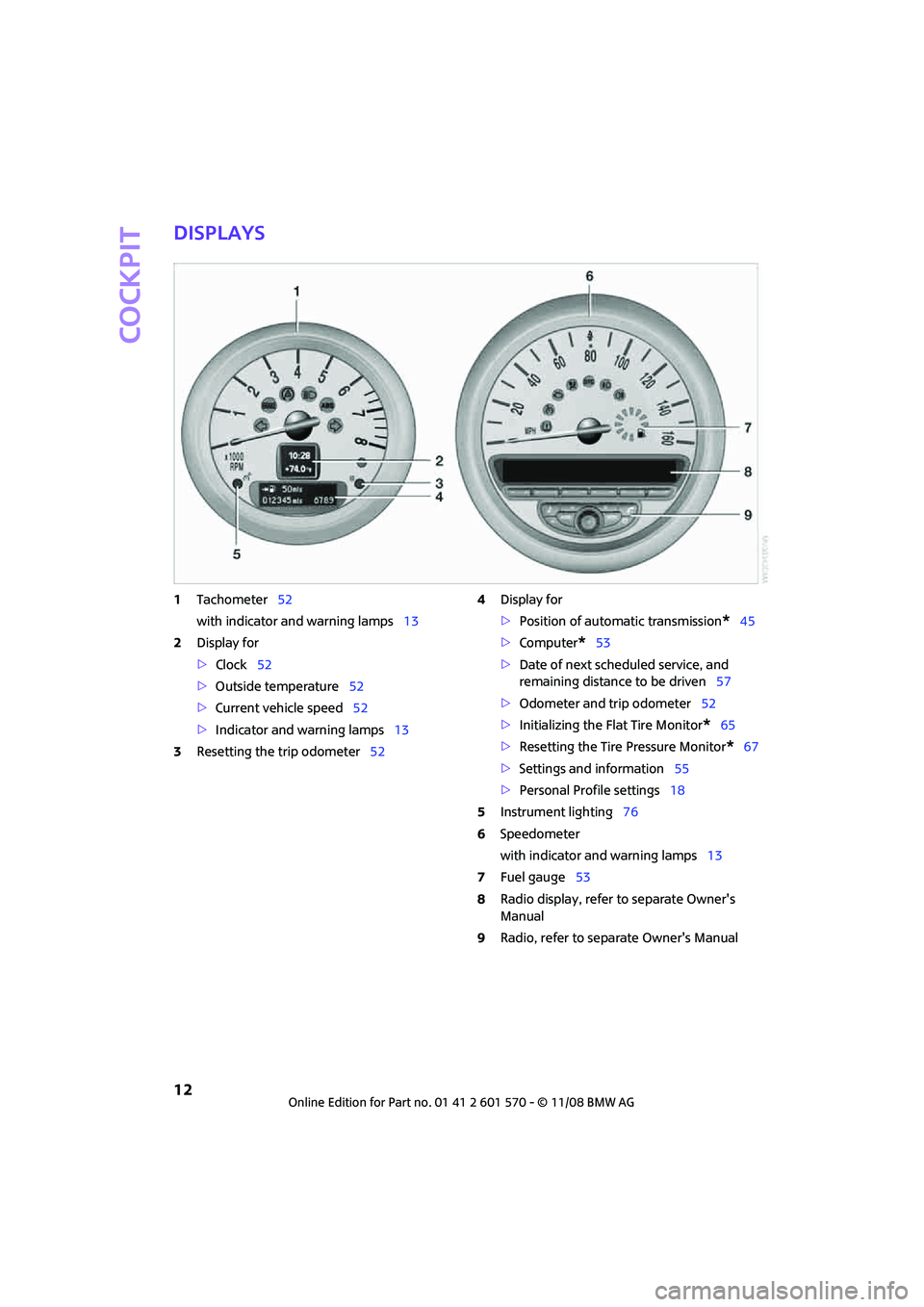
Displays
1Tachometer52
with indicator and warning lamps13
2Display for
>Clock52
>Outside temperature52
>Current vehicle speed52
>Indicator and warning lamps13
3Resetting the trip odometer524Display for
>Position of automatic transmission
*45
>Computer
*53
>Date of next scheduled service, and
remaining distance to be driven57
>Odometer and trip odometer52
>Initializing the Flat Tire Monitor
*65
>Resetting the Tire Pressure Monitor
*67
>Settings and information55
>Personal Profile settings18
5Instrument lighting76
6Speedometer
with indicator and warning lamps13
7Fuel gauge53
8Radio display, refer to separate Owner's
Manual
9Radio, refer to separate Owner's Manual
Page 15 of 172

REFERENCE
AT A GLANCE CONTROLS DRIVING TIPS MOBILITY
13
Indicator and warning
lamps
The concept
Indicator and warning lamps can light up in var-
ious combinations and colors in indicator area 1
or2.
Some lamps are checked for proper functioning
and thus come on briefly when the engine is
started or the ignition is switched on.
What to do in case of a malfunction
A list of all indicator and warning lamps, as well
as notes on possible causes of malfunctions and
on how to respond, can be found starting on
page138.
Page 17 of 172
REFERENCE
AT A GLANCE CONTROLS DRIVING TIPS MOBILITY
15
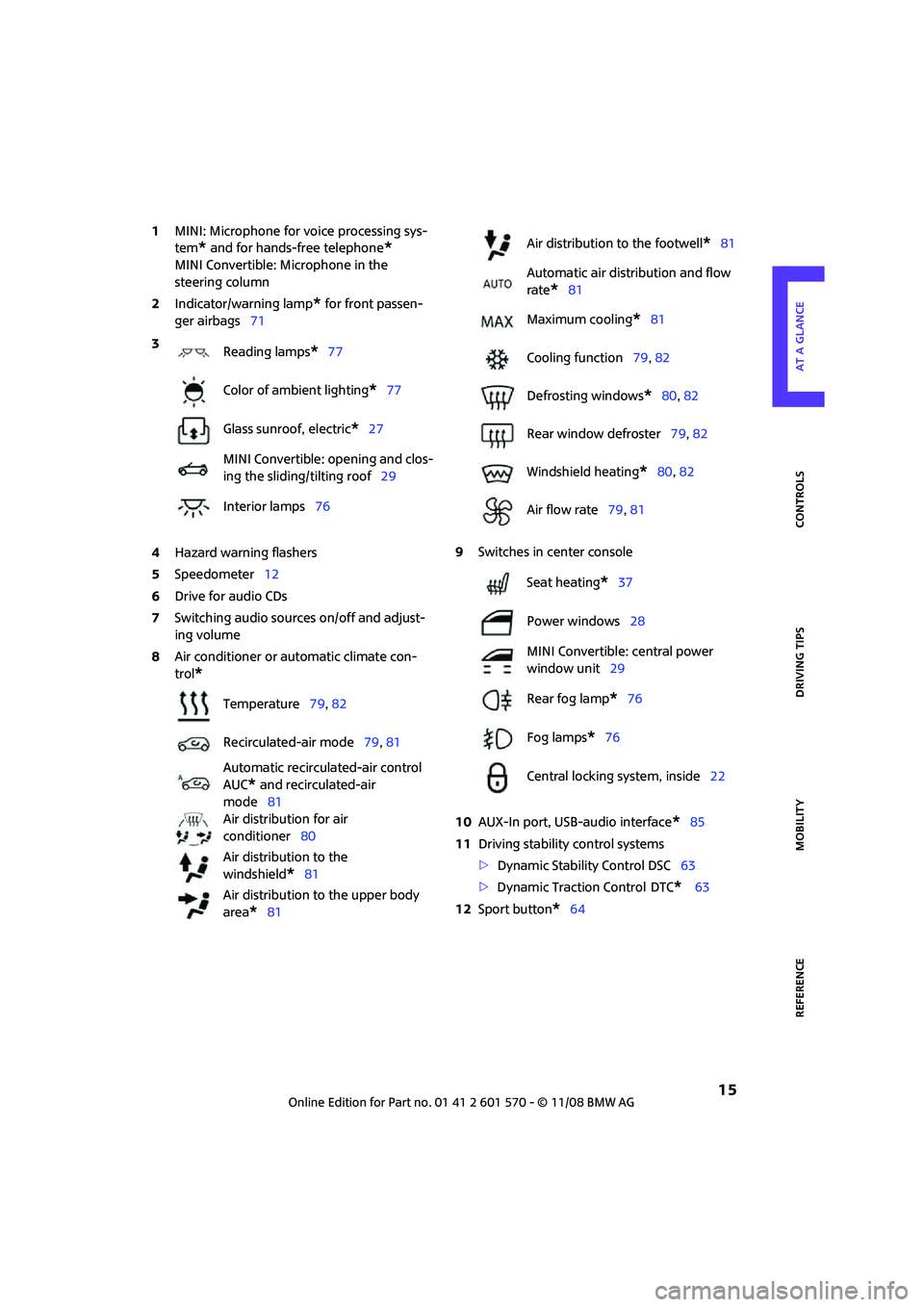
1MINI: Microphone for voice processing sys-
tem
* and for hands-free telephone*
MINI Convertible: Microphone in the
steering column
2Indicator/warning lamp
* for front passen-
ger airbags71
4Hazard warning flashers
5Speedometer12
6Drive for audio CDs
7Switching audio sources on/off and adjust-
ing volume
8Air conditioner or automatic climate con-
trol
*
9Switches in center console
10AUX-In port, USB-audio interface
*85
11Driving stability control systems
>Dynamic Stability Control DSC63
>Dynamic Traction Control
DTC* 63
12Sport button
*64 3
Reading lamps
*77
Color of ambient lighting
*77
Glass sunroof, electric
*27
MINI Convertible: opening and clos-
ing the sliding/tilting roof29
Interior lamps76
Temperature79, 82
Recirculated-air mode79, 81
Automatic recirculated-air control
AUC
* and recirculated-air
mode81
Air distribution for air
conditioner80
Air distribution to the
windshield
*81
Air distribution to the upper body
area
*81
Air distribution to the footwell*81
Automatic air distribution and flow
rate
*81
Maximum cooling
*81
Cooling function79, 82
Defrosting windows
*80, 82
Rear window defroster79, 82
Windshield heating
*80, 82
Air flow rate79, 81
Seat heating
*37
Power windows28
MINI Convertible: central power
window unit29
Rear fog lamp
*76
Fog lamps
*76
Central locking system, inside22
Page 21 of 172
REFERENCEAT A GLANCE CONTROLS DRIVING TIPS MOBILITY
19
Personal Profile settings
For more information on specific settings, refer
to the specified pages.
>Response of the central locking system
when the car is being unlocked19
>Automatic locking of the vehicle23
>Triple turn signal activation47
>Settings for the displays on the onboard
monitor, in the speedometer and in the
tachometer.
>12h/24h mode of the clock, refer to For-
mats and units of measure56
>Date format, refer to Formats and units
of measure56
>Units of measure for fuel consumption,
distance covered/remaining distances
and temperature, refer to Formats and
units of measure56
>Light settings:
>Pathway lighting73
>Daytime running lamps74
>Automatic climate control
*: AUTO program,
activating/deactivating cooling function and
automatic recirculated-air control, setting
temperature, air flow rate and
distribution80
>Entertainment:
>Audio volume, refer to separate Owner's
Manual
>Speed-dependent volume, refer to sepa-
rate Owner's Manual
Central locking system
The concept
The central locking system is ready for operation
whenever the driver's door is closed.
The system simultaneously engages and
releases the locks on the following:
>Doors
>Tailgate
>Fuel filler door
Operating from outside
>Via the remote control
>Via the door lock
*
>In cars with convenient access*, via the door
handles on the driver's and passenger's
sides.
The anti-theft system is also operated at the
same time. It prevents the doors from being
unlocked using the lock buttons or door han-
dles. The remote control can also be used to
switch on/off the welcome lamps and interior
lamps. The alarm system
* is also activated or
deactivated, page24.
Operating from inside
Button for central locking system, page22.
In the event of a sufficiently severe accident, the
central locking system unlocks automatically. In
addition, the hazard warning flashers and inte-
rior lamps come on.
Opening and closing:
from outside
Persons or animals in a parked vehicle
could lock the doors from the inside. Take
the key with you when you leave the vehicle so
that the vehicle can be opened from the out-
side.<
Using the remote control
Unlocking
Press button .
The welcome lamps and interior lamps come on.
Unlocking mode
You can also set which parts of the car are
unlocked. The setting is stored for the remote
control in use.
Page 23 of 172

REFERENCEAT A GLANCE CONTROLS DRIVING TIPS MOBILITY
21
3.Press and hold the button until the display
changes.
4.Briefly press the button repeatedly until the
symbol and "SET" are displayed.
5.Press and hold the button until the display
changes.
6.Briefly press the button to select, arrow:
> Confirmation signal during unlocking
> Confirmation signal during locking
7.Press and hold the button until the display
changes.
8.Briefly press the button to select:
>
The hazard warning flashers light up dur-
ing unlocking/locking.
>
An acoustic signal sounds during unlock-
ing/locking.
>
The hazard warning flashers light up and
an acoustic signal
* sounds during
unlocking/locking.
>
The function is deactivated.
9.Press and hold the button until the display
changes. The setting is stored.
Switching on interior lamps
While the car is locked:
Press the button.
You can also use this function to locate your
vehicle in parking garages, etc.
Unlocking the tailgate
Press the button.
When it is opened, the tailgate swings
upward and outward to the rear. Ensure
that there is sufficient clearance.
To prevent accidentally locking yourself out, do
not place the key down in the cargo bay. If the
tailgate was locked before opening, it will be
locked again after it is closed.
Before and after each trip, check that the tail-
gate has not been inadvertently unlocked.<
Malfunctions
The remote control may malfunction due to
local radio waves. If this occurs, unlock and lock
the car at the door lock with the integrated key.
If the car can no longer be locked with a remote
control, the battery in the remote control is dis-
charged. Use this remote control during an
extended drive; this will recharge the battery,
page18.
For US owners only
The transmitter and receiver units comply with
part 15 of the FCC/Federal Communications
Commission regulations. Operation is governed
by the following:
FCC ID:
LX8766S
LX8766E
LX8CAS
Compliance statement:
This device complies with part 15 of the FCC
Rules. Operation is subject to the following two
conditions:
>This device must not cause harmful interfer-
ence, and
>This device must accept any interference
received, including interference that may
cause undesired operation.
Page 28 of 172
Opening and closing
26
Convenient access*
Convenient access enables you to enter your
vehicle without having to hold the remote con-
trol in your hand. All you need to do is wear the
remote control close to your body, e.g. in your
jacket pocket. The vehicle automatically detects
the remote control within the immediate vicinity
or in the passenger compartment.
Convenient access supports the following func-
tions:
>Unlocking/locking the vehicle
>Unlocking the tailgate by itself
>Enginestarting
>Convenient operation
>MINI Convertible: Convertible top operation
Functional requirements
>The vehicle or the tailgate can only be
locked when the vehicle detects that the
remote control currently in use is outside of
the vehicle.
>The vehicle cannot be locked or unlocked
again until after approx. 2 seconds.
>The engine can only be started when the
vehicle detects that the remote control is
inside the vehicle.
>The doors and tailgate must be closed to be
able to operate the windows and glass sun-
roof.
Comparison to standard remote controls
In general, there is no difference between using
convenient access or pressing the buttons on
the remote control to carry out the functions
mentioned above.
Instructions on opening and closing are found
starting on page18.
Special features regarding the use of convenient
access are described below.
If you notice a brief delay while opening or
closing the windows, the glass sunroof or
the convertible top, the system is checking
whether a remote control is inside the vehicle.
Repeat the opening or closing procedure, if nec-
essary.<
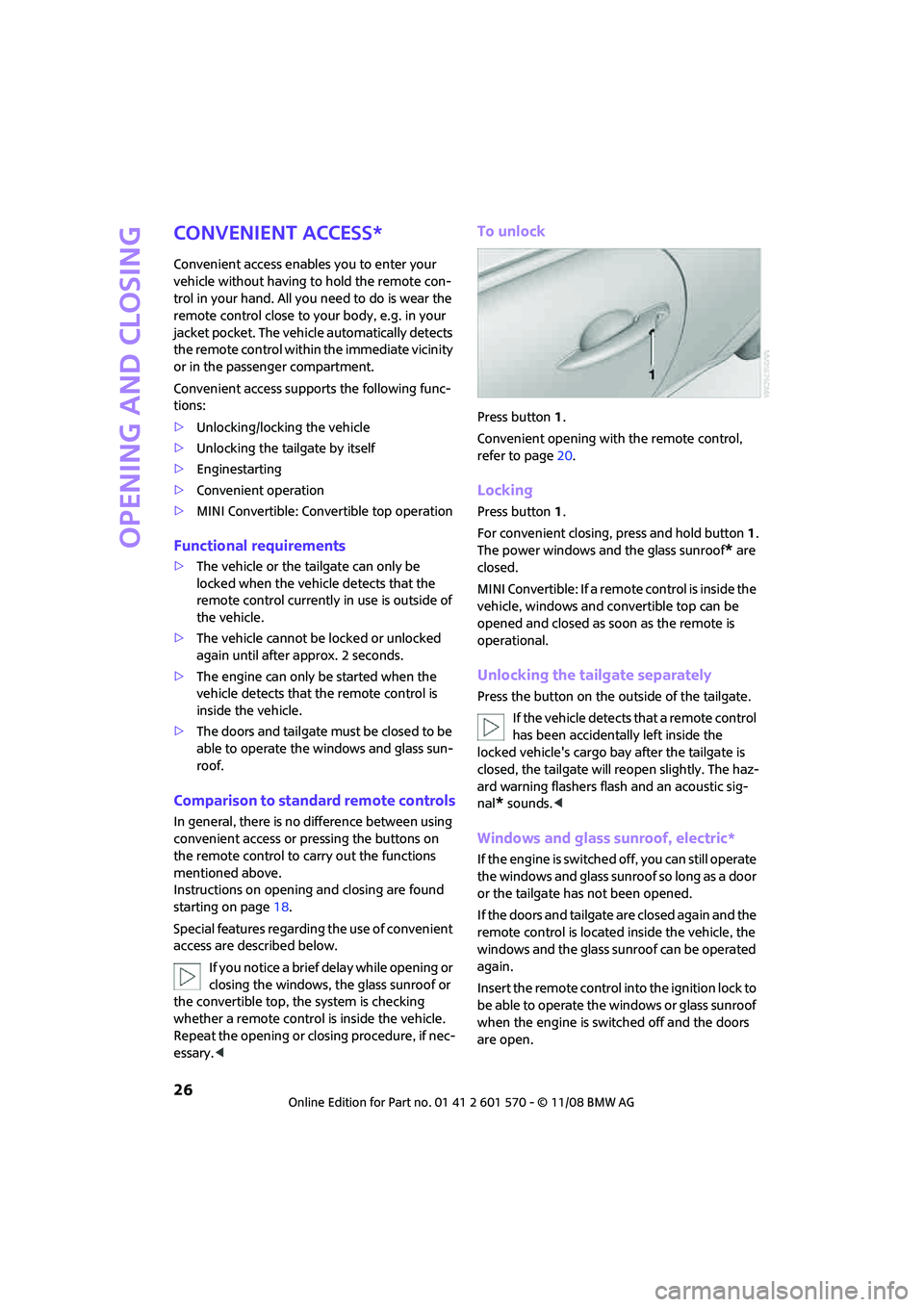
To unlock
Press button 1.
Convenient opening with the remote control,
refer to page20.
Locking
Press button 1.
For convenient closing, press and hold button 1.
The power windows and the glass sunroof
* are
closed.
MINI Convertible: If a remote control is inside the
vehicle, windows and convertible top can be
opened and closed as soon as the remote is
operational.
Unlocking the tailgate separately
Press the button on the outside of the tailgate.
If the vehicle detects that a remote control
has been accidentally left inside the
locked vehicle's cargo bay after the tailgate is
closed, the tailgate will reopen slightly. The haz-
ard warning flashers flash and an acoustic sig-
nal
* sounds.<
Windows and glass sunroof, electric*
If the engine is switched off, you can still operate
the windows and glass sunroof so long as a door
or the tailgate has not been opened.
If the doors and tailgate are closed again and the
remote control is located inside the vehicle, the
windows and the glass sunroof can be operated
again.
Insert the remote control into the ignition lock to
be able to operate the windows or glass sunroof
when the engine is switched off and the doors
are open.
Page 45 of 172
REFERENCEAT A GLANCE CONTROLS DRIVING TIPS MOBILITY
43
Driving
Ignition lock
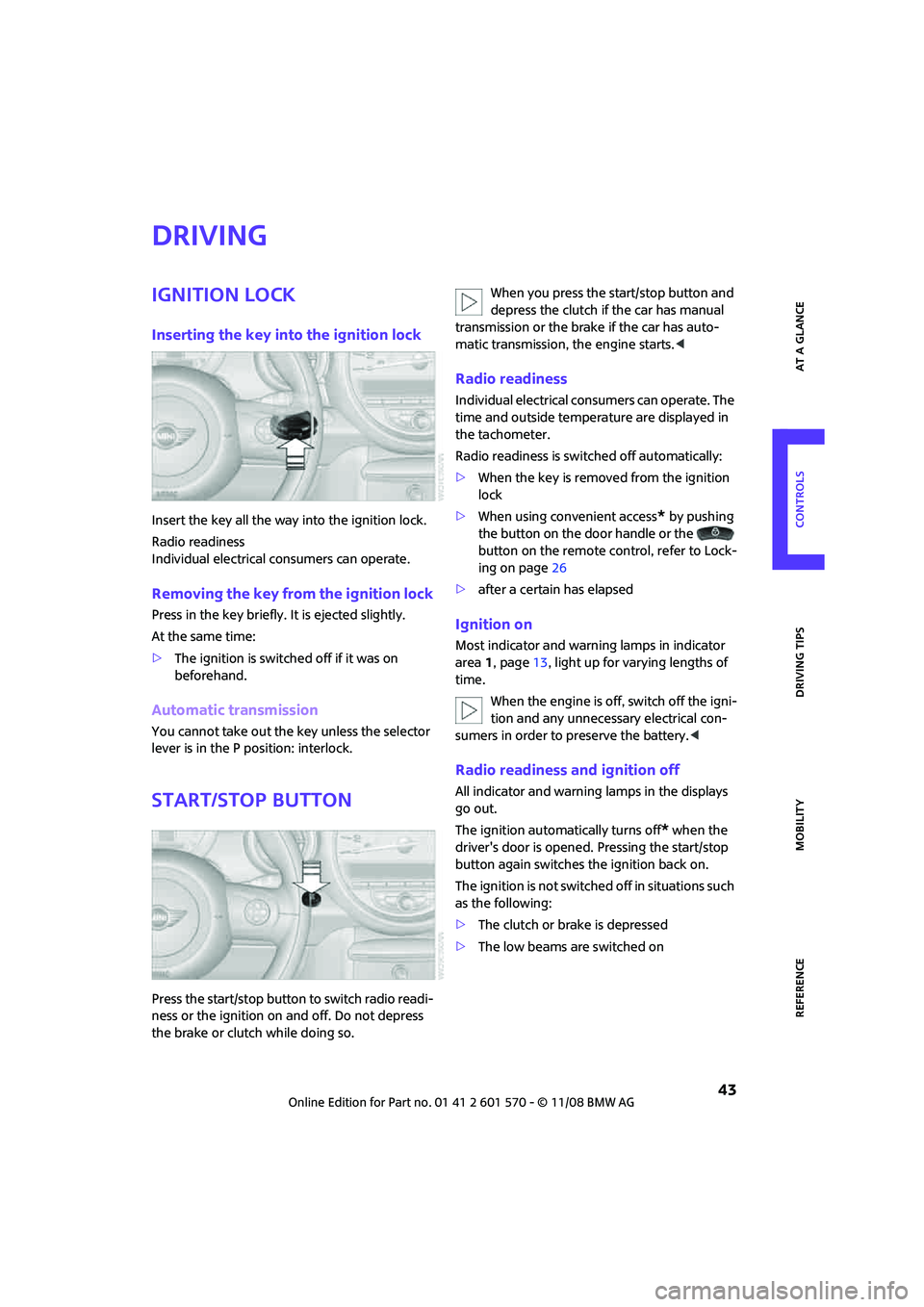
Inserting the key into the ignition lock
Insert the key all the way into the ignition lock.
Radio readiness
Individual electrical consumers can operate.
Removing the key from the ignition lock
Press in the key briefly. It is ejected slightly.
At the same time:
>The ignition is switched off if it was on
beforehand.
Automatic transmission
You cannot take out the key unless the selector
lever is in the P position: interlock.
Start/stop button
Press the start/stop button to switch radio readi-
ness or the ignition on and off. Do not depress
the brake or clutch while doing so.When you press the start/stop button and
depress the clutch if the car has manual
transmission or the brake if the car has auto-
matic transmission, the engine starts.<
Radio readiness
Individual electrical consumers can operate. The
time and outside temperature are displayed in
the tachometer.
Radio readiness is switched off automatically:
>When the key is removed from the ignition
lock
>When using convenient access
* by pushing
the button on the door handle or the
button on the remote control, refer to Lock-
ing on page26
>after a certain has elapsed
Ignition on
Most indicator and warning lamps in indicator
area 1, page13, light up for varying lengths of
time.
When the engine is off, switch off the igni-
tion and any unnecessary electrical con-
sumers in order to preserve the battery.<
Radio readiness and ignition off
All indicator and warning lamps in the displays
go out.
The ignition automatically turns off
* when the
driver's door is opened. Pressing the start/stop
button again switches the ignition back on.
The ignition is not switched off in situations such
as the following:
>The clutch or brake is depressed
>The low beams are switched on
Page 53 of 172

REFERENCEAT A GLANCE CONTROLS DRIVING TIPS MOBILITY
51
Activating
1Resuming cruise control
2Activating/deactivating cruise control
3Maintaining, storing and increasing speed
4Maintaining, storing and decreasing speed
Indicator lamp in the speedometer lights up. The
cruise control system is ready and can be acti-
vated.
Activating/deactivating cruise control
Press button 2.
In addition, the system is automatically deacti-
vated:
>When the brakes are applied
>When the clutch is depressed
>When the automatic transmission is in selec-
tion lever position N
>When the driving stability control system is
active
Cruise control is not deactivated by depressing
the accelerator pedal. Once the accelerator
pedal is released, the stored speed is achieved
again and maintained.
The stored speed is cleared when the ignition is
switched off.
Maintaining current speed
Press button3.
The system maintains and stores the current
vehicle speed.
If, on a downhill grade, the engine braking effect
is not sufficient, the controlled speed may be
exceeded. On uphill grades vehicle speed may
drop if the engine output is insufficient.
Increasing speed
Press button3 repeatedly until the desired
speed is reached. Every time you press the but-
ton, the speed increases by approx. 1 mph or
approx. 2 km/h.
Accelerating using the button
Press and hold button3.
The vehicle accelerates without pressure on the
accelerator pedal. After the button is released,
the driving speed is maintained and stored.
Decreasing speed
Press button4 repeatedly until the desired
speed is reached.
The functions here are the same as for increas-
ing the speed or accelerating, except that the
speed will be decreased.
Resuming a speed stored beforehand
Press button 1.
The last speed stored is achieved again and
maintained.
The stored speed is cleared when the ignition is
switched off.
Display in tachometer*
Selected speed is displayed briefly.
If --- mph or --- km/h is displayed briefly
in the tachometer, the conditions neces-
sary for operation may not be fulfilled.<
Malfunction
The warning lamp in the tachometer
lights up if the system fails.
Page 54 of 172
Everything under control
52
Everything under control
Odometer, outside
temperature display,
clock
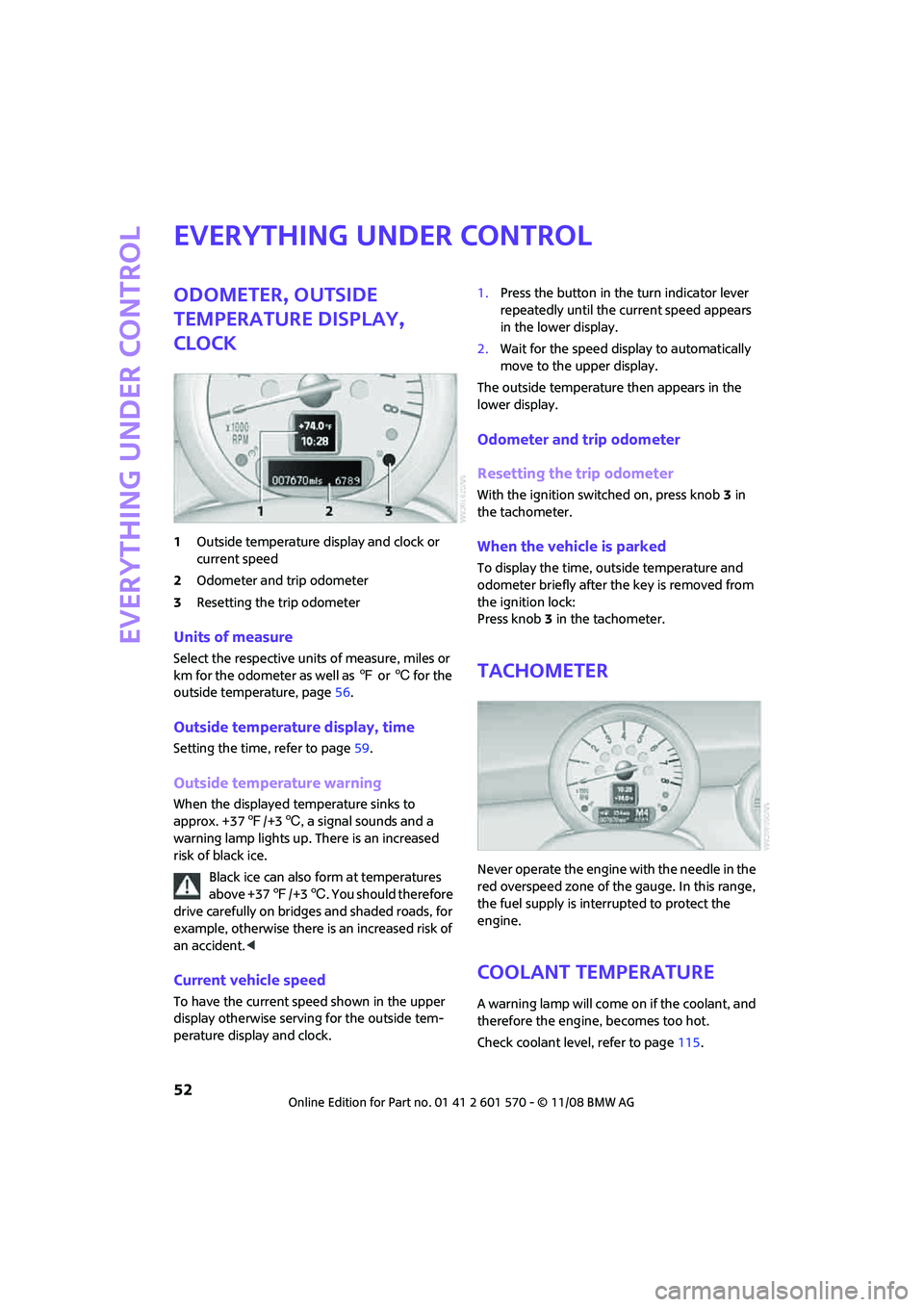
1Outside temperature display and clock or
current speed
2Odometer and trip odometer
3Resetting the trip odometer
Units of measure
Select the respective units of measure, miles or
km for the odometer as well as 7 or 6 for the
outside temperature, page56.
Outside temperature display, time
Setting the time, refer to page59.
Outside temperature warning
When the displayed temperature sinks to
approx. +377/+36, a signal sounds and a
warning lamp lights up. There is an increased
risk of black ice.
Black ice can also form at temperatures
above +377/+36. You should therefore
drive carefully on bridges and shaded roads, for
example, otherwise there is an increased risk of
an accident.<
Current vehicle speed
To have the current speed shown in the upper
display otherwise serving for the outside tem-
perature display and clock.1.Press the button in the turn indicator lever
repeatedly until the current speed appears
in the lower display.
2.Wait for the speed display to automatically
move to the upper display.
The outside temperature then appears in the
lower display.
Odometer and trip odometer
Resetting the trip odometer
With the ignition switched on, press knob 3 in
the tachometer.
When the vehicle is parked
To display the time, outside temperature and
odometer briefly after the key is removed from
the ignition lock:
Press knob 3 in the tachometer.
Tachometer
Never operate the engine with the needle in the
red overspeed zone of the gauge. In this range,
the fuel supply is interrupted to protect the
engine.
Coolant temperature
A warning lamp will come on if the coolant, and
therefore the engine, becomes too hot.
Check coolant level, refer to page115.
Page 62 of 172

Everything under control
60
6.Wait for the display to change to month.
7.Set the month and year in the same way.
8.Wait for the display to change.
The settings are stored.
Check Control
The concept
The Check Control monitors vehicle functions
and alerts you to any malfunctions in the sys-
tems monitored. Check Control messages
involve indicator or warning lamps in the dis-
plays and, in some circumstances, an acoustic
signal. To adjust the volume of the signal, refer
to the Owner's Manual for Radio.
Indicator and warning lamps can light up in var-
ious combinations and colors in the indicator
areas 1 and2.
What to do in case of a malfunction
The meaning of each lamp in the event of a mal-
function and tips on how to respond are listed
starting on page138.
Hiding Check Control messages
Press the button in the turn indicator lever.Some Check Control messages are displayed
until the malfunctions have been rectified. They
cannot be hidden. If several malfunctions occur
at the same time, they are displayed in succes-
sion.
Other Check Control messages are automatically
hidden after approx. 20 seconds, but remain
stored.
This symbol indicates that Check Control
messages have been stored. Check Control mes-
sages can be viewed whenever it is convenient.
Viewing stored Check Control messages
Stored Check Control messages can only be dis-
played if the driver's door is closed.
1.Briefly press the button in the turn indicator
lever repeatedly until "SET/INFO" is dis-
played.
2.Press and hold the button until the display
changes.