low beam MINI COOPER CONVERTIBLE 2016 User Guide
[x] Cancel search | Manufacturer: MINI, Model Year: 2016, Model line: COOPER CONVERTIBLE, Model: MINI COOPER CONVERTIBLE 2016Pages: 252, PDF Size: 5.41 MB
Page 103 of 252
The indicator lamp in the instrument
cluster is illuminated, when the low
beams are switched on.
The high beams are switched on and off auto‐
matically.
The blue indicator lamp in the instru‐
ment cluster lights up when the system
switches on the high beams.
Deactivating The High-beam Assistant is deactivated when
manually switching the high beams on and off,
refer to page 72.
To reactivate the High-beam Assistant, press
the button on the turn signal lever.
System limits The High-beam Assistant cannot serve as asubstitute for the driver's personal judgment of
when to use the high beams. Therefore, man‐
ually switch off the high beams in situations
where required to avoid a safety risk.
The system is not fully functional in the follow‐
ing situations, and driver intervention may be
necessary:▷In very unfavorable weather conditions,
such as fog or heavy precipitation.▷When detecting poorly-lit road users such
as pedestrians, cyclists, horseback riders
and wagons; when driving close to train or
ship traffic; and at animal crossings.▷In tight curves, on hilltops or in depressions,
in cross traffic or half-obscured oncoming
traffic on highways.▷In poorly-lit towns and cities and in the
presence of highly reflective signs.▷When the windshield behind the interior
mirror is fogged over, dirty or covered with
stickers, etc.Fog lights
Front fog lights
The low beams must be switched on.
Press button. The green indicator lamp
lights up.
If the automatic headlight control, refer to
page 101, is activated, the low beams will
come on automatically when you switch on the
front fog lights.
When the high beams or headlight flasher are
activated, the front fog lights are not switched
on.
Rear fog lights The low beams or front fog lights must be
switched on.
Press button. The yellow indicator
lamp lights up.
If the automatic headlight control, refer to
page 101, is activated, the low beams will
come on automatically when you switch on the
rear fog lights.
Instrument lighting Adjusting The parking lights or low beams
must be switched on to adjust
the brightness.
Adjust the brightness with the
thumbwheel.Seite 103LightsCONTROLS103
Online Edition for Part no. 01 40 2 969 276 - II/16
Page 209 of 252
Lamp and bulb replace‐
ment
General information Lights and bulbs make an essential contribution
to vehicle safety.
The manufacturer of the vehicle recommends
that you have appropriate work performed by a
dealer’s service center or another qualified
service center or repair shop if you are unfami‐
liar with it or if it has not been described here.
A spare lamp box is available from a dealer’s
service center or another qualified service cen‐
ter or repair shop.
Information
Lights and bulbs WARNING
Bulbs can get hot during operation. Con‐
tact with the bulbs can cause burns. There is a
risk of injuries. Only change bulbs after they
have cooled off. ◀
WARNING
Work on switched-on lighting systems
can cause short circuits. There is a risk of inju‐
ries or a risk of property damage. When work‐
ing on the lighting system, switch off the lamps
in question. If necessary, heed the bulb manu‐
facturer's instructions. ◀
CAUTION
Dirty bulbs have a reduced service life.
There is a risk of property damage. Do not hold
new bulbs with your bare hands. Use a clean
cloth or something similar, or hold the bulb by
its base. ◀
Light-emitting diodes (LEDs) Some items of equipment use light-emitting di‐
odes installed behind a cover as a light source.These light-emitting diodes, which are related
to conventional lasers, are officially designated
as Class 1 light-emitting diodes.
WARNING
Too intensive brightness can irritate or
damage the retina of the eye. There is a a risk
of injury. Do not look directly into the head‐
lights or other light sources. Do not remove the
LED covers. ◀
Headlight glass Condensation can form on the inside of the ex‐
ternal lights in cool or humid weather. When
driving with the lights switched on, the conden‐
sation evaporates after a short time. The head‐
light glass does not need to be changed.
If despite driving with the lights switched on,
increasing humidity forms, e. g. water droplets
in the lamp, the manufacturer of your vehicle
recommends having it checked by a dealer’s
service center or another qualified service cen‐
ter or repair shop.
Front lights, bulb replacement
Overview
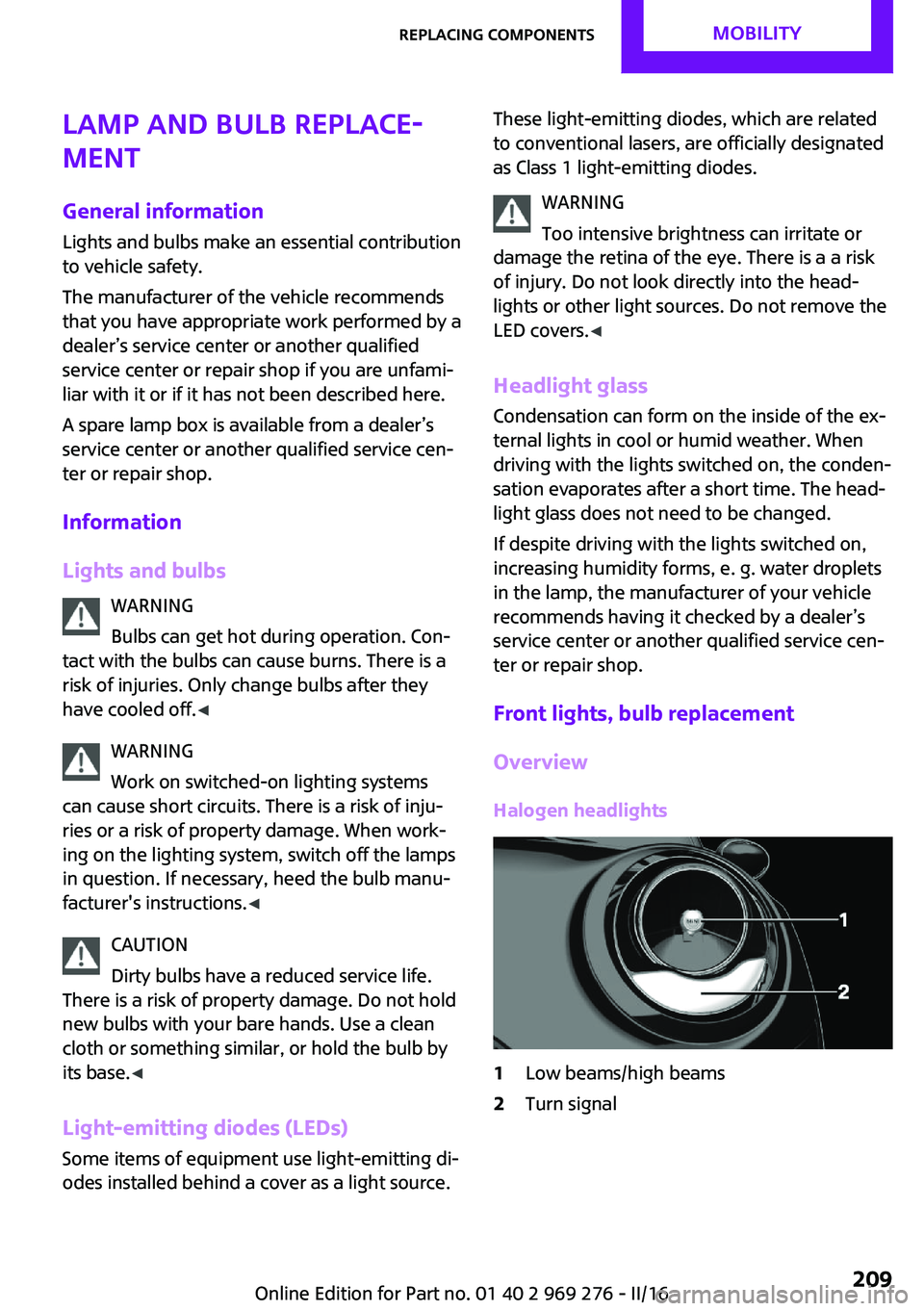
Halogen headlights1Low beams/high beams2Turn signalSeite 209Replacing componentsMOBILITY209
Online Edition for Part no. 01 40 2 969 276 - II/16
Page 210 of 252
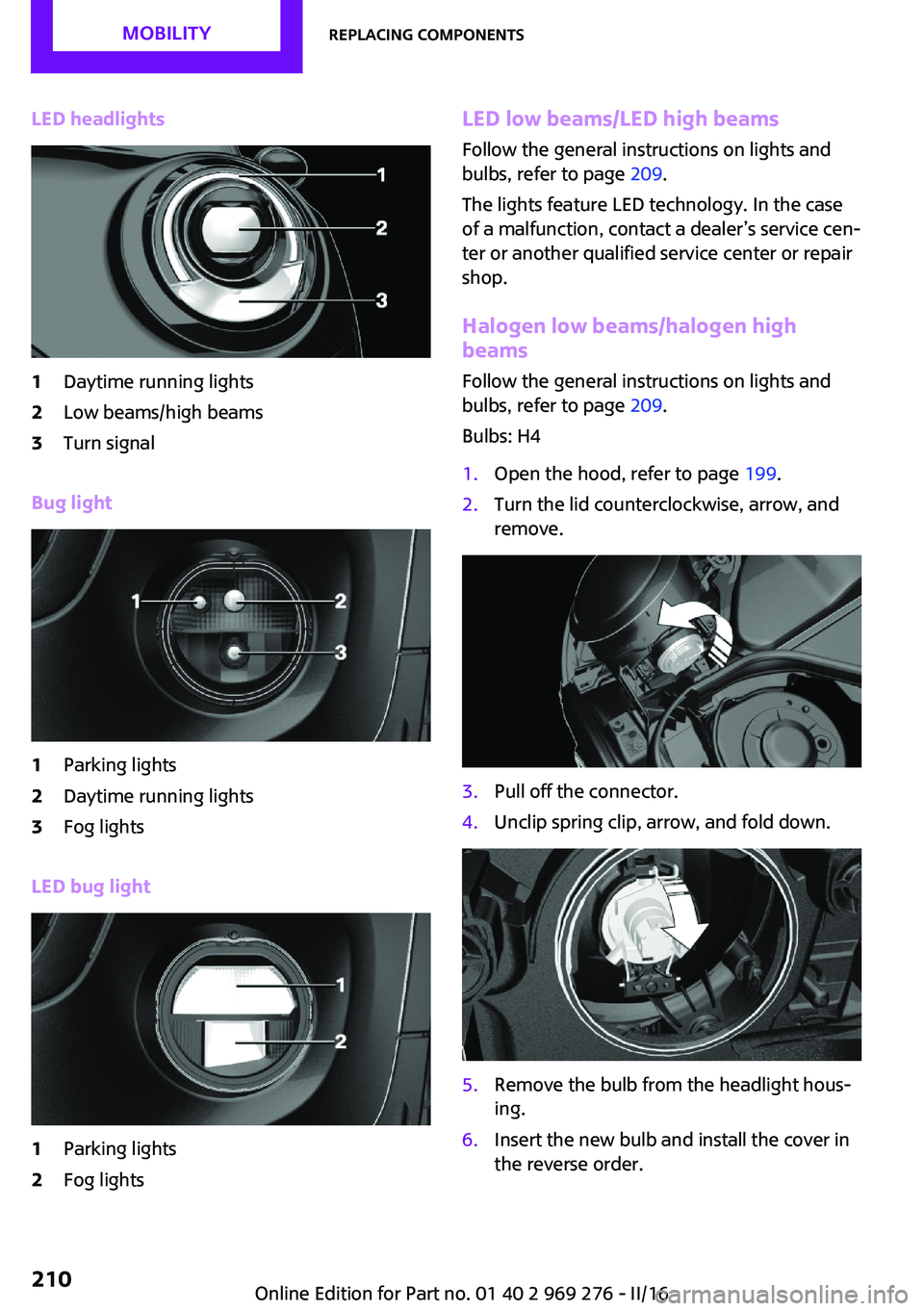
LED headlights1Daytime running lights2Low beams/high beams3Turn signal
Bug light
1Parking lights2Daytime running lights3Fog lights
LED bug light
1Parking lights2Fog lightsLED low beams/LED high beamsFollow the general instructions on lights and
bulbs, refer to page 209.
The lights feature LED technology. In the case
of a malfunction, contact a dealer’s service cen‐
ter or another qualified service center or repair
shop.
Halogen low beams/halogen high
beams
Follow the general instructions on lights and
bulbs, refer to page 209.
Bulbs: H41.Open the hood, refer to page 199.2.Turn the lid counterclockwise, arrow, and
remove.3.Pull off the connector.4.Unclip spring clip, arrow, and fold down.5.Remove the bulb from the headlight hous‐
ing.6.Insert the new bulb and install the cover in
the reverse order.Seite 210MOBILITYReplacing components210
Online Edition for Part no. 01 40 2 969 276 - II/16
Page 223 of 252
▷Make sure that the ignition is switched on;
otherwise, the low beams, tail lamps, turn
signals, and wipers may be unavailable.▷Do not tow the vehicle with the rear axle
tilted, as the front wheels could turn.▷When the engine is stopped, there is no
power assist. Consequently, more force
needs to be applied when braking and
steering.▷Larger steering wheel movements are re‐
quired.▷The towing vehicle must not be lighter than
the vehicle being towed; otherwise, it will
not be possible to control the vehicle's re‐
sponse.▷Do not exceed a towing speed of
30 mph/50 km/h.▷Do not exceed a towing distance of
30 miles/50 km.
Tow truck
With driven front axle
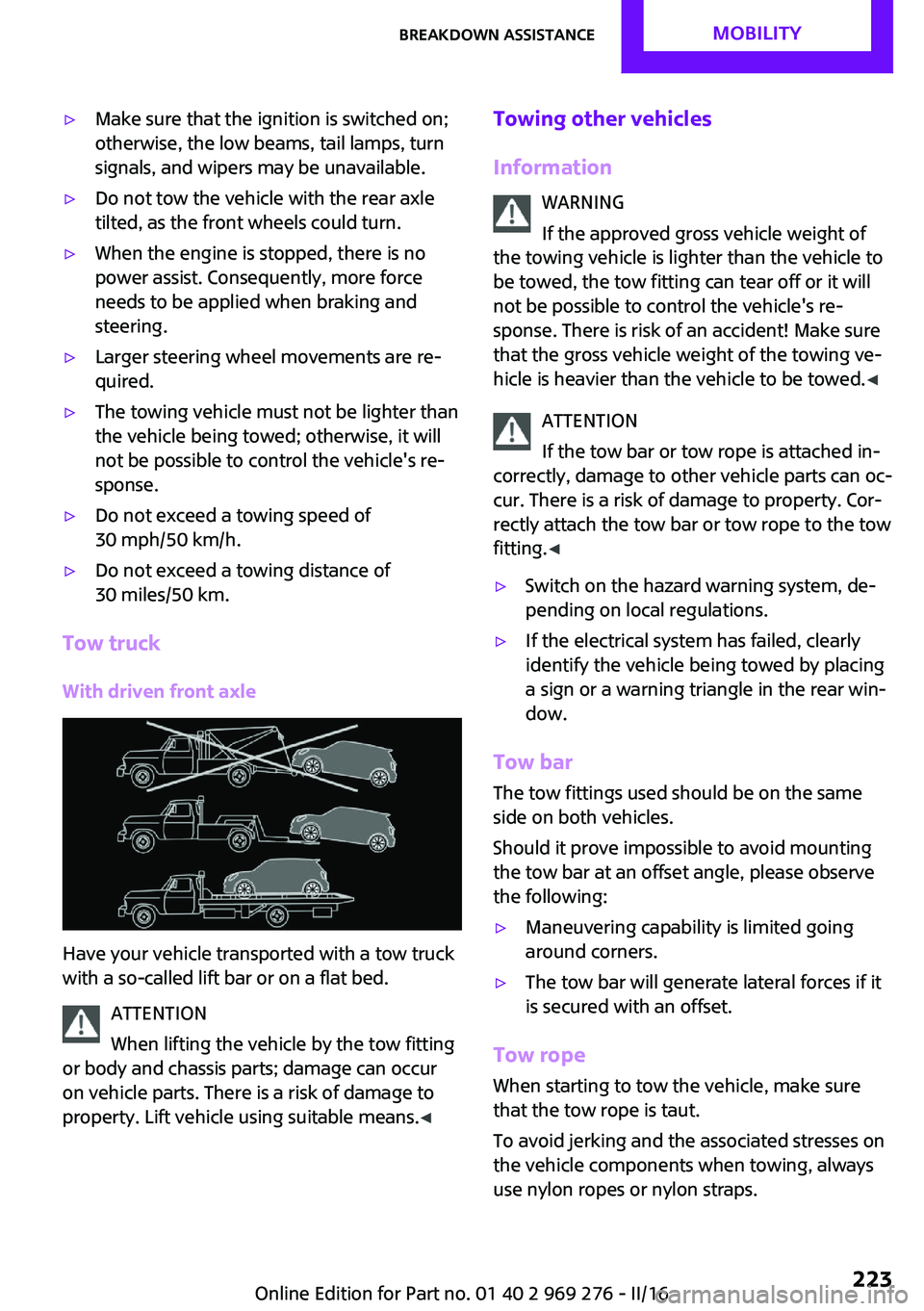
Have your vehicle transported with a tow truck
with a so-called lift bar or on a flat bed.
ATTENTION
When lifting the vehicle by the tow fitting
or body and chassis parts; damage can occur
on vehicle parts. There is a risk of damage to
property. Lift vehicle using suitable means. ◀
Towing other vehicles
Information WARNING
If the approved gross vehicle weight of
the towing vehicle is lighter than the vehicle to
be towed, the tow fitting can tear off or it will
not be possible to control the vehicle's re‐ sponse. There is risk of an accident! Make sure
that the gross vehicle weight of the towing ve‐
hicle is heavier than the vehicle to be towed. ◀
ATTENTION
If the tow bar or tow rope is attached in‐
correctly, damage to other vehicle parts can oc‐ cur. There is a risk of damage to property. Cor‐
rectly attach the tow bar or tow rope to the tow
fitting. ◀▷Switch on the hazard warning system, de‐
pending on local regulations.▷If the electrical system has failed, clearly
identify the vehicle being towed by placing
a sign or a warning triangle in the rear win‐
dow.
Tow bar
The tow fittings used should be on the same
side on both vehicles.
Should it prove impossible to avoid mounting
the tow bar at an offset angle, please observe
the following:
▷Maneuvering capability is limited going
around corners.▷The tow bar will generate lateral forces if it
is secured with an offset.
Tow rope
When starting to tow the vehicle, make sure
that the tow rope is taut.
To avoid jerking and the associated stresses on
the vehicle components when towing, always
use nylon ropes or nylon straps.
Seite 223Breakdown assistanceMOBILITY223
Online Edition for Part no. 01 40 2 969 276 - II/16
Page 245 of 252
Exterior mirror, automaticdimming feature 61
Exterior mirrors 60
External start 220
External temperature dis‐ play 85
External temperature warn‐ ing 85
Eyes for securing cargo 171
F
Failure message, see Check Control 81
False alarm, see Unintentional alarm 45
Fan, see Air flow 145, 148
Favorites buttons, onboard monitor 24
Filler neck for engine oil 201
Fine wood, care 229
First-aid kit 220
Flat tire, changing wheels 215
Flat Tire Monitor FTM 113
Flat tire, repairing 194
Flat tire, Tire Pressure Monitor TPM 109
Flat tire, warning lamp 110, 113
Flooding 167
Floor carpet, care 229
Floor mats, care 229
Fogged up windows 146
Fold-away position, wind‐ shield wipers 74
Folding back rear seat backr‐ ests 158
Foot brake 167
Front airbags 105
Front-end collision warning with City Braking func‐
tion 116
Front fog lights 103
Front-seat passenger airbags, automatic deactivation 107 Front-seat passenger airbags,
indicator lamp 107
FTM Flat Tire Monitor 113
Fuel 184
Fuel consumption, see Aver‐ age fuel consumption 90
Fuel filler flap 182
Fuel gauge 85
Fuel lid 182
Fuel quality 184
Fuel recommendation 184
Fuel, tank capacity 236
Fuse 219
G Garage door opener, see Uni‐ versal Integrated Remote
Control 151
Gasoline 184
Gear change, Steptronic trans‐ mission 76
Gear shift indicator 87
General driving notes 167
Glare shield 155
Glove compartment 160
GREEN Mode 174
GREEN Mode, bonus range 176
GREEN Mode driving style analysis 178
GREEN Mode indicator 174
GREEN - program, driving dy‐ namics 124
GREEN tip 176
Gross vehicle weight, ap‐ proved 235
Ground clearance 168
H Halogen headlights 209
Handbrake, see parking brake 71
Hand-held transmitter, alter‐ nating code 152 Hazard warning flashers 220
Headlamp control, auto‐ matic 101
Headlight courtesy delay fea‐ ture 101
Headlight flasher 72
Headlight glass 209
Headlights, care 227
Head restraints 54
Head restraints, front 58
Head restraints, rear 59
Head-up Display 94
Head-Up Display, Shift point indicator 96
Head-up Display, sport dis‐ plays 96
Head-up Display, standard view 95
Heavy cargo, stowing 171
High-beam Assistant 102
High beams 72
High beams/low beams, see High-beam Assistant 102
Hills 168
Hill start assistant, see Drive- off assistant 125
Holder for beverages 161
Homepage 6
Hood 198
Horn 14
Hot exhaust system 167
HUD Head-up Display 94
Hydroplaning 167
I
Ice warning, see External tem‐ perature warning 85
Icy roads, see External tem‐ perature warning 85
Identification marks, tires 190
Identification number, see ve‐ hicle identification num‐
ber 10
Ignition key, see Remote con‐ trol 34 Seite 245Everything from A to ZREFERENCE245
Online Edition for Part no. 01 40 2 969 276 - II/16
Page 246 of 252
Ignition off 66
Ignition on 66
Illuminated ring, central in‐ strument cluster 94
Indication of a flat tire 110 , 113
Indicator lamp, see Check Control 81
Individual air distribu‐ tion 145, 148
Individual settings, see Per‐ sonal Profile 36
Inflation pressure, tires 186
Inflation pressure warning, tires 113
Info display, refer to On-Board computer 89
Information 6
Initialize, Tire Pressure Moni‐ tor TPM 110
Initializing, Flat Tire Monitor FTM 113
Instrument cluster 80
Instrument cluster, electronic displays 81
Instrument lighting 103
Integrated key 34
Integrated Owner's Manual in the vehicle 29
Intelligent Safety 115
Intensity, AUTO program 148
Interior equipment 151
Interior lights 104
Interior lights during unlock‐ ing 38
Interior lights with the vehicle locked 39
Interior mirror 17
Interior mirror, automatic dimming feature 61
Interior mirror, manually dim‐ mable 61
Interior motion sensor 45
Interior rearview mirror, com‐ pass 153
Internet site 6 Interval display, service re‐
quirements 86
Interval mode 73
J Jacking points for the vehicle jack 215
Joystick, Steptronic transmis‐ sion 76
Jump-starting 220
K
Key/remote control 34
Keyless Go, see Comfort Ac‐ cess 41
Key Memory, see Personal Profile 36
Kickdown, Steptronic trans‐ mission 76
Knee airbag 105
L
Label on recommended tires 192
Lamp replacement 209
Lamp replacement, front 209
Lamp replacement, rear 212
Lamp replacement, side 214
Language on Control Dis‐ play 93
Lashing eyes, securing cargo 171
LATCH child restraint sys‐ tem 65
Launch Control 78
Leather, care 228
LED bug light 210
LED headlights 210
LED ring, central instrument cluster 94
LEDs, light-emitting di‐ odes 209 Letters and numbers, enter‐
ing 25
Light 100
Light-alloy wheels, care 229
Light-emitting diodes, LEDs 209
Lighter 155
Lighting 100
Lights and bulbs 209
Light switch 100
Load 171
Loading 170
Loading aid 157
Loading, see Interior equip‐ ment 157
Lock, door 40
Locking/unlocking via door lock 40
Locking/unlocking with re‐ mote control 38
Locking, automatic 43
Locking, settings 43
Low beams 100
Low beams, automatic, see High-beam Assistant 102
Lower back support, mechani‐ cal 55
Lumbar support, mechani‐ cal 55
M
Maintenance 206
Maintenance require‐ ments 206
Maintenance, service require‐ ments 86
Maintenance system, MINI 206
Make-up mirror 155
Malfunction displays, see Check Control 81
Manual air distribu‐ tion 145, 148
Manual air flow 145, 148 Seite 246REFERENCEEverything from A to Z246
Online Edition for Part no. 01 40 2 969 276 - II/16