key MINI COOPER CONVERTIBLE 2016 Owners Manual
[x] Cancel search | Manufacturer: MINI, Model Year: 2016, Model line: COOPER CONVERTIBLE, Model: MINI COOPER CONVERTIBLE 2016Pages: 252, PDF Size: 5.41 MB
Page 24 of 252
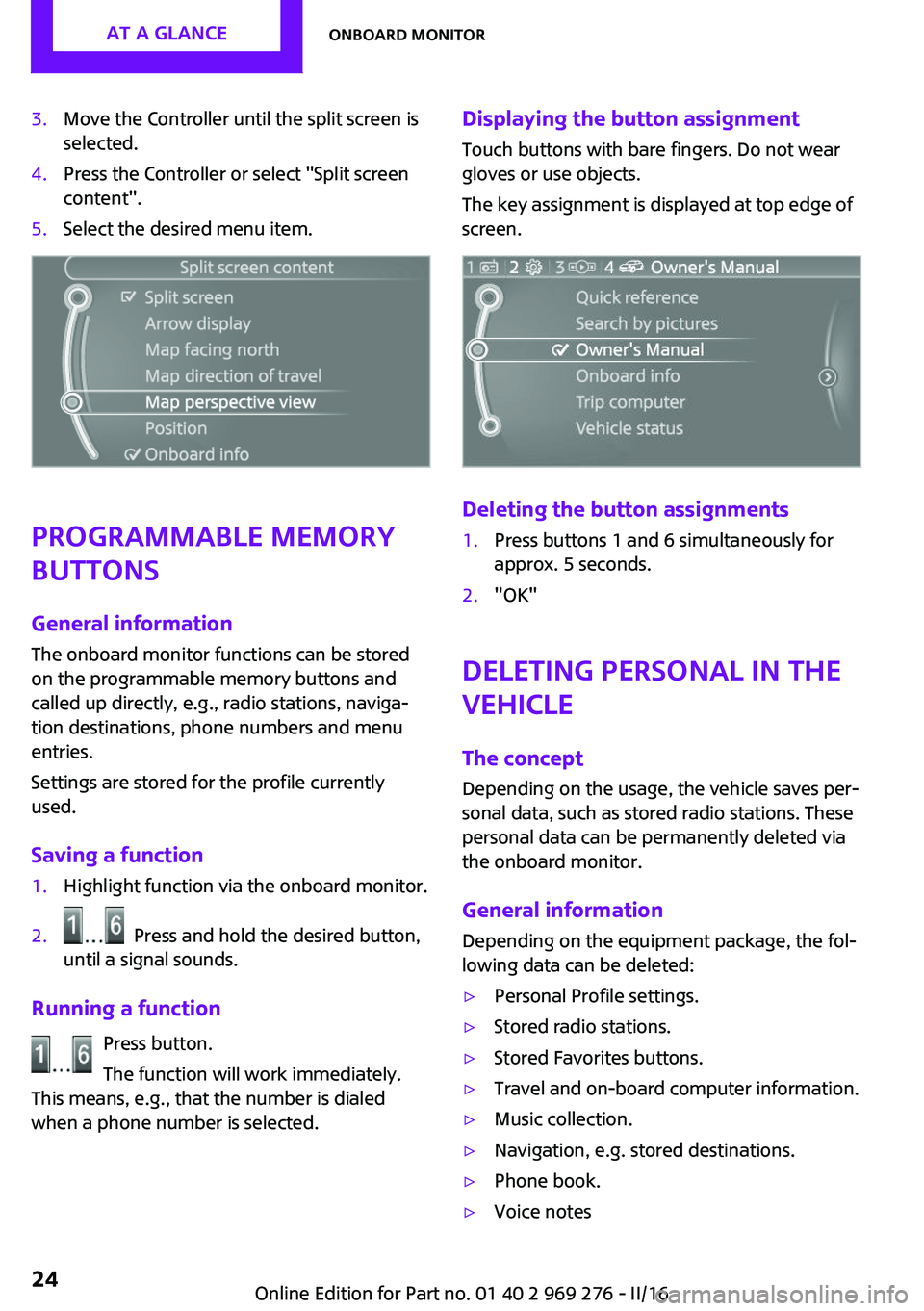
3.Move the Controller until the split screen is
selected.4.Press the Controller or select "Split screen
content".5.Select the desired menu item.
Programmable memory
buttons
General information
The onboard monitor functions can be stored
on the programmable memory buttons and
called up directly, e.g., radio stations, naviga‐
tion destinations, phone numbers and menu
entries.
Settings are stored for the profile currently
used.
Saving a function
1.Highlight function via the onboard monitor.2. Press and hold the desired button,
until a signal sounds.
Running a function
Press button.
The function will work immediately.
This means, e.g., that the number is dialed
when a phone number is selected.
Displaying the button assignment
Touch buttons with bare fingers. Do not wear
gloves or use objects.
The key assignment is displayed at top edge of
screen.
Deleting the button assignments
1.Press buttons 1 and 6 simultaneously for
approx. 5 seconds.2."OK"
Deleting personal in the
vehicle
The concept
Depending on the usage, the vehicle saves per‐
sonal data, such as stored radio stations. These
personal data can be permanently deleted via
the onboard monitor.
General information Depending on the equipment package, the fol‐
lowing data can be deleted:
▷Personal Profile settings.▷Stored radio stations.▷Stored Favorites buttons.▷Travel and on-board computer information.▷Music collection.▷Navigation, e.g. stored destinations.▷Phone book.▷Voice notesSeite 24AT A GLANCEOnboard monitor24
Online Edition for Part no. 01 40 2 969 276 - II/16
Page 34 of 252
Opening and closingVehicle features and op‐
tions
This chapter describes all standard, country-
specific and optional features offered with the
series. It also describes features that are not
necessarily available in your car, e. g., due to
the selected options or country versions. This
also applies to safety-related functions and sys‐
tems. The respectively applicable country provi‐
sions must be observed when using the respec‐
tive features and systems.
Remote control/key General information The vehicle is supplied with two remote con‐
trols with integrated key.
Every remote control holds a replaceable bat‐
tery.
You may set the key functions depending on
the optional features and country-specific ver‐
sion. For Settings, refer to page 43.
The vehicle stores personal settings for every
remote control. Personal Profile, refer to
page 36.
The remote controls hold information on re‐
quired maintenance. Service data in the remote
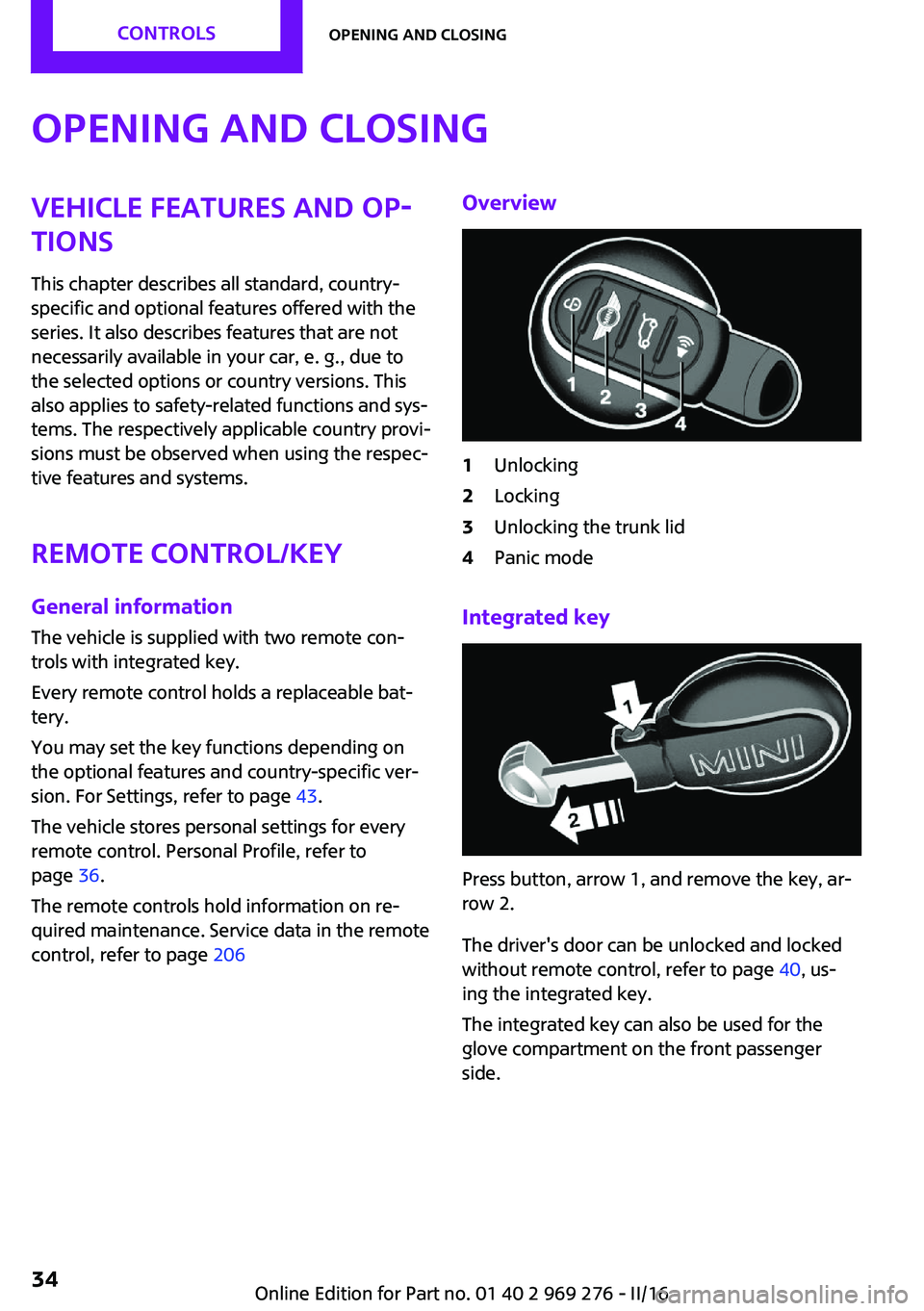
control, refer to page 206Overview1Unlocking2Locking3Unlocking the trunk lid4Panic mode
Integrated key
Press button, arrow 1, and remove the key, ar‐
row 2.
The driver's door can be unlocked and locked
without remote control, refer to page 40, us‐
ing the integrated key.
The integrated key can also be used for the
glove compartment on the front passenger
side.
Seite 34CONTROLSOpening and closing34
Online Edition for Part no. 01 40 2 969 276 - II/16
Page 35 of 252
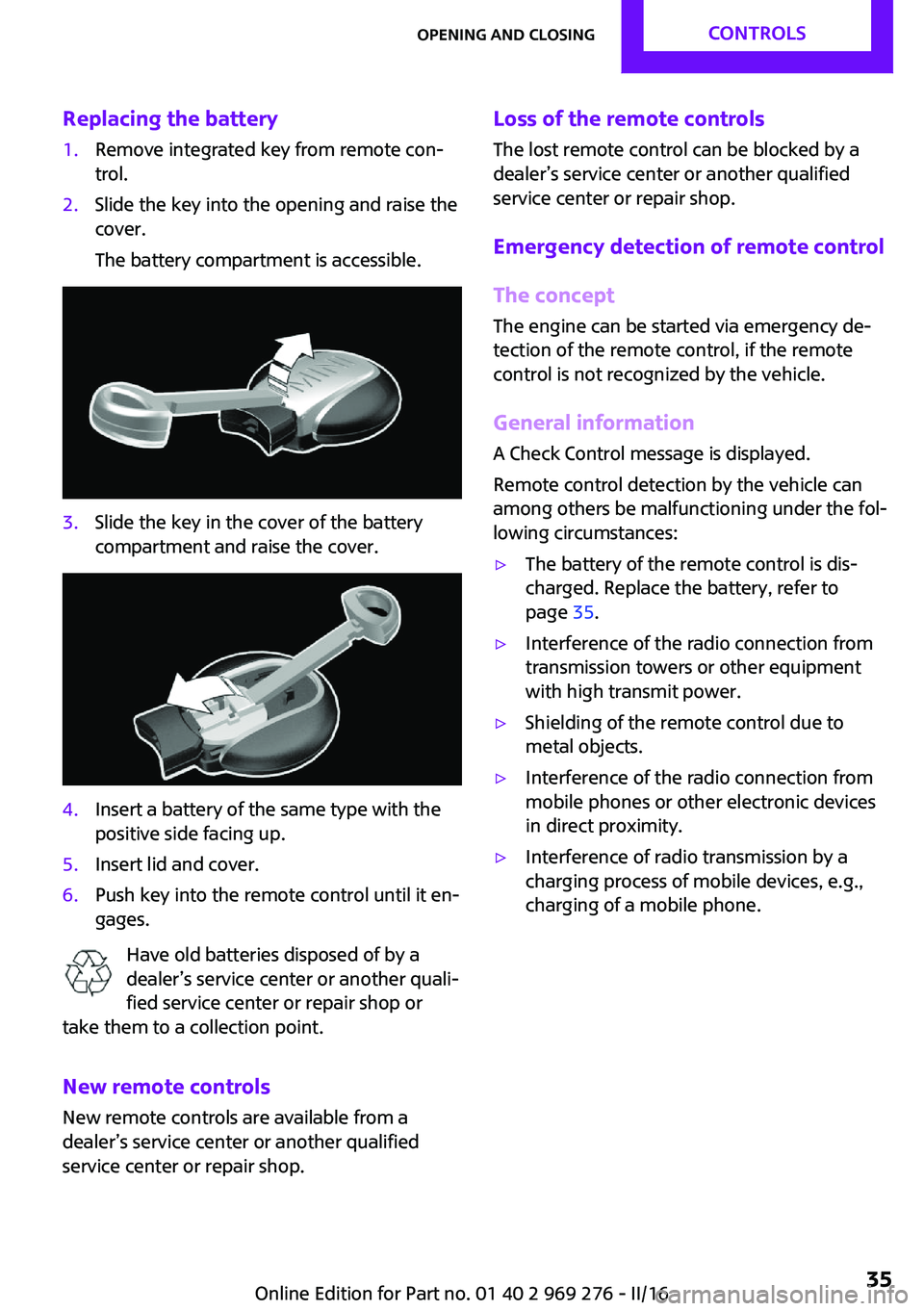
Replacing the battery1.Remove integrated key from remote con‐
trol.2.Slide the key into the opening and raise the
cover.
The battery compartment is accessible.3.Slide the key in the cover of the battery
compartment and raise the cover.4.Insert a battery of the same type with the
positive side facing up.5.Insert lid and cover.6.Push key into the remote control until it en‐
gages.
Have old batteries disposed of by a
dealer’s service center or another quali‐
fied service center or repair shop or
take them to a collection point.
New remote controls
New remote controls are available from a
dealer’s service center or another qualified
service center or repair shop.
Loss of the remote controls
The lost remote control can be blocked by a
dealer’s service center or another qualified
service center or repair shop.
Emergency detection of remote control
The concept
The engine can be started via emergency de‐
tection of the remote control, if the remote
control is not recognized by the vehicle.
General information
A Check Control message is displayed.
Remote control detection by the vehicle can
among others be malfunctioning under the fol‐
lowing circumstances:▷The battery of the remote control is dis‐
charged. Replace the battery, refer to
page 35.▷Interference of the radio connection from
transmission towers or other equipment
with high transmit power.▷Shielding of the remote control due to
metal objects.▷Interference of the radio connection from
mobile phones or other electronic devices
in direct proximity.▷Interference of radio transmission by a
charging process of mobile devices, e.g.,
charging of a mobile phone.Seite 35Opening and closingCONTROLS35
Online Edition for Part no. 01 40 2 969 276 - II/16
Page 39 of 252
Convenient closingWARNING
With convenient closing, body parts can
be jammed. There is a risk of injury. Make sure
that the area of movement of the doors is clear
during convenient closing. ◀
Press and hold the button on the re‐
mote control in the area close to the
vehicle, until the closing operation is com‐
pleted.
The windows and convertible top close.
Releasing the button stops the closing proce‐
dure. Leaving the vicinity of the vehicle stops
the motion of the convertible top.
Press button in the vicinity of the vehicle again
until the convertible top operation is com‐
pleted.
Switching on interior lights and
courtesy lights
Press button on the remote control
with the vehicle locked.
The interior lights are switched on, when it is
dark outside, the courtesy lamps and the MINI
logo projection are also switched on.
These functions are not available if the interior
lamps were switched off manually.
If the button is pressed within 10 seconds of
when the vehicle was locked Interior motion
sensor and tilt alarm sensor of the anti-theft
warning system, refer to page 45, are turned
off. After locking, wait 10 seconds before press‐
ing the button again.
Panic mode
You can trigger the alarm system if you find
yourself in a dangerous situation.
Press button on the remote control for
at least 3 seconds.
To switch off the alarm: press any button.Unlocking the tailgate Press button on the remote control for
approx. 1 second.
The tailgate opens slightly, regardless of whether the vehicle was previously locked or
unlocked.
To avoid locking it into the vehicle, do not place
the remote control in the cargo area.
Depending on the features and the country
version, it is also possible to have door un‐
locked. Create the settings, refer to page 43.
If the doors were not unlocked, the trunk lid is
locked again as soon as it closes.
Malfunction
Remote control detection by the vehicle can
among others be malfunctioning under the fol‐ lowing circumstances:▷The battery of the remote control is dis‐
charged. Replace the battery, refer to
page 35.▷Interference of the radio connection from
transmission towers or other equipment
with high transmit power.▷Shielding of the remote control due to
metal objects.▷Interference of the radio connection from
mobile phones or other electronic devices
in direct proximity.
Do not transport the remote control together
with metal objects or electronic devices.
In the case of a malfunction, unlock and lock
the vehicle using the integrated key, refer to
page 40.
For US owners only The transmitter and receiver units comply with
part 15 of the FCC/Federal Communication
Commission regulations. Operation is governed by the following:
FCC ID:
Seite 39Opening and closingCONTROLS39
Online Edition for Part no. 01 40 2 969 276 - II/16
Page 40 of 252
▷LX8766S.▷LX8766E.▷LX8CAS.▷LX8CAS2.▷MYTCAS4.
Compliance statement:
This device complies with part 15 of the FCC
Rules. Operation is subject to the following two
conditions:
▷This device may not cause harmful interfer‐
ence, and▷this device must accept any interference re‐
ceived, including interference that may
cause undesired operation.
Any unauthorized modifications or changes to
these devices could void the user's authority to
operate this equipment.
Without remote control From the outside WARNING
Unlocking from the inside is only possible
with special knowledge.
If people must spend a longer time in the vehi‐
cle while it is very hot or cold outside, there is a
risk of injuries or danger to life. Do not lock the
vehicle from the outside when there are people
in it. ◀
ATTENTION
The door lock is permanently joined with
the door. The door handle can be moved.
When pulling the door handle with the inte‐
grated key inserted, paint or key can be dam‐
aged. There is a risk of damage to property. Re‐
move the integrated key before pulling the
outside door handle. ◀
Unlock or lock the driver's door via the door
lock using the integrated key, refer to page 34.
The other doors must be unlocked or locked
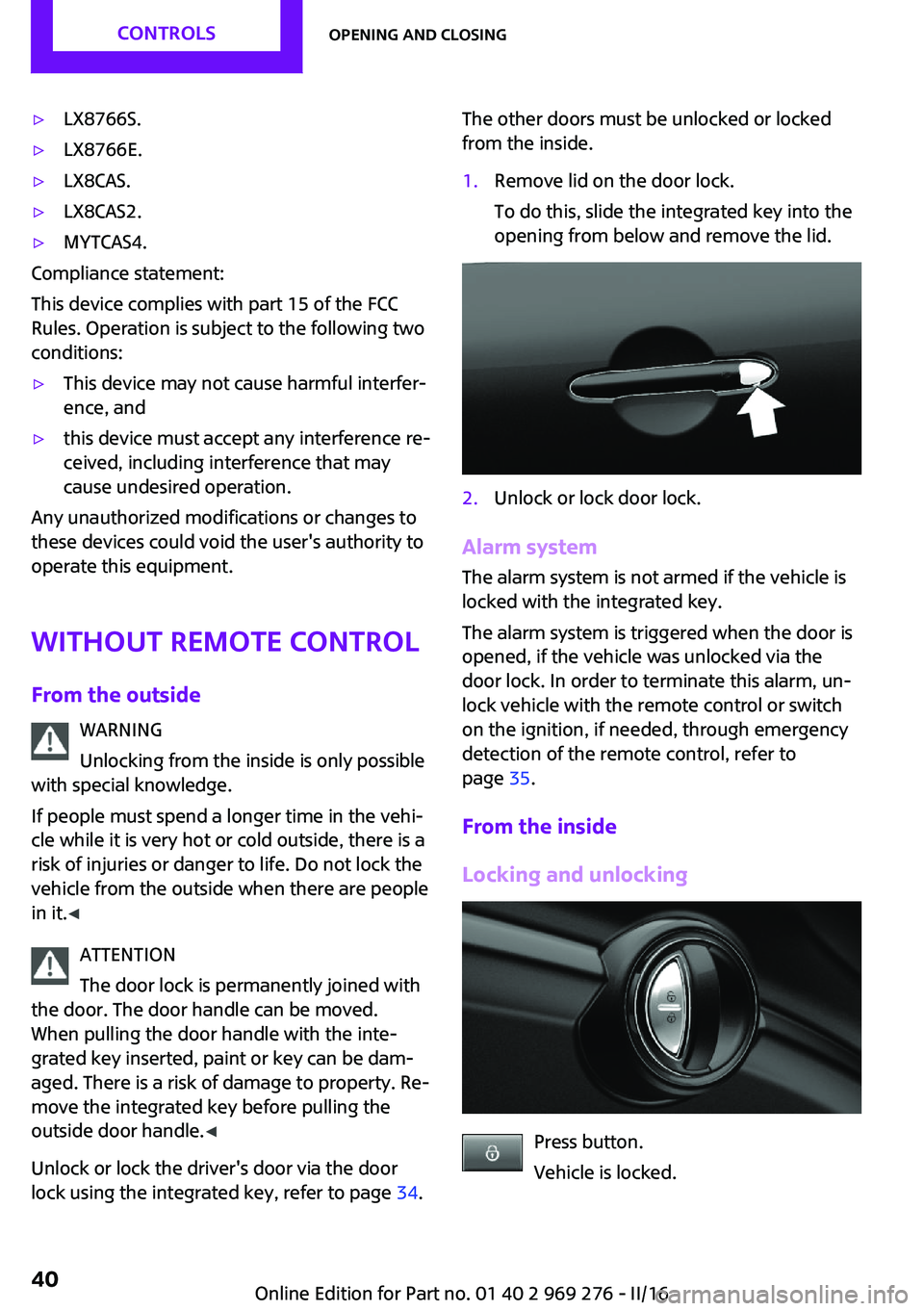
from the inside.1.Remove lid on the door lock.
To do this, slide the integrated key into the
opening from below and remove the lid.2.Unlock or lock door lock.
Alarm system
The alarm system is not armed if the vehicle is
locked with the integrated key.
The alarm system is triggered when the door is
opened, if the vehicle was unlocked via the
door lock. In order to terminate this alarm, un‐
lock vehicle with the remote control or switch
on the ignition, if needed, through emergency
detection of the remote control, refer to
page 35.
From the inside
Locking and unlocking
Press button.
Vehicle is locked.
Seite 40CONTROLSOpening and closing40
Online Edition for Part no. 01 40 2 969 276 - II/16
Page 43 of 252
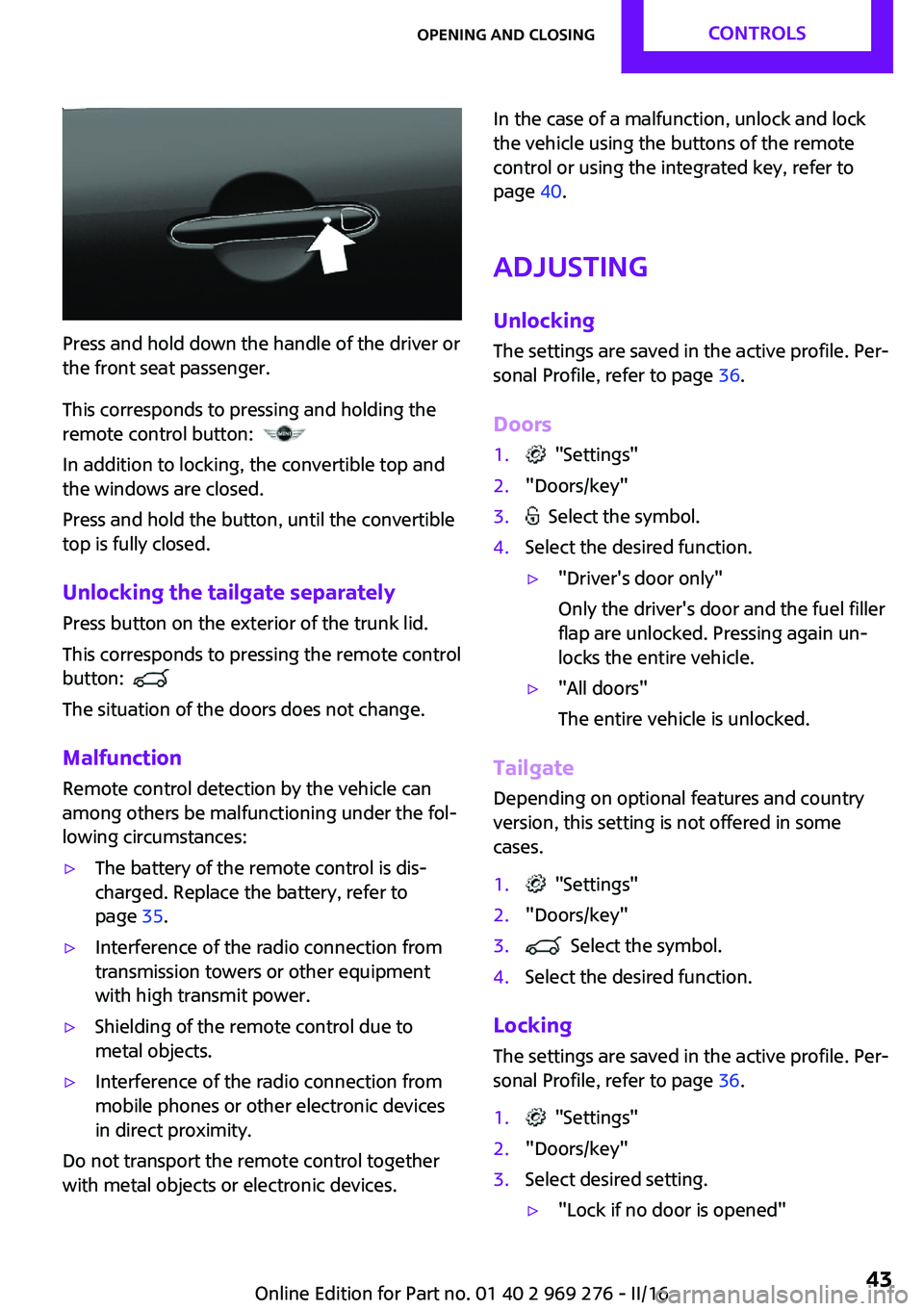
Press and hold down the handle of the driver or
the front seat passenger.
This corresponds to pressing and holding the
remote control button:
In addition to locking, the convertible top and
the windows are closed.
Press and hold the button, until the convertible
top is fully closed.
Unlocking the tailgate separately
Press button on the exterior of the trunk lid.
This corresponds to pressing the remote control
button:
The situation of the doors does not change.
Malfunction Remote control detection by the vehicle can
among others be malfunctioning under the fol‐
lowing circumstances:
▷The battery of the remote control is dis‐
charged. Replace the battery, refer to
page 35.▷Interference of the radio connection from
transmission towers or other equipment
with high transmit power.▷Shielding of the remote control due to
metal objects.▷Interference of the radio connection from
mobile phones or other electronic devices
in direct proximity.
Do not transport the remote control together
with metal objects or electronic devices.
In the case of a malfunction, unlock and lock
the vehicle using the buttons of the remote
control or using the integrated key, refer to
page 40.
Adjusting Unlocking The settings are saved in the active profile. Per‐
sonal Profile, refer to page 36.
Doors1. "Settings"2."Doors/key"3. Select the symbol.4.Select the desired function.▷"Driver's door only"
Only the driver's door and the fuel filler
flap are unlocked. Pressing again un‐
locks the entire vehicle.▷"All doors"
The entire vehicle is unlocked.
Tailgate
Depending on optional features and country
version, this setting is not offered in some
cases.
1. "Settings"2."Doors/key"3. Select the symbol.4.Select the desired function.
Locking
The settings are saved in the active profile. Per‐
sonal Profile, refer to page 36.
1. "Settings"2."Doors/key"3.Select desired setting.▷"Lock if no door is opened"Seite 43Opening and closingCONTROLS43
Online Edition for Part no. 01 40 2 969 276 - II/16
Page 44 of 252
The vehicle locks automatically after a
short period of time if no door is
opened after unlocking.▷"Lock after start driving"
The vehicle locks automatically after
you drive off.
Confirmation signals from the vehicle
1. "Settings"2."Doors/key"3.Select desired setting.▷With alarm system:
"Acoustic sig. lock/unlock"
Unlocking is signaled by one honk of
the horn.▷"Flash when lock/unlock"
Unlocking is signaled by two flashes,
locking by one.
Alarm system
The concept
When the vehicle is locked, the vehicle alarm
system responds to:
▷Opening a door, the hood or the trunk lid.▷Movements in the vehicle interior.▷Changes in the vehicle tilt, e. g., during at‐
tempts at stealing a wheel or when towing
the car.▷Disconnected battery voltage.
The alarm system briefly signals tampering:
▷Acoustic alarm.▷By switching on the hazard warning system.▷By flashing the daytime running lights.
Switching on and off
When you lock or unlock the vehicle, either
with the remote control or with Comfort Access,
the alarm system is switched on and off at the same time.
Door lock with the alarm system
switched on
The alarm system is triggered when the door is
opened, when the vehicle is unlocked via the
door lock.
Switching off the alarm, refer to page 45.
Tailgate with the alarm system
switched on
The tailgate can be opened even when the
alarm system is switched on.
After the trunk lid is closed, it is locked and
monitored again when the doors are locked.
The hazard warning system flashes once.
Panic mode
You can trigger the alarm system if you find
yourself in a dangerous situation.
Press button on the remote control for
at least 3 seconds.
To switch off the alarm: press any button.
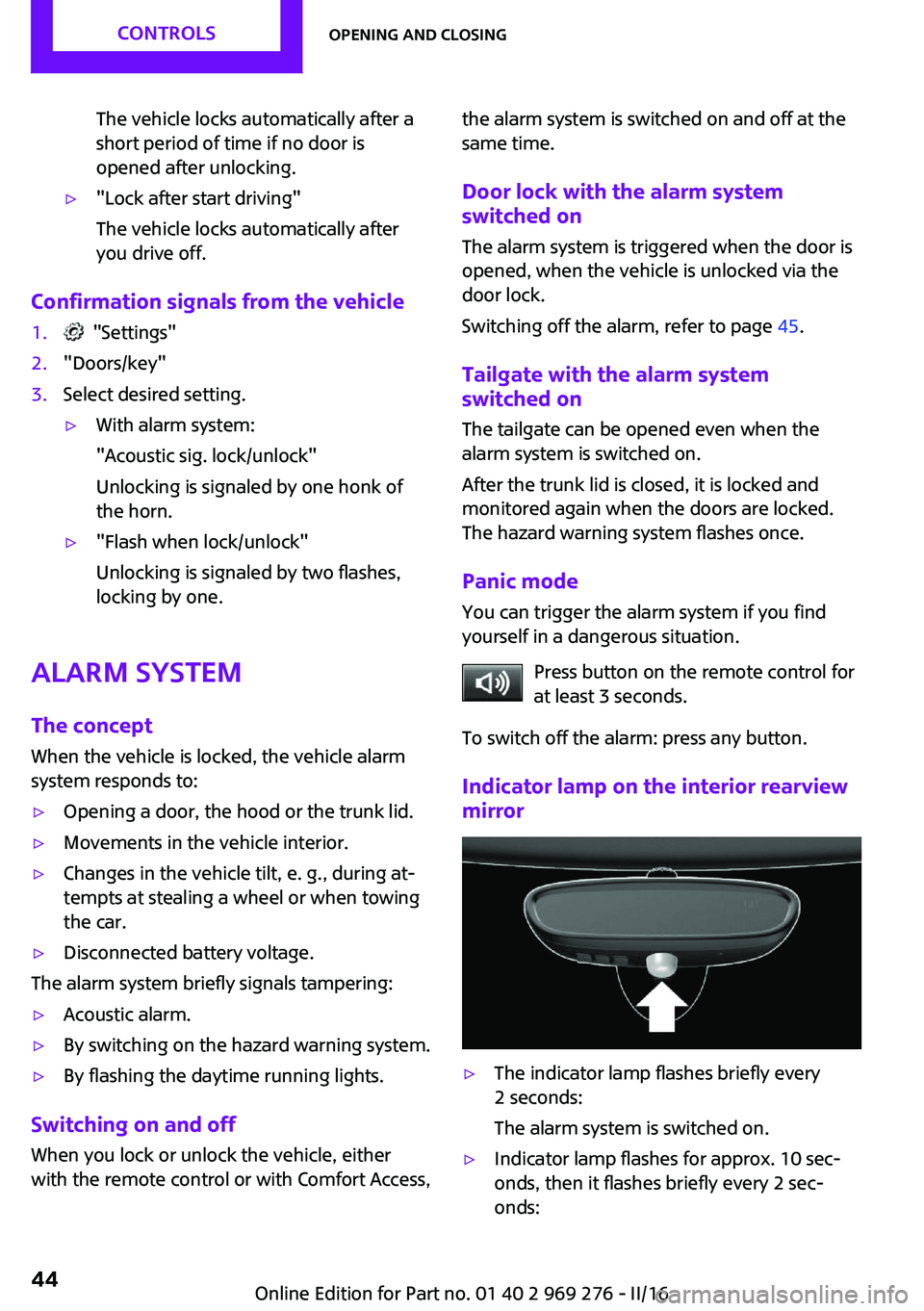
Indicator lamp on the interior rearview
mirror▷The indicator lamp flashes briefly every
2 seconds:
The alarm system is switched on.▷Indicator lamp flashes for approx. 10 sec‐
onds, then it flashes briefly every 2 sec‐
onds:Seite 44CONTROLSOpening and closing44
Online Edition for Part no. 01 40 2 969 276 - II/16
Page 151 of 252
Interior equipmentVehicle features and op‐
tions
This chapter describes all standard, country-
specific and optional features offered with the
series. It also describes features that are not
necessarily available in your car, e. g., due to
the selected options or country versions. This
also applies to safety-related functions and sys‐
tems. The respectively applicable country provi‐
sions must be observed when using the respec‐
tive features and systems.
Universal Integrated Re‐
mote Control
The concept
The Universal Integrated Remote Control can
operate up to 3 functions of remote-controlled
systems such as garage door drives or lighting
systems. The Universal Integrated Remote Con‐
trol replaces up to 3 different hand-held trans‐
mitters. To operate the remote control, the but‐
tons on the interior rearview mirror must be
programmed with the desired functions. The
hand-held transmitter for the particular system
is required in order to program the remote con‐
trol.
Before selling the vehicle, delete the stored
functions for the sake of security.
Information WARNING
Body parts can be jammed when operat‐
ing remote-controlled systems, e.g., the garage
door, using the integrated universal remote
control. There is a risk of injury or risk of prop‐
erty damage. Make sure that the area of move‐
ment of the respective system is clear duringprogramming and operation. Also follow the
safety instructions of the hand-held transmit‐
ter. ◀
Compatibility If this symbol is printed on the packag‐
ing or in the instructions of the system
to be controlled, the system is generally
compatible with the Universal Integrated Re‐
mote Control.
If you have any questions, please contact:▷A dealer’s service center or another quali‐
fied service center or repair shop.▷www.homelink.com on the Internet.
HomeLink is a registered trademark of Gentex
Corporation.
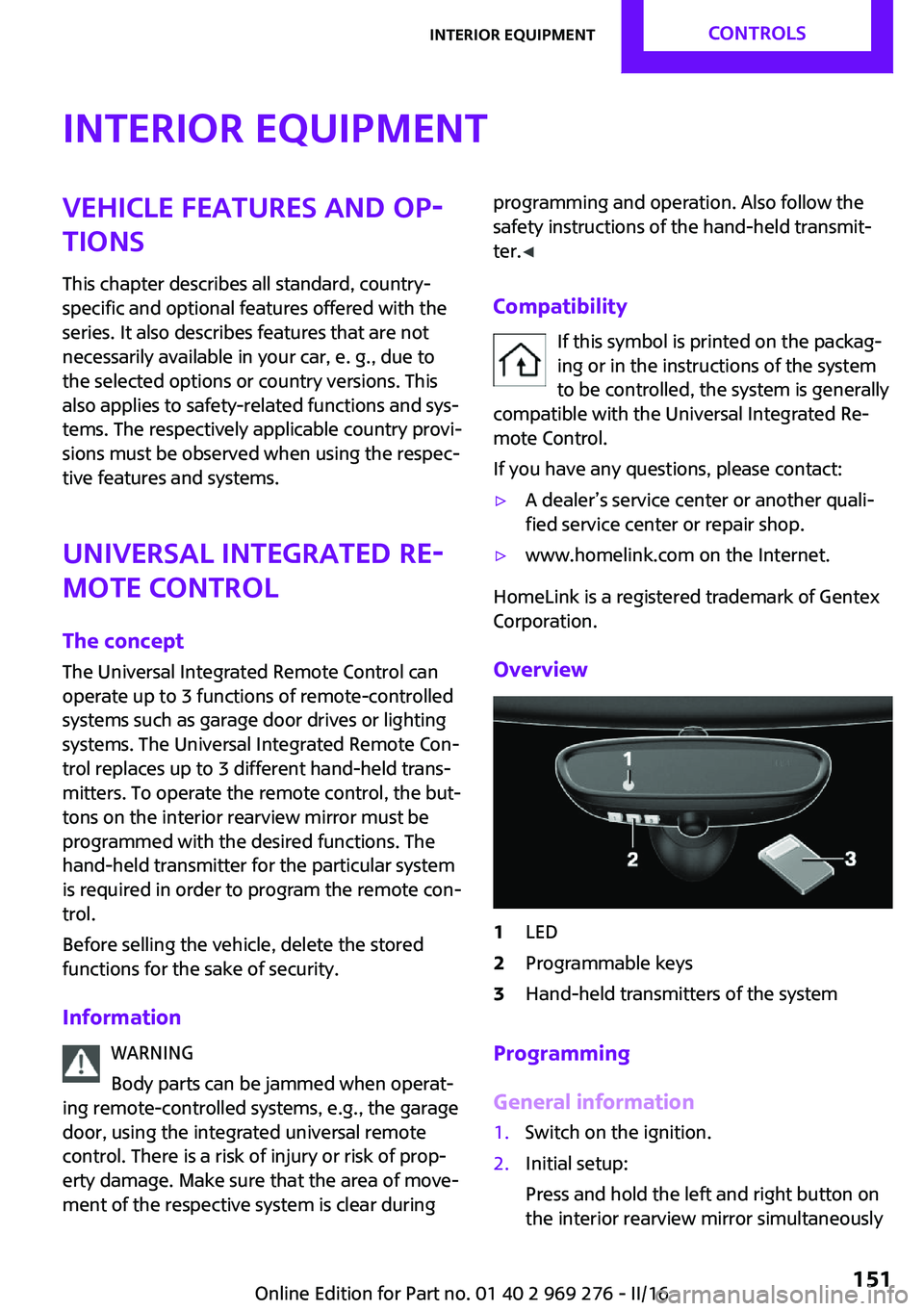
Overview
1LED2Programmable keys3Hand-held transmitters of the system
Programming
General information
1.Switch on the ignition.2.Initial setup:
Press and hold the left and right button on
the interior rearview mirror simultaneouslySeite 151Interior equipmentCONTROLS151
Online Edition for Part no. 01 40 2 969 276 - II/16
Page 161 of 252
Locking
The glove compartment can be locked with an
integrated key to separately secure the trunk
lid, refer to page 41, e.g.
This prevents access to the glove compartment
and to the trunk.
After the glove compartment is locked, the re‐
mote control can be handed over, such as at a
hotel, without the integrated key.
Compartments in the
doors
WARNING
Breakable objects, e.g., glass bottles, can
break in the event of an accident. Broken glass
can be scattered in the vehicle's interior. There
is a a risk of injury. Do not stow any breakable
objects in the vehicle's interior. ◀
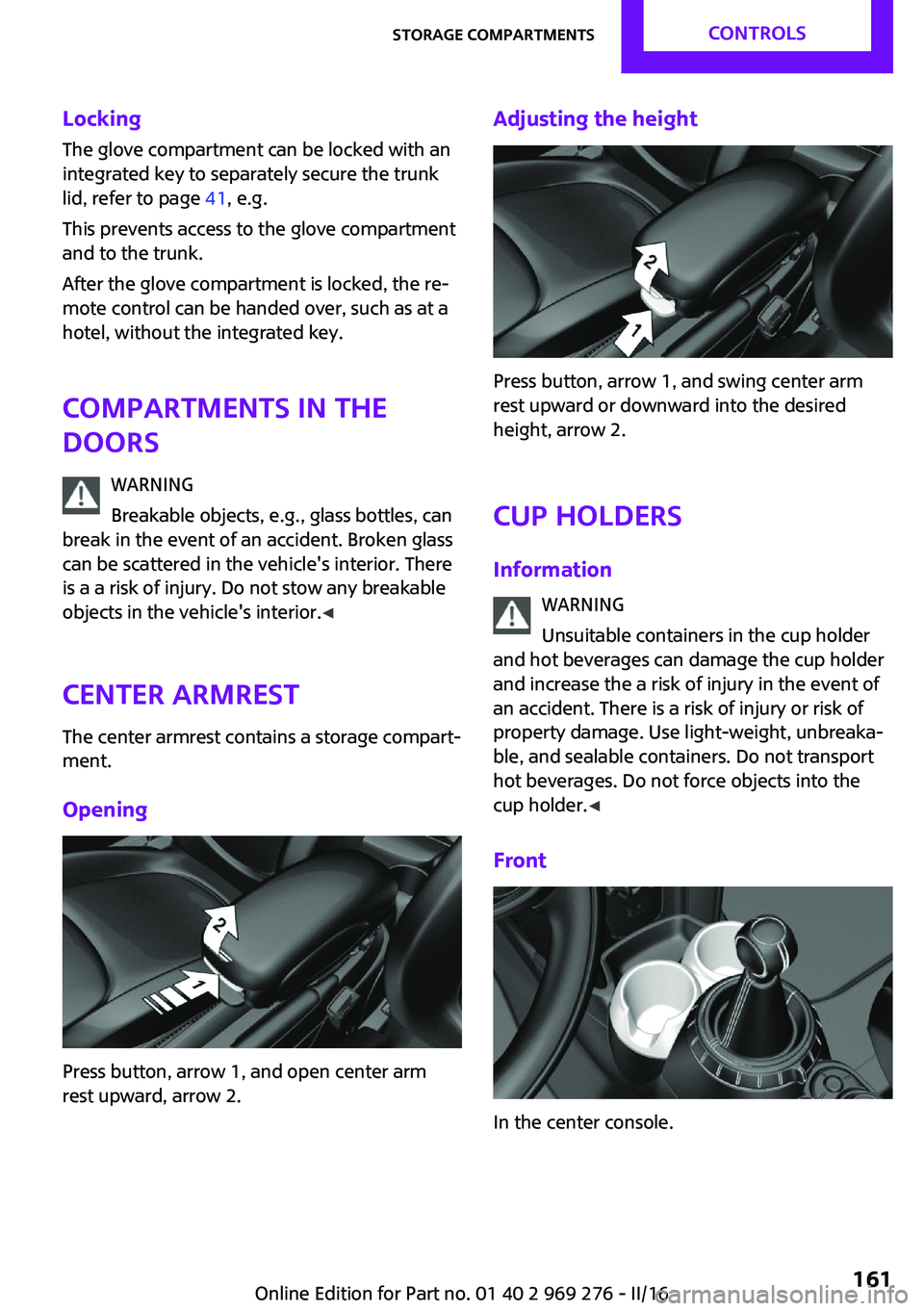
Center armrest The center armrest contains a storage compart‐
ment.
Opening
Press button, arrow 1, and open center arm
rest upward, arrow 2.
Adjusting the height
Press button, arrow 1, and swing center arm
rest upward or downward into the desired
height, arrow 2.
Cup holders Information WARNING
Unsuitable containers in the cup holder
and hot beverages can damage the cup holder
and increase the a risk of injury in the event of
an accident. There is a risk of injury or risk of
property damage. Use light-weight, unbreaka‐
ble, and sealable containers. Do not transport
hot beverages. Do not force objects into the
cup holder. ◀
Front
In the center console.
Seite 161Storage compartmentsCONTROLS161
Online Edition for Part no. 01 40 2 969 276 - II/16
Page 243 of 252
Bulbs and lights 209
Button, Start/Stop 66
Bypassing, see Jump-start‐ ing 220
C California Proposition 65 Warning 8
Camera-based cruise con‐ trol 126
Camera lenses, care 230
Camera, rearview cam‐ era 137
Can holder, see Cup holder 161
Car battery 217
Care, displays 230
Care, vehicle 227
Cargo area, enlarging 158
Cargo area partition 158
Cargo area, storage compart‐ ments 162
Cargo straps, securing cargo 171
Car key, see Remote con‐ trol 34
Carpet, care 229
Car wash 226
Catalytic converter, see Hot exhaust system 167
CBS Condition Based Serv‐ ice 206
Center armrest 161
Center console 16
Central instrument cluster, LED ring 94
Central locking system 40
Central screen, refer to Control Display 18
Changes, technical, refer to Own Safety 7
Changing parts 208
Changing wheels 215
Changing wheels/tires 192 Chassis number, see vehicle
identification number 10
Check Control 81
Checking the oil level elec‐ tronically 200
Children, seating position 63
Children, transporting safely 63
Child restraint fixing sys‐ tem 63
Child restraint fixing system LATCH 65
Child restraint fixing systems, mounting 64
Child seat, mounting 64
Child seats 63
Chrome parts, care 229
Chrono package, cockpit 97
Cigarette lighter 155
Cleaning, displays 230
Climate control 144, 146
Clock 85
Closing/opening via door lock 40
Closing/opening with remote control 38
Coasting 177
Coasting with engine decou‐ pled, coasting 177
Coasting with idling en‐ gine 177
Combination switch, see Turn signals 71
Combi switch, see wiper sys‐ tem 72
Comfort Access 41
Comfort entry 38
Compartments in the doors 161
Compass 153
Compressor 194
Condensation on win‐ dows 149
Condensation under the vehi‐ cle 168 Condition Based Service
CBS 206
Configuring driving pro‐ gram 125
Confirmation signal 44
Control Display 18
Control Display, settings 92
Controller 19
Control systems, driving stabil‐ ity 122
Convenient closing with the remote control 39
Convenient opening 38
Convertible, convertible top 47
Convertible mode, automatic climate control 148
Convertible program, auto‐ matic climate control 148
Convertible, roof 47
Convertible top 47
Convertible top, care 227
Convertible top, cargo area partition 50
Convertible top, emergency operation 50
Convertible top, rollover pro‐ tection system 108
Coolant 204
Cooling function 145, 147
Cooling, maximum 147
Cooling system 204
Cornering light 102
Corrosion on brake discs 168
Cosmetic mirror 155
Courtesy lamps during unlock‐ ing 38
Courtesy lamps with the vehi‐ cle locked 39
Cruise control 131
Cruise control, active 126
Cruise control with distance control, see camera-based
cruise control 126 Seite 243Everything from A to ZREFERENCE243
Online Edition for Part no. 01 40 2 969 276 - II/16