seats MINI COOPER CONVERTIBLE 2016 User Guide
[x] Cancel search | Manufacturer: MINI, Model Year: 2016, Model line: COOPER CONVERTIBLE, Model: MINI COOPER CONVERTIBLE 2016Pages: 252, PDF Size: 5.41 MB
Page 108 of 252
front passenger side are not
activated.▷The indicator lamp does not light up when,
for example, a correctly seated person of
sufficient size is detected on the seat. The
airbags on the front passenger side are ac‐
tivated.
Detected child seats
The system generally detects children seated in
a child seat, particularly in child seats required
by NHTSA when the vehicle was manufactured.
After installing a child seat, make sure that the
indicator lamp for the front-seat passenger air‐
bags lights up. This indicates that the child seat
has been detected and the front-seat passen‐
ger airbags are not activated.
Strength of the driver's and front-seat
passenger airbag
The explosive power that activates driver's/
front passenger's airbags very much depends
on the positions of the driver's/front passeng‐
er's seat.
To maintain the accuracy of this function over
the long-term, calibrate the front seats as soon
as a relevant Check Control message is dis‐
played. A message also appears on the Control
Display.
Calibrating the front seats WARNING
There is risk of jamming when moving the
seats. There is a risk of injury or risk of property
damage. Make sure that the area of movement
of the seat is clear prior to any adjustment. ◀
An appropriate Check Control message is dis‐
played.
1.Move the respective seat all the way for‐
ward.2.Move the respective seat forward again. It
moves forward briefly.3.Readjust the seat to the desired position.The calibration procedure is completed when
the Check Control message disappears.
If the message continues to be displayed, re‐
peat the calibration.
If the message does not disappear after a re‐
peat calibration, have the system checked as
soon as possible.
Rollover protection sys‐
tem
The concept
The rollover protection system is automatically
activated in the event of a sufficiently serious
accident or if the longitudinal axis is tilted ex‐
cessively. The safety frames located behind the
rear headrests extend within fractions of a sec‐
ond.
Supplementing the reinforced front windshield
frame, the rollover protection system further in‐
creases passenger safety.
Information WARNING
There can be damage or injuries when
the rollover protection system is triggered.
There is a risk of injuries or a risk of property
damage. Make sure that the area of movement
of the rollover protection system is clear. ◀
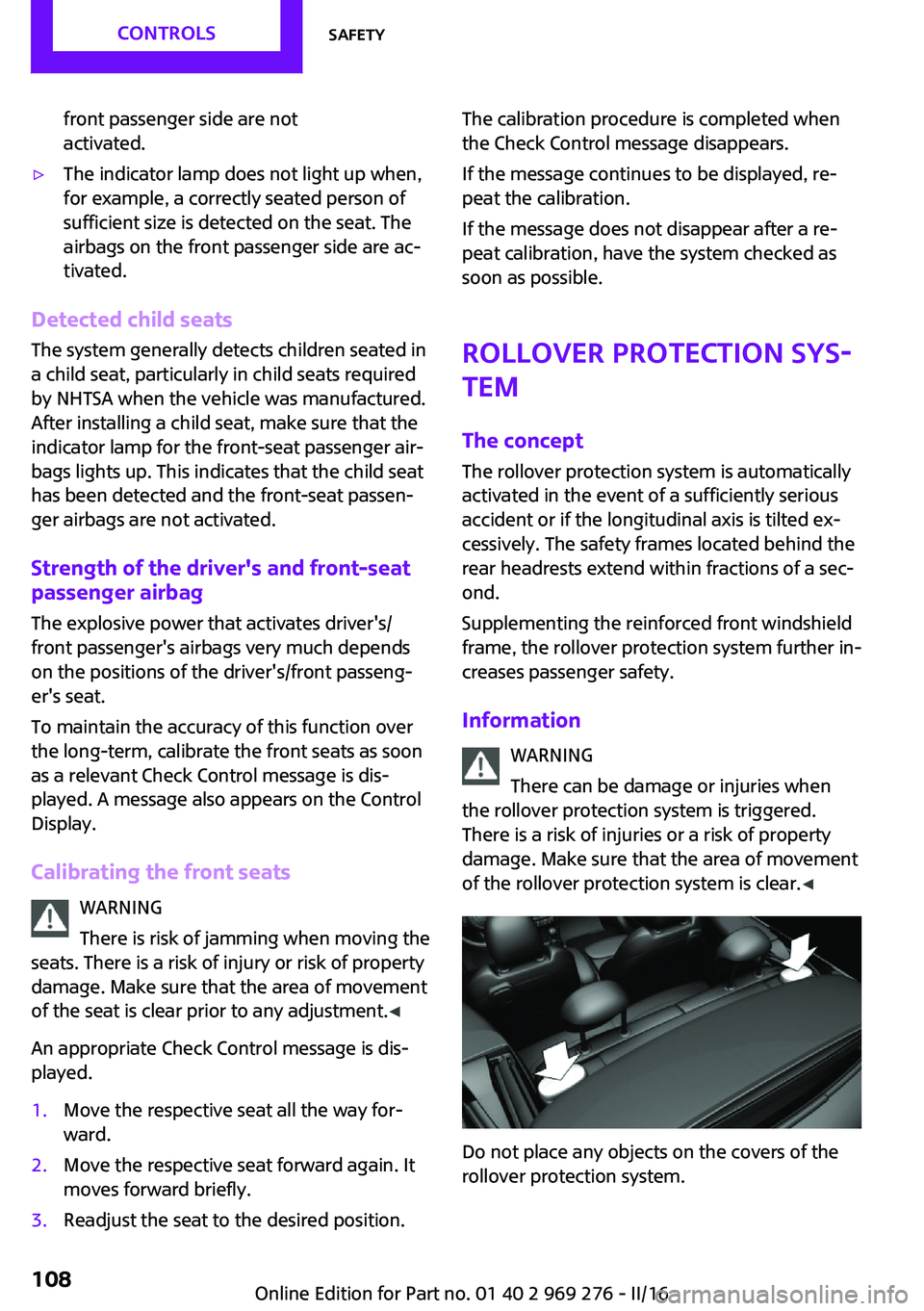
Do not place any objects on the covers of the
rollover protection system.
Seite 108CONTROLSSafety108
Online Edition for Part no. 01 40 2 969 276 - II/16
Page 158 of 252
stowed, which do not fit through the loading
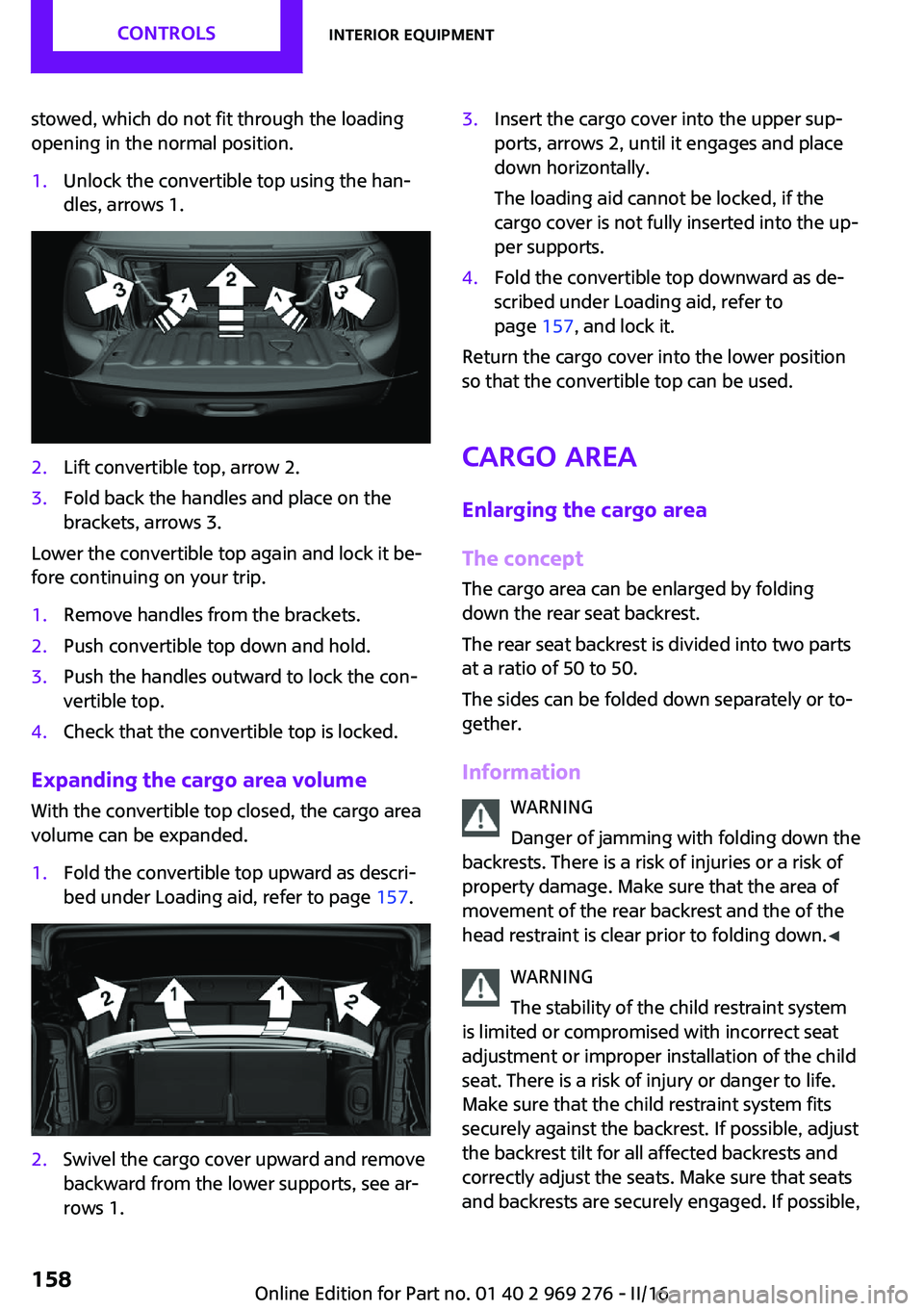
opening in the normal position.1.Unlock the convertible top using the han‐
dles, arrows 1.2.Lift convertible top, arrow 2.3.Fold back the handles and place on the
brackets, arrows 3.
Lower the convertible top again and lock it be‐
fore continuing on your trip.
1.Remove handles from the brackets.2.Push convertible top down and hold.3.Push the handles outward to lock the con‐
vertible top.4.Check that the convertible top is locked.
Expanding the cargo area volume
With the convertible top closed, the cargo area
volume can be expanded.
1.Fold the convertible top upward as descri‐
bed under Loading aid, refer to page 157.2.Swivel the cargo cover upward and remove
backward from the lower supports, see ar‐
rows 1.3.Insert the cargo cover into the upper sup‐
ports, arrows 2, until it engages and place
down horizontally.
The loading aid cannot be locked, if the
cargo cover is not fully inserted into the up‐
per supports.4.Fold the convertible top downward as de‐
scribed under Loading aid, refer to
page 157, and lock it.
Return the cargo cover into the lower position
so that the convertible top can be used.
Cargo area
Enlarging the cargo area
The concept
The cargo area can be enlarged by folding
down the rear seat backrest.
The rear seat backrest is divided into two parts
at a ratio of 50 to 50.
The sides can be folded down separately or to‐
gether.
Information WARNING
Danger of jamming with folding down the
backrests. There is a risk of injuries or a risk of
property damage. Make sure that the area of
movement of the rear backrest and the of the head restraint is clear prior to folding down. ◀
WARNING
The stability of the child restraint system
is limited or compromised with incorrect seat
adjustment or improper installation of the child seat. There is a risk of injury or danger to life.
Make sure that the child restraint system fits
securely against the backrest. If possible, adjust
the backrest tilt for all affected backrests and
correctly adjust the seats. Make sure that seats
and backrests are securely engaged. If possible,
Seite 158CONTROLSInterior equipment158
Online Edition for Part no. 01 40 2 969 276 - II/16
Page 160 of 252
Storage compartmentsVehicle features and op‐
tions
This chapter describes all standard, country-
specific and optional features offered with the
series. It also describes features that are not necessarily available in your car, e. g., due to
the selected options or country versions. This
also applies to safety-related functions and sys‐
tems. The respectively applicable country provi‐
sions must be observed when using the respec‐
tive features and systems.
Information WARNING
Loose objects or devices with a cable
connection to the vehicle, e.g., mobile phones,
can be thrown into the vehicle's interior while
driving, e.g.,in the event of an accident or dur‐
ing braking and evasive maneuvers. There is a
a risk of injury. Secure loose objects or devices
with a cable connection to the vehicle in the
vehicle's interior. ◀
ATTENTION
Anti-slip pads such as anti-slip mats can
damage the dashboard. There is a risk of dam‐
age to property. Do not use anti-slip pads. ◀
Overview The following storage compartments are avail‐
able in the vehicle interior:▷Storage compartment in front of the cu‐
pholders.▷Storage tray in the center console.▷Glove compartment on the front passenger
side.▷Storage compartment in the center arm‐
rest.▷Compartments in the doors.▷Pockets on the backrests of the front seats.▷Storage compartments in the trunk
Glove compartment
Information WARNING
Folded open, the glove compartment
protrudes in the vehicle's interior. Objects in
the glove compartment can be thrown into the
vehicle's interior while driving, e.g., in the event
of an accident or during braking and evasive
maneuvers. There is a a risk of injury. Always
close the glove compartment immediately after
using it. ◀
Opening
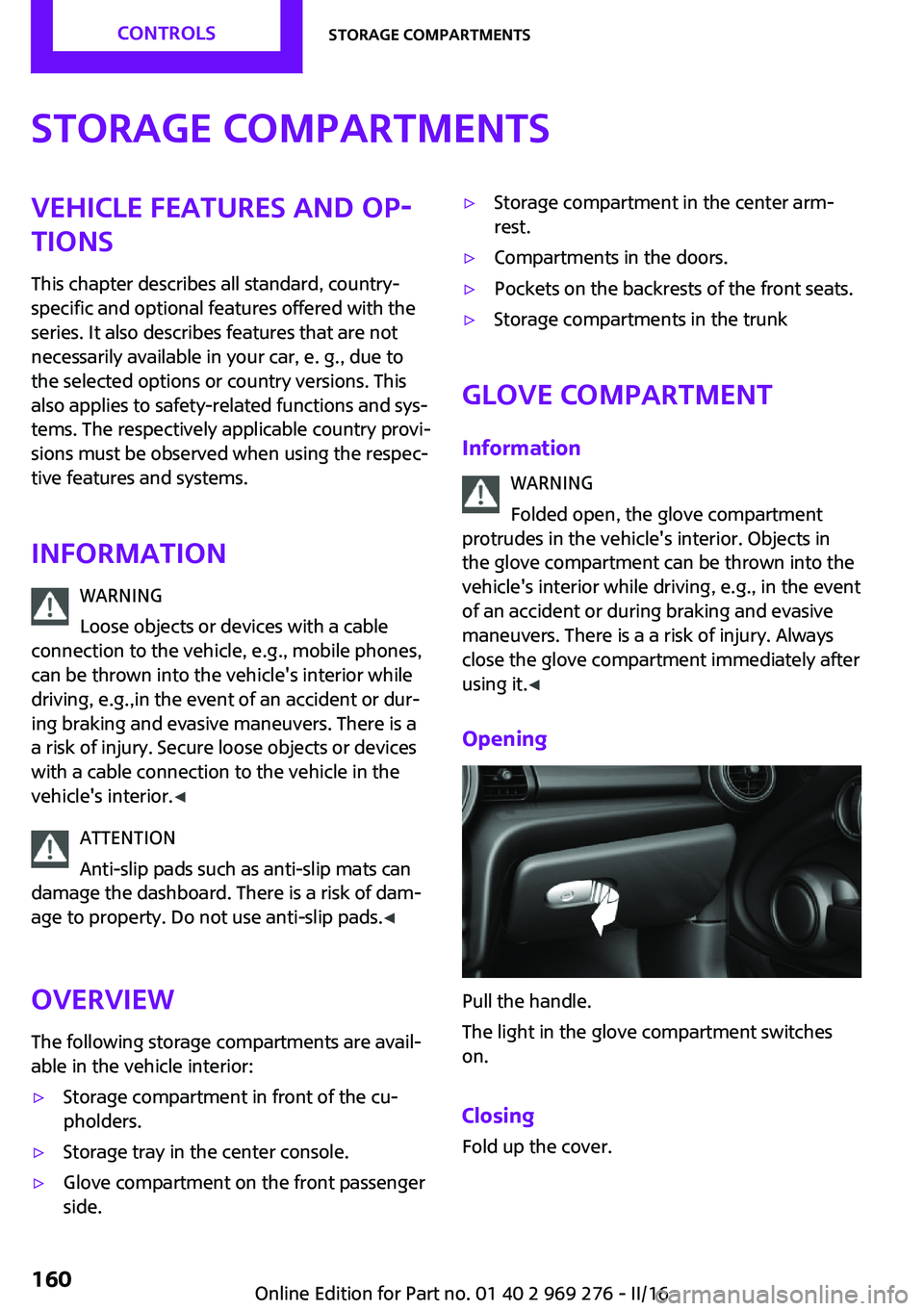
Pull the handle.
The light in the glove compartment switches
on.
Closing Fold up the cover.
Seite 160CONTROLSStorage compartments160
Online Edition for Part no. 01 40 2 969 276 - II/16
Page 162 of 252
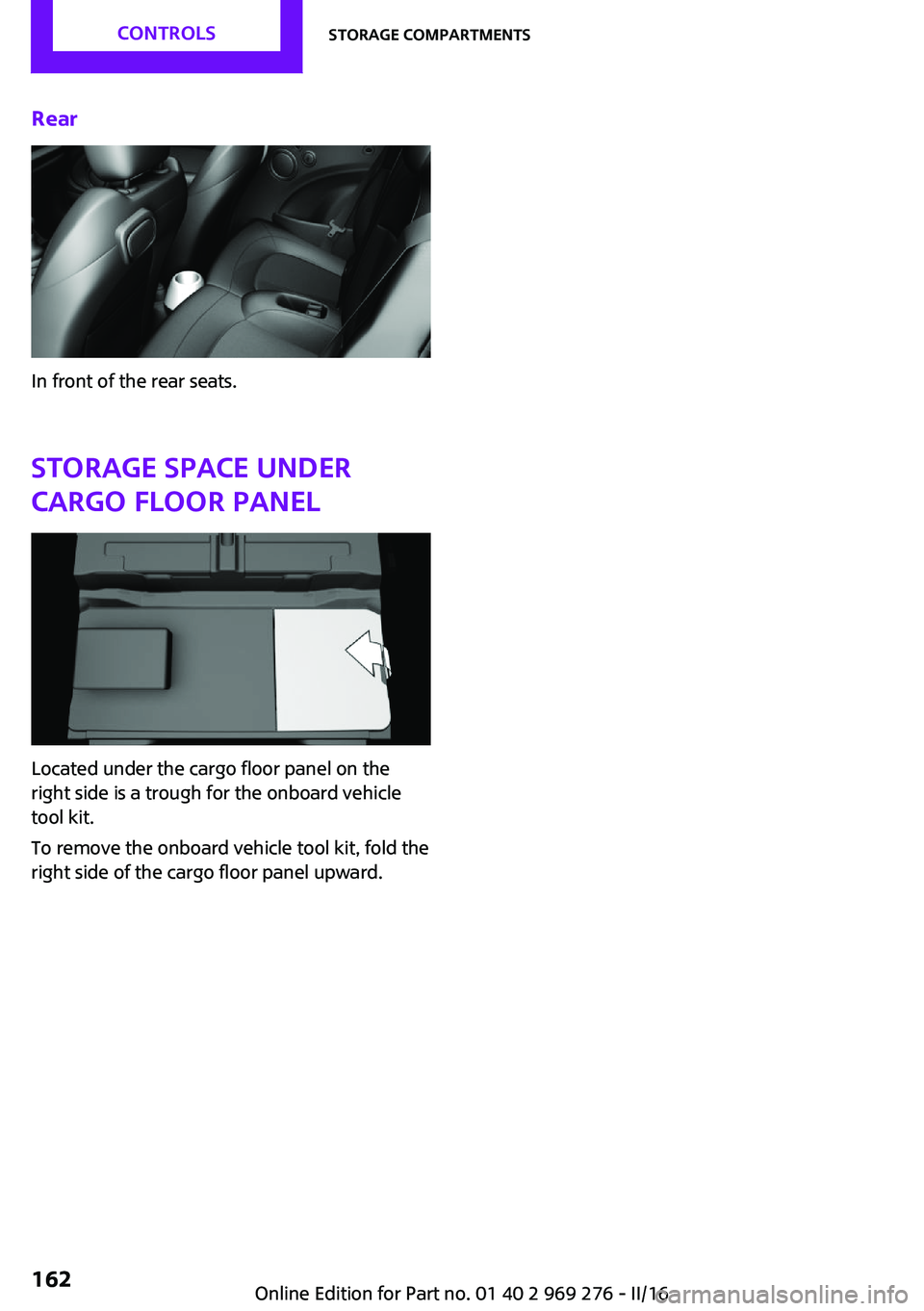
Rear
In front of the rear seats.Storage space undercargo floor panel
Located under the cargo floor panel on the
right side is a trough for the onboard vehicle
tool kit.
To remove the onboard vehicle tool kit, fold the
right side of the cargo floor panel upward.
Seite 162CONTROLSStorage compartments162
Online Edition for Part no. 01 40 2 969 276 - II/16
Page 175 of 252
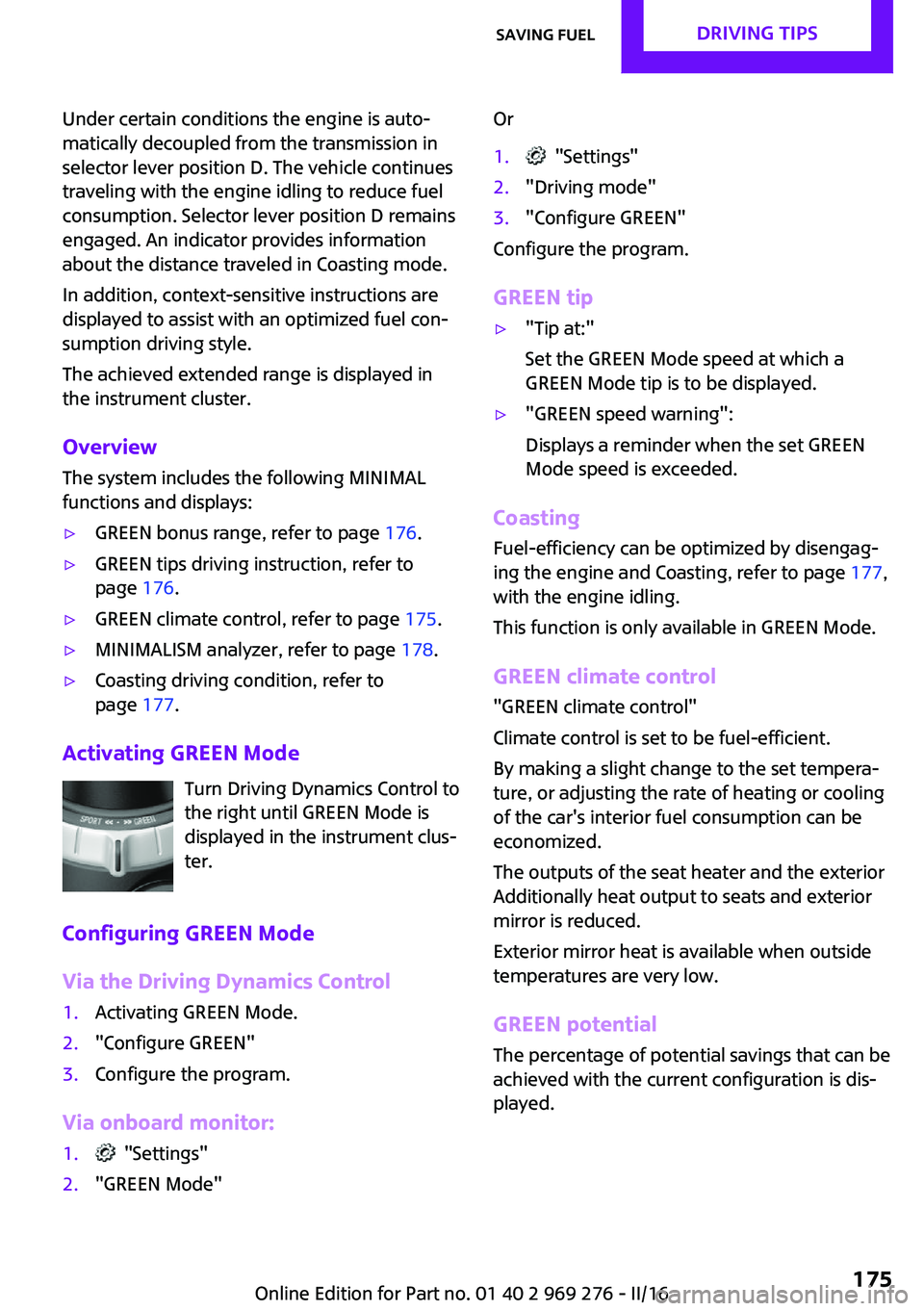
Under certain conditions the engine is auto‐
matically decoupled from the transmission in
selector lever position D. The vehicle continues
traveling with the engine idling to reduce fuel
consumption. Selector lever position D remains
engaged. An indicator provides information
about the distance traveled in Coasting mode.
In addition, context-sensitive instructions are
displayed to assist with an optimized fuel con‐
sumption driving style.
The achieved extended range is displayed in
the instrument cluster.
Overview The system includes the following MINIMAL
functions and displays:▷GREEN bonus range, refer to page 176.▷GREEN tips driving instruction, refer to
page 176.▷GREEN climate control, refer to page 175.▷MINIMALISM analyzer, refer to page 178.▷Coasting driving condition, refer to
page 177.
Activating GREEN Mode
Turn Driving Dynamics Control to
the right until GREEN Mode is
displayed in the instrument clus‐
ter.
Configuring GREEN Mode
Via the Driving Dynamics Control
1.Activating GREEN Mode.2."Configure GREEN"3.Configure the program.
Via onboard monitor:
1. "Settings"2."GREEN Mode"Or1. "Settings"2."Driving mode"3."Configure GREEN"
Configure the program.
GREEN tip
▷"Tip at:"
Set the GREEN Mode speed at which a
GREEN Mode tip is to be displayed.▷"GREEN speed warning":
Displays a reminder when the set GREEN
Mode speed is exceeded.
Coasting
Fuel-efficiency can be optimized by disengag‐
ing the engine and Coasting, refer to page 177,
with the engine idling.
This function is only available in GREEN Mode.
GREEN climate control
"GREEN climate control"
Climate control is set to be fuel-efficient.
By making a slight change to the set tempera‐
ture, or adjusting the rate of heating or cooling
of the car's interior fuel consumption can be
economized.
The outputs of the seat heater and the exterior
Additionally heat output to seats and exterior
mirror is reduced.
Exterior mirror heat is available when outside
temperatures are very low.
GREEN potential
The percentage of potential savings that can be
achieved with the current configuration is dis‐
played.
Seite 175Saving fuelDRIVING TIPS175
Online Edition for Part no. 01 40 2 969 276 - II/16
Page 242 of 252
Everything from A to ZIndexA
ABS, Antilock Brake Sys‐ tem 122
Acceleration Assistant, see Launch Control 78
Accessories and parts 8
ACC, see camera-based cruise control 126
Activated-charcoal filter 149
Active Cruise Control, see camera-based cruise con‐
trol 126
Additional information, on‐ board monitor 23
Additives, oil 202
Adjustments, seats/head re‐ straints 54
Adjustments, steering wheel 62
After washing vehicle 227
Airbags 105
Airbags, indicator/warning light 106
Air circulation, see Recircu‐ lated-air mode 145, 148
Air conditioner 144
Air, dehumidifying, see Cool‐ ing function 145, 147
Air distribution, man‐ ual 145 , 148
Air flow, air conditioner 145
Air flow, automatic climate control 148
Air pressure, tires 186
Air vents, see Ventilation 149
Alarm system 44
Alarm triggering 44
Alarm, unintentional 45
All around the center con‐ sole 16 All around the interior mir‐
ror 17
All around the steering wheel 14
All-season tires, see Winter tires 193
Alternating-code hand-held transmitter 152
Alternative oil types 202
Always Open Timer, Control Display 97
Always Open Timer, onboard computer 90
Antifreeze, washer fluid 74
Antilock Brake System, ABS 122
Anti-slip control, see DSC 122
App, MINI Motorer’s Guide 6
Approved axle load 235
Arrival time 91
Ash tray 155
Assistance, Roadside Assis‐ tance 220
Assistance when driving off 125
Assist system, refer to Intelli‐ gent Safety 115
AUTO intensity 148
Automatic car wash 226
Automatic climate con‐ trol 146
Automatic Curb Monitor 60
Automatic deactivation, Front- seat passenger airbags 107
Automatic headlamp con‐ trol 101
Automatic locking 43
Automatic recirculated-air control 148
Automatic transmission with Steptronic 75 AUTO program, automatic cli‐
mate control 147
AUTO program, intensity 148
Auto Start/Stop function 68
AUX-IN port, position in vehi‐ cle 156
Average fuel consumption 90
Average speed 90
Axle loads, weights 235
B
Backrest curvature, see Lum‐ bar support 55
Band-aids, see First-aid kit 220
Battery replacement, vehicle battery 218
Battery, vehicle 217
Being towed, see Tow-starting and towing 222
Belts, safety belts 56
Beverage holder, cup holder 161
Bonus range, GREEN Mode 176
Bottle holder, see Cup holder 161
Brake assistant 122
Brake discs, break-in 166
Brake pads, break-in 166
Braking, information 167
Breakdown assistance 220
Break-in 166
Brightness of Control Dis‐ play 93
Bug light 210
Bulb replacement 209
Bulb replacement, front 209
Bulb replacement, rear 212
Bulb replacement, side 214 Seite 242REFERENCEEverything from A to Z242
Online Edition for Part no. 01 40 2 969 276 - II/16
Page 243 of 252
Bulbs and lights 209
Button, Start/Stop 66
Bypassing, see Jump-start‐ ing 220
C California Proposition 65 Warning 8
Camera-based cruise con‐ trol 126
Camera lenses, care 230
Camera, rearview cam‐ era 137
Can holder, see Cup holder 161
Car battery 217
Care, displays 230
Care, vehicle 227
Cargo area, enlarging 158
Cargo area partition 158
Cargo area, storage compart‐ ments 162
Cargo straps, securing cargo 171
Car key, see Remote con‐ trol 34
Carpet, care 229
Car wash 226
Catalytic converter, see Hot exhaust system 167
CBS Condition Based Serv‐ ice 206
Center armrest 161
Center console 16
Central instrument cluster, LED ring 94
Central locking system 40
Central screen, refer to Control Display 18
Changes, technical, refer to Own Safety 7
Changing parts 208
Changing wheels 215
Changing wheels/tires 192 Chassis number, see vehicle
identification number 10
Check Control 81
Checking the oil level elec‐ tronically 200
Children, seating position 63
Children, transporting safely 63
Child restraint fixing sys‐ tem 63
Child restraint fixing system LATCH 65
Child restraint fixing systems, mounting 64
Child seat, mounting 64
Child seats 63
Chrome parts, care 229
Chrono package, cockpit 97
Cigarette lighter 155
Cleaning, displays 230
Climate control 144, 146
Clock 85
Closing/opening via door lock 40
Closing/opening with remote control 38
Coasting 177
Coasting with engine decou‐ pled, coasting 177
Coasting with idling en‐ gine 177
Combination switch, see Turn signals 71
Combi switch, see wiper sys‐ tem 72
Comfort Access 41
Comfort entry 38
Compartments in the doors 161
Compass 153
Compressor 194
Condensation on win‐ dows 149
Condensation under the vehi‐ cle 168 Condition Based Service
CBS 206
Configuring driving pro‐ gram 125
Confirmation signal 44
Control Display 18
Control Display, settings 92
Controller 19
Control systems, driving stabil‐ ity 122
Convenient closing with the remote control 39
Convenient opening 38
Convertible, convertible top 47
Convertible mode, automatic climate control 148
Convertible program, auto‐ matic climate control 148
Convertible, roof 47
Convertible top 47
Convertible top, care 227
Convertible top, cargo area partition 50
Convertible top, emergency operation 50
Convertible top, rollover pro‐ tection system 108
Coolant 204
Cooling function 145, 147
Cooling, maximum 147
Cooling system 204
Cornering light 102
Corrosion on brake discs 168
Cosmetic mirror 155
Courtesy lamps during unlock‐ ing 38
Courtesy lamps with the vehi‐ cle locked 39
Cruise control 131
Cruise control, active 126
Cruise control with distance control, see camera-based
cruise control 126 Seite 243Everything from A to ZREFERENCE243
Online Edition for Part no. 01 40 2 969 276 - II/16
Page 248 of 252
Post Crash — iBrake 121
Power failure 218
Power windows 45
Prescribed engine oil types 202
Pressure, tire air pressure 186
Pressure warning, tires 113
Profile, see Personal Pro‐ file 36
Protective function, win‐ dows 46
Push-and-turn switch, see Controller 19
R
Racetrack operation 169
Radiator fluid 204
Radio-operated key, see Re‐ mote control 34
Radio ready state 66
Radio, refer to Integrated Owner's Manual
Rain sensor 73
Ratchet straps, securing cargo 171
Rear fog lights 103
Rear lights 212
Rear luggage rack 171
Rearview camera 137
Rearview mirror 60
Rear window de‐ froster 146, 149
Recirculated-air filter 149
Recirculated-air mode 145, 148
Recommended fuel grade 185
Recommended tire brands 192
Refueling 182
Remaining range 86
Remote control/key 34
Remote control, blocking 35
Remote control, malfunc‐ tion 39 Remote control, replacing the
battery 35
Remote control, univer‐ sal 151
Replacement fuse 219
Replacing parts 208
Replacing the battery, remote control 35
Replacing wheels/tires 192
Reporting safety malfunc‐ tions 10
RES CNCL button, see camera- based cruise control 126
RES CNCL button, see Cruise control 131
Reserve warning, see Range 86
Reset, Tire Pressure Monitor TPM 110
Retreaded tires 193
Roadside parking lights 101
Rollover protection sys‐ tem 108
RON recommended fuel grade 185
Roof load capacity 235
Roof, see convertible top 47
RSC Run Flat System Compo‐ nent, see Run-flat tires 193
Rubber components, care 229
Run-flat tires 193
S Safe braking 167
Safety belt reminder for driv‐ er's seat and front passenger
seat 57
Safety belts 56
Safety belts, care 229
Safety belts, rear 57
Safety systems, airbags 105
Saving fuel 173
Screen, refer to Control Dis‐ play 18 Screwdriver 208
Sealant 194
Seat belts, see Safety belts 56
Seat heating, front 56
Seating position for chil‐ dren 63
Seats 54
Securing cargo 171
Selection list in instrument cluster 89
Selector lever, Steptronic transmission 76
Sensors, care 230
Service and warranty 8
Service requirements, Condi‐ tion Based Service CBS 206
Service requirements, dis‐ play 86
Service, Roadside Assis‐ tance 220
SET button, see camera-based cruise control 126
SET button, see Cruise con‐ trol 131
Settings, locking/unlocking 43
Settings, mirrors 60
Settings on Control Display 92
Shift paddles on the steering wheel 77
Shift point indicator, Head-Up Display 96
Side airbag 105
Signaling, horn 14
Signals when unlocking 44
Sitting safely 54
Size 234
Snow chains 197
Socket 155
Socket, OBD Onboard Diag‐ nostics 207
Spare fuse 219
Spare tire, see Emergency wheel 215
Speed, average 90
Speed limit detection 87 Seite 248REFERENCEEverything from A to Z248
Online Edition for Part no. 01 40 2 969 276 - II/16