cruise control MINI COOPER CONVERTIBLE 2016 Owners Manual
[x] Cancel search | Manufacturer: MINI, Model Year: 2016, Model line: COOPER CONVERTIBLE, Model: MINI COOPER CONVERTIBLE 2016Pages: 252, PDF Size: 5.41 MB
Page 15 of 252
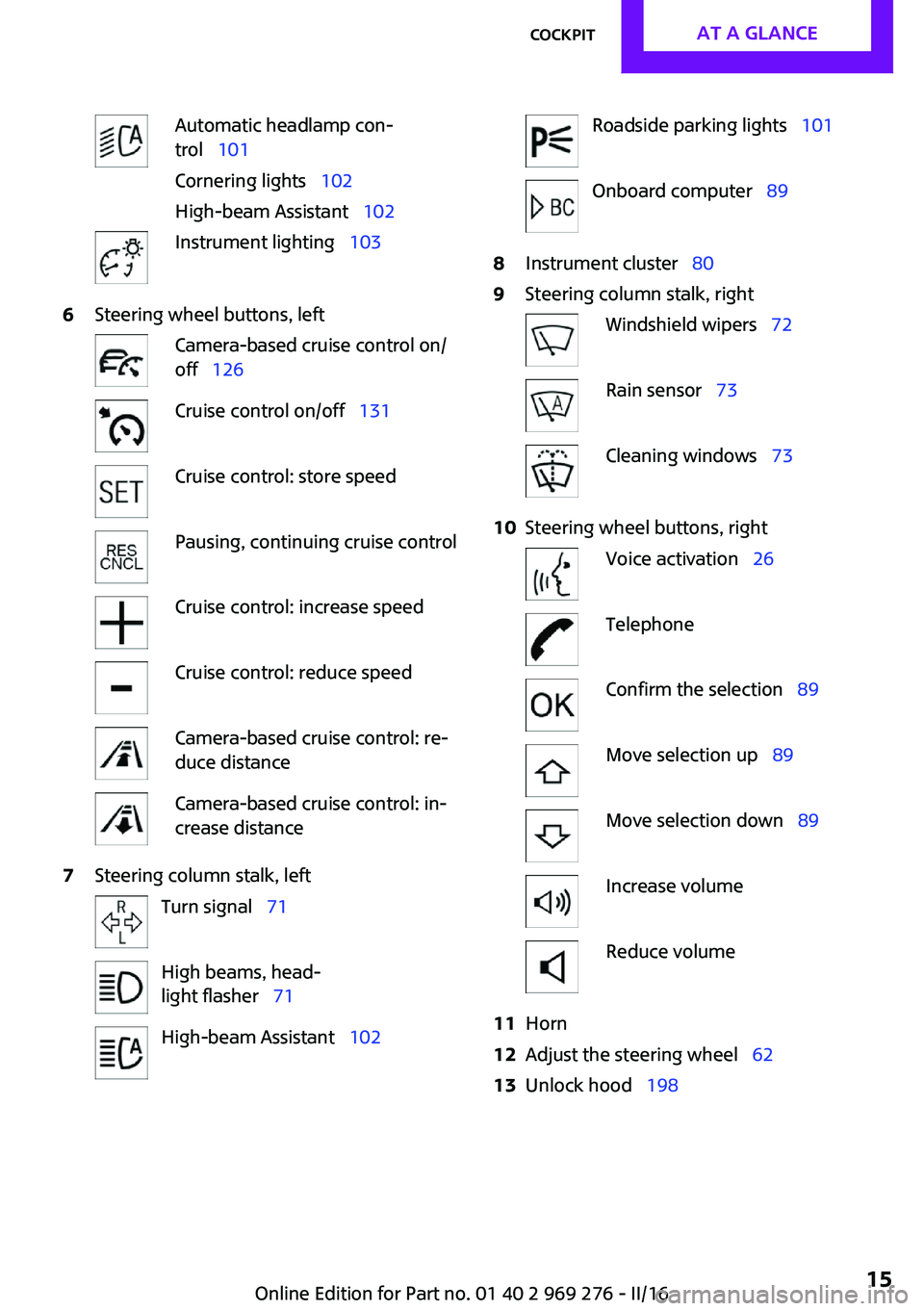
Automatic headlamp con‐
trol 101
Cornering lights 102
High-beam Assistant 102Instrument lighting 1036Steering wheel buttons, leftCamera-based cruise control on/
off 126Cruise control on/off 131Cruise control: store speedPausing, continuing cruise controlCruise control: increase speedCruise control: reduce speedCamera-based cruise control: re‐
duce distanceCamera-based cruise control: in‐
crease distance7Steering column stalk, leftTurn signal 71High beams, head‐
light flasher 71High-beam Assistant 102Roadside parking lights 101Onboard computer 898Instrument cluster 809Steering column stalk, rightWindshield wipers 72Rain sensor 73Cleaning windows 7310Steering wheel buttons, rightVoice activation 26TelephoneConfirm the selection 89Move selection up 89Move selection down 89Increase volumeReduce volume11Horn12Adjust the steering wheel 6213Unlock hood 198Seite 15CockpitAT A GLANCE15
Online Edition for Part no. 01 40 2 969 276 - II/16
Page 82 of 252
be activated if objects are placed on the front
passenger seat.
Make sure that the safety belts are positioned
correctly.
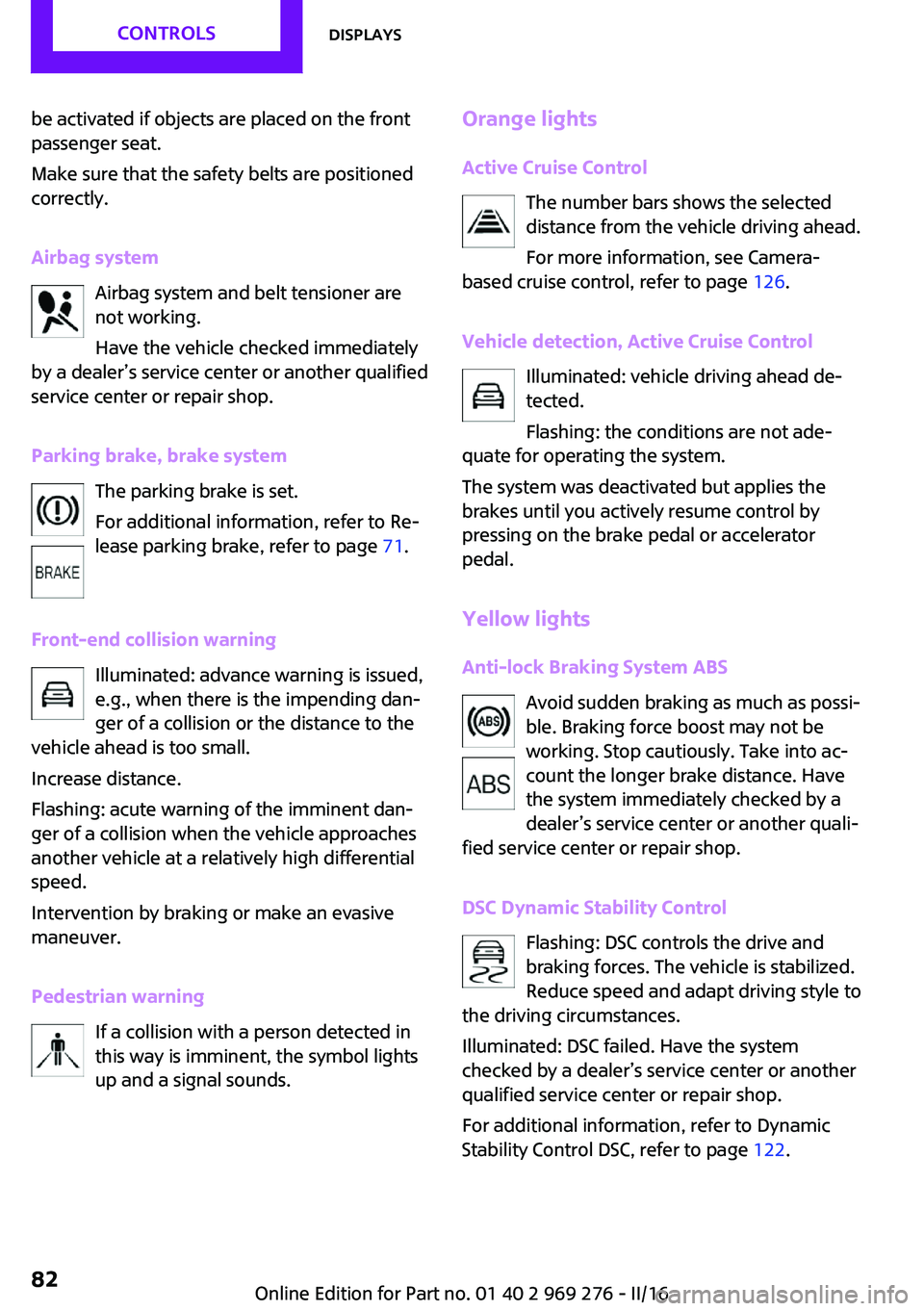
Airbag system Airbag system and belt tensioner are
not working.
Have the vehicle checked immediately
by a dealer’s service center or another qualified
service center or repair shop.
Parking brake, brake system The parking brake is set.
For additional information, refer to Re‐
lease parking brake, refer to page 71.
Front-end collision warning Illuminated: advance warning is issued,
e.g., when there is the impending dan‐
ger of a collision or the distance to the
vehicle ahead is too small.
Increase distance.
Flashing: acute warning of the imminent dan‐
ger of a collision when the vehicle approaches
another vehicle at a relatively high differential
speed.
Intervention by braking or make an evasive
maneuver.
Pedestrian warning If a collision with a person detected in
this way is imminent, the symbol lights
up and a signal sounds.Orange lights
Active Cruise Control The number bars shows the selected
distance from the vehicle driving ahead.
For more information, see Camera-
based cruise control, refer to page 126.
Vehicle detection, Active Cruise Control Illuminated: vehicle driving ahead de‐
tected.
Flashing: the conditions are not ade‐
quate for operating the system.
The system was deactivated but applies the
brakes until you actively resume control by
pressing on the brake pedal or accelerator
pedal.
Yellow lights Anti-lock Braking System ABS Avoid sudden braking as much as possi‐
ble. Braking force boost may not be
working. Stop cautiously. Take into ac‐
count the longer brake distance. Have
the system immediately checked by a
dealer’s service center or another quali‐
fied service center or repair shop.
DSC Dynamic Stability Control Flashing: DSC controls the drive and
braking forces. The vehicle is stabilized.
Reduce speed and adapt driving style to
the driving circumstances.
Illuminated: DSC failed. Have the system
checked by a dealer’s service center or another
qualified service center or repair shop.
For additional information, refer to Dynamic
Stability Control DSC, refer to page 122.Seite 82CONTROLSDisplays82
Online Edition for Part no. 01 40 2 969 276 - II/16
Page 84 of 252
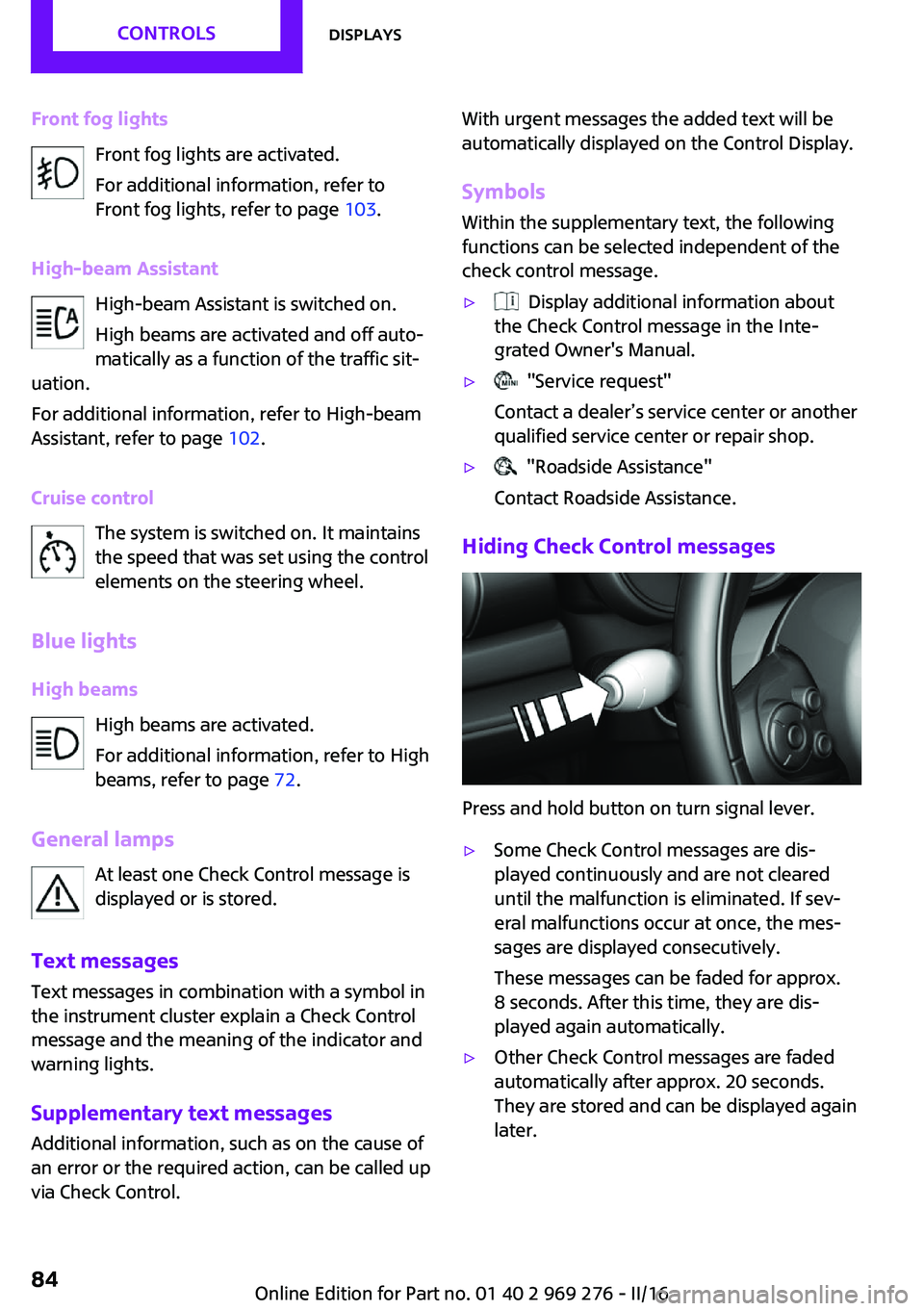
Front fog lightsFront fog lights are activated.
For additional information, refer to
Front fog lights, refer to page 103.
High-beam Assistant High-beam Assistant is switched on.
High beams are activated and off auto‐
matically as a function of the traffic sit‐
uation.
For additional information, refer to High-beam
Assistant, refer to page 102.
Cruise control The system is switched on. It maintains
the speed that was set using the control
elements on the steering wheel.
Blue lights
High beams High beams are activated.
For additional information, refer to High
beams, refer to page 72.
General lamps At least one Check Control message is
displayed or is stored.
Text messages
Text messages in combination with a symbol in
the instrument cluster explain a Check Control
message and the meaning of the indicator and
warning lights.
Supplementary text messages
Additional information, such as on the cause of
an error or the required action, can be called up
via Check Control.With urgent messages the added text will be
automatically displayed on the Control Display.
Symbols
Within the supplementary text, the following
functions can be selected independent of the
check control message.▷ Display additional information about
the Check Control message in the Inte‐
grated Owner's Manual.▷ "Service request"
Contact a dealer’s service center or another
qualified service center or repair shop.▷ "Roadside Assistance"
Contact Roadside Assistance.
Hiding Check Control messages
Press and hold button on turn signal lever.
▷Some Check Control messages are dis‐
played continuously and are not cleared
until the malfunction is eliminated. If sev‐
eral malfunctions occur at once, the mes‐
sages are displayed consecutively.
These messages can be faded for approx.
8 seconds. After this time, they are dis‐
played again automatically.▷Other Check Control messages are faded
automatically after approx. 20 seconds.
They are stored and can be displayed again
later.Seite 84CONTROLSDisplays84
Online Edition for Part no. 01 40 2 969 276 - II/16
Page 116 of 252
Front-end collision
warning with City Brak‐
ing function
The concept
The system can help prevent accidents. If an
accident cannot be prevented, the system will
help reduce the collision speed.
The system sounds a warning before an immi‐
nent collision and actuates brakes independ‐
ently if needed.
The automatic braking intervention is done
with limited force and duration.
The system is controlled via a camera in the
base of the mirror.
The front-end collision warning is available
even if cruise control has been deactivated.
With the vehicle approaching another vehicle
intentionally, the collision warning and braking
are delayed in order to avoid false system reac‐
tions.
General information
The system warns at two levels of an imminent
danger of collision at speeds from approx.
3 mph/5 km/h. Time of warnings may vary with
the current driving situation.
Appropriate braking kicks in at speeds of up to
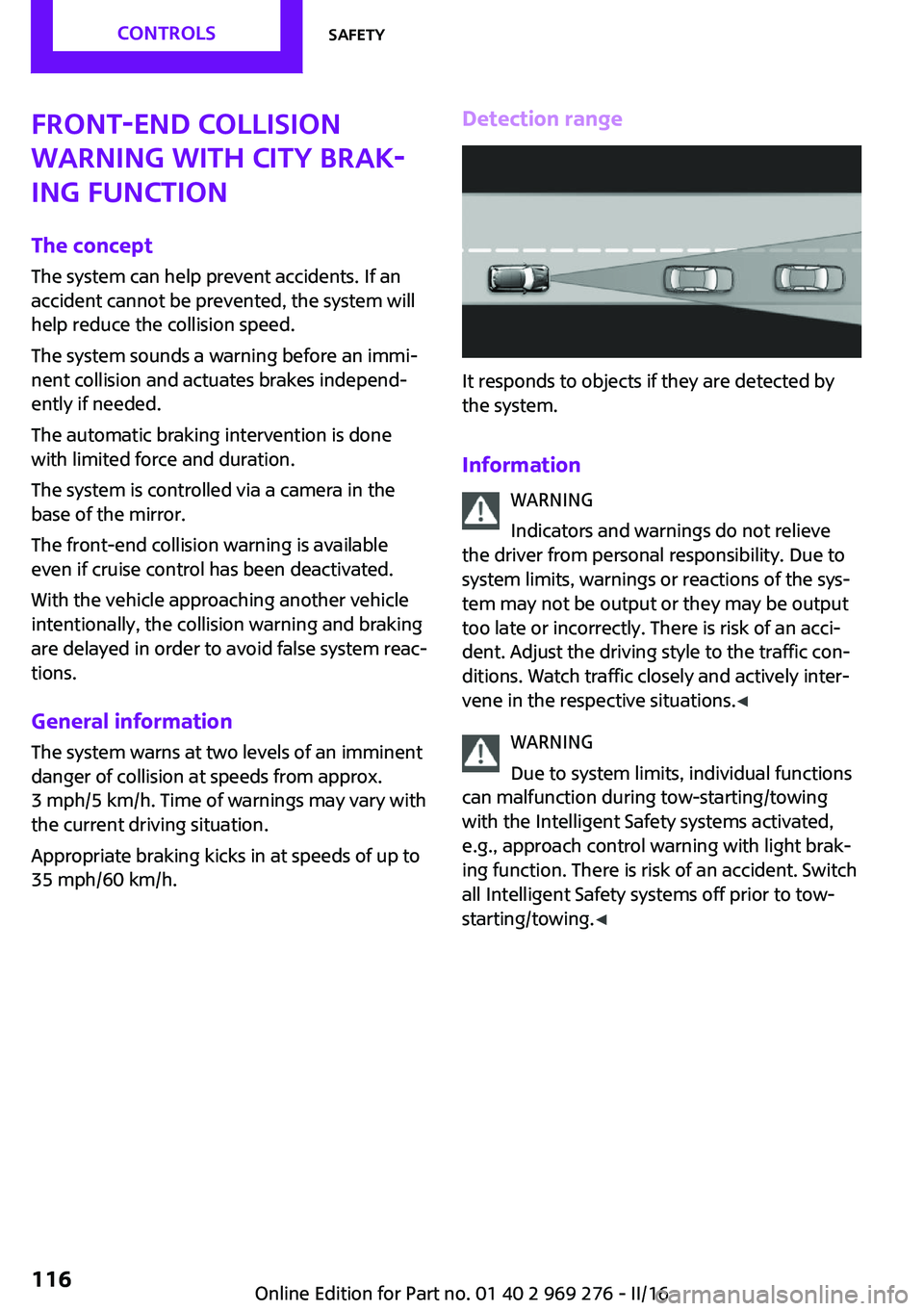
35 mph/60 km/h.Detection range
It responds to objects if they are detected by
the system.
Information WARNING
Indicators and warnings do not relieve
the driver from personal responsibility. Due to
system limits, warnings or reactions of the sys‐
tem may not be output or they may be output
too late or incorrectly. There is risk of an acci‐
dent. Adjust the driving style to the traffic con‐
ditions. Watch traffic closely and actively inter‐
vene in the respective situations. ◀
WARNING
Due to system limits, individual functions
can malfunction during tow-starting/towing
with the Intelligent Safety systems activated,
e.g., approach control warning with light brak‐
ing function. There is risk of an accident. Switch
all Intelligent Safety systems off prior to tow-
starting/towing. ◀
Seite 116CONTROLSSafety116
Online Edition for Part no. 01 40 2 969 276 - II/16
Page 123 of 252
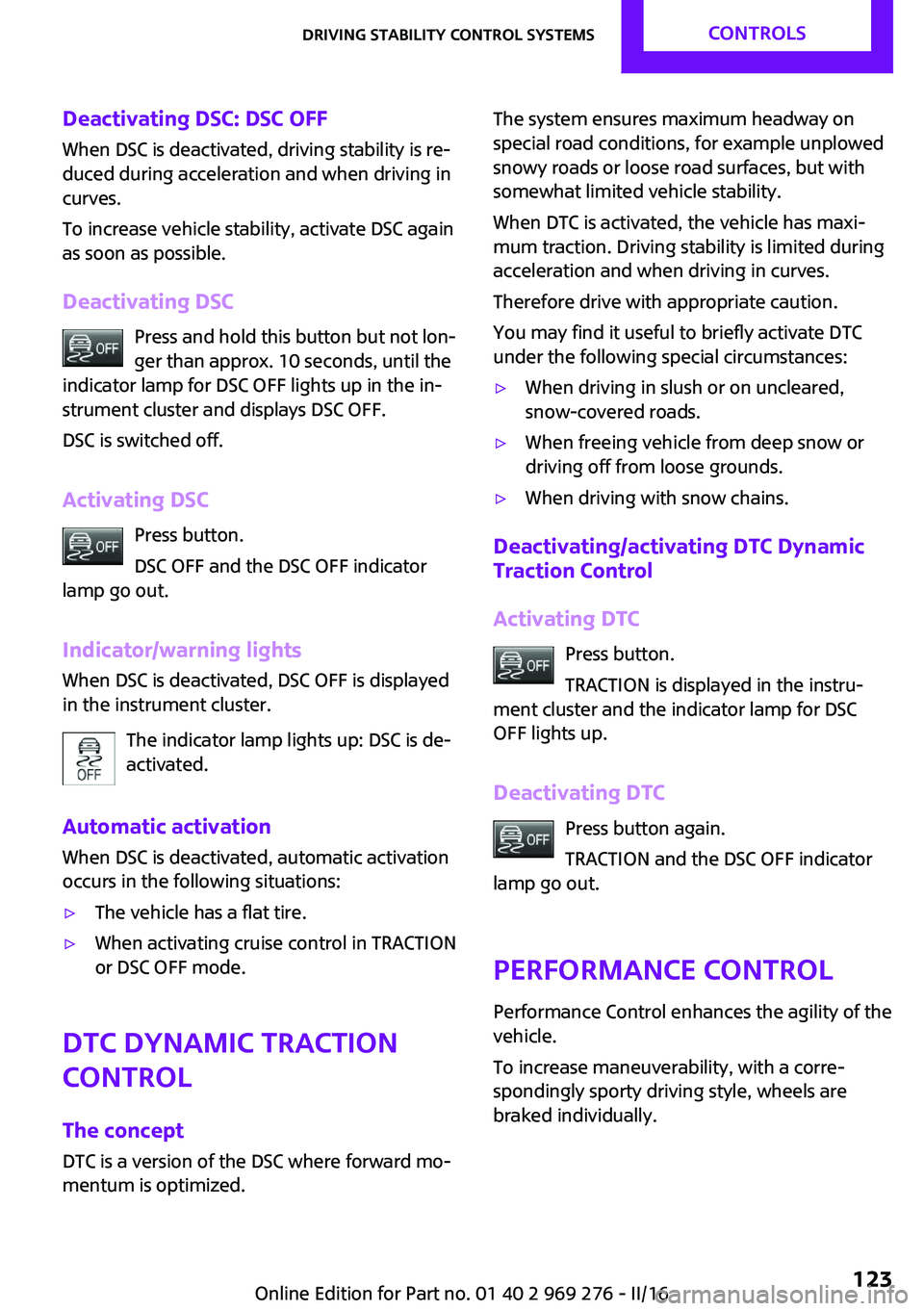
Deactivating DSC: DSC OFFWhen DSC is deactivated, driving stability is re‐
duced during acceleration and when driving in
curves.
To increase vehicle stability, activate DSC again
as soon as possible.
Deactivating DSC Press and hold this button but not lon‐
ger than approx. 10 seconds, until the
indicator lamp for DSC OFF lights up in the in‐
strument cluster and displays DSC OFF.
DSC is switched off.
Activating DSC Press button.
DSC OFF and the DSC OFF indicator
lamp go out.
Indicator/warning lights
When DSC is deactivated, DSC OFF is displayed
in the instrument cluster.
The indicator lamp lights up: DSC is de‐
activated.
Automatic activation When DSC is deactivated, automatic activation
occurs in the following situations:▷The vehicle has a flat tire.▷When activating cruise control in TRACTION
or DSC OFF mode.
DTC Dynamic Traction
Control
The concept
DTC is a version of the DSC where forward mo‐
mentum is optimized.
The system ensures maximum headway on
special road conditions, for example unplowed
snowy roads or loose road surfaces, but with
somewhat limited vehicle stability.
When DTC is activated, the vehicle has maxi‐
mum traction. Driving stability is limited during
acceleration and when driving in curves.
Therefore drive with appropriate caution.
You may find it useful to briefly activate DTC
under the following special circumstances:▷When driving in slush or on uncleared,
snow-covered roads.▷When freeing vehicle from deep snow or
driving off from loose grounds.▷When driving with snow chains.
Deactivating/activating DTC Dynamic
Traction Control
Activating DTC Press button.
TRACTION is displayed in the instru‐
ment cluster and the indicator lamp for DSC
OFF lights up.
Deactivating DTC Press button again.
TRACTION and the DSC OFF indicator
lamp go out.
Performance Control
Performance Control enhances the agility of the
vehicle.
To increase maneuverability, with a corre‐
spondingly sporty driving style, wheels are
braked individually.
Seite 123Driving stability control systemsCONTROLS123
Online Edition for Part no. 01 40 2 969 276 - II/16
Page 126 of 252
Driving comfortVehicle features and op‐
tions
This chapter describes all standard, country-
specific and optional features offered with the
series. It also describes features that are not
necessarily available in your car, e. g., due to
the selected options or country versions. This
also applies to safety-related functions and sys‐
tems. The respectively applicable country provi‐
sions must be observed when using the respec‐
tive features and systems.
Camera-based cruise con‐
trol
The concept
Using this system, a desired speed and a dis‐
tance to a vehicle ahead can be adjusted using
the buttons on the steering wheel.
The system maintains the desired speed on
clear roads. For this purpose, the vehicles accel‐
erates or brakes automatically.
If a vehicle is driving ahead of you, the system
adjusts the speed of your vehicle within the
given system limits so that the set distance to
the vehicle ahead is maintained.
The distance can be adjusted in several steps.
For safety reasons, it depends on the repective
speed.
General information
A camera on the interior rear view mirror is
used to detect vehicles driving ahead.
The system is functional at speeds beginning at
approx. 20 mph/30 km/h.
Active cruise control is paused below approx.
20 mph/30 km/h.The system does not brake to a stop.
Depending on the driving settings, the features
of the cruise control can change in certain
areas.
Information WARNING
The system does not release from the
personal responsibility to correctly assess the
traffic situation. Based on the limits of the sys‐
tem, it cannot independently react to all traffic situations. There is risk of an accident. Adjust
the driving style to the traffic conditions. Watch
traffic closely and actively intervene in the re‐
spective situations. ◀
WARNING
The desired speed can be incorrectly ad‐
justed or called up by mistake. There is risk of
an accident. Adjust the desired speed to the
traffic conditions. Watch traffic closely and ac‐
tively intervene in the respective situations. ◀
WARNING
Risk of accident due to too high speed
differences to other vehicles, e.g., in the follow‐
ing situations:▷When fast approaching a slowly moving ve‐
hicle.▷Suddenly swerving vehicle onto the own
lane.▷When fast approaching standing vehicles.
There is a risk of injury or danger to life. Watch
traffic closely and actively intervene in the re‐
spective situations. ◀
Seite 126CONTROLSDriving comfort126
Online Edition for Part no. 01 40 2 969 276 - II/16
Page 127 of 252
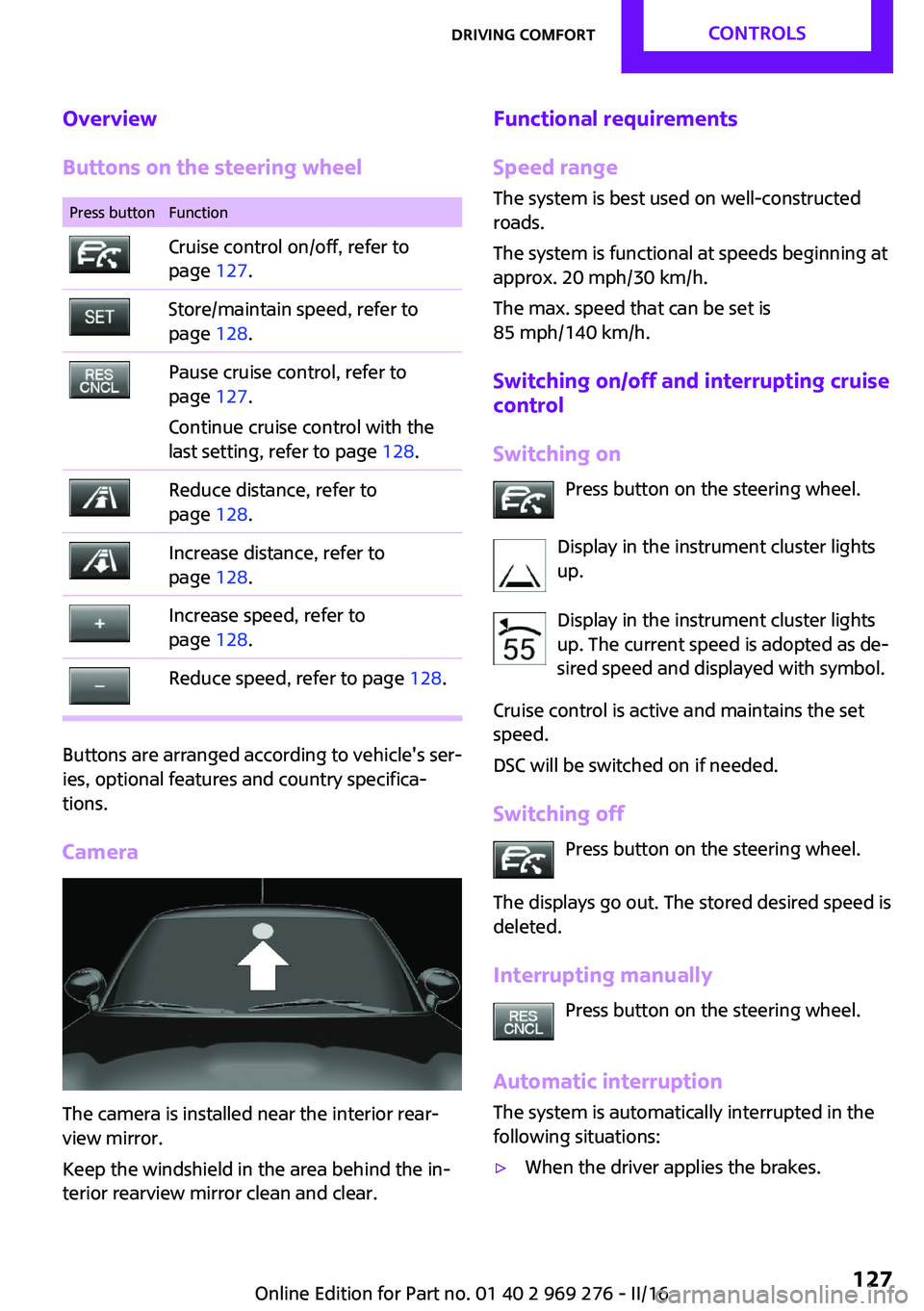
Overview
Buttons on the steering wheelPress buttonFunctionCruise control on/off, refer to
page 127.Store/maintain speed, refer to
page 128.Pause cruise control, refer to
page 127.
Continue cruise control with the
last setting, refer to page 128.Reduce distance, refer to
page 128.Increase distance, refer to
page 128.Increase speed, refer to
page 128.Reduce speed, refer to page 128.
Buttons are arranged according to vehicle's ser‐
ies, optional features and country specifica‐
tions.
Camera
The camera is installed near the interior rear‐
view mirror.
Keep the windshield in the area behind the in‐
terior rearview mirror clean and clear.
Functional requirements
Speed range The system is best used on well-constructed
roads.
The system is functional at speeds beginning at
approx. 20 mph/30 km/h.
The max. speed that can be set is
85 mph/140 km/h.
Switching on/off and interrupting cruise
control
Switching on Press button on the steering wheel.
Display in the instrument cluster lights
up.
Display in the instrument cluster lights
up. The current speed is adopted as de‐
sired speed and displayed with symbol.
Cruise control is active and maintains the set
speed.
DSC will be switched on if needed.
Switching off Press button on the steering wheel.
The displays go out. The stored desired speed is
deleted.
Interrupting manually Press button on the steering wheel.
Automatic interruption
The system is automatically interrupted in the
following situations:▷When the driver applies the brakes.Seite 127Driving comfortCONTROLS127
Online Edition for Part no. 01 40 2 969 276 - II/16
Page 128 of 252

▷If the clutch pedal is depressed for a few
seconds or released while a gear is not en‐
gaged.▷If selector lever position N is set.▷When DTC is activated or DSC is deacti‐
vated.▷When DSC is actively controlling stability.▷If the detection range of the camera is im‐
paired, for example, by soiling, heavy pre‐
cipitation or glare effects from the sun.▷If the vehicle in front decelerates below a
speed of approx. 20 mph/30 km/h.
Setting the speed
Maintaining/storing the speed Press
or button in the interrupted state.
When the system is switched on, the current
speed is maintained and stored as the desired
speed.
The stored speed is displayed on the
symbol.
DSC will be switched on if needed.
The speed can also be stored as follows: Press button.
Changing the speed
or button: press until the desired speed
is set.
If active, the displayed speed is stored and the
vehicle reaches the stored speed when the
road is clear.
▷ or button: each time it is pressed to
the point of resistance, the desired speed
increases or decreases by approx.
1 mph/1 km/h.▷ or button: each time it is pressed
past the point of resistance, the desired
speed increases or decreases by a maxi‐
mum of 5 mph/10 km/h. or button: hold down to repeat the cor‐
responding action.
Adjusting distance
Information WARNING
The system does not release from the
personal responsibility. Due to the system lim‐
its, braking can be late. There is risk of acci‐
dents or risk of property damage. Be aware to
the traffic situation at all times. Adjust the dis‐
tance to the traffic and weather conditions and
maintain the prescribed safety distance, possi‐
bly by braking. ◀
Reduce distance Press button repeatedly until the de‐
sired distance is set.
The set distance is briefly displayed in
the left part of the instrument cluster.
Increase distance Press button repeatedly until the de‐
sired distance is set.
The set distance is briefly displayed in
the left part of the instrument cluster.
Continuing cruise control
General information
An interrupted cruise control can be continued
by calling up the stored speed.
In the following cases, the stored speed value is
deleted and cannot be called up again:▷When the system is switched off.▷When the ignition is switched off.Seite 128CONTROLSDriving comfort128
Online Edition for Part no. 01 40 2 969 276 - II/16
Page 129 of 252
InformationMake sure that the difference between current
speed and stored speed is not too large before
calling up the stored speed. Otherwise, unin‐
tentional braking or accelerating may occur.
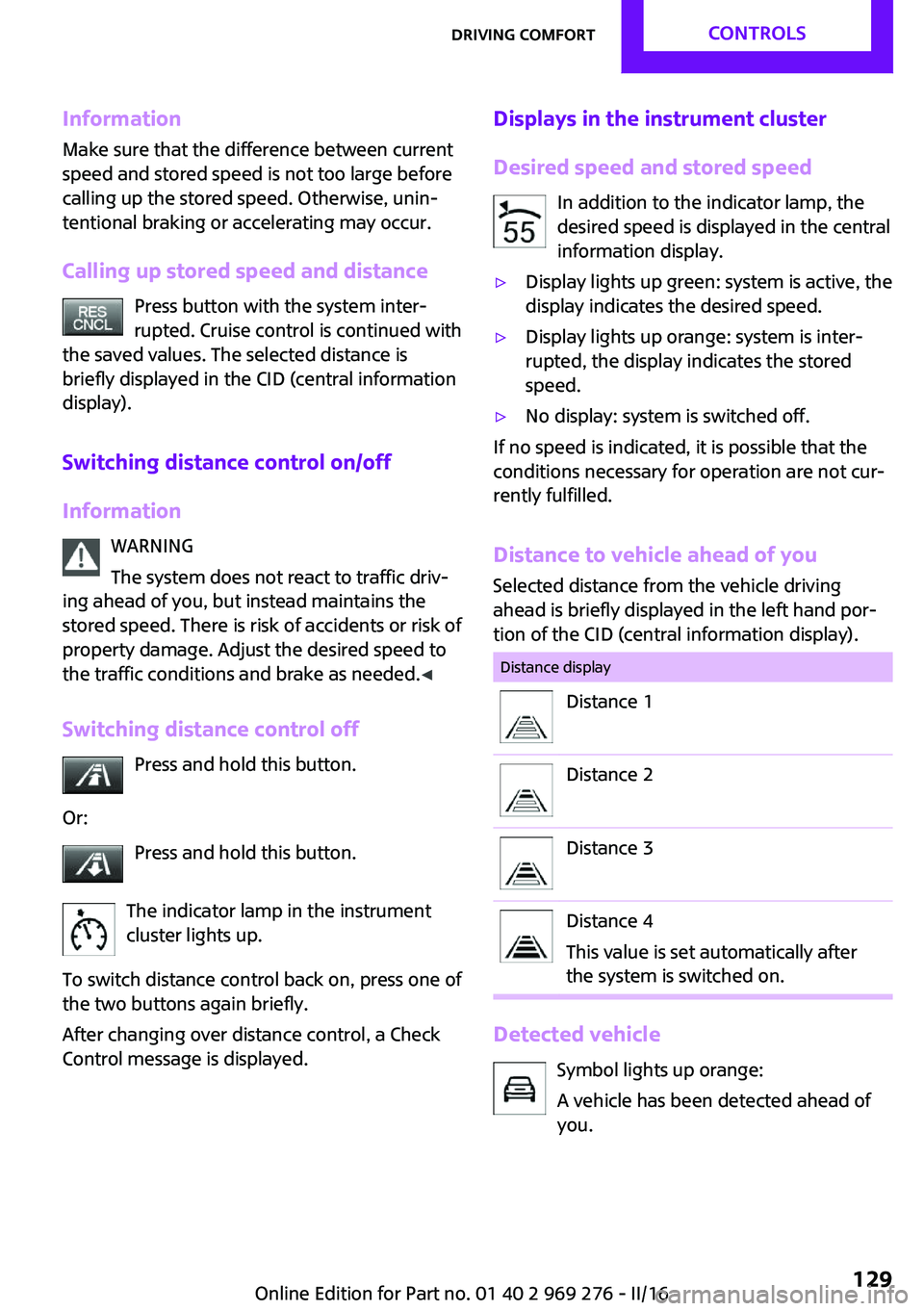
Calling up stored speed and distance Press button with the system inter‐
rupted. Cruise control is continued with
the saved values. The selected distance is
briefly displayed in the CID (central information
display).
Switching distance control on/off
Information WARNING
The system does not react to traffic driv‐
ing ahead of you, but instead maintains the
stored speed. There is risk of accidents or risk of
property damage. Adjust the desired speed to
the traffic conditions and brake as needed. ◀
Switching distance control off Press and hold this button.
Or: Press and hold this button.
The indicator lamp in the instrument
cluster lights up.
To switch distance control back on, press one of
the two buttons again briefly.
After changing over distance control, a Check
Control message is displayed.Displays in the instrument cluster
Desired speed and stored speed In addition to the indicator lamp, the
desired speed is displayed in the central
information display.▷Display lights up green: system is active, the
display indicates the desired speed.▷Display lights up orange: system is inter‐
rupted, the display indicates the stored
speed.▷No display: system is switched off.
If no speed is indicated, it is possible that the
conditions necessary for operation are not cur‐
rently fulfilled.
Distance to vehicle ahead of you
Selected distance from the vehicle driving
ahead is briefly displayed in the left hand por‐
tion of the CID (central information display).
Distance displayDistance 1Distance 2Distance 3Distance 4
This value is set automatically after
the system is switched on.
Detected vehicle
Symbol lights up orange:
A vehicle has been detected ahead of
you.
Seite 129Driving comfortCONTROLS129
Online Edition for Part no. 01 40 2 969 276 - II/16
Page 130 of 252

Indicator/warning lightsSymbol flashes orange:
The conditions are not adequate for the
system to work.
The system was deactivated but applies the
brakes until you actively resume control by
pressing on the brake pedal or accelerator
pedal.
Symbol flashes red and a signal sounds:
You are requested to intervene by brak‐
ing or make an evasive maneuver.
The system has been interrupted or dis‐
tance control is temporarily suppressed
because the accelerator pedal is being
pressed; a vehicle was not detected.
Distance control is temporarily sup‐
pressed because the accelerator pedal
is being pressed; a vehicle was de‐
tected.
Displays in the Head-up Display
The information from Active Cruise Control can
also be displayed in the Head-up Display.
Adjusting the Head-up Display, refer to
page 94.
System limits
Detection range
The detection capacity of the system and the
automatic braking capacity are limited.
Two-wheeled vehicles for instance might not
be detected.
Deceleration
The system does not decelerate in the following
situations:▷For pedestrians, cyclists or similarly slow-
moving road users.▷For red traffic lights.▷For cross traffic.▷For oncoming traffic.▷Unlit vehicles or vehicles with nonworking
lighting at night.
Swerving vehicles
A vehicle driving in front of you is not detected
until it is completely within the same lane as
your vehicle.
If a vehicle driving ahead of you suddenly
swerves into your lane, the system may not be
able to automatically restore the selected dis‐
tance. This also applies to major speed differ‐
ences to vehicles driving ahead of you, for ex‐
ample, when rapidly approaching a truck.
When a vehicle driving ahead of you is reliably
detected, the system requests that the driver
intervene by braking and carrying out evasive
maneuvers, if needed.
Seite 130CONTROLSDriving comfort130
Online Edition for Part no. 01 40 2 969 276 - II/16