phone MINI COOPER CONVERTIBLE 2016 Owners Manual
[x] Cancel search | Manufacturer: MINI, Model Year: 2016, Model line: COOPER CONVERTIBLE, Model: MINI COOPER CONVERTIBLE 2016Pages: 252, PDF Size: 5.41 MB
Page 10 of 252
corded by the EDR under normal driving condi‐
tions and no personal data, e. g., name, gen‐
der, age, and crash location, are recorded.
However, other parties, such as law enforce‐
ment, could combine the EDR data with the
type of personally identifying data routinely ac‐
quired during a crash investigation.
To read data recorded by an EDR, special
equipment is required, and access to the vehi‐
cle or the EDR is needed. In addition to the ve‐
hicle manufacturer, other parties, such as law
enforcement, that have the special equipment,
can read the information if they have access to
the vehicle or the EDR.
Vehicle identification
number
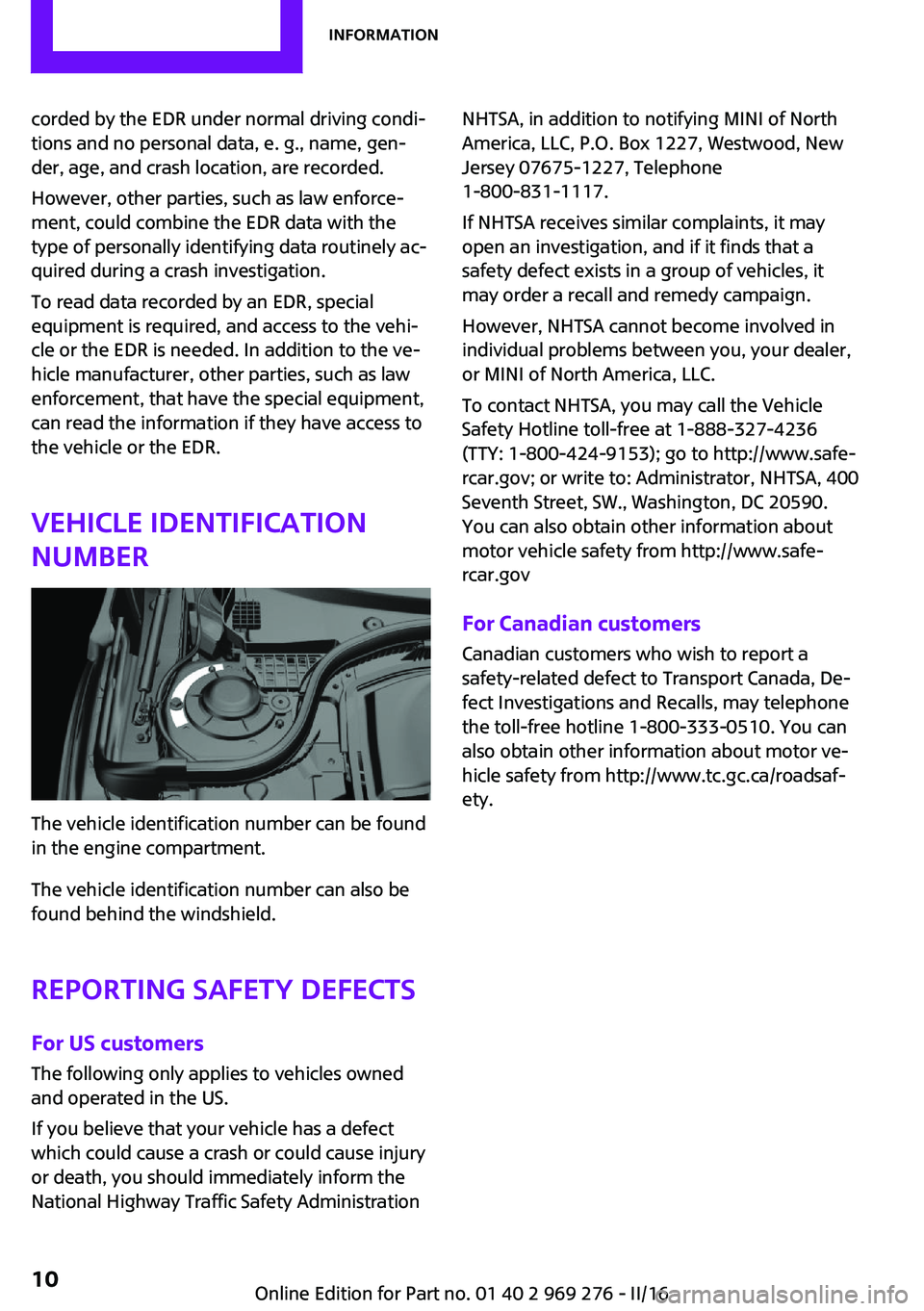
The vehicle identification number can be found
in the engine compartment.
The vehicle identification number can also be
found behind the windshield.
Reporting safety defects For US customers
The following only applies to vehicles owned
and operated in the US.
If you believe that your vehicle has a defect
which could cause a crash or could cause injury or death, you should immediately inform the
National Highway Traffic Safety Administration
NHTSA, in addition to notifying MINI of North
America, LLC, P.O. Box 1227, Westwood, New
Jersey 07675-1227, Telephone
1-800-831-1117.
If NHTSA receives similar complaints, it may
open an investigation, and if it finds that a
safety defect exists in a group of vehicles, it may order a recall and remedy campaign.
However, NHTSA cannot become involved in
individual problems between you, your dealer,
or MINI of North America, LLC.
To contact NHTSA, you may call the Vehicle
Safety Hotline toll-free at 1-888-327-4236
(TTY: 1-800-424-9153); go to http://www.safe‐
rcar.gov; or write to: Administrator, NHTSA, 400
Seventh Street, SW., Washington, DC 20590.
You can also obtain other information about
motor vehicle safety from http://www.safe‐
rcar.gov
For Canadian customers
Canadian customers who wish to report a
safety-related defect to Transport Canada, De‐
fect Investigations and Recalls, may telephone
the toll-free hotline 1-800-333-0510. You can
also obtain other information about motor ve‐
hicle safety from http://www.tc.gc.ca/roadsaf‐
ety.Seite 10Information10
Online Edition for Part no. 01 40 2 969 276 - II/16
Page 15 of 252
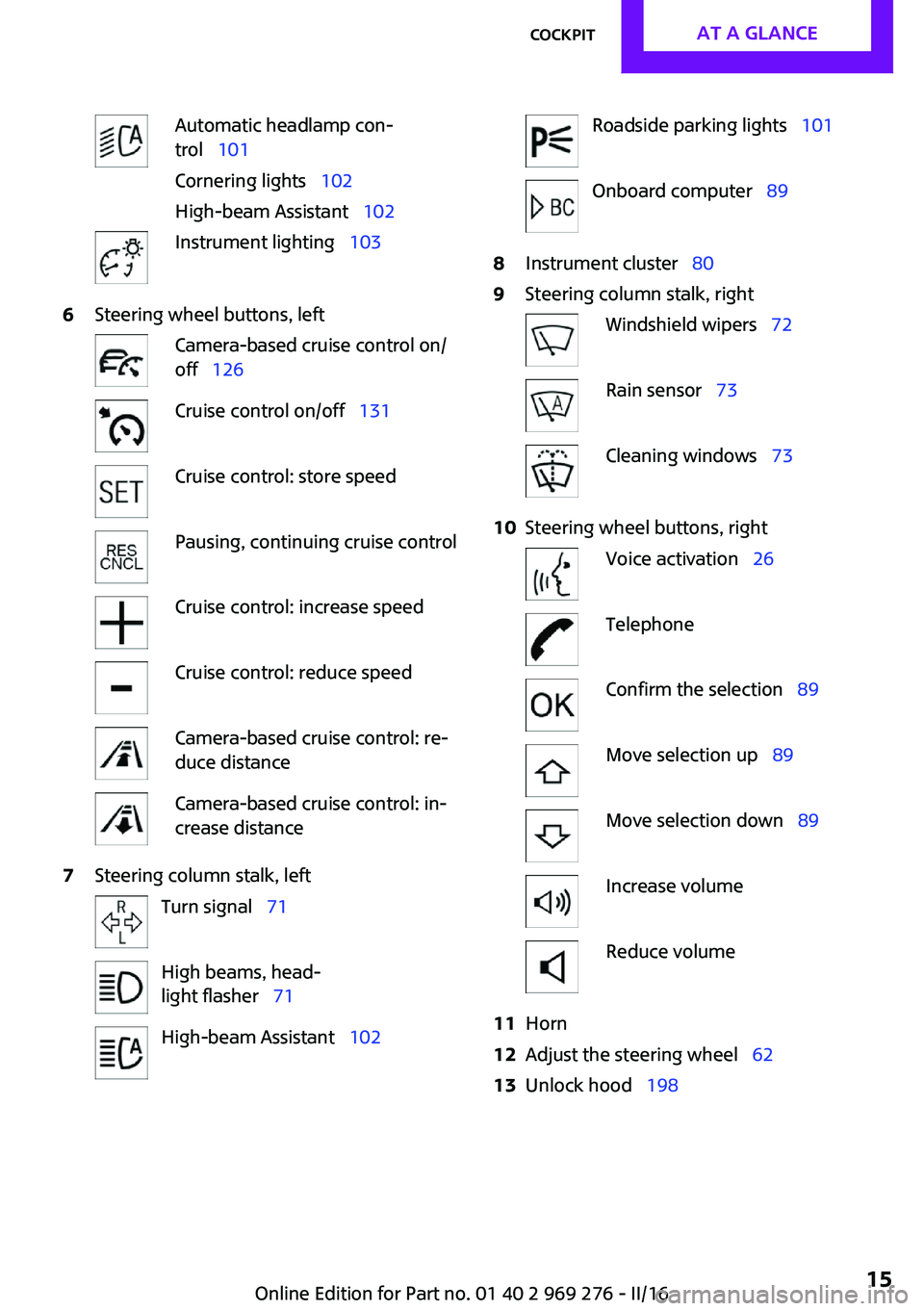
Automatic headlamp con‐
trol 101
Cornering lights 102
High-beam Assistant 102Instrument lighting 1036Steering wheel buttons, leftCamera-based cruise control on/
off 126Cruise control on/off 131Cruise control: store speedPausing, continuing cruise controlCruise control: increase speedCruise control: reduce speedCamera-based cruise control: re‐
duce distanceCamera-based cruise control: in‐
crease distance7Steering column stalk, leftTurn signal 71High beams, head‐
light flasher 71High-beam Assistant 102Roadside parking lights 101Onboard computer 898Instrument cluster 809Steering column stalk, rightWindshield wipers 72Rain sensor 73Cleaning windows 7310Steering wheel buttons, rightVoice activation 26TelephoneConfirm the selection 89Move selection up 89Move selection down 89Increase volumeReduce volume11Horn12Adjust the steering wheel 6213Unlock hood 198Seite 15CockpitAT A GLANCE15
Online Edition for Part no. 01 40 2 969 276 - II/16
Page 19 of 252
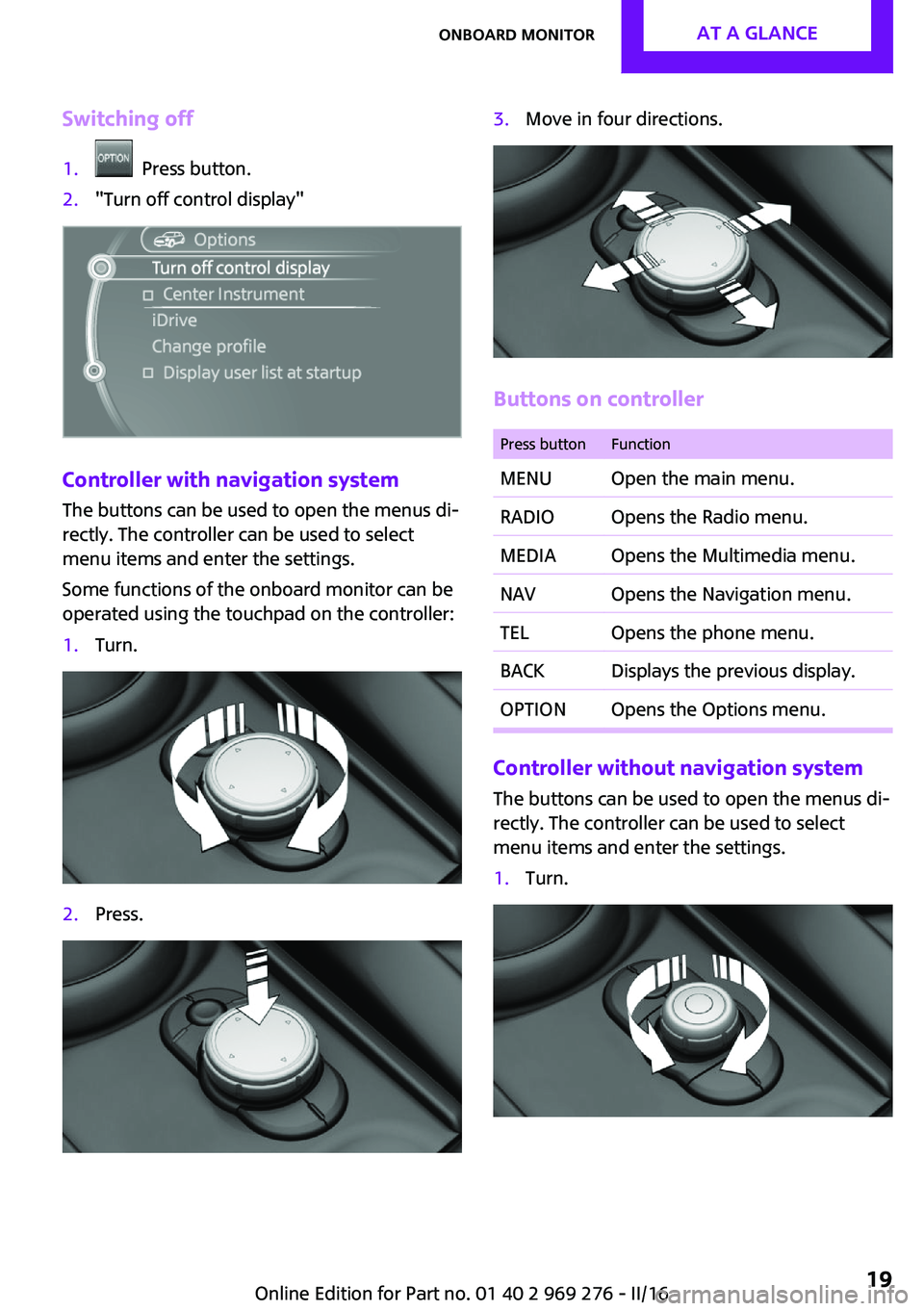
Switching off1. Press button.2."Turn off control display"
Controller with navigation system
The buttons can be used to open the menus di‐
rectly. The controller can be used to select
menu items and enter the settings.
Some functions of the onboard monitor can be
operated using the touchpad on the controller:
1.Turn.2.Press.3.Move in four directions.
Buttons on controller
Press buttonFunctionMENUOpen the main menu.RADIOOpens the Radio menu.MEDIAOpens the Multimedia menu.NAVOpens the Navigation menu.TELOpens the phone menu.BACKDisplays the previous display.OPTIONOpens the Options menu.
Controller without navigation system
The buttons can be used to open the menus di‐
rectly. The controller can be used to select
menu items and enter the settings.
1.Turn.Seite 19Onboard monitorAT A GLANCE19
Online Edition for Part no. 01 40 2 969 276 - II/16
Page 20 of 252
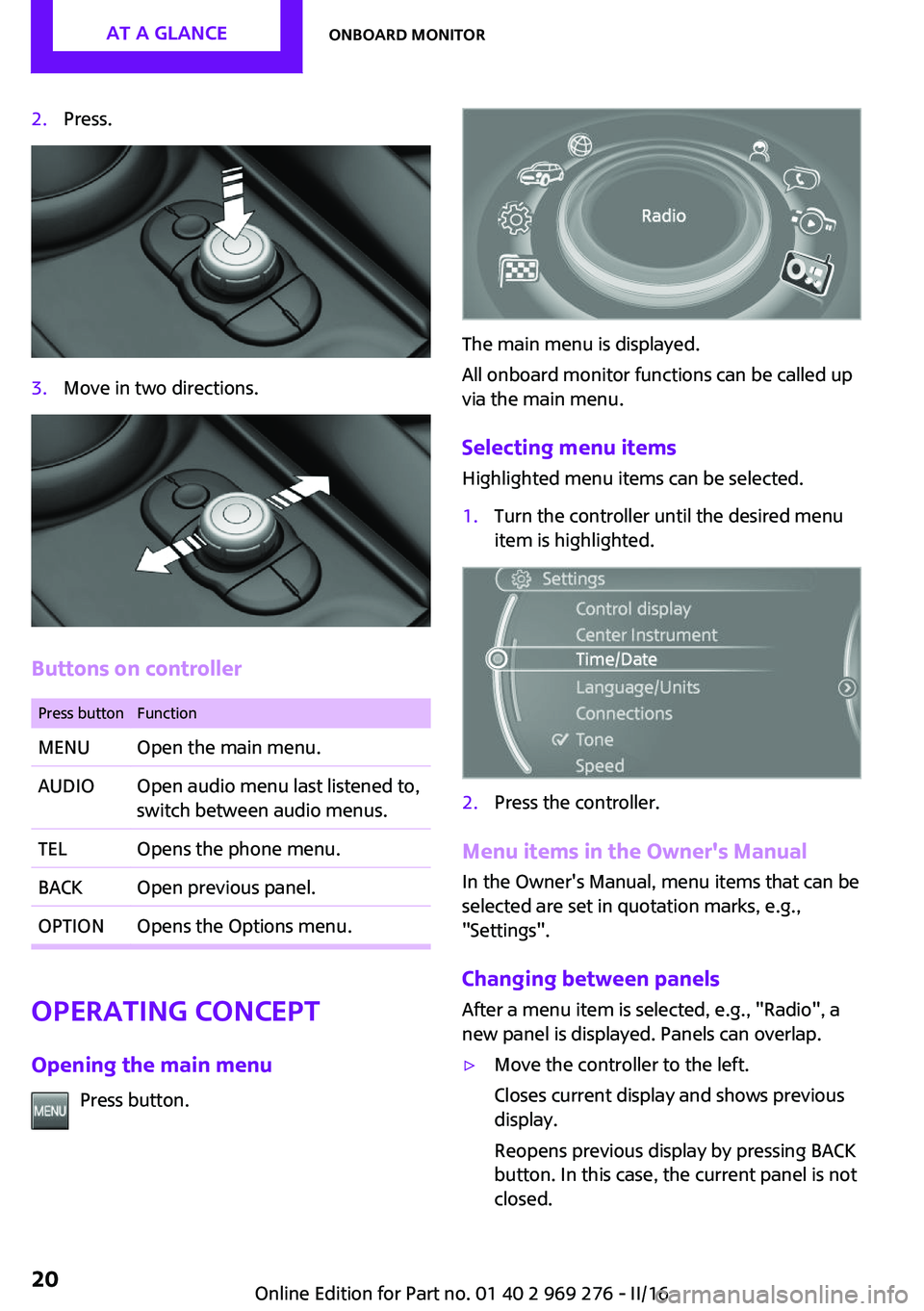
2.Press.3.Move in two directions.
Buttons on controller
Press buttonFunctionMENUOpen the main menu.AUDIOOpen audio menu last listened to,
switch between audio menus.TELOpens the phone menu.BACKOpen previous panel.OPTIONOpens the Options menu.
Operating concept
Opening the main menu Press button.
The main menu is displayed.
All onboard monitor functions can be called up
via the main menu.
Selecting menu items Highlighted menu items can be selected.
1.Turn the controller until the desired menu
item is highlighted.2.Press the controller.
Menu items in the Owner's Manual
In the Owner's Manual, menu items that can be
selected are set in quotation marks, e.g.,
"Settings".
Changing between panels
After a menu item is selected, e.g., "Radio", a
new panel is displayed. Panels can overlap.
▷Move the controller to the left.
Closes current display and shows previous
display.
Reopens previous display by pressing BACK
button. In this case, the current panel is not
closed.Seite 20AT A GLANCEOnboard monitor20
Online Edition for Part no. 01 40 2 969 276 - II/16
Page 23 of 252
Additional information
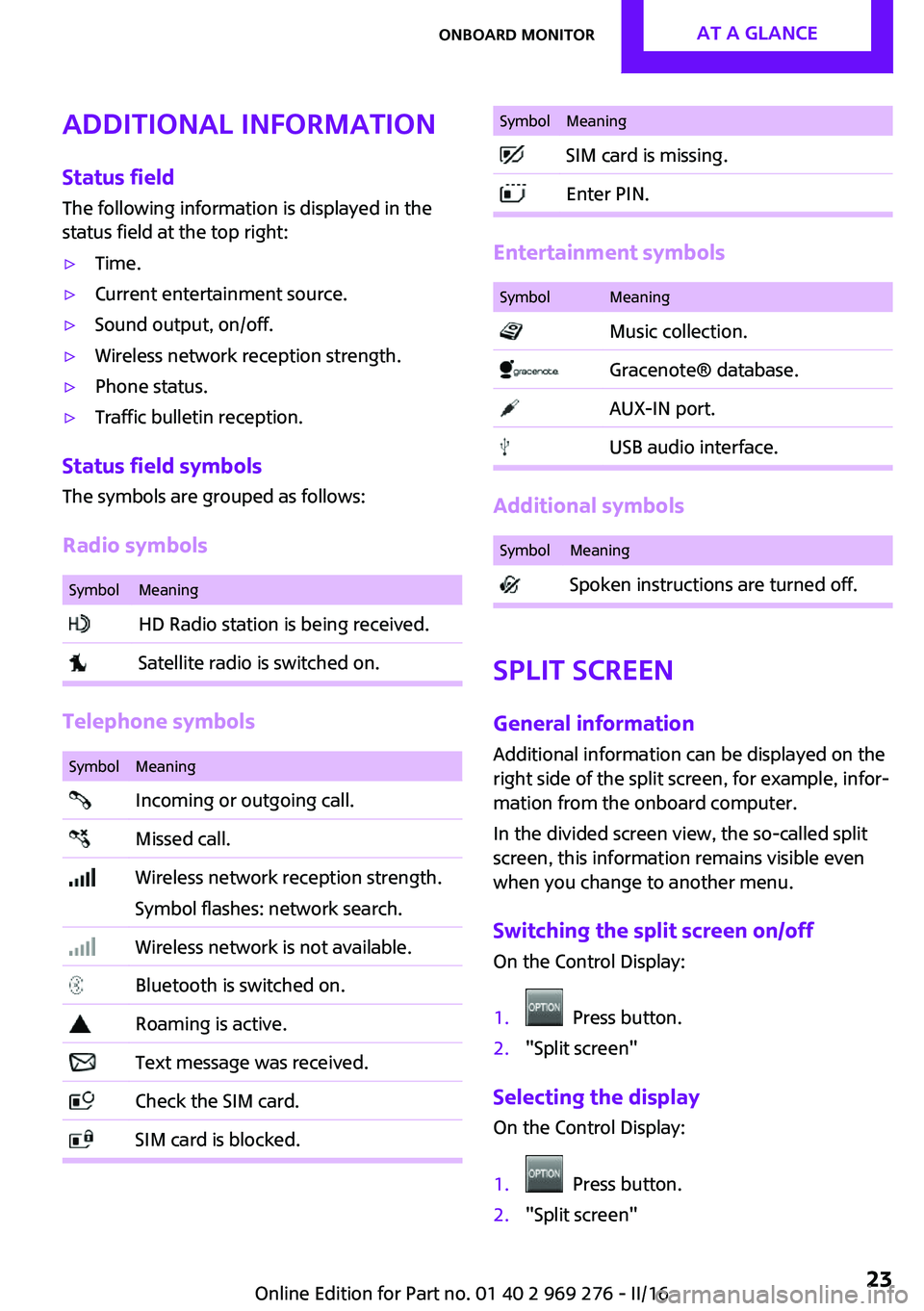
Status field The following information is displayed in the
status field at the top right:▷Time.▷Current entertainment source.▷Sound output, on/off.▷Wireless network reception strength.▷Phone status.▷Traffic bulletin reception.
Status field symbols
The symbols are grouped as follows:
Radio symbols
SymbolMeaning HD Radio station is being received. Satellite radio is switched on.
Telephone symbols
SymbolMeaning Incoming or outgoing call. Missed call. Wireless network reception strength.
Symbol flashes: network search. Wireless network is not available. Bluetooth is switched on. Roaming is active. Text message was received. Check the SIM card. SIM card is blocked.SymbolMeaning SIM card is missing. Enter PIN.
Entertainment symbols
SymbolMeaning Music collection. Gracenote® database. AUX-IN port. USB audio interface.
Additional symbols
SymbolMeaning Spoken instructions are turned off.
Split screen
General information
Additional information can be displayed on the
right side of the split screen, for example, infor‐
mation from the onboard computer.
In the divided screen view, the so-called split
screen, this information remains visible even
when you change to another menu.
Switching the split screen on/off On the Control Display:
1. Press button.2."Split screen"
Selecting the display On the Control Display:
1. Press button.2."Split screen"Seite 23Onboard monitorAT A GLANCE23
Online Edition for Part no. 01 40 2 969 276 - II/16
Page 24 of 252
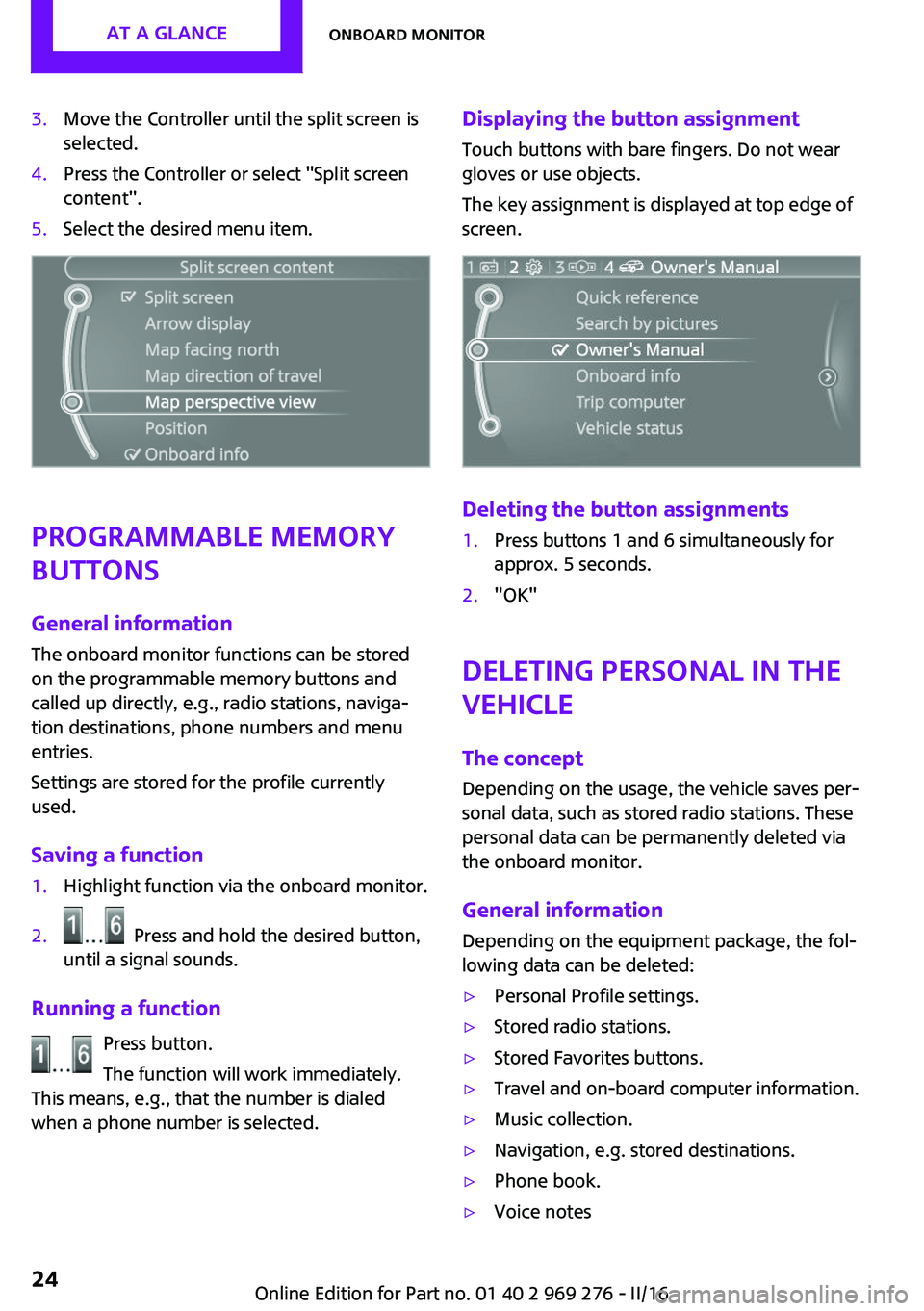
3.Move the Controller until the split screen is
selected.4.Press the Controller or select "Split screen
content".5.Select the desired menu item.
Programmable memory
buttons
General information
The onboard monitor functions can be stored
on the programmable memory buttons and
called up directly, e.g., radio stations, naviga‐
tion destinations, phone numbers and menu
entries.
Settings are stored for the profile currently
used.
Saving a function
1.Highlight function via the onboard monitor.2. Press and hold the desired button,
until a signal sounds.
Running a function
Press button.
The function will work immediately.
This means, e.g., that the number is dialed
when a phone number is selected.
Displaying the button assignment
Touch buttons with bare fingers. Do not wear
gloves or use objects.
The key assignment is displayed at top edge of
screen.
Deleting the button assignments
1.Press buttons 1 and 6 simultaneously for
approx. 5 seconds.2."OK"
Deleting personal in the
vehicle
The concept
Depending on the usage, the vehicle saves per‐
sonal data, such as stored radio stations. These
personal data can be permanently deleted via
the onboard monitor.
General information Depending on the equipment package, the fol‐
lowing data can be deleted:
▷Personal Profile settings.▷Stored radio stations.▷Stored Favorites buttons.▷Travel and on-board computer information.▷Music collection.▷Navigation, e.g. stored destinations.▷Phone book.▷Voice notesSeite 24AT A GLANCEOnboard monitor24
Online Edition for Part no. 01 40 2 969 276 - II/16
Page 26 of 252

Voice activation systemVehicle features and op‐
tions
This chapter describes all standard, country-
specific and optional features offered with the
series. It also describes features that are not
necessarily available in your car, e. g., due to
the selected options or country versions. This
also applies to safety-related functions and sys‐
tems. The respectively applicable country provi‐
sions must be observed when using the respec‐
tive features and systems.
The concept▷Most functions displayed on the Control
Display can be operated by voice com‐
mands via the voice activation system. The
system supports you with announcements
during input.▷Functions that can only be used when the
vehicle is stationary cannot be used via the
voice activation system.▷The system uses a special microphone on
the driver's side.▷›...‹ Verbal instructions in the Owner's Man‐
ual to use with the voice activation system.
Requirements
Via the Control Display, set a language that is
also supported by the voice activation system
so that the spoken commands can be identi‐
fied.
Set the language, refer to page 93.
Using voice activation
Using the voice activation system1. Press button on the steering wheel.2.Wait for the signal.3.Say the command.
A command that is recognized by the voice
activation system is announced and dis‐
played in the instrument cluster.
This symbol in the instrument cluster indi‐
cates that the voice activation system is active.
If no other commands are available, operate
the function via the onboard monitor.
Terminating the voice activation
system
Briefly press the button on the steering
wheel or ›Cancel‹.
Possible commands
Most menu items on the Control Display can be
voiced as commands.
The available commands depend on the menu
that is currently displayed on the Control Dis‐
play.
There are short commands for many functions.
You may select lists such as phone lists via
voice activation. Read these lists out loud ex‐
actly as they show in the respective list.
Having possible commands read aloud You can have available commands read out
loud for you: ›Voice commands‹
E.g. if the
"Settings" menu is displayed, the
commands for the settings are read out loud.
Seite 26AT A GLANCEVoice activation system26
Online Edition for Part no. 01 40 2 969 276 - II/16
Page 27 of 252
Executing functions using short
commands
Execute functions on the main menu via short
commands. It almost doesn't matter which
menu item is selected, for example, ›Vehicle
status‹.
The list for short commands of the voice activa‐
tion system can be called up via the Integrated
Owner's Manual on the Control Display.
Help dialog for the voice activation
system
Calling up help dialog: ›Help‹
Additional commands for the help dialog:▷›Help with examples‹: announces informa‐
tion about the current operating options
and the most important commands for
them.▷›Help with voice activation‹: information
about the principle of operation for the
voice activation system is announced.
One example: opening the
tone settings
Via the main menu
The commands of the menu items are spoken
just as they are selected via the controller.
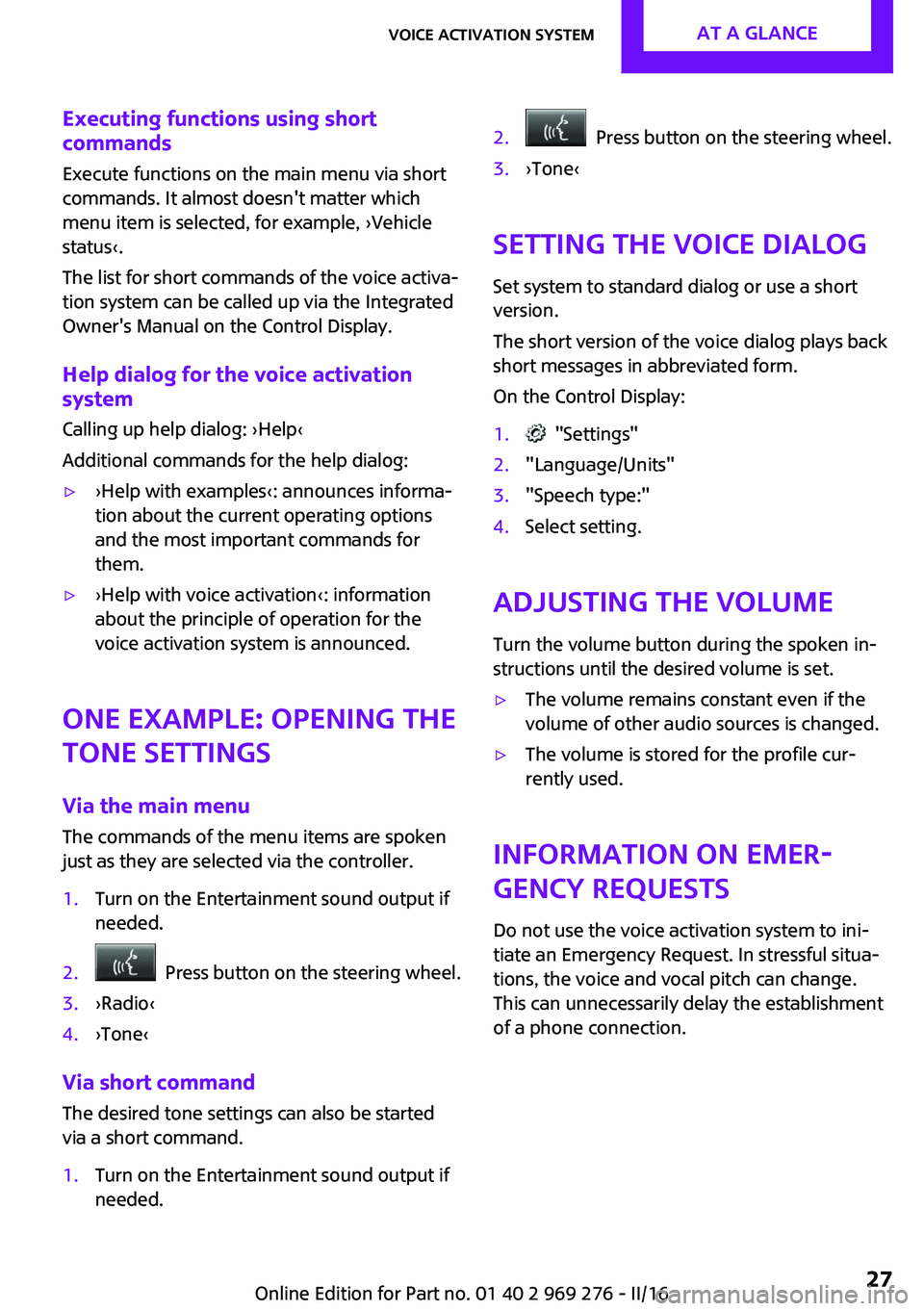
1.Turn on the Entertainment sound output if
needed.2. Press button on the steering wheel.3.›Radio‹4.›Tone‹
Via short command
The desired tone settings can also be started
via a short command.
1.Turn on the Entertainment sound output if
needed.2. Press button on the steering wheel.3.›Tone‹
Setting the voice dialog
Set system to standard dialog or use a short
version.
The short version of the voice dialog plays back short messages in abbreviated form.
On the Control Display:
1. "Settings"2."Language/Units"3."Speech type:"4.Select setting.
Adjusting the volume
Turn the volume button during the spoken in‐
structions until the desired volume is set.
▷The volume remains constant even if the
volume of other audio sources is changed.▷The volume is stored for the profile cur‐
rently used.
Information on Emer‐
gency Requests
Do not use the voice activation system to ini‐tiate an Emergency Request. In stressful situa‐
tions, the voice and vocal pitch can change.
This can unnecessarily delay the establishment
of a phone connection.
Seite 27Voice activation systemAT A GLANCE27
Online Edition for Part no. 01 40 2 969 276 - II/16
Page 35 of 252
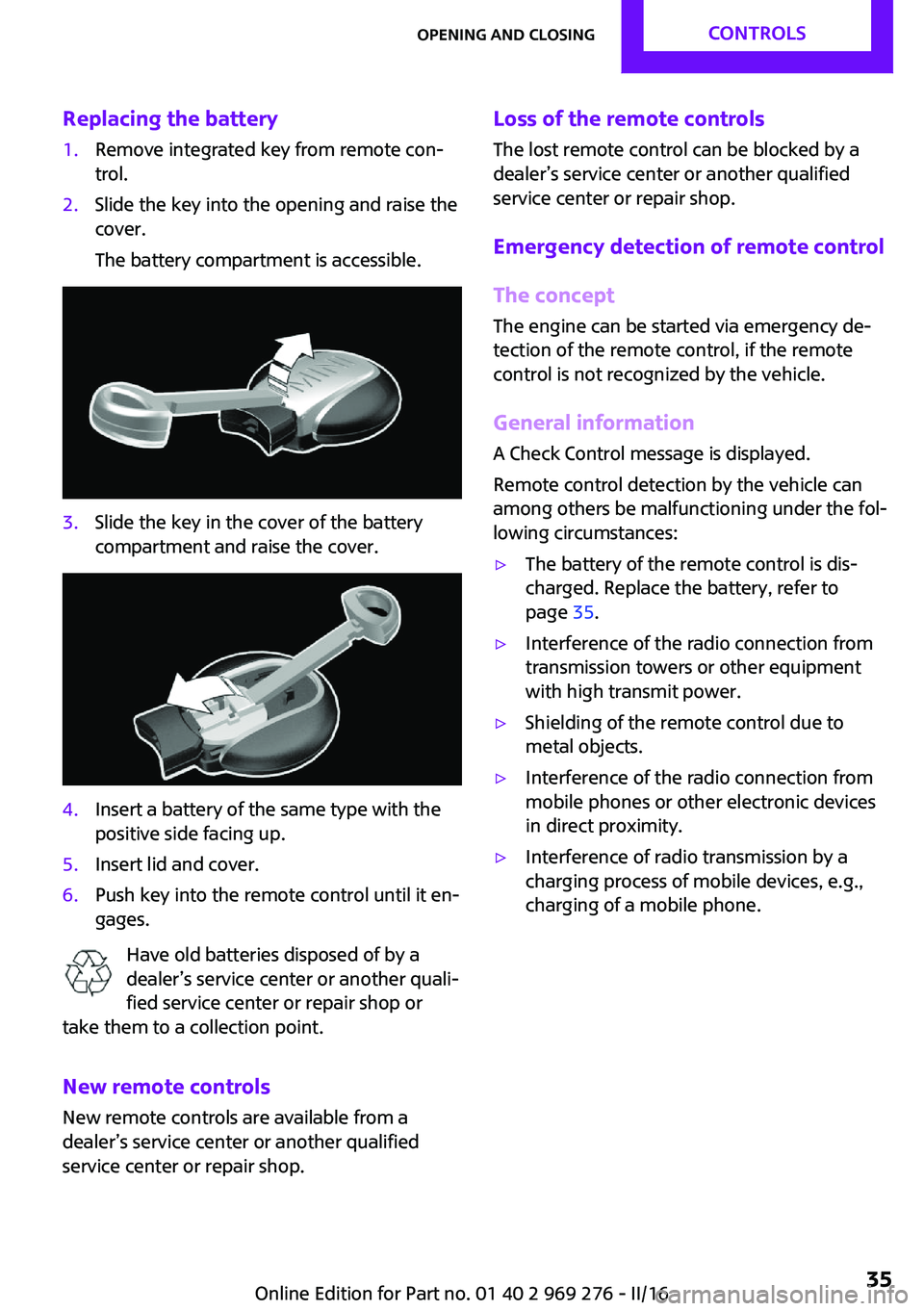
Replacing the battery1.Remove integrated key from remote con‐
trol.2.Slide the key into the opening and raise the
cover.
The battery compartment is accessible.3.Slide the key in the cover of the battery
compartment and raise the cover.4.Insert a battery of the same type with the
positive side facing up.5.Insert lid and cover.6.Push key into the remote control until it en‐
gages.
Have old batteries disposed of by a
dealer’s service center or another quali‐
fied service center or repair shop or
take them to a collection point.
New remote controls
New remote controls are available from a
dealer’s service center or another qualified
service center or repair shop.
Loss of the remote controls
The lost remote control can be blocked by a
dealer’s service center or another qualified
service center or repair shop.
Emergency detection of remote control
The concept
The engine can be started via emergency de‐
tection of the remote control, if the remote
control is not recognized by the vehicle.
General information
A Check Control message is displayed.
Remote control detection by the vehicle can
among others be malfunctioning under the fol‐
lowing circumstances:▷The battery of the remote control is dis‐
charged. Replace the battery, refer to
page 35.▷Interference of the radio connection from
transmission towers or other equipment
with high transmit power.▷Shielding of the remote control due to
metal objects.▷Interference of the radio connection from
mobile phones or other electronic devices
in direct proximity.▷Interference of radio transmission by a
charging process of mobile devices, e.g.,
charging of a mobile phone.Seite 35Opening and closingCONTROLS35
Online Edition for Part no. 01 40 2 969 276 - II/16
Page 39 of 252
Convenient closingWARNING
With convenient closing, body parts can
be jammed. There is a risk of injury. Make sure
that the area of movement of the doors is clear
during convenient closing. ◀
Press and hold the button on the re‐
mote control in the area close to the
vehicle, until the closing operation is com‐
pleted.
The windows and convertible top close.
Releasing the button stops the closing proce‐
dure. Leaving the vicinity of the vehicle stops
the motion of the convertible top.
Press button in the vicinity of the vehicle again
until the convertible top operation is com‐
pleted.
Switching on interior lights and
courtesy lights
Press button on the remote control
with the vehicle locked.
The interior lights are switched on, when it is
dark outside, the courtesy lamps and the MINI
logo projection are also switched on.
These functions are not available if the interior
lamps were switched off manually.
If the button is pressed within 10 seconds of
when the vehicle was locked Interior motion
sensor and tilt alarm sensor of the anti-theft
warning system, refer to page 45, are turned
off. After locking, wait 10 seconds before press‐
ing the button again.
Panic mode
You can trigger the alarm system if you find
yourself in a dangerous situation.
Press button on the remote control for
at least 3 seconds.
To switch off the alarm: press any button.Unlocking the tailgate Press button on the remote control for
approx. 1 second.
The tailgate opens slightly, regardless of whether the vehicle was previously locked or
unlocked.
To avoid locking it into the vehicle, do not place
the remote control in the cargo area.
Depending on the features and the country
version, it is also possible to have door un‐
locked. Create the settings, refer to page 43.
If the doors were not unlocked, the trunk lid is
locked again as soon as it closes.
Malfunction
Remote control detection by the vehicle can
among others be malfunctioning under the fol‐ lowing circumstances:▷The battery of the remote control is dis‐
charged. Replace the battery, refer to
page 35.▷Interference of the radio connection from
transmission towers or other equipment
with high transmit power.▷Shielding of the remote control due to
metal objects.▷Interference of the radio connection from
mobile phones or other electronic devices
in direct proximity.
Do not transport the remote control together
with metal objects or electronic devices.
In the case of a malfunction, unlock and lock
the vehicle using the integrated key, refer to
page 40.
For US owners only The transmitter and receiver units comply with
part 15 of the FCC/Federal Communication
Commission regulations. Operation is governed by the following:
FCC ID:
Seite 39Opening and closingCONTROLS39
Online Edition for Part no. 01 40 2 969 276 - II/16