light MINI Countryman 2011 (Mini Connected) Manual Online
[x] Cancel search | Manufacturer: MINI, Model Year: 2011, Model line: Countryman, Model: MINI Countryman 2011Pages: 254, PDF Size: 3.84 MB
Page 215 of 254

Replacing componentsMOBILITY
213
Sealant and compressor
1Sealant bottle and adhesi ve label with speed
limit
2 Filling hose
Note the use-by date on the sealant bot-
tle. <
3 Holder for the sealant bottle
4 Compressor
5 Plug and cable for the socket in the vehicle
interior, page 92
6 Connection hose to connect the compressor
and sealant bottle or the compressor and
wheel
7 On/off switch
8 Pressure gauge for indi cating the tire infla-
tion pressure
9 Release button for reduci ng the tire inflation
pressure
Connector, cable and connection hose are
stored in the compressor housing.
Using the Mobility System
To repair a tire puncture with the Mobility Sys-
tem, proceed as follows: >
Filling the tire with sealant
> Distributing the sealant
> Correct the tire inflation pressure
Filling the tire with sealant
Proceed in the specified order; otherwise,
sealant may emerge under high pres-
sure. <
1. Shake the sealant bottle.
2. Pull the connecting hose 6 completely out of
the compressor housing and screw it onto
the connector of the sealant bottle. Make
sure that the hose is not kinked.
3. Insert the sealant bottle on the compressor
housing in an upright position.
4. Unscrew the dust cap from the valve of the
defective wheel and screw the filling hose 2
of the sealant bottle onto the valve.
5. Ensure that the compressor is switched off.
6. Insert the plug 5 into the lighter socket/
power socket in the vehicle interior,
page 92.
7. With the engine running:
Switch on the compresso r and let it run for
approx. 3 to 8 minutes to fill the tire with
sealant and achieve a ti re inflation pressure
of approx. 26 psi/180 kPa.
When filling with the sealant, the infla-
tion pressure can briefly rise to
approx. 73 psi/500 kPa. Do not switch off
the compressor during this phase. <
Do not run the compressor for longer
than 10 minutes; otherwise, the
Page 221 of 254
Giving and receiving assistanceMOBILITY
219
Connecting jumper cables
Connect the jumper cables in the correct
o r d e r , s o t h a t n o s parks which could cause
injury occur. <
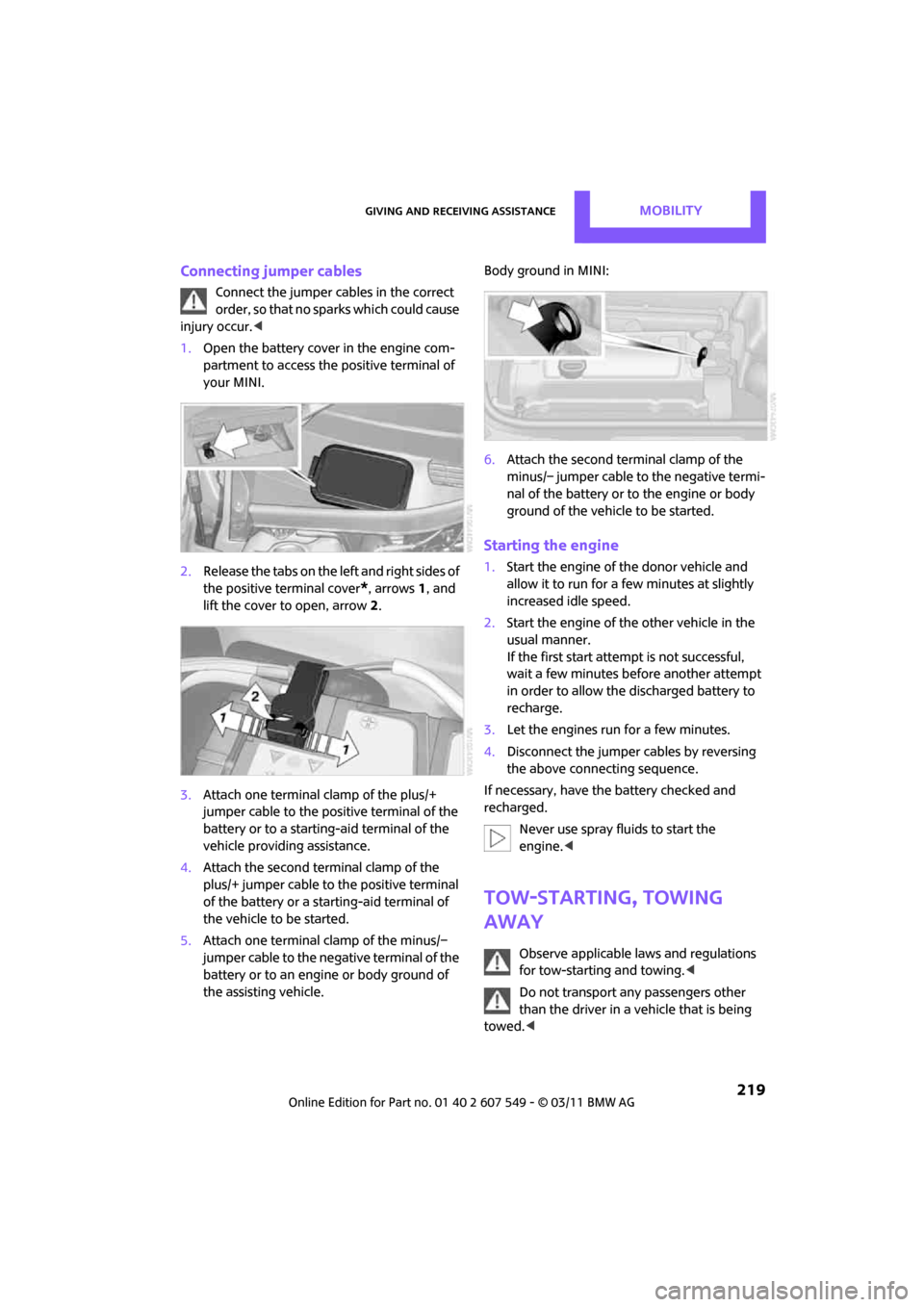
1. Open the battery cover in the engine com-
partment to access the positive terminal of
your MINI.
2. Release the tabs on the left and right sides of
the positive terminal cover
*, arrows 1, and
lift the cover to open, arrow 2.
3. Attach one terminal clamp of the plus/+
jumper cable to the positive terminal of the
battery or to a starting-aid terminal of the
vehicle providing assistance.
4. Attach the second terminal clamp of the
plus/+ jumper cable to the positive terminal
of the battery or a starting-aid terminal of
the vehicle to be started.
5. Attach one terminal clamp of the minus/–
jumper cable to the negative terminal of the
battery or to an engine or body ground of
the assisting vehicle. Body ground in MINI:
6.
Attach the second terminal clamp of the
minus/– jumper cable to the negative termi-
nal of the battery or to the engine or body
ground of the vehicle to be started.
Starting the engine
1.Start the engine of the donor vehicle and
allow it to run for a few minutes at slightly
increased idle speed.
2. Start the engine of the other vehicle in the
usual manner.
If the first start attempt is not successful,
wait a few minutes be fore another attempt
in order to allow the discharged battery to
recharge.
3. Let the engines run for a few minutes.
4. Disconnect the jumper cables by reversing
the above connecting sequence.
If necessary, have the battery checked and
recharged. Never use spray fluids to start the
engine. <
Tow-starting, towing
away
Observe applicable laws and regulations
for tow-starting and towing. <
Do not transport an y passengers other
than the driver in a vehicle that is being
towed. <
Page 222 of 254

MOBILITYGiving and receiving assistance
220
Using a tow fitting
The screw-in tow fitting must always be carried
in the car. It can be screwed in at the front or at
the right rear.
The tow fitting can be found under the right
front seat or in the pocket of the tire changing
set
* in the cargo area.
Use only the tow fitting provided with the
vehicle and screw it all the way in. Use the
tow fitting for towing on paved roads only. Avoid
lateral loading of the tow fitting, e.g. do not lift
the vehicle by the tow fitting. Otherwise, the tow
fitting and the vehicle could be damaged. <
Access to screw thread
Press the lower part of the cover. This will push
out the upper edge of the cover, which can then
be removed.
Front
Rear Being towed
Make sure that the igni
tion is switched on,
refer to page 46; otherwise, the low
beams, tail lamps, turn signals, and windshield
wipers may be unavailable. Do not tow the vehi-
cle with just the rear axle raised, as this would
allow the steering to turn. <
There is no power assist while the engine is off.
Thus, braking and steering will require increased
effort.
Switch on the hazard wa rning flashers, depend-
ing on local regulations.
Manual transmission
Gearshift lever in neutral position.
Automatic transmission
Tow vehicles with automatic transmission
only with a tow truck or with the front
wheels lifted; otherwise, the transmission can be
damaged. <
Towing methods
Do not lift vehicle by tow fitting or body
and chassis parts, otherwise damage may
result. <
With towbar
The towing vehicle must not be lighter
than the towed vehicle; otherwise, it may
be impossible to maintain control. <
The tow fittings used should be on the same side
on both vehicles. Should it prove impossible to
avoid mounting the tow bar at an angle, please
observe the following:
> Clearance and maneuver ing capability will
be sharply limited during cornering.
> The tow bar will generate lateral forces if it is
attached offset.
Attach the tow bar to the tow fittings only,
as attaching it to other parts of the vehicle
could result in damage. <
Page 236 of 254

REFERENCEShort commands for the voice activation system
234
Equipment*
Accessing speed limit settings{Speed }
Activating lighting {Lighting }
Selecting the door lock {Door locks }
FunctionCommand
FunctionCommand
Selecting the air conditioning {Climate }
Page 238 of 254
236
REFERENCEEverything from A to Z
Everything from A to Z
INDEX
A
ABS Antilock Brake System67
Accessories, refer to Your individual vehicle 4
Acknowledgment signals for
locking/unlocking vehicle 28
Activated-charcoa l filter for
automatic climate control 87
Adaptive Light Control 80
Additives
– coolant 200
– engine oil 200
Address, entering 115
Address for navigation
– entering 109,115
Adjusting temperature inside the car, refer to Air
conditioner 84
Adjusting temperature inside
the car, refer to Automatic
climate control 85
Adjusting the tone during
audio operation, refer to
Tone control 131
Air conditioner 83
Air conditioning mode
– air conditioner 84
– automatic cl imate control85
– ventilation 87
Air distribution
– automatic 86
– individual 85
– manual 85
Air flow rate 84,86
– air conditioning system 84
– automatic cl imate control86
– heating, ventilation 84
Air outlets, refer to Air vents 83
Air pressure, checking, refer to Tire inflation pressure 190Air recirculation, refer to
Recirculated-air
mode 84,86
Air supply
– air conditioner 84
– automatic climate control 85
– ventilation 87
Air vents 83
Airbags 76
– sitting safely 37
– warning lamp 78
Airing, refer to Ventilation87
AKI, refer to Fuel grade 189
Alarm system 31
ALL4 all-wheel drive system 69
All-season tires, refer to Winter tires 197
All-wheel drive, refer to
ALL4 69
AM, wa
veband 132
Ambient air, refer to Recirculated-air
mode 84,86
Ambient lighting 82
Antenna, care 204
Antifreeze
– coolant 200
– washer fluid 53
Antilock Brake System ABS 67
Anti-theft alarm system, refer to Alarm system 31
Approved axle loads, refer to
Weights 226
Approved engine oils 200
Approved gross vehicle
weight, refer to Weights 226
Armrest, refer to Center armrest 91
Arrival time
– computer 57
– route guidance 118Ashtray
92
Assistant systems, refer to
– Dynamic Stability Control
DSC 67
Audio 130
– controls 130
– switching on/off 130
– tone control 131
– volume 130
Audio device, external 90
AUTO program for automatic climate control 86
Automatic
– air distribution 86
– air flow rate 86
– cruise control 53
– headlamp control 79
Automatic climate control 83
– automatic air distribution 86
Automatic transmission with
Steptronic 48
– interlock 48
– overriding selector lever
lock 50
– shiftlock 48
– sport program 49
Auxiliary phone 164
AUX-IN connection 142
AUX-IN, refer to External audio
device 90
Average fuel consumption 56
– setting the units 58
Average speed 56
Avoiding highways for navigation 118
Axle loads, refer to Weights 22
6
Page 239 of 254
Everything from A to ZREFERENCE
237
B
Background lighting, refer to
Ambient lighting 82
Backrests, refer to Seats 38
Backup lamps
– replacing bulb 211
Band-aids, refer to First aid pouch 218
Bar, refer to Tow-starting,
towing away 220
Base plate for telephone or mobile phone
– refer to Snap-in adapter 174
Bass sounds, refer to Tone control 131
Battery 216
– charging 216
– disposal 34,216
– jump-starting 218
– temporary power failure 216
Battery renewal
– remote control 34
Being towed 220
Belt tensioner, refer to Safety
belts 40
Belts, refer to Safety belts 40
Beverage holders, refer to
Cupholders 92
Black ice, refer to External
temperature warning 56
Blower, refer to Air flow rate 84,86
Bluetooth, activating/ deactivating 154,164
Bluetooth audio 146
– device pairing 146
– disconnecting an audio connection 148
– playback 147
– unpairing device 148
– What to do if... 148
Bottle holders, refer to Cupholders 92
Brake Assist 67
Brake fluid, refer to Service requirements 59 Brake lamps
– replacing bulbs
211
Brake pads, breaking in 96
Brake rotors 97
– brakes 96
– breaking in 96
Brake system 96
– breaking in 96
– disc brakes 97
– MINI Maintenance
System 202
Brakes
– ABS 67
– b
reaking in 96
– MINI Maintenance System 202
– parking brake 47
– service requirements 59
Brakes, refer to Braking
safely 97
Breakdown service, refer to Roadside Assistance 218
Break-in period 96
Breaking in the clutch 96
Brightness of Control
Display 65
Bulb changing, refer to Lamps and bulbs 208
Button for starting the engine 46
Buttons on the steering wheel 11
C
Calendar 179
– displaying appointment 180
– selecting calendar day 180
California Proposition 65
warning 5
Call
– accepting 157,168
– ending 157,168
– muting the microphone 158,170
– rejecting 157,168 Calling, refer to Phone
numbers, dialing 157,169
Can holders, refer to Cupholders 92
Capacities 226
Car battery, refer to Vehicle battery 216
Car care 204
Car key, refer to Keys/remote controls 26
Car phone
– installation location, refer to Center armrest 91
Car phone, refer to Telephone 154,163
Car radio, refer to Radio 132
Car wash
– before driving in 47
Car wash, care 204
Car washes 204
Care 204
– car washes 204
– car-care products 204
– CD/DVD drives 207
– external 204
– high-pressure washers 205
– internal 206
– leather 206
– manual washing 205
– upholstery and fabrics 206
– windows 205
– wiper blades 205
Cargo area 98
– capacity 226
– Comfort Access 33
– lamp 82
– opening from outside 30
– trunk lid, refer to Liftgate 30
Cargo area, expanding 98
Cargo area lamp 82
Cargo area li
d, refer to
Liftgate 30
Cargo area partition net, refer to Cargo net 100
Page 240 of 254
REFERENCEEverything from A to Z
238
Cargo loading101
– securing cargo 102
– stowing cargo 102
– vehicle 98
Cargo net 100
Cargo, securing 102
Carpets, care 206
Catalytic conver ter, refer to
Hot exhaust system 96
CD, audio playback 140
CD player 140
– controls 130
– fast forward/reverse 141
– random order 141
– selecting a track 140
– switching on/off 130
– tone control 131
– volume 130
Center armrest 91
Center brake lamp 212
Center console, refer to Around the center
console 14
Center Rail 91
Center Rail, refer to Storage
compartments 91
Central locking system 27
– Comfort Access 32
– from inside 30
– from outside 27
– setting unlocking behavior 27
Changing bulbs 208
Changing the language on the Control Display 65
Changing the measurement
units on the Control
Display 58
Changing wheels 214
Chassis number, refer to Engine compartment 199
Check Control 62
Child restraint fixing system LATCH 44
Child restraint systems 43
Child seats 43
Child-safety locks 45Chrome parts, care
206
Chrome parts, refer to Care 204
Cigarette lighter 92
Cleaning headlamps 52
– washer fluid 53
Clock
– 12 h/24 h mode 61
– setting time 61
Closing
– f
rom inside 30
– from outside 27
Clothes hooks 92
Cockpit 10
Cold start, refer to Starting the engine 46
Comfort Access 32
– replacing the battery 34
– what to observe before
entering a car wash 34
Comfort area, refer to Around the center console 14
Compartment for remote control, refer to Ignition
lock 46
Computer 56
– displays on Control Display 57
Condensation, refer to When the vehicle is parked 98
Condition Based Service CBS 202
Configuring settings, refer to
Personal Profile 26
Connecting vacuum cleaner, refer to Connecting electrical
appliances 92
Consumption, refer to Average fuel consumption 56
Contacts 161,176
– deleting 162,179
– displaying 162
– editing 162
– exporting/importing 179
– new contact 178
Control Display
– adjusting brightness 65Control Display, refer to iDrive
– switching on/off
19
Control Display, refer to On- board computer
– adjusting brightness 65
Control Display, refer to On-board computer 16
Control stick, refer to On-board computer 16
Control unit, refer to On-board
computer 16
Controls and displays 10
Convenient access, refer to
Comfort Access 32
Convenient operation
– windows 28
Convenient star t, refer to
Starting the engine 46
Coolant 200
– checking level 201
– filling 201
– temperature 201
Coolant temperature 201
Coo
ling fluid, refer to
Coolant 200
Cooling, maximum 86
Copyright 2
Cornering light, refer to
Adaptive Light Control 80
Criteria for route 118
Cruise control
– indicator lamp 13
Cruising range 56
Cupholders 92
Curb weight, refer to Weights 226
Current fuel consumption 56
Current playback
– external devices 145
D
Dashboard instruments, refer
to Displays 12
Dashboard lighting, refer to
Instrument lighting 81
Dashboard, refer to Cockpit 10
Page 241 of 254
Everything from A to ZREFERENCE
239
Data224
– capacities 226
– dimensions 225
– engine 224
– weights 226
Data memory 203
Date
– setting 62
– setting format 62
Daytime running lights 80
DBC Dynamic Brake Control, refer to Brake Assist 67
Deactivating front passenger
airbags 76
Deadlocking, refer to Locking 28
Defect
– door lock 29
– fuel filler flap 188
Defining a home address 178
Defogging windows 85,87
Defrost position, refer to
Defrosting windows 85,87
Defrosting windows 85,87
Defrosting windows and
removing condensation
– air conditioner 85
– automatic climate control 87
Defrosting windshield, refer to Defrosting windows 85,87
Destination address
– entering 109,115
Destination for navigation
– entering 109
– entering via map 114
Differential, breaking in 96
Digital radio, refer to HD Radio 133
Dimensions 225
Dipstick, engine oil 199
Direction announcements, refer to Voice
instructions 122
Direction instructions, refer to Voice instructions 122
Directional indicators, refer to Turn signals 50 Directory for navigation, refer
to Address book 111
Displacement, re fer to Engine
data 224
Display lighting, refer to Instrument lighting 81
Display, refer to On-board
computer controls 16
Displaying contact
pictures 17
8
Displaying special destinations 114
Displays 12
– instrument cluster 12
– on the Control Display 16
Displays and controls 10
Displays, care 207
Disposal
– of coolant 200
– remote control battery 34
– vehicle battery 216
Distance, refe r to Computer 57
Distance remaining to service, refer to Service
requirements 59
Distance to dest ination, refer
to Computer 57
Distance warning, refer to Park
Distance Control PDC 66
Door key, refer to Integrated
key/remote control 26
Door lock 29
Door lock, confirmation
signals 28
Doors, manual operation 29
DOT Quality Grades 194
Drinks holders, refer to Cupholders 92
Drive-off assistant, refer to Hill
Assist 69
Driving dynamics control, refer to Sport button 69
Driving lamps, refer to Parking lamps/low beams 79
Driving notes 96
Driving off on inclines, refer to Hill Assist 69 Driving stability control
systems 67
Driving through water 97
Driving tips, refer to Driving
notes 96
Dry air, refer to Cooling function 87
DSC Dynamic Stability Control 67
DTC Dynamic Traction
Control 68
Dynamic Brake Control DBC, refer to Brake Assist 67
Dynamic route guidance 125
Dynamic Stability Control DSC 67
Dynamic Traction Control DTC 68
E
Eject button, refer to Buttons
on the CD player 130
Electrical malfunction
– door lock 29
– fuel filler flap 188
Electronic brake-force distribution 67
Electronic Stability Program ESP, refer to Dynamic
Stability Control DSC 67
Emergency operation, refer to Manual operation
– door lock 29
– fuel filler flap 188
– transmission lock, automatic
transmission 50
Emergency services, refer to Roadside Assistance 218
Page 243 of 254
Everything from A to ZREFERENCE
241
Fuel display, refer to Fuel gauge 55
Fuel filler flap 188
– releasing in the event of
electrical malfunction 188
Fuses 216
G
Garage door op ener, refer to
Integrated universal remote
control 88
Gasoline
– refer to Average fuel consumption 56
Gasoline display, refer to Fuel
gauge 55
Gasoline, refer to Required
fuel 189
Gear indicator
– automatic transmission with Steptronic 48
Gear shifting
– automatic transmission 48
– manual transmission 48
Gearshift lever
– automatic transmission with Steptronic 48
– manual transmission 48
General driving notes 96
Glass roof, electric 34
– convenient operation 28,29
– opening, closing 35
– remote control 28
– tilting 34
Glove compartment 90
GPS navigation, refer to Navigation system 108
Grills, refer to Air vents 83
Gross vehicle weight, refer to Weights 226
H
Halogen lamps
– replacing bulb 209
Handbrake, refer to Parking brake 47
Hands-free device
Bluetooth 154
Hands-free system 14,160 ,172
Hazard warning flashers 14
HD Radio 133
Head airbags 76
Head Light, refer to Adaptive Light Control 80
Head restraints 39
– sitting safely 37
Headlamp control, automatic 79
Headlamp flasher 50
– indicator lamp 11,13
Headlamp glass lens 209
Headlamps
– replacing bulb 209
Headlamps, care 205
Heated
– mirrors 41
– rear window 84,86
– seats 40
Heating 83
– mirrors 41
– rear window 84,86
– seats 40
Heavy loads, refer to Stowing cargo 102
Height adjustment
– seats 38
– steering wheel 42
Height, refer to
Dimensions 225
High beams 81
– headlamp flasher 81
– indicator lamp 13
– replacing bulb 209
High water, refer to Driving
through water 97 Highway, refer to Route
criteria 118
Hill Assist 69
Hills 97
Holders for cups 92
Homepage 4
Hood 198
Horn 10
Hot exhaust system 96
Hy
droplaning 97
I
IBOC, refer to HD Radio 133
Ice warning, refer to External temperature warning 56
Ignition 46
– switched off 46
– switched on 46
Ignition key position 1, refer to Radio readiness 46
Ignition key position 2, refer to
Ignition on 46
Ignition key, refer to Integrated key/remote
control 26
Ignition lock 46
Imprint 2
Incoming call 157,168
Indicator and warning
lamps 13
– Tire Pressure Monitor TPM 73
Indicator lighting, refer to
Instrument lighting 81
Individual air distribution 85
Individual settings, refer to
Personal Profile 26
Inflation pressure monitoring, refer to Tire Pressure Monitor
TPM 72
Information
– on another location 112
– on current position 112
– on destination location 112
Page 244 of 254

REFERENCEEverything from A to Z
242
Initializing
– Flat Tire Monitor FTM70
– glass roof, electric 35
– radio, refer to Station,
storing 133
Instructions for navigation system, refer to Voice
instructions 122
Instrument clus ter, refer to
Displays 12
Instrument lighting 81
Instrument panel, refer to Cockpit 10
Instrument panel, refer to Displays 12
Integrated key 26
Integrated universal remote control 88
Interactive map 114
Interesting destination for navigation 112
Interior lamps 82
– remote control 28
Interior rearview mirror 41
– automatic dimming
feature 42
Interlock 48
Intermittent mode of the
wipers 51
Internet page 4
J
Jacking points 215
Jets, refer to Window washer nozzles 52
Joystick, refer to On-board computer 16
Jumpering, refer to
Jump-starting 218
Jump-starting 218
K
Key Memory, refe r to Personal
Profile 26
Key, refer to Keys/remote controls 26
Keyless opening and closing,
refer to Comfort Access 32
Keyless-Go, refer to Comfort Access 32
Keypad dialing 159,170
Kickdown 49
– automatic transmission with
Steptronic 49
Knock control 189
L
Lamps and bulbs, replacing
bulbs 208
Lamps, refer to Parking lamps/ Low beams 79
Lashing eyes, refe r to Securing
cargo 102
Last destinations 112
LATCH child restraint fixing system 44
Leather care 206
LEDs light-emitting diodes 208
Length, refer to
Dimensions 225
License plate lamp
– bulb replacement 212
Liftgate 30
– Comfort Access 33
– opening from outside 30
– opening/closing 30
– unlocking with remote control 28
Light
– automatic headlamp control 79
Light alloy wheels, care 206
Light switch 79 Light-emitting diodes
LEDs 208
Lighter 92
– socket 92
Lighting
– lamps and bulbs 208
– of the instruments 81
– of vehicle, refer to Lamps 79
Limit, refer to Speed limit 64
Load 101
Load securing equipment, refer to Secu ring cargo102
Lock buttons of doors, refer to
Locking 30
Locking
– adjusting confirmation
signal 28
– from inside 30
– from outside 28
– without remote control, refer to Comfort Access 32
Locking and unlocking doors
– confirmation signals 28
– from inside 30
– from outside 27
Longlife oils
– approved motor oils 200
Low beams 79
– automatic 79
– replacing bulb 209
Lower back support, refer to Lumbar support 38
Luggage compartment
– doors, refer to Liftgate 30
Luggage compartment partition net, refer to Cargo
net 100
L
uggage rack, refer to Roof-mounted luggage
rack 103
Lumbar support 38