mirror MINI Countryman 2011 Owner's Manual (Mini Connected)
[x] Cancel search | Manufacturer: MINI, Model Year: 2011, Model line: Countryman, Model: MINI Countryman 2011Pages: 254, PDF Size: 3.84 MB
Page 12 of 254

AT A GLANCECockpit
10
Cockpit
Around the steering wheel: Controls and displays
1Adjusting the exterior mirrors, folding them
in and out
*41
2
Parking lamps 79
Low beams 79
Automatic headlamp control
*79
Adaptive Light Control
*80
Turn signals 50
High beams 81
Headlamp flasher 50
Roadside parking lamps
*81
Computer
*56
Page 43 of 254
AdjustmentsCONTROLS
41
Safety belt reminder
Front seats
The indicator lamps come on and an
acoustic signal sounds.A message also
appears on the Control Display.Check
whether the safety belt has been fas-
tened correctly. The 'Fasten safety belts'
reminder is issued when the driver's safety belt
has not been fastened. The 'Fasten safety belts'
reminder is also activate d at road speeds above
approx. 5 mph or 8 km/h if the front passenger's
safety belt has not been fastened, if objects are
placed on the front passenger seat, or if driver or
front passenger unfasten their safety belts.
Damage to safety belts
If the safety belts are damaged or stressed
in an accident: have the safety belt system
and its seat-belt tensio ners replaced and the
belt anchors checked. Have this work carried out
only by a MINI dealer or by a workshop that has
specially trained personnel working in accor-
dance with the specifications of the MINI manu-
facturer; otherwise, correct operation of these
safety systems is not ensured. <
Mirrors
Exterior mirrors
The mirror on the passenger's side is more
curved than the driver's mirror. The
objects seen in the mirror are closer than they
appear. Do not gauge your distance from traffic
behind you on the basis of what you see in the
mirror; otherwise, there is an increased risk of an
accident. < 1
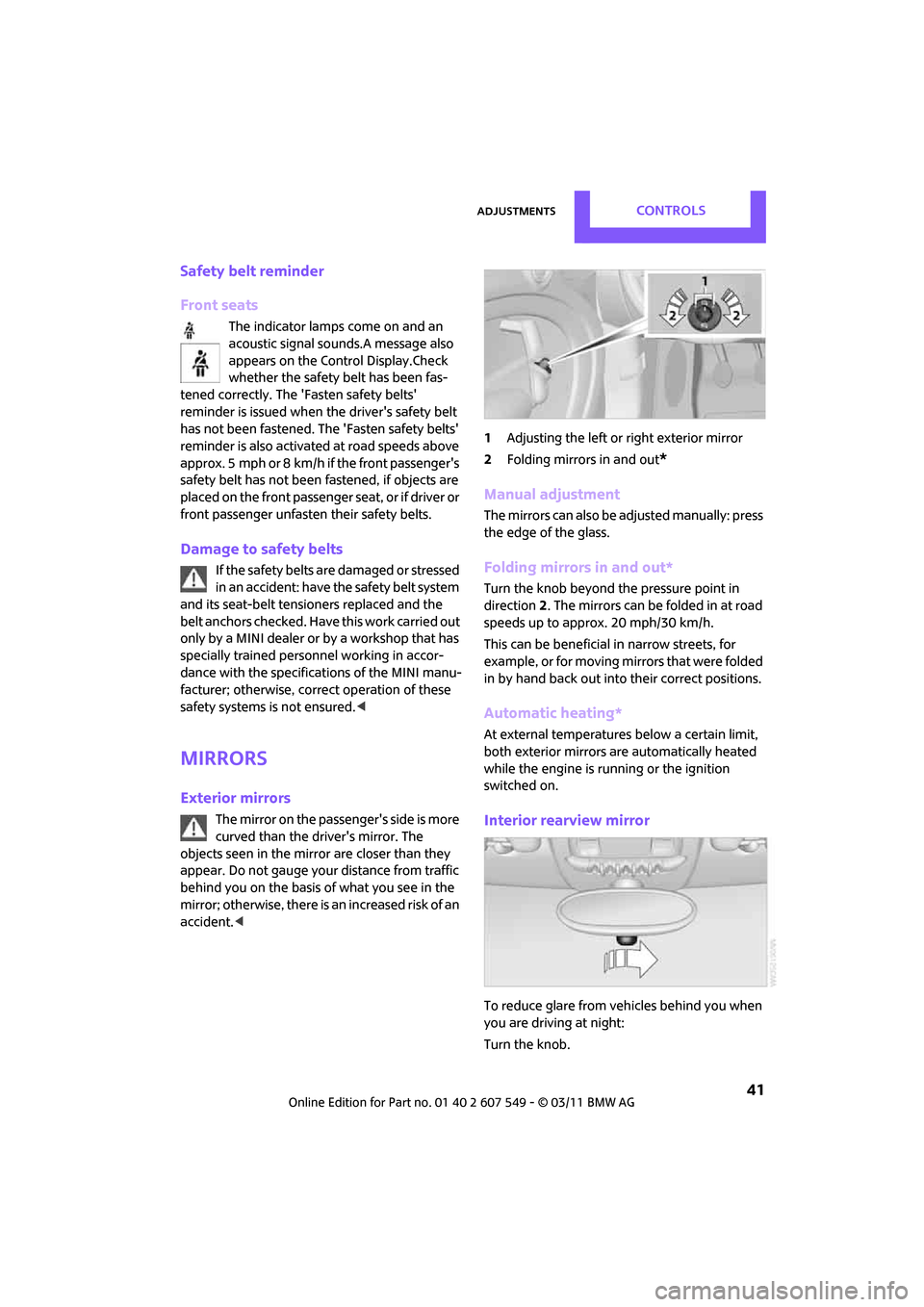
Adjusting the left or right exterior mirror
2 Folding mirrors in and out
*
Manual adjustment
The mirrors can also be adjusted manually: press
the edge of the glass.
Folding mirrors in and out*
Turn the knob beyond the pressure point in
direction 2. The mirrors can be folded in at road
speeds up to approx. 20 mph/30 km/h.
This can be beneficial in narrow streets, for
example, or for moving mirrors that were folded
in by hand back out into their correct positions.
Automatic heating*
At external temperatures below a certain limit,
both exterior mirrors are automatically heated
while the engine is running or the ignition
switched on.
Interior rearview mirror
To reduce glare from vehicles behind you when
you are driving at night:
Turn the knob.
Page 44 of 254

CONTROLSAdjustments
42
Interior and exterior mirrors,
automatic dimming feature*
It is controlled by two photosensors:
>Inside the interior rearview mirror, arrow.
> On the back of the mirror.
For proper function:
> Keep the photosensors clean.
> Do not cover the area between the interior
rearview mirror and the windshield.
> Do not place stickers or decals on the wind-
shield in front of the mirror.
Steering wheel
Adjustments
Do not adjust the steering wheel position
while the car is in motion; otherwise, there
is a risk of accident du e to an unexpected move-
ment. <
1. Fold the lever down.
2. Move the steering wheel to the preferred
distance and angle to suit your seated posi-
tion. 3.
Swing the lever back up.
Do not use force to swing the lever
back up; otherwise, the mechanism
will be damaged. <
Page 53 of 254

DrivingCONTROLS
51
3."Triple turn signal"
The setting is stored for the remote control cur-
rently in use.
Wiper system
1 Switching on wipers
2 Switching off wipers or brief wipe
3 Activating/deactivating intermittent wipe or
rain sensor
*
4Cleaning windshield and headlamps*
Switching on wipers
Press the lever upward, arrow 1.
The lever automatically returns to its initial posi-
tion when released.
Normal wiper speed
Press once.
The system switches to intermittent operation
when the vehicle is stationary.
Fast wiper speed
Press twice or press beyo nd the resistance point.
The system switches to normal speed when the
vehicle is stationary.
Intermittent wipe or rain sensor*
If the car is not equipped with a rain sensor, the
intermittent-wipe time is preset.
If the car is equipped with a rain sensor, the time
between wipes is contro lled automatically and
depends on the intensity of the rainfall. The rain
sensor is mounted on the windshield, directly in
front of the interior rearview mirror.
Activating intermittent wipe or rain
sensor
Press button, arrow 3.
This symbol is displayed in the tachom-
eter.
Deactivate the rain sensor before entering
an automatic car wash. Failure to do so
could result in damage caused by undesired
wiper activation. <
Adjusting the sensitivity of the rain
sensor
1.Switch on the ignition, refer to page 46.
2. Press the button on the turn signal indicator
as often as necessary until "SET/INFO" is dis-
played.
3. Press and hold the butt on until the display
changes.
Page 79 of 254
Technology for driving comfort and safetyCONTROLS
77
activates or deactivates the front, side, and knee
airbags for the front passenger.Make sure that the front passenger's feet
remain in the footwell; otherwise, it is not
possible to guarantee the function of the front
passenger airbags. <
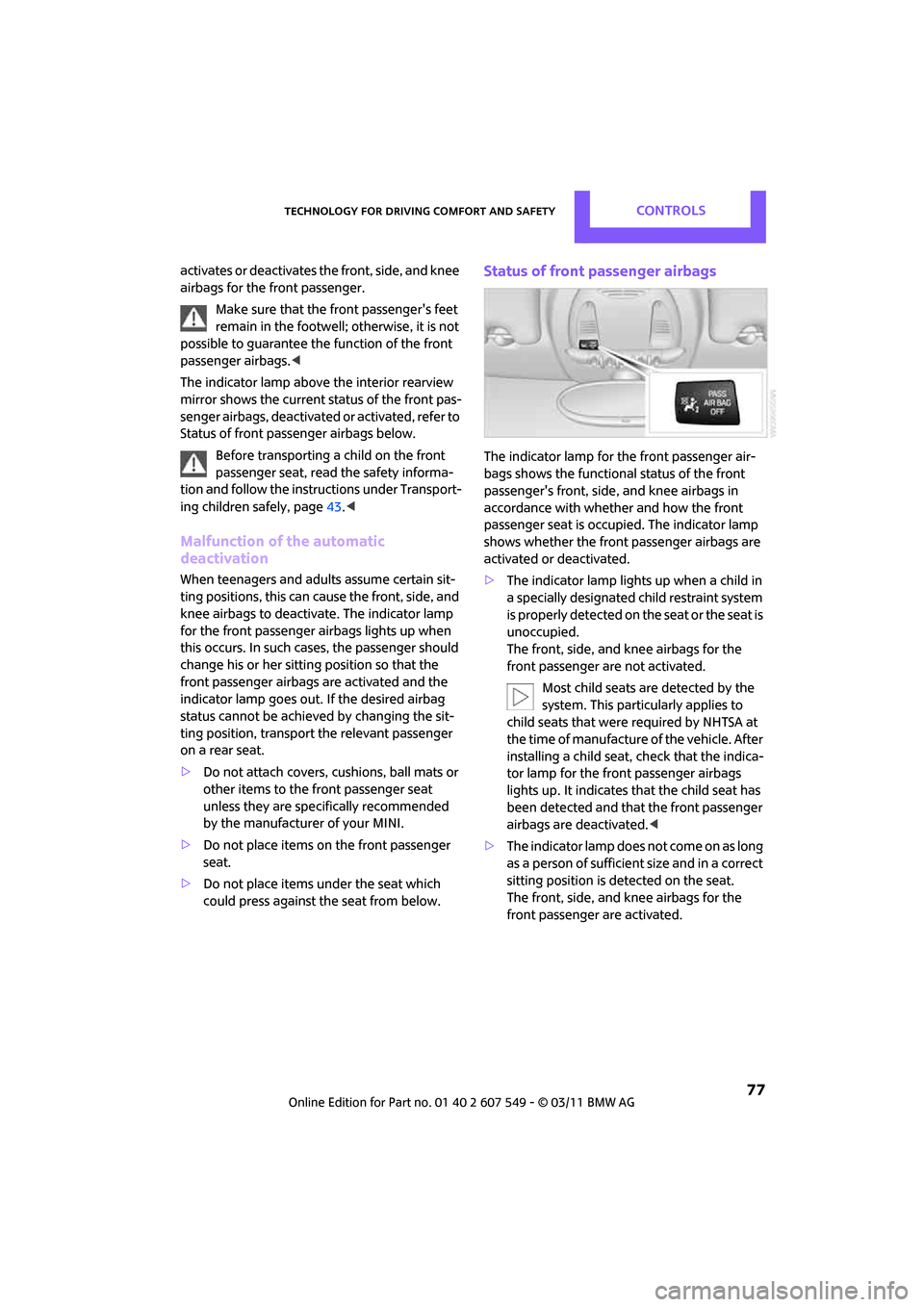
The indicator lamp above the interior rearview
mirror shows the current status of the front pas-
senger airbags, deactivate d or activated, refer to
Status of front passenger airbags below.
Before transporting a child on the front
passenger seat, read the safety informa-
tion and follow the instructions under Transport-
ing children safely, page 43.<
Malfunction of the automatic
deactivation
When teenagers and adul ts assume certain sit-
ting positions, this can cause the front, side, and
knee airbags to deactiva te. The indicator lamp
for the front passenger airbags lights up when
this occurs. In such cases, the passenger should
change his or her sittin g position so that the
front passenger airbags are activated and the
indicator lamp goes out. If the desired airbag
status cannot be achieved by changing the sit-
ting position, transport the relevant passenger
on a rear seat.
> Do not attach covers, cushions, ball mats or
other items to the front passenger seat
unless they are specifically recommended
by the manufacturer of your MINI.
> Do not place items on the front passenger
seat.
> Do not place items un der the seat which
could press against th e seat from below.
Status of front passenger airbags
The indicator lamp for the front passenger air-
bags shows the functional status of the front
passenger's front, side , and knee airbags in
accordance with whether and how the front
passenger seat is occupied. The indicator lamp
shows whether the front passenger airbags are
activated or deactivated.
> The indicator lamp lights up when a child in
a specially designated child restraint system
i s p r o p e r l y d e t e c t e d o n t h e s e a t o r t h e s e a t i s
unoccupied.
The front, side, and knee airbags for the
front passenger are not activated.
Most child seats are detected by the
system. This particularly applies to
child seats that were required by NHTSA at
the time of manufacture of the vehicle. After
installing a child seat, check that the indica-
tor lamp for the front passenger airbags
lights up. It indicates that the child seat has
been detected and that the front passenger
airbags are deactivated. <
> The indicator lamp does not come on as long
as a person of sufficient size and in a correct
sitting position is detected on the seat.
The front, side, and knee airbags for the
front passenger are activated.
Page 105 of 254

Things to remember when drivingDRIVING TIPS
103
Roof-mounted luggage
rack*
A special rack system is available as an option for
your MINI. Your MINI dealer will be glad to
advise you. Comply with the installation instruc-
tions supplied with the rack system.
Loading roof-mounted luggage rack
Because roof racks raise the vehicle's center of
gravity when loaded, they have a major effect
on vehicle handling and steering response.
You should therefore always remember not to
exceed the approved roof load capacity, the
approved gross vehicle weight or the axle loads
when loading the rack.
You can find the applicable data under Weights
on page 226.
The roof load must be distributed uniformly and
should not be too large in area. Heavy items
should always be placed at the bottom.
When loading, make sure that there is sufficient
space for the movement of the glass sunroof.
Fasten roof-mounted cargo correctly and
securely to prevent it from shifting or falling off
during the trip.
Drive smoothly. Avoid su dden acceleration and
braking maneuvers, and take corners gently.
Rear luggage rack
A special rear-mounted luggage rack is available
as an optional accessory . It does not require a
trailer hitch.
Please comply with the precautions included
with the installation instructions.
Mounting points
The mounting points ar e located under the cov-
ers in the bumper.
Remove the covers , refer to page220.
Loading rear luggage rack
When loading, make su re that you do not
exceed the approved gross vehicle weight and
axle loads.
You can find the applicable data under Weights
on page 226.
Saving fuel
Fuel consumption depends on a number of dif-
ferent factors. The implementation of certain
measures, your driving style and regular mainte-
nance can have an influence on fuel consump-
tion and on the environmental impact.
Remove unnecessary cargo
Additional weight increases fuel consumption.
Remove attached part s no longer in use
Remove auxiliary mirrors, roof- or rear-mounted
luggage racks whenever you are not using
them.
Attached parts on the ve hicle affect its aerody-
namics and increase fuel consumption.
Check tire inflation pressure regularly
Check and, if necessary, correct tire inflation
pressure at least twice a month and before start-
ing on a long trip.
Page 206 of 254
MOBILITYCare
204
Care
Car-care products
Regular cleaning and care helps to maintain the
value of your MINI.
The manufacturer of your MINI recommends
using manufacturer-approved products to clean
and care for your vehicle.
Your MINI dealer would be pleased to advise
you on cleaning and care products and services
for your MINI.The ingredients of original MINI Care Prod-
ucts have been tested, and the products
have been tested in the laboratory and in prac-
tice. They offer optimum care and protection for
your vehicle. <
Do not use any cleansers containing alco-
hol or solvents as these may cause dam-
age. <
Cleaning agents may contain hazardous
or health-damaging substances. Follow
the warning and hazard instructions on the
packaging. For interior cleaning, always open
the doors or windows of the vehicle.
Do not use any products that are not intended
for cleaning the vehicle. <
External care
Washing your vehicle
Especially during the winter months the
vehicle should be frequently washed. Dirt
and road salt can damage the vehicle. <
After washing the vehicle, apply the
brakes briefly to dry them; otherwise,
water can reduce braking efficiency over the
short term and the brake rotors can corrode. <
Car washes
Preference should be given to cloth car washes.
Do not use automatic high-pressure car
washes; otherwise, water may drip into
the vehicle around the windows. <
Before driving in to the car wash, check if the sys-
tem is suitable for your MINI. Observe the fol-
lowing points:
> Vehicle dimensions, page 225
> If necessary: fold in the outside mirrors,
page 41
> Maximum permissible tire width
Avoid car washes with tracks higher than
4 in/10 cm; otherwise, the chassis could
be damaged. <
Preparations for driving into the car wash:
> Unscrew the rod antenna.
> Deactivate the rain sensor
* to prevent unin-
tentional wiping.
> Deactivate rear window wiper and protect it
from damage. Ask the car wash operator
about measures that can be taken to protect
the wipers.
> Remove additional atta chments, e.g. spoil-
ers or telephone antennas, if there is a pos-
sibility that they could be damaged.
> Inserting the remote control into the ignition
lock.
Automatic transmission
Before driving into the car wash, make sure that
the vehicle can roll:
1.Place the remote control, even with Comfort
Access, in the ignition lock.
2. Move the selector le ver to position N.
3. Release the parking brake.
4. Switch off the engine.
Page 207 of 254

CareMOBILITY
205
5.Insert the remote control in the ignition lock
so that the vehicle can roll.
Steam jets/high-pressure washers
When using steam jets or high-pressure
washers, make sure th at you maintain suf-
ficient distance from the vehicle and do not
exceed a maximum temperature of 140 7/60 6.
If the distance is too close, the pressure too high,
or the temperature too high, parts of the vehicle
can be damaged, or water can penetrate.
Observe the operating in structions for high-
pressure washers. <
Do not spray sensors such as Park Dis-
tance Control with hi gh-pressure washers
for a long time and main tain the greatest possi-
ble distance of approx. 1 ft/30 cm from them. <
Manual washing
Use a great deal of water and, if necessary, car
shampoo when washing your car by hand. Clean
the vehicle with a sponge or a washing brush
applying a slight amount of pressure.
Before cleaning the windshield, deacti-
vate the rain sensor or turn off the ignition
to prevent unintentional wiping. <
Observe local regulati ons regarding wash-
ing vehicles by hand. <
Headlamps
Do not wipe dry and do not use abrasive or cor-
rosive cleaning agents. Remove dirt and con-
tamination, such as inse cts, by soaking with
shampoo and then washing with plenty of
water.
Do not remove accumula ted ice and snow with
an ice scraper; use window deicers instead.
Windows
Clean the outside and inside of the windows and
mirrors with a window cleaner.
Do not clean the mirrors with cleaners
containing quartz. <
Wiper blades
Clean with soapy water an d change regularly to
prevent the formation of streaks.
Wax, preservatives and dirt on the win-
dows cause streaks when the windshield
wipers are on, and can cause premature wear of
the wiper blades and interfere with the rain sen-
sor. <
Paintwork, care
Regular care helps your vehicle retain its value
and protects the pain t from the long-term
effects of aggressive substances.
In some regions, envi ronmental factors can
affect the vehicl e paintwork and damage it. It is
therefore important to adjust the frequency and
extent of vehicle ca re correspondingly.
Immediately remove aggr essive materials such
as spilled fuel, oil, grease, brake fluid, tree sap or
bird droppings to preven t damage to the paint-
work.
Removing paintwork damage
Depending on the severity of the damage,
immediately repair stone damage or
scratches to prevent rusting. <
The manufacturer of the MINI recommends
repairing paint damage pr ofessionally according
to factory specifications with original MINI
paints.
Preservation
Preservation is necessary when water no longer
beads on the clean paint surface. To preserve
the paint, only use pres ervatives that contain
carnauba or synthetic waxes.
Rubber seals
Only treat with water or rubber care products.
Do not use silicon spra ys or other silicon-
containing care products on rubber seals;
otherwise, noise and damage could occur. <
Page 242 of 254
REFERENCEEverything from A to Z
240
Engine
– breaking in96
– data 224
– overheated, refer to Coolant
temperature 201
– speed 224
– starting 46
– starting, Comfort Access 32
– switching off 47
Engine compartment 199
Engine coolant, refer to Coolant 200
Engine malfunction
– indicator lamp 13
Engine oil
– adding 200
– additives, refer to Approved engine oils 200
– alternative oil types 200
– approved engine oils 200
– capacity 200
– checking level 199
– dipstick 199
– intervals between changes, refer to Service
requirements 59
– MINI Maintenance System 202
Engine oil level, checking 199
Engine output, refer to Engine
data 224
Engine starti ng, refer to
Starting the engine 46
Entering destination 109
Entering intersection 110
Entertainment sound output
on/off 130
Entry map for destination 114
ESP Electronic Stability
Program, refer to Dynamic
Stability Control DSC 67
Exhaust system, refer to Hot
exhaust system 96 Exterior mirrors
41
– adjusting 41
– automatic dimming feature 42
– automatic heating 41
– folding in and out 41
External audio device 90
External audio de vice, refer to
AUX-IN connection 142
External devices
– random play sequence 145
– software update 149
External temperature display
– change units of measure 58
– in the on-board computer 58
External temperature
warning 56
Eyes
– f
or tow-starting and towing
away 220
– for tying down loads 102
F
Failure messages, refer to
Check Control 62
Failure of an electrical consumer 216
Fast forward
– CD player 141
Fastening safety belts, refer to Safety belts 40
Fastest route for
navigation 118
Fault messages, refer to Check Control 62
Faulty
– tire 71
Filter
– microfilter for air conditioner 85
– microfilter/activated-
charcoal filter for automatic
climate control 87
Fine wood, care 207
First aid pouch 218 Fixture for remote control,
refer to Ignition lock 46
Flash when locking/ unlocking 28
Flat load floor 100
Flat tire
– run-flat tires 196
– Tire Pressure Monitor TPM 72
Flat Tire Monitor FTM 69
– indicating a flat tire 71
– initializing the system 70
– snow chains 70
– system limits 70
Flat tires, refer to Tire condition 195
Floor mats, care 206
Floor plate, refer to Flat load floor 100
FM, waveband 132
Fog lamps
– replacing bulb 210
Folding rear seat backrest 98
Footbrake, refer to Braking safely 97
Footwell lamps 82
For your own safety 5
Four-wheel drive, refer to ALL4 69
Front airbags 76
Front fog lamps 81
– replacing bulb 210
Front seat adjustment 38
Frost on windows, refer to
Defrosting windows 85,87
FTM, refer to Flat Tire Monitor 69
Fuel 189
– gauge 55
– high-quality brands 189
–
quality 189
– specifications 189
– tank capacity 226
Fuel clock, refer to Fuel gauge 55
Fuel consumption display
– average fuel consumption 56
Page 243 of 254
Everything from A to ZREFERENCE
241
Fuel display, refer to Fuel gauge 55
Fuel filler flap 188
– releasing in the event of
electrical malfunction 188
Fuses 216
G
Garage door op ener, refer to
Integrated universal remote
control 88
Gasoline
– refer to Average fuel consumption 56
Gasoline display, refer to Fuel
gauge 55
Gasoline, refer to Required
fuel 189
Gear indicator
– automatic transmission with Steptronic 48
Gear shifting
– automatic transmission 48
– manual transmission 48
Gearshift lever
– automatic transmission with Steptronic 48
– manual transmission 48
General driving notes 96
Glass roof, electric 34
– convenient operation 28,29
– opening, closing 35
– remote control 28
– tilting 34
Glove compartment 90
GPS navigation, refer to Navigation system 108
Grills, refer to Air vents 83
Gross vehicle weight, refer to Weights 226
H
Halogen lamps
– replacing bulb 209
Handbrake, refer to Parking brake 47
Hands-free device
Bluetooth 154
Hands-free system 14,160 ,172
Hazard warning flashers 14
HD Radio 133
Head airbags 76
Head Light, refer to Adaptive Light Control 80
Head restraints 39
– sitting safely 37
Headlamp control, automatic 79
Headlamp flasher 50
– indicator lamp 11,13
Headlamp glass lens 209
Headlamps
– replacing bulb 209
Headlamps, care 205
Heated
– mirrors 41
– rear window 84,86
– seats 40
Heating 83
– mirrors 41
– rear window 84,86
– seats 40
Heavy loads, refer to Stowing cargo 102
Height adjustment
– seats 38
– steering wheel 42
Height, refer to
Dimensions 225
High beams 81
– headlamp flasher 81
– indicator lamp 13
– replacing bulb 209
High water, refer to Driving
through water 97 Highway, refer to Route
criteria 118
Hill Assist 69
Hills 97
Holders for cups 92
Homepage 4
Hood 198
Horn 10
Hot exhaust system 96
Hy
droplaning 97
I
IBOC, refer to HD Radio 133
Ice warning, refer to External temperature warning 56
Ignition 46
– switched off 46
– switched on 46
Ignition key position 1, refer to Radio readiness 46
Ignition key position 2, refer to
Ignition on 46
Ignition key, refer to Integrated key/remote
control 26
Ignition lock 46
Imprint 2
Incoming call 157,168
Indicator and warning
lamps 13
– Tire Pressure Monitor TPM 73
Indicator lighting, refer to
Instrument lighting 81
Individual air distribution 85
Individual settings, refer to
Personal Profile 26
Inflation pressure monitoring, refer to Tire Pressure Monitor
TPM 72
Information
– on another location 112
– on current position 112
– on destination location 112